1
Programming a device
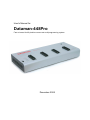
Dataman-448Pro can operate in two modes:
Engineering mode
Production mode
for make a project
for mass production
Engineering mode
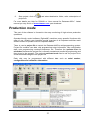
This part of the software is focused to the quick and easy preparation of the project file
for usage in the production mode control software.
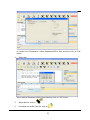
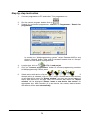
Each programming module is driven by an easy-to-use control program with pull-down
menu, hot keys and on-line help. Selecting of device is performed by its class, by
manufacturer or simply by typing a fragment of vendor name and/or part number. It is
the same years-proven software, as is used for all other Dataman single-site
programmers. Engineer can use all properties of this software and can make a project
for mass production.
Standard device-related commands (read, blank check, program, verify, erase) are
boosted by some test functions (insertion test, connection check, signature-byte check),
and some special functions (autoincrement, production mode - start immediately after
insertion of chip into socket).
All known data formats are supported. Automatic file format detection and conversion
are doing during loading of file. There is possible to use Jam files (JEDEC standard
JESD-71) and VME files
The rich-featured auto-increment function enables one to assign individual serial
numbers to each programmed device - or simply increments a serial number, or the
function enables one to read serial numbers or any programmed device identification
signatures from a file.
The software also provides a many informations about programmed device. As a
special, the drawing of all available packages is provided. The software provides also
explanation of chip labeling (the meaning of prefixes and suffixes at the chips) for each
supported chip.
19