1
TMCM-1140 TMCL Firmware V1.27 Manual (Rev. 1.04 / 2015-JAN-05)
6
2 Putting the Module into Operation
Here you can find basic information for putting your TMCM-1140 into operation. If you are already common
with TRINAMICs modules you may skip this chapter.
The things you need:
TMCM-1140
Interface (RS485/CAN/USB) suitable to your module with cables
Nominal supply voltage +24V DC for your module
TMCL-IDE program and PC
Stepper motor
PRECAUTIONS
Do not connect or disconnect the TMCM-1140 while powered!
Do not connect or disconnect the motor while powered!
Do not exceed the maximum power supply voltage of 28 V DC!
Note, that the module is not protected against reverse polarity!
START WITH POWER SUPPLY OFF!
2.1 Basic Set-Up
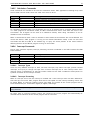
The following paragraph will guide you through the steps of connecting the unit and making first
movements with the motor.
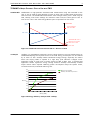
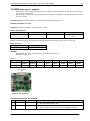
CONNECTING THE MODULE
USB
Converter
e.g. USB-2-485
B
US
Converter
e.g. USB-2-X
CAN
Pin 6 CAN_L
Pin 5 CAN_H
Pin 1 GND
1
Power supply
Pin 2 9… 28V DC
Pin 1 GND
Note, that the
GND pin has to
be used for
power supply
and for the
interfaces also.
Motor
1
Motor
Figure 2.1: Starting up
www.trinamic.com
USB
RS485
Pin 4 RS485Pin 3 RS485+
Pin 1 GND
In/Out
Interface
RS48
5
CA
N
Serial USB
interface