1
Pin
1
3
Signal
SPKR
GND
Pin
2
4
Signal
NC
+5V
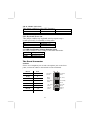
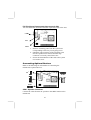
USB2: Front panel USB header
The mainboard has USB ports installed on the rear edge I/O port
array. Some computer cases have a special module that mounts
USB ports at the front of the case. If you have this kind of case, use
auxiliary USB connectors USB2 to connect the front-mounted
ports to the mainboard.
Pin
1
3
5
7
9
Signal
VERG_FP_USBPWR0
USB_FP_P0USB_FP_P0+
GROUND
KEY
Pin
2
4
6
8
10
Signal
VERG_FP_USBPWR0
USB_FP_P1USB_FP_P1+
GROUND
USB_FP_OC0
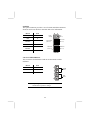
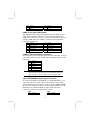
JUSBC: USB Card Reader Connector
This connector is for connecting internal USB card reader. You can
use a card reader to read or transfer files and digital images to your
computer.
Pin
1
2
3
4
5
Signal
VCC
USBUSB+
GND
KEY
Note: The JUSBC is shared with one of the USB ports of the
I/O back panel. The USB port is located beside the serial
port connectors. See “I/O Ports” for more information.
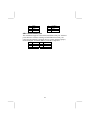
CD1/2:CD-ROM/DVD Audio Input Connector
If you have installed a CD-ROM drive or DVD-ROM drive, you
can connect the drive audio cable to the onboard sound system.
On the mainboard, locate the two 4-pin connectors CD1 and CD2.
There are two kinds of connector because different brands of CDROM drive have different kinds of audio cable connectors.
Connect the cable to the appropriate connector.
CD1
CD2
Pin
Signal
Pin
17
Signal