1
9
oP9
10
oP-
Stand-Alone
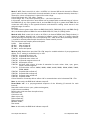
Press ENTER to access ‘F00-F99’ steps; press UP (blue) or DOWN (black)
button to move between steps and press Enter to record any changes
made.
The F setting is accessible only in ‘oP9’.
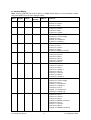
‘F00-F09’ 10 speeds full colour roll
‘F10-F19’ 10 speeds cold colour roll
‘F20-F29’ 10 speeds warm colour roll
‘F30-F39’ 10 speeds magenta colour roll
‘F40-F45’ 6 fixed split colours
‘F46-F69’ 24 fixed solid colours, 4 levels of saturation for each colour: blue,
cyan, green, yellow, red and magenta
‘F70-F79’ 10 fixed white colours: 2600K, 3200K, 3600K, 4100K, 5000K,
5600K, 6500K, 7000K, 7500K, 8000K
‘F80-F84’ 5 speeds fade on/fade off
‘F85-F89’ 5 speeds fade on/snap off
‘F90-F94’ 5 speeds snap on/fade off
‘F95-F99’ 5 speeds strobe
Press ENTER when in between values F80-F99 to access Colour Selection of
intensity effects ‘c00 to c29’; and UP (blue) or DOWN (black) button to move
between colours and press Enter to record any changes made.
Demo Mode
Note: The DMX level indicator stays off in modes ‘oP9’ and ‘oP-’.
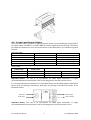
2.7 Technical specifications
Dimensions:
250mm x 136mm x 125mm
9.8” x 5.3” x 4.9”
Weight:
2.38kg / 5.25 lbs
DMX protocol:
ANSI E1.11 USITT DMX 512-A
Working Voltage:
90 – 240V AC
Power consumption:
60W
Connectors:
XLR5 in/thru, PowerCon in/thru
Body material:
Aluminum extrusion
Body colour:
Black anodised
Cooling:
1 x fan
European approvals:
Pending
North American approvals:
Pending
2.8 Maintenance
With care, the Color Split fixture will require little maintenance. However, as the unit is likely to
be used in a stage environment we recommend periodical internal inspection and cleaning of
any resulting dust and cracked oil residue.
Do not spray liquids on the front or rear panel. If the front enclosure requires cleaning, wipe
with a mild detergent on a damp cloth.
Color Split User Manual
10
V1.3 September 2007