1
Gigaset S810-S810A / Grossbritannien / A31008-M2306-L101-1-7619 / Cover_front.fm /
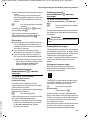
Congratulations
By purchasing a Gigaset, you have chosen a brand that is fully committed
to sustainability. This product’s packaging is eco-friendly!
To learn more, visit www.gigaset.com.
Gigaset S810-S810A / Grossbritannien / A31008-M2306-L101-1-7619 / Cover_front.fm
Gigaset S810-S810A / Grossbritannien / A31008-M2306-L101-1-7619 / introduction.fm / 14.05.2013
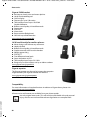
Accessories
Accessories
There is a range of accessories available for your Gigaset phone:
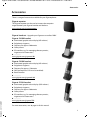
Gigaset repeater
The Gigaset repeater can be used to increase the reception
range between your Gigaset handset and the base.
www.gigaset.com/gigasetrepeater
Gigaset handsets - Upgrade your Gigaset to a cordless PABX
Gigaset S810H handset
u
u
u
u
u
Illuminated graphic colour display (65k colours)
Polyphonic ringtones
Directory for approx. 500 entries
Caller picture
PC interface, e.g., for managing directory entries,
ringtones and screensavers
u ...................
www.gigaset.com/gigasets810h
Gigaset C610H handset
u
u
u
u
u
u
Illuminated graphic colour display (65k colours)
Polyphonic ringtones
Directory for approx. 150 entries
SMS (prerequisite: CLIP must be enabled)
Room monitor
...................
www.gigaset.com/gigasetc610h
Gigaset SL78H handset
Version 4.1, 21.11.2007
u
u
u
u
u
Illuminated graphic colour display (256k colours)
Polyphonic ringtones
Directory for approx. 500 entries
Caller picture
PC interface, e.g., for managing directory entries,
ringtones and screensavers
u ...................
www.gigaset.com/gigasetsl78h
For more accessories, see ¢ page 88 of this manual.
1
Gigaset S810-S810A / Grossbritannien / A31008-M2306-L101-1-7619 / introduction.fm / 14.05.2013
Gigaset S810/S810A – more than just a telephone
Gigaset S810/S810A – more than just a telephone
Version 4.1, 21.11.2007
Your telephone sets new standards for the way you communicate at home.
The configuration and user interface of the cordless phone are excellent, providing
you with first-class voice quality in handsfree mode, while the various interfaces
(Bluetooth, USB) offer you enormous flexibility.
The large TFT display, user-friendly keypad and clearly laid out menu are very simple to use.
Your phone can do a whole lot more:
u Communicate cordlessly via Bluetooth™ with other devices (e. g. headsets),
which also use this technology.
u You can synchronise your directories on your telephone, mobile phone and PC
via Bluetooth™ or the USB port using the Gigaset QuickSync software
(¢ page 86).
u You can save appointments (¢ page 60) and anniversaries, e.g., birthdays
(¢ page 40), in your phone and it will remind you of them in advance.
u You can designate important people as VIPs to identify important calls from the
ringtone (¢ page 37).
u You can assign a picture to entries in the directory – in future the picture will
appear every time you receive a call from this number (¢ page 37).
u If you do not want to take calls where the caller has withheld their number, just
set your handset to only ring if Calling Line Identification has not been withheld
(¢ page 73).
u If you do not wish to be disturbed, you can simply set up a time control so that
your phone will only ring when it is convenient (¢ page 73). VIP calls are still
connected.
u You can assign important numbers to the number keys on your phone.
The number is then dialled by simply pressing a key (¢ page 69).
u Adapt your Gigaset to suit your handsfree requirements (¢ page 72).
u View your personal pictures as a screensaver slide show (¢ page 70).
u You can set the display to large font to increase readability in particularly
important situations (e.g., the directory and lists) (¢ page 71).
u You can adapt the menu display to suit your individual requirements so that
only the most important functions (standard mode) or all functions
(expert mode •) are displayed (¢ page 28). Menu options that are only
available in expert mode are marked with the • icon.
u Gigaset Green Home – Be environmentally aware when using your phone.
Details about our ECO DECT products can be found at
www.gigaset.com/service.
You can find additional information about your phone at
www.gigaset.com/gigasets810.
Have fun using your new phone!
2
Gigaset S810-S810A / Grossbritannien / A31008-M2306-L101-1-7619 / overview.fm / 14.05.2013
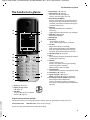
The handset at a glance
¢
¢
The handset at a glance
18
i
17
Ã
V
1
2
07:15
INT 1
14 Oct
3
Calls
SMS
4
16
15
5
14
6
13
12
11
7
10
8
9
4 Display keys (
page 23)
page 42)
5 Message key (
Access to call and message lists;
Flashes: new message or new call
6 End call key, On/Off key
End call, cancel function, go back one menu
level (press briefly), back to idle status (press
and hold), activate/deactivate handset (press
and hold in idle status)
7 Hash key
Keypad lock on/off (press and hold in
idle status);
toggles between upper/lower case and digits
page 34)
8 Mute key (
Mute the microphone
9 Microphone
10 Recall key
- Consultation call (flash)
- Insert a dialling pause (press and hold)
11 Star key
Ringtone on/off (press and hold);
with an open connection: switch between
pulse dialling/tone dialling (press briefly);
text input: open table of special characters
page 20)
12 Headset socket (
13 Key 1
Dial answering machine (S810A only)/network
mailbox (press and hold)
14 Talk key
Flashes: incoming call;
Accept a call; open redial list (press briefly);
start dialling (press and hold);
When writing an SMS: send SMS
15 Handsfree key
Switch between earpiece and handsfree mode
page 22)
16 Control key (
17 Signal strength (
page 19)
page 59) activated
Green: Eco Mode (
18 Answering machine symbol (S810A only)
Answering machine switched on;
Flashes: answering machine is recording a
message or is being operated by another internal party
¢
¢
¢
¢
¢
1 Display in idle status
2 Battery charge status
page 19)
(
3 Side keys
page 72) or ringtone
Set call (
volume (
page 73)
¢
¢
¢
Version 4.1, 21.11.2007
Gigaset service contact numbers:
For personal advice on our range of products and for repairs or guarantee/warranty claims call:
Service Centre UK:
0845 0318190 (local call cost charge)
Please have your proof of purchase ready when calling.
3
Gigaset S810-S810A / Grossbritannien / A31008-M2306-L101-1-7619 / overview.fm / 14.05.2013
The handset at a glance
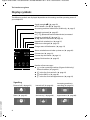
Display symbols
The following symbols are displayed dependent on the settings and the operating status of
your telephone:
Signal strength i (¢ page 59)
or ECO Mode+ icon ¼ (¢ page 59)
Answering machine switched on (S810A only, ¢ page 5)
Bluetooth activated (¢ page 67)
or ô/ õ (Bluetooth headset/data device) connected
Ringtone switched off (¢ page 73)
or ñ alert tone activated (¢ page 74)
Keypad lock switched on (¢ page 25)
i
Ã
»
Û 08:00
Batteries are charged (¢ page 19)
Charge status of the batteries (¢ page 19)
ó ˝
V
07:15
INT 1
14 Oct
Ã
™
¾
02
10
09
08
Calls
SMS
Signalling
Version 4.1, 21.11.2007
Current time (¢ page 18)
Current day and month (¢ page 18)
Name of the handset (¢ page 65)
Number of new messages:
u à on the answering machine (Gigaset S810A only)/
network mailbox (¢ page 42)
u ™ in the list of missed calls (¢ page 42)
u ¾ in the SMS list (¢ page 46)
u in the list of missed appointments (¢ page 43)
External call (¢ page 32)
Internal call (¢ page 63)
Answering machine is
recording (¢ page 52)
Alarm (¢ page 62)
Anniversary (¢ page 60)
Appointment (¢ page 60)
Ø«Ú
ØìÚ
4
Alarm switched on and wake-up time set (¢ page 62)
ØåÚ
ØðÚ
Ø þÚ
ØáÚ
Gigaset S810-S810A / Grossbritannien / A31008-M2306-L101-1-7619 / overview.fm / 14.05.2013
The base at a glance
The base at a glance
During message playback:
You can use the keys on the base to register
handsets to the base, search for handsets
(paging), (¢ page 63) and operate the integrated answering machine (Gigaset S810A
only).
Gigaset S810A base
4 Play/Stop key
Play back new messages from answering
machine or cancel playback (press briefly).
Play back new and old messages (press and
hold).
5 Skip to next message (press once) or skip
ahead two messages (press twice).
6 Skip back five seconds (press briefly once),
skip back to the beginning of the message
(press and hold) or skip back to the previous
message (press twice).
7 Delete current message.
8 Adjust volume during message playback: ÷
= quieter; ø = louder.
While an external call is being signalled: adjust
ringtone volume.
Please note:
If the answering machine is being operated
from a handset or if it is recording a message
(00 flashes), it cannot be operated from the
base at the same time.
Gigaset S810 base
3
8
4
1
2
6
7
5
1 Registration/Paging key
Press briefly: search for handsets (paging)
page 63).
(
Press and hold: register handsets and DECT
page 62).
devices (
2 On/Off key
Activating/deactivating the answering machine.
3 Display
Lights up: answering machine is activated.
The number of saved messages is displayed.
00 flashes: the answering machine is recording a new message.
Flashes slowly: there are new messages. The
number of new messages is displayed.
99 flashes quickly: the answering machine is
full.
Version 4.1, 21.11.2007
¢
¢
Registration/Paging key
– Press briefly: search for handsets (paging)
page 63.
– Press and hold: register handsets and DECT
page 62).
devices (
¢
¢
5
Gigaset S810-S810A / Grossbritannien / A31008-M2306-L101-1-7619 / S810AIVZ.fm / 14.05.2013
Contents
Contents
Accessories . . . . . . . . . . . . . . . . . . . . . . . . . . . . . . . . . . . . . . . . . . . . . . . . . . . . . . . . 1
Gigaset S810/S810A – more than just a telephone . . . . . . . . . . . . . . . . . . . 2
The handset at a glance . . . . . . . . . . . . . . . . . . . . . . . . . . . . . . . . . . . . . . . . . . . . 3
Gigaset service contact numbers: . . . . . . . . . . . . . . . . . . . . . . . . . . . . . . . . . . . . . . . . . . . . . . 3
Display symbols . . . . . . . . . . . . . . . . . . . . . . . . . . . . . . . . . . . . . . . . . . . . . . . . . . . 4
The base at a glance . . . . . . . . . . . . . . . . . . . . . . . . . . . . . . . . . . . . . . . . . . . . . . . 5
Safety precautions . . . . . . . . . . . . . . . . . . . . . . . . . . . . . . . . . . . . . . . . . . . . . . . . 10
First steps . . . . . . . . . . . . . . . . . . . . . . . . . . . . . . . . . . . . . . . . . . . . . . . . . . . . . . . . 11
Checking the package contents . . . . . . . . . . . . . . . . . . . . . . . . . . . . . . . . . . . . . . . . . . . . . .
Setting up the base and charger (if included) . . . . . . . . . . . . . . . . . . . . . . . . . . . . . . . . .
Connecting the base . . . . . . . . . . . . . . . . . . . . . . . . . . . . . . . . . . . . . . . . . . . . . . . . . . . . . . . . .
Connecting the charger (if included) . . . . . . . . . . . . . . . . . . . . . . . . . . . . . . . . . . . . . . . . .
Setting up the handset for use . . . . . . . . . . . . . . . . . . . . . . . . . . . . . . . . . . . . . . . . . . . . . . .
Changing the display language . . . . . . . . . . . . . . . . . . . . . . . . . . . . . . . . . . . . . . . . . . . . . .
Setting the date and time . . . . . . . . . . . . . . . . . . . . . . . . . . . . . . . . . . . . . . . . . . . . . . . . . . . .
Connecting the headset . . . . . . . . . . . . . . . . . . . . . . . . . . . . . . . . . . . . . . . . . . . . . . . . . . . . .
Connecting the USB data cable . . . . . . . . . . . . . . . . . . . . . . . . . . . . . . . . . . . . . . . . . . . . . . .
What would you like to do next? . . . . . . . . . . . . . . . . . . . . . . . . . . . . . . . . . . . . . . . . . . . . . .
11
12
12
13
14
17
18
20
20
21
Using the phone . . . . . . . . . . . . . . . . . . . . . . . . . . . . . . . . . . . . . . . . . . . . . . . . . . 22
Control key . . . . . . . . . . . . . . . . . . . . . . . . . . . . . . . . . . . . . . . . . . . . . . . . . . . . . . . . . . . . . . . . . .
Display keys . . . . . . . . . . . . . . . . . . . . . . . . . . . . . . . . . . . . . . . . . . . . . . . . . . . . . . . . . . . . . . . . .
Keys on the keypad . . . . . . . . . . . . . . . . . . . . . . . . . . . . . . . . . . . . . . . . . . . . . . . . . . . . . . . . . .
Side keys . . . . . . . . . . . . . . . . . . . . . . . . . . . . . . . . . . . . . . . . . . . . . . . . . . . . . . . . . . . . . . . . . . . .
Correcting incorrect entries . . . . . . . . . . . . . . . . . . . . . . . . . . . . . . . . . . . . . . . . . . . . . . . . . .
Using the menus . . . . . . . . . . . . . . . . . . . . . . . . . . . . . . . . . . . . . . . . . . . . . . . . . . . . . . . . . . . . .
Activating/deactivating the handset . . . . . . . . . . . . . . . . . . . . . . . . . . . . . . . . . . . . . . . . . .
Activating/deactivating the keypad lock . . . . . . . . . . . . . . . . . . . . . . . . . . . . . . . . . . . . . .
Using this guide . . . . . . . . . . . . . . . . . . . . . . . . . . . . . . . . . . . . . . . . . . . . . . . . . . . . . . . . . . . . .
22
23
23
23
23
24
25
25
26
Menu overview . . . . . . . . . . . . . . . . . . . . . . . . . . . . . . . . . . . . . . . . . . . . . . . . . . . 28
Version 4.1, 21.11.2007
Making calls . . . . . . . . . . . . . . . . . . . . . . . . . . . . . . . . . . . . . . . . . . . . . . . . . . . . . . 31
Making an external call . . . . . . . . . . . . . . . . . . . . . . . . . . . . . . . . . . . . . . . . . . . . . . . . . . . . . .
One Touch Call . . . . . . . . . . . . . . . . . . . . . . . . . . . . . . . . . . . . . . . . . . . . . . . . . . . . . . . . . . . . . . .
Ending a call . . . . . . . . . . . . . . . . . . . . . . . . . . . . . . . . . . . . . . . . . . . . . . . . . . . . . . . . . . . . . . . . .
Accepting a call . . . . . . . . . . . . . . . . . . . . . . . . . . . . . . . . . . . . . . . . . . . . . . . . . . . . . . . . . . . . . .
Calling Line Identification . . . . . . . . . . . . . . . . . . . . . . . . . . . . . . . . . . . . . . . . . . . . . . . . . . . .
Notes on calling line display (CLIP) . . . . . . . . . . . . . . . . . . . . . . . . . . . . . . . . . . . . . . . . . . . .
Handsfree mode . . . . . . . . . . . . . . . . . . . . . . . . . . . . . . . . . . . . . . . . . . . . . . . . . . . . . . . . . . . . .
Switching to mute . . . . . . . . . . . . . . . . . . . . . . . . . . . . . . . . . . . . . . . . . . . . . . . . . . . . . . . . . . .
6
31
31
31
32
32
33
34
34
Gigaset S810-S810A / Grossbritannien / A31008-M2306-L101-1-7619 / S810AIVZ.fm / 14.05.2013
Contents
Making calls using network services . . . . . . . . . . . . . . . . . . . . . . . . . . . . . . . 35
Calling Line Identification . . . . . . . . . . . . . . . . . . . . . . . . . . . . . . . . . . . . . . . . . . . . . . . . . . . .
Ringback . . . . . . . . . . . . . . . . . . . . . . . . . . . . . . . . . . . . . . . . . . . . . . . . . . . . . . . . . . . . . . . . . . . .
Call waiting during an external call . . . . . . . . . . . . . . . . . . . . . . . . . . . . . . . . . . . . . . . . . . .
Call divert (CD) . . . . . . . . . . . . . . . . . . . . . . . . . . . . . . . . . . . . . . . . . . . . . . . . . . . . . . . . . . . . . . .
Consultation call, call swap . . . . . . . . . . . . . . . . . . . . . . . . . . . . . . . . . . . . . . . . . . . . . . . . . . .
35
35
35
36
36
Using the directory and lists . . . . . . . . . . . . . . . . . . . . . . . . . . . . . . . . . . . . . . . 37
Directory . . . . . . . . . . . . . . . . . . . . . . . . . . . . . . . . . . . . . . . . . . . . . . . . . . . . . . . . . . . . . . . . . . . .
Redial list . . . . . . . . . . . . . . . . . . . . . . . . . . . . . . . . . . . . . . . . . . . . . . . . . . . . . . . . . . . . . . . . . . . .
Incoming SMS message list . . . . . . . . . . . . . . . . . . . . . . . . . . . . . . . . . . . . . . . . . . . . . . . . . .
Answering machine list (Gigaset S810A only) . . . . . . . . . . . . . . . . . . . . . . . . . . . . . . . . .
Call lists . . . . . . . . . . . . . . . . . . . . . . . . . . . . . . . . . . . . . . . . . . . . . . . . . . . . . . . . . . . . . . . . . . . . .
Message key function . . . . . . . . . . . . . . . . . . . . . . . . . . . . . . . . . . . . . . . . . . . . . . . . . . . . . . . .
List of missed alarms . . . . . . . . . . . . . . . . . . . . . . . . . . . . . . . . . . . . . . . . . . . . . . . . . . . . . . . . .
37
41
41
41
41
42
43
Making cost-effective calls . . . . . . . . . . . . . . . . . . . . . . . . . . . . . . . . . . . . . . . . 44
Automatic network provider code (preselection) . . . . . . . . . . . . . . . . . . . . . . . . . . . . . . 44
SMS (text messages) . . . . . . . . . . . . . . . . . . . . . . . . . . . . . . . . . . . . . . . . . . . . . . 45
Writing/sending an SMS . . . . . . . . . . . . . . . . . . . . . . . . . . . . . . . . . . . . . . . . . . . . . . . . . . . . .
Receiving an SMS . . . . . . . . . . . . . . . . . . . . . . . . . . . . . . . . . . . . . . . . . . . . . . . . . . . . . . . . . . . .
SMS with vCard . . . . . . . . . . . . . . . . . . . . . . . . . . . . . . . . . . . . . . . . . . . . . . . . . . . . . . . . . . . . . .
Notification via SMS . . . . . . . . . . . . . . . . . . . . . . . . . . . . . . . . . . . . . . . . . . . . . . . . . . . . . . . . . .
SMS mailboxes . . . . . . . . . . . . . . . . . . . . . . . . . . . . . . . . . . . . . . . . . . . . . . . . . . . . . . . . . . . . . . .
Setting SMS centres . . . . . . . . . . . . . . . . . . . . . . . . . . . . . . . . . . . . . . . . . . . . . . . . . . . . . . . . . .
SMS on a PABX . . . . . . . . . . . . . . . . . . . . . . . . . . . . . . . . . . . . . . . . . . . . . . . . . . . . . . . . . . . . . . .
Activating/deactivating SMS function . . . . . . . . . . . . . . . . . . . . . . . . . . . . . . . . . . . . . . . .
SMS troubleshooting . . . . . . . . . . . . . . . . . . . . . . . . . . . . . . . . . . . . . . . . . . . . . . . . . . . . . . . .
45
46
48
48
48
49
50
50
51
Operating the Gigaset S810A base answering machine . . . . . . . . . . . . . 52
Operating via the handset . . . . . . . . . . . . . . . . . . . . . . . . . . . . . . . . . . . . . . . . . . . . . . . . . . . .
Activating/deactivating call screening . . . . . . . . . . . . . . . . . . . . . . . . . . . . . . . . . . . . . . . .
Setting the recording parameters . . . . . . . . . . . . . . . . . . . . . . . . . . . . . . . . . . . . . . . . . . . .
Resetting fast access for the answering machine using key 1 . . . . . . . . . . . . . . . . . .
Operating when on the move (remote operation) . . . . . . . . . . . . . . . . . . . . . . . . . . . . .
52
55
55
56
56
Using the network mailbox . . . . . . . . . . . . . . . . . . . . . . . . . . . . . . . . . . . . . . . 58
Configuring fast access for the network mailbox . . . . . . . . . . . . . . . . . . . . . . . . . . . . . . 58
Viewing the network mailbox message . . . . . . . . . . . . . . . . . . . . . . . . . . . . . . . . . . . . . . . 58
ECO DECT . . . . . . . . . . . . . . . . . . . . . . . . . . . . . . . . . . . . . . . . . . . . . . . . . . . . . . . . 59
Setting an appointment (calendar) . . . . . . . . . . . . . . . . . . . . . . . . . . . . . . . . 60
Displaying missed appointments, anniversaries . . . . . . . . . . . . . . . . . . . . . . . . . . . . . . . 61
Version 4.1, 21.11.2007
Setting the alarm clock . . . . . . . . . . . . . . . . . . . . . . . . . . . . . . . . . . . . . . . . . . . 62
7
Gigaset S810-S810A / Grossbritannien / A31008-M2306-L101-1-7619 / S810AIVZ.fm / 14.05.2013
Contents
Using multiple handsets . . . . . . . . . . . . . . . . . . . . . . . . . . . . . . . . . . . . . . . . . . 62
Registering handsets . . . . . . . . . . . . . . . . . . . . . . . . . . . . . . . . . . . . . . . . . . . . . . . . . . . . . . . . .
De-registering handsets . . . . . . . . . . . . . . . . . . . . . . . . . . . . . . . . . . . . . . . . . . . . . . . . . . . . . .
Locating a handset ("Paging") . . . . . . . . . . . . . . . . . . . . . . . . . . . . . . . . . . . . . . . . . . . . . . . .
Changing the base . . . . . . . . . . . . . . . . . . . . . . . . . . . . . . . . . . . . . . . . . . . . . . . . . . . . . . . . . . .
Making internal calls . . . . . . . . . . . . . . . . . . . . . . . . . . . . . . . . . . . . . . . . . . . . . . . . . . . . . . . . .
Listening in to an external call . . . . . . . . . . . . . . . . . . . . . . . . . . . . . . . . . . . . . . . . . . . . . . . .
Changing the name of a handset . . . . . . . . . . . . . . . . . . . . . . . . . . . . . . . . . . . . . . . . . . . . .
Changing a handset's internal number . . . . . . . . . . . . . . . . . . . . . . . . . . . . . . . . . . . . . . .
62
63
63
63
63
65
65
65
Using a handset as a room monitor (Babyphone) . . . . . . . . . . . . . . . . . . . 66
Using Bluetooth devices . . . . . . . . . . . . . . . . . . . . . . . . . . . . . . . . . . . . . . . . . . 67
Handset settings . . . . . . . . . . . . . . . . . . . . . . . . . . . . . . . . . . . . . . . . . . . . . . . . . 69
Quick access to numbers and functions . . . . . . . . . . . . . . . . . . . . . . . . . . . . . . . . . . . . . . .
Changing the display language . . . . . . . . . . . . . . . . . . . . . . . . . . . . . . . . . . . . . . . . . . . . . .
Setting the display . . . . . . . . . . . . . . . . . . . . . . . . . . . . . . . . . . . . . . . . . . . . . . . . . . . . . . . . . . .
Setting keypad illumination . . . . . . . . . . . . . . . . . . . . . . . . . . . . . . . . . . . . . . . . . . . . . . . . . .
Activating/deactivating auto answer . . . . . . . . . . . . . . . . . . . . . . . . . . . . . . . . . . . . . . . . .
Changing the speaker/earpiece volume . . . . . . . . . . . . . . . . . . . . . . . . . . . . . . . . . . . . . .
Setting a handsfree profile . . . . . . . . . . . . . . . . . . . . . . . . . . . . . . . . . . . . . . . . . . . . . . . . . . .
Changing ringtones . . . . . . . . . . . . . . . . . . . . . . . . . . . . . . . . . . . . . . . . . . . . . . . . . . . . . . . . . .
Resource Directory . . . . . . . . . . . . . . . . . . . . . . . . . . . . . . . . . . . . . . . . . . . . . . . . . . . . . . . . . . .
Activating/deactivating advisory tones . . . . . . . . . . . . . . . . . . . . . . . . . . . . . . . . . . . . . . .
Setting your own area code . . . . . . . . . . . . . . . . . . . . . . . . . . . . . . . . . . . . . . . . . . . . . . . . . .
Restoring the handset default settings . . . . . . . . . . . . . . . . . . . . . . . . . . . . . . . . . . . . . . . .
69
70
70
71
71
72
72
73
74
75
75
75
Setting the base . . . . . . . . . . . . . . . . . . . . . . . . . . . . . . . . . . . . . . . . . . . . . . . . . . 76
Changing the base Gigaset S810A ringtones . . . . . . . . . . . . . . . . . . . . . . . . . . . . . . . . . .
Activating/deactivating music on hold . . . . . . . . . . . . . . . . . . . . . . . . . . . . . . . . . . . . . . .
Repeater support . . . . . . . . . . . . . . . . . . . . . . . . . . . . . . . . . . . . . . . . . . . . . . . . . . . . . . . . . . . .
Protecting against unauthorised access . . . . . . . . . . . . . . . . . . . . . . . . . . . . . . . . . . . . . . .
Resetting the base to the factory settings . . . . . . . . . . . . . . . . . . . . . . . . . . . . . . . . . . . . .
76
76
76
77
77
Connecting the base to the PABX . . . . . . . . . . . . . . . . . . . . . . . . . . . . . . . . . . 78
Dialling modes and recall . . . . . . . . . . . . . . . . . . . . . . . . . . . . . . . . . . . . . . . . . . . . . . . . . . . .
Saving an access code (outside line code) . . . . . . . . . . . . . . . . . . . . . . . . . . . . . . . . . . . . .
Setting pauses . . . . . . . . . . . . . . . . . . . . . . . . . . . . . . . . . . . . . . . . . . . . . . . . . . . . . . . . . . . . . . .
Switching temporarily to tone dialling (DTMF) . . . . . . . . . . . . . . . . . . . . . . . . . . . . . . . .
78
78
79
79
Customer Service & Assistance . . . . . . . . . . . . . . . . . . . . . . . . . . . . . . . . . . . . 80
Questions and answers . . . . . . . . . . . . . . . . . . . . . . . . . . . . . . . . . . . . . . . . . . . . . . . . . . . . . . 81
Authorisation . . . . . . . . . . . . . . . . . . . . . . . . . . . . . . . . . . . . . . . . . . . . . . . . . . . . . . . . . . . . . . . . 82
Guarantee Certificate
United Kingdom . . . . . . . . . . . . . . . . . . . . . . . . . . . . . . . . . . . . . . . . . . . . . . . . . . . . . . . . . . . . . 82
Version 4.1, 21.11.2007
Protecting our environment . . . . . . . . . . . . . . . . . . . . . . . . . . . . . . . . . . . . . . . 83
8
Gigaset S810-S810A / Grossbritannien / A31008-M2306-L101-1-7619 / S810AIVZ.fm / 14.05.2013
Contents
Appendix . . . . . . . . . . . . . . . . . . . . . . . . . . . . . . . . . . . . . . . . . . . . . . . . . . . . . . . . 84
Caring for your telephone . . . . . . . . . . . . . . . . . . . . . . . . . . . . . . . . . . . . . . . . . . . . . . . . . . . .
Contact with liquid . . . . . . . . . . . . . . . . . . . . . . . . . . . . . . . . . . . . . . . . . . . . . . . . . . . . . . . . . .
Specifications . . . . . . . . . . . . . . . . . . . . . . . . . . . . . . . . . . . . . . . . . . . . . . . . . . . . . . . . . . . . . . . .
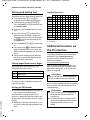
Writing and editing text . . . . . . . . . . . . . . . . . . . . . . . . . . . . . . . . . . . . . . . . . . . . . . . . . . . . . .
84
84
84
86
Additional functions via the PC interface . . . . . . . . . . . . . . . . . . . . . . . . . . 86
Accessories . . . . . . . . . . . . . . . . . . . . . . . . . . . . . . . . . . . . . . . . . . . . . . . . . . . . . . . 88
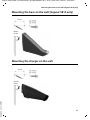
Mounting the base on the wall (Gigaset S810 only) . . . . . . . . . . . . . . . . . 91
Mounting the charger on the wall . . . . . . . . . . . . . . . . . . . . . . . . . . . . . . . . . 91
Version 4.1, 21.11.2007
Index . . . . . . . . . . . . . . . . . . . . . . . . . . . . . . . . . . . . . . . . . . . . . . . . . . . . . . . . . . . . 92
9
Gigaset S810-S810A / Grossbritannien / A31008-M2306-L101-1-7619 / security.fm / 14.05.2013
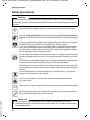
Safety precautions
Safety precautions
Warning
Be sure to read this user guide and the safety precautions before using your telephone
Explain their content and the potential hazards associated with using the telephone to your
children.
$
Use only the power adapter supplied, as indicated on the underside of the base.
Use only rechargeable batteries that correspond to the specification provided on
page 84, as this could otherwise result in significant health risks and personal injury.
Using your telephone may affect nearby medical equipment. Be aware of the technical conditions in your particular environment e.g., doctor's surgery.
If you use a medical device (e.g. a pacemaker), please contact the device manufacturer. They will be able to advise you regarding the susceptibility of the device to
external sources of high-frequency energy. Please refer to the “Appendix” chapter
for the specifications of this Gigaset product.
Do not hold the rear of the handset to your ear when it is ringing or when handsfree
mode is activated. Otherwise you risk serious and permanent damage to your hearing.
Your Gigaset is compatible with the majority of digital hearing aids on the market.
However, perfect function with all hearing aids cannot be guaranteed.
The handset may cause an unpleasant humming or whistling noise in hearing aids
or cause them to overload. If you require assistance, please contact the hearing aid
supplier.
Do not install the base or charger in bathrooms or shower rooms. The base and
charger are not splashproof (¢ page 84).
Do not use your phone in environments with a potential explosion hazard
(e.g., paint shops).
ƒ
If you give your Gigaset to a third party, make sure you also give them the user guide.
Remove faulty bases from use or have them repaired by our Service department, as
they could interfere with other wireless services.
Version 4.1, 21.11.2007
Please note
u Not all of the functions described in this user guide are available in all countries.
u The device cannot be used in the event of a power failure. It is also not possible to trans-
mit emergency calls.
10
Gigaset S810-S810A / Grossbritannien / A31008-M2306-L101-1-7619 / starting.fm / 14.05.2013
First steps
First steps
Checking the package contents
1
3
or
2
4
5
9
6
7
8
Version 4.1, 21.11.2007
1 One Gigaset S810/S810A base
2 One power adapter
3 One Gigaset S810H handset
4 One phone cord
5 Two batteries
6 One battery cover
7 One belt clip
8 One plastic headset socket cover
9 One user guide
If you have purchased a
model with multiple handsets the package should
contain two batteries, a battery cover, a belt clip and a
charger 9 with power
adapter J for each additional handset.
9
J
11
Gigaset S810-S810A / Grossbritannien / A31008-M2306-L101-1-7619 / starting.fm / 14.05.2013
First steps
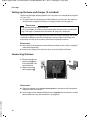
Setting up the base and charger (if included)
The base and charger are designed for use in dry rooms in a temperature range of
+5°C to +45°C.
¤ Set up the base at a central point in the building on a level, non-slip surface or
mount the base (Gigaset S810 only) or charger on the wall (¢ page 91).
Please note
Pay attention to the range of the base.
This is up to 300 m in unobstructed outdoor areas and up to 50 m inside buildings. The range is reduced when Eco Mode (¢ page 59) is activated.
The phone's feet do not usually leave any marks on surfaces. However, due to the
multitude of different varnishes and polishes used on today's furnishings, the
occurrence of marks on the surfaces cannot be completely ruled out.
Please note:
u Never expose the telephone to the influence of heat sources, direct sunlight or
other electrical devices.
u Protect your Gigaset from moisture, dust, corrosive liquids and fumes.
Connecting the base
¤ First connect the tel¤
ephone jack 2 and
insert the cables into
the cable ducts.
Then connect the
power adapter 1.
1
1
2
1
Please note:
u The power adapter must always be connected, as the phone will not operate
without a mains connection.
u Use only the power adapter and phone cord supplied. Pin connections on tele-
Version 4.1, 21.11.2007
phone cables can vary (pin connections ¢ page 85).
12
Gigaset S810-S810A / Grossbritannien / A31008-M2306-L101-1-7619 / starting.fm / 14.05.2013
First steps
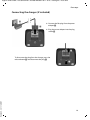
Connecting the charger (if included)
2
¤ Connect the flat plug from the power
1
adapter 1.
¤ Plug the power adapter into the plug
socket 2.
4
To disconnect the plug from the charger, press the
release button 3 and disconnect the plug 4.
Version 4.1, 21.11.2007
3
13
Gigaset S810-S810A / Grossbritannien / A31008-M2306-L101-1-7619 / starting.fm / 14.05.2013
First steps
Setting up the handset for use
The display and keypad are protected by plastic films.
Remove the protective films!
Inserting the batteries and closing the battery cover
Warning
Use only rechargeable batteries recommended by Gigaset Communications
GmbH (¢ page 84), i.e., Never use conventional (non-rechargeable) batteries,
as this could result in significant health risks and personal injury. For example,
the outer casing of the batteries could be damaged or the batteries could
explode. The phone could also malfunction or be damaged as a result of using
batteries that are not of the recommended type.
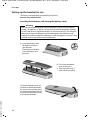
¤ Insert the batteries with
the polarity in the correct direction.
The polarity is indicated
in/on the battery compartment.
¤ First insert the battery
¤
Version 4.1, 21.11.2007
To open the battery cover, for
instance to replace the batteries, insert a coin into the cavity
on the left-hand side of the casing, then pull the battery cover
in an upward direction.
14
cover at the top a.
Then press the cover b
until it clicks into place.
Gigaset S810-S810A / Grossbritannien / A31008-M2306-L101-1-7619 / starting.fm / 14.05.2013
First steps
¤ Insert the plastic cover provided for the
headset socket to ensure optimum sound in
handsfree mode.
Attaching the belt clip
Version 4.1, 21.11.2007
The handset has notches on each side to attach the belt clip.
¤ To attach – press the belt clip
onto the back of the handset so
that the protrusions on the belt
clip engage with the notches.
¤ To remove – press the centre of
the belt clip firmly with your right
thumb, push the fingernail of
your left index finger up between
the clip and the housing and pull
the clip in an upward direction.
15
Gigaset S810-S810A / Grossbritannien / A31008-M2306-L101-1-7619 / starting.fm / 14.05.2013
First steps
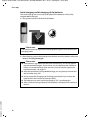
Initial charging and discharging of the batteries
The correct charge status can only be displayed if the batteries are first fully
charged and discharged.
¤ Charge the handset in the base for 8.5 hours.
8.5 h
Please note
The handset must only be placed in the designated Gigaset S810/S810A base or
charging cradle.
¤ After charging, remove the handset from the base and only replace it when the
batteries are fully discharged.
Please note
u Each handset is registered with the base at the factory. You do not need to
u
u
Version 4.1, 21.11.2007
u
u
16
register the handset again. If you wish to use your handset with a different
base or use further handsets with your base, you will need to register the
handset manually (¢ page 62).
After the initial battery charge and discharge, you may place your handset in
the base after every call.
Always repeat the charging and discharging procedure if you remove the
batteries from the handset and reinsert them.
The batteries may warm up during charging. This is not dangerous.
After a while, the charge capacity of the batteries will decrease for technical
reasons.
Gigaset S810-S810A / Grossbritannien / A31008-M2306-L101-1-7619 / starting.fm / 14.05.2013
First steps
Changing the display language
Change the display language if you do not understand the language currently set.
¤ Press right on the control key.
O5
±
Ø
Deutsch
English
±
Francais
±
It li
¤ Slowly press keys O and 5 one
after the other.
The display for setting languages appears.
The current language (e.g. English) is
selected.
¤ Press down on the control key s ...
±
Ø
Deutsch
English
±
Francais
±
Italiano
Espanol
Back
x
±
... until the language you wish to use is
marked, e.g., French.
Select
¤ Press the right key directly below the
display to select this language.
Deutsch
English
Francais
Version 4.1, 21.11.2007
It li
±
±
Ø
±
The selection is marked with Ø.
¤ Press and hold the end call key a to return to idle status.
17
Gigaset S810-S810A / Grossbritannien / A31008-M2306-L101-1-7619 / starting.fm / 14.05.2013
First steps
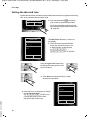
Setting the date and time
Set the date and time so that the correct date and time can be assigned to incoming
calls, and so that the alarm can be used.
¤ Press the key below §Time§ on the dis-
Calls
Date/Time
The Date/Time submenu is shown on
the display.
¤ The active input position flashes.
Enter day, month and year as an
8-digit number via the keypad,
e.g., 4
Q
2Q
for 14/10/2011.
Date:
31.01.2011
Time:
00:00
Back
play screen to open the input field.
(If you have already set the time and
date, open the input field via the menu
¢ page 30.)
Time
Save
Press the right or left control key
to change the input position and
correct an entry.
¤ Press down on the control key to switch
to the time input field.
Date/Time
Date:
¤ Enter the hours and minutes in 4-digit
Version 4.1, 21.11.2007
format via the keypad,
e.g., QM
5 for 07:15 am.
Change the input position with
the control key if necessary.
14.10.2011
Time:
00:00
Back
18
Save
Gigaset S810-S810A / Grossbritannien / A31008-M2306-L101-1-7619 / starting.fm / 14.05.2013
First steps
Back
Save
¤ Press the key below §Save§ on the display screen to confirm your entry.
Date/Time
‰
Saved
The display shows Saved. You will hear a
confirmation tone and the handset will
automatically return to idle status.
Display in idle status
Once the phone is registered and the time is set, the idle display is shown as in this
example. If the answering machine is activated, the answering machine icon à is
displayed in the header.
Displays
u Reception between the base and the handset:
i
Ã
Version 4.1, 21.11.2007
– Poor to good: Ð i Ñ Ò
INT 1
– No reception: |
Green: Eco Mode activated (¢ page 59)
u Battery charge status:
– { white: charged over 66%
– { white: charged between 34% and 66%
Calls
– y white: charged between 11% and 33%
– y red: charged below 11%
– y flashes red: battery almost empty
(less than 10 minutes talktime)
– xy xy x{ x{ white: battery charging
V
07:15
14 Oct
SMS
Please note
If you have chosen a colour scheme with a white background, the white symbols are displayed in black.
19
Gigaset S810-S810A / Grossbritannien / A31008-M2306-L101-1-7619 / starting.fm / 14.05.2013
First steps
u INT 1
Internal name of the handset (¢ page 65)
If Eco Mode+ (¢ page 59) is activated, the ¼ icon is displayed in the top left corner of the display.
Your answering machine is set with a pre-recorded announcement.
Your phone is now ready for use!
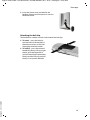
Connecting the headset
After removing the plastic cover, you can connect a headset to the left-hand side of your telephone with the 2.5 mm
jack connector.
See the relevant product page at www.gigaset.com for
information on recommended headsets.
The headset volume corresponds to the settings for the
handset volume (¢ page 72).
After using the headset, replace the plastic cover to enable
optimum sound in handsfree mode.
Connecting the USB data cable
You can connect a standard USB data cable with a mini-B connector to the back of
your handset to connect the handset to a PC (¢ page 86).
¤ Remove the belt clip (if attached)
(¢ page 15).
¤ Remove the battery cover (¢ page 14).
¤ Connect the USB data cable to
USB socket 1.
1
Please note
Version 4.1, 21.11.2007
Please connect your handset directly to
the PC; do not connect via a USB hub.
20
Gigaset S810-S810A / Grossbritannien / A31008-M2306-L101-1-7619 / starting.fm / 14.05.2013
First steps
What would you like to do next?
Now you have successfully set up your Gigaset, you will certainly want to adapt it
to your personal requirements. Use the following guide to quickly locate the most
important topics.
If you are unfamiliar with menu-driven devices such as other Gigaset telephones,
read the section entitled "Using the phone" (¢ page 22) first.
Information on ...
Setting the ringtone and volume
Setting the earpiece volume
Recording your own announcement for the
answering machine
Setting Eco Mode / Eco Mode+
Preparing the telephone for SMS reception
Operating the telephone on a PABX
Registering existing Gigaset handsets to a base
Transferring directory entries from existing Gigaset
handsets to new handset(s)
Using Bluetooth devices
Connecting the phone to the PC
g page 73
g page 72
... is located here.
g page 52
g page 59
g page 45
g page 78
g page 62
g page 39
g page 67
g page 86
Version 4.1, 21.11.2007
If you have any questions about using your phone, please read the tips
on troubleshooting (¢ page 81) or contact our Customer Care team
(¢ page 80).
21
Gigaset S810-S810A / Grossbritannien / A31008-M2306-L101-1-7619 / starting.fm / 14.05.2013
Using the phone
Using the phone
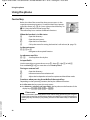
Control key
Below, the side of the control key that you must press in the
respective operating situation is marked in black (top, bottom,
right, left, centre), e.g., v for "press right on the control key" or
w for "press the centre of the control key".
The control key has a number of different functions:
When the handset is in idle status
s
v
u
t
Open the directory.
Open the main menu.
Open the list of handsets.
Call up the menu for setting the handset's call volume (¢ page 72).
In the main menu
t, s, v or u
Navigate to the required function.
In submenus and lists
t/s
Scroll up/down line by line.
In input fields
Use the control key to move the cursor up t, down s, right v or left u.
Press and hold v or u to move the cursor word by word.
During an external call
s
u
t
Open the directory.
Initiate an internal consultation call.
Adjust the loudspeaker volume for earpiece and handsfree mode.
Functions when pressing the middle of the control key
Depending on the operating situation, the key has different functions.
u In idle status the key opens the main menu.
u In submenus, selection and input fields, the key takes on the function of the
display keys §OK§, §Yes§, §Save§, §Select§ or §Change§ .
Please note
Version 4.1, 21.11.2007
These instructions demonstrate the main menu being opened by pressing the
right of the control key and functions being actuated by pressing the appropriate display key. However, if you prefer, you can use the control key as described
above.
22
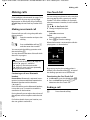
Gigaset S810-S810A / Grossbritannien / A31008-M2306-L101-1-7619 / starting.fm / 14.05.2013
Using the phone
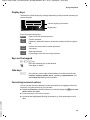
Display keys
The functions of the display keys change depending on the particular operating situation. Example:
Back
Save
Current display key functions.
Display keys
Some important display keys:
Options
Open a menu for further functions.
Confirm selection.
OK
Delete key: delete character by character/word by word from right to
Û
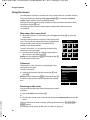
left.
Back
Go back one menu level or cancel operation.
Save
Store entry.
Þ
Open the redial list.
à
Forwarding a call to the answering machine.
Keys on the keypad
c / Q / * etc.
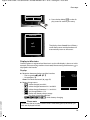
Press the matching key on the handset.
~
Enter digits or letters.
Side keys
ø/÷
Press the keys on the right of the handset to set the volume for the
handset, ringtone, speaker, alarm, signalling of appointments and
the headset depending on the situation.
Correcting incorrect entries
Version 4.1, 21.11.2007
You can correct incorrect characters in the input fields by navigating to the incorrect entry using the control key. You can then:
u Delete the character to the left of the cursor with the display key Ñ (press and
hold to delete the word)
u Insert characters at the cursor position
u Overwrite the highlighted (flashing) character, e.g., when entering time and
date.
23
Gigaset S810-S810A / Grossbritannien / A31008-M2306-L101-1-7619 / starting.fm / 14.05.2013
Using the phone
Using the menus
Your telephone's functions are accessed using a menu that has a number of levels.
The menu display can be extended (expert mode •) or restricted (standard
mode). Expert mode is the active default setting.
Settings or functions that are only available in expert mode are marked in these
instructions by the • icon.
Switching between standard mode/expert mode and the menu overview
(¢ page 28).
Main menu (first menu level)
¤ When the handset is in idle status press the right control key v to open the
main menu.
The main menu functions are shown in the display with
icons. The icon for the selected function is highlighted in
orange and the name of the associated function
appears in the display header.
To access a function, i.e., to open the corresponding
submenu (next menu level):
¤ Use the control key p to select the required function and press the display key §OK§.
Briefly press the display key §Back§ or the end call key a
to revert back to idle status.
Ç
Settings
ò
É
Â
Ï
Ë Ì
Ê
á
Back
OK
Submenus
The functions in the submenus are displayed as lists
(example on the right).
To access a function:
¤ Scroll to the function with the control key q and
press §OK§.
Briefly press the display key §Back§ or the end call key a
to return to the previous menu level/cancel the operation.
Settings
Date/Time
Audio Settings
Display
Language
Registration
Back
OK
Version 4.1, 21.11.2007
Reverting to idle status
You can revert to idle status from anywhere in the menu
as follows:
¤ Press and hold the end call key a.
or:
¤ Do not press any key: after 2 minutes the display will automatically revert to idle
status.
Settings that have not been saved by selecting the display keys §OK§, §Yes§, §Save§ or
§Change§ are lost.
An example of the display in idle status is shown on page 19.
24
Gigaset S810-S810A / Grossbritannien / A31008-M2306-L101-1-7619 / starting.fm / 14.05.2013
Using the phone
Activating/deactivating the handset
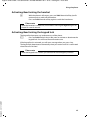
a
With the phone in idle status, press and hold the end call key (confirmation tone) to switch off the handset.
Press and hold the end call key again to switch the handset on.
Please note
When the handset is switched on, an animation showing the Gigaset logo is displayed for several seconds.
Activating/deactivating the keypad lock
The keypad lock prevents any inadvertent use of the phone.
#
Press and hold the hash key in idle status to activate or deactivate the
keypad lock. You will hear the confirmation tone.
If the keypad lock is activated, you will see a message when you press a key.
The keypad lock deactivates automatically when you receive a call. It is reactivated
when the call is finished.
Please note
Version 4.1, 21.11.2007
When the keypad lock is active, you cannot even call emergency numbers.
25
Gigaset S810-S810A / Grossbritannien / A31008-M2306-L101-1-7619 / starting.fm / 14.05.2013
Using the phone
Using this guide
The operating steps are shown in abbreviated form.
Example:
The illustration:
v ¢ Ï ¢ Eco Mode ¢ Eco Mode+ (³ = on)
means:
¤ Press right on the control key v
to open the main menu.
Ç
Settings
ò
É
Â
Ï
¤ Press right, left, down and up on
control key p to navigate to
the Settings submenu.
Ë Ì
Ê
á
Back
OK
¤ Press the display key §OK§ to confirm
your selection.
Settings
Display
¤ Press down on the control key s
Language
until the Eco Mode menu option
appears on the display.
Registration
Menu View
Eco Mode
Back
OK
¤ Press the display key §OK§ to confirm
Version 4.1, 21.11.2007
your selection.
26
Gigaset S810-S810A / Grossbritannien / A31008-M2306-L101-1-7619 / starting.fm / 14.05.2013
Using the phone
Eco Mode
³
´
Eco Mode
Eco Mode+
Back
¤ Press down on the control key s
until the Eco Mode+ menu option
appears on the display.
Change
¤ Press the display key §Change§ to
activate/deactivate the function.
Eco Mode
Eco Mode
Eco Mode+
Back
³
³
The change is effective immediately
and does not need to be confirmed.
Change
¤ Press the key below §Back§ on the
Version 4.1, 21.11.2007
display screen to jump back to the
previous menu level.
or
Press and hold the end call key a to
return to idle status.
27
Gigaset S810-S810A / Grossbritannien / A31008-M2306-L101-1-7619 / menuetree.fm / 14.05.2013
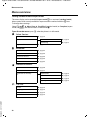
Menu overview
Menu overview
Setting standard mode or expert mode
The menu display can be extended (expert mode •) or restricted (standard mode).
Menu options that are only available in expert mode are marked with the • icon.
To change these settings:
Select v ¢ Ï ¢ Menu View ¢ Simplified (standard mode) or Complete (expert
mode) ¢ §Select§ (the active mode is marked with Ø)
Open the main menu: press v when the phone is in idle mode.
Ç Select Services
Withhold Number
All Calls
¢ page 35
Call Divert
Call Waiting
ò
Ringback Off
Bluetooth
Activation
Search for Headset
Search Data Device
Known Devices
Own Device
É Additional Features
Room Monitor
One Touch Call
•
Resource Directory
¢ page 35
¢ page 67
¢ page 68
¢ page 68
¢ page 68
¢ page 69
¢ page 66
¢ page 31
Screensavers
Caller Pictures
Sounds
Ê Call Lists
All Calls
Outgoing Calls
Accepted Calls
Version 4.1, 21.11.2007
Missed Calls
28
¢ page 36
¢ page 35
Capacity
¢ page 41
¢ page 41
¢ page 41
¢ page 41
¢ page 74
¢ page 74
¢ page 74
¢ page 74
Gigaset S810-S810A / Grossbritannien / A31008-M2306-L101-1-7619 / menuetree.fm / 14.05.2013
Menu overview
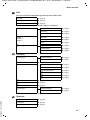
Ë SMS
You have activated an SMS mailbox (general or private) without a PIN
New SMS
Incoming
Draft
¢ page 45
¢ page 47
¢ page 46
You have activated an SMS mailbox with a PIN or 2–3 mailboxes
Mailbox
New SMS
Incoming
Draft
Mailbox 1
Mailbox 2
Mailbox 3
•
New SMS
Incoming
Draft
Settings
Service Centres
SMS Mailboxes
Ì Voice Mail
Play Messages
Notification
Network Mailbox
Answ. Machine *
Activation *
Announcements *
¢ page 52
Rec. Announcement *
Play Announcement *
Del. Announcement *
•
•
•
•
*
Recordings *
Call Screening *
Network Mailbox
Set Key 1 *
Rec. Advisory Msg. *
Play Advisory Msg. *
Del. Advisory Msg. *
¢ page 55
¢ page 55
¢ page 58
Network Mailbox
Answ. Machine
¢ page 58
¢ page 52
¢ page 52
¢ page 52
¢ page 52
¢ page 52
¢ page 53
¢ page 53
¢ page 58
¢ page 58
Base with answering machine only
á Organizer
Calendar
Version 4.1, 21.11.2007
•
•
•
¢ page 45
¢ page 47
¢ page 46
¢ page 45
¢ page 47
¢ page 46
¢ page 49
¢ page 48
¢ page 48
Alarm Clock
Missed Alarms
¢ page 60
¢ page 62
¢ page 61
29
Gigaset S810-S810A / Grossbritannien / A31008-M2306-L101-1-7619 / menuetree.fm / 14.05.2013
Menu overview
 Directory
Ï Settings
Date/Time
Audio Settings
¢ page 37
¢ page 18
Handset Volume
Handsfree Profiles
•
Advisory Tones
Ringtones(Handset)
Ringtones (Base)
•
Display + Keypad
Music on hold
Screensaver
Large Font
Colour Schemes
•
Display Backlight
Keypad Illumination
Language
Registration
¢ page 70
Register Handset
De-reg. Handset
•
Select Base
Telephony
Auto Answer
Area Codes
Listening In
Preselection
Access Code
Dialling Mode
•
Recall
System
Handset Reset
Base Reset
Repeater Mode
System PIN
Menu View
Simplified
Complete
Version 4.1, 21.11.2007
Eco Mode
Eco Mode
Eco Mode+
30
¢ page 72
¢ page 72
¢ page 75
¢ page 73
¢ page 76
¢ page 76
¢ page 70
¢ page 71
¢ page 71
¢ page 71
¢ page 71
¢ page 62
¢ page 63
¢ page 63
¢ page 71
¢ page 75
¢ page 65
¢ page 44
¢ page 78
¢ page 78
¢ page 78
¢ page 75
¢ page 77
¢ page 76
¢ page 77
¢ page 28
¢ page 28
¢ page 59
¢ page 59
Gigaset S810-S810A / Grossbritannien / A31008-M2306-L101-1-7619 / telefony.fm / 14.05.2013
Making calls
Making calls
If the backlight is deactivated (¢ page 71) it
is switched on by pressing any key. Digit
keys appear on the display for pre-dialling;
all other keys do not have any further functions.
Making an external call
External calls are calls using the public telephone network.
~c
Enter the number and press the
talk key.
or:
c~
Press and hold the talk key c
and then enter the number.
You can cancel the dialling operation with
the end call key a.
You are shown the duration of the call while
the call is in progress.
One Touch Call
You can set up your phone in such a way that
pressing any key dials a previously stored
number. This allows children, for example,
who cannot enter a number, to call a certain
number.
v ¢ É ¢ One Touch Call
¤ Change multiple line input:
Activation:
Select On to activate.
Call to:
Enter or change number.
¤ Press §Save§ to save the settings.
When the function is activated, the idle display appears as shown below:
i
Version 4.1, 21.11.2007
Continuing a call on a Bluetooth
headset
Precondition: Bluetooth is activated; a connection has been established between the
Bluetooth headset and the handset
(¢ page 67).
Press the talk key on the Bluetooth headset;
it may take up to 5 seconds to establish a
connection to the handset.
During the call you can adjust the volume of
the earpiece and microphone with the side
keys.
For further details about your headset, see
the user guide issued with it.
V
07:15
INT 1
Please note
Dialling with the directory (¢ page 37),
call list (¢ page 41), redial list
(¢ page 41) and automatic redial
(¢ page 41) saves you from repeatedly
keying in phone numbers.
Ã
”
22 Oct
OneTouchCall active
0891234567
OFF
By pressing any key the saved number is
dialled. Press the end call key a, to cancel
the dialling operation or to end the call.
Deactivating the One Touch Call
¤ In idle status, press the display key §OFF§ .
¤ Press and hold the hash key #, to
deactivate the One Touch Call.
Ending a call
a
Press the end call key.
31
Gigaset S810-S810A / Grossbritannien / A31008-M2306-L101-1-7619 / telefony.fm / 14.05.2013
Making calls
Accepting a call
The handset indicates an incoming call in
three ways: by ringing, by a display on the
screen and by the flashing talk key c.
Accept the call by:
¤ Pressing the talk key c.
¤ Pressing the handsfree key d.
¤ Gigaset S810: press the display key
§Accept§.
¤ Gigaset S810A: press the display key
Ô to divert the call to the answering
machine (¢ page 55).
If the handset is in the base/charger and the
Auto Answer function is activated
(¢ page 71), the handset automatically
answers the call when you remove it from
the base/charger.
To deactivate the ringtone, press the §Silence§
display key. You can accept the call as long as
it is displayed on the screen.
– CLIP (Calling Line Identification Presentation): the caller's number is displayed.
u You have requested CLIP from your network provider.
u The caller has requested CLI from the network provider.
Call display with CLIP/CLI
If the caller's number is saved in your directory, the number is replaced by the corresponding directory entry (ä/ k/ l symbol
and name/number). If you have assigned a
caller picture to that caller, this will also be
displayed.
Ø«Ú
ä1234567890
Gigaset S810
1
2
3
Accepting a call on a Bluetooth
headset
Precondition: Bluetooth is activated; a connection has been established between the
Bluetooth headset and the handset
(¢ page 67).
Only press the talk key on the headset
when the headset rings; it can take up to 5
seconds.
During the call you can adjust the volume of
the earpiece and microphone with the side
keys.
For further details about your headset, see
the user guide issued with it.
Version 4.1, 21.11.2007
Calling Line Identification
When you receive a call, the caller's number
is displayed on the screen if the following
conditions are met:
u Your network provider supports CLIP, CLI.
– CLI (Calling Line Identification): the
caller's number is transmitted.
32
Accept
Silence
or
Ø«Ú
ä1234567890
à
Gigaset S810A
1
2
3
Silence
1 Ringtone icon
2 ä/ k/ l symbol from directory
3 Number or name of caller
Gigaset S810-S810A / Grossbritannien / A31008-M2306-L101-1-7619 / telefony.fm / 14.05.2013
Making calls
The following is displayed in place of the
number:
u External, if no number is transmitted.
u Withheld, if the caller has withheld Calling Line Identification (¢ page 35).
u Unavailable, if the caller has not
arranged Calling Line Identification.
Please note
The ringtone can be switched off for
unknown calls (calls with Calling Line
Identification withheld) (¢ page 73).
Notes on calling line display
(CLIP)
By default, the number of the caller is shown
in the display of your Gigaset telephone. You
do not have to make any other settings on
your Gigaset telephone.
However, if the caller's number is not
displayed, this can be due to the
following:
If the caller number is still not
displayed:
¤ Check the CLIP settings of your PABX and
activate this function if necessary. In the
user guide for the device, search for the
term "CLIP" (or an alternative term such
as "calling line identification", "phone
number transmission", "caller ID", ...).
If necessary, contact the device manufacturer.
If this does not resolve the problem, it is possible that your network provider does not
the CLIP service for this number.
Have you ordered the calling line
display service from your network
provider?
¤ Check whether your provider supports
calling line display (CLIP) and that the
function has been activated for you. If
necessary, contact your provider.
Additional information on this subject can
be found on the Gigaset homepage at:
www.gigaset.com/service
u You have not ordered CLIP from your net-
work provider or
u Your telephone is connected via a PABX
or a router with an integrated PABX (gateway) that does not transmit all information.
Is your telephone connected via a
PABX/gateway?
Version 4.1, 21.11.2007
You can establish this by checking for an
additional device connected between your
telephone and house connection, e.g., a
PABX, gateway etc. In most cases, simply
resetting this device will remedy the situation:
¤ Briefly disconnect the mains plug of your
PABX. Re-insert the plug and wait for the
device to restart.
33
Gigaset S810-S810A / Grossbritannien / A31008-M2306-L101-1-7619 / telefony.fm / 14.05.2013
Making calls
Handsfree mode
Switching to mute
In handsfree mode, instead of holding the
handset to your ear you can put it down, for
example on the table in front of you. This
allows others to participate in the call.
You can deactivate the microphone in your
handset during an external call.
h
Press key to mute the handset.
The display shows Microphone
is off.
Press the key again to reactivate
the microphone.
Activating/deactivating handsfree
mode
Activating while dialling
~d
¤
Enter the number and press the
handsfree key.
Inform your caller before you use the
handsfree function so that the caller
knows a third party may be listening.
Switching between earpiece and
handsfree mode
d
Press the handsfree key.
During a call and when listening to the
answering machine (Gigaset S810A only),
activate or deactivate handsfree mode.
If you wish to place the handset in the base/
charger during a call:
¤ Press and hold the handsfree key d
while placing the handset in the base/
charger and for a further 2 seconds.
For instructions on adjusting the speaker
volume (¢ page 72).
Please note
Version 4.1, 21.11.2007
If you have a headset connected, you can
switch between the headset and handsfree mode.
34
Please note
u If the telephone is muted, all keys
except the mute key h and the
end-call key a will not work.
u A connected headset will also be
muted.
Gigaset S810-S810A / Grossbritannien / A31008-M2306-L101-1-7619 / TNet_Features_SAG.fm / 14.05.2013
Making calls using network services
Making calls using
network services
Network services are functions that your
network provider makes available to you.
You have to request these services from your
network provider.
¤ It is not possible to reprogram the network services.
¤ If you require assistance, please contact
your network provider.
Calling Line Identification
Withhold Calling Line Identification
once (CLIR):
If you make a call, your number is shown in
the display of the call recipient if that person
has activated CLIP (¢ page 32).
If, in certain instances, you do not wish to
have your number displayed, you can withhold your number for the next call (CLIR).
v ¢ Ç ¢ Withhold Number
~
Enter phone number.
c
Press the talk key.
or
§Dial§
Press the display key.
Ringback
Initiating ringback
Version 4.1, 21.11.2007
If the number you have called is engaged,
you can initiate ringback. As soon as the line
belonging to the person you called is free,
your handset will ring.
You hear the busy tone.
§Options§ ¢ Ringback
a
Press the end call key.
Cancelling ringback
You can cancel a ringback that has already
been initiated.
v ¢ Ç ¢ Ringback Off
Call waiting during an
external call
If the function is activated, during an external call you will hear a call waiting tone to
signal that another external caller is trying to
get through. If you have CLIP (¢ page 32),
the number of the waiting caller or the corresponding directory entry is shown in the
display.
Activating/deactivating call
waiting
v ¢ Ç ¢ All Calls ¢ Call Waiting
Status
Activate/deactivate.
§Send§
Press the display key.
Accepting a waiting call
You are making an external call and hear the
call waiting tone.
You have the following options:
If CLIP (¢ page 32) is activated
§Accept§
Press the display key.
If CLIP is not activated
§Options§ ¢ Accept Waiting call
Once you have accepted the waiting call
you can switch between the two callers
("call swap" ¢ page 36).
35
Gigaset S810-S810A / Grossbritannien / A31008-M2306-L101-1-7619 / TNet_Features_SAG.fm / 14.05.2013
Making calls using network services
Call divert (CD)
When diverting a call, the call is forwarded to
another connection.
The following options are available:
u All Calls: Calls are diverted immediately.
No more calls are signalled on your
phone.
u No Answer: Calls are diverted if no one
accepts the call within several rings.
u When Busy: Calls are forwarded when
your line is busy. Call is diverted without a
call waiting tone.
v ¢ Ç ¢ All Calls ¢ Call Divert
¤ You can enter data in the following fields:
When:
Select All Calls / When Busy / No Answer.
Phone Number:
Enter the number to which the call is to
be diverted.
Status:
Activate/deactivate call divert.
§Send§
Press the display key.
a
After the announcement, press
the end call key.
Consultation call, call swap
These functions enable you to:
u Call a second external caller (consultation
call)
u Switch between two calls (call swap)
Version 4.1, 21.11.2007
Consultation call
You can call a second external caller. The first
call is placed on hold.
During an external call:
§Ext. Call§
Press the display key.
The previous call is placed on
hold. The other participant
hears an announcement.
~
Enter the second participant's
telephone number.
36
The phone number is dialled. You are connected to the second participant.
If the caller does not answer, select the display key §End§ to return to the first participant.
Please note
You can also select the second participant's phone number from the directory
(¢ page 38) or the call list (¢ page 40).
Ending a consultation call
¢ End Active Call
You are reconnected to the first caller.
You can also end the consultation call by
pressing the end call key. The connection is
briefly interrupted and you will receive a call
back. Once you have pressed the talk key,
you are reconnected to the first caller.
§Options§
Call swap
You can speak to both callers one at a time
(call swap).
Prerequisite: You are conducting an external call and have called a second participant
(consultation call) or have accepted a waiting call.
¤ Use q to swap between the participants.
The caller you are currently speaking to is
marked with the æ icon.
Ending the current call.
¢ End Active Call
You are re-connected to the waiting caller.
§Options§
Gigaset S810-S810A / Grossbritannien / A31008-M2306-L101-1-7619 / direct_charges.fm / 14.05.2013
Using the directory and lists
Using the directory and
lists
The options are:
u Directory
u Redial list
u Incoming SMS message list
u Call lists
u List of missed appointments
u Answering machine list
(Gigaset S810A only)
You can create a personalised directory for
your own handset. You can also send lists/
entries to other handsets (¢ page 39).
Directory
You can save up to 500 entries in the directory.
Please note
To quickly access a number from the
directory (quick dial), you can assign the
number to a key (¢ page 69).
Directory
In the directory, you can save:
u Up to three numbers and associated first
names and surnames
u E-mail addresses
u Anniversaries with reminder
u VIP ringtone with VIP icon
u Caller pictures.
You open the directory in idle status using
the s key.
Version 4.1, 21.11.2007
Length of the entries
3 numbers:
each max. 32 digits
First name and surname:
each max. 16 characters
E-mail address:
max. 64 characters
Saving a number in the directory
s ¢ <New Entry>
¤ You can enter data in the following fields:
First Name:/Surname:
Enter first names and/or surnames.
If you do not enter a name in either of the
fields, the phone number is saved and
displayed in place of a surname.
(For instructions on entering text and
special characters, please see
¢ page 86.)
Phone (Home): / Phone (Office): /
Phone (Mobile):
Enter a number in at least one of the
fields.
When scrolling through the directory, the
entries are highlighted by a prefixed symbol: ä/ k/ l.
E-mail:
Enter the e-mail address.
Anniversary:
Select On or Off.
With setting On:
Enter Annivers. (Date) and Anniversary
(time) and select reminder type:
Anniversary (tone) ¢ page 40.
Caller Picture:
If required, select a picture to be
displayed when this person calls
(see "Resource Directory", page 74).
Prerequisite: Calling Line Identification
(CLIP).
Caller Melody (VIP):
Mark a directory entry as a VIP
(Very Important Person) by assigning
a specific ringtone to it. VIP calls are recognised by the ringtone.
When scrolling through the directory, VIP
entries are highlighted by the Æ icon.
Prerequisite: Calling Line Identification
(CLIP).
§Save§
Press the display key.
37
Gigaset S810-S810A / Grossbritannien / A31008-M2306-L101-1-7619 / direct_charges.fm / 14.05.2013
Using the directory and lists
Order of directory entries
Managing directory entries
Directory entries are generally sorted alphabetically by surname. Spaces and digits take
first priority. If only the first name was
entered in the directory, this is incorporated
into the sort order instead of the surname.
The sort order is as follows:
1. Space
2. Digits (0–9)
3. Letters (alphabetical)
4. Other characters
To get round the alphabetical order of the
entries, insert a space or a digit in front of the
first letter of the surname. These entries will
then move to the beginning of the directory.
Viewing entries
Select a directory entry
s
Open the directory.
You have the following options:
u Use s to scroll through the entries until
the required name is selected.
u Enter the first letters of the name (max. 8),
if necessary scroll to the entry with the s
key.
The directory searches for the surname. If
a surname has not been entered, the
directory searches for the first name.
Select from the directory
Version 4.1, 21.11.2007
s ¢ s (Select entry)
c
Press the talk key.
(If several numbers are entered,
select the required number by
pressing r and press the talk
key c again).
The number is dialled.
38
s ¢ s (Select entry)
§View§
Press the display key. The entry
is displayed.
§Options§
Press the display key.
The following functions can be selected
with q:
Display Number
To edit or add to a saved number, or to
save it as a new entry, press Ó after the
number is displayed.
Delete Entry
Delete selected entry.
Copy Entry
to Internal: Send a single entry to a handset (¢ page 39).
vCard via SMS: Send a single entry in
vCard format via SMS.
vCard via Bluetooth: Send a single entry
in vCard format via Bluetooth.
Editing entries
s ¢ s (Select entry)
§View§ §Edit§ Press display keys one after the
other.
¤ Carry out changes and save.
Using other functions
s ¢ s (Select entry)
¢ §Options§ (Open menu)
The following functions can be selected
with q:
Display Number
Edit or add to a saved number and then
dial with c or save as a new entry; to do
so, press Ó after the number is displayed.
Edit Entry
Edit selected entry.
Delete Entry
Delete selected entry.
Gigaset S810-S810A / Grossbritannien / A31008-M2306-L101-1-7619 / direct_charges.fm / 14.05.2013
Using the directory and lists
Copy Entry
to Internal: Send a single entry to a handset (¢ page 39).
vCard via SMS: Send a single entry in
vCard format via SMS.
vCard via Bluetooth: Send a single entry
in vCard format via Bluetooth.
Delete All
Delete all entries in the directory.
Copy All
to Internal: Send the complete list to a
handset (¢ page 39).
vCard via Bluetooth: Send the complete
list in vCard format via Bluetooth.
Available Memory
Display the number of entries that are still
available in the directory (¢ page 37).
Using quick dial keys
¤ Press and hold the required quick dial key
(¢ page 69).
Transferring the directory to
another handset
Prerequisites:
u The sending and receiving handsets must
both be registered to the same base.
Version 4.1, 21.11.2007
u The other handset and the base can send
and receive directory entries.
s ¢ s (Select entry)
¢ §Options§ (Open menu)
¢ Copy Entry / Copy All ¢ to Internal
s
Select the internal number of
the receiving handset and
press §OK§.
You can transfer several individual entries
one after the other by responding to the
Entry copied - Copy next entry? prompt
with §Yes§.
A successful transfer is confirmed by a message and confirmation tone on the receiving
handset.
Please note:
u Entries with identical numbers are not
overwritten on the receiving handset.
u The transfer is cancelled if the phone
rings or if the memory of the receiving
handset is full.
u Pictures and sounds assigned to entries
are not transferred.
Transferring the directory as a
vCard with Bluetooth
In Bluetooth mode(¢ page 67) you can
transfer directory entries in vCard format,
e.g. to exchange entries with your mobile
phone.
s ¢ s (Select entry)
¢ §Options§ (Open menu)
¢ Copy Entry / Copy All
¢ vCard via Bluetooth
The list of “Known Devices“ (¢ page 68) is
displayed.
s
Select device and press §OK§
Receiving a vCard with Bluetooth
If a device from the "Known Devices" list
(¢ page 68) esends a vCard to your handset, this occurs automatically. You are
informed about it via the display.
If the sending device does not appear in the
list, you will be asked on the display to enter
the device PIN for the sending device:
~
Enter the PIN for the sending
Bluetooth device and press §OK§ .
The transferred vCard is available as a directory entry.
39
Gigaset S810-S810A / Grossbritannien / A31008-M2306-L101-1-7619 / direct_charges.fm / 14.05.2013
Using the directory and lists
Copying the displayed number to
the directory
You can copy numbers displayed in a list,
e.g., the call list or the redial list, or in an SMS,
to the directory.
A number is displayed:
§Options§ ¢ Copy to Directory
¤ Complete the entry (¢ page 37).
Gigaset S810A: Message playback is interrupted during the number transfer from the
answering machine list.
Copying a number or e-mail
address from the directory
In some operating situations, you can open
the directory to copy a number or e-mail
address, for example. Your handset need not
be in idle status.
¤ Depending on the operating situation,
open the directory with s or Ó.
q
Select entry (¢ page 38).
Please note
A time must be specified for reminder
calls. If you select a visual signal, a time is
not required and is automatically set to
00.00.
Deactivating anniversaries
s ¢ s (Select entry)
§View§ §Edit§ Press display keys one after the
other.
s
Scroll to the Anniversary line.
v
Select Off.
§Save§
Press the display key.
Reminder call on an anniversary
In idle status, a reminder call is indicated on
the handset display and by the selected
ringtone and volume that has been set for
internal calls (¢ page 73).
ØðÚ
Version 4.1, 21.11.2007
Storing an anniversary in the
directory
For each number in the directory, you can
save an anniversary and specify a time at
which a reminder call should be made on
the anniversary (default setting: Anniversary: Off).
s ¢ s (Select entry)
§View§ §Edit§ Press display keys one after the
other.
s
Scroll to the Anniversary line.
v
Select On.
¤ You can enter data in the following fields:
Annivers. (Date)
Enter day/month/year in 8-digit format.
Anniversary (time)
Enter the hour/minute for the reminder
call in 4-digit format.
Anniversary (tone)
Select the reminder type.
§Save§
Press the display key.
40
Miller,
Frank
Off
SMS
You can:
§SMS§
Write an SMS.
§Off§
Press the display key to
acknowledge and end the
reminder call.
During the reminder call, you can permanently change the volume by pressing the
side keys ø (louder) or ÷ (quieter).
When you are on the phone, a reminder call
is indicated on the handset with a single
advisory tone.
Anniversaries that are indicated during a call
and are not acknowledged are entered in
the Missed Alarms list (¢ page 43).
Gigaset S810-S810A / Grossbritannien / A31008-M2306-L101-1-7619 / direct_charges.fm / 14.05.2013
Using the directory and lists
Redial list
Incoming SMS message list
The redial list contains the twenty numbers
last dialled with the handset (max. 32 digits).
If one of the numbers is in the directory, the
corresponding name is displayed.
All received SMS messages are saved in the
incoming message list (¢ page 46).
Manual redial
c
s
c
Press the key briefly.
Select entry.
Press the talk key again. The
number is dialled.
When a name is displayed, you can display
the corresponding phone number by pressing the display key §View§.
Managing entries in the redial list
c
s
Version 4.1, 21.11.2007
Press the key briefly.
Select entry.
§Options§
Open menu.
The following functions can be selected with
q:
Copy to Directory
Copy an entry to the directory (page 37).
Automatic Redial
The selected number is automatically
dialled at fixed intervals (at least every
20 seconds). The handsfree key flashes
and "open listening" is activated.
– Party answers:
Press the talk key c. The function is
ended.
– Party does not answer:
The call is terminated after approx.
30 seconds. The function is ended
after pressing any key or after ten
unsuccessful attempts.
Display Number (as in the directory,
page 38)
Delete Entry (as in the directory, page 38)
Delete All (as in the directory, page 39)
Answering machine list
(Gigaset S810A only)
You can use the answering machine list to
listen to the messages that are on the
answering machine.
Call lists
Prerequisite: Calling Line Identification
(CLIP, page 32)
Your telephone stores various types of calls:
u Answered calls
u Outgoing calls
u Missed calls
u Calls recorded by the answering machine
(Gigaset S810A only)
You can view each type of call separately or
gain an overview of all calls. Each call record
contains the last 20 numbers in its category.
When in idle status, open the call lists by
selecting the §Calls§ display key or via the
menu:
v¢Ê
41
Gigaset S810-S810A / Grossbritannien / A31008-M2306-L101-1-7619 / direct_charges.fm / 14.05.2013
Using the directory and lists
List entry
Message key function
New messages are displayed at the top.
Example of list entries:
Opening lists
All Calls
™
l Frank
14.10.11, 15:40
š 089563810
14.10.11, 15:32
™ ...0123727859362922
14.10.11, 15:07
View
Options
u List type (in header)
u Status of entry
Bold: New entry
u Number or name of caller
u Date and time of call (if set, page 18)
u Type of entry:
Accepted calls ( › )
Missed calls ( ™ )
Outgoing calls ( š )
Calls recorded by the answering
machine (Ã, Gigaset S810A only)
Press the talk key c to call the selected
caller back.
Press the §View§ display key to access additional information, including for example
the number linked to the name.
Select the §Options§ display key to select the
following options:
Copy to Directory
Copy the number to the directory.
Delete Entry
Delete selected entry.
Delete All
Delete all entries.
When you quit the call lists, all entries are set
to the status "old", i.e., the next time you call
up the list, they will no longer be shown in
bold.
Version 4.1, 21.11.2007
–
–
–
–
42
Use the message key f to open the following list selection:
u Answering machine list (Gigaset S810A
only) or network mailbox, if your network
provider supports this function and fast
access is set for the network mailbox
(¢ page 58).
u Incoming SMS message list (¢ page 46)
If multiple mailboxes are set up
(¢ page 48), several lists are displayed.
u List of missed calls
u List of missed alarms (¢ page 43)
An advisory tone sounds as soon as a new
message arrives in a list.
In idle status, the display shows an icon for
the new message:
Icon
Ã
™
Ë
New message...
... in the answering machine list
(Gigaset S810A only) or on the network mailbox
... in the missed calls list
... in the SMS list
... in the Missed Alarms list:
The number of new entries is displayed
under the corresponding icon.
Ã
œ
¾
02
10
09
08
Please note
If calls are saved in the network mailbox,
you will receive a message if the appropriate settings have been made (see your
network provider user guide).
After pressing the message key f, you can
see all lists containing messages and the
network mailbox list.
Gigaset S810-S810A / Grossbritannien / A31008-M2306-L101-1-7619 / direct_charges.fm / 14.05.2013
Using the directory and lists
Lists containing new messages are at the top
of the list and are marked in a bold font.
Messages & Calls
Calls:
(3)
Missed Alarms
(1)
SMS:
(2)
¤ Press key Q or , to set the behav-
ior for new messages:
Q
message key flashes (it stops
when the key is pressed)
or message key does not flash
Your selection is displayed (e.g. 1):
System
975 SET:
[1]
Back
OK
Select a list with q. To open, press §OK§.
Disable/enable flashing of the
message key
You can select whether the message key f
flashes (default setting) or does not flash
when new messages arrive. Please do the
following:
¤ Press the key sequence:
v ¢ *#Q5#M
The following is displayed:
System
97
¤ Press one of the following keys to select
the message type:
5
for missed calls
or L
for new SMS
or M
for messages on the answering machine (Gigaset S810A
only)/network mailbox
Your selection is displayed (e.g. 5 for
missed calls); the current setting flashes:
System
975 SET:
Version 4.1, 21.11.2007
[0]
¤ Press the display key §OK§.
List of missed alarms
Missed (unacknowledged) appointments
from the calendar (¢ page 60) and anniversaries (¢ page 40) are saved in the Missed
Alarms list under the following circumstances:
u You do not accept an appointment/anniversary.
u The appointment/anniversary was signalled during a phone call.
u The handset is deactivated at the time of
the appointment/anniversary.
u Automatic redial was activated at the
time of an appointment/anniversary
(¢ page 41).
u Open the list by pressing the message
key f (¢ page 42).
Each entry is displayed with:
u Number or name
u Date and time
The most recent entry is at the head of the
list.
Press the display key §Delete§, to delete the
selected entry.
If 10 entries are already stored in the list, the
next appointment reminder will delete the
oldest entry.
43
Gigaset S810-S810A / Grossbritannien / A31008-M2306-L101-1-7619 / direct_charges.fm / 14.05.2013
Making cost-effective calls
Making cost-effective
calls
Make phone calls through a network provider who offers particularly low-cost call
rates (call-by-call).
Automatic network provider
code (preselection)
You can store a call-by-call number (preselection number), which is automatically
placed in front of numbers when you dial
them.
In the "With Preselection" list, specify the
access codes or the first digits of the access
codes that you wish to assign to the preselection number.
In the "No Preselection" list, enter the
exceptions to the "With Preselection" list.
Example:
Preselection No.
0999
With Preselection
08
No Preselection
081
084
All numbers that start with 08, except for 081
and 084, are dialled with the preselection
number 0999.
Phone number
07112345678
08912345678
Version 4.1, 21.11.2007
08412345678
44
¢
¢
¢
Dialled number
07112345678
0999 08912345678
08412345678
• Saving preselection numbers
v ¢ Ï ¢ Telephony ¢ Preselection
¢ Preselection No.
~
§Save§
Enter or change the preselection number (call-by-call
number).
Press the display key.
Save or change entries in the
preselection lists
Each of the two lists can contain 20 entries,
each with 6 digits.
Numbers may be prefixed according to the
country in the "With Preselection" list. This
means, for example, that all national calls or
calls to the mobile network are automatically linked to the preselection number you
have saved previously.
v ¢ Ï ¢ Telephony ¢ Preselection
¢ With Preselection / No Preselection
s
Select entry.
~
Enter or edit the first digits of
the number.
§Save§
Press the display key.
Temporarily cancelling
preselection
c (press and hold) ¢ §Options§
¢ Preselection off ¢ ~ (dial number)
Permanently deactivating
preselection
v ¢ Ï ¢ Telephony ¢ Preselection
¢ Preselection No.
Ñ
Press and hold the display key
until the preselection number is
deleted.
§Save§
Press the display key.
Gigaset S810-S810A / Grossbritannien / A31008-M2306-L101-1-7619 / sms_BRD_neutral.fm / 14.05.2013
SMS (text messages)
SMS (text messages)
Your phone is delivered ready to send SMS
messages immediately.
Prerequisites:
u Calling Line Identification is enabled for
your phone line.
u Your network provider supports SMS on
the fixed line network (information on
this can be obtained from your network
provider).
u You are registered with your service provider to send and receive SMS messages.
u To receive SMS messages, you must be
registered with your service provider. This
occurs automatically when you send your
first SMS.
Please note
If your phone is connected to a PABX,
please read ¢ page 50.
Please note
u For instructions on entering text and
special characters, please see
page 86.
u An SMS may contain up to
612 characters. If there are more than
160 characters, the SMS is sent as a
linked SMS (up to 4 SMS messages
with 153 characters each). The top
right of the display shows how many
characters are still available and
which part of a linked SMS is currently
being written.
Sending an SMS
c
or:
§Options§
Send
SMS
~/s
Writing/sending an SMS
Writing an SMS
v¢Ë
Version 4.1, 21.11.2007
Mailbox 2 Select mailbox if necessary and
press §OK§.
~
Enter mailbox PIN if necessary
and press §OK§.
New SMS Select and press §OK§.
~
Write an SMS.
Press the talk key
§Send§
Press the display key.
Select and press §OK§.
Select and press §OK§.
Select number with access code
(even if you are in that area)
from the directory or enter
directly. For sending SMS messages to an SMS mailbox: add
the mailbox ID to the end of the
number.
Press the display key. The SMS is
sent.
Please note
u If you are interrupted by an external
call while writing an SMS, the text is
automatically saved in the draft SMS
list.
u If the memory is full, or if the SMS
function on the base is being used by
another handset, the operation is cancelled. An appropriate message
appears in the display. Delete SMS
messages you no longer require or
send the SMS later.
45
Gigaset S810-S810A / Grossbritannien / A31008-M2306-L101-1-7619 / sms_BRD_neutral.fm / 14.05.2013
SMS (text messages)
Draft SMS list
You can save an SMS in the draft SMS list, and
edit and send it later.
Saving an SMS in the draft SMS list
¤ You are writing an SMS (¢ page 45).
§Options§
Press the display key.
Save Entry Select and press §OK§.
Opening the draft message list
v ¢ Ë ¢ , if necessary ~
(mailbox, mailbox PIN), ¢ Draft
The first entry in the list is displayed, e.g.:
Saved
14.10.11 15:07
If the entry has been saved with the phone
number, i.e., when the SMS was saved from
the incoming message list, the number is
displayed in the first line.
Reading or deleting SMS messages
¤ Open the draft message list and then:
q
Select SMS.
Press the display key. The text is
displayed. Scroll line by line
using q
or delete the SMS with
§Options§ ¢ Delete Entry ¢ §OK§.
§Read§
Writing/editing an SMS
¤ You are reading an SMS in the draft SMS
list.
Version 4.1, 21.11.2007
§Options§
Open menu.
You have the following options:
Send
Send stored SMS.
Edit
Edit the text of the saved SMS and then
send it (¢ page 45).
Character Set
Display text in the selected character set.
46
Deleting draft SMS list
¤ Open the draft message list and then:
§Options§
Open menu.
Delete All Select, press §OK§ and confirm
with §Yes§. The list is deleted.
Receiving an SMS
All received SMS messages are saved in the
incoming SMS list. Linked SMS messages are
displayed as one message. If this is too long
or is not transferred completely, it is split into
individual messages. Since an SMS remains
in the list even after it has been read, regularly delete SMS messages from the list.
The display tells you if the SMS memory is
full.
Activating/deactivating first
ringtone muting
Each incoming SMS is signalled by a single
ring (ringtone as for external calls). If you
accept such a "call", the SMS is lost. To prevent this ring, suppress the first ringtone for
all external calls.
v
Open the main menu.
*#Q5# O
Press keys.
Q §OK§ Make the first ringtone audible.
or:
§OK§ Mute the first ringtone.
Incoming message list
The incoming message list contains:
u All received SMS messages, starting with
the most recent.
u SMS messages that could not be sent due
to an error.
New SMS messages are signalled on all
Gigaset S810H handsets by the Ë icon on
the display, the flashing message key f
and an advisory tone.
Gigaset S810-S810A / Grossbritannien / A31008-M2306-L101-1-7619 / sms_BRD_neutral.fm / 14.05.2013
SMS (text messages)
Opening the incoming message list
with the f key
f
Press.
The incoming message list is indicated by
the mailbox name and the number of entries
(example):
SMS:
(2)
Bold: new entries
Normal font: old entries
If necessary select a mailbox and open list by
selecting §OK§ (enter mailbox PIN if required
and confirm by pressing §OK§).
The number and date of receipt are displayed in the entry list.
0123727859362922
14.10.11 09:07
Opening the incoming message list via
the SMS menu
v ¢ Ë ¢ (If necessary, select mailbox,
enter mailbox PIN) ¢ Incoming
Changing the character set
¤ Read the SMS
§Options§
Press the display key.
Character Set
Text is shown in the selected character
set.
Replying to or forwarding SMS
messages
¤ Read the SMS
§Options§
Press the display key.
You have the following options:
Reply
Write and send a new SMS in reply to the
sender (¢ page 45).
Edit
Edit the text in the SMS and return it to
the sender (¢ page 45).
Forward
Forward the SMS to another number
(¢ page 45).
Copying the number to the
directory
Deleting the incoming message list
All new and old SMS messages in the list are
deleted.
¤ Open the incoming message list.
§Options§
Open menu.
Delete All Select, press §OK§ and confirm
with §Yes§. The list is deleted.
Reading or deleting SMS messages
¤ Open the incoming message list, then:
Version 4.1, 21.11.2007
q
Select SMS.
§Read§
Press the display key. The text is
displayed. Scroll line by line
using q
or delete the SMS with
§Options§ ¢ Delete Entry ¢ §OK§.
After you have read a new SMS, it is given the
status "Old" (is no longer shown in bold).
Copying the sender's number
¤ Open the incoming message list and
select the SMS (¢ page 46).
§Options§ ¢ Copy to Directory
¤ Complete the entry ¢ page 40.
Please note
An attached mailbox identifier is added
to the directory.
Copying/dialling numbers from an
SMS
¤ Read the SMS and scroll to the telephone
number.
The digits are highlighted.
Ó
Press the display key.
Complete the entry (¢ page 40).
or:
c
Press the talk key to dial the
number.
47
Gigaset S810-S810A / Grossbritannien / A31008-M2306-L101-1-7619 / sms_BRD_neutral.fm / 14.05.2013
SMS (text messages)
If you wish to use the number to send an
SMS:
¤ Save the number with the local area code
(access code) in the directory.
SMS with vCard
The vCard is an electronic business card. It is
displayed by the Å icon in the body of the
SMS.
A vCard can include:
u Name
u Private number
u Business number
u Mobile phone number
u Birthday
Entries in a vCard can be saved to the directory individually.
Opening the vCard
¤ Read the SMS containing the vCard.
§View§
Press the display key.
To return to the body of the
SMS, press §Back§.
q
Select number.
§Save§
Press the display key.
When you save a number, the directory is
opened automatically. The number and
name are copied. If a birthday is entered on
the vCard, the date is copied to the directory
as an anniversary.
¤ If necessary, edit the entry in the directory and save it. You will return to the
vCard automatically.
Version 4.1, 21.11.2007
• Notification via SMS
You can be notified about missed calls or
new answering machine messages
(Gigaset S810A only) via SMS.
Prerequisite: For missed calls, the caller's
number (CLI) must have been transmitted.
Notification is sent to your mobile phone or
another phone with SMS functionality.
48
You only need to save the telephone
number to which you wish the notification
to be sent.
v ¢ Ë ¢ Settings ¢ Notification
¤ You can enter data in the following fields:
To:
Enter the number to which the SMS
should be sent.
On missed call
Select On if you require SMS notification.
On message on answer machine
(Gigaset S810A only)
Select On if you require SMS notification.
§Save§
Press the display key.
Warning
Do not enter your own fixed line network
number for the notification of missed
calls. This can lead to chargeable endless
looping.
SMS mailboxes
The general mailbox is the default setting.
Anyone can access this mailbox and it cannot be protected by a PIN. You can set up
three additional personal mailboxes and
protect these with a PIN. Each mailbox is
identified by a name and a "mailbox ID" (a
kind of extension number).
Please note:
u If you operate a number of devices
(bases) with SMS functionality on a single
phone line, then each SMS mailbox ID
may only occur once. In this case, you
must also change the preset ID of the
general mailbox ("0").
u Only use personal mailboxes if your service provider supports this function. You
can tell whether this is the case by the
addition of a star (*) to the number of a
(preset) SMS centre.
u If you have forgotten your mailbox PIN,
you can reset it by restoring the base's
default settings. This will delete all SMS
messages from all mailboxes.
Gigaset S810-S810A / Grossbritannien / A31008-M2306-L101-1-7619 / sms_BRD_neutral.fm / 14.05.2013
• Setting up and editing a
personal mailbox
Setting up a personal mailbox
v ¢ Ë ¢ Settings ¢ SMS Mailboxes
s
Select mailbox, e.g., Mailbox 2
and press §Edit§.
¤ You can enter data in the following fields:
Activation:
Activate or deactivate mailbox.
Name:
Enter name.
Box ID:
Select mailbox ID (0–9). You can only
select the available numbers.
Protection:
Activate/deactivate PIN protection.
SMS PIN
If necessary, enter 4-digit PIN.
§Save§
Press the display key.
Active mailboxes are marked with μ in the
mailbox list. They are shown in the SMS list
and can, if necessary, be displayed by pressing the message key f.
Deactivating a mailbox
¤ Set Activation to Off. Confirm message
with §Yes§ if necessary.
All SMS messages saved in this mailbox are
deleted.
Deactivating PIN protection
¤ Set Protection to Off.
The mailbox PIN is reset to "0000".
Changing the name of a mailbox
v ¢ Ë ¢ Settings ¢ SMS Mailboxes
¢ s (Select mailbox)
§Edit§
Press the display key.
Enter new name.
§Save§
Press the display key.
Version 4.1, 21.11.2007
~
Changing a mailbox's PIN and ID
v ¢ Ë ¢ Settings ¢ SMS Mailboxes
¢ s (Select mailbox)
SMS (text messages)
~
¤
Enter mailbox PIN if necessary
and press §OK§.
Set Box ID, Protection and SMS PIN
(¢ page 49).
Sending an SMS to a personal
mailbox
To send an SMS to a personal mailbox, the
sender must know your ID and enter it after
your number.
¤ You can send your SMS contact an SMS
via your personal mailbox.
Along with this SMS, your SMS contact will
receive your SMS number with current ID
and can save it in their directory. If the ID is
invalid, the SMS will not be delivered.
Setting SMS centres
SMS messages are exchanged between SMS
centres operated by service providers. You
must enter the SMS centre through which
you wish to send and receive SMS messages
into your phone. You can receive SMS messages from every SMS centre that is entered,
provided you have registered with your service provider.
Your SMS messages are sent via the SMS centre that is entered as the active send service
centre (¢ page 49). Only one SMS centre
can be the active send service centre at any
one time.
If no SMS service centre is entered, the SMS
menu only contains the entry Settings.
Enter an SMS Service Centre (¢ page 49).
• Entering/changing SMS
centres
¤ Find out about the services and special
functions offered by your service provider before you make a new application and/or before you delete pre-configured call numbers.
v ¢ Ë ¢ Settings ¢ Service Centres
s
Select SMS centre (e.g., Service
Centr.1) and press §Edit§.
49
Gigaset S810-S810A / Grossbritannien / A31008-M2306-L101-1-7619 / sms_BRD_neutral.fm / 14.05.2013
SMS (text messages)
¤ You can enter data in the following fields:
Active Send:
Select §Yes§ if SMS messages are to be sent
via the SMS centre.
SMS Service Centre no.:
Enter the number of the SMS service and
insert a star if your service provider supports personal mailboxes.
Send e-mail to:
Enter the number of the e-mail service.
§Save§
Press the display key.
Please note
Ask your service provider for details on
entering service numbers if you wish to
use personal mailboxes (prerequisite:
your service provider supports this function).
Sending an SMS via another SMS
centre
¤ Activate the SMS centre (2 to 4) as the
active send service centre.
Version 4.1, 21.11.2007
¤ Send the SMS.
50
SMS on a PABX
u You can only receive an SMS when the
Calling Line Identification is forwarded
to the extension of the PABX (CLIP). The
CLIP evaluation of the SMS centre
number is completed in your Gigaset.
u Depending on your PABX, you may have
to add the access code (external line prefix) before the number of the SMS centre.
If in doubt, test your PABX, e.g., by sending an SMS to your own number: once
with and once without the access code.
u When you send SMS messages, your
sender number may be sent without your
extension number. In this case, the recipient cannot reply to you directly.
Sending and receiving SMS messages on
ISDN PABXs is only possible via the MSN
number assigned to your base.
Activating/deactivating
SMS function
If you deactivate the SMS function, you cannot send or receive any SMS messages with
your phone.
The settings you have made for sending and
receiving SMS messages (e.g., the numbers
of the SMS centres) and the entries in the
incoming and draft message lists are saved
even after deactivation.
v
Open the main menu.
*#Q5# 2 L
Enter the digits.
Q §OK§ Deactivate the SMS function.
or:
§OK§ Activate the SMS function
(default setting).
Gigaset S810-S810A / Grossbritannien / A31008-M2306-L101-1-7619 / sms_BRD_neutral.fm / 14.05.2013
SMS (text messages)
SMS troubleshooting
Error codes when sending
E0 Calling Line Identification permanently withheld (CLIR) or Calling Line Identification not
activated.
FE Error occurred during SMS transfer.
FD Connection to SMS centre failed; see selfhelp.
The SMS is played back.
1. The "display call number" feature is not activated.
Ask your service provider to activate this
function (chargeable).
¥
2. No agreement is in place between your
mobile phone operator and your fixed line
network SMS service provider.
Obtain information from your fixed line
network SMS service provider.
¥
The following table lists problem situations
and possible causes and provides advice on
troubleshooting.
3. Your terminal has been recorded by your SMS
provider as having no fixed line network SMS
functionality, i.e., you are not registered with
the provider.
Send any SMS to automatically register
your telephone to receive SMS.
You cannot send messages.
Messages are only received during the day.
Self-help with errors
1. You have not requested the CLIP service (Calling Line Identification Presentation).
Ask your service provider to enable this
service.
¥
2. SMS transmission has been interrupted (e.g.,
by a call).
Re-send the SMS.
¥
¥
The terminal is recorded in your SMS provider's database as having no fixed line network SMS functionality, i.e., you are not registered with the provider.
Obtain information from your fixed line
network SMS service provider.
Send any SMS to automatically register
your telephone to receive SMS.
¥
¥
3. The network provider does not support this
feature.
4. No number or an invalid number is entered for
the SMS centre set as the active send service
centre.
Enter the number (
page 49).
¥
¢
You receive an incomplete SMS.
¥
¢ page 46).
1. Your phone's memory is full.
Delete old SMS messages (
2. The service provider has not yet sent the rest
of the SMS.
You have stopped receiving SMS messages.
¥
1. You have changed the ID of your mailbox.
Give your SMS contacts your new ID or
page 49).
undo the change (
¢
¥
¢
Version 4.1, 21.11.2007
2. You have not activated your mailbox.
Activate your mailbox (
page 49).
3. Call divert (redirecting) is set to When: All
Calls or All Calls is activated for the network
mailbox.
Change the call divert settings
page 36).
(
¥
¢
51
Gigaset S810-S810A / Grossbritannien / A31008-M2306-L101-1-7619 / answering_m.fm / 14.05.2013
Operating the Gigaset S810A base answering machine
Operating the
Gigaset S810A base
answering machine
You can access the answering machine via
the handset, the buttons on the base
(¢ page 5) or by remote operation (from
another phone/mobile phone). You can
record your own announcement message or
advisory message via the handset.
Answering machine mode
You can use the answering machine in two
different modes.
u In Answer & record mode, the caller
hears the announcement and can then
leave a message.
u In Answer only mode, the caller hears
your announcement but cannot leave a
message.
Operating via the handset
The handset loudspeaker activates automatically if you receive an acoustic prompt
or message while operating. You can switch
it off with the handsfree key d.
Version 4.1, 21.11.2007
Activating/deactivating and
setting the answering machine
mode
You can choose between Answer & record,
Answer only and Alternating. By using the
Alternating setting, you can activate answer
and record mode for a set period of time,
outside this period the caller will only hear
the announcement.
v ¢ Ì ¢ Activation (μ= on)
§Edit§
Press the display key.
¤ You can enter data in the following fields:
Activation:
Select On or Off to activate/deactivate
the answering machine.
52
• Mode:
Select Answer & record, Answer only or
Alternating.
If Alternating mode is selected:
Record from:
Enter hours/minutes for the start of
the period in 4-digit format.
(The time must be set on the phone
beforehand.)
Record until:
Enter hours/minutes for the end of the
period in 4-digit format.
If Answer & record is not set, Answer
only mode applies.
§Save§
Press the display key.
If the messages memory is full and
Activation: On has been selected, saving is
interrupted and you will receive an instruction to delete old messages.
When you switch the answering machine
on, the remaining memory time is
announced. If the time has not yet been set,
an appropriate announcement is made (set
time ¢ page 18). The à icon appears in
the display. The LED display on the base
lights up (¢ page 5).
The phone is supplied with pre-recorded
announcements for Answer & record mode
and for Announce only mode. If a personal
announcement has not been recorded, the
relevant pre-recorded announcement is
used.
Recording personal
announcements/ • advisory
messages
v ¢ Ì ¢ Announcements
¢ Rec. Announcement /
Rec. Advisory Msg.
§OK§
Press the display key to start the
recording.
You hear the ready tone (short tone).
Gigaset S810-S810A / Grossbritannien / A31008-M2306-L101-1-7619 / answering_m.fm / 14.05.2013
Operating the Gigaset S810A base answering machine
¤ Now speak your announcement (at least
3 secs.).
Just as if making a call via the receiver,
place the telephone against your ear and
speak into the microphone at a normal
volume.
§End§
Press the display key to end the
recording.
Cancel recording with a or §Back§. Restart
the recording with §OK§.
After recording, the announcement is
played back for you to check. You can rerecord the announcement with §New§.
Please note:
u Recording ends automatically if the max-
imum recording time of 100 seconds is
exceeded or there is a break in speech for
more than 2 seconds.
u If you cancel the recording, the prerecorded announcement is used again.
u If the answering machine's memory is
full, it will switch to Answer only mode.
¤ Delete old messages and the answering machine will automatically switch
back to Answer & record mode.
Repeat recording if required.
Playing back personal
announcements/ • advisory
messages
Version 4.1, 21.11.2007
v ¢ Ì ¢ Announcements
¢ Play Announcement /
Play Advisory Msg.
If you have not recorded a personal
announcement, the relevant pre-recorded
announcement is played.
Record a new announcement while playing
back the announcement:
§New§
Press the display key.
If the answering machine's memory is full, it
will switch to Answer only mode.
¤ Delete old messages and the answering
machine will automatically switch back
to Answer & record mode. Repeat
recording if required.
Deleting personal
announcements/ • advisory
messages
v ¢ Ì ¢ Announcements
¢ Del. Announcement / Del. Advisory
Msg.
§Yes§
Press the display key to confirm
the prompt.
Once you have deleted your announcement,
the relevant pre-recorded announcement is
used again.
Please note
Deleting announcements can take some
time.
Playing back messages
The date and time of each message is logged
(provided this has been set, ¢ page 18) and
displayed during the playback. If Calling Line
Identification is activated, the caller's
number is displayed. If the caller's number is
saved in the directory, their name is displayed.
Playing back new messages
New messages that have not yet been
played back are indicated on the display
with an icon and number:
Ã
02
The f key on the handset and the display
on the base will flash. The number of new
messages is displayed on the base.
f
Press the message key.
Answer. Mach.:
Select and press §OK§.
If there are new messages, playback then
begins with the first new message. After the
last new message, you will hear the end tone
and an announcement stating how much
recording time remains.
If the message has been saved with the date
and time, you will hear an appropriate
announcement before playback begins.
53
Gigaset S810-S810A / Grossbritannien / A31008-M2306-L101-1-7619 / answering_m.fm / 14.05.2013
Operating the Gigaset S810A base answering machine
Playing back old messages
You can listen to old messages if there are no
more new messages. Begin playback as
described under "Playing back new messages".
After the entry time and date have been
played back (after approx. 3 seconds) a new
message assumes the status "old".
Stopping and controlling playback
During message playback:
2
Pause playback. Press 2
again to resume.
or
§Options§
Open menu.
Pause
Select and press §OK§.
To continue select Continue
and press §OK§.
t or Go to the start of the current
message.
Press twice to go back to the
previous message.
s or 3 Skip to next message.
Press twice to skip ahead two
messages.
4
Skip back 5 seconds in the current message.
(Skip back function
prerequisite: more than five seconds of the current message
have been played back).
If playback is interrupted for over a minute,
the answering machine returns to idle status.
Version 4.1, 21.11.2007
Marking a message as "new"
A previously played back "old" message is
displayed as a "new" message again.
During message playback:
*
Press the star key.
or:
§Options§
Open menu.
Mark as New
Select and press §OK§.
An announcement informs you of the message's new status.
54
Playback of the current message is cancelled. Playback of next message starts, if
applicable.
The f key on the handset flashes.
Copying a phone number from a
message to the directory
During playback or pause:
§Options§ ¢ Copy to Directory
¤ Complete the entry (¢ page 40).
Deleting messages
You can either delete all old messages
together or individually.
Deleting all old messages
During playback or pause:
§Options§ ¢ Delete Old List
§OK§
Press the display key to confirm
the prompt.
§Yes§
Press the display key to confirm
the prompt.
Deleting individual old messages
During playback or pause:
§Delete§
Press the display key.
Picking up a call from the
answering machine
You can pick up a call while the answering
machine is recording or is being operated
via remote operation:
c / §Accept§
Press the talk or display key.
Recording stops and you can speak to the
caller.
If two seconds of the call have already been
recorded when you pick it up, the call is displayed as a new message. The f key on the
handset flashes.
You can answer the call, even if it is not signalled on the handset.
Gigaset S810-S810A / Grossbritannien / A31008-M2306-L101-1-7619 / answering_m.fm / 14.05.2013
Operating the Gigaset S810A base answering machine
Diverting an external call to the
answering machine
You can divert an incoming external call to
the answering machine, even if it is deactivated.
Prerequisite: Sufficient memory space is
available on the answering machine.
An external call is signalled on the handset:
Ô
Select display key.
The answering machine starts immediately
in Answer & record mode and records the
call. The set time for ring delay (¢ page 55)
is ignored.
Activating/deactivating two-way
record
Version 4.1, 21.11.2007
You can record an external call with the
answering machine.
¤ Inform the caller that the call is being
recorded.
§Options§
Open menu.
Two-way Record
Select and press §OK§.
Two-way record is indicated on the display
by an advisory text and is added to the
answering machine list as a new message.
§End§
Press the display key to stop
two-way record.
The maximum recording time depends on
the memory available on the answering
machine. If the memory is full, you will hear
an end tone, the recording is aborted, and
the call recorded up to that point is listed in
the answering machine list as a new message.
• Activating/deactivating
call screening
While a message is recording, you can screen
calls via the base loudspeaker and registered
handsets.
Permanently activating/deactivating
call screening
v ¢ Ì ¢ Call Screening
¢ Handset / Base (³= on)
§Change§
Select display key to activate/
deactivate the function.
Call screening can be simultaneously activated on the base and handset.
Deactivating call screening for the
current recording
You can deactivate the function for your
own handset during the recording.
§Silence§
Press the display key.
• Setting the recording
parameters
The answering machine has already been
preset at the factory. Individual settings can
be adjusted using the handset.
v ¢ Ì ¢ Recordings
¤ You can enter data in the following fields:
Length:
Select maximum recording time 1 min.,
2 min., 3 min. or Maximum.
Quality:
Select Long Play or Excellent recording
quality. If the quality is higher, the maximum recording time is reduced.
Ring Delay:
Select when the answering machine
should accept a call:
Immediately, after 10 sec., 18 sec.,
30 sec. or Automatic.
§Save§
Press the display key.
55
Gigaset S810-S810A / Grossbritannien / A31008-M2306-L101-1-7619 / answering_m.fm / 14.05.2013
Operating the Gigaset S810A base answering machine
Information about ring delay
In Automatic mode, the following applies
for ring delay:
u If there are no new messages, the answering machine answers a call after
18 seconds.
u If there are new messages, the answering
machine answers a call after 10 seconds.
When operating remotely (¢ page 56), you
can tell after approx. 15 seconds that there
are no new messages (otherwise the
answering machine would have already
accepted your call). There are no call charges
if you hang up now.
Please note:
You can configure your telephone so that
the first ring is suppressed on all calls
(¢ page 46). This means that the time
selected for the ring delay predetermines
how long the caller must wait before the
answering machine accepts the call.
• Resetting fast access for
the answering machine using
key 1
Version 4.1, 21.11.2007
By default, key has been assigned for
fast access to the integrated answering
machine. However, if you have set the network mailbox for fast access (¢ page 58),
you can reset this setting.
v ¢ Ì ¢ Set Key 1
Answ. Machine
Select and press §OK§.
Once you have selected the answering
machine, press and hold key . You are
connected directly.
The setting for fast access applies to all registered handsets.
56
Operating when on the move
(remote operation)
You can check and activate your answering
machine from any other telephone (hotel,
pay phone etc.), or initiate ringback from the
answering machine with an SMS.
Prerequisites:
u You have set a system PIN other than
0000 (¢ page 77).
u The phone you are using for remote oper-
ation has tone dialling (DTMF), i.e., you
hear different tones when you press the
keys. Alternatively, you can use a code
transmitter (available from your mobile
phone retailer).
Calling the answering machine and
playing back messages
~
9~
Dial your own number.
When you hear your announcement, press 9 and enter the
system PIN.
You are informed whether any new messages have been recorded. The messages are
now played back. You can now operate the
answering machine with the keypad.
The following keys are used for operation:
A
To return to the start of the current message.
Press twice to go back to the
previous message.
B
Pause playback. Press again to
resume.
3
Go to the next message.
D
Skip back 5 seconds in the current message.
(Skip back function
prerequisite: more than five seconds of the current message
have been played back).
:
A previously played back "old"
message is displayed as a "new"
message again.
0
Delete current message.
Gigaset S810-S810A / Grossbritannien / A31008-M2306-L101-1-7619 / answering_m.fm / 14.05.2013
Operating the Gigaset S810A base answering machine
Activating the answering machine
¤ Phone home and let the phone ring until
you hear: "Please enter PIN".
~
Enter system PIN.
Version 4.1, 21.11.2007
Your answering machine is activated. It tells
you how much memory time is left.
The messages are now played back.
The answering machine cannot be deactivated remotely.
Initiating ringback from the
answering machine with SMS and
listening to messages
Prerequisite: You must have stored an SMS
notification number (¢ page 48).
You can use the telephone (mobile phone or
any other device with SMS functionality) for
which you have stored the SMS notification
number in your phone to send an SMS to
your answering machine when you are away
from home. It will then call you back. The
message playback begins when you accept
the call and press any digit key.
The SMS must contain the following:
*<System PIN>*<Ringback number>*
The ringback number is optional.
Examples:
*4711* or *4711*089123456*
If a ringback number is entered, it is dialled;
otherwise the SMS notification number is
dialled.
You can now operate the answering
machine via the keypad, as described in the
previous sections.
57
Gigaset S810-S810A / Grossbritannien / A31008-M2306-L101-1-7619 / T-NetBox_SAG.fm / 14.05.2013
Using the network mailbox
Using the network
mailbox
The network mailbox is your network provider's answering machine within the network. You cannot use the network mailbox
unless you have requested it from your network provider.
• Configuring fast access
for the network mailbox
With fast access, you can dial the network
mailbox or the integrated answering
machine (Gigaset S810A only) directly.
Gigaset S810: Fast access is preset for the
network mailbox. You only need to enter the
number of the network mailbox.
Gigaset S810A: The integrated answering
machine is preset for fast access. You can
configure the network mailbox instead. Ask
your network provider about this.
Configuring fast access for the
network mailbox and entering the
network mailbox number
Version 4.1, 21.11.2007
Gigaset S810A:
v ¢ Ì ¢ Set Key 1
Network Mailbox
Select and press §Network Mailbox§
(Ø Select= selected).
Gigaset S810:
v ¢ Ì ¢ Network Mailbox
To continue:
~
Enter the number for the network mailbox.
§Save§
Press the display key.
The setting for fast access applies to all
Gigaset S810H handsets.
58
Calling the network mailbox
d
Press and hold. You are connected straight to the network
mailbox.
Press handsfree key d if
required. You will hear the network mailbox announcement.
Viewing the network mailbox
message
When a message is recorded, you receive a
call from the network mailbox. If you have
requested Calling Line Identification, the
network mailbox number is displayed. If you
accept the call, the new messages are played
back. If you do not accept the call, the network mailbox number is saved in the missed
call list and the message key flashes
(¢ page 42).
Please note
Enter the network mailbox phone
number into your directory along with
the designation "Network mailbox"; the
display and the call list will then show
this designation.
Gigaset S810-S810A / Grossbritannien / A31008-M2306-L101-1-7619 / registr_sett.fm / 14.05.2013
ECO DECT
ECO DECT
You are helping to protect the environment
with your Gigaset S810/S810A.
Reducing energy consumption
By using a power-saving adapter plug, your
telephone consumes less power.
Reducing radiation
The radiation from your telephone is
reduced automatically:
u Handset: The closer the handset is to the
base, the lower the radiation.
u Base station: The radiation is reduced to
virtually zero when only one handset is
registered and the handset is placed in
the base.
You can reduce the radiation from the
handset and base even more by using Eco
Mode.
u Eco Mode
Reduces the radiation of the base station
and handset by 80% - whether you are
making a call or not. Eco Mode reduces
the range of the base station by approx.
50%. Using Eco Mode always makes
sense when a reduced range is sufficient.
Activate/deactivate Eco Mode /Eco
Mode+:
v ¢ Ï ¢ Eco Mode
¢ Eco Mode / Eco Mode+
§Change§
Press the display key (³ = on).
Status displays
Display icon
Ð i Ñ Ò
|
Ð white
Ð green
¼ white
¼ green
Version 4.1, 21.11.2007
When you activate Eco Mode+, radiation
(DECT transmission power) from the base
and handset is switched off in the idle
state.
This is also true when multiple handsets
are used, provided the handsets support
Eco Mode+.
Eco Mode / Eco Mode+ can be activated/
deactivated independently of one another
and can also be used with multiple handsets.
The handset must not be placed in the base.
Eco Mode deactivated
Eco Mode activated
Eco Mode+ activated
(displayed instead of the
reception strength icon
when in idle status)
Eco Mode and Eco
Mode+ activated
Please note
u With Eco Mode+ activated, press and
u
Switching off radiation
u Eco Mode+
Signal strength:
– good to poor
– no signal
u
u
u
hold the talk key c to check that the
base can be reached. You will hear the
dial tone if the base can be reached.
When Eco Mode+ is activated:
– Call setup is delayed by approx.
two seconds.
– Handset standby time is reduced
by approx. 50%.
Registering handsets that do not support Eco Mode+ will cause the mode
to be deactivated on the base and all
other handsets.
Activating Eco Mode reduces the
range of the base.
Eco Mode / Eco Mode+ and repeater
support (¢ page 76) cancel each
other out, i.e., if you use a repeater,
you cannot use Eco Mode or Eco
Mode+.
59
Gigaset S810-S810A / Grossbritannien / A31008-M2306-L101-1-7619 / registr_sett.fm / 14.05.2013
Setting an appointment (calendar)
Setting an appointment
(calendar)
You can use your handset to remind yourself
of up to 30 appointments. Anniversaries
(¢ page 40) entered in the directory are
automatically recorded in the calendar.
Saving an appointment.
Prerequisite: The date and time have
already been set (¢ page 18).
v ¢ Í ¢ Calendar
Dec 2011
Mo
Tu
We
Th
Fr
Sa
Su
01
02
03
04
05
06
07
08
09
10
11
12
13
14
15
16
17
18
19
20
21
22
23
24
25
26
27
28
29
30
31
Back
Options
u The current day is selected (highlighted
Version 4.1, 21.11.2007
in white).
u Days on which appointments have
already been saved are highlighted in
white.
r/q
Select the required day in the
graphical calendar.
The selected day is highlighted in white. The
current day is no longer highlighted.
w
Press the centre of the control
key.
u If appointments have already been
entered, this will open the list of saved
appointments on that day.
Select <New Entry> ¢ §OK§ to open the
data input window.
u If no appointments have been entered,
the data input window will open immediately to add the new appointment.
¤ You can enter data in the following fields:
Activation:
Select On or Off.
Date:
Enter day/month/year in 8-digit format.
Time:
Enter hours/minutes in 4-digit format.
Text:
Enter text (max. of 16 characters). The
text appears as the appointment name in
the list and is displayed on the screen
during the appointment reminder. If you
do not enter any text, only the date and
time of the appointment are displayed.
Signal:
Select the reminder type.
§Save§
Please note
If you have already saved thirty appointments, you will have to first delete an
existing appointment before adding a
new one.
Signalling appointments and
anniversaries
An appointment reminder is signalled in idle
status for 60 seconds with the selected ringtone at the volume that has been set for
internal calls (¢ page 73). During the
reminder call, you can permanently change
the volume by pressing the side keys ø
(louder) or ÷ (quieter).
The name is displayed for anniversaries,
while the entered text is displayed for
appointments along with the date and time.
ØáÚ
Meeting
03.11.11 15:38
Off
60
Press the display key.
SMS
Gigaset S810-S810A / Grossbritannien / A31008-M2306-L101-1-7619 / registr_sett.fm / 14.05.2013
Setting an appointment (calendar)
You can either deactivate or answer an
appointment reminder:
§§Off§§
Press the display key to deactivate the appointment reminder.
or:
§SMS
Press the display key to respond
to the appointment reminder
with an SMS.
Please note
During a call, the appointment reminder
is signalled by a short tone.
Managing appointments
v ¢ Í ¢ Calendar
Editing individual appointments
r/q
q
Select a day in the graphical calendar and press the control key
w. (Days on which appointments have already been saved
are highlighted in white in the
calendar).
Select appointment for the day.
You have the following options:
§§View§§
Press the display key and edit or
confirm the entry.
or
§Options§
Open the menu for editing,
deleting and activating/deactivating.
Deleting all appointments for one day
§Options
¢ Delete all Appts. ¢ §OK§
Version 4.1, 21.11.2007
Confirm the security prompt with §Yes§.
All appointments are deleted.
Displaying missed
appointments, anniversaries
Missed appointments/anniversaries
(¢ page 40) are displayed in the Missed
Alarms list if:
u You do not accept an appointment/anniversary.
u The appointment/anniversary was signalled during a phone call.
u The handset is deactivated at the time of
the appointment/anniversary.
u Automatic redial was activated at the
time of an appointment/anniversary
(¢ page 41).
The icon n and the number of new entries
are shown in the display. The most recent
entry is at the head of the list.
Open the list by pressing the message key
f (¢ page 42) or via the menu:
v ¢ Í ¢ Missed Alarms
Select appointment/anniversary.
Information about the appointment/anniversary is displayed.
A missed appointment is displayed with the appointment
name and a missed anniversary
is displayed with the last name
and first name. The date and
time will also be given.
§Delete§
Delete appointment.
§SMS§
Write an SMS.
If 10 entries are already stored in the list, the
next appointment reminder will delete the
oldest entry.
61
Gigaset S810-S810A / Grossbritannien / A31008-M2306-L101-1-7619 / registr_sett.fm / 14.05.2013
Setting the alarm clock
Setting the alarm clock
Prerequisite: The date and time have
already been set (¢ page 18).
Activating/deactivating and
setting the alarm clock
v ¢ á ¢ Alarm Clock
¤ You can enter data in the following fields:
Activation:
Select On or Off.
Time:
Enter the wake-up time in 4-digit format.
How often:
Select Daily or Monday-Friday.
Volume:
Set the volume (1–6).
Melody:
Select melody.
§Save§
Press the display key.
In idle status, the ¼ icon and wake-up time
are displayed.
A wake-up call is signalled on the display
and with the selected ringtone (¢ page 4).
The wake-up call sounds for 60 seconds. If
no key is pressed, the wake-up call is
repeated twice at five minute intervals and
then switched off.
While the wake-up call sounds, you can
permanently change the volume by pressing the side keys ø (louder) or ÷ (quieter).
During a call, the wake-up call is only signalled by a short tone.
Deactivating the wake-up call/
repeating after a pause (snooze
mode)
Version 4.1, 21.11.2007
Prerequisite: A wake-up call is sounding.
§OFF§
Press the display key. The wakeup call is deactivated.
62
or
§Snooze§
Press the display key or any key.
The wake-up call is deactivated
and then repeated after 5 minutes. After the second repetition
the wake-up call is deactivated
completely.
Using multiple handsets
Registering handsets
You can register up to six handsets to your
base.
A Gigaset S810H handset can be registered
on up to four bases.
Manually registering a
Gigaset S810H to a Gigaset S810/
S810A
You must activate manual registration of the
handset on both the handset (1) and the
base (2).
When the registration process has completed successfully, the handset returns to
idle status. The handset's internal number is
shown in the display e.g., INT 1. If not, repeat
the procedure. .
1) On the handset
The handset is not registered to a base.
§Register§
Press the display key.
The handset is already registered to a base:
v ¢ Ï ¢ Registration
¢ Register Handset
If the handset is already registered to four
bases:
s
Select base, e.g., Base 3 and
press §OK§.
~
If required, enter the system
PIN for the base and press §OK§.
A message appears stating that the handset is searching for a base that is ready for
registration.
Gigaset S810-S810A / Grossbritannien / A31008-M2306-L101-1-7619 / registr_sett.fm / 14.05.2013
Using multiple handsets
2) On the base
Within 60 seconds press and hold the registration/paging key on the base
(¢ page 5) (approx. 3 seconds).
Registering other handsets
You can register other Gigaset handsets and
handsets for other devices with GAP functionality as follows. .
1) On the handset
Start to register the handset as described
in its user guide.
2) On the base
Press and hold the registration/paging key
on the base (¢ page 5) (approx. 3 sec.).
De-registering handsets
You can de-register any other registered
handset from any registered Gigaset S810H
handset.
v ¢ Ï ¢ Registration
¢ De-reg. Handset
s
Select the internal subscriber
you wish to de-register and
press §OK§.
(The handset you are currently
using is highlighted with <).
~
Enter the current system PIN
and press §Save§.
§Yes§
Press the display key.
Version 4.1, 21.11.2007
Locating a handset ("Paging")
You can locate your handset using the base.
¤ Briefly press the registration/paging key
on the base (¢ page 5).
¤ All handsets will ring simultaneously
("paging"), even if the ringtones are deactivated.
Ending paging
¤ Briefly press the registration/paging key
on the base or press the talk key c on
the handset.
Changing the base
If your handset is registered to more than
one base, you can set it to a particular base
or to the base that has the best reception
(Best Base).
v ¢ Ï ¢ Registration ¢ Select Base
s
Select one of the registered
bases or Best Base and press
§Select§.
Making internal calls
Internal calls to other handsets registered on
the same base are free.
Calling a specific handset
u
~
or:
u
s
c
Initiate internal call.
Enter the number of the handset.
Initiate internal call.
Select handset.
Press the talk key.
Calling all handsets ("group call")
u
or:
u
*
Press and hold.
Initiate internal call.
Press the star key.
or
Call All
Select
c
Press the talk key.
All handsets are called.
Ending a call
a
Press the end call key.
63
Gigaset S810-S810A / Grossbritannien / A31008-M2306-L101-1-7619 / registr_sett.fm / 14.05.2013
Using multiple handsets
Transferring a call to another
handset
You can transfer an external call to another
handset (connect).
u
Open the list of handsets.
The external participant hears
music on hold, if activated
(¢ page 76).
s
Select a handset or Call All and
press §OK§.
When the internal participant answers:
¤ If necessary, announce the external call.
a
Press the end call key.
The external call is transferred to the other
handset.
If the internal participant does not answer or
the line is busy, press the display key §End§ to
return to the external call.
When transferring a call, you can also press
the end call key a before the internal participant answers.
Then, if the internal participant does not
answer or the line is busy, the call will automatically return to you.
Version 4.1, 21.11.2007
Internal consultation/conference
calls
When you are conducting an external call,
you can call an internal participant at the
same time for consultation or hold a conference call between all 3 participants.
You are conducting an external call:
u
Open the list of handsets.
The external participant hears
music on hold, if activated
(¢ page 76).
s
Select handset and press §OK§.
The internal participant is
called.
If the participant picks up, you can either:
§End§
Press the display key.
You are reconnected with the
external participant.
64
or:
§Conference§ Press the display key.
All 3 participants are connected
with each other.
Please note
u If only two handsets are registered,
the other handset is called immediately by pressing the u key.
u Pressing and holding the u key calls
all handsets immediately.
Ending a conference call
a
Press the end call key.
If an internal participant presses the end call
key a, the other handset remains connected to the external participant.
Accepting/rejecting call waiting
If you receive an external call during an
internal call, you will hear the call waiting
tone (short tone). With Calling Line Identification, the caller's number will appear in the
display.
Ending an internal call, accepting an
external call
§Accept§
Press the display key.
The internal call is ended. You are connected
to the external caller.
Rejecting the external call
§Reject§
Press the display key.
The call waiting tone is turned off. You
remain connected to the internal participant. The ringtone can still be heard on
other registered handsets.
Gigaset S810-S810A / Grossbritannien / A31008-M2306-L101-1-7619 / registr_sett.fm / 14.05.2013
Using multiple handsets
Listening in to an external call
Prerequisite: The Listening In function must
be activated.
You are conducting an external call. An internal participant can listen in on this call and
take part in the conversation. All the participants are made aware of additional listeners
by a signal tone.
• Activating/deactivating
listening in
v ¢ Ï ¢ Telephony ¢ Listening In
Press §Change§ to activate/deactivate the function (³ = on).
Changing the name of a
handset
The names "INT 1", "INT 2" etc. are assigned
automatically on registration. You can
change these names. The name must be no
more than 10 characters. The changed name
is displayed in every handset's list.
u
Open the list of handsets. Your
own handset is indicated by f.
s
Select handset.
§Options§
Open menu.
Rename
~
Enter name.
§Save§
Press the display key.
Internal listening in
The line is engaged with an external call.
Your screen will display information to that
effect. To listen in to the external call.
c
Press and hold the talk key.
You can listen in to the call. All participants
hear a signal tone. During this time, this
handset displays the Conference message
and it is not possible to dial another number
from this handset.
Ending listening in
Version 4.1, 21.11.2007
a
Press the end call key.
All participants hear a signal tone.
If the first internal participant presses the
end call key a, the handset that has "listened in" remains connected to the external
participant.
Changing a handset's
internal number
A handset is automatically assigned the
lowest free number when it is registered. If
all slots are occupied, number 6 is overwritten if this handset is in idle status. You can
change the internal number of all registered
handsets (1–6).
u
Open the list of handsets. Your
own handset is indicated by f.
§Options§
Open menu.
Assign Handset No.
Select and press §OK§.
r
Select number. Only numbers
that have not been assigned are
displayed.
§Save§
Press the display key to save the
input.
65
Gigaset S810-S810A / Grossbritannien / A31008-M2306-L101-1-7619 / registr_sett.fm / 14.05.2013
Using a handset as a room monitor (Babyphone)
Using a handset as a
room monitor
(Babyphone)
If the room monitor is activated, a previously
saved destination number is called as soon
as a set noise level is reached. You can save
an internal or external number in your handset as the destination number. All of the
handset keys are deactivated, with the
exception of the display keys.
The room monitor call to an external
number is terminated after approximately
90 seconds. The room monitor call to an
internal number (handset) is terminated
after approximately 3 minutes (depending
on the base). When the room monitor is activated, all keys are locked except the end call
key. The handset's speaker can be switched
on or off (Two Way Talk = On or Off). If Two
Way Talk is switched on, you can answer the
room monitor call.
When the room monitor is activated, incoming calls to the handset are indicated without a ringtone and are only shown on the
screen. The display and keypad are not illuminated and advisory tones are also turned
off.
Version 4.1, 21.11.2007
If you accept an incoming call, the room
monitor is suspended for the duration of the
call, but the function remains activated.
If you deactivate then reactivate the handset, the room monitor remains activated.
66
Warning!
u Always check the operation of the
room monitor before use. For example, test its sensitivity. Check the
connection if you are diverting the
room monitor to an external
number.
u When the function is switched on, the
handset's operating time is considerably reduced. If necessary, place the
handset in the base/charger. This
ensures that the battery does not run
down.
u Ideally the handset should be positioned 1 to 2 metres away from the
baby. The microphone must be
directed towards the baby.
u The connection to which the room
monitor is diverted must not be
blocked by an activated answering
machine.
Activating the room monitor and
entering the destination number
v ¢ É ¢ Room Monitor
¤ You can enter data in the following fields:
Activation:
Select On to activate.
Alarm to:
Select Internal or External.
External number: Select the number
from the directory (press display key ö)
or enter it manually.
Internal number: Select display key
§Change§ ¢ . Select handset or Call All to
call all registered handsets ¢ §OK§.
In idle status, the destination number or
the internal destination number is displayed.
Two Way Talk:
Switch the handset's speaker on or off
(select On or Off).
Sensitivity:
Select noise level sensitivity (Low or
High).
¤ Press §Save§ to save the settings.
Gigaset S810-S810A / Grossbritannien / A31008-M2306-L101-1-7619 / registr_sett.fm / 14.05.2013
Using Bluetooth devices
When the room monitor function is activated, the idle display appears as shown
below:
i
Ã
V
07:15
INT 1
Á
22 Oct
Room Monitor
0891234567
OFF
Options
Changing the set destination
number
v ¢ É ¢ Room Monitor
¤ Enter and save number as described in
"Activating the room monitor and entering the destination number"
(¢ page 66).
Cancel/deactivate room monitor
Press the end call key a to cancel the call
when the room monitor is activated.
In idle status, press the display key §OFF§ to
deactivate room monitor mode.
Version 4.1, 21.11.2007
Deactivating the room monitor
remotely
Prerequisites: The phone must support tone
dialling and the room monitor should be set
for an external destination number.
¤ Accept the call from the room monitor
and press keys 9 ;.
The room monitor function will deactivate
after the call ends. There are no further room
monitor calls. The other room monitor settings on the handset (e.g., no ringtone) will
remain activated until you press the display
key §OFF§ on the handset.
To reactivate the room function with the
same phone number:
¤ Turn on the activation again and save
with §Save§ (¢ page 66).
Using Bluetooth devices
Your Gigaset handset can communicate
wirelessly via Bluetooth™ with other devices
using this technology.
Before you can use your Bluetooth devices,
you must first activate Bluetooth and then
register the devices to the handset.
You can register 1 Bluetooth headset to the
handset. You can also register up to 5 data
devices (PCs, PDAs and mobile phones) to
send and receive directory entries as vCards
or exchange data with the computer
(¢ page 86).
To use the phone numbers, dialling codes
(country and area code) must be stored in
the directory (¢ page 75).
You will find a description of how to operate
your Bluetooth devices in the user guides for
these devices.
Please note
u You can operate headsets on your
handset that have the headset or
speaker profile. If both profiles are
available, the speaker profile will be
used to communicate.
u It can take up to 5 seconds to create a
connection between your handset
and a Bluetooth headset. This applies
both when a call is accepted using
the headset or transferred to the
headset, and when a number is
dialled from the headset.
Activating/deactivating Bluetooth
mode
v ¢ ò ¢ Activation
Press§Change§ do activate or deactivate Bluetooth mode (³ = activated).
In idle status, the ò icon on the handset
shows that Bluetooth mode is activated)
(¢ page 4).
67
Gigaset S810-S810A / Grossbritannien / A31008-M2306-L101-1-7619 / registr_sett.fm / 14.05.2013
Using Bluetooth devices
Registering Bluetooth devices
The distance between the handset in Bluetooth mode and the activated Bluetooth
device (headset or data device) should be no
more than 10 m.
Please note
u If you register a headset, any headset
that is already registered will be overwritten.
u If you would like to use a headset with
your handset that is already registered to another device (e.g. to a
mobile phone), please deactivate
this connection before you start the
registration process.
v ¢ ò ¢ Search for Headset / Search
Data Device
The search can take up to 30 seconds.
Once the device has been found, its name
will be shown on the display.
§Options§
Press the display key.
Trust Device
Select and press §OK§ .
~
Enter the PIN for the Bluetooth
device you want to register and
press §OK§.
The device is saved in the list of known
devices.
Cancelling/repeating current search
Version 4.1, 21.11.2007
To cancel search:
§Cancel§
Press the display key.
Repeat search if necessary:
§Options§
Press the display key.
Repeat Search
Select and press §OK§.
68
Editing the list of known (trusted)
devices
Open list
v ¢ ò ¢ Known Devices
A corresponding icon appears next to each
device name in the list displayed:
Icon
ô
õ
Meaning
Bluetooth headset
Bluetooth data devices
If a device is connected, the corresponding
symbol ò is shown in the header of the display.
Viewing entries
Open list ¢ s (select entry)
§View§
Press the display key.
Device name and address are
displayed.
Back with §OK§.
Deregistering Bluetooth devices
Open list ¢ s (select entry)
§Options§
Press the display key.
Delete Entry
Select and press §OK§ .
Please note
If you deregister an activated Bluetooth
device, it may try to reconnect as an
"unregistered device".
Changing the name of a Bluetooth
device
Open list ¢ s (select entry)
§Options§
Press the display key.
Edit Name Select and press §OK§.
~
Change the name.
§Save§
Press the display key.
Gigaset S810-S810A / Grossbritannien / A31008-M2306-L101-1-7619 / registr_sett.fm / 14.05.2013
Handset settings
Rejecting/accepting an
unregistered Bluetooth device
Handset settings
If a Bluetooth device that is not registered in
the list of known devices tries to connect
with the handset, you will be prompted on
the display to enter the PIN for the Bluetooth
device (bonding).
u Reject
a
Press the display key.
u Accept
~
Enter the PIN for the Bluetooth
device you want to accept and
press.
If you have accepted the device, you can
use it temporarily (i.e. as long as it is
within receiving range or until you deactivate the handset) or save it to the list of
known devices.
Once the device's PIN has been confirmed
– Save to the list of known devices: press
display key §Yes§.
– Use temporarily: press display key §No§.
Your handset is preconfigured, but you can
change the settings to suit your individual
requirements.
Changing the Bluetooth name of
the handset
Version 4.1, 21.11.2007
You can change the handset name used to
identify it on the display of another Bluetooth device.
v ¢ ò ¢ Own Device
§Change§
Press the display key.
~
Change the name.
§Save§
Press the display key.
Quick access to numbers and
functions
You can assign a number from the directory
to each of the digit keys Q and 2 to
O.
The left and right display keys have a default
function. You can change the assignment
(¢ page 70).
The number is then dialled or the function
started by simply pressing a key.
Assigning digit keys
Prerequisite: You have not yet assigned a
number to the digit key.
¤ Press and hold the digit key
or
Press the digit key briefly and press the
display key §QuickDial§.
The directory opens.
¤ Select an entry and press §OK§.
The entry is saved to the corresponding digit
key.
Please note
If you delete or edit the entry in the directory at a later date, this will not affect the
assignment to the number key.
69
Gigaset S810-S810A / Grossbritannien / A31008-M2306-L101-1-7619 / registr_sett.fm / 14.05.2013
Handset settings
Selecting numbers/changing an
assignment
Prerequisite: The digit key already has a
number assigned to it.
When the handset is in idle status
¤ Press and hold the digit key:
The number is dialled immediately.
or
¤ Briefly press the digit key.
Press the display key with the number/
name (abbreviated if necessary) to select
the number or
press the display key §Change§ to change
the assignment or to delete the assignment.
Changing display key assignments
Version 4.1, 21.11.2007
¤ Press and hold the left or right side of the
display key.
The list of possible key assignments is
opened. The following can be selected:
Room Monitor
Assign menu for setting and activating
the room monitor to a key (¢ page 66).
Alarm Clock
Assign menu for setting and activating
the alarm clock to a key (¢ page 62).
Calendar
Display graphical calendar (¢ page 60).
Bluetooth
Assign the Bluetooth menu to a key
(¢ page 67).
Redial
Display the redial list.
More Functions...
More features are available:
Call Lists
Display call lists (¢ page 41).
INT
Internal calls (¢ page 63).
SMS
Assign menu for SMS functions to a
key (¢ page 45).
70
Withhold Number
Withhold Calling Line Identification
for the next call (¢ page 35).
¤ Select an entry and press §OK§.
Changing the display
language
You can view the display texts in different
languages.
v ¢ Ï ¢ Language
The current language is indicated by a Ø.
s
Select language and
press §Select§.
If you accidentally choose a language you do
not understand:
v ¢ O5
s
Select the correct language and
press the right display key.
Setting the display
Setting the screensaver/slide show
When in idle state, a picture or a slide show
(all the pictures are displayed one after the
other) from the Screensaver folder of the
Resource Directory (¢ page 74) or the
time can be displayed as a screensaver. This
will replace the idle state display.
The screensaver is not displayed in certain
situations, e.g., during a call or if the handset
is de-registered.
If a screensaver is activated, the Screensaver
menu option is marked with μ.
v ¢ Ï ¢ Display + Keypad
¢ Screensaver
The current setting is displayed.
¤ You can enter data in the following fields:
Activation:
Select On (screensaver is displayed) or
Off (no screensaver).
Gigaset S810-S810A / Grossbritannien / A31008-M2306-L101-1-7619 / registr_sett.fm / 14.05.2013
Handset settings
Selection:
Select screensaver or
§View§
Press the display key. The active
screensaver is displayed.
s
Select screensaver and press
§OK§.
§Save§
Press the display key.
Briefly press the end call key a to return to
the idle display.
v ¢ Ï ¢ Display + Keypad
¢ Display Backlight
The current setting is displayed.
¤ You can enter data in the following fields:
In Charger
Select On or Off.
Out of Charger
Select On or Off.
Please note
Please note
With the On setting, the standby time
of the handset can be significantly
reduced.
If the analogue clock has been set as the
screensaver, the second hand is shown
only when the handset is in the base.
§Save§
Press the display key.
Setting large font
You can increase the font size of print and
symbols in call lists and in the directory to
improve readability. Only one entry is shown
at a time on the display instead of several
entries and names are abbreviated if necessary.
v ¢ Ï ¢ Display + Keypad
¢ Large Font
§Change§
Press display key (³= on).
Setting the colour scheme
You can set the display to be shown in various colour combinations.
v ¢ Ï ¢ Display + Keypad
¢ Colour Schemes
Select Colour Scheme (1 to 5) and press §OK§.
•
Setting the display Backlight
Version 4.1, 21.11.2007
Depending on whether or not the handset is
in the base/charger, you can activate or
deactivate the backlight. If it is activated, the
display is permanently dimmed. If the backlight is deactivated it is switched on by
pressing any key. Digit keys appear on the
display for pre-dialling; all other keys do not
have any further functions.
Setting keypad illumination
The brightness of the keypad illumination
can be set to one of five levels.
v ¢ Ï ¢ Display + Keypad
¢ Keypad Illumination
The current setting is displayed.
¤ You can enter data in the following fields:
Brightness:
Select 1 (darkest) to 5 (brightest).
§Save§
Press the display key.
• Activating/deactivating
auto answer
If you activate this function, when you
receive a call you can simply lift the handset
out of the base/charger without having to
press the talk key c.
v ¢ Ï ¢ Telephony ¢ Auto Answer
§Change§
Press display key (³= on).
71
Gigaset S810-S810A / Grossbritannien / A31008-M2306-L101-1-7619 / registr_sett.fm / 14.05.2013
Handset settings
Changing the speaker/
earpiece volume
You can set the loudspeaker volume for
handsfree mode and the earpiece volume to
five different levels.
During a conversation via the earpiece or in
handsfree mode:
ø/ ÷
Press the side key to call up the
Handset Volume menu.
Change the volume by pressing
ø (louder) or ÷ (quieter).
or
t
Press the control key to call up
the Handset Volume menu. Set
the earpiece or speaker volume
by pressing r.
The setting will automatically be saved after
approximately 3 seconds, if not then press
the display key §Save§.
If t is assigned to another function, e.g., call
swap (¢ page 36):
§Options§
Open menu.
Volume
Select and press §OK§.
Configure setting (see above).
Please note
u The settings for the earpiece also
Version 4.1, 21.11.2007
apply to a connected headset.
u You can also set the call volume using
the menu (¢ page 30).
72
Setting a handsfree profile
You can set different handsfree profiles to
optimally adapt your phone to your environment.
Profile 1
The optimum setting for most connections and set as default.
Profile 2
Optimum volume in handsfree mode.
However, this means that the participants
cannot speak at the same time as the person speaking is given preferential transmission (making two-way conversations
difficult).
Profile 3
Optimises two-way conversations, both
callers can hear each other, even if they
talk at the same time.
Profile 4
Optimised for special connections. If the
default setting (profile 1) does not provide optimum sound, please give this a
try.
In idle status:
v ¢ Ï ¢ Audio Settings
¢ Handsfree Profiles
q
Select handsfree profile (1 to 4).
§Select§
Press the display key to save the
setting.
During a conversation:
§Options§
Open menu.
Handsfree Profiles
Select and press §OK§ .
q
Select handsfree profile (1 to 4).
§Select§
Press the display key to save the
setting.
Gigaset S810-S810A / Grossbritannien / A31008-M2306-L101-1-7619 / registr_sett.fm / 14.05.2013
Handset settings
Changing ringtones
u Volume:
You can choose between 6 volumes (1–5;
e.g., volume 3 = Š) and the "crescendo" ringtone (6; volume increases
with each ring = ‡).
u Ringtones:
You can select a ringtone from a list of
pre-loaded melodies.
You can select various ringtones, melodies or any sound from the Resource
Directory (¢ page 74).
You can set different ringtones for the following functions:
u Int. Calls
u Extern. Calls
Setting volume/melodies
In idle status:
v ¢ Ï ¢ Audio Settings
¢ Ringtones(Handset)
¢ Volume/Melodies
r
Setting volume/melodies for
internal calls and anniversaries.
s
Scroll to the next line.
r
Setting volumes/melodies for
external calls.
§Save§
Press the display key to save the
setting.
While the phone is ringing, you can permanently change the volume by pressing the
side keys ø (louder) or ÷ (quieter).
•
Additionally for external calls:
Version 4.1, 21.11.2007
You can specify a time period when you do
not want the telephone to ring, e.g., during
the night.
v ¢ Ï ¢ Audio Settings
¢ Ringtones(Handset) ¢ Time Control
For external calls:
Select On or Off.
If the time control is activated:
Suspend ring. from:
Enter the start of the period in 4-digit format.
Suspend ring. until:
Enter the end of the period in 4-digit format.
Please note
During this period, you will continue to
receive calls from numbers to which you
have assigned a personalised melody in
the directory (VIP).
Activating/deactivating the
ringtone for unknown calls.
You can set your handset so that it doesn't
ring for calls where Calling Line Identification has been withheld (not answering
machine). The call will only be signalled on
the display.
In idle status:
v ¢ Ï ¢ Audio Settings
¢ Ringtones(Handset) ¢ Anon. Calls
Silent
Press §Change§ to activate or deactivate the
function (³= on).
Activating/deactivating the
ringtone
You can deactivate the ringtone on your
handset before you answer a call or when
the handset is in idle status; the ringtone can
be deactivated permanently or just for the
current call. The ringtone cannot be re-activated while an external call is in progress.
Deactivating the ringtone
permanently
*
Press and hold the star key.
The ó icon appears in the display.
Reactivating the ringtone
*
Press and hold the star key.
73
Gigaset S810-S810A / Grossbritannien / A31008-M2306-L101-1-7619 / registr_sett.fm / 14.05.2013
Handset settings
Deactivating the ringtone for the
current call
§Silence§
Press the display key.
Activating/deactivating the alert
tone
In place of the ringtone, you can activate an
alert tone. When you receive a call, you will
hear a short tone ("Beep") instead of the
ringtone.
*
Press and hold the star key and
within 3 seconds:
§Beep§
Press the display key. A call will
now be signalled by one short
alert tone.
ñ appears in the display.
Resource Directory
The resource directory on the handset manages sounds, which you can use as ringtones, and pictures, which you can use as
caller pictures or as screensavers. Prerequisite: Calling Line Identification (CLIP). The
resource directory can manage the following media types:
Type
Format
Version 4.1, 21.11.2007
Sound
Ringtones
Internal
Monophonic
Internal
Polyphonic
Internal
Imported sounds
WMA, MP3, WAV
Picture
– Caller picture
– Screensaver
BMP, JPG, GIF
128 x 86 pixels
128 x 160 pixels
Various mono and polyphonic sounds and
pictures are preconfigured on your handset.
You can listen to the available sounds and
view the pictures.
You can download pictures and sounds from
a PC (¢ page 86). If there is not enough
memory available, you must first delete one
or more pictures or sounds.
74
Playing back sounds/viewing caller
pictures
v ¢ É ¢ Resource Directory
¢ Screensavers / Caller Pictures /
Sounds (select entry)
Pictures:
§View§
Press the display key. The
selected picture is displayed.
Switch between pictures using
the q key.
If you have saved a picture in an invalid file
format, you will see an error message after
selecting the entry.
Sounds:
The selected sound is played back immediately. Switch between the sounds using the
q key.
You can set the volume during playback.
§Options§
Open menu.
Volume
Select and press §OK§.
r
Set volume.
§Save§
Press the display key.
Deleting/renaming a picture/
sound
You have selected an entry.
§Options§
Open menu.
If a picture/sound cannot be deleted (¯),
these options are not available. You can
select the following functions:
Delete Entry
The selected entry is deleted.
Rename
Change the name (max. 16 characters)
and press §Save§. The entry is stored with
the new name.
Checking the memory
You can check how much memory is available for screensavers and caller pictures.
v ¢ É ¢ Resource Directory
¢ Capacity
Gigaset S810-S810A / Grossbritannien / A31008-M2306-L101-1-7619 / registr_sett.fm / 14.05.2013
• Activating/deactivating
advisory tones
Your handset uses advisory tones to tell you
about different activities and statuses. The
following advisory tones can be activated/
deactivated independently of each other:
u Key tone: every key press is confirmed.
u Acknowledge tones:
– Confirmation tone (ascending tone
sequence): at the end of an entry/setting and when an SMS or a new entry
arrives in the answering machine list
or call list
– Error tone (descending tone
sequence): when you make an incorrect entry
– Menu end tone: when scrolling to the
end of a menu
u Battery low beep: the battery needs
charging.
In idle status:
v ¢ Ï ¢ Audio Settings
¢ Advisory Tones
¤ You can enter data in the following fields:
Key Tones:
Select On or Off.
Confirmation:
Select On or Off.
Battery:
Select On or Off.
§Save§
Press the display key.
• Setting your own area
Version 4.1, 21.11.2007
code
Handset settings
¤ You can enter data in the following fields:
q
r
Ñ
Select/change input field.
Navigate in the input field.
If necessary, delete number:
press the display key.
Enter number.
Press the display key.
~
§Save§
Example:
Area Codes
International code:
00 - 44
Local area code:
0-[
Û
]
Save
• Restoring the handset
default settings
You can reset individual settings and
changes that you have made.
The following settings are not affected by a
reset:
u Registration to the base
u Date and time
u Entries in the calendar
u Entries in the directory, the call lists, the
SMS lists and the content of the resource
directory
v ¢ Ï ¢ System ¢ Handset Reset
§Yes§
Press the display key.
To transfer phone numbers (e.g., in vCards),
it is essential that your area code (international and local area code) is saved on the
phone.
Some of these numbers are already preset.
v ¢ Ï ¢ Telephony ¢ Area Codes
Check that the (pre)set area code is correct.
75
Gigaset S810-S810A / Grossbritannien / A31008-M2306-L101-1-7619 / registr_sett.fm / 14.05.2013
Setting the base
Setting the base
The base settings are carried out using a registered Gigaset S810H handset.
Changing the base Gigaset
S810A ringtones
u Volume:
You can choose between five volumes
(0–6; e.g., volume 3 = Š) and the "crescendo" ringtone (6; volume increases
with each ring = ‡).
u Ringtones:
You can select a ringtone from a list of
pre-loaded melodies.
In idle status:
v ¢ Ï ¢ Audio Settings
¢ Ringtones (Base)
¤ You can enter data in the following fields:
r
Set volume.
s
Scroll to the next line.
r
Set melody.
§Save§
Press the display key to save the
setting.
• Activating/deactivating
music on hold
Version 4.1, 21.11.2007
v ¢ Ï ¢ Audio Settings
¢ Music on hold
Press §Change§ to activate or deactivate the
music on hold (³ = on).
76
• Repeater support
With a repeater, you can increase the range
and signal strength of your base. You will
need to activate repeater mode. This will terminate any calls that are in progress at the
time.
Prerequisite: A repeater is registered.
v ¢ Ï ¢ System ¢ Repeater Mode
Press §Change§ to activate or deactivate
repeater mode (³= on).
After activating or deactivating the
repeater, switch your handset off and
on again (¢ page 25).
Please note
¢ page 59)
and repeater support cancel each
other out, i.e., if you use a repeater,
you cannot use Eco Mode or Eco
Mode+.
u Encrypted transmission activated at
the factory is deactivated when a
repeater is registered.
u Eco Mode / Eco Mode+ (
Gigaset S810-S810A / Grossbritannien / A31008-M2306-L101-1-7619 / registr_sett.fm / 14.05.2013
• Protecting against
Setting the base
• Resetting the base to the
unauthorised access
factory settings
Protect the system settings of the base with
a PIN known only to yourself. The system PIN
must be entered when, for example, registering/de-registering a handset to/from the
base or when restoring the default settings.
When the settings are restored:
u Date and time are retained
u Handsets are still registered
u Eco Mode is activated and Eco Mode+ is
deactivated,
u The system PIN is not reset.
v ¢ Ï ¢ System ¢ Base Reset
~
Enter the system PIN and
press §OK§.
§Yes§
Press the display key.
Changing the system PIN
You can change the 4-digit system PIN set on
the base (default setting: 0000) to a 4-digit
PIN known only by you.
Gigaset S810A: Setting a system PIN facilitates remote operation of the answering
machine (¢ page 56).
v ¢ Ï ¢ System ¢ System PIN
~
Enter the current system PIN
and press §OK§.
~
Enter your new system PIN and
press §OK§.
Resetting the system PIN
If you have forgotten your system PIN, you
can reset the base to the original code 0000:
Disconnect the power cable from the base.
Hold down the registration/paging key on
the base while reconnecting the power
cable to the base. Hold down the key for at
least 5 seconds.
The base has now been reset and the system
PIN set to 0000.
Please note
Version 4.1, 21.11.2007
All handsets are de-registered and must
be re-registered. All settings are reset to
the factory settings.
77
Gigaset S810-S810A / Grossbritannien / A31008-M2306-L101-1-7619 / pabx.fm / 14.05.2013
Connecting the base to the PABX
Connecting the base to
the PABX
The following settings are only necessary if
your PABX requires them; see the PABX user
guide.
You cannot send or receive SMS messages
on PABXs that do not support Calling Line
Identification.
• Dialling modes and recall
The current setting is indicated by Ø.
Changing the dialling mode
The following dialling modes can be
selected:
u Tone dialling (DTMF)
u Pulse dialling (PD)
v ¢ Ï ¢ Telephony ¢ Dialling Mode
s
Select dialling mode and press
§Select§ (Ø = selected).
Setting recall
Version 4.1, 21.11.2007
Your phone is preset at the factory for operation on the main connection. For operation
on a PABX, you may have to change this
value. Please refer to the user guide for your
PABX.
v ¢ Ï ¢ Telephony ¢ Recall
s
Select recall and press §Select§
(Ø = set value).
Possible values are:
80 ms, 100 ms, 120 ms, 180 ms,
250 ms, 300 ms, 400 ms, 600 ms,
800 ms.
78
• Saving an access code
(outside line code)
Prerequisite: You may have to enter an
access code in front of the number for external calls in your PABX, e.g., "0".
v ¢ Ï ¢ Telephony ¢ Access Code
~
Enter or change access code,
max. 3 digits.
§Save§
Press the display key.
If an access code has been saved:
u The access code is prefixed automatically
when you dial a number from the following lists: SMS centre numbers, call lists or
answering machine list.
u The access code must be entered when
dialling manually and when manually
entering directory, emergency/quick dial
numbers or SMS centre numbers.
u If you copy the recipient's number from
the directory when sending an SMS, you
have to delete the access code.
u An existing access code is deleted
using Ñ.
Gigaset S810-S810A / Grossbritannien / A31008-M2306-L101-1-7619 / pabx.fm / 14.05.2013
Connecting the base to the PABX
Setting pauses
Changing the pause after line
seizure
You can change the length of the pause that
is inserted between pressing the talk key c
and sending the number.
v
Open the main menu.
*#Q5#
L
Press keys.
~
Enter number for the length of
the pause (1 = 1 sec.; 2 = 3 secs.;
3 = 7 secs.) and press §OK§.
Switching temporarily to
tone dialling (DTMF)
If your PABX still operates with pulse dialling
(PD), but you need tone dialling for a connection (e.g., to listen to the network mailbox), you must switch to tone dialling for the
call.
Prerequisite: You are conducting a call or
have already dialled an external number.
*
Press the star key.
After the call ends, pulse dialling is automatically activated again.
Change pause after recall key
You can change the length of the pause if
your PABX requires this (refer to the user
guide for your PABX).
v
Open the main menu.
*#Q5#
2
Press keys.
~
Enter a number for the length of
the pause (1 = 800 ms;
2 = 1600 ms; 3 = 3200 ms)
and press §OK§.
Changing a dialling pause (pause
after access code)
Prerequisite: You have saved an access code
(¢ page 78).
Version 4.1, 21.11.2007
v
Open the main menu.
*#Q5#
Press keys.
~
Enter number for the length of
the pause (1 = 1 sec.; 2 = 2 secs.;
3 = 3 secs.; 4 = 6 secs.) and
press §OK§.
To insert a dialling pause: press and hold
S for 2 seconds. A P appears in the display.
79
Gigaset S810-S810A / Grossbritannien / A31008-M2306-L101-1-7619 / appendix.fm / 14.05.2013
Customer Service & Assistance
Customer Service & Assistance
You have questions? As a Gigaset customer, you can take advantage of our comprehensive service offerings. You can find help quickly in this User Manual and in the service pages of our
Gigaset online portal.
Please register your phone right after purchase on www.gigaset.com/uk/service
thus enabling us to provide you even with better service in case of questions or in case of a warranty claim. Your personal user account enables you to directly contact our customer service by
email.
In our constantly updated online service on www.gigaset.com/uk/service you can find:
u Extensive information about our products
u FAQ compilations
u Keyword search to help find topics quickly
u Compatibility database: Find out which base stations and handsets can be combined.
u Product comparison: Compare the features of several products with each other.
u Downloads for user manuals and current software updates
u E-mail contact form for customer service
Our service representatives are available on the telephone for more advanced questions or inperson consultation.
Here you can get competent advice on questions regarding installation, operation and
configuration:
UK: +44 84503 18190
(local call cost charge)
Version 4.1, 21.11.2007
Please note that if the Gigaset product is not sold by authorised dealers in the national territory
the product may not be fully compatible with the national telephone network. It is clearly specified on the box near the CE mark for which country/countries the equipment has been developed. If the equipment is used in a manner inconsistent with this advice or with the instructions
of the manual and on the product itself, this may have implications on the conditions for warranty or guarantee claims (repair or exchange of product).
In order to make use of the warranty, the product purchaser is asked to submit a receipt which
proves the date of purchase (date from which the warranty period starts) and the type of goods
that have been purchased.
80
Gigaset S810-S810A / Grossbritannien / A31008-M2306-L101-1-7619 / appendix.fm / 14.05.2013
Customer Service & Assistance
Questions and answers
If you have any questions about the use of
your phone, you can contact us 24/7 at
www.gigaset.com/service.
The table below contains a list of common
problems and possible solutions.
Registration or connection problems with a
Bluetooth headset.
¥
¥
¥
Reset the Bluetooth headset (see the user
guide for your headset).
Delete registration data from the handset
page 68).
when deregistering the device (
Repeat the registration process (
page 68).
¢
¢
The display is blank.
¥
1. The handset is not switched on.
Press and hold the end call key a.
¥
2. The battery is empty.
Charge the battery or replace it
page 14).
(
¢
Not all menu items are displayed.
¥
The menu display is restricted (standard mode).
Activate extended menu display
page 28).
(expert mode •) (
¢
No Base flashes on the display.
Handset does not ring.
¥
¢
¥
¢
1. The ringtone is deactivated.
Activate the ringtone (
page 73).
2. Call divert set for "All Calls".
Deactivate call divert (
page 36).
3. The phone only rings if the phone number
has been transferred.
Switch on the ringtone for unknown calls
page 73).
(
¥
¢
You cannot hear a ringtone/dialling tone from
the fixed line network.
The phone cord supplied has not been used or
has been replaced by a new cord with the wrong
pin connections.
Please always use the phone cord supplied or
ensure that the pin connections are correct
when purchasing from a retailer
page 12).
(
¥
¢
The connection always terminates after
approx. 30 seconds.
¥
¢
page 76).
Repeater activated/deactivated (
Activate/deactivate the handset
page 25).
(
¢
Error tone sounds after system PIN prompt.
¥
¢
You have entered the wrong system PIN.
Reset the system PIN to 0000 (
page 77).
1. The handset is outside the range of the base.
Move the handset closer to the base.
Forgotten the system PIN.
2. The base's range is reduced because
Eco Mode is activated.
Deactivate Eco Mode (
page 59) or
reduce the distance between the handset
and the base.
The other party cannot hear you.
¥
¥
¥
¢
3. The base is not switched on.
Check the base power adapter
page 12).
(
¢
Please register handset flashes on the display.
Handset has not been registered with the base or
has been deregistered.
Register the handset (
page 62).
¥
¢
¥
Reset the system PIN to 0000 (
¢ page 77).
You have pressed the mute button h. The
handset is "muted".
Reactivate the microphone (
page 34).
¥
¢
The number of the caller is not displayed
despite CLIP.
¥
Calling Line Identification is not enabled.
The caller should ask the network provider to
enable Calling Line Identification (CLI).
You hear an error tone when keying an input (a
descending tone sequence).
¥
Action has failed/invalid input.
Repeat the operation.
Watch the display and refer to the user guide
if necessary.
Version 4.1, 21.11.2007
You cannot listen to messages on the network
mailbox.
¥
Your PABX is set for pulse dialling.
Set your PABX to tone dialling.
81
Gigaset S810-S810A / Grossbritannien / A31008-M2306-L101-1-7619 / appendix.fm / 14.05.2013
Customer Service & Assistance
Gigaset S810A only:
No time is specified for a message in the call list.
¥
¢
Date and time have not been set.
Set the date and time (
page 18).
The answering machine announces "PIN is
incorrect" during remote operation.
¥
1. You have entered the wrong system PIN.
Enter the system PIN again.
¥
2. The system PIN is still set to 0000.
Set the system PIN to something other
page 77).
than 0000 (
¢
The answering machine is not recording any
messages/has switched over to answer only.
¥
¥
Its memory is full.
Delete old messages.
Play back new messages and delete.
Exclusion of liability
Some displays may contain pixels (picture elements), which remain activated
or deactivated. As a pixel is made up of
three sub-pixels (red, green, blue), it is
possible that pixel colours may vary.
This is completely normal and does not
indicate an error.
Authorisation
Version 4.1, 21.11.2007
This device is intended for analogue phone
lines in the UK.
Country-specific requirements have been
taken into consideration.
We, Gigaset Communications GmbH,
declare that this device meets the essential
requirements and other relevant regulations
laid down in Directive 1999/5/EC.
A copy of the 1999/5/EC Declaration of
Conformity is available at this Internet
address:
www.gigaset.com/docs
82
Guarantee Certificate
United Kingdom
Without prejudice to any claim the user (customer) may have in relation to the dealer or
retailer, the customer shall be granted a
manufacturer's Guarantee under the conditions set out below:
u In the case of new devices and their components exhibiting defects resulting from
manufacturing and/or material faults
within 24 months of purchase, Gigaset
Communications shall, at its own option
and free of charge, either replace the
device with another device reflecting the
current state of the art, or repair the said
device. In respect of parts subject to wear
and tear (including but not limited to,
batteries, keypads, casing), this warranty
shall be valid for six months from the date
of purchase.
u This Guarantee shall be invalid if the
device defect is attributable to improper
treatment and/or failure to comply with
information contained in the user guides.
u This Guarantee shall not apply to or
extend to services performed by the
authorised dealer or the customer themselves (e. g. installation, configuration,
software downloads). User guides and
any software supplied on a separate data
medium shall be excluded from the Guarantee.
u The purchase receipt, together with the
date of purchase, shall be required as evidence for invoking the Guarantee. Claims
under the Guarantee must be submitted
within two months of the Guarantee
default becoming evident.
u Ownership of devices or components
replaced by and returned to Gigaset
Communications shall vest in Gigaset
Communications.
Gigaset S810-S810A / Grossbritannien / A31008-M2306-L101-1-7619 / appendix.fm / 14.05.2013
Protecting our environment
u This Guarantee shall apply to new devices
Version 4.1, 21.11.2007
purchased in the European Union. For
Products sold in the United Kingdom the
Guarantee is issued by: Gigaset Communications UK Limited, 2 White Friars, Chester, CH1 1NZ.
u Any other claims resulting out of or in
connection with the device shall be
excluded from this Guarantee. Nothing in
this Guarantee shall attempt to limit or
exclude a Customers Statutory Rights,
nor the manufacturer's liability for death
or personal injury resulting from its negligence.
u The duration of the Guarantee shall not
be extended by services rendered under
the terms of the Guarantee.
u Insofar as no Guarantee default exists,
Gigaset Communications reserves the
right to charge the customer for replacement or repair.
u The above provisions does not imply a
change in the burden of proof to the detriment of the customer.
To invoke this Guarantee, please contact the
Gigaset Communications telephone service.
The relevant number is to be found in the accompanying user guide.
Protecting our
environment
Our environmental mission
statement
We, Gigaset Communications GmbH, bear
social responsibility and are actively committed to a better world. Our ideas, technologies and actions serve people, society and
the environment. The aim of our global
activity is to secure sustainable life resources
for humanity. We are committed to a responsibility for our products that comprises their
entire life cycle. The environmental impact
of products, including their manufacture,
procurement, distribution, use, service and
disposal, are already evaluated during product and process design.
Further information on environmentally
friendly products and processes is available
on the Internet at www.gigaset.com.
Environmental management
system
Gigaset Communications
GmbH is certified pursuant
to the international standards EN 14001 and
ISO 9001.
ISO 14001 (Environment): certified since
September 2007 by TüV SÜD Management
Service GmbH.
ISO 9001 (Quality): certified since 17/02/
1994 by TüV SÜD Management Service
GmbH.
83
Gigaset S810-S810A / Grossbritannien / A31008-M2306-L101-1-7619 / appendix.fm / 14.05.2013
Appendix
Disposal
Batteries should not be disposed of in general household waste. Observe the local
waste disposal regulations, details of which
can be obtained from your local authority.
All electrical and electronic products should
be disposed of separately from the municipal waste stream via designated collection
facilities appointed by the government or
the local authorities.
IThis crossed-out wheeled
bin symbol on the product
means the product is
covered by the European
Directive 2002/96/EC.
The correct disposal and
separate collection of your old appliance will
help prevent potential negative consequences for the environment and human
health. It is a precondition for reuse and
recycling of used electrical and electronic
equipment.
For more detailed information about disposal of your old appliance, please contact
your local council refuse centre or the original supplier of the product.
!
If the device comes into contact with liquid:
1. Unplug the power supply and/or remove the battery from the handset immediately.
2. Allow the liquid to drain from the device.
3. Pat all parts dry. Place the device (handset with the battery compartment open
and the keypad facing down) in a dry,
warm place for at least 72 hours (not in
a microwave, oven etc.).
4. Do not switch on the device again until
it is completely dry.
When it has fully dried out, you will normally
be able to use it again.
Specifications
Batteries
Appendix
Technology:
Nickel-metal-hydride (NiMH)
Size:
AAA (Micro, HR03)
Voltage:
1.2 V
Capacity: 550 - 1000 mAh
The device is supplied with two approved
batteries.
Caring for your telephone
Handset operating times/charging
times
Wipe the device with a damp cloth or an
antistatic cloth. Do not use solvent or a
microfibre cloth.
Impairments in the high-gloss finish can be
carefully removed using display polishes for
mobile phones.
Never use a dry cloth as this can cause static.
Version 4.1, 21.11.2007
Contact with liquid
84
This Gigaset can charge batteries up to a
capacity of 1000 mAh. The use of special
high-performance batteries or batteries
with high capacities is not recommended for
cordless phones.
Gigaset S810-S810A / Grossbritannien / A31008-M2306-L101-1-7619 / appendix.fm / 14.05.2013
Appendix
The operating time of your Gigaset depends
on the capacity and age of the batteries and
the way they are used. (All times are maximum possible times).
Capacity (mAh) approx.
Standby time
(hours)*
550
700
800
1000
140/
50
165/
58
185/
67
230/
83
Talktime (hours)
11
12
14
17
Operating time for
1.5 hrs of calls per
day (hours)**
85
95
110
135
Charging time in
base (hours)
7,5
8,5
10
12
Charging time in
charger (hours)
6,5
7,5
8,5
10,5
* without/with display backlight
** without display backlight
page 71)
(Setting the display Backlight
¢
Due to the constant progression in battery
development, the list of recommended batteries in the FAQ section of the Gigaset Customer Care pages is regularly updated:
www.gigaset.com/service
Base power consumption
In standby mode:
Gigaset S810: approx. 1.1 watt
Gigaset S810A: approx. 1.2 watt
During the conversation:
Gigaset S810: approx. 1.0 watt
Gigaset S810A: approx. 1.1 watt
General specifications
DECT
DECT standard
GAP standard
Is supported
No. of channels
60 duplex channels
Radio frequency range 1880–1900 MHz
Duplex method
Time multiplex,
10 ms frame length
Pulse repetition rate
100 Hz
Pulse transmission
length
370 μs
Channel grid
1728 kHz
Bit rate
1152 kbit/s
Modulation
GFSK
Language code
32 kbit/s
Transmission power
10 mW average power
per channel,
250 mW pulse power
Range
Up to 300 m outdoors,
up to 50 m indoors
Base power supply
230 V ~/50 Hz
Environmental conditions in operation
+5°C to +45°C, 20% to
75% relative humidity
Dialling mode
DTMF (tone dialling)/
PD (pulse dialling)
Bluetooth
Radio frequency range 2402–2480 MHz
Transmission power
4 mW pulse power
Pin connections on the telephone
jack
3
2
1
Version 4.1, 21.11.2007
Is supported
4
5
6
1
2
3
4
5
6
unused
unused
a
b
unused
unused
85
Gigaset S810-S810A / Grossbritannien / A31008-M2306-L101-1-7619 / appendix.fm / 14.05.2013
Additional functions via the PC interface
Writing and editing text
The following rules apply when writing text:
u Each key between Q and O is
assigned several letters and characters.
u Control the cursor with u v t s.
Press and hold u or v to move the cursor word by word.
u Characters are inserted at the cursor position.
u Press the star key * to display the
table of special characters. Select the
required character and press the display
key §Insert§ to insert the character at the
cursor position.
u Press and hold Q to O to enter digits.
u Press display key Ñ to delete the character to the left of the cursor. Press and
hold to delete the word to the left of the
cursor.
u The first letter of the name of directory
entries is automatically capitalised, followed by lower case letters.
Setting upper/lower case or digits
Repeatedly press the hash key # to
change the text input mode.
123
Abc
abc
Writing digits
Upper case *
Lower case
* First letter in capitals, all others in lower case
The active mode is indicated at the bottom
right of the screen.
Writing an SMS/names
Version 4.1, 21.11.2007
¤ Enter the individual letters/characters by
pressing the corresponding key.
The characters assigned to the key are
shown in a selection line at the bottom left
of the screen. The selected character is highlighted.
¤ Briefly press the key several times in succession to select the required letter/character.
86
Standard characters
2
3
4
5
L
M
N
O
Q
1x
1
a
d
g
j
m
p
t
w
1)
2x
3x
4x
5x
6x
7x
8x
9x
10x
b c
e f
h i
k l
n o
q r
u v
x y
. ,
2
3
4
5
6
s
8
z
?
ä
ë
ï
á
é
í
à
è
ì
â
ê
î
ã
ç
ö ñ ó ò ô õ
7 ß
ü ú ù û
9 ÿ ý æ ø å
2)
!
0
1) Space
2) Line break
Additional functions via
the PC interface
To enable your handset to communicate
with the PC, the "Gigaset QuickSync"
program must be installed on your PC
(free to download at
www.gigaset.com/gigasets810).
After installing "Gigaset QuickSync", connect the handset to your computer using
Bluetooth (¢ page 67) or via a USB data
cable (¢ page 20).
Please note
Please connect your handset directly to
the PC; do not connect via a USB hub.
If you want to use the Bluetooth connection,
your computer must be equipped with a
suitable dongle.
Please note
u If the USB data cable is plugged in, a
Bluetooth connection cannot be
established.
u If a USB data cable is plugged in during an existing Bluetooth connection,
the Bluetooth connection is cancelled.
Gigaset S810-S810A / Grossbritannien / A31008-M2306-L101-1-7619 / appendix.fm / 14.05.2013
Additional functions via the PC interface
Transferring data
Start the "Gigaset QuickSync" program. You
can now:
u Synchronise your handset directory with
Outlook
u Download caller pictures (.bmp) from the
computer to the handset,
u Download pictures (.bmp) as a screensaver from the computer to the handset.
u Download sounds (ringtones) from the
computer to the handset.
During the transfer of data between handset
and PC, you will see Data transfer in
progress on the display. During this time the
keypad is disabled, and incoming calls will
be ignored.
Completing a firmware update
¤ Connect you phone to your PC using a
USB data cable (¢ page 20).
¤ Start the "Gigaset QuickSync" program
update, repeat the update procedure as follows:
¤ Close the "Gigaset QuickSync" program
on the PC.
¤ Remove the USB data cable from the telephone.
¤ Remove the battery (¢ page 14).
¤ Replace the battery.
¤ Complete the firmware update as
described.
If the update procedure fails several times or
you can no longer connect to the PC, proceed as follows (emergency update):
¤ Close the "Gigaset QuickSync" program
on the PC.
¤ Remove the USB data cable from the telephone.
¤ Remove the battery (¢ page 14).
¤ Press and hold keys 4 and L with
the index and middle finger.
on your PC.
¤ Establish a connection to your handset.
¤ Select [Settings] ¢ [Device properties]
to open the [Device] tab.
¤ Click on [Firmware update].
This launches the firmware update.
The update process can take up to 10 minutes (not including the download time). Do
not interrupt the process or remove the
USB data cable.
The data is initially loaded from the update
server on the Internet. The amount of time
this takes is dependent on the speed of your
Internet connection.
The display on your phone is switched off
and the message key f and the talk key c
start flashing.
Once the update is complete, your phone
will automatically restart.
Version 4.1, 21.11.2007
Procedure in case of an error
If the update procedure fails or your phone
does not work properly following the
¤ Replace the battery.
¤ Release keys 4 and L. The message
¤
key f and the talk key c will flash
alternately.
Complete the firmware update as
described.
Please note
Personal pictures and sounds that you
have loaded to your handset should
always be saved on your PC as they will
be deleted during an emergency
update.
87
Gigaset S810-S810A / Grossbritannien / A31008-M2306-L101-1-7619 / accessories_SAG.fm / 14.05.2013
Accessories
Accessories
Gigaset handsets
Upgrade your Gigaset to a cordless PABX:
Gigaset S810H handset
u
u
u
u
u
u
u
u
u
Brilliant sound quality in handsfree mode
High-quality keypad with illumination
Plus/minus key for simple volume control
1.8´´ TFT colour display
Bluetooth® and mini USB
Directory for up to 500 vCards
Talk/standby time of up to 13h/180h, standard batteries
Large font for call lists and directory
Brilliant sound quality in handsfree mode:
4 handsfree settings
u Caller pictures, screensaver (analogue and digital clock)
u Download ringtones
u ECO DECT
u Alarm clock
u Calendar with appointment scheduler
u Night mode with time-controlled ringtone deactivation
u No interruptions from unknown calls
u Room monitor (Babyphone), One Touch Call mode
u SMS with up to 640 characters
www.gigaset.com/gigasets810h
Gigaset C610H handset
Version 4.1, 21.11.2007
u Social life management with room monitor and birthday
reminders
Individual programming of ringtones with 6 VIP-groups
High-quality keypad with illumination
1.8´´ TFT colour display
Directory for up to 150 vCards
Talk/standby time of up to 12h/180h, standard batteries
Large font for call lists and directory
Brilliant sound quality in handsfree mode
Screensaver (digital clock)
ECO DECT
Alarm clock
Night mode with time-controlled ringtone deactivation
No interruptions from unknown calls
Room monitor (Babyphone), One Touch Call mode
SMS with up to 640 characters
www.gigaset.com/gigasetc610h
u
u
u
u
u
u
u
u
u
u
u
u
u
u
88
Gigaset S810-S810A / Grossbritannien / A31008-M2306-L101-1-7619 / accessories_SAG.fm / 14.05.2013
Accessories
Gigaset SL400 handset
u
u
u
u
u
u
u
u
Genuine metal frame and keypad
High-quality keypad illumination
1.8´´ TFT colour display
Bluetooth® and mini USB
Directory for up to 500 vCards
Talk/standby time of up to 14h/230h
Large font for call lists and directory
Brilliant sound quality in handsfree mode:
4 handsfree settings
u Caller pictures, slide show and screensaver
(analogue and digital clock)
u Silent alert, download ringtones
u ECO DECT
u Alarm clock
u Calendar with appointment scheduler
u Night mode with time-controlled ringtone deactivation
u No interruptions from unknown calls
u Room monitor (Babyphone), One Touch Call mode
u SMS with up to 640 characters
www.gigaset.com/gigasetsl400
Gigaset SL78H handset
u
u
u
u
u
u
u
u
Version 4.1, 21.11.2007
Real metal frame
Modern keypad with high-quality illumination
2.2´´ TFT QVGA colour display
Bluetooth® and mini USB
Directory for up to 500 vCards
Talk/standby time of up to 14h/200h
Brilliant sound quality in handsfree mode
Caller pictures, slide show and screensaver
(analogue and digital clock)
u Download ringtones
u ECO DECT
u Alarm clock
u Calendar with appointment scheduler
u Night mode with time-controlled ringtone deactivation
u Room monitor (Babyphone)
u SMS with up to 640 characters
www.gigaset.com/gigasetsl78h
89
Gigaset S810-S810A / Grossbritannien / A31008-M2306-L101-1-7619 / accessories_SAG.fm / 14.05.2013
Accessories
Gigaset E49H handset
u
u
u
u
u
Resistant to shocks, dust and water splashes
Hardy illuminated keypad
Colour display
Directory for up to 150 entries
Talk/standby time of up to 12h/250h
Standard batteries
u Brilliant sound quality in handsfree mode
u Screensaver
u ECO DECT
u Alarm clock
u Room monitor (Babyphone)
u SMS with up to 640 characters
www.gigaset.com/gigasete49h
L410 handsfree clip for cordless phones
u
u
u
u
u
u
u
u
u
u
Move during a call without any restrictions
Handy clip belt
Brilliant sound quality in handsfree mode
Simple to transfer calls from the handset
Weight approx. 30 g
ECO-DECT
Five different volume levels
Status indication via LED
Talk/standby time of up to 5 h/120 h
Range of up to 50 m indoors and up to 300 m outdoors
www.gigaset.com/gigasetl410
Gigaset repeater
The Gigaset repeater can be used to increase the reception
range between your Gigaset handset and the base.
www.gigaset.com/gigasetrepeater
Compatibility
For more information on handset functions in relation to Gigaset bases, please visit:
www.gigaset.com/compatibility
Version 4.1, 21.11.2007
All accessories and batteries are available from your phone retailer.
Use only original accessories. This will avoid possible health risks and personal
injury, and also ensure that all the relevant regulations are complied with.
90
Gigaset S810-S810A / Grossbritannien / A31008-M2306-L101-1-7619 / accessories_SAG.fm / 14.05.2013
Mounting the base on the wall (Gigaset S810 only)
Mounting the base on the wall (Gigaset S810 only)
41 mm
Approx.
5.5 mm
Mounting the charger on the wall
21 mm
Version 4.1, 21.11.2007
Approx.
4 mm
91
Gigaset S810-S810A / Grossbritannien / A31008-M2306-L101-1-7619 / S810ASIX.fm / 14.05.2013
Index
Index
A
Version 4.1, 21.11.2007
Access code . . . . . . . . . . . . . . . . . . . . . . . . . . 78
for a PABX . . . . . . . . . . . . . . . . . . . . . . . . . . 78
Access protection . . . . . . . . . . . . . . . . . . . . . 77
Accessories . . . . . . . . . . . . . . . . . . . . . . . . . . . 88
Acknowledge tones . . . . . . . . . . . . . . . . . . . 75
Activating
advisory tones . . . . . . . . . . . . . . . . . . . . . . 75
answering machine . . . . . . . . . . . . . . . . . 52
answering machine
(remote operation). . . . . . . . . . . . . . 57
appointment . . . . . . . . . . . . . . . . . . . . . . . 60
handset . . . . . . . . . . . . . . . . . . . . . . . . . . . . 25
keypad lock . . . . . . . . . . . . . . . . . . . . . . . . 25
listening in . . . . . . . . . . . . . . . . . . . . . . . . . 65
muting ringtone . . . . . . . . . . . . . . . . . . . . 46
room monitor . . . . . . . . . . . . . . . . . . . . . . 66
two-way record . . . . . . . . . . . . . . . . . . . . . 55
Advisory tones . . . . . . . . . . . . . . . . . . . . . . . . 75
Alarm clock . . . . . . . . . . . . . . . . . . . . . . . . . . . 62
Alert tone . . . . . . . . . . . . . . . . . . . . . . . . . . . . 74
Anniversary . . . . . . . . . . . . . . . . . . . . . . . . . . . 40
deactivating . . . . . . . . . . . . . . . . . . . . . . . . 40
missed . . . . . . . . . . . . . . . . . . . . . . . . . . 43, 61
saving in the directory . . . . . . . . . . . . . . . 40
Announcement (answering machine) . . . 53
Anonymous calling . . . . . . . . . . . . . . . . . . . . 35
Answer only mode (answering
machine) . . . . . . . . . . . . . . . . . . . . . . . . . 52
Answering machine . . . . . . . . . . . . . . . . . . . 52
activating/deactivating . . . . . . . . . . . . . . 52
deleting messages . . . . . . . . . . . . . . . . . . 54
list . . . . . . . . . . . . . . . . . . . . . . . . . . . . . . 41, 42
playing back messages . . . . . . . . . . . . . . 53
recording a personal
announcement/advisory
message . . . . . . . . . . . . . . . . . . . . . . . 52
remote operation . . . . . . . . . . . . . . . . . . . 56
scrolling back . . . . . . . . . . . . . . . . . . . . . . . 54
scrolling forward . . . . . . . . . . . . . . . . . . . . 54
skip-back function . . . . . . . . . . . . . . . 54, 56
Answering machine, see also
Network mailbox
92
Appointment . . . . . . . . . . . . . . . . . . . . . . . . . 60
Appointment/anniversary
display missed . . . . . . . . . . . . . . . . . . . . . . 61
Appointments
activating/deactivating . . . . . . . . . . . . . . 61
deleting . . . . . . . . . . . . . . . . . . . . . . . . . . . . 61
managing . . . . . . . . . . . . . . . . . . . . . . . . . . 61
Area code
setting own area code . . . . . . . . . . . . . . . 75
Assigning a number key . . . . . . . . . . . . . . . 69
Authorisation . . . . . . . . . . . . . . . . . . . . . . . . . 82
Auto answer . . . . . . . . . . . . . . . . . . . . . . . . . . 71
Automatic
network provider preselection . . . . . . . 44
redial . . . . . . . . . . . . . . . . . . . . . . . . . . . . . . 41
ring delay . . . . . . . . . . . . . . . . . . . . . . . 32, 71
B
Babyphone . . . . . . . . . . . . . . . . . . . . . . . . . . . 66
Backlight
keypad . . . . . . . . . . . . . . . . . . . . . . . . . . . . . 71
Base
changing . . . . . . . . . . . . . . . . . . . . . . . . . . . 63
connecting . . . . . . . . . . . . . . . . . . . . . . . . . 12
connecting to PABX . . . . . . . . . . . . . . . . . 78
restoring to factory settings . . . . . . . . . . 77
setting ringtone . . . . . . . . . . . . . . . . . . . . 76
setting up . . . . . . . . . . . . . . . . . . . . . . . . . . 12
settings . . . . . . . . . . . . . . . . . . . . . . . . . . . . 76
system PIN . . . . . . . . . . . . . . . . . . . . . . . . . 77
Battery
charging . . . . . . . . . . . . . . . . . . . . . . . 3, 4, 16
display . . . . . . . . . . . . . . . . . . . . . . . . . . . . 3, 4
icon . . . . . . . . . . . . . . . . . . . . . . . . . . . . . . . 3, 4
inserting . . . . . . . . . . . . . . . . . . . . . . . . . . . 14
tone . . . . . . . . . . . . . . . . . . . . . . . . . . . . . . . 75
Best base . . . . . . . . . . . . . . . . . . . . . . . . . . . . . 63
Birthday, see Anniversary
Bluetooth
accepting a call . . . . . . . . . . . . . . . . . . . . . 32
activate . . . . . . . . . . . . . . . . . . . . . . . . . . . . 67
changing device name . . . . . . . . . . . 68, 69
deregistering devices. . . . . . . . . . . . . . . . 68
list of known devices . . . . . . . . . . . . . . . . 68
registering devices . . . . . . . . . . . . . . . . . . 68
transferring directory (vCard) . . . . . . . . 39
Gigaset S810-S810A / Grossbritannien / A31008-M2306-L101-1-7619 / S810ASIX.fm / 14.05.2013
Index
C
Version 4.1, 21.11.2007
Calendar . . . . . . . . . . . . . . . . . . . . . . . . . . . . . 60
Call
accepting . . . . . . . . . . . . . . . . . . . . . . . . . . 32
accepting (Bluetooth) . . . . . . . . . . . . . . . 32
connect participant . . . . . . . . . . . . . . . . . 65
ending . . . . . . . . . . . . . . . . . . . . . . . . . . . . . 31
external . . . . . . . . . . . . . . . . . . . . . . . . . . . . 31
internal . . . . . . . . . . . . . . . . . . . . . . . . . . . . 63
make anonymous call . . . . . . . . . . . . . . . 35
picking up from answering
machine . . . . . . . . . . . . . . . . . . . . . . . 54
transferring (connecting) . . . . . . . . . 64, 65
two-way record . . . . . . . . . . . . . . . . . . . . . 55
Call divert . . . . . . . . . . . . . . . . . . . . . . . . . . . . 36
Call duration . . . . . . . . . . . . . . . . . . . . . . . . . . 31
Call lists . . . . . . . . . . . . . . . . . . . . . . . . . . . . . . 41
Call screening during recording . . . . . . . . 55
Call swap . . . . . . . . . . . . . . . . . . . . . . . . . . . . . 36
Call waiting
accepting/rejecting . . . . . . . . . . . . . . . . . 35
activating/deactivating . . . . . . . . . . . . . . 35
external call . . . . . . . . . . . . . . . . . . . . . . . . 35
internal call . . . . . . . . . . . . . . . . . . . . . . . . . 64
Call-by-call . . . . . . . . . . . . . . . . . . . . . . . . . . . 44
Caller Picture . . . . . . . . . . . . . . . . . . . . . . 37, 74
Calling
anonymously . . . . . . . . . . . . . . . . . . . . . . . 35
external . . . . . . . . . . . . . . . . . . . . . . . . . . . . 31
internal . . . . . . . . . . . . . . . . . . . . . . . . . . . . 63
Calling line display, notes . . . . . . . . . . . . . . 33
Calling Line Identification . . . . . . . . . . . . . . 32
cancel once. . . . . . . . . . . . . . . . . . . . . . . . . 35
Cancelling
preselection . . . . . . . . . . . . . . . . . . . . . . . . 44
CD, see Call divert
Changing
destination number
(room monitor) . . . . . . . . . . . . . . . . . 67
device name (Bluetooth). . . . . . . . . . 68, 69
dialling mode . . . . . . . . . . . . . . . . . . . . . . . 78
display language . . . . . . . . . . . . . . . . . 17, 70
earpiece volume . . . . . . . . . . . . . . . . . . . . 72
internal number of a handset . . . . . . . . 65
name of a handset . . . . . . . . . . . . . . . . . . 65
pauses . . . . . . . . . . . . . . . . . . . . . . . . . . . . . 79
ringtone . . . . . . . . . . . . . . . . . . . . . . . . 73, 76
speaker volume . . . . . . . . . . . . . . . . . . . . . 72
system PIN . . . . . . . . . . . . . . . . . . . . . . . . . 77
Character set . . . . . . . . . . . . . . . . . . . 46, 47, 86
Charge status display . . . . . . . . . . . . . . . . . 3, 4
CLI, CLIP . . . . . . . . . . . . . . . . . . . . . . . . . . . . . . 32
CLIR . . . . . . . . . . . . . . . . . . . . . . . . . . . . . . . . . . 35
Colour scheme . . . . . . . . . . . . . . . . . . . . . . . . 71
Conference
internal . . . . . . . . . . . . . . . . . . . . . . . . . . . . 64
Confirmation tone . . . . . . . . . . . . . . . . . . . . 75
Connecting
base to PABX . . . . . . . . . . . . . . . . . . . . . . . 78
headset . . . . . . . . . . . . . . . . . . . . . . . . . . . . 20
Consultation call . . . . . . . . . . . . . . . . . . . . . . 36
internal . . . . . . . . . . . . . . . . . . . . . . . . . . . . 64
Control key . . . . . . . . . . . . . . . . . . . . . . . . . 3, 22
Correcting incorrect entries . . . . . . . . . . . . 23
Customer Care . . . . . . . . . . . . . . . . . . . . . . . . 80
Customer Service & Assistance . . . . . . . . . 80
D
Deactivating
advisory tones . . . . . . . . . . . . . . . . . . . . . . 75
answering machine . . . . . . . . . . . . . . . . . 52
appointment . . . . . . . . . . . . . . . . . . . . . . . 60
handset . . . . . . . . . . . . . . . . . . . . . . . . . . . . 25
keypad lock . . . . . . . . . . . . . . . . . . . . . . . . 25
listening in . . . . . . . . . . . . . . . . . . . . . . . . . 65
muting ringtone . . . . . . . . . . . . . . . . . . . . 46
room monitor . . . . . . . . . . . . . . . . . . . . . . 67
two-way record . . . . . . . . . . . . . . . . . . . . . 55
Delete key . . . . . . . . . . . . . . . . . . . . . . . . . . . . 23
Deleting
announcement for answering
machine . . . . . . . . . . . . . . . . . . . . . . . 53
characters . . . . . . . . . . . . . . . . . . . . . . . . . . 23
message . . . . . . . . . . . . . . . . . . . . . . . . . . . 54
De-registering (handset) . . . . . . . . . . . . . . . 63
Deregistering devices (Bluetooth) . . . . . . 68
Destination number (room monitor) . . . . 66
Dialling
using quick dial . . . . . . . . . . . . . . . . . . 39, 69
using the directory . . . . . . . . . . . . . . . . . . 38
93
Gigaset S810-S810A / Grossbritannien / A31008-M2306-L101-1-7619 / S810ASIX.fm / 14.05.2013
Index
Dialling mode . . . . . . . . . . . . . . . . . . . . . . . . . 78
Dialling pause . . . . . . . . . . . . . . . . . . . . . . . . 79
Directory . . . . . . . . . . . . . . . . . . . . . . . . . . . . . 37
copying number from text . . . . . . . . . . . 40
managing entries . . . . . . . . . . . . . . . . . . . 38
opening . . . . . . . . . . . . . . . . . . . . . . . . . . . . 22
order of entries . . . . . . . . . . . . . . . . . . . . . 38
saving anniversary . . . . . . . . . . . . . . . . . . 40
saving entry . . . . . . . . . . . . . . . . . . . . . . . . 37
saving sender’s (SMS) number. . . . . . . . 47
sending entry/list to handset. . . . . . . . . 39
transferring a vCard (Bluetooth) . . . . . . 39
using to enter numbers . . . . . . . . . . . . . . 40
Display
backlight . . . . . . . . . . . . . . . . . . . . . . . . . . . 71
changing display language . . . . . . . 17, 70
colour scheme . . . . . . . . . . . . . . . . . . . . . . 71
directory memory . . . . . . . . . . . . . . . . . . . 39
in idle status . . . . . . . . . . . . . . . . . . . . . 19, 24
memory (resource directory) . . . . . . . . . 74
missed anniversaries . . . . . . . . . . . . . . . . 43
missed appointments/
anniversaries . . . . . . . . . . . . . . . . . . . 61
network mailbox message . . . . . . . . . . . 58
number (CLI/CLIP) . . . . . . . . . . . . . . . . . . . 32
screensaver . . . . . . . . . . . . . . . . . . . . . . . . . 70
setting . . . . . . . . . . . . . . . . . . . . . . . . . . . . . 70
slide show . . . . . . . . . . . . . . . . . . . . . . . . . . 70
Display keys . . . . . . . . . . . . . . . . . . . . . . . . 3, 23
assigning . . . . . . . . . . . . . . . . . . . . . . . . . . . 69
Disposal . . . . . . . . . . . . . . . . . . . . . . . . . . . . . . 84
Draft message list (SMS) . . . . . . . . . . . . . . . 46
Version 4.1, 21.11.2007
E
Earpiece volume . . . . . . . . . . . . . . . . . . . . . . 72
ECO DECT . . . . . . . . . . . . . . . . . . . . . . . . . . . . 59
Eco mode . . . . . . . . . . . . . . . . . . . . . . . . . . . . 59
Eco mode+ . . . . . . . . . . . . . . . . . . . . . . . . . . . 59
E-mail address
copying from the directory . . . . . . . . . . 40
End call key . . . . . . . . . . . . . . . . . . . . . . . . . 3, 31
Ending, call . . . . . . . . . . . . . . . . . . . . . . . . . . . 31
Entry
saving, changing (preselection) . . . . . . 44
selecting from directory . . . . . . . . . . . . . 38
Environment . . . . . . . . . . . . . . . . . . . . . . . . . . 83
Error tone . . . . . . . . . . . . . . . . . . . . . . . . . . . . 75
Expert mode . . . . . . . . . . . . . . . . . . . . . . . 28, 81
94
External call
call waiting . . . . . . . . . . . . . . . . . . . . . . . . . 35
forwarding to ans. mach. . . . . . . . . . . . . 55
F
Fast access
answering machine . . . . . . . . . . . . . . . . .
network mailbox . . . . . . . . . . . . . . . . . . . .
Firmware update . . . . . . . . . . . . . . . . . . . . . .
Flashing of the message key
disable/enable. . . . . . . . . . . . . . . . . . . .
56
58
87
43
G
General troubleshooting . . . . . . . . . . . . . . . 81
Group call . . . . . . . . . . . . . . . . . . . . . . . . . . . . 63
Guarantee Certificate . . . . . . . . . . . . . . . . . . 82
H
Handset
activating/deactivating . . . . . . . . . . . . . . 25
advisory tones . . . . . . . . . . . . . . . . . . . . . . 75
changing internal number . . . . . . . . . . . 65
changing name . . . . . . . . . . . . . . . . . . . . . 65
changing the number . . . . . . . . . . . . . . . 65
changing to a different base . . . . . . . . . 63
changing to best reception . . . . . . . . . . 63
colour scheme . . . . . . . . . . . . . . . . . . . . . . 71
contact with liquid . . . . . . . . . . . . . . . . . . 84
de-registering . . . . . . . . . . . . . . . . . . . 62, 63
display backlight . . . . . . . . . . . . . . . . . . . . 71
display language . . . . . . . . . . . . . . . . . 17, 70
earpiece volume . . . . . . . . . . . . . . . . . . . . 72
idle status . . . . . . . . . . . . . . . . . . . . . . . . . . 24
keypad backlight . . . . . . . . . . . . . . . . . . . 71
large font. . . . . . . . . . . . . . . . . . . . . . . . . . . 71
list . . . . . . . . . . . . . . . . . . . . . . . . . . . . . . . . . 22
locating . . . . . . . . . . . . . . . . . . . . . . . . . . . . 63
muting . . . . . . . . . . . . . . . . . . . . . . . . . . . . . 34
paging . . . . . . . . . . . . . . . . . . . . . . . . . . . . . 63
registering . . . . . . . . . . . . . . . . . . . . . . . . . 62
registering to a different base . . . . . . . . 63
restoring to factory settings . . . . . . . . . . 75
screensaver . . . . . . . . . . . . . . . . . . . . . . . . . 70
set up for use . . . . . . . . . . . . . . . . . . . . . . . 14
setting . . . . . . . . . . . . . . . . . . . . . . . . . . . . . 69
speaker volume . . . . . . . . . . . . . . . . . . . . . 72
transferring a call . . . . . . . . . . . . . . . . . . . 64
using multiple . . . . . . . . . . . . . . . . . . . . . . 62
using room monitor . . . . . . . . . . . . . . . . . 66
Gigaset S810-S810A / Grossbritannien / A31008-M2306-L101-1-7619 / S810ASIX.fm / 14.05.2013
Index
Handset mode . . . . . . . . . . . . . . . . . . . . . . . . 34
Handset operating time
in room monitor mode . . . . . . . . . . . . . . 66
Handsfree
key . . . . . . . . . . . . . . . . . . . . . . . . . . . . . . . . . .3
set profile . . . . . . . . . . . . . . . . . . . . . . . . . . 72
Handsfree mode . . . . . . . . . . . . . . . . . . . . . . 34
Handsfree profile . . . . . . . . . . . . . . . . . . . . . . 72
Hash key . . . . . . . . . . . . . . . . . . . . . . . . . . . 3, 25
Headset (Bluetooth) . . . . . . . . . . . . . . . . . . . 67
Headset socket. . . . . . . . . . . . . . . . . . . . . . . . 20
Hearing aids . . . . . . . . . . . . . . . . . . . . . . . . . . 10
Help . . . . . . . . . . . . . . . . . . . . . . . . . . . . . . . . . 81
I
Icon
alarm clock . . . . . . . . . . . . . . . . . . . . . . . . . 62
answering machine . . . . . . . . . . . . . . 52, 55
for new messages . . . . . . . . . . . . . . . . . . . 42
keypad lock . . . . . . . . . . . . . . . . . . . . . . . . 25
new message . . . . . . . . . . . . . . . . . . . . . . . 53
new SMS . . . . . . . . . . . . . . . . . . . . . . . . . . . 46
ringtone. . . . . . . . . . . . . . . . . . . . . . . . . . . . 73
Idle status (display) . . . . . . . . . . . . . . . . . 19, 24
Idle status, returning to . . . . . . . . . . . . . . . . 24
Incoming message list (SMS) . . . . . . . . . . . 46
Incorrect entries (correction) . . . . . . . . . . . 23
Installing, base . . . . . . . . . . . . . . . . . . . . . . . . 12
Internal
conference . . . . . . . . . . . . . . . . . . . . . . . . . 64
consulting . . . . . . . . . . . . . . . . . . . . . . . . . . 64
listening in . . . . . . . . . . . . . . . . . . . . . . . . . 65
making calls . . . . . . . . . . . . . . . . . . . . . . . . 63
Internal call . . . . . . . . . . . . . . . . . . . . . . . . . . . 63
call waiting . . . . . . . . . . . . . . . . . . . . . . . . . 64
Version 4.1, 21.11.2007
K
Key
assigning to a function or
number . . . . . . . . . . . . . . . . . . . . . . . . 69
Key 1 (fast access) . . . . . . . . . . . . . . . . . . . 3, 56
Keypad backlight . . . . . . . . . . . . . . . . . . . . . 71
Keypad lock . . . . . . . . . . . . . . . . . . . . . . . . . . 25
Keys
control key . . . . . . . . . . . . . . . . . . . . . . . 3, 22
delete key . . . . . . . . . . . . . . . . . . . . . . . . . . 23
display keys . . . . . . . . . . . . . . . . . . . . . . 3, 23
end call key . . . . . . . . . . . . . . . . . . . . . . . 3, 31
fast access . . . . . . . . . . . . . . . . . . . . . . . . 3, 56
handsfree key. . . . . . . . . . . . . . . . . . . . . . . . .3
hash key . . . . . . . . . . . . . . . . . . . . . . . . . 3, 25
message key . . . . . . . . . . . . . . . . . . . . . . . . . .3
mute key . . . . . . . . . . . . . . . . . . . . . . . . . . . . .3
on/off key . . . . . . . . . . . . . . . . . . . . . . . . . . . .3
quick dial . . . . . . . . . . . . . . . . . . . . . . . . . . . 39
recall key . . . . . . . . . . . . . . . . . . . . . . . . . . . . .3
side keys . . . . . . . . . . . . . . . . . . . . . . . . . . . . .3
star key . . . . . . . . . . . . . . . . . . . . . . . . . . . . . .3
talk key . . . . . . . . . . . . . . . . . . . . . . . . . . 3, 31
L
Language, display . . . . . . . . . . . . . . . . . . 17, 70
Large font . . . . . . . . . . . . . . . . . . . . . . . . . . . . 71
Linking, see SMS
List
answering machine . . . . . . . . . . . . . . 41, 42
call lists . . . . . . . . . . . . . . . . . . . . . . . . . . . . 41
handsets . . . . . . . . . . . . . . . . . . . . . . . . . . . 22
known devices (Bluetooth) . . . . . . . . . . 68
missed calls . . . . . . . . . . . . . . . . . . . . . . . . 41
network mailbox . . . . . . . . . . . . . . . . . . . . 42
SMS draft message list . . . . . . . . . . . . . . . 46
SMS incoming message list . . . . . . . . . . 46
SMS list . . . . . . . . . . . . . . . . . . . . . . . . . . . . 42
Listening in to a call . . . . . . . . . . . . . . . . . . . 65
Locating, handset . . . . . . . . . . . . . . . . . . . . . 63
Lock
activating/deactivating keypad lock . . 25
M
Mailbox ID, see SMS
Mailboxes, see SMS
Making calls
accepting a call . . . . . . . . . . . . . . . . . . . . . 32
cost-effective calls . . . . . . . . . . . . . . . . . . 44
external . . . . . . . . . . . . . . . . . . . . . . . . . . . . 31
internal . . . . . . . . . . . . . . . . . . . . . . . . . . . . 63
Manual redial . . . . . . . . . . . . . . . . . . . . . . . . . 41
Medical equipment . . . . . . . . . . . . . . . . . . . 10
Memory
directory . . . . . . . . . . . . . . . . . . . . . . . . . . . 39
resource directory. . . . . . . . . . . . . . . . . . . 74
Menu
end tone . . . . . . . . . . . . . . . . . . . . . . . . . . . 75
opening . . . . . . . . . . . . . . . . . . . . . . . . . . . . 22
overview . . . . . . . . . . . . . . . . . . . . . . . . . . . 28
using . . . . . . . . . . . . . . . . . . . . . . . . . . . . . . 24
Menu display
expert mode . . . . . . . . . . . . . . . . . . . . 28, 81
standard mode . . . . . . . . . . . . . . . . . . 28, 81
95
Gigaset S810-S810A / Grossbritannien / A31008-M2306-L101-1-7619 / S810ASIX.fm / 14.05.2013
Index
Message key
disable/enable flashing . . . . . . . . . . . . . . 43
open list . . . . . . . . . . . . . . . . . . . . . . . . . . . . 46
opening lists . . . . . . . . . . . . . . . . . . . . . . . . 42
Messages . . . . . . . . . . . . . . . . . . . . . . . . . . . . . 52
copying the number to the
directory . . . . . . . . . . . . . . . . . . . . . . . 54
deleting . . . . . . . . . . . . . . . . . . . . . . . . . . . . 54
key . . . . . . . . . . . . . . . . . . . . . . . . . . . . . . . . . .3
marking as "new" . . . . . . . . . . . . . . . . . . . 54
new message icon . . . . . . . . . . . . . . . . . . 53
playing back . . . . . . . . . . . . . . . . . . . . . . . . 53
Microphone . . . . . . . . . . . . . . . . . . . . . . . . . . . .3
Missed
anniversary . . . . . . . . . . . . . . . . . . . . . . . . . 61
appointment . . . . . . . . . . . . . . . . . . . . . . . 61
Missed calls . . . . . . . . . . . . . . . . . . . . . . . . . . . 41
Music on hold. . . . . . . . . . . . . . . . . . . . . . . . . 76
Mute key . . . . . . . . . . . . . . . . . . . . . . . . . . . . . . .3
Muting
first ringtone . . . . . . . . . . . . . . . . . . . . . . . 46
handset . . . . . . . . . . . . . . . . . . . . . . . . . . . . 34
N
Name of a handset . . . . . . . . . . . . . . . . . . . .
Network mailbox . . . . . . . . . . . . . . . . . . . . . .
Network provider preselection,
automatic . . . . . . . . . . . . . . . . . . . . . . . .
Network services . . . . . . . . . . . . . . . . . . . . . .
Night mode see Time Control
Notification via SMS . . . . . . . . . . . . . . . . . . .
Number
as destination for room monitor . . . . . .
copying from an SMS text . . . . . . . . . . . .
copying from directory . . . . . . . . . . . . . .
copying to the directory . . . . . . . . . . . . .
displaying caller's number (CLIP) . . . . .
entering with directory . . . . . . . . . . . . . .
saving in directory . . . . . . . . . . . . . . . . . .
65
58
44
35
48
66
47
40
40
32
40
37
O
On/Off key . . . . . . . . . . . . . . . . . . . . . . . . . . . . . .3
One Touch Call . . . . . . . . . . . . . . . . . . . . . . . . 31
Operating remotely . . . . . . . . . . . . . . . . . . . 56
Order in directory . . . . . . . . . . . . . . . . . . . . . 38
Version 4.1, 21.11.2007
P
PABX
connecting base . . . . . . . . . . . . . . . . . . . . 78
pauses . . . . . . . . . . . . . . . . . . . . . . . . . . . . . 79
96
saving access code . . . . . . . . . . . . . . . . . . 78
setting dialling mode . . . . . . . . . . . . . . . . 78
setting recall. . . . . . . . . . . . . . . . . . . . . . . . 78
SMS . . . . . . . . . . . . . . . . . . . . . . . . . . . . . . . . 50
switching to tone dialling . . . . . . . . . . . . 79
Package contents . . . . . . . . . . . . . . . . . . . . . 11
Paging . . . . . . . . . . . . . . . . . . . . . . . . . . . . . . . 63
Pause
after access code . . . . . . . . . . . . . . . . . . . . 79
after line seizure . . . . . . . . . . . . . . . . . . . . 79
after recall key . . . . . . . . . . . . . . . . . . . . . . 79
PC interface . . . . . . . . . . . . . . . . . . . . . . . . . . 86
PD (pulse dialling) . . . . . . . . . . . . . . . . . . . . . 78
Picture
Caller . . . . . . . . . . . . . . . . . . . . . . . . . . . 37, 74
deleting . . . . . . . . . . . . . . . . . . . . . . . . . . . . 74
renaming. . . . . . . . . . . . . . . . . . . . . . . . . . . 74
PIN change
system PIN . . . . . . . . . . . . . . . . . . . . . . . . . 77
Pin connections . . . . . . . . . . . . . . . . . . . . . . . 85
Playing back
announcement (answering
machine). . . . . . . . . . . . . . . . . . . . . . . 53
message (answering machine) . . . . . . . 53
Power adapter . . . . . . . . . . . . . . . . . . . . . . . . 10
Power consumption . . . . . . . . . . . . . . . . . . . 85
Preselection . . . . . . . . . . . . . . . . . . . . . . . . . . 44
cancelling . . . . . . . . . . . . . . . . . . . . . . . . . . 44
Protecting the phone against access . . . . 77
Pulse dialling . . . . . . . . . . . . . . . . . . . . . . . . . 78
Q
Questions and answers . . . . . . . . . . . . . . . . 81
Quick dial . . . . . . . . . . . . . . . . . . . . . . . . . 37, 69
R
Range . . . . . . . . . . . . . . . . . . . . . . . . . . . . . . . . 12
Recall . . . . . . . . . . . . . . . . . . . . . . . . . . . . . . . . 78
Recall key. . . . . . . . . . . . . . . . . . . . . . . . . . . 3, 79
Reception booster, see Repeater
Recording
quality . . . . . . . . . . . . . . . . . . . . . . . . . . . . . 55
time . . . . . . . . . . . . . . . . . . . . . . . . . . . . . . . 55
two-way record . . . . . . . . . . . . . . . . . . . . . 55
Redial . . . . . . . . . . . . . . . . . . . . . . . . . . . . . . . . 41
Redirect, see Call divert
Registering (handset) . . . . . . . . . . . . . . . . . . 62
Registering devices (Bluetooth) . . . . . . . . 68
Reminder call . . . . . . . . . . . . . . . . . . . . . . . . . 40
Repeater . . . . . . . . . . . . . . . . . . . . . . . . . . . . . 76
Gigaset S810-S810A / Grossbritannien / A31008-M2306-L101-1-7619 / S810ASIX.fm / 14.05.2013
Index
Resource directory . . . . . . . . . . . . . . . . . . . . 74
Ringback . . . . . . . . . . . . . . . . . . . . . . . . . . . . . 35
Ringtone
changing . . . . . . . . . . . . . . . . . . . . . . . . 73, 76
muting . . . . . . . . . . . . . . . . . . . . . . . . . . . . . 46
setting volume. . . . . . . . . . . . . . . . . . . 73, 76
Ringtone deactivated for unknown
call . . . . . . . . . . . . . . . . . . . . . . . . . . . . . . 73
Room monitor . . . . . . . . . . . . . . . . . . . . . . . . 66
Version 4.1, 21.11.2007
S
Saving (access code) . . . . . . . . . . . . . . . . . . . 78
Screensaver. . . . . . . . . . . . . . . . . . . . . . . . . . . 70
Search directory . . . . . . . . . . . . . . . . . . . . . . 38
Sending
directory entry to handset . . . . . . . . . . . 39
Sensitivity (room monitor) . . . . . . . . . . . . . 66
Setting the date . . . . . . . . . . . . . . . . . . . . 18, 30
Setting the time . . . . . . . . . . . . . . . . . . . . 18, 30
Setting up
handset . . . . . . . . . . . . . . . . . . . . . . . . . . . . 14
Side keys . . . . . . . . . . . . . . . . . . . . . . . . . . . . . . .3
Signal tone, see Advisory tones
Skip-back function
(answering machine) . . . . . . . . . . . 54, 56
Slide show . . . . . . . . . . . . . . . . . . . . . . . . . . . . 70
SMS . . . . . . . . . . . . . . . . . . . . . . . . . . . . . . . . . . 45
active send service centre. . . . . . . . . . . . 49
changing mailbox . . . . . . . . . . . . . . . . . . . 49
deleting . . . . . . . . . . . . . . . . . . . . . . . . . 46, 47
draft message list . . . . . . . . . . . . . . . . . . . 46
forwarding . . . . . . . . . . . . . . . . . . . . . . . . . 47
incoming message list . . . . . . . . . . . . . . . 46
linked . . . . . . . . . . . . . . . . . . . . . . . . . . . . . . 45
list . . . . . . . . . . . . . . . . . . . . . . . . . . . . . . . . . 42
mailbox ID . . . . . . . . . . . . . . . . . . . . . . . . . . 48
mailboxes . . . . . . . . . . . . . . . . . . . . . . . . . . 48
notification by SMS. . . . . . . . . . . . . . . . . . 48
PIN protection . . . . . . . . . . . . . . . . . . . . . . 49
reading . . . . . . . . . . . . . . . . . . . . . . . . . 46, 47
receiving . . . . . . . . . . . . . . . . . . . . . . . . . . . 46
replying to or forwarding . . . . . . . . . . . . 47
saving number. . . . . . . . . . . . . . . . . . . . . . 47
self help with error messages . . . . . . . . 51
sending to a personal mailbox . . . . . . . 49
to PABXs . . . . . . . . . . . . . . . . . . . . . . . . . . . 50
troubleshooting . . . . . . . . . . . . . . . . . . . . 51
vCard . . . . . . . . . . . . . . . . . . . . . . . . . . . . . . 48
writing . . . . . . . . . . . . . . . . . . . . . . . . . . 45, 86
SMS centre
changing number . . . . . . . . . . . . . . . . . . . 49
setting . . . . . . . . . . . . . . . . . . . . . . . . . . . . . 49
Snooze mode . . . . . . . . . . . . . . . . . . . . . . . . . 62
Sound, see Ringtone
Special functions . . . . . . . . . . . . . . . . . . . . . . 78
Specifications . . . . . . . . . . . . . . . . . . . . . . . . . 84
Standard mode . . . . . . . . . . . . . . . . . . . . 28, 81
Star key . . . . . . . . . . . . . . . . . . . . . . . . . . . . . . . .3
System settings . . . . . . . . . . . . . . . . . . . . . . . 77
T
Talk key . . . . . . . . . . . . . . . . . . . . . . . . . . . . 3, 31
Telephone jack, pin connections. . . . . . . . 85
Text message, see SMS
Time Control (Night mode) . . . . . . . . . . . . . 73
Tone dialling . . . . . . . . . . . . . . . . . . . . . . . 78, 79
Troubleshooting (SMS) . . . . . . . . . . . . . . . . 51
Two Way Talk (room monitor) . . . . . . . . . . 66
U
Unknown. . . . . . . . . . . . . . . . . . . . . . . . . . . . .
Unknown caller . . . . . . . . . . . . . . . . . . . . . . .
Update . . . . . . . . . . . . . . . . . . . . . . . . . . . . . . .
USB connection . . . . . . . . . . . . . . . . . . . . . . .
33
33
87
20
V
vCard (SMS). . . . . . . . . . . . . . . . . . . . . . . . . . . 48
Viewing the network mailbox
message . . . . . . . . . . . . . . . . . . . . . . . . . 58
Volume
earpiece . . . . . . . . . . . . . . . . . . . . . . . . . . . . 72
handset speaker volume . . . . . . . . . . . . . 72
loudspeaker . . . . . . . . . . . . . . . . . . . . . . . . 72
ringtone . . . . . . . . . . . . . . . . . . . . . . . . 73, 76
W
Warning tone, see Advisory tones
Writing (SMS) . . . . . . . . . . . . . . . . . . . . . . . . . 45
Writing and editing text . . . . . . . . . . . . . . . 86
97
Gigaset S810-S810A / Grossbritannien / A31008-M2306-L101-1-7619 / Cover_back.fm / 14.05.2013