1
Revo 4
Operation
Revo 4
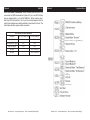
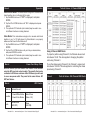
Traits & Values - 4 Channel DMX Mode
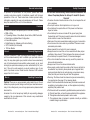
Sound Active Mode: This mode allows a single unit or several units
linked together, to run to the beat of the music.
1. Tap the MENU button until “SOUN” is displayed, and press ENTER.
2. Tap the UP or DOWN buttons until “ON” is displayed and press ENTER.
3. The optional UC3 Controller (not included) may be used to con-
trol different functions including blackout.
Show Mode: This mode allows a single unit or several units linked
together, to run 1 of 12 light shows. For Show Mode to run properly
make sure that Sound Active Mode is off.
1. Tap the MENU button until “SHND” is displayed, and press ENTER.
2. Tap the UP or DOWN buttons until you find your desired show, and press ENTER to confirm.
3. The optional UC3 Controller (not included) may be used to con-
trol different functions including blackout.
Revo 4
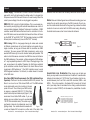
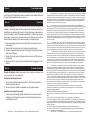
Power Cord Daisy Chain
With this feature you can connect the fixtures to one another
using the IEC input and output sockets. The quantity that can be
connected is 20 fixtures maximum. After 20 fixtures you will need
to use a new power outlet. They must be the same fixtures. DO
NOT mix fixtures.
Revo 4
Using 4 Channel DMX Mode:
To project a pattern using Channel 2, the Channel values must
be between 10-99. This also applies to changing the pattern
color using Channel 3.
To run the chases using Channel 2, the Channel 1 values must
be between 100-239. This also applies to controlling the chase
speed using Channel 3.
Revo 4
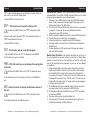
Traits & Values - 256 Channel DMX Mode
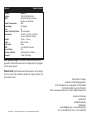
UC3 Control
Blackout Blackout the unit
Function
1. Sound White Strobe
2. Sound Color Strobe
Select Show
(Show 1-12)
Mode
Sound/Strobe
(LED OFF)
Show
(LED ON)
American DJ® - www.americandj.com - Revo 4 Instruction Manual Page 13
American DJ® - www.americandj.com - Revo 4 Instruction Manual Page 14