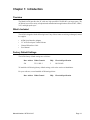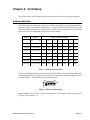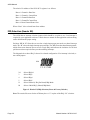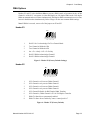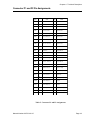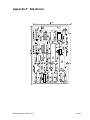
1
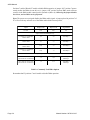
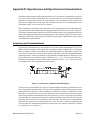
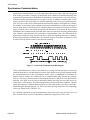
Model ACB4 Product Manual MANUAL NUMBER : 00750-104-15D FOREWORD This product manual provides information to install, operate and or program the referenced product(s) manufactured or distributed by ICS Advent. The following pages contain information regarding the warranty and repair policies. Check our Web site (www.icsadvent.com) for technical information, manuals, and BIOS updates. Technical assistance is also available at: 800-480-0044 (U.S.) or 858-677-0877 (international). Customer Comments: If you experience any problems with this manual or just want to provide some feedback, please send us a message using the online "Service Form" on our Web site (www.icsadvent.com) under "Support." Detail any errors you find. We will correct the errors or problems as soon as possible and post the revised manual in our online Support Library. Thank you. The information in this document is provided for reference only. ICS Advent does not assume any liability arising from the application or use of the information or products described herein. This document may contain or reference information and products protected by copyrights or patents and does not convey any license under the patent rights of ICS Advent, nor the rights of others. Copyright © 1999, a California Corporation, 6260 Sequence Drive, San Diego, CA 92121-4371. ICS Advent is a Registered Trademark of ICS Advent. All trademarks and registered trademarks are the property of their respective owners. All rights reserved. Printed in the United States of America. No part of this publication may be reproduced, stored in a retrieval system, or transmitted, in any form or by any means, electronic, mechanical, photocopying, recording , or otherwise, without the prior written permission of the publisher. Page - iii Guarantee A thirty day money-back guarantee is provided on all standard products sold. Special order products are covered by our Limited Warranty, however they may not be returned for refund or credit. EPROMs, RAM, Flash EPROMs or other forms of solid electronic media are not returnable for credit - but for replacement only. Extended Warranty available. Consult factory. Refunds In order to receive a refund on a product for the purchase price, the product must not have been damaged by the customer or by the common carrier chosen by the customer to return the goods and the product must be returned complete (meaning all manuals, software, cables, etc.) within 30 days of receipt and in an as-new and resalable condition. The Return Procedure must be followed to assure prompt refund. Restocking Charges Product returned after 30 days, and before 60 days, of the purchase will be subject to a minimum 20% restocking charge and charges for any damaged or missing parts. Products not returned within 60 days of purchase, or products which are not in an as-new and re-saleable condition, are not eligible for credit return and will be returned to the customer. Limited Warranty Effective April 1, 1998, all products carry a 2-year limited warranty. Within two years of purchase, ICS Advent will repair or replace, at our option, any defective product. ICS Advent will service the warranty for all standard catalog products for the first two years from the date of shipment. Please note: The 2-year warranty may not apply to special promotion items. Please consult the factory for warranty verification. The limited warranty is void if the product has been subjected to alteration, neglect, misuse, or abuse; if any repairs have been attempted by anyone other than ICS Advent or its authorized agent; or if the failure is caused by accident, acts of God, or other causes beyond the control of ICS Advent or the manufacturer. Neglect, misuse, and abuse shall include any installation, operation, or maintenance of the product other than in accordance with the user’s manual. No agent, dealer, distributor, service company, or other party is authorized to change, modify, or extend the terms of this Limited Warranty in any manner whatsoever. ICS Advent reserves the right to make changes or improvements in any product without incurring any obligation to similarly alter products previously purchased. Shipments not in compliance with this Guarantee and Limited Warranty Return Policy will not be accepted by ICS Advent. Page - iv Return Procedure For any Guarantee or Limited Warranty return, please contact ICS Advent's Customer Service at 800-480-0044 (U.S.) or 858-677-0877 (international) and obtain a Return Material Authorization (RMA) Number. All product(s) returned to ICS Advent for service or credit must be accompanied by a Return Material Authorization (RMA) Number. Freight on all returned items must be prepaid by the customer who is responsible for any loss or damage caused by common carrier in transit. Returns for Warranty must include a Failure Report for each unit, by serial number(s), as well as a copy of the original invoice showing date of purchase. To reduce risk of damage, returns of product must be in an ICS Advent shipping container. If the original container has been lost or damaged, new shipping containers may be obtained from ICS Advent Customer Service at a nominal cost. ICS Advent owns all parts removed from repaired products. ICS Advent uses new and reconditioned parts made by various manufacturers in performing warranty repairs and building replacement products. If ICS Advent repairs or replaces a product, its warranty term is not extended. ICS Advent will normally return your replacement or repaired items via Second Day Air. Overnight delivery or delivery via other carriers is available at an additional charge. Limitation of Liability In no event shall ICS Advent be liable for any defect in hardware, software, loss, or inadequacy of data of any kind, or for any direct, indirect, incidental, or consequential damages in connection with or arising out of the performance or use of any product furnished hereunder. ICS Advent liability shall in no event exceed the purchase price of the product purchased hereunder. The foregoing limitation of liability shall be equally applicable to any service provided by ICS Advent or its authorized agent. Some Sales Items and Customized Systems are not subject to the guarantee and limited warranty. However in these instances , any deviations will be disclosed prior to sales and noted in the original invoice. ICS Advent reserves the right to refuse returns or credits on software or special order items. Page - v Advisories Three types of advisories are used throughout the manual to stress important points or warn of potential hazards to the user or the system. They are the Note, the Caution, and the Warning. Following is an example of each type of advisory: Note: The note is used to present special instruction, or to provide extra information which may help to simplify the use of the product. CAUTION! A Caution is used to alert you to a situation which if ignored may cause injury or damage equipment. WARNING! A Warning is used to alert you of a situation which if ignored will cause serious injury. Cautions and Warnings are accented with triangular symbols. The exclamation symbol is used in all cautions and warnings to help alert you to the important instructions. The lightning flash symbol is used on the left hand side of a caution or a warning if the advisory relates to the presence of voltage which may be of sufficient magnitude to cause electrical shock. Use caution when servicing any electrical component. We have tried to identify the areas which may pose a Caution or Warning condition in this manual; however, ICS Advent does not claim to have covered all situations which might require the use of a Caution or Warning. You must refer to the documentation for any component you install into a computer system to ensure proper precautions and procedures are followed. Page - vi Table of Contents Chapter 1: Introduction ............................................................................................. 1-1 Overview ............................................................................................................................................ 1-1 What’s Included ................................................................................................................................. 1-1 Factory Default Settings .................................................................................................................... 1-1 Chapter 2: Card Setup .............................................................................................. 2-1 Address Selection ............................................................................................................................. 2-1 IRQ Selection (Header E8) ................................................................................................................. 2-2 DMA Options ..................................................................................................................................... 2-3 Header E3 ................................................................................................................................... 2-3 Header E5 ................................................................................................................................... 2-3 Headers E1 and E2 ........................................................................................................................... 2-5 RS-485 Enable .................................................................................................................................. 2-5 Chapter 3: Installation ............................................................................................... 3-1 Chapter 4: Technical Description............................................................................. 4-1 Features ............................................................................................................................................ 4-1 Internal Baud Rate Generator ...................................................................................................... 4-1 Programming The ACB4 Control/Status Port ...................................................................................... 4-1 Software Examples ..................................................................................................................... 4-2 Connector P1 and P2 Pin Assignments ............................................................................................. 4-3 RS-530/422/485 Line Termination ................................................................................................ 4-3 How to remain CE Compliant ............................................................................................................. 4-4 Chapter 5: Specifications ......................................................................................... 5-1 Environmental Specifications .............................................................................................................. 5-1 Power Consumption .................................................................................................................... 5-1 Mean Time Between Failures (MTBF) ......................................................................................... 5-1 Phyisical Dimensions .................................................................................................................. 5-1 Appendix A: Troubleshooting ................................................................................. A-1 Appendix B: Electrical Interface .............................................................................. B-1 RS-422 .............................................................................................................................................. B-1 RS-530 .............................................................................................................................................. B-1 RS-449 .............................................................................................................................................. B-1 RS-485 .............................................................................................................................................. B-2 Page - vii Appendix C: Direct Memory Access ....................................................................... C-1 Appendix D: Asynchronous and Synchronous Communications ...................... D-1 Asynchronous Communications ........................................................................................................ D-1 Synchronous Communications .......................................................................................................... D-2 Appendix E: ACB Developer Toolkit Diskette and ACB Resource Kit ................. E-1 Appendix F: Silk-Screen ...........................................................................................F-1 CE Declaration of Conformity List of Figures Figure 1: DIP-switch Illustration ............................................................................................................... 2-1 Figure 2: Header E8, IRQ Selection (Shown in Factory Default ) ............................................................. 2-2 Figure 3: Header E3 (Factory Default Settings) ....................................................................................... 2-3 Figure 4: Header E7 (Factory Default) ..................................................................................................... 2-3 Figure 5: Header E5 Clock Input/Output Modes ...................................................................................... 2-5 Figure 6: Asynchronous Communications Bit Diagram ............................................................................ D-1 Figure 7: Synchronous Communications Bit Diagram .............................................................................. D-2 List of Tables Table 1: Address Selection Table ............................................................................................................. 2-1 Table 2: Commonly Used DMA Options ................................................................................................... 2-4 Table 3: Status/Control Register Bit Definitions ........................................................................................ 4-1 Table 4: Status Register Examples ......................................................................................................... 4-2 Table 5: Connector P1 and P2 Assignments ............................................................................................ 4-3 Current Revision 15D December 2000 Page - viii Chapter 1: Introduction Chapter 1: Introduction Overview The Model ACB4 provides the PC with two high speed RS-530/422/485 sync/async ports. The ACB4 can be used in a variety of sophisticated communications applications such as SDLC, HDLC, X.25, and high speed async. Whats Included The ACB4 is shipped with the following items. If any of these items are missing or damaged, contact the supplier. ACB4 Serial Interface Adapter 3.5 ACB Developers Toolkit Diskette Channel B Interface Cable User Manual Factory Default Settings The ACB4 factory default settings are as follows: Base Address DMA Channels IRQ Electrical Specification 238 5 RS-530/422 TX: 1/RX: 3 To install the ACB4 using factory default settings, refer to the section on Installation. For your reference, record installed ACB4 settings below: Base Address DMA Channel Manual Number: 00750-104-15 IRQ Electrical Specification Page 1-1 ACB4 Manual This page intentionally left blank Page 1-2 Manual Number: 00750-104-15 Chapter 2: Card Setup Chapter 2: Card Setup The ACB4 contains several jumper straps for each port which must be set for proper operation. Address Selection The ACB4 occupies 8 consecutive I/O locations. A DIP-switch (SW1) is used to set the base address for these locations. The ACB4 can reside in any I/O location between 100 and 3F8 Hex. Be careful when selecting the base address as some selections conflict with existing PC ports. The following table shows several examples that usually do not cause a conflict. Address Binary A9 Switch Position Settings A0 1 2 3 4 5 6 7 238-23F 1000111XXX OFF ON ON ON OFF OFF OFF 280-288 1010000XXX OFF ON OFF ON ON ON ON 2A0-2A8 1010100XXX OFF ON OFF ON OFF ON ON 2E8-2EF 1011101XXX OFF ON OFF OFF OFF ON OFF 300-308 1100000XXX OFF OFF ON ON ON ON ON 328-32F 1100101XXX OFF OFF ON ON OFF ON OFF 3E8-3EF 1111101XXX OFF OFF OFF OFF OFF ON OFF Table 1: Address Selection Table The following illustration shows the correlation between the DIP-switch setting and the address bits used to determine the base address. In the example below, the address 300 Hex through 307 Hex is selected. 300 Hex = 11 0000 0XXX in binary representation. A9 A3 ON 1 2 3 4 5 6 7 Figure 1: DIP-switch Illustration Note: Setting the switch “On” or “Closed” corresponds to a “0” in the address, while leaving it “Off” or “Open” corresponds to a “1”. Manual Number: 00750-104-15 Page 2-1 ACB4 Manual The relative I/O address of the 85230 SCC registers is as follows: Base+0 Channel A Data Port Base+1 Channel A Control Port Base+2 Channel B Data Port Base+3 Channel B Control Port Base+4 Board Control/Status Port Where “Base” is the selected board base address. IRQ Selection (Header E8) The ACB4 has an interrupt selection jumper which should be set prior to use, if an interrupt is required by your application software. Consult the user manual for the application software being used to determine the proper setting. Positions “M” & “N” allow the user to select a single interrupt per port mode or a shared interrupt mode. The “N” selects the single interrupt per port mode. The “M” selects the shared interrupt mode, which allows more than one port to access a single IRQ, and indicates the inclusion of a 1K ohm pull-down resistor required on one port when sharing interrupts. The diagram below shows IRQ 5 selected in a shared configuration. If no interrupt is desired, remove both jumpers. E8 2 3 4 5 NM 2/9 Selects IRQ2/9 3 Selects IRQ3 4 Selects IRQ4 5 Selects IRQ5 N Selects Normal (1 IRQ Per Board) IRQ Mode M Selects “Multi-IRQ” (Shared) IRQ Mode Figure 2: Header E8, IRQ Selection (Shown in Factory Default ) Note: The actual silk-screen for the ACB4 may have a “2” in place of the IRQ “2/9” selection. Page 2-2 Manual Number: 00750-104-15 Chapter 2: Card Setup DMA Options Headers E3 and E5 select the Direct Memory Access (DMA) mode of operation for the ACB4. Channel A of the SCC can operate in either half-duplex or full duplex DMA mode. Full duplex DMA can transmit and receive data simultaneously. Half-duplex DMA can transmit or receive data, but not in both directions simultaneously. Refer to Page 6 for the most common DMA settings. Note: If DMA is not used, remove all of the jumpers on E3 and E5. Header E3 E3 1 2 3 4 5 6 1 DACK 1 Or 3 Acknowledge For Two Channel Mode 2 Two Channel A/B Mode A3B1 3 Two Channel A/B Mode A1B3 4 On = Ch. A Only / Off = Ch. B Only 5 DACK 3 DMA Acknowledge Channel 3 6 DACK 1 DMA Acknowledge Channel 1 Figure 3: Header E3 (Factory Default Settings) Header E5 E5 1 2 3 4 5 6 7 8 1 SCC Channel A or B can use DMA Channel 3 2 SCC Channel A only can use DMA Channel 3 3 SCC Channel A or B can use DMA Channel 1 4 SCC Channel A only can use DMA Channel 1 5 SCC Channel B Enable for Half Duplex DMA Transfers 6 SCC Channel A, DMA Channel 1 & 3 for Full Duplex Transfers 7 DMA Tri-State drivers permanently enabled 8 DMA Tri-State drivers enabled by status / control port bit 7 Figure 4: Header E7 (Factory Default) Manual Number: 00750-104-15 Page 2-3 ACB4 Manual Positions 7 and 8 of Header E7 enable or disable DMA operation. A jumper “ON” position 7 permanently enables the DMA tri-state drivers. A jumper “ON” position 8 places DMA under software control via the DMA enable control port bit (located at (Base+4)). Removing the jumper disables the drivers, and no DMA can be performed. Note: The power-on reset signal disables the DMA enable signal. A jumper placed in position 7 of E7 will override any software use of the DMA enable/disable status port bit. Option Jumpe rs on E3 Jumpe rs on E5 Program 8530 No DMA None None N/A Single Channel DMA (Half Duplex only) CH A DMA CH 1 Half Duplex CH B No DMA 4,6 4,5 WAIT/REQ A CH A DMA CH 1 Half Duplex CH B No DMA 4,5 2,5 WAIT/REQ A CH B DMA CH 1 Half Duplex CH B No DMA 6 only 3,5 WAIT/REQ B CH B DMA CH 1 Half Duplex CH A No DMA 5 only 1,5 WAIT/REQ B Full Duplexusing both DMA Channels 1 and 3 CH A DMA CH 1 Receive Data CH A DMA CH 3 Transmit Data 1,4 1,4,6 WAIT/REQ A DTR/REQ A CH A DMA CH 3 Receive Data CH A DMA CH 1 Transmit Data 1,4 2,3,6 WAIT/REQ A DTR/REQ A Table 2: Commonly Used DMA Options Remember that E5 positions 7 and 8 enable or disable DMA operation. Page 2-4 Manual Number: 00750-104-15 Chapter 2: Card Setup Headers E1 and E2 Headers E1 and E2 set the input/output clock modes for the transmit clock (TXC), as well as the RS485 enable/disable. E1 sets the clock mode for the SCC Channel B (Port 2), while E2 sets the clock mode for the SCC channel A (Port 1). TX RX TX RX E1, E2 Silkscreen: E I O I Table: 1 2 3 4 5 O O O O O 6 7 8 9 1 Enable (for RS-485 mode only) 2 Transmit Clock Input (TXC In on pins 12 and 15 of the DB-25) 3* Transmit Clock Output (TXC Out on pins 12 and 15 of the DB-25) 4* Receive Clock Input (RXC In on pins 17 and 9)** 5 Not Used (Leave Jumper Off) 6* Transmit Clock Output (TXC Out on pins 12 and 15 of the DB-25) 7* Transmit Clock Output (TXC Out on pins 12 and 15 of the DB-25) 8 Not Used (Leave Jumper Off)** 9 Not Used (Leave Jumper Off)** Figure 5: Header E5 Clock Input/Output Modes *Factory default **These jumpers are always configured in this manner and should not be removed or replaced. Note: The TXC pins (12 and 15) can be programmed as either an input or an output. The TSET pins (11 and 24) will always echo the TXC pins, regardless of whether the TXC pins are selected as an input or an output. RS-485 Enable To enable the driver in RS-485 mode, place a jumper over position 1 on E1 for port 2 and position 1 on E2 for port 1, then assert RTS (Write Register 5 position D1=1) to transmit and de-assert RTS (Write Register 5 position D1=0) when finished transmitting. To permanently enable the driver (normal EIA-530/RS-422 point to point mode), remove jumper at position 1 on E1 and E2. Half-duplex twowire operation is also possible by connecting TX+ to RX+ and TX- to RX- in the cable hood. The unused EIA-530 signals can be left disconnected or floating, as they have pull-up/pull-down resistors to provide an “On” condition, if not connected. Manual Number: 00750-104-15 Page 2-5 ACB4 Manual This page intentionally left blank Page 2-6 Manual Number: 00750-104-15 Chapter 3: Installation Chapter 3: Installation The ACB4 can be installed in any of the PC expansion. The ACB4 contains several jumper straps for each port which must be set for proper operation. 1. Turn off PC power. Disconnect the power cord. 2. Remove the PC case cover. 3. Locate two available slots and remove the blank metal slot covers. 4. Install the Channel B cable into Box Header E4. This cable is keyed to prevent improper installation. Gently insert the ACB4 into the slot. Make sure that the adapter is seated properly. Attach the Channel B cable to the adjacent slot with the retaining screw. (If Channel B of the ACB4 is not used, the adapter cable is not required). 5. Replace the cover. 6. Connect the power cord. Installation is complete. Manual Number: 00750-104-15 Page 3-1 ACB4 Manual This page intentionally left blank Page 3-2 Manual Number: 00750-104-15 Chapter 4: Technical Description Chapter 4: Technical Description The ACB4 utilizes the Zilog 85230 Enhanced Serial Communications Controller (ESCC). This chip features programmable baud rate, data format and interrupt control, as well as DMA control. Refer to the SCC Users Manual for details on programming the SCC 85230 chip. Features • Two channels of sync/async communications using 8530 chip • DMA supports data rate greater than 1 million bps (bits per second) • Select-able Port Address, IRQ level (2/9,3,4,5), and DMA channel (1 or 3) • EIA-530/422 interface with full modem control supports TD, RD, RTS, CTS, DSR, DCD, DTR, TXC, RXC, LL, RL, TM signals • Jumper options for clock source • Software programmable baud rate Internal Baud Rate Generator The baud rate of the SCC is programmed under software control. The standard oscillator supplied with the board is 7.3728 MHz. However, other oscillator values can be substituted to achieve different baud rates. Programming The ACB4 Control/Status Port The ACB4 occupies eight Input/Output (I/O) addresses. The first four are used by the SCC chip, while the fifth address ((Base+4)) is the address of the on-board Control/Status Port. This port is used to set the Data Terminal Ready (DTR) signal, to enable or disable DMA under program control, and to monitor the Data Set Ready (DSR) input signals from the modem. The following table lists bit positions of the Control/Status port. Bit Output Port Bits Input Port Bits 0 DTR A 1=On, 0=Off DSR A 1=On, 0=Off 1 DTR B 1=On, 0=Off DSR B 1=On, 0=Off 2- 6 7 Not Used DMA Enable 1=On, 0=Off Not Used Not Used Figure 3: Status/Control Register Bit Definitions Manual Number: 00750-104-15 Page 4-1 ACB4 Manual Software Examples Function Program Bits Turn On CH A DTR Out Base+4, XXXX XXX1 Turn On CH B DTR Out Base+4, XXXX XX1X Turn Off CH A DTR Out Base+4, XXXX XXX0 Turn Off CH B DTR Out Base+4, XXXX XX0X Turn On CH A LL Out Base+4, XXXX X1XX Turn On CH B LL Out Base+4, XXX1 XXXX Turn On CH A RL Out Base+4, XXXX 1XXX Turn On CH B RL Out Base+4, XX1X XXXX Turn Off CH A LL Out Base+4, XXXX X0XX Turn Off CH B RL Out Base+4, XX0X XXXX Enable DMA Drivers Out Base+4, 1XXX XXXX Disable DMA Drivers Out Base+4, 0XXX XXXX Test CH A DSR In Base+4, Mask=0000 0001 Test CH B DSR In Base+4, Mask=0000 0010 Test CH A TM In Base+4, Mask=0000 0100 Test CH B TM In Base+4, Mask=0001 0000 Table 4: Status Register Examples Page 4-2 Manual Number: 00750-104-15 Chapter 4: Technical Description Connector P1 and P2 Pin Assignments Signal Name GND Pin# M ode Ground 7 Input RS- 422 RDB RX+ Receive Positive 16 Input RS- 422 RDA RX- Receive Negative 3 Input RS- 422 CTSB CTS+ Clear to Send Pos. 13 Input RS- 422 CTSA CTS- Clear to Send Neg. 5 Input RS- 422 DSRB DSR+ Data Set Ready Pos. 22 Input RS- 422 DSRA DSR- Data Set Ready Neg. 6 Input RS- 422 DCDB DCD+ Data Carr. Detect Pos. 10 Input RS- 422 DCDA DCD- Data Carr. Detect Neg. 8 Input RS- 422 TDB TX+ Transmit Pos. 14 Output RS- 422 TDA TX- Transmit Neg. 2 Output RS- 422 RTSB RTS+ Req. to Send Pos. 19 Output RS- 422 RTSA RTS- Req. to Send Neg. 4 Output RS- 422 DTRB DTR+ Data Term. Ready Pos. 23 Output RS- 422 DTRA DTR- Data Term. Ready Neg. 20 Output RS- 422 TXCB TXC+ Transmit Clock Pos. 12 Input or Output TXCA TXC- Transmit Clock Neg. 15 Input or Output RXCB RXC+ Receive Clock Pos. 9 Input Only RXCA RXC- Receive Clock Neg. 17 Input Only TSETB TSET+ Terminal Timing Pos. 11 Output TSETA TSET- Terminal Timing Neg. 24 Output LL Local Loop Back 18 Output (for testing) RL Remote Loop Back 21 Output (for testing) TM Test Mode 25 Input Table 5: Connector P1 and P2 Assignments Manual Number: 00750-104-15 Page 4-3 ACB4 Manual RS-530/422/485 Line Termination Typically, each end of the RS-530/422/485 bus must have line terminating resistors. A 100 ohm resistor is across each RS-530/422/485 input in addition to a 1K ohm pull-up/pull-down combination that bias the receiver inputs. The RS-530 specification calls for a 100 ohm 1/2 watt resistor between the signal ground and the chassis ground. On the IBM PC, these two grounds are already connected together, therefore this resistor is omitted. How to remain CE Compliant In order for machines to remain CE compliant, only CE compliant parts may be used. To keep a chassis compliant it must contain only compliant cards, and for cards to remain compliant they must be used in compliant chassis. Any modifications made to the equipment may affect the CE compliance standards and should not be done unless approved in writing by Industrial Computer Source. The Model ACB4 is designed to be CE Compliant when used in an CE compliant chassis. Maintaining CE Compliance also requires proper cabling and termination techniques. The user is advised to follow proper cabling techniques from sensor to interface to ensure a complete CE Compliant system. Industrial Computer Source does not offer engineering services for designing cabling or termination systems. Although Industrial Computer Source offers accessory cables and termination panels, it is the user's responsibility to ensure they are installed with proper shielding to maintain CE Compliance. Page 4-4 Manual Number: 00750-104-15 Chapter 5: Specifications Chapter 5: Specifications Environmental Specifications Specification Operating Storage 0° to 50° C 32° to 122° F -20° to 70° C -4° to 158° F 0 to 90% R.H Non-Condensing 0 to 90% R.H Non-Condensing Temperature Range Humidity Range Power Consumption Supply Line ratings are in milliamps Supply Line +5VDC Rating (mA) 195mA Mean Time Between Failures (MTBF) Greater than 150,000 hours. (Calculated) Phyisical Dimensions Board length = 6.2 inches. Board Width including Goldfingers = 4.2 inches. Please see Appendix G for board layout and dimensions. Manual Number: 00750-104-15 Page 5-1 ACB4 Manual This page intentionally left blank Page 5-2 Manual Number: 00750-104-15 Appendix A: Troubleshooting Appendix A: Troubleshooting An ACB Developers Toolkit Diskette is supplied with the adapter and will be used in the troubleshooting procedures. By using this diskette and following these simple steps, most common problems can be eliminated without the need to call Technical Support. 1. Identify all I/O adapters currently installed in your system. This includes your on-board serial ports, controller cards, sound cards etc. The I/O addresses used by these adapters, as well as the IRQ (if any) should be identified. 2. Configure your ACB adapter so that there is no conflict with currently installed adapters. No two adapters can occupy the same I/O address. 3. Make sure the ACB adapter is using a unique IRQ. While theadapter does allow the sharing of IRQs, many other adapters (i.e. SCSI adapters & on-board serial ports) do not. The IRQ is typically selected via an on-board header block. Refer to the section on Card Setup for help in choosing an I/O address and IRQ. 4. Make sure the ACB adapter is securely installed in a motherboard slot. 5. Use the supplied diskette and User Manual to verify that the ACB adapter is configured correctly. The supplied diskette contains a diagnostic program SSDACB that will verify if an adapter is configured properly. This diagnostic program is written with the user in mind and is easy to use. Refer to the UTIL.txt file found in the \UTIL sub-directory on the supplied diskette for detailed instructions on using SSDACB. The following are known I/O conflicts: The 278 and 378 settings may conflict with your printer I/O adapter. 3B0 cannot be used if a Monochrome adapter is installed. 3F8-3FF is typically reserved for COM1: 2F8-2FF is typically reserved for COM2: 3E8-3EF is typically reserved for COM3: 2E8-2EF is typically reserved for COM4:. This is a valid setup option for the ACB4. However, since only 10 address lines are actually decoded, a possible conflict with an advanced video card emulating the IBM XGA adapter (8514 register set) may occur. Manual Number: 00750-104-15 Page A-1 ACB4 Manual This page intentionally left blank Page A-2 Manual Number: 00750-104-15 Appendix B: Electrical Interface Appendix B: Electrical Interface RS-422 The RS-422 specification defines the electrical characteristics of balanced voltage digital interface circuits. RS-422 is a differential interface that defines voltage levels and driver/receiver electrical specifications. On a differential interface, logic levels are defined by the difference in voltage between a pair of outputs or inputs. In contrast, a single ended interface, for example RS-232, defines the logic levels as the difference in voltage between a single signal and a common ground connection. Differential interfaces are typically more immune to noise or voltage spikes that may occur on the communication lines. Differential interfaces also have greater drive capabilities that allow for longer cable lengths. RS-422 is rated up to 10 Megabits per second and can have cabling 4000 feet long. RS-422 also defines driver and receiver electrical characteristics that will allow 1 driver and up to 32 receivers on the line at once. RS-422 signal levels range from 0 to +5 volts. RS-422 does not define a physical connector. RS-530 RS-530 (a.k.a. EIA-530) compatibility means that RS-422 signal levels are met, and the pin-out for the DB-25 connector is specified. The Electronic Industry Association (EIA) created the RS-530 specification to detail the pin-out, and define a full set of modem control signals that can be used for regulating flow control and line status. The RS-530 specification defines two types of interface circuits, Data Terminal Equipment (DTE) and Data Circuit-Terminating Equipment (DCE). The Sealevel Systems adapter is a DTE interface. RS-449 RS-449 (a.k.a. EIA-449) compatibility means that RS-422 signal levels are met, and the pin-out for the DB-25 connector is specified. The EIA created the RS-449 specification to detail the pin-out, and define a full set of modem control signals that can be used for regulating flow control and line status. Manual Number: 00750-104-15 Page B-1 ACB4 Manual RS-485 RS-485 is backwardly compatible with RS-422; however, it is optimized for partyline or multi-drop applications. The output of the RS-422/485 driver is capable of being Active (enabled) or Tri-State (disabled). This capability allows multiple ports to be connected in a multi-drop bus and selectively polled. RS-485 allows cable lengths up to 4000 feet and data rates p to 10 Megabits per second. The signal levels for RS-485 are the same as those defined by RS-422. RS-485 has electrical characteristics that allow for 32 drivers and 32 receivers to be connected to one line. This interface is ideal for multi-drop or network environments. RS-485 tri-state driver (not dual-state) will allow the electrical presence of the driver to be removed from the line. The driver is in a tri-state or high impedance condition when this occurs. Only one driver may be active at a time and the other driver(s) must be tri-stated. The output modem control signal Request to Send (RTS) controls the state of the driver. Some communication software packages refer to RS-485 as RTS enable or RTS block mode transfer. RS-485 can be cabled in two ways, two wire and four wire mode. Two wire mode does not allow for full duplex communication, and requires that data be transferred in only one direction at a time. For half-duplex operation, the two transmit pins should be connected to the two receive pins (Tx+ to Rx+ and Tx- to Rx-). Four wire mode allows full duplex data transfers. RS-485 does not define a connector pin-out or a set of modem control signals. RS-485 does not define a physical connector. Page B-2 Manual Number: 00750-104-15 Appendix C: Direct Memory Access Appendix C: Direct Memory Access In many instances it is necessary to transmit and receive data at greater rates than would be possible with simple port I/O. In order to provide a means for higher rate data transfers, a special function called Direct Memory Access (DMA) was built into the original IBM PC. The DMA function allows the ACB4 (or any other DMA compatible interface) to read or write data to or from memory without using the Microprocessor. This function was originally controlled by the Intel 8237 DMA controller chip, but may now be a combined function of the peripheral support chip sets (i.e. Chips & Technology or Symphony chip sets). During a DMA cycle, the DMA controller chip is driving the system bus in place of the Microprocessor providing address and control information. When an interface needs to use DMA, it activates a DMA request signal (DRQ) to the DMA controller, which in turn sends a DMA hold request to the Microprocessor. When the Microprocessor receives the hold request it will respond with an acknowledge to the DMA controller chip. The DMA controller chip then becomes the owner of the system bus providing the necessary control signals to complete a Memory to I/O or I/O to Memory transfer. When the data transfer is started, an acknowledge signal (DACK) is sent by the DMA controller chip to the ACB4. Once the data has been transferred to or from the ACB4, the DMA controller returns control to the Microprocessor. To use DMA with the ACB4 requires a thorough understanding of the PC DMA functions . The ACB Developers Toolkit demonstrates the setup and use of DMA with several source code and high level language demo programs. Please refer to the SCC Users Manual for more information. Manual Number: 00750-104-15 Page C-1 ACB4 Manual This page intentionally left blank Page C-2 Manual Number: 00750-104-15 Appendix D: Asynchronous and Synchronous Communications Appendix D: Asynchronous and Synchronous Communications Serial data communications implies that individual bits of a character are transmitted consecutively to a receiver that assembles the bits back into a character. Data rate, error checking, handshaking, and character framing (start/stop bits or sync characters) are pre-defined and must correspond at both the transmitting and receiving ends. The techniques used for serial communications can be divided two groups, asynchronous and synchronous. When contrasting asynchronous and synchronous serial communications, the fundamental differences deal with how each method defines the beginning and end of a character or group of characters. The method of determining the duration of each bit in the data stream is also an important difference between asynchronous and synchronous communications. The remainder of this section is devoted to detailing the differences between character framing and bit duration implemented in asynchronous and synchronous communications. Asynchronous Communications Asynchronous communications is the standard means of serial data communication for PC compatibles and PS/2 computers. The original PC was equipped with a communication or COM: port that was designed around an 8250 Universal Asynchronous Receiver Transmitter (UART). This device allows asynchronous serial data to be transferred through a simple and straightforward programming interface. Character boundaries for asynchronous communications are defined by a starting bit followed by a pre-defined number of data bits (5, 6, 7, or 8). The end of the character is defined by the transmission of a pre-defined number of stop bits (usual 1, 1.5 or 2). An extra bit used for error detection is often appended before the stop bits. 2GG(YHQ ,GOHVWDWHRI OLQH WR'DWD%LWV RU 5HPDLQ,GOHRU 8QXVHG QH[WVWDUWELW 3%,7 6723 Figure 6: Asynchronous Communications Bit Diagram This special bit is called the parity bit. Parity is a simple method of determining if a data bit has been lost or corrupted during transmission. There are several methods for implementing a parity check to guard against data corruption. Common methods are called (E)ven Parity or (O)dd Parity. Sometimes parity is not used to detect errors on the data stream. This is referred to as (N)o parity. Because each bit in asynchronous communications is sent consecutively, it is easy to generalize asynchronous communications by stating that each character is wrapped (framed) by pre-defined bits to mark the beginning and end of the serial transmission of the character. The data rate and communication parameters for asynchronous communications have to be the same at both the transmitting and receiving ends. The communication parameters are baud rate, parity, number of data bits per character, and stop bits (i.e. 9600,N,8,1). Manual Number: 00750-104-15 Page D-1 ACB4 Manual Synchronous Communications Synchronous Communications is used for applications that require higher data rates and greater error checking procedures. Character synchronization and bit duration are handled differently than asynchronous communications. Bit duration in synchronous communications is not necessarily predefined at both the transmitting and receiving ends. Typically, in addition to the data signal, a clock signal is provided. This clock signal will mark the beginning of a bit cell on a pre-defined transmission. The source of the clock is predetermined and sometimes multiple clock signals are available. For example, if two nodes want to establish synchronous communications, point A could supply a clock to point B that would define all bit boundaries that A transmitted to B. Point B could also supply a clock to point A that would correspond to the data that A received from B. This example demonstrates how communications could take place between two nodes at completely different data rates. Character synchronization with synchronous communications is also very different than the asynchronous method of using start and stop bits to define the beginning and end of a character. When using synchronous communications a pre-defined character or sequence of characters is used to let the receiving end know when to start character assembly. %LW7LPH &ORFN %LW %LW6WDWH 'DWD /6% 6\QF&KDUDFWHU 'DWD&KDUDFWHU Figure 7: Synchronous Communications Bit Diagram This pre-defined character is called a sync character or sync flag. Once the sync flag is received, the communications device will start character assembly. Sync characters are typically transmitted while the communications line is idle or immediately before a block of information is transmitted. To illustrate with an example, lets assume that we are communicating using eight bits per character. Point A is receiving a clock from point B and sampling the receive data pin on every upward clock transition. Once point A receives the pre-defined bit pattern (sync flag), the next eight bits are assembled into a valid character. The following eight bits are also assembled into a character. This will repeat until another pre-defined sequence of bits is received (either another sync flag or a bit combination that signals the end of the text, e.g., EOT). The actual sync flag and protocol varies depending on the sync format (SDLC, BISYNC, etc.). For a detailed explanation of serial communications, please refer to the book Technical Aspects of Data Communications by John E. McNamara, published by Digital Press (DEC) 1982. Page D-2 Manual Number: 00750-104-15 Appendix E: ACB Developer Toolkit Diskette and ACB Resource Kit Appendix E: ACB Developer Toolkit Diskette and ACB Resource Kit The ACB Developer Toolkit diskette provides sample software and technical insight to aid in the development of reliable applications and device drivers for the ACB family of communication cards. The goal in publishing this collection of source code and technical information is two-fold. First is to provide the developer with ample information to develop ACB based applications. Second is to provide a channel for suggestions into the technical support efforts. The ACB Resource Kit provides a brief overview of the ACB product line and is available at your request. Topics concerning applications and integration are covered to provide a complete overview of the versatile ACB family. During ACB development, if any questions, comments, or suggestions arise, please contact Technical Support at the numbers listed at the end of this manual. Manual Number: 00750-104-15 Page E-1 ACB4 Manual This page intentionally left blank Page E-2 Manual Number: 00750-104-15 Appendix F: Silk-Screen Appendix F: Silk-Screen Manual Number: 00750-104-15 Page F-1 ACB4 Manual This page intentionally left blank Page F-2 Manual Number: 00750-104-15 Chapter X: XXXXX ICS Advent Manual # 00750-104-14A Addendum In an effort to provide the most value to you, our customer, this product has been upgraded at no additional cost to provide an 85230-8 ESCC in place of the standard 8530-6 SCC. This upgrade maintains 100% compatibility with the previous controller chip and also offers additional benefits that could not be enjoyed with the 8530-6 SCC. 85230 ESCC -vs- 8530 SCC The 85230-8 ESCC has larger FIFOs and enhanced SDI.C/HDLC capabilities. If you have been using this ACB card with the 8530-6 SCC then you do not need to modify any code to continue running just as you have been. Should you decide to take advantage of the additional features of the 85230-8 ESCC then simply refer to the application notes included on your ACB Developer's Toolkit Diskette (App Note: AN00015.TXT). Existing source code and examples on this diskette can be modified easily to take advantage of the 85230-8 ESCC. For details on fully exploiting the enhanced versions of the SCC, please refer to the Zilog SCC User Manual. Support Should you have questions regarding this upgrade please contact our technical support personnel. Manual Number: 00750-104-14 Page 1 Declaration of Conformity Information Technology Equipment 6260 Sequence Drive San Diego, CA 92121-4371 (800) 523-2320 / (858) 677-0877 The product(s) covered by this declaration: ACB4 The European Union directives covered by this declaration: EMC Directive 89/336/EEC and Low Voltage Directive 73/23/EEC The basis on which conformity is declared: EN 50081-1:1992 Emissions, Generic Requirements -EN 55022 Limits and Methods of Measurement of Radio Disturbance Characteristics of Information Technology Equipment EN 50082-1:1992 Immunity, Generic Requirements -EN61000-4-2:1995 Electrostatic Discharge (ESD) Immunity -EN61000-4-3:1995 Radiated RF Field Immunity -EN61000-4-4:1995 EFT Immunity for AC and I/O Lines EN 60950:1992 Safety of Information Technology Equipment The technical documentation required to demonstrate this product meets the requirements of the EMC Directive and the Low Voltage Directive has been compiled by ICS Advent and is available for inspection by the relevant enforcement authorities. The CE mark was first applied in 2000. Attention The attention of the specifier, purchaser, installer, or user is drawn to special measures and limitations for use which must be observed when the product is taken into service to maintain compliance with the above directives. Details of these special measures and limitations are in the product manual. Mr. Jim Jameson President & Chief Executive Officer ICS Advent Europe Ben Turner Industrial Road Oving Road Chichester, West Sussex PO19 4ET, UK