1
Functions
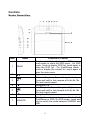
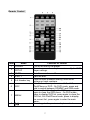
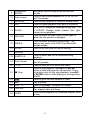
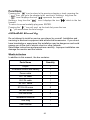
Pressing the "
" icon to return to the previous chapter or track, pressing the
"
" icon, you go to the chapter to the next track. Holding a long time the
"
" icon it displays the icon " " represents the rewind.
Holding a long time the "
" icon it displays the icon "
" which is the fast
forward.
To return to normal modality play press ENTER.
Pressing the "
" icon will scroll up the track list, press the icon
"
" you scroll down the list of songs.
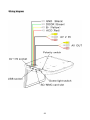
Installation and Wiring
Do not attempt to install or service your player by yourself. Installation and
servicing in electronic equipment and automotive accessories . If you do not
have knowledge or experience this installation may be dangerous and could
expose you to the risk of electric shock or other hazards.
Read these instructions and precautions carefully . Improper installation can
damage the monitor and the vehicle .
What's in the box
In addition to this manual , the box contains :
Parts Name
Quantity
Player
1
IR remote control with battery
1
Power cable
1
AV 1 IN cable
1
AV 2 IN cable
1
AV OUT cable
1
ST4.2x16 screw
8
TB2.6x6 screw
7
PM 4x8 screw
4
Installation Bracket
1
Trim Ring
1
User manual
1
20