1
GB
Using the refrigerator/freezer
Electronic control
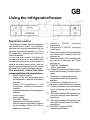
1.
Freezer’s
ON/OFF
switching
pushbuttons
2. Refrigerator’s ON/OFF switching
pushbuttons
3. Green light-emitting LED signalling that
the refrigerator’s chamber has been
switched on
4. Blue light-emitting LED signalling that
the freezer’s chamber has been
switched on
5. “FREEZE” pushbutton
6. “COOL” pushbutton
7,8 Display showing the set temperature,
time of super freezing, and alarm status
codes
9. Pushbutton for displaying the real
temperature inside the refrigerator’s
chamber
10. Pushbutton for displaying the real
temperature inside the freezers’ chamber
11. Function pushbutton (for quick freezing
quick cooling adjusting the ligh on the
display)
12. Blue light-emitting LED signalling that
the quick cooling function has been
switched on
13. Blue light-emitting LED signalling that
the quick freezing function has been
switched on
14. “HOLIDAY” function ON/OFF
switching pushbutton
The refrigerator-freezer has been equipped
with the electronic control. The equipment
has been set-up by the manufacturer for the
optimum temperature operation i.e. +5oC in
the refrigerator’s chamber and –18oC in the
freezer’s chamber.
In case the user intends to modify the
manufacturer’s set-up the new setting shall
be stored in the electronic control memory. In
case of the power supply failure, after the
power supply has been restored, the control
will keep in the memory the latest settings.
The electronic control has been
equipped with the following functions:
-
-
-
ON/OFF switch function
Display of the real temperature inside
the refrigerator’s chamber and freeze’s
chamber
Setting the temperatures in the
refrigerator’s chamber and freezer’s
chamber
Automatic defrosting of the refrigerator’s
chamber
Quick freezing
Quick cooling
“HOLIDAY” function
adjustment of the display contrast
acoustic and visual signalling of alarms
visual signalling with use of LEDs of
switched on functions
7