1
Overview
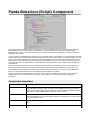
Panda Behaviour is a Behaviour Tree (BT) engine integrated with a simple scripting language named Panda Script. You
have now the the power of BT at your finger tips. Write high-level and scalable AI logic with the flexibility and simplicity of
plain text script. Though Behaviour tree is a tool for programmers, its simplicity requires only basic knowledge about
programming to start using it.
Panda Behaviour is build in order to easily iterate over the design of your game BT logic: make modifications to your
scripts, refresh Unity and see the result of your changes in play mode without waiting for any compilation. Furthermore,
you can visualize the runtime execution of your BT and debug it in realtime.
To keep things simple, Panda Behaviour features scope is kept to the bare minimum: a BT engine. You know what you
need for your game, and what BT tasks you need. Creating a custom BT task is as simple as writing a c# sharp method,
in fact this is the way you define a new task!
Please have a look at the provide examples in PandaBehaviour/Examples to get started.
Installation
Download the Panda Behaviour package from the Unity Asset Store, then import it into your project. Once the package
has been imported, a new directory named PandaBehaviour will be present at the root of your the Assets folder. The
PandaBehaviour folder contains the core of Panda Behaviour, the documentation and some examples to get started.