1
RSK+RX63N-256K
6. Configuration
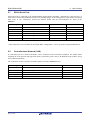
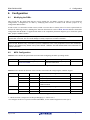
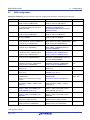
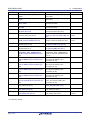
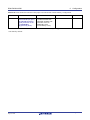
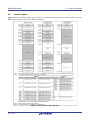
Table 6-17 below details the different configurations and functions of the USB jumpers.
Reference
Position
J17*
J20*
Pin 1 and 2 shorted
Function
Pin 1 and 2 shorted
Bus-powered
(via R281)
Pin 2 and 3 shorted
All open
Self-powered
(via R265)
Table 6-17: USB Jumpers (VBUS0 Self-powered/Bus-powered Configuration)
* Not fitted by default. Ensure J17 and J20 have the same configuration.
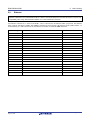
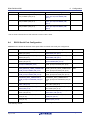
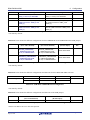
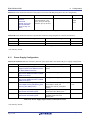
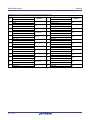
Table 6-18 below details the different configurations and functions of the USB jumpers.
Reference
J18
Position One
Position Two
Position Three
(Pin 1 and 2 Shorted)
(Pin 2 and 3 Shorted)
(All Pins Open)
Related Ref.
Host mode.
Function mode.
OTG mode.
(Ensure R269 is
removed)
(Ensure R269 is
removed)
(Ensure R269 is fitted)
R269*
Table 6-18: USB Jumpers (VBUS0 Host/Function/OTG Select)
* Not fitted by default.
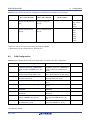
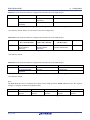
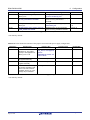
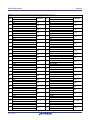
Table 6-19 below details the different configurations and functions of the USB jumpers.
Reference
Position
J19*
Pin 1 and 2 shorted
Pin 2 and 3 shorted
(via R272)
J20*
Function
Pin 2 and 3 shorted
Bus-powered
All open
Self-powered
Table 6-19: USB Jumpers (VBUS1 Self-powered/Bus-powered Configuration)
* Not fitted by default.
Note:
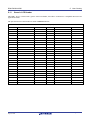
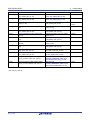
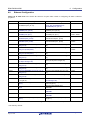
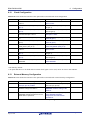
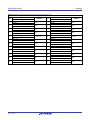
The RSK+RX63N board is configured for Function mode USB operations. Table 6-20 below lists the required
changes to configure the board for USB Host mode.
Reference
Position
J3
Pin 2 and 3
shorted
J4
Pin 2 and 3
shorted
J15
Pin 1 and 2
shorted
J16
Pin 1 and 2
shorted
J18
Pin 1 and 2
shorted
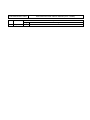
Table 6-20: USB0 Jumpers (Host Mode Configuration)
R20UT3076EG0100 Rev. 1.00
Aug 14, 2014
Page 31 of 54