1
Applications Menu
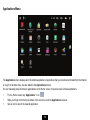
The Applications menu displays all of the tablet’s applications. Applications that you download and install from the Internet,
or copy from another drive, are also added to the Applications screen.
You can manually place shortcuts to applications on the Home screen, for quick access to those applications.
y
From a Home screen, tap “Applications.” Icon
y
y
Slide your finger from the top to bottom of the screen to scroll the Applications screens.
Tap an icon to launch the desired application.
13