1
6.
Operating Guide
6.1
.1.. Application method
6.1.1 Measurement
A
B
C
D
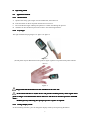
Squeeze the clamp, put a finger into the rubber hole, then release it.
Press the button on the front panel until the device turns on.
Do not shake the finger and keep the patient in a stable state during the process.
The data can be read directly from the screen in the measuring interface.
6.1.2 Lay finger
The right method of laying finger is as figure 3 or figure 4.
figure 3
(Actual probe may be different from the probe as figure 3,please accept the actual probe with the
device)
Figure 4
Fingernails and the luminescent tube should be in the same side.
If the alarm function is on,the device will provide medium-priority alarm signal when
probe or finger is out
out.. Intermittent alarm will occur and the user interface presents "FINGER
OUT".
Medium priority indicating that prompt operator response is required.
6.1.3 Change display mode:
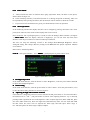
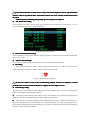
In the measuring interface, you can change the display mode by short pressing the button .
6