1
3 Protection Functions Setting
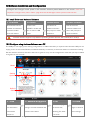
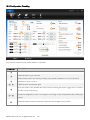
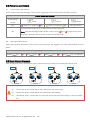
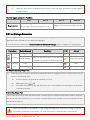
Set protection in the Assistant software ->Advanced page. FailSafe and Low voltage protections are required.
3.1 FailSafe
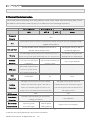
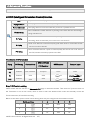
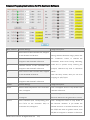
FailSafe works when the Transmitter (TX) signal is lost, the flight control system will automatically control the
aircraft to reduce injuries or damage.
TX
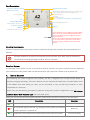
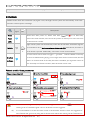
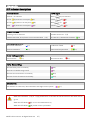
Descriptions
signal
≥6(
Home
30secs later after power on; 10secs later after
Point
Motors have been started; auto-record the position as home point at the first time
(HP)
the throttle stick is raised.
or no Red LED);
Flight control system can automatically control the aircraft after Transmitter signal is
≥ lost. It should be set in Assistant software->Advanced->F/S, while Hover, Go-Home or
FailSafe
6
Alt Go-Home is optional. Additionally, a Go-Home switch can be enabled.
Go Home switch can be used to trigger a “go home” without FailSafe. If One-Key
One-Key
Go Home is enabled during flying, you no longer have control of the aircraft, the LED
Go Home
blinks in its Control Mode. If One-Key Go Home is disabled, you regain the control at
once. If already in a Failsafe condition, then the switch will not work.
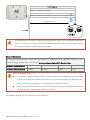
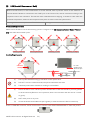
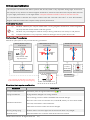
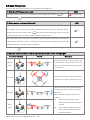
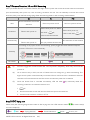
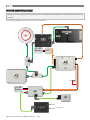
Failsafe and Go Home procedures
1
Record Home Point (HP)
2 Confirm Home Point
3 Transmitter Signal Lost
≥7
<8m
LED
LED
(∝)
4 Signal Lost Lasts 3secs.
LED
(6)
5Go Home(20m can be customized)
(∝)
6 Landing after Hovering 15secs
Height over HP>20m
20m
Elevate to 20m
Height over HP<=20m
LED
(∝)
(1)
LED
(∝)
LED
(∝)
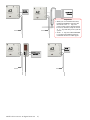
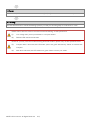
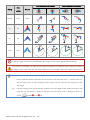
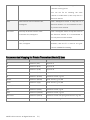
The aircraft will not go home (only attitude stabilizing) in the condition that
<6 or GPS is not
working, even if Transmitter signal is lost or Go Home switch is triggered.
(2)
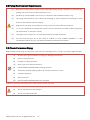
It is recommended to set the Go Home switch in the Assistant software. Users are suggested to
enter Failsafe and go home by using the Go Home switch rather than turning off the Transmitter in
© 2013 DJI Innovations. All Rights Reserved
21 |