1
Lum/nex
®
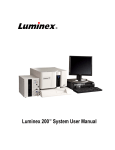
Luminex® 200™
System User Manual
© LUMINEX CORPORATION, 2001-2006. All rights reserved. No part of this publication may be reproduced,
transmitted, transcribed, or translated into any language or computer language, in any form or by any means
without prior express, written consent of:
LUMINEX CORPORATION
12212 Technology Boulevard
Austin, Texas 78727-6115
U.S.A.
Voice: (512) 219-8020
Fax: (512) 219-5195
Luminex® 200™ System User Manual
PN 89-00002-00-173 Rev. A
January 2007
EC
REP
Paul. A. Rowden
33 Stapleford Road
Middlesbrough
Cleveland TS39ES
Angleterre
([email protected])
Luminex Corporation (Luminex) reserves the right to modify its products and services at any time. This guide
is subject to change without notice. Although prepared to ensure accuracy, Luminex assumes no liability for
errors or omissions, or for any damages resulting from the application or use of this information.
The following are trademarks of Luminex: Luminex, Luminex 100, Luminex 100 IS, Luminex 200, xPONENT,
LabMAP, xMAP, Luminex SeroMAP, LumAvidin, Luminex XYP, Luminex FlexMAP, and Luminex SD. All other
trademarks, including Windows, Cheminert, Pentium, and Dell are trademarks of their respective companies.
The contents of this manual and the associated Luminex software are the property of Luminex and are
copyrighted. Except as specified in the End User License Agreement, any reproduction in whole or in part is
strictly prohibited.
Standard Terms and Conditions For Use of Product
By opening the packaging containing this product ("Product") or by using such Product in any manner,
you are consenting and agreeing to be bound by the following terms and conditions. You are also agreeing that the following terms and conditions constitute a legally valid and binding contract that is enforceable against you. If you do not agree to all of the terms and conditions set forth below, you must promptly
return the Product for a full refund prior to using them in any manner.
1. Acceptance - ALL SALES ARE SUBJECT TO AND EXPRESSLY CONDITIONED UPON THE
TERMS AND CONDITIONS CONTAINED HEREIN, AND UPON BUYER'S ASSENT THERETO. NO
VARIATION OF THESE TERMS AND CONDITIONS SHALL BE BINDING UPON LUMINEX CORPORATION ("LUMINEX") UNLESS AGREED TO IN WRITING AND SIGNED BY AN AUTHORIZED
REPRESENTATIVE OF LUMINEX. For purposes of this agreement, "Seller" shall mean the Luminex
authorized reseller that sells the Product to Buyer. Buyer, by accepting the Product shall be deemed
to have assented to the terms and conditions set forth herein, notwithstanding any terms contained in
any prior or later communications from Buyer and whether or not Seller shall specifically or expressly
object to any such terms.
2. Warranties - Any warranty obligations for the Product shall be exclusively provided in writing to Buyer
directly by Seller. LUMINEX MAKES NO WARRANTY WHATSOEVER REGARDING THE PRODUCT AND LUMINEX SPECIFICALLY DISCLAIMS ALL WARRANTIES, EXPRESS OR IMPLIED,
INCLUDING ANY IMPLIED WARRANTY OF MERCHANTABILITY OR FITNESS FOR A PARTICULAR PURPOSE. NEITHER SELLER NOR LUMINEX SHALL IN ANY EVENT BE LIABLE FOR INCIDENTAL, CONSEQUENTIAL OR SPECIAL DAMAGES OF ANY KIND RESULTING FROM ANY
USE OR FAILURE OF THE PRODUCT, EVEN IF SELLER OR LUMINEX HAS BEEN ADVISED OF
THE POSSIBILITY OF SUCH DAMAGE INCLUDING, WITHOUT LIMITATION, LIABILITY FOR LOSS
OF WORK IN PROGRESS, DOWN TIME, LOSS OF REVENUE OR PROFITS, FAILURE TO REALIZE SAVINGS, LOSS OF PRODUCTS OF BUYER OR OTHER USE OR ANY LIABILITY OF BUYER
TO A THIRD PARTY ON ACCOUNT OF SUCH LOSS, OR FOR ANY LABOR OR ANY OTHER
EXPENSE, DAMAGE OR LOSS OCCASIONED BY SUCH PRODUCT INCLUDING PERSONAL
INJURY OR PROPERTY DAMAGE UNLESS SUCH PERSONAL INJURY OR PROPERTY DAMAGE
IS CAUSED BY SELLER'S GROSS NEGLIGENCE.
3. Buyer's Use of Product -Buyer agrees that no rights or licenses under Luminex's patents shall be
implied from the sale of the Product, except as expressly provided herein, and Buyer does not receive
any right under Luminex's patent rights hereunder. Buyer acknowledges and agrees that the Product
is sold and licensed only for use with Luminex's standard fluorescently dyed microspheres. Buyer further acknowledges that the Product have not received approval from the United States Food and
Drug Administration or other federal, state or local regulatory agencies and have not been tested by
Seller or Luminex for safety or efficacy in food, drug, medical device, cosmetic, commercial or any
other use, unless otherwise stated in Seller's technical specifications or material data sheets furnished to Buyer. Buyer expressly represents and warrants to Seller that Buyer will properly test and
use any Product in accordance with the practices of a reasonable person who is an expert in the field
and in strict compliance with the United States Food and Drug Administration and all applicable
domestic and international laws and regulations, now and hereinafter enacted.
BUYER HEREBY GRANTS TO LUMINEX A NONEXCLUSIVE, WORLDWIDE, UNRESTRICTED,
ROYALTY-FREE, FULLY PAID-UP LICENSE, WITH THE RIGHT TO GRANT AND AUTHORIZE
SUBLICENSES, UNDER ANY AND ALL PATENT RIGHTS IN INVENTIONS COMPRISING MODIFICATIONS, EXTENSIONS, OR ENHANCEMENTS MADE BY BUYER TO THE PRODUCT OR TO
THE MANUFACTURE OR USE OF THE PRODUCT ("IMPROVEMENT PATENTS"), TO MAKE,
HAVE MADE, USE, IMPORT, OFFER FOR SALE OR SELL ANY AND ALL PRODUCT; EXPLOIT
ANY AND ALL METHODS OR PROCESSES; AND OTHERWISE EXPLOIT IMPROVEMENT PATENTS FOR ALL PURPOSES. NOTWITHSTANDING THE FOREGOING, "IMPROVEMENT PATENTS" SPECIFICALLY EXCLUDES PATENT CLAIMS CONCEIVED AND REDUCED TO PRACTICE
BY BUYER CONSISTING OF METHODS OF SAMPLE PREPARATION, METHODS OF CONJU-
GATING PRODUCT TO ANALYTES, THE COMPOSITION OF MATTER OF THE SPECIFIC CHEMISTRIES OF THE ASSAYS DEVELOPED BY BUYER AND METHODS OF PERFORMING THE
ASSAYS (I.E., THE PROTOCOL FOR THE ASSAY).
Buyer has the responsibility and hereby expressly assumes the risk to verify the hazards and to conduct any further research necessary to learn the hazards involved in using the Product. Buyer also
has the duty to warn Buyer's customers, employees, agents, assigns, officers, successors and any
auxiliary or third party personnel (such as freight handlers, etc.) of any and all risks involved in using
or handling the Product. Buyer agrees to comply with instructions, if any, furnished by Seller or
Luminex relating to the use of the Product and not misuse the Product in any manner. Buyer shall not
reverse engineer, decompile, disassemble or modify the Product. Buyer acknowledges that Luminex
retains ownership of all patents, trademarks, trade secrets and other proprietary rights relating to or
residing in the Product.
4. Buyer's Representations, Release and Indemnity - Buyer represents and warrants that it shall use the
Product in accordance with Paragraph 2, "Buyer's Use of Product," and that any such use of Product
will not violate any law, regulation, judicial order or injunction. Buyer agrees to release, discharge,
disclaim and renounce any and all claims, demands, actions, causes of action and/or suits in law or
equity, now existing or hereafter arising, whether known or unknown, against Seller and Luminex, and
their respective officers, directors, employees, agents, successors and assigns (collectively the
"Released Parties"), with respect to the use of the Product. Buyer agrees to indemnify and hold
harmless the Released Parties from and against any suits, losses, claims, demands, liabilities, costs
and expenses (including attorney, accounting, expert witness, and consulting fees) that any of the
Released Parties may sustain or incur as a result of any claim against such Released Party based
upon negligence, breach of warranty, strict liability in tort, contract or any other theory of law or equity
arising out of, directly or indirectly, the use of the Product or by reason of Buyer's failure to perform its
obligations contained herein. Buyer shall fully cooperate with the Released Parties in the investigation and determination of the cause of any accident involving the Product which results in personal
injury or property damage and shall make available to the Released Parties all statements, reports,
recordings and tests made by Buyer or made available to Buyer by others.
5. Patent Disclaimer - Neither Seller nor Luminex warrants that the use or sale of the Product will not
infringe the claims of any United States or other patents covering the product itself or the use thereof
in combination with other products or in the operation of any process.
End-User License Agreement (EULA) for Luminex® Software
This Luminex End-User License Agreement ("EULA") is a legal agreement between you (either an individual or a
single entity, also referred herein as "you") the end-user and Luminex Corporation ("Luminex") regarding the use of
the Luminex software product provided to you above, which includes computer software and online or electronic
documentation and may include associated media and printed materials (if any) ("SOFTWARE PRODUCT" or
"SOFTWARE").
The SOFTWARE PRODUCT is protected by copyright laws and international copyright treaties, as well as other
intellectual property laws and treaties. The SOFTWARE PRODUCT is licensed, not sold.
1. GRANT OF LICENSE. Subject to the terms and conditions of this EULA, Luminex hereby grants to you a
nonexclusive, nontransferable, nonassignable license (without right to sublicense) under Luminex's copyrights
and trade secrets to use the SOFTWARE PRODUCT on a single computer running with a Luminex instrument/
purchased from Luminex or a Luminex partner pursuant to Luminex's terms and conditions of sale. You may
make one (1) copy of the SOFTWARE PRODUCT for backup or archival purposes only. You may also install the
SOFTWARE PRODUCT on up to three (3) additional computers for purposes of performing ancillary tasks (i.e.
preparing templates/protocols, performing further analysis or re-running previous data), provided such computers
are at a single location and are NOT connected with a Luminex instrument. In addition, You may purchase the
right to use the SOFTWARE PRODUCT on additional computers, as agreed to in writing with Luminex or its
authorized reseller, for purposes of performing ancillary tasks (i.e. preparing templates/protocols, performing
further analysis or re-running previous data), provided such computers are at a single location and are NOT
connected with a Luminex instrument Although no rights or licenses under any of Luminex's patents are granted
by or shall be implied from the license of the SOFTWARE or the sale of Luminex instrumentation to you, the
purchaser, you may obtain a license under Luminex's patents, if any, to use this unit of Luminex instrumentation
with fluorescently labeled microsphere beads authorized by Luminex by purchasing such beads from Luminex or
an authorized Luminex reseller.
2. RESTRICTIONS.
• Each SOFTWARE PRODUCT must only be installed and operated on a single Luminex instrument/
computer.
• You may not use this SOFTWARE PRODUCT for any commercial purpose, including in the
performance of testing services, unless expressly agreed to in writing by Luminex or as authorized
in writing by Luminex through an authorized reseller of the SOFTWARE PRODUCT.
• You may only use the SOFTWARE PRODUCT with microspheres manufactured by Luminex or
with kits developed, manufactured and distributed by licensees authorized in writing by Luminex.
• You must maintain all proprietary notices on all copies of the SOFTWARE PRODUCT.
• You may not distribute copies of the SOFTWARE PRODUCT to third parties.
• You may not reverse-engineer, decompile, disassemble, or otherwise attempt to derive source
code from the SOFTWARE PRODUCT.
• You may not copy (other than one backup or archival copy), distribute, sublicense, rent, lease,
transfer or grant any rights in or to all or any portion of the SOFTWARE PRODUCT.
• You must comply with all applicable laws regarding the use of the SOFTWARE PRODUCT.
• You may not modify or prepare derivative works of the SOFTWARE PRODUCT.
• You may not use the SOFTWARE PRODUCT in a computer-based service business or publicly
display visual output of the SOFTWARE PRODUCT.
• You may not transmit the SOFTWARE PRODUCT over a network, by telephone, or electronically
by any means.
3. TERM AND TERMINATION. Your rights under this EULA are effective until termination. You may terminate this
EULA at any time by destroying the SOFTWARE PRODUCT, including all computer programs and
documentation, and erasing any copies residing on your computer equipment. Luminex may terminate this EULA
upon thirty (30) days written notice to you. Your rights under this EULA automatically terminate without further
action on the part of Luminex if you do not comply with any of the terms or conditions of this EULA. Upon any
termination of this EULA, you agree to destroy the SOFTWARE PRODUCT and erase any copies residing on
your computer equipment.
4. RIGHTS IN SOFTWARE. All rights and title in and to the SOFTWARE PRODUCT and any copies thereof are
owned by Luminex or its suppliers. This EULA is not a sale and does not transfer to you any title or ownership
interest in or to the SOFTWARE or any patent, copyright, trade secret, trade name, trademark or other
intellectual property right therein. You shall not remove, alter, or obscure any proprietary notices contained on or
within the SOFTWARE and shall reproduce such notices on any back-up copy of the SOFTWARE. All title and
intellectual property rights in and to the content which may be accessed through use of the SOFTWARE
PRODUCT is the property of the respective content owner and may be protected by applicable copyright or other
intellectual property laws and treaties. This EULA grants you no rights to use such content.
5. EXPORT RESTRICTIONS. You agree that you will not export or re-export the SOFTWARE PRODUCT to any
country, person, entity, or end-user subject to U.S.A. export restrictions. You hereby warrant no state or federal
agency has suspended, revoked, or denied your export privileges.
6. NO WARRANTY. THE SOFTWARE PRODUCT IS LICENSED "AS IS." ANY USE OF THE SOFTWARE
PRODUCT IS AT YOUR OWN RISK. THE SOFTWARE PRODUCT IS PROVIDED FOR USE ONLY WITH
LUMINEX PRODUCTS. TO THE MAXIMUM EXTENT PERMITTED BY APPLICABLE LAW, LUMINEX AND ITS
SUPPLIERS DISCLAIM ALL WARRANTIES, EITHER EXPRESS OR IMPLIED, INCLUDING, BUT NOT LIMITED
TO, IMPLIED WARRANTIES OF MERCHANTABILITY, FITNESS FOR A PARTICULAR PURPOSE, AND
NONINFRINGEMENT.
7. LIMITATION OF LIABILITY. IN NO EVENT SHALL LUMINEX OR ITS SUPPLIERS BE LIABLE FOR ANY
SPECIAL, INCIDENTAL, INDIRECT, OR CONSEQUENTIAL DAMAGES WHATSOEVER (INCLUDING,
WITHOUT LIMITATION, DAMAGES FOR LOSS OF BUSINESS PROFITS, BUSINESS INTERRUPTION, LOSS
OF BUSINESS INFORMATION, OR ANY OTHER PECUNIARY LOSS) ARISING OUT OF THE USE OF OR
INABILITY TO USE THE SOFTWARE PRODUCT, EVEN IF LUMINEX HAS BEEN ADVISED OF THE
POSSIBILITY OF SUCH DAMAGES.
MISCELLANEOUS. This EULA is governed by the laws of the State of Texas, U.S.A., without reference to conflicts of
laws principles. You shall not assign or sublicense or otherwise transfer the rights or license granted hereunder, by
agreement or by operation of law, without the prior written consent of Luminex, and all assignments in violation of this
prohibition shall be null and void. This EULA is the complete and exclusive agreement of Luminex and you and
supersedes all other communications, oral or written, relating to the subject matter hereof. No change to this EULA
shall be valid unless in writing and signed by the party against whom enforcement is sought. The waiver or failure of
Luminex or you to exercise in any respect any right or rights provided for herein shall not be deemed a waiver of any
further right hereunder. If any provision of this EULA is held unenforceable, the remainder of this EULA will continue
in full force and effect.
89-30000-00-122, Rev. A
Contents
Safety
Intended Use . . . . . . . . . . . . . . . . . . . . . . . . . . . . . . . . . . . . . . . . . . .
Warnings and Notes . . . . . . . . . . . . . . . . . . . . . . . . . . . . . . . . . . . . .
Symbols . . . . . . . . . . . . . . . . . . . . . . . . . . . . . . . . . . . . . . . . . . . . . . .
Safety Precautions . . . . . . . . . . . . . . . . . . . . . . . . . . . . . . . . . . . . . . .
Fluidics . . . . . . . . . . . . . . . . . . . . . . . . . . . . . . . . . . . . . . . . . . . .
Luminex 200 Analyzer Laser . . . . . . . . . . . . . . . . . . . . . . . . . . .
Barcode Reader Laser. . . . . . . . . . . . . . . . . . . . . . . . . . . . . . . . .
Mechanical . . . . . . . . . . . . . . . . . . . . . . . . . . . . . . . . . . . . . . . . .
Biological . . . . . . . . . . . . . . . . . . . . . . . . . . . . . . . . . . . . . . . . . .
Heat. . . . . . . . . . . . . . . . . . . . . . . . . . . . . . . . . . . . . . . . . . . . . . .
Blue Indicator Light . . . . . . . . . . . . . . . . . . . . . . . . . . . . . . . . . .
Decontaminating the Luminex 200 Analyzer for Return Shipment .
The System
1
1
1
2
2
2
3
3
3
4
4
4
5
7
Theory of Operation . . . . . . . . . . . . . . . . . . . . . . . . . . . . . . . . . . . . . 7
Hardware . . . . . . . . . . . . . . . . . . . . . . . . . . . . . . . . . . . . . . . . . . . . . . 8
xMAP Technology Reagents. . . . . . . . . . . . . . . . . . . . . . . . . . . . . . . 8
Required Laboratory Reagents . . . . . . . . . . . . . . . . . . . . . . . . . . . . . 9
Luminex Software . . . . . . . . . . . . . . . . . . . . . . . . . . . . . . . . . . . . . . . 9
Luminex 200 Performance Specifications . . . . . . . . . . . . . . . . . . . . 9
Speed. . . . . . . . . . . . . . . . . . . . . . . . . . . . . . . . . . . . . . . . . . . . . . 9
Accuracy and Precision . . . . . . . . . . . . . . . . . . . . . . . . . . . . . . . 9
Sensitivity . . . . . . . . . . . . . . . . . . . . . . . . . . . . . . . . . . . . . . . . . 10
Capacity . . . . . . . . . . . . . . . . . . . . . . . . . . . . . . . . . . . . . . . . . . 10
Luminex 200 Analyzer General . . . . . . . . . . . . . . . . . . . . . . . . . . . 10
Optics . . . . . . . . . . . . . . . . . . . . . . . . . . . . . . . . . . . . . . . . . . . . 11
Fluidics . . . . . . . . . . . . . . . . . . . . . . . . . . . . . . . . . . . . . . . . . . . 11
Electronics . . . . . . . . . . . . . . . . . . . . . . . . . . . . . . . . . . . . . . . . 11
Luminex XYP Instrument General . . . . . . . . . . . . . . . . . . . . . . . . . 11
Luminex SD System General . . . . . . . . . . . . . . . . . . . . . . . . . . . . . 12
PC Specifications . . . . . . . . . . . . . . . . . . . . . . . . . . . . . . . . . . . . . . 12
Recommended Additional Equipment . . . . . . . . . . . . . . . . . . . 12
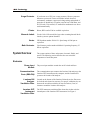
System Overview . . . . . . . . . . . . . . . . . . . . . . . . . . . . . . . . . . . . . . 13
Electronics . . . . . . . . . . . . . . . . . . . . . . . . . . . . . . . . . . . . . . . . 13
Fluidics . . . . . . . . . . . . . . . . . . . . . . . . . . . . . . . . . . . . . . . . . . . 14
Optical. . . . . . . . . . . . . . . . . . . . . . . . . . . . . . . . . . . . . . . . . . . . 16
xMAP Technology Reagents . . . . . . . . . . . . . . . . . . . . . . . . . . 16
i
Luminex 200 System User Manual
Maintenance and Cleaning
17
Daily Maintenance . . . . . . . . . . . . . . . . . . . . . . . . . . . . . . . . . . . . . . 17
Before Running Samples . . . . . . . . . . . . . . . . . . . . . . . . . . . . . . 17
After Running Samples . . . . . . . . . . . . . . . . . . . . . . . . . . . . . . . 19
Routine Tasks . . . . . . . . . . . . . . . . . . . . . . . . . . . . . . . . . . . . . . . . . . 19
Sheath and Waste Fluids . . . . . . . . . . . . . . . . . . . . . . . . . . . . . . 19
Weekly . . . . . . . . . . . . . . . . . . . . . . . . . . . . . . . . . . . . . . . . . . . . . . . 20
Visual Inspection . . . . . . . . . . . . . . . . . . . . . . . . . . . . . . . . . . . . 20
Clean the Sample Probe . . . . . . . . . . . . . . . . . . . . . . . . . . . . . . . 20
Flush the System . . . . . . . . . . . . . . . . . . . . . . . . . . . . . . . . . . . . 21
Monthly . . . . . . . . . . . . . . . . . . . . . . . . . . . . . . . . . . . . . . . . . . . . . . 21
Clean Exterior Surfaces . . . . . . . . . . . . . . . . . . . . . . . . . . . . . . . 21
Calibrate the system. . . . . . . . . . . . . . . . . . . . . . . . . . . . . . . . . . 21
Every Six Months . . . . . . . . . . . . . . . . . . . . . . . . . . . . . . . . . . . . . . . 22
Luminex 200 Analyzer Air Intake Filter . . . . . . . . . . . . . . . . . . 22
Luminex XYP Instrument Air Intake Filter. . . . . . . . . . . . . . . . 23
Syringe Seal . . . . . . . . . . . . . . . . . . . . . . . . . . . . . . . . . . . . . . . . 24
Luminex 200 Analyzer Ventilation Filter . . . . . . . . . . . . . . . . . 25
Annually . . . . . . . . . . . . . . . . . . . . . . . . . . . . . . . . . . . . . . . . . . . . . . 26
Sheath Filter . . . . . . . . . . . . . . . . . . . . . . . . . . . . . . . . . . . . . . . . 26
As required . . . . . . . . . . . . . . . . . . . . . . . . . . . . . . . . . . . . . . . . . . . . 27
Fuses . . . . . . . . . . . . . . . . . . . . . . . . . . . . . . . . . . . . . . . . . . . . . 27
Replacing the SD System with a Sheath Bottle . . . . . . . . . . . . . 28
Storing the System . . . . . . . . . . . . . . . . . . . . . . . . . . . . . . . . . . . 28
Taking the System out of Storage . . . . . . . . . . . . . . . . . . . . . . . 29
Maintenance Log . . . . . . . . . . . . . . . . . . . . . . . . . . . . . . . . . . . . . . . 31
Troubleshooting
33
Troubleshooting the Luminex 200 System. . . . . . . . . . . . . . . . . . . . 33
Power Supply Problems . . . . . . . . . . . . . . . . . . . . . . . . . . . . . . . . . . 34
Communication . . . . . . . . . . . . . . . . . . . . . . . . . . . . . . . . . . . . . . . . 34
Pressurization . . . . . . . . . . . . . . . . . . . . . . . . . . . . . . . . . . . . . . . . . . 35
Fluid Leaks . . . . . . . . . . . . . . . . . . . . . . . . . . . . . . . . . . . . . . . . . . . . 36
Sample Probe . . . . . . . . . . . . . . . . . . . . . . . . . . . . . . . . . . . . . . . . . . 37
Calibration and Control Problems . . . . . . . . . . . . . . . . . . . . . . . . . . 38
Acquisition Problems . . . . . . . . . . . . . . . . . . . . . . . . . . . . . . . . . . . . 41
Bead Detail Irregularities . . . . . . . . . . . . . . . . . . . . . . . . . . . . . . . . . 42
Luminex SD Problems . . . . . . . . . . . . . . . . . . . . . . . . . . . . . . . . . . . 45
Filter. . . . . . . . . . . . . . . . . . . . . . . . . . . . . . . . . . . . . . . . . . . . . . 45
Malfunction . . . . . . . . . . . . . . . . . . . . . . . . . . . . . . . . . . . . . . . . 45
Draining the Reservoir. . . . . . . . . . . . . . . . . . . . . . . . . . . . . . . . 45
Product Numbers
47
Hardware . . . . . . . . . . . . . . . . . . . . . . . . . . . . . . . . . . . . . . . . . . . . . 47
Software . . . . . . . . . . . . . . . . . . . . . . . . . . . . . . . . . . . . . . . . . . . . . . 48
xMAP Reagents . . . . . . . . . . . . . . . . . . . . . . . . . . . . . . . . . . . . . . . . 49
ii
1
Safety
Please become familiar with the information in this chapter before
using the equipment. Do not perform procedures on your Luminex®
200TM system that are not specifically contained in this manual,
unless you are directed to do so by Luminex Technical Support.
Intended Use
Warnings and Notes
The Luminex software is designed to use xMAP® technology with
assay kits available through kit manufacturers. The Luminex 200
system performs a wide range of xMAP technology-based laboratory
tests, measuring biomolecular reactions on the surface of xMAP
microspheres. This system is intended for general laboratory use.
Informational notes and warnings appear in this manual.
Note: A note provides general helpful information. No safety or
performance issues are involved.
Caution: This message is used in cases where the hazard is minor or
only potential hazard is present. Failure to comply with the caution
may result in potentially hazardous conditions.
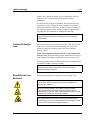
Warning: This message is used in cases where danger to the
operator or to the performance of the instrument is present. Failure to
comply with the warning may result in incorrect performance,
instrument failure, invalid results, or hazard to the operator.
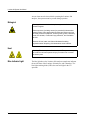
Danger: This message is used in cases where significant risk of
serious injury or death is present.
1
Luminex 200 System User Manual
Symbols
Symbol
These symbols describe warnings, cautions, and general information
used in the operation of this instrument. Some of these symbols are
further defined under “Safety Precautions.”
Description
Symbol
Description
Protective ground
Warning
(refer to manual)
Warning
(refer to manual)
On
Warning
(refer to manual)
Warning (refer to
manual)
Catalog Number
Consult instructions
for use
In vitro Diagnostic
Medical Device
Batch Code
Serial Number
Temperature
Limitation
Expiration Date
Date of Manufacture
Manufacturer
Underwriter’s
Laboratory
Canadian
Underwriter’s
Laboratory
European Union
Conformity
WEEE - Do not
throw in trash
Off
Safety Precautions
2
Description
Warning
(refer to manual)
Alternating current
(ac)
Fluidics
Symbol
Warning
(refer to manual)
Read the following safety information before setting up or using the
Luminex 200 analyzer. A user should be present during operation.
This system contains electrical, mechanical, and laser components
which, if handled improperly, are potentially harmful. In addition,
biological hazards may be present during system operation.
Therefore, we recommend that all system users become familiar with
the specific safety advisories below, in addition to adhering to
standard laboratory safety practices. The protection provided by the
equipment may be impaired or the warranty voided if the system is
used in a manner not specified by the instructions or by Luminex
Corporation.
This system contains fluidics. In the event of a fluid leak, turn off all
power to the system and disconnect all power cords. The on/off
xMAP Technology
Safety
switch is not a disconnect means; power cords must be removed
from the outlet. Contact Luminex Corporation for further
information.
You must monitor waste levels manually. Do not allow the waste
container to overflow! Empty the waste container each time the
sheath fluid container is filled. Do not place the waste container on
top of the instrument. Contact Luminex Technical Support before
relocating the waste container or rerouting the waste line.
Warning: If biological samples have been tested with the system,
use your standard laboratory safety practices when handling
system waste.
Luminex 200 Analyzer
Laser
The Luminex 200 system classifies per FDA 21 CFR 1040.10 and
1040.11 as a Class II laser product consisting of a Class I laser
product (Luminex 200 analyzer) and a Class II laser product
(barcode reader).
Under NO circumstances should you remove the Luminex 200
analyzer cover! When performing routine maintenance, turn power
to the Luminex 200 analyzer OFF and disconnect the power cord.
All laser apertures are located within the Luminex 200 analyzer and
are contained within a protective housing.
Warning: Use of controls or adjustments or performance of
procedures other than those specified herein may result in
hazardous radiation exposure.
Barcode Reader Laser
Do not stare into the beam or shine it into other people’s eyes.
Mechanical
Warning: During operation, this system contains exposed,
moving parts. Risk of personal injury is present. Observe all
warnings and cautions.
Warning: During operation, this system contains exposed,
moving parts which could result in puncture hazard. Risk of
personal injury is present. Keep hands and fingers away from the
Luminex XYP instrument slot during operation.
Warning: During operation, this system contains exposed,
moving parts which could result in pinch point hazard. Risk of
personal injury is present. Keep hands and fingers away from the
Luminex XYP instrument slot during operation.
3
Luminex 200 System User Manual
Access doors must be closed while operating the Luminex 200
analyzer; the operator must be present during operation.
Biological
Warning: Human and animal samples may contain biohazardous
infectious agents.
Where exposure (including aerosol) to potentially biohazardous
material exists, follow appropriate biosafety procedures and use
personal protective equipment, such as gloves, gowns, laboratory
coats, face shields, or mask and eye protection, and ventilation
devices.
Observe all local, state, and federal biohazard handling
regulations when disposing of biohazardous waste material.
Heat
Warning: The heater plate of the Luminex XYP instrument may
be hot and could cause personal injury if touched. Do not touch
the heater plate.
Blue Indicator Light
4
The blue light above the Luminex 200 analyzer sample arm indicates
the on/off status of the Luminex 200 analyzer, and is harmless. The
blue light-emitting diode (LED) does not emit light in the UV
spectrum.
xMAP Technology
Decontaminating
the Luminex 200
Analyzer for Return
Shipment
Safety
Luminex Technical Support will give you a Return Material
Authorization (RMA) number if they direct you to return the system.
They will explain how to return the system according to Luminex
procedures.
The accessible surfaces and the internal fluidics system must be
sanitized and decontaminated before returning the analyzer. This is
particularly important when biohazardous samples have been run.
Make a copy of this page to fill out and return with the system.
Complete the following checklist, signed and dated, and return it
with the Luminex 200 analyzer.
Note: It is the user’s
responsibility to
decontaminate the
analyzer before
shipment.
1.
Remove all specimens, disposables, and reagents from the system.
2.
Disconnect the sheath line going from the SD system to the analyzer.
3.
Connect a sheath bottle filled with a solution of 10% to 20% household
bleach solution to the analyzer.
4.
Sanitize the system using the Sanitize command in the Luminex
software. Follow this by washing twice with distilled water.
5.
Disconnect the system from AC power by turning off the power switch
on the rear of the system, then unplugging the analyzer power cord
from the wall source.
6.
Disconnect the SD system and waste and sheath containers.
7.
Rinse the waste container with 10% to 20% household bleach solution
and drain.
8.
Wash all exterior surfaces with a mild detergent, followed by a 10% to
20% household bleach solution.
9.
Open the front doors of the analyzer. Clean all accessible surfaces with
mild detergent followed by a 10% to 20% household bleach solution.
10. Pack the system within a biohazard bag, place it in the corrugated box,
then insert it in its original packaging or an approved shipping
container. Attach this checklist to the top of the corrugated box prior to
packaging in the crate.
Was there an internal leak in the system?
Yes
No
Print Name:
Signature:
Date:
Instrument Serial No.
5
xMAP Technology
Safety
6
2
The System
Theory of Operation
Luminex xMAP technology is based on flow cell fluorometry with
Luminex-developed innovations. The fluidics, optics, robotics,
temperature control, software, and xMAP microspheres work
together to enable simultaneous analysis of up to 100 analytes in a
single test sample. Assay analysis requiring temperature control is
provided through the Luminex XYP instrument heater block.
There are two fluidics paths in the Luminex 200 analyzer. The first
path involves a syringe-driven mechanism that controls the sample
uptake. This mechanism permits small sample uptake volumes from
small reaction volumes. The syringe-driven system transports a
specified volume of sample from a sample container to the cuvette.
The sample is injected into the cuvette at a steady rate for analysis.
Following analysis, the sample path is automatically purged with
Luminex xMAP Sheath Fluid by the second fluidics path. This
process removes residual sample within the tubing, valves, and
probe. The second fluidics path is driven by positive air pressure and
supplies sheath fluid to the cuvette and sample path.
Luminex xMAP Sheath Fluid is the delivery medium of the sample
to the optics component. The analysis sample is acquired using a
sample probe from a 96-well microtiter plate via the Luminex XYP
instrument and injected into the base of the cuvette. The sample then
passes through with sheath fluid at a reduced rate resulting in a
narrow sample core to ensure that each microsphere is illuminated
individually. The sample injection rate is such that the xMAP
microspheres are introduced to the optics path as a series of single
events. The Luminex SD system lets you run samples continuously
without refilling sheath bottles. It automatically draws sheath from a
non pressurized bulk sheath container to constantly maintain a
reservoir of pressurized sheath fluid. A single 20 liter sheath
container provides enough fluid for 48 hours or more of normal
operation.
7
Luminex 200 System User Manual
The optics assembly consists of two lasers. One laser excites the dye
mixture inside the xMAP microspheres and the second laser excites
the fluorophore bound to the surface of the xMAP microspheres.
Avalanche photo diode detectors measure the excitation emission
intensities of the color coding classification dye mixtures inside the
xMAP microspheres and a photomultiplier tube detects the excitation
emission intensity of the reporter molecule bound to the surface of
the xMAP microspheres. High speed digital signal processors and
advanced computer algorithms provide analysis of the xMAP
microspheres as they are processed through the Luminex 200
analyzer. Results of the analyses are processed and provided in a
report format.
Hardware
xMAP Technology
Reagents
8
The Luminex 200 system includes the following hardware:
•
•
•
•
•
•
•
•
•
•
•
•
•
•
•
•
•
•
Luminex 200 analyzer
Luminex XYP instrument
Luminex Sheath Delivery System (Luminex SD™)
Power cables
Two long sample probes
Reservoir
Shield
Heater block
Sheath fluid container
Waste container
Sheath fluid line
Air line
Sheath fluid intake line
Communications: 1 serial communication cable
Communications: 1 USB communication cable
Communications: 1 CANBUS cable (short cable)
Barcode reader
Sample probe height alignment kit
•
•
•
•
•
Classification calibration microspheres (CAL1)
Reporter calibration microspheres (CAL2)
Classification control microspheres (CON1)
Reporter control microspheres (CON2)
Luminex xMAP Sheath Fluid
xMAP Technology
Required
Laboratory
Reagents
Luminex Software
The System
•
•
•
•
Household bleach
70% isopropanol or 70% ethanol
Mild detergent
Distilled water
Luminex software provides complete control of the system and
performs data analysis. Your Luminex 200 system is preloaded with
the Luminex software. However, we supply a software CD should
you need to reinstall the software.
This software requires a dedicated system. Unauthorized additional
software is prohibited and may result in improper operation of the
system.
Luminex 200
Performance
Specifications
Speed
•
•
•
•
•
•
•
•
•
•
Accuracy and Precision
•
•
•
•
USB communications link for fast data transfer
Automatic transfer of assay templates and new reagent
information into the system via a large capacity read/write CD
Installation: < 4 hours
System calibration: < 10 minutes
System controls: < 10 minutes
Barcode reader entry of sample IDs
Automatic post-analysis
Analyze one 96-well plate/hour depending on manufacturer’s kit
Up to 100 xMAP microsphere sets per sample
System warmup: 30 minutes. Systems that remain inactive for at
least four hours will require a warm-up to restart the lasers. After
acquiring sample, running system calibrators, running system
controls, and warming up the instrument, the system resets the
four-hour internal clock.
Sample uptake volume: ± 5%
Classification of xMAP microspheres: > 80%
Misclassification of xMAP microspheres: ≤ 2 % - may vary by
xMAP microsphere product lines. Refer to the specific product
information sheet for further details.
Temperature control: 0°C to + 2°C of target
9
Luminex 200 System User Manual
Sensitivity
•
•
Internal sample carry over: < 0.9%
Soluble background fluorescence emission at 575 nm
automatically subtracted from fluorescence intensity values
•
Detect 1000 fluorochromes phycoerythrin (PE) per xMAP
microsphere
Reporter channel dynamic range: 3.5 decades of detection
•
Capacity
The specifications below reflect minimum capacity values:
•
•
•
•
•
•
•
•
•
•
•
10
Analyze multiple 96-well plates per batch
Analyze multiple assay templates per plate
Distinguish a minimum of 1 to a maximum of 100 unique xMAP
microsphere sets in a single sample
Detect and distinguish surface reporter fluorescence emissions at
575 nm on the surface of 1-100 unique xMAP microspheres sets
in a single sample
Sample core: 15-20 µm core at 1 µL/sec. sample inject rate
Maintain samples at a constant temperature from 35°C to 55°C
(95°F to 131°F)
Automatic sampling from a 96-well plate
Start sampling from any well position
Sheath container and waste container hold enough volume to run
up to two 96-well plates between refills
Microtiter plates with 96 wells must be compatible with the
Luminex XYP instrument plate holder. The following microtiter
plate types are compatible with the Luminex XYP instrument
plate holder: flatbottom, conical, round, filter bottom, half plates,
overall height no more than 0.75” (19 mm), any color.
Microtiter plates with 96 wells must be compatible with
Luminex XYP instrument heater block temperature from 35°C to
55°C (95°F to 131°F) when performing heated assays and using
the heater block.
xMAP Technology
Luminex 200
Analyzer General
The System
•
•
•
•
•
•
•
•
•
•
•
Optics
•
•
•
•
•
Fluidics
Electronics
Indoor use only
Operating temperature: 15°C to 30°C (59°F to 86°F)
Humidity: 20% to 80%, noncondensing
Altitude: Operation up to 2400 m (7874 ft.) above mean sea level
Physical dimensions: 43 cm (17 inches) W x 50.5 cm (20 inches)
D x 24.5 cm (9.5 inches) H
Weight: maximum of 25 kg (60 lbs.)
UL installation category: UL Installation Category II, as defined
in Annex J of UL 61010A-1
Pollution degree: UL Pollution Degree 2, as defined in Section
3.7.3.2 of UL 61010A-1
Shipping and storage: The allowable shipping and storage
temperature and humidity ranges are 0°C to + 50°C and 20-80%
noncondensing, respectively
Input voltage range: 100 - 120 V~ ± 10%, 1.4 Amp, and 200-240
V~ ± 10%, 0.8 Amp, 47-63 Hz.
ac inlet fuse: 3 Amp, 250 V~, fast acting
Reporter laser: 532 nm, nominal output 10-15 mW, maximum
500 mW, frequency-doubled diode; mode of operation,
continuous wave (CW)
Classification laser: 635 nm, 9.1 mW ± 6%, maximum output 25
mW, diode; mode of operation, continuous wave (CW)
Reporter detector: Photomultiplier tube, detection bandwidth of
565-585 nm
Classification detector: Avalanche photo diodes with temperature
compensation
Doublet discrimination detector: Avalanche photo diodes with
temperature compensation
•
•
•
•
Sheath flow rate 90 µL ± 5 µL/second
Cuvette: 200 micron square flow channel
Sample injection rate: 1 µL/second ± 0.05 µL
Sample uptake volume: 20-200 µL
•
•
•
Reporter channel detection: A/D resolution 14 bits
Communications interface: USB
Luminex XYP instrument, communications interface: RS 232
11
Luminex 200 System User Manual
Luminex XYP
Instrument General
•
•
•
•
•
•
•
•
•
•
Luminex SD System
General
•
•
•
•
•
•
•
•
•
PC Specifications
Ambient temperature: 15°C to 30°C (59°F to 86°F)
Humidity: 20% to 80%, noncondensing
Altitude: operation up to 2400 m (7874 ft) above mean sea level
Physical dimensions: 44 cm (17.25 inches) W x 60 cm (23.5
inches) D x 8 cm (3 inches) H
Weight: 15 kg (33 lbs.)
UL installation category: UL Installation Category II, as defined
in Annex J of UL 61010A-1
Pollution degree: UL Pollution Degree 2, as defined in Section
3.7.3.2 of UL 61010A-1
Heater operating range: 35°C to 55°C (95°F to 131°F) with
tolerance 0°C to +2°C
Input voltage range: 100-240 V~ ± 10%, 1.8 Amps, 47-63 Hz
AC inlet fuse: 3 A, 250 V~, fast acting
Ambient temperature: 15°C to 30°C (59° to 86°F)
Humidity: 20% to 80%, noncondensing
Altitude: designed to operate at up to 2400m (7874 feet) above
mean sea level
Physical dimensions: 20 cm (8 inches) W x 30 cm (11.75 inches)
D x 24.75 cm (9.75 inches) H
Weight: 9 kg (20 lbs)
UL installation category: UL Installation Category II, as defined
in Annex J of UL 61010A-1
Pollution degree: UL Pollution Degree 2, as defined in Section
3.7.3.2 of UL 61010A-1
Input voltage range: 100-240 V~ ± 10%, 0.4 Amps, 47-63 Hz
AC inlet fuse: 2 Amp, 250 V~, time lag
For updated information regarding the PC, notebook, or operating
system, go to http://www.luminexcorp.com, then click on the
Support link to open the FAQ list.
Recommended Additional
Equipment
Uninterruptible
Power Supply
(UPS)
12
Luminex highly recommends using an uninterruptible power supply
(UPS) to protect your system from power outages. Choose one that
can provide 1050 Watts for at least 45 minutes. The UPS should be
UL listed, CSA certified, and CE marked when used internationally.
xMAP Technology
The System
Surge Protector
Printer
Barcode Labels
Vortex
Bath Sonicator
System Overview
If you do not use a UPS, use a surge protector. Choose a protector
that meets your needs. Factors to consider include electrical
environment, endurance, suppressed voltage rating, and method of
protection. It should have six outlets, rated at least 1500 Watts, and
be UL listed, CSA certified, CE marked for nondomestic use when
used internationally.
Printer, HP LaserJet 2300 or available equivalent
Use the Code 128 barcode label type when scanning barcode labels
into the system as patient identities.
VWR product number 58816-121: Speed range 0-3200 rpm or
equivalent
Cole-Parmer® product number 08849-00: Operating frequency 55
kHz or equivalent
The system consists of three subsystems: electronic, fluidic, and
optical. The following section describes the user-accessible
components of each subsystem.
Electronics
Power Input
Module
The power input modules contain the on/off switch and fuses.
Communications
Ports (DB9-PIN)
The communications port connects the Luminex 200 analyzer or the
Luminex XYP instrument to the computer, and the Luminex SD
system to the Luminex 200 analyzer.
Luminex 200
Analyzer
Ventilation Filter
Located on the bottom of the Luminex 200 analyzer, the filter must
be checked and cleaned as necessary. For proper ventilation, do not
obstruct the area below and allow at least two inches (5 cm) of
clearance around the Luminex 200 analyzer.
Luminex XYP
Instrument
Ventilation Filter
The XYP instrument ventilation filter cleans the air that cools the
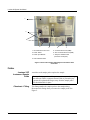
internal parts of the Luminex XYP instrument. See Figure 1.
13
Luminex 200 System User Manual
1
2
3
4
5
6
7
1
1. Air intake filter access door
5. Communication Ports (DB9)
2. Power Switch
6. XYP Communication Port (DB9)
3. Power Input Module
7. Analyzer ventilation filter
(on bottom of analyzer)
4. XYP Ventilation Filter
Figure 1 Back of the Luminex 200 Analyzer and Luminex XYP
Instrument
Fluidics
14
Luminex XYP
Instrument Sample
Probe
A stainless steel sample probe acquires the sample.
Cheminert® Fitting
This fitting attaches the sample probe to the sample tubing.
Disconnect this fitting when you remove the sample probe. See
Figure 2.
Warning: During operation, this system contains exposed moving
parts that can result in a puncture hazard. Risk of personal injury
is present. Keep hands and fingers away from the sample probe.
The shield should be in place.
xMAP Technology
The System
1
2
3
4
1. Cheminert Fitting
2. Probe Holder
3. Front thumbscrew
4. Luminex XYP Instrument Sample Probe
Figure 2 Fluidics Components
Access Doors
The Luminex 200 analyzer has three access doors. Two of the access
doors are on the front, and the third is on the back. The front left
access door supplies access to the sheath filter. The front center
access door supplies access to the syringe. The rear access door
supplies access to the air intake filter. See Figure 3.
1
2
1. Left door, access to service panel
2. Center door, access to syringe
Figure 3 Luminex 200 Analyzer Access Doors
15
Luminex 200 System User Manual
Air Intake Filter
A replaceable air intake filter cleans the air used to pressurize sheath
fluid. This filter is enclosed behind an access door located on the
back of the Luminex 200 analyzer.
Syringe
The syringe delivers a sample from the 96-well microtiter plate to the
cuvette.
Sheath Filter
The sheath filter removes particles greater than ten microns in
diameter from the sheath fluid.
Air, Waste, and
Sheath Fluid
Connectors
The air, waste, and sheath connectors, located on the left side of the
analyzer, connect to the SD system and waste fluid containers using
clear tubing. The air connector is green, the sheath fluid connector is
blue, and the waste fluid connector is orange.
Luminex Sheath
Delivery System
For proper operation, place the Luminex SD system at the same level
as the base of the Luminex XYP instrument. Do not put it on top of
the Luminex 200 analyzer. If you are not using the SD system, sheath
fluid levels must be monitored manually. Check the sheath fluid level
before starting a run or procedure.
Warning: If biological samples have been tested with the system, use your standard laboratory safety practices.
Waste Fluid
Container
The waste fluid container receives waste from the system. The waste
container should not be placed on top of the instrument. Ensure
that the waste tubing is not elevated above the level of the
Luminex 200 analyzer at any point. Contact Luminex Technical
Support before you relocate the waste fluid container. To maintain a
stable flow rate, do not move the waste line or container during
system operation.
Warning: Waste levels must be manually monitored. Do not
allow the waste container to overflow.
Optical
xMAP Technology
Reagents
16
The optical system consists of the optical assembly and the excitation
lasers. The optical assemblies do not require manual adjustment by
the user.
The xMAP technology reagent system consists of classification
calibration microspheres, reporter calibration microspheres,
classification control microspheres, and reporter control
microspheres.
3
Maintenance and Cleaning
To ensure accurate test results, properly clean and maintain the
Luminex 200 system. Read and follow all instructions in this section.
For your convenience, a maintenance log form is included at the end
of this chapter.
It is important to use only xMAP Sheath Fluid or other Luminexapproved sheath fluid. USE OF NON-LUMINEX APPROVED SHEATH
FLUID SHALL CONSTITUTE “IMPROPER USE” AND MAY VOID
WARRANTY RIGHTS PROVIDED BY LUMINEX AND/OR ITS
AUTHORIZED PARTNER.
Warning: When analyzing potentially infectious biological samples
on the Luminex 200 analyzer, follow standard laboratory safety
practices. These safety precautions should also be taken when
cleaning or maintaining the analyzer.
Do not remove the analyzer cover under any circumstances!
Daily Maintenance
Before Running Samples
If the system is powered on, but idle for more than four hours, click
Warmup. Wait 30 minutes for the Luminex 200 analyzer and the
optics system to warm up.
1. Turn the Luminex 200 analyzer on. The system begins warming.
2. Verify the levels of sheath fluid and waste fluid.
3. Prime the analyzer.
4. Perform an alcohol flush using at least 1.2 mL of 70%
isopropanol or 70% ethanol in the reservoir.
5. Run two wash commands using distilled water.
6. Check that the Luminex XYP instrument sample probe has been
vertically aligned for the plate used in the kit.
17
Luminex 200 System User Manual
Adjust the sample
probe vertical
height
Note: Verify that the microtiter plate is not warped.
Warped plates can lead to
incorrect probe height
adjustment.
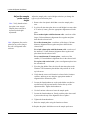
Adjust the sample probe vertical height each time you change the
type or style of microtiter plate.
1. Remove the clear plastic shield that covers the sample probe
area.
2. In a 96-well microtiter plate where overall height is no more than
0.75 inches (19 mm), place the appropriate alignment tool in the
plate:
For a standard plate with flat-bottom wells—stack two of the
larger (5.08 mm diameter) alignment discs together and place
them into the selected well.
Note: Alignment discs can be
placed in any well as long as
the well is designated in the
software.
For a filter bottom plate—stack three of the larger (5.08 mm
diameter) alignment discs together and place them into the
selected well.
For a half-volume plate with flat-bottom wells—stack two of
the smaller (3.35 mm diameter) alignment discs together and
place them into the selected well.
For a round-bottom (U-bottom) plate—stack two of the
smaller (3.35 mm diameter) alignment discs in the selected well.
For a plate with conical wells—place one alignment sphere into
the selected well.
3. Eject the plate holder. Place the 96-well microtiter plate on the
Luminex XYP instrument plate holder with position A1 in the
top left corner.
4. Verify that the correct well location is selected in the Luminex
software, and that you are using the appropriate number of
alignment discs. Retract the plate.
5. Loosen the front thumbscrew on the probe holder one-third to
one-half turn. Pull it upward until it touches the top of the
adjustment slide. Tighten the thumbscrew.
6. Use the Luminex software to lower the sample probe.
7. Loosen the front thumbscrew. Gently push the probe down until
it just touches the top of the alignment discs or sphere.
8. Tighten the front thumbscrew.
9. Raise the sample probe using the Luminex software.
10. Replace the plastic shield that covers the sample probe area.
18
xMAP Technology
After Running Samples
Maintenance and Cleaning
After running samples:
1. Sanitize with a 10% to 20% household bleach solution.
2. Run two Wash cycles with distilled water.
3. Soak with distilled water. Wait until the soak completes.
4. If desired, turn off the Luminex 200 analyzer.
Routine Tasks
Sheath and Waste Fluids
Replace the sheath fluid and empty the waste container as required.
Be careful not to touch the seal in the waste bottle cap or allow it to
become wet or dirty. This could cause the bottle to become
pressurized, causing pressure errors in the system. If the seal gets
wet, let it air-dry. Touching the seal can contaminate it. If it gets
dirty, you should replace the waste bottle cap.
If you are using the waste line, do not move it while the system is
running. While you can move the line along a horizontal surface, do
not permanently reroute the waste line elevation without first
contacting Technical Support. You can move the line temporarily for
cleaning and maintenance purposes.
You must manually monitor waste container levels.
Refill the Sheath
Fluid Container
To refill the sheath fluid container:
1. Release system pressure by removing the lid from the sheath
fluid container.
2. Refill the sheath fluid container.
If the sheath container ever runs dry, prime the system at least twice
until the air is removed from the system.
19
Luminex 200 System User Manual
Empty the Waste
Container
To empty the waste container:
1. Disconnect the waste container from the Luminex 200 analyzer.
2. Unscrew the waste container lid, being careful not to touch the
Gore-TexTM seal. If the seal becomes wet or soiled, it may impair
venting.
Note: There is NO warning
of a high waste volume.
Empty the waste container
each time you fill the
sheath container.
3. Discard the waste from the waste container by appropriate
means.
4. Reconnect the waste container to the Luminex 200 analyzer and
replace the cap.
Any time the sheath container is disconnected from the Luminex
200 analyzer, you must remove air from the sample lines by
priming.
Weekly
Visual Inspection
Open all of the Luminex 200 analyzer doors and visually inspect for
leaks, corrosion, and other signs of improper function. Check all
visible tubing connections. Check the Luminex XYP instrument air
intake filter for buildup of dust. Check the SD system and its
connection for leaks. If you see a leak, turn off the power to the
Luminex SD system and contact Luminex Corporation.
Clean the Sample Probe
Warning: Be sure that the system is not performing an operation
when you remove the sample probe.
Caution: The Luminex XYP instrument sample probe should slide
up easily while removing it from the sample arm. If you feel
resistance, do not force the probe up. Contact Luminex Technical
Support.
To clean the sample probe:
1. Remove the sample probe as follows: Unsnap the light housing
located above the probe. Then, unscrew the Cheminert fitting on
top of the probe completely. Next, gently grasp the probe and
push up. Remove the probe out of the top of the sample arm.
2. Clean the sample probe using a bath sonicator or using a 10 mL
syringe. If you are using a bath sonicator, place the bottom of the
sample probe in the bath sonicator for 2 to 5 minutes. If you are
20
xMAP Technology
Maintenance and Cleaning
using a syringe, force distilled water through the bottom of the
sample probe.
3. Replace the sample probe and adjust the vertical height. You
should adjust the vertical height anytime the probe is removed.
4. Alcohol Flush the system with 70% isopropanol or 70% ethanol.
Flush the System
Run 3 backflushes, 3 drains, 2 alcohol flushes and 3 washes with
distilled water.
Monthly
Clean Exterior Surfaces
To clean exterior surfaces, follow these steps:
1. Disconnect the system from ac power by turning off the power
switches and unplugging the Luminex 200 analyzer, the Luminex
XYP instrument, and the Luminex SD system.
2. Wipe all exterior surfaces with mild detergent, then a 10% to
20% household bleach solution, and finally with plain distilled
water.
3. Open both doors of the analyzer. Clean all accessible surfaces
with detergent followed by a 10% to 20% household bleach
solution and then plain distilled water.
4. Dry the sheet metal surfaces to prevent corrosion.
5. Plug in and power on the Luminex 200 analyzer, the Luminex
XYP instrument, and the Luminex SD system.
Calibrate the system
You should calibrate the system on a monthly basis as part of
regularly scheduled maintenance. For instructions on calibrating the
system and verifying calibration, see the Luminex online help or the
applicable Luminex software manual.
21
Luminex 200 System User Manual
Every Six Months
Luminex 200 Analyzer Air
Intake Filter
Note: Hold on to the tubing! Do not allow the tubing to fall inside the the
To replace the analyzer air intake filter:
1. Disconnect the Luminex 200 analyzer from ac power by turning
off the power switch on the rear of the analyzer, then unplugging
the power cord from the wall source.
2. On the back of the Luminex 200 analyzer, in the upper left
corner, remove the screw at the top of the panel and open the
panel door.
3. Grasp the tubing and pull the filter 3 to 4 inches from the unit.
See Figure 4.
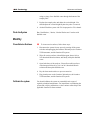
Figure 4 Grasping the Tubing
4. Remove the filter with one hand, and hold the tubing with the
other hand.
5. Connect a new filter to the tubing and position the filter inside
the panel.
6. Reattach the panel door to the unit.
7. Plug in and power on the Luminex 200 analyzer.
22
xMAP Technology
Luminex XYP Instrument
Air Intake Filter
Maintenance and Cleaning
To replace the XYP instrument air intake filter:
1. Disconnect the Luminex XYP instrument from ac power by
turning off the power switch on the rear of the Luminex XYP
instrument, then unplugging the Luminex XYP instrument power
cord from the wall source.
2. On the back of the Luminex XYP instrument, to the left side,
gently remove the screen from the Luminex XYP instrument
filter. Do not remove the screws. See Figure 5.
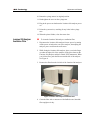
Figure 5 Removing the Screen
3. Replace the filter and replace the screen. See Figure 6.
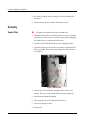
Figure 6 Removing and Replacing the Filter
4. Plug in and turn on Luminex XYP instrument power.
23
Luminex 200 System User Manual
Syringe Seal
To replace the syringe plunger seal:
Warning: The syringe arm does not deactivate when changing the
plunger; injury could result if the system is not unplugged.
1. Disconnect the Luminex 200 analyzer from ac power by turning
off the power switch on the rear of the analyzer, then unplugging
the power cord from the wall source.
2. Open the center-most door on the front of the Luminex 200
analyzer.
3. Locate the syringe (a glass cylinder with a metal rod). See
Figure 7.
1
2
1. Syringe Seal
2. Syringe
Figure 7 Syringe and Syringe Seal
4. Unscrew the knob on the syringe arm (at the bottom of the
syringe), and forcefully push the syringe arm down.
5. Unscrew the syringe from the top of its housing.
6. Pull the plunger out of the syringe.
7. Remove and replace the plunger seal and the black “O” ring.
8. Return the plunger to the syringe.
9. Screw the syringe back into its housing.
24
xMAP Technology
Maintenance and Cleaning
10. Return the syringe arm to its original position.
11. Hand-tighten the screw on the syringe arm.
12. Plug in the power cord and turn the Luminex 200 analyzer power
on.
13. Prime the system twice, watching for any leaks in the syringe
area.
14. When the prime finishes, close the center door.
Luminex 200 Analyzer
Ventilation Filter
To clean the Luminex 200 analyzer ventilation filter:
1. Disconnect the Luminex 200 analyzer from ac power by turning
off the power switch on the rear of the analyzer, then unplug the
analyzer power cord from the wall source.
2. While facing the Luminex 200 analyzer, place your index finger
up under the right side of the analyzer (in the space between the
Luminex 200 analyzer and the Luminex XYP instrument). When
you feel the filter, push the filter toward the left of the analyzer.
See Figure 8.
3. Remove the filter from the left side of the Luminex 200 analyzer.
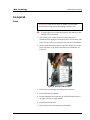
Figure 8 Luminex 200 Analyzer Ventilation Filter
4. Clean the filter with a vacuum or with distilled water. Stand the
filter upright to air dry.
25
Luminex 200 System User Manual
5. Re-install it with the arrows facing up. The filter should click
into place.
6. Plug in and turn on the Luminex 200 analyzer power.
Annually
Sheath Filter
To change the Luminex 200 analyzer sheath filter:
1. Disconnect the Luminex 200 analyzer from ac power by turning
off the power switch on the rear of the analyzer, then unplugging
the analyzer power cord from the wall source.
2. Disconnect the sheath fluid tubing before changing the filter.
3. Open the left door on the Luminex 200 analyzer. Disconnect the
filter by pushing down on the metal clamps on each connection.
See Figure 9.
Figure 9 Sheath Filter
4. Connect the new sheath filter, matching up the color-coded
fittings. The arrow on the sheath filter should be pointing up.
5. Reconnect the sheath fluid tubing.
6. Plug in and power on the Luminex 200 analyzer.
7. Close the left analyzer door.
8. Prime twice.
26
xMAP Technology
Maintenance and Cleaning
As required
Fuses
Warning: To avoid serious injury or death by electric shock,
you must turn off the system and unplug it from the wall.
To replace the fuses in either the Luminex 200 analyzer or the
Luminex XYP instrument:
1. Turn off the power switch on the rear of the analyzer or
instrument, then unplug the instrument power cord from the wall
source. Remove the power cord from the analyzer or instrument.
2. With a small, flathead screwdriver, open the module door on the
lower left corner of the back of the analyzer or instrument. See
Figure 10.
Figure 10 Opening the Module Door
3. Remove the red cartridge (use a flathead screwdriver).
4. Check both fuses for damage.
5. Replace damaged fuses with the type specified on the sticker to
the right of the power input module.
6. Replace the module door.
7. Plug in and power on the analyzer or instrument.
27
Luminex 200 System User Manual
Replacing the SD System
with a Sheath Bottle
You may need to replace the Sheath Delivery (SD) system with
sheath bottles for maintenance or troubleshooting.
To replace the SD system with sheath bottles:
1. With the SD still connected, perform a “Warm Up” via the
software.
2. When the pressure has stabilized, note the value of the Sheath
pressure in the software.
3. Open the access door on the analyzer. Use a screwdriver to turn
the regulator approximately five full turns to the left
(counterclockwise).
4. Shut down the SD and disconnect it from the analyzer.
5. Attach the sheath bottle (preferably full) to the analyzer.
6. Open and close the sheath bottle cap in order to release any
remaining pressure within the system.
7. Perform a “Warm Up” via the software if the compressor has
turned off.
8. When the pressure has stabilized, note the “Sheath” pressure.
9. If the pressure is equal to the value noted in step #2 (within +/0.1psi), then the set up is complete. If not, continue with the
next step. After each adjustment, you will have to release the
pressure and let it build back up again in order to obtain an
accurate pressure reading. Any time the compressor turns off
while making adjustments, perform another warm-up to maintain
pressure in the system.
10. On the analyzer, turn the regulator clockwise (right) to increase
the pressure or counterclockwise to decrease the perssure. There
is no exact measurement of pressure increase or decrease for
each turn of the regulator. Try one full turn in the required
direction to start.
11. Release the pressure by opening and closing the sheath bottle
cap.
12. Repeate the last two steps until you obtain the original Sheath
pressure reading noted in step 2, within +/- 0.1 psi).
Do not move the sheath bottle or sheath line while the system is in
use.
Storing the System
28
This procedure explains the steps you should take before placing the
system into long-term storage.
xMAP Technology
Maintenance and Cleaning
Before storing the system:
1. Run a sanitize with 10% to 20% household bleach solution.
2. Run a sanitize with distilled water.
3. Run four washes with distilled water.
4. Remove the sample probe from the instrument, flush with
distilled water from the narrow end out through the larger end,
replace it in the sample arm, and wrap the end with Parafilm.
Taking the System out of
Storage
Follow this procedure before you begin using the system after it has
been stored long-term.
Before using the system:
1. Turn on the Luminex 200 and XY Platform and watch for the
following indications that the instruments are responding
correctly:
• The light above the sample probe on the Luminex 200 and the
light next to the door of the XY platform are lit
• The compressor starts in the Luminex 200. It is a low
rumbling sound.
• Place your hand behind the Luminex 200 to feel air coming
out of the rear fan.
• Observe movement of the syringe inside the front middle door
of the Luminex 200 shortly after the instrument is powered on.
2. Turn on the PC and start up the software.
3. Complete a Warmup command, which will take 30 minutes.
4. Remove the Parafilm from the end of the sample probe.
5. After Warmup is complete, run three Backflush commands, three
Drain commands, two Alcohol Flush commands, and three
Washes with distilled water. Make sure that the sheath bottle or
Luminex SD has a sufficient amount of sheath fluid and that the
waste container is empty. Verify that the pressure during each of
the maintenance commands reads between 6 and 9 psi.
29
xMAP Technology
Maintenance and Cleaning
30
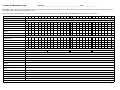
Luminex 200 Maintenance Log
Month(s): ________________________________________Year:_______________
Maintenance Log
Procedure: Use this form to record information over a four-week period. Fill in the month(s) and year above. Fill in the dates in the first line of the table. For each item listed at the left, enter
your initials under each date that you perform the item.
Note: Follow your standard laboratory safety practices when cleaning or maintaining the system. Do not remove the instrument cover under any circumstances.
Dates
Daily maintenance
Startup
Initials: (for each item listed at the left, fill in your initials under each date that you perform the item)
Laser warmup
Check sheath fluid
Check waste level
Tighten sheath cap
Alcohol Flush (70% isopropanol or 70%
ethanol)
Wash twice with distilled water
Shut down
Initials: (for each item listed at the left, fill in your initials under each date that you perform the item)
Sanitize (10% to 20% household
bleach solution)
Wash twice (distilled water)
Soak (distilled water)
Loosen sheath cap
Turn system off (optional)
Weekly
Visual inspection
Date/Initials:
Date/Initials:
Date/Initials:
Date/Initials:
Monthly
Clean sample probe
Date/Initials:
Wipe exterior surfaces
Date/Initials:
Calibrate and verify
Date/Initials:
Every six months
Replace air intake filter,
analyzer
Date/Initials:
Replace air intake filter, XYP
Date/Initials:
Replace syringe plunger seal, or
syringe
Date/Initials:
Check analyzer ventilation filter
Date/Initials:
Yearly
Replace sheath filter
Date/Initials:
As required
Replace fuses
Date/Initials:
Comments:
33
This Page Left Intentionally Blank
34
4
Troubleshooting
Troubleshooting the
Luminex 200
System
Troubleshooting procedures help users isolate, identify, and remedy
problems with the Luminex 200 analyzer and Luminex XYP. This
chapter does not troubleshoot problems with the PC. For help with
PC problems, please contact the technical support system for your
PCs manufacturer.
To troubleshoot a problem, select a general symptom. Next, identify
the possible problem and remedy it with one of the solutions listed.
This chapter supplies information for the following topics:
•
•
•
•
•
•
•
•
•
•
Power Supply Problems
Communication
Pressurization
Fluid Leaks
Sample Probe
Calibration Problems
Acquisition Problems
Bead Detail Irregularities
Printing Errors
Verification
Luminex Technical Support is available to users in the U.S. and
Canada by calling 1-877-785-BEAD (-2323) Users outside of the
U.S. and Canada can contact us at +1 512-381-4397. Inquiries may
also be sent by email to [email protected].
Additional information is available on the Luminex website. Search
on the desired topic or navigate through menus. Also, review the
website’s FAQ section. Enter http://www.luminexcorp.com in your
browser’s address field. Click Support>Support Login to log into
the Support FAQ site.
33
Luminex 200 System User Manual
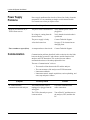
Power Supply
Problems
Power supply problems often involve a blown fuse, faulty electronic
component, or even something as simple as a disconnected cable.
Use extreme care when you replace a fuse.
Symptom
Analyzer will not turn on, or
XYP will not turn on.
Fuses continue to open (blow).
Communication
Possible problem
Solution
The power cord is disconnected.
Verify that the power cord is
plugged in.
No voltage is coming from the
electrical outlet.
Verify that the electrical outlet is
operational.
The power supply is faulty.
Contact Technical Support.
A fuse has burned out.
See page 27 for instructions on
changing fuses.
A component has a short circuit.
Contact Technical Support.
Communication problems described in this section involve the links
between the data system (PC and software) and the Luminex 200
analyzer and XYP instrument. This section does not address
communication issues with other peripheral devices.
The term “Communication” refers to:
•
•
•
•
Symptom
PC cannot initialize
communication with analyzer.
34
The transfer of data between the PC and the analyzer.
The current status of the analyzer and XYP instrument.
Instrument readbacks.
Instrument control, sample acquisition, session uploading, and
start, stop and pause features.
Possible problem
Solution
The communication cable is
unplugged, or plugged into the
wrong port.
Check the communications
cable connections.
The XYP or the analyzer power
is not turned on.
Turn off the PC and then turn on
the analyzer, XYP, and then the
PC.
xMAP Technology
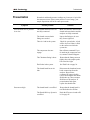
Pressurization
Symptom
Pressurization fails or pressure
is too low.
Pressure too high.
Troubleshooting
Normal air and sheath pressure readings vary between 6-9 psi while
the compressor runs. If the system pressure is out of range, your
sample acquisition will fail or return poor results.
Possible problem
Solution
The sheath and waste lines are
not fully connected.
Make sure the lines between the
sheath and waste bottles and the
analyzer are fully connected.
The sheath or waste bottle
fittings are cracked.
Inspect the fittings to be sure
they form a tight seal.
There is a leak in the system.
Check for system leaks. A leak
will be obvious if there is fluid
on the surface on which the
system sits.
The compressor does not
engage.
Run a Prime command. If you
do not hear the compressor turn
on, contact Technical Support.
The Cheminert fitting is loose.
Ensure that the fitting connects
tightly above the sample probe,
below the blue light.
Fluid leaks in the system.
See Fluid Leak on page 36.
The sheath bottle has an air
leak.
Disconnect the sheath and waste
bottle connections from the
analyzer. Run a Prime
command. If pressure builds,
remove and retighten the sheath
fluid bottle cap, then reconnect
fluid lines to the analyzer. If
pressurization fails again,
replace the sheath bottle.
The sheath bottle is overfilled.
Ensure that the sheath bottle is
not filled above the fill line.
The Sheath Delivery System is
overfilled.
Drain the SD reservoir and refill
it. See page 45.
35
Luminex 200 System User Manual
Regulator not adjusted properly.
Fluid Leaks
Symptom
Pressure too low.
If using bottles, open the center
door on the Luminex analyzer.
Use a screwdriver to adjust the
regulator to fit in the center of
the green region on the Run
Batch tab.
Fluid leaks can result in poor pressurization and failed sample
acquisition.
Possible problem
Solution
The sample probe is clogged.
Clean the sample probe. See
page 20.
The syringe seal leaks.
Replace the syringe seal. See
page 24.
The syringe valve leaks.
Hand-tighten the syringe
connection (silver knob) on the
syringe valve. Run a Prime
command. If leaks continue,
contact Technical Support.
Large amount of fluid pooled
around instrument.
Fittings or fluid lines are
damaged.
Contact Technical Support.
Fluid dripping from the sample
probe.
The sample probe is clogged.
Clean the sample probe. See
page 20.
The sample three-way valve is
faulty.
Contact Technical Support.
The syringe seal leaks.
Replace the syringe seal. See
page 24.
The syringe valve leaks.
Hand-tighten the syringe
connection (silver knob) on the
syringe valve. Run a Prime. If
leaks continue, contact
Technical Support.
Fluid is leaking from the front
of the analyzer.
36
xMAP Technology
Sample Probe
Symptom
Troubleshooting
Problems with the sample probe can lead to fluid leaks and
pressurization problems, as well as inhibit sample acquisition.
Possible problem
Solution
Sample probe leaks.
The sample probe is clogged.
Clean the sample probe. See
page 20.
Sample arm is stuck in the up
position.
The system isn’t properly
pressurized.
Check pressure settings. Ensure
that the sample probe is not
clogged and there are no leaks
in the syringe seal or syringe
valve.
Sample arm is stuck in the down
position.
The sample probe height is too
low, or the path to the well is
blocked.
DO NOT turn off the Luminex
XYP instrument.
1. Remove the blue light
housing from the analyzer.
2. Unscrew the Cheminert
fitting. The system monitor
changes from “Busy” to
“Running” and sample
acquisition continues. Click
Cancel to make adjustments
before continuing with the
rest of the samples.
3. If the sample arm does not
raise, save the data that has
been collected. Turn off the
analyzer, but keep the XYP
instrument on.
4. Exit the Luminex software.
5. Turn the analyzer back on
and restart the software.
6. Run a Wash with distilled
water to remove air from
the system.
7. Verify probe height.
37
Luminex 200 System User Manual
Sample arm does not go down
smoothly.
The 96-well plate is incorrectly
seated in the XYP instrument.
Adjust the 96-well plate.
The 96-well plate is warped.
Inspect the 96-well plate.
Replace it if it is warped.
The sample arm is misaligned.
Readjust the sample arm
horizontal alignment.
The sample probe is bent.
Remove the sample probe from
the Luminex 200 analyzer. Roll
it on a flat surface. If it does not
roll smoothly, replace it with a
new sample probe. Adjust the
sample probe height (see
page 18).
Calibration and
Control Problems
Symptom
Calibration is slow or fails.
38
Possible problem
Solution
The calibration microspheres
are not fully suspended.
Vortex the calibration vials to
resuspend the microspheres.
Wrong lot number or target
values are entered in Update
CAL Targets dialog box.
Verify that correct lot number
and target values are used.
The system calibrators are in the
wrong well on the plate.
Verify that calibrators are in the
correct well.
Not enough calibrator
microspheres added to the well.
Add at least five drops of
calibrator microspheres to the
well. Hold the vial upside down
at a 90 degree angle to the plate
while dispensing them.
Calibrator lot is expired.
Use a fresh bottle of calibrator
microspheres.
The sample probe height is
incorrect.
Adjust the sample probe height.
See page 18.
The sample probe is clogged.
Clean the sample probe. See
page 20.
xMAP Technology
Zero events collected during
calibration.
Analyzer fails Controls.
Troubleshooting
There is a partial clog in the
system.
Clean the sample probe, then
flush the system. See page 20.
There is air in the system.
Verify sample probe height. Run
three Prime commands, two
Alcohol Flush commands, then
three Washes with water.
The waste container is not
vented.
Check that the seal in the waste
container cap is dry and that the
waste container cap is vented.
The waste line was moved
during system operation,
resulting in unstable flow rate.
Verify that the waste line is not
moved during system operation.
Possible problem with the laser.
View the calibration trend
report. Check for dramatic
changes in temperature, sheath
pressure, or voltages. If any of
these are evident on the report,
contact Technical Support.
There is a problem with fluid
levels.
Check the sheath and waste
fluid levels. Verify that tubing
for both bottles is tightly
connected to the instrument.
Check that the waste bottle cap
is vented.
Laser-related issue.
Verify fluid is moving through
the system by performing a
Wash, which causes fluid to go
out to waste. If no fluid is going
to waste, clean the sample
probe, then flush the system
(see page 20). If the issue does
not resolve, contact Technical
Support.
The waste container is not
vented.
Check that the seal in the waste
container cap is dry and that the
waste container cap is vented.
The Cheminert fitting is loose.
Make sure that the Cheminert
fitting is tightened.
The control microspheres are
not fully suspended.
Vortex the control vials to
resuspend the microspheres.
39
Luminex 200 System User Manual
40
Wrong control lot number or
target values are entered in
Update CON Targets box.
Verify that the correct lot
number and target values are
used.
The system controls are in the
wrong well on the plate.
Verify that control microspheres
are in the correct well.
Not enough control
microspheres added to the well.
Add at least five drops of
control microspheres to the
well. For accurate drop volume,
hold the vial upside down at a
90 degree angle to the plate
while dispensing them.
Control lot is expired.
Use a fresh bottle of control
microspheres.
Control microspheres have been
diluted.
Do not dilute the control
microspheres.
The sample probe height is
incorrect.
Adjust the sample probe height.
See page 18.
The sample probe is clogged.
Clean the sample probe. See
page 20.
There is air in the system.
Verify sample probe height. Run
three Prime commands, two
Alcohol Flush commands, then
three Washes with water
The waste container is not
properly vented.
Verify that the waste container
is properly vented and that the
seal is not wet or soiled.
The waste line was moved
during system operation,
resulting in unstable flow rate.
Verify that the waste line is not
moved during system operation.
Possible problem with the
lasers.
Check the system control trend
report for consistent failures. If
any are evident on the report,
contact Technical Support.
xMAP Technology
Troubleshooting
Acquisition
Problems
Symptom
Acquisition fails or slows.
Slow or unsuccessful sample
acquisition.
Possible problem
Solution
The air pressure is out of range.
See Pressurization on page 35.
The sample probe height is
incorrect.
Adjust the sample probe height.
See page 18.
The sample probe is clogged.
Clean the sample probe. See
page 20.
The sheath bottle has a leaky
seal.
Make sure that the sheath bottle
lid is tightened. Remove and
replace the sheath bottle lid.
The sheath or waste lines are
not fully connected.
Disconnect and reconnect the
lines; you should hear them
click.
The calibration microspheres
have expired.
Replace old microspheres with a
fresh lot.
The wrong wells are selected for
the calibration microspheres.
Ensure that the correct wells are
selected in the Maintenance tab.
The calibration lot number or
target values selected in setup is
incorrect.
Enter the correct calibration lot
number and target values in the
Update CAL Targets box.
The sample probe is clogged.
Clean the sample probe. See
page 20.
The air pressure is out of range.
See Pressurization on page 35.
The sample probe is not
vertically aligned.
Adjust the sample probe height.
See page 18.
Air is present in the system.
Verify sample probe height. Run
three Prime commands, two
Alcohol Flush commands, then
three Washes with water
The acquisition volume is set
too high.
Set the acquisition volume to at
least 25 µL less than the actual
volume in your wells. This
setting lets the analyzer acquire
sample more efficiently with
less chance of acquiring air.
41
Luminex 200 System User Manual
Bead Detail
Irregularities
The xMAP microspheres are not
fully suspended.
Gently vortex the plate or
resuspend beads with a
multichannel pipettor to ensure
that the microspheres are
present in the solution.
You are using photobleached
microspheres.
Replace the microspheres with a
fresh batch.
There is an insufficient number
of beads in the sample.
Ensure that there are 2000-5000
beads per beadset per well.
The sample is too concentrated.
Dilute concentrated biological
fluids, such as serum or plasma,
at least 1:5.
Use these tools to assist in diagnosing system and kit-related
problems:
•
•
•
•
•
system calibrators
system controls
assay standards
assay controls
error messages
Review calibration/control trend reports routinely to detect trends.
Use system xMAP control microspheres to check the success of the
system calibration and for troubleshooting purposes. If there is a
problem with your kit results, xMAP controls can help determine if
the problem is analyzer related. If Calibration and Controls are
successful, contact the kit manufacturer.
A normal bead detail display is shown below. It depicts a tight bead
population within a white region.
42
xMAP Technology
Troubleshooting
Figure 11 Normal Bead Detail
The histogram for the bead detail above looks like this:
Figure 12 Normal Histogram
Symptom
xMAP microspheres classify
too high.
Possible problem
You may be using
photobleached calibration
microspheres.
Solution
Replace the calibration
microspheres with a fresh batch.
To avoid photobleaching,
protect your microspheres from
light.
43
Luminex 200 System User Manual
xMAP microspheres hit the
lower right of the region.
You may be using
photobleached xMAP
microspheres.
Replace microspheres with a
fresh batch. To avoid
photobleaching, protect your
microspheres from light.
Beads appear scattered.
There is air in the system.
Verify sample probe height. Run
three Prime commands, two
Alcohol Flush commands, and
then three washes with distilled
water.
The sheath fluid is empty.
Make sure there is sheath fluid
in the sheath container. Prime
the system until all air is out of
the system.
The xMAP microspheres have
agglutinated.
Add additional detergent to the
assay buffer. For example, add
.02% to 0.1% Tween-20,
Triton® X100, or SDS.
The solvent is incompatible.
View a list of incompatible
solvents at the Luminex
Technical Support website http://luminexcorp.custhelp.com.
If the solvent you are using is
listed, switch solvents.
You are using incompatible
sheath fluid.
Use only Luminex sheath fluid
in the Luminex 200 analyzer.
Other fluids may damage your
analyzer and may void your
warranty.
Microspheres appear as a long
diagonal line.
44
xMAP Technology
Luminex SD
Problems
Filter
Malfunction
Draining the Reservoir
Troubleshooting
If the empty sheath fluid container is not replaced and the system
continues to operate, the Luminex SD system eventually vents
pressure to prevent air from being introduced into the Luminex 200
analyzer. This may interrupt a sample and prevent further samples
from being collected.
If the filter attached to the sheath intake line becomes clogged from
extended use, an alarm will sound even though the bulk sheath
container is not empty. If this happens, replace the filter, part number
CN-0037-01.
If the alarm sounds even though the bulk sheath container has fluid
and the sheath filter is in good condition, the system is reporting a
malfunction. If this happens, contact Luminex Technical Support.
If you need to ship the Luminex SD system back to Luminex
Corporation, drain the reservoir before you pack the system.
1. Perform a warmup to pressurize the system.
2. Leave the green air tubing connected between the Luminex 200
analyzer and the SD system.
3. On the SD front panel, disconnect the blue tubing from the
intake labeled Sheath Out and disconnect the white tubing from
the intake labeled Sheath In.
4. Insert the white tubing into the intake labeled Sheath Out and
insert the blue tubing into the intake labeled Sheath In.
5. Turn the unit off and then on again.
6. Press the Prime button on the front panel of the SD system.
7. Sheath fluid will pump from the Sheath Delivery System
reservoir into the 20L Sheath Box.
To refill the Sheath Delivery System, reconnect the tubing according
to color coding and press the Prime button on the SD.
Contact Technical Support for additional information.
45
Luminex 200 System User Manual
46
5
Product Numbers
Hardware
Product Description
Note: These part
numbers are subject to
change without notice.
Note: Common
description of product is
enclosed in brackets.
Customer
Number
Rear Air Filter
CN-0001-01
Bottom Air Filter
CN-0002-01
Air Filter, Intake
CN-0027-01
Bar Code Scanner
CN-PC03-01
Serial Cable, 5 feet
CN-0005-01
PC, Luminex 100 IS
CN-PC04-01
2 Amp, 250 Volts, Fast Acting Fuse (Qty 10)
CN-0019-01
3 Amp, 250 Volts, Fast Acting Fuse
CN-0051-01
Heater Block, XYP
CN-0017-01
Luminex 200 System with IS 2.3
LX200-IS2.3
Luminex 200 System with IS 2.3
Developer’s Workbench
LX200-IS2.3WB
Luminex 100 IS Developer Guide to xMAP
Technology Version 2.3
CN-M029-01
Luminex 200 System with xPONENT
LX200-xPONENT
47
Luminex 200 System User Manual
Power Cord, USA
Power Cord, Australia
Power Cord, Brazil
Power Cord, Denmark
Power Cord, Germany, Sweden, France,
Belgium, and Spain
Power Cord, Switzerland
Power Cord, Israel
Power Cord, UK
Power Cord, Italy
Power Cord, Japan
Power Cord, China
CN-P001-01
CN-P002-01
CN-P003-01
CN-P004-01
CN-P005-01
Reservoir, XYP
CN-0022-01
Sample Needle Height Alignment Kit
[Sample Probe Alignment Kit]
CN-0015-01
Short Sample Needle
CN-0006-01
Long Sample Needle
CN-0007-01
Sample Holder, Large, 1.5 mL
CN-0008-01
Sample Holder, Small, 1.2 mL
CN-0009-01
Sheath Filter with Quick Disconnect
CN-0010-01
Sheath Bottle
CN-0011-01
Syringe Cylinder with Seal
CN-0013-01
Syringe Seal (Qty 4)
CN-0014-01
Cable, USB
CN-0018-01
Waste Bottle
CN-0012-01
Luminex SD [Luminex Sheath
Delivery System]
CN-S001-01
CN-P006-01
CN-P007-01
CN-P008-01
CN-P009-01
CN-P010-01
CN-P012-01
Software
Product Description
48
Customer
Number
Luminex 100 IS Version 2.3 [Software CD]
CN-SW08-01
Luminex xPONENT [Software CD]
CN-SWI5-01
xMAP Technology
Product Numbers
xMAP Reagents
Product Description
Customer
Number
Microspheres, LX100, CL1 CL2 Calibration
(xMAP Classification Calibrator)
L100-CAL1
Microspheres, LX100, RP1 Calibration
(xMAP Reporter Calibrator)
L100-CAL2
Microspheres, LX100, CL1 CL2 Control
(xMAP Classification Control)
L100-CON1
Microspheres, LX100, RP1 Control (xMAP
Reporter Control)
L100-CON2
Microspheres, MagPlex, DD CL1 CL2
Calibrator, 5mL (MagPlex Classification
Calibrator Microspheres)
MCAL1-05
Microspheres, MagPlex, DD CL1 CL2
Control, 5mL, (MagPlex Classification
Control Microspheres)
MCON1-05
xMAP Sheath Fluid, LX100
40-50000
49
Luminex 200 System User Manual
50
Index
A
access doors 3, 15
accessories
see accessory instructions 27
accuracy/precision
specifications 9
add sheath fluid 19
additional equipment
barcode labels 13
bath sonicator 13
printer 13
surge protector 12
vortex 13
additional software 9
after running samples
releasing pressure 19
sanitize 19
wash twice 19
air connector 16
air intake 14
air intake filter 14, 22
replacing 23
XYP 13, 23
analyzer 13
connections 13
ventilation filter 25
avoid
beam exposure 3
shining beam into people’s eyes 3
staring into beam 3
B
barcode label 13
biohazard 2
biological 1
warning 4
blue indicator light 1, 4
C
calibration 21
capacity specifications 10
caution 2
CD supplied 9
cheminert fitting 14
classification laser 11
clean
accessible surfaces 21
clinical samples 8
component of Luminex 100 IS 3
components 1, 8
connectors
air, waste, and sheath fluid 16
D
daily
activities 17
decontamination 1, 5
discard waste 19
disconnect from AC power 21
during operation 1
E
electronics 11, 13
specifications 11
F
filter 14
air intake 15
replacing
air intake 23
sheath 15, 16
flow rate 11
fluidics 11
components 14
illustration 14
leak 2
specifications 11
51
Luminex xPONENT Software Manual
warning 14
fluorescence 10
fuses
product number 47
replacing 27
G
general
Luminex 100 analyzer specifications 10
H
hardware
specifications 8
testing 8
heat 1, 4
heat warning labels 4
heater block 47
high waste volume 20
I
idle
more than 4 hours 17
improper system operation 9
instrument
operation 2
status 4
instrument operation 3
L
label type specifications 13
labels 3
laboratory reagents 9
laser
analyzer 3
apertures 3
bar code reader 3
information 3
location 3
leaks 2
light emission 4
location 4
Luminex 100 IS
specifications 13
Luminex XYP specifications 11
M
maintenance schedule
annual 26
52
as required 27
daily 17
monthly 21
routine tasks 19
semi-annual 22
weekly 20
manual adjustment 16
mechanical 1, 3
monitor waste fluid
refill sheath container 19
O
operation of instrument 2
optical 16
optical assembly 16
optics 11
specifications 11
P
PC specifications 12
performance specifications 9
power down 21
preventing corrosion 21
prime
remove air in waste line 19
printer 13
product numbers 47
protection provided 1
protective housing 3
R
radiation exposure 3
reagent specifications 8
reagents 9, 49
specifications 8
refill sheath warning 19
release system pressure 19
replace fuses 27
replace syringe plunger 24
reporter channel 11
reporter laser
specifications 11
responsibility 5
return shipment 5
running samples
after 17
Index
before 17
once a day 17
sheath container cap 17
verify 17
S
safety advisories 1
safety precautions 1, 2
sample arm
adjusting vertical height 27
sample probe
clean 20
sanitize 17
sensitivity 10
sheath filter 16, 48
sheath flow rate 11
sheath fluid
connector 16
filling 19
filter 26
levels 17
product number 49
sheath fluid container 16
software 9, 48
software specifications 9
dedicated system 9
specifications
11
accuracy/precision 9
capacity 10
classification laser 11
electronics 11
fluidics 11
hardware 8
Luminex 100 analyzer 10
Luminex 100 IS 9, 11, 13
Luminex XYP 11
PC 12
reporter laser 11
sensitivity 10
speed 9
vortex 13
speed specifications 9
start-up procedure 17
status of instrument 4
subsystems 13
surge protector 12
surge protector specifications 12
symbols 2
syringe 16
syringe seal 24, 48
system
overview 13
T
technical support 33
email address 33
hours 33
phone numbers 33
testing clinical samples 8
troubleshooting 33
U
unauthorized additional software 9
user-accessible components 13
V
ventilation filter, XYP 13
visual inspection 20
vortex 13
W
warmup 17
warnings 2, 3, 4, 24
biological 4
warranty 1
waste
connector 16
container 16, 19
high volume 20
wipe exterior surfaces 21
X
xMAP 10
reagents 8
XYP
air intake filter 23
ventilation filter 13
53