1
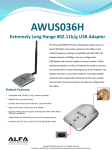
AWUS036H
Vista User Manual V1.1
-1-
USING THIS DOCUMENT
This document provides detailed user guidelines for AWUS036H USB Adapter
operation and setting-up. Though every effort has been made to ensure that this
document is up-to-date and accurate, more information may have become available
subsequent to the production of this guide.
Content
Chapter 1 Introduction ------------------------------------------------------------------- 3
Chapter 2 Specifications ------------------------------------------------------------------ 4
Chapter 3 Installation/ Uninstallation ------------------------------------------------- 5
3.1 Installation ------------------------------------------------------------------------------ 5
3.2 Uninstallation--------------------------------------------------------------------------- 10
Chapter 4 RtWLAN: Wireless LAN Management GUI---------------------------- 12
4.1 Introduction of Main Window ------------------------------------------------------ 12
4.2 Station Mode---------------------------------------------------------------------------- 21
4.3 AP Mode --------------------------------------------------------------------------------- 29
-2-
Chapter 1 Introduction
Thank you for purchasing AWUS036H USB Adapter. AWUS036H USB Adapter
is a perfect combination of both performance and cost-effective product introduced. It
is sincerely hoped that you can enjoy the wireless world through this solidly profiled
wireless adapter.
It provides a full solution of all the IEEE 802.11 b/g protocols, that pass the WiFi tests
and are compatible with all the wireless products with WiFi logo. If you have a AWUS036H
USB Adapter on hand, it means you can connect to the wireless world
without any difficulty.
It also provides all the data rates in the IEEE 802.11 b/g standards, with both short
and long preambles to ensure the compatibility of legacy wireless products and new
ones, saving the panic works for end users to find compatible products.
Since the security issue has become one of the most important one in the wireless
society, it provides you with the full security coverage from the 64/128bits WEP
encryptions, second generation WPA-PSK encryption, to the most advanced
WPA2-AES encryption. WPA2 is the latest security standard currently approved by
WiFi standards.
Saving mode, Adhoc wireless Lan, Wake on Lan (WOL) and other exciting features
are also included in this Wireless LAN USB Adapter. This user manual will guide you
through these exciting features in the following chapters and we is believed that you
will be greatly satisfied with its performance and ease of use.
-3-
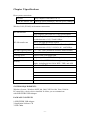
Chapter 2 Specifications
Host system connections
Interface
Fully complies with USB 2.0 or 1.1
USB date transfer rate USB high speed (480Mbps), and full speed (12Mbps)
Wireless LAN (WLAN) environment connections
WLAN Interface
Multimode features
Fully complies with IEEE 802.11 b/g specifications
802.11 b:DQPSK with data scrambling capability to
provide data rate of 1,2,5.5 and 11Mbps
WLAN transfer rate
802.11 g:A high-speed Fast Fourier
Transform(FFT)/Inverse Fast Fourier Transform(IFFT)
provide data rate of 6,9,12.18,24,36,48 and 54Mbps
WLAN Frequency Band
2.4 ~ 2.497 GHz ((Industrial Scientific Medical Band)
Operation Channel
Channel 1 ~ 11
Coverage Area
Indoors:100ft with straight path
Compatibility
Fully compatible to IEEE 802.11 b/g devices
Security
Hardware-based IEEE 802.11i encryption/decyption
engine, including 64-bit/128-bit WEP, TKIP, and AES
Antenna
Detachable RP-SMA antenna
SYSTEM REQUIREMENTS
Windows System : Windows 98SE, Me, 2000, XP 32/64 bit, Vista 32/64 bit
PCs must have a device driver installed. It allows you to communicate
with AWUS036H USB Adapter.
PACKAGE CONTENTS
1.AWUS036H USB Adapter
2.Installation Software CD
3.USB Cable
-4-
Chapter 3 Installation/ Uninstallation
Warning! Do not cover or block the airflow to the adapter. The adapter will reach a
high temperature during use.
3.1 Installation
Before you proceed with the installation, please notice the following descriptions.
Note1: The following installation was operated under Windows Vista. (Procedures are
similar for Windows 98SE/Me/2000/XP.)
Note2: If you have installed the WLAN USB driver & utility before, please uninstall
the old version first.
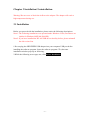
1.Do not plug the AWUS036H USB adapter into your computer USB port before
installing the software program. Insert the software program CD , then auto
installation window pops up on following:
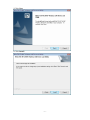
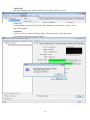
2.While the following screen pops out, click Driver Installation
-5-
3.Click Driver Installation
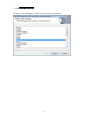
4.Choose a set up language. Click Next to process the installation.
-6-
5.Click Next
6.Click Install
-7-
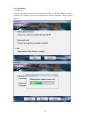
7.The system starts software installation of the WLAN USB adapter.
8.Click Finish to complete the installation
-8-
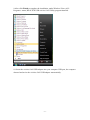
9.After click Finish to complete the installation, under Windows Vista <ALL
Programs> menu, REALTEK USB wireless LAN Utility program installed.
10. Insert the wireless LAN USB adapter into your computer USB port, the computer
detected and active the wireless LAN USB adapter automatically.
-9-
3.2 Uninstallation
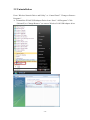
From “Wireless Network Driver and Utility” or “Control Panel” ”Change or Remove
Programs”.
A. Uninstall the WLAN USB Adapter Driver from “Start” “All Programs” Click
“Uninstall”(or “Change/Remove”) to remove Wireless LAN USB Adapter driver.
- 10 -
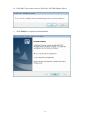
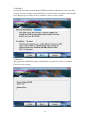
B. Click“Yes”if you want to remove Wireless LAN USB Adapter Driver.
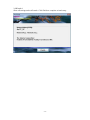
C. Click“Finish”to complete the uninstallation
- 11 -
Chapter 4 Rt WLAN: Wireless LAN Management GUI
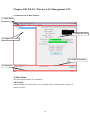
4.1 Introduction of Main Window
A. Main Menu
C. Properties Area
B. Adapter List Area
D. Global Control Bar
E. Status Bar
A.Main Menu
The main menu includes five submenus.
1.Refresh(R)
When clicking the refresh menu, you can update and re-enumerate the contents of
adapter list area.
- 12 -
2.Set Wizard(S)
2.1 Wizard-1
Click Set Wizard(S) menu to enter operation wizard. Click AP: Setup a wireless
network. To configure Access Point parameters. Next to continue. Cancel to leave
wizard
- 13 -
2.2Wizard-2
User defines wireless network Name [SSID](less than 32 characters). User may skip
wireless security. Strongly recommend user to setup wireless security to avoid invalid
users. Back to go previous. Next to continue. Cancel to close wizard.
2.3Wizard-3
This page shows SSID & Security settings Back to go previous Next to continue.
Cancel to close wizard.
- 14 -
2.4Wizard-4
Show all settings under AP mode. Click Finish to complete wizard setup.
- 15 -
3.Mode (M)
Wireless configuration is quickly switched to be either [Station] or [AP].
4.View (V)
Enable/disable the presence of E. Status Bar. Without the check mark (v) the E. Status
Bar will be hidden.
5.About(A)
Click the “About” to show the about dialog. The application version and license
information are shown in the about dialog.
- 16 -
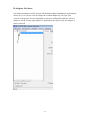
B. Adapter List Area
All connected adapters on this system with multiple adapter installations are displayed
in this area. It is easy for users to change the selected adapter by one click. The
contents of properties area are dependant on wireless configuration that the selected
adapter is set up. If only single adapter is installed on the system, only one adapter is
always selected.
- 17 -
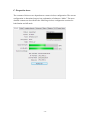
C. Properties Area
The contents of this area are dependent on current wireless configuration. The current
configuration is determined on previous explanation of submenu “Mode”. The more
detailed contents are described in the following wireless configuration sections for
both Station and AP mode
- 18 -
D. Global Control Bar
Each control item on this bar affects the adapter or management GUI directly.
Show Tray Icon
Checking "Show Tray Icon" and clicking “Close” button, the management GUI will
be minimized and stay on the tray icon located at the right bottom corner of Windows.
If not, management GUI will shut down while clicking "Close" button with
unchecked condition
Radio Off
Turn off the radio to save power. While the radio is off, the links with other wireless
network nodes are disconnected. User should be aware that while the wireless
configuration is in AP mode. The radio off will cause the sub network belonging to
the AP to be disconnected with internet/intranet.
Disable Adapter
Stop wireless USB device.
E. Status Bar
The hints or status of the management GUI are presented in the status bar.
- 19 -
- 20 -
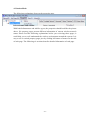
4.2 Station Mode
The following explanations focus on the properties area.
Infrastructure and Ad-Hoc
With both Infrastructure and Ad-Hoc types, the properties should look like the picture
above. Six property pages present different information of current wireless network
status. Please read the following explanations before you reviewing these pages, it
could help you to well understand the wireless environment around the system. It is
easy to use to switch property pages just by clicking left button of mouse on the title
of each page. The following six sections describe detailed information of each page.
- 21 -
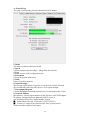
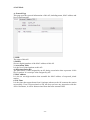
A. General Page
This page represents the general information of this adapter.
1. Status
The status of station connection to AP.
2. Speed
Current transition speed in Mbps (Mega-Bits-Per-Second).
3. Type
Current wireless LAN configuration type.
4. Encryption
Current encryption mode used.
5. SSID
Name of wireless network.
6. Signal Strength
The average signal quality of packets received from wireless network.
We recommend connecting AP with over 70% signal strength.
7. Throughput Diagram
Current throughput, including transmission (Tx) and total traffic (Total).
8. Network Address
Mac Address: six two-digital number of this Wireless LAN USB adapter
IP Address: assigned network address by DHCP server or
self-definition in four three-digital number format.
■ Subnet Mask: the only valid value is 2555.255.255.0
■ Gateway: It comes from connected AP. Your system can not
connect internet with this field empty.
- 22 -
B. Profile Page
This page provides profiles management such as add, remove, edit and duplicate just
by pressing the respected button.
Available Profile(s)
The list box shows all the created profiles.
1. Add
Add a new profile for AP or IBSS (Ad-Hoc mode).
2. Remove
Remove the selected profile.
3. Edit
Edit contents of selected profile.
4. Duplicate
Make copy of selected profile.
5. Set Default
Set the selected profile as default selection.
6. Available Network Page
This page presents all BSS, including AP and IBSS, around this system. You can pick
any one of these network connections.
- 23 -
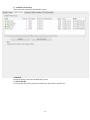
C. Available Network(s)
Show network connection around this system
1. Refresh
Rescan network connection around this system.
2. Add to Profile
Create profile for selected network connection and add it to profile list.
- 24 -
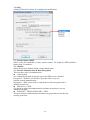
D. Advanced Page
1. Power Save
None: without power save function.
Min: wake up more frequently to receive packets.
Max: wake up less frequently to receive packets.
2. Wireless Mode
802.11b
802.11g/b
3. 802.11b Preamble Mode
Long: higher quality but with lower performance than preamble short mode.
Short: Normal quality but with higher performance than preamble long mode.
Auto: use the preamble mode of current.
4. Fragment Threshold
The threshold of fragment length. Higher threshold increase data transition
performance with good signal quality. However, in a poor signal quality
environment, data throughput might be worse on high fragment threshold
than low fragment threshold.
5. RTS Threshold
Threshold of Request To Send mechanism. The RTS frame will not send out
until the packet size over threshold.
6. WOL (Wake On LAN)
The wake-on-LAN is applied for remote control purpose. You could wake up a
system through network packets. For Wireless LAN USB Adapter, only the same
adapter on another system could wake it up. Input MAC Address: the six two-digit
numbers of Wireless LAN USB Adapter on target system.
Wake Up: click this button to wake it up .
- 25 -
7. Set Defaults
Restore the default value to be current settings.
8. Apply
Apply the current settings to GUI.
E. Status Page
1. NDIS Driver Version
Driver version
2. Short Radio Header
Yes
3. Encryption
Current encryption mode.
4. Authenticate
Authentication state
5. Channel Set
Selected channel plan currently.
6. MAC Address
MAC address of this adapter.
7. Data Rate
Wireless LAN transition speed
8. Channel(Frequency)
Current channel number
9. Status
Wireless network status
10. SSID: name of connecting AP
11. Network Type
Indicate current network configuration type
12. Power Save Mode
Current setting power save mode
13. Associated AP MAC
MAC address of connecting AP
14. Up Time
- 26 -
Total connection time
- 27 -
F. Statistics Page
You could watch the Tx/Rx status of current wireless connection. This page shows a
statistic analysis of packet transition.
- 28 -
4.3 AP Mode
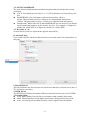
A. General Page
This page provides general information of this AP, including name, MAC address and
list of joined stations.
1. SSID
The name of this AP.
2. BSSID
Six two-digital numbers of the MAC address of this AP.
3. Association Table
It is the list of joined stations to this AP.
4. AID (Association ID)
The AID field is a value assigned by an AP during association that represents 16-bit
ID of a station. It is a unique value assigned by AP.
5. MAC address
It is the six two-digit numbers that assemble the MAC address of respected joined
station.
6. Life Time
It is the timer that counts down from 10 minutes whenever the AP connects the station
successfully. If an STA associated to SW AP does not have any interaction with the
AP in 10 minutes, it will be disassociated from the Infra-structure BSS.
- 29 -
7. Config
A dialog of this AP is shown for configuration modification.
7.1. Network Name (SSID)
Name of the AP searchable by other wireless nodes. The length of SSID should be
shorter than 32 characters.
7.2. Channel
Select the wireless channel within current channel plan.
7.3. Network Authentication & Data Encryption
There are three types of authentication:
z Open System
It is combined with data encryption type to be WEP or to be disabled.
Encryption ~ disabled: you decide to open this AP to every one
without network authentication.
Encryption ~ WEP: you decide to setup the basic data encryption with a
defined network key.
z Shared Key + WEP
You decide to apply both authentication and data encryption to prevent
unauthorized login.
z WPA-PSK + TKIP & WPA2-PSK + TKIP
The most advanced authentication and data encryption that provide the best
security protection.
- 30 -
7.4. ASCII/ PASSPHRASE
The most advanced authentication and data encryption that provide the best security
protection.
z ASCII: You should provide either 5 or 13 ASCII characters on Network key edit
box.
z PASSPHRASE: You could input words on Network Key edit box.
64 bits: The generated pass key is 64-bit to be complied with data packets.
128 bits: The generated pass key is 128-bit to be complied with data packets.
z Hexadecimal: While both ASCII and PASSPHRASE are not checked, you should
input hexadecimal number in the network key box. For example, 10 digits hex
number for 64-bit WEP or 26 digits hex number for 128-bit WEP.
7.5. Key index (1 ~4)
At most four key index to represent the opposite network key.
B. Advanced Page
Users could setup the advanced characteristics of network packet for transmission on
this page.
1. Beacon Interval
This filed indicates the interval between each beacon that this AP sends out in unit of
TU (1024 micro-seconds).
2. DTIM Period
The DTIM Period field is the number of Beacon intervals between successive DTIMs.
3. Preamble Mode
z Long: higher quality but with lower performance than preamble short mode.
z Short: Normal quality but with higher performance then preamble long mode.
z Auto: select the proper preamble mode by current signal frame information.
- 31 -
C. Statistics Page
The Tx/Rx status of current wireless connection is shown. A statistic analysis of
packet transition is listed.
- 32 -
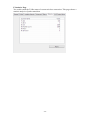
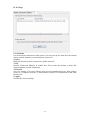
D. ICS Page
1. ConnName
List all network connections to this system. You can pick up one from the listed item(s)
whose network domain you would want to connect to.
2. Select
Make the desired network connection to public network.
3. ICS
Internet Connection Sharing. It enables this AP to create the domain to share this
internet/intranet network connection.
4. Firewall
Any of a number of security schemes that prevents unauthorized users from gaining
access to a computer network, or that monitors transfers of information to and from
the network.
5. Apply
Execute the current settings.
- 33 -