1
ting started
Ge t
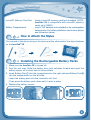
microSD Memory Card Slot
Battery Compartments
Insert a microSD memory card (not included). (NOTE:
InnoTab® 3S is compatible with microSD memory
cards up to 32GB.)
Insert 4 "AA" batteries (not included) or the rechargeable
battery packs. For battery installation instructions, please
see the section below.
How to Attach the Stylus
Tie one end of the stylus string to the stylus and the other end to the stylus fastener
on the InnoTab® 3S.
Installing the Rechargeable Battery Packs
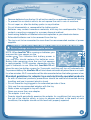
1. Make sure the InnoTab® 3S is turned off.
2. Turn the unit over. Slide the battery door lock switches forward and push the
battery covers off to each side to remove them.
3. Insert Battery Pack① into the compartment on the right side and Battery Pack②
into the compartment on the left side.
• Insert the battery pack into the connector slot first.
• Then press the battery pack down until it rests in place.
4. Replace the battery covers.
4