1
Learning the various functions – HOME/Menu
Using the HOME screen
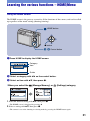
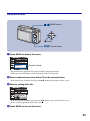
The HOME screen is the gateway screen for all the functions of the camera, and can be called
up regardless of the mode setting (shooting/viewing).
HOME button
z button
ɟ ɠ Control button
1 Press HOME to display the HOME screen.
Shooting
Shooting
Shoot photos or movies
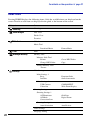
Category
Item
Guide
2
Select a category with b/B on the control button.
3
Select an item with v/V, then press z.
[ When you select the
(Manage Memory) or
(Settings) category
1 Select the desired setting with v/V, then press z.
• The HOME screen is displayed by pressing b.
2 Select a setting with v/V, then press z.
• The camera is set to the shooting or viewing mode by pressing the HOME button again.
21