1
AJA R20AD 10-bit Universal Decoder User Manual
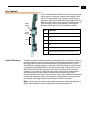
Front of Card
Reference Select:
FRAME = Selects Aux
BNC on Frame
LOOP = Selects Reference Loop BNC
Termination:
OFF = No Termination
ON = 75 Ohm Internal Termination
1
FRAME
Reference Strapping
Field (J3)
LOOP
J3
OFF
ON
Jumpers shown with Reference Select set to “LOOP”
and Termination set to “OFF”
Reference Select and Termination Configuration
Output Timing
Adjustment (With
Model FSG
Framesync/
Genlock Option
The following procedure provides instructions for output timing adjustment of the
R20AD when used with the model FSG FRAMESYNC/GENLOCK option.
The R20AD has two levels of output timing adjustment:
• advance or delay by lines
• advance or delay by pixels (with l/4 pixel resolution)
And there are two modes of timing adjustment:
• Genlock
• Delay
If the board detects an external reference, it will be in Genlock mode. If there is no
external reference detected, the board will be in Delay mode. In Genlock mode, the
R20AD output will be genlocked to the external reference. The board can be set to
Delay mode without removing the external reference by lifting the “REFERENCE
SELECT” jumper J3.
Genlock Mode
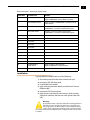
1. Perform function 1 in Bank 1 “SET DEFAULT DELAY”. This will bring the output
timing close to the reference’s timing.
2. Perform function 3 in Bank 1 “SET PIXEL DELAY”. This will allow adjustment to
within 1/4 pixel of reference.
Delay Mode
1. Perform function 1 in Bank 1 “SET DEFAULT DELAY”. This will make the total delay
through the R20AD to about 1 frame.
2. Perform function 2 in Bank 1 “SET LINE DELAY”. This will allow advancing and
delaying of the output timing in Line increments.
3. Perform function 3 in Bank 1 “SET PIXEL DELAY”. This will allow advancing and
delaying of the output timing in Pixel increments.
Note: In "SET PIXEL DELAY," the first four increments are 1/4 pixel steps.
9