1
Contents
Language
Page
___________________________________________________________________
English
1
French
47
Spanish
96
1
TABLE OF CONTENTS
Topic
Inventory of Contents
Features
Setting Up
Battery Installation
Function keys
LCD Screen and Settings
Atomic time -WWVB Radio Controlled Time
Manual Settings
Weather Man Icon
Display of Indoor Temperature and Humidity Reading
Display of Outdoor Temperature Reading
Display of Outdoor Minimum and Maximum records
Display of Indoor Minimum and Maximum records
Ice Alarm
915 MHz Reception
Mounting
Care and Maintenance
Specifications
2
Page
3
4
6
8
10
12
14
15
20
21
22
23
24
26
27
28
31
32
Warranty Information
FAQ
This product offers:
33
INSTANT TRANSMISSION is the state-of-the-art
new wireless transmission technology,
exclusively designed and developed by LA
CROSSE TECHNOLOGY. INSTANT
TRANSMISSION offers you an immediate update
(every 4 seconds!) of all your outdoor data
measured from the transmitters: follow your
climatic variations in real-time!
INVENTORY OF CONTENTS
1.
2.
3.
Wireless Weather Station
Wireless Temperature Sensor (TX37U) and mounting bracket.
Instruction Manual
3
FEATURES:
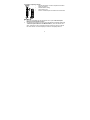
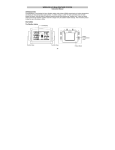
The Weather Station
Hanging hole
Battery
compartment
cover
LCD
Display
Function
Keys
Ice Alarm Key
Foldout
Stand
4
•
•
•
•
•
•
•
•
•
•
•
•
•
Atomic time function (WWVB Radio controlled time) with manual setting options
Daylight Saving Time ON/OFF
Hour and minute display
Calendar display
Time zone option 0 to 12 hours
Wireless transmission at 915 MHz
Outdoor signal reception intervals at 4-second
Display one of the multiple easy-to-read Temperature condition icons featured by
Weather Girl
Temperature display in Fahrenheit (°F) or Celsius (°C) selectable
Indoor and Outdoor temperature display with MIN/MAX recording
All MIN/MAX recordings can be reset
Low battery indicator
Wall hanging or free standing
5
The Outdoor Temperature Sensor
•
Remote transmission of outdoor temperature to Weather
Station by 915 MHz
•
Weather-resistant casing
•
Wall mounting case
•
Mount in a sheltered place. Avoid direct rain and sunshine
SETTING UP:
1.
2.
First, insert the batteries into the temperature sensor. (see “Install and replace
batteries in the temperature sensor“).
Immediately after and within 2 minutes, insert the batteries into Weather Station (see
“Install and replace batteries in the Weather Station”). Once the batteries are in
place, all segments of the LCD will light up briefly. Following the time as 12:00 and
the "Oscar Outlook" icon will be displayed. If these are not displayed after 60
6
3.
4.
seconds, remove the batteries and wait for at least 10 seconds before reinserting
them.
After inserting the batteries into the sensor, the Weather Station will start receiving
data from the sensor. The outdoor temperature and the signal reception icon should
then be displayed on the Weather Station. If this does not happen after 5 minutes, the
batteries will need to be removed from both units and reset from step 1.
In order to ensure sufficient 915 MHz transmission there should be no more than 330
feet (100 meters) between the final position of the Weather Station and the sensor
(see notes on “Mounting” and “915 MHz Reception”).
Note:
•
•
•
•
The Weather Station will receive one outdoor sensor only.
If the signal reception is not successful on the first frequency (915MHz) for 22
seconds, the frequency is changed to 920MHz and the reception is tried another 22
seconds. If still not successful the reception is tried for 22 seconds on 910MHz. This
will also be done for re-synchronization.
If after 10 minutes, the Atomic time (WWVB time) signal has not been received, press
the SET key to manually enter a time initially.
Daily WWVB reception is attempted at full hour between 12:00 am to 6:00 am. If the
reception is successful, there will no reception attempt until the following day. When
this is successful, the received time will override the manually set time. The date is
7
also updated with the received time. (Please refer also to notes on “Atomic auto-set
time - WWVB Radio controlled Time” and “Manual Time Setting”).
BATTERY INSTALLATION
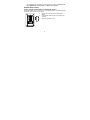
INSTALL AND REPLACE BATTERIES IN THE WEATHER STATION
The Weather Station uses 2 x AAA, IEC LR3, 1.5V Alkaline batteries. To install and replace
the batteries, please follow the steps below:
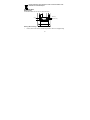
1.
Remove the cover at the back of the Weather
Station.
2.
Insert batteries observing the correct polarity (see
marking).
3.
Replace compartment cover.
8
INSTALL AND REPLACE BATTERIES IN THE TEMPERATURE SENSOR
The temperature sensor uses 2 x AA, IEC LR6, 1.5V Alkaline battery.
To install and replace the batteries, please follow the steps below:
1.
Pull out the battery holder at the bottom of the sensor.
2.
Insert the batteries, observing the correct polarity (see marking).
3.
Replace the battery holder on the unit.
Note:
In the event of changing batteries in any of the units, all units need to be reset by following
the setting up procedures. This is because a random security code is assigned by the
sensor at start-up and this code must be received and stored by the Weather Station in the
first 3 minutes of power being supplied to it
BATTERY CHANGE:
It is recommended to replace the batteries in all units regularly to ensure optimum accuracy
of these units (Battery life see Specifications below).
9
Please participate in the preservation of the environment. Return used
batteries to an authorized depot.
FUNCTION KEYS:
Weather Station:
The Weather Station has four easy to use function keys.
SET key
+ key
Ice Alarm key
MIN/
MAX key
SET key (Manual Setting):
•
Press to enter the set mode for the following functions: Time zone, Daylight saving
10
time ON/OFF, Manual time, Year, Month, Date, Weekday and °C/°F settings.
MIN/ MAX key
•
To toggle between the maximum/ minimum outdoor temperature and maximum/
minimum indoor temperature data
•
Press to reset the maximum or minimum temperature records of the indoor and the
outdoor channel (will reset all records to current level)
•
Press to exit the setting mode
+ key
•
•
Make adjustments for various settings
In normal display, press to toggle between the display of the calendar and second of
time in the time display of LCD
Ice Alarm key
•
To activate / deactivate the Ice Alarm (alarm will be triggered once the outdoor
temperature has dropped to 39.2°F)
•
To exit from the manual setting mode
11
LCD SCREEN AND SETTINGS:
Transmitter low battery icon
Ice alarm icon
Outdoor Temperature
Outdoor signal
reception icon*
Weather Girl icon
(Based on
temperature)
Receiver low
battery icon
Indoor humidity %RH
Indoor Temperature
Time reception icon
Time display
Display "Calendar"
or "Second"
12
* When the outdoor signal is successfully received by the Weather Station, this icon will be
switched on. (If not successful, the icon will not be shown in LCD) User can easily see
whether the last reception was successful (icon on) or not (icon off). On the other hand, the
short blinking of the icon shows that a reception is currently taking place.
For easy viewing, the LCD screen is divided into 3 sections displaying the information for
time and indoor data, weather forecast, and outdoor data.
Section 1 - OUTDOOR TEMPERATURE
•
Display the current outdoor temperature.
•
By pressing the MIN/ MAX key, display the stored MIN/MAX outdoor temperature,
with simultaneous display of MIN/ MAX icon.
•
A signal reception symbol will be shown indicating that outdoor temperature signal is
received.
Section 2 - INDOOR DATA AND WEATHER ICON (FEATURED BY WEATHER GIRL)
Display indoor temperature and indoor humidity
The current temperature condition is displayed in form of one of multiple icons,
featured by Weather Girl, which change in appearance according to the current
outdoor temperature.
•
Format of the Oscar Outlook icons refers to the below clause "Weather Girl"
•
•
13
Section 3 - TIME AND CALENDAR
•
In normal mode, display the time and calendar.
•
A signal reception symbol is shown indicating that Atomic time (WWVB time) signal is
received.
ATOMIC TIME - WWVB RADIO CONTROLLED TIME
The NIST (National Institute of Standards and Technology—Time and Frequency Division)
WWVB radio station is located in Ft. Collins, Colorado, and transmits the exact time signal
continuously throughout the United States at 60 kHz. The signal can be received up to
2,000 miles away through the internal antenna in the Weather Station. However, due to the
nature of the Earth’s Ionosphere, reception is very limited during daylight hours. The
wireless weather station will search for a signal every night when reception is best.
The WWVB radio station receives the time data from the NIST Atomic clock in Boulder,
Colorado. A team of atomic physicists is continually measuring every second, of every day,
to an accuracy of ten billionths of a second per day. These physicists have created an
international standard, measuring a second as 9,192,631,770 vibrations of a Cesium-133
atom in a vacuum. For more detail, visit http://www.boulder.nist.gov/timefreq.htm. To listen
to the NIST time, call (303)499-7111. This number will connect you to an automated time,
announced at the top of the minute in “Coordinated Universal Time”, which is also known
as Greenwich Mean Time (GMT). This time does not follow Daylight Saving Time changes.
14
After the top of the minute, a tone will sound for every second. It is possible that your
wireless weather station will not be exactly on the second due to the variance in the quartz.
However, the clock will adjust the quartz timing over the course of several days to be very
accurate; under 0.10 seconds per day.
MANUAL SETTINGS:
The following manual settings can be done in the setting mode:
•
Time zone setting
•
Daylight Saving Time ON/OFF setting
•
Manual time setting
•
Calendar setting
•
°F/ °C setting
Press and hold the SET key for about 3 seconds to advance to the setting mode:
TIME ZONE SETTING:
flashing
15
The time zone default of the Weather station is -5 hr. To change to another time zone:
1.
Press and hold the SET key for about 3 seconds to enter the time zone setting
(flashing).
2.
Using the + key, set the time zone. The range runs between 0 to -12 hr, in
consecutive 1 hour intervals.
3.
Press the SET key to confirm and enter the “Daylight Saving time ON/OFF setting”
or exit the setting mode by pressing the MIN/MAX key
DAYLIGHT SAVING TIME ON/OFF SETTING
flashing
1.
2.
3.
The digit “ON DST” will start flashing on the LCD.
Use the + key to turn ON or OFF the daylight saving time function.
Confirm with the SET key and enter the “Manual Time setting” or exit the setting
mode by pressing the MIN/MAX key.
16
MANUAL TIME SETTING
In case the Weather Station is not able to detect the Atomic time (WWVB) signal
(disturbances, transmitting distance, etc.), the time can be manually set. The clock will then
work as a normal Quartz clock.
Hours (flashing)
Minutes (flashing)
To set the clock:
1.
The hour digits start flashing in the time display section.
2.
Use the + key to adjust the hours and then press SET key to go to the minute setting.
3.
The minute will be flashing. Press the + key to adjust the minutes.
4.
Confirm with the SET key and enter the “Calendar Setting” or exit the setting mode
by pressing the MIN/MAX key
Note:
•
The unit will still try to receive the signal at each full hour despite it being manually
set. When it does receive the signal, it will change the manually set time into the
received time.
17
•
The time format is fixed to "12-hr" time display. "PM" will be shown in hours from
noon to midnight.
CALENDAR SETTING
Year
"Month. Date."
Weekday
The date default of the Weather Station is 1. 1. of the year 2006 after initial set-up. Once
the radio-controlled time signals are received, the date is automatically updated. However,
if the signals are not received, the date can also be set manually. To do this:
1.
Using the + key, set the year required. The range runs from 2000 to 2029 (default is
2006).
2.
Press the SET key to enter the month setting mode.
18
3.
4.
5.
6.
7.
The month digit will be flashing. Press the + key to set the month and then press the
SET key to go to the date setting.
The date digit will be flashing. Press the + key to set the date.
Confirm with the SET key and set the weekday.
Press + key to select the weekday, "MO", TU", "WE" etc.
Confirm with SET key and enter the “°F/°C TEMPERATURE UNIT SETTING” or exit
the setting mode by pressing the MIN/MAX key.
°F/°C TEMPERATURE UNIT SETTING
flashing
The default temperature reading is set to °F (Fahrenheit). To select °C (Celsius):
1.
The “°F/ °C” will be flashing, use the + key to toggle between “°F” and “°C”.
2.
Once the desired temperature unit has been chosen, confirm with the SET to exit the
setting mode.
19
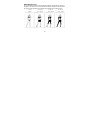
WEATHER GIRL ICON:
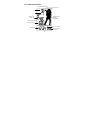
One of the multiple temperature icons (featured by Weather Girl with different clothing) is
displayed in the center of LCD, which indicates the different temperature conditions due to
the current outdoor temperature (temperature value detected by the outdoor sensor):
>78.8°F
(>26°C)
69.8 - 78.7 °F
(21.0 - 25.9°C)
59 - 69.7°F
(15.0 - 20.9°C)
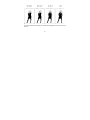
20
50 - 58.9°F
(10.0 - 14.9°C)
46.4 - 49.9°F
(8.0 - 9.9°C)
39.2 - 46.3 °F
(4.0 - 7.9°C)
32 - 39.1°F
(0 - 3.9°C)
< 32°F
< 0°C
DISPLAY OF INDOOR TEMPERATURE AND HUMIDITY READING:
The indoor temperature and humidity are measured and displayed on the second section of
the LCD.
21
Indoor Relative
Humidity %
Indoor
Temperature
in °F
DISPLAY OF OUTDOOR TEMPERATURE READING:
The first LCD section shows the outdoor temperature.
Outdoor
Temperature in °F
22
DISPLAY OF OUTDOOR MINIMUM AND MAXIMUM RECORDS:
1.
In normal display mode, Press the MIN/MAX button once, the outdoor MIN
temperature and the time and date of recording this temperature will be displayed.
Min outdoor
temperature
Outdoor
data icon
Minimum
icon
Time of
record
2.
3.
Press the MIN/MAX button once more, the outdoor max temperature and the time
and date of recording this temperature will be displayed.
Press the MIN/ MAX button once more to advance to the indoor MIN/ MAX display.
23
DISPLAY OF INDOOR MINIMUM AND MAXIMUM RECORDS:
1.
2.
In normal display mode, press the MIN/ MAX key three times, the minimum indoor
temperature will be shown in LCD. Also the time and date of recording this
temperature will be displayed.
Then press the MIN/MAX button one more time, the maximum indoor temperature will
be shown in LCD. Also the time and date of recording this temperature will be
displayed.
Indoor data
icon
Maximum
icon
Max indoor
temperature
Time of record
24
3.
Press the MIN/ MAX button once more to go back to the normal display.
RESETTING THE INDOOR AND OUTDOOR MINIMUM AND MAXIMUM
RECORDS
1.
In normal display mode, press the MIN/ MAX button to advance to the MIN/MAX
records display.
2.
Press and hold the MIN/MAX key for about 2 seconds, this will reset all the indoor
and outdoor MIN and MAX temperature records to the current temperature and time.
Note: The indoor and outdoor records will be reset at the same time.
Ice Alarm (ALARM AT 39.2°°F)
This Weather Station has a unique Ice Alarm feature. User may choose to turn it On or Off.
Press the Ice Alarm key to activate the alarm (the Ice Alarm icon will then be displayed to
indicate that the alarm is "on"). After the alarm is switched on, and the measured outdoor
temperature has dropped below 39.2°F, the Ice Alarm will be triggered. The alarm will then
sound and the Ice Alarm icon will be blinking on the LCD. The alarm duration will be about
1.5 minutes.
HYSTERESIS OF ICE ALARM
To compensate for the fluctuation of the measured outdoor temperature, which may cause
25
the Ice Alarm to sound constantly if the measured reading is close to 39.2°F, a hysteresis
function has been implemented for the alarm.
If the current temperature value drops to 39.2°F, the ice alarm will be activated (if the alarm
has been enabled).
Since the preset hysteresis is 1.8°F. If the temperature rises back to 40.3°F and thereafter
again drops to below 39.2°F, the data will be blinking, but no alarm will be activated.
With the pre-set hysteresis of 1.8°F, it has to rise back to above 41°F and drop below
39.2°F to trigger the alarm again.
Note: After the alarm is triggered, the alarming icon will still blink when the temp is still
between 39.2 to 41°F.
915 MHz RECEPTION
The Weather Station should receive the temperature data within 5 minutes after set-up. If
the temperature data is not received 5 minutes after setting up (not successfully
continuously, the outdoor display shows “- - -” ), please check the following points:
1.
The distance of the Weather Station or sensor should be at least 5 to 6.5 feet away
from any interfering sources such as computer monitors or TV sets.
2.
Avoid positioning the Weather Station onto or in the immediate proximity of metal
window frames.
26
3.
4.
Using other electrical products such as headphones or speakers operating on the
same signal frequency (915MHz) may prevent correct signal transmission and
reception.
Neighbors using electrical devices operating on the 915MHz signal frequency can
also cause interference.
Note:
When the 915MHz signal is received correctly, do not re-open the battery cover of either
the sensor or Weather Station, as the batteries may spring free from the contacts and force
a false reset. Should this happen accidentally then reset all units (see Setting up above)
otherwise transmission problems may occur.
The transmission range is about 330 ft. (100 m) from the sensor to the Weather Station (in
open space). However, this depends on the surrounding environment and interference
levels. If no reception is possible despite the observation of these factors, all system units
have to be reset (see Setting up).
MOUNTING
POSITIONING THE WEATHER STATION:
The Weather Station has been designed to be hung onto wall or free standing.
27
To wall mount
Choose a sheltered place. Avoid direct rain and sunshine. Before
wall mounting, please check that the outdoor temperature values
can be received from the desired locations.
1.
Fix a screw (not supplied) into the desired wall, leaving the
head extended out the by about 5mm.
2.
Fold the stand the Weather Station before hanging the station
onto the screw. Make sure that it locks into place before
releasing.
Free standing
With the stand, the Weather Station can be placed onto any
flat surface.
28
POSITIONING THE TEMPERATURE SENSOR:
The sensor is supplied with a holder that may be attached to a wall
with the two screws supplied. The sensor can also be position on a
flat surface by securing the stand to the bottom to the sensor.
To wall mount:
1. Secure the bracket onto a desired wall using the screws and plastic
anchors.
2. Clip the sensor onto the bracket.
Note:
Before permanently fixing the sensor wall base, place all units in the
desired locations to check that the outdoor temperature reading is
receivable. In event that the signal is not received, relocate the sensors
or move them slightly as this may help the signal reception.
29
CARE AND MAINTENANCE:
•
•
•
•
•
•
Extreme temperatures, vibration and shock should be avoided as these may cause
damage to the unit and give inaccurate forecasts and readings.
When cleaning the display and casings, use a soft damp cloth only. Do not use
solvents or scouring agents as they may mark the LCD and casings.
Do not submerge the unit in water.
Immediately remove all low powered batteries to avoid leakage and damage. Replace
only with new batteries of the recommended type.
Do not make any repair attempts to the unit. Return them to their original point of
purchase for repair by a qualified engineer. Opening and tampering with the unit may
invalidate their guarantee.
Do not expose the units to extreme and sudden temperature changes, this may lead
to rapid changes in forecasts and readings and thereby reduce their accuracy.
SPECIFICATIONS:
Temperature measuring range:
Indoor
:
14.1°F to +139.8°F with 0.2°F resolution
(-9.9ºC to +59.9ºC with 0.1ºC resolution,
“OF.L” displayed if outside this range)
Outdoor : -39.8°F to +139.8°F with 0.2°F resolution
30
(-39.9ºC to +59.9ºC with 0.1ºC resolution,
“OF.L” displayed if outside this range)
Relative humidity measuring range:
Indoor
: 1% to 99% with 1% resolution (displays “- -” when outside this range)
Indoor temperature checking interval :
Indoor humidity checking interval
:
Outdoor data reception
:
every 17 seconds
every 17 seconds
approximately every 4 seconds
Power consumption:
Weather Station
: 2 x AAA, IEC, LR3, 1.5V
Temperature Sensor
: 2 x AA, IEC, LR6 1.5V
Battery life cycle (Alkaline batteries recommended)
Weather Station
: Approximately 12 months
Sensor
: Approximately 24 months
Dimensions (L x W x H)
Weather Station
Temperature Sensor
:
:
3.74" x 0.74" x 5.35"/ 95 x 18.8 x 136mm
1.50" x 0.83" x 5.05"/ 38.2 x 21.2 x 128.3mm
31
WARRANTY
La Crosse Technology, Ltd provides a 1-year limited warranty on this product against
manufacturing defects in materials and workmanship.
This limited warranty begins on the original date of purchase, is valid only on products
purchased and used in North America and only to the original purchaser of this product. To
receive warranty service, the purchaser must contact La Crosse Technology, Ltd for
problem determination and service procedures. Warranty service can only be performed
by a La Crosse Technology, Ltd authorized service center. The original dated bill of sale
must be presented upon request as proof of purchase to La Crosse Technology, Ltd or La
Crosse Technology, Ltd’s authorized service center.
La Crosse Technology, Ltd will repair or replace this product, at our option and at no
charge as stipulated herein, with new or reconditioned parts or products if found to be
defective during the limited warranty period specified above. All replaced parts and
products become the property of La Crosse Technology, Ltd and must be returned to La
Crosse Technology, Ltd. Replacement parts and products assume the remaining original
warranty, or ninety (90) days, whichever is longer. La Crosse Technology, Ltd will pay all
expenses for labor and materials for all repairs covered by this warranty. If necessary
repairs are not covered by this warranty, or if a product is examined which is not in need or
repair, you will be charged for the repairs or examination. The owner must pay any
shipping charges incurred in getting your La Crosse Technology, Ltd product to a La
32
Crosse Technology, Ltd authorized service center. La Crosse Technology, Ltd will pay
ground return shipping charges to the owner of the product to a USA address only.
Your La Crosse Technology, Ltd warranty covers all defects in material and workmanship
with the following specified exceptions: (1) damage caused by accident, unreasonable use
or neglect (including the lack of reasonable and necessary maintenance); (2) damage
occurring during shipment (claims must be presented to the carrier); (3) damage to, or
deterioration of, any accessory or decorative surface; (4) damage resulting from failure to
follow instructions contained in your owner’s manual; (5) damage resulting from the
performance of repairs or alterations by someone other than an authorized La Crosse
Technology, Ltd authorized service center; (6) units used for other than home use (7)
applications and uses that this product was not intended or (8) the products inability to
receive a signal due to any source of interference.. This warranty covers only actual
defects within the product itself, and does not cover the cost of installation or removal from
a fixed installation, normal set-up or adjustments, claims based on misrepresentation by the
seller or performance variations resulting from installation-related circumstances.
LA CROSSE TECHNOLOGY, LTD WILL NOT ASSUME LIABILITY FOR INCIDENTAL,
CONSEQUENTIAL, PUNITIVE, OR OTHER SIMILAR DAMAGES ASSOCIATED WITH
THE OPERATION OR MALFUNCTION OF THIS PRODUCT. THIS PRODUCT IS NOT
TO BE USED FOR MEDICAL PURPOSES OR FOR PUBLIC INFORMATION. THIS
PRODUCT IS NOT A TOY. KEEP OUT OF CHILDREN’S REACH.
33
This warranty gives you specific legal rights. You may also have other rights specific to
your State. Some States do no allow the exclusion of consequential or incidental damages
therefore the above exclusion of limitation may not apply to you.
For warranty work, technical support, or information contact:
La Crosse Technology, Ltd
2809 Losey Blvd. S.
La Crosse, WI 54601
Phone: 608.782.1610
Fax: 608.796.1020
e-mail:
[email protected]
(warranty work)
[email protected]
(information on other products)
web:
www.lacrossetechnology.com
Question? Instructions? Please visit:
www.lacrossetechnology.com/9740
34
FAQ – WS-9740U-IT
Congratulations on purchasing this state-of-the-art Weather Station.
Remember, for your Weather Station to work properly, it must be started correctly, using
good quality alkaline batteries, and the time must be set manually.
Before calling for technical support (1-888-211-1923), you may be able to correct the
problem by first performing a Proper Restart, and problem solving with the trouble-shooting
guide.
Section 1 – Proper Restart (Quick Set-up Guide)
Section 2 – Outdoor Readings
Section 3 – Indoor Readings
Section 4 – Minimum and Maximum Readings
Section 5 – Time and Date Information
Section 6 – Weather Station Beeps Periodically/ Ice Alarm
Section 7 – Display Information
Section 8– Power Source
FIRST THINGS FIRST, OR BATTERIES, BATTERIES, BATTERIES
Batteries are the number one warranty issue that we have. We recommend new, brand
name, plain alkaline batteries for our products.
A good alkaline battery will have an expiration date printed on it. Alkaline batteries are
dated six to seven years beyond the current year. Therefore a battery with an expiration
35
date three years beyond the current year has already been sitting on a shelf for three to
four years. Consider what happens to your car battery if you let it sit unused for three to
four years.
If you have a voltmeter and your older batteries test to 1.48 or better, they should power
our products. New plain alkaline batteries often test to 1.6 or better.
Use good quality alkaline batteries with an expiration date of at least six years into the
future or newer. If you are using questionable batteries, be sure they measure at least 1.48
on a voltmeter. Generic or store brand batteries, and batteries labeled super, ultra, max,
heavy duty, lithium and rechargeable should be avoided. These batteries provide their
power at different rates than plain alkaline batteries. This may cause problems, especially
with the display unit. It is not always a low battery that causes problems. It may be an
overpowered battery.
Section 1 – Proper Restart (Quick Set-up Guide)
In the event of installing or changing batteries in any of the units, all units need to be reset
by following the setup procedures.
Have both the indoor display unit and the outdoor transmitter (sensor) inside and five to six
feet apart with nothing between them.
Remove all power from both units.
36
Press any one of the buttons on the display unit at least 20 times to clear all memory.
Verify that the display is blank before proceeding. Let the units sit for five minutes before
installing batteries.
Batteries: Use good quality alkaline batteries with an expiration date of at least six years
into the future or newer. If you are using questionable batteries, be sure they measure at
least 1.48 on a voltmeter. Generic or store brand batteries, and batteries labeled super,
ultra, max, heavy duty, lithium and rechargeable should be avoided. These batteries
provide their power at a different rate than plain alkaline batteries. This may cause
problems, especially with the display unit. It is not always a low battery that causes
problems. It may be an overpowered battery.
Place the batteries into the outdoor remote sensor first, making sure they are installed
according to the diagram in the battery compartment. Next, taking care not to press any
buttons, install the batteries in the indoor display unit according to the diagram in the
battery compartment.
Do not press any buttons for at least 15 minutes after installing the batteries. This is
because the sensor assigns a random security code at start-up, and this code must be
received and stored by the indoor station in the first few minutes of power supplying.
A temperature and humidity reading should be showing on your display in the “outdoor”
portion of your display. Because the sensor detects the temperature at the location where
37
it is placed, and because the setup generally takes place indoors, your indoor and outdoor
temperature will match within a couple of degrees.
After you have completed this setup and placed your sensor outside, the temperature
reading will adjust to the outdoor temperature. The temperature will be displayed on your
indoor unit.
TROUBLE-SHOOTING GUIDE
If you continue to experience problems with your Weather Station after a Proper Restart
and Initial Set-up, please see if your problem is described in this Trouble-Shooting Guide
and follow the suggestions to attempt to correct the problem before contacting technical
support.
Section 2 – Outdoor Readings
Outdoor Temperature Displays as --.- (dashes)
Placement of Sensor: The maximum transmission range is 330 feet in a straight line (line
of sight). Trees, walls, windows, and obstructions will reduce transmission range by as
much as half. (An obstruction would include anything that is in the line of sight like a roof,
walls, floors, ceilings, trees, etc.). Certain building materials such as glass, stucco, and
metal framework or siding, can greatly reduce the range.
38
In order to get an accurate reading and to prolong the life of your sensor, we recommend
that you place the sensor in a sheltered area out of the sun and direct rain. Fog and mist
will not affect the sensor, but a soaking in water may.
Sensor is wet: If your sensor becomes soaked, bring the unit inside, remove the batteries
and allow the unit to dry overnight; then restart the station using the Proper Restart
instructions. You can mount the sensor outside under an eave of your house or any other
suitable place that will keep it out of the sun and rain. Do not wrap the sensor in plastic or
seal it in a plastic bag. You may also put it in a two-sided bird feeder with a roof.
Restart: Remove batteries from all units and follow the directions in the Proper Restart
section above. If this does not correct the problem, continue to the next step.
Outdoor Temperature is Inaccurate or Missing
Batteries: Be sure you have good alkaline batteries for both the sensor and the base
station.
Placement: The sensor will measure the temperature in the location where it is placed.
Therefore, the unit must be placed outside to register the outdoor temperature.
If you believe the temperature is still inaccurate, bring the transmitter indoors and let it set
for a couple hours to reach room temperature. Compare this reading with the reading on
your display. A temperature difference of +/- two degrees is considered normal. Therefore,
39
if your sensor is reading two degrees high and your display is reading two degrees low, you
may experience a 4-degree difference between La Crosse Technology units. All
electronics have similar tolerances within their products.
Distance: It may also be that the distance between the transmitter and the receiver is too
great or has too many obstacles between the units to allow the signal to reach the
transmitter.
Worn out: Also, your transmitter may be defective or worn out due to age or weather
conditions. If you continue to have problems, please call for technical support.
Outdoor Temperature Displays as OFL
Batteries: Be sure you have good alkaline batteries for both the sensor and the base
station.
If the display shows OFL, your batteries may be weak or dead. Follow the “Proper Restart”
instructions. If you continue to have problems, please call for technical support.
Outdoor Humidity displays as --.- (dashes)
Check that the display and sensor has fresh batteries. It is possible that your unit is
reading a sensor (either yours or a neighbor’s) that does not have humidity capabilities. Do
a Proper Restart.
40
Outdoor Readings are Totally Blank
If only the Outdoor Readings portions of the indoor unit are totally blank (not showing
dashes or OFL), this may a problem with the indoor unit or the batteries. Remove all
batteries from all units and follow the directions in the Proper Restart section above, using
fresh batteries. If the problem continues, contact Customer Support for further instructions.
Section 3 – Indoor Readings
Indoor Temperature Displays as --.- (dashes) or is missing
Batteries: Be sure you have good alkaline batteries for both the sensor and the base
station. This is almost always a power issue.
Indoor Temperature is Blank
If only the Indoor Readings portion of the indoor unit is totally blank (not showing dashes or
OFL), this may a problem with the indoor unit or the batteries. Remove all batteries from all
units and follow the directions in the Proper Restart section above, using fresh alkaline
batteries. If the problem continues, contact Customer Support for further instructions.
Indoor Temperature Displays as OFL
Batteries: Be sure you have good alkaline batteries for both the sensor and the base
station. This is almost always a power issue.
41
Section 4 – Minimum and Maximum Records
Indoor and Outdoor Minimum and Maximum Temperatures
•
Press and release the MIN/MAX button to display records. The indoor minimum
temperature and date/time of occurrence will be flashing.
•
Press the MIN/MAX button a second time and the indoor maximum record will be
flashing, along with the date/time of occurrence.
•
Press the MIN/MAX button a third time and the outdoor minimum records will be
flashing, along with the date/time of occurrence.
•
Press the MIN/MAX button a fourth time and the outdoor maximum record will be
flashing along with the date/time of occurrence.
•
Press the MIN/MAX button once again to return to normal mode.
Minimum and Maximum Temperatures
•
In normal display mode, press and release the MIN/MAX button once to advance to
the indoor MIN temperature display.
•
Then press and hold the MIN/MAX key for about 3 seconds. This will reset the
currently shown indoor and outdoor MIN/MAX data to the Current Time, Date and
Temperature.
•
Press and release the MIN/MAX 3 more times to return to normal display.
42
Section 5 – Time and Date Information
Time is Not Accurate
Scratch Guard
If you have not yet installed the batteries or plugged in the weather station and it shows a
time, remove the scratch-guard from the LCD panel.
WWVB Signal
This weather station receives a signal from Ft. Collins, Colorado (WWVB) to set it to atomic
time.
Sometimes, due to adverse weather or atmospheric conditions, you will not be able to
receive a signal immediately and may have to wait overnight for the signal. The best way to
get a signal is to put your weather station in a window with the front or back facing
Colorado until you see the tower icon appear.
Hour is Incorrect. Minutes are Correct. Unit “Jumps” Time.
Time Zone
Time Zone setting may be incorrect. Please note North American Time Zones are negative
numbers. Zo -4 Atlantic, Zo -5 Eastern, Zo -6 Central, Zo -7 Mountain, Zo -8 Pacific, Zo -9
Alaskan, Zo -10 Hawaiian. The dash preceding the number must be showing to properly
43
display the North American Time Zones. Use the programming mode to select the proper
Time Zone.
Daylight Savings Time
If your time is still off by an increment of one hour, check the Daylight Savings Time setting.
Use the programming mode to select DST.
Section 6 - Weather Station Beeps Periodically
Batteries: Be sure you have good alkaline batteries for both the sensor and the base
station. Improper batteries may cause your weather station to beep when no alarm is set.
Ice Alarm:
This weather station has a unique ICE ALARM feature. When the alarm is switched on,
and the measured outdoor temperature has dropped below 39.2 degrees, the ice alarm will
be triggered. The alarm duration is about 1.5 minutes.
To turn this feature on, press the ICE ALARM button on the reverse of the unit. The icon
! will appear to the right of the youth weather-person icon and to the left of the adult
weather-person icon. To turn this feature off, press the ICE ALARM button, making sure
the ! icon is no longer displayed.
44
Section 7 – Display Information
Entire Display is Blank
If your weather station has a blank display it is generally a power issue. Please be sure you
are using good alkaline batteries dated at least six years in advance. Remove the batteries
from the unit, press the SET button 20 times to clear any electricity, and install good
alkaline batteries.
Segmented Numbers
If your weather station has missing segments on numbers or letters, it is generally a power
issue. Please be sure you are using good alkaline batteries dated at least six years in
advance. Remove the batteries from the unit, press the SET button 20 times to clear any
electricity, and install good alkaline batteries.
If operating on a/c power only- the adapter pin may not be properly seated.
Remove all power from the base unit, and remove the batteries from the outdoor sensor.
Press any button on the indoor unit at least 20 times. This discharges any residual power
from the unit.
Do a Proper Restart with fresh batteries, making sure they are installed according to the
diagram in the battery compartment. If these steps do not correct the problem, contact our
technical support department for assistance.
45
Display Has Black “ink blob” on it.
If your screen has black on it that may look like and ink blob, this is likely do to the display
unit falling or being impacted in some way. Unfortunately this is not a warranty issue.
Section 8 – Power Source
Battery Leakage
Battery leakage is not a warranty issue. We recommend you contact the battery
manufacturer if this occurs.
Prevention:
Be aware of expiration dates. Do not mix old and new batteries.
Store batteries at room temperature or allow coming back to room temperature before
using.
Remove weak batteries from you device to prevent leakage.
If you are still having problems after following these steps, please contact us at:
(888) 211-1923 or [email protected].
All rights reserved. This handbook must not be reproduced in any form, even in excerpts, or duplicated or
processed using electronic, mechanical or chemical procedures without written permission of the
publisher.
This handbook may contain mistakes and printing errors. The information in this handbook is regularly
checked and corrections made in the next issue. We accept no liability for technical mistakes or printing
errors, or their consequences. All trademarks and patents are acknowledged.
46