1
Chapter 1
Introduction
Navigation
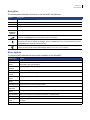
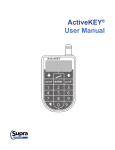
The following table describes the buttons on the ActiveKEY and their uses:
Button
Description
on/off
Turns the ActiveKEY on and off
enter
Selects a menu option; accepts a code
cancel
Exits a menu option or backspaces when entering a code
arrows
Scroll up and down through the menu options
0-9
numbered
buttons
Enter codes, such as PIN or shackle code, into the ActiveKEY
Turns the flashlight on and off. To activate the flashlight, press the on/off button to turn on the ActiveKEY,
then press the flashlight button located between the two arrow keys.
Turns the backlight on and off to illuminate the LCD screen and entire keypad to see numbers and
instructions in low light. To activate the backlight, press the on/off button to turn on the ActiveKEY, then press
the light bulb button to the left of the zero button.
Press and release the S button to display support contact information. Press and hold the Supra logo button
for three seconds to send an alert email message. Refer to “ActiveKEY alert” on page 6.
Menu options
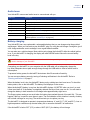
The following table describes the menu options available on the ActiveKEY:
Menu option
Action
OBTAIN KEY
Access a KeyBox to obtain the listing key.
MLS SECURE
TOKENS
Generate a secure MLS login token. This menu option will only display if your Association or MLS
subscribes to this optional feature.
DISPLAY KEYBOX
SHOWINGS
Display the number of showings you’ve had at your KeyBoxes.
RELEASE SHACKLE
Release the KeyBox shackle.
CALL BEFORE
SHOWING
Enter a Call Before Showing (CBS) code.
READ KEYBOX
ACTIVITY
Display the activity information stored in a KeyBox.
MANUALLY INPUT
UPDATE
Enter an update code.
VIEW ERROR CODES
View recent error codes for troubleshooting.
CLEAR KEYBOX
LISTING DATA
Clear listing information programmed into a KeyBox.
SET IBOX TIMED
ACCESS
Program a KeyBox for timed or 24-hour access.
REVIEW MESSAGES
Review messages from your broker, Association, or Supra Security.
PREFERENCES
Set your showing notification frequency and ActiveKEY tone preferences.
VIEW ACTIVEKEY
STATUS
Display the ActiveKEY’s status, including whether it is enabled, active, and if compatible cell coverage is
available.
ABOUT
Display the ActiveKEY’s firmware version and manufacture date.
3