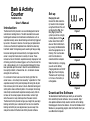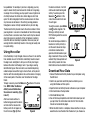
1
Software and firmware may be updated periodically, so we recommend visiting this site every six months to check for updates.
Instructions for downloading software for Windows users
You will be downloading a zipped file from the website. You will
need to unzip/extract the folder to run the software.
1.Click the Windows link on the website and Save the software
to your desktop or other preferred folder on your computer.
2.Unzip/extract the folder by right clicking on the saved folder
and clicking Extract All.
3.Open the unzipped/extracted folder.
4.Double-click on folder named Bark and Activity Counter.
5.Click on the file labeled Bark and Activity Counter.
6.Click Run (after you click Run, the software will open
automatically).
Instructions for downloading software for Mac users
1.Click the Mac link on the website, and the software will
automatically download to the Downloads folder.
2.Open the Downloads folder.
3.Open the folder that begins with TRN-BAC-MACSW_Ver.
4.Open the folder named Bark and Activity Counter.
5.Double click on the application named Bark and Activity
Counter.
Setting time and date
To set the time and date automatically:
• With the Bark and Activity Counter unit connected to computer
by the USB cord, open the Bark and Activity Software and click
Command on the top toolbar.
• Click RTC Synchronize.
• Click OK.
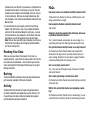
To set the time and date
manually:
Press the Mode button until you
reach time mode. You should see
a small clock icon on the screen.
(Fig. 4)
and
to set hour,
Use
minute, am and pm. Use the
Figure 4
Scan button to switch between
Minute, Hour, and AM/PM.
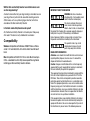
Press the Mode button until you
reach date mode. You should
see “YEAR, MONTH, DAY” on the
screen. (Fig. 5)
and
to set the
Use
month, day, and year. Use the
Scan button to switch between
Figure 5
the month, day, and year.
Push the Mode button to return to bark or activity mode.
Establishing a Baseline
The Bark and Activity Counter will register the general amount
of activity produced by your dog during a session. Activity is not
the exact amount of steps or distance recorded, but a general
estimate based on your dog’s movement.
To get a baseline of your dog’s activity, put the collar on your dog
and begin a session. Walk your dog for one minute at a normal
pace, then end the session. Repeat this three times to achieve
three sessions. The Bark and Activity Counter will show a number
for your dog’s activity in each session. This shows your dog’s
activity per minute when walking at a normal pace and will show
the consistency of the counter.
The activity recorded by the unit may vary depending on the size
and gait of your dog. The Bark and Activity Counter works similar