1
English
WEEE Warning Message
Symbol for Separate Collection in European Countries
This symbol indicates that this product is to be collected
separately.
The following apply only to users in European countries:
This product is designated for separate collection at an
appropriate collection point. Do not dispose of as
household waste.
For more information, contact the retailer or the local
authorities in charge of waste management.
FCC STATEMENT
This device complies with Part 15 of the FCC Rules. Operation is subject to the
following two conditions:
(1). This device may not cause harmful interference, and
(2). This device must accept any interference received, including interference that
may cause undesired operation.
Note:
This equipment has been tested and found to comply with the limits for Class B digital
devices, pursuant to Part 15 of the FCC rules. These limits are designed to provide
reasonable protection against harmful interference in a residential installation. This
equipment generates uses and can radiate radio frequency energy and, if not installed
and used in accordance with the instructions, may cause harmful interference to radio
communications.
However, there is no guarantee that interference will not occur in a particular
installation. If this equipment does cause harmful interference to radio or television
reception, which can be determined by turning the equipment off and on, the user is
encouraged to try to correct the interference by one or more of the following
measures:
Reorient or relocate the receiving antenna
Increase the separation between the equipment and receiver
Connect the equipment into an outlet on a circuit different from that to which the
receiver is connected
-1-
English
Use of shielded cable is required to comply with Class B limits in Subpart B of Part 15
of the FCC rules.
Do not make any changes or modifications to the equipment unless otherwise
specified in the manual. If such changes or modifications should be made, you could
be required to stop operation of the equipment.
Product Information
1. Product design and specifications are subject to change without notice. This
2.
3.
4.
5.
includes primary product specifications, software, software drivers, and user’s
manual. This User Manual is a general reference guide for the product.
The product and accessories that come with your camera may be different from
those described in this manual. This is due to the fact that different retailers often
specify slightly different product inclusions and accessories to suit their market
requirements, customer demographics, and geographical preferences. Products
very often vary between retailers especially with accessories such as batteries,
memory cards, cables, carrying cases/pouches, and language support.
Occasionally a retailer will specify a unique product color, appearance, and internal
memory capacity. Contact your dealer for precise product definition and included
accessories.
The illustrations in this manual are for the purpose of explanation and may differ
from the actual design of your camera.
The manufacturer assumes no liability for any errors or discrepancies in this user
manual.
For driver updates, you can check the “Download” section of our website,
www.geniusnet.com
SAFETY INSTRUCTIONS
Read and understand all Warnings and Cautions before using this product.
Warnings
If foreign objects or water have entered the camera, turn the power
OFF and remove the batteries.
Continued use in this state might cause fire or electric shock. Consult the
store of purchase.
If the camera has fallen or its case has been damaged, turn the
power OFF and remove the batteries.
Continued use in this state might cause fire or electric shock. Consult the
store of purchase
-2-
English
Do not disassemble, change or repair the camera.
This might cause fire or electric shock. For repair or internal inspection,
ask the store of purchase.
Do not use the camera in areas near water.
This might cause fire or electric shock. Take special care during rain,
snow, on the beach, or near the shore.
Do not place the camera on inclined or unstable surfaces.
This might cause the camera to fall or tilt over, causing injury.
Keep the batteries out of the reach of children.
Swallowing batteries might cause poisoning. If the battery is accidentally
swallowed, immediately consult a physician.
Do not use the camera while you are walking, driving or riding a
motorcycle.
This might cause you to fall over or result in traffic accident.
Cautions
Insert the batteries paying careful attention to the polarity (+ or –) of
the terminals.
Inserting the batteries with its polarities inverted might cause fire and injury,
or damage to the surrounding areas due to the battery rupturing or leaking.
Do not fire the flash close to anyone’s eyes.
This might cause damage to the person’s eyesight.
Do not subject the LCD monitor to impact.
This might damage the glass on the screen or cause the internal fluid to
leak. If the internal fluid enters your eyes or comes into contact with your
body or clothes, rinse with fresh water.
If the internal fluid has entered your eyes, consult a physician to receive
treatment.
A camera is a precision instrument. Do not drop it, strike it or use
excessive force when handling the camera.
This might cause damage to the camera.
Do not use the camera in humid, steamy, smoky, or dusty places.
This might cause fire or electric shock.
Do not remove the battery immediately after long period of continuous
use.
The battery becomes hot during use. Touching a hot battery might cause
burns.
Do not wrap the camera or place it in cloth or blankets.
This might cause heat to build up and deform the case, resulting in fire. Use
the camera in a well-ventilated place.
Do not leave the camera in places where the temperature may rise
significantly, such as inside a car.
This might adversely affect the case or the parts inside, resulting in fire.
-3-
English
Before you move the camera, disconnect cords and cables.
Failure to do this might damage cords and cables, resulting in fire and
electric shock.
Notes on Battery Usage
When you use the battery, carefully read and strictly observe the Safety Instructions
and the notes described below:
Different battery types and surrounding temperatures may affect the battery
performance.
Avoid using batteries in extremely cold environments as low temperatures can
shorten the battery life and reduce camera performance.
The battery may feel warm when using the camera for an extended period of time
or using the flash continuously. This is normal and not a malfunction.
The digital video camera may feel warm when being used continuously or for an
extended period of time. This is normal and not a malfunction.
If you will not be using the batteries for an extended period of time, remove them
from the camera to prevent leakage or corrosion.
Always keep the terminals in a clean state.
Never use manganese batteries.
Risk of explosion if battery is replaced by an incorrect type.
Dispose of used batteries according to the instructions.
-4-
English
CONTENTS
INTRODUCTION ________________________________________________ 7
PACKAGE CONTENT ______________________________________________ 7
GETTING TO KNOW YOUR CAMERA_______________________________ 8
FRONT VIEW ___________________________________________________ 8
MODE DIAL ____________________________________________________ 9
Using the Mode Dial __________________________________________ 10
LCD MONITOR INFORMATION ______________________________________ 10
Camera Mode _______________________________________________ 10
Movie Mode ________________________________________________ 11
Image Playback _____________________________________________ 11
Movie Playback______________________________________________ 11
PREPARING THE CAMERA ______________________________________ 12
INSTALLING THE BATTERIES _______________________________________ 12
INSERTING AND REMOVING AN SD MEMORY CARD ______________________ 12
ATTACHING THE CAMERA STRAP ___________________________________ 13
LED INDICATORS AND SELF-TIMER INDICATORS ________________________ 13
GETTING STARTED ____________________________________________ 14
TURNING THE POWER ON/OFF _____________________________________ 14
CHOOSING THE SCREEN LANGUAGE _________________________________ 14
SETTING THE DATE AND TIME ______________________________________ 15
FORMATTING AN SD MEMORY CARD OR INTERNAL MEMORY _______________ 15
USING THE LCD MONITOR ________________________________________ 16
POSSIBLE NUMBER OF SHOTS (STILL IMAGE) ___________________________ 17
POSSIBLE RECORDING TIME / SEC (VIDEO CLIP) _________________________ 17
PHOTOGRAPHY MODE _________________________________________ 18
SHOOTING IMAGES _____________________________________________ 18
SETTING IMAGE RESOLUTION AND QUALITY ___________________________ 18
USING THE ZOOM FUNCTION ___________________________________ 19
USING THE FLASH ______________________________________________ 20
SETTING THE FOCUS ____________________________________________ 21
CAPTURE MODE ______________________________________________ 22
BURST ______________________________________________________ 22
AUTO BRACKET ________________________________________________ 23
SETTING THE SELF-TIMER ________________________________________ 23
ADJUSTING THE EXPOSURE (EV COMPENSATION)_______________________ 24
SETTING WHITE BALANCE ________________________________________ 24
PLAYBACK MODE - THE BASICS_________________________________ 26
VIEWING IMAGES _______________________________________________ 26
-5-
English
MAGNIFYING IMAGES ____________________________________________ 26
THUMBNAIL DISPLAY ____________________________________________ 27
SLIDESHOW DISPLAY ____________________________________________ 27
RESIZING AN IMAGE _____________________________________________ 28
MOVIE MODE _________________________________________________ 29
RECORDING MOVIE CLIPS ________________________________________ 29
PLAYING BACK MOVIE CLIPS ______________________________________ 29
PLAYBACK MODE – ____________________________________________ 30
ADVANCED FEATURES _________________________________________ 30
PLAYING BACK STILL IMAGES/MOVIE CLIPS ON TV ______________________ 30
DELETING IMAGES/MOVIE CLIPS ___________________________________ 30
PROTECTING IMAGES/MOVIE CLIPS _________________________________ 31
DPOF SETTINGS _______________________________________________ 32
MENU OPTIONS _______________________________________________ 35
CAMERA MENU ________________________________________________ 35
MOVIE MENU __________________________________________________ 37
PLAYBACK MENU _______________________________________________ 38
SETUP MENU _________________________________________________ 40
CONNECTING TO A PICTBRIDGE COMPLIANT PRINTER _____________ 42
TRANSFERRING RECORDED IMAGES AND VIDEOS TO YOUR COMPUTER
_____________________________________________________________ 44
CONNECTING THE CAMERA TO YOUR COMPUTER _______________________ 44
DOWNLOADING IMAGES AND VIDEO FILES _____________________________ 45
EDITING SOFTWARE INSTALLATION _____________________________ 46
INSTALLING PHOTO EXPLORER _____________________________________ 46
INSTALLING PHOTO EXPRESS ______________________________________ 46
USING THE DIGITAL STILL CAMERA AS A PC CAMERA ______________ 47
STEP 1: INSTALL THE PC CAMERA DRIVER _____________________________ 47
STEP 2: CONNECT THE DIGITAL STILL CAMERA TO YOUR COMPUTER. _________ 48
STEP 3: RUN YOUR APPLICATION SOFTWARE (I.E. WINDOWS NETMEETING) ____ 48
CAMERA SPECIFICATIONS______________________________________ 49
TROUBLESHOOTING___________________________________________ 50
-6-
English
Introduction
Thank you for purchasing this new digital still camera!
Equipped with a 6.0 mega pixel CCD sensor, your camera delivers high quality, 2816
x 2112 resolution images. Other features provided by the camera include the
following:
True 6.0 Mega Pixel CCD
2.4” TFT color image LCD monitor
12x Zoom (3x Optical zoom and 4x Digital zoom)
Supports Multi-Scene
SD memory card can support up to 2GB
DPOF functionality
PictBridge support
Package content
Carefully unpack your kit box and ensure that you have the following items. In the
event that any item is missing or if you find any mismatch or damage, promptly
contact your dealer.
Digital Camera
CD driver includes:
Ulead Photo Explorer
Ulead Photo Express
Web Cam Driver for Windows 2000/XP
Multi-Language User’s Manual
USB cable
AV out cable
2 x AA alkaline batteries
Quick Guide
Pouch
Strap
-7-
English
GETTING TO KNOW YOUR CAMERA
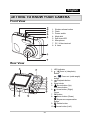
Front View
1
2
3
4
5
6
1.
2.
3.
4.
5.
6.
7.
8.
Shutter release button
Flash
Power switch
Mode dial
Self-timer LED
Microphone
PC / Video terminal
8. Lens
7
8
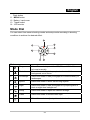
Rear View
1
2
3
4
5
6
7
8
9
10
11
14
13
12
-8-
1. LED indicator
/
Zoom in (telephoto)
2.
button
/
Zoom out (wide-angle)
button
Playback button
3.
4. Strap holder
Arrow button (Up)
5.
Self-timer button
Arrow button (Right)
6.
Focus
7. OK button
Arrow button (Down)
8.
Exposure compensation
button
Delete button
9.
10. Arrow button (Left)
English
Flash button
11. MENU button
12. Battery / card cover
13. Tripod socket
14. . LCD monitor
Mode Dial
You can select from seven shooting modes and setup mode according to shooting
conditions to achieve the desired effect.
8
1
7
2
6
3
5
4
Mode
1
Description
Select this mode to permit the ISO, EV, and White Balance
to be set manually.
Select this mode to make people stand out with the
background out-of-focus.
Select this mode to take photographs of distant scenery or
landscapes.
Select this mode to shoot fast moving objects.
Program
2
Portrait
3
Landscape
4
Sports
5
Night
6
Setup
Select this mode to take photographs of people against a
dusk or night-time background.
Select this mode to adjust the camera settings.
7
Video
Select this mode to record movie clips.
8
Auto
Select this mode to adjust point-and-shoot action.
-9-
English
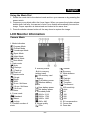
Using the Mode Dial
1. Rotate the mode dial to the desired mode and turn your camera on by pressing the
power switch.
2. Compose your subject within the focus frame. When you press the shutter release
button down half way, the camera’s Auto Focus feature automatically focuses the
image. Proper exposure is determined and locked at the same time.
3. Press the shutter release button all the way down to capture the image.
LCD Monitor Information
Camera Mode
1. Mode indication
[ ] Program Mode
[ ] Portrait Mode
[ ] Landscape Mode
[ ] Sport Mode
[ ] Night Mode
[ ] Movie Mode
[ ] Auto Mode
2. Flash mode
[ ] Auto
[ ] Red eye
[ ] Flash on
[ ] Flash off
3. Capture mode
[ ] Single
[ ] Burst
[ ] AEB
[ ] 2 sec. Self-timer
[ ] 10 sec. Self-timer
[ ] 10+2 sec.
Self-timer
4. Focus mode
[ ] Standard
[ ] Macro
[ ] Infinity
5. Possible number of
shots
6. Memory status
: Built-in memory
(without card)
: SD memory card
7. Battery
[ ] Full battery power
[ ] Medium battery
power
[ ] Low battery power
[ ] No battery power
8. Recorded pixels
[ ] 2816 x 2112
[ ] 2304 x 1728
[ ] 1600 x 1200
[ ] 640 x 480
9. Image quality
[ ] Fine
-10-
[ ] Normal
[ ] Economy
10. White balance
[ ] Auto
[ ] Daylight
[ ] Cloudy
[ ] Tungsten
[ ] Fluorescent
11. ISO sensitivity
[ ] Auto
[ ] 64
[ ] 100
[ ] 200
[ ] 400
12. EV compensation
13. Focus area
14. Zoom bar
English
Movie Mode
1. Movie mode
2. Flash mode
3. Recordable movie time available
4. Memory status
5. Battery power indicator
6. Focus area
7. Zoom bar
Image Playback
1. Playback mode
2. Number of image
3. Memory status
4. Battery power indicator
5. Index number of total number
6. DPOF indicator
7. Protect indicator
8. Date
9. Time
10. Aperture
11. Shutter speed
12. EV compensation
13. ISO sensitivity
14. White balance
15. Image quality
16. Recorded pixels
Movie Playback
1. Playback mode
2. Movie mode
3. Number of movie
4. Memory status
5. Battery power indicator
6. Index number of total number
7. Elapsed time
8. Date
9. Time
10. Play/Pause indicator
-11-
English
PREPARING THE CAMERA
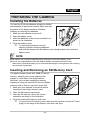
Installing the Batteries
You can use 2 AA size batteries (alkaline or Ni-MH
rechargeable) to power the camera. Make sure that
the power of the digital camera is off before
inserting or removing the batteries.
1. Make sure the camera is turned off.
2. Open the battery cover.
3. Insert the batteries in the correct orientation as
shown in the illustration.
4. Close the battery cover.
To remove the batteries, turn the
camera off before removing batteries
and hold the camera with the battery cover facing upward, then open the
battery cover.
NOTE
Be careful not to drop the batteries when opening or closing the battery cover.
Due to the characteristics of the AA alkaline battery, camera performance may
deteriorate. AA alkaline battery is not recommended except in emergencies and checking
the camera's functionality.
Inserting and Removing an SD Memory Card
The digital camera comes with 16MB of internal
memory, allowing you to store captured still
images or video clips in the digital camera.
Moreover, you can also expand the memory
capacity by using an optional SD (Secure Digital)
memory card so that you can store more files.
1. Make sure your camera is turned off before
inserting or removing a memory card.
2. Open the SD memory card cover.
3. Insert an SD memory card in the correct
orientation as shown in the illustration.
4. Close the battery/SD memory card cover.
To remove the SD memory card, make sure the camera is turned off. Press
lightly on the edge of the memory card and it will eject.
-12-
English
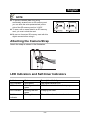
NOTE
To prevent valuable data from being
accidentally erased from an SD memory card
you can slide the write-protected tab (on the
side of the SD memory card) to “LOCK”.
To save, edit or erase data on an SD memory
card, you must unlock the card.
Be sure to format an SD memory card with this
digital camera before using it.
Attaching the Camera Strap
Attach the strap as shown in the illustration.
LED Indicators and Self-timer Indicators
Indicators
LED indicator
LED indicator
LED indicator
Self-timer
indicator
State
Solid green
Blinking red and
green
Blinking red and
green
Blinking blue
Description/Activity
The digital camera is on.
USB communication/transfer in progress
Charging the flash.
The self-timer function is activated.
-13-
English
GETTING STARTED
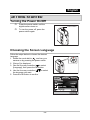
Turning the Power On/Off
Press the power switch until the
digital camera turns on.
To turn the power off, press the
power switch again.
Power switch
Choosing the Screen Language
Follow the steps below to choose the desired
language.
and turn your
1. Rotate the mode dial to
camera on by pressing the power switch.
2. [Set-up1] is displayed.
3. Use the four-way controller ( ) to select
[Language], then press the OK button.
) to select
4. Use the four-way controller (
the language you want.
5. Press the OK button to confirm.
Set-up1
Set-up2
Set-up3
Format
Beeper
Date
Time
te & Tim
Langu
Language
Louder
m/d/y
Englis
English
lish
En
Select :
-14-
English
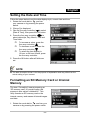
Setting the Date and Time
Follow the steps below to set the date display style, current date and time.
and turn
1. Rotate the mode dial to
your camera on by pressing the power
switch.
2. [Set-up1] is displayed.
3. Use the four-way controller ( ) to select
[Date & Time], then press the OK button.
) to
4. Press the four-way controller (
select date style, Day, Month, Year and
Time fields.
To increase a value, press the
four-way controller ( ).
To decrease a value, press the
four-way controller ( ).
To select the time display in
12-hour or 24-hour format, press
the four-way controller.
5. Press the OK button after all fields are
set.
NOTE
The date illustration shown is for the purpose of explanation and may differ from the
actual setting of your camera.
Formatting an SD Memory Card or Internal
Memory
The term “Formatting” means preparing an
“SD memory card” to record images; this
process is also called “initialization”. This
utility formats an SD memory card or the
internal memory and erases all stored images
and data.
and turn your
1. Rotate the mode dial to
camera on by pressing the power switch.
-15-
English
Set-up1] is displayed.
2. Use the four-way controller ( ) to select
[Format], then press the OK button.
3. Use the four-way controller (
)) to
select [Yes], then press the OK button to
confirm.
NOTE
When you format an SD memory card, be aware that all data on the SD memory card will
be erased. Protected images are also erased.
To format the internal memory, do not insert an SD memory card into the camera.
Otherwise, you will format the SD memory card.
An SD memory card having any problem cannot be properly formatted.
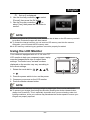
Using the LCD Monitor
Your camera is equipped with a 2.4” full color TFT
LCD monitor to help you compose images, replay
recorded images/movie clips or adjust menu
settings. The mode icons, text and numbers
displayed on the monitor may vary according to
the current settings.
1. Rotate the mode dial to
or
,
,
,
,
.
2. Press the power switch to turn on the power.
3. Compose your scene on the LCD monitor.
4. Press the shutter release button.
NOTE
The LCD monitor darkens in strong sunlight or bright light. This is not a malfunction.
To prevent your images from being blurred while pressing the shutter release button,
always hold it carefully. This is especially important when you are shooting under low
lighting conditions, since your camera may decelerate the shutter speed to ensure your
images are properly exposed.
-16-
English
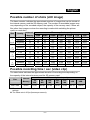
Possible number of shots (still image)
The frame counter indicates the approximate number of images that can be stored on
the internal memory and the SD memory card. The number of recordable images may
vary depending on the recorded subject, the capacity of the memory card, if there are
files other than images or when the recording is made while switching the picture
quality or resolution.
Size
Quality
2816
x
2112
Fine
Standard
Economy
Fine
Standard
Economy
Fine
2304
x
1728
1600
x
1200
640
x
480
Standard
Economy
Fine
Standard
Economy
Internal
Memory
32MB
64MB
4
8
13
6
13
19
13
26
38
68
113
152
9
19
30
14
30
43
30
60
86
152
254
339
20
41
61
30
61
88
61
124
177
311
519
692
SD memory Card capacity
128MB
256MB
512MB
41
83
125
62
125
179
125
251
359
628
1048
1397
83
168
252
125
252
360
252
505
721
1263
2106
2808
168
337
506
253
506
723
506
1013
1448
2534
4225
5633
1GB
2GB
337
676
1014
507
1014
1450
1014
2030
2900
5076
8460
11281
676
1354
2031
1015
2031
2902
2031
4063
5805
10160
16934
22579
Possible recording time / sec (video clip)
The table below indicates the approximate duration of recording time depending on
the capacity of the internal memory and the SD memory card.
Size
Internal
Memory
320 x 240
00:49
32
MB
64
MB
01:51
03:48
SD memory Card capacity
128
256
512
MB
MB
MB
07:42
15:28
31:03
1GB
2GB
62:12
124:30
The values for the recording time may vary depending on the shooting conditions and
settings.
The frame rate is 30 fps (frames per second).
-17-
English
PHOTOGRAPHY MODE
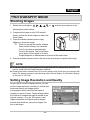
Shooting Images
1. Rotate the mode dial to
,
,
,
,
or
and turn your camera on by
pressing the power switch.
2. Compose the image on the LCD monitor
screen so that the main subject is within the
focus frame.
3. Press the shutter release button down
halfway to focus the image.
When you press the shutter release
button down halfway, the camera’s
Auto Focus feature automatically
focuses the image. The focus frame
turns green if the subject is in focus.
Proper exposure is determined and locked at the same time.
4. Press the shutter release button the rest of the way down to capture the image.
NOTE
The actual captured image appears to be larger than the one displayed by the LCD
monitor screen after the image has been captured.
Pressing the button switches the LCD monitor display mode. Each time you press the OK
button, the display changes in the following order: Normal Display
information Display
No Icons
LCD Off.
Setting Image Resolution and Quality
As you get to know the digital camera, you can
set the image resolution (number of vertical and
horizontal pixels) and image quality
(compression ratio) based on the types of
images you want to shoot. These settings affect
the number of images that can be stored in the
internal memory, or on an SD memory card.
Higher resolution and higher quality images
provide finer detail but cause the images’ file
size to be larger.
-18-
English
To change image resolution or image quality, perform these steps below:
1. Rotate the mode dial to
,
,
,
,
or
and turn your camera on by
pressing the power switch.
2. Press the MENU button.
[Mode1] is displayed.
In the
mode, [Auto] is
displayed.
3. Use the four-way controller ( ) to select
[Image Size], then press the OK button.
)) to select
4. Use the four-way controller (
the desired setting, then press the OK
button to confirm.
5. Follow steps 3 and 4 above to set the
[Quality].
NOTE
The possible number of shots and recording time depend on the storage size, resolution
and quality settings and the subject of the image to be captured.
You can resize the images later. Please refer to the section “Resizing an Image” for
further detail.
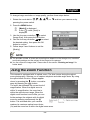
Using the Zoom Function
This camera is equipped with 3x optical zoom. The lens moves during the optical
zoom photography, allowing you to capture telephoto and wide-angle shots. By using
the optical zoom function, images appear
button, or smaller
closer by pressing the
button.
away by pressing the
The zoom bar indicates the current level of
magnification. When the digital zoom is
within 3x magnification, the zoom bar is
within the optical zoom range. When the
digital zoom function is set to On, you can
further enlarge the subjects with 4x digital
zoom by pressing continuously the
button. It is activated after your camera
reaches its maximum optical zoom factor
(3x) and the zoom bar is within the digital zoom area.
-19-
English
You can enlarge the subject to a maximum magnification equivalent to 12 times. A
useful feature as it is, however, the more the image is enlarged, the more pixilated the
image will appear.
To capture a zoomed image, perform the following steps:
1. Rotate the mode dial to
,
,
,
,
or
and turn your camera on by
pressing the power switch.
2. Adjust the magnification ratio by using the
/ button.
To exit the zoom photography, press
button.
continuously the
The status of digital magnification is
displayed on the LCD monitor.
3. Compose your scene and press the shutter
release button.
NOTE
To enable digital zoom feature, set the [Mode2- Digital Zoom] to [On] in the
, or mode.
,
,
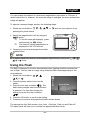
Using the Flash
The flash is designed to function automatically when lighting conditions warrant the
use of flash. You can take an image using a desired flash mode depending on the
circumstances.
1. Rotate the mode dial to
2.
3.
4.
5.
,
,
,
, or
.
Press the power switch to turn on the
power.
Press the four-way controller ( / ). The
flash mode changes each time the button
is pressed. You can also change the
setting using the four-way controller
).
(
Press the OK button to confirm the setting.
Compose your scene and press the shutter release button.
The camera has four flash modes: Auto, Auto + Red-eye, Flash on and Flash off.
The table below will help you to choose the appropriate flash mode:
-20-
,
English
Flash mode
[ ] Auto Flash
[ ] Red-eye
Reduction
[ ] Forced Flash
[
] Flash Off
Description
The flash fires automatically to suit the photographic
conditions.
Use this mode to reduce the red-eye phenomenon when
you want to capture natural-looking images of people and
animals in low-light conditions.
When capturing images, the red-eye phenomenon can
be reduced by asking the subject (person) to look at the
camera or get as close to the camera as possible.
In this mode, the flash always fires. Use this mode for
photographing under artificial light such as backlighting.
Use this mode when capturing images using indoor
lighting, for stages and indoor competitions, and when
the subject is too far away for the flash to be effective.
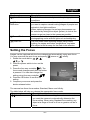
Setting the Focus
Images can be captured with the focus determined automatically using auto focus.
You may over-ride the auto focus and specify [ ] macro or [ ] infinity.
, ,
,
1. Rotate the mode dial to
, or
.
2. Press the power switch to turn on the
power.
3. Press the four-way controller ( / ). The
focus mode changes each time the button
is pressed. You can also change the
).
setting using four-way controller (
4. Press the OK button to confirm the
setting.
5. Compose your scene and press the
shutter release button.
The camera has three focus modes: Standard, Macro and Infinity.
The table below will help you choose the appropriate focus mode:
Focus mode
Description
[ ] Auto Focus
Select Standard-focus setting for most occasions when
you want the camera to automatically determine the
focus setting. When using Standard-focus setting, any
object at a range of focus is 40 cm or greater can be in
focus.
-21-
English
[
[
] Marco
] Infinity
Select Macro-focus setting to capture close-up images.
When the lens is zoomed to its widest position you may
focus objects as close as 6 cm. When the lens is zoomed
to its telephoto position (3x zoom) you may focus objects
as close as 35 cm.
Select Infinity-focus setting when you want to capture
images of subject at a distance of infinity. The flash mode
will be set to Flash Off automatically.
Capture Mode
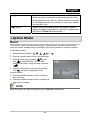
Burst
This mode is used for continuous shooting. Three pictures are taken continuously
once the shutter release button is pressed. Secure the camera to a tripod or place it
on a stable surface.
1. Rotate the mode dial to
,
,
,
,
or
.
2. Press the power switch to turn on the power.
3. Press the four-way controller ( / ) and
use ( ) to select [Burst]. You can also
change the setting using four-way controller
).
(
4. Press the OK button to confirm the setting.
indicator is displayed on the
The
monitor screen.
5. Press the shutter release button halfway to
lock the focus.
6. Press the shutter release button to capture a
sequence of images.
NOTE
In Burst mode, the flash mode will be set to Flash Off automatically.
-22-
English
Auto Bracket
In this mode, the camera automatically changes the exposure within a set range to
take three shots after you press the shutter
release button once. Auto Bracket settings can
be combined with exposure compensation
settings to extend the adjustment range.
1. Rotate the mode dial to
or
,
,
,
,
.
2. Press the power switch to turn on the power.
3. Press the four-way controller ( / ) and
use ( ) to select [AEB]. You can also
).
change the setting using the four-way controller (
4. Press the OK button to confirm the setting.
indicator is displayed on the LCD monitor screen.
The
5. Press the shutter release button to capture the three images.
NOTE
In AEB mode, the flash mode will be set to Flash Off automatically.
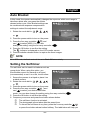
Setting the Self-timer
The self-timer can be used in situations such as
group shots. When using this option, you
should either mount the camera on a tripod
(recommended) or rest it on a flat, level surface.
1. Secure the camera to a tripod or place it on
a stable surface.
, ,
,
,
2. Rotate the mode dial to
.
or
3. Press the power switch to turn on the power.
) and
4. Press the four-way controller ( /
use ( ) to select your desired self-timer
).
mode. You can also change the setting using four-way controller (
5. Press the OK button to confirm the setting.
6. Compose your scene and press the shutter release button.
The self-timer function is activated.
The photograph is then taken after the preset time.
To cancel the self-timer at any time, press the four-way controller ( / )
or press the shutter release button halfway. The table below will help you
-23-
English
choose the appropriate self-timer mode:
Self-timer mode
[ 10s] 10 sec.
[
[
2s ] 2 sec.
10+2s ] 10+2 sec.
Description
The image is captured about 10 seconds after the shutter
button is pressed.
The image is captured about 2 seconds after the shutter
button is pressed.
One image is captured about 10 seconds after the
shutter button is pressed, and the other image is
captured again after 2 seconds. This is convenient when
capturing group images in succession.
NOTE
After one shot is taken, the self-timer mode is turned off.
If you wish to take another image using the self-timer, repeat these steps.
Adjusting the Exposure (EV Compensation)
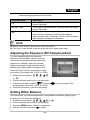
You can manually adjust the exposure
determined by the digital camera. Use this
mode when the proper exposure cannot be
obtained, for example, when the contrast
(difference between bright and dark areas)
between the subject and the background is
extremely high. The EV compensation value
can be set in the range from -2.0EV to +2.0EV.
1. Rotate the mode dial to
,
,
,
,
.
or
2. Press the power switch to turn on the power.
3. Press the four-way controller ( / ) and use
compensation value from -2.0EV to +2.0EV.
4. Press the OK button to confirm the setting.
to set the range of EV
Setting White Balance
This feature lets you make adjustments to compensate for different lighting types
according to your shooting conditions.
, ,
,
, or
.
1. Rotate the mode dial to
2. Press the power switch to turn on the power.
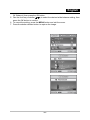
3. Press the MENU button. [Mode1] is displayed.
4. Use the four-way controller ( ) to select
-24-
English
[W. Balance], then press the OK button.
5. Use the four-way controller (
) to select the desired white balance setting, then
press the OK button to confirm.
6. To cancel the setting, press the MENU button and exit the menu.
7. Press the shutter release button to capture the image.
-25-
English
PLAYBACK MODE - THE BASICS
Viewing Images
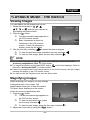
You can display the still images one by one.
, ,
,
1. Rotate the mode dial to
, ,
or
and turn your camera on
by pressing the power switch.
button.
2. Press the
The last recorded image appears on
the LCD monitor screen.
Basic information is shown by
indicators on the LCD monitor
screen. To see full information
display, press the OK button.
) to select the desired images.
3. Use the four-way controller (
To view the previous image, press the four-way controller ( ).
To view the next image, press the four-way controller ( ).
NOTE
For protected images/movie clips,
mark will be displayed. Refer to the section
“Protecting Images/Movie Clips” for further details.
For images selected for printing with DPOF setting,
mark will be displayed. (Refer to
the section “Setting the DPOF” for further details.)
If there is no image stored in the internal memory or on the SD memory card, [No image]
message will appear on the LCD monitor screen.
You cannot enter the Playback mode from the Setup mode.
Magnifying Images
While reviewing your images, you may enlarge
a selected portion of an image. This
magnification allows you to view fine details.
The zoom factor displayed on the screen
shows the current magnification ratio.
button.
1. Press the
The last recorded image appears on
the LCD monitor screen.
To view the previous image, press
the four-way controller ( ).
To view the next image, press the four-way controller ( ).
button.
2. Adjust the zoom ratio by using the /
-26-
English
To enlarge the selected image, press the
button.
To return to the normal image, press the
button.
The magnification factor is displayed on the LCD monitor screen.
3. To view different portions of the images, press the four-way controller (
to adjust the display area.
)
NOTE
The magnification factors range from 1.5X to 4X (within 6 stages: 1.5X, 2.0X, 2.5X, 3.0X,
3.5X and 4.0X).
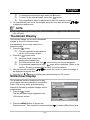
Thumbnail Display
This function allows you to view 9 thumbnail
images on the LCD monitor screen
simultaneously so you may search for a
particular image.
button.
1. Press the
The last recorded image appears
on the LCD monitor screen.
button once.
2. Press the
Nine thumbnail images are
displayed simultaneously.
For recorded movie clips, the
movie mode icon will be displayed.
For protected mages/movie clips,
mark will be displayed. (Refer to the
section “Protecting Images/Movie Clips” for further details.)
) to move the cursor to select the image to
3. Use the four-way controller (
be displayed at regular size.
button to display the selected image on full screen.
4. Press the or /
Slideshow Display
The slideshow function enables you to play
your images back automatically in sequential
order. This is very useful and entertaining
feature for reviewing recorded images and for
presentations.
button.
1. Press the
The last recorded image appears on the
LCD monitor screen.
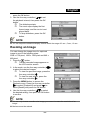
2. Press the MENU button to access the
Playback menu. Then use the four-way controller (
-27-
) to select [Slide Show] and
English
press the OK button.
3. Use the four-way controller (
) to set
the playback interval, then press the OK
button.
The slideshow starts.
The movie clips display the first
frame image, and the movie is not
played back.
To stop slideshow, press the OK
button.
NOTE
You can adjust the slideshow display interval within the range of 3 sec., 5 sec., 10 sec..
Resizing an Image
You can change the image size of a captured
image to one of the following sizes:
2304 x 1728 pixel, 1600 x 1200 pixel and 640 x
480 pixel.
button.
1. Press the
The last recorded image appears on
the LCD monitor screen.
)
2. In the mode, use the four-way controller (
to select the desired images.
To view the previous image, press the
four-way controller ( ).
To view the next image, press the
four-way controller ( ).
3. Press the MENU button to access the
Playback menu. Press the four-way controller
( ) to select [Playback2] and press ( ) to
select [Resize] and press the OK button.
) to select
4. Use the four-way controller (
the desired setting, then press the OK button
to confirm.
NOTE
You can only choose a smaller size image; you cannot increase the resolution of an
image.
Movies cannot be resized.
-28-
English
MOVIE MODE
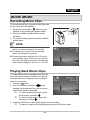
Recording Movie Clips
This mode allows you to record movie clips with
sound via built-in microphone.
1. Rotate the mode dial to
and turn your
camera on by pressing the power switch.
2. Press the shutter release button to start
recording.
3. To stop recording, press the shutter release
button again.
NOTE
The optical zoom function (3X) can be activated
before you start recording the movie clips
The digital zoom function can be activated
before and during the recording.
Pressing the button switches the LCD monitor
screen display mode. Each time you press the
OK button, the display changes in the following
order: Normal Display
No Icons
LCD Off.
Playing Back Movie Clips
You can play back the recorded movie clips on
the LCD monitor screen. However, the sound
recorded with movie clips can only be played
back on a computer.
button.
1. Press the
) to go
2. Use the four-way controller (
through the images until the movie clip you
want to play back is displayed.
To view the previous image, press
the four-way controller ( ).
To view the next image, press the
four-way controller ( ).
3. Press the OK button to start playing back the movie clips.
To pause or resume movie playback, press the OK button again.
-29-
English
NOTE
The index number, date and time indicators displayed on the LCD monitor screen will
disappear after a few seconds.
The zoom function cannot be activated when playing back movie clips.
To playback the movie clips on the computer, we recommend you use Windows Media
Player 9.0 or later (WMP 9.0 or later). You can download WMP version from the website
at www.microsoft.com
PLAYBACK MODE –
ADVANCED FEATURES
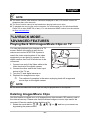
Playing Back Still Images/Movie Clips on TV
You can also playback your images on a TV
screen. Before connecting to any device,
make sure to select NTSC/PAL system to
match the video output system of the video
equipment you are going to connect to the
PC/Video terminal
digital camera, then turn off all devices to be
connected.
1. Connect one end of the Video cable to the
Video terminal of the digital camera.
2. Connect the other end to the Video input
socket of the TV set.
3. Turn the TV and digital camera on.
4. Playback the images/movie clips.
The method of operation is the same as playing back still images and
movie clips on the digital camera.
NOTE
The sound recorded with movie clips can only be played back on a computer.
Deleting Images/Movie Clips
Use this function to delete one or all images/movie clips stored in SD memory card or
the internal memory. Please note that the deleted images or movie clips cannot be
recovered. Exercise caution before deleting a file.
, ,
,
, ,
or
and turn your camera on
1. Rotate the mode dial to
by pressing the power switch.
-30-
English
2. Press the
button.
The last recorded image/movie clip
appears on the LCD monitor screen.
3. Use the four-way controller (
) to select the
image/movie clip you want to delete.
button to delete.
4. Press the
5. Use the four-way controller (
) to select
[This Image] or [All Images you’re your
preference, then press the OK button.
6. When the delete message appears, use the
) to select [Yes], then
four-way controller (
press the OK button to confirm the deletion.
If you wish to cancel the deletion, select
[No].
NOTE
Protected images cannot be deleted with the delete
function.
Protecting Images/Movie Clips
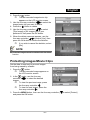
Set the data to read-only to prevent images
from being erased by mistake.
button.
1. Press the
The last recorded image appears on
the LCD monitor screen.
mode, use the four-way
2. In the
) to select the desired
controller (
images.
To view the previous image, press
the four-way controller ( ).
To view the next image, press the
four-way controller ( ).
3. Press the MENU button, then use the four-way controller (
and press the OK button.
-31-
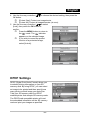
) to select [Protect]
English
4. Use the four-way controller (
) to choose the desired setting, then press the
OK button.
[Protect One]: Protect one image/movie.
[Protect All]: Protect all images/movies (at once).
) to select
5. Use the four-way controller (
[Lock], then press the OK button to
confirm.
Press the MENU button to return to
mode. The
indicator
the
appears on the selected image.
If you wish to cancel the protect
function of a protected image,
select [Unlock].
DPOF Settings
DPOF (Digital Print Order Format) allows you
to embed printing information on your SD
memory card. By using DPOF, you can select
an image to be printed and then specify how
many prints or which image you would like.
Take your SD memory card to a DPOF
enabled printer that accepts SD memory cards.
The DPOF/card-compatible printer will read
the embedded information on the SD memory
card and print your images as specified.
-32-
English
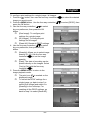
To configure print settings for a single image / all images.
1. Press the
button, then use the four-way controller (
image you want to print.
2. Press the MENU button. Use the four-way controller (
press the OK button.
) to select
3. Use the four-way controller (
by your preference, then press the OK
button.
[One Image]: To configure print
settings for a single image.
[All Images]: To configure print
settings for all images.
[Reset All]: Resets all DPOF settings.
4. Use the four-way controller (
) to select
by your preference, then press the OK
button.
[Quantity]: Allows you to select image
quantity (0~10). Use the four-way
) to set the image
controller (
quantity.
[Date]: The date of recording can be
printed directly on the images. Select
[Yes] or [No] with the four-way
).
controller (
5. Press the MENU button to return to the
image playback mode.
The print icon
is marked on the
displayed image.
To cancel the DPOF settings for a
single image, go back to step 3 to
select [One Image] and select 0 in
[Quantity] in the next step. For
resetting all the DPOF settings, go
back to step 3 to select [Reset All].
-33-
) to select the desired
) to select [DPOF], then
English
NOTE
Before you perform the DPOF settings on your camera, always remember to copy your
images from the internal memory to an SD memory card first.
The print
icon will appear on the LCD monitor screen indicating images selected for
printing.
You cannot print movies.
Depending on the printer or printing equipment at the photo processing lab, the date may
not be imprinted on the pictures even if the DPOF settings are made.
-34-
English
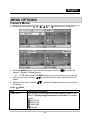
MENU OPTIONS
Camera Menu
1. Rotate the mode dial to
,
,
,
,
or
and turn your camera on.
) to select the
2. Press the MENU button, then use the four-way controller (
[Mode1] / [Mode2] / [Mode3] menu.
In
Mode, press the MENU button to access the [Auto] menu directly.
) to select the option item, then press the OK
3. Use the four-way controller (
button.
) to select the desired setting, then press the
4. Press the four-way controller (
OK button.
In the
Mode
Item
Image Size
Functional Description
Sets the size of the image that will be captured. Refer to the
section "Setting Image Resolution and Quality" for further
details.
2816x2112
2304x1728
1600x1200
640x480
-35-
English
Quality
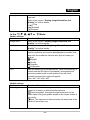
, ,
Mode1 settings
Item
Image Size
In the
Quality
White Balance
ISO
Mode2 settings
Item
Metering
Sets the quality (compression rate) at which the image is
captured.
Refer to the section "Setting Image Resolution and
Quality" for further details.
] Fine
[
[ ] Standard
[ ] Economy
,
,
or
Mode.
Functional Description
Refer to the section “Setting Image Resolution and
Quality” for further details.
Refer to the section “Setting Image Resolution and
Quality” for further details.
Sets the white balance when shooting under a variety of
lighting conditions and permits photographs to be taken that
approach the conditions that are seen by the human eye.
Auto
Daylight
Cloudy
Tungsten
Fluorescent
Sets the sensitivity for taking pictures. When the sensitivity is
raised (and the ISO figure is increased), photography will
become possible even in dark locations, but the more
pixilated (grainier) the image will appear.
Auto / 64 / 100 / 200 / 400
Functional Description
You can select the metering mode that sets which part of the
subject to measure to determine the exposure.
Center-weighted: Averages the light metered from the
entire frame, but gives greater weight to the subject matter in
the center.
Spot: The exposure is determined by the small area in the
center of the screen only.
-36-
English
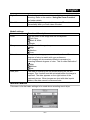
Digital Zoom
Quick View
Mode3 settings
Item
Color
Sharpness
Saturation
Date print
This decides whether or not to use digital zoom at the time of
shooting. Refer to the section “Using the Zoom Function”
for further details.
Set to display a photographed image on LCD monitor screen
immediately after you have taken the shot.
Functional Description
Sets the color of the image that will be captured.
Full Color
Black & White
Sepia
Sets the level of image sharpness.
High
Medium
Low
To capture an image, you can select from three different
degrees of color to match with your preference.
Your images will demonstrate different impression by
selecting different degrees of color. This is called Saturation”.
High
Medium
Low
The date of recording can be printed directly on the still
images. This function must be activated before the image is
captured. The date appears on the right bottom of the
captured picture. When images are shot with date imprint
feature, the date cannot be removed later.
Movie Menu
This menu is for the basic settings to be used when recording movie clips.
-37-
English
1. Rotate the mode dial to
and turn your camera on.
2. Press the MENU button.
) to select the option item. Then press the OK
3. Press the four-way controller (
button
4. Press the four-way controller (
) to select the desired setting, then press the
OK button.
5. To exit the movie menu, press the MENU button.
Item
Functional Description
Color
Refer to the Camera Menu's option item ( , ,
,
,
Mode) for further details.
or
Digital Zoom
Refer to the Camera Menu's option item ( , ,
,
,
or
Mode) for further details.
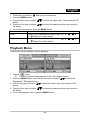
Playback Menu
In the menu, set the settings used for playback.
1. Press the
button.
The last recorded image appears on the LCD monitor screen.
) to select the
2. Press the MENU button, then use the four-way controller (
[Playback1] / [Playback2] menu.
to select the option item, then press the OK
3. Use the four-way controller (
button.
) to select the desired setting, then press the
4. Press the four-way controller (
OK button.
5. To exit the playback menu, press the MENU button.
-38-
English
Playback 1
Item
Slide Show
Protect
DPOF
Playback 2
Item
Resize
Quality Change
Copy to Card
Functional Description
You can play back recorded images in order with a selected
interval time. This function is useful for checking your images
or for presentations, etc. Refer to the section “Slideshow
Display” for further details. 3 Sec. / 5 Sec. / 10 Sec.
Set the data to read-only to prevent images from being
erased by mistake. Refer to the section “Protecting
Images/Movie Clips” for further details.
Allows you to select the desired pictures to be printed and set
the number of prints and whether or not to imprint the data in
DPOF format. You can print images easily just by inserting
the SD memory card to a DPOF-compatible printer or taking it
to a print shop. Refer to the section “Setting the DPOF” for
further details.
Functional Description
Changes the size of a recorded image.
Resizing replaces the original image with the changed image.
Only resizing to a smaller size is available. Refer to the
section “Resizing an Image” for further details.
2304x1728
1600x1200
640x480
Changes the quality (compression rate) of a recorded image.
Compresses images and overwrites an old size images with a
newly compressed image. Only quality changing to a lower
quality level is available.
Normal
Economy
Allows you to copy your files from the digital camera’s internal
memory to an SD memory card. You can only do this if you
have an SD memory card installed and some files in internal
memory.
-39-
English
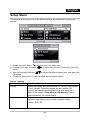
Setup Menu
This feature allows you to set up the default settings by preference for using your
camera.
1. Rotate the mode dial to
mode and turn your camera on.
2. Press the four-way controller (
) to select the [Set-up1] / [Set-up2] / [Set-up3]
menu.
) to select the desired option item, then press the
3. Use the four-way controller (
OK button.
4. To exit the setup menu, rotate the mode dial to another mode.
Set-up 1 setting
Item
Format
Beeper
Functional Description
Erases all images and reformats the SD memory card loaded
in your camera. Protected images are also erased. SD
memory card cannot be formatted if it is write-protected.
Refer to the section “Formatting an SD Memory Card or
Internal Memory” for further details.
This sets whether or not to mute the startup sound, and the
camera sound each time you press a camera button.
Louder / Soft / Off
-40-
English
Date & Time
Language
Set-up 2 setting
Item
USB
TV
LCD
Brightness
Auto Shut
Down
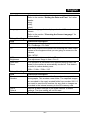
Set-up 3 setting
Item
Reset
Number.
Set to
Default
Version
This sets the date and the time.
Refer to the section “Setting the Date and Time” for further
details.
d/m/y
m/d/y
y/m/d
Sets the language that is displayed on the LCD monitor
screen.
Refer to the section “Choosing the Screen Language” for
further details.
Functional Description
Choose one of the following modes for further settings.
PC / PictBridge / PC CAM
Sets video output of the camera for matching the video output
system of the equipment that you are going to connect to the
camera.
PAL / NTSC
This sets the brightness of the LCD monitor screen.
The adjustment range is from -5 to +5.
If no operation is performed for a specific period of time, the
power to the camera is automatically turned off. This feature
is useful to reduce battery wear.
2 Min. / 3 Min. / 5 Min. / Off
Functional Description
Sets whether or not to reset the file number when you take
photographs. This creates a new folder. The captured images
are recorded to the newly created folder from number 0001. If
you want to reset the file number, be sure that no images are
recorded in the internal memory or the SD memory card.
Returns all basic settings to the digital camera's default
settings. The time setting will not be reset.
This displays the current firmware version of the camera.
-41-
English
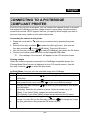
CONNECTING TO A PICTBRIDGE
COMPLIANT PRINTER
Even if you do not have a computer, you can connect the camera directly to a printer
that supports PictBridge to perform image selection and printing using the camera
screen and controls. DPOF support also lets you specify which images you want to
print and how many copies of each should be printed.
Connecting the camera to the printer
and turn your camera on by pressing the power
1. Rotate the mode dial to
switch.
2. Press the four-way controller ( ) to select the [Set-up2] menu, then use the
four-way controller ( ) to select [USB Mode]. Press the OK button.
) to select [PictBridge], then press the OK button.
3. Use the four-way controller (
4. Connect your camera and the printer via the supplied USB cable.
The message “One moment” will appear on the LCD monitor screen.
Printing images
When the camera is properly connected to a PictBridge-compatible printer, the
[Printing Mode Select] screen is displayed on the LCD monitor screen. Use the
) to select the print mode.
four-way controller (
In [Print] Mode: Lets you print the specified image with PictBridge.
Step
Procedure
Use the four-way controller (
) to select the [Print] mode, then press the
1
OK button.
Use the four-way controller (
) to select the image you want to print,
2
then press the four-way controller ( ) to set more detailed settings.
) to select by your preference, then press
Use the four-way controller (
the OK button.
3
[Quantity]: Specifies the number of prints. Select a number up to 10.
[Date]: If you select [With], images are printed with the date.
[File Name]: If you select [With], images are printed with the file name.
is marked on the displayed
After Print Setting is set, the print icon
) to change the image
image. You can still use the four-way controller (
4
by your preference, then press the OK button to print.
-42-
English
5
6
) to access the paper selection setting,
Use the four-way controller (
then press the OK button to confirm.
[Size]: You may select the desired item depending on the type of printer
being used.
[Borderless]: You may select the desired item depending on the type of
printer being used.
This starts printing and displays the message “Transferring” on the LCD
monitor screen. The message will disappear after the printing is finished.
Then the screen returns to [Printing Mode Select].
To cancel printing:
Pressing the button during print data transfer displays the screen for
selecting whether to [Continue] or [Cancel] printing.
In [Print All] Mode: Lets you print all images with PictBridge.
Step
Procedure
If you wish to print all the images stored in the camera, you may choose
1
[Print All] in [Printing Mode Select].
2
To set Print Settings, follow steps 2 to 6 in [Print] Mode.
In [Print With DPOF] Mode: This function only lets you print the specified image
based on the previous DPOF settings.
Step
Procedure
If you wish to print images with DPOF setting, you may choose [Print With
1
DPOF] in [Printing Mode Select].
2
To set Print Settings, follow steps 2 to 6 in [Print] Mode.
NOTE
When connecting a printer which is not compatible with DPOF, [Print With DPOF] cannot
be selected.
-43-
English
TRANSFERRING RECORDED IMAGES
AND VIDEOS TO YOUR COMPUTER
System Requirements (Windows)
Pentium III 600 MHz or higher
Windows 2000/XP
64MB RAM
128MB hard disk space
CD-ROM drive
Available USB port
System Requirements (Macintosh)
PowerPC G3/G4
OS 9.0 or later
64MB RAM
128MB hard disk space
CD-ROM drive
Available USB port
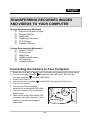
Connecting the Camera to Your Computer
1. Rotate the mode dial to
and turn your camera on by pressing the power switch.
2. Press the four-way controller ( ) to select the [Set-up2] menu, then use the
four-way controller ( ) to select [USB Mode].
3. Press the OK button.
4. Use the four-way controller ( ) to select [PC], then press the OK button.
5. Turn off your camera.
6. Connect your camera and the
computer via the supplied USB cable.
7. Turn your camera on by pressing the
power switch.
PC/Video terminal
8. There will be a new “Removable Disk”
icon detected in “My Computer”, which
contains your recorded images or
movie clips.
-44-
English
Downloading Images and Video Files
When the camera is turned on and connected to your computer, it is considered to be
a disk drive, just like a floppy disk or CD. You can download (transfer) images by
copying them from the “Removable disk” (“untitled” or “unlabeled” disk on a Macintosh)
to your computer hard drive.
Windows
Open the “removable disk” and subsequent folders by double clicking on them. Your
images are inside these folder(s). Select the images that you want, and then choose
“Copy” from the “Edit” menu. Open the destination location (folder) and choose
“Paste” from the “Edit” menu. You may also drag and drop image files from the
camera to a desired location.
Macintosh
Open the “untitled” disk icon, and the destination location on your hard disk. Drag and
drop from the camera to the desired destination.
NOTE
Memory card users may prefer to use a memory card reader (highly recommended).
Video playback application is not included with the package. Make sure that video
playback application has been installed in your computer.
-45-
English
EDITING SOFTWARE INSTALLATION
Installing Photo Explorer
Ulead Photo Explorer provides a simple and efficient way to transfer, browse, modify
and distribute digital media. Acquire photos, video or sound clips from various digital
device types and easily browse or add personal descriptions; make timely
modifications; or distribute the media through the medium of your choice: E-mail, Print,
Slideshow Presentations. It is an indispensable all-in-one tool for owners of digital
cameras, Web Cams, DV camcorders, scanners, or anyone who strives to effectively
organize a large collection of digital media.
To install Photo Explorer:
1.
2.
Insert the CD-ROM that came with the camera into your CD-ROM drive. The
welcome screen appears.
Click “INSTALL PHOTO EXPLORER 8.0”. Follow the on-screen instructions to
complete the installation.
NOTE
For more information about the operation of Photo Explorer application software, refer to
its respective help documentation.
For Windows 2000/XP users, please make sure to install and use the Photo Explorer in
“Administrator” mode.
Photo Explorer is not supported on the Mac. iPhoto or iPhoto2 is recommended.
Installing Photo Express
Ulead Photo Express is complete photo project software for digital images. The
step-by-step workflow, visual program interface, and in-program help assist users in
creating exciting photo projects. Acquire digital photos effortlessly from digital
cameras or scanners. Organize them conveniently with the Visual Browse mode. Use
hundreds of ready-to-use templates such as albums, cards, posters, slideshows, and
more. Edit and enhance images with photo editing tools, photographic filters, and
special effects. Embellish projects by adding creative design elements such as frames,
callouts, and stamp objects. Share results with family and friends via e-mail and
multiple print options.
To install Photo Express:
1.
Insert the CD-ROM that came with the camera into your CD-ROM drive. The
welcome screen appears.
-46-
English
2.
Click “INSTALL PHOTO EXPRESS 5.0”. Follow the on-screen instructions to
complete the installation.
NOTE
For more information about the operation of Photo Express application software, refer to
its respective help documentation.
For Windows 2000/XP users, please make sure to install and use the Photo Express in
“Administrator” mode.
Photo Express is not supported on the Mac.
USING THE DIGITAL STILL CAMERA AS A
PC CAMERA
Your digital still camera can act as a PC camera, which allows you to videoconference
with business associates, or have a real-time conversation with friends or family. To
use the digital still camera for videoconferencing, your computer system must include
the items as below:
Microphone
Sound card
Speakers or headphones
Network or Internet connection
NOTE
Video conferencing (or video editing) software is not included with the digital still camera.
This mode does not work with Mac.
Step 1: Install the PC camera driver
The PC-camera driver included in the CD-ROM is exclusively for Windows.
The PC camera function is not supported for Mac platforms.
1. Insert the CD-ROM that came with the camera into your CD-ROM drive.
2. When the welcome screen appears, click “PC CAM Driver “. Follow the on-screen
instructions to complete the installation.
3. After the driver installation is completed, restart your computer.
-47-
English
Step 2: Connect the digital still camera to your
computer.
1. Rotate the mode dial to
and turn your camera on by pressing the power switch.
2. Press the four-way controller ( ) to select the [Set-up2] menu, then use the
four-way controller ( ) to select [USB Mode].
3. Press the OK button.
) to select [PC CAM], then press the OK button.
4. Use the four-way controller (
5. Connect your camera and the computer via the supplied USB cable.
6. Position the digital camera steadily on top of your computer monitor or use a tripod.
NOTE
When using this digital still camera as a PC camera, it is necessary to install the battery
into the digital still camera.
Step 3: Run your application software (i.e.
Windows NetMeeting)
To use Windows NetMeeting for videoconferencing:
1. Go to Start → Programs → Accessories → Communications → NetMeeting to
launch the NetMeeting program.
2. Click the Start Video button to view live video.
3. Click the Place Call button.
4. Type the e-mail address or the network address of the computer that you are
calling.
5. Click Call. The person that you are calling must also have Windows NetMeeting
running and be willing accept your call to start the videoconference.
NOTE
The video resolution for videoconferencing applications is generally 320 x 240.
For more information about the operation of videoconference application software, refer
to its respective help documentation.
-48-
English
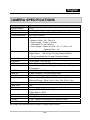
CAMERA SPECIFICATIONS
Item
Image Sensor
Effective pixels
Image resolution
Video Resolution
Lens
Zoom
Shutter Speed
Exposure
ISO
White Balance
LCD Display
Memory
Audio
Flash
Self-Timer
Web Cam
Pictbridge
File format
Connectors
Power
Weight
Dimensions
Description
CCD
6.0 Mega Pixels
2816 x 2112, 2304 x 1728, 1600 x 1200, 640 x 480
320 x 240 (QVGA)
Auto Focus Lens
- Aperture: Wide: 2.8 / Tele: 4.8
- Focal Length:5.5mm ~16.5mm
(Equivalent To: 34~102mm)
- Focus Range:Macro W: 6cm ~ Inf. / T: 35cm ~ Inf.
Normal 40cm ~ Inf.
Optical Zoom:3X Zoom
Digital Zoom:1.2X~4X by 0.2 step (Preview Mode)
1.5X~4X scrollable by 0.5 step (Playback Mode)
2~1/1000 sec
1/3 EV step, -2.0~+2.0 EV
Auto, Manual:64,100,200,400
Auto, Manual Mode : Daylight / Cloudy / Tungsten /
Fluorescent
2.4 " TFT LCD (112K pixels)
16MB, External:SD Card (up to 2GB)
Speaker:NO, Microphone:YES
Build-In:Auto, Fill-in Flash, Off Flash, Red-Eye Reduction
Effective Range:Wide: 0.5m~3.0m; Tele: 0.5m~1.8m
2 sec, 10 sec, 10+2 sec
Yes
Yes
Image: JPEG (EXIF 2.2) & DCF
Video: Motion JPEG
USB & AV-out 2-in-1 port
2X “AA” Alkaline Battery
130g (without the battery & SD memory card)
90 x 62 x 27 mm (excluding protruding parts)
Design and specifications are subject to change without notice.
-49-
English
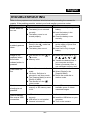
TROUBLESHOOTING
Refer to the symptoms and solutions listed below before sending the camera for
repairs. If the problem persists, contact your local reseller or service center.
Symptom
Cause
Solution
The battery has run out.
Load new or fully charged
Power does not
battery.
The battery is not oriented
turn on.
correctly.
The battery cover is not
closed properly.
Load the battery in the
correct direction.
Close the battery cover
correctly.
Camera
suddenly powers
down.
The function of [Auto Shut
Down] in the
mode has
been activated.
The battery has run out.
Turn the power back on and
set the option of [Auto Shut
Down] to [Off].
Load new or fully charged
battery.
Image is not
captured when
the shutter
release button is
pressed.
The camera is in the
mode.
Memory is full.
Rotate the mode dial to
Flash does not
fire.
Flash off is selected in flash
mode.
10+2 sec. Self-timer is
selected in self-timer mode.
The [Capture Mode] is set to
[Burst] or [AEB].
The camera is in the
(video) mode.
The capacity of the built-in
memory or SD memory card
is full.
Select a different flash mode.
Select [Single] in the
[Capture Mode].
Switch the mode dial to
another mode.
USB cable is not connected
securely.
USB driver is not installed.
Camera is turned off.
Check all connections.
Install the USB driver on your
computer.
Turn on the camera.
Continuous
shooting is not
possible.
Cannot transfer
files over a USB
connection.
-50-
or
,
,
,
, ,
or
.
Transfer the desired files to
your computer and then
delete unnecessary files, or
use a different memory card.
Insert SD memory card with
available space or delete
unwanted images.