1
1.
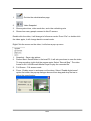
:Get into the administration page
2.
:Video Snapshot
3.
4.
Show system time, video resolution, and video refreshing rate
Shows how many people connect to this IP camera
Double-click the video, it will change to full screen mode. Press “Esc” or double-click
the video again, it will change back to normal mode.
Right-Click the mouse on the video, it will show a pop-up menu.
1.
2.
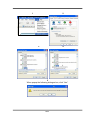
Snapshot:Save a jpg picture
Record Start:Record video in the local PC. It will ask you where to save the video.
To stop recording, right-click the mouse again. Select “Record Stop”. The video
3.
4.
format is AVI. Use Microsoft Media Player to play the recorded file.
Full Screen:Full-screen mode.
Zoom : Enable zoom-in and zoom-out functions. Select “Enable digital zoom”
option first within the pop-up dialogue box and then drag and drop the bar to
adjust the zoom factors.
14/33