1
3-452-778-11(1)
Operating Instructions
Blu-ray Disc / DVD Player
BDP-S550
3-452-778-11(1)
Printed in Japan
© 2008 Sony Corporation
WARNING
To reduce the risk of fire or electric
shock, do not expose this apparatus
to rain or moisture.
To avoid electrical shock, do not
open the cabinet. Refer servicing to
qualified personnel only.
Batteries or batteries installed
apparatus shall not be exposed to
excessive heat such as sunshine,
fire or the like.
Keep the external memory away
from children. If swallowed,
promptly see a doctor.
CAUTION
The use of optical instruments with
this product will increase eye
hazard. As the laser beam used in
this Blu-ray Disc/DVD player is
harmful to eyes, do not attempt to
disassemble the cabinet.
Refer servicing to qualified
personnel only.
This label is located on the laser
protective housing inside the
enclosure.
This symbol is
intended to alert the
user to the presence
of uninsulated
“dangerous voltage”
within the product’s enclosure that
may be of sufficient magnitude to
constitute a risk of electric shock to
persons.
2
This symbol is
intended to alert the
user to the presence
of important
operating and
maintenance (servicing)
instructions in the literature
accompanying the appliance.
CAUTION
You are cautioned that any
changes or modifications not
expressly approved in this manual
could void your authority to
operate this equipment.
The shielded Interface cable
(Network cable) must be used with
the equipment in order to comply
with the limits for a digital device
pursuant to Subpart B of Part 15 of
FCC Rules.
b
This equipment has been tested
and found to comply with the
limits for a Class B digital device,
pursuant to Part 15 of the FCC
Rules. These limits are designed to
provide reasonable protection
against harmful interference in a
residential installation. This
equipment generates, uses, and can
radiate radio frequency energy
and, if not installed and used in
accordance with the instructions,
may cause harmful interference to
radio communications. However,
there is no guarantee that
interference will not occur in a
particular installation. If this
equipment does cause harmful
interference to radio or television
reception, which can be
determined by turning the
equipment off and on, the user is
encouraged to try to correct the
interference by one or more of the
following measures:
– Reorient or relocate the
receiving antenna.
– Increase the separation between
the equipment and receiver.
– Connect the equipment into an
outlet on a circuit different from
that to which the receiver is
connected.
– Consult the dealer or an
experienced radio/TV technician
for help.
Precautions
• To prevent fire or shock hazard,
do not place objects filled with
liquids, such as vases, on the
apparatus.
• Install this unit so that the AC
power cord can be unplugged
from the wall socket
immediately in the event of
trouble.
Owner’s Record
The model and serial numbers are
located at the rear of the unit.
Record the serial number in the
space provided below. Refer to
them whenever you call upon your
Sony dealer regarding this product.
Model No. BDP-S550
Serial No.______________
Model No. USM1GH
Serial No.______________
For customers in the U.S.A
If this product is not working
properly, please call 1-866-9097669.
The number below is for the FCC
related matters only.
Regulatory Information
Declaration of Conformity
Trade Name: SONY
Model No.: USM1GH
Responsible Party:
Sony Electronics Inc.
Address:
16530 Via Esprillo, San
Diego, CA 92127 U.S.A.
Telephone No.:
858-942-2230
This device complies with Part15
of the FCC Rules. Operation is
subject to the following two
conditions.: (1)This device may
not cause harmful interference,
and (2)this device must accept
any interference received,
including interference that may
cause undesired operation.
For Customers in Canada
If this product is not working
properly, please call 1-877-6022008 for Peace of Mind
Warranty Replacement
service.
For other product related questions
please contact our Customer
Information Service Center at
1-877-899-7669 or write to us at:
Customer Information Service 115
Gordon Baker Road, Toronto,
Ontario, M2H 3R6
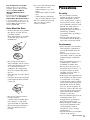
Notes About the Discs
• To keep the disc clean, handle
the disc by its edge. Do not
touch the surface.
Dust, fingerprints, or scratches
on the disc may cause it to
malfunction.
• Do not use the following discs.
– A disc that has a nonstandard shape (e.g., card,
heart).
– A disc with a label or sticker
on it.
– A disc that has cellophane
tape or sticker adhesive on it.
• Do not resurface the playing
side of a disc to remove
surface scratches.
Precautions
On safety
• To prevent fire or shock
hazard, do not place objects
filled with liquids, such as
vases, on the player, or place
the player near water, such as
near a bathtub or shower room.
Should any solid object or
liquid fall into the cabinet,
unplug the player and have it
checked by qualified
personnel before operating it
any further.
• Do not touch the AC power
cord with wet hands. Doing so
may cause an electric shock.
On placement
• Do not expose the disc to
direct sunlight or heat sources
such as hot air ducts, or leave it
in a car parked in direct
sunlight as the temperature
may rise considerably inside
the car.
• After playing, store the disc in
its case.
• Clean the disc with a cleaning
cloth. Wipe the disc from the
center out.
• Do not use solvents such as
benzine, thinner,
commercially available disc/
lens cleaners, or anti-static
spray intended for vinyl LPs.
• If you have printed the disc’s
label, dry the label before
playing.
• Place the player in a location
with adequate ventilation to
prevent heat build-up in the
player.
• Do not place the player on a
soft surface such as a rug that
might block the ventilation
holes.
• Do not install this player in a
confined space, such as a
bookshelf or similar unit.
• Do not place the player in a
location near heat sources, or
in a place subject to direct
sunlight, excessive dust, or
mechanical shock.
• If the player is brought directly
from a cold to a warm location,
or is placed in a very damp
room, moisture may condense
on the lenses inside the player.
Should this occur, the player
may not operate properly. In
this case, remove the disc and
leave the player turned on for
about half an hour until the
moisture evaporates.
• Do not install the player in an
inclined position. It is
designed to be operated in a
horizontal position only.
• Keep the player and the discs
away from equipment with
strong magnets, such as
microwave ovens, or large
loudspeakers.
• Do not place heavy or unstable
objects on the player.
,continued
3
• Do not place any objects other
than discs on the disc tray.
Doing so may cause damage to
the player or the object.
• When you move the player,
take out any discs. If you
don’t, the disc may be
damaged.
• When you move the player,
disconnect the AC power cord
and all other cables from the
player.
On power sources
• The player is not disconnected
from the AC power source as
long as it is connected to the
wall outlet, even if the player
itself has been turned off.
• If you are not going to use the
player for a long time, be sure
to disconnect the player from
the wall outlet. To disconnect
the AC power cord, grasp the
plug itself; never pull the cord.
• Observe following points to
prevent the AC power cord
being damaged. Do not use the
AC power cord if it is
damaged, as doing so may
result in an electric shock or
fire.
– Do not pinch the AC power
cord between the player and
wall, shelf, etc.
– Do not put anything heavy
on the AC power cord or pull
on the AC power cord itself.
On adjusting volume
Do not turn up the volume while
listening to a section with very
low level inputs or no audio
signals. If you do, the speakers
may be damaged when a peak
level section is played.
On cleaning
Clean the cabinet, panel, and
controls with a soft cloth slightly
moistened with a mild detergent
solution. Do not use any type of
abrasive pad, scouring powder
or solvent such as alcohol or
benzine.
4
On cleaning discs, disc/
lens cleaners
Do not use cleaning discs or
disc/lens cleaners (including wet
or spray types). These may cause
the apparatus to malfunction.
On replacement of parts
In the events that this player is
repaired, repaired parts may be
collected for reuse or recycling
purposes.
Copyrights and
Trademarks
• This product incorporates
copyright protection
technology that is protected by
U.S. patents and other
intellectual property rights.
Use of this copyright
protection technology must be
authorized by Macrovision,
and is intended for home and
other limited viewing uses
only unless otherwise
authorized by Macrovision.
Reverse engineering or
disassembly is prohibited.
• “AVCHD” and the “AVCHD”
logo are trademarks of
Matsushita Electric Industrial
Co., Ltd. and Sony
Corporation.
• Java and all Java-based
trademarks and logos are
trademarks or registered
trademarks of Sun
Microsystems, Inc.
•
, “XMB,” and “xross media
bar” are trademarks of Sony
Corporation and Sony
Computer Entertainment Inc.
• This product incorporates
High-Definition Multimedia
Interface (HDMI™)
technology. HDMI, the HDMI
logo and High-Definition
Multimedia Interface are
trademarks or registered
trademarks of HDMI
Licensing LLC.
• “Blu-ray Disc” is a trademark.
• “Blu-ray Disc,” “DVD+RW,”
“DVD-RW,” “DVD+R,”
“DVD-R,” “DVD VIDEO,”
and “CD” logos are
trademarks.
• “BD-Live” and “BonusView”
are trademarks of Blu-ray Disc
Association.
• “x.v.Color” and “x.v.Color”
logo are trademarks of Sony
Corporation.
• “BRAVIA Sync” is a
trademark of Sony
Corporation.
• “PhotoTV HD” and the
“PhotoTV HD” logo are
trademarks of Sony
Corporation.
• Other system and product
names are generally
trademarks or registered
trademarks of the
manufacturers. ™ and ®
marks are not indicated in this
document.
IMPORTANT NOTICE
Caution: This player is
capable of holding a still
video image or on-screen
display image on your
television screen
indefinitely. If you leave the
still video image or onscreen display image
displayed on your TV for an
extended period of time you
risk permanent damage to
your television screen.
Plasma display panel
televisions and projection
televisions are susceptible to
this.
If you have any questions or
problems concerning your
player, please consult your
nearest Sony dealer.
Important Safety
Instructions
1)
2)
3)
4)
5)
Read these instructions.
Keep these instructions.
Heed all warnings.
Follow all instructions.
Do not use this apparatus near
water.
6) Clean only with dry cloth.
7) Do not block any ventilation
openings. Install in accordance
with the manufacturer’s
instructions.
8) Do not install near any heat
sources such as radiators, heat
registers, stoves, or other
apparatus (including
amplifiers) that produce heat.
9) Do not defeat the safety
purpose of the polarized or
grounding-type plug. A
polarized plug has two blades
with one wider than the other.
A grounding type plug has two
blades and a third grounding
prong. The wide blade or the
third prong are provided for
your safety. If the provided
plug does not fit into your
outlet, consult an electrician for
replacement of the obsolete
outlet.
10)Protect the power cord from
being walked on or pinched
particularly at plugs,
convenience receptacles, and
the point where they exit from
the apparatus.
11)Only use attachments/
accessories specified by the
manufacturer.
12)Use only with the cart, stand,
tripod, bracket, or table
specified by the manufacturer,
or sold with the apparatus.
When a cart is used, use caution
when moving the cart/
apparatus combination to avoid
injury from tip-over.
14)Refer all servicing to qualified
service personnel. Servicing is
required when the apparatus
has been damaged in any way,
such as power-supply cord or
plug is damaged, liquid has
been spilled or objects have
fallen into the apparatus, the
apparatus has been exposed to
rain or moisture, does not
operate normally, or has been
dropped.
About this manual
• In this manual, “disc” is used
as a general reference for the
BDs, DVDs, or CDs unless
otherwise specified by the text
or illustrations.
• Icons, such as BD , listed
at the top of each explanation
indicate what kind of media
can be used with the function
being explained.
For details, see “Playable
Discs” (page 62).
• Instructions in this manual
describe the controls on the
remote. You can also use the
controls on the player if they
have the similar symbols as
those on the remote.
• The on-screen display
illustrations used in this
manual may not match the
graphics displayed on your TV
screen.
• NEED-to-know information
(to prevent incorrect
operation) is listed under the
b icon. NICE-to-know
information (tips and other
useful information) is listed
under the z icon.
13)Unplug this apparatus during
lightning storms or when
unused for long periods of
time.
5
Table of Contents
WARNING . . . . . . . . . . . . . . . . . . . . . . . . . . . . . . . . . . . . . . . . . . . . . . . . . . . . 2
Precautions . . . . . . . . . . . . . . . . . . . . . . . . . . . . . . . . . . . . . . . . . . . . . . . . . . . 3
Guide to Parts and Controls . . . . . . . . . . . . . . . . . . . . . . . . . . . . . . . . . . . . . . 8
Hookups and Settings
Hooking Up the Player . . . . . . . . . . . . . . . . . . . . . . . . . . . . . . . . . . . . . . . . . 13
Step 1: Connecting to Your TV . . . . . . . . . . . . . . . . . . . . . . . . . . . . . . . . . . . 14
Connecting to an HDMI jack . . . . . . . . . . . . . . . . . . . . . . . . . . . . . . . . . 15
About the BRAVIA Sync features (for HDMI connections only) . . . . . . 16
Connecting to component video jacks (Y, Pb, Pr) . . . . . . . . . . . . . . . . . 17
Connecting to an audio/video or S VIDEO jack . . . . . . . . . . . . . . . . . . 18
Step 2: Connecting to Your AV Amplifier (Receiver) . . . . . . . . . . . . . . . . . . . 19
Connecting to an HDMI jack . . . . . . . . . . . . . . . . . . . . . . . . . . . . . . . . . 20
Connecting to digital jacks (OPTICAL/COAXIAL) . . . . . . . . . . . . . . . . . 21
Connecting to 7.1 channel jacks . . . . . . . . . . . . . . . . . . . . . . . . . . . . . . 22
Connecting to audio L/R jacks . . . . . . . . . . . . . . . . . . . . . . . . . . . . . . . 23
Step 3: Inserting the External Memory . . . . . . . . . . . . . . . . . . . . . . . . . . . . . 24
Step 4: Connecting to the Network . . . . . . . . . . . . . . . . . . . . . . . . . . . . . . . . 25
When connecting to a broadband router directly . . . . . . . . . . . . . . . . . 25
When connecting via a wireless LAN router . . . . . . . . . . . . . . . . . . . . . 26
Step 5: Connecting the AC Power Cord . . . . . . . . . . . . . . . . . . . . . . . . . . . . 26
Step 6: Preparing the Remote . . . . . . . . . . . . . . . . . . . . . . . . . . . . . . . . . . . . 27
Controlling TVs with the remote . . . . . . . . . . . . . . . . . . . . . . . . . . . . . . 27
Step 7: Easy Setup . . . . . . . . . . . . . . . . . . . . . . . . . . . . . . . . . . . . . . . . . . . . 29
Playback
Playing BDs/DVDs . . . . . . . . . . . . . . . . . . . . . . . . . . . . . . . . . . . . . . . . . . . . 32
Using the BD’s or DVD’s menu . . . . . . . . . . . . . . . . . . . . . . . . . . . . . . . 34
Enjoying BonusView/BD-Live . . . . . . . . . . . . . . . . . . . . . . . . . . . . . . . . 35
Searching for a scene quickly (Scene Search) . . . . . . . . . . . . . . . . . . . 35
Searching for a Title/Chapter . . . . . . . . . . . . . . . . . . . . . . . . . . . . . . . . 36
Displaying the playing time and play information . . . . . . . . . . . . . . . . . 36
Adjusting pictures and sound for videos . . . . . . . . . . . . . . . . . . . . . . . . 37
Playing CDs . . . . . . . . . . . . . . . . . . . . . . . . . . . . . . . . . . . . . . . . . . . . . . . . . . 38
Playing Photo Files . . . . . . . . . . . . . . . . . . . . . . . . . . . . . . . . . . . . . . . . . . . . 39
Settings and Adjustments
Using the Settings Displays . . . . . . . . . . . . . . . . . . . . . . . . . . . . . . . . . . . . . . 41
Network Update . . . . . . . . . . . . . . . . . . . . . . . . . . . . . . . . . . . . . . . . . . . . . . . 42
Video Settings . . . . . . . . . . . . . . . . . . . . . . . . . . . . . . . . . . . . . . . . . . . . . . . . 43
Audio Settings . . . . . . . . . . . . . . . . . . . . . . . . . . . . . . . . . . . . . . . . . . . . . . . . 46
BD/DVD Viewing Settings . . . . . . . . . . . . . . . . . . . . . . . . . . . . . . . . . . . . . . . 51
Photo Settings . . . . . . . . . . . . . . . . . . . . . . . . . . . . . . . . . . . . . . . . . . . . . . . . 53
System Settings . . . . . . . . . . . . . . . . . . . . . . . . . . . . . . . . . . . . . . . . . . . . . . 53
Network Settings . . . . . . . . . . . . . . . . . . . . . . . . . . . . . . . . . . . . . . . . . . . . . . 54
Easy Setup . . . . . . . . . . . . . . . . . . . . . . . . . . . . . . . . . . . . . . . . . . . . . . . . . . 56
Resetting . . . . . . . . . . . . . . . . . . . . . . . . . . . . . . . . . . . . . . . . . . . . . . . . . . . . 56
6
Additional Information
Troubleshooting . . . . . . . . . . . . . . . . . . . . . . . . . . . . . . . . . . . . . . . . . . . . . . . 57
Self-Diagnosis Function . . . . . . . . . . . . . . . . . . . . . . . . . . . . . . . . . . . . . . . . . 61
Playable Discs . . . . . . . . . . . . . . . . . . . . . . . . . . . . . . . . . . . . . . . . . . . . . . . . 62
Video Output Resolution . . . . . . . . . . . . . . . . . . . . . . . . . . . . . . . . . . . . . . . . 65
Audio Output Signals . . . . . . . . . . . . . . . . . . . . . . . . . . . . . . . . . . . . . . . . . . . 66
Specifications . . . . . . . . . . . . . . . . . . . . . . . . . . . . . . . . . . . . . . . . . . . . . . . . . 67
Language Code List . . . . . . . . . . . . . . . . . . . . . . . . . . . . . . . . . . . . . . . . . . . . 68
Parental Control/Area Code . . . . . . . . . . . . . . . . . . . . . . . . . . . . . . . . . . . . . . 68
Terms and Conditions of Use and End User License Agreement . . . . . . . . . 69
Software License Information . . . . . . . . . . . . . . . . . . . . . . . . . . . . . . . . . . . . 71
Glossary . . . . . . . . . . . . . . . . . . . . . . . . . . . . . . . . . . . . . . . . . . . . . . . . . . . . . 80
Index . . . . . . . . . . . . . . . . . . . . . . . . . . . . . . . . . . . . . . . . . . . . . . . . . . . . . . . 82
Before operating the player, please read “Terms and Conditions of Use and End User License
Agreement” (page 69).
7
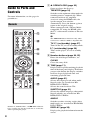
A Z OPEN/CLOSE (page 32)
Guide to Parts and
Controls
For more information, see the pages in
parentheses.
Remote
Opens or closes the disc tray.
THEATER (page 16)
Switches to the optimum video mode for
watching movies automatically. When
connected with an AV amplifier
(receiver) using the HDMI cable, the
speaker output also switches
automatically. Press the button again to
return to the original setting.
When connected with a Theater Modecompatible TV using the HDMI cable,
the TV’s video mode switches to Theater
Mode.
b
The THEATER button functions only when
connected to a Theater Mode-compatible TV.
TV [/1 (on/standby) (page 27)
Turns on the TV, or sets to standby mode.
[/1 (on/standby) (page 29)
Turns on the player, or sets to standby
mode.
B Number buttons (page 36, 55)
Enters the title/chapter numbers, etc.
CLEAR
Clears the entry field.
C TIME (page 11)
Displays the elapsed/remaining playback
time in the front panel display. Each time
you press the button, the display switches
between elapsed playback time and
remaining playback time.
AUDIO (page 51)
Selects the language track when multilingual tracks are recorded on BDROMs/DVD VIDEOs.
Selects the sound track on CDs.
SUBTITLE (page 51)
Selects the subtitle language when multilingual subtitles are recorded on BDROMs/DVD VIDEOs.
ANGLE
Number 5, AUDIO, CH +, and N PLAY buttons
have a tactile dot. Use the tactile dot as a reference
when operating the player.
8
Switches to other viewing angles when
multi-angles are recorded on BD-ROMs/
DVD VIDEOs.
DISPLAY (page 36)
Displays the playback information on the
screen.
D Color buttons (RED/GREEN/
BLUE/YELLOW)
Short cut keys for selecting items on
some BD’s menus (can also be used for
BD’s Java interactive operations).
E TOP MENU (page 34)
When you press and hold the button, fast
forward/fast reverse continues at the
selected speed until you release the
button.
* Search speed does not change when playing
CDs.
Speed multiple values are approximate.
Opens or closes the BD’s or DVD’s Top
Menu.
– To resume normal playback, press
N PLAY.
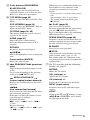
POP UP/MENU (page 34)
N PLAY (page 32)
Opens or closes the BD-ROM’s Pop-up
Menu, or the DVD’s menu.
Starts or re-starts playback.
Resumes playback from the point where
you press x STOP (Resume Play).
Plays a slideshow when a disc containing
JPEG image files is inserted.
OPTIONS (page 34, 40)
The options menu that can be selected
appears on the screen.
HOME (page 41)
Enters the player’s home menu.
Exits the home menu when a CD is
inserted.
RETURN
Returns to the previous display.
</M/m/,
Moves the highlight to select a displayed
item.
Center button (ENTER)
Enters the selected item.
F . PREV/NEXT > (previous/
next)
SCENE SEARCH (page 35)
Switches to Scene Search mode that lets
you move quickly between scenes within
the title currently being played back.
X PAUSE
Pauses or re-starts playback.
x STOP
Stops playback and remembers the stop
point (resume point) (page 33, 39).
The resume point for a title/track is the
last point you played or the last photo for
a photo folder.
G For TVs operable with the following
buttons, see page 27.
Skips to the previous/next chapter, track,
or file.
To go to the beginning of the previous
track, press . PREV twice.
MUTING
REPLAY/ADVANCE
(instant replay/instant advance)
Adjusts the TV volume.
Replays the scene/briefly fast forwards
the scene.
Selects the TV channels up and down.
m/M
(fast reverse/fast forward)
Switches between TV and other input
sources.
Fast reverses/fast forwards the disc when
pressed during playback.
Each time you press the button, search
speed changes as follows*:
Playback direction
M1 (×10) t M2 (×30) t M3
(×120)
Reverse direction
n (×1) t m1 (×10) t m2 (×30)
t m3 (×120)
LIGHT
Mutes the TV sound.
VOL (volume) +/–
CH (channel) +/–
INPUT (input select)
Lights up the 5 and 6 buttons (except
</M/m/, and ENTER) and is useful
for operation in the dark.
,continued
9
Front panel
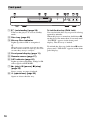
A [/1 (on/standby) (page 29)
Turns on the player, or sets to standby
mode.
Lights up when a BD is recognized.
You can lock the disc tray to prevent it being
opened by mistake.
When the player is turned on, hold down X
on the player for more than 10 seconds until
“LOCKED” appears in the front panel
display. The disc tray is locked.
z
When the player is turned on for the first time,
the Blu-ray Disc indicator lights up, then turns
off when Easy Setup is complete.
To unlock the disc tray, hold down X on the
player until “UNLOCK” appears in the front
panel display.
B Disc tray (page 32)
C Blu-ray Disc indicator
D Front panel display (page 11)
E Remote sensor (page 27)
F 24P indicator (page 45)
Lights up when outputting 1080p/24 Hz
video signals of BD-ROMs.
G N (play), X (pause), x (stop)
(page 32)
Starts, pauses, or stops playback.
H A (open/close) (page 32)
Opens or closes the disc tray.
10
To lock the disc tray (Child Lock)
Front panel display
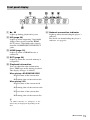
A N, X
Lights up during playback or pause.
B HD (page 44)
Lights up when outputting 720p/1080i/
1080p video signals from the HDMI
OUT jack or 720p/1080i video signals
from the COMPONENT VIDEO OUT
jacks.
F Network connection indicator
Lights up when downloading the player’s
software.
For details on downloading the player’s
software, see page 42.
C HDMI (page 15)
Lights up when an HDMI device is
connected.
D EXT (page 24)
Lights up when the external memory is
recognized.
E Playback information
You can check the time information.
Press TIME repeatedly during playback.
The display changes as follows.
When playing a BD-ROM/DVD VIDEO
Elapsed time of the current title
r
Remaining time of the current title
When playing a CD
Elapsed time of the current track
r
Remaining time of the current track
r
Elapsed time of the current disc
r
Remaining time of the current disc
z
“T” (Title or Track), “C” (Chapter), or “D”
(Disc) may be displayed depending on the
disc.
,continued
11
Rear panel
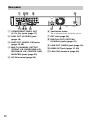
A COMPONENT VIDEO OUT
(Y, PB, PR) jacks (page 17)
F Ventilation holes
B LINE OUT (S VIDEO) jack
(page 18)
G EXT slot (page 24)
C LINE OUT (AUDIO L/R) jacks
(page 18, 23)
D MULTI CHANNEL OUTPUT
(FRONT L/R, SURROUND L/R,
SUR BACK L/R, CENTER, SUB
WOOFER) jacks (page 22)
E AC IN terminal (page 26)
12
The ventilation fan is inside the player.
H DIGITAL OUT (OPTICAL/
COAXIAL) jacks (page 21)
I LINE OUT (VIDEO) jack (page 18)
J HDMI OUT jack (page 15, 20)
K LAN (100) terminal (page 25)
Hooking Up the Player
Follow steps 1 through 7 to hook up and
adjust the settings of the player. Do not
connect the AC power cord until you reach
“Step 5: Connecting the AC Power Cord”
(page 26).
Hookups and Settings
Check that you have the following items.
• Audio/video cable (phono plug ×3) (1)
• AC power cord (1)
• External memory (1)
• Remote commander (remote) (1)
• Size AA (R6) batteries (2)
Hookups and
Settings
13
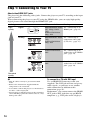
Step 1: Connecting to Your TV
About video/HDMI OUT jacks
The player has the following video jacks. Connect the player to your TV according to the input
jack on your TV.
When connecting the player to your TV using the HDMI cable, you can enjoy high quality
digital pictures and sound through the HDMI OUT jack.
Jack type
High
quality
Video resolution
Hookup
Digital
High Definition: 1080/ See “Connecting to an
24p, 1080p, 1080i,
HDMI jack” (page 15).
720p
Standard Definition:
480p, 480i
Analog
High Definition: 1080i, See “Connecting to
720p
component video jacks
Standard Definition:
(Y, Pb, Pr)” (page 17).
480p, 480i
Standard Definition:
480i
See “Connecting to an
audio/video or S VIDEO
jack” (page 18).
Standard Definition:
480i
See “Connecting to an
audio/video or S VIDEO
jack” (page 18).
Standard
quality
14
b
To connect to a TV with DVI input
• Plug in cables securely to prevent unwanted
noise.
• Refer to the instructions supplied with the
components to be connected.
• You cannot connect this player to a TV that does
not have a video input jack.
• Do not apply too much pressure on the connecting
cables. Pushing against the cabinet wall, etc., may
damage the cable.
Use an HDMI-DVI converter cable (not
supplied). The DVI jack will not accept any
audio signals, so you have to use another
audio connection in addition to this
connection (page 19).
Furthermore, you cannot connect the HDMI
OUT jack to DVI jacks that are not HDCP
compliant (e.g., DVI jacks on PC displays).
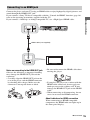
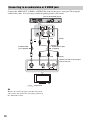
Connecting to an HDMI jack
Blu-ray Disc/DVD player
Hookups and Settings
Connect the player and your TV using an HDMI cable to enjoy high quality digital pictures and
sound through the HDMI OUT jack.
If you connect a Sony TV that is compatible with the “Control for HDMI” function (page 16),
refer to the operating instructions supplied with the TV.
If you connect a 1080/24p- or 1080p-compatible TV, use a High Speed HDMI cable.
HDMI cable (not supplied)
TV
Notes on connecting to the HDMI OUT jack
Observe the following as improper handling
may damage the HDMI OUT jack and the
connector.
• Carefully align the HDMI OUT jack on the
rear of the player and the HDMI connector
by checking their shapes. Make sure the
connector is not upside down or tilted.
• Be sure to disconnect the HDMI cable when
moving the player.
• If you place the player on a cabinet with the
HDMI cable connected, do not apply too
much pressure to the cabinet wall. It may
damage the HDMI OUT jack or the HDMI
cable.
• When connecting or disconnecting, do not
screw in or rotate the HDMI connector.
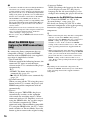
About indicators for HDMI connection
When connecting an HDMI compatible
component, the HDMI indicator lights up in
the front panel display.
,continued
15
b
• Consumers should note that not all high definition
television sets are fully compatible with this
product and may cause artifacts to be displayed in
the picture. In the case of 480i/480p/720p/1080i/
1080p scan picture problems, it is recommended
that the user switch the connection to the LINE
OUT VIDEO or S VIDEO jack. If there are
questions regarding our TV set compatibility with
this model 480i/480p/720p/1080i/1080p Blu-ray
Disc/DVD player, please contact our customer
service center.
• If the picture is not clear, not natural or not to your
satisfaction, change the video output resolution in
step 3 of “Output Video Format” under the
“Video Settings” setup (page 44).
• Be sure to use only an HDMI cable that bears the
HDMI logo.
About the BRAVIA Sync
features (for HDMI connections
only)
By connecting Sony components that are
compatible with the “Control for HDMI”
function with an HDMI cable (not supplied),
operation is simplified as below:
• One-Touch Play
With one touch of the following buttons, the
connected TV turns on and the input
selector on the TV is switched to the player
automatically.
– [/1
– HOME: The home menu appears
automatically (page 41).
– N PLAY: Playback starts automatically
(page 33).
• System Power-Off
When you turn off the TV using the power
button on the TV’s remote, the player and
HDMI-compatible components turn off
automatically.
• Theater
When you press THEATER, the player
automatically switches to the optimum
video mode for watching movies. When
connected with an AV amplifier (receiver)
using the HDMI cable, the speaker output
also switches automatically. When
connected with a Theater Mode-compatible
TV using the HDMI cable, the TV’s video
mode switches to Theater Mode. Press the
button again to return to the original setting.
16
• Language Follow
When you change the language for the onscreen display on your TV, the player’s
language for the on-screen display is also
changed after turning the player off and on.
To prepare for the BRAVIA Sync features
Set “Control for HDMI” to “On” in the
“System Settings” setup (page 53).
For details on settings of your TV or other
connected components, refer to the operating
instructions supplied with the TV or
components.
z
• When connecting the Sony TV that is compatible
with the “Control for HDMI” Easy Setting
function using the HDMI cable, the “Control for
HDMI” setting of the player automatically
switches to “On” if the “Control for HDMI”
setting on the connected TV is set to “On.” Refer
to the operating instructions supplied with the
TV.
• When connecting the Sony TV that is compatible
with the BRAVIA Sync features using the HDMI
cable, you can control the basic functions of the
player with the TV’s remote if the “Control for
HDMI” setting on the connected TV is set to
“On.” Refer to the operating instructions supplied
with the TV.
b
Depending on the connected component, the
“Control for HDMI” function may not work. Refer
to the operating instructions supplied with the
component.
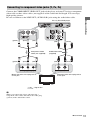
Connecting to component video jacks (Y, PB, PR)
Connect the COMPONENT VIDEO OUT jacks of the player and your TV using a component
video cable or three video cables (not supplied) of the same kind and length. You can enjoy
high-quality pictures.
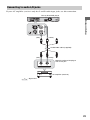
Be sure to connect to the LINE OUT (AUDIO L/R) jacks using the audio/video cable.
Hookups and Settings
Blu-ray Disc/DVD player
(green)
(blue)
(red)
(red)
Component video
cable (not supplied)
(green)
(blue)
(white)
Audio/video cable
(supplied)
(red)
(red)
Match the color of the plug to that
of the jack.
(white)
Match the color of the plug to that
of the jack.
TV
: Signal flow
b
When you connect the player and TV using a
component video cable, disconnect the video plug
(yellow) of the audio/video cable.
,continued
17
Connecting to an audio/video or S VIDEO jack
Connect the LINE OUT (VIDEO, AUDIO L/R) jacks of the player and your TV using the
audio/video cable. You can enjoy standard quality pictures and sound.
Blu-ray Disc/DVD player
or
(yellow)
(red)
S-video cable
(not supplied)
(white)
Audio/video cable
(supplied)
(yellow)
(red)
(white)
Match the color of the plug to
that of the jack.
TV
: Signal flow
b
When you connect the player and TV using an Svideo cable, disconnect the video plug (yellow) of
the audio/video cable.
18
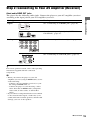
Step 2: Connecting to Your AV Amplifier (Receiver)
About audio/HDMI OUT jacks
The player has the following audio jacks. Connect the player to your AV amplifier (receiver)
according to the input jack on your AV amplifier (receiver).
Hookup
Digital
See “Connecting to an HDMI jack” (page 20).
See “Connecting to digital jacks (OPTICAL/
COAXIAL)” (page 21).
Analog
Hookups and Settings
Jack type
See “Connecting to 7.1 channel jacks” (page 22).
See “Connecting to audio L/R jacks” (page 23).
z
For correct speaker location, refer to the operating
instructions supplied with the connected
components.
b
• When you connect the player to your AV
amplifier (receiver) using an HDMI cable, do one
of the following:
– Connect your AV amplifier (receiver) to your
TV using an HDMI cable, or
– Connect the player to your TV using a video
cable other than an HDMI cable (component
video cable, S-video cable, or audio/video
cable).
• If you connect a component that does not conform
to the selected audio signal, a loud noise (or no
sound) will come from the speakers, which could
damage your ears or the speakers.
,continued
19
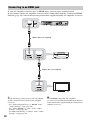
Connecting to an HDMI jack
If your AV amplifier (receiver) has an HDMI input, you can enjoy surround sound.
If you connect a Sony AV amplifier (receiver) that is compatible with the “Control for HDMI”
function (page 16), refer to the operating instructions supplied with the AV amplifier (receiver).
Blu-ray Disc/DVD player
HDMI cable (not supplied)
AV amplifier (receiver)
HDMI cable (not supplied)
TV
z
Set the following settings and you can enjoy higher
quality sound from the connected AV amplifier
(receiver).
– Set “Audio Output Priority” to “HDMI” in the
“Audio Settings” setup (page 46).
– Set “Audio (HDMI)” to “Auto” in the “Audio
Settings” setup (page 49).
– Set “BD Audio Setting” to “Direct” in the “Audio
Settings” setup (page 49).
20
b
Not all HDMI-compatible AV amplifiers
(receivers) accept 8ch Linear PCM signals. Refer as
well to instructions supplied with the connected AV
amplifier (receiver).
Connecting to digital jacks (OPTICAL/COAXIAL)
If your AV amplifier (receiver) has a Dolby*1 Digital, Dolby Pro Logic, or DTS*2 decoder and
a digital input jack, you can enjoy Dolby Digital (5.1ch), Dolby Pro Logic (4.0ch), or DTS
(5.1ch) surround effects.
Blu-ray Disc/DVD player
Hookups and Settings
or
Optical digital cable
(not supplied)
Coaxial digital cable
(not supplied)
AV amplifier (receiver)
: Signal flow
1
Connect the digital jack of the player
and your AV amplifier (receiver).
2
Set “Audio Output Priority” to
“Coaxial/Optical” in the “Audio
Settings” setup (page 46).
3
*1
*2
Make the appropriate settings in
“Dolby Digital” and “DTS” under the
“Audio Settings” setup (page 49).
Otherwise, no sound or a loud noise will
come from your speakers.
,continued
21
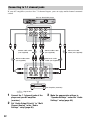
Connecting to 7.1 channel jacks
If your AV amplifier (receiver) has 7.1 channel inputs, you can enjoy multi channel surround
sound.
Blu-ray Disc/DVD player
Stereo audio cable
(not supplied)
Stereo audio cable
(not supplied)
Stereo audio cable
(not supplied)
Monaural audio
cable (not supplied)
Monaural audio
cable (not supplied)
AV amplifier (receiver)
: Signal flow
22
1
Connect the 7.1 channel jacks of the
player and your AV amplifier
(receiver).
2
Set “Audio Output Priority” to “Multi
Channel Analog” in the “Audio
Settings” setup (page 46).
3
Make the appropriate settings in
“Speaker Settings” under the “Audio
Settings” setup (page 46).
Connecting to audio L/R jacks
If your AV amplifier (receiver) only has L and R audio input jacks, use this connection.
Blu-ray Disc/DVD player
Hookups and Settings
(red)
(white)
Audio/video cable (supplied)
(red)
(white)
Match the color of the plug to
that of the jack.
AV amplifier (receiver)
: Signal flow
23
b
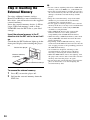
Step 3: Inserting the
External Memory
To enjoy additional content (such as
BonusView/BD-Live) on certain Blu-ray
Disc titles, you will need to use the supplied
external memory.
Insert the external memory device (1 GB or
larger USB flash memory, such as Sony
USM1GH) into the EXT slot as your local
storage.
Insert the external memory in the V
direction into the EXT slot as far as it will
go.
Check that the EXT indicator lights up in the
front panel display when turning the player
on.
Rear of the player
External memory
(supplied)
With the terminal side up
To remove the external memory
1
2
24
Press [/1 to turn the player off.
Pull out the external memory from the
EXT slot.
• Do not connect anything other than a USB flash
memory, such as an HDD, etc., to the EXT slot.
• Insert the external memory straight. If you force
the external memory into the slot, this will cause
damage to both the external memory and the
player.
• Keep the external memory away from small
children to prevent them from accidentally
swallowing the external memory.
• Do not apply too much pressure to the external
memory in the slot, as it may cause a malfunction.
• We recommend use of the Sony USM1GH
available as of April 2008.
• Other USB flash devices may support this
function. However we cannot guarantee
compatibility with all USB flash memories.
• When inserting a USB flash memory other than
Sony USM1GH, check the insertion direction
before inserting it.
• Depending on the USB flash memory, it may
stick out from the EXT slot. Do not force into the
slot or apply pressure to the protruding portion of
the USB flash memory.
• To avoid data corruption or damage to the
external memory, turn the player off when
inserting or removing the external memory.
• When the EXT indicator does not light up, turn
the player off, remove and re-insert the external
memory, then turn the player on again.
• Do not insert the external memory that contains
photo or music files to avoid corrupting the
external memory data.
Step 4: Connecting to
the Network
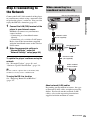
When connecting to a
broadband router directly
Blu-ray Disc/DVD player
1
Connect the LAN (100) terminal of the
player to your Internet source.
Methods to connect to your Internet
source include:
• Connecting to a broadband router
directly
• Connecting via a wireless LAN router
Refer also to the instructions supplied
with the broadband router or the wireless
LAN router.
2
Hookups and Settings
Connect the LAN (100) terminal of the player
to your Internet source using a network cable
to update the player’s software. You can also
enjoy the BD-Live function (page 35).
Network cable
(not supplied)
Broadband router
Make the appropriate settings in
“Internet Settings” under the
“Network Settings” setup (page 54).
To update the player’s software using the
network
See “Network Update” (page 42) and
“Software Update Notification” (page 54).
To PC
Network cable
(not supplied)
ADSL modem/
Cable modem
b
Do not connect a phone line to the LAN (100)
terminal, as it may cause a malfunction.
To enjoy the BD-Live function
See “Enjoying BonusView/BD-Live”
(page 35).
Internet
About network (LAN) cables
Depending on the modem or router, the type
of network (LAN) cable, straight or crossing,
differs. For details on the network (LAN)
cables, refer to the operating instructions
supplied with the modem or router.
,continued
25
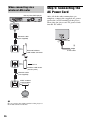
When connecting via a
wireless LAN router
Blu-ray Disc/DVD player
Step 5: Connecting the
AC Power Cord
After all of the other connections are
complete, connect the supplied AC power
cord to the AC IN terminal of the player.
Then plug the player and TV power cords
into the AC outlet.
Network cable
(not supplied)
1
to AC IN
2
Ethernet/wireless
LAN media converter
To PC
Wireless LAN router
(access point)
Network cable
(not supplied)
ADSL modem/
Cable modem
Internet
b
Do not connect the LAN terminal of the player to
the LAN terminal of the PC.
26
to AC outlet
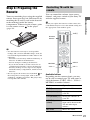
Step 6: Preparing the
Remote
You can control the volume, input source,
channel, and power switch of your Sony TV
with the supplied remote.
b
When you replace the batteries of the remote, the
code number may be reset to the default setting. Set
the appropriate code number again.
TV [/1
Hookups and Settings
You can control the player using the supplied
remote. Insert two Size AA (R6) batteries by
matching the 3 and # ends on the batteries
to the markings inside the battery
compartment. When using the remote, point
it at the remote sensor
on the player
(page 10).
Controlling TVs with the
remote
Number
buttons
b
• Use the batteries correctly to avoid possible
leakage and corrosion. Should leakage occur, do
not touch the liquid with bare hands. Observe the
following:
– Do not use a new battery with an old battery, or
batteries of different manufacturers.
– Do not attempt to recharge the batteries.
– If you do not intend to use the remote for an
extended period of time, remove the batteries.
– If battery leakage occurs, wipe out any liquid
inside the battery compartment, and insert new
batteries.
• Do not expose the remote sensor (marked
on
the front panel) to strong light, such as direct
sunlight or a lighting apparatus. The player may
not respond to the remote.
INPUT
MUTING
VOL +/–
CH +/–
Available buttons
Depending on the connected unit, you may
not be able to control your TV with some or
all of the buttons (TV [/1, CH +/–, VOL +/–,
MUTING, or number buttons).
Buttons
Operations
TV [/1
Turns your TV on or off.
VOL (volume) +/– Adjusts the volume of
your TV.
CH (channel) +/– Selects the channel on
your TV.
INPUT (input
select)
Switches your TV’s
input source between the
TV and other input
sources.
MUTING
Mutes the sound.
,continued
27
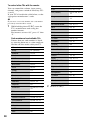
To control other TVs with the remote
Manufacturer
Code number
KTV
03, 04, 12, 14
LXI (Sears)
04, 07, 08, 10, 11,
12
Magnavox
03, 04, 06, 08, 12,
21
Marantz
13
Mitsubishi/MGA
04, 12, 13
NEC
04, 12
Panasonic
06, 19
Philco
02, 03, 04, 08, 12
Philips
08, 21
Pioneer
06, 07, 16
Portland
04, 12
Quasar
06
Code number
Radio Shack
04, 05, 10, 13, 14
Sony
01 (default)
RCA/PROSCAN
04, 10, 12
Admiral
10, 18
Samsung
03, 04, 12, 20
Akai
04, 12
Sanyo
11, 14
AOC
04
Scott
04, 12, 14
Bell & Howell
18
SEMP Toshiba
07
Broksonic
04, 12
Sharp
03, 05, 18
CCE
08, 22
Signature2000
18
Craig
14
Sylvania
04, 08, 12, 23
Croslex
08
Symphonic
14
Crown
14
Toshiba
07, 18
Curtis Mathis
04, 07, 12, 14
Videch
02, 04, 12
Daewoo
04, 12, 22
Wards
03, 04, 12
Daytron
03
Zenith
15
Emerson
03, 04, 05, 12, 14,
23
Fisher
11
Funai
23
General Electric
04, 06, 10, 12
LG/Goldstar
03, 04, 12, 17
Gradients
09
Hitachi
02, 03, 04
J.C.Penney
04, 10, 12, 17
JVC
09
You can control the volume, input source,
channel, and power switch of non-Sony TVs
as well.
If your TV is listed in the table below, set the
appropriate manufacturer’s code.
b
If you enter a new code number, the code number
previously entered will be erased.
1
While holding down TV [/1, enter the
TV’s manufacturer code using the
number buttons.
For instance, to enter “09,” press “0” then
“9.”
Code numbers of controllable TVs
If more than one code number is listed,
try entering them one at a time until you
find the one that works with your TV.
Manufacturer
28
2
Release TV [/1.
4
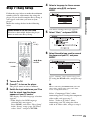
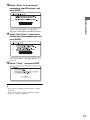
Step 7: Easy Setup
Select a language for the on-screen
displays using M/m, and press
ENTER.
When turned on for the first time
Wait for a short while before the player
turns on and starts Easy Setup.
The initial settings message appears.
5
Select “Start,” and press ENTER.
6
Select the cable type used to connect
the player and your TV, and press
ENTER.
Hookups and Settings
Follow the steps below to make the minimum
number of basic adjustments for using the
player. If you do not complete Easy Setup, it
will appear each time you turn on your
player.
Make the settings below in the following
order.
[/1
TV [/1
RETURN
</M/m/,,
ENTER
HOME
1
2
3
Turn on the TV.
Select “HDMI” when connecting your
TV using the HDMI cable, and go to step
7.
Press [/1 to turn on the player.
b
The player turns on after a moment.
When connecting the HDMI OUT jack and
other video output jacks at the same time,
select “Component Video.”
Switch the input selector on your TV so
that the signal from the player
appears on your TV screen.
The display for OSD language selection
appears.
• If the display for OSD language
selection does not appear
Press HOME, and select “Easy Setup”
in the “Setup” setup (page 56). Then,
select “Start,” and press ENTER.
Select “Component Video” when
connecting your TV using the component
video cable, and go to step 7.
Select “Video or S Video” when
connecting your TV using the video
cable or S-video cable, and go to step 8.
,continued
29
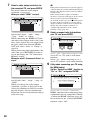
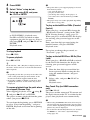
7
b
Select a video output resolution for
the connected TV, and press ENTER.
If the picture is distorted or no picture appears,
wait for about 30 seconds without pressing any
buttons. The display returns to the resolution
setting screen.
If the selected video output resolution is
incorrect, no picture will appear on the screen
when you press any button within that
30 seconds. In this case, press x on the player
for more than 10 seconds to reset the video
output resolution to the lowest resolution. To
change the video output resolution, set
“Output Video Format” in the “Video
Settings” setup (page 44).
For details about the video output
resolution, see page 45.
When you select “HDMI” in step 6
8
Select from “Auto,” “480i,” “480p,”
“720p,” “1080i,” or “1080p.”
When connecting the HDMI OUT jack
and other video output jacks at the same
time, video signals may not output from
the jacks, other than from the HDMI
OUT jack, when “Auto” or “1080p” is
selected.
When connecting other equipment at the
same time, press RETURN to return to
step 6 and change the “TV Connection
Method” setting.
Select “16:9” when connecting to a widescreen TV or a TV with a wide mode
function.
Select “4:3” when connecting to a 4:3
screen TV without a wide mode function.
When you select “Component Video” in
step 6
9
Select from “480i,” “480p,” “720p,” or
“1080i.”
When you change the video output
resolution, a picture is displayed in the
selected resolution for about 30 seconds,
then the display asks for confirmation.
Follow the on-screen instructions and go
to the next step.
30
Select an aspect ratio that matches
your TV, and press ENTER.
(Only when connecting your TV using
the HDMI cable)
Set the “Control for HDMI” function to
“On” or “Off,” and press ENTER.
Select “On” to use the “Control for
HDMI” function when connecting Sony
components that are compatible with the
“Control for HDMI” function (page 16).
If you do not use the “Control for HDMI”
function, select “Off.”
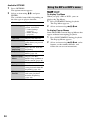
10 Select “Allow” to allow Internet
connections from BD contents, and
press ENTER.
11 Select “Quick Start” to shorten the
Hookups and Settings
Select “Do not allow” to not allow
Internet connections from BD contents.
startup time from standby mode, and
press ENTER.
For details about “Standby Mode,” see
page 53.
12 Select “Finish,” and press ENTER.
z
• You can reset settings to their factory settings
(page 56).
• You can run “Easy Setup” again from “Easy
Setup” in “Setup” (page 56).
31
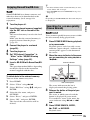
Playing BDs/DVDs
BD
DVD
Z OPEN/
CLOSE
Number
buttons
</M/m/,,
ENTER
OPTIONS
HOME
N PLAY
X PAUSE
Playback
x STOP
1
Switch the input selector on your TV so
that the signal from the player
appears on your TV screen.
2
Press Z OPEN/CLOSE, and place a
disc on the disc tray.
Playing side facing down
3
Press Z OPEN/CLOSE to close the
disc tray.
• When you insert a commercially
available BD-ROM or DVD VIDEO,
playback automatically starts
depending on the disc.
b
Playback does not start by pressing N PLAY
while the disc tray is open.
32
4
5
6
Press HOME.
Select “Video” using </,.
Select
using M/m, and press
N PLAY or ENTER.
b
• The point where you stopped playing is cleared
from memory when:
– you open the disc tray,
– you play another title,
– you change the settings on the player, or
– you remove the external memory (for BDROMs).
• The player may not resume playback depending
on the disc or stop point.
For commercially available BD-ROMs
or DVD VIDEOs, playback starts.
For BDs or DVDs recorded on other
equipment, the title list appears. Select a
title using M/m, and press N PLAY or
ENTER.
Playback starts.
To stop playback
When you play a restricted BD, change the
“BD Parental Control” setting in the “BD/
DVD Viewing Settings” setup (page 51).
When you play a restricted DVD, the display
for entering your password appears on the
screen.
Enter your four-digit password using the
number buttons, and press ENTER.
Playback starts.
Playback
To play restricted BDs or DVDs (Parental
Control)
To register or change the password, see
“Password” (page 52).
Press x STOP.
To pause playback
Press X PAUSE.
z
In the title list, “PL” (Playlist) is displayed next to
the name of titles that are created and edited from
their originals.
To play restricted BD-REs or BD-Rs (Disc
Lock)
When you play a BD-RE or BD-R restricted
by the Disc Lock function, the display for
entering your password appears on the
screen.
1
Enter the four-digit password that has
been registered when creating the disc
using the number buttons, and press
ENTER.
2
Select a title, and press N PLAY or
ENTER.
Playback starts.
b
• Depending on the disc you may not be able to do
some of the playback operations. Refer to the
instruction manual supplied with the disc.
• Depending on BDs or DVDs recorded on other
equipment, title lists or title names may not be
displayed.
To resume playback from the point where
you stopped (Resume Play)
After stopping playback, select
using M/
m, and press N PLAY or ENTER.
The player resumes playback from the point
where you pressed x STOP.
One-Touch Play (for HDMI connection
only)
Press N PLAY.
The player and the connected TV turn on and
the input selector on the TV is switched to the
player, then playback starts automatically.
b
To start from the beginning, press OPTIONS
to select “Play from beginning,” and press
ENTER. Playback starts from the beginning
of the title.
• When using the HDMI connection, there may be
a delay before the playback picture appears on the
screen, and the beginning portion of the playback
picture may not be displayed.
• To use the One-Touch Play function, set “Control
for HDMI” to “On” in the “System Settings”
setup (page 53).
,continued
33
Available OPTIONS
34
1
Press OPTIONS.
The options menu appears.
2
Select an item using M/m, and press
ENTER.
The available items differ depending on
the disc type or player situation.
Items
Details
A/V Settings
Adjusts settings for
picture and sound.
• Video Settings
(page 37)
• Audio Settings
(page 38)
Title List
Displays the title list.
Play
Plays the title from the
point where you pressed
x STOP.
Play from
beginning
Plays the title from the
beginning.
Top Menu
Displays the disc’s Top
Menu (page 34).
Menu/Popup
Menu
Displays the BDROM’s Pop-up Menu or
DVD’s menu (page 34).
Stop
Stops playback.
Title Search
Searches for a title and
starts playback from the
beginning (page 36).
Chapter
Search
Searches for a chapter
and starts playback
from the beginning
(page 36).
Using the BD’s or DVD’s menu
BD
DVD
To display Top Menu
When you play a BD or DVD, you can
display the Top Menu.
1
Press TOP MENU during playback.
The Top Menu appears.
2
Select an item using </M/m/,.
To display Pop-up Menus
Some BD-ROMs contain Pop-up Menus that
appear without interrupting playback.
1
Press POP UP/MENU during playback.
The Pop-up Menu appears.
2
Select an item using </M/m/,, color
buttons, or the number buttons, and
follow the on-screen instructions.
Enjoying BonusView/BD-Live
BD
Some BD-ROMs have bonus contents and
other data that can be downloaded to the
external memory (local storage) for
enjoyment.
Turn the player off.
Insert the external memory (supplied)
into the EXT slot on the rear of the
player.
The external memory is used as the local
storage.
Make sure that the external memory is
properly inserted into the player
(page 24).
3
Connect the player to a network
(page 25).
4
5
Turn the player on.
6
Insert a BD-ROM with BonusView/BDLive.
Set “BD Internet Connection” to
“Allow” in the “BD/DVD Viewing
Settings” setup (page 52).
b
Depending on the BD-ROM, the disc name may not
be displayed.
Searching for a scene quickly
(Scene Search)
BD
Playback
1
2
z
• To delete all data in the external memory at once,
select “Erase All” in step 5.
• Press ENTER instead of OPTIONS in step 4 to
skip step 5.
DVD
You can move quickly between scenes within
the title currently being played back.
1
Press SCENE SEARCH during playback
or in pause mode.
Playback pauses and a bar with a scene
indicator (square-shaped – indicates the
current point) appears at the bottom of
the screen.
2
Move the scene indicator to the scene
you are searching for using </, or
m/M.
Scene indicator
The operation method differs depending
on the disc. Refer to the instruction
manual supplied with the disc.
To delete data in the external memory
You can delete unnecessary data.
1
2
3
Press HOME.
4
Select the disc name, and press
OPTIONS.
5
6
Select “Erase,” and press ENTER.
The current point
Select “Video” using </,.
Select “BD Data” using M/m, and press
ENTER.
Select “OK,” and press ENTER.
The data of the selected disc will be
deleted.
The scene indicator on the bar is
displayed around the playing point.
3
Release the button at the point you
want to watch.
The scene at which you released the
button is displayed in pause mode.
To search for a scene again, move the
scene indicator using </, or m/
M.
4
Press SCENE SEARCH, ENTER,
N PLAY, or X PAUSE.
Playback starts.
,continued
35
To cancel Scene Search mode
Press SCENE SEARCH, ENTER,
N PLAY, or X PAUSE.
Playback starts from the point you pressed
the button.
b
• The Scene Search function is available for titles
longer than 100 seconds and shorter than 100
hours.
• The Scene Search function may not be available
depending on the disc.
Searching for a Title/Chapter
BD
Displaying the playing time and
play information
BD
DVD
You can check the title information,
including the video transmission rate, etc.
Press DISPLAY.
The displayed information differs depending
on the disc type and player status.
Example: When playing a BD-ROM
DVD
You can search for a chapter if the title
contains chapter marks.
1
Press OPTIONS during playback or in
pause mode.
The options menu appears.
2
Select a search method using M/m,
and press ENTER.
“Title Search” (for BD-ROMs/DVD
VIDEOs)
“Chapter Search”
The display for entering the number
appears.
Example: Chapter Search
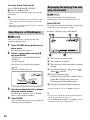
A The current selected angle
B Title number or name
C The currently selected audio or subtitle
setting
D Available functions (
audio/
subtitle)
angle/
E Playback information
Displays Disc type/Play mode/Video
codec/Bit rate/Playing status bar/
Playing time (Remaining time*)
F Output resolution/Video frequency
3
Enter the number of the title or chapter
using the number buttons.
If you make a mistake, press CLEAR,
and re-enter another number.
4
Press ENTER.
After a while, the player starts playback
from the selected number.
36
* Displayed when you press TIME repeatedly.
z
• You can also check the playback information in
the front panel display (page 11).
• Press SUBTITLE, AUDIO, or ANGLE, and you
can check each type of information.
b
Adjusting pictures and sound
for videos
BD
DVD
To adjust the picture
• Set the picture setting of your TV to ‘Standard’
before changing the “Picture Quality Mode”
settings.
• “Video Settings” is not available when the
connected TV is set to Theater Mode (page 16).
• Depending on the disc or the scene being played,
“FNR,” “BNR” or “MNR” effects may be hard to
discern.
1
Press OPTIONS during playback.
The options menu appears.
2
Select “A/V Settings” using M/m, and
press ENTER.
1
3
Select “Video Equalizer” in step 4 above,
and press ENTER.
Select “Video Settings” using M/m, and
press ENTER.
The “Video Settings” screen appears.
2
Select an item, and press ENTER.
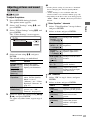
“Video Equalizer” elements
Playback
Items
Details
Contrast
Changes the contrast.
((weak) –3 ~ 0
~ 3 (strong))
4
Select an item using M/m, and press
ENTER.
The default settings are underlined.
Items
Details
Picture Quality Selects the picture
Mode
settings for different
(Standard/
lighting environments.
Brighter Room/
Theater Room/
Memory)
Video
Equalizer
NR (Noise
Reduction)
5
This setting is selectable
when “Picture Quality
Mode” is set to
“Memory” (see ““Video
Equalizer” elements” on
page 37).
Reduces the noise in the
picture (see ““NR”
elements” on page 37).
Select or adjust the settings using </M/
m/,, and press ENTER.
To adjust any other items, repeat steps 4
and 5.
Brightness
((dark) –3 ~ 0
~ 3 (bright))
Changes the overall
brightness.
Chroma
((light) –3 ~ 0
~ 3 (deep))
Deepens deep colors, or
lightens light colors.
Hue ((red) –3
~0~3
(green))
Changes overall color
balance.
Sharpness
(0 ~ 3)
Sharpens or softens the
picture outlines.
Gamma
Adjusts the picture
balance between light
and dark areas.
“NR” elements
1
Select “NR” in step 4 above, and press
ENTER.
2
Select an item, and press ENTER.
Items
Details
FNR
(Off/Auto)
Reduces random noise
appearing in the picture.
BNR
(Off/Auto)
Reduces mosaic-like
block noise in the
picture.
MNR
(Off/Auto)
Reduces minor noise
around the picture
outlines (mosquito
noise).
,continued
37
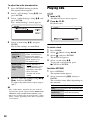
To adjust the audio characteristics
Press OPTIONS during playback.
The options menu appears.
2
Select “A/V Settings” using M/m, and
press ENTER.
3
Select “Audio Settings” using M/m, and
press ENTER.
The “Audio Settings” screen appears.
2
Select an item using M/m, and press
ENTER.
The default settings are underlined.
To select a track
4
Items
Details
AV SYNC
(short) 0 ~
120 msec
(long)
Adjusts the gap between
picture and sound, by
delaying the sound
output in relation to the
picture output (0 to
120 milliseconds).
Audio Filter
(for analog
audio signals
only)
5
• Sharp: Provides a
wide frequency range
and spatial feeling.
Normally select this.
• Slow: Provides
smooth and warm
sound.
Select or adjust the settings using </M/
m/,, and press ENTER.
To adjust any other items, repeat steps 4
and 5.
b
• The “Audio Filter” function does not work for
digital audio signals output from the HDMI OUT/
DIGITAL OUT (OPTICAL/COAXIAL) jacks.
• There may be little effect by changing the “Audio
Filter” setting depending on the disc or playback
environment.
38
Playing CDs
1
CD
1
Insert a CD.
The Music Player screen appears.
Press N PLAY.
Playback starts.
1
2
3
Press HOME.
4
Select a track using M/m.
To play the selected track, press
N PLAY or ENTER.
Select
(Music) using </,.
Select , and press ENTER.
The music list appears.
Available OPTIONS
1
Press OPTIONS.
The options menu appears.
2
Select an item using M/m, and press
ENTER.
The available items differ depending on
the situation.
Items
Details
Play
Plays the selected track.
Play from
beginning
Plays the current track
from the beginning.
Stop
Stops playing the track.
Various music playback operations
Operations
N PLAY
Starts playback from the
point where you pressed
x STOP.
x STOP
Stops playback.
X PAUSE
Pauses playback.
. PREV/
NEXT >
Skips to the beginning of the
current or next track. To go
to the previous track press
. PREV twice.
m/M
Fast reverse/fast forwards
when pressed during
playback.
TIME
Switches time information
on the screen and the front
panel display (page 11).
Playing Photo Files
BD
*1
DATA DVD
*2
DATA CD
*3
*1
*2
BD-REs/BD-Rs containing JPEG image files
DVD+RWs/DVD+Rs/DVD-RWs/DVD-Rs
containing JPEG image files
*3 CD-RWs/CD-Rs containing JPEG image files
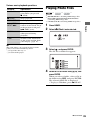
1
2
Press HOME.
3
Select
Select
(Photo) using </,.
Playback
Buttons
b
The point where you stopped playing (resume
point) is cleared from memory when:
– you open the disc tray, or
– you turn off the player.
, and press ENTER.
The file list or folder list appears.
4
Select a file or folder using M/m, and
press ENTER.
When you select a folder, select a file in
the folder using M/m, and press ENTER.
The selected photo file is displayed.
• To play a slideshow, press N PLAY.
,continued
39
Available OPTIONS during playback
Buttons
Operations
x STOP
RETURN
Stops a slideshow.
X PAUSE
Pauses a slideshow.
. PREV/
NEXT >
</,
Displays the previous or
next photo.
To view best quality images
DISPLAY
Displays the file
information.
If you have a Sony TV compatible with
“PhotoTV HD,” you can enjoy best quality
images by the following connection and
setting.
1
Press OPTIONS during playback.
The options menu appears.
2
Select an item using M/m, and press
ENTER.
The available items differ depending on
the situation.
Items
Details
Slideshow
Speed
Changes the slideshow
speed.
• Fast
• Normal
• Slow
Stop
Stops a slideshow.
Rotate Left
Rotates the photo
counterclockwise by 90
degrees.
Rotate Right
Rotates the photo
clockwise by 90
degrees.
Various photo playback operations
40
b
• When you attempt to play the following photo
files, the
mark appears on the screen and they
cannot be played.
– photo files larger than 8,192 pixels (width or
height)
– photo files smaller than 15 pixels (width or
height)
– photo files exceeding 32 MB
– photo files with extreme aspect ratios (greater
than 50:1 or 1:50)
– photo files in Progressive JPEG format
– photo files that have a “.jpeg” or “.jpg”
extension, but not in JPEG format
– photo files that have an extremely long name
• The following photo files cannot be played.
– photo files recorded on BD-Rs in any format
other than UDF (Universal Disk Format) 2.6
– photo files recorded on BD-REs in any format
other than UDF (Universal Disk Format) 2.5
• The following photo files or folders cannot be
displayed in the file list or folder list.
– photo files that have an extension other than
“.jpeg” or “.jpg”
– photo files that have an extremely long name
– photo files in the 5th tree or lower
– 501th or more folders when the total number of
folders and files in a single tree exceeds 500
• Photo files edited on a PC may not be played.
• Thumbnail images of some photo files may not be
displayed.
• Large photo files may take some time to display
or to start a slideshow.
1
Connect the player to the TV using an
HDMI cable (not supplied).
2
Set “HDMI Resolution” of “Output
Video Format” to “Auto,” “1080i,” or
“1080p” in the “Video Settings” setup
(page 45).
3
Set the TV’s video setting to [VIDEO-A]
mode.
For details on [VIDEO-A], refer to the
operating instructions supplied with the
TV.
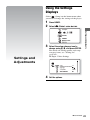
Using the Settings
Displays
Select
(Setup) on the home menu when
you need to change the settings of the player.
1
2
Press HOME.
3
Select the setup category icon to
change using M/m, and press ENTER.
Select
(Setup) using </,.
Settings and Adjustments
For details on setting options and setup
category icons, see “Setting list”
(page 42).
Example: Video Settings
Settings and
Adjustments
4
Set the options.
,continued
41
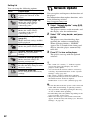
Setting list
Network Update
You can setup the following options.
Icon
Explanation
Network Update (page 42)
Updates the software of the
player.
Video Settings (page 43)
Makes the video settings
according to the type of
connecting jacks.
Audio Settings (page 46)
Makes the audio settings
according to the type of
connecting jacks.
BD/DVD Viewing Settings
(page 51)
Makes detailed settings for BD/
DVD playback.
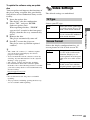
You can update and improve the functions of
the player.
For information about update functions, refer
to the following website;
http://esupport.sony.com
1
The player connects to the network, and
the display asks for confirmation.
2
Network Settings (page 54)
Makes detailed settings for
Internet and network.
Easy Setup (page 56)
Re-runs the Easy Setup to make
the basic settings.
Resetting (page 56)
Resets the player to the factory
settings.
Select “OK” using </,, and press
ENTER.
The player starts downloading, then
updating the software automatically.
When updating finishes, “FINISH”
appears for 5 seconds in the front panel
display, then the player automatically
turns off.
Photo Settings (page 53)
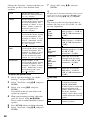
Makes the photo-related settings.
System Settings (page 53)
Makes the player-related
settings.
Select “Network Update” using M/m,
and press ENTER.
3
Press [/1 to turn on the player.
The player starts up with the updated
software.
z
• The “VUP */9” counter (“*” indicates update
step) in the front panel display also shows
progress of the update.
• You can check the current software version by
selecting “System Information” in the “System
Settings” setup (page 54).
• The “Setup” settings remain after updating.
• The player informs you of newer software version
information when “Software Update
Notification” is set to “On” (default) (page 54).
b
• Do not disconnect the AC power cord or network
cable while downloading or updating software.
• Any operations, including opening the disc tray,
are not available while updating.
• Downloading times may differ depending on the
server provider or line status.
• When error messages on network connections
appear, check the network settings (see “Internet
Settings” on page 54).
42
To update the software using an update
disc
You can update and improve the functions of
the player using an update disc provided by
Sony dealer or local authorized Sony service
facility.
Insert the update disc.
The display asks for confirmation.
2
Select “OK,” and press ENTER.
Software update starts.
When updating finishes, “FINISH”
appears for 5 seconds in the front panel
display, then the disc tray automatically
opens.
3
Remove the disc.
The player automatically turns off.
4
Press [/1 to turn the player on.
The player starts up with the updated
software.
z
• The “VUP */9” counter (“*” indicates update
step) in the front panel display also shows
progress of the update.
• You can check the current software version by
selecting “System Information” in the “System
Settings” setup (page 54).
• The “Setup” settings remain after updating.
• For information about other software update
methods, refer to the following website or consult
your nearest Sony dealer or local authorized Sony
Service facility;
http://esupport.sony.com
The default settings are underlined.
TV Type
Selects your TV type.
16:9
Select this when connecting
to a wide-screen TV or a TV
with a wide mode function.
4:3
Select this when connecting
to a 4:3 screen TV without a
wide mode function.
Screen Format
Selects the display configuration for a 4:3
screen picture on a 16:9 wide screen TV.
Original
Select this when connecting
to a TV with a wide mode
function. Displays a 4:3
screen picture in 16:9 aspect
ratio even on a wide-screen
TV.
Fixed Aspect
Ratio
Changes the picture size to
fit the screen size with the
original picture aspect ratio.
Settings and Adjustments
1
Video Settings
b
• Do not disconnect the AC power cord while
updating.
• Any operations, including opening the disc tray,
are not available while updating.
,continued
43
DVD Aspect Ratio
Selects the display configuration for
playback of 16:9 screen pictures on a 4:3
screen TV (selectable when “TV Type” is set
to “4:3” and “Screen Format” is set to “Fixed
Aspect Ratio”).
Letter Box
Pan & Scan
Displays a wide picture with
black bands on the top and
bottom.
Output Video Format
Selects the jack type to output video signals
(“TV Connection Method”) and output
resolution (“HDMI Resolution”/“Component
Resolution”).
1
Select “Output Video Format” in “Video
Settings,” and press ENTER.
2
Select the jack type to output video
signals using M/m, and press ENTER.
Displays a full-height
picture on the entire screen,
with trimmed sides.
b
When connecting the HDMI OUT jack and
other video output jacks at the same time,
select “Component Video.”
Letter Box
TV Connection Method
HDMI
Outputs signals from
the HDMI OUT jack
according to the “HDMI
Resolution” setting
below.
Component
Video
Outputs signals from
the COMPONENT
VIDEO OUT jacks
according to the
“Component
Resolution” setting
below.
Video or
S Video
Outputs signals from
the LINE OUT VIDEO
or S VIDEO jack.
Pan & Scan
b
Depending on the DVD, “Letter Box” may be
selected automatically instead of “Pan & Scan” or
vice versa.
Cinema Conversion Mode
Sets the video conversion method for 480p,
720p, 1080i, or 1080p* signals from the
HDMI OUT jack or the COMPONENT
VIDEO OUT jacks.
* HDMI only
44
Auto
Normally select this. The
player automatically detects
whether the material is
video-based or film-based,
and switches to the
appropriate conversion
method.
Video
The conversion method
suited for video-based
material will always be
selected regardless of the
material.
3
(When you select “HDMI” or
“Component Video” only)
Select the signal type for the HDMI OUT
jack or COMPONENT VIDEO OUT
jacks using M/m, and press ENTER.
When you change the video output
resolution, a picture is displayed in the
selected resolution for about 30 seconds,
then the display asks for confirmation.
Follow the on-screen instructions.
The HD indicator lights up when
outputting 720p/1080i/1080p video
signals.
b
BD-ROM 1080/24p Output
Sets to output 1920 × 1080p/24 Hz video
signals when playing film-based materials on
BD-ROMs (720p/24 Hz or 1080p/24 Hz).
1920 × 1080p/24 Hz video signals can be
output when all of the following conditions
are met.
– You connect a 1080/24p-compatible TV
using the HDMI OUT jack,
– “Output Video Format” is set to “HDMI,”
and
– “HDMI Resolution” is set to “Auto” or
“1080p.”
The 24P indicator lights up when outputting
1920 × 1080p/24 Hz video signals.
Auto
Outputs 1920 × 1080p/
24 Hz video signals only
when connecting a 1080/
24p-compatible TV using
the HDMI OUT jack.
On
Outputs 1920 × 1080p/
24 Hz video signals
regardless of the connected
TV type.
Off
Select this when your TV is
not compatible with 1080/
24p video signals.
HDMI Resolution/Component Resolution
Auto (HDMI
only)
Normally select this.
The player outputs
signals starting from the
highest resolution
acceptable to the TV:
1080p > 1080i > 720p >
480p > 480i
If the resulting image
format is undesirable,
try another setting that
suits your TV.
480i
Outputs 480i video
signals.
480p
Outputs 480p video
signals.
720p
Outputs 720p video
signals.
1080i
Outputs 1080i video
signals.
1080p (HDMI
only)
Outputs 1080p video
signals.
Settings and Adjustments
• If the picture is distorted or no picture
appears, wait for about 30 seconds without
pressing any buttons. The display returns to
the resolution setting screen.
If the selected video output resolution is
incorrect, no picture will appear on the
screen when you press any button within that
30 seconds. In this case, press x on the
player for more than 10 seconds to reset the
video output resolution to the lowest
resolution.
• When connecting the HDMI OUT jack and
other video output jacks at the same time,
video signals may not output from the jacks,
other than from the HDMI OUT jack, when
“Auto” or “1080p” is selected.
When connecting other equipment at the
same time, press RETURN to return to step
2 and change the “TV Connection Method”
setting.
b
No BD-ROM picture appears when the connected
TV is non-compatible with 1080/24p and “BDROM 1080/24p Output” is set to “On.” In this case,
press HOME to display the home menu, and change
the “BD-ROM 1080/24p Output” setting.
,continued
45
YCbCr/RGB (HDMI)
Sets the color setting for video signals output
from the HDMI OUT jack. Select the setting
that matches the connected TV type.
Auto
Automatically detects the
connected TV type, and
switches to the matching
color setting.
YCbCr (4:2:2) Outputs YCbCr 4:2:2 video
signals.
The default settings are underlined.
Audio Output Priority
Selects the jack type to output audio signals.
2-channel linear PCM signals are output at
48 kHz maximum from output jacks other
than the priority jacks.
YCbCr (4:4:4) Outputs YCbCr 4:4:4 video
signals.
HDMI
Outputs audio signals from
the HDMI OUT jack.
RGB (16-235) Select this when connecting
to a device that only
supports RGB limited range.
Coaxial/
Optical
Outputs audio signals from
the DIGITAL OUT
(OPTICAL/COAXIAL)
jack.
RGB (0-255)
Select this when connecting
to an RGB (0-255) device.
x.v.Color Output
Sets whether to send xvYCC information to
the connected TV.
Combining xvYCC-compatible video with a
TV that supports x.v.Color display makes it
possible to more accurately reproduce object
colors present in the natural world.
Auto
Normally select this.
Off
Select this when the picture
is unstable or colors appear
unnatural.
Pause Mode
Sets the picture mode for DVD playback
pause status. For BD-ROMs or discs
containing AVCHD files, “Pause Mode”
automatically switches to “Auto.”
46
Audio Settings
Auto
Normally select this.
Dynamic moving pictures
appear without blurring.
Frame
Displays static pictures at
high resolution.
Multi Channel Select this when connecting
Analog
an AV amplifier (receiver)
via the MULTI CHANNEL
OUTPUT jacks.
Stereo Analog Outputs audio signals from
the LINE OUT (AUDIO L/
R) jacks.
Speaker Settings
To obtain the best possible surround sound,
set the speakers you have connected and their
distance from your listening position.
Then use the test tone to adjust the volume
and the balance of the speakers to the same
level.
This setting is selectable when “Audio
Output Priority” is set to “Multi Channel
Analog.”
To set the speakers
1
Select “Speaker Settings” in “Audio
Settings,” and press ENTER.
2
Select “Size,” “Distance,” and press
ENTER.
3
Select a setup item using M/m, and press
ENTER.
4
Select or set a setting using M/m, and
press ENTER.
Size
Selects the size of the speakers.
• Front
Normally select this
position.
Small
Select this when the
speakers cannot reproduce
adequate low frequencies.
• Center
Large
Normally select this
position.
Small
Select this when the speaker
cannot reproduce adequate
low frequencies.
None
Select this if you do not
connect a center speaker.
• Surround
Large
Normally select this
position.
Small
Select this when the
speakers cannot reproduce
adequate low frequencies.
None
Select this if you do not
connect surround speakers.
Yes
Select this if you connect a
subwoofer to output the
LFE (low frequency effect)
signals from the subwoofer.
None
Select this if you do not
connect a subwoofer.
b
• Depending on the settings of other speakers, the
subwoofer may output excessive sound.
• When you play a BD or DVD that does not have
subwoofer output recorded, no sound is produced
from the subwoofer, even if “Subwoofer” is set to
“Yes.”
• Since subwoofer use is set as the player default
setting, “Subwoofer” cannot be set to “None”
when “Front” is set to “Small.”
• When connecting the front speakers that cannot
reproduce adequate low frequencies and a
subwoofer is not connected, set “Front” to
“Large,” and “Subwoofer” to “None.”
Settings and Adjustments
Large
• Subwoofer
Distance
Sets the distance from your listening position
to the speakers.
Set the distance to your front speakers in
“Front” first (A = 4 to 50 feet). Then adjust
the values in “Center” (center speaker B),
“Surround” (surround speakers C),
“Surround Back” (surround back speakers
D), and “Subwoofer” (E) to reflect the
actual distance to your center speaker,
surround speakers, surround back speakers,
and subwoofer.
• Surround Back
Large
Normally select this
position.
Small
Select this when the
speakers cannot reproduce
adequate low frequencies.
None
Select this if you do not
connect surround back
speakers.
,continued
47
Change the “Distance” setting each time you
move the speakers. Start from the front
speakers.
Front
Set this between 4 and
50 feet in 1 foot increments.
(4 ~ 10 ~ 50 [ft])
Center
Set this within –5 and
+2 feet of the “Front” setting
in 1 foot increments. For
example, if “Front” is set to
5 feet, “Center” can be set
between 0 and 7 feet.
(0 ~ 10 ~ 52 [ft])
Surround
Surround
Back
Subwoofer
Set this within –16 and
+2 feet of the “Front” setting
in 1 foot increments. For
example, if “Front” is set to
16 feet, “Surround” can be
set between 0 and 18 feet.
(0 ~ 10 ~ 52 [ft])
Set this within –16 and
+2 feet of the “Front” setting
in 1 foot increments. For
example, if “Front” is set to
16 feet, “Surround Back”
can be set between 0 and
18 feet. (0 ~ 10 ~ 52 [ft])
Set this within –5 and
+2 feet of the “Front” setting
in 1 foot increments. For
example, if “Front” is set to
5 feet, “Subwoofer” can be
set between 0 and 7 feet.
(0 ~ 10 ~ 52 [ft])
7
Select “Off” using M/m, and press
ENTER.
z
To adjust the level without listening to the test tone,
select “Level” in step 2 and press ENTER, then
adjust the level using M/m, and press ENTER.
Level
You can vary the level of each speaker as
follows. Be sure to set “Test Tone” to “On”
for easy adjustment.
Front
Left
Front
Right
Adjust the level of the
front speakers (–12 dB to
0 dB, 0.5 dB increments).
(0 [dB])
Center
Adjust the level of the
center speaker (–12 dB to
0 dB, 0.5 dB increments).
(0 [dB])
Surround
Left
Surround
Right
Adjust the level of the
surround speakers (–12 dB
to 0 dB, 0.5 dB
increments). (0 [dB])
Surround
Back
Left
Surround
Back
Right
Adjust the level of the
surround back speakers
(–12 dB to 0 dB, 0.5 dB
increments). (0 [dB])
Subwoofer
Adjust the level of the
subwoofer (–12 dB to
0 dB, 0.5 dB increments).
(0 [dB])
To adjust the speaker level
1
Select “Speaker Settings” in “Audio
Settings,” and press ENTER.
2
Select “Test Tone” using M/m, and press
ENTER.
3
Select “On” using M/m, and press
ENTER.
You will hear the test tone from each
speaker in sequence.
4
From your listening position, adjust the
value of “Level” using </M/m/,.
The test tone is emitted from the selected
speaker.
5
6
48
Press ENTER when you finish adjusting.
Select “Test Tone” using M/m, and press
ENTER.
Test Tone
On
The player emits a test tone
in sequence from the
MULTI CHANNEL
OUTPUT jacks to adjust the
sound level from each
speaker. When you select
one of the “Speaker
Settings” items, the test tone
is emitted from the selected
speaker.
Off
The test tone is not emitted
from the speakers.
Audio (HDMI)
Selects the signal type for the HDMI OUT
jack.
Auto
Normally select this.
Outputs audio signals
according to the status of the
connected HDMI device.
2ch PCM
Downmixes to 2-channel
Linear PCM signals before
outputting from the HDMI
OUT jack.
Select “2ch PCM” when connecting a TV or an AV
amplifier (receiver) that does not support Dolby
Digital or DTS, otherwise noise or no sound may
result.
BD Audio Setting
Selects whether to mix or not mix interactive
audio and secondary audio (commentary)
when playing a BD that contains such audio.
Mix
Outputs the audio obtained
by mixing the interactive
audio and secondary audio
to the primary audio.
Direct
Outputs the primary audio
only.
Selects the audio signals output when playing
Dolby Digital discs.
This setting affects the output from the
DIGITAL OUT (COAXIAL/OPTICAL)
jack.
Downmix
PCM
Converts to output Linear
PCM signals. Select this
when connecting an audio
device without a built-in
Dolby Digital decoder.
Dolby Digital
Select this when connecting
an audio device with a builtin Dolby Digital decoder.
DTS
Selects the audio signals output when playing
DTS discs. This setting affects the output
from the DIGITAL OUT (COAXIAL/
OPTICAL) jack.
Downmix
PCM
Converts to output Linear
PCM signals. Select this
when connecting to an audio
device without a built-in
DTS decoder.
DTS
Select this when connecting
to an audio device with a
built-in DTS decoder.
Settings and Adjustments
b
Dolby Digital
b
PCM 96 kHz and PCM 192 kHz audio signals are
output as PCM 48 kHz audio signals when “BD
Audio Setting” is set to “Mix.”
Audio ATT
Lowers the audio output level to prevent
sound distortion.
On
Enables Audio Attenuation.
Off
Disables Audio Attenuation.
b
“Audio ATT” does not affect the output from the
HDMI OUT jack and the DIGITAL OUT
(OPTICAL/COAXIAL) jack.
48kHz/96kHz PCM
Selects the maximum sampling frequency for
the PCM signals output from the DIGITAL
OUT (OPTICAL/COAXIAL) jack.
48kHz/16bit
Outputs audio signals of
96 kHz sampling as 48 kHz/
16 bit.
96kHz/24bit
Outputs audio signals of
96 kHz sampling as 96 kHz/
24 bit. However, the signals
will be output as 48 kHz/
16 bit if the source is copyprotected.
,continued
49
b
• If you select “96kHz/24bit” when an AV
amplifier (receiver) that does not support 96 kHz
is connected, no sound or a loud sound may
result.
• “48kHz/96kHz PCM” is not effective when
“Audio Output Priority” is set to “HDMI,” “Multi
Channel Analog,” or “Stereo Analog.”
Downmix
Sets the downmix method of multi-channel to
two-channel sound.
Dolby
Surround
Outputs the Dolby Surround
(Pro Logic) signals in 2
channels. Select this when
connecting an audio device
that supports Dolby
Surround (Pro Logic).
Normal
Outputs audio signals
without Dolby Surround
(Pro Logic) effect. Select
this when connecting an
audio device that does not
support Dolby Surround
(Pro Logic).
Audio DRC
Selects the dynamic range (compression level
of the sound) setting when playing a BD or
DVD that conforms to “Audio DRC.”
Auto
Performs playback at the
dynamic range specified by
the disc (BD-ROM only).
Other discs are played back
at the “Standard” level.
Standard
Performs playback at a
compression level between
“TV Mode” and “Wide
Range.”
TV Mode
Sounds are compressed
heavily. Low sounds are
easier to hear.
Wide Range
No compression works. A
more dynamic sound is
produced.
b
• “Audio DRC” is effective only when playing
Dolby Digital, Dolby Digital Plus, and Dolby
TrueHD audio signals.
• When “Dolby Digital” is set to “Dolby Digital” in
the “Audio Settings” setup (page 49), “Audio
DRC” has no effect on the audio output from the
DIGITAL OUT (OPTICAL/COAXIAL) jack.
However, this excludes the following cases.
– when “BD Audio Setting” is set to “Mix” when
playing a BD.
– when “Audio Output Priority” is set to
“HDMI,” “Multi Channel Analog,” or “Stereo
Analog.”
50
b
“Downmix” has no effect on the bitstream audio
output from the DIGITAL OUT (OPTICAL/
COAXIAL)/HDMI OUT jack.
BD/DVD Viewing
Settings
4
The lower the value, the stricter the
limitation.
If you select “Select Age Restriction,”
you can enter the age from “0” to “255”
using </M/m/, or the number
buttons.
• To cancel the Parental Control setting,
select “No Restrictions.”
The default settings are underlined.
BD/DVD Menu
Audio
Selects the default track language for BDROMs or DVD VIDEOs.
When you select “Original,” the language
given priority in the disc is selected.
When you select “Select Language Code,”
the display for entering the language code
appears. Enter the code for your language by
referring to “Language Code List” (page 68).
Subtitle
Selects the default subtitle language for BDROMs or DVD VIDEOs.
When you select “Select Language Code,”
the display for entering the language code
appears. Enter the code for your language by
referring to “Language Code List” (page 68).
BD Parental Control
Playback of some BD-ROMs can be limited
according to the age of the users. Scenes may
be blocked or replaced with different scenes.
1
Select “BD Parental Control” in “BD/
DVD Viewing Settings,” and press
ENTER.
2
Enter your four-digit password using
the number buttons.
3
Select “OK,” and press ENTER.
z
You can change the password (see “Password” on
page 52).
b
• If you forget the password, reset the player
(page 56) and set a new password (see
“Password” on page 52).
• When you play discs which do not have the
Parental Control function, playback cannot be
limited on this player.
• Depending on the disc, you may be asked to
change the Parental Control level while playing
the disc. In this case, enter your password, then
change the level.
• When “255” is selected in “Select Age
Restriction,” the Parental Control setting is
canceled.
Settings and Adjustments
Selects the default menu language for BDROMs or DVD VIDEOs.
When you select “Select Language Code,”
the display for entering the language code
appears. Enter the code for your language by
referring to “Language Code List” (page 68).
Select the age restriction, and press
ENTER.
DVD Parental Control
Playback of some DVD VIDEOs can be
limited according to the age of the users.
Scenes may be blocked or replaced with
different scenes.
1
Select “DVD Parental Control” in “BD/
DVD Viewing Settings,” and press
ENTER.
2
Enter your four-digit password using
the number buttons.
3
4
Select “OK,” and press ENTER.
Select a level, and press ENTER.
The lower the value, the stricter the
limitation.
• To cancel the Parental Control setting,
select “No Restrictions.”
,continued
51
z
You can change the password (see “Password” on
page 52).
b
• If you forget the password, reset the player
(page 56) and set a new password (see
“Password” on page 52).
• When you play discs which do not have the
Parental Control function, playback cannot be
limited on this player.
• Depending on the disc, you may be asked to
change the Parental Control level while playing
the disc. In this case, enter your password, then
change the level.
Parental Control Region Code
Playback of some BD-ROMs or DVD
VIDEOs can be limited according to the
geographic area. Scenes may be blocked or
replaced with different scenes.
1
Select “Parental Control Region
Code” in “BD/DVD Viewing Settings,”
and press ENTER.
2
Enter your four-digit password using
the number buttons.
3
4
Select “OK,” and press ENTER.
Select the area restriction, and press
ENTER.
When you select “Select Region Code,”
the display for entering the region code
appears. Enter the code for the area
restriction by referring to “Parental
Control/Area Code” (page 68).
z
You can change the password (see “Password” on
page 52).
b
• If you forget the password, reset the player
(page 56) and set a new password (see
“Password” on page 52).
• When you play discs which do not have the
Parental Control function, playback cannot be
limited on this player.
• Depending on the disc, you may be asked to
change the Parental Control level while playing
the disc. In this case, enter your password, then
change the level.
52
Password
Sets or changes the password for the Parental
Control function. A password allows you to
set a restriction on BD-ROM or DVD
VIDEO playback. If necessary, you can
differentiate the restriction levels for BDROMs and DVD VIDEOs.
1
Select “Password” in “BD/DVD
Viewing Settings,” and press ENTER.
2
Enter your four-digit password using
the number buttons.
3
Select “OK,” and press ENTER.
To change the password
1
After step 3, enter a new password using
the number buttons.
2
Select “OK,” and press ENTER.
Hybrid Disc Playback Layer
Selects the layer priority when playing a
Hybrid Disc. To change the setting, turn the
player off and on again.
BD
Plays BD layer.
DVD/CD
Plays DVD or CD layer.
BD Internet Connection
Sets whether to allow Internet connections
from the contents of a BD (in BDMV mode)
being played. Network connections and
settings are required when using this function
(page 54).
Allow
Normally select this.
Do not allow
Prohibits Internet
connection.
Photo Settings
The default setting is underlined.
Slideshow Speed
Changes the slideshow speed.
Photos change rapidly.
Normal
Photos change at normal
speed.
Slow
Photos change slowly.
The default settings are underlined.
OSD
Selects your language for the player onscreen displays.
Dimmer
Adjusts the lighting of the front panel display.
Bright
Bright lighting.
Dark
Low lighting.
Off
Turns off the lighting during
playback. Low lighting other
than during playback.
Settings and Adjustments
Fast
System Settings
Control for HDMI
On
Allows you to use the
“Control for HDMI”
function (page 16).
Off
Turns off the function.
Standby Mode
Quick Start
Shortens the startup time
from standby mode. You can
operate the player quickly
after turning it on.
Normal
The default setting.
b
When “Standby Mode” is set to “Quick Start,”
– power consumption will be higher than when
“Standby Mode” is set to “Normal” and
– the ventilation fan may turn on depending on the
surrounding temperature.
,continued
53
Auto Display
On
Off
Automatically displays
information on the screen
when changing the viewing
titles, picture modes, audio
signals, etc.
Displays information only
when you press DISPLAY.
Screen Saver
The screen saver image appears when you do
not use the player for more than 15 minutes
while an on-screen display, such as the home
menu, is displayed on your TV screen. The
screen saver image helps prevent your
display device from becoming damaged
(ghosting).
On
Turns on the screen saver
function.
Off
Turns off the function.
Network Settings
Internet Settings
These items are necessary when you connect
to the Internet via a network cable. Enter the
respective (alphanumeric) values for your
broadband router or Wireless LAN router.
The items that need to be set may differ,
depending on the Internet service provider or
the router. For details, refer to the instruction
manuals that have been provided by your
Internet service provider or supplied with the
router.
1
Select “Internet Settings” in “Network
Settings,” and press ENTER.
2
Select “IP Address Acquisition,” and
press ENTER.
3
Select an item, and press ENTER.
Use DHCP
Select this when DHCP
(Dynamic Host
Configuration Protocol)
server settings are
available from your
Internet service
provider. The network
settings necessary for
the player will be
assigned automatically.
Use Static IP
Address
Set the IP address
manually according to
your network
environment.
Software Update Notification
Informs you of newer software version
information. Network connections and
settings are required when using this function
(page 54).
On
Off
Sets the player to inform you
of newer software version
information (page 42).
Turns off the function.
System Information
Displays the player’s software version
information and the MAC address.
54
• When you select “Use DHCP”
If you set “DNS Server Auto
Acquisition” to “Off,” set the following
item:
– DNS Server (Primary)/DNS Server
(Secondary)
• When you select “Use Static IP
Address”
Set the following items:
– IP Address
– Subnet Mask
– Default Gateway
– DNS Server (Primary)/DNS Server
(Secondary)
b
When you set the “DNS Server (Primary)”/
“DNS Server (Secondary)” addresses
manually, enter the “DNS Server (Primary)”
address. Otherwise, the “Internet Settings”
will be set incorrectly.
4
If your ISP has a specific proxy server
setting, select “Proxy Settings” using
M/m, and press ENTER.
The “Proxy Settings” display appears.
If the proxy server does not have a
specific setting, go to step 8.
Set “Use of Proxy Server” to “On.”
Select “Proxy Server” and “Port,” and
enter the settings.
To enter the proxy server, see “To enter
characters” (page 55).
7
8
Press RETURN.
Select “Network Diagnostic” using M/
m, and press ENTER.
9 Select “Start,” and press ENTER.
10 Check that the message “Network
connections are correct.” appears.
The setup is finished. If the message does
not appear, follow the on-screen
messages.
To enter characters
The display for entering characters appears
when you select “Proxy Server” in “Proxy
Settings.”
1
Press a number button repeatedly to
select a character.
Example:
Press the number 3 button once to enter
“D.”
Press the number 3 button three times to
enter “F.”
2
Press ,, and enter the next character.
Press the yellow button (“Finish”) to
finish.
Available buttons
Buttons
Details
Red button
(Letter Type)
Switches the keyboard
between alphabet and
numbers.
Green button
(A/a)
Switches the keyboard
between upper case and
lower case.
Blue button
(Symbol)
Displays the keyboard for
symbols.
Yellow button
(Finish)
The input is entered, and
the player returns to the
previous display.
CLEAR
Erases the selected
(Clear/Clear All) character.
To erase all displayed
characters, press and hold
CLEAR for 2 seconds or
more.
RETURN
(Cancel)
Returns to the previous
display, canceling the
input.
</M/m/,,
ENTER
• Select an input function
using </M/m/,, and
press ENTER.
• Enter characters as
follows: 1Select a
character selection panel
using </M/m/,, and
press ENTER. 2Select a
character using </,,
and press ENTER.
Settings and Adjustments
5
6
3
55
Easy Setup
Re-runs the Easy Setup to make the basic
settings.
Resetting
You can reset the player settings to the
factory default by selecting the group of
settings. All the settings within the group will
be reset.
1
Select “Easy Setup,” and press
ENTER.
2
Select “Start” using </,, and
press ENTER.
1
2
Select “Resetting,” and press ENTER.
3
Follow the instructions for “Step 7:
Easy Setup” (page 29) from step 4.
3
Select the settings you want to reset to
default, and press ENTER.
Select “Reset to Factory Default
Settings,” and press ENTER.
The display asks for confirmation.
You can reset the following settings:
– Video Settings
– Audio Settings
– BD/DVD Viewing Settings
– Photo Settings
– System Settings
– Network Settings
– All Settings
4
Select “Start” using </,, and
press ENTER.
b
When “All Settings” is selected in step 3,
– the Blu-ray Disc indicator lights up, then turns off
when Easy Setup is complete.
– all settings within
(Setup) are reset.
– “A/V Settings” that can be adjusted by pressing
OPTIONS during playback (page 37) are not
reset.
56
Troubleshooting
If you experience any of the following
difficulties while using the player, use this
troubleshooting guide to help remedy the
problem before requesting repairs. Should
any problem persist, consult your nearest
Sony dealer.
Power
The power does not turn on.
The message “A new software version has
been found on the network. Perform
update under "Network Update."” appears
on the screen when turning the player on.
Additional
Information
Additional Information
, Check that the AC power cord is connected
securely.
, It takes a short while before the player turns
on.
, See “Network Update” (page 42) to update
the player to a newer software version.
Disc
The disc does not play.
, The disc is dirty.
, The disc is upside down. Insert the disc with
the playback side facing down.
, The disc is skewed.
, You are attempting to play a disc with a
format that cannot be played back by this
player (page 63).
, The region code on the BD or DVD does
not match the player.
, The player cannot play a recorded disc that
is not correctly finalized (page 63).
,continued
57
Picture
See also “Connecting to an HDMI jack”
(page 15) when connecting equipment using
the HDMI cable.
There is no picture/picture noise appears.
, Check that all the connecting cables are
securely connected.
, Check whether the connecting cables are
damaged.
, Check the connection to your TV (page 14)
and switch the input selector on your TV so
that the signal from the player appears on
the TV screen.
, When playing a double-layer DVD, the
video and audio may be momentarily
interrupted at the point where the layers
switch.
No picture appears when the video output
resolution selected in “Output Video
Format” is incorrect.
, Press x on the player for more than 10
seconds to reset the video output resolution
to the lowest resolution.
The picture does not fill the screen, even
though the aspect ratio is set in “DVD
Aspect Ratio” under “Video Settings.”
, The aspect ratio of the disc is fixed on your
DVD (page 44).
No BD-ROM picture appears.
, Check the “BD-ROM 1080/24p Output”
setting in the “Video Settings” setup
(page 45).
Sound
See also “Connecting to an HDMI jack”
(page 20) when connecting equipment using
the HDMI cable.
There is no sound.
, Check that all the connecting cables are
securely connected.
, Check whether the connecting cables are
damaged.
, Check the connection to your AV amplifier
(receiver) (page 19) and switch the input
selector on your AV amplifier (receiver) so
that the audio signals of the player are
output from your AV amplifier (receiver).
, The player is in scan mode.
, If the audio signal does not come through
the DIGITAL OUT (OPTICAL/
COAXIAL)/HDMI OUT jack, check the
audio settings (page 46).
The sound is not output correctly.
, Check the “Audio Output Priority” setting
in the “Audio Settings” setup (page 46).
, Check the speaker settings (page 46).
The sound volume is low.
Video signals are not output from the
jacks, other than from the HDMI OUT jack,
when connecting the HDMI OUT jack and
other video output jacks at the same time.
, Set “Output Video Format” to “Component
Video” in the “Video Settings” setup
(page 44).
The dark area of the picture is too dark/the
bright area is too bright or unnatural.
, Set “Picture Quality Mode” to “Standard”
(default) (see “Adjusting pictures and
sound for videos” on page 37).
The picture is not output correctly.
, Check the “Output Video Format” settings
in the “Video Settings” setup (page 44).
58
, The sound volume is low on some BDs or
DVDs.
, Try setting “Audio DRC” to “TV Mode” in
the “Audio Settings” setup (page 50).
, Set “Audio ATT” to “Off” in the “Audio
Settings” setup (page 49).
The HD Audio (Dolby Digital Plus, Dolby
TrueHD, DTS-HD High Resolution Audio,
and DTS-HD Master Audio) is not output
by bitstream.
, Set “BD Audio Setting” to “Direct” in the
“Audio Settings” setup (page 49).
, Check that the connected AV amplifier
(receiver) is compatible with each HD
Audio format.
The interactive audio is not output.
, Set “BD Audio Setting” to “Mix” in the
“Audio Settings” setup (page 49).
HDMI
There is no picture or no sound when
connected to the HDMI OUT jack.
, Try the following: 1Turn the player off
and on again. 2Turn the connected
equipment off and on again. 3Disconnect
and then reconnect the HDMI cable.
, The HDMI OUT jack is connected to a DVI
device that does not support copyright
protection technology.
, If the HDMI OUT jack is used for video
output, changing the video output
resolution may solve the problem
(page 44).
No sound is output from the HDMI OUT
jack.
, The HDMI OUT jack is connected to a DVI
device (DVI jacks do not accept audio
signals).
The sound is not output correctly when
connected to the HDMI OUT jack.
, The device connected to the HDMI OUT
jack does not support the audio format of
the player. Check the audio settings
(page 46).
The display language on the screen
switches automatically when connected to
the HDMI OUT jack.
, When “Control for HDMI” is set to “On”
(page 53), the display language on the
screen automatically switches according to
the language setting of the connected TV (if
you change the setting on your TV, etc.).
, Check that the AC power cord of the
connected component is securely
connected.
, If the HDMI indicator does not appear in
the front panel display, check the HDMI
connection (page 15, 20).
, Set “Control for HDMI” to “On” (page 53).
, Make sure that the connected component is
compatible with the “Control for HDMI”
function. For details, refer to the operating
instructions supplied with the component.
, Check the connected component’s setting
for the “Control for HDMI” function. For
details, refer to the operating instructions
supplied with the component.
, If you change the HDMI connection, turn
the player off and on again.
, If power failure occurs, set “Control for
HDMI” to “Off,” then set “Control for
HDMI” to “On” (page 53).
, For details on the “Control for HDMI”
function, see “About the BRAVIA Sync
features (for HDMI connections only)”
(page 16).
, If you connect the player to a TV through an
AV amplifier (receiver) that is not
compatible with the “Control for HDMI”
function, you may be unable to control the
TV from the player.
Additional Information
There is no picture or picture noise
appears when connected to the HDMI OUT
jack.
The “Control for HDMI” function does not
work (BRAVIA Sync).
External memory (local
storage)
The external memory is not recognized.
, Try the following: 1Turn the player off.
2Align the V mark of the EXT slot with
the V mark on the external memory, and
insert the external memory (page 24).
3Turn the player on. 4Check that the
EXT indicator lights up in the front panel
display.
,continued
59
Bonus contents or other data that are
contained in a BD-ROM cannot be played.
The language for the soundtrack/subtitle
or angles cannot be changed.
, Try the following: 1Remove the disc.
2Turn the player off. 3Remove and reinsert the external memory (page 24).
4Turn the player on. 5Check that the
EXT indicator lights up in the front panel
display. 6Insert the BD-ROM with
BonusView/BD-Live.
, Try using the BD’s or DVD’s menu instead
of the direct selection button on the remote
(page 34).
, Multi-lingual tracks/subtitles or multiangles are not recorded on the BD or DVD
being played.
, The BD or DVD prohibits the changing of
the language for the sound track/subtitle or
angles.
A message indicating that the local
storage does not have enough space
appears on the screen.
, Delete unnecessary data in the external
memory (page 35).
Operation
The remote does not function.
, The batteries in the remote are weak
(page 27).
, The distance between the remote and the
player is too far.
, The remote is not pointed at the remote
sensor on the player.
The file name is not correctly displayed.
, The player can only display ISO 8859-1compliant character formats. Other
character formats may be displayed
differently.
, Depending on the writing software used,
the input characters may be displayed
differently.
The disc does not start playing from the
beginning.
, Resume Play is on (page 33).
Some functions such as Stop or Search
cannot be performed.
, Depending on the disc, you may not be able
to do some of the operations above. Refer to
the operating manual supplied with the disc.
60
The disc tray does not open and
“LOCKED” or “TLK ON” appears in the
front panel display.
, When “LOCKED” appears, the player is
locked. To cancel the Child Lock, hold
down X on the player until “UNLOCK”
appears in the front panel display (page 10).
, When “TLK ON” appears, contact your
Sony dealer or local authorized Sony
service facility.
The disc tray does not open and you
cannot remove the disc even after you
press A.
, Try the following: 1Turn the player off,
and disconnect the AC power cord.
2Reconnect the AC power cord while
pressing down A on the player. 3Keep
pressing down A on the player until the tray
opens. 4Remove the disc. 5When
“WAIT” appears in the front panel display,
hold down [/1 on the player for more than
10 seconds until the player turns on again.
The player does not respond to any button.
, Moisture has condensed inside the player
(page 3).
, Hold down [/1 on the player for more than
10 seconds until the indicators in the front
panel display turn off.
If the player still does not respond to any
button, disconnect then reconnect the AC
power cord.
Self-Diagnosis Function
When the self-diagnosis function is activated
to prevent the player from malfunctioning, an
error code appears in the front panel display,
or just
appears without any messages on
the entire screen.
In these cases, check the following.
When an error code appears in the front
panel display
Corrective action
Exxxx
SYS ERR
Contact your nearest Sony
dealer or local authorized Sony
service facility and give the
error code.
FAN ERR
• Check that the ventilation
holes on the rear of the player
are not blocked.
• Place the player in a location
with adequate ventilation to
prevent heat build-up in the
player.
Additional Information
Error code
When just
appears without any
messages on the entire screen
Contact your nearest Sony dealer or local
authorized Sony service facility.
61
Playable Discs
Type
Disc Logo
Icon used in
this manual
BD-ROMs and BD-REs/BD-Rs in
BDMV and BDAV mode, including
8 cm discs (single layer) and DL discs
Blu-ray Disc
BD
DVD VIDEO
DVD
Discs such as movies that can be
purchased or rented
DVD
DVD+RWs/DVD+Rs in +VR mode or
DVD-RWs/DVD-Rs in video and VR
mode, including 8 cm discs (single
layer) and DVD+R DL/DVD-R DL
discs
DATA DVD
DVD+RWs/DVD+Rs/DVD-RWs/
DVD-Rs containing JPEG* image files
CD
Music CDs or CD-Rs/CD-RWs in music
CD format
DVD
DATA DVD
CD
DATA CD
—
DATA CD
* JPEG format conforming to UDF (Universal Disk
Format).
62
Characteristics
CD-Rs/CD-RWs containing JPEG*
image files
Notes about BD-ROM compatibility
Since the Blu-ray Disc specifications are new
and evolving, some discs may not be playable
depending on the disc type and the version.
The audio output differs depending on the
source, connected output jack, and selected
audio settings. For details, see page 66.
b
•
•
•
•
•
•
•
•
•
•
• Notes about BD-REs/BD-Rs, DVD+RWs/
DVD+Rs, DVD-RWs/DVD-Rs, or CD-Rs/
CD-RWs
Some BD-REs/BD-Rs, DVD+RWs/DVD+Rs,
DVD-RWs/DVD-Rs, or CD-Rs/CD-RWs cannot
be played on this player due to the recording
quality or physical condition of the disc, or the
characteristics of the recording device and
authoring software.
A CD or DVD disc will not play if it has not been
correctly finalized. For more information, refer to
the operating instructions supplied with the
recording device. Note that some playback
functions may not work with some DVD+RWs/
DVD+Rs, even if they have been correctly
finalized. In this case, view the disc using normal
playback.
• Music discs encoded with copyright
protection technologies
This product is designed to play back discs that
conform to the Compact Disc (CD) standard.
Various music discs encoded with copyright
protection technologies are being marketed by
some record companies. Please be aware that
among those discs, there are some that do not
conform to the CD standard and may not be
playable by this product.
• Note on DualDiscs
A DualDisc is a two sided disc product which
mates DVD recorded material on one side with
digital audio material on the other side.
However, since the audio material side does not
conform to the Compact Disc (CD) standard,
playback on this product is not guaranteed.
• Note about double-layer DVDs
The playback pictures and sound may be
momentarily interrupted when the layers switch.
• Note about 8 cm BD-REs/8 cm BD-Rs
Some 8 cm BD-REs/8 cm BD-Rs cannot be
played on this player.
• Note about BD-REs/BD-Rs
This player supports Ver. 2.1 BD-RE and Ver. 1.1
and 1.2 BD-R including organic pigment type
BD-R (LTH type).
• Note about DTS 5.1 MUSIC DISCs
This player can play DTS 5.1 MUSIC DISCs.
Audio signals are output in the formats specified
under the “Audio Output Signals” table on page
66.
BDs with cartridge
DVD-RAMs
HD DVDs
DVD Audio discs
PHOTO CDs
Data part of CD-Extras
VCDs/Super VCDs
HD layer on Super Audio CDs
Audio material side on DualDiscs
BD-ROMs/DVD VIDEOs with a different
region code (page 63).
• A disc recorded in a color system other than
NTSC, such as PAL (this player conforms
to the NTSC color system).
Note on playback operations of BDs/DVDs
Some playback operations of BDs/DVDs
may be intentionally set by software
producers. Since this player plays BDs/
DVDs according to the disc contents the
software producers designed, some playback
features may not be available. Refer to the
instructions supplied with the BDs/DVDs.
Region code (BD-ROM/DVD VIDEO only)
Your player has a region code printed on the
rear of the unit and will only play BD-ROMs/
DVD VIDEOs (playback only) labeled with
identical region codes. This system is used to
protect copyrights.
DVD VIDEOs labeled ALL will also play on
this player.
Depending on the BD-ROM/DVD VIDEO,
no region code may be indicated even though
playing the BD-ROM/DVD VIDEO is
prohibited by area restrictions.
Region code
,continued
Additional Information
Discs that cannot be played
63
About playback of discs recorded in
AVCHD format
This player can play AVCHD format discs.
TM
What is the AVCHD format?
The AVCHD format is a high-definition digital
video camera format used to record SD (standard
definition) or HD (high definition) signals of either
the 1080i specification*1 or the 720p
specification*2 on DVDs, using efficient data
compression coding technology. The MPEG-4
AVC/H.264 format is adopted to compress video
data, and the Dolby Digital or Linear PCM system
is used to compress audio data. The MPEG-4 AVC/
H.264 format is capable of compressing images at
higher efficiency than that of the conventional
image compressing format. The MPEG-4 AVC/
H.264 format enables a high definition (HD) video
signal shot on a digital video camera recorder to be
recorded on DVD discs, in the same way as it would
be for a standard definition (SD) television signal.
*1
A high-definition specification which utilizes
1080 effective scanning lines and the interlace
system.
*2 A high-definition specification which utilizes
720 effective scanning lines and the progressive
system.
b
• Some AVCHD format discs may not play,
depending on the recording condition.
• The AVCHD format disc will not play if it has not
been correctly finalized.
64
Video Output Resolution
Output resolution differs depending on the “Output Video Format” setting in the “Video
Settings” setup (page 43).
When “Output Video Format” is set to
“HDMI”
Resolution
setting
COMPONENT
VIDEO jack
HDMI OUT
jack
LINE OUT
VIDEO/
S VIDEO
jack
480i
480i
480p
480i
480i
480i
480i
480i
480i
480i
480p
480i
480p
480p
720p
480i
1080i
480i
480i
720p
480i
720p*
720p*
480i
1080i
480i
1080i*
1080i*
1080p
no picture
no picture
1080p
* Protected contents on DVDs are output at 480p
resolution.
When “Output Video Format” is set to
“Video or S Video”
480i video signals are output from the LINE
OUT VIDEO/S VIDEO or COMPONENT
VIDEO jack, and 480p video signals are
output from the HDMI OUT jack.
COMPONENT
VIDEO jack
HDMI OUT
jack
unselectable unselectable unselectable
Additional Information
LINE OUT
VIDEO/
S VIDEO
jack
When “Output Video Format” is set to
“Component Video”
65
Audio Output Signals
The audio output differs as follows, depending on the source, output jack, and the selected
settings.
Jacks/
settings*1
Digital
Disc/source
Auto*3
2ch PCM*3
BD
LPCM 2ch
LPCM 2ch
LPCM 2ch
LPCM 2ch
LPCM 2ch
2ch
2ch
LPCM 5.1ch
LPCM 5.1ch
LPCM 2ch
LPCM 2ch
LPCM 2ch
5.1ch
2ch
LPCM 7.1ch
LPCM 7.1ch
LPCM 2ch
LPCM 2ch
LPCM 2ch
7.1ch
2ch
Dolby Digital
LPCM 5.1ch*5 LPCM 2ch
Dolby Digital/
LPCM 2ch
LPCM 2ch*6
5.1ch
2ch
Dolby Digital
Plus
LPCM 7.1ch*5 LPCM 2ch
Dolby Digital/
LPCM 2ch
LPCM 2ch*6
7.1ch
2ch
Dolby TrueHD LPCM 7.1ch*5 LPCM 2ch
Dolby Digital/
LPCM 2ch
LPCM 2ch*6
7.1ch
2ch
LPCM 2ch
5.1ch
2ch
DVD
CD
HDMI OUT
DTS
LPCM 5.1ch*5 LPCM 2ch
DTS/
LPCM 2ch*6
DTS-HD High
Resolution
Audio
LPCM 7.1ch*5 LPCM 2ch
DTS/
LPCM 2ch*6
LPCM 2ch
7.1ch
2ch
DTS-HD
*5
LPCM 2ch
Master Audio LPCM 7.1ch
DTS/
LPCM 2ch*6
LPCM 2ch
7.1ch
2ch
LPCM
LPCM 2ch
LPCM 2ch
LPCM 2ch
LPCM 2ch
2ch
2ch
Dolby Digital
Dolby Digital
LPCM 2ch
Dolby Digital LPCM 2ch
5.1ch
2ch
DTS
DTS
LPCM 2ch
DTS
LPCM 2ch
5.1ch
2ch
LPCM
LPCM
LPCM 2ch
LPCM 2ch
LPCM 2ch
2ch
2ch
LPCM 2ch
DTS
LPCM 2ch
5.1ch
2ch
DTS 5.1 MUSIC DISC DTS
*1
*2
*3
*4
*5
66
Analog
DIGITAL OUT (OPTICAL/ MULTI
LINE OUT
COAXIAL) jacks*2
CHANNEL
(AUDIO L/
OUTPUT R) jacks
*4
*2
Bitstream
PCM
jacks
jack*2
When “Audio Output Priority” is set to “Stereo
Analog,” LPCM 2ch signals are output from
each jack.
When “Audio Output Priority” is set to “HDMI,”
“Coaxial/Optical” or “Multi Channel Analog,”
LPCM 2ch signals are output from jacks other
than the selected jack.
Auto: when “Audio (HDMI)” is set to “Auto” in
the “Audio Settings” setup (page 49).
2ch PCM: when “Audio (HDMI)” is set to “2ch
PCM” in the “Audio Settings” setup (page 49).
Bitstream: when “Dolby Digital” is set to
“Dolby Digital” or “DTS” is set to “DTS” in the
“Audio Settings” setup (page 46).
When “BD Audio Setting” is set to “Direct,”
audio recorded by the source is output by
bitstream. However, this audio may be output as
follows depending on the audio formats
supported by the AV amplifier (receiver).
– When the AV amplifier (receiver) does not
support HD Audio (Dolby Digital Plus, Dolby
TrueHD, DTS-HD High Resolution Audio and
DTS-HD Master Audio) but supports Multi-ch
LPCM, up to LPCM 7.1ch is output.
– When the AV amplifier (receiver) does not
support HD Audio or Multi-ch LPCM but
supports Dolby Digital/DTS, a Dolby Digital
or DTS bitstream is output.
– When the AV amplifier (receiver) does not
support HD Audio, Multi-ch LPCM or Dolby
Digital/DTS, LPCM 2ch is output.
*6 The 2-channel or less-channel primary/
secondary audio signals are output as LPCM 2ch
signals.
b
When outputting 480i/480p video signals from the
HDMI OUT jack, Dolby TrueHD and DTS-HD
Master Audio are output as LPCM, Dolby Digital,
or DTS bitstream signals even if “BD Audio
Setting” is set to “Direct” in the “Audio Settings”
setup (page 49).
Specifications
System
Laser: Semiconductor laser
Inputs and outputs
Additional Information
(Jack name:
Jack type/Output level/Load impedance)
LINE OUT AUDIO L/R:
Phono jack/2 Vrms/10 kilohms
DIGITAL OUT (OPTICAL):
Optical output jack/–18 dBm
(wave length 660 nm)
DIGITAL OUT (COAXIAL):
Phono jack/0.5 Vp-p/75 ohms
MULTI CHANNEL OUTPUT:
Phono jack/2 Vrms/10 kilohms
HDMI OUT:
HDMI 19-pin standard connector
COMPONENT VIDEO OUT
(Y, PB, PR):
Phono jack/Y: 1.0 Vp-p/
PB, PR: 0.7 Vp-p/75 ohms
LINE OUT VIDEO:
Phono jack/1.0 Vp-p/75 ohms
LINE OUT S VIDEO:
4-pin mini DIN/
Y: 1.0 Vp-p, C: 0.286 Vp-p/75 ohms
LAN (100):
100BASE-TX Terminal
EXT:
External memory slot (For connecting the
external memory)
DC output: 5 V 500 mA Max
General
Power requirements:
120 V AC, 60 Hz
Power consumption:
28 W
Dimensions (approx.):
430 mm × 220 mm × 70 mm
(17 in. × 8 3/4 in. × 2 3/4 in.)
(width/depth/height) incl. projecting parts
Mass (approx.):
3.3 kg (7 1/4 lb)
Operating temperature:
5 ºC to 35 ºC (41 °F to 95 °F)
Operating humidity:
25 % to 80 %
Supplied accessories
See page 13.
Specifications and design are subject to
change without notice.
67
Language Code List
For details, see page 51.
The language spellings conform to the ISO 639: 1988 (E/F) standard.
Number, Language (BD Language Code/DVD Language Code)
not specified
Parental Control/Area Code
For details, see page 51.
Number, Area (Code)
2044, Argentina (ar)
2047, Australia (au)
2046, Austria (at)
2057, Belgium (be)
2070, Brazil (br)
2079, Canada (ca)
2090, Chile (cl)
2092, China (cn)
2093, Colombia (co)
2115, Denmark (dk)
2165, Finland (fi)
2174, France (fr)
2109, Germany (de)
68
2200, Greece (gr)
2219, Hong Kong (hk)
2248, India (in)
2238, Indonesia (id)
2239, Ireland (ie)
2254, Italy (it)
2276, Japan (jp)
2304, Korea (kr)
2333, Luxembourg (lu)
2363, Malaysia (my)
2362, Mexico (mx)
2376, Netherlands (nl)
2390, New Zealand (nz)
2379, Norway (no)
2427, Pakistan (pk)
2424, Philippines (ph)
2428, Poland (pl)
2436, Portugal (pt)
2489, Russia (ru)
2501, Singapore (sg)
2149, Spain (es)
2499, Sweden (se)
2086, Switzerland (ch)
2543, Taiwan (tw)
2528, Thailand (th)
2184, United Kingdom (gb)
3. User Account & Privacy
Terms and Conditions of
Use and End User
License Agreement
The Sony Blu-ray Disc player (“Product”) and associated
software (“Software”) are provided and maintained by Sony
Electronics Inc. and its affiliates (“Sony”). Sony also provides
and maintains associated service (the “Service”), including any
subsite accessible through the Service’s Internet homepage (the
“Site”). The Software includes software embedded in the
Product; stored on any media, bundled with the Product or
otherwise provided by Sony; downloaded from the Site or
otherwise made accessible or provided by Sony; any such media
and any printed or “on-line” or electronic documentation
associated with the Product and all updates and upgrades thereto.
1. Ownership
The Software and all materials on the Service and/or Site,
including but not limited to images, software and text (the
“Content”) are protected by copyright under U.S. copyright law,
international conventions, and other copyright laws. You cannot
use the Software, Service, Product, Content, and Site except as
specified herein. There may be proprietary logos, service marks,
and trademarks found on this Service or Site. By making them
available on the Service and/or Site, Sony is not granting you
any license to utilize those proprietary logos, service marks, or
trademarks. Any unauthorized use of the Service, Site, Content
or Software may violate copyright laws, trademark laws, the
laws of privacy and publicity, and civil and criminal statutes. All
title and copyright in and to the Software or materials on the
Service/Site and any copies of the Software, are owned by Sony,
its licensors, or suppliers. All rights not specifically granted
under this Agreement are reserved by Sony, its licensors, and
suppliers.
2. Your Rights & Limited License
The Service, Site, Software, Content, and Product are only for
your personal use. You are responsible for all your activities
hereunder, including all legal liability incurred from your use of
the Service or others who use the Service via your Product or
Account (as defined below). You may use the Service, Site,
Software, Content and Product for lawful purposes only. You
may not distribute, exchange, modify, sell, or transmit anything
you may copy from the Service or Site, including but not limited
to any text, images, audio, and video, for any business,
commercial, or public purpose. As long as you comply with the
terms of this Agreement, Sony grants you a non-exclusive, nontransferable, limited right to enter, display, and use the Service,
Site, and Software as set forth in this Agreement. You agree not
to interrupt/disrupt or attempt to interrupt/disrupt the operation
of this Service, Site or Software in any way.
Sony’s Privacy Policy is posted on the Site and at
http://products.sel.sony.com/SEL/legal/privacy.html,
the terms of which are incorporated herein, and applies to your
use of the Account, Product, Service, Site, and Software.
4. Automatic Update
The Software contains a functionality by which it is updated
automatically when the Product is connected to a server
belonging to Sony or to a third party designated by Sony. When
you specify your intention not to use this automatic update
functionality, or when the setting asking whether you wish to
update automatically is activated and you decline to execute
updates, it is assumed that you agree that the security
functionality improvements, error corrections, other functional
updates or any other changes offered by Sony through such
updates would not be made to the Software and that your current
and further use of the Software may be affected thereby.
When the automatic update functionality described in the
previous paragraph is activated, it is assumed that you agree (a)
that the Software will be automatically updated as necessary to
improve security functionality, to correct errors, to improve
update functionality, or for other purposes, and (b) that this
updating of the Software may be accompanied by the
augmenting, modifying, or removing of functionality of the
Software.
Additional Information
WHEN YOU ACCESS, BROWSE, OR USE THE SERVICE,
PRODUCT, SOFTWARE, AND/OR SITE, YOU ACCEPT,
WITHOUT LIMITATION OR QUALIFICATION, THE
TERMS AND CONDITIONS SET FORTH HEREIN, SONY’S
PRIVACY POLICY POSTED ON THE SITE, AND ANY
ADDITIONAL TERMS AND CONDITIONS OF USE SET
FORTH IN ANY PORTION OF THE SERVICE AND SITE
(COLLECTIVELY THE “AGREEMENT”). IF YOU DO NOT
AGREE WITH THE TERMS AND CONDITIONS OF THIS
AGREEMENT, SONY DOES NOT GRANT THE LIMITED
RIGHTS HEREIN, AND PLEASE DO NOT USE THE
SERVICE, PRODUCT, SOFTWARE, AND/OR SITE.
As part of your usage of the Product, Service, Site, and/or
Software, Sony may require that you establish a user account
(“Account”) for which you must provide Sony true, accurate,
current, and complete information about yourself and maintain/
promptly update such information. You are responsible for
maintaining the confidentiality of any and all of your passwords
associated with the Account. You agree to notify Sony
immediately of any unauthorized use of your password or any
other breach of security related to the Service, Site, and/or
Software.
5. Additional Terms Governing Product Software
You may use the Software solely in conjunction with the Product
that accompanied the Software. The Software is licensed, not
sold. In addition to the terms set forth in other portions of this
Agreement, the Software is subject to the following:
Use of Software. You may use the Software in conjunction with
the Product for personal use.
Limitation on Reverse Engineering, Decompilation and
Disassembly. You may not modify, reverse engineer,
decompile, or disassemble the Software in whole or in part.
Separation of Components.The Software is licensed as a single
product. Its component parts may not be separated for use on
more than one device unless expressly authorized by Sony.
Data Files. The Software may create data files automatically for
use with the Software. Any such data files will be deemed as part
of the Software.
Rental. You may not rent or lease the Software.
Software Transfer. You may permanently transfer all of your
rights under this Agreement only as part of a sale or transfer of
Software accompanying the sale or transfer of your Product,
provided you retain no copies, transfer all of the Software
(including all copies, component parts, the media and printed
materials, all versions and any upgrades of the Software and this
Agreement), and the recipient agrees to the terms of this
Agreement.
Dependent Software. The software, network services or other
products other than Software upon which the Software’s
performance depends on might be interrupted or discontinued at
the discretion of the suppliers (software suppliers, service
providers or Sony).
High Risk Activities. The Software is not fault-tolerant and is
not designed, manufactured or intended for use or resale as online control equipment in hazardous environments requiring failsafe performance, such as in the operation of nuclear facilities,
aircraft navigation or communication systems, air traffic control,
direct life support machines, or weapons systems, in which the
failure of the Software could lead to death, personal injury, or
severe physical or environmental damage (“High Risk
Activities”). Sony and its suppliers specifically disclaim any
express or implied warranty of fitness for High Risk Activities.
,continued
69
U.S. Government Restricted Rights. The Software is provided
with RESTRICTED RIGHTS. Use, duplication, or disclosure by
the United States Government is subject to restriction as set forth
in subparagraph (c) (1) and (2) of the Commercial Computer
Software-Restricted Rights at 48 CFR 52.227-19, as applicable.
Manufacturer is Sony Electronics Inc., 16530 Via Esprillo, San
Diego, CA 92127.
GNU General Public, Lesser General Public, & Other Licenses.
Notwithstanding terms in this Agreement, certain portions of the
Software are governed by the GNU Lesser General Public
License, Version 2.1 (LGPL), GNU General Public License
Version 2 (GPL), and other open source code licenses (“Open
Source Licenses”), copies of which are attached hereto and
incorporated herein. For such portions of the Software, to the
extent there is any conflict between this Agreement and the
Open Source Licenses, the Open Source Licenses shall govern
as applicable.
Certain Source Code Availability. Sony is making available the
source code of certain portions of the SOFTWARE per the GPL/
LGPL LICENSES. Please see http://www.sony.com/linux
for access to and instructions on obtaining such source code.
6. Changes to Service
Sony reserves the right to discontinue one, some, or all of the
features of the Service you receive at any time at its discretion.
Sony may, at its discretion and from time to time change, add or
remove features and functionality, upgrade or modify the
Service, Site and/or Software without notice. You may, at
Sony’s discretion, receive messages regarding these changes and
new features/functionality. Any new text, content, file, data,
product, services, information, software, software tool or other
feature provided by Sony (through the network or by CD-ROM
or other means) (including, but not limited to, any update to
Software provided to you automatically pursuant to Section 4 of
this Agreement) will be subject to this Agreement; provided that,
if separate terms and conditions applicable to such feature are
provided to you, such terms and conditions shall apply to such
feature in priority to this Agreement.
7. Confidentiality
You shall maintain the confidentiality of any information with
regard to the Product and Documentation that is provided under
this Agreement and is not publicly known. You agree not to
disclose such information to any third party without the prior
written consent.
8. Sony’s Right to Terminate or Modify Terms or
Conditions of this Agreement
Sony may add to, change, or remove any part, term, or condition
of this Agreement at any time, without prior notice. Any changes
to this Agreement or any terms posted on the Service and/or Site
apply as soon as they are posted. By continuing to use the
Service, Product, Software and/or Site after any changes are
posted, you are indicating your acceptance of those changes.
SONY MAY ADD, CHANGE, DISCONTINUE, REMOVE,
OR SUSPEND ANY OTHER CONTENT POSTED ON THE
SERVICE AND/OR SITE, INCLUDING FEATURES AND
SPECIFICATIONS OF PRODUCTS DESCRIBED OR
DEPICTED ON THE SERVICE AND/OR SITE,
TEMPORARILY OR PERMANENTLY, AT ANY TIME,
WITHOUT NOTICE AND WITHOUT LIABILITY.
WITHOUT PREJUDICE TO ANY OTHER RIGHTS, SONY
MAY SUSPEND OR TERMINATE THIS AGREEMENT
IMMEDIATELY UPON NOTICE IF YOU FAIL TO
COMPLY WITH THE TERMS AND CONDITIONS OF THIS
AGREEMENT. Upon termination, you shall destroy the
Software within fourteen (14) days after the date of such
termination, and upon Sony’s request, provide Sony with the
certification of such destruction. Sony may take any legal and
technical remedies to prevent the violation of and/or to enforce
this Agreement, including without limitation, immediate
termination of your access to the Service if we believe in our
discretion you are violating this Agreement.
70
9. Indemnification
You agree to indemnify, defend, and hold Sony and all of its
agents, directors, employees, information providers, licensors
and licensees, affiliates, content providers, officers, and parent
(collectively, “Indemnified Parties”), harmless from and against
any and all liability and costs (including, without limitation,
attorneys’ fees and costs), incurred by the Indemnified Parties in
connection with any claim arising out of (i) any breach or alleged
breach by you of this Agreement in any manner, (ii) any
information you submit to Sony hereunder, (iii) any breach or
alleged breach by you of a third party’s rights or (iv) any damage
caused by or alleged to have been caused by you to the Service.
You will cooperate as fully as reasonably required in
Indemnified Party(s) defense of any claim. Sony and/or
Indemnified Parties reserve the right, at its own expense, to
assume the exclusive defense and control of any matter
otherwise subject to indemnification by you and you shall not in
any event settle any matter without the written consent of Sony
and/or Indemnified Parties.
10. DISCLAIMER OF WARRANTIES AND DAMAGES;
LIMITATION OF LIABILITY
YOU UNDERSTAND THAT USAGE OF THE PRODUCT
AND SERVICE REQUIRES INTERNET SERVICE
PROVIDED BY YOU, FOR WHICH YOU ARE SOLELY
RESPONSIBLE. OPERATION OF THE PRODUCT AND/OR
SERVICE MAY BE LIMITED OR RESTRICTED
DEPENDING UPON THE CAPABILITIES OR TECHNICAL
LIMITATIONS OF YOUR INTERNET SERVICE.
YOUR USE OF THE SOFTWARE, SERVICE, PRODUCT,
CONTENT AND/OR SITE IS AT YOUR OWN RISK. THE
SOFTWARE, SERVICE, CONTENT AND SITE ARE
PROVIDED “AS IS” AND, TO THE FULLEST EXTENT
PERMISSIBLE BY LAW, SONY MAKES NO
REPRESENTATIONS OR WARRANTIES OF ANY KIND
WHATSOEVER (1) FOR THE ACCURACY,
MERCHANTABILITY, FITNESS FOR A PARTICULAR
PURPOSE, OR NON-INFRINGEMENT ASSOCIATED
WITH THE SERVICE, SITE, AND/OR SOFTWARE; (2)
THAT THE SERVER(S) THAT MAKES THE SERVICE,
SOFTWARE, AND/OR SITE AVAILABLE ARE FREE OF
VIRUSES OR OTHER COMPONENTS THAT MAY
INFECT, HARM, OR CAUSE DAMAGE TO YOUR
COMPUTER, TELEVISION, OTHER EQUIPMENT, OR
ANY OTHER PROPERTY. FURTHERMORE, SONY DOES
NOT WARRANT OR MAKE ANY REPRESENTATIONS
REGARDING THE USE OR THE RESULTS OF THE USE OF
THE SOFTWARE, SERVICE, AND/OR SITE IN TERMS OF
ITS CORRECTNESS, ACCURACY, RELIABILITY, OR
OTHERWISE. NO ORAL OR WRITTEN INFORMATION
OR ADVICE GIVEN BY SONY OR A SONY AUTHORIZED
REPRESENTATIVE SHALL CREATE A WARRANTY OR
IN ANY WAY INCREASE THE SCOPE OF THIS
WARRANTY. SHOULD THE SOFTWARE, SERVICE, AND/
OR SITE PROVE DEFECTIVE YOU (AND NOT SONY OR
A SONY AUTHORIZED REPRESENTATIVE) ASSUME
THE ENTIRE COST OF ALL NECESSARY SERVICING,
REPAIR OR CORRECTION.
UNDER NO CIRCUMSTANCES, INCLUDING BUT NOT
LIMITED TO SONY’S NEGLIGENCE OR ISSUES
RELATED TO THIRD PARTY CONTENT PROVIDERS,
SHALL SONY BE LIABLE FOR ANY CONSEQUENTIAL,
DIRECT, INCIDENTAL, INDIRECT, PUNITIVE, OR
SPECIAL DAMAGES RELATED TO (A) THE USE OF, (B)
THE INABILITY TO USE, OR (C) ERRORS OR OMISSIONS
IN THE SOFTWARE, SERVICE, PRODUCT, AND/OR SITE,
EVEN IF SONY OR AN AUTHORIZED REPRESENTATIVE
THEREOF HAS BEEN ADVISED OF THE POSSIBILITY OF
SUCH DAMAGES. SOME STATES DO NOT ALLOW THE
EXCLUSION OR LIMITATION OF CONSEQUENTIAL OR
INCIDENTAL DAMAGES, SO THE ABOVE LIMITATION
OR EXCLUSION MAY NOT APPLY TO YOU. IN NO
EVENT SHALL SONY’S TOTAL LIABILITY TO YOU FOR
ALL DAMAGES, LOSSES, AND CAUSES OF ACTION
(WHETHER IN CONTRACT OR TORT, INCLUDING, BUT
NOT LIMITED TO, NEGLIGENCE OR OTHERWISE)
EXCEED $100.00.
11. General Provisions
This Agreement, the limited warranty accompanying the
Product, plus any additional terms posted on the Service or Site,
together constitute the entire agreement between Sony and you
with respect to your use of the Product, Service, Site, Content,
and Software. Any notice by Sony hereunder may be made by
letter, email, or posting on the Service or Site. Any cause of
action you may have with respect to your use of this Site must be
commenced within one (1) year after the claim or cause of action
arises. If for any reason a court of competent jurisdiction finds
any provision of this Agreement, or portion thereof, to be
unenforceable, that provision shall be enforced to the maximum
extent permissible so as to affect the intent of this Agreement,
and the remaining terms and conditions of the Agreement shall
continue in full force and effect. This Agreement shall be
governed by and construed in accordance with the laws of the
State of Delaware, United States of America, without reference
to its conflicts of law rules. You agree to submit to the personal
and exclusive jurisdiction of federal or state courts in Delaware.
Software License
Information
Required public statement & License for
GPL/LGPL licensed software used in
this product
This product contains software that is subject to the following
GNU General Public License (“GPL”) or GNU Lesser General
Public License (“LGPL”). These establish that customers have
the right to acquire, modify, and redistribute the source code of
said software in accordance with the terms of the GPL or the
LGPL.
Package List
The source code for the above-listed software is available on the
Web.
To download, please access the following URL:
http://www.sony.net/Products/Linux
Please note that Sony cannot answer or respond to any inquiries
regarding the content of this source code.
Additional Information
linux-kernel.tar.gz
pump
lrzsz
busybox
gcc
glibc
netbase
dosfstools
lzo
mkcramfs
hostname
scfs
GNU GENERAL PUBLIC LICENSE
Version 2, June 1991
Copyright (C) 1989, 1991 Free Software Foundation, Inc.
51 Franklin Street, Fifth Floor, Boston, MA 02110-1301 USA
Everyone is permitted to copy and distribute verbatim copies of
this license document, but changing it is not allowed.
Preamble
The Licenses for most software are designed to take away your
freedom to share and change it. By contrast, the GNU General
Public License is intended to guarantee your freedom to share
and change free software--to make sure the software is free for
all its users. This General Public License applies to most of the
Free Software Foundation’s software and to any other program
whose authors commit to using it. (Some other Free Software
Foundation software is covered by the GNU Lesser General
Public License instead.) You can apply it to your programs, too.
When we speak of free software, we are referring to freedom, not
price. Our General Public Licenses are designed to make sure
that you have the freedom to distribute copies of free software
(and charge for this service if you wish), that you receive source
code or can get it if you want it, that you can change the software
or use pieces of it in new free programs; and that you know you
can do these things.
To protect your rights, we need to make restrictions that forbid
anyone to deny you these rights or to ask you to surrender the
rights. These restrictions translate to certain responsibilities for
you if you distribute copies of the software, or if you modify it.
For example, if you distribute copies of such a program, whether
gratis or for a fee, you must give the recipients all the rights that
you have. You must make sure that they, too, receive or can get
the source code. And you must show them these terms so they
know their rights.
We protect your rights with two steps: (1) copyright the
software, and (2) offer you this license which gives you legal
permission to copy, distribute and/or modify the software.
,continued
71
Also, for each author’s protection and ours, we want to make
certain that everyone understands that there is no warranty for
this free software. If the software is modified by someone else
and passed on, we want its recipients to know that what they
have is not the original, so that any problems introduced by
others will not reflect on the original authors’ reputations.
Finally, any free program is threatened constantly by software
patents. We wish to avoid the danger that redistributors of a free
program will individually obtain patent licenses, in effect
making the program proprietary. To prevent this, we have made
it clear that any patent must be licensed for everyone’s free use
or not licensed at all.
The precise terms and conditions for copying, distribution and
modification follow.
GNU GENERAL PUBLIC LICENSE TERMS AND
CONDITIONS FOR COPYING, DISTRIBUTION AND
MODIFICATION
0. This License applies to any program or other work which
contains a notice placed by the copyright holder saying it
may be distributed under the terms of this General Public
License. The “Program”, below, refers to any such program
or work, and a “work based on the Program” means either the
Program or any derivative work under copyright law: that is
to say, a work containing the Program or a portion of it, either
verbatim or with modifications and/or translated into another
language. (Hereinafter, translation is included without
limitation in the term “modification”.) Each licensee is
addressed as “you”.
Activities other than copying, distribution and modification are
not covered by this License; they are outside its scope. The act
of running the Program is not restricted, and the output from the
Program is covered only if its contents constitute a work based
on the Program (independent of having been made by running
the Program). Whether that is true depends on what the Program
does.
1. You may copy and distribute verbatim copies of the
Program’s source code as you receive it, in any medium,
provided that you conspicuously and appropriately publish
on each copy an appropriate copyright notice and disclaimer
of warranty; keep intact all the notices that refer to this
License and to the absence of any warranty; and give any
other recipients of the Program a copy of this License along
with the Program.
You may charge a fee for the physical act of transferring a copy,
and you may at your option offer warranty protection in
exchange for a fee.
2. You may modify your copy or copies of the Program or any
portion of it, thus forming a work based on the Program, and
copy and distribute such modifications or work under the
terms of Section 1 above, provided that you also meet all of
these conditions:
a) You must cause the modified files to carry prominent
notices stating that you changed the files and the date of
any change.
b) You must cause any work that you distribute or publish,
that in whole or in part contains or is derived from the
Program or any part thereof, to be licensed as a whole at
no charge to all third parties under the terms of this
License.
c) If the modified program normally reads commands
interactively when run, you must cause it, when started
running for such interactive use in the most ordinary way,
to print or display an announcement including an
appropriate copyright notice and a notice that there is no
warranty (or else, saying that you provide a warranty) and
that users may redistribute the program under these
conditions, and telling the user how to view a copy of this
License. (Exception: if the Program itself is interactive
but does not normally print such an announcement, your
work based on the Program is not required to print an
announcement.)
72
These requirements apply to the modified work as a whole. If
identifiable sections of that work are not derived from the
Program, and can be reasonably considered independent and
separate works in themselves, then this License, and its terms, do
not apply to those sections when you distribute them as separate
works. But when you distribute the same sections as part of a
whole which is a work based on the Program, the distribution of
the whole must be on the terms of this License, whose
permissions for other licensees extend to the entire whole, and
thus to each and every part regardless of who wrote it.
Thus, it is not the intent of this section to claim rights or contest
your rights to work written entirely by you; rather, the intent is
to exercise the right to control the distribution of derivative or
collective works based on the Program.
In addition, mere aggregation of another work not based on the
Program with the Program (or with a work based on the
Program) on a volume of a storage or distribution medium does
not bring the other work under the scope of this License.
3. You may copy and distribute the Program (or a work based
on it, under Section 2) in object code or executable form
under the terms of Sections 1 and 2 above provided that you
also do one of the following:
a) Accompany it with the complete corresponding machinereadable source code, which must be distributed under
the terms of Sections 1 and 2 above on a medium
customarily used for software interchange; or,
b) Accompany it with a written offer, valid for at least three
years, to give any third party, for a charge no more than
your cost of physically performing source distribution, a
complete machine-readable copy of the corresponding
source code, to be distributed under the terms of Sections
1 and 2 above on a medium customarily used for software
interchange; or,
c) Accompany it with the information you received as to the
offer to distribute corresponding source code. (This
alternative is allowed only for noncommercial
distribution and only if you received the program in
object code or executable form with such an offer, in
accord with Subsection b above.)
The source code for a work means the preferred form of the work
for making modifications to it. For an executable work, complete
source code means all the source code for all modules it
contains, plus any associated interface definition files, plus the
scripts used to control compilation and installation of the
executable. However, as a special exception, the source code
distributed need not include anything that is normally distributed
(in either source or binary form) with the major components
(compiler, kernel, and so on) of the operating system on which
the executable runs, unless that component itself accompanies
the executable.
If distribution of executable or object code is made by offering
access to copy from a designated place, then offering equivalent
access to copy the source code from the same place counts as
distribution of the source code, even though third parties are not
compelled to copy the source along with the object code.
4. You may not copy, modify, sublicense, or distribute the
Program except as expressly provided under this License.
Any attempt otherwise to copy, modify, sublicense or
distribute the Program is void, and will automatically
terminate your rights under this License. However, parties
who have received copies, or rights, from you under this
License will not have their licenses terminated so long as
such parties remain in full compliance.
5. You are not required to accept this License, since you have
not signed it. However, nothing else grants you permission to
modify or distribute the Program or its derivative works.
These actions are prohibited by law if you do not accept this
License. Therefore, by modifying or distributing the
Program (or any work based on the Program), you indicate
your acceptance of this License to do so, and all its terms and
conditions for copying, distributing or modifying the
Program or works based on it.
6. Each time you redistribute the Program (or any work based
on the Program), the recipient automatically receives a
license from the original licensor to copy, distribute or
modify the Program subject to these terms and conditions.
You may not impose any further restrictions on the
recipients’ exercise of the rights granted herein. You are not
responsible for enforcing compliance by third parties to this
License.
7. If, as a consequence of a court judgment or allegation of
patent infringement or for any other reason (not limited to
patent issues), conditions are imposed on you (whether by
court order, agreement or otherwise) that contradict the
conditions of this License, they do not excuse you from the
conditions of this License. If you cannot distribute so as to
satisfy simultaneously your obligations under this License
and any other pertinent obligations, then as a consequence
you may not distribute the Program at all. For example, if a
patent license would not permit royalty-free redistribution of
the Program by all those who receive copies directly or
indirectly through you, then the only way you could satisfy
both it and this License would be to refrain entirely from
distribution of the Program.
It is not the purpose of this section to induce you to infringe any
patents or other property right claims or to contest validity of any
such claims; this section has the sole purpose of protecting the
integrity of the free software distribution system, which is
implemented by public license practices. Many people have
made generous contributions to the wide range of software
distributed through that system in reliance on consistent
application of that system; it is up to the author/donor to decide
if he or she is willing to distribute software through any other
system and a licensee cannot impose that choice.
This section is intended to make thoroughly clear what is
believed to be a consequence of the rest of this License.
8. If the distribution and/or use of the Program is restricted in
certain countries either by patents or by copyrighted
interfaces, the original copyright holder who places the
Program under this License may add an explicit geographical
distribution limitation excluding those countries, so that
distribution is permitted only in or among countries not thus
excluded. In such case, this License incorporates the
limitation as if written in the body of this License.
9. The Free Software Foundation may publish revised and/or
new versions of the General Public License from time to
time. Such new versions will be similar in spirit to the present
version, but may differ in detail to address new problems or
concerns.
Each version is given a distinguishing version number. If the
Program specifies a version number of this License which
applies to it and “any later version”, you have the option of
following the terms and conditions either of that version or of
any later version published by the Free Software Foundation. If
the Program does not specify a version number of this License,
you may choose any version ever published by the Free Software
Foundation.
10. If you wish to incorporate parts of the Program into other free
programs whose distribution conditions are different, write
to the author to ask for permission. For software which is
copyrighted by the Free Software Foundation, write to the
Free Software Foundation; we sometimes make exceptions
for this. Our decision will be guided by the two goals of
preserving the free status of all derivatives of our free
software and of promoting the sharing and reuse of software
generally.
11. BECAUSE THE PROGRAM IS LICENSED FREE OF
CHARGE, THERE IS NO WARRANTY FOR THE
PROGRAM, TO THE EXTENT PERMITTED BY
APPLICABLE LAW. EXCEPT WHEN OTHERWISE
STATED IN WRITING THE COPYRIGHT HOLDERS
AND/OR OTHER PARTIES PROVIDE THE PROGRAM
“AS IS” WITHOUT WARRANTY OF ANY KIND,
EITHER EXPRESSED OR IMPLIED, INCLUDING, BUT
NOT LIMITED TO, THE IMPLIED WARRANTIES OF
MERCHANTABILITY AND FITNESS FOR A
PARTICULAR PURPOSE. THE ENTIRE RISK AS TO
THE QUALITY AND PERFORMANCE OF THE
PROGRAM IS WITH YOU. SHOULD THE PROGRAM
PROVE DEFECTIVE, YOU ASSUME THE COST OF
ALL NECESSARY SERVICING, REPAIR OR
CORRECTION.
12. IN NO EVENT UNLESS REQUIRED BY APPLICABLE
LAW OR AGREED TO IN WRITING WILL ANY
COPYRIGHT HOLDER, OR ANY OTHER PARTY WHO
MAY MODIFY AND/OR REDISTRIBUTE THE
PROGRAM AS PERMITTED ABOVE, BE LIABLE TO
YOU FOR DAMAGES, INCLUDING ANY GENERAL,
SPECIAL, INCIDENTAL OR CONSEQUENTIAL
DAMAGES ARISING OUT OF THE USE OR INABILITY
TO USE THE PROGRAM (INCLUDING BUT NOT
LIMITED TO LOSS OF DATA OR DATA BEING
RENDERED INACCURATE OR LOSSES SUSTAINED
BY YOU OR THIRD PARTIES OR A FAILURE OF THE
PROGRAM TO OPERATE WITH ANY OTHER
PROGRAMS), EVEN IF SUCH HOLDER OR OTHER
PARTY HAS BEEN ADVISED OF THE POSSIBILITY OF
SUCH DAMAGES.
Additional Information
If any portion of this section is held invalid or unenforceable
under any particular circumstance, the balance of the section is
intended to apply and the section as a whole is intended to apply
in other circumstances.
NO WARRANTY
END OF TERMS AND CONDITIONS
How to Apply These Terms to Your New Programs
If you develop a new program, and you want it to be of the
greatest possible use to the public, the best way to achieve this is
to make it free software which everyone can redistribute and
change under these terms.
To do so, attach the following notices to the program. It is safest
to attach them to the start of each source file to most effectively
convey the exclusion of warranty; and each file should have at
least the “copyright” line and a pointer to where the full notice is
found.
<one line to give the program’s name and an idea of what it
does.>
Copyright (C) <year> <name of author>
This program is free software; you can redistribute it and/or
modify it under the terms of the GNU General Public License as
published by the Free Software Foundation; either version 2 of
the License, or (at your option) any later version.
This program is distributed in the hope that it will be useful, but
WITHOUT ANY WARRANTY; without even the implied
warranty of MERCHANTABILITY or FITNESS FOR A
PARTICULAR PURPOSE. See the GNU General Public
License for more details.
You should have received a copy of the GNU General Public
License along with this program; if not, write to the Free
Software Foundation, Inc., 59 Temple Place - Suite 330, Boston,
MA 02111-1307, USA.
Also add information on how to contact you by electronic and
paper mail.
If the program is interactive, make it output a short notice like
this when it starts in an interactive mode:
Gnomovision version 69, Copyright (C) year name of author
Gnomovision comes with ABSOLUTELY NO WARRANTY;
for details type ‘show w’. This is free software, and you are
welcome to redistribute it under certain conditions; type ‘show
c’ for details.
,continued
73
The hypothetical commands ‘show w’ and ‘show c’ should show
the appropriate parts of the General Public License. Of course,
the commands you use may be called something other than
‘show w’ and ‘show c’; they could even be mouse-clicks or
menu items--whatever suits your program.
You should also get your employer (if you work as a
programmer) or your school, if any, to sign a “copyright
disclaimer” for the program, if necessary. Here is a sample; alter
the names:
Yoyodyne, Inc., hereby disclaims all copyright interest in the
program ‘Gnomovision’ (which makes passes at compilers)
written by James Hacker.
<signature of Ty Coon>, 1 April 1989
Ty Coon, President of Vice
This General Public License does not permit incorporating your
program into proprietary programs. If your program is a
subroutine library, you may consider it more useful to permit
linking proprietary applications with the library. If this is what
you want to do, use the GNU Lesser General Public License
instead of this License.
GNU LESSER GENERAL PUBLIC
LICENSE
Version 2.1, February 1999
Copyright (C) 1991, 1999 Free Software Foundation, Inc.
51 Franklin Street, Fifth Floor, Boston, MA 02110-1301 USA
Everyone is permitted to copy and distribute verbatim copies of
this license document, but changing it is not allowed.
[This is the first released version of the Lesser GPL. It also
counts as the successor of the GNU Library Public License,
version 2, hence the version number 2.1.]
Preamble
The licenses for most software are designed to take away your
freedom to share and change it. By contrast, the GNU General
Public Licenses are intended to guarantee your freedom to share
and change free software--to make sure the software is free for
all its users.
This license, the Lesser General Public License, applies to some
specially designated software packages--typically libraries--of
the Free Software Foundation and other authors who decide to
use it. You can use it too, but we suggest you first think carefully
about whether this license or the ordinary General Public
License is the better strategy to use in any particular case, based
on the explanations below.
When we speak of free software, we are referring to freedom of
use, not price. Our General Public Licenses are designed to make
sure that you have the freedom to distribute copies of free
software (and charge for this service if you wish); that you
receive source code or can get it if you want it; that you can
change the software and use pieces of it in new free programs;
and that you are informed that you can do these things.
To protect your rights, we need to make restrictions that forbid
distributors to deny you these rights or to ask you to surrender
these rights. These restrictions translate to certain
responsibilities for you if you distribute copies of the library or
if you modify it.
For example, if you distribute copies of the library, whether
gratis or for a fee, you must give the recipients all the rights that
we gave you. You must make sure that they, too, receive or can
get the source code. If you link other code with the library, you
must provide complete object files to the recipients, so that they
can relink them with the library after making changes to the
library and recompiling it. And you must show them these terms
so they know their rights.
We protect your rights with a two-step method: (1) we copyright
the library, and (2) we offer you this license, which gives you
legal permission to copy, distribute and/or modify the library.
To protect each distributor, we want to make it very clear that
there is no warranty for the free library. Also, if the library is
modified by someone else and passed on, the recipients should
know that what they have is not the original version, so that the
original author's reputation will not be affected by problems that
might be introduced by others.
Finally, software patents pose a constant threat to the existence
of any free program. We wish to make sure that a company
cannot effectively restrict the users of a free program by
obtaining a restrictive license from a patent holder. Therefore,
we insist that any patent license obtained for a version of the
library must be consistent with the full freedom of use specified
in this license.
Most GNU software, including some libraries, is covered by the
ordinary GNU General Public License. This license, the GNU
Lesser General Public License, applies to certain designated
libraries, and is quite different from the ordinary General Public
License. We use this license for certain libraries in order to
permit linking those libraries into non-free programs.
When a program is linked with a library, whether statically or
using a shared library, the combination of the two is legally
speaking a combined work, a derivative of the original library.
The ordinary General Public License therefore permits such
linking only if the entire combination fits its criteria of freedom.
The Lesser General Public License permits more lax criteria for
linking other code with the library.
We call this license the “Lesser” General Public License because
it does Less to protect the user’s freedom than the ordinary
General Public License. It also provides other free software
developers Less of an advantage over competing non-free
programs. These disadvantages are the reason we use the
ordinary General Public License for many libraries. However,
the Lesser license provides advantages in certain special
circumstances.
For example, on rare occasions, there may be a special need to
encourage the widest possible use of a certain library, so that it
becomes a de-facto standard. To achieve this, non-free programs
must be allowed to use the library. A more frequent case is that
a free library does the same job as widely used non-free libraries.
In this case, there is little to gain by limiting the free library to
free software only, so we use the Lesser General Public License.
In other cases, permission to use a particular library in non-free
programs enables a greater number of people to use a large body
of free software. For example, permission to use the GNU C
Library in non-free programs enables many more people to use
the whole GNU operating system, as well as its variant, the
GNU/Linux operating system.
Although the Lesser General Public License is Less protective of
the users’ freedom, it does ensure that the user of a program that
is linked with the Library has the freedom and the wherewithal
to run that program using a modified version of the Library.
The precise terms and conditions for copying, distribution and
modification follow. Pay close attention to the difference
between a “work based on the library” and a “work that uses the
library”. The former contains code derived from the library,
whereas the latter must be combined with the library in order to
run.
GNU GENERAL PUBLIC LICENSE TERMS AND
CONDITIONS FOR COPYING, DISTRIBUTION AND
MODIFICATION
0. This License Agreement applies to any software library or
other program which contains a notice placed by the
copyright holder or other authorized party saying it may be
distributed under the terms of this Lesser General Public
License (also called “this License”). Each licensee is
addressed as “you”.
A “library” means a collection of software functions and/or data
prepared so as to be conveniently linked with application
programs (which use some of those functions and data) to form
executables.
74
The “Library”, below, refers to any such software library or
work which has been distributed under these terms. A “work
based on the Library” means either the Library or any derivative
work under copyright law: that is to say, a work containing the
Library or a portion of it, either verbatim or with modifications
and/or translated straightforwardly into another language.
(Hereinafter, translation is included without limitation in the
term “modification”.)
“Source code” for a work means the preferred form of the work
for making modifications to it. For a library, complete source
code means all the source code for all modules it contains, plus
any associated interface definition files, plus the scripts used to
control compilation and installation of the library.
Activities other than copying, distribution and modification are
not covered by this License; they are outside its scope. The act
of running a program using the Library is not restricted, and
output from such a program is covered only if its contents
constitute a work based on the Library (independent of the use
of the Library in a tool for writing it). Whether that is true
depends on what the Library does and what the program that
uses the Library does.
You may charge a fee for the physical act of transferring a copy,
and you may at your option offer warranty protection in
exchange for a fee.
2. You may modify your copy or copies of the Library or any
portion of it, thus forming a work based on the Library, and
copy and distribute such modifications or work under the
terms of Section 1 above, provided that you also meet all of
these conditions:
a) The modified work must itself be a software library.
b) You must cause the files modified to carry prominent
notices stating that you changed the files and the date of
any change.
c) You must cause the whole of the work to be licensed at
no charge to all third parties under the terms of this
License.
d) If a facility in the modified Library refers to a function or
a table of data to be supplied by an application program
that uses the facility, other than as an argument passed
when the facility is invoked, then you must make a good
faith effort to ensure that, in the event an application does
not supply such function or table, the facility still
operates, and performs whatever part of its purpose
remains meaningful.
(For example, a function in a library to compute square roots
has a purpose that is entirely well-defined independent of the
application. Therefore, Subsection 2d requires that any
application-supplied function or table used by this function
must be optional: if the application does not supply it, the
square root function must still compute square roots.)
These requirements apply to the modified work as a whole.
If identifiable sections of that work are not derived from the
Library, and can be reasonably considered independent and
separate works in themselves, then this License, and its
terms, do not apply to those sections when you distribute
them as separate works. But when you distribute the same
sections as part of a whole which is a work based on the
Library, the distribution of the whole must be on the terms of
this License, whose permissions for other licensees extend to
the entire whole, and thus to each and every part regardless
of who wrote it.
3. You may opt to apply the terms of the ordinary GNU General
Public License instead of this License to a given copy of the
Library. To do this, you must alter all the notices that refer to
this License, so that they refer to the ordinary GNU General
Public License, version 2, instead of to this License. (If a
newer version than version 2 of the ordinary GNU General
Public License has appeared, then you can specify that
version instead if you wish.) Do not make any other change
in these notices.
Once this change is made in a given copy, it is irreversible for
that copy, so the ordinary GNU General Public License applies
to all subsequent copies and derivative works made from that
copy.
This option is useful when you wish to copy part of the code of
the Library into a program that is not a library.
4. You may copy and distribute the Library (or a portion or
derivative of it, under Section 2) in object code or executable
form under the terms of Sections 1 and 2 above provided that
you accompany it with the complete corresponding machinereadable source code, which must be distributed under the
terms of Sections 1 and 2 above on a medium customarily
used for software interchange.
If distribution of object code is made by offering access to copy
from a designated place, then offering equivalent access to copy
the source code from the same place satisfies the requirement to
distribute the source code, even though third parties are not
compelled to copy the source along with the object code.
Additional Information
1. You may copy and distribute verbatim copies of the
Library’s complete source code as you receive it, in any
medium, provided that you conspicuously and appropriately
publish on each copy an appropriate copyright notice and
disclaimer of warranty; keep intact all the notices that refer
to this License and to the absence of any warranty; and
distribute a copy of this License along with the Library.
In addition, mere aggregation of another work not based on the
Library with the Library (or with a work based on the Library)
on a volume of a storage or distribution medium does not bring
the other work under the scope of this License.
5. A program that contains no derivative of any portion of the
Library, but is designed to work with the Library by being
compiled or linked with it, is called a “work that uses the
Library”. Such a work, in isolation, is not a derivative work
of the Library, and therefore falls outside the scope of this
License.
However, linking a “work that uses the Library” with the Library
creates an executable that is a derivative of the Library (because
it contains portions of the Library), rather than a “work that uses
the library”. The executable is therefore covered by this License.
Section 6 states terms for distribution of such executables.
When a “work that uses the Library” uses material from a header
file that is part of the Library, the object code for the work may
be a derivative work of the Library even though the source code
is not. Whether this is true is especially significant if the work
can be linked without the Library, or if the work is itself a
library. The threshold for this to be true is not precisely defined
by law.
If such an object file uses only numerical parameters, data
structure layouts and assessors, and small macros and small
inline functions (ten lines or less in length), then the use of the
object file is unrestricted, regardless of whether it is legally a
derivative work. (Executables containing this object code plus
portions of the Library will still fall under Section 6.)
Otherwise, if the work is a derivative of the Library, you may
distribute the object code for the work under the terms of Section
6. Any executables containing that work also fall under Section
6, whether or not they are linked directly with the Library itself.
6. As an exception to the Sections above, you may also
combine or link a “work that uses the Library” with the
Library to produce a work containing portions of the Library,
and distribute that work under terms of your choice, provided
that the terms permit modification of the work for the
customer’s own use and reverse engineering for debugging
such modifications.
Thus, it is not the intent of this section to claim rights or contest
your rights to work written entirely by you; rather, the intent is
to exercise the right to control the distribution of derivative or
collective works based on the Library.
,continued
75
You must give prominent notice with each copy of the work that
the Library is used in it and that the Library and its use are
covered by this License. You must supply a copy of this License.
If the work during execution displays copyright notices, you
must include the copyright notice for the Library among them,
as well as a reference directing the user to the copy of this
License. Also, you must do one of these things:
a) Accompany the work with the complete corresponding
machine-readable source code for the Library including
whatever changes were used in the work (which must be
distributed under Sections 1 and 2 above); and, if the
work is an executable linked with the Library, with the
complete machine-readable “work that uses the Library”,
as object code and/or source code, so that the user can
modify the Library and then relink to produce a modified
executable containing the modified Library. (It is
understood that the user who changes the contents of
definitions files in the Library will not necessarily be able
to recompile the application to use the modified
definitions.)
b) Use a suitable shared library mechanism for linking with
the Library. A suitable mechanism is one that (1) uses at
run time a copy of the library already present on the user's
computer system, rather than copying library functions
into the executable, and (2) will operate properly with a
modified version of the library, if the user installs one, as
long as the modified version is interface-compatible with
the version that the work was made with.
c) Accompany the work with a written offer, valid for at
least three years, to give the same user the materials
specified in Subsection 6a, above, for a charge no more
than the cost of performing this distribution.
d) If distribution of the work is made by offering access to
copy from a designated place, offer equivalent access to
copy the above specified materials from the same place.
e) Verify that the user has already received a copy of these
materials or that you have already sent this user a copy.
For an executable, the required form of the “work that uses the
Library” must include any data and utility programs needed for
reproducing the executable from it. However, as a special
exception, the materials to be distributed need not include
anything that is normally distributed (in either source or binary
form) with the major components (compiler, kernel, and so on)
of the operating system on which the executable runs, unless that
component itself accompanies the executable.
It may happen that this requirement contradicts the license
restrictions of other proprietary libraries that do not normally
accompany the operating system. Such a contradiction means
you cannot use both them and the Library together in an
executable that you distribute.
7. You may place library facilities that are a work based on the
Library side-by-side in a single library together with other
library facilities not covered by this License, and distribute
such a combined library, provided that the separate
distribution of the work based on the Library and of the other
library facilities is otherwise permitted, and provided that
you do these two things:
a) Accompany the combined library with a copy of the same
work based on the Library, uncombined with any other
library facilities. This must be distributed under the terms
of the Sections above.
b) Give prominent notice with the combined library of the
fact that part of it is a work based on the Library, and
explaining where to find the accompanying uncombined
form of the same work.
8. You may not copy, modify, sublicense, link with, or
distribute the Library except as expressly provided under this
License. Any attempt otherwise to copy, modify, sublicense,
link with, or distribute the Library is void, and will
automatically terminate your rights under this License.
However, parties who have received copies, or rights, from
you under this License will not have their licenses terminated
so long as such parties remain in full compliance.
76
9. You are not required to accept this License, since you have
not signed it. However, nothing else grants you permission to
modify or distribute the Library or its derivative works.
These actions are prohibited by law if you do not accept this
License. Therefore, by modifying or distributing the Library
(or any work based on the Library), you indicate your
acceptance of this License to do so, and all its terms and
conditions for copying, distributing or modifying the Library
or works based on it.
10. Each time you redistribute the Library (or any work based on
the Library), the recipient automatically receives a license
from the original licensor to copy, distribute, link with or
modify the Library subject to these terms and conditions.
You may not impose any further restrictions on the
recipients' exercise of the rights granted herein. You are not
responsible for enforcing compliance by third parties with
this License.
11. If, as a consequence of a court judgment or allegation of
patent infringement or for any other reason (not limited to
patent issues), conditions are imposed on you (whether by
court order, agreement or otherwise) that contradict the
conditions of this License, they do not excuse you from the
conditions of this License. If you cannot distribute so as to
satisfy simultaneously your obligations under this License
and any other pertinent obligations, then as a consequence
you may not distribute the Library at all. For example, if a
patent license would not permit royalty-free redistribution of
the Library by all those who receive copies directly or
indirectly through you, then the only way you could satisfy
both it and this License would be to refrain entirely from
distribution of the Library.
If any portion of this section is held invalid or unenforceable
under any particular circumstance, the balance of the section is
intended to apply, and the section as a whole is intended to apply
in other circumstances.
It is not the purpose of this section to induce you to infringe any
patents or other property right claims or to contest validity of any
such claims; this section has the sole purpose of protecting the
integrity of the free software distribution system which is
implemented by public license practices. Many people have
made generous contributions to the wide range of software
distributed through that system in reliance on consistent
application of that system; it is up to the author/donor to decide
if he or she is willing to distribute software through any other
system and a licensee cannot impose that choice.
This section is intended to make thoroughly clear what is
believed to be a consequence of the rest of this License.
12. If the distribution and/or use of the Library is restricted in
certain countries either by patents or by copyrighted
interfaces, the original copyright holder who places the
Library under this License may add an explicit geographical
distribution limitation excluding those countries, so that
distribution is permitted only in or among countries not thus
excluded. In such case, this License incorporates the
limitation as if written in the body of this License.
13. The Free Software Foundation may publish revised and/or
new versions of the Lesser General Public License from time
to time. Such new versions will be similar in spirit to the
present version, but may differ in detail to address new
problems or concerns.
Each version is given a distinguishing version number. If the
Library specifies a version number of this License which applies
to it and “any later version”, you have the option of following the
terms and conditions either of that version or of any later version
published by the Free Software Foundation. If the Library does
not specify a license version number, you may choose any
version ever published by the Free Software Foundation.
14. If you wish to incorporate parts of the Library into other free
programs whose distribution conditions are incompatible
with these, write to the author to ask for permission. For
software which is copyrighted by the Free Software
Foundation, write to the Free Software Foundation; we
sometimes make exceptions for this. Our decision will be
guided by the two goals of preserving the free status of all
derivatives of our free software and of promoting the sharing
and reuse of software generally.
NO WARRANTY
16. IN NO EVENT UNLESS REQUIRED BY APPLICABLE
LAW OR AGREED TO IN WRITING WILL ANY
COPYRIGHT HOLDER, OR ANY OTHER PARTY WHO
MAY MODIFY AND/OR REDISTRIBUTE THE
LIBRARY AS PERMITTED ABOVE, BE LIABLE TO
YOU FOR DAMAGES, INCLUDING ANY GENERAL,
SPECIAL, INCIDENTAL OR CONSEQUENTIAL
DAMAGES ARISING OUT OF THE USE OR INABILITY
TO USE THE LIBRARY (INCLUDING BUT NOT
LIMITED TO LOSS OF DATA OR DATA BEING
RENDERED INACCURATE OR LOSSES SUSTAINED
BY YOU OR THIRD PARTIES OR A FAILURE OF THE
LIBRARY TO OPERATE WITH ANY OTHER
SOFTWARE), EVEN IF SUCH HOLDER OR OTHER
PARTY HAS BEEN ADVISED OF THE POSSIBILITY OF
SUCH DAMAGES.
END OF TERMS AND CONDITIONS
How to Apply These Terms to Your New Libraries
If you develop a new library, and you want it to be of the greatest
possible use to the public, we recommend making it free
software that everyone can redistribute and change. You can do
so by permitting redistribution under these terms (or,
alternatively, under the terms of the ordinary General Public
License).
To apply these terms, attach the following notices to the library.
It is safest to attach them to the start of each source file to most
effectively convey the exclusion of warranty; and each file
should have at least the “copyright” line and a pointer to where
the full notice is found.
<one line to give the library's name and an idea of what it does.>
Copyright (C) <year> <name of author>
This library is free software; you can redistribute it and/or
modify it under the terms of the GNU Lesser General Public
License as published by the Free Software Foundation; either
version 2.1 of the License, or (at your option) any later version.
This library is distributed in the hope that it will be useful, but
WITHOUT ANY WARRANTY; without even the implied
warranty of MERCHANTABILITY or FITNESS FOR A
PARTICULAR PURPOSE. See the GNU Lesser General
Public License for more details.
You should have received a copy of the GNU Lesser General
Public License along with this library; if not, write to the Free
Software Foundation, Inc., 59 Temple Place, Suite 330, Boston,
MA 02111-1307 USA
Yoyodyne, Inc., hereby disclaims all copyright interest in the
library ‘Frob’ (a library for tweaking knobs) written by James
Random Hacker.
signature of Ty Coon, 1 April 1990
Ty Coon, President of Vice
That’s all there is to it!
Required statements for OpenSSL
project used in this product
This product contains OpenSSL (including the library Original
SSLeay), which Sony uses under license with the copyright
holder. In compliance with a request by the copyright holder of
said software, Sony conveys the following notice and asks that
you read it.
Package name: sony-target-grel-openssl-0.9.8g-020201.src.rpm
OpenSSL
Copyright (c) 1998-2006 The OpenSSL Project. All rights
reserved.
Redistribution and use in source and binary forms, with or
without modification, are permitted provided that the following
conditions are met:
1. Redistributions of source code must retain the above
copyright notice, this list of conditions and the following
disclaimer.
2. Redistributions in binary form must reproduce the above
copyright notice, this list of conditions and the following
disclaimer in the documentation and/or other materials
provided with the distribution.
Additional Information
15. BECAUSE THE LIBRARY IS LICENSED FREE OF
CHARGE, THERE IS NO WARRANTY FOR THE
LIBRARY, TO THE EXTENT PERMITTED BY
APPLICABLE LAW. EXCEPT WHEN OTHERWISE
STATED IN WRITING THE COPYRIGHT HOLDERS
AND/OR OTHER PARTIES PROVIDE THE LIBRARY
“AS IS” WITHOUT WARRANTY OF ANY KIND,
EITHER EXPRESSED OR IMPLIED, INCLUDING, BUT
NOT LIMITED TO, THE IMPLIED WARRANTIES OF
MERCHANTABILITY AND FITNESS FOR A
PARTICULAR PURPOSE. THE ENTIRE RISK AS TO
THE QUALITY AND PERFORMANCE OF THE
LIBRARY IS WITH YOU. SHOULD THE LIBRARY
PROVE DEFECTIVE, YOU ASSUME THE COST OF
ALL NECESSARY SERVICING, REPAIR OR
CORRECTION.
You should also get your employer (if you work as a
programmer) or your school, if any, to sign a “copyright
disclaimer” for the library, if necessary. Here is a sample; alter
the names:
3. All advertising materials mentioning features or use of this
software must display the following acknowledgment:
“This product includes software developed by the OpenSSL
Project for use in the OpenSSL Toolkit. (http://
www.openssl.org/)”
4. The names “OpenSSL Toolkit” and “OpenSSL Project”
must not be used to endorse or promote products derived
from this software without prior written permission. For
written permission, please contact [email protected].
5. Products derived from this software may not be called
“OpenSSL” nor may “OpenSSL” appear in their names
without prior written permission of the OpenSSL Project.
6. Redistributions of any form whatsoever must retain the
following acknowledgment:
“This product includes software developed by the OpenSSL
Project for use in the OpenSSL Toolkit (http://
www.openssl.org/)”
THIS SOFTWARE IS PROVIDED BY THE OpenSSL
PROJECT “AS IS” AND ANY EXPRESSED OR IMPLIED
WARRANTIES, INCLUDING, BUT NOT LIMITED TO, THE
IMPLIED WARRANTIES OF MERCHANTABILITY AND
FITNESS FOR A PARTICULAR PURPOSE ARE
DISCLAIMED. IN NO EVENT SHALL THE OpenSSL
PROJECT OR ITS CONTRIBUTORS BE LIABLE FOR ANY
DIRECT, INDIRECT, INCIDENTAL, SPECIAL,
EXEMPLARY, OR CONSEQUENTIAL DAMAGES
(INCLUDING, BUT NOT LIMITED TO, PROCUREMENT
OF SUBSTITUTE GOODS OR SERVICES; LOSS OF USE,
DATA, OR PROFITS; OR BUSINESS INTERRUPTION)
HOWEVER CAUSED AND ON ANY THEORY OF
LIABILITY, WHETHER IN CONTRACT, STRICT
LIABILITY, OR TORT (INCLUDING NEGLIGENCE OR
OTHERWISE)
ARISING IN ANY WAY OUT OF THE USE OF THIS
SOFTWARE, EVEN IF ADVISED OF THE POSSIBILITY OF
SUCH DAMAGE.
Also add information on how to contact you by electronic and
paper mail.
,continued
77
This product includes cryptographic software written by Eric
Young ([email protected]). This product includes software
written by Tim Hudson ([email protected]).
Original SSLeay License
Original SSLeay
Copyright (C) 1995-1998 Eric Young ([email protected])
All rights reserved.
This package is an SSL implementation written by Eric Young
([email protected]).
The implementation was written so as to conform with
Netscapes SSL.
This library is free for commercial and non-commercial use as
long as the following conditions are aheared to. The following
conditions apply to all code found in this distribution, be it the
RC4, RSA, lhash, DES, etc., code; not just the SSL code. The
SSL documentation included with this distribution is covered by
the same copyright terms except that the holder is Tim Hudson
([email protected]).
Copyright remains Eric Young’s, and as such any Copyright
notices in the code are not to be removed.
If this package is used in a product, Eric Young should be given
attribution as the author of the parts of the library used.
This can be in the form of a textual message at program startup
or in documentation (online or textual) provided with the
package.
Redistribution and use in source and binary forms, with or
without modification, are permitted provided that the following
conditions are met:
1. Redistributions of source code must retain the copyright
notice, this list of conditions and the following disclaimer.
2. Redistributions in binary form must reproduce the above
copyright notice, this list of conditions and the following
disclaimer in the documentation and/or other materials
provided with the distribution.
3. All advertising materials mentioning features or use of this
software must display the following acknowledgement:
“This product includes cryptographic software written by
Eric Young ([email protected])”
The word ‘cryptographic’ can be left out if the rouines from
the library being used are not cryptographic related :-).
4. If you include any Windows specific code (or a derivative
thereof) from the apps directory (application code) you must
include an acknowledgement:
“This product includes software written by Tim Hudson
([email protected])”
THIS SOFTWARE IS PROVIDED BY ERIC YOUNG “AS IS”
AND ANY EXPRESS OR IMPLIED WARRANTIES,
INCLUDING, BUT NOT LIMITED TO, THE IMPLIED
WARRANTIES OF MERCHANTABILITY AND FITNESS
FOR A PARTICULAR PURPOSE ARE DISCLAIMED. IN
NO EVENT SHALL THE AUTHOR OR CONTRIBUTORS
BE LIABLE FOR ANY DIRECT, INDIRECT, INCIDENTAL,
SPECIAL, EXEMPLARY, OR CONSEQUENTIAL
DAMAGES (INCLUDING, BUT NOT LIMITED TO,
PROCUREMENT OF SUBSTITUTE GOODS OR SERVICES;
LOSS OF USE, DATA, OR PROFITS; OR BUSINESS
INTERRUPTION) HOWEVER CAUSED AND ON ANY
THEORY OF LIABILITY, WHETHER IN CONTRACT,
STRICT LIABILITY, OR TORT (INCLUDING
NEGLIGENCE OR OTHERWISE) ARISING IN ANY WAY
OUT OF THE USE OF THIS SOFTWARE, EVEN IF
ADVISED OF THE POSSIBILITY OF SUCH DAMAGE.
The licence and distribution terms for any publically available
version or derivative of this code cannot be changed. i.e. this
code cannot simply be copied and put under another distribution
licence [including the GNU Public Licence.]
78
FreeType
The FreeType Project is copyright (C) 1996-2000 by David
Turner, Robert Wilhelm, and Werner Lemberg. All rights
reserved except as specified below.
THE FREETYPE PROJECT IS PROVIDED ‘AS IS’
WITHOUT WARRANTY OF ANY KIND, EITHER
EXPRESS OR IMPLIED, INCLUDING, BUT NOT LIMITED
TO, WARRANTIES OF MERCHANTABILITY AND
FITNESS FOR A PARTICULAR PURPOSE. IN NO EVENT
WILL ANY OF THE AUTHORS OR COPYRIGHT
HOLDERS BE LIABLE FOR ANY DAMAGES CAUSED BY
THE USE OR THE INABILITY TO USE, OF THE
FREETYPE PROJECT.
Notice about NetBSD Software
BSD License
Copyright (c) 1994-2004 The NetBSD Foundation, Inc. All
rights reserved.
Redistribution and use in source and binary forms, with or
without modification, are permitted provided that the following
conditions are met:
1. Redistributions of source code must retain the above
copyright notice, this list of conditions and the following
disclaimer.
2. Redistributions in binary form must reproduce the above
copyright notice, this list of conditions and the following
disclaimer in the documentation and/or other materials
provided with the distribution.
3. All advertising materials mentioning features or use of this
software must display the following acknowledgement:
This product includes software developed by the NetBSD
Foundation, Inc. and its contributors.
4. Neither the name of The NetBSD Foundation nor the names
of its contributors may be used to endorse or promote
products derived from this software without specific prior
written permission.
THIS SOFTWARE IS PROVIDED BY THE REGENTS AND
CONTRIBUTORS “AS IS” AND ANY EXPRESS OR
IMPLIED WARRANTIES, INCLUDING, BUT NOT
LIMITED TO, THE IMPLIED WARRANTIES OF
MERCHANTABILITY AND FITNESS FOR A
PARTICULAR PURPOSE ARE DISCLAIMED. IN NO
EVENT SHALL THE REGENTS OR CONTRIBUTORS BE
LIABLE FOR ANY DIRECT, INDIRECT, INCIDENTAL,
SPECIAL, EXEMPLARY, OR CONSEQUENTIAL
DAMAGES (INCLUDING, BUT NOT LIMITED TO,
PROCUREMENT OF SUBSTITUTE GOODS OR SERVICES;
LOSS OF USE, DATA, OR PROFITS; OR BUSINESS
INTERRUPTION)
HOWEVER CAUSED AND ON ANY THEORY OF
LIABILITY, WHETHER IN CONTRACT, STRICT
LIABILITY, OR TORT (INCLUDING NEGLIGENCE OR
OTHERWISE) ARISING IN ANY WAY OUT OF THE USE
OF THIS SOFTWARE, EVEN IF ADVISED OF THE
POSSIBILITY OF SUCH DAMAGE.
The following notices are required to satisfy the license terms of
the software that we have mentioned in this document:
This product includes software developed by Adam Glass.
This product includes software developed by Bill Paul.
This product includes software developed by Charles M.
Hannum.
This product includes software developed by Christian E.
Hopps.
This product includes software developed by Christopher G.
Demetriou.
This product includes software developed by Christopher G.
Demetriou for the NetBSD Project.
This product includes software developed by Christos Zoulas.
This product includes software developed by Gardner
Buchanan.
This product includes software developed by Gordon W. Ross
This product includes software developed by Jonathan Stone for
the NetBSD Project.
This product includes software developed by Manuel Bouyer.
This product includes software developed by Rolf Grossmann.
This product includes software developed by TooLs GmbH.
This product includes software developed by the NetBSD
Foundation, Inc. and its contributors.
This product includes software developed by the University of
California, Berkeley and its contributors.
This product includes software developed by the University of
California, Lawrence Berkeley Laboratory and its contributors.
This product includes software developed by the University of
California, Lawrence Berkeley Laboratory.
This product includes software developed for the NetBSD
Project by Wasabi Systems, Inc.
This product includes software developed for the NetBSD
Project by Matthias Drochner..
Notice about JPEG
In plain English:
1. We don’t promise that this software works. (But if you find
any bugs, please let us know!)
2. You can use this software for whatever you want. You don’t
have to pay us.
3. You may not pretend that you wrote this software. If you use
it in a program, you must acknowledge somewhere in your
documentation that you've used the IJG code.
In legalese:
The authors make NO WARRANTY or representation, either
express or implied, with respect to this software, its quality,
accuracy, merchantability, or fitness for a particular purpose.
This software is provided “AS IS”, and you, its user assume the
entire risk as to its quality and accuracy.
This software is copyright (c) 1991-1998, Thomas G. Lane.
All Rights Reserved except as specified below.
Permission is hereby granted to use, copy, modify, and distribute
this software (or portions thereof) for any purpose, without fee,
subject to these conditions:
(1) If any part of the source code for this software is distributed,
then this README file must be included, with this copyright
and no-warranty notice unaltered; and any additions, deletions,
or changes to the original files must be clearly indicated in
accompanying documentation.
(2) If only executable code is distributed, then the accompanying
documentation must state that “this software is based in part on
the work of the Independent JPEG Group”.
(3) Permission for use of this software is granted only if the user
accepts full responsibility for any undesirable consequences; the
authors accept NO LIABILITY for damages of any kind.
These conditions apply to any software derived from or based on
the IJG code, not just to the unmodified library. If you use our
work, you ought to acknowledge us.
Permission is NOT granted for the use of any IJG author’s name
or company name in advertising or publicity relating to this
software or products derived from it. This software may be
referred to only as “the Independent JPEG Group’s software”.
We specifically permit and encourage the use of this software as
the basis of commercial products, provided that all warranty or
liability claims are assumed by the product vendor.
This product contains some code of the application PuTTY.
Source package: putty-0.58.tar.gz
License text: http://www.chiark.greenend.org.uk/~sgtatham/
putty/licence.html
PuTTY is copyright 1997-2006 Simon Tatham.
Portions copyright Robert de Bath, Joris van Rantwijk, Delian
Delchev, Andreas Schultz, Jeroen Massar, Wez Furlong,
Nicolas Barry, Justin Bradford, Ben Harris, Malcolm Smith,
Ahmad Khalifa, Markus Kuhn, and CORE SDI S.A.
Permission is hereby granted, free of charge, to any person
obtaining a copy of this software and associated documentation
files (the “Software”), to deal in the Software without restriction,
including without limitation the rights to use, copy, modify,
merge, publish, distribute, sublicense, and/or sell copies of the
Software, and to permit persons to whom the Software is
furnished to do so, subject to the following conditions:
The above copyright notice and this permission notice shall be
included in all copies or substantial portions of the Software.
THE SOFTWARE IS PROVIDED “AS IS”, WITHOUT
WARRANTY OF ANY KIND, EXPRESS OR IMPLIED,
INCLUDING BUT NOT LIMITED TO THE WARRANTIES
OF MERCHANTABILITY, FITNESS FOR A PARTICULAR
PURPOSE AND NONINFRINGEMENT. IN NO EVENT
SHALL SIMON TATHAM BE LIABLE FOR ANY CLAIM,
DAMAGES OR OTHER LIABILITY, WHETHER IN AN
ACTION OF CONTRACT, TORT OR OTHERWISE,
ARISING FROM, OUT OF OR IN CONNECTION WITH THE
SOFTWARE OR THE USE OR OTHER DEALINGS IN THE
SOFTWARE.
Additional Information
Parts of this product utilize the research results of the
Independent JPEG Group.
Package name sony-target-grel-libjpeg-6b-020201.src.rpm.
Notice about PuTTY Software
Notice about fdlibm Software
@(#)fdlibm.h 1.5 95/01/18
Copyright (C) 1993 by Sun Microsystems, Inc. All rights
reserved.
Developed at SunSoft, a Sun Microsystems, Inc. business.
Permission to use, copy, modify, and distribute this software is
freely granted,provided that this notice is preserved.
Notice about Root Certificates
In addition, the Runtimes and Runtime Components may
contain one or more root certificates (herein referred to as “Root
Certificates”). You may not modify the Root Certificates.
Notice about Nano-XML
Copyright (C) 2000-2002 Marc De Scheemaecker, All Rights
Reserved.
This software is provided ‘as-is’, without any express or implied
warranty. In no event will the authors be held liable for any
damages arising from the use of this software.
Permission is granted to anyone to use this software for any
purpose, including commercial applications, and to alter it and
redistribute it freely, subject to the following restrictions:
1. The origin of this software must not be misrepresented; you
must not claim that you wrote the original software. If you
use this software in a product, an acknowledgment in the
product documentation would be appreciated but is not
required.
2. Altered source versions must be plainly marked as such, and
must not be misrepresented as being the original software.
3. This notice may not be removed or altered from any source
distribution.
79
BD-RE (page 62)
Glossary
AACS
“Advanced Access Content System” is a
specification for managing digital
entertainment contents stored on the next
generation of prerecorded and recorded
optical media. The specification enables
consumers to enjoy digital entertainment
content, including high-definition content.
AVCHD (page 64)
The AVCHD format is a high definition
digital video camera format used to record
SD (standard definition) or HD (high
definition) signals of either the 1080i
specification*1 or the 720p specification*2 on
DVDs, using efficient data compression
coding technology. The MPEG-4 AVC/
H.264 format is adopted to compress video
data, and the Dolby Digital or Linear PCM is
used to compress audio data. The MPEG-4
AVC/H.264 format is capable of
compressing images at higher efficiency than
that of the conventional image compression
format. The MPEG-4 AVC/H.264 format
enables a high definition (HD) video signal
shot on a digital video camera recorder to be
recorded on DVDs in the same way as for a
standard definition (SD) television signal.
*1
A high definition specification that utilizes 1080
effective scanning lines and the interlace format.
*2 A high definition specification that utilizes 720
effective scanning lines and the progressive
format.
BD-J application
The BD-ROM format supports Java for
interactive functions.
“BD-J” offers content providers almost
unlimited functionality when creating
interactive BD-ROM titles.
BD-R (page 62)
BD-R (Blu-ray Disc Recordable) is a
recordable, write-once Blu-ray Disc,
available in the same capacities as the BD
below. Since contents can be recorded and
cannot be overwritten, a BD-R can be used to
archive valuable data or storing and
distributing video material.
80
BD-RE (Blu-ray Disc Rewritable) is a
recordable and rewritable Blu-ray Disc,
available in the same capacities as the BD
below. The re-recordable feature makes
extensive editing and time-shifting
applications possible.
BD-ROM (page 62)
BD-ROMs (Blu-ray Disc Read-Only
Memory) are commercially produced discs
and are available in the same capacities as the
BD below. Other than conventional movie
and video contents, these discs have
enhanced features such as interactive content,
menu operations using pop-up menus,
selection of subtitle display, and slideshow.
Although a BD-ROM may contain any form
of data, most BD-ROM discs will contain
movies in High Definition format, for
playback on Blu-ray Disc/DVD players.
Blu-ray Disc (BD) (page 62)
A disc format developed for recording/
playing high-definition (HD) video (for
HDTV, etc.), and for storing large amounts of
data. A single layer Blu-ray Disc holds up to
25 GB, and a dual-layer Blu-ray Disc holds
up to 50 GB of data.
Dolby Digital Plus (page 66)
Developed as an extension to Dolby Digital,
the audio coding technology supports 7.1
multi-channel surround sound.
Dolby TrueHD (page 66)
Dolby TrueHD is a lossless coding
technology that supports up to 8 channels of
multi-channel surround sound for the next
generation optical discs. The reproduced
sound is true to the original source bit-for-bit.
DTS-HD High Resolution Audio (page 66)
Developed as an extension to DTS Digital
Surround format. It supports a maximum
sampling frequency of 96 kHz, and 7.1 multichannel surround.
DTS-HD High Resolution Audio has a
maximum transmission rate of 6 Mbps, with
lossy compression (Lossy).
DTS-HD Master Audio (page 66)
24p True Cinema (page 45)
DTS-HD Master Audio has a maximum
transmission rate of 24.5 Mbps, and uses
lossless compression (Lossless), and DTSHD Master Audio corresponds to a maximum
sampling frequency of 192 kHz, and
maximum of 7.1ch.
Movies shot with a film camera consist of 24
frames per second.
Since conventional televisions (both CRT
and flat panels) display frames either at 1/60
or 1/50 second intervals, the 24 frames do not
appear at an even pace.
When connected to a TV with 24p
capabilities, the player displays each frame at
1/24 second intervals — the same interval
originally shot with the film camera, thus
faithfully reproducing the original cinema
image.
HDMI (High-Definition Multimedia
Interface) (page 15)
LTH (Low to High) (page 63)
Additional Information
HDMI is an interface that supports both video
and audio on a single digital connection. The
HDMI connection carries standard- to highdefinition video signals and multi-channel
audio signals to AV components such as
HDMI equipped TVs, in digital form without
degradation.
The HDMI specification supports HDCP
(High-bandwidth Digital Contents
Protection), a copy protection technology for
digital entertainment contents for HDMI.
LTH is a recording system that supports
organic pigment type BD-R.
PhotoTV HD (page 40)
“PhotoTV HD” allows for a highly-detailed
pictures, and photo-like expression of subtle
textures and colors. By connecting Sony
“PhotoTV HD” compatible devices using an
HDMI cable, whole new world of photos can
be enjoyed in breathtaking Full HD quality.
For instance, the delicate texture of the
human skin, flowers, sand and waves can
now be displayed on a large screen in
beautiful photo-like quality.
Pop-up menu (page 34)
An enhanced menu operation available on
BD-ROMs. The pop-up menu appears when
POP UP/MENU is pressed during playback,
and can be operated while playback is in
progress.
x.v.Color (page 46)
x.v.Color is a familiar term for the xvYCC
standard proposed by Sony.
xvYCC is an international standard for Color
space in video.
This standard can express a wider color range
than the currently used broadcast standard.
81
24p True Cinema 81
Disc Lock 33
DISPLAY 8
Dolby Digital 21, 49
Dolby Digital Plus 66, 80
Dolby TrueHD 66, 80
DTS 21, 49
DTS-HD 66, 80
DVD 62
A
E
Index
Words in quotations appear
in the on-screen displays.
Numerics
“A/V Settings” 37
AACS 80
ANGLE 8
AUDIO 8
“Audio Output Priority”
46
Audio output signals 66
“Audio Settings” 38, 46
AVCHD 64, 80
B
Batteries 27
“BD Data” 35, 60
“BD/DVD Viewing
Settings” 51
BD-Live 24, 35
BD-R 62, 80
BD-RE 62, 80
Bitstream 66
Blu-ray Disc 62, 80
BonusView 35
BRAVIA Sync 16, 59
C
CD 62
Chapter 36
Child Lock 10, 60
Color buttons 9
Connecting
AV amplifier
(receiver) 19
TV 14
“Control for HDMI” 16,
33, 53, 59
D
“Dimmer” 53
Disc information 36
82
Easy Setup 29, 56
Enter characters 55
External memory 24, 35,
59
F
Front panel display 11
H
HDMI 15, 20, 29, 44, 46,
49, 59, 81
HOME 9
Home menu 38, 39, 41
L
Language Follow 16
Local storage 24, 35, 59
LTH 81
M
MULTI CHANNEL
OUTPUT 22, 46
“Music” 38
N
“Network Diagnostic” 55
“Network Settings” 54
“Network Update” 25, 42
O
One-Touch Play 16, 33
OPTIONS 9, 34, 38, 40
“OSD” 53
P
Parental Control 33, 51
“Photo” 39
“Photo Settings” 53
PhotoTV HD 40, 81
Playable discs 62
POP UP/MENU 9, 34
Q
“Quick Start” 53
R
Region code 63
Remote 8, 27, 28
“Resetting” 56
Resetting the player 56
Resume 9, 33, 39
S
SCENE SEARCH 9
Searching 35, 36
Self-diagnosis function 61
“Setup” 41
Slideshow 39
Software update 25, 42,
54
“Speaker Settings” 46
“Standby Mode” 53
SUBTITLE 8
System Power-Off 16
“System Settings” 53
T
THEATER 8, 16
Title 36
TOP MENU 9
Troubleshooting 57
“TV Type” 43
U
Update 25, 42
V
“Video” 32
Video output resolution 65
“Video Settings” 37, 43
X
x.v.Color 46, 81
83