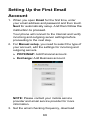
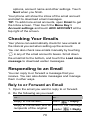
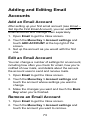
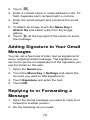
1
towards any direction to access the application shortcuts. If you touch Pattern, you‟re guided to create a pattern you must draw to unlock the screen. The first time you do this, a short tutorial about creating an unlock pattern appears. Then you‟re prompted to draw and redraw your own pattern. If you touch PIN or Password, you‟re prompted to set a numeric PIN or a password you must enter to unlock your screen. The next time you turn on your phone or wake up the screen, you must draw your unlock pattern or enter your PIN or password to unlock it. IMPORTANT: Screen lock options are listed in the approximate order of the strength of their security, starting with None and Long press, which provide no security. Pattern provides minimal security, although it can be more convenient than the stronger options. Protecting Your Phone With Encryption You can encrypt all the data on your phone: Google Accounts, application data, music and other media, downloaded information, and so on. If you do, you must enter a numeric PIN or password each time you power on your phone. WARNING! Encryption is irreversible. The only way to revert to an unencrypted phone is to perform a factory data reset, which erases all your data. 24