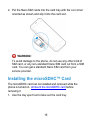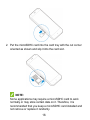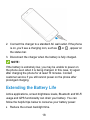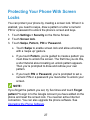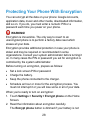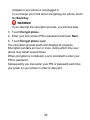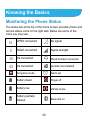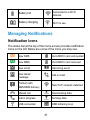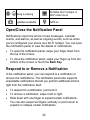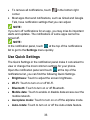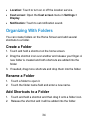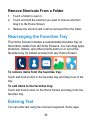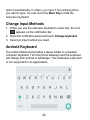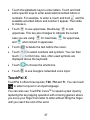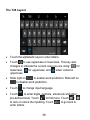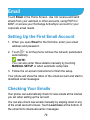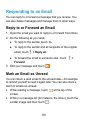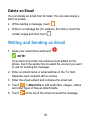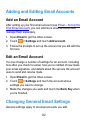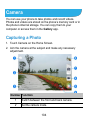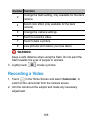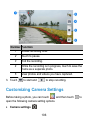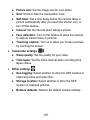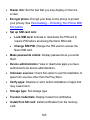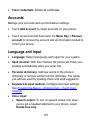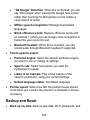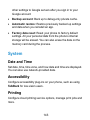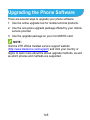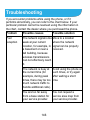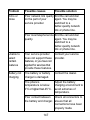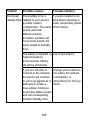
1
Blade S6 User Manual 1 About This Manual Thank you for choosing this ZTE mobile device. In order to keep your device in its best condition, please read this manual and keep it for future reference. Copyright Copyright © 2015 ZTE CORPORATION All rights reserved. No part of this publication may be quoted, reproduced, translated or used in any form or by any means, electronic or mechanical, including photocopying and microfilm, without the prior written permission of ZTE Corporation. Notice ZTE Corporation reserves the right to make modifications on print errors or update specifications in this guide without prior notice. This manual has been designed with the utmost care to ensure the accuracy of its content. However, all statements, information and recommendations contained therein do not constitute a warranty of any kind, either expressed or implied. Please refer to For Your Safety to be sure to use your phone properly and safely. We offer self-service for our smart terminal device users. Please visit the ZTE official website (at www.ztedevice.com) for more information on self-service and supported product models. Information on the website takes precedence. 2 Disclaimer ZTE Corporation expressly disclaims any liability for faults and damages caused by unauthorized modifications of the software. Images and screenshots used in this manual may differ from the actual product. Content in this manual may differ from the actual product or software. Trademarks ZTE and the ZTE logos are trademarks of the ZTE Corporation. Google and Android are trademarks of Google, Inc. The Bluetooth® trademark and logos are owned by the Bluetooth SIG, Inc. and any use of such trademarks by ZTE Corporation is under license. microSDHC logo is a trademark of the SD-3C, LLC. Manufactured under license from Dolby Laboratories. Dolby and the double-D symbol are trademarks of Dolby Laboratories. Version No.: R1.0 Edition Time: January 9, 2015 3 Contents Getting Started ....................................................... 12 Getting to Know Your Phone ............................................ 12 Knowing the Keys ............................................................ 13 Installing the Nano SIM Cards .......................................... 14 Installing the microSDHC™ Card ..................................... 15 Charging the Battery ........................................................ 17 Extending the Battery Life ................................................ 18 Powering On/Off .............................................................. 19 Restarting the Phone ....................................................... 19 Setting Up for the First Time ............................................ 19 Locking/Unlocking the Screen and Keys .......................... 20 Using the Touch Screen ................................................... 21 Getting to Know the Home Screen ................................... 22 Personalizing.......................................................... 24 Changing the System Language ...................................... 24 Setting the Date and Time................................................ 24 Changing Ringtone and Notification Sound ...................... 24 Turning On/Off Touch Sound ............................................ 25 Adjusting Volume ............................................................. 25 Switching to Silent Mode .................................................. 25 Applying New Wallpapers ................................................ 26 Changing Screen Brightness ........................................... 26 Protecting Your Phone With Screen Locks ....................... 27 Protecting Your Phone With Encryption ............................ 28 4 Knowing the Basics............................................... 30 Monitoring the Phone Status ............................................ 30 Managing Notifications ..................................................... 31 Organizing With Folders ................................................... 34 Rearranging the Favorites Tray ........................................ 35 Entering Text .................................................................... 35 Editing Text ...................................................................... 41 Opening and Switching Apps ............................................ 42 Connecting to Networks and Devices .................. 43 Connecting to Mobile Networks ........................................ 43 Connecting to Wi-Fi® ........................................................ 45 Using Wi-Fi Direct® .......................................................... 49 Connecting to Bluetooth® Devices .................................... 51 Connecting to Your Computer via USB ............................. 53 Sharing Your Mobile Data Connection .............................. 55 Connecting to Virtual Private Networks ............................. 58 Phone Calls ............................................................ 61 Placing and Ending Calls ................................................. 61 Answering or Rejecting Calls ............................................ 62 Working With the Call Log ................................................ 63 Calling Your Contacts ....................................................... 64 Checking Voicemail .......................................................... 64 Using Options During a Call ............................................. 65 Adjusting Your Call Settings ............................................. 66 People ..................................................................... 70 5 Checking Contact Details ................................................. 70 Adding a New Contact ..................................................... 70 Setting Up Your Own Profile............................................. 71 Importing, Exporting, and Sharing Contacts ..................... 71 Working With Favorite Contacts ....................................... 73 Searching for a Contact ................................................... 74 Editing Contacts............................................................... 74 Accounts.................................................................77 Adding or Removing Accounts ......................................... 77 Configuring Account Sync ................................................ 78 Email .......................................................................79 Setting Up the First Email Account ................................... 79 Checking Your Emails ...................................................... 79 Responding to an Email ................................................... 80 Writing and Sending an Email .......................................... 81 Adding and Editing Email Accounts .................................. 82 Changing General Email Settings .................................... 82 Gmail™ ...................................................................84 Opening Your Gmail Inbox ............................................... 84 Switching Accounts .......................................................... 84 Writing and Sending a Message....................................... 85 Replying to or Forwarding a Message .............................. 85 Working With Received Attachments ................................ 86 Working With Labels ........................................................ 86 Changing Gmail Settings ................................................. 87 6 Messaging .............................................................. 88 Opening the Messaging Screen ....................................... 88 Sending a Message ......................................................... 88 Replying to a Message ..................................................... 89 Forwarding a Message ..................................................... 90 Changing Message Settings ............................................. 90 Calendar ................................................................. 91 Viewing Your Calendars and Events ................................. 91 Creating an Event ............................................................ 92 Editing or Deleting an Event ............................................. 93 Changing Calendar Settings ............................................. 93 Google+™............................................................... 94 Getting Started With Google+ ........................................... 94 Signing out of Google+..................................................... 95 Browser .................................................................. 96 Opening the Browser ....................................................... 96 Downloading Files ............................................................ 97 Changing Browser Settings .............................................. 97 Maps ....................................................................... 98 Activating Location Services ............................................. 98 Getting Your Location ....................................................... 98 Searching for a Location .................................................. 99 Getting Directions to Your Destination .............................. 99 Searching for Local Places ............................................. 100 7 Google Now™ and Search ..................................102 Enabling Google Now .................................................... 102 Searching With Text ....................................................... 102 Searching by Speaking .................................................. 103 Changing Search Settings ............................................. 103 Camera ..................................................................104 Capturing a Photo .......................................................... 104 Recording a Video ......................................................... 105 Customizing Camera Settings ........................................ 106 Gallery...................................................................108 Opening Gallery............................................................. 108 Working With Albums ..................................................... 108 Working With Pictures.................................................... 109 Retouching Your Pictures ............................................... 110 Playing Videos ................................................................ 111 Music..................................................................... 112 Copying Music Files to Your Phone ................................ 112 Viewing Your Music Library ............................................ 113 Set a Song as the Default Ringtone ............................... 113 Playing Music ................................................................ 114 Managing Playlists ......................................................... 115 Play Music ............................................................ 116 Playing Your Music ........................................................ 116 Managing Playlists ......................................................... 118 8 Video Player ......................................................... 119 Opening the Video Library .............................................. 119 Playing and Controlling Videos ....................................... 119 Managing Video Files ..................................................... 119 FM Radio .............................................................. 121 Scanning and Saving Channels ...................................... 121 Listening to FM Radio .................................................... 121 Adding a Radio Station to Favorites ................................ 122 Recording Radio Programs ............................................ 122 Other Options and Settings ............................................ 122 Sound Recorder ................................................... 124 Recording a Voice Memo ............................................... 124 Playing a Voice Memo .................................................... 124 More Apps ............................................................ 125 Clock ............................................................................. 125 Backup and Restore....................................................... 126 Calculator ...................................................................... 126 Chrome™ ...................................................................... 127 Downloads ..................................................................... 127 File Manager .................................................................. 127 Mi-POP .......................................................................... 127 Flashlight ....................................................................... 128 NotePad......................................................................... 128 Play Books ..................................................................... 129 System........................................................................... 129 9 Task Manager ................................................................ 130 YouTube™..................................................................... 130 Google Play™ Store ............................................ 131 Browsing and Searching for Apps .................................. 131 Downloading and Installing Apps.................................... 131 Creating a Google Wallet™ Account .............................. 132 Requesting a Refund for a Paid App .............................. 133 Managing Your Downloads ............................................ 133 Settings .................................................................135 Wireless and Networks .................................................. 135 Device ........................................................................... 137 Personal ........................................................................ 139 System .......................................................................... 143 Upgrading the Phone Software ........................... 145 Troubleshooting ................................................... 146 For Your Safety .................................................... 152 General Safety............................................................... 152 Radio Frequency (RF) Exposure .................................... 153 Distraction ..................................................................... 155 Product Handling ........................................................... 156 Electrical Safety ............................................................. 160 CTIA Requirements ....................................................... 161 Radio Frequency Interference ........................................ 162 Explosive Environments ................................................. 164 10 Declaration of RoHS Compliance ....................... 165 Disposal of Your Old Appliance .......................... 166 11 Getting Started Getting to Know Your Phone 12 Knowing the Keys Key Function Power Key Press and hold to turn on or off Aeroplane mode, enable silent mode, vibration mode or sound, reboot or to power off. Press to switch your phone to Sleep mode or wake it up. 13 Key Function Home Key Menu Key Touch to return to the Home Screen from any application or screen. Touch and hold to use Google voice search. Touch to get the options for the current screen. Touch and hold to see recently used applications. Back Key Touch to go to the previous screen. Volume Key Press or hold to turn the volume up or down. Installing the Nano SIM Cards Switch off your phone before installing the micro- SIM cards. 1. Use the tray eject tool to take out the card tray. 14 2. Put the Nano SIM cards into the card tray with the cut corner oriented as shown and slip it into the card slot. WARNING! To avoid damage to the phone, do not use any other kind of SIM card, or any non-standard Nano SIM card cut from a SIM card. You can get a standard Nano SIM card from your service provider. Installing the microSDHC™ Card The microSDHC card can be installed and removed while the phone is turned on. Unmount the microSDHC card before removing it. 1. Use the tray eject tool to take out the card tray. 15 2. Put the microSDHC card into the card tray with the cut corner oriented as shown and slip it into the card slot. NOTE: Some applications may require a microSDHC card to work normally or may store certain data on it. Therefore, it is recommended that you keep a microSDHC card installed and not remove or replace it randomly. 16 Charging the Battery Your phone’s battery should have enough power for the phone to turn on, find a signal, and make a few calls. You should fully charge the battery as soon as possible. If the battery is low, there will be a pop-up message on the screen. As you charge your phone, the screen will tell you the exact battery level each time you wake up your phone. WARNING! Use only ZTE-approved chargers and cables. The use of unapproved accessories could damage your phone or cause the battery to explode. CAUTION: Do not change the built-in rechargeable battery in your phone by yourself. The battery can only be changed by ZTE or ZTE authorised service provider. 1. Connect the adapter to the charging jack. Ensure that the adapter is inserted with the correct orientation. Do not force the connector into the charging jack. 17 2. Connect the charger to a standard AC wall outlet. If the phone is on, you’ll see a charging icon, such as the status bar. or , appear on 3. Disconnect the charger when the battery is fully charged. NOTE: If the battery is extremely low, you may be unable to power on the phone even when it is being charged. In this case, try again after charging the phone for at least 10 minutes. Contact customer service if you still cannot power on the phone after prolonged charging. Extending the Battery Life Active applications, screen brightness levels, Bluetooth and Wi-Fi usage and GPS functionality can drain your battery. You can follow the helpful tips below to conserve your battery power: Reduce the screen backlight time. 18 Lower the screen brightness. Turn auto-sync, Wi-Fi, and Bluetooth off when not in use. Disable the GPS function when not in use. Most applications using this function will periodically query the GPS satellites for your current location; each query drains your battery. Powering On/Off Press and hold the Power Key to turn on your phone. To turn it off, press and hold the Power Key to open the options menu. Touch Power off and then touch OK. Restarting the Phone If the screen freezes or takes too long to respond, try pressing and holding the Power Key for about 10 seconds to restart the phone. Setting Up for the First Time When you first power on your phone after you purchase it or reset it to factory settings (see Settings – Personal – Backup and Reset), you need to do some settings before using it. 1. Touch the language field to select the language you want to use and then touch . 2. Set the date, time, and time zone, or use date and time data 19 provided by the network. Then touch NEXT. 3. Enter your name, which the phone uses to personalize some apps, and touch NEXT. 4. You will be prompted to accept the terms of Google service. Touch NEXT to continue. 5. Touch FINISH to complete the setup. NOTE: If the Nano SIM cards are not installed, the phone would prompt you to connect to a Wi-Fi network before asking you to set the date, time and time zone. Locking/Unlocking the Screen and Keys Your phone allows you to quickly lock the screen and keys (put the phone into sleep mode) when not in use and to turn the screen back on and unlock it when you need it. To lock the screen and keys: To quickly turn the screen off and lock the keys, press the Power Key. NOTE: To save battery power, the phone automatically turns off the screen after a certain period of time when you leave it idle. You will still be able to receive messages and calls while the phone screen is off. 20 To unlock the screen and keys: 1. Press the Power Key to turn the screen on. 2. Swipe up to unlock the screen. NOTE: If you have set an unlock pattern, PIN or password for your phone (see the chapter Personalizing – Protecting Your Phone With Screen Locks), you’ll need to draw the pattern or enter the PIN/password to unlock your screen. Using the Touch Screen Your phone’s touch screen lets you control actions through a variety of touch gestures. Touch When you want to type using the onscreen keyboard, select onscreen items such as application and settings icons, or press onscreen buttons, simply touch them with your finger. Touch and Hold To open the available options for an item (for example, a message or link in a Web page), touch and hold the item. Swipe or Slide To swipe or slide means to quickly drag your finger vertically or horizontally across the screen. Drag To drag, press and hold your finger with some pressure 21 before you start to move your finger. While dragging, do not release your finger until you have reached the target position. Pinch In some apps (such as Maps, Browser, and Gallery), you can zoom in and out by placing two fingers on the screen at once and pinching them together (to zoom out) or spreading them apart (to zoom in). Rotate the screen For most screens, you can automatically change the screen orientation from portrait to landscape by turning the phone sideways. Getting to Know the Home Screen The home screen is the starting point for your phone’s applications, functions, and menus. You can customize your home screen by adding application icons, folders, widgets, and more. Your home screen extends beyond the initial screen. Swipe the screen left or right to display additional screens. 22 23 Personalizing Changing the System Language 1. Touch Settings > Language & input > Language on the Home Screen. 2. Select the language you need. Setting the Date and Time 1. Touch Settings > Date & time on the Home Screen. 2. Uncheck Automatic date & time and Automatic time zone if you want to set the date, time and time zone by yourself. 3. Set the date, time, time zone, and date/time format. Changing Ringtone and Notification Sound You can customize the default ringtone for incoming calls and the default notification sound quickly. 1. Touch Settings > Sound & notification on the Home Screen. 2. Touch Phone ringtone or Default notification ringtone. 3. Scroll through the ringtone list and select the ringtone you want to use. 24 4. Touch OK. NOTE: See chapter People – Editing Contacts – Set a Ringtone for a Contact for how to assign a special ringtone to an individual contact. Turning On/Off Touch Sound 1. Touch Settings > Sound & notification > Other sounds on the Home Screen. 2. Touch Touch sounds. Adjusting Volume 1. Touch Settings > Sound & notification on the Home Screen. 2. Drag the sliders to adjust the volume for each type. NOTE: You can adjust the media volume when a media application is in use by pressing the Volume Key. If no media application is active, press the Volume Key to adjust ringtone volume (or the earpiece volume during a call). Switching to Silent Mode You can set the phone to silent mode by using one of the following methods. 25 Press and hold the Power Key and then touch silent mode, touch to enable to enable silent mode with vibration, or touch to disable silent mode. Keep pressing the Volume Down Key when no media application is active. When the icon appears on the status bar, the phone is set to silent mode with vibration. Applying New Wallpapers You can set the wallpaper for the Home Screen or Lock Screen. 1. Touch Settings > Display > Wallpaper on the Home Screen. 2. Select a wallpaper source from Gallery, Live Wallpaper, or Photos and choose the image or animation you want to use as the wallpaper. Some cropping may be needed for Gallery images. 3. Touch OK at the top of the screen for Gallery images; touch Set wallpaper for Live Wallpaper; touch SET WALLPAPER for Photos. Changing Screen Brightness 1. Touch Settings > Display > Brightness level on the Home Screen. 2. Drag the slider to adjust the brightness level. 26 Protecting Your Phone With Screen Locks You can protect your phone by creating a screen lock. When it is enabled, you need to swipe, draw a pattern or enter a numeric PIN or a password to unlock the phone’s screen and keys. 1. Touch Settings > Security on the Home Screen. 2. Touch Screen lock. 3. Touch Swipe, Pattern, PIN or Password. Touch Swipe to enable screen lock and allow unlocking with a ‘swipe up’ gesture. If you touch Pattern, you’re guided to create a pattern you must draw to unlock the screen. The first time you do this, a short tutorial about creating an unlock pattern appears. Then you’re prompted to draw and redraw your own pattern. If you touch PIN or Password, you’re prompted to set a numeric PIN or a password you must enter to unlock your screen. NOTE: If you forget the pattern you set, try five times and touch Forget pattern? to sign in to the Google Account you have added on the phone and reset the screen lock. You need an active Internet connection. You can also upgrade the phone software. See Upgrading the Phone Software. 27 Protecting Your Phone With Encryption You can encrypt all the data on your phone: Google Accounts, application data, music and other media, downloaded information, and so on. If you do, you must enter a numeric PIN or a password each time you power on your phone. WARNING! Encryption is irreversible. The only way to revert to an unencrypted phone is to perform a factory data reset which erases all your data. Encryption provides additional protection in case your phone is stolen and may be required or recommended in some organizations. Consult your system administrator before turning it on. In many cases the PIN or password you set for encryption is controlled by the system administrator. Before turning on encryption, prepare as follows: Set a lock screen PIN or password. Charge the battery. Keep the phone connected to the charger. Schedule an hour or more for the encryption process. You must not interrupt it or you will lose some or all of your data. When you're ready to turn on encryption: 1. Touch Settings > Security > Encrypt phone on the Home Screen. 2. Read the information about encryption carefully. The Encrypt phone button is dimmed if your battery is not 28 charged or your phone is not plugged in. If you change your mind about encrypting your phone, touch the Back Key. WARNING! If you interrupt the encryption process, you will lose data. 3. Touch Encrypt phone. 4. Enter your lock screen PIN or password and touch Next. 5. Touch Encrypt phone again. The encryption process starts and displays its progress. Encryption can take an hour or more, during which time your phone may restart several times. When encryption is completed, you're prompted to enter your PIN or password. Subsequently you must enter your PIN or password each time you power on your phone in order to decrypt it. 29 Knowing the Basics Monitoring the Phone Status The status bar at the top of the home screen provides phone and service status icons on the right side. Below are some of the icons you may see. GPRS connected No signal EDGE connected Signal strength 3G connected Wired headset connected 4G connected No SIM card installed Aeroplane mode Alarm set Battery dead Ringer off Battery low Vibrate mode Battery partially drained Bluetooth on 30 / Battery full Connected to a Wi-Fi network Battery charging Wi-Fi in use Managing Notifications Notification Icons The status bar at the top of the home screen provides notification icons on the left. Below are some of the icons you may see. New SMS microSDHC card unmounted New MMS microSDHC card removed New email Upcoming event New Gmail message Call on hold Problem with SMS/MMS delivery New Wi-Fi network detected Missed call Downloading data Call in progress Sending data USB connected USB tethering is on 31 / Song is playing Portable Wi-Fi hotspot or Wi-Fi direct is on Updates available GPS on Open/Close the Notification Panel Notifications report the arrival of new messages, calendar events, and alarms, as well as ongoing events, such as when you've configured your phone as a Wi-Fi hotspot. You can open the notification panel to view the details of notifications. To open the notification panel, swipe your finger down from the top of the screen. To close the notification panel, swipe your finger up from the bottom of the screen or touch the Back Key. Respond to or Remove a Notification In the notification panel, you can respond to a notification or remove the notifications. The notification panel also supports expandable notifications that let you perform additional actions right from the notification itself. To respond to a notification, just touch it. To remove a notification, swipe it left or right. Slide down with one finger to expand certain notifications. You can also swipe two fingers vertically or pinch-zoom to expand or collapse certain notifications. 32 To remove all notifications, touch corner. Most apps that send notifications, such as Gmail and Google Talk, have notification settings that you can adjust. in the bottom right NOTE: If you turn off notifications for an app, you may miss its important alerts and updates. The notifications of some apps cannot be turned off. NOTE: In the notification panel, touch at the top of the notifications list to get to the Settings menu quickly. Use Quick Settings The Quick Settings in the notification panel make it convenient to view or change the most common settings for your phone. Open the notification panel and touch at the top of the notifications list, you can find the following Quick Settings. Brightness: Touch to adjust the screen brightness. Wi-Fi: Touch to turn on or off Wi-Fi. Bluetooth: Touch to turn on or off Bluetooth. Mobile data: Touch to enable or disable data access over the mobile network. Aeroplane mode: Touch to turn on or off the airplane mode. Auto-rotate: Touch to turn on or off the Auto-rotate feature. 33 Location: Touch to turn on or off the location service. Cast screen: Open the Cast screen menu in Settings > Display. Notification: Touch to set notification sound. Organizing With Folders You can create folders on the Home Screen and add several shortcuts to a folder. Create a Folder 1. Touch and hold a shortcut on the home screen. 2. Drag the shortcut icon over another and release your finger. A new folder is created and both shortcuts are added into the folder. 3. If needed, drag more shortcuts and drop them into the folder. Rename a Folder 1. Touch a folder to open it. 2. Touch the folder name field and enter a new name. Add Shortcuts to a Folder 1. Touch and hold a shortcut and then drag it onto a folder icon. 2. Release the shortcut and it will be added into the folder. 34 Remove Shortcuts From a Folder 1. Touch a folder to open it. 2. Touch and hold the shortcut you want to remove and then drag it to the Home Screen. 3. Release the shortcut and it will be removed from the folder. Rearranging the Favorites Tray The Home Screen includes a customizable favorites tray at the bottom visible from all Home Screens. You can drag apps, shortcuts, folders, and other priority items in or out of the favorites tray for instant access from any Home Screen. To remove items from the favorites tray: Touch and hold an item in the favorites tray and drag it out of the tray. To add items to the favorites tray: Touch and hold an item on the Home Screen and drag it into the favorites tray. Entering Text You can enter text using the onscreen keyboard. Some apps 35 open it automatically. In others, you open it by touching where you want to type. You can touch the Back Key to hide the onscreen keyboard. Change Input Methods 1. When you use the onscreen keyboard to enter text, the icon appears on the notification bar. 2. Open the notification panel and touch Change keyboard. 3. Select an input method you need. Android Keyboard The Android Keyboard provides a layout similar to a desktop computer keyboard. Turn the phone sideways and the keyboard will change from portrait to landscape. The landscape keyboard is not supported in all applications. 36 Touch the alphabetic keys to enter letters. Touch and hold some specific keys to enter associated accented letters or numbers. For example, to enter è, touch and hold and the available accented letters and number 3 appear. Then slide to choose è. Touch to use uppercase. Double-tap to lock uppercase. This key also changes to indicate the current case you are using: and for lowercase, for uppercase, when locked in uppercase. Touch Touch to select numbers and symbols. You can then touch to find more. Also, often used symbols are displayed above the keyboard. Touch Touch to delete the text before the cursor. to choose the emoticons. to use Google’s networked voice input. TouchPal X TouchPal X offers three layouts: T26, T12 and T+. You can touch to select a layout or an input language. You can also use TouchPal CurveTM to speed up text input by replacing the key tapping operation with a tracing gesture where you move your finger from letter to letter without lifting the finger until you reach the end of the word. 37 The T26 Layout Touch the alphabetic keys to enter letters. Touch to use uppercase or lowercase. This key also changes to indicate the current case you are using: for lowercase, for uppercase, and when locked in uppercase. Slide right on to enable word prediction. Slide left on to disable word prediction. Touch Touch to enter digits, symbols, emoticons and other pre-defined texts. Touch to find more. Touch / to lock or unlock the inputting. Touch to go back to enter letters. to change input language. 38 Touch Touch or hold Touch to access the quick settings of TouchPal X, change keyboard skin, or check messages from TouchPal X. Touch to open text editing options. You can move the cursor, select, cut, copy, paste, or delete text. Touch Touch . You can touch the text field again to show the keyboard. to start a new line. to delete text before the cursor. and speak through the microphone. The T12 Layout Touch a key repeatedly until the desired letter or symbol appears. If word prediction is enabled ( ), just touch the keys once and choose the right word. 39 The T+ Layout Touch to enter the left letter on the key; double-tap or flick right to enter the right letter/symbol on the key. If word prediction is enabled ( ), just touch the keys and choose the right word. Google Voice Typing Google Voice typing uses the Google voice recognition service to convert speech to text. You must have a data connection on a mobile or Wi-Fi network to use it. 1. Flick down the status bar when entering text and touch Change keyboard, and then select Google voice typing. Or touch to access the voice typing when you are using the Android Keyboard. 2. When you see the microphone image, speak what you want 40 to type. 3. You can continue entering text to keep it or to delete it. NOTE: Say "comma," "period," "question mark," "exclamation mark," or "exclamation point" to enter punctuation. Input Settings Choose input settings by touching Settings > Language & input from the Home Screen. In the Keyboard & input methods section, you can set the default input method and choose the settings for input methods. Editing Text Move the insertion point: Touch where you want to type. The cursor blinks in the new position, and a tab appears below it. Drag the tab to move the cursor. Select text: Touch and hold or double-tap within the text. The nearest word highlights, with a tab at each end of the selection. Drag the tabs to change the selection. Cut or copy: Select the text you want to manipulate. Then touch the Cut or Copy button to cut or copy the text to the clipboard. Replace text with the clipboard text: Select the text you want to replace. Then touch or PASTE. 41 Insert text from the clipboard: Move cursor to the insertion point and then touch and hold the tab below the cursor. Release the finger and touch PASTE. Opening and Switching Apps Open an App Slide left or right on the screen and touch an app to open it. Switch Between Recently Opened Apps 1. Touch and hold the Menu Key. A list of the names and thumbnails of apps you’ve used recently opens. If you’ve been using more apps recently than can fit on the screen, you can scroll the list up and down. 2. Touch a thumbnail to open that app. NOTE: You can swipe a thumbnail sideways to remove it from the list. 42 Connecting to Networks and Devices Connecting to Mobile Networks Manage the Nano SIM Cards You can turn on or off the Nano SIM cards, choose the default card for voice calls, messaging, and data. To turn on or off a card: 1. Touch Settings > SIM cards from the Home Screen. 2. Touch the switch next to a card displayed below SIM Enablers. To set the default card: 1. Touch Settings > SIM cards from the Home Screen. 2. Touch Mobile data, Calls or SMS messages and select a card as the default. You can also turn off data connection for both cards. Select Network Operator 1. Touch Settings > More > Mobile networks from the Home Screen. 2. Touch one of the Nano SIM cards. 43 3. Touch Network operators 4. Touch SEARCH NERWORKS to search for all available networks. 5. Touch a network in the network list to register manually. You can also touch Choose automatically to select preferred network automatically. Select Preferred Network Mode 1. Touch Settings > More > Mobile networks > Preferred network type from the Home Screen. 2. Touch the network mode you would prefer the phone to connect with. Control Mobile Data Use To enable or disable data access: 1. Touch Settings > Data usage from the Home Screen. 2. Touch one of the Nano SIM cards. 3. Touch the switch next to the Mobile data to enable data access over the mobile network. Touch the switch again to disable data access. To get data services when roaming: 1. Touch Settings > More > Mobile networks from the Home Screen. 2. Touch one of the Nano SIM cards. 3. Check Data roaming. 44 NOTE: Data roaming may incur significant roaming charges. Set Access Point Names To connect to the Internet you can use the default Access Point Names (APN). And if you want to add a new APN, please contact the service provider to get the necessary information. 1. Touch Settings > More > Mobile networks from the Home Screen. 2. Touch one of the Nano SIM cards. 3. Touch Access point names. 4. Touch . 5. Touch each item to enter the information you get from your service provider. 6. Touch > Save to complete. NOTE: To set the APN to default settings, touch the Menu Key > Reset to default. Connecting to Wi-Fi® Wi-Fi is a wireless networking technology that can provide Internet access at distances of up to 100 meters, depending on the Wi-Fi router and your surroundings. 45 Turn Wi-Fi On and Connect to a Wi-Fi Network 1. Touch Settings > Wi-Fi from the Home Screen. 2. Slide the switch to turn on Wi-Fi. 3. Touch a network name to connect to it. 4. If the network is secured, enter the password and touch Connect. NOTE: Your phone automatically connects to previously used Wi-Fi networks when they are in range. Get Notified of Open Networks 1. Touch Settings > Wi-Fi from the Home Screen. 2. Slide the switch to turn on Wi-Fi. 3. Touch the Menu Key > Advanced. 4. Turn on the Network notification switch. When Wi-Fi is on, you receive notifications in the Status bar when your phone detects an open Wi-Fi network. Uncheck the option to turn off notifications. Add a Wi-Fi Network You can add a Wi-Fi network if the network does not broadcast its name (SSID) or add a Wi-Fi network when you are out of range. To connect to a secured network, you first need to get the 46 security details from the network's administrator. 1. Touch Settings > Wi-Fi from the Home Screen. 2. Slide the switch to turn on Wi-Fi. 3. Touch the Menu Key > Add network. 4. Enter the network SSID (name). If necessary, enter security or other network configuration details. 5. Touch SAVE. Forget a Wi-Fi Network You can make your phone forget about the details of a Wi-Fi network that you added - for example, if you don’t want the phone to connect to it automatically or if it is a network that you no longer use. 1. Touch Settings > Wi-Fi from the Home Screen. 2. Slide the switch to turn on Wi-Fi. 3. Touch the Wi-Fi network name and then touch FORGET. Connect to a WPS Network WPS (Wi-Fi Protected Setup) is a feature that makes it easy to add your phone to access points which support WPS. You can use one of the following two methods to connect your phone to a wireless network using WPS. Method one: WPS push button 1. Touch Settings > Wi-Fi from the Home Screen. 2. Slide the switch to turn on Wi-Fi. 47 3. Touch the Menu Key > Advanced > WPS Push Button. 4. Press the WPS button on the access point and the access point will recognize your phone and add it to the network. Method two: PIN number 1. Touch Settings > Wi-Fi from the Home Screen. 2. Slide the switch to turn on Wi-Fi. 3. Touch the Menu Key > Advanced > WPS Pin Entry. 4. The WPS Pin number displays on the screen. Enter the Pin number into the access point’s setup page. 5. After entering the Pin number, your phone automatically finds the access point and configures the connection. NOTE: For detailed information about the WPS feature of the access point, please refer to its user documents. Adjust Advanced Wi-Fi Settings 1. Touch Settings > Wi-Fi from the Home Screen. 2. Touch the Menu Key > Advanced to adjust the following settings. Network notification: Get notifications in the status bar when Wi-Fi is on and an open network is available. Scanning always available: Let Google’s location service other apps scan for network, even when Wi-Fi is off. 48 Keep Wi-Fi on during sleep: Set whether to keep Wi-Fi on in sleep mode. Wi-Fi frequency band: Set Wi-Fi frequency band. Install certificates: Install certificates from the memory card. Wi-Fi direct: Use Wi-Fi direct. WPS Push Button: Connect to a WPS network in this way. WPS Pin Entry: Connect to a WPS network in this way. MAC address: Check the MAC address. IP address: Check the phone’s IP address. Using Wi-Fi Direct® Wi-Fi Direct allows Wi-Fi devices to connect to each other without the need for wireless access points (hotspots). NOTE: Activating this feature will disconnect your current Wi-Fi network connection. Connect to Another Device via Wi-Fi Direct 1. Touch Settings > Wi-Fi from the Home Screen. 2. Touch the Menu Key > Advanced > Wi-Fi direct to turn on Wi-Fi direct. 3. Your phone will search for other devices enabled with Wi-Fi 49 direct connections. 4. Touch a device name below PEER DEVICES to connect with it. The other device will receive a connection prompt and need to accept the request. Both devices may need to enter a common PIN. NOTE: The target device must also have Wi-Fi Direct service activated and running before it can be detected by your phone. 5. Once connected the device is displayed as “Connected” in the PEER DEVICES list. Send Data via Wi-Fi 1. Open the appropriate application and select the file or item you want to share. 2. Select the option for sharing via Wi-Fi. The method may vary by application and data type. 3. Touch a device the phone has connected with or wait for it to search for new devices and touch one of them. Receive Data via Wi-Fi When an attempt to transfer data via Wi-Fi is received, you can see a notification in the status bar. Touch Accept to start receiving the data. 50 Received files are stored automatically in a dedicated folder (WLANShare, for instance). You can access them with the File Manager app. Connecting to Bluetooth® Devices Bluetooth® is a short-range wireless communication technology. Phones or other devices with Bluetooth capabilities can exchange information wirelessly within a distance of about 10 meters. The Bluetooth devices must be paired before the communication is performed. Turn Bluetooth On/Off 1. Touch Settings > Bluetooth from the Home Screen. 2. Slide the switch to turn on Bluetooth. When Bluetooth is on, the icon will appear in the status bar. Change the Device Name 1. Touch Settings > Bluetooth from the Home Screen. 2. Slide the switch to turn on Bluetooth. 3. Touch the Menu Key > Rename this device. 4. Edit the name and touch RENAME. Pair With Another Bluetooth Device 1. Touch Settings > Bluetooth from the Home Screen. 2. Slide the switch to turn on Bluetooth. 51 Your phone automatically scans for and displays the IDs of all available Bluetooth devices in range. You could touch the Menu Key > Refresh if you want to scan again. 3. Touch the device you want to pair with. 4. Confirm that the Bluetooth passkeys are the same between the two devices and touch Pair. Alternately, enter a Bluetooth passkey and touch Pair. Pairing is successfully completed when the other device accepts the connection or the same passkey is entered. NOTE: The Bluetooth passkey may be fixed for certain devices such as headsets and handsfree car kits. You can try entering 0000 or 1234 (the most common passkeys) or refer to the documents for that device. Send Data via Bluetooth 1. Open the appropriate application and select the file or item you want to share. 2. Select the option for sharing via Bluetooth. The method may vary by application and data type. 3. Touch a Bluetooth device the phone has paired with or wait for it to search for new devices and touch one of them. Receive Data via Bluetooth 1. Turn Bluetooth on before trying to receive data via Bluetooth. NOTE: 52 If the phone has not been paired with the sending device, you may need to touch Bluetooth > [your phone’s name] in Settings to keep the phone detectable through Bluetooth. 2. Flick down the status bar and touch . 3. Touch ACCEPT to start receiving the data. Depending on your storage setting and whether a microSDHC card is installed, received files are stored automatically in a dedicated folder (Bluetooth, for instance) in the phone storage or microSDHC directory. You can access them with the File Manager app. Received contacts (vCard files) are automatically imported to your contact list. Connecting to Your Computer via USB You can connect your phone to a computer with a USB cable and transfer music, pictures, and other files in both directions. Your phone stores these files in internal storage or on a removable microSDHC card. If you are using USB tethering, you must turn that off before you can use USB to transfer files between your phone and computer. Connect Your Phone to a Computer via USB 1. Connect your phone to the PC with a USB cable. 2. Open the Notification panel and touch 3. Choose one of the following options: (Connected as...). Charge only: Charge your phone via USB. USB Storage: Transfer files between your computer and 53 your Android device. NOTE: To transfer files, open the notification panel and touch USB mass storage > TURN ON USB STORAGE. NOTE: To end the connection, unmount (“eject”) the flash drives from your computer first. Then open the notification panel on the phone and touch Connected as USB mass storage > USB mass storage > TURN OFF USB STORAGE. Install driver: Install the driver needed for some USB connection modes (such as MTP). Connect to PC software: Install apps or manage data on the phone via PC software. Media device (MTP): Transfer media files on Windows® or Mac®. Camera (PTP): Transfer photos using camera software. ® Connect With Windows Media Player You can sync music on your phone and the computer installed with Windows Media Player. 1. Connect the phone with your computer via USB and choose Media device (MTP). 2. Open Windows Media Player and synchronize music files. 54 Disconnect Your Phone From the Computer To disconnect the phone from the computer, simply unplug the USB cable when you’re finished. Remove the microSDHC Card From Your Phone If you need to remove the microSDHC card while the phone is on, you should unmount it first. 1. Touch Settings > Storage from the Home Screen. 2. Scroll down and touch Unmount SD card > OK. 3. The icon appears in the status bar and you can now safely remove the microSDHC card from the phone. Erase microSDHC Card 1. Touch Settings > Storage from the Home Screen. 2. Scroll down the screen and touch Erase SD card > ERASE SD CARD > ERASE EVERYTHING. CAUTION: The formatting procedure erases all the data on the microSDHC card, after which the files CANNOT be retrieved. Sharing Your Mobile Data Connection You can share your phone’s data capabilities through tethering or by activating the mobile hotspot feature to create a portable Wi-Fi hotspot. 55 Share Your Mobile Data Connection via USB You can access the Internet on your computer via the USB tethering feature of your phone. The feature needs data connection on a mobile network and may result in data charges. NOTE: If your phone has a microSDHC card or USB storage, you can’t mount it on your computer while USB tethered. 1. Connect your phone to your computer with a USB cable. 2. Touch Settings > More > Tethering & portable hotspot from the Home Screen. 3. Touch USB tethering. A new network connection will be created on your computer. NOTE: To stop sharing your data connection, touch USB tethering again or disconnect the USB cable. Share Your Mobile Data Connection via Bluetooth If your computer can obtain an Internet connection via Bluetooth, you can configure your phone to share its mobile data connection with your computer. 1. Pair your phone with your computer via Bluetooth. 2. Configure your computer to obtain its network connection via Bluetooth. For more information, please see your computer's documentation. 56 3. Touch Settings > More > Tethering & portable hotspot from the Home Screen. 4. Touch Bluetooth tethering. Your computer is now sharing your phone's data connection. NOTE: To stop sharing your data connection, touch Bluetooth tethering again. Share Your Mobile Data Connection as a Wi-Fi Hotspot You can share your phone’s data connection with other devices by turning your phone into a portable Wi-Fi hotspot. The feature needs data connection on a mobile network and may result in data charges. NOTE: When the portable Wi-Fi hotspot feature is enabled, you cannot use your phone’s applications to access the Internet via its Wi-Fi connection. You still remain connected to the Internet via your mobile data network. 1. Touch Settings > More > Tethering & portable hotspot from the Home Screen. 2. Touch Portable Wi-Fi hotspot. After a moment, the phone starts broadcasting its Wi-Fi network name (SSID). 3. On another device, locate your phone via Wi-Fi and connect with it to start using the phone’s mobile data. 57 NOTE: To stop sharing your data connection, touch Portable Wi-Fi hotspot again. Rename or Secure Your Wi-Fi Hotspot You can change the name of your phone's Wi-Fi network (SSID) and secure your portable Wi-Fi hotspot. 1. Touch Settings > More > Tethering & portable hotspot > Set up Wi-Fi hotspot from the Home Screen. 2. Set your name and security options as follows: Network name: Enter or edit a network SSID (name) that other devices see when scanning for Wi-Fi networks. Security: Choose a security option: Open (not recommended), WPA PSK or WPA2 PSK (other users can access your mobile hotspot only if they enter the correct password). When you select WPA PSK or WPA2 PSK. Password: Touch the Password field to edit the security password. 3. Touch SAVE to save your settings. Connecting to Virtual Private Networks Virtual private networks (VPNs) allow you to connect to the resources inside a secured local network. VPNs are commonly deployed by corporations, schools, and other institutions to let 58 people access local network resources when not on campus, or when connected to a wireless network. Depending on the type of VPN you are using, you may be required to enter your login credentials or install security certificates before you can connect to your VPN. You can get this information from your network administrator. Add a VPN 1. Touch Settings > More > VPN from the Home Screen. 2. Touch and fill in the information provided by your network administrator. 3. Touch SAVE. The VPN is added to the list on the VPN screen. Connect to a VPN 1. Touch Settings > More > VPN from the Home Screen. 2. Touch the VPN that you want to connect to. 3. When prompted, enter any requested credentials, and then touch Connect. When you are connected, the VPN connected icon appears in the Status bar. Modify a VPN 1. Touch Settings > More > VPN from the Home Screen. 2. Touch and hold the VPN that you want to modify. 3. Touch Edit profile and edit the VPN settings you want. 59 4. Touch Save. Delete a VPN 1. Touch Settings > More > VPN from the Home Screen. 2. Touch and hold the VPN that you want to delete. 3. Touch Delete Profile. 60 Phone Calls You can place calls from the Phone app, the People app, or other apps or widgets that display contact information. Wherever you see a phone number, you can usually touch it to dial. Placing and Ending Calls Place a Call by Dialing 1. Touch the Home Key > . 2. Touch and enter the phone number or the contact name with the dialpad. The phone will display matching information from your contact list. Touch to delete incorrect digits. 3. Touch the Phone icon below the keypad to dial. NOTE: To make an international call, touch and hold the 0 key to enter the plus (+) symbol. Next, enter the country code, followed by the city/area code and then the phone number. End a Call During a call, touch on the screen. 61 Answering or Rejecting Calls When you receive a phone call, the Incoming Call screen opens, displaying the Caller ID or the information about the caller that you've entered in People. You can answer or reject the call, or reject it with a text message. Answer a Call When you receive a phone call, drag the call. over to answer NOTE: To silence the ringer before answering the call, press the Volume Keys up or down. Reject a Call When you receive a phone call, drag the call. over to reject You can also drag over to reject the call and send a preset text message to the caller. NOTE: To edit the text response from within the Phone app, touch Settings > General settings > Quick responses. 62 > Working With the Call Log The Call Log is a list of all the calls you've placed, received, or missed. It provides a convenient way to redial a number, return a call, or add a number to your Contacts. To open the call log, you can touch the Home Key > then touch the RECENTS tab. and Place a Call From the Call Log 1. Open the call log. 2. Touch a number and then touch CALL BACK. NOTE: You can touch > Call History on the top of the screen and select the call log type you want to view. Add a Call Log Number as a Contact 1. Open the call log. 2. Touch the caller image in front of the number to view more call information. 3. Touch . 4. To add the number to an existing contact, touch a contact in the list. To add a new contact, touch Create new contact. Take Other Actions on a Call Log Entry 1. Open the call log. 63 2. Touch the caller image in front of the number to view more call information. While viewing the call details, you can: Touch the number to call it. Touch Touch the Menu Key > Delete to delete the call log. to send a message. Calling Your Contacts 1. Touch the Home Key > and then touch the CONTACTS tab. 2. Flick the screen up or down to view all your contacts with phone numbers. 3. Touch a contact or number to call it. Checking Voicemail If you have set the phone to divert calls to voicemail, callers can leave voicemail messages when they cannot reach you. Here’s how to check the messages they left. 1. Touch the Home Key > . 2. Touch and hold in the dialer. If prompted, enter your voicemail password. 3. Follow the voice prompts to listen to and manage your voicemail messages. 64 NOTE: To set your voicemail service, touch > Settings > Call settings > SUBS Settings and touch Voicemail. For detailed information, please contact the service provider. Using Options During a Call During a call, you will see a number of onscreen options. Touch an option to select it. Touch to turn on or off the speaker. Touch to mute or unmute your microphone. Touch to make another call separately from the first call, which is put on hold. Touch to switch to the keypad when you need to enter a code (for example, the PIN for your voicemail or bank account) during the call. Touch Touch to put the call on hold. to end the current call. WARNING! Because of higher volume levels, do not place the phone near your ear during speakerphone use. 65 Adjusting Your Call Settings Use Fixed Dialing Numbers Fixed Dialing Numbers (FDN) allows you to restrict outgoing calls to a limited set of phone numbers. 1. Touch the Home Key > > > Settings > Call Settings > SUBS Settings. 2. Touch one of the Nano SIM cards. 3. Touch Fixed Dialing Numbers. 4. The following options are available: Enable FDN: Input the PIN2 code to enable the FDN feature. Change PIN2: Change the PIN2 code for FDN access. FDN list: Manage the FDN list. NOTE: The PIN2 code is provided by your carrier. Entering an incorrect PIN2 code more times than allowed can get your SIM card locked. Contact the service provider for assistance. Edit Quick Response to Rejected Callers 1. Touch the Home Key > > > Settings > General Settings. 2. Touch Quick responses. 3. Touch the text message to edit it. 66 Set Voicemail 1. Touch the Home Key > > > Settings > Call Settings > SUBS Settings. 2. Touch one of the Nano SIM cards. 3. Touch Voicemail to set the following options: Touch Service to select the voicemail service provider. Your carrier is the default. Touch Setup > Voicemail number to edit the voicemail number if necessary. Touch Sound to set the notification sound for voicemail. Check Vibrate to enable vibrate mode when receiving voicemail. Enable/Disable Phone Dial Pad Sound 1. Touch the Home Key > > > Settings > General Settings. 2. Check or uncheck Dialpad tones. Set DTMF Tones You can set the length of Dual-tone multi-frequency (DTMF) signal tones. 1. Touch the Home Key > > 67 > Settings > Call Settings > DTMF tones. 2. Touch Normal or Long. Set Speed Dials You can touch and hold the 1 ~ 9 keys from the dialer to call the corresponding speed dial number. The number key 1 is reserved to speed dial your voicemail. To assign a speed dial key: 1. Touch the Home Key > Settings > Speed dial. > > Settings > Call 2. Touch a speed dial key. 3. Enter a phone number or select one from the contact list. 4. Touch OK. Bar Certain Calls Call barring feature allows you to forbid certain types of calls from your phone. 1. Touch the Home Key > > > Settings > Call Settings > Call Baring Settings. 2. Set the restriction of specific types of calls from your phone. Forward Incoming Calls Call forwarding feature allows you to forward your incoming calls to another phone number. 68 1. Touch the Home Key > > > Settings > Call Settings > SUBS Settings. 2. Touch one of the Nano SIM cards. 3. Touch Call forwarding. 4. Touch an available option ( Always forward, Forward when busy, Forward when unanswered, or Forward when unreachable) to enable it. Other Options 1. Touch the Home Key > > > Settings > Call Settings > SUBS Settings. 2. Touch one of the Nano SIM cards. 3. Touch Additional settings. 4. Touch Caller ID to choose whether your number is displayed when someone receives your outgoing call. Or check Call waiting to get notified of incoming calls during a call. NOTE: Please contact the service provider to check whether the caller ID and call waiting features are available. 69 People You can put contacts on your phone and synchronize them with the contacts in your Google account or other accounts that support contact syncing. To see your contacts, touch the Home Key > . Checking Contact Details 1. Touch the Home Key > and touch the ALL CONTACTS tab to access your contact list. 2. Scroll through the list to view all your contacts. 3. Touch a contact to view its details. NOTE: If you have a lot of contacts stored, you'll see a slider when you touch the right side of the screen. To go directly to a letter, touch and hold the slider and drag it to a letter. Adding a New Contact 1. Touch the Home Key > 2. Touch . to add a new contact. 3. Touch the account field near the top of the screen to choose 70 where to save the contact. If a sync account is selected, the contacts will be synced automatically with your account online. 4. Enter the contact name, phone numbers, email addresses, and other information. 5. Touch to save the contact. Setting Up Your Own Profile You can create your own name card in your phone. 1. Touch the Home Key > tab. and touch the ALL CONTACTS 2. Touch Set up my profile or your name, whichever is at the top of the contact list. 3. Edit your profile information and touch . Importing, Exporting, and Sharing Contacts You can import/export contacts from/to your SIM or microSDHC card. This is especially useful when you need to transfer contacts between different devices. You can also quickly share your contacts using Bluetooth, Email, Messages, etc. 71 Import Contacts From the SIM Card 1. Touch the Home Key > . 2. Touch the Menu Key > Import/export > Import from SIM card 1/ Import from SIM card 2. 3. Select an account in which to save the contacts. 4. Touch to select the contacts you need and then touch . Import Contacts From the microSDHC Card 1. Touch the Home Key > . 2. Touch the Menu Key > Import/export > Import from storage. 3. Select an account in which to save the contacts. 4. Select the vCard file(s) in the microSDHC card and touch OK. Export Contacts to the SIM Card 1. Touch the Home Key > . 2. Touch the Menu Key > Import/export > Export to SIM card 1/ Export to SIM card 2. 3. Touch to select the contacts you need and then touch Export Contacts to the microSDHC Card 1. Touch the Home Key > . 72 . 2. Touch the Menu Key > Import/export > Export to storage. 3. The phone will prompt you with the name of the vCard file. Touch OK to create the file on the microSDHC card. Share All Contacts 1. Touch the Home Key > . 2. Touch the Menu Key > Import/export > Share visible contacts. 3. Choose to share the contacts via Bluetooth, Gmail or Messaging. Working With Favorite Contacts In the FAVOURITES tab, you can find your favorite contacts and frequently contacted contacts. Add a Contact to Favorites You can add the contacts you use frequently to Favorites so that you can find them quickly. NOTE: Contacts on the Nano SIM cards cannot be added to FAVOURITES. 1. Touch the Home Key > tab. and touch the ALL CONTACTS 73 2. Touch a contact and then touch at the top of the screen. Remove a Contact From Favorites 1. Touch the Home Key > tab. and touch the FAVOURITES 2. Touch a favorite contact and then touch contact name. next to the Searching for a Contact 1. Touch the Home Key > 2. Touch . at the top of the screen. 3. Input the contact name you want to search for. The contacts matched will be listed. Editing Contacts Edit Contact Details 1. Touch the Home Key > . 2. Touch a contact you need to edit and then touch 3. Edit the contact and touch . 74 . Set a Ringtone for a Contact Assign a special ringtone to a contact, so you know who is calling when you hear the ringtone. 1. Touch the Home Key > . 2. Touch a contact you want to set a ringtone for and then touch . 3. Touch > Set ringtone. 4. Select a ringtone you like and touch OK. Delete Contacts 1. Touch the Home Key > . 2. Touch the Menu Key > Select item(s). 3. Touch to select the contacts you want to remove. 4. Touch the Menu Key > Delete. 5. Touch OK to confirm. Join Contacts As your phone synchronizes with multiple online accounts, you may see duplicate entries for the same contact. You can merge all the separate information of a contact into one entry in the Contacts list. 75 1. Touch the Home Key > . 2. Touch a contact entry to display the contact’s details. 3. Touch and then touch > Join. 4. Touch the contact whose information you want to join with the first entry. The information from the second contact is added to the first, and the second contact is no longer displayed in the Contacts list. You can repeat these steps to join another contact to the main contact. Separate Contact Information If contact information from different sources was joined in error, you can separate the information back into individual contacts on your phone. 1. Touch the Home Key > . 2. Touch a contact entry you have merged and want to separate. 3. Touch and then touch > Separate. 4. Touch OK to confirm. 76 Accounts Adding or Removing Accounts You can add multiple Google Accounts and Microsoft Exchange ActiveSync® accounts. You may also add other kinds of accounts depending on the apps installed on your phone. Add an Account 1. From the Home Screen, touch Settings > Accounts. 2. Touch Add account. 3. Touch the type of account you want to add. 4. Follow the onscreen steps to enter the information about the account. Most accounts require a username and password, but the details may vary. You may also need to obtain some information from IT support or your system administrator. When the account is successfully added, it is displayed in the Accounts list. Remove an Account Removing an account will delete it and all information associated with it from your phone, such as emails and contacts. 1. From the Home Screen, touch the Settings > Accounts. 2. Touch the account. 77 3. Touch the Menu Key > Remove account > REMOVE ACCOUNT. Configuring Account Sync Configure Auto Sync Setting 1. Open the Accounts settings screen. Your accounts and sync status are displayed. The is displayed if automatic sync is enabled for some or all of the account’s data. When automatic sync is turned on, changes you make to information on your phone or on the web are automatically synced with each other. When auto sync is turned off, you need to sync manually to collect emails, updates, or other recent information. Change an Account’s Sync Settings 1. Open the Accounts settings screen. 2. Touch the account whose sync settings you want to change. The Sync settings screen appears, showing a list of information the account can sync. 3. Check or uncheck items as you need. Checked types of information on the phone and the web will be kept in sync when auto-sync is turned on. 78 Email Touch Email in the Home Screen. Use it to receive and send emails from your webmail or other accounts, using POP3 or IMAP, or access your Exchange ActiveSync account for your corporate email needs. Setting Up the First Email Account 1. When you open Email for the first time, enter your email address and password. 2. Touch to let the phone retrieve the network parameters automatically. NOTE: You can also enter these details manually by touching MANUAL SETUP or when automatic setup fails. 3. Follow the on-screen instructions to finish the setup. Your phone will show the inbox of the email account and start to download email messages. Checking Your Emails Your phone can automatically check for new emails at the interval you set when setting up the account. You can also check new emails manually by swiping down in any of the email account’s boxes. Touch Load more at the bottom of the email list to download earlier messages. 79 Responding to an Email You can reply to or forward a message that you receive. You can also delete messages and manage them in other ways. Reply to or Forward an Email 1. Open the email you want to reply to or forward from Inbox. 2. Do the following as you need. To reply to the sender, touch To reply to the sender and all recipients of the original email, touch . > Reply all. To forward the email to someone else, touch Forward. 3. Edit your message and touch > . Mark an Email as Unread You can return a read email to the unread state—for example, to remind yourself to read it again later. You can also mark a batch of emails as unread. While reading a message, touch screen. While in a message list (for instance, the inbox), touch the sender image and then touch . 80 at the top of the Delete an Email You can delete an email from its folder. You can also delete a batch of emails. While reading a message, touch While in a message list (for instance, the inbox), touch the sender image and then touch . . Writing and Sending an Email 1. Open your email Inbox and touch . NOTE: If you have more than one email account added on the phone, touch the sender line to select the account you want to use for sending the message. 2. Enter a contact name or email address in the ‘To’ field. Separate each recipient with a comma. 3. Enter the email subject and compose the email text. 4. Touch > Attach file to add audio files, images, videos and other types of files as attachments. 5. Touch at the top of the screen to send the message. 81 Adding and Editing Email Accounts Add an Email Account After setting up your first email account (see Email – Set Up the First Email Account), you can add more email accounts and manage them separately. 1. Open Email to get the Inbox screen. 2. Touch > Settings and touch Add account. 3. Follow the prompts to set up the account as you did with the first one. Edit an Email Account You can change a number of settings for an account, including how often you check for email, how you’re notified of new mails, your email signature, and details about the servers the account uses to send and receive mails. 1. Open Email to get the Inbox screen. 2. Touch > Settings and touch the account whose settings you want to change. 3. Make the changes you want and touch the Back Key when you’re finished. Changing General Email Settings General settings apply to all email accounts you add. 82 1. Open Email to get the Inbox screen. 2. Touch > Settings > General settings. 3. Make the changes and touch the Back Key when you finish. 83 Gmail™ After you sign in to your Google account on the phone, you can send and retrieve Gmail messages with the Gmail app. NOTE: This feature may not be available in certain regions or with certain service providers. Opening Your Gmail Inbox Touch Google folder in the Home Screen and select Gmail. The Inbox screen appears. If you haven’t signed in, you will be prompted to do so or create a new account. Touch the Menu Key > Refresh to refresh your Inbox and download new messages. To search for Gmail messages, touch or the Search Key and enter the words to search for. Switching Accounts Gmail displays conversations, messages, and settings from one Google account at a time. If you have signed in to more than one Google account on your phone, you can switch accounts and view information in each account. 1. From your Inbox, touch the current account at the top of the 84 screen. 2. From the menu that appears, touch the account you want to see. The account’s Inbox will open. Writing and Sending a Message 1. Open your Gmail Inbox and switch to the account you want to use for sending the message. 2. Touch . 3. Enter a contact name or email address in the ‘To’ field. Separate each recipient with a comma. 4. Enter the email subject and compose the email text. 5. To attach an image or a video, touch the Menu Key > Attach picture / Attach video. 6. Touch at the top right of the screen to send the message. Replying to or Forwarding a Message 1. Open the Gmail message you want to reply to or forward to another person. 2. Do the following as you need. To reply to the sender, touch To reply to the sender and all recipients of the original message, touch > Reply all. 85 . To forward the message, touch > Forward. 3. Edit your message and touch the send icon . Working With Received Attachments When a message has an attachment, Gmail displays information about it in the ATTACHMENTS section of the email. Depending on the attachment type, the applications installed on your phone as well as your settings, you may touch to preview, view, or save the attachment. NOTE: For documents with multiple pages, touching the Preview option will only download the pages you view, while touching other options may download the entire file and cost more time and data. Working With Labels Message labels include both labels you create and default labels such as Sent, Starred, and Outbox. You can organize your emails by labeling them or adding stars to them. Labels also help you sort your messages, just like folders. To label or change labels: 1. Open the Gmail app and touch in the message list the sender images at the left side of the messages you want to label. 86 2. At the top of the screen, touch > Change labels. 3. Check or uncheck labels in the new screen and touch OK. To add stars to messages: 1. Open the Gmail app and touch in the message list the sender images in front of the messages you want to star. 2. At the top of the screen, touch > Add star. To view messages by label: 1. Open the Gmail app and touch the current account at the top of the screen without checking any message. 2. Touch a label below ALL LABELS to view messages with that label. Changing Gmail Settings Touch the Menu Key > Settings in any Gmail screen to change General settings, which apply to all Gmail accounts, or other settings that only apply to specific accounts. 87 Messaging You can use Messaging to exchange text messages (SMS) and multimedia messages (MMS). Opening the Messaging Screen Touch the Home Key > . The Messaging screen opens where you can create a new message, search for messages, or open an ongoing message thread. Touch to write a new text or multimedia message. Touch to search for a message using keywords. Touch an existing message thread to open the conversation you’ve had with a certain number. Sending a Message 1. On the Messaging screen, touch at the bottom. 2. Add recipients by one of the following ways. Touch the To field and manually enter the recipient’s number or the contact name. If the phone presents a few suggestions, touch the one you want to add. Select recipients from your contacts by touching 88 . 3. Touch the Type message field and enter the content of your message. 4. If you want to send a multimedia message, touch the Menu Key > Add subject to add a message subject or touch the paper clip icon message. 5. Touch / to attach a file or a slideshow to the to send. NOTE: You can also include email addresses as recipients for multimedia messages. NOTE: Do not add a message subject or any attachment if you want to send a text message. Otherwise you may be charged for a multimedia message. Replying to a Message Messages you receive are appended to existing threads for the same number. If the new message comes from a new number, a new thread is created. 1. On the Messaging screen, touch the thread that has the message you want to reply to. 2. Type your reply in the text box at the bottom. You can touch the attach icon if you want to reply with an MMS. 89 3. Touch / to send. Forwarding a Message 1. On the Messaging screen, touch the thread that has the message you want to forward. 2. Touch the message. 3. Touch Forward in the menu that opens. 4. Enter a recipient for the message and edit the content if you want. 5. Touch / to send. Changing Message Settings Touch the Menu Key > Settings in the Messaging screen to change Messages settings. 90 Calendar Calendar on the phone works with the web-based Google Calendar™ service for creating and managing events, meetings, and appointments. It also works with the Microsoft Exchange ActiveSync calendar once you sign into your Exchange account on the phone. To open Calendar, slide left or right on the screen and touch Calendar. Viewing Your Calendars and Events Select Visible Calendars 1. Open the Calendar app. 2. Touch the Menu Key > Calendars to be displayed. 3. In the new screen, touch the calendars to check the calendars you want to see or uncheck the calendars you’d like to hide. Events from hidden calendars are not shown in the Calendar app. Change Calendar Views You can view your calendars in different forms. The app offers four views: Month, Week, Day, and Agenda. To change calendar views, touch the tabs shown at the bottom 91 and select the view you prefer. You can also change to Day view from Month view by touching any day in the grid. In Month view, swipe vertically to see earlier months and later months. In Week or Day view, swipe horizontally to see earlier weeks/days and later weeks/days. When you are viewing earlier or later days, weeks, or months, touch at the top to quickly switch to today. View Event Details In Agenda, Day, or Week view, touch an event to view its details. In Month view, touch a day to switch to Day view. Then touch an event to view its details. Creating an Event 1. In any Calendar view, touch . You can also touch a spot in Day or Week view twice to add an event to that time spot. 2. If you have more than one calendar account, touch the current account above the Event name box to choose one. 3. Enter the event details and touch DONE. 92 Editing or Deleting an Event 1. Find the event you want to edit or delete. 2. Open its details screen (see Viewing Your Calendars and Events – View Event Details in this chapter). 3. Do one of the following as you need. To… do… Edit the event, touch at the bottom of the screen. Touch DONE to save your changes. Delete the event, touch at the bottom of the screen and then touch OK. Share the event touch at the bottom of the screen and choose how to share. Changing Calendar Settings To change Calendar settings, open a Calendar view (Day, Week, Month, or Agenda) and touch the Menu Key > Settings. 93 Google+™ Google+ is a social networking service offered by Google. The Google+ application on your phone enables you to manage your data, chat with online contacts, organize them in different circles, and share your selected information. Touch the Google folder in the Home Screen and select Google+. The first time you open the Google+ app, select the photo & video backup and contact sync options. NOTE: For detailed guide for Google+, open Google+ and touch the Menu Key > Help to view the online instructions. Getting Started With Google+ Open the Google+ app and touch the Google+ icon at the top left to use the following features: Home: See posts people have shared with you, a circle you are in, or everyone. People: Find people to add to your Google+ circles, create new circles, view and organize people into circles based on your relationships. You can also follow content posted by people you find interesting. Profile: View and edit your basic information, view your posts and photos. Photos: View photos you uploaded, photos of you, photos 94 from your posts and more. Communities: Search and join all kinds of online communities, where people gather for the sharing and discussion of a common topic. Locations: See your friends’ locations on the map and configure your location sharing settings. Hangouts: Chat with your Google+ contacts through text messages or video call. Events: Manage your social calendar. You can add events, invite people, and then share photos in real time from the event. Search: Search for content posted on Google+. Signing out of Google+ If you are already signed in to the app, you can sign out by following these steps. 1. Touch the Google folder in the Home Screen and select Google+. 2. Touch the Menu Key > Sign out. 95 Browser Use Browser to view web pages and search for information. Opening the Browser Touch the Home Key > to start this function. The last web page you were viewing is displayed. If you have not used Browser recently, your home page opens. Browser also opens when you touch a web link - for example, in an email or a text message. Open a Web Page or Search the Web 1. Open the Browser app. 2. Touch the address box at the top of the web page. If the address box isn’t visible, swipe down a little to show it. 3. Enter the address (URL) of a web page. Or, enter terms you want to search for. You can also touch to search by voice. 4. Touch a URL or search suggestion or touch Go on the keyboard to open the web page or search results. NOTE: Touch the X to the left of the address box if you want to stop opening the page. 96 NOTE: Touch the tabs icon to the right of the address box to open a new web page in a new tab. Downloading Files Touch and hold an image or a link to a file or to another webpage. In the menu that opens, touch Save image or Save link. The downloaded files are saved to your phone or the memory card. You can view or open them in the Downloads app. Changing Browser Settings You can configure a number of Browser settings to customize the way you browse the web, including several that you can use to control your privacy. To open the Browser settings screen, touch the Menu Key > Settings. 97 Maps Activating Location Services To use Google Maps and find your location on Google Maps™, you must have location services turned on on your phone. 1. Touch Settings > Location from the Home Screen. 2. Slide the switch to the ON position to turn on the location service. 3. When location access is enabled, touch Mode to select location sources you want to use. High accuracy: Get accurate location using both GPS and Wi-Fi as well as mobile networks. Battery saving: Use only Wi-Fi and mobile networks to get your approximate location. This will drain less power from your battery than using GPS. Device only: Use GPS to pinpoint your location. Getting Your Location 1. Touch the Google folder in the Home Screen and select Maps. 2. Touch at the bottom. The map centers on a dot and an arrow that indicate your 98 location and the direction the phone is facing. Searching for a Location 1. Touch the Google folder in the Home Screen and select Maps. 2. Touch or touch the Search Key. 3. Enter the address or the type of business or establishment you’re looking for in the search box at the top. If suitable suggestions appear below the search box, touch one to search for it. NOTE: You can also touch search. beside the search box to use voice 4. Touch the search icon on the keyboard. Red points indicating search results appear on the map. 5. Touch a red point to open a card at the bottom with summary information about the location. Slide the card up to find more information about the location as well as options for getting directions and more. Getting Directions to Your Destination Maps can provide directions for travel by foot, public transportation, or car. 1. Touch the Google folder in the Home Screen and select 99 Maps. 2. Touch beside the search box. 3. Select the mode of transportation and then enter a start and end point. If your location is found, it will appear in the start point field by default. As suggested routes appear, touch one to see it on the map. Slide the bottom card up to see the route directions in a list. NOTE: Touch (Start) to use Google Maps Navigation (beta) and get turn-by-turn voice directions. Searching for Local Places Google Maps helps you find all kinds of businesses and establishments around you. You can rate these places and get recommendations 1. Touch the Google folder in the Home Screen and select Maps. 2. Navigate the map view to the area you'd like to explore. You can explore nearby locations or pan the map to another location. 3. Touch the search bar at the top. 4. Touch the Explore card and choose one option in the new screen. Results will appear on cards. 5. Touch a location to see it on the map or get directions. 100 You can also slide up the bottom card to find out more information, such as the street address, website, and street view, or to call that place, save it to your Google Account, or share it with others. NOTE: The "Explore" feature is not available for all areas. 101 Google Now™ and Search You can search for information on the web or on your phone using Google Search, get information when you need with Google Now without searching, or perform certain tasks by speaking. Enabling Google Now Google Now gets you just the right information at just the right time. It tells you today’s weather before you start your day, how much traffic to expect before you leave for work, and more. You can turn Google Now on or off from within the Google app. The first time you open the Google app, see a brief explanation of how Google Now works and touch Next. When you see Yes, I’m in, choose it to begin. 1. Touch Google in the Home Screen. 2. Touch Search & Now. 3. Slide the switch next to Google Now. Searching With Text You can search for information on the Internet or on the phone (such as music, messages, apps, and contacts) by entering text. 1. Touch Google in the Home Screen. 102 2. Touch Search & Now. 3. Enter the terms you want to search for in the search box and touch the search key on the keyboard, or touch a search suggestion that appears below the search box. Searching by Speaking You can also search the web or perform certain tasks by speaking. 1. Touch the Home Key > > Google. 2. Touch the microphone icon to the right of the search box, or just say ‘Google’. NOTE: You can also touch the Home Key > > Voice Search. 3. Speak the terms you want to search for or the question you want to ask. When you’re finished speaking, your speech is analyzed and the search is initiated. Changing Search Settings Open the Google app and touch the Menu Key > Search settings to set Google Now, notifications, my stuff (your addresses and interests for Google Now in order to deliver relevant information when you need it), voice and phone search options, and to change privacy settings for your account. 103 Camera You can use your phone to take photos and record videos. Photos and videos are stored on the phone’s memory card or in the phone’s internal storage. You can copy them to your computer or access them in the Gallery app. Capturing a Photo 1. Touch Camera on the Home Screen. 2. Aim the camera at the subject and make any necessary adjustment. Number Function 1 Switch between the front and back camera. 2 Set the camera mode. 104 Number Function 3 Change the flash setting, only available for the back camera. 4 Select color effect (only available for the back camera). 5 Change the camera settings. 6 Touch to record a video. 7 Touch to take a picture. 8 View pictures and videos you have taken. WARNING! Keep a safe distance when using the flash. Do not point the flash towards the eyes of people or animals. 3. Lightly touch to take a picture. Recording a Video 1. Touch in the Home Screen and select Camcorder, or switch to the camcorder from the camera screen. 2. Aim the camera at the subject and make any necessary adjustment. 105 Number Function 1 Shows recording time. 2 Touch to pause. 3 End the recording. 4 While the recording is in progress, touch to save the frame as a separate photo. 5 View photos and videos you have captured. 3. Touch to start and to stop recording. Customizing Camera Settings Before taking a photo, you can touch and then touch open the following camera setting options. Camera settings 106 to Picture size: Set the image size for your photo. Grid: Show or hide the composition lines. Self-timer: Set a time delay before the camera takes a picture automatically after you touch the shutter icon, or turn off this feature. Interval: Set the interval when taking a picture. Face detection: Turn on this feature to allow the camera to capture clearer faces in pictures. Touching capture: Turn on to allow you to take a picture by touching the screen. Camcorder settings Video quality: Set the quality for your video. Time lapse: Set the frame interval when recording time lapse videos. Other settings Geo-tagging: Select whether to store the GPS location in captured picture and video files. Storage location: Select whether to store the GPS location in captured pictures. Restore defaults: Restore the default camera settings. 107 Gallery Opening Gallery Touch the Home Key > videos. to view albums of your pictures and Working With Albums When you open Gallery, all pictures and videos on your phone are displayed in a number of albums. To view album contents: Touch an album to view the pictures and videos it contains. To share albums, pictures, or videos: 1. Touch and hold an item in the Albums view to select an album or after you open an album to select a picture or a video. 2. Touch more items that you want to share. 3. Touch and select how you want to share the items. To delete albums: 1. Touch and hold an album until it is selected. 2. Touch more albums that you want to delete. 3. Touch > OK. 108 Working With Pictures Touch a picture in an album to view the picture in full screen. Double-touch the picture, or pinch two fingers together or spread them apart to zoom out or in. Slide left or right to view other pictures in the album. Number 1 Function Touch to return to the album, where all its contents are displayed in a grid. 109 2 Swipe horizontally to see more; double-tap a picture to zoom in or out. 3 Delete, edit, share, or set the picture as contact icon, wallpaper, or lock screen wallpaper. 4 Touch to rotate the picture, view picture file detail, rename the picture or change slideshow settings. 5 Browse the album contents in a slideshow. NOTE: All options may not be available for certain albums or pictures. Retouching Your Pictures You can edit any photos you took and some other pictures in Gallery. The changed picture is saved in the album, while the original image is never affected. Touch while viewing a picture in full screen to open the Edit interface. 1. Touch the icons along the bottom of the screen to edit the picture. Apply effects such as posterizing, lomography, documentary, and film grain. Crop, fix red eye, straighten, rotate, flip, or sharpen the picture. 110 Add fill light, emphasize highlight or shadows, or set to auto-fix. Apply a frame to the picture. Decorate people in the picture with comical moustaches, eye glasses, hats and more. Apply a blur effect to the picture. Select a colour and draw anything on the picture. Add some text to the picture and adjust its effect. 2. Touch at the top of the screen. To confirm the changes you’ve made to the picture, touch screen. at the top of the 3. Touch Save to save the new picture to the album. Playing Videos 1. Touch an album in the gallery and then touch the thumbnail of a video. 2. Touch at the center to start playing. Touch the video to view the playback controls. 111 Music Touch Music in the Home Screen to play audio files stored on your phone. Music supports a wide variety of audio formats, so it can play music you purchase from online stores, music you copy from your CD collection, and so on. Copying Music Files to Your Phone Before using Music, you need to copy or download audio files to your phone. Copy From a Computer 1. Connect your phone and the computer with a USB cable. 2. Touch Media device (MTP) (if supported on the PC) or Camera (PTP) to browse the files in the phone storage and on the microSDHC card. 3. Copy the music file from the PC and paste it to the phone storage or microSDHC card. Download From the Internet You can download music files when browsing web pages. See Downloading Files. Receive via Bluetooth You can receive music files from other devices via Bluetooth. 112 See Receive Data via Bluetooth. Receive via Wi-Fi You can receive music files from other devices via Wi-Fi. See Receive Data via Wi-Fi. Viewing Your Music Library Touch Music in the Home Screen and your music library is displayed. All your audio files are cataloged according to the information stored in the files. Touch the tabs at the top of the screen to view your music library organized by My, Songs, Artists and Online. NOTE: If an audio file is being played, its summary information is displayed at the bottom of the screen. Touch the summary area to open the playback screen. Set a Song as the Default Ringtone The song will be used as the ringtone for all incoming calls, except those from contacts to whom you have assigned special ringtones. 1. Touch Music in the Home Screen to see the music library. 2. Touch and hold a song in any list. 3. In the menu that opens, touch Use as phone ringtone. 113 Playing Music Touch a song in the music library to listen to it. The following playback screen appears. Number Function 1 Touch to open the current playlist. 2 Album artwork. 3 Add the song to Favorite. 114 4 Share the song. 5 Touch to play the current playlist in shuffle mode or toggle repeat mode: sequential, repeating current song, or repeating all songs. 6 Playback control. Skip songs or pause and resume playback. Drag the slider to jump to any part of the song. 7 Touch to repeat a part of the song. Managing Playlists Create playlists to organize your music files into sets of songs, so that you can play the songs you like in the order you prefer. Touch and hold a song and then touch Add to playlist in the menu that opens to add it to a playlist or create a new playlist. Touch and hold a playlist and then touch Delete in the menu that opens to delete the playlist. Touch a playlist to view its content. You can touch and hold a song and then touch Remove from playlist to remove the song from the playlist. NOTE: The above options may not be available for certain automatically created playlists, such as Recently play. 115 Play Music The Play Music application ( ) works with Google Music, Google’s online music store and streaming service. You can stream via mobile data or Wi-Fi and listen to you favorite songs that you’ve added to your online Google Music library. You can also play audio files you’ve copied directly to your phone from a computer. NOTE: The availability of Google Music is dependent on your region. If it is not available, or you don’t have a mobile data or Wi-Fi connection, you can only play music stored on your phone. Playing Your Music Touch the Google folder in the Home Screen and select Play Music. If you are prompted, select an account to access its online music library. The app searches your online library and your phone for music and playlists before displaying your combined music library, organized by Artists, Albums, Songs, Playlists, and Genres. You can touch > My Library / Playlists to view all the music and playlists. To changes views of your library, swipe left or right. Touch a song to play it. When the song is playing, touch the summary information at the bottom to display the playback screen. 116 Number Function 1 Song and artist information. Touch or drag down to return to the music library. 2 Album artwork. 3 Give the song a thumbs-up. 4 Playback control. Skip songs, pause and resume playback, use shuffle or repeat. Drag the progress bar to jump to any part of the song. 5 Give the song a thumbs-down. 6 Touch to see the current playlist (queue). 7 Get more options. 117 You can still control the music when you are not in the playback screen. In the music library of the Play Music app, touch the summary information at the bottom of the screen to restore the playback screen. In other apps, flick down the notification panel. Touch the song title to restore the playback screen, or just pause/ resume playback or skip to the next/previous song. When the screen is locked, the song information, album cover as well as playback control is displayed on top of the screen. You can pause/resume playback or skip songs. Managing Playlists Create playlists to organize your music files into sets of songs, so that you can play the songs you like in the order you prefer. To view all your playlists, touch > Playlists. Touch > Add to playlist next to a song or a playlist to add it to a playlist or create a new playlist. Touch > Delete next to a playlist to delete the playlist. Touch a playlist to view its content. You can touch > Remove from playlist next to the song you want to remove, or drag the handle icon to the left of each song to rearrange its order in the playlist. 118 Video Player Use the video player to play various kinds of videos. Opening the Video Library Slide left or right on the screen and touch Video to view your video library. Playing and Controlling Videos Touch a video in the video library to play it. Rotate the phone on its side to watch the video in landscape view. Touch the video to show the playback controls. You can pause and resume the playback, or jump to any part of the video, adjust video brightness, hide the control panel and more. You can also exit the video by touching the Back Key. Managing Video Files To delete videos: 1. Touch and hold a video in the video library. 2. Touch Delete in the menu that opens. To share videos: 1. Touch and hold a video in the video library. 119 2. Touch Share in the menu that opens. To rename a video: 1. Touch and hold a video in the video library. 2. Touch Rename in the menu that opens. To view details of a video: 1. Touch and hold a video in the video library. 2. Touch Details in the menu that opens. 120 FM Radio With the FM radio, you can search for radio channels, listen to them, and save them on your phone. Note that the quality of the radio broadcast depends on the coverage of the radio station in your area. The wired headset that comes with your phone works as an antenna, so always connect the headset when using the radio. When you receive an incoming call while listening to the radio, the radio will be turned off. Scanning and Saving Channels The first time you plug in a wired headset and open FM Radio, you phone scans for all available channels and saves them. To scan again, touch the Menu Key > Scan. All previously saved channels will be removed. Listening to FM Radio 1. Slide left or right on the screen and touch FM Radio while the headset is connected. 2. Touch to select one of the saved channels. You can also touch channels. or to switch to the adjacent 121 Adding a Radio Station to Favorites 1. Slide left or right on the screen and touch FM Radio while the headset is connected. 2. Touch 3. Touch to select one of the saved channels. . The new channel is added to the favorites at the bottom of the screen. Recording Radio Programs When you listen to the radio, you can record your favorite programs and save the audio on the phone. 1. Touch the Menu Key > Record to start recording. 2. When the program ends, touch the Menu Key > Stop Recording. Recorded files are stored automatically in a folder (Records, for instance). You can access them with the File Manager app, or play them with the Music or Play Music app. Other Options and Settings To remove a channel from favorites: 1. Touch the channel you want to remove from the favorites. 2. Touch and the channel is removed from the favorites. 122 To turn off FM radio automatically: Touch the Menu Key > Timing turn off and select the time you want to turn off the radio. A count-down clock appears above the frequency and the radio is turned off when the clock counts down to 0:00. To turn off FM radio immediately: Touch at the top right of the screen. To set your radio region: FM radio frequency ranges differ in different regions. Touch the Menu Key > World region to select the region you are in. NOTE: If you change the region setting, previously saved favorite channels are not shown until you switch back to the original region setting. 123 Sound Recorder Sound Recorder enables you to record voice memos and listen to them whenever you like. Recording a Voice Memo 1. Touch Sound in the Home Screen. 2. Touch to start recording. Touch to cancel recording if you change your mind. You can touch to pause and to continue during the recording. 3. Touch saved. to stop recording. The memo is automatically If you don’t want to save the memo after recording it, touch × to delete it. Playing a Voice Memo To play a memo you just recorded: Touch at the bottom of the screen. To play any saved memo: 1. Touch at the top right of the screen to see all recordings. 2. Touch the title of a memo to play it. 124 More Apps Clock Set a New Alarm 1. Touch Clock in the Home Screen and select 2. Touch a default alarm to configure it, or touch bottom of the screen to create a new alarm. . at the 3. Set time and touch OK to set up the alarm options, such as time, repeat, and ringtone. NOTE: To enable or disable existing alarms directly, just slide the switch. Check World Time 1. Touch Clock in the Home Screen. 2. Touch to check local time for cities around the world. 3. Touch at the bottom to add a new city or country. Use the Countdown 1. Touch Clock in the Home Screen. 2. Touch . 125 3. Set a time. 4. Touch to count down to zero. Use the Stopwatch 1. Touch Clock in the Home Screen. 2. Touch 3. Touch . to record lap times. Backup and Restore Touch Backup in the Home Screen. You can back up your user data, such as contacts and messages, and installed applications to the memory card regularly. If the data get lost, restore it from the memory card. Touch > Help to view detailed guide. Calculator Slide left or right on the screen and touch Calculator. NOTE: Touch or to switch between different panels. You can also hold the phone on its side to see all of the calculator buttons. 126 Chrome™ Use Google Chrome to browse the Internet. Chrome on your phone can sync bookmarks, browsing history, and opened tabs from your Google account. Downloads The Downloads app keeps a record of the files you have downloaded using the Browser, Email, or Gmail app. Touch Downloads in the Home Screen to check the record. Touch a file to open it with the appropriate applications. Touch and hold a file, or check the box in front of it, to delete or share it. File Manager Quickly access all of your images, videos, audio clips, and other types of files on your phone and on the memory card. Slide left or right on the screen and touch File Manager. Touch the folder name at the top of the screen to switch between the memory card storage and the phone storage. Mi-POP Mi-POP keeps the onscreen navigation keys always at your fingertips. You no longer need to reach for the Home Key, the 127 Back Key, the Menu Key or . To enable Mi-POP, slide left or right on the screen and touch Mi-POP, and then check Mi-POP. The icon should appear on the screen, functioning as the Back Key. Drag freely to wherever your finger feels comfortable to reach. Drag horizontally to display other buttons: : the Home Key. : recent apps. : the Menu Key. Flashlight Slide left or right on the screen and touch Flashlight to use the phone’s flash for illumination. Touch to turn on or off the flashlight, or flashlight settings. to configure NotePad Slide left or right on the screen and touch NotePad to save and view your text notes. Touch to create a new note. Then enter your text and touch Save to save it. Touch a note to view its entire contents. You can also delete it, share it, or change its title. 128 Play Books Use the Google Play Books app to read eBooks downloaded from the Google Play Store. You can read books online or mark them for availability offline, so that you can read them when you don’t have an Internet connection. You can also use Google Play Books as your starting point for browsing or searching for books online. You will need a Google Account to use the Google Play Books app. To start reading a book: 1. Touch the Google folder and select Play Books > Library to view all your books. > My 2. Touch a book cover to start reading the book. NOTE: You can touch at the upper right of the screen and search for books by entering the title or author. 3. To turn pages when reading, touch on the side of the page or swipe sideways. System Slide left or right on the screen and touch System. You can check your system’s software status, check for updates, or change update settings. 129 Task Manager Touch Task Manager in the Home Screen to view or stop applications. Touch a task in the Tasks tab to switch to its screen, abort it, or see its details. Touch the Apps tab to manage all the apps on your phone. Touch the Resources tab to view the real-time system resources information. YouTube™ Touch the Google folder and select YouTube. You can watch YouTube videos or upload your own. 130 Google Play™ Store Touch Play Store in the Home Screen. You can buy or rent music, books, movies, and apps and download them to your phone. NOTE: The content you can access in Google Play store depends on your region and your service provider. Browsing and Searching for Apps You can browse apps by category and sort them in different ways. Touch a top-level category, such as Games and touch an app from any subcategory. You can also search for apps using an app’s name or description, or the developer’s name. Just touch and enter the search terms. Downloading and Installing Apps When you find the app you are interested in through browsing or searching, touch it to open its details screen, where more information about the app is displayed. 1. Touch Install (free apps) or the price (paid apps). If the app is not free, you need to sign in to your Google Wallet account and select a payment method. 131 CAUTION: Once installed, some apps can access many functions or a significant amount of your personal data. The Play Store will show you what the app can access. Touch ACCEPT to proceed, or touch the Back Key to cancel. 2. Wait for the app to be downloaded and installed automatically. Payment needs to be authorized before paid apps start downloading. The app is successfully installed when the icon appears in the status bar. You can find the new app on the screen. Creating a Google Wallet™ Account You must have a Google Wallet account associated with your Google Account to purchase items from the Google Play Store app. Do one of the following: On your computer, go to checkout.google.com to create a Google Wallet account. The first time you use your phone to buy an item from Google Play Store, you’re prompted to enter your billing information to set up a Google Wallet account. WARNING! When you’ve used Google Wallet once to purchase items from the Google Play Store app, the phone remembers your password so you don’t need to enter it the next time. For this 132 reason, you should secure your phone to prevent others from using it without your permission. Requesting a Refund for a Paid App If you are not satisfied with an app, you can ask for a refund within 15 minutes of the purchase. Your credit card is not charged and the app is uninstalled from your phone. If you change your mind, you can install the app again, but you can’t request a refund a second time. For details, please read the Play Store help information. 1. Touch Play Store in the Home Screen. 2. Touch the Menu Key > My apps. 3. Touch the app to uninstall for a refund. The details screen for the app opens. 4. Touch Refund and then touch Uninstall. Your app is uninstalled and the charge is cancelled. Managing Your Downloads After you’ve downloaded and installed an app, you can rate it, view it in a list with your other downloaded apps, configure it to update itself automatically, and so on. View Your Downloaded Apps 1. On the Apps screen of Play Store, touch the Menu Key > My Apps. 133 2. Your list of installed apps opens. You can touch one to rate it, uninstall it, request a refund and so on. Uninstall an App 1. On the Apps screen of Play Store, touch the Menu Key > My Apps. 2. Touch an app to open its details screen. 3. Touch Uninstall > OK. 134 Settings Touch Settings in the Home Screen. The Settings app contains most of the tools for customizing and configuring your device. Wireless and Networks Wi-Fi Turn Wi-Fi on or off and configure your Wi-Fi connections. See Connecting to Networks and Devices – Connecting to Wi-Fi. Bluetooth Turn Bluetooth on or off and configure your Bluetooth connections. See Connecting to Networks and Devices – Connecting to Bluetooth Devices. SIM cards Manage your installed Nano SIM cards, set the default Nano SIM card for making calls, sending messages, data connection, data roaming and more. See Managing the Nano SIM Cards. Data Usage Slide the switch to turn on or off mobile data. You can check how much data has been used during the time 135 cycle you set, set a mobile data limit and warning, see what apps have been using mobile data, or restrict background data for individual apps. NOTE: The data usage is measured by your phone. Your carrier’s data usage accounting may differ. Aeroplane Mode In the Settings app, touch More under Wireless & networks and check Aeroplane mode. All the phone’s radios that transmit voice or data are turned off. Default SMS App Choose the preferred application for sending and receiving SMS. Tethering and Portable Hotspot Share your phone’s mobile data connection with PCs or other devices via USB or Wi-Fi. See Connecting to Networks and Devices – Sharing Your Mobile Data Connection. VPN Set up and connect to virtual private networks. See Connecting to Networks and Devices – Connecting to Virtual Private Networks. 136 Mobile Networks Control mobile data use, select mobile network and set access point names. See Connecting to Networks and Devices – Connecting to Mobile Networks. Device Display Brightness level: Set the brightness of the display. Adaptive brightness: Enable to optimize brightness level for available light. Wallpaper: Select a background image for the Home Screen. Sleep: Set the length of time of inactivity before the screen turns off. Daydream: Control what happens when the phone is docked and/or sleeping. Font size: Set the font size of the text on the screen. When the device is rotated: Set whether to rotate the content or not when the device is rotated. Cast screen: Connect with TVs that support wireless display and project your phone’s content on the TV screen. You need to turn on Wi-Fi first. For detailed introduction, please refer to the TV manual. 137 Sound & Notification Adjust different types of volume (see Personalizing – Adjusting Volumes), toggle sound and mute (see Switching to Silent Mode), set up ringtone and notification sound (see Personalizing – Changing Ringtone and Notification Sound), and select system sounds (refer to Turning On/Off Touch Sounds). Storage Check memory information for your memory card and internal storage. Unmount SD card: Unmount the memory card from your phone so that you can safely remove the card while the phone is on. Erase SD card: Erase all data on your memory card and prepare it for use with your phone. Touch the Menu Key > USB computer connection to set the connection type for your phone. Battery Check how much power remains for the battery and what has been using the battery. Apps See apps installed on your phone and manage them. 138 Touch an app in the DOWNLOADED, ON SD CARD, RUNNING, or ALL tab to see its information. You can stop the app, uninstall the app, clear data and cache, or move the app between the internal storage and the memory card. NOTE: Not all applications can be moved or uninstalled. Connect to PC You can connect your phone to a computer with a USB cable and transfer music, pictures, and other files in both directions. Your phone stores these files in internal storage or on a removable microSDHC card. See Connecting to Your Networks and Device – Conencting to Your Computer via USB – Connect Your Phone to a Computer via USB. Personal Location Activate location services to determine your location. See Maps. Security Screen lock: Disable the screen lock or enable it with slide, pattern, PIN, or password. See Personalizing – Protecting Your Phone With Screen Locks. 139 Owner info: Set the text that you may display on the lock screen. Encrypt phone: Encrypt your data on the phone to protect your privacy. See Personalizing – Protecting Your Phone With Encryption. Set up SIM card lock: Lock SIM card: Activate or deactivate the PIN lock to require PIN before accessing the Nano SIM card. Change SIM PIN: Change the PIN used to access the Nano SIM card. Make passwords visible: Display passwords as you enter them. Device administrators: View or deactivate apps you have authorized to be device administrators. Unknown sources: Check this option to permit installation of apps from sources other than the Play Store. Verify apps: Disallow or warn before installation of apps that may cause harm. Storage type: Set storage type. Trusted credentials: Display trusted CA certificates. Install from SD card: Install certificates from the memory card. 140 Clear credentials: Delete all certificates. Accounts Manage your accounts and synchronization settings. Touch Add account to create accounts on your phone. Touch an account and then touch the Menu Key > Remove account to remove the account and all information related to it from your phone. Language and Input Language: Select a language and region for your system. Spell checker: With this checked, the phone will check your spelling automatically when you enter text. Personal dictionary: Add new words to the phone’s dictionary or remove words from the dictionary. The words you add are used for spelling check and word suggestion. Keyboard & input method: Configure text input settings. See Knowing the Basics – Entering Text – Touch Input Settings. Voice input: Speech output: To turn on speech output only when you’ve got a headset attached to your phone, select Hands-free only. 141 “Ok Google” Detection: When this is checked, you can say “OK Google” when viewing the Google Now screen rather than touching the Microphone icon to initiate a voice search or action. Offline speech recognition: Manage downloaded languages. Block offensive words: Replace offensive words with an asterisk (*) when you use Google voice recognition to transcribe your voice into text. Bluetooth headset: When this is checked, you can record audio through Bluetooth headset if supported. Text-to-speech output: Preferred engine: Select the speech synthesis engine you want to use or change its settings. Speech rate: Select how quickly you want the synthesizer to speak. Listen to an example: Play a brief sample of the speech synthesizer, using your current settings. Default language status: Set default language. Pointer speed: Select how fast the pointer/mouse should scroll when you connect the phone to a trackpad or mouse accessory. Backup and Reset Back up my data: Back up app data, Wi-Fi passwords, and 142 other settings to Google servers after you sign in to your Google account. Backup account: Back up to debug-only private cache. Automatic restore: Restore previously backed up settings and data when you reinstall an app. Factory data reset: Reset your phone to factory default settings. All your personal data from the phone’s internal storage will be erased. You can also erase the data on the memory card during the process. System Date and Time Set date, time, time zone, and how date and time are displayed. You can also use network-provided data. Accessibility Configure accessibility plug-ins on your phone, such as using TalkBack for low-vision users. Printing Configure cloud printing service options, manage print jobs and more. 143 About Phone View phone status and legal information. You can also upgrade your phone system from update packages copied to the storage card. 144 Upgrading the Phone Software There are several ways to upgrade your phone software: 1. Use the online upgrade tool for mobile terminal products. 2. Use the one-press upgrade package offered by your mobile service provider. 3. Use the upgrade package on your microSDHC card. NOTE: Visit the ZTE official handset service support website (http://www.ztedevice.com/support) and click your country or region to learn more about the above upgrade methods, as well as which phones and methods are supported. 145 Troubleshooting If you encounter problems while using the phone, or if it performs abnormally, you can refer to the chart below. If your particular problem cannot be resolved using the information in the chart, contact the dealer where you purchased the phone. Problem Possible causes Possible solution Poor reception The network signal is too weak at your current location, for example, in a basement or near a tall building, because wireless transmissions can not effectively reach it. Move to a location where the network signal can be properly received. The network is busy at the current time (for example, during peak times, there may be too much network traffic to handle additional calls). Avoid using the phone at such times, or try again after waiting a short time. You are too far away from a base station for your service provider. You can request a service area map from your service provider. 146 Problem Possible causes Echo or noise Poor network link quality End the call and dial on the part of your again. You may be service provider. switched to a better-quality network link or phone line. Possible solution Poor local telephone line End the call and dial quality. again. You may be switched to a better-quality network link or phone line. Unable to select certain features Your service provider does not support these features, or you have not applied for services that provide these features. Contact your service provider. Battery not charging The battery or battery charger is damaged. Contact the dealer. The phone’s temperature is below 0°C or higher than 45 °C. Adjust the battery charging environment to avoid extremes of temperature. Poor contact between Check all connectors to the battery and charger. ensure that all connections have been properly made. 147 Problem Possible causes Shortened The standby time is standby time related to your service provider system configuration. The same phone used with different service providers’ systems will not provide exactly the same length of standby time. Possible solution If you are located in an area where signaling is weak, temporarily power off the phone. The battery is depleted. In Use a new battery. high temperature environments, battery life will be shortened. If you are not able to connect to the network, the phone will continue to send out signals as it attempts to locate a base station. Doing so consumes battery power and will consequently shorten standby time. 148 Change your location to one where the network is accessible, or temporarily turn off your phone. Problem Possible causes Possible solution Cannot turn Battery power has been Recharge the phone’s your phone depleted. battery. on Nano SIM card error Nano SIM card malfunction or damage. Take the Nano SIM card to your service provider for testing. Nano SIM card inserted Insert the Nano SIM improperly. card properly. Debris on the Nano SIM Use a soft, dry cloth to card contacts. clean the Nano SIM card contacts. Unable to connect to the network Cannot answer incoming calls Nano SIM card invalid. Contact your service provider. You are not within the network’s service area. Check the service area with your service provider. Poor signal. Move to an open space, or if you are inside a building, move closer to a window. You have activated the Call barring feature. Go to Settings > Call > Call Barring Settings, and then select Deactive All. 149 Problem Possible causes Possible solution You cannot make outgoing calls. You have activated the Call barring feature. Go to Settings > Call > Call Barring Settings, and then select Deactive All. You have activated the Fixed dial numbers feature. Go to Settings > Call > Fixed Dialing Numbers and disable it. PIN Code blocked You have entered an Contact your service incorrect PIN code three provider. If the service consecutive times. provider provides the SIM card’s PUK code, use the PUK code to unlock the SIM card. Unable to enter information into the phonebook The phonebook’s memory is already full. Delete unnecessary data from the contacts. Phone crashes, reboots, Some third-party software is not compatible with your Reset the phone to factory status. 150 Problem Possible causes freeze, or phone. cannot be powered on Possible solution Enter safety mode and uninstall the software that may cause the problem. Upgrade the phone software. 151 For Your Safety General Safety Don’t make or receive handheld calls while driving. Never text while driving. Don’t use at gas stations. Keep your phone at least 15 mm away from your ear or body while making calls. Your phone may produce a bright or flashing light. Small parts may cause choking. Don’t dispose of your phone in fire. Your phone can produce a loud sound. To prevent possible hearing damage, do not listen at high volume levels for long periods. Avoid contact with anything magnetic. Avoid extreme temperatures. Keep away from pacemakers and other electronic medical devices. Avoid contact with liquids. Keep your phone dry. 152 Turn off when asked to in hospitals and medical facilities. Don’t take your phone apart. Turn off when told to in aircrafts and airports. Only use approved accessories. Turn off when near explosive materials or liquids. Don’t rely on your phone for emergency communications. Radio Frequency (RF) Exposure General Statement on RF Energy Your phone contains a transmitter and a receiver. When it is ON, it receives and transmits RF energy. When you communicate with your phone, the system handling your call controls the power level at which your phone transmits. Specific Absorption Rate (SAR) Your mobile device is a radio transmitter and receiver. It is designed not to exceed the limits for exposure to radio waves recommended by international guidelines. These guidelines were developed by the independent scientific organization ICNIRP and include safety margins designed to assure the protection of all persons, regardless of age and health. The guidelines use a unit of measurement known as Specific 153 Absorption Rate, or SAR. The SAR limit for mobile devices is 2 W/kg and the highest SAR value for this device when tested at the ear was 0.857 W/kg*. As mobile devices offer a range of functions, they can be used in other positions, such as on the body as described in this user guide**. As SAR is measured utilizing the device’s highest transmitting power, the actual SAR of this device while operating is typically below that indicated above. This is due to automatic changes to the power level of the device to ensure it only uses the minimum power required to communicate with the network. * The tests are carried out in accordance with EN 50360, EN 62311, EN 62209-1, EN 62209-2. ** Please see body worn operation. Body Worn Operation Important safety information regarding radio frequency radiation (RF) exposure: To ensure compliance with RF exposure guidelines the phone must be used with a minimum of 15 mm separation from the body. Failure to observe these instructions could result in your RF exposure exceeding the relevant guideline limits. Limiting Exposure to Radio Frequency (RF) Fields For individuals concerned about limiting their exposure to RF fields, 154 the World Health Organization (WHO) provides the following advice: Precautionary measures: Present scientific information does not indicate the need for any special precautions for the use of mobile phones. If individuals are concerned, they might choose to limit their own or their children’s RF exposure by limiting the length of calls, or using ‘hands-free’ devices to keep mobile phones away from the head and body. Further information on this subject can be obtained from the WHO home page http://www.who.int/peh-emf (WHO Fact sheet 193: June 2000). Regulatory Information The following approvals and notices apply in specific regions as noted. Please find the section Declaration of RoHS Compliance and CE DOC in the end of this manual. Distraction Driving Full attention must be given to driving at all times in order to reduce the risk of an accident. Using a phone while driving (even with a hands free kit) can cause distraction and lead to an accident. You must comply with local laws and regulations restricting the use of wireless devices while driving. 155 Operating Machinery Full attention must be given to operating machinery in order to reduce the risk of an accident. Product Handling General Statement on Handling and Use You alone are responsible for how you use your phone and any consequences of its use. You must always turn off your phone wherever the use of a phone is prohibited. Use of your phone is subject to safety measures designed to protect users and their environment. Always treat your phone and its accessories with care and keep it in a clean and dust-free place. Keep the screen and camera lens clean. Unclean screen or camera lens may slow down the phone's reaction to your operations or lower image quality. Clean the device and its accessories with a soft material such as cleaning cloth for eyeglass lenses. Do not use alcohol or other corrosive substances for cleaning or allow them to get inside. Do not expose your phone or its accessories to open flames or lit tobacco products. Do not expose your phone or its accessories to liquid, 156 moisture or high humidity. Do not drop, throw or try to bend your phone or its accessories. Do not paint your phone or its accessories. Do not attempt to disassemble your phone or its accessories. Only authorized personnel can do so. Do not expose or use your phone or its accessories in a environment with or that can reach extreme temperatures, minimum - [5] and maximum + [50] degrees Celsius. Do not place your phone inside or near heating equipments or high pressure containers, such as water heaters, microwave ovens, or hot cooking utensils. Otherwise, your phone may be damaged. Please check local regulations for disposal of electronic products. Do not carry your phone in your back pocket as it could break when you sit down. Small Children Do not leave your phone and its accessories within the reach of small children or allow them to play with it. They could hurt themselves or others, or could accidentally damage the phone. Your phone contains small parts with sharp edges that may cause an injury or may become detached and create a choking 157 hazard. Demagnetization To avoid the risk of demagnetization, do not allow electronic devices or magnetic media to be close to your phone for a long time. Electrostatic Discharge (ESD) Do not touch the SIM card’s metal connectors. Antenna Do not touch the antenna unnecessarily. Normal Use Position When placing or receiving a phone call, hold your phone to your ear, with the bottom towards your mouth. Air Bags Do not place a phone in the area over an air bag or in the air bag deployment area as an airbag inflates with great force and serious injury could result. Store the phone safely before driving your vehicle. Seizures/Blackouts The phone can produce a bright or flashing light. A small 158 percentage of people may be susceptible to blackouts or seizures (even if they have never had one before) when exposed to flashing lights or light patterns such as when playing games or watching video. If you have experienced seizures or blackouts or have a family history of such occurrences, please consult a physician. Repetitive Strain Injuries To minimize the risk of Repetitive Strain Injury (RSI) when texting or playing games with your phone: Do not grip the phone too tightly. Press the buttons lightly. Use the special features which are designed to minimize the times of pressing buttons, such as Message Templates and Predictive Text. Take many breaks to stretch and relax. Emergency Calls This phone, like any wireless phone, operates using radio signals, which cannot guarantee connection in all conditions. Therefore, you must never rely solely on any wireless phone for emergency communications. Loud Noise This phone is capable of producing loud noises, which may damage your hearing. Turn down the volume before using 159 headphones, Bluetooth stereo headsets or other audio devices. Phone Heating Your phone may become warm during charging and during normal use. Electrical Safety Accessories Use only approved accessories. Do not connect with incompatible products or accessories. Take care not to touch or allow metal objects, such as coins or key rings, to contact or short-circuit in the battery terminals. Never puncture the surface of the battery with sharp objects. Connection to a Car Seek professional advice when connecting a phone interface to the vehicle electrical system. Faulty and Damaged Products Do not attempt to disassemble the phone or its accessories. Only qualified personnel can service or repair the phone or its accessories. If your phone (or its accessories) has been submerged in water, 160 punctured, or subjected to a severe fall, do not use it until you have taken it to be checked at an authorized service center. CTIA Requirements Do not disassemble or open crush, bend or deform, puncture or shred. Do not modify or remanufacture, attempt to insert foreign objects into the battery, immerse or expose to water or other liquids, expose to fire, explosion or other hazard. Only use the battery for the system for which it is specified. Only use the battery with a charging system that has been qualified with the system per CTIA Certification Requirements for Battery System Compliance to IEEE 1725. Use of an unqualified battery or charger may present a risk of fire, explosion, leakage, or other hazard. Do not short circuit a battery or allow metallic conductive objects to contact battery terminals. Replace the battery only with another battery that has been qualified with the system per this standard, IEEE-Std-1725. Use of an unqualified battery may present a risk of fire, explosion, leakage or other hazard. Promptly dispose of used batteries in accordance with local regulations. Battery usage by children should be supervised. 161 Avoid dropping the phone or battery. If the phone or battery is dropped, especially on a hard surface, and the user suspects damage, take it to a service center for inspection. Improper battery use may result in a fire, explosion or other hazard. The phone shall only be connected to CTIA certified adapters, products that bear the USB-IF logo or products that have completed the USB-IF compliance program. Radio Frequency Interference General Statement on Interference Care must be taken when using the phone in close proximity to personal medical devices, such as pacemakers and hearing aids. Pacemakers Pacemaker manufacturers recommend that a minimum separation of 15 cm be maintained between a mobile phone and a pacemaker to avoid potential interference with the pacemaker. To achieve this, use the phone on the opposite ear to your pacemaker and do not carry it in a breast pocket. Hearing Aids People with hearing aids or other cochlear implants may experience interfering noises when using wireless devices or 162 when one is nearby. The level of interference will depend on the type of hearing device and the distance from the interference source. Increasing the separation between them may reduce the interference. You may also consult your hearing aid manufacturer to discuss alternatives. Medical Devices Please consult your doctor and the device manufacturer to determine if operation of your phone may interfere with the operation of your medical device. Hospitals Turn off your wireless device when requested to do so in hospitals, clinics or health care facilities. These requests are designed to prevent possible interference with sensitive medical equipment. Aircraft Turn off your wireless device whenever you are instructed to do so by airport or airline staff. Consult the airline staff about the use of wireless devices onboard the aircraft. If your device offers a ‘flight mode’, this must be enabled prior to boarding an aircraft. 163 Interference in Cars Please note that because of possible interference with electronic equipment, some vehicle manufacturers forbid the use of mobile phones in their vehicles unless a hands-free kit with an external antenna is included in the installation. Explosive Environments Gas Stations and Explosive Atmospheres In locations with potentially explosive atmospheres, obey all posted signs to turn off wireless devices such as your phone or other radio equipment. Areas with potentially explosive atmospheres include fueling areas, below decks on boats, fuel or chemical transfer or storage facilities, and areas where the air contains chemicals or particles, such as grain, dust, or metal powders. Blasting Caps and Areas Power off your mobile phone or wireless device when in a blasting area or in areas posted power off “two-way radios” or “electronic devices” to avoid interfering with blasting operations. 164 Declaration of RoHS Compliance To minimize the environmental impacts and take more responsibilities to the earth we live on, this document shall serve as a formal declaration that the Blade S6 manufactured by ZTE CORPORATION is in compliance with the Directive 2011/65/EU of the European Parliament - RoHS (Restriction of Hazardous Substances) with respect to the following substances: 1. Lead (Pb) 2. Mercury (Hg) 3. Cadmium (Cd) 4. Hexavalent Chromium (Cr (VI)) 5. Polybrominated biphenyls (PBBs) 6. Polybrominated diphenyl ethers (PBDEs) The Blade S6 manufactured by ZTE CORPORATION, meets the requirements of EU 2011/65/EU. 165 Disposal of Your Old Appliance 1. When this crossed-out wheeled bin symbol is attached to a product, it means the product is covered by the European Directive 2012/19/EU. 2. All electrical and electronic products should be disposed of separately from the municipal waste stream via designated collection facilities appointed by the government or the local authorities. 3. The correct disposal of your old appliance will help prevent potential negative consequences for the environment and human health. For this product’s recycling information based on WEEE directive, please send an e-mail to [email protected] 166