1
Gigaset M34 USB/ englisch / A31008-M403-R101-1-7619 / Installieren.fm / 21.09.2004
Installing the software and device drivers
Pack contents
u 1 Gigaset M34 USB PC adapter
u 1 USB extension cable
u 1 CD-ROM containing software and comprehensive operating instructions
u 1 installation booklet
Preparing the base station
ì Read the operating instructions for your base station.
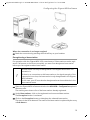
ì Connect your base station.
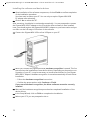
– Connect your base station to your phone line or PABX using the telephone cable.
– Connect the base station to the power supply using the mains adapter.
Your base station is now ready for use.
Now that your base station is ready for use, you can make external calls
and also take incoming calls.
It is not necessary to install the Gigaset M34 software to do this.
ì You can check that your base station is working properly by dialling an
external telephone number.
i
ì If you cannot make the call, check your phone line or the settings for
your PABX.
You will find a detailed description in the operating instructions for
your phone line or PABX.
Gigaset SX2xxisdn
To make calls, you also need to register a handset on the base station.
You will find a detailed description of the registration procedure in the
handset's operating instructions.
9