1
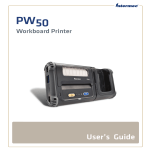
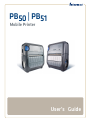
PB50 | PB51
Mobile Printer
User’s Guide
Intermec Technologies Corporation
Worldwide Headquarters
6001 36th Ave.W.
Everett, WA 98203
U.S.A.
www.intermec.com
The information contained herein is provided solely for the purpose of allowing customers to
operate and service Intermec-manufactured equipment and is not to be released, reproduced, or
used for any other purpose without written permission of Intermec Technologies Corporation.
Information and specifications contained in this document are subject to change without prior
notice and do not represent a commitment on the part of Intermec Technologies Corporation.
© 2007 - 2010 by Intermec Technologies Corporation. All rights reserved.
The word Intermec, the Intermec logo, Norand, ArciTech, Beverage Routebook, CrossBar,
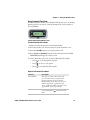
dcBrowser, Duratherm, EasyADC, EasyCoder, EasySet, Fingerprint, i-gistics, INCA (under license),
Intellitag, Intellitag Gen2, JANUS, LabelShop, MobileLAN, Picolink, Ready-to-Work, RoutePower,
Sabre, ScanPlus, ShopScan, Smart Mobile Computing, SmartSystems, TE 2000, Trakker Antares,
and Vista Powered are either trademarks or registered trademarks of Intermec Technologies
Corporation.
There are U.S. and foreign patents as well as U.S. and foreign patents pending.
Wi-Fi is a registered certification mark of the Wi-Fi Alliance.
Bluetooth is a trademark of Bluetooth SIG, Inc., U.S.A.
ii
PB50 and PB51 Mobile Printer User’s Guide
Document Change Record
This page records changes to this document. The document was
originally released as Revision 001.
Version
Number
Date
Description of Change
004
1/2010
• Updated procedures for upgrading printer
firmware and cleaning the printer.
003
5/2009
• Addition of information describing the PB51
printer.
• Addition of changes to the media adjust in the
PB50 printer.
002
11/2008
PB50 and PB51 Mobile Printer User’s Guide
These changes were made for the current release:
• Support for the ESC/P programming language.
• Addition of a radioless PB50 printer.
• Change to the Ready-to-Work indicator
behavior.
• Addition of linerless media support.
• New icons for Bluetooth radio and addition of
printhead lifted error message.
• Addition of power management options Sleep
Timer and Standby Timer.
iii
iv
PB50 and PB51 Mobile Printer User’s Guide
Contents
Contents
Before You Begin. . . . . . . . . . . . . . . . . . . . . . . . . . . . . . . . . . . . . . . . . . . . . . . . . . . . . . . . . . . . . . . . . ix
Safety Information . . . . . . . . . . . . . . . . . . . . . . . . . . . . . . . . . . . . . . . . . . . . . . . . . . . . . . . ix
Global Services and Support . . . . . . . . . . . . . . . . . . . . . . . . . . . . . . . . . . . . . . . . . . . . . . ix
Warranty Information. . . . . . . . . . . . . . . . . . . . . . . . . . . . . . . . . . . . . . . . . . . . ix
Web Support . . . . . . . . . . . . . . . . . . . . . . . . . . . . . . . . . . . . . . . . . . . . . . . . . . . . ix
Telephone Support . . . . . . . . . . . . . . . . . . . . . . . . . . . . . . . . . . . . . . . . . . . . . . . x
Service Location Support . . . . . . . . . . . . . . . . . . . . . . . . . . . . . . . . . . . . . . . . . . x
Who Should Read This Manual . . . . . . . . . . . . . . . . . . . . . . . . . . . . . . . . . . . . . . . . . . . . x
Related Documents . . . . . . . . . . . . . . . . . . . . . . . . . . . . . . . . . . . . . . . . . . . . . . . . . . . . . . xi
1 Using the Mobile Printer
................................................ 1
Introducing the Mobile Printer. . . . . . . . . . . . . . . . . . . . . . . . . . . . . . . . . . . . . . . . . . . . . . . . . . . . . 2
What’s New?. . . . . . . . . . . . . . . . . . . . . . . . . . . . . . . . . . . . . . . . . . . . . . . . . . . . . . . . . . . . . . 2
Features of the Printer . . . . . . . . . . . . . . . . . . . . . . . . . . . . . . . . . . . . . . . . . . . . . . . . . . . . . . . . . . . . . 3
Identifying the Parts of the Printer . . . . . . . . . . . . . . . . . . . . . . . . . . . . . . . . . . . . . . . . . 3
Understanding the Control Panel . . . . . . . . . . . . . . . . . . . . . . . . . . . . . . . . . . . . . . . . . . 4
Understanding the Printer Language . . . . . . . . . . . . . . . . . . . . . . . . . . . . . . . . . . . . . . . 6
Understanding the Printer Sounds . . . . . . . . . . . . . . . . . . . . . . . . . . . . . . . . . . . . . . . . . 7
Using the Batteries . . . . . . . . . . . . . . . . . . . . . . . . . . . . . . . . . . . . . . . . . . . . . . . . . . . . . . . . . . . . . . . . 7
Installing the Battery . . . . . . . . . . . . . . . . . . . . . . . . . . . . . . . . . . . . . . . . . . . . . . . . . . . . . . 8
Charging the Batteries. . . . . . . . . . . . . . . . . . . . . . . . . . . . . . . . . . . . . . . . . . . . . . . . . . . . . 8
Understanding the Battery Icons . . . . . . . . . . . . . . . . . . . . . . . . . . . . . . . . . . . . . . . . . . . 9
Managing Power on the Mobile Printer . . . . . . . . . . . . . . . . . . . . . . . . . . . . . . . . . . . . 10
Extending Battery Life. . . . . . . . . . . . . . . . . . . . . . . . . . . . . . . . . . . . . . . . . . . . . . . . . . . . 11
Loading Media. . . . . . . . . . . . . . . . . . . . . . . . . . . . . . . . . . . . . . . . . . . . . . . . . . . . . . . . . . . . . . . . . . . 11
Printing on Floodcoated Media . . . . . . . . . . . . . . . . . . . . . . . . . . . . . . . . . . . . . . . . . . . . . . . . . . . 16
Understanding the Display Modes. . . . . . . . . . . . . . . . . . . . . . . . . . . . . . . . . . . . . . . . . . . . . . . . . 17
Understanding Ready Mode . . . . . . . . . . . . . . . . . . . . . . . . . . . . . . . . . . . . . . 17
Understanding Information Mode . . . . . . . . . . . . . . . . . . . . . . . . . . . . . . . . 17
Understanding Pause Mode. . . . . . . . . . . . . . . . . . . . . . . . . . . . . . . . . . . . . . . 18
Understanding Setup Mode. . . . . . . . . . . . . . . . . . . . . . . . . . . . . . . . . . . . . . . 18
Understanding Error Mode . . . . . . . . . . . . . . . . . . . . . . . . . . . . . . . . . . . . . . . 19
Understanding Test Mode . . . . . . . . . . . . . . . . . . . . . . . . . . . . . . . . . . . . . . . . 20
Printing a Test Page . . . . . . . . . . . . . . . . . . . . . . . . . . . . . . . . . . . . . . . . . . . . . . . . . . . . . . . . . . . . . . 22
PB50 and PB51 Mobile Printer User’s Guide
v
Contents
2 Configuring the Mobile Printer
. . . . . . . . . . . . . . . . . . . . . . . . . . . . . . . . . . . . . . . 25
Connecting the Printer to Your PC . . . . . . . . . . . . . . . . . . . . . . . . . . . . . . . . . . . . . . . . . . . . . . . . 26
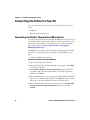
Connecting the Printer Through the USB Interface . . . . . . . . . . . . . . . . . . . . . . . . . 26
Connecting the Printer Through the Serial Port . . . . . . . . . . . . . . . . . . . . . . . . . . . . 27
Connecting the Printer to Your Network . . . . . . . . . . . . . . . . . . . . . . . . . . . . . . . . . . . . . . . . . . . 29
Setting Up Bluetooth Communications. . . . . . . . . . . . . . . . . . . . . . . . . . . . . . . . . . . . 29
Setting Up 802.11 Radio Communications . . . . . . . . . . . . . . . . . . . . . . . . . . . . . . . . . 30
Configuring Wireless Printing Using IPL. . . . . . . . . . . . . . . . . . . . . . . . . . . 33
Configuring Wireless Printing Using Fingerprint . . . . . . . . . . . . . . . . . . . 36
Configuring the Printer Settings . . . . . . . . . . . . . . . . . . . . . . . . . . . . . . . . . . . . . . . . . . . . . . . . . . 38
Changing Configuration Settings From the Display . . . . . . . . . . . . . . . . 38
Changing Configuration Settings From PrintSet . . . . . . . . . . . . . . . . . . . 40
Changing Configuration Settings Using the Command Line . . . . . . . . 40
Changing Configuration Settings From the Printer Home Page . . . . . . . . . . . . . . 41
Changing Configuration Settings From the SmartSystems Console . . 42
Upgrading the Firmware. . . . . . . . . . . . . . . . . . . . . . . . . . . . . . . . . . . . . . . . . . . . . . . . . . . . . . . . . . 43
Upgrading the Printer Firmware Using PrintSet . . . . . . . . . . . . . . . . . . . . . . . . . . . . 43
Upgrading the Printer Firmware Using the Printer Home Page . . . . . . . . . . . . . . . 44
Upgrading Printer Firmware Using SmartSystems Foundation. . . . . . . . . . . . . . . 47
Upgrading the Printer Firmware Using a Communications Program . . . . . . . . . 48
Downloading Fonts and Graphics . . . . . . . . . . . . . . . . . . . . . . . . . . . . . . . . . . . . . . . . . . . . . . . . . 51
3 Troubleshooting and Maintaining the Mobile Printer
. . . . . . . . . . . . . . 53
Troubleshooting the Mobile Printer . . . . . . . . . . . . . . . . . . . . . . . . . . . . . . . . . . . . . . . . . . . . . . . 54
Contacting Product Support. . . . . . . . . . . . . . . . . . . . . . . . . . . . . . . . . . . . . . . . . . . . . . 54
Understanding Error Messages . . . . . . . . . . . . . . . . . . . . . . . . . . . . . . . . . . . . . . . . . . . . 54
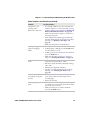
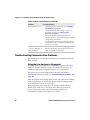
Troubleshooting Printer Problems and Finding Solutions . . . . . . . . . . . . . . . . . . . 56
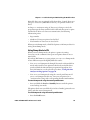
Troubleshooting Communication Problems . . . . . . . . . . . . . . . . . . . . . . . . . . . . . . . 58
Using the Line Analyzer in Fingerprint. . . . . . . . . . . . . . . . . . . . . . . . . . . . . 58
Using Dump Mode in IPL . . . . . . . . . . . . . . . . . . . . . . . . . . . . . . . . . . . . . . . . 59
Resetting the Mobile Printer . . . . . . . . . . . . . . . . . . . . . . . . . . . . . . . . . . . . . . . . . . . . . . . . . . . . . . 60
Cleaning the Printer. . . . . . . . . . . . . . . . . . . . . . . . . . . . . . . . . . . . . . . . . . . . . . . . . . . . . . . . . . . . . . 60
Cleaning the Printhead . . . . . . . . . . . . . . . . . . . . . . . . . . . . . . . . . . . . . . . . . . . . . . . . . . . 61
Cleaning the Platen Roller . . . . . . . . . . . . . . . . . . . . . . . . . . . . . . . . . . . . . . . . . . . . . . . . 62
Cleaning the Printer Exterior. . . . . . . . . . . . . . . . . . . . . . . . . . . . . . . . . . . . . . . . . . . . . . 62
vi
PB50 and PB51 Mobile Printer User’s Guide
Contents
Cleaning the Printer Media Compartment . . . . . . . . . . . . . . . . . . . . . . . . . . . . . . . . . 63
A Specifications
. . . . . . . . . . . . . . . . . . . . . . . . . . . . . . . . . . . . . . . . . . . . . . . . . . . . . . . . . 65
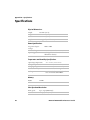
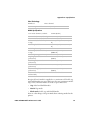
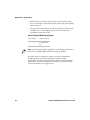
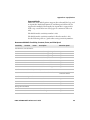
Specifications. . . . . . . . . . . . . . . . . . . . . . . . . . . . . . . . . . . . . . . . . . . . . . . . . . . . . . . . . . . . . . . . . . . . 66
Interfaces. . . . . . . . . . . . . . . . . . . . . . . . . . . . . . . . . . . . . . . . . . . . . . . . . . . . . . . . . . . . . . . . . . . . . . . . 70
RS-232 Serial Interface . . . . . . . . . . . . . . . . . . . . . . . . . . . . . . . . . . . . . . . . . . . . . . . . . . . 70
USB Interface. . . . . . . . . . . . . . . . . . . . . . . . . . . . . . . . . . . . . . . . . . . . . . . . . . . . . . . . . . . . 71
Accessories for the Mobile Printer . . . . . . . . . . . . . . . . . . . . . . . . . . . . . . . . . . . . . . . . . . . . . . . . . 72
B IPL and Fingerprint Setup Menus
. . . . . . . . . . . . . . . . . . . . . . . . . . . . . . . . . . . . 75
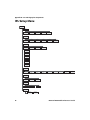
IPL Setup Menu . . . . . . . . . . . . . . . . . . . . . . . . . . . . . . . . . . . . . . . . . . . . . . . . . . . . . . . . . . . . . . . . . 76
Fingerprint Setup Menu . . . . . . . . . . . . . . . . . . . . . . . . . . . . . . . . . . . . . . . . . . . . . . . . . . . . . . . . . . 77
PB50 and PB51 Mobile Printer User’s Guide
vii
Contents
viii
PB50 and PB51 Mobile Printer User’s Guide
Before You Begin
Before You Begin
This section provides you with safety information, technical support
information, and sources for additional product information.
Safety Information
Your safety is extremely important. Read and follow all warnings and
cautions in this document before handling and operating Intermec
equipment. You can be seriously injured, and equipment and data can
be damaged if you do not follow the safety warnings and cautions.
This section explains how to identify and understand warnings,
cautions, and notes that are in this document.
A warning alerts you of an operating procedure, practice,
condition, or statement that must be strictly observed to avoid
death or serious injury to the persons working on the equipment.
A caution alerts you to an operating procedure, practice,
condition, or statement that must be strictly observed to prevent
equipment damage or destruction, or corruption or loss of data.
Note: Notes either provide extra information about a topic or contain
special instructions for handling a particular condition or set of
circumstances.
Global Services and Support
Warranty Information
To understand the warranty for your Intermec product, visit the
Intermec web site at www.intermec.com and click Support >
Returns and Repairs > Warranty.
Web Support
Visit the Intermec web site at www.intermec.com to download our
current manuals (in PDF). To order printed versions of the Intermec
manuals, contact your local Intermec representative or distributor.
PB50 and PB51 Mobile Printer User’s Guide
ix
Before You Begin
Visit the Intermec technical knowledge base (Knowledge Central) at
www.intermec.com and click Support > Knowledge Central to
review technical information or to request technical support for your
Intermec product.
Telephone Support
In the U.S.A. and Canada, call 1-800-755-5505.
Outside the U.S.A. and Canada, contact your local Intermec
representative. To search for your local representative, from the
Intermec web site, click About Us > Contact Us.
Service Location Support
For the most current listing of service locations, go to
www.intermec.com and click Support >Returns and Repairs >
Repair Locations.
For technical support in South Korea, use the after service locations
listed below:
AWOO Systems
102-1304 SK Ventium
522 Dangjung-dong
Gunpo-si, Gyeonggi-do Korea, South 435-776
Contact: Mr. Sinbum Kang
Telephone: +82-31-436-1191
E-mail: [email protected]
IN Information System PTD LTD
6th Floor
Daegu Venture Center Bldg 95
Shinchun 3 Dong
Donggu, Daegu City, Korea
E-mail: [email protected] or [email protected]
Who Should Read This Manual
This document is for the person who is responsible for installing,
configuring, and maintaining the PB50 or PB51 mobile printer.
This document provides you with information about the features of
the mobile printer, and how to install, configure, operate, maintain,
and troubleshoot it.
x
PB50 and PB51 Mobile Printer User’s Guide
Before You Begin
Before you work with the mobile printer, you should be familiar with
your network and general networking terms, such as IP address.
Related Documents
This table contains a list of related Intermec documents and their
part numbers.
Document Title
Intermec Fingerprint Command Reference Manual
Intermec Fingerprint Developer’s Guide
Intermec Printer Language (IPL) Developer’s Guide
Intermec Printer Language (IPL) Command Reference Manual
ESC/P Programmer’s Reference Manual
The Intermec web site at www.intermec.com contains our
documents (as PDF files) that you can download for free.
To download documents
1 Visit the Intermec web site at www.intermec.com.
2 Click the Products tab.
3 Use the Products menu, navigate to your product page. For
example, to find the CN3 computer product page, click
Computers > Handheld Computers > CN3.
4 Click the Manuals tab.
PB50 and PB51 Mobile Printer User’s Guide
xi
Before You Begin
xii
PB50 and PB51 Mobile Printer User’s Guide
1
Using the Mobile Printer
Use this chapter to familiarize yourself with your mobile printer.
In this chapter you will find these sections:
•
Introducing the Mobile Printer
•
Features of the Printer
•
Using the Batteries
•
Loading Media
•
Printing on Floodcoated Media
•
Understanding the Display Modes
•
Printing a Test Page
1
Chapter 1 — Using the Mobile Printer
Introducing the Mobile Printer
The PB50, PB50C, and PB51 are rugged direct thermal label and
receipt printers designed for use with Intermec mobile computers as
well as the SF51 and SR61 scanners. The PB50 is intended to be used
primarily for label printing, and the PB51 is intended to be used
primarily for receipt printing.
Throughout this manual, all models of the printer are referred to as
printer unless the information is specific to one model.
The printer provides:
•
print resolution of 203 dpi.
•
print speeds of up to 100 mm per second (4 ips).
•
802.11 radio, Bluetooth radio, or no radio options.
Note: Unless otherwise noted, this manual uses the term “printer” to
refer to both the PB50 and PB51 printers.
What’s New?
This version of the printer manual contains these changes:
2
•
Updated information for upgrading printer firmware.
•
Updated information for configuring the printer.
•
Updated information for cleaning the printer.
PB50 and PB51 Mobile Printer User’s Guide
Chapter 1 — Using the Mobile Printer
Features of the Printer
Use this section to understand how to use the printer. This section
contains information about:
•
parts of the printer.
•
control panel.
•
printer language.
•
printer sounds.
Identifying the Parts of the Printer
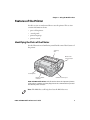
Use the illustration to familiarize yourself with some of the features of
the printer.
Self-strip
door
Media cover
release button
Control panel
Ready-to-Work
indicator
Communications port
PB50 and PB51 Mobile Printer: This illustration shows the important features
of the printer. A weather-resistant flap protects the communications port and
the external power connector.
Note: The PB50 has a self-strip door but the PB51 does not.
PB50 and PB51 Mobile Printer User’s Guide
3
Chapter 1 — Using the Mobile Printer
Understanding the Control Panel
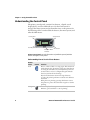
The printer control panel contains four buttons, a liquid crystal
display (LCD), and one LED indicator. Use the four buttons to
navigate the menu system and perform functions on the printer. See
the following tables to understand the buttons, the menu system, and
what the LED means.
Feed button
Setup button
SETUP:
SER-COM
Standby button
Info button
Ready-to-Work
indicator
Printer Control Panel: Use this illustration to familiarize yourself with the
buttons and lights on the printer.
Understanding How to Use the Printer Buttons
Button
Name
4
Button
Function
Feed
Press to advance label or receipt paper. The amount of
media that feeds is dependent on the type of media you
are using. It will advance by 5 mm (0.2 inch), feed out
an entire label, or feed a configured length of media
based on your media and settings.
If you hold the button down for longer than two
seconds, the printer performs a testfeed and calibrates
the media.
If the printer is printing, pressing this button causes
the printer to pause. Press the button again to resume
printing.
Setup
Press to display the Setup menu. With ESC/P
firmware, press and hold to cancel printing.
PB50 and PB51 Mobile Printer User’s Guide
Chapter 1 — Using the Mobile Printer
Understanding How to Use the Printer Buttons (continued)
Button
Name
Button
Function
Standby
(Power)
Press to put the printer in Standby mode. In Standby
mode, power to the radio, the display, and the
backlight are turned off.
Press to turn the printer back on and put in Ready
mode.
Info
Press to display a summary of network connection
information and error conditions. Each setting in the
summary information displays on the screen for five
seconds.
In Fingerprint and IPL, press this button in Pause
mode to cancel the print job. The info button is not
functional with ESC/P.
All of the buttons can act as “soft keys,” which means that the
function of each button depends on the state of the printer. A small
icon appears in the screen next to the button to indicate the function
it performs
Understanding the Soft Keys
Button
Soft Keys
Description
Moves through the settings at the same level in the
menu system.
Exit Setup mode and return to Ready mode.
• Moves up one level in the menu system. This soft
key appears in Setup mode.
• Increases the value of a number when editing
settings s uch as an IP address. This soft key
appears in Setup mode.
• Pauses the printing job. This icon appears only
when you are printing.
• Moves down one level in the menu system and
saves changes to a setting.
• Exits a printing job or exits Information mode.
PB50 and PB51 Mobile Printer User’s Guide
5
Chapter 1 — Using the Mobile Printer
There is only one LED on the printer: the Ready-to-Work™ indicator.
Understanding the Ready-to-Work Indicator
Indicator State
Description
Off
When the light is off, it can mean one of several
conditions:
• The printer is in Standby mode.
• The printer is in Info mode.
• The printer is in Setup mode.
On
The printer is powered on and operating.
Blinking
A blinking light can mean one of several conditions:
• The printer is out of paper.
• The media cover is open.
• There is a printer error that requires you to perform an
action. For a list of possible problems, see
“Troubleshooting the Mobile Printer” on page 54.
Understanding the Printer Language
Depending on the configuration you ordered, your printer comes
with Intermec Printer Language (IPL), Fingerprint. This manual
contains information for using both printer language.
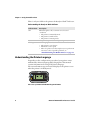
The current firmware type and version display on the printer screen
when the printer is in Ready mode.
IPL 12.0.0
The Screen of a PB50 and PB51 Running IPL Firmware
6
PB50 and PB51 Mobile Printer User’s Guide
Chapter 1 — Using the Mobile Printer
Understanding the Printer Sounds
The printer plays sounds in response to several actions that you can
take with it. Use the following table to understand when the sounds
occur and what they mean.
Understanding the Printer Sounds
Sound
Occurs When:
Power
• You supply power (battery or AC adapter) to the
printer.
• The printer starts charging the battery.
Hardware
You open the media door, close the media door, or insert a
cable.
Button
You press any of the printer buttons.
Error
• The printer cannot feed paper or print a job because of
a hardware issue such as the media door open, a paper
jam, or there is no media.
• An error occurs such as a paper jam or a print error.
Using the Batteries
The printer uses a rechargeable 2200 mAh lithium-ion battery (Model
AB13) for power. You must fully charge the battery before you can use
the printer. A fully charged battery can last up to one week without
needing to be recharged when the printer is in Standby mode.
Use Intermec Model AB13 battery only. Use of another battery
may present a risk of fire or explosion.
The Model AB13 battery may present a fire or chemical burn
hazard if mistreated. Do not disassemble, heat above 100°C
(212°F), or incinerate.
Dispose of used batteries promptly. Keep away from children.
PB50 and PB51 Mobile Printer User’s Guide
7
Chapter 1 — Using the Mobile Printer
Installing the Battery
Make sure you fully charge the battery before you use your printer.
You can charge the battery before or after you install them into the
printer.
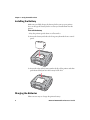
To install the battery
1 Lay the printer upside down on a flat surface.
2 Insert the battery with the tab facing away from the front control
panel.
3 Insert the edge of the battery under the lip of the printer and then
push down until you hear the battery latch click.
Charging the Batteries
There are two ways to charge the printer battery:
8
PB50 and PB51 Mobile Printer User’s Guide
Chapter 1 — Using the Mobile Printer
•
Connect AC power to the printer and charge the battery while it is
in the printer.
•
Charge the battery in the AC18 4-bay battery charger.
For information on charging your battery in the 4-bay battery
charger, see the AC18 4-Bay Battery Charger Instructions.
It takes approximately 6 hours to charge the battery while it is
installed in the printer. To charge the battery inside the printer, you
need:
•
an Intermec 12 VDC power supply (Model AE19).
•
an AC power cord.
To charge the battery inside the printer
1 Install the battery in the printer. For help, see the previous section,
“Installing the Battery” on page 8.
2 Connect the power supply to the DC power connector on the
printer.
3 Connect one end of the power cord to the power supply and then
plug the other end into an AC outlet.
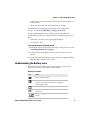
Understanding the Battery Icons
The easiest way to tell the status of your battery is to look at the
battery icons on the control panel of the printer.
Battery Icon Status
Icon
Status
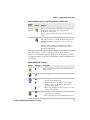
Battery is fully charged.
Battery has a medium charge. You should be able to
work for several more hours before charging or
replacing the battery.
Battery is low. You need to replace the battery soon.
Battery is critically low. You need to replace the
battery now.
Battery charging error. You may need to replace the
battery.
PB50 and PB51 Mobile Printer User’s Guide
9
Chapter 1 — Using the Mobile Printer
Battery Icon Status (continued)
Icon
Status
External power connected and there is no battery in
the printer.
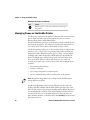
Managing Power on the Mobile Printer
Use the power options on the printer to manage and conserve battery
power. From the Power option in Setup menu, you can set Low
Battery, Sleep Timer, and Standby Timer.
Use the Low Battery option to set the battery voltage at which the low
battery warning appears. The values for Low Battery range from 12.1
V to 16.8 V in 0.1 V increments. The default setting is 13.5 V.
Use the Sleep Timer option to set the amount of time it takes for the
printer to go to “sleep” if it is not printing and you do not have any
interaction with it. When the printer goes to “sleep,” it turns off the
backlight and it dims the Ready-to-Work indicator. By default, the
printer backlight turns off after 20 seconds of no user interaction.
You can set Sleep Timer to always off, always on, 5 seconds, 10
seconds, 20 seconds, 30 seconds, or 60 seconds. The backlight turns
on when:
•
the printer begins printing.
•
you press a button.
•
you connect the printer to external power.
•
you are communicating with or sending data to the printer.
Note: If you have Sleep Timer set to always on, the Standby timer
setting will have no effect.
Use the Standby Timer option to turn off power to the radio, the
display, and the backlight. The Standby Timer option has the same
effect on the printer as pressing the Standby button. When the printer
is in Standby mode, both the LCD and the Ready-to-Work indicator
are turned off. You can set Standby Timer to 5 mins, 10 mins, 20
mins, 30 mins, 60 mins, or disabled. Press the Standby button to turn
the printer back on.
10
PB50 and PB51 Mobile Printer User’s Guide
Chapter 1 — Using the Mobile Printer
Extending Battery Life
Here are some tips for extending the overall life of your battery:
•
Never expose the battery to direct sunlight or temperatures over
50°C (122°F).
•
Only charge the battery inside the printer using a power supply or
in the 4-bay battery charger (Model AC18).
•
Do not set the backlight to always on. The always on setting
disables the automatic power saving modes.
Here are some tips for extending the life of your battery between
charges:
•
Press the Standby button to put the printer in Standby mode.
•
Remove the battery from the printer if you will not be using it for
three days or more.
•
Do not operate the printer in extremely cold temperatures. Using
the printer in temperatures below freezing reduces the overall
battery life.
Remember that any rechargeable battery loses its ability to maintain a
charge over time. You can only recharge it a finite number of times
before you must replace it.
Loading Media
You can use roll or fanfold receipt media with both the PB50 and
PB51 printers. Your printer ships with a small amount of media
loaded and a test page printed to verify that the printer works. The
PB50 printer supports self-strip printing applications. For
information on how to correctly load media for self-strip printing, see
“To load media for self-strip printing (PB50 only)” on page 14.
For information on media specifications, see “Specifications” on
page 66.
To load media
1 Make sure that the printer is in Ready mode.
PB50 and PB51 Mobile Printer User’s Guide
11
Chapter 1 — Using the Mobile Printer
•
If the printer is off or in Standby mode, press the Standby
button.
•
If the printer is already on, press the
Ready mode.
soft key to return to
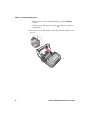
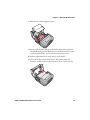
2 Press down on the blue media cover release button until the cover
releases.
12
PB50 and PB51 Mobile Printer User’s Guide
Chapter 1 — Using the Mobile Printer
3 Slide the two media supports apart.
4 Insert a roll of media and press the media adjust guide until the
roll is held firmly in place. Make sure you load the media clockwise
so that it pulls off the core from the bottom of the printer.
5 Pull out approximately 8 cm (3 inches) of the media.
6 Close the media cover until it latches. The printer emits the
hardware sound to tell you that the media door closed correctly.
PB50 and PB51 Mobile Printer User’s Guide
13
Chapter 1 — Using the Mobile Printer
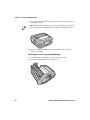
7 Press down on the self-strip door to make sure the media cover is
completely latched.
Note: The linerless printer does not have a self-strip door. Instead,
the self-strip door is molded plastic and part of the media cover.
8 Press and hold the Feed button for more than two seconds to
calibrate the media.
To load media for self-strip printing (PB50 only)
1 Complete Steps 1 through 3 in the previous procedure.
2 Open the self-strip door in the media cover.
14
PB50 and PB51 Mobile Printer User’s Guide
Chapter 1 — Using the Mobile Printer
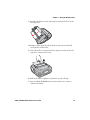
3 Feed the label liner over the self-strip bar and out the back of the
self-strip door.
4 Remove a label from the roll of media so that you are left with
several inches of label liner.
5 Close the media cover until it latches and press down on the selfstrip door to make sure it locks.
6 Pull on the liner to tighten it and ensure a good self strip.
7 Press and hold the Feed button for more than two seconds to
calibrate the media.
PB50 and PB51 Mobile Printer User’s Guide
15
Chapter 1 — Using the Mobile Printer
Printing on Floodcoated Media
If you are using colored media, also known as floodcoated media, you
may need to adjust the settings to enable better printing.
To configure the printer to print on Floodcoated media
1 Press the Setup button.
2 Press
3 Press
4 Press
5 Press
6 Press
7 Press
8 Press
9 Press
until you reach Media.
to enter the Media menu system.
until you reach Advanced .
to enter the Advanced menu system.
until you reach Thermal Management.
to enter the Thermal Management menu system.
until you reach Custom TM.
to select Custom TM.
To adjust the print speed for floodcoated media
1 Press the Setup button.
2 Press
3 Press
4 Press
5 Press
6 Press
until you reach Media.
to enter the Media menu system.
until you reach Advanced .
to enter the Advanced menu system.
until you reach Min Speed.
7 Press the Feed button to scroll through a list of numbers. Choose
a number that is appropriate for the floodcoated media. To see a
sensitivity settings for each media type, go to “Recommended
Media Sensitivity, Constant, Factor, and Print Speed” on
page 69.
8 Press
to select a number.
9 Reboot your printer.
16
PB50 and PB51 Mobile Printer User’s Guide
Chapter 1 — Using the Mobile Printer
Understanding the Display Modes
The printer has six display modes to help you effectively interact with
the printer: Ready, Information, Paused, Setup, Error, and Test. Use
the following sections to understand the different printer modes.
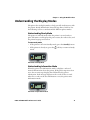
Understanding Ready Mode
The printer is in Ready mode when the printer is on and ready to
print. The main screen displays the power status, the radio status, and
the printer language and version.
To enter ready mode
•
If the printer is off or in Standby mode, press the Standby button.
•
If the printer is already on, press the
mode.
soft key to return to Ready
SETUP:
IPL 11.2.0
SER-COM
The Printer in Ready Mode
Understanding Information Mode
When the printer is in Information mode, it displays a subset of
network information about the printer. If the printer experienced an
error, the error message displays first followed by the printer
information. Each message displays on the screen for five seconds.
After five seconds on the last information screen, the printer exits
Information mode.
SETUP:
I/O serial
SER-COM
8N1 9600
5
X
The Printer in Information Mode
PB50 and PB51 Mobile Printer User’s Guide
17
Chapter 1 — Using the Mobile Printer
To enter Information mode
•
Press the Information button on the control panel.
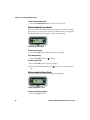
Understanding Pause Mode
Use Pause mode to momentarily stop printing or to cancel a current
print job. Once you pause the printer, the Pause mode screen appears.
Use the Feed button to both pause and resume printing.
PAUSE
X
The Printer in Pause Mode
To enter Pause mode
•
Press the Feed button while the printer is printing.
To resume printing
•
Press the Feed button (or
soft key).
To cancel a print job
1 Press the Feed button to pause printing.
2 Press the Information button (or
job.
soft key) to cancel the print
Understanding Setup Mode
Use Setup mode to change the settings on the printer.
Sample Setup Mode Screen
To enter or exit Setup mode
•
18
Press the Setup button.
PB50 and PB51 Mobile Printer User’s Guide
Chapter 1 — Using the Mobile Printer
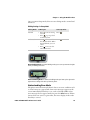
Once you enter Setup mode, there are two editing modes: normal and
enhanced.
Editing Settings in Setup Mode
Editing Mode
To Navigate
To Accept Value
Normal
• Press
Press
.
Enhanced
• Press
to move within Press
the editable fields. When
the field blinks, you can
edit it.
• Press to increase the
value of the field.
.
to move among
choices.
• Press to go up a level
in menu system.
BAUDRATE:
9600
Normal Editing Mode: In normal editing mode, you see an up arrow and a right
arrow for making selections.
+
IP ADDRESS:
130.42.240.102
Enhanced Editing Mode: In enhanced editing mode you have a plus sign and a
right arrow to change the value of numeric fields.
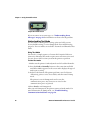
Understanding Error Mode
The printer enters Error mode when it detects an error condition such
as a low battery or a paper fault. Some error messages appear on the
screen immediately when they occur, such as DOOR OPEN. Other
error messages do not appear until you press the Info button. If there
is more than one error at a given time, the errors display in the order
that they occurred.
PB50 and PB51 Mobile Printer User’s Guide
19
Chapter 1 — Using the Mobile Printer
PAPER FAULT
Sample Error Mode Screen
If you encounter an error message, see “Understanding Error
Messages” on page 54 for information on how to fix the problem.
Understanding Test Mode
Use Test mode to verify printer settings, print test labels, restore
factory default settings, or enter Dump mode for troubleshooting
purposes. Two test modes are available: Test mode and Extended Test
mode.
Using Test Mode
Test mode is a simple sequence of events which requires little user
interaction. Extended Test mode requires more user interaction and
lets you choose which actions you want the printer to perform.
To enter Test mode
1 Make sure the printer is in Ready mode and is loaded with media.
2 Press the Feed and Standby buttons at the same time and hold
until Select Media appears on the screen and it displays the type of
media you are using.
3 Release both buttons. The printer performs a test feed (sensor
calibration), prints a series of test labels, and then enters Dump
mode.
The printer is now in Dump mode and it scans the
communication ports. Any characters received on the
communication ports are printed.
4 Press Feed to exit Dump mode.
After you exit Dump mode, the printer returns to Ready mode. For
more information on Dump mode, see “Troubleshooting
Communication Problems” on page 58.
20
PB50 and PB51 Mobile Printer User’s Guide
Chapter 1 — Using the Mobile Printer
Using Extended Test Mode
Use Extended Test mode to run additional diagnostic tests, including
printing specific test labels, entering Dump mode, and resetting to
factory defaults.
TEST LABELS
CHESS
Sample Extended Test Mode Screen
To enter Extended Test mode
1 Make sure that the printer is loaded with media.
2 Press the media cover release button to open the media cover.
3 Press the Standby button to turn the printer off.
4 Press Feed and Standby buttons at the same time until CLOSE
PRINTER DOOR appears on the screen.
5 Close the media cover. You are now in Extended Test mode.
•
Press
to cycle through the options.
•
Press
to select a test option.
•
Press
to exit Extended Test mode.
Options in Extended Test Mode
Function
Description
Select Media
This option is almost the same as the
process in Test mode, except that the
printer performs a slow test feed in
Extended Test mode. The slow test feed
enables the printer to perform a slow
sensor calibration which can help resolve
gap or mark detection problems.
Test Labels
This option allows you to print test labels
one at a time. Press
to print the next
label.
PB50 and PB51 Mobile Printer User’s Guide
21
Chapter 1 — Using the Mobile Printer
Options in Extended Test Mode (continued)
Function
Description
Dump Mode
This options enters Dump mode. For more
information on Dump mode, see
“Troubleshooting Communication
Problems” on page 58.
Factory Default
This option restores the factory default
settings. Press
to select this option and
then follow the instructions on the screen.
Setup and Exit
This option exits Extended Test mode and
puts the printer in Setup mode.
Exit
This option exits Extended Test mode.
Printing a Test Page
After you have loaded media in the printer, you are ready to print a
testprint. You can choose from several testprint options for each type
of firmware. If you cannot get the testprint information to print, see
“Troubleshooting the Mobile Printer” on page 54.
To print a test page with a printer loaded with IPL
1 Press the Setup button.
2 Press
until you reach Test/Service.
3 Press
to enter the Test/Service menu system.
4 Press
to enter the Testprint Config menu.
5 Press
to enter the Config menu.
6 Press
7 Press
to choose a testprint.
to print the Config testprint of your choice.
To print a test page with a printer loaded with Fingerprint
1 Press the Setup button.
2 Press
3 Press
4 Press
5 Press
22
until you reach Print Defs.
to enter the Print Defs menu system.
until you reach Testprint.
to enter the Testprint menu.
PB50 and PB51 Mobile Printer User’s Guide
Chapter 1 — Using the Mobile Printer
6 Press
7 Press
to choose a testprint.
to print the testprint of your choice.
To print a self test with a printer loaded with ESC/P
1 Press and hold the Feed and Power button simultaneously for
approximately five seconds.
2 Release the Feed and Power buttons when the printer displays the
media you are printing on.
3 Press the Feed button to exit Dump Mode.
PB50 and PB51 Mobile Printer User’s Guide
23
Chapter 1 — Using the Mobile Printer
24
PB50 and PB51 Mobile Printer User’s Guide
2
Configuring the Mobile Printer
In this chapter you will find these sections:
•
Connecting the Printer to Your PC
•
Connecting the Printer to Your Network
•
Configuring the Printer Settings
•
Upgrading the Firmware
•
Downloading Fonts and Graphics
25
Chapter 2 — Configuring the Mobile Printer
Connecting the Printer to Your PC
You can easily connect to the printer to your PC using one of these
ports:
•
USB port
•
RS-232 serial interface port
Connecting the Printer Through the USB Interface
To connect the printer to a PC through the USB device port, you need
to install Intermec InterDriver® software. To make sure you have the
latest version of InterDriver, you may want to go to the downloads
page for the printer on http://www.intermec.com/support/
downloads/index.aspx.
The USB cable you need is not included in the shipping box with the
printer. To connect the printer to your PC using the USB port, you
need:
•
a USB cable (P/N 321-611-xxx).
To connect the printer through a USB port
1 Open the Interdriver executable.
2 The File Download - Security Warning screen appears. Click Run
to run the executable.
3 The Intermec End User License Agreement appears. Read the
agreement and select the radio button to accept the agreement,
and then click Next.
4 The Installation Directory screen appears. The default installation
directory is c:\Intermec\InterDriver7. Click Next to use the default
directory or specify a different location to install the files.
5 The Installation Information screen appears. Clear the Run Add
Print Wizard after unpacking drivers check box and click
Finish.
26
PB50 and PB51 Mobile Printer User’s Guide
Chapter 2 — Configuring the Mobile Printer
6 On the New Hardware Wizard screen, select Install from a list or
specific location and then click Next to continue.
Note: For LPT connections, you must restart your computer for
Windows to detect the new hardware. For USB connections, the
New Hardware Wizard will launch automatically when the printer
is connected and turned on.
7 On the Search and Installation Options screen, click Next.
8 On the Hardware Installation warning screen, click Continue
Anyway.
9 Click Finish to exit the New Hardware Wizard. InterDriver files
are now installed on your computer.
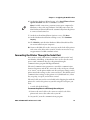
10 Connect the USB cable to the connector on the back of the printer
and connect the other end to your PC. You do not need to set up
any parameters for USB communications.
Connecting the Printer Through the Serial Port
You can use a serial connection to communicate with your PC and
run PrintSet, LabelShop, or InterDriver. You can also use the serial
port to send commands directly to the printer through a
communications program like HyperTerminal.
The serial communication parameters control the communication
between the printer and the PC connected on the serial port, referred
to as “uart1:” on the printer. Make sure the serial port settings on the
printer match the settings on the connected device. The default serial
communication settings on the printer are: 115200 baud rate, 8 data
bits, no parity, 1 stop bit, and no flow control.
The serial cable you need is not included in the shipping box with the
printer. To connect the printer to your PC using the serial port, you
need:
•
a serial cable (P/N 075497).
To connect the printer to a PC through the serial port
1 Connect the serial cable to the connector on the back of the
printer and connect the other end to your PC.
2 On your PC, start the communications program.
PB50 and PB51 Mobile Printer User’s Guide
27
Chapter 2 — Configuring the Mobile Printer
3 If necessary, configure the PC port settings so they match those of
your printer.
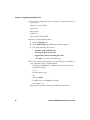
Bits per second: 115200
Data bits: 8
Parity: None
Stop bits: 1
Flow control: XON_XOFF
4 If you are using HyperTerminal
a Click the Settings tab.
b Click ASCII Setup. The ASCII Setup window appears.
c
Check the following check boxes:
•
Send line ends with line feed
•
Echo typed characters locally
•
Append line feeds to incoming line ends
•
Click OK to save and exit ASCII Setup.
5 Test your connection by typing one of the following commands on
your communications program window
•
For IPL, press Ctrl and in communications program window
simultaneously type:
b,w,c
•
For FingerPrint, type:
FF
and press Enter.
•
For ESC/P, press the ESC key and type:
EZ {AHEAD:10}
The printer responds by feeding a small amount of media.
28
PB50 and PB51 Mobile Printer User’s Guide
Chapter 2 — Configuring the Mobile Printer
Connecting the Printer to Your Network
The printer must establish communications with a host that will send
the data for the printer to print. The printer provides four ways to
communicate with a host:
•
Bluetooth radio communications
•
802.11 b/g radio communications
Setting Up Bluetooth Communications
Your mobile printer can contain a Bluetooth radio that allows wireless
communications with a remote device from distances up to 100
meters (approximately 328 feet) depending on the Bluetooth range
capabilities of the remote device, environmental conditions, and
obstructions. For the Bluetooth-enabled devices to exchange data,
both devices must establish a connection. Bluetooth software is
always running in the background.
A printer cannot initiate a Bluetooth connection. One of the devices,
such as a CK31, CK61, 700 series, CN2B, or CN3 mobile computer,
must request a connection with the printer. The printer then accepts
or rejects the connection. Use Intermec Settings on the mobile
computer to enable the Bluetooth settings on the printer.
If the printer has a Bluetooth connection, it can also connect to
Bluetooth scanners, such as the SF51 and the SR61 Cordless scanners.
You can create the bar code labels you need to connect the printer to a
Bluetooth scanner using EasySet software. If you are going to create
the bar code labels using EasySet, you will need to know the Bluetooth
Device Address and the PIN of the printer. You can download a free
version of EasySet from the Intermec web site at www.intermec.com.
Each printer equipped with a Bluetooth radio has a unique Bluetooth
Device Address (BDA) loaded into its module when manufactured.
You can find the BDA on the certification label located on the bottom
of the printer.
PB50 and PB51 Mobile Printer User’s Guide
29
Chapter 2 — Configuring the Mobile Printer
To set up Bluetooth communications with a mobile computer
•
Follow the procedure to discover and connect to Bluetooth devices
in your mobile computer user’s manual.
Note: For maximum security, you need to configure a Bluetooth
passcode for your mobile printer. The default passcode is “1234.”
To set up Bluetooth communications with a scanner
1 Download and install EasySet.
2 Create the following bar code labels using EasySet:
•
Administrator reset factory defaults
•
Bluetooth parameters - security - not active
•
Bluetooth parameters - connect/disconnect - compose BT
address
•
Bluetooth parameters - security - compose PIN:
3 Scan the bar code labels with the Bluetooth scanner.
Icon
Description
The Bluetooth radio is on and the printer is not connected to a
serial cable.
The Bluetooth radio is turned off. The Bluetooth radio turns off
when you connect a serial cable.
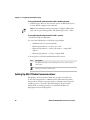
Setting Up 802.11 Radio Communications
The printer can have an internal 802.11 b/g radio to transfer and
receive data using wireless communications. This manual assumes
that you have already set up your wireless communications network
including your access points. The following procedures include
information on setting up wireless security for both IPL and
Fingerprint versions of the printer.
30
PB50 and PB51 Mobile Printer User’s Guide
Chapter 2 — Configuring the Mobile Printer
The printer supports these authentication modes: none, WEP, WPA
Personal and Enterprise mode (802.1x authentication), WPA2
Personal and Enterprise mode (802.1x authentication).
Note: WPA and WPA2 Enterprise mode currently support PEAP,
TTLS, and LEAP. For LEAP authentication, the printer supports Open
EAP, but does not support Network EAP.
To set up the printer to work in your wireless network, you need these
items:
•
Serial cable (P/N 075497-001)
•
Host PC running Windows or Linux
•
A communications program such as HyperTerminal.
To set up the printer for wireless communications
1 Connect the 8-pin circular DIN connector to the serial port on the
printer.
2 Connect the other end of the serial cable to a serial port on the
back of your PC or to a serial adapter on your mobile computer.
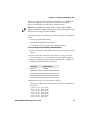
3 Open a communications program on your PC and configure the
following parameters for the serial port:
Parameter
Default Setting
Baud rate
115200
Data bits
8
Parity
None
Stop bits
1
4 From the host PC, check the wireless settings.
If you have an IPL version of the printer, send these commands to
the printer:
<STX><SI>wt,SSID<ETX>
<STX><SI>wt,WEP1<ETX>
<STX><SI>wt,WEP2<ETX>
<STX><SI>wt,WEP3<ETX>
<STX><SI>wt,WEP4<ETX>
<STX><SI>wt,AUTH<ETX>
<STX><SI>wt,WPA<ETX>
PB50 and PB51 Mobile Printer User’s Guide
31
Chapter 2 — Configuring the Mobile Printer
<STX><SI>wt,WPA2<ETX>
<STX><SI>wt,WPA_PSK<ETX>
<STX><SI>wt,ROAM<ETX>
<STX><SI>wt,PWR_MODE<ETX>
<STX><SI>wt,CHANNEL<ETX>
<STX><SI>wt,AP_MAC<ETX>
<STX><SI>wt,SIGNAL<ETX>
<STX><SI>wt,SPEED<ETX>
<STX><SI>wt,ACTIVE<ETX>
If you have a Fingerprint version of the printer, send this
command to the printer:
setup write "wlan","uart1:"
5 Set up the printer to use the correct SSID and authentication
modes. See one of the following procedures to configure wireless
printing on your IPL or Fingerprint printer.
6 If you are going to use certificates for validation, transfer the
certificate to the printer. The printer can accept .pfx, .pem, and
.der certificates.
7 Verify that the printer is connected to the access point and make
sure it has an IP address allocated to it.
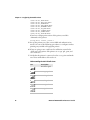
Understanding the 802.11 Radio Icons
Icon
Description
Excellent signal
Strong signal
Good signal
Weak signal
Poor signal
No signal
32
PB50 and PB51 Mobile Printer User’s Guide
Chapter 2 — Configuring the Mobile Printer
Use the following sections to set most of your wireless
communication settings. For help with additional commands and
information, see either the Fingerprint Command Reference Manual or
the IPL Command Reference Manual. You can download both
documents from the Intermec web site at www.intermec.com.
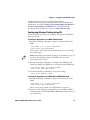
Configuring Wireless Printing Using IPL
Use the following procedures to configure your printer with IPL for
wireless printing.
To configure the printer to use WEP authentication
1 Send the following commands to login as an admin and set the
SSID:
<STX><ESC>.x,su -p pass admin<ETX>
<STX><SI>ws,SSID,xxxxx<ETX>
where xxxxx can be from 0 to 32 ASCII characters, not including
the double quote.
Note: The default password for logging in as an admin is “pass.” If
you have changed the password, you will need to use your
password instead of “pass.”
2 Send the following commands to configure the WEP keys. The
following example sets WEP key 1 to 1234 and enables WEP key 1.
<STX><SI>ws,WEP1, 0x0001020304<ETX>
<STX><SI>ws,.WEP_KEY,1<ETX>
3 Send the following command to activate the settings.
<STX><SI>ws,ACTIVE,1<ETX>
To configure the printer to use WPA-PSK or WPA2-PSK mode
1 Send the following commands to login as an admin and set the
SSID:
<STX><ESC>.x,su -p pass admin<ETX>
<STX><SI>ws,SSID,xxxxx<ETX>
where xxxxx can be from 0 to 32 alphanumeric characters.
2 Send one of the following commands to turn on WPA or WPA2
authentication. Send the WPA-PSK or WPA2-PSK command to set
a pre-shared key:
PB50 and PB51 Mobile Printer User’s Guide
33
Chapter 2 — Configuring the Mobile Printer
<STX><SI>ws,WPA,ON<ETX>
<STX><SI>ws,WPA2,ON<ETX>
<STX><SI>ws,WPA_PSK, xxxxxxxxxx<ETX>
where xxxxxxxxxx is a value between 8 and 64 characters.
3 Send the following command to activate the settings:
<STX><SI>ws,ACTIVE,1<ETX>
To configure the printer to use WPA or WPA2 Enterprise mode
1 Send the following commands to login as an admin and set the
SSID:
<STX><ESC>.x,su -p pass admin<ETX>
<STX><SI>ws,SSID,xxxxx<ETX>
where xxxxx can be from 0 to 32 alphanumeric characters.
Note: The default password for logging in as an admin is “pass.” If
you have changed the password, you will need to use your password
instead of “pass.”
2 Send one of the following commands to enable WPA-802.1x or
WPA2-802.1x authentication. You should also send the WPA_PSK
command that does not contain a value:
<STX><SI>ws,WPA,ON<ETX>
<STX><SI>ws,WPA2,ON<ETX>
<STX><SI>ws,WPA_PSK, <ETX>
3 Send these commands to configure the EAP_TYPE:
<STX><SI>ws,EAP_TYPE,xxxx<ETX>
where xxxx can be OFF, LEAP, PEAP, or TTLS.
<STX><SI>ws,.EAP_USER,xxxx<ETX>
<STX><SI>ws,.EAP_PASS,xxxx<ETX>
where xxxx is the unique username and the unique password for
this protocol.
4 If you are using TTLS, you may need to send this command to set
the TTLS outer name:
<STX><SI>ws,TTLS_USER, xxxx <ETX>
where xxxx is the outer name.
5 If you are using certificates for validation, here are some
commands you may need to use.
34
PB50 and PB51 Mobile Printer User’s Guide
Chapter 2 — Configuring the Mobile Printer
•
Send the following commands to set a certificate and enable
validation:
<STX><SI>ws,CA_CERT,c:/testCA.pfx@export<ETX>
<STX><SI>ws,VALIDATE,ON<ETX>
where c:/testCA.pfx is the location and name of the certificate
and export is the passphrase.
•
Send the following commands to set a common name for
server 1 and server 2:
<STX><SI>ws, .SERVER_CN1,xxxxxxxxxx <ETX>
<STX><SI>ws, .SERVER_CN2,xxxxxxxxxx <ETX>
where xxxxxxxxxx can be a value from 0 to 64 characters.
•
Send the following command to make sure your values match
those used by the access point:
<STX><SI>wt,[variable name]<ETX>
All variables are returned with the exception of EAP_PASS
which always returns “****” if configured and CA_CERT
which transmits the name of the last certificate authority
successfully installed. An additional read-only variable for the
supplicant state, called STATE, is also returned.
•
You may need to send the following command several times for
the wireless station to connect:
<STX><SI>ws,ACTIVE,1<ETX>
PB50 and PB51 Mobile Printer User’s Guide
35
Chapter 2 — Configuring the Mobile Printer
Configuring Wireless Printing Using Fingerprint
Use the following procedures to configure your printer with
Fingerprint for wireless printing.
To configure the printer to use WEP authentication
1 Send the following commands to login as an admin and set the
SSID:
run"su -p pass admin"
setup write "wlan","uart1:"
setup "wlan","SSID","xxxxx"
where xxxxx can be from 0 to 32 ASCII characters, not including
the double quote.
Note: The default password for logging in as an admin is “pass.”
If you have changed the password, you will need to use your
password instead of “pass.”
2 Send the following commands to configure the WEP keys. The
following example sets WEP key 1 to 1234 and enables WEP key 1.
setup
setup
setup
setup
"wlan","WEP1","0x0001020304"
"wlan",".WEP_KEY","1"
"wlan","ACTIVE","1"
write "wlan","uart1:"
To configure the printer to use WPA-PSK or WPA2-PSK mode
1 Send the following commands to login as an admin and set the
SSID:
run"su-p pass admin"
setup write "wlan","uart1:"
setup "wlan","SSID","xxxxx"
where xxxxx can be from 0 to 32 alphanumeric characters.
2 Send one of the following WPA/WPA2 ON commands to turn on
WPA or WPA2 authentication. Send the WPA-PSK or WPA2-PSK
command to set a pre-shared key:
setup
setup
setup
setup
setup
"wlan","WPA","ON"
"wlan","WPA2","ON"
"wlan","WPA_PSK","xxxxxxxxxx"
"wlan","ACTIVE","1"
write "wlan","uart1:"
where xxxxxxxxxx is a value between 8 and 64 characters.
36
PB50 and PB51 Mobile Printer User’s Guide
Chapter 2 — Configuring the Mobile Printer
To configure the Printer to use WPA or WPA2 Enterprise mode
1 Send the following commands to login as an admin and set the
SSID:
run"su-p pass admin"
setup write "wlan","uart1:"
setup "wlan","SSID","xxxxx"
where xxxxx can be from 0 to 32 alphanumeric characters.
2 Send one of the following WPA/WPA2 ON commands to set up
WPA-802.1x or WPA2-802.1x authentication. You should also
send the WPA_PSK command that does not contain a value:
setup
setup
setup
setup
•
"wlan","WPA","ON"
"wlan","WPA2","ON"
"wlan","WPA_PSK",""
write "wlan","uart1:"
To view the 802.1x values, send this command:
setup write "8021x","uart1:"
3 Send these commands to configure the EAP_TYPE:
setup "8021x","EAP_TYPE","xxxx"
where xxxx can be OFF, LEAP, PEAP, or TTLS.
setup "8021x",".EAP_USER","xxxx"
setup "8021x","EAP_PASS","xxxx"
where xxxx is the unique username and the unique password for
this protocol.
4 If you are using TTLS, you may need to send this command to set
the TTLS outer name:
setup "8021x","TTLS_USER","xxxx"
where xxxx is the outer name.
5 If you are using certificates for validation, here are some
commands you may need to use.
•
Send the following commands to set a certificate and enable
validation:
setup "8021x","CA_CERT","c:/test.pfx@export"
setup "8021x","VALIDATE","ON"
where c:/test.pfx is the location and name of the certificate and
export is the passphrase.
PB50 and PB51 Mobile Printer User’s Guide
37
Chapter 2 — Configuring the Mobile Printer
•
Send the following commands to set a common name for
server 1 and server 2:
setup "8021x",".SERVER_CN1","xxxxxxxxxx"
setup "8021x",".SERVER_CN2","xxxxxxxxxx"
where xxxxxxxxxx can be a value from 0 to 64 characters.
•
Send the following command to make sure your values match
those used by the access point:
setup write "8021x","uart1:"
•
You may need to send the following command several times for
the wireless station to connect:
setup "wlan","ACTIVE","1"<ETX>
Configuring the Printer Settings
You can change the configuration settings of the printer directly
from:
•
from the display.
•
from the host PC using PrintSet.
•
from the host PC using the command line.
•
from the printer home page.
•
from the SmartSystems Console.
For more information on the IPL and Fingerprint menu systems,
see“IPL Setup Menu” on page 76.
Changing Configuration Settings From the Display
You need to enter Setup mode before you can change configuration
settings. For more information on entering Setup mode and
navigating through the settings, see “Understanding Setup Mode”
on page 18.
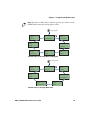
The top levels of the Setup menu are organized in a one-way loop.
Each level has several sub-levels.
Note: The ESC/P printer does not have a Setup menu.
38
PB50 and PB51 Mobile Printer User’s Guide
Chapter 2 — Configuring the Mobile Printer
Note: If you have a Bluetooth or radioless printer, you will not see the
NETWORK setup menu in Fingerprint or IPL.
Starting point
SETUP:
DISPLAY
SETUP:
SETUP:
SER-COM,UART1
NET-COM, NET1
SETUP:
SETUP:
POWER
NETWORK
SETUP:
PRINT DEFS
SETUP:
SETUP:
MEDIA
FEEDADJ
The Main Levels of the Setup Menu in Fingerprint
Starting point
SETUP:
DISPLAY
SETUP:
SETUP:
SER-COM
NETWORK
SETUP:
SETUP:
POWER
TEST/SERVICE
SETUP:
SETUP:
CONFIGURATION
MEDIA
The Main Levels of the Setup Menu in IPL
PB50 and PB51 Mobile Printer User’s Guide
39
Chapter 2 — Configuring the Mobile Printer
Changing Configuration Settings From PrintSet
PrintSet Version 4.2 (or later) is a printer configuration tool that you
can download from the Intermec web site and install on a host PC.
PrintSet can communicate with your printer through a serial cable or
a network connection. It works on all PCs running Windows 98 (or
later). PrintSet allows you to easily change all of the setup parameters.
It also includes setup wizards to guide you through some common
configuration tasks. For more help using PrintSet, see the online help.
Changing Configuration Settings Using the Command
Line
You can change configuration parameters by sending commands
directly to the printer using a communications program like
HyperTerminal and a serial or network connection.
If your printer uses the Fingerprint language, you use the SETUP
command, followed by the node, subnode, and parameters setting.
Here is a Fingerprint example that sets your media setting to labels
with gaps:
SETUP "MEDIA,MEDIA TYPE,LABEL (w GAPS)"
If your printer uses the IPL language, you would send this command:
<STX><SI>T1<ETX>
Fingerprint automatically sends feedback to the communications
program as you type. If you want to see what you are typing with IPL,
you need to complete the following procedure.
To see IPL commands as you type
1 From the HyperTerminal menu, select File > Properties > the
Settings tab.
2 Click the ASCII Setup button.
3 Select Echo typed characters locally.
4 Click OK twice.
For more information on how to change configuration settings, see
either the Fingerprint Command Reference Manual or the IPL
Command Reference Manual. You can download both documents
from the Intermec web site at www.intermec.com.
40
PB50 and PB51 Mobile Printer User’s Guide
Chapter 2 — Configuring the Mobile Printer
Changing Configuration Settings From the Printer Home
Page
If you are have a printer with an 802.11 wireless radio, you can change
configuration settings from the home page of the printer.
To make changes to the configuration
1 Establish a connection between your printer and the network. For
help see “Setting Up 802.11 Radio Communications” on
page 30.
2 Connect your PC to the same network that the printer is on.
3 If you are using Fingerprint or IPL, do the following to find the IP
address:
a Press the Setup button .
until you reach Network.
b Press the
c
Press
d Press
e Press
to enter the Network system menu.
until you reach IP address.
to view the IP address.
4 If you are using ESC/P, use a communications program to find the
IP address.
a Start a communications program.
b In the communications program window, type:
ESC{QST:NW}
and press Enter. The IP address of the printer appears in the
communications program window.
5 Start a web browser.
PB50 and PB51 Mobile Printer User’s Guide
41
Chapter 2 — Configuring the Mobile Printer
6 In the address field, type the IP address of your printer and press
Enter. The home page of the printer appears.
7 Click Login and enter your administrator name and password.
8 On the home page of the printer, click Configuration.
For help with Fingerprint, IPL, ESC/P, or SmartSystems Foundation
commands and information, see either the Intermec Fingerprint
Command Reference Manual, the Intermec Printer Language (IPL)
Command Reference Manual, the ESC/P Programmer’s Reference
Manual, or SmartSystems Foundation online help. You can download
these documents from the Intermec web site at www.intermec.com.
Changing Configuration Settings From the
SmartSystems Console
You can use the SmartSystems Console to change configuration
settings on your printer. The printer ships with the SmartSystems
client loaded on it. The console is part of SmartSystems Foundation
and is available from the Intermec web site. To download
SmartSystems Foundation, go to www.intermec.com/products/
smrtsysfoundation/index.aspx.
42
PB50 and PB51 Mobile Printer User’s Guide
Chapter 2 — Configuring the Mobile Printer
Upgrading the Firmware
The latest firmware and software is available for download from the
Intermec web site at www.intermec.com. You can upgrade the
firmware on your printer using:
•
PrintSet. You can download PrintSet from the downloads page for
the printer on the Intermec web site at www.intermec.com.
•
the printer home page.
•
SmartSystemsTM Foundation.
•
a communications program like HyperTerminal.
When upgrading your firmware, make sure the battery in the
printer is fully charged. If the printer loses power during the
upgrade, the printer may be permanently damaged.
Upgrading the Printer Firmware Using PrintSet
You can only upgrade your printer using PrintSet when the printer is
running IPL, Fingerprint, or ESC/P printer languages. To upgrade the
printer using PrintSet, you need to install PrintSet to your PC and
purchase a serial cable (P/N 075497).
To upgrade the printer firmware using PrintSet
1 Connect your printer to your printer using a serial cable. For help,
see “Connecting the Printer Through the Serial Port” on
page 27.
2 Download the firmware (.bin) file you want to upgrade to a
location on your PC.
a Go to www.intermec.com.
b Click Support > Downloads.
c
Use the Product Category, Product Family, and Product
fields, to select the printer model.
d Click Submit. The latest available software appears on the
page.
e Download the latest firmware version to your PC.
f
Extract the .zip file to a folder on your PC.
PB50 and PB51 Mobile Printer User’s Guide
43
Chapter 2 — Configuring the Mobile Printer
3 Open PrintSet. The Intermec PrintSet dialog box appears.
4 Under My Printers, click the printer whose firmware you want to
upgrade.
5 Under Printer Tasks in the right-hand column, click Firmware
Wizard.
6 Click Next.The Firmware Wizard dialog box appears.
7 Click Browse and navigate to the firmware (.bin) file you want to
use. Wait approximately five minutes as your printer upgrades to
the new firmware.
Upgrading the Printer Firmware Using the Printer Home Page
You can upgrade your printer using the printer home page with a
printer with an 802.11 radio running IPL or Fingerprint.
44
PB50 and PB51 Mobile Printer User’s Guide
Chapter 2 — Configuring the Mobile Printer
To upgrade using the printer home page
1 Establish a connection between your printer and the network. For
help, see “Setting Up 802.11 Radio Communications” on
page 30.
2 Establish a connection between your PC and the network your
printer is on.
3 Download the firmware (.bin) file you want to upgrade to a
location on your PC.
a Go to www.intermec.com.
b Click Support > Downloads.
c
Use the Product Category, Product Family, and Product
fields, to select the printer model.
d Click Submit. The latest available software appears on the
page.
e Download the latest firmware version to your PC.
f
Extract the .zip file to a folder on your PC.
4 If you are using Fingerprint or IPL, use the display to find the IP
address of the printer.
•
Press the Setup button.
•
Press
•
Press
•
Press
•
Press
•
Press the Setup button to exit the menu.
until you reach Network.
to enter the Network menu.
until you reach IP Address.
to select and view the IP Address.
5 Start a web browser.
PB50 and PB51 Mobile Printer User’s Guide
45
Chapter 2 — Configuring the Mobile Printer
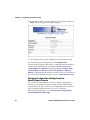
6 In the address field type the IP address of your printer and press
Enter.
=
46
PB50 and PB51 Mobile Printer User’s Guide
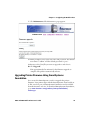
Chapter 2 — Configuring the Mobile Printer
7 Click Maintenance. The Maintenance page appears.
8 When prompted, enter your user name and password. The default
user name is “admin” and the default password is “pass.”
9 Browse to the (.bin) file you want to upgrade to and select it.
10 Click Upgrade.
Wait approximately five minutes for the firmware upgrade to
complete. The printer automatically reboots.
Upgrading Printer Firmware Using SmartSystems
Foundation
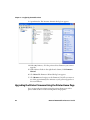
You can use the SmartSystems console to upgrade the printer
firmware. Your printer ships with the SmartSystems client loaded on
it. The console is part of SmartSystems Foundation and is available
from the Intermec web site. To download SmartSystems Foundation,
go to www.intermec.com/products/smrtsysfoundation/
index.aspx.
PB50 and PB51 Mobile Printer User’s Guide
47
Chapter 2 — Configuring the Mobile Printer
Upgrading the Printer Firmware Using a Communications
Program
You can upgrade your printer firmware using a communications
program like HyperTerminal and a printer running either the IPL,
Fingerprint or ESC/P printer language. Using a communications
program is not the preferred method for upgrading printer firmware.
When possible, upgrade using PrintSet or the home page of the
printer.
To upgrade the printer firmware using a communications program
and IPL
1 Connect your printer to your PC using a serial cable. For help, see
“Connecting the Printer Through the Serial Port” on page 27.
or
Establish a connection between your printer and your network
“Connecting the Printer to Your Network” on page 29.
2 If you connected your printer to the network, establish a
connection between your PC and the network your printer is on.
3 Download the firmware (.bin) file you want to upgrade to a
location on your PC.
a Go to www.intermec.com.
b Click Support > Downloads.
c
Use the Product Category, Product Family, and Product
fields, to select the printer model.
d Click Submit. The latest available software appears on the
page.
e Download the latest firmware version to your PC.
f
Extract the .zip file to a folder on your PC.
4 Open a communications program. The communications program
window appears.
5 In the window, type:
<STX><ESC>.y,ush<ETX>
and press Enter. You will be prompted for more data.
48
PB50 and PB51 Mobile Printer User’s Guide
Chapter 2 — Configuring the Mobile Printer
6 Type:
su -p pass admin.
and press Enter.
7 Type:
dlk -z
and press Enter.
The printer’s display will read “Upgrading”.
8 In the communications program window, click Transfer > Send
File. A dialog box will appear.
9 In the protocol drop-down box, choose Zmodem.
10 Browse to the firmware (.bin) file you want to upgrade to and
select it.
Wait approximately five minutes for the firmware upgrade to
complete. When the upgrade is complete, the communications
program will display “kernal flashing ok.” The printer
automatically reboots.
To upgrade the printer firmware using a communications program
and Fingerprint
1 Connect your printer to your PC using a serial cable. For help, see
“Connecting the Printer Through the Serial Port” on page 27.
2 Download the firmware (.bin) file you want to upgrade to a
location on your PC.
a Go to www.intermec.com.
b Click Support > Downloads.
c
Use the Product Category, Product Family, and Product
fields, to select the printer model.
d Click Submit. The latest available software appears on the
page.
e Download the latest firmware version to your PC.
f
Extract the .zip file to a folder on your PC.
3 Open a communications program like HyperTerminal.
PB50 and PB51 Mobile Printer User’s Guide
49
Chapter 2 — Configuring the Mobile Printer
4 Type:
run “su -p pass admin”
and press Enter.
5 Type:
run “dlk -z”
and press Enter.
The printer’s display will read “Upgrading”.
6 In the communications program, click Transfer > Send File. A
dialog box will appear.
7 In the protocol drop-down box, choose Zmodem.
8 Browse to the firmware (.bin) file you want to upgrade to and
select it.
Wait approximately five minutes for the firmware upgrade to
complete. When the upgrade is complete, the communications
program will display “kernal flashing ok.” The printer will
automatically reboot.
To upgrade the printer firmware using a communications program
and ESC/P
1 Connect your printer to your PC using a serial cable. For help, see
“Connecting the Printer Through the Serial Port” on page 27.
2 Download the firmware (.bin) file you want to upgrade to a
location on your PC.
a Go to www.intermec.com.
b Click Support > Downloads.
c
Use the Product Category, Product Family, and Product
fields, to select the printer model.
d Click Submit. The latest available software appears on the
page.
e Download the latest firmware version to your PC.
f
Extract the .zip file to a folder on your PC.
3 Open a communications program like HyperTerminal.
4 Reboot the printer.
50
PB50 and PB51 Mobile Printer User’s Guide
Chapter 2 — Configuring the Mobile Printer
5 Press the Esc key and in the communications program window
type:
{SYS:USH}
and press Enter.
6 Type:
su -pass admin
and press Enter.
7 Type:
dlk -z.
and press Enter.
The printer’s display will read “Upgrading”.
8 In the communications program window, click Transfer > Send
File. A dialog box will appear.
9 In the protocol drop-down box, choose Zmodem.
10 Browse to the firmware (.bin) file you want to upgrade to and
select it.
11 Browse to the firmware (.bin) file you want to upgrade to and
select it.
Wait approximately five minutes for the firmware upgrade to
complete. When the upgrade is complete, the communications
program will display “kernal flashing ok.” The printer will
automatically reboot.
Downloading Fonts and Graphics
The easiest way to download fonts and graphics is to use the free
Intermec printer application called PrintSet. You can download
PrintSet from the downloads page for the your printer on the
Intermec web site at www.intermec.com. Follow the procedures in
the PrintSet online help to download fonts and graphics.
PB50 and PB51 Mobile Printer User’s Guide
51
Chapter 2 — Configuring the Mobile Printer
You can also use Fingerprint, IPL, or ESC/P commands to send fonts
and graphics to the printer. For help with commands and
information, see either the Fingerprint Command Reference Manual ,
the IPL Command Reference Manual, or the ESC/P Programmer’s
Reference Manual. You can download these documents from the
Intermec web site at www.intermec.com.
52
PB50 and PB51 Mobile Printer User’s Guide
3
Troubleshooting and Maintaining the
Mobile Printer
Use this chapter to solve problems you may encounter while
using the printer. You will also find information on booting the
printer and routine maintenance.
In this chapter, you will find these sections:
•
Troubleshooting the Mobile Printer
•
Resetting the Mobile Printer
•
Cleaning the Printer
53
Chapter 3 — Troubleshooting and Maintaining the Mobile Printer
Troubleshooting the Mobile Printer
You may have printer operation, print quality, or printer
communication problems at some time during the life of the printer.
It is easy to fix most of the problems and you will find solutions in
“Troubleshooting Printer Problems and Finding Solutions” on
page 56. If you cannot find the answer to your problem, you may need
to contact Product Support.
Contacting Product Support
Before you call Intermec Product Support, you may want to visit the
Intermec technical knowledge base (Knowledge Central). To do so, go
to www.intermec.com and click Support > Knowledge Central. If
you still need help after visiting Knowledge Central, you may need to
call Product Support.
To talk to an Intermec Product Support representative in the U.S.A.
or Canada, call:
1-800-755-5505
Outside the U.S.A. and Canada, go to www.intermec.com and click
Contact Us to find your local Intermec representative.
Before you call Intermec Product Support, make sure you have the
following information ready:
•
Printer serial number
•
Firmware type and version
•
Bluetooth, wireless, or serial port settings
You can find all of the information listed above in the printer menu
system or on a testprint page.
Understanding Error Messages
Use the following tables to troubleshoot some common error message
you may see display on printer screen. Some of the error messages are
specific to the type of firmware you have loaded on your printer.
54
PB50 and PB51 Mobile Printer User’s Guide
Chapter 3 — Troubleshooting and Maintaining the Mobile Printer
Possible Printer Error Icons and Messages
Error Icon Error Message
Description
Pause
The print job is paused.
Paper out (IPL)
Out of Paper
(Fingerprint)
The printer is out of paper. Load a new roll of
media. For help, see “Loading Media” on
page 11.
Testfeed not
done
The printer did not perform a testfeed before
it printed out test labels. It is important to
perform a testfeed because it calibrates the
sensor.
To perform a testfeed:
• In Fingerprint and ESC/P, press the Feed
button for more than 2 seconds.
• In IPL, open and close the media door and
then press the Feed button.
Printhead hot
The printhead is overheated and needs to
cool down. In IPL, wait for printing to resume
automatically. In Fingerprint and ESC/P,
your print job is lost.
Upgrading
The printer is loading new firmware.
LSS too high,
LSS too low
These errors can occur when you run a test
feed without any media installed, or if you
have incorrect media settings.
Load the printer with media (see “Loading
Media” on page 11), run Test mode (see ),
and select the appropriate media type.
‘
IP configuration The printer is trying to acquire an IP address
error
from the network. Wait for the printer to
complete the task before taking any action.
IP link error
No network connection.
Field out of label You are attempting to print in an area that
extends beyond the print window. See the
command reference manual for your type of
firmware (IPL, Fingerprint, or ESC/P) for
information on how to set the media
parameters.
PB50 and PB51 Mobile Printer User’s Guide
55
Chapter 3 — Troubleshooting and Maintaining the Mobile Printer
Possible Printer Error Icons and Messages (continued)
Error Icon Error Message
Printhead lifted
Description
The printer is not completely closed. Press
down on the media cover to make sure it is
latched.
Troubleshooting Printer Problems and Finding Solutions
Use the following tables to troubleshoot some common problems you
may encounter with the printer.
Printer Problems and Solutions
Problem
Possible Solution
The printer does not
• Replace the battery with a charged battery.
turn on when you press • Connect external power to make sure the
Standby.
printer works correctly and to charge the
battery.
The blue light (Readyto-Work indicator) is
blinking.
• Make sure media is loaded and the media cover
Printer keeps printing
or feeding when it
should stop.
• Check media settings.
• Make sure the label gap sensor is clean. For
The printout is not in
the desired position.
• Check for errors in the software application.
• Make sure the label gap sensor and platen roller
is closed. For help, see “Loading Media” on
page 11.
• There is a printing error. The screen displays an
error message containing information on the
error.
• The printer is paused. The printer is cancelling
a print job.
help, see “Cleaning the Printer” on page 60.
are clean.
The printer is not
• Verify that the wireless settings are correct. For
printing with an 802.11
help, see “Setting Up 802.11 Radio
wireless connection.
Communications” on page 30.
• Make sure the printer has an IP address.
• Make sure the printer is connected to the
network.
• Make sure the printer is in Ready mode.
56
PB50 and PB51 Mobile Printer User’s Guide
Chapter 3 — Troubleshooting and Maintaining the Mobile Printer
Printer Problems and Solutions (continued)
Problem
Possible Solution
The printer is not
printing with a
Bluetooth connection.
• Re-establish a Bluetooth connection with the
When printing, the
printer is skipping
labels.
Perform a testfeed:
• In Fingerprint or ESC/P, press the Feed button
for more than 2 seconds.
• In IPL, open and close the media door and then
press the Feed button.
• Make sure the label gap sensor is clean. For
help, see “Cleaning the Printer” on page 60.
Printout is faded or
weak.
• Fingerprint users: adjust the media constant/
mobile computer or scanner. For help, see your
mobile computer user’s manual or “Setting Up
Bluetooth Communications” on page 29.
• Make sure the mobile computer can print to a
known good printer.
• Print a Bluetooth testprint page to make sure
that the mobile printer discovered your printer.
For help, see “Printing a Test Page” on
page 22.
• Make sure the printer is in Ready mode.
factor and contrast (-10% to +10%).
• IPL users: adjust the media sensitivity setting (10 to +10).
• ESC/P users: Adjust the darkness.
• Check to see if the printhead needs cleaning.
For help, see “Cleaning the Printer” on
page 60.
The battery charge is
• Check the battery date. If the battery is a few
not lasting as long as it
years old, the shortened life may be due to
should.
normal aging.
• Replace the battery.
The test pages do not
print.
PB50 and PB51 Mobile Printer User’s Guide
• Make sure that the blue light is not blinking. If
it is, make sure your printer has media and that
the media cover is closed.
• Make sure that you can advance media by
pressing the Feed button.
57
Chapter 3 — Troubleshooting and Maintaining the Mobile Printer
Printer Problems and Solutions (continued)
Problem
Possible Solution
Print quality is poor.
• Clean the printhead. For help, see “Cleaning
the Printer” on page 60.
• Check the battery and recharge or replace as
necessary. For help, see “Charging the
Batteries” on page 8.
• Check the quality of the media. Use only
Intermec media to ensure superior print quality
and product performance.
• Check that the printer is set to the appropriate
Constant/Factory or sensitivity number for the
media you are using.
Your printer cannot
connect to PrintSet or
HyperTerminal
• Make sure that the serial cable is plugged in.
• Check to make sure that all pins on the serial
cable are straight and not bent.
Troubleshooting Communication Problems
Use Dump mode to verify that the printer is receiving data from the
host correctly.
Using the Line Analyzer in Fingerprint
In Dump mode, the printer runs a Fingerprint program called Line
Analyzer. The Line Analyzer captures incoming characters on the
communication ports and prints them on one or more labels.
The easiest way to enter Dump mode is through Test mode or
Extended Test mode. For help, see “Understanding Test Mode” on
page 20.
After the printer enters Dump mode, it tells you it has entered Dump
mode by printing it on a label. The display shows the Dump mode
icon and printer is ready to receive data.
While the printer is receiving data, the Ready-to-Work indicator
blinks. After a half of a second, if no more characters have been
received, the printer times out. The program considers the
transmission terminated and prints out a label.
58
PB50 and PB51 Mobile Printer User’s Guide
Chapter 3 — Troubleshooting and Maintaining the Mobile Printer
Printable characters are printed in black-on-white. Control characters
and space characters (ASCII 000 to 032 dec) are printed in white-onblack.
As long as a continuous string of characters is being received, the
program wraps the lines until the label is full and then starts to print
another label. After each character transmission, the following
information prints:
•
Page number
•
Number of characters printed on the label
•
Total number of characters received so far
When you exit Dump mode, a final label prints to inform you that it is
exiting from Dump mode.
Using Dump Mode in IPL
When you enter Dump mode, the printer captures incoming
characters on the communication ports and prints them on one or
more labels.
If you have IPL firmware on your printer, you can access Dump mode
in two different ways with slightly different results:
•
You can access Dump mode through Test mode or Extended Test
mode and you will receive printouts that look exactly like those
produced with the Line Analyzer program in Fingerprint. For
more information, see the previous procedure, “Using the Line
Analyzer in Fingerprint” on page 58.
•
You can access Dump mode using the control panel buttons. If
you access Dump mode this way, characters are printed on a
continuous line along with corresponding hexadecimal numbers.
To enter Dump mode using the control panel buttons
•
Press and hold the Feed and Standby buttons until the printer
starts feeding out media.
The printer feeds out several labels (or inches of media), prints the test
labels, and then enters Dump mode.
To exit Dump mode using the control panel buttons
•
Press the Feed button.
PB50 and PB51 Mobile Printer User’s Guide
59
Chapter 3 — Troubleshooting and Maintaining the Mobile Printer
Resetting the Mobile Printer
You rarely need to cold boot the printer, unless you are upgrading the
firmware. If your printer occasionally locks up, you will want to cold
boot it. A cold boot reinitializes the 802.11 radio and clears the
working memory.
Note: The Setup menu is not affected by a cold boot. Your printer
retains all of your configuration settings after the printer powers back
up.
To reset the printer
1 Disconnect the printer from power if externally powered.
2 Remove the battery from the printer for at least one second.
3 Insert the battery back into the printer.
4 Reconnect external power if your printer is externally powered.
Cleaning the Printer
To properly maintain your printer, you must clean it at the
recommended interval. Use the following illustration to locate the
parts of your printer to clean.
Make sure to clean the following parts:
Printhead
Platen roller
Paper sensors
Tear bar
Printer exterior
Media compartment
To avoid possible personal injury or damage to the printer, never
insert any pointed or sharp objects into the printer.
60
PB50 and PB51 Mobile Printer User’s Guide
Chapter 3 — Troubleshooting and Maintaining the Mobile Printer
Use only the cleaning agents specified in this section. Intermec is
not responsible for damage caused by any other cleaning
materials used on this printer. Clean most of the printer with a
cotton swab saturated with alcohol.
Do not clean the linerless platen roller with isopropyl alcohol. It
could damage the surface of the platen roller.
Tear bar
Paper sensor
Label taken
sensor
Printhead
Platen roller
Label gap
sensor
PB50 and PB51 Mobile Label and Receipt Printer: Identifying the parts of the
printer to clean regularly
Cleaning the Printhead
Clean the printhead every five rolls of media to prolong the life of the
printhead and ensures that you maintain high print quality.
Clean the printhead with the cleaning swab. The cleaning swab is
shipped with the printer and can also be purchased separately from
www.intermec.com.
Note: The cleaning swab is the recommended method for cleaning the
printhead and platen roller. Using other methods for cleaning may
damage the printer.
PB50 and PB51 Mobile Printer User’s Guide
61
Chapter 3 — Troubleshooting and Maintaining the Mobile Printer
To clean the printhead
1 Open the media cover.
2 Remove the media and ribbon.
3 Use the cleaning swab to dissolve any contamination on the line of
heat-emitting objects at the front/bottom of the printhead.
Or, clean thoroughly with 70% isopropyl alcohol and a cotton swab.
4 Wait 30 seconds and carefully rub off any contamination.
5 Repeat Steps 4 and 5 if necessary.
6 Allow the printhead to dry for a minute or more before loading a
new supply of media and ribbon.
Cleaning the Platen Roller
Regular cleaning of the platen roller every five rolls of media prolongs
the life of the printhead and ensures that you maintain high print
quality.
Clean the printhead with the cleaning swab. The cleaning swab is
shipped with the printer and can also be purchased separately from
www.intermec.com.
Note: The cleaning swab is the recommended method for cleaning the
printhead and platen roller. Using other methods for cleaning may
damage the printer.
To clean the platen roller
•
Rotate the platen roller and clean it thoroughly with the cleaning
swab.
Be sure to clean the following parts using the cleaning swab:
•
Paper sensors
•
Tear bar
Cleaning the Printer Exterior
Make sure to keep the exterior of the printer clean, this will reduce the
risk of dust or foreign particles reaching the inside of the printer and
affect printer functionality.
62
PB50 and PB51 Mobile Printer User’s Guide
Chapter 3 — Troubleshooting and Maintaining the Mobile Printer
To clean the printer exterior
1 Close the media cover.
2 Use a soft cloth, possibly moistened with water or a mild detergent
and wipe the printer exterior.
Make sure to keep the surface surrounding the printer clean as
well.
Cleaning the Printer Media Compartment
1 Open the media cover.
2 Remove the media and ribbon.
3 Use a brush or air blow the compartment.
Make sure the paper sensors are free of dust.
PB50 and PB51 Mobile Printer User’s Guide
63
Chapter 3 — Troubleshooting and Maintaining the Mobile Printer
64
PB50 and PB51 Mobile Printer User’s Guide
A
Specifications
65
Appendix A — Specifications
Specifications
Physical Dimensions
Depth:
78.7 mm (3.1 in)
Height:
174.5 mm (6.9 in)
Width:
159.5 mm (6.3 in)
Weight:
1190 g (2 lb) with battery
Power Specifications
AC power adapter
voltage:
100 to 240V
Printer voltage:
100V to 240V and 50 Hz to 60 Hz
Operating power:
Rechargeable 16.8 V 2200 mAh
lithium-ion battery
Temperature and Humidity Specifications
Operating temperature:
-15°C to 50°C (5°F to 122°F)
Storage temperature:
-22°C to 70°C (-30°F to 158°F)
Charging temperature:
0°C to 45°C (32°F to 113°F)
Relative humidity:
0 to 95% non-condensing
Sealing:
IP54 is used. The paper path and
slots are excluded from IP54.
Memory
RAM:
16 MB
Flash:
64 MB
Print Speed and Resolution
66
Print speed:
up to 4 ips (100 mm/s)
Resolution:
203 dpi (8 dots/mm)
PB50 and PB51 Mobile Printer User’s Guide
Appendix A — Specifications
Print Technology
Printhead:
Direct thermal
Maximum print width:
108 mm (4.25 in)
Media Specifications
Core inside diameter, standard:
19 mm (0.75in)
Core inside diameter, with adapter: 10.2 mm (0.4 in)
Maximum roll outside diameter:
67.3 mm (2.65 in)
Media width, label with liner/
receipt:
49mm (1.9 in) to 111.5 mm (4.4
in)
Media length, label:
25.4 mm (1.0 in) to 609.6 mm (24
in)
Media length, receipt:
Continuous
Media caliper, label with liner/
receipt:
0.05 mm (0.002 in) to 0.165 mm
(0.0065 in)
Media caliper, tag (maximum):
0.15 mm (0.006 in)
Gap length (centered on
perforation):
3.17 mm (0.125 in) to 12.7 mm
(0.50 in)
Notch length (centered on
perforation):
6.35 mm (0.25 in)
Notch width (centered on
perforation):
12.7 mm (0.50 in)
Black mark length (centered on
perforation):
3.17 mm (0.125 in) to 12.7 mm
(0.50 in)
Black mark width (centered on
media width):
Full width of media
Receipt roll stock media is supplied as a continuous roll. Label, tag,
and fanfold media use repeat indicators for non-continuous media.
Gap, notch, and black marks are used as repeat indicators:
•
Gap: Label and fanfold media
•
Notch: Tag media
•
Black mark: Label, tag, and fanfold media
Here are a few things to keep in mind when ordering media for the
printer:
PB50 and PB51 Mobile Printer User’s Guide
67
Appendix A — Specifications
•
Black marks can only be sensed on the back side of the media.
•
You can use higher caliper media in the printer, but print quality
will be reduced.
•
Receipt roll stock media has an end of roll indicator. The end of
roll indicator is a red marking (on last 3 feet of roll) on the
thermally sensitive side of the
External Fanfold Media Specifications
Stack height:
70 mm (2.75 in)
Page length:
152 mm (6 in)
to 305 mm (12
in)
Note: A 6-inch page length is supplied in 12-inch long stacks (two 6inch stacks of equal height with the bottom page linked).
Specialty media is required for unique customer environments,
including printer operating temperature extremes. Media
performance is format and environment dependent. Not all media
will work in all customer applications. Intermec recommends that
you test the media in your application.
68
PB50 and PB51 Mobile Printer User’s Guide
Appendix A — Specifications
Supported Media
All models of the mobile printer support direct thermal label, tag, and
receipt media. Both North American and European label media are
supported in multiple label lengths. Receipt media is supported in
both a top coated and an uncoated paper in continuous roll stock
only.
The default media sensitivity number is 180.
The default media sensitivity number for linerless media is 103
Use the following table as a guide when setting sensitivity numbers.
Recommended Media Sensitivity, Constant, Factor, and Print Speed
Sensitivity
Constant
Factor
Description
Max Print Speed
North American Label Media
720
60
40
Duratherm Lightning Plus
4 ips
470
52
40
Duratherm Lightning
4 ips
450
48
40
Duratherm Lightning
2 ips
430
100
40
Duratherm Synthetic
4 ips
180
80
40
Duratherm II Label
4 ips
180
80
40
Duratherm III Label
4 ips
180
80
40
Duratherm Near IR
4 ips
150
50
40
Duratherm 5 mil Tag
2 ips
North American Label Media (continued)
103
110
45
Direct Thermal Linerless
Dependent on format
and environment
North America Receipt Media
401
45
40
Duratherm TC
2 ips
102
32
40
Duratherm NTC - 2
2 ips
101
30
40
Duratherm NTC
2 ips
European Label Media
440
47
30
Thermal Eco
2 ips
140
70
40
Thermal Top
4 ips
PB50 and PB51 Mobile Printer User’s Guide
69
Appendix A — Specifications
Interfaces
This section describes the standard interfaces available on the PB50
and PB51 printers.
RS-232 Serial Interface
Use the following tables and graphics to understand the default
settings of the serial port.
Default Settings of the Serial Port
Parameter
Default Setting
Baud rate
115200
Character Length or Data Bits
8
Parity
None
Stop Bits
1
Handshaking
none (Fingerprint
XON/XOFF (IPL)
The illustration below shows printer end of the serial cable.
8
5
6
3
1
Serial Cable (Printer End)
Serial Cable Pins and Descriptions (Printer End)
70
PIns
Signal
Description
1
HHC RXD
Receive data from host (input)
3
HHC CTS
Clear to send from printer (output)
5
HHC RTS
Request to send from host (input)
6
HHC TXD
Transmit data to printer (output)
8
GND
Ground
PB50 and PB51 Mobile Printer User’s Guide
Appendix A — Specifications
The illustration below shows the PC end of the serial cable.
5 4 3 2 1
9 8 7 6
RS-232 Serial Cable DB9 Pins
Serial Cable Pins and Description (PC End)
Pin
Signal
Description
1
DCD
Data carrier detect
2
RXD
Receive data from host (input)
3
TXD
Transmit data to printer (output)
4
DTR
Data terminal ready
5
GND
Ground
6
DSR
Data set ready
7
RTS
Request to send from host (input)
8
CTS
Clear to send from printer (output)
9
RI
Ring indicator
USB Interface
To use the USB interface to print from a PC, you need to have the
Intermec InterDriver printer driver installed on your PC. For help
setting up USB communications, see “Connecting the Printer
Through the USB Interface” on page 26.
The USB cable that ships with the printer has a USB Type A connector
on one end to connect to the PC and a USB Type B connector on the
other end to connect to the printer. You do not need to configure
communications for the USB port.
USB Type A Connector
PB50 and PB51 Mobile Printer User’s Guide
71
Appendix A — Specifications
USB Type B Connector
Accessories for the Mobile Printer
You can use these accessories (sold and ordered separately) with the
printer. To order accessories, contact your local Intermec sales
representative.
AB13 Battery
Use the lithium-ion 2200 mAh battery to provide power to the
printer.
AC18 4-Bay Battery Charger
Use the AC18 to charge up to four batteries at a time. The battery
charger is designed to sense when a battery is fully charged and not
overcharge it, ensuring long and consistent battery life.
AV8 Vehicle Cradle
Use the vehicle cradle to attach the printer to a truck or forklift. You
will need the forklift power supply kit to connect your vehicle power
to the printer.
Belt Clip
Use the printer belt clip to attach the printer to your belt.
Cart Dock
Use the cart dock to easily attach the printer to a movable cart or a flat
surface.
Forklift Power Supply Kit
Use the forklift power supply kit to connect the printer and vehicle
cradle to a truck or forklift.
Handstrap
Use the printer handstrap to conveniently carry your printer. With the
handstrap attached, you can also attach the printer shoulder strap.
72
PB50 and PB51 Mobile Printer User’s Guide
Appendix A — Specifications
Intermec Cleaning Swab
Use the Intermec cleaning swab to clean the printhead and platen
roller. One cleaning swab is included in the box with the printer. You
can also purchase the cleaning swab from www.intermec.com.
Power Supply (Model AE19)
Provides power to the mobile printer and the 4-bay battery charger
(Model AC18).
Printhead Cleaning Pen
Use the cleaning pen to clean the printhead.
Protective Case
Use the protective case to transport and store your printer. The
protective case keeps the printer free of dust, dirt, and moisture and
still provides easy access to the printer for printing.
Serial Cable
The serial adapter is an 8-pin DIN to DB9 connector that connects
from the printer to your desktop PC.
Shoulder Strap
Use the shoulder strap in combination with the handstrap to easily
carry the printer. The wide padded strap makes it comfortable to wear
the printer for long periods of time.
PB50 and PB51 Mobile Printer User’s Guide
73
Appendix A — Specifications
74
PB50 and PB51 Mobile Printer User’s Guide
B
IPL and Fingerprint Setup Menus
75
Appendix B — IPL and Fingerprint Setup Menus
IPL Setup Menu
SETUP
SER-COM
BAUDRATE
DATA BITS
PARITY
STOPBITS
IP ADDRESS
NETMASK
DEFAULT
ROUTER
DATA DUMP
MEMORY RESET
LSS TEST
LBL LENGTH
DOTS
LBL WIDTH
DOTS
PROTOCOL
NETWORK
IP SELECTION
NAMESERVER
MAC ADDRESS
SENSITIVITY
DARKNESS
TEST/SERVICE
TESTPRINT
CONFIG
TEST LABELS
FORMAT
PAGE
UDC
FONT
MEDIA
TESTFEED
MODE
MEDIA TYPE
LBL REST POINT
FORM ADJ DOTS
X
FORM ADJ DOTS
Y
CONFIGURATION
PWRUP
EMULATION
PRINT SPEED
LTS
CALIBRATION
SLEEP TIMER
STANDBY TIMER
POWER
LOW BATTERY
DISPLAY
ORIENTATION
76
CONTRAST
PB50 and PB51 Mobile Printer User’s Guide
Chapter B — IPL and Fingerprint Setup Menus
Fingerprint Setup Menu
SETUP
SER-COM,UART1
CHAR LENGTH
BAUDRATE
PARITY
STOPBITS
FLOWCONTROL
NEW LINE
REC BUF
TRANS BUF
RTS/CTS
NET-COM NET 1
ENQ/ACK
NEW LINE
XON/XOFF
DATA TO HOST
DATA FROM
HOST
NETWORK
IP SELECTION
IP ADDRESS
DEFAULT
ROUTER
NETMASK
NAMESERVER
MAC ADDRESS
FEEDADJ
STARTADJ
STOPADJ
MEDIA
MEDIA SIZE
XSTART
WIDTH
LENGTH
MEDIA TYPE
PAPER TYPE
LABELS
(w GAPS)
DIRECT
THERMAL
TICKET
(w MARK)
CONTRAST
TESTFEED
TESTFEED
MODE
LEN (SLOW
MODE)
LABEL
CONTRAST
TICKET
(w GAPS)
LABEL
FACTOR
FIX LENGTH
STRIP
VAR LENGTH
STRIP
PRINT DEFS
HEAD RESIST
TESTPRINT
PRINT SPEED
POWER
LOW BATTERY
SLEEP TIMER
LSS TEST
CLIP DEFAULT
LTS
LESS AUTO
LTS VALUE
LSS MANUAL
LTS ADJUST
STANDBY TIMER
LTS TEST
DISPLAY
ORIENTATION
CONTRAST
PB50 and PB51 Mobile Printer User’s Guide
77
Appendix B — IPL and Fingerprint Setup Menus
78
PB50 and PB51 Mobile Printer User’s Guide
Worldwide Headquarters
6001 36th Avenue West
Everett, Washington 98203
U.S.A.
tel 425.348.2600
fax 425.355.9551
www.intermec.com
© 2010 Intermec Technologies
Corporation. All rights reserved.
PB50 and PB51 Mobile Printer User’s Guide
*934-012-004*
P/N 934-012-004