1
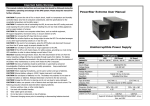
Important Safety Warning (SAVE THESE INSTRUCTIONS)
POWER
CAUTION!
acceptable temperature and humidity range.)
CAUTION! To reduce the risk of overheating the UPS, do not cover the UPS' cooling vents and
avoid exposing the unit to direct sunlight or installing the unit near heat emitting appliances
such as space heaters or furnaces.
CAUTION! Do not attach non-computer-related items, such as medical equipment,
life-support equipment, microwave ovens, or vacuum cleaners to UPS.
CAUTION! Do not plug the UPS input into its own output.
CAUTION! Do not allow liquids or any foreign object to enter the UPS. Do not place beverages
or any other liquid-containing vessels on or near the unit.
CAUTION! In the event of an emergency, press the OFF button and disconnect the power
cord from the AC power supply to properly disable the UPS.
CAUTION! Do not attach a power strip or surge suppressor to the UPS.
CAUTION! If the UPS is with metal chassis, for safety purpose, grounding is a must during
UPS installation in order to reduce leakage current below 3.5mA.
Attention hazardous through electric shock. Also with disconnection of this unit from the
mains, hazardous voltage still may be accessible through supply from battery. The battery
supply should be therefore disconnected in the plus and minus pole at the quick connectors of
the battery when maintenance or service work inside the UPS is necessary.
CAUTION! Servicing of batteries should be performed or supervised by personnel
knowledgeable of batteries and the required precautions. Keep unauthorized personnel away
from batteries.
CAUTION! When replacing the batteries, use the same number and type of batteries.
CAUTION! Internal battery voltage is 12VDC. Sealed, lead-acid, 6-cell battery.
CAUTION!
mutilate the battery or batteries. Released electrolyte is harmful to the skin and eyes.
CAUTION! Unplug the UPS prior to cleaning and do not use liquid or spray detergent.
CAUTION! A battery can present a risk of electric shock and high short circuit current. The
following precaution should be observed before replacing batteries:
1)
Remove watches, rings, or other metal objects.
2)
Use tools with insulated handles.
3)
Wear rubber gloves and boots.
4)
Do not lay tools or metal parts on top of batteries.
5)
Disconnect charging source prior to connecting or disconnecting batteries terminal.
Software Download & Installation
If your UPS came with a software CD, follow the instructions on the CD, otherwise:
1. Go to the website http://www.power-software-download.com
2. Click ViewPower software icon and then choose your required OS to downloadthe software.
3. Follow the on-screen instructions to install the software.
Inspired
VIX3000 Series Line Interactive
UPS System
Model
VIX3065
VIX3085
CAPACITY
INPUT
Voltage
Voltage Range
OUTPUT
Voltage Regulation
Transfer Time
Waveform
BATTERY
Type & Number
Charging Time
PHYSICAL
Dimension (DxWxH mm)
Net Weight (kgs)
ENVIRONMENT
Humidity
Nosie Level
MANAGEMENT
650VA/360W
850VA/480W
USB
Power Inspired Ltd. Units 5-7 High Point, Riding Road, Brackley UK.
Tel: 01280 811180
VIX3000-REV1
www.powerinspired.com
VIX3100
VIX3150
VIX3200
1000VA/600W 1500VA/900W 2000VA/1200W
220/230/240 VAC
162-290 VAC
+/-10%
Typical 2-6 ms, 10 ms max.
Simulated Sine Wave
12V/7AHx1
12V/9AHx1
12V/7AHx2
12V/9AHx2
12V/9AHx2
4-6 hours recover to 90% capacity
287 x 100 x 142
4.25
4.9
350x146x160
8.0
397 x 146 x 205
11.1
11.5
0-90 % RH @ 0-40 C (non-condensing)
Less than 40 dB
Supports Windows® 2000/2003/XP/Vista/2008, Windows®7/8
Linux, Unix and MAC
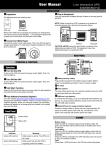
Introduction
Connect to Utility and Charging
Thank you for purchasing a Power Inspired Uninterruptible Power Supply. For further
information on this product or for support please visit www.powerinspired.com/vix3000/
Connect the Loads
LCD Models
LCD panel
8
3 9
4
Connect Modem/Phone/Network for Surge Protection
5
Connect a single modem/phone line into surge-protected “IN” outlet on the back panel of
the UPS unit. Connect from “OUT” outlet to the computer with another phone line cable.
7
1.
2.
3.
4.
5.
Power switch
Input information
Output information
AC mode indicator
Battery mode indicator
Load level indicator
6. Battery capacity indicator
7. Overload indicator
8. Low battery indicator
9. Fault indicator
To allow for unattended UPS shutdown/start-up and status monitoring, connect the
communication cable one end to the USB/RS-232 port and the other to the communication
shutdown/start-up and monitor UPS status through PC.
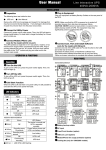
Turn On/Off the Unit
5
Fault : Red lighting
5
2
4
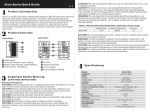
1 Output receptacles
2 AC input
3 Circuit breaker / Fuse
2
3
4
1
2
1
1
4
650V/850VA
Connect Communication Cable
port of your PC. With the monitoring software installed, you can schedule UPS
AC mode: green lighting
5
6 hours
Plug in the loads to output receptacles on the rear panel of the UPS. Simply turn on the
power switch of UPS unit, then devices connected to the UPS will be protected by UPS unit.
6
Power switch
suggest to charge the battery at least 6 hours before initial use.
The unit charges its battery while connecting to the utility.
Product Overview
LED Models
UPS status LED
Plug in the AC input cord to the wall outlet. For the best results,
1KVA
4 Modem/Phone/Network surge
protection
Installation & Operation
NOTE: Before installation, please inspect the unit. Be sure that nothing inside
the package is damaged.
Placement & Storage Conditions
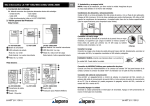
Please place the UPS away from other units at least 20 cm to avoid interference. Do NOT
check the specs for the limitations.)
Turn off the UPS by pressing the power switch again.
CAUTION: NEVER connect a laser printer or scanner to
the UPS unit. This may cause the damage of the unit.
Troubleshooting
5 USB com port
1.5KVA/2KVA
operat
Turn on the UPS unit by pressing the power switch.
Problem
Possible Cause
Solutions
AC
input
is
not
connected
Check
if
the
input
power
LCD blank / No LEDs
well.
connected
to
the
mains.
illuminated when
AC input is connected to the Plug AC input power cord to AC input
mains is normal
UPS output.
correctly.
Battery backup time is Batteries are not fully
Charge the batteries at least 6 hours
shorter than nominal charged.
and then check the capacity again.
value.
If the problem still persists, please
consult your dealer.
Batteries defect.
Contact your dealer to replace the
batteries.
Warning or fault icon Fan is locked or not working. Check fans and notify your dealer.
is shown and alarm is The UPS is overload.
continuously
reconnecting devices, please verify
sounding.
the total loads match the UPS
spec.
Low battery icon is
Low battery.
Charge the UPS at least 6 hours.
shown on the LCD
screen.