1
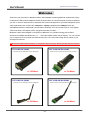
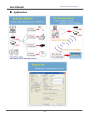
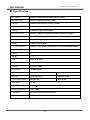
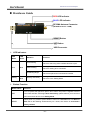
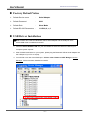
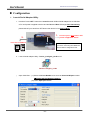
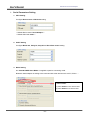
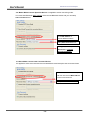
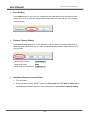
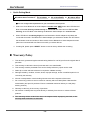
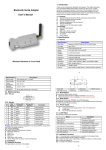
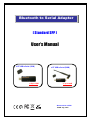
Bluetooth to Serial Adapter [ Standard SPP ] User’s Manual ● BT USB to Serial (150M) >> Up to 150M ● BT USB to Serial (500M) >> Up to 500M Bluetooth V2.1+EDR V4.0B July, 2011 User’s Manual Bluetooth to Serial Adapter Contents Table Welcome...…………………………………………………… 2 Package Contents.…………………………………………… 3 Feature………………………………………………………. 3 Application…………………………………………………… 4 Specification…………………………………………………. 5 Hardware Guide……………………………………………… 6 ¾ LED Indicators…………………….…………..…………..…. 6 ¾ Button Function…………………….…………..…………..…. 6 Factory Default Value…………………………………………. 7 USB Driver Installation……….……………………………….. 7 Configuration ¾ Launch Serial Adapter Utility…………………….……………… 8 ¾ Serial Parameters Setting …………….………..……………..… 9-10 ¾ Save Setting……………………….…………..…………..…. 11 ¾ Restore Factory Default….………..……………………….….... 11 ¾ Hardware Restore Factory Default…………….………..….…..… 11 ¾ Quick Pairing Mode……..……………………………….…….. 12 Warranty Policy…………………..……………………….…. -1- 12 User’s Manual Bluetooth to Serial Adapter Welcome Thanks for your purchase our Bluetooth USB to Serial Adapter. Featuring Bluetooth wireless technology, our Bluetooth USB to Serial Adapter provides the best solution for cable-free Serial connections between your PC or Server & serial devices to industrial and commercial application. It provides transparent serial cable replacement and connects any Computer or Laptop equipped with a USB port to link any Serial-Based devices to a Bluetooth communication wirelessly, such as barcode scanner, cash register, credit card reader, LED display, RFID, sphygmomanometer, film tilter, ........ Bluetooth USB to Serial Adapter is compliance to Bluetooth V2.1+EDR technology and is able to downward compatible with Bluetooth V1.x….. and improve data transfer rate & capacity. You can connect your computer or server and RS-232 serial devices up to 150 / 500 meters away without cables in your working environments. ※ Bluetooth USB to Serial Adapter is compatible with following - Bluetooth SPP Serial Products: ● BT to RS-232 (150M) ● BT to RS-422/485 (150M) Bluetooth to RS-232 Serial Adapter Bluetooth to RS-485/422 Serial Adapter >> 150 Meter >> 150 Meter ● BT to RS-232 (500M) ● BT to RS-422/485 (500M) Bluetooth to RS-232 Serial Adapter Bluetooth to RS-485/422 Serial Adapter >> 500 Meter >> 500 Meter -2- User’s Manual Bluetooth to Serial Adapter Package Contents ¾ Bluetooth USB to Serial Adapter x1 ¾ USB Cable (Type A Female to Male) x1 ¾ User’s Manual x1 ¾ CD (Device Utility / Driver) x1 ¾ 5dBi RP-SMA Antenna (BT USB to Serial – 500M) x1 Feature ¾ Bluetooth Specification V2.1+EDR ¾ CSR BC04 Chipset ¾ Operation Range up to 150/500 Meters. ¾ Supports Bluetooth Serial Port Profile (SPP) ¾ Provides transparent Serial cable replacement. ¾ Supports Baud Rate 1.2k to 921.6k bps. ¾ Easy to use Windows configuration tool available. ¾ Supports UART interface. ¾ Supports CTS/RTS hardware flow control. ¾ Customized features support for pairing mode, device name, PIN code. ¾ Supports Bluetooth SPP as a slave or a master. ¾ Supports Bluetooth Auto Reconnect. ¾ Support OS: Win 98/ ME/ 2000/ XP/ Vista/ Win 7, Win CE, Linux, MAC OS -3- User’s Manual Bluetooth to Serial Adapter Application -4- User’s Manual Bluetooth to Serial Adapter Specification Model Name Bluetooth USB to RS-232/422/485 Serial Adapter Bluetooth Profile Series Port Profile (Bluetooth SPP) Standard Bluetooth specification version 2.1+EDR Frequency 2.402GHz ~ 2.480GHz unlicensed ISM band Hopping 1,600/sec, 1 MHz channel space Modulation Method GFSK for 1Mbps; Π/4-DQPSK for 2Mbps; 8-DPSK for 3Mbps Transfer rates (Max) Max UART baud rates of 3Mbps Spread Spectrum Frequency Hopping Spread Spectrum (FHSS) Interface USB 2.0 (Type-A Male) Transfer Baud Rate Supports 1.2/2.4/4.8/9.6/19.2/38.4/57.6/115.2/230.4/460.8/921.6kbps Flow Control CTS / RTS Data Bit 8 Stop Bit 1,2 Parity None, Odd, Even RF Output Power Class 1 Tx Power Max.18 +/-2 dBm Rx Sensitivity -80 dBm typical Antenna PCB Antenna 5dBi RP-SMA Antenna Coverage Up to 150 meter Up to 500 meter Current Consumption Max. 90 mA Max. 95 mA Input Power 5V DC Operating Temperature 0 ~ +60℃ Storage Temperature -10 ~ +70℃ Dimensions 78 x 31 x 12.5mm (without antenna) Operation System Win 98/ ME/ 2000/ XP/ Vista/ Win 7, Win CE, Linux, MAC OS -5- User’s Manual Bluetooth to Serial Adapter Hardware Guide RED LED Indicator BLUE LED Indicator RP-SMA Antenna Connecter (BT USB to Serial – 150M) RESET Button SET Button ; USB Connector ¾ LED Indicators LED LED Name Color Situation Fast Flashing Link Blue Slow Flashing Everlasting Bright Setting ¾ Red & Blue Flashing alternatively Function Search Mode: Device is searching other available devices to pair. Waiting Mode: Device is waiting to be connected. Connected Mode: Device has paired and connected successful. Setting Mode: Device is in the Setting Mode. Button Function Button Name Function Turn off power then persist to press “SET” button until power is applied to device SET when Red and Blue LED begin flash alternatively, please take off your hand from SET button then device is into Setting Mode. When power on, persist to press “RESET” button for 3 seconds then LED Red and RESET Blue will be fast flashing simultaneously for 3 times, then device is recovered to factory default. -6- User’s Manual Bluetooth to Serial Adapter Factory Default Value ¾ Default Device name : Serial Adapter ¾ Default Password : 0000 ¾ Default Role : Slave Mode ¾ Default RS-232 Parameters : 1115200, 8, n, 1 USB Driver Installation ※ Note: Please don’t insert the Bluetooth USB to Serial Adapter into the USB port of PC before USB driver is installed successful. 1. Insert the Device Software CD into your CD-ROM then select the driver to install as your computer system request. 2. After finished install driver on your system, please plug the Bluetooth USB to Serial Adapter into the USB port of your PC or Laptop. 3. You will find out a new virtual COM port – Silicon Labs CP210x to UART Bridge in Device Manager, if driver has been installed successful. Device Manager -7- User’s Manual Bluetooth to Serial Adapter Configuration ¾ Launch Serial Adapter Utility 1. Persist to Press “SET” button then insert Bluetooth USB to Serial Adapter into a USB Port of PC until power is applied to device and the Red and Blue LED begin flash alternatively, please take off your hand from SET button then device is into Setting Mode. 1. 2. Persist to press “SET” Button until power is applied to device Insert into PC USB Port Note: Please you must disconnect if your PC is connecting other Bluetooth devices before configuration start. 2. Launch Serial Adapter Utility – Device_Configure_v4.0B on PC Device-Configure_v4.0B 3. Open COM Port - (1) Select COM Port Number to be same as Virtual COM port number. ※ Please refer the picture in page 7. (2) Press “Open port” Button -8- User’s Manual ¾ Bluetooth to Serial Adapter Serial Parameters Setting 1. INFO Setting Configure Device name & PIN Code setting. ** Default Device name: Serial Adapter ** ** Default PIN Code: 0000 ** 2. UART Setting Configure Baud rate, Parity bit, Stop bit and Hard flow control setting. 3. Mode Setting 3-1. Standard SPP Slave Mode: It’s applied to passive connecting mode. Bluetooth Serial Adapter is waiting to be connected with other devices such as PC, PDA or….. ** Discoverable: (1) Select Enable to show device name. (2) Select Disable to hid device name -9- User’s Manual Bluetooth to Serial Adapter 3-2. Master Mode Connect Specified Device: It’s applied to active connecting mode. You must enter Bluetooth MAC address of the remote Bluetooth device and you can setup auto reconnect times. Enter MAC Address of Remote Bluetooth Device. Setup Auto Reconnect times. ** Suggest you to setup Auto Reconnect to “Connect disconnected device. 3-3. Slave Mode Connect Last Connected Device It’s applied to active auto reconnect last connected device and setup the auto reconnect times. At this mode, Bluetooth Serial Adapter will auto memorize the MAC Address of last connected device. Setup Auto Reconnect times. - 10 - User’s Manual ¾ Bluetooth to Serial Adapter Save Setting Press Update button to save your new configuration then turn off the power of Bluetooth Serial Adapter then turn it on, after then the Bluetooth Serial Adapter will work with your new configure Serial parameter. ¾ Restore Factory Default Press Restore factory button to recover parameter to factory default then turn off the power of Bluetooth Serial Adapter then turn it on, after then Bluetooth Serial Adapter default will recover to factory default. ** Default Device Name: Serial Adapter ** Default PIN Code: 0000 ** Default RS-232 Parameters: 115200, 8, n, 1 ¾ Hardware Restore Factory Default 1. Turn on power. 2. Please persist to press “RESET” button for 3 seconds then LED Red and Blue will be fast flashing simultaneously for 3 times, then device is recovered to factory default. - 11 - User’s Manual ¾ Bluetooth to Serial Adapter Quick Pairing Mode This function is only able to apply with our Bluetooth Serial Adapter products connecting. ◆BT USB to Serial connect to : BT to RS-232 or BT to RS-422/485 or BT USB to Serial Connect power into two Bluetooth to Serial Adapters then Blue LED will be Slow Flashing. ※ You can configure Serial parameters as your need before connect power 1. Select one of two Bluetooth to Serial Adapter to double click “SET” button then LED Red and Blue will be slow flashing simultaneously for 2 seconds after then become LED Blue fast flashing, when LED Blue is fast flashing the Bluetooth Serial Adapter is in search mode. 2. When LED Blue is everlasting bright, the two Bluetooth to Serial Adapters had paired and connected successful. The Bluetooth to Serial Adapter you selected to double click SET button that is Master mode and another is Slave mode, the two Bluetooth to Serial Adapters that had paired and connected will Auto-Reconnect when you reboot devices. 3. If setting fail, please press “RESET” button to recover factory default then re-setting. Warranty Policy 1. This device is guaranteed against manufacturing defects for one full year from the original date of purchase. 2. This warranty is valid at the time of purchase and is non-transferable. 3. This warranty must be presented to the service facility before any repair can be made. 4. Sales slip or other authentic evidence is required to validate warranty. 5. Damage caused by accident, misuse, abuse, improper storage, and/or uncertified repairs is not covered by this warranty. 6. All mail or transportation costs including insurance are at the expense of the owner. 7. Do not send any product to service center for warranty without a RMA (Return Merchandise Authorization) and proof of purchase. Ensure a trackable method of delivery is used (keep tracking number). 8. Warranty is valid only in the country of purchase. 9. We assume no liability that may result directly or indirectly from the use or misuse of these products. 10. This warranty will be voided if the device is tampered with, improperly serviced, or the security seals are broken or removed". - 12 -