1
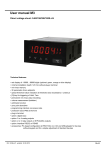
User manual M2-1F
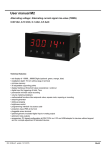
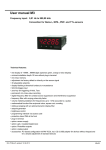
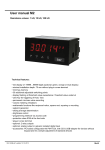
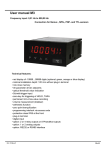
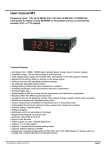
Frequency input: 0.01 Hz to 999.99 kHz / 0.01 Hz to 9.9999 kHz / 0-2.500 kHz
Connection for Namur, NPN/PNP with HTL- or TTL-output or for
position survey via incremental encoder
Technical features:
• red display of -19999…99999 digits (optional: green, orange or blue display)
• minimal installation depth: 70 mm without plug-in terminal
• min/max memory
• adjustment via factory default or directly on the sensor signal
• 30 adjustable supporting points
• display flashing at threshold undercut or exceedance
• simplified parameterisation U/min with only 3 parameters
• Schmitt-trigger-input
• zero-key for triggering of Hold, Tara
• permanent min/max-value recording
• digital frequency filter for contact bounce suppression and interference suppresion
• frequency filter with varying pulse-duty factor
• volume metering (totaliser) for frequencies up to 1 kHz (accurate to a pulse)
• mathematical function like reciprocal value, square root, rounding
• sliding averaging with an optional dynamic display filter
• setpoint generator
• brightness control
• programming interlock via access code
• protection class IP65 at the front
• plug-in terminal
• sensor supply
• galv. isolated digital input
• option: relay outputs
• option: analog output
• accessories: PC-based configuration-kit PM-TOOL incl. CD & USB-adapter for devices without
keypad and for a simple adjustment of standard devices
M2_1FGB.pdf update: 10.03.2015
96x48
Identification
STANDARD-TYPES
Frequency
Housing size: 96x48 mm
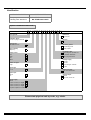
ORDER NUMBER
M2-1FR5B.0307.570CD
M2-1FR5B.0007.670CD
Options – breakdown of order code:
M 2- 1 F R 5 B. 0 3 0 7. 5 7 0 C D
Basic type M2
Dimension
D physical unit
Installation depth
89 mm, incl.plug-in terminal
2
Version
C C
Housing size
B96xH48xT70 mm
1
Switching points
0 no switching points
Type of display
Frequency
F
2 2 relay outputs
Protection class
1 without keypad, operation via
Display colour
Blue
Green
B
G
Red
Yellow
R
Y
Number of digits
5-digit
5
PC-software PM-TOOL
7 IP65 / plug-in terminal
Voltage supply
4 115 VAC
5 230 VAC
6 10-30 VDC galv. isolated
8 24 VDC
Digit height
14 m m
B
Measuring input
1 0.01 Hz to 999.99 kHz
Digital input
without
one
0
I
Analog output
0 without
X 0-10 VDC, 0/4-20 mA
Sensor supply
without
0
10 VDC / 20 mA, incl. digital
24 VDC / 50 mA, incl. digital
2
3
24 VDC / 50 mA, incl. digital K
and pulse output max 10 kHz
Please state physical unit by order, e.g. m/min.
Contents
1.
Brief description
2
2.
Assembly
3
3.
Electrical connection
4
4.
Function description and operation
6
4.1. Programming software PM-TOOL
7
Setting up the device
8
5.1. Switching on
8
5.2. Standard parameterisation (flat operation level)
8
5.
Value assignment for the triggering of the signal input
5.3. Programming interlock „RUN“
12
Activation/Deactivation of the programming interlock or change into professional
or flat operation level
5.4. Extended parameterisation (professional operation level)
5.4.1. Signal input parameters „INP“
13
13
Value assignment for the triggering of the signal input incl. linearisation
5.4.2. General device parameters „FCT“
17
Superior device functions like Hold, Tara, min/max permanent, setpoint value function /
nominal value function, averaging, brightness control, as well as the control of the digital input and
keyboard layout
5.4.3. Safety parameters „COD“
21
Assignment of user and master code to lock or to receive access to defined parameter such as
analog output and alarms, etc.
5.4.4. Analog output parameters „Out“
22
Analog output functions
5.4.5. Relay functions „rel“
24
Parameter for setpoint definition
5.4.6. Alarm parameters „AL1…AL4“
26
Actuator and dependencies of the alarms
5.4.7. Totaliser (Volume metering) „tot“
28
Parameter for calculation of the sum function
6.
Reset to factory settings
29
Reset parameters onto the delivery state
7.
Alarms / Relays
30
Functional principle of the switching outputs
8.
Programmer examples
31
Sample applications like e.g. calculation of the input frequency or the adjustment at unknown rotation speed
9.
Technical data
34
10.
Safety advices
36
11.
Error elimination
37
1
1. Brief description
1. Brief description
The panel meter M2-1F can evaluate pulses in many different ways and show the result in the 5-digit LEDdisplay. Available options are: frequency coverage with optional filters, summate of pulses or display values
via the time, detection of a rotational speed or collection of a position via an incremental encoder. The
results can be monitored via alarm conditions and can be displayed onto the optional switching point.
Furthermore the results can be freely scaled on an optional analog output and relayed to a control system.
The device can be operated directly by Namur sensors, 3-wire sensors, switching/slider contacts,
incremental encoders (HTL-/TTL-output) or TTL-signals.
Via the 4 navigation keys on the front, the device can be adjusted onto different kind of applications and
later on different functions of the device can be controlled. The adjustment is also possible via the PCSoftware PM-TOOL with a special connecting cable. With an individual code, the created parameterisation
can be protected against changes by the user.
Numerous applications can be realised with this device, like e.g. tachometer, revolution counter, flowmeter,
dosing equipment, filling capacity meter, baking time meter of a baking oven, flying knife, position
evaluation, position surveillance, flow rate surveillance, acoustic discharge measurements and so on. By
use of the integrated, configurable functions like permanent min/max-recording, averaging, frequency filter,
setpoint setting, threshold value recording via alarm system, 30-points-linearisation, mathematic charging
and many more, you receive an universal applicable modern system for your demands in measuring and
control technique.
2
2. Assembly
2. Assembly
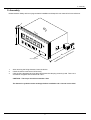
Please read the Safety advice on page 36 before installation and keep this user manual for future reference.
3,0
48,0
M2
Se
alin
g
,0
89
l.
inc
h
t
p
de
on
i
t
a
tall
Ins
Gap for physical unit
1.
2.
3.
l
na
erm
t
n
g-i
plu
After removing the fixing elements, insert the device.
Check the seal to make sure it fits securely.
Click the fixing elements back into place and tighten the clamping screws by hand. Then use a
screwdriver to tighten them another half a turn.
CAUTION! The torque should not exceed 0.1 Nm!
The dimension symbols can be exchanged before installation via a channel on the side!
3
3. Electrical connection
3. Electrical connection
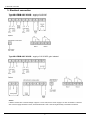
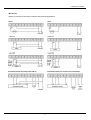
Type M2-1FR5B.0307.470CD – supply of 115 VAC
Type M2-1FR5B.0307.570CD – supply of 230 VAC
Type M2-1FR5B.0007.670CD – supply of 10-30 VDC galv. isolated
Advice:
If Namur sensors with a nominal voltage of approx. 8 V are used, then a sensor supply of 12 VDC is needed. For devices
with a sensor supply terminals 4 and 8, aswell as terminals 3 and 7 need to be galvanically connected in the device.
4
3. Electrical connection
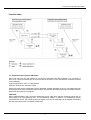
M3-devices
Below you find some connection examples with practical applications:
5
4. Function and operation description
4. Function and operation description
Operation
The operation is divided into three different levels.
Menu level (delivery status)
This level is for the standard settings of the device. Only menu items which are sufficent to set the device
into operation are displayed. To get into the professional level, run through the menu level and parameterise
“prof“ under menu item RUN.
Menu group level (complete function volume)
Suited for complex applications as e.g. linkage of alarms, setpoint treatment, totaliser function etc. In this
level function groups which allow an extended parameterisation of the standard settings are availabe. To
leave the menu group level, run through this level and parameterise „uloc„ under menu item RUN.
Parameterisation level:
Parameter deposited in the menu item can be parameterised here. Functions, that can be changed or
adjusted, are always signalised by a flashing of the display. Settings that are made in the parameterisation
level are confirmed with [P] and thus safed. By pressing the „zero-key“ it leads to a break-off of the value
input and to a change into the menu level. All adjustments are safed automatically by the device and
changes into operating mode, if no further key operation is done within the next 10 seconds.
Level
Key
Description
Change to parameterisation level and deposited values.
Menu level
Keys for up and down navigation in the menu level.
Change into operation mode.
To confirm the changes made at the parameterization level.
Parameterisation
level
Adjustment of the value / the setting.
Change into menu level or break-off in value input.
Change to menu level.
Menu group level
Keys for up and down navigation in the menu group level.
Change into operation mode or back into menu level.
6
4. Function and operation description
Function chart:
4.1. Parameterisation software PM-TOOL:
Part of the PM-TOOL are the software on CD and an USB-cable with device adapter. The connection is
done via a 4-pole micromatch-plug on the back side of the device, to the PC-side the connection ist done
via an USB plug.
System requirements: PC incl. USB interface
Software: Windows XP, Windows VISTA
With this tool the device configuration can be generated, omitted and safed on the PC. The parameters can
be changed via the easy to handle program surface, whereat the operating mode and the possible selection
options can be preset by the program.
CAUTION!
During parameterisation with connected measuring signal, make sure that the measuring signal has no
mass supply to the programming plug. The programming adapter is galvanic not isolated and directly
connected with the PC. Via polarity of the input signal, a current can discharge via the adapter and destroy
the device as well as other connected components!
7
5. Setting up the device
5. Setting up the device
5.1. Switching-on
Once the installation is complete, start the device by applying the voltage supply. Before, check once again
that all electrical connections are correct.
Starting sequence
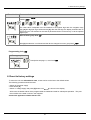
For 1 second during the switching-on process, the segment test (8 8 8 8 8) is displayed, followed by an
indication of the software type and, after that, also for 1 second, the software version. After the starting
sequence, the device switches to operation/display mode.
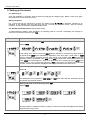
5.2. Standard parameterisation: (flat operation level)
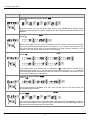
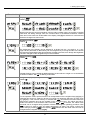
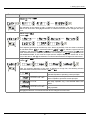
To parameterize the display, press the [P] key in operating mode for 1 second. The display then changes to
the menu level with the first menu item TYPE.
Menu level
Parameterisation level
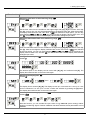
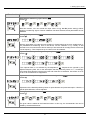
Selection of the input signal, TYPE:
Default: frequ
If the scaling of the device is done via SEnS.F (Sensor calibration), the frequency range needs to
be preset under rAnGE and is adjusted by application of the final value / initial value. If FrEqU
(Factory calibration) is preferred, the final value needs to be entered under End and the final
frequency needs to be entered under EndA. Under OFFS the initial value needs to be entered and
under OFFSA the initial frequency. There is no application of the measuring signal. Rotar is the
rotation in r.p.m. up to 10 kHz input frequency. Posit is the position recognition per incremental
encoder. Confirm the selection with [P] and the display switches back to menu level.
Adjustment of pulses per rotation, ppr:
Default: 1
This parameter is only important if type=rotar or =Posit have been selected. Generally it shows
the number of pulses per rotation.
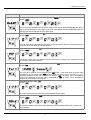
Setting end value of the measuring range, END:
Default: 100e3
9.9999 Hz
99.999 Hz
99.999 kHz
999.99 kHz
999.99 Hz
9.9999 kHz
Choose between six different frequency ranges. Confirm the selection with [P] and the display
switches back to menu level.
8
5. Setting up the device
Menu level
Parameterisation level
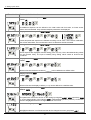
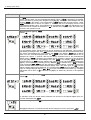
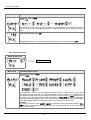
Setting the final value of the measuring range, END:
Default: 10000
Set the final value from the smallest to the highest digit with [▲] [▼] and confirm each digit
with [P]. A minus sign can only be parameterized on the highest value digit. After the last digit,
the display switches back to the menu level. If Sens was selected as input option, you can only
select between noca and cal. With noca, only the previously set display value is taken over, and
with cal, the device takes over both the display value and the analogue input value.
Setting the start/offset value of the measuring range, offs:
Default: 0
Enter the start/offset value from the smallest to the highest digit [▲] [▼] and confirm each digit
with [P]. After the last digit the display switches back to the menu level. If Sens.F was selected
as the input option, you can only select between noca and cal. With noca, only the previously set
display value is taken over, and with cal, the device takes over both the display value and the
analogue input value.
Setting the decimal point, dot:
Default: 0
The decimal point on the display can be moved with [▲] [▼] and confirmed with [P]. The
display then switches back to the menu level again.
Setting up the display time, SEC:
Default: 1.0
then
The display time is set with [▲] [▼]. The display moves up in increments of 0.1 sec up to 1 sec
and in increments of 1.0 sec up to 10.0 sec. Confirm the selection by pressing the [P] button.
The display then switches back to the menu level again.
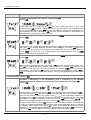
Rescaling the measuring input values, EndA:
Default: 10000
With this function, you can rescale the input value of e.g. 8.000 Hz (works setting) without
applying a measuring signal. If sensor calibration has been selected, these parameters are not
available.
9
5. Setting up the device
Menu level
Parameterisation level
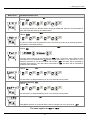
Rescaling the measuring input values, OFFA:
Default: 0
With this function, you can rescale the input value of e.g. 100 Hz (works setting) without
applying a measuring signal. If sensor calibration has been selected, these parameters are not
available.
Setting of the pulse delay, dELAY:
Default: 0
With the pulse delay of 0–250 s (max), frequencies can be collected, which are even smaller
than by the predetermined measuring time of the device. If e.g. a delay of 250 seconds is set,
this means that the device waits up to 250 seconds for an edge, before it assumes a 0 Hz
frequency. Thus frequencies up to 0.004 Hz can be collected.
Adjustment of the optimum digital frequency filter, fi.frq:
Default: NO
If the optional filter is not activated by the adjustment „No“, frequencies are ignored by the
adjusted frequency filter. Act on the assumption that the pulse-duty factor is 1:1. Accordingly
the minimal pulse duration is derived from the half of the time of oscillation. Use a filter of 10 Hz
or 20 Hz for contact bounce suppression.
Selection of analog output, Out.rA:
Default: 4-20
Three output signals are available: 0-10 VDC, 0-20 mA and 4-20 mA, with this function, the
demanded signal is selected.
Setting up the final value of the analog output, Out.En:
Default: 10000
The final value is adjusted from the smallest digit to the highest digit with [▲] [▼] and digit by
digit confirmed with [P]. A minus sign can only be parameterised on the highest digit. After the
last digit, the device changes back into menu level.
10
5. Setting up the device
Menu level
Parameterisation level
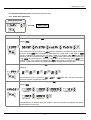
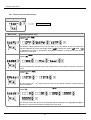
Setting up the initial value of the analog output, Out.OF:
Default: 00000
The final value is adjusted from the smallest digit to the highest digit with [▲] [▼] and digit by
digit confirmed with [P]. A minus sign can only be parameterised on the highest digit. After the
last digit, the device changes back into menu level.
Threshold values / limit values, LI-1:
Default: 2000
For both limit values, two different values can be parameterized. With this, the parameters for
each limit value are called up one after another.
Hysteresis for limit values, HY-1:
Default: 00000
For all limit values exists a hysteresis function, that reacts according to the settings (threshold
exceedance / threshold undercut).
Function if display falls below / exceeds limit value, FU-1:
Default: high
The limit value undercut can be selected with Louu (LOW = lower
exceedance can be selected with high (HIGH = upper limit value).
switching threshold of 100 and occupied with function „high“, the
reaching the threshold. If the limit value is allocated to „Low“, an
undercut of the threshold. See page 29.
limit value) and limit value
If e.g. limit value 1 is on a
alarm will be activated by
alarm will be activated by
Threshold values / limits, LI-2:
Default: 3000
This value defines the threshold, that activates/deactivates an alarm.
Hysteresis for limit values, HY-2:
Default: 00000
The delayed reaction of the alarm is the difference to the threshold value, which is defined by
the hysteresis.
11
5. Setting up the device
Menu level
Parameterisation level
Function for threshold value undercut / exceedance, Fu-2:
Default: high
A limit value undercut is selected with Louu (for LOW = lower limit value), a limit value
exceedance with High (for HIGH = higher limit value). If e.g. limit value 1 is on a threshold level
of 100 and allocated with function High, an alarm is activated by reaching the threshold level. If
the threshold value was allocated to Low, an alarm will be activated by undercutting the
threshold value, as long as the hysteresis is zero.
User code (4-digit number-combination, free available), U.CodE:
Default: 0000
If this code is set (>0000), all parameters are locked, if LOC has been selected before under
menu item run. By pushing [P] during operation mode for approx. 3 seconds, Code appears in
the display. To get access to the unlocked reduced parameter, the user needs to enter the
preset U.Code. This code has to be entered before each parameterisation, until the A.Code
(Master code) unlocks all parameters again.
Master code (4-digit number-combination free available), A.CodE:
Default: 1234
With this code, all parameters can be unlocked, if LOC has been activated before under menu
item run. By pushing [P] during operation mode for approx. 3 seconds, Code appears in the
display. The user can now reach all parameters by entering A.codE. Leaving the parameterisation, under menu item run, the user can unlock them permanently by choosing ULOC or
ProF. So, there is no need for anew code entering, even by pushing [P] during operation mode
again.
5.3. Programming interlock „run“
Activation / deactivation of the programming lock or completion of the standard
parameterization with change into menu group level (complete function range), run:
Default: uloc
Choose between the deactivated key lock Uloc (works setting) and the activated key lock Loc, or
the menu group level ProF, with the navigation keys [▲] [▼]. Confirm the selection with [P].
After this, the display confirms the settings with "- - - - -", and automatically switches to
operating mode. If Loc was selected, the keyboard is locked. To get back into the menu level,
press [P] for 3 seconds in operating mode. Now enter the CODE (works setting 1 2 3 4) that
appears using [▲] [▼] plus [P] to unlock the keyboard. FAIL appears if the input was wrong.
To parameterise further functions ProF needs to be set. The device confirms this setting with
„- - - - - „ and changes automatically into operation mode. By pressing [P] for approx. 3 seconds
in operation mode, the first menu group InP is shown in the display and thus confirms the
change into the extended parameterisation. It stays activated as long as ULOC is entered in
menu group RUN , thus the display is set back in standard parameterisation again.
12
5. Setting up the device
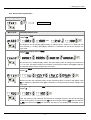
5.4. Extended parameterisation (Professional operation level)
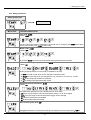
5.4.1. Signal input parameters
Menu group level
Menu level
Menu level
Parameterisation level
Selection of the input signal, TYPE:
Default: frequ
If the scaling of the device is done via SEnS.F (Sensor calibration), the frequency range needs to
be preset under rAnGE and is adjusted by application of the final value / initial value. If FrEqU
(Factory calibration) is preferred, the final value needs to be entered under End and the final
frequency needs to be entered under EndA. Under OFFS the initial value needs to be entered and
under OFFSA the initial frequency. There is no application of the measuring signal. Rotar is the
rotation in r.p.m. up to 10 kHz input frequency. Posit is the position recognition per incremental
encoder. Confirm the selection with [P] and the display switches back to menu level.
Adjustment of pulses per rotation, ppr:
Default: 1
This parameter ist only important if type = rotar or = Posit have been selected. Generally it
shows the number of pulses per rotation.
Setting the end value of the measuring range, END:
Default: 100e3
9.9999 Hz
99.999 Hz
99.999 kHz
999.99 kHz
999.99 Hz
9.9999 kHz
Choose between six different frequency ranges. Confirm the selection with [P] and the display
switches back to menu level.
13
5. Setting up the device
Menu level
Parameterisation level
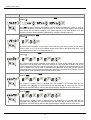
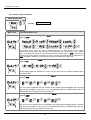
Setting the final value of the measuring range, END:
Default: 10000
Set the final value from the smallest to the highest digit with [▲] [▼] and confirm each digit
with [P]. A minus sign can only be parameterized on the leftmost digit. After the last digit, the
display switches back to the menu level. If Sens was selected as input option, one can only
select between noca and cal. With noca, only the previously set display value is taken over, and
with cal, the device takes over both the display value and the analogue input value.
Setting the start/offset value of the measuring range, offs:
Default: 0
Enter the start/offset value from the smallest to the highest digit [▲] [▼] and confirm each digit
with [P]. After the last digit the display switches back to the menu level. If Sens.F was selected
as the input option, you can only select between noca and cal. With noca, only the previously set
display value is taken over, and with cal, the device takes over both the display value and the
analogue input value.
Setting the decimal point, dot:
Default: 0
The decimal point on the display can be moved with [▲] [▼] and confirmed with [P]. The
display then switches back to the menu level again.
Setting up the display time, SEC:
Default: 1.0
then
The display time is set with [▲] [▼]. The display moves up in increments of 0.1 sec up to 1 sec
and in increments of 1.0 sec up to 10.0 sec. Confirm the selection by pressing the [P] button.
The display then switches back to the menu level again.
Rescaling the measuring input values, EndA:
Default: 10000
With this function, you can rescale the input value of e.g. 8.000 Hz (works setting) without
applying a measuring signal. If sensor calibration has been selected, these parameters are not
available.
14
5. Setting up the device
Menu level
Parameterisation level
Rescaling the measuring input values, OFFA:
Default: 0
With this function, one can rescale the input value of e.g. 100 Hz (works setting) without
applying a measuring signal. If sensor calibration has been selected, these parameters are not
available.
Setting up the pulse delay, dELAY:
Default: 0
With the pulse delay of 0–250 seconds (maximum), frequencies that are even smaller than by
the predetermined measuring time of the device, can be collected. If e.g. a delay of 250
seconds is set, it means that the device waits up to 250 seconds for an edge, before it assumes
a 0 Hz frequency. Thus frequencies up to 0.004 Hz can be collected.
Adjustment of the optimum digital frequency filter, fi.frq:
Default: NO
If the optional filter is not activated by the adjustment „No“, frequences are ignored by the
adjusted frequency filter. Act on the assumption that the pulse-duty factor is 1:1. Accordingly
the minimal pulse duration is derived from the half of the time of oscillation. Use a filter of 10 Hz
or 20 Hz for contact bounce suppression.
Adjustment of the pulse-duty factor at activated digital filter, fi.rat:
Default: i-i
Adjustment of the desired pulse-duty factor for pulse duration and pulse interruption. Like this, a
special pulse behaviour can be adjusted.
Setting up the tare/offset value, tArA:
Default: 0
The given value is added to the linerarized value. In this way, the characteristic line can be
shifted by the selected amount.
15
5. Setting up the device
Menu level
Parameterisation level
Number of additional setpoints, SPCt:
Default: 00
30 additional setpoints can be defined to the initial value and final value, so linear sensor
values are not linearised. Only activated setpoint parameters are displayed.
Display values for setpoints, dIS.01 … dIS.30:
Under this parameter setpoints are defined according to their value. At the sensor calibration,
like at final value/offset, one is asked at the end if a calibration shall be activated.
Analog values for setpoints, InP.01 … InP.30:
These setpoints are displayed at works setting (4-20 mA) only. Here, demanded analog values
can be choosen freely. The input of steadily rising analog values needs to be done selfcontained.
Display underflow, dI.Und:
Default: -19999
With this function the device undercut (_ _ _ _ _) can be defined on a definite value.
Display overflow, dI.OUE:
Default: 99999
With this function the display overflow (
_____
) can be defined on a definite value.
Input variable of process value, SIG.in:
Default: a.meas
This parameter controls the device via the analog input signals a.meas = Sens.f repectively fre9u
or via the digital signals of the interface M.bus = RS232/RS485 (Modbus protocol). Confirm the
selction with [P] and the device changes back into menu level.
Back to menu group level, rEt:
With [P] the selection is confirmed and the device changes into menu group level „–INP–“.
16
5. Setting up the device
5.4.2. General device parameters
Menu group level
Menu level
Menu level
Parameterisation level
Display time, DISEC:
Default: 01.0
then
The display is set up with [▲] [▼]. Thereby on switches until 1 second in 0.1 steps and until
10.0 seconds in 1.0-steps. With [P] the selection is confirmed and the device changes into
menu level.
Rounding of display values, round:
Default: 00001
This function is for instable display values, where the display value is changed in increments of
1, 5, 10 or 50. This does not affect the resolution of the optional outputs. With [P] the selection
is confirmed and the device changes into menu level.
Arithmetic, ArItH:
Default: no
Root extraction
Reciprocal
Square
With this function the calculated value, not the measuring value, is shown in the display. With
no, no calulation is deposited. With [P] the selection is confirmed and the device changes into
menu level.
Sliding average determination, AVG:
Default: 10
Here, the number of the meterings that need to be averaged is preset. The time of averaging
results of the product of measuring time SEC and the averaged metering AVG. With the selection
of AVG in the menu level DISPL, the result will be shown in the display and evaluated via the
alarms.
17
5. Setting up the device
Menu level
Parameterisation level
Dynamic for the sliding average determination, step:
Default: no
With step the sliding average determination can be adjusted dynamically. If 6pro or 12pro is
selected, a frequency value with a variance of 6% or 12% of the current display value is taken
over directly for the sliding averaging. The display appears to be more dynamic at a fast
frequency change, without appearing disturbed by a slightly unsteady frequency.
Zero point slowdown, ZErO:
Default: 00
At the zero point slowdown, a value range around the zero point can be preset, so the display
shows a zero. If e.g. a 10 is set, the display would show a zero in the value range from -10 to
+10; below continue with -11 and beyond with +11.
Definite contstant value, const:
Default: 0
The constant value can be evaluated via the alarms or via the analog output, like the current
measurand. The decimal place cannot be changed for this value and is taken over by the
current measurand. Like this a setpoint generator can be realised via the analog output by this
value. Furthermore it can be used for calculating the difference. At this the constant value is
substracted from the current measurand and the difference is evaluated in the alerting or by the
analog output. Thus regulations can be displayed quite easily.
Minimum constant value, con.mi:
Default: -i9999
The minimum constant value is adjusted from the smallest to the highest digit with the
navigation keys [▲] [▼] and confirmed digit per digit with [P]. A minus sign can only be
adjusted on the leftmost digit. After the last digit the display changes back into menu level.
Maximum constant value, con.ma:
Default: 99999
The maximum constant value is adjusted from the smallest to the highest digit with the
navigation keys [▲] [▼] and confirmed digit per digit with [P]. A minus sign can only be
adjusted on the leftmost digit. After the last digit the display changes back into menu level.
18
5. Setting up the device
Menu level
Parameterisation level
Display, dISPL:
Default: Actua
With this function the current measurand, min/max-value, totaliser value, the process-controlled
Hold-value, the sliding average value, the constant value or the difference between constant
value and current value can be allocated to the display. With [P] the selection is confirmed and
the device changes into menu level.
Brightness control, Light:
Default: 15
The brightness of the display can be adjusted in 16 levels from 00 = very dark to 15 = very
bright via this parameter or alternatively via the navigation keys. During the start of the device
the level that is deposited under this parameter will always be used, even though the brightness
has been changed via the navigation keys in the meantime.
Display flashing, FLASH:
Default: no
A display flashing can be added as additional alarm function either to single or to a combination
of off-limit condition. With no, no flashing is allocated.
Assignment (deposit) of key functions, tASt:
Default: no
For the operation mode, special functions can be deposited on the navigation keys [▲] [▼], in
particular this function is made for devices in housing size 48x24mm which do not have a 4th
key ([O]-key). If the min/max-memory is activated with EHtr, all measured min/max-values are
safed during operation and can be recalled via the navigation keys. The values get lost by
restart of the device. If the threshold value correction LI.12 or LI.34 is choosen, the values of the
threshold can be changed during operation without disturbing the operating procedure. With
tArA the device is tared to zero and safed permanently as offset. The device confirms the
correct taring by showing ooooo in the display. Set.tA switches into the offset value and can be
changed via the navigation keys [▲] [▼].
19
5. Setting up the device
Menu level
Continuation
Parameterisation level
Via totAL the current value of the totaliser can be displayed for approx. 7 seconds, after this the
device changes back onto the parameterised display value. If tot.rE is deposited, the totaliser
can be set back by pressing the navigation keys [▲] [▼], the device acknowledges this with
showing ooooo in the display. The configuration of EHt.rE deletes the min/max-memory. Under
ActuA the measurand is shown for approx. 7 seconds, after this the display returns to the
parameterised display value. The brightness can be adjusted with light. This adjustment is not
safed and lost at a restart of the device. If no is selected, the navigation keys are without any
function in the operation mode.
Special function [O]-key, tASt.4:
Default: no
…
For the operation mode, special functions can be deposited on the [O]-Taste. This function is
activated by pressing the key. With tArA the device is set temporarily on a parameterised value.
The device acknowledges the correct taring with oo0oo in the display. Set.tA adds a defined
value on to the currently displayed value. Via totAL the current value of the totaliser can be
displayed for approx. 7 seconds, after this the device switches back on the parameterised
display value. If tot.rE is deposited, the totaliser can be set back by pressing of the navigation
keys [▲] [▼], the device acknowledges this with ooooo in the display. EHt.rE deletes the
min/max-memory. If HOLD has been selected, the moment can be hold constant by pressing the
[O]-key, and is updated by releasing the key. Advice: Hold is activated only, if HOLD is selected
under parameter DISPL. ActuA shows the measuring value for approx. 7 seconds, after this the
device switches back on the parameterised display value. The same goes for AVG, here the
sliding average values will be displayed. The constant value const can be recalled via the digital
input, or changed digit per digit. At AL-1…AL-4 an output can be set and therewith e.g. a setpoint
adjustment can be done. If no is selected, the [O]-key is without any function in the operation
mode.
Special function digital input, dIG.In:
Default: no
…
In operation mode, the above shown parameter can be laid on the optional digital input, too.
Function description see tASt.4.
Back to menu group level, rEt:
With [P] the selection is confirmed and the device changes into menu group level „–fct–“.
20
5. Setting up the device
5.4.3. Safety parameters
Menu group level
Menu level
Menu level
Parameterisation level
User code, U.Code:
Default: 000o
Via this code reduced sets of parameters can be set free. A change of the U.CodE can be done
via the correct input of the A.CodE (master code).
Master code, A.Code:
Default: 1234
By entering A.CodE the device will be unlocked and all parameters are released.
Release/lock analog output parameters, Out.LE:
Default: all
Analog output parameter can be locked or released for the user:
- At En-oF the initial or final value can be changed in operation mode.
- At Out.EO the output signal can be changed from e.g. 0-20 mA to 4-20 mA or 0-10 VDC.
- At ALL analog output parameters are released.
- At no all analog output parameters are locked.
Release/lock alarm parameters, AL.LEU:
Default: all
This parameter describes the user release/user lock of the alarm.
- LIMIt, here only the range of value of the threshold values 1-4 can be changed.
- ALrM.L, here the range of value and the alarm trigger can be changed.
- ALL, all alarm parameters are released.
- no, all alarm parameters are locked.
Back to menu group level, rEt:
With [P] the selection is confirmed and the device changes into menu group level „– Cod –“ .
21
5. Setting up the device
5.4.4. Analog output parameters
Menu group level
Menu level
Menu level
Parameterisation level
Selection reference of analog output, OutPt:
Default: actua
The analog output signal can refer to different functions, in detail these are the current
measurand, the min-value, the max-value, the totaliser function / sum function, the constant
value or the difference between current measurand and constant value. If HoLd is selected, the
signal of the analog output will be kept. It can be continued processing after a deactivation of
Hold. With [P] the selection is confirmed and the device changes into menu level.
Selection analog output, Out.rA:
Default: 4-20
Three output signals are available 0-10 VDC, 0-20 mA and 4-20 mA. Select the desired signal
with this function.
Setting the final value of the analog output, Out.En:
Default: 10000
The final value is adjusted from the smallest to the highest digit with [▲] [▼] and confirmed
digit per digit with [P]. A minus sign can only be parameterised on the leftmost digit. After the
last digit the device changes back into menu level.
Setting the initial value of the analog output, Out.OF:
Default: 00000
The initial value is adjusted from the smallest to the highest digit with [▲] [▼] and confirmed
digit per digit with [P]. A minus sign can only be parameterised on the leftmost digit. After the
last digit the device changes back into menu level.
22
5. Setting up the device
Menu level
Parameterisation level
Overflow behaviour, O.FLoU:
Default: edge
To recognise and evaluate faulty signals, e.g. by a controller, the overflow behaviour of the
analog output can be defined. As overflow can be seen either EdGE, that means the analog
output runs on the set limits e.g. 4 and 20 mA, or to.OFF (input value smaller than initial value,
analog output switches on e.g. 4 mA), to.End (higher than final value, analog output switches on
e.g. 20 mA). If to.MIn or to.MAX is set, the analog output switches onto the smallest or highest
possible binary value. This means that values of e.g. 0 mA, 0 VDC or values higher than 20 mA
or 10 VDC can be reached. With [P] the selection is confirmed and the device changes into
menu level.
Back to menu group level, rEt:
With [P] the selection is confirmed and the device changes into menu group level „–out–“ .
23
5. Setting up the device
5.4.5. Relay functions
Menu group level
Menu level
Menu level
Parameterisation level
Alarm relay 1, rEL-1:
Default: al-1
….
….
Each setpoint (optional) can be linked up via 4 alarms (by default). This can either be inserted
at activated alarms AL1/4 or deactivated alarms ALN1/4. If LOGIC is selected, logical links are
available in the menu level LoG-1 and CoM-1. Access to these two menu levels is via LOGIC, at all
other selected functions, these two parameters are overleaped. Via On/OFF the setpoints can be
activated/deactivated, in this case the output and the setpoint display are set/not set on the
front of the device. With [P] the selection is confirmed and the device changes into menu level.
Logic relay 1, Log-1:
Default: or
Here, the switching behaviour of the relay is defined via a logic link, the following schema
describes these functions with inclusion of AL-1 and AL-2:
A1 v A2
As soon as a selected alarm is activated, the relay
operates. Equates to operating current principle.
A1 v A2 = A1 Λ A2
The relay operates only, if no selected alarm is
active. Equates to quiescent current principle.
A1 Λ a2
The relay operates only, if all selected alarms are
active.
A1 Λ A2 = A1 v A2
As soon as a selected alarm is not activated, the
relay operates.
____ _ _
____ _ _
With [P] the selection is confirmed and the device changes into menu level.
24
5. Setting up the device
Menu level
Parameterisation level
Alarms for relay 1, CoM-1:
Default: a.1
….
The allocation of the alarms to relay 1 happens via this parameter, one alarm or a group of
alarms can be chosen. With [P] the selection is confirmed and the device changes into menu
level.
Alarm relay 2, reL-2:
Default: al-2
….
….
Each setpoint (optional) can be linked up via 4 alarms (by default). This can either be inserted
at activated alarms AL1/4 or deactivated alarms ALN1/4. If LOGIC is selected, logical links are
available in the menu level LoG-2 and CoM-2. Access to these two menu levels is via LOGIC, at all
other selected functions, these two parameters are overleaped. Via On/OFF the setpoints can be
activated/deactivated, in this case the output and the setpoint display are set/not set on the
front of the device. With [P] the selection is confirmed and the device changes into menu level.
Logic relay 5, LoG-5:
Default: or
Here, the switching behaviour of the relay is defined via a logic link, the following schema
describes these functions with inclusion of AL-1 and AL-2:
A1 v A2
As soon as a selected alarm is activated, the relay
operates. Equates to operating current principle.
A1 v A2 = A1 Λ A2
The relay operates only, if no selected alarm is
active. Equates to quiescent current principle.
A1 Λ a2
The relay operates only, if all selected alarms are
active.
A1 Λ A2 = A1 v A2
As soon as a selected alarm is not activated, the
relay operates.
____ _ _
____ _ _
With [P] the selection is confirmed and the device changes into menu level.
25
5. Setting up the device
Menu level
Parameterisation level
Alarms for relay 2, CoM-2:
Default: a. 2
….
The allocation of the alarms for relay 2 happens via this parameter, one alarm or a group of
alarms can be chosen. With [P] the selection is confirmed and the device changes into menu
level.
Back to menu group level, rEt:
With [P] the selection is confirmed and the device changes into menu group level „–rel–“.
5.4.6. Alarm parameters
Menu group level
Menu level
Menu level
Parameterisation level
Dependency alarm 1, ALrM.1:
Default: actua
The dependency of alarm 1 can be related to special functions, in detail these are the current
measurand, the min-value, the max-value, the totaliser value / sum-value, the constant value or
the difference between the current measurand and the constant value. Is Hold selected, then
the alarm is hold and processed just after deactivation of HOLD. EHtEr causes the dependency
either by pressing the [O]-key on the front of the housing or by an external signal via the digital
input. With [P] the selection is confirmed and the device changes into menu level.
Example:
By using the maximum value Alarm.1 = Max.va in combination with a threshold monitoring Fu-1 =
High, an alarm confirmation can be realised. Use the navigation keys, the 4th key or the digital
input for confirmation.
26
5. Setting up the device
Menu level
Parameterisation level
Threshold values / limit values, LI-1:
Default: 2000
For both limit values, two different values can be parameterized. With this, the parameters for
each limit value are called up one after another.
Hysteresis for limit values, HY-1:
Default: 00000
For all limit values exists a hysteresis function, that reacts according to the settings (threshold
exceedance / threshold undercut).
Function if display falls below / exceeds limit value, FU-1:
Default: high
The limit value undercut can be selected with Louu (LOW = lower
exceedance can be selected with high (HIGH = upper limit value).
switching threshold of 100 and occupied with function „high“, the
reaching the threshold. If the limit value is allocated to „Low“, an
undercut of the threshold.
limit value) and limit value
If e.g. limit value 1 is on a
alarm will be activated by
alarm will be activated by
Switching-on delay, ton-1:
Default: 000
For limit value 1 a delayed switching-on of 0-100 seconds can be preset.
Switching-off delay, toF-1:
Default: 000
For limit value 1 a delayed switching-off of 0-100 seconds can be preset.
Back to menu group level, rEt:
With [P] the selection is confirmed and the device changes into menu group level „–Ali–“.
The same applies to –Al2– to –Al4–.
27
5. Setting up the device
5.4.7. Totaliser (Volume measurement)
Menu group level
Menu level
Menu level
Parameterisation level
Totaliser state, total:
Default: off
The totaliser makes measurements on a time base of e.g. l/h possible, at this the scaled input
signal is integrated by a time and steadily (select Stead) or temporarily (select temp) safed. If Off
is selected, the function is deactivated. With [P] the selection is confirmed and the device
changes into menu level.
Time base, t.base:
Default: sec
Under this parameter the time base of the measurement can be preset in seconds, minutes or
hours.
Totaliser factor, Facto:
Default: 10Π0
…
At this the factor (100…106) respectively the divisor for the internal calculation of the measuring
value is assigned.
Setting up the decimal point for the totaliser, tot.dt:
Default: 0
The decimal point of the device can be adjusted with the navigation keys [▲] [▼]. With [P] the
selection is confirmed and the device changes into menu level.
28
6. Reset to factory settings
Menu level
Parameterisation level
Totaliser reset, tot.re:
Default: 00000
The reset value is adjusted from the smallest to the highest digit with the navigation keys
[▲] [▼] and digit per digit confirmed with [P]. After the last digit, the display switches back to
the menu level. The activator for the reset is parameter driven via the 4th key or via the optional
digital input.
Back to menu group level, rEt:
With [P] the selection is confirmed and the device changes into menu group level „–tot–“.
Programming lock, run:
Menu group level
Description see page 11, menu level run
6. Reset to factory settings
To return the unit to a defined basic state, a reset can be carried out to the default values.
The following procedure should be used:
• Switch off the power supply
• Press button [P]
• Switch on voltage supply and press [P]-button until „- - - - -“ is shown in the display.
With reset, the default values of the program table are loaded and used for subsequent operation. This puts
the unit back to the state in which it was supplied.
Caution! All application-related data are lost.
29
7. Alarms / Relays
7. Alarms / Relays
This device has 4 virtual alarms that can monitor a limit value in regard of an undercut or exceedance. Each
alarm can be allocated to an optional relay output S1-S2; furthermore alarms can be controlled by events like
e.g. hold or min/max-value.
Function principle of alarms / relays
Alarm / Relay x
Deactivated, instantaneous value, min/max-value, hold-value, totaliser
value, sliding average value, constant value, difference between
instantaneous value and constant value or an activation via the digital
input or via the [O]-key.
Switching threshold
Threshold / limit value of the change-over
Hysteresis
Broadness of the window between the switching thresholds
Working principle
Operating current / Quiescent current
Operating current
By operating current the alarm S1-S2 is off
below the threshold and on on reaching the
threshold.
Quiescent current
By quiescent current the alarm S1-S2 is on
below the threshold and switched off on
reaching the threshold.
Switching-on delay
The switching-on delay is activated via an alarm
and e.g. switched 10 seconds after reaching the
switching threshold, a short-term exceedance of
the switching value does not cause an alarm,
respectively does not cause a switching
operation of the relay. The switching-off delay
operates in the same way, keeps the alarm / the
relay switched longer for the parameterised
time.
30
8. Programmer examples
8. Programmer examples
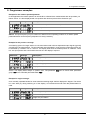
Example for the rotation speed adjustment:
In this application the rotation speed of an axis shall be collected via a toothed wheel with 30 sprockets, per
Namur sensor. It is then displayed with one position after decimal point and the dimension rpm.
Parameter
Settings
Description
Rotation – rotation speed measurment up to 10 kHz
Number of sprockets
1 position after decimal point
Advice: The input frequency may be maximum 9.999 kHz in this operating module. So, a rotation speed
parameterisation via the frequency adjustment is rarely necessary.
Example for the position coverage:
A measuring system for length works via a incremental encoder with two dephased output signals (typically
A and B) and 100 pulse/rotation. The axis perimeter was calculated in a way that the measuring section can
be extracted by a rotation of 6 cm = 60 mm. The display shall show the relative position in millimeter. There
is a zero joint position with a limit switch that can zero the display if required.
Parameter
Settings
Description
Positioning – rotary encoder
Pulse number per rotation
Change of length per rotation
Display zero
Advice: The display starts always on position zero. The parameter dig.in can be found under parameter
group –fct– in the extended parameterisation Prof.
Example for angle coverage:
On a manually operated bender for sheet metal the bending angle shall be displayed in degree. The device
is in zero state (0°) during switching on of the display. An incremental encoder with 360 pulses/rotation is
used.
Parameter
Settings
Description
Positioning – rotary encoder
Pulse number per rotation
Angle sum per rotation
31
8. Programmer examples
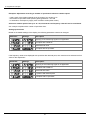
Examples: Adjustment according to number of sprockets at unknown rotation speed.
- nearly 100% of the rotation speeds are in the range of 0 to 30.000 r.p.m.
- the number of sprockets varies (without gearing) between 1 and 100
- in automation, the frequency supply never exceeds 10 kHz (rather 3 kHz)
Assume a rotation speed of 60 r.p.m. at 1 Hz, whereat the real frequency value will not be considered.
Our example complies with a number of sprockets of 64.
Setting up the advice
Based on the default settings of the display, the following parameters need to be changed:
Parameter
Settings
Description
Applying of the measuring signal is not applicable.
Complies with 9.9999 Hz.
Assumed final value.
Complies with 64 sprockets.
If the frequency needs to be displayed with a position after decimal point, then a 60 has to be selected as final
value for this adjustment.
Parameter
Settings
Description
Applying of the measuring signal is not applicable.
Complies with 9.9999 Hz
Assumed final value
1 position after decimal point
Complies with 64 sprockets
32
8. Programmer examples
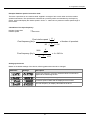
Example: Rotation speed of a machine shaft
There are 4 sprockets on one machine shaft. Applied in an angle of 90° to each other and to the rotation
speed measurement. The sprockets are collected via a proximity switch and evaluated by the frequency
device, which shall display the rotation speed in U/min. 0…3600 U/min is preset as rotation speed range of
the machine.
Calculation of the input frequency
Number of sprockets
Rotation speed
=4
= 3600 U/min
Final rotation speed [ U ]
min
Final frequency [Hz] =
x Number of sprockets
s
60 [
] x 1U
min
3600
Final frequency [Hz] =
U
min
60 s
min
x 4 = 240 Hz
x 1U
Setting up the device
Based on the default settings of the device, following parameters need to be changed:
Parameter
Settings
Description
As the input frequency is known, the device does not need to be
applied to the measuring section.
The final frequency is in the range of 100.00 to 999.99 Hz.
A rotation speed of 3600 shall be displayed as final value.
The final frequency for display value 3600 is 24.00 Hz.
33
9. Technical data
9. Technical data
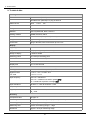
Housing
Dimensions
96x48x70 mm (WxHxD)
96x48x89 mm (WxHxD) incl. plug-in terminal
Panel cut-out
92.0+0.8 x 45.0+0.6 mm
Wall thickness
up to 15 mm
Fixing
screw elements
Material
PC Polycarbonate, black, UL94V-0
Sealing material
EPDM, 65 Shore, black
Protection class
Standard IP65 (Front), IP00 (back side)
Weight
approx. 200 g
Connection
plug-in terminal; wire cross section up to 2.5 mm2
Display
Digit height
14 mm
Segment colour
red (optional green, yellow or blue)
Range of display
-19999 to 99999
Switching points
one LED per switching point
Overflow
horizontal bars at the top
Underflow
horizontal bars at the bottom
Display time
0.1 to 10.0 seconds
Input
Sensing device
Namur, 3-wire initiator, pulse input, TTL
High/Low level
TTL level
> 15 V / < 4 V – Uin max. 30 V
> 4.6 V / < 1.9 V
Input frequency
0.01 Hz – 999.99 kHz
0.01 Hz – 9.9999 kHz at rotation speed rotar
0 – 2.5000 kHz at position coverage posit
Input resistance
RI at 24 V / 4 kΩ / RI at Namur 1.8 kΩ
Frequency filter
none, 100 Hz, 50 Hz, 20 Hz, 10 Hz, 5 Hz, 2 Hz
Digital input
<24 V OFF, >10 V ON, max. 30 VDC
RI ~ 5 kΩ
Accuracy
Temperature drift
50 ppm / K
Measuring time
0.1…10.0 seconds, respectively optional pulse delay 250 seconds
Measuring principle
Frequency measuring / pulse width modulation
Measuring error
0.05% of measuring range; ± 1 digit
Resolution
approx. 19 bit per measuring range
34
9. Technical data
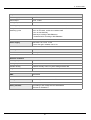
Output
Sensor supply
24 VDC / 50 mA
Pulse output
max. 19 kHz
Analog output
0/4-20 mA / burden ≤500 Ω or 0-10 VDC / ≥10 kΩ, 16 bit
Switching outputs
Relay
Switching cycles
with change-over contacts 250 VAC / 5 AAC; 30 VDC / 5 ADC
30 x 103 at 5 AAC, 5 ADC ohm resistive load
10 x 106 mechanically
Diversity according to DIN EN50178
/ Characteristics according to DIN EN60255
Power supply
230 VAC ±10 % max. 10 VA
10-30 VDC galv. isolated, max. 4 VA
Memory
EEPROM
Data life
≥ 100 years at 25°C
Ambient conditions
Working temperature
0…50°C
Storing temperature
-20…80°C
Climatic density
relative humidity 0-80% on years average without dew
Height
up to 200m above sea level
EMV
EN 61326
CE-sign
Conformity to directive 2004/108/EG
Safety standard
According to low voltage directive 2006/95/EG
EN 61010; EN 60664-1
35
10. Safety advices
10. Safety advices
Please read the following safety advice and the assembly chapter 1 before installation and keep it
for future reference.
Proper use
The M2-1F-device is designed for the evaluation and display of sensor signals.
Attention! Careless use or improper operation can result in
personal injury and/or damage the equipment.
Control of the device
The panel meters are checked before dispatch and sent out in perfect condition. Should there be
any visible damage, we recommend close examination of the packaging. Please inform the
supplier immediately of any damage.
Installation
The M2-1F-device must be installed by a suitably qualified specialist (e.g. with a qualification in
industrial electronics).
Notes on installation
• There must be no magnetic or electric fields in the vicinity of the device, e.g. due to transformers,
mobile phones or electrostatic discharge.
• The fuse rating of the supply voltage should not exceed a value of 6A N.B. fuse.
• Do not install inductive consumers (relays, solenoid valves etc.) near the device and
suppress any interference with the aid of RC spark extinguishing combinations or free-wheeling
diodes.
• Keep input, output and supply lines separate from one another and do not lay them parallel with
each other. Position “go” and “return lines” next to one another. Where possible use twisted pair.
So, the best measuring results can be received.
• Screen off and twist sensor lines. Do not lay current-carrying lines in the vicinity. Connect the
screening on one side on a suitable potential equaliser (normally signal ground).
• The device is not suitable for installation in areas where there is a risk of explosion.
• Any electrical connection deviating from the connection diagram can endanger human life and/or
can destroy the equipment.
• The terminal area of the devices is part of the service. Here electrostatic discharge needs to be
avoided. Attention! High voltages can cause dangerous body currents.
• Galvanic isolated potentials within one complex need to be placed on an appropriate point
(normally earth or machines ground). So, a lower disturbance sensibility against impacted
energy can be reached and dangerous potentials, that can occur on long lines or due to faulty
wiring, can be avoided.
36
11. Error elimination
11. Error elimination
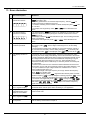
Error description
Measures
1.
The device shows a
permanent overflow
• The input frequency is too high for the selected frequency range. Correct
„range“ according to this.
• Disturbing pulses lead to an increased input frequency, activate „fi.frq“ at
smaller frequencies or shield the senor line.
• A mechanic switching contact chatters. Activate the frequency filter „fi.frq“ with
10 or 20 kHz.
• The display was taught faulty under „type“ = „Sens.f“. Error elimination see
below.
2.
The device shows a
permanent underflow.
• An offset frequency „offsa“ bigger than 0 Hz respectively a „Living Zero“ was
selected, in which no frequency is aligned. Check the sensor lines or set the
„Offsa“ onto 0 Hz.
• The display underflow dl.und was selected too high. The according parameter
needs to be adapted.
• The device was taught faulty under „type“ = „Sens.f“. Error elimination see
below.
3.
The displayed values
switches sporadical.
• Disturbances lead to short-term display switches. For smaller frequences use
the frequency filter „Fi.frq“, select a higher measuring time or use the sliding
averaging.
• The sprockets that needs to be collected, are not evenly spread on a shaft or
are not measured accurately. Use the sliding averaging „Avg“ if necessary with
the dynamic function „Step“. The displayed value „displ“ needs to be set on „AVG“.
4.
The display remains on
zero.
• The sensor was not connected properly. Check the connection lines and if
necessary the sensor supply. Best directly on the screw terminals of the device!
• A PNP- respectively NPN-output does not reach the required threshold. Check
the voltage between terminal 2 and 3 with a Multimeter. Depending on signal
form it generally shoud be between 4 V and 15 V. The thresholds can be
checked more safely with an oscilloscope. If necessary include an external pullup or pull-down.
• A Namur-sensor does not react. Check the distance between the sensor and
the sprocket / survey mark and if necessary measure the voltage between 1 and
3. In open condition the input voltage needs to be smaller than 2.2 V and in
active condition bigger than 4.6 V.
• The selected range of the input frequency is too high. Reduce the frequency
range „range“ to a smaller value.
• The activated frequency filter „Fi.frq“ suppresses the relevant pulses. Increase
the filter frequency „fi.frq“ or use the adaption of the key proportion „fi.rat“. If this
should not work, temporarily deactivate the frequency filter with „fi.frq“ = „no“.
• The device was taught faulty under „type“ = „Sens.f“. Change into „Type“ „Frequ“
and preset the assumed frequency range „range“ and the according initial and
final values „end“, „offs“, „Enda“, and „offsa“. So you can check if a frequency
signal was connected to the input.
5.
The device shows „HELP“ in
the 7-segment display
• The device located an error in the configuration memory, excecute a reset to
the default values and set up the device according to your application.
6.
Program numbers for the
parameterisation of the
input are not available
• The programming interlock is activated.
• Enter correct code.
7.
The device shows „Err1“ in
the 7-segment display
• Contact the manufacturer if errors of this kind occur.
8.
The device does not react
as expected.
• If you are not sure, that the device has been parameterised before, restore the
state of delivery as described in chapter 6.
37
M2_1FGB.pdf
update: 10.03.2015