1
Troubleshooting
Before seeking assistance at the help desk of your Sidepower dealer / distributor please perform these tests and make notes
of all measurements to ensure that they have as much information as possible to work on.
NB! All check points and solutions must be carried out after consulting the relevant information elsewhere in this manual to understand how the system is intended to work. If you are unable to understand what to check, you must consult a professional.
»
»
»
»
Check
If the drive pin on the motor shaft is broken
Remove motor and replace the drive pin
Are the propellers in the tunnel fastened correctly on
the prop-shaft (key present)
Re-fasten or replace the propeller and/or key.
With the motor removed, turn the driveshaft from
inside the boat to feel if the gears are engaging and
turning the prop-shaft.
In case of a failure inside the gearhouse, we advice to get a replacement gear-house instead of attempting to repear the internal gear and bearing system.
The thruster does not start at all or works only in one direction.
Check that the voltage of the electromotor are correct
for your installation by their labels.
If wrong, contact your dealer or distributor to obtain parts with the correct voltage.
Check the voltage at the thruster between main minus
input (A1 on motor) and main plus input point:
The no load voltage should be:
12V system =12,7V / 24V system = 25,4 V. If below 12,3V / 24,6V your batteries
are not in a good charge state or worn out and must be recharged or replaced
before trying to run the thruster.
Check the voltage at the thruster while you are trying
to run it. Keep main engine(s) running to have continous charge to the batteries.
If less than 8,5V at the thruster the voltage is to low for the thruster to operate
correctly. In a 24V boat the thruster will operate down to approx. 12V, but the
performance will be very bad. Find and correct the reason for this low voltage
which will probably be one or more of these points: main battery cable sizes and
connections, battery size and condition, fuse and main power switch performance.
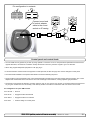
If the main solenoids on the thruster are not even trying to engage (clicking) they are probably not getting
a "run" signal from the control system. Try to run the
thruster without the panel by directly connecting the
red and the blue or the red and the grey wires in the
controlcable contact coming from the thruster.
If the thruster runs in both directions, try the same in the connector that goes into
the back of the control panel. If it also works in this position, check the contact and
wires on the back of the panel and try to engage this again by pushing both ON
buttons simultaneously. If the panel does not turn on (see control light), measure
the voltage between the Red and the Black in the contact going into the thruster. If
the voltage is good, chances are that the panel is not working.
If it works by the thruster, and not by the panel there is a bad contact or a broken
lead in the controlcables between these two test points.
Measure that you have the correct voltage between the Red (+) and all the other
colours in the contact. If you do not get a reading.
If the thruster does not run at all, or only in one direction in
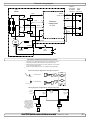
the above tests, check the internal wiring on the thruster motor, solenoids and electronic motor inter-face box
to be in accordance with the wiring diagram and ensure
that all connections are clean and tight.
Between main minus (A1 on motor) and the blue and the grey wire connected to
the sides of the main solenoids you should have the same voltage as between the
main battery cables on the thruster.
If not, check that the internal wiring on the solenoid is ok and measure that there
is contact through the magnetising spools of each side of the solenoid (measure
between the red and blue on one side, and red and grey on the other side with an
Ohm meter.). If there are no contact between these, the solenoid is broken and
needs replacing.
The thruster has an unexpected low performance.
Check voltage at thruster when running
If less than 10,5 V / 21V the thruster will not perform at specified effect.
Check that all the brush-springs sits correctly on the
brushes in the electromotor.
If one or more brushes are loose/has no tension from the brush-spring, the performance will be low.
Check that the propeller, gearhouse and tunnel is free
from growth / barnacles etc.
If there are growth in the tunnel, this will disturb / block the waterflow and especially barnacles on the propeller will greatly reduce performance.
The thruster runs for approximately 0,5 seconds every 4 seconds.
Solenoid flapping, most probable cause: low voltage.
»
Solution
The electromotor runs, but there is no thrust.
Re-charge battery(ies), if this is not sufficient, replace battery(ies).
Check for bad cable connections, if necessary tighten/re-adjust connections.
Check cable size in accordance to manual.
The thruster runs for approximately 0,5 seconds every 10 seconds.
Solenoid lock-in, auto stop of thruster, auto retry every
10 seconds.
Shut off thruster main switch, tap slightly on the motor to see if it will release. Turn
on thruster main switch. If solenoid is still in lock-in mode, contact your dealer.
SE 60/185S ignition protected thruster assembly
version 1.4 - 2015
17