1
Advanced Networking Capabilities
•
•
•
•
•
•
•
•
•
•
•
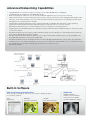
Integrated RJ45 connection for quick connection to the LAN (10/100 base-T capability)
Integrated high-speed wireless LAN IEEE 802.11b/g/n
Remote diagnostics enable the user to monitor and make adjustments to the projector remotely
PC CTL 4.0 controls the power switching input selection and other functions while managing lamp usage and a
variety of other vital information over the network. Email notification and projector scheduling for better asset
management is included with the software.
Image Express Utility dedicated projector software (IEU 2.0; compatible with Windows or Mac operating
systems) provides wired and wireless data transmission via peer-to-peer or over the network
Broadcast mode allows you to send information from one computer to several projectors
Image Express Lite dedicated projector software provides wired and wireless data transmission via peer-to-peer
or over the network
Windows Network Projector function within Windows Vista connects directly to networked projectors without
the need for additional proprietary software
Windows Remote Desktop function allows you to control a networked computer by connecting a USB mouse
and keyboard directly to the projector’s USB input
Windows Media Connection and Network Drive functions display multimedia files (.jpeg, .bmp, .png, .mpeg2 or
.wmv9) stored on the Windows Media Connect server, in the Windows shared folder, or on a local network using
the Viewer function—all without bringing your PC into the conference room
Crestron Roomview
Built-In Software
Built-in wall color correction presets
DICOM SIM
On a
green wall...
DICOM Simulation
enables users in medical
environments to display
accurate diagnostic images.
These provide for adaptive color tone correction to display properly
on non-white surfaces.
BEFORE
auto wall correction
AFTER
auto wall correction