1
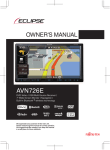
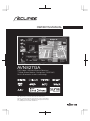
OWNER'S MANUAL
AVN827GA
DVD-Video / USB Multi-Source Receiver /
7" Wide Screen Monitor / Navigation / RDS-TMC /
Built-in Bluetooth® wireless technology
We appreciate your purchase of this main unit.
Please read through this manual for correct operation.
We suggest that after reading it you keep this manual
in a safe place for future reference.
The symbols described below are found in this instruction manual as well as on
the device itself to insure its proper and safe usage and to prevent injury or
damage to property. Make sure you understand the meaning of these symbols
before reading the rest of this manual.
Precautions for Use
The following symbols will precede information useful for preventing damage to the
main unit as well as for its smooth operation.
WARNING
This sign indicates a situation in which incorrect handling through
disregard of a sign might result in death or serious personal injury.
CAUTION
This sign indicates a situation in which incorrect handling through
disregard of a sign might result in personal injury or may result solely in
damage to property.
IMPORTANT
Follow this advice to prevent malfunctions or damage to the main unit.
Perform the indicated action in the event of a malfunction.
ATTENTION
Useful information for the smooth operation of the main unit.
CHECK
Facts to keep in mind when operating the main unit.
Please read all materials such as manuals and warranties that have come with
the product. ECLIPSE will not be responsible for unsatisfactory product
performance due to failure to follow these instructions.
Changes to product specifications may result in differences between content
of the manual and features of the product.
CAUTION
There is the possibility that the touch switches of the display screen
may not operate correctly if condensation forms inside them. In such a
case, do not attempt to operate them until the condensation has
disappeared.
Before Use
1. Safety Precautions ........................................................... 13
2. Viewing This Document ................................................... 17
3. About This Receiver ......................................................... 18
Control Names and Operations........................................................................18
Panel buttons ................................................................................................................. 18
Touch switches............................................................................................................... 19
Turning the Power On or Off ............................................................................20
Turning on the power ..................................................................................................... 20
Turning off the audio ...................................................................................................... 21
Loading/Unloading a Disc ................................................................................21
Loading a disc ................................................................................................................ 21
Unloading a disc............................................................................................................. 22
Adjusting the Display Angle.............................................................................23
Loading and Unloading an SD Memory Card .................................................25
Loading an SD memory card.......................................................................................... 25
Unloading an SD memory card ...................................................................................... 26
Connecting (or Disconnecting) the USB Memory ..........................................27
About the Unit Modes .......................................................................................28
Selecting a Mode ...............................................................................................29
Navigation screen........................................................................................................... 29
Audio operations screen................................................................................................. 29
Multi screen .................................................................................................................... 30
About the on-screen display........................................................................................... 30
Operation Conditions for the Unit....................................................................31
4. Unit Settings...................................................................... 32
Various Unit Settings ........................................................................................32
Displaying the Info screen .............................................................................................. 32
Bluetooth setting............................................................................................................. 33
Skin pattern setting......................................................................................................... 33
Opening screen setting .................................................................................................. 34
Clock setting................................................................................................................... 34
Time display setting........................................................................................................ 35
Time zone setting ........................................................................................................... 35
Day/night view changeover setting................................................................................. 36
Voice recognition setting ................................................................................................ 38
Guide tone setting .......................................................................................................... 39
1
1
Button Illumination Setting...............................................................................39
Voice Guidance Setting ....................................................................................40
Automatic volume control in motorway setting ............................................................... 40
Output speaker setting ................................................................................................... 40
Audio sound setting........................................................................................................ 41
ESN (Eclipse Security Network) Setting..........................................................41
ESN setting screen display ............................................................................................ 42
Operation of ESN security.............................................................................................. 42
Unlocking ESN security lock .......................................................................................... 43
Cancelling ESN security................................................................................................. 44
Setting display of security indicator ................................................................................ 44
Radio Antenna Setting ......................................................................................45
Screen Adjustment and Setting .......................................................................46
Displaying the picture quality adjustment screen ........................................................... 46
Checking the Software Version........................................................................47
Displaying the Software Version screen......................................................................... 47
Initialising Personal Data..................................................................................48
Initialised personal data items ........................................................................................ 48
Initialising personal data................................................................................................. 49
5. Bluetooth Handsfree Operation ...................................... 50
Bluetooth Handsfree System ...........................................................................50
About the Display ..............................................................................................52
Bluetooth signal quality icon........................................................................................... 52
Battery indicator ............................................................................................................. 52
Roaming area icon ......................................................................................................... 52
Reception indicator......................................................................................................... 52
Displaying the handsfree screen .................................................................................... 53
Registering a mobile phone............................................................................................ 53
Deleting a mobile phone registration.............................................................................. 54
Connecting a mobile phone............................................................................................ 55
Cancelling a mobile phone connection........................................................................... 56
Making a call .................................................................................................................. 57
Receiving a call .............................................................................................................. 61
Operations during a call ................................................................................................. 61
2 2
Setting and Editing Bluetooth Handsfree .......................................................63
Handsfree settings ......................................................................................................... 63
Volume setting (handsfree) ............................................................................................ 65
Editing the phone book................................................................................................... 66
Registering a Speed Dial number .................................................................................. 68
Displaying Device Details............................................................................................... 71
Displaying Detailed Bluetooth Settings for the unit ........................................................ 72
Changing the passcode (passkey) ................................................................................. 73
Using the messaging function .........................................................................74
Displaying the Messages screen.................................................................................... 74
Checking received messages ........................................................................................ 75
Replying to a message................................................................................................... 76
Various message settings .............................................................................................. 79
Setting the message volumes ........................................................................................ 80
About the messaging function ........................................................................................ 81
Information
1. Information on Warnings and Safety .............................. 82
Read First
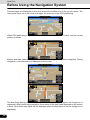
1. Before Using the Navigation System.............................. 83
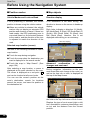
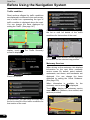
Navigation settings ...........................................................................................83
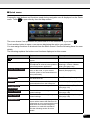
Navigation Menu................................................................................................84
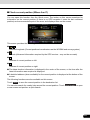
On-screen Buttons and Other Switches..........................................................85
Using the keyboard ........................................................................................................ 86
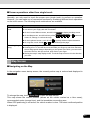
Screen operations other than single touch..................................................................... 87
Map Screen ........................................................................................................87
Navigating on the Map ................................................................................................... 87
Position marker .............................................................................................................. 90
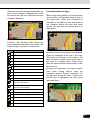
Map objects .................................................................................................................... 90
Quick menu .................................................................................................................... 97
Check current position (Where Am I?) .......................................................................... 99
3
3
Navigation
1. Navigation ....................................................................... 101
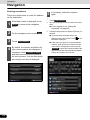
Select route destination..................................................................................101
Enter all or part of the address ..................................................................................... 101
Selecting the destination from your favourite spots (POI: Point Of Interest) ................ 113
Selecting a map position as the destination ................................................................. 124
Selecting the destination from the destination list ........................................................ 125
Selecting a frequently used destination (Smart History) .............................................. 126
Selecting a recent destination from History.................................................................. 127
Creating a route from the destination list (route creator).............................................. 128
Displaying the Entire Route on the Map........................................................129
Confirming Route Settings and Calling Route Related Functions .............129
Setting the avoidance route.......................................................................................... 130
Changing the Route ........................................................................................131
Selecting a new destination after the route has been set: new route, waypoint,
and final destination ..................................................................................................... 131
Setting a new starting point for the route...................................................................... 131
Editing the Destination List (Route Editing).................................................................. 133
Pausing Route Navigation............................................................................................ 133
Cancelling Route Navigation ........................................................................................ 133
Changing the Method for Searching for a Route (Other Routes, etc.) ......................... 134
Changing the Road Categories used for the Route Search ......................................... 135
Saving a Position to the Destination List......................................................135
Displaying a Simulation of the Route ............................................................136
Voice Control Navigation................................................................................137
Reference Data
1. Reference Data................................................................ 139
Feature..............................................................................................................139
Smart Zoom.................................................................................................................. 139
Switching between Day and Night Screens ................................................................. 139
Screen Design in Tunnels ............................................................................................ 139
Route Search/Search Again......................................................................................... 139
GPS Positioning Quality Indicator ................................................................................ 140
Online Road Information Saved in Route Search ........................................................ 141
4 4
“More” Menu ....................................................................................................142
Settings Menu ..................................................................................................143
Sound and Warnings.................................................................................................... 144
Customise Quick Menu ................................................................................................ 146
Traffic ........................................................................................................................... 147
Route Settings.............................................................................................................. 148
Map Settings ................................................................................................................ 149
Visual Guidance ........................................................................................................... 150
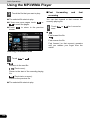
Units and Formats ........................................................................................................ 151
Trip Monitor .................................................................................................................. 151
Other
1. Glossary .......................................................................... 152
2. End-User License Agreement........................................ 154
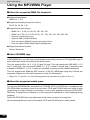
3. Further Information ........................................................ 158
Display Connection Status Information ........................................................158
Display Connection Status Information ........................................................................ 158
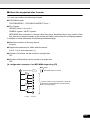
Accuracy & error calculation..........................................................................159
Regarding Precision Accuracy ..................................................................................... 159
Regarding the Properties of the GPS Electro-Magnetic Waves and Signal
Reception ..................................................................................................................... 159
Regarding Errors in Current Position Display............................................................... 160
Regarding Vehicle Position Detection Correction Using Map Matching....................... 160
Regarding the Accuracy of the Current Position and Route Navigation....................... 161
Regarding Roads and Place Name Data ..................................................................... 162
Regarding Route Navigation ........................................................................................ 162
Starting Out
1. Before Use....................................................................... 164
About Discs......................................................................................................166
USB ...................................................................................................................169
5
5
Basic Operations
1. Switching the Audio Source .......................................... 170
Switching the Audio Source...........................................................................170
Displaying the Audio Operations Screen......................................................170
Stopping the Audio Mode ...............................................................................170
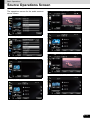
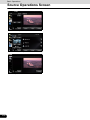
2. Source Operations Screen............................................. 171
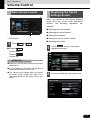
3. Volume Control ............................................................... 173
Main Volume Control.......................................................................................173
Displaying the Sound Settings Screen..........................................................173
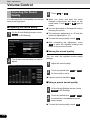
Adjusting the Sound Quality ..........................................................................174
Adjusting the sound quality .......................................................................................... 174
Saving the sound quality .............................................................................................. 174
Using a preset sound quality ........................................................................................ 174
Resetting the EQ curve ................................................................................................ 175
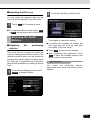
Adjusting the Audio Balance..........................................................................175
Adjusting the positioning selector................................................................................. 175
Adjusting the Vehicle Type........................................................................................... 176
Adjusting the audio balance ......................................................................................... 176
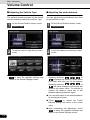
Setting Loudness ............................................................................................177
Setting the Source Volume Control ...............................................................178
Sub-Woofer Settings .......................................................................................179
Switching the phase ..................................................................................................... 179
Setting sub-woofer level ............................................................................................... 179
Setting low pass filter ................................................................................................... 180
Audio Operations
1. Using the Radio .............................................................. 181
Using the Radio ...............................................................................................181
Listening to the radio .................................................................................................... 181
Tuning a station............................................................................................................ 181
Selecting a radio band.................................................................................................. 182
Saving a station............................................................................................................ 182
Displaying title information ........................................................................................... 183
Using RDS (Radio Data System) ................................................................................. 184
6 6
2. Using the CD Player ....................................................... 187
Using the CD Player ........................................................................................187
Listening to a CD.......................................................................................................... 187
Selecting a track........................................................................................................... 188
Fast forwarding and fast reversing ............................................................................... 188
Finding a track.............................................................................................................. 188
Repeating the same track ............................................................................................ 189
Playing tracks randomly ............................................................................................... 189
3. Using the MP3/WMA Player ........................................... 190
Using the MP3/WMA Player ............................................................................190
Listening to an MP3/WMA file ...................................................................................... 190
Selecting a folder.......................................................................................................... 191
Selecting a music file.................................................................................................... 191
Fast forwarding and fast reversing ............................................................................... 192
Repeating the music file ............................................................................................... 193
Playing randomly.......................................................................................................... 193
Scrolling title information .............................................................................................. 194
About MP3/WMA..............................................................................................195
About the supported MP3 file standards ...................................................................... 195
About the supported WMA file standards..................................................................... 196
About ID3/WMA tags.................................................................................................... 196
About the supported media types................................................................................. 196
About the supported disc formats................................................................................. 197
About the file names..................................................................................................... 198
Multi-sessions............................................................................................................... 198
About MP3/WMA playback........................................................................................... 198
About the MP3/WMA playing time display ................................................................... 198
Creating and Playing MP3/WMA Files ...........................................................199
Downloading from MP3/WMA music sites on the Internet ........................................... 199
Converting a music CD into MP3/WMA files ................................................................ 199
Writing MP3/WMA files on a CD-R/RW disc ................................................................ 199
Playing a CD-R/RW disc .............................................................................................. 199
7
7
4. Using the USB Music File Player................................... 200
Using the USB Music File Player ...................................................................200
Listening to a USB music file........................................................................................ 200
Selecting a folder.......................................................................................................... 201
Selecting a music file.................................................................................................... 201
Fast forwarding and fast reversing ............................................................................... 202
Repeating the music file ............................................................................................... 202
Playing randomly.......................................................................................................... 203
Scrolling title information .............................................................................................. 203
About USB Devices .........................................................................................204
About the supported USB memory standards.............................................................. 204
Supported MP3 file standards ...................................................................................... 204
Supported WMA file standards..................................................................................... 205
About the supported AAC file standards ...................................................................... 205
About ID3/WMA/AAC tags ........................................................................................... 206
USB memory format..................................................................................................... 207
Visual Operations
1. Using the USB Video File Player ................................... 208
Before Using the USB Video File Player .......................................................208
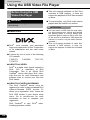
About DivX ................................................................................................................... 208
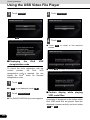
Using the USB Video File Player....................................................................209
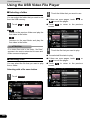
Viewing a USB video file .............................................................................................. 209
Selecting a folder.......................................................................................................... 210
Selecting a file .............................................................................................................. 210
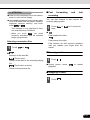
Fast forwarding and fast reversing ............................................................................... 211
Pausing a video............................................................................................................ 211
Stopping a video........................................................................................................... 211
Repeating the video file................................................................................................ 212
Playing randomly.......................................................................................................... 212
Changing the subtitle language.................................................................................... 213
Changing the audio language ...................................................................................... 214
Changing the video output ........................................................................................... 214
Displaying DivX VOD code .............................................................................215
Displaying the DivX VOD registration code.................................................................. 215
Displaying the DivX VOD deregistration code.............................................................. 216
Caution display while playing VOD rental files ............................................................. 216
8 8
About USB Devices .........................................................................................217
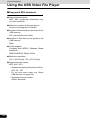
Supported DivX standards ........................................................................................... 217
Supported WMV standards .......................................................................................... 217
Supported MP4 standards............................................................................................ 218
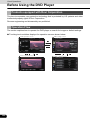
2. Before Using the DVD Player......................................... 219
Advantages of Digital Versatile Disc (DVD) ..................................................219
Multi-Audio Function..................................................................................................... 219
Multi-Angle Function..................................................................................................... 219
Subtitle Display Function.............................................................................................. 219
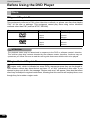
Discs .................................................................................................................220
Types of Playable Discs ............................................................................................... 220
Region Code of Playable Disc...................................................................................... 220
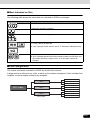
Mark Indicated on Disc................................................................................................. 221
Disc Configuration ........................................................................................................ 221
Products equipped with Rovi Corporation ...................................................222
Operation Flow ................................................................................................222
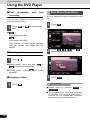
3. Using the DVD Player ..................................................... 223
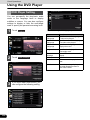
Using the DVD Player......................................................................................223
Watching a DVD Video ....................................................................................223
Fast forwarding and fast reversing ............................................................................... 224
Pausing a video............................................................................................................ 224
Stopping a video........................................................................................................... 224
Disc Menu Operations.....................................................................................224
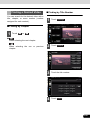
Finding a Desired Video..................................................................................225
Finding by Chapter ....................................................................................................... 225
Finding by Title Number ............................................................................................... 225
Playback from the selected position............................................................................. 226
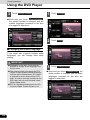
Changing the Screen Display and Audio Mode............................................226
Changing the Angle...................................................................................................... 226
Changing the Subtitle Language .................................................................................. 227
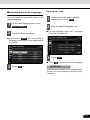
Changing the Audio Language..................................................................................... 228
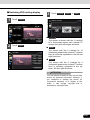
Switching DVD setting display...................................................................................... 229
9
9
DVD Player Setting ..........................................................................................230
Specifying the Audio Language.................................................................................... 231
Specifying the Subtitle Language................................................................................. 232
Specifying the Menu Language.................................................................................... 233
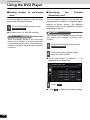
Setting display of multi-angle mark .............................................................................. 234
Specifying the Parental Screening Level...................................................................... 234
Switching the Video Output .......................................................................................... 235
Auto Start setting.......................................................................................................... 236
Setting initialisation....................................................................................................... 236
Language Code List ........................................................................................237
4. Using a VTR..................................................................... 238
Using a VTR .....................................................................................................238
Playing a VTR .............................................................................................................. 238
Settings in the VTR setting screen ............................................................................... 239
How to Operate Portable Audio Devices
1. Using the iPod® Player................................................... 240
Using the iPod Player......................................................................................240
Playing an iPod ............................................................................................................ 241
Fast forwarding and fast reversing ............................................................................... 242
Selecting a music or video file...................................................................................... 242
Switching between music mode and video mode ........................................................ 242
Finding a music file....................................................................................................... 243
Finding a video file ....................................................................................................... 244
Pausing ........................................................................................................................ 245
Settings in the Video mode setting screen ................................................................... 245
Repeating the same music file ..................................................................................... 246
Playing music files randomly ........................................................................................ 246
Playing all shuffle songs............................................................................................... 247
Changing the audiobook playback speed .................................................................... 248
Scrolling title information .............................................................................................. 248
About the Supported iPods ............................................................................249
2. Using Bluetooth Audio................................................... 250
Before Using Bluetooth Audio .......................................................................250
Registering a portable device....................................................................................... 251
Deleting a portable device registration ......................................................................... 252
Connecting a portable device....................................................................................... 253
Cancelling a portable device connection...................................................................... 254
10 10
Using a Portable Device..................................................................................255
Listening to a portable device....................................................................................... 255
Pausing the playback ................................................................................................... 256
Selecting a track........................................................................................................... 256
Selecting a music album .............................................................................................. 256
Fast forwarding and fast reversing ............................................................................... 256
Finding a music album ................................................................................................. 257
Finding a music track ................................................................................................... 257
Scrolling title information .............................................................................................. 258
Various portable device settings .................................................................................. 258
About the Compatible Bluetooth-Supporting Devices ................................259
Other Operations
1. Picture Function Operations ......................................... 260
Using the Picture Function.............................................................................260
Displaying the picture operations screen ..................................................................... 260
Replacing the Opening screen with your own image data ........................................... 261
Selecting an image file from the picture list.................................................................. 261
Slide show setting ........................................................................................................ 262
About the Supported Image Data...................................................................263
2. Back Eye Camera Operations........................................ 264
Displaying the Back Eye Camera Image .......................................................265
Adjusting the guide lines................................................................................266
Back Eye Camera Screen Setting ..................................................................267
3. About Steering Wheel Switches.................................... 269
Manual setting of steering wheel switch functions......................................269
Compatibility with Steering Wheel Switches ................................................271
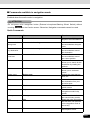
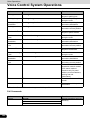
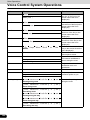
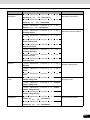
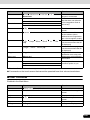
4. Voice Control System Operations................................. 274
About the Voice Control System....................................................................274
Using the Voice Control System ....................................................................274
Displaying the Command List ........................................................................276
Examples of Using the Voice Control System..............................................277
Specifying a folder........................................................................................................ 277
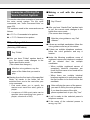
Making a call with the phone book ............................................................................... 277
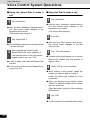
Using the Speed Dial to make a call ............................................................................ 278
Using the Dial to make a call........................................................................................ 278
11
11
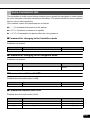
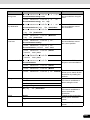
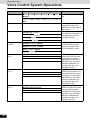
Voice Command Lists .....................................................................................279
Command for changing to the handsfree mode ........................................................... 279
Command for changing to the navigation mode........................................................... 279
Commands available with USB .................................................................................... 279
Commands available with iPod .................................................................................... 279
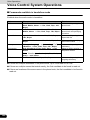
Commands available in handsfree mode ..................................................................... 280
Commands available in navigation mode..................................................................... 281
Other Commands ......................................................................................................... 289
Reference
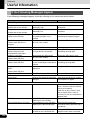
1. Useful Information .......................................................... 290
If the Following Messages Appear.................................................................290
When You Think There Is a Malfunction .......................................................296
Glossary ...........................................................................................................297
About Trademarks...........................................................................................298
Specifications ..................................................................................................300
12 12
Before Use
Safety Precautions
WARNING
● Do not modify this system for any uses other than that specified herein. Also, do not deviate
from the installation procedures described herein. Eclipse will not be held liable for damages
including, but not limited to serious injury, death or property damage resulting from installations
that enable unintended operation.
● The main unit requires a 12V DC power supply. The main unit should not be installed in any
vehicle which does not have a 12 V power system with a ground-connected negative side. An
installation other than the one intended may cause severe damage to the main unit, electric
shock or personal injury.
● Never install the main unit where it will interfere with safe operation of the vehicle.
● Never block the drivers' view. Do not install the main unit where it may interfere with operation
of the brake, the steering or safety systems, such as seat belts and air bags.
● Before drilling holes in a vehicle for installation, be sure to confirm the locations of pipes, tanks,
electrical wiring, and other vehicle systems and components to ensure that there will be no
interference or contact. In addition, apply rust prevention and leak prevention measures at the
drilling area. Otherwise, fire or electric shock could occur.
● When installing the main unit, do not remove or alter existing vehicle fasteners, including nuts,
bolts, screws, clips, and fittings. Never detach, move or alter existing vehicle wiring, including
electrical grounds and straps. Alteration of existing vehicle components may make vehicle
unsafe to operate.
● Before installation, remove the negative (-) battery terminal to prevent shocks, electrical arcing,
fires, and damage to vehicle wiring and the main unit you are installing.
● Secure wiring with non-conductive tape or plastic ties so that the wires do not interfere with
vehicle operation, including the brake pedal, gear shifter and steering. Position wires so that
they will not be rubbed, abraded, or damaged by moving vehicle components, including power
seats.
● To avoid damage to the main unit and vehicle, including fire, never supply power to the installed
main unit in a way that will overload the capacity of an existing vehicle circuit. Never leave a
power supply wire or connection uninsulated. Always install supplied fuses, circuit breakers,
and relays.
● Air bags are a vital part of a safety system. Never install the main unit in a way which will alter
air bag wiring or interfere with air bag deployment. Air bags must function properly in the event
of an accident.
● When installation is complete, test all vehicle electrical systems to ensure they operate
correctly, including lights, horn, brake lights, and emergency flashers.
● For your protection, never use a power drill without wearing safety glasses or goggles.
Debris or broken drill bits may cause severe eye injuries, including blindness.
● Use electrical tape to insulate the ends of all wires, even if they are not used. Proper insulation
prevents arcs, shocks and fires.
● Some devices require the use of batteries. Never install the main unit where young children can
get access to batteries. If a battery is swallowed, seek immediate medical attention.
● When the vehicle is in motion, never take your eyes off the road to make adjustments to the
main unit. To prevent accidents, keep your eyes on the road. Do not lose concentration on your
driving when operating or making adjustments to the main unit.
● The driver should not look at the screen while driving. Doing so may result in an accident.
13
13
Before Use
Safety Precautions
● Do not place foreign objects in the disc insertion slot or iPod/USB input terminal. Fire or shocks
may result.
● Do not disassemble or alter this main unit. Doing so may result in an accident, fire or shock.
● Do not let water or foreign objects enter the internal parts of this main unit. Doing so may result
in smoke, fire or shock.
● Do not use when the main unit is malfunctioning (the screen is not lit or no sound comes out).
Doing so may result in an accident, fire or shock.
● Always replace fuses with fuses of identical capacity and characteristics. Never use a fuse with
a higher capacity than the original fuse. Using the wrong type of fuse may cause a fire or severe
damage.
● If foreign objects or water enters the main unit, smoke or a strange odour may be emitted. If this
occurs, stop using the main unit immediately and contact your dealer. Accidents, fire, or shocks
may result if you continue to use the main unit under these conditions.
● The driver should not change the disc or iPod/USB memory while driving. Doing so may result
in an accident. You must first stop or park your car in a safe location and then proceed to
remove or insert the disc and/or iPod/USB.
● Plastic bags and wrappings may cause suffocation and death. Keep these objects away from
babies and children. Never place bags or wrappings over anyone's head or mouth.
● Be sure to park the vehicle in a safe location and set the parking brake before watching DVDs
or videos. For safety reasons, only the sound of DVDs or videos will be emitted while the vehicle
is in motion.
14 14
CAUTION
● Wiring and installing this main unit requires expertise and experience. Professional installation
is recommended. Consult with your dealer or a professional installation expert. Incorrect wiring
may damage the main unit or interfere with safe operation of the vehicle.
● Use only specified accessory parts. Using other parts may cause damage to the main unit or
cause parts to dislodge and fall or fly off the main unit.
● Do not install the main unit in places where it may be exposed to dew condensation (around the
air conditioning hose, etc.), or in locations where it may come in contact with water, high levels
of moisture, dust or oily smoke. If water, moisture, dust or oily smoke enters this main unit,
smoke, fires or malfunctions may result.
● Do not install in places subject to direct sunlight or where it may be hit directly by hot air from the
heater. This may increase the interior temperature of the main unit, resulting in fires and
malfunctions.
● Do not impede the air flow of the heat sink or vents of this main unit. Impeding the air flow will
cause the interior of the main unit to overheat, and fire may result.
● Connect as specified in the installation manual. If not connected correctly, fires or accidents
may result.
● Install wiring in a manner in which cables will not be pinched by movable parts such as seat rails
and screw parts of the vehicle body. Accidents, fires and, shocks may result from disconnection
and electrical shorts.
● Install wiring in a manner in which cables will not come in contact with metal parts. The wiring
may be damaged by contact with metal parts, resulting in fire and, shocks.
● Avoid all contact with hot surfaces when wiring the main unit. High temperatures may damage
wiring, causing shorts, arcing and fires.
● When changing the installation location for this main unit, please consult the dealer where you
bought it for safety reasons. Expertise is necessary for removal and installation.
● Keep volume to a reasonable level so that you can hear sounds from outside the vehicle,
including warning sounds, voices, and sirens. Failure to do so may cause an accident.
● Be careful that your hands and fingers do not get pinched when adjusting the tilting angle or
closing the display. Injuries may result.
● Do not put your hands or fingers into the disc insertion slot or iPod/USB input terminal.
Injuries may result.
● Do not touch hot parts of the main unit. Fire may result.
● The volume should be set at a moderate level to avoid hearing damage when the main unit is
powered on.
● Do not operate when sound such as distortion is being emitted.
● The main unit uses invisible laser light. Do not disassemble or alter this main unit. If any
problems occur, contact the dealer where you purchased the main unit. Altering this main unit
may cause exposure to laser emissions (which may damage your eyesight), or result in an
accident, fire or shocks.
● If the main unit is dropped or the front panel is damaged, turn off the power to the main unit and
contact your dealer. If used in this condition, fires or shocks may result.
15
15
Before Use
Safety Precautions
IMPORTANT
● When there is a lot of vibration – when driving on a rough road for example – the main unit may
become inoperable due to it not being able to read data from the disc.
● In cold temperatures, condensation may accumulate on the lens for reading CDs and DVDs
immediately after turning ON the heater. Wait approximately 1 hour for the condensation to
evaporate and the device will operate normally.
Contact the store where you purchased the device if normal operation does not resume after
several hours.
● If using this receiver immediately after having purchased it or after having stored it
disconnected from the vehicle battery, the present location may not be displayed accurately.
Wait for a short while and the GPS positioning will correct the displayed position.
● This device is precision-engineered equipment and the information that you record on it after
purchase can be lost as a result of static electricity, electrical noise, vibration and, other
influences. It is recommended that you keep a separate record of the information you store in
the main unit.
● Note that the following events are not covered by the warranty.
a Corruption or loss of the data stored in the main unit by the purchaser resulting from failure or
incorrect operation of the main unit, or any problems associated with it, or due to the effects
of electrical noise or other influences.
b Corruption or loss of the data stored in the main unit by the purchaser resulting from misuse
of the main unit by the purchaser or a third party.
c Corruption or loss of data stored in the main unit by the purchaser resulting from failure/repair
of the main unit.
* Please note that by installing or using the main unit, you are regarded as having consented to
the points above.
16 16
Before Use
Viewing This Document
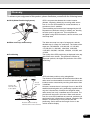
Section title
A title is assigned for each section.
Item title
A number and title is
assigned for each
item.
Operation title
A title is assigned for
each operation .
Detailed operation
title
A title is assigned for
each detailed
operation.
Operation procedure
Describes the
operation.
Proceeds with the
operation in
numerical order.
Operation screen
A screen showing
the operation will
appear.
CHECK
In this document, the unit is generally described using the screens which appear when the optional
devices are connected. Navigation is mostly described using the Heading - upwards 1 screen.
About switch display
When a panel button should be pressed, button names are shown as
(
,
, etc.).
When a touch switch on the screen should be touched, switch names are shown as
[].
17
or
17
Before Use
About This Receiver
Control Names and Operations
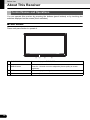
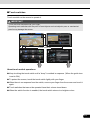
You can operate this receiver by pressing the buttons (panel buttons) or by touching the
switches displayed on the screen (touch switches).
■ Panel buttons
Press each panel button to operate it.
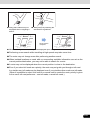
1
a TILT/EJECT button
2
3
4
Press to display the TILT·EJECT screen.
Press to use the audio or info.
b AUDIO button
Press for 1 second or more to adjust the picture quality or screen
brightness.
c MAP button
Press to display the navigation screen.
d VOL button
Press to adjust volume of audio.
18 18
■ Touch switches
Touch a switch on the screen to operate it.
IMPORTANT
Touch the touch switches with your finger.
Operating touch switches with the point of hard objects such as ballpoint pens or mechanical
pencils may damage the screen.
Touch switches
About touch switch operations
● Keep touching the touch switch until a “beep” is emitted in response. (When the guide tone
is set to ON.)
● To protect the screen, touch the touch switch lightly with your finger.
● When there is no response from the switch, remove your finger from the screen and touch it
again.
● Touch switches that cannot be operated have their colours toned down.
● When the switch function is enabled, the touch switch returns to a brighter colour.
19
19
Before Use
About This Receiver
Turning the Power On or Off
This unit switches on automatically at ignition, and when started for the first time, it displays the
Navigation setting screen*. When the engine is switched off, the unit also switches off.
* The second and subsequent times that the unit is started, the mode screen that was last in use is
displayed. If the last mode in use was the Navigation screen, then your current position will be
displayed. If the last mode in use was the Audio screen, then your last audio selection will be
displayed.
■ Turning on the power
1
The Caution screen is displayed automatically. When you touch I Agree , the
Navigation setting screen appears.
● I Agree turns down the tone during system startup. After system startup, wait until the tone
is turned up, and then touch I Agree .
<Opening screen>
<Caution screen>
<Navigation setting screen>
ATTENTION
Do not press the voice recognition button (External microphone/Steering Wheel Switch) without
touching I Agree on the Caution screen. Otherwise, Navigation commands cannot be used.
20 20
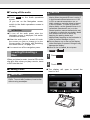
■ Turning off the audio
● Touch OFF on the Audio operations
screen.
(If you are on the Navigation screen,
switch to the Audio operations screen to
do this.)
ATTENTION
● To turn off the audio power when the
Navigation screen is displayed, first switch
to the Source screen.
● When the audio power is turned off, touch
the source you wish to change to on the
Source screen. For details, see “Switching
the Audio Source” on page 170.
● You cannot turn off the navigation power.
Loading/Unloading a
Disc
When you listen to music, insert a CD into the
disc slot. Also, when you play a movie, insert
a DVD into the slot.
■ Loading a disc
CAUTION
● You may not be able to open or close the
display when the gearshift lever is set to P
in an automatic transmission car or 1/3/5
or r in a manual transmission car; or
when a bottle or a similar object is placed
in the cup holder. To open or close the
display safely, set the gearshift lever to N
(automatic transmission car) or to the
Neutral position (manual transmission car)
in advance, or empty the cup holder. Make
sure that the car is not in motion by
applying the parking brake and
appropriately stepping on the foot brake in
order to prevent damage or injury.
● Do not place a cup or can on the display
while the display is opened. Doing so may
damage the display.
● When a disc is loaded, do not press
.
Close or
1
Press
2
Touch Disc .
.
● The display will open to reveal the
insertion slot.
IMPORTANT
This receiver can play 8 cm CDs and 8 cm
DVDs. To avoid disc problems, insert a disc
without using an adapter.
Disc slot
21
21
Before Use
About This Receiver
3
Insert a disc into the slot.
● The display will close automatically when
the disc is inserted.
● Hold a DVD or CD correctly (by inserting
your finger in its centre hole and by holding
the disc edge by another finger), face the
disc label side upward, and insert the disc
into the slot.
● When you insert a DVD into the slot, the
movie will be played in the DVD mode.
● When you insert a CD into the slot, the
music will be played or the MP3/WMA play
will start.
Disc
■ Unloading a disc
IMPORTANT
● When unloading a disc, use the following
notes.
Automatic transmission (AT) car:
If it is difficult to unload a disc when the
shift lever is in the P position, shift it to the
N position. (If your car has a column shift
lever, shift it to the P or N position.)
Manual transmission (MT) car:
If it is difficult to unload a disc when the
shift lever is in “1”, “3”, “5” or “r” position,
shift it to the Neutral position.
● Take care NOT to close the display when
the ejected disc remains in the slot. If this
caution is not observed, this receiver or the
disc may be scratched.
● Do not attempt to close the front panel by
hand. Doing so may damage the display.
● Do not put cups, cans, or any other objects
on the display when it is open. Doing so
may damage the display.
● Wipe and clean the display immediately if
juice or other liquid spills onto it. If it is not
cleaned, the display may be damaged.
● To protect the display from heat and dust,
keep the display closed except when you
load or unload a disc.
ATTENTION
● Press
the display.
for a second or more to open
● For disc details, see “About Discs” on page
166.
22 22
1
Press
2
Touch Disc .
.
● The disc will be ejected automatically.
Adjusting the Display
Angle
When the screen shines due to ambient
sunlight, you can adjust the angle of the
display.
CAUTION
When adjusting its angle, take care not to
pinch your fingers. Otherwise you may hurt
yourself or the display may fail.
IMPORTANT
● Do not load a disc when the display is
tilted. If this caution is not observed, this
receiver or the disc may be scratched.
3
After the disc is ejected, touch Close
or press
to close the display.
● When adjusting the display angle, use the
following notes.
Automatic transmission (AT) car:
Adjust the display angle so as not to get in
the way when shifting the AT lever to any
of the P, r, or N positions. (If the lever shift
is interfered with, do not tilt the display.)
Manual transmission (MT) car:
Adjust the display angle so as not to get in
the way when shifting the MT lever to any
of the 1/3/5 or r positions. (If the lever
shift is interfered with, do not tilt the
display.)
23
23
Before Use
About This Receiver
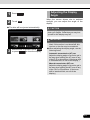
1
Press
2
Touch
or
adjustment.
ATTENTION
.
of the angle
●
:
Each touch returns the display from the
tilted state by 1 step (5 °). (Maximum 6
steps, 30 °)
●
:
Each touch tilts the display by 1 step (5 °).
(Maximum 6 steps, 30 °)
3
24 24
After adjusting the angle, press
.
● You can open the display even when it is
tilted. When you close the display, it returns
to the preset angle.
● If you tilt the display and turn the ignition key
OFF, the display will return to the upright
position. However, when you turn the
ignition key to the ACC or ON position, the
display returns to the preset angle.
Loading and Unloading
an SD Memory Card
Insert an SD memory card into the slot.
■ Loading an SD memory card
CAUTION
● You may not be able to open or close the
display when the gearshift lever is set to P
in an automatic transmission car or 1/3/5
or r in a manual transmission car; or
when a bottle or a similar object is placed
in the cup holder. To open or close the
display safely, set the gearshift lever to N
(automatic transmission car) or to the
Neutral position (manual transmission car)
in advance, or empty the cup holder. Make
sure that the car is not in motion by
applying the parking brake and
appropriately stepping on the foot brake in
order to prevent damage or injury.
● Do not place a cup or can on the display
while the display is opened. Doing so may
damage the display.
● When an SD memory card is loaded, do
not press Close or
.
IMPORTANT
● Position an SD memory card with the 1
mark at the far end and insert it until it
makes a “click” sound. When it makes
contact with the stopper inside, the card
cannot be inserted any further. Do not try
to forcibly push the card.
● Before inserting a miniSD card, microSD
card, miniSDHC card or microSDHC card,
be sure to attach the card to the special
adapter. (If you insert only the miniSD
card, microSD card, miniSDHC card or
microSDHC card, you may not be able to
remove it.)
25
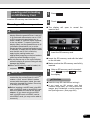
1
Press
2
Touch Full Open .
.
● The display will open to reveal the
insertion slot.
3
Insert the SD memory card.
● Insert the SD memory card with the label
on the left side.
● Make sure that the SD memory card is fully
inserted.
4
After an SD memory card is inserted,
touch Close or press
to close
the display.
ATTENTION
● Insert the map SD card without locking it.
● If you insert an SD memory card that
contains image data, you can preview the
images, play a slideshow, or set an image as
the Opening screen. (See page 260)
25
Before Use
About This Receiver
About SD memory cards
● This unit supports SD memory cards with
capacities from 512 MB to 8 GB.
● SD memory cards that are marked as
follows can be used.
■ Unloading an SD memory card
IMPORTANT
● When unloading an SD memory card, use
the following notes.
Automatic transmission (AT) car:
SD Logo is a trademark of SD3C, LLC.
SDHC Logo is a trademark of
SD-3C, LLC.
miniSD Logo is a trademark of
SD-3C, LLC.
Manual transmission (MT) car:
If it is difficult to unload an SD memory
card when the shift lever is in “1”, “3”, “5” or
“r” position, shift it to the Neutral position.
miniSDHC Logo is a
trademark of SD-3C, LLC.
● Take care NOT to close the display when
the ejected SD memory card remains in
the slot. If this caution is not observed, this
receiver or the disc may be scratched.
microSD Logo is a trademark
of SD-3C, LLC.
● Do not attempt to close the front panel by
hand. Doing so may damage the display.
microSDHC Logo is a
trademark of SD-3C, LLC.
● Multi Media Cards (MMC) cannot be used.
26 26
If it is difficult to unload an SD memory
card when the shift lever is in the P
position, shift it to the N position. (If your
car has a column shift lever, shift it to the P
or N position.)
● Do not put cups, cans, or any other objects
on the display when it is open. Doing so
may damage the display.
● Wipe and clean the display immediately if
juice or other liquid spills onto it. If it is not
cleaned, the display may be damaged.
● To protect the display from heat and dust,
keep the display closed except when you
load or unload an SD memory card.
1
Press
2
Touch Full Open .
.
ATTENTION
● This unit supports USB memory in the
following formats.
● Press in the SD memory card until you
hear it “click”, let go of the card, and then
pull it straight out.
• Supported class: Mass storage class
• Supported USB Ver.: USB1.0/1.1/2.0
(maximum transfer speed is the same as
USB 2.0)
• Maximum consumption current: Less
than 1.0 A
• Supported capacities: 16 MB to 8 GB
● Do not connect USB memory devices other
than those conforming to the specifications
above. There is a possibility that some USB
memory devices that do conform to
specifications will not function correctly, due
to many variables. We suggest testing your
USB device prior to departing to your
destination.
3
After an SD memory card is ejected,
touch Close or press
to close
the display.
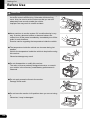
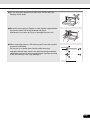
Connecting (or
Disconnecting) the USB
Memory
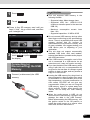
1
Connect (or disconnect) the USB
memory.
● This unit does not support commercially
available USB hubs, multi card readers,
external hard disks or portable audio players
with USB connectors.
● If the USB memory connection cord of this
unit is connected to a USB device via an
extension cord, it may not function correctly.
● If you lose the data in the USB memory while
using it with this unit, no compensation will
be given for the lost data. It is always a good
practice to back up data, and only access a
copy for in-vehicle use.
● Leaving the USB memory for a long time in a
place exposed to direct sunlight may result
in deformation or discolouration due to the
high temperature, or cause a malfunction. In
such cases, ECLIPSE will not give any
compensation. When you are not using the
USB memory, keep it in a place away from
direct sunlight. Further, when leaving the
vehicle, do not keep the USB memory
inside.
● When the audio source is USB, do not
disconnect the USB memory. Doing so may
damage the data in the USB memory.
Before disconnecting the USB memory, turn
the ignition switch to the Off position or
switch the audio source to a source other
than USB, and then disconnect it.
27
27
Before Use
About This Receiver
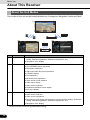
About the Unit Modes
The modes of this unit can be broadly divided into 3 categories: Navigation, Audio and, Multi.
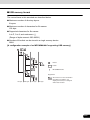
(1)
(3)
(2)
Mode
Main functions
(1)
Navigation
● Navigation screen display and operations (current position display, destination
setting, destination guidance, destination registration, etc.)
(2)
Audio
● Navigation menu display
● Receiving AM/FM radio
● CD, MP3/WMA player operations
● DVD player operations
● USB music/video file player operations
● VTR/AUX display
● iPod operations
● Bluetooth audio operations
● Video screen mode selection
● Audio menu display
● Audio source selection
● Handsfree operation screen display
● Info menu display
(3)
Multi
● Navigation screen and Audio operations screen selection
● Audio source selection
● Audio source operations
● Navigation screen display and operations (current position display, destination
setting, destination guidance, destination registration, etc.)
● Navigation menu display
* Some functions cannot be operated while driving.
28 28
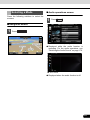
Selecting a Mode
Press the following switches to select the
screens.
■ Audio operations screen
1
Press
.
■ Navigation screen
1
Press
.
● When the Radio is operating
● Displayed while the audio function is
operating. For the audio operations, see
“Switching the Audio Source” on page 170.
● OFF screen
● Displayed when the audio function is off.
29
29
Before Use
About This Receiver
■ Multi screen
■ About the on-screen display
You can position the Navigation screen and
Audio operations screen on the left and right
to display them at the same time.
If a disc is loaded while the Navigation screen
is displayed, an on-screen display appears.
1
On the Navigation screen, touch
.
After a short time, the on-screen display
disappears automatically.
On-screen display
● The Multi screen appears.
ATTENTION
When a USB memory device or an iPod is
disconnected during playback, an audio off onscreen display appears.
● Multi screen
ATTENTION
On the Multi screen, touch
Navigation screen.
30 30
to return to the
Operation Conditions for the Unit
The operability of the unit's functions varies according to the following conditions (ignition
switch position).
: Operable
×: Inoperable
Function
Ignition switch position
OFF
ACC
ON, vehicle
stationary*1
ON, vehicle in motion
Navigation
settings and
information
×
When the vehicle is in motion,
some functions become
Audio function
×
When the vehicle is in motion,
some functions become
inoperable for safety reasons.
Video function
×
When the vehicle is in motion,
some functions become
inoperable for safety reasons.*2
inoperable for safety reasons.*3
Handsfree
×
*1
When the parking brake is applied.
*2
When the navigation safety function is on.
*3
Video is not displayed.
When the vehicle is in motion,
some functions become
inoperable for safety reasons.
ATTENTION
Switches that cannot be operated have their colours toned down. Operating a switch that is
disabled while driving may result in the display of an operation prohibited message on the screen.
31
31
Before Use
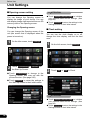
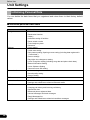
Unit Settings
In addition to settings for navigation and
audio operations, the following settings can
be performed for the unit.
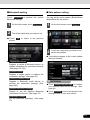
3
Touch the switch that you want to set.
● Touch
screen.
● Bluetooth setting (See page 33)
● Skin pattern setting (See page 33)
or
to change the Info
● Opening screen setting (See page 34)
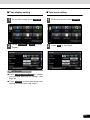
● Clock setting (See page 34)
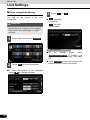
● Day/night view changeover setting (See
page 36)
● Voice recognition setting (See page 38)
● Guide tone setting (See page 39)
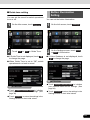
● Button Illumination Setting (See page 39)
● Voice Guidance Setting (See page 40)
● Camera Screen SW setting (See page
267)
● ESN (Eclipse Security Network) Setting
(See page 41)
● Steering Remote Setting (See page 269)
● Radio Antenna Setting (See page 45)
● DivX(R) VOD :
Display DivX VOD code. (See page 215)
Various Unit Settings
■ Displaying the Info screen
Display the Info screen to perform various
settings.
1
Press
ATTENTION
.
● System Check :
Check the sensitivity of the GPS signal
reception, or the connection of the parking
and reverse signals. (See page 158)
● Software Version :
View information such as the map data that
is stored on the unit or version information
for the audio application. (See page 47)
● Steering Remote :
2
Touch Steering Remote to perform the
various steering wheel switches settings.
(See page 269)
Touch Info .
● If Info is not displayed, touch
.
● Camera :
Touch Camera to perform the Back eye
camera settings. (See page 264)
32 32
■ Bluetooth setting
■ Skin pattern setting
Touch Bluetooth to perform the various
Bluetooth settings.
You can set the colour pattern (Black/Green/
Amber/Blue) for the screen.
1
On the Info screen, touch Bluetooth .
2
Touch the switch that you want to set.
● Touch
screen.
1
On the Info screen, touch Settings .
2
Touch the colour that you want to use
as the skin pattern.
to return to the previous
● The setting changes to the colour pattern
that you touched.
● Registered Devices :
Register or delete a Bluetooth device, or
display information for connected devices.
(See pages 53, 251)
Connect Phone :
Register a mobile phone or perform the
connection settings. (See page 55)
Connect Portable Player :
Register a Bluetooth audio device or
perform the connection settings. (See
page 253)
Detailed Bluetooth Settings :
Display or set the detailed Bluetooth
information for this unit. (See page 72)
ATTENTION
● Touch Delete Personal Data to initialise
your personal data and all settings. (See
page 48)
● Touch Initialise to return the settings in the
Settings screen to their initial values.
Passcode Settings :
Set the passcode (passkey). (See page
73)
33
33
Before Use
Unit Settings
■ Opening screen setting
You can change the Opening screen to
display the image of your choice. You can
also display image data imported from an SD
memory card on the Opening screen.
Changing the Opening screen
You can change the Opening screen of the
unit (the screen that is displayed when the
power is turned on).
1
On the Info screen, touch Settings .
2
Touch Customised or Initialise on
the Start Up Screen.
● Touch Customised to change to the
Opening screen that was set with the
picture function. (See page 260)
ATTENTION
● Touch Delete Personal Data to initialise
your personal data and all settings. (See
page 48)
● Touch Initialise to return the settings in the
Settings screen to their initial values.
■ Clock setting
You can turn the clock display on or off,
change the time display, and set the time
zone.
1
On the Info screen, touch Settings .
2
Touch On or Off in Clock.
● Touch Initialise to return the settings in
the Start Up screen to their initial values.
ATTENTION
● Touch Delete Personal Data to initialise
your personal data and all settings. (See
page 48)
● Touch Initialise to return the settings in the
Settings screen to their initial values.
34 34
■ Time display setting
■ Time zone setting
1
On the Info screen, touch Settings .
1
On the Info screen, touch Settings .
2
Touch 12:00 am or 24:00 in Time
Display.
2
Touch Set in Time Zone.
ATTENTION
● Touch Delete Personal Data to initialise
your personal data and all settings. (See
page 48)
● Touch Initialise to return the settings in the
Settings screen to their initial values.
35
35
Before Use
Unit Settings
3
Touch On or Off in Auto Time
Zone.
● Touch On in Auto Time Zone to set the
time zone automatically.
● When Auto Time Zone is “Off”, touch or + in Manual Time Zone to adjust the
time zone manually.
■ Day/night
setting
view
changeover
1
On the Info screen, touch Settings .
2
Touch Headlight , Time or None in
Link to Day/Night View.
● Touch
for 1 second or more to
+
advance the time continuously.
Touch
for 1 second or more to
reverse the time continuously.
● After configuring the setting, touch Done
to save the setting and return to the
previous screen.
● If Link to Day/Night View is not displayed,
touch
to change the page.
ATTENTION
● On
the
Settings
screen,
touch
to initialise your
personal data and all settings. (See page
48)
Delete Personal Data
● On the Settings screen, touch Initialise to
return the settings in the Settings screen to
their initial values.
● Headlight :
Change to night view when the lights
(sidelights, tail lights, license plate lights)
are turned on.
Time :
Change to night view or day view at the set
times.
None :
Change to night view or day view
manually.
36 36
Day/night view changeover time setting
Changing to the night view or day view
When Link to Day/Night View is set to “Time”,
you can set the time at which to change to the
day view.
When Link to Day/Night View is set to “None”,
you can change to the night view or day view
manually.
1
On the Settings screen, touch Time
in Link to Day/Night View.
2
Touch Time Settings .
3
Touch
or
.
● You can set the “Sunrise” and “Sunset”
time for the day view.
● After configuring the setting, touch Done
to save the setting and return to the
previous screen.
1
On the Settings screen, touch None
in Link to Day/Night View.
2
Touch Day or Night .
ATTENTION
● Touch Delete Personal Data to initialise
your personal data and all settings. (See
page 48)
● Touch Initialise to return the settings in the
Settings screen to their initial values.
ATTENTION
● On
the
Settings
screen,
touch
to initialise your
personal data and all settings. (See page
48)
Delete Personal Data
● On the Settings screen, touch Initialise to
return the settings in the Settings screen to
their initial values.
37
37
Before Use
Unit Settings
■ Voice recognition setting
You can set the volume of the voice
recognition.
CAUTION
Be sure to set the volume of the audio at an
appropriate level. Improper volume setting
may result in hearing damage or a traffic
accident.
1
3
●
Touch
or
-
+ .
+ (right side):
Volume up
-
(left side):
Volume down
On the Info screen, touch Settings .
ATTENTION
● On
the
Settings
screen,
touch
to initialise your
personal data and all settings. (See page
48)
Delete Personal Data
2
Touch Set in Voice Recognition.
● If Voice Recognition is not displayed,
touch
to change the page.
38 38
● Touch Initialise to return the settings in the
different screens to their initial values.
Button Illumination
Setting
■ Guide tone setting
You can set the sound for switch operations
to on or off.
You can set the button illumination.
1
On the Info screen, touch Settings .
1
On the Info screen, touch Settings .
2
Touch On or Off in Guide Tone.
2
On the Settings screen, touch Blue
or Red in Illumination.
● If Guide Tone is not displayed, touch
to change the page.
● If Voice Guidance is not displayed, touch
to change the page.
● When Guide Tone is set to “Off”, switch
operations do not emit a sound.
ATTENTION
ATTENTION
● Touch Delete Personal Data to initialise
your personal data and all settings. (See
page 48)
● Touch Delete Personal Data to initialise
your personal data and all settings. (See
page 48)
● Touch Initialise to return the settings in the
Settings screen to their initial values.
● Touch Initialise to return the settings in the
Settings screen to their initial values.
39
39
Before Use
Unit Settings
Voice Guidance Setting
You can turn the automatic volume control in
motorway on or off, change the output
speaker, and turn the audio sound on or off.
■ Automatic volume
motorway setting
1
control
in
On the Info screen, touch Settings .
4
Touch Done .
■ Output speaker setting
2
Touch Set in Voice Guidance.
1
On the Info screen, touch Settings .
2
Touch Set in Voice Guidance.
● If Voice Guidance is not displayed, touch
to change the page.
● If Voice Guidance is not displayed, touch
to change the page.
3
3
40 40
Touch On or Off in Automatic
Volume Control In Motorway.
Touch Front L or Front R in Output
Speaker.
4
Touch Done .
■ Audio sound setting
1
On the Info screen, touch Settings .
2
Touch Set in Voice Guidance.
● If Voice Guidance is not displayed, touch
to change the page.
ESN (Eclipse Security
Network) Setting
This receiver has a built-in ESN (ECLIPSE
Security Network) function. ESN is a security
system which renders the navigation and
audio functions inoperable when the battery
terminal is disconnected and reconnected.
You can make the security indicator flash
when the security system is in operation.
INDICATOR
To operate ESN, register a music CD as the
key CD for this receiver.
CHECK
● The flashing of the security indicator works
to discourage theft.
● A DVD or MP3/WMA disc cannot be
registered as the key CD.
● When setting the security on this receiver,
register a music CD. Be sure to store the
registered music CD somewhere safe.
3
Touch On or Off in Audio Sound.
4
Touch Done .
41
● When setting the security, the audio is
turned Off.
41
Before Use
Unit Settings
■ ESN setting screen display
1
Press
2
Touch Info .
When ESN security is in operation, the
navigation and audio functions of this
receiver become inoperable when it is
disconnected and subsequently reconnected
to the battery terminal of the vehicle.
.
● If Info is not displayed, touch
3
■ Operation of ESN security
.
1
On the ESN setting screen, touch
Setup security disc .
2
“Please insert disc to set security.”
appears on the screen. Load a music
CD into the disc insertion slot.
On the Info screen, touch ESN .
● The ESN setting screen is displayed.
● For disc insertion, see “Loading/Unloading
a Disc” on page 21.
● Touch Cancel to cancel the security
setting and return to the previous screen.
42 42
3
“Set up security using this disc?”
appears on the screen. Touch Yes .
● The security system is now “On”.
● Touch No to cancel the security setting
and return to the previous screen.
■ Unlocking ESN security lock
When you disconnect and then reconnect the
battery terminal, the Program reading screen
and the Opening screen are displayed first,
followed by the Security screen.
1
Insert the registered music CD in the
disc insertion slot.
● For disc insertion, see “Loading/Unloading
a Disc” on page 21.
ATTENTION
● You can display the current settings in
security.
● The registered music CD is required when
unlocking the security. It is recommended to
make a note of the registered music CD to
remind you of which music CD is registered.
2
“Verify security code?” appears on the
screen. Touch Yes .
● This receiver verifies the inserted CD
against the registered information, and
unlocks the security on completion of the
verification.
● Touch
to cancel the security
No
unlocking and return to the previous
screen.
43
43
Before Use
Unit Settings
ATTENTION
● If the music CD cannot be verified, you can
make a maximum of five attempts to unlock
the security. When verification fails, the
Customer enquiries screen is displayed.
● When the Customer enquiries screen is
displayed, you can no longer operate this
receiver. Please contact customer services.
3
“Cancel the security using this disc?”
appears on the screen. Touch Yes .
● The security system is now “Off”.
● Touch No to cancel the security setting
and return to the previous screen.
■ Cancelling ESN security
To reapply the ESN security after cancelling,
repeat the process of registering a music CD.
See “Loading/Unloading a Disc” on page 21.
1
On the ESN setting screen, touch
Deactivate Security .
■ Setting display
indicator
of
security
You can select whether to use the security
indicator which flashes when ESN security is
in operation.
CHECK
You cannot set the indicator unless you have
registered a music CD in this receiver.
2
“Please insert the key disc.” appears
on the screen. Load a music CD into
the disc insertion slot.
● For disc insertion, see “Loading/Unloading
a Disc” on page 21.
● Touch Cancel to cancel the security
setting and return to the previous screen.
44 44
1
On the ESN setting screen, touch
On in ESN Indicator.
Radio Antenna Setting
If your vehicle's radio antenna is an
automatic antenna, the radio antenna will
remain extended even when the radio is not
in use. You can force the antenna to lower at
these times.
However, when the antenna is lowered, it will
not be possible to use the RDS (Radio Data
System).
2
Touch Antenna Off .
● If the Antenna switch is not displayed,
touch
to change the page.
● If the radio antenna is lowered, touch
Antenna On to raise the antenna.
CAUTION
If the ignition switch is turned to OFF (LOCK)
when the antenna is lowered, the antenna
will remain lowered the next time the ignition
switch is turned to ACC or ON. Touch
Antenna On on the Info screen.
1
3
Touch OK .
Touch Info .
● If the Navigation screen is displayed,
change to the Multi screen or Audio
operations screen before performing this
operation.
● If Info is not displayed, touch
45
.
45
Before Use
Unit Settings
Screen Adjustment and
Setting
When Link to Day/Night View on the Settings
screen is set to “Headlight” (See page 36),
day view or night view is selected based on
whether the lights (sidelights, tail lights,
license plate light) are on or off, to make it
easier to view the screen. When “Time” is set
(See page 37), the view changes at the set
time.
Also, when set to “None” (See page 37), you
can manually switch to a day view or a night
view screen at any time.
■ Displaying the picture quality
adjustment screen
The picture quality adjustment screen has
different adjustment items depending on
whether it is the operations screen or video
screen of the navigation or audio.
1
2
Press
for 1 second or more.
After completing the adjustment, touch
Done .
● For the operations screen
46 46
● For the video screen
Changing to the night view or day view
1
Touch Night ( Day ) if the day (night)
view is displayed on the image quality
adjustment screen.
● The view changes between night view and
day view each time you touch the screen.
ATTENTION
When Link to Day/Night View is set to “None”
on the Settings screen, Day or Night is not
displayed.
Closing the screen
1
On the picture quality adjustment
screen, touch Off .
● To display the screen again, press
or
.
Adjusting the picture quality
You can independently adjust the day view
and night view.
1
Display the day view or night view.
● For details on changing the view, see
“Changing to the night view or day view”
on page 46.
2
Adjust to the desired picture quality.
● Contrast:
Touch
to increase contrast and
+
touch - to decrease contrast.
● Brightness:
Touch + to increase brightness and
touch - to decrease brightness.
● Colour (only applies to the video screens):
Touch G to strengthen green colours
and touch R to strengthen red colours.
Checking the Software
Version
You can check the version of the navigation
and audio software.
■ Displaying the Software Version
screen
1
Touch Info .
● If the Navigation screen is displayed,
change to the Multi screen or Audio
operations screen before performing this
operation.
● If Info is not displayed, touch
2
.
Touch Software Version .
● The Software Version screen appears.
● Tone (only applies to the video screens):
Touch + to darken colours and touch
- to lighten colours.
● Software Version screen
47
47
Before Use
Unit Settings
Initialising Personal Data
You can delete the data items that you registered and return them to their factory default
values.
■ Initialised personal data items
Item
Initialised data
Navigation
● Favourite
● Destination histories
● History
● Indication setting of facilities
● Route search results
● Travel trajectory data
● Shortcuts
Settings
● Clock setting
● Guide tone setting
● Skin pattern setting, Opening screen setting (including data registered in
“Customised”)
● Screen settings
● Day/night view changeover setting
● Voice recognition setting (including song data and phone book data)
● Button Illumination Setting
● Voice Guidance Setting
● Camera Screen SW setting
General audio
● Volume setting
● Sound quality setting
● Screen setting
Radio
● AM/FM preset channels
Bluetooth audio
● Bluetooth audio registered data
● Settings and edited items related to Bluetooth audio
Handsfree
● Phone book data
● Outgoing call history and incoming call history
● Speed Dial data
● Bluetooth phone registered data
● Unread messages and read messages
● Reply Messages list
● Settings and edited items related to handsfree messages
48 48
■ Initialising personal data
1
4
Touch Delete .
● Touch Do Not Delete
initialisation.
Touch Info .
to cancel the
● If the Navigation screen is displayed,
change to the Multi screen or Audio
operations screen before performing this
operation.
● If Info is not displayed, touch
2
.
Touch Settings .
5
3
Touch Yes .
Touch Delete Personal Data .
ATTENTION
Once the information (data) is initialised
(deleted), it cannot be restored. Be very
careful when performing initialisation.
49
49
Before Use
Bluetooth Handsfree Operation
Bluetooth Handsfree System
The Handsfree system allows you to make or receive a call without taking your hands off the
steering wheel by connecting your mobile phone.
This system supports Bluetooth®. Bluetooth® is a wireless data system by which you can call
without your mobile phone being connected with a cable or placed on a cable.
If your mobile phone does not support Bluetooth®, this system cannot function.
WARNING
While driving, do not use a mobile phone or connect a Bluetooth® phone.
CAUTION
● Do not leave your mobile phone in the car. The indoor temperature may be high and damage
the phone.
● When you dispose of your car, take care to delete all the personal data that is registered in your
NAVIGATION system. You should delete the following handsfree data from the system;
• Phone book data
• Outgoing call history and incoming call history
• Speed Dial data
• Bluetooth phone registered data
• Unread messages and read messages
• Settings and edited items related to hands-free messages
● Do not leave a Bluetooth-connected phone inside the vehicle. (Direct sunlight may cause the
temperature of the vehicle interior to rise very high.)
● When using a Bluetooth-connected phone, keep away from devices inside the vehicle. If you
get too close to a device inside the vehicle, the sound or connection quality may drop.
● The frequency band used by these devices is the same band that is used by microwave ovens,
wireless devices used in factory production lines for identifying moving objects (license
required), special low output wireless devices (license not required), amateur radios (license
required), and other industrial, scientific and medical devices. (The 3 types of wireless devices
above are hereafter called “other wireless devices”.) When using a Bluetooth-connected phone,
check whether “other wireless devices” are nearby. If the Bluetooth-connected phone causes
harmful radio wave interference in “other wireless devices”, immediately move the phone to a
different location to stop the wireless interference. The frequency band used by Bluetoothconnected phones is the 2.4 GHz band. The FH-SS modulation scheme is used. The estimated
distance in which interference may occur is less than 10 m. The band used by Bluetoothconnected phones is the full band, which helps avoid interference with the band used by
devices that identify moving objects.
50 50
CHECK
● Under the following conditions, the system may not function.
• The mobile phone is turned off.
• The current location is outside the communication area.
• The mobile phone is not connected.
• The mobile phone has a low battery.
● The Bluetooth® word mark and logos are registered trademarks owned by Bluetooth SIG, Inc.
and any use of such marks by FUJITSU TEN LIMITED is under license. Other trademarks and
trade names are those of their respective owners.
● Compatible Bluetooth Specifications: Bluetooth Specification Ver. 1.1 or higher (Ver. 2.0 + EDR
or higher is recommended)
● Compatible Profiles:
• HFP (Hands Free Profile) Ver.1.0 or later (Conformed Ver.1.5)
• OPP (Object Push Profile) Ver.1.1 or later
• SYNC (Synchronization Profile)
• PBAP (Phone Book Access Profile)
• MAP (Message Access Profile)
● Bluetooth hands-free feature is subject to mobile phone compatibility.
● Certain feature will be disabled when vehicle is in motion.
● Bluetooth hands-free performance can be influence by mobile phone network, handset and
driving condition.
51
51
Before Use
Bluetooth Handsfree Operation
About the Display
a b c d
● When setting the mobile phone to power
saving mode, the Bluetooth connection may
be automatically disconnected. If this
happens, switch off the power saving mode
of the mobile phone.
■ Battery indicator
Displays the battery power remaining for the
mobile phone.
a Bluetooth signal icon
b Battery level indicator
● The battery indicator may not match the
battery indicator of the mobile phone.
Depending on the model, it may not be
possible to display the battery power
remaining.
c Roaming area icon
d Reception indicator
■ Roaming area icon
■ Bluetooth signal quality icon
Displayed when connected in the roaming
area.
Displays the Bluetooth connection status of a
mobile phone.
■ Reception indicator
● When a Bluetooth connection is
established, “ ” and reception level are
displayed.
ATTENTION
● A Bluetooth communication antenna is
embedded in the car display.
If a Bluetooth-enabled mobile phone is used
in the following locations or conditions, the
Bluetooth connection status display may
turn grey or Bluetooth connection may not
be possible.
• When the mobile phone is hidden from
the display (when the mobile phone is
behind or under a seat or in the glove box
or console box).
• When the mobile phone is touching or
covered by a metal object to use a
Bluetooth-enabled mobile phone, move
the phone to a location where the blue
display appears.
52 52
Displays the reception level.
● When “No Service” is displayed, the
location is either outside the service area
or cannot be reached by the signal. In
such situations, the mobile phone itself
cannot be used. Move to a location where
the “No Service” display is no longer
shown.
● Observe the following point when
performing hands-free operation with a
mobile phone.
• The reception level may not match the
display of the mobile phone. Depending
on the model, it may not be possible to
display the reception level.
■ Displaying the handsfree screen
1
Press
2
Touch Phone .
3
Touch Bluetooth .
4
Touch Registered Devices .
5
Touch Add New .
.
● The handsfree screen appears.
● Handsfree screen
■ Registering a mobile phone
WARNING
Do not register a mobile phone while driving.
Be sure to park the vehicle in a safe location
and apply the parking brake before
registering a mobile phone.
You can register mobile phones on this unit.
Up to 5 mobile phones can be registered on
the unit. The order of connection precedence
is always 1 to 5. When a mobile phone is
added or deleted, the order of connection
precedence is updated.
1
Press
2
Touch Info .
.
● If Info is not displayed, touch
53
.
53
Before Use
Bluetooth Handsfree Operation
6
Operate the mobile phone to enter the
passcode (passkey) of the unit.
● The name of
MULTIMEDIA.
the
unit
is
CAR
● The initial setting for the passcode
(passkey) is 0000.
● Operate the mobile phone while the
Registered Devices screen is displayed.
■ Deleting
a
registration
mobile
You can delete mobile phones that are
registered on the unit.
1
Press
2
Touch Info .
.
● If Info is not displayed, touch
3
Touch Bluetooth .
4
Touch Registered Devices .
● Registered Devices screen
7
When the registration is complete,
“Connection Completed” appears.
● The mobile phone registration is complete.
● After the registration completed message
is displayed, “Transfer the phonebook
from your mobile?” appears. Touch Yes
or No . For the procedure when you
touch Yes , see step 4 in “Transferring the
phone book data from a mobile phone” on
page 66.
ATTENTION
● If the registration fails, “Connection failed”
appears on the screen. If this happens,
perform the registration operation again.
● For details of operations on the mobile
phone, see the mobile phone's instruction
manual.
● When processing a Bluetooth connection,
the Bluetooth Audio may skip.
54 54
phone
.
5
Select the mobile phone that you want
to delete.
■ Connecting a mobile phone
You can connect a mobile phone that is
registered on the unit.
● Make the preparations necessary for
connecting to the unit, for example by
setting the mobile phone's Bluetooth
standby to “On”.
● For details of operations on the mobile
phone, see the mobile phone's instruction
manual.
6
Touch Delete .
1
On the handsfree screen, touch
Settings .
2
Touch Connection .
● “Are you sure you want to delete this
device?” appears on the screen. Touch
Yes or No .
● After touching Yes , when the deletion is
complete, “Completed”appears.
● The mobile phone deletion is complete.
ATTENTION
When a mobile phone registration is deleted,
the outgoing call history, incoming call history
and phone book data that are saved in the unit
are also deleted.
55
55
Before Use
Bluetooth Handsfree Operation
3
Select the mobile phone that you want
to connect.
● The Bluetooth mark is displayed for mobile
phones with an active Bluetooth
connection.
■ Cancelling
connection
a
mobile
phone
1
On the handsfree screen, touch
Settings .
2
Touch Connection .
3
Select the mobile phone with the
connection that you want to cancel.
Bluetooth mark
4
Touch Connect .
5
When the connection is complete,
“Connection Completed” appears.
● The connection between the mobile phone
and the unit is complete. The Bluetooth
signal icon, battery level indicator, roaming
area icon (only when in a roaming area),
and reception indicator appear on the
screen.
ATTENTION
● If the connection fails, “Connection failed”
appears on the screen. If this happens,
perform the connection operation again.
● Connection is not possible if no mobile
phones are registered.
● On the Connect Phone screen, touch
Add New to register a mobile phone.
● When processing a Bluetooth connection,
the Bluetooth Audio may skip.
56 56
4
Making a call by entering a telephone
number
Touch Disconnect .
● “Another device already connected.
Disconnect this device?” appears on the
screen. Touch Yes or No .
5
After touching Yes , when the
cancellation is complete, “Connection
with the mobile telephone was
disconnected.” appears.
● The cancellation of the mobile phone
connection is complete. The Bluetooth
signal icon, battery level indicator, roaming
area icon (only when in a roaming area),
and reception indicator disappear from the
screen.
1
On the handsfree screen, touch 0
and 1 through 9 to enter the
telephone number.
● You can enter telephone numbers of up to
24 digits.
● Touch
to delete 1 digit from the
entered number. Touch for 1 second or
more to delete the digits continuously.
ATTENTION
On
the
Connect
Phone
screen,
touch
Add New to register a mobile phone.
■ Making a call
WARNING
2
After entering the telephone number,
touch
.
● A call is made to the entered telephone
number.
Do not make a call while driving. Be sure to
park the vehicle in a safe location and apply
the parking brake before making a call.
You can make calls from the unit by entering
a telephone number, using a stored number
(phone book or Speed Dial), or calling from
the incoming (missed call) or outgoing call
history.
57
57
Before Use
Bluetooth Handsfree Operation
Calling from call history
1
On the handsfree screen, touch
Contacts .
2
To call from the incoming call history,
touch Incoming Calls . To call from
the outgoing call history, touch
Outgoing Calls .
4
Touch
.
● A call is made to the telephone number
that you selected from the history.
● Touch Add to Speed Dial to register the
displayed history item in “Speed Dial”.
(See page 68)
ATTENTION
The incoming and outgoing call histories can
each store 10 calls for each registered mobile
phone. In the incoming call history, 5 missed
calls and 5 other calls can be stored. When 10
calls are stored (5 missed incoming calls and 5
other calls), the oldest call is deleted from the
history at the next call.
3
Select the name or telephone number
to call from the history.
● Touch
list.
58 58
or
to scroll the history
Calling from the phone book
1
On the handsfree screen, touch
Contacts .
● Touch Data Transfer to transfer the
mobile phone's phone book to the unit.
(See page 66)
● Touch Delete All to delete all the list data
in the phone book.
● If 2 or more telephone numbers are
registered for the selected person (name
or telephone number), the telephone
number selection screen appears. Touch
the telephone number that you want to
call.
2
Touch Phone book .
● Telephone number selection screen
4
3
Select a person (name or telephone
number) to call.
Touch
.
● A call is made to the selected person's
telephone number.
● Touch
or
on the scroll function
to scroll the List Page of names or
telephone numbers.
● Touch
or
on the index function
to display in the list the names or
telephone numbers that start with the
selected letter or number.
● Touch Add to Speed Dial to register the
displayed item in “Speed Dial”. (See page
68)
● Touch Delete to delete the displayed
item from each phone book.
59
59
Before Use
Bluetooth Handsfree Operation
Calling from Speed Dial
1
On the handsfree screen, touch
Contacts .
2
Touch Speed Dial .
4
Touch
.
● A call is made to the selected person's
telephone number.
● Touch Delete to delete the displayed
“Speed Dial” item.
ATTENTION
For details on “Speed Dial” registration, see
“Registering a Speed Dial number” on page
68.
3
Select a person (name or telephone
number) to call.
● Touch
or
to scroll the List Page
of names or telephone numbers.
● Touch Delete All to delete all the list data
in the Speed Dial.
60 60
■ Receiving a call
You can receive incoming calls when any
source mode is selected. When a call arrives,
the
Incoming
call
screen
appears
automatically.
1
When you hear the ringtone, touch
.
● You are connected and able to talk.
● Touch
to hang up and refuse the
incoming call.
Adjust the volume for phone calls
1
On the Talking screen, touch
Mic Level .
2
Adjust by touching
●
+
or
-
.
+ :
Call volume up
- :
Call volume down
● Touch + for 1 second or more to raise
the volume continuously.
Touch - for 1 second or more to lower
the volume continuously.
● Incoming call screen
ATTENTION
You can also receiving calls automatically.
See “Auto Answer setting” on page 64.
■ Operations during a call
You can perform the following operations on
during a call.
● Adjust the volume for phone calls
● End the call
● Enter numeric keys
● Perform call waiting
61
61
Before Use
Bluetooth Handsfree Operation
Transferring a call (private mode
handsfree mode)
When using a Bluetooth mobile phone, you
can transfer calls between the unit and the
mobile phone.
The call is switched from a handsfree call to a
mobile phone call, or from a mobile phone
call to a handsfree call.
Operating with the screen
1
Ending a call
On the Talking screen, touch
to end the
call. You can also end the call by hanging up
the mobile phone. When a call ends, the
handsfree screen disappears.
Entering numeric keys
On the Talking screen for outgoing calls,
touch Dial Tone to display the Dial Tone
screen and enable numeric key input.
Touch Transfer .
● Touch Transfer
handsfree call.
again to switch to a
● Send :
Send a dial tone that has already been
registered in the phone book.
Exit :
Operating with the mobile phone
You can transfer calls while making a call,
while talking, and while a call is on hold.
● Switch from a mobile phone call to a
handsfree call to enable touch switch
operations.
● The transfer method and operations vary
depending on the type of mobile phone.
For details of operations on the mobile
phone, see the instruction manual that is
supplied with the mobile phone.
ATTENTION
● Calls cannot be transferred while driving.
● If a call is transferred on the screen, the
transfer may fail and cut off the sound of the
call.
62 62
Skip the tones.
Call waiting
If a call arrives from another phone while you
are already talking, you can put the current
call on temporary hold by using the Talking
screen and receive the new incoming call.
1
When you hear the ringtone, touch
on the Talking screen.
● You can put the current call on hold and
connect to the new call.
● To end call waiting, touch
. When call
waiting ends, the phone connects to the
call that was put on hold and you can
continue the previous call.
● During call waiting, touch
switch between the callers.
again to
Setting and Editing
Bluetooth Handsfree
WARNING
Do not set or edit mobile phones while
driving. Be sure to park the vehicle in a safe
location before performing setting or editing
operations.
■ Handsfree settings
You can perform settings for handsfree
operation on the phone Settings screen. You
can perform settings individually for each
registered mobile phone. For details on
switching the mobile phone, see “Connecting
a mobile phone” on page 55.
1
On the handsfree screen, touch
Settings .
2
On the phone Settings screen, you
can perform the following settings by
touching the setting switches for each
item.
ATTENTION
If a call waiting contract has not been setup for
the mobile phone itself, you cannot use the call
waiting function.
● Phone Settings screen (page 1)
63
63
Before Use
Bluetooth Handsfree Operation
Bluetooth setting
Set the Bluetooth function to on or off.
1
Touch On or Off .
Auto Answer setting
● Phone Settings screen (page 2)
Item
Function
Handsfree
Set the handsfree function to
on or off.
Bluetooth
Set the Bluetooth function to
on or off.
Auto Answer
Set automatic call
acceptance.
Auto Connect
Set automatic connection
between a registered mobile
phone and the unit.
Auto Phonebook
Transfer
Automatically transfer the
phone book to the unit when
a mobile phone is registered.
Initialise
Return the settings displayed
on the phone Settings screen
to their initial values.
Connection
Display the Connect Phone
screen to register a mobile
phone or perform connection
settings. (See page 55)
Volume Settings
Display the Volume Settings
screen to perform settings for
the ringtone or call volume.
Handsfree setting
Set the handsfree function to on or off.
● When handsfree is set to “Off”, you cannot
be sent a telephone number from a this
unit.
1
64 64
Touch On or Off .
Start the call automatically 5 seconds after
the arrival of an incoming call.
1
Touch On or Off .
Auto Connect setting
Set automatic connection between
registered mobile phone and the unit.
1
a
Touch On or Off .
Auto Phonebook Transfer setting
Automatically transfer the phone book to the
unit when a mobile phone is registered.
1
Touch On or Off .
Setting initialisation
Touch Initialise to return the “Handsfree”,
“Bluetooth”, “Auto Answer”, “Auto Connect”
and “Auto Phonebook Transfer” settings to
their initial values.
■ Volume setting (handsfree)
You can set the handsfree volume on the
Volume Settings screen. You can perform
settings individually for each registered
mobile phone. For details on switching the
mobile phone, see “Connecting a mobile
phone” on page 55.
Ring Tone Volume setting
You can adjust the volume of the ringtone.
1
●
Adjust by touching
+
or
-
.
+ :
Ringtone volume up
- :
CAUTION
Be sure to set the volume of the audio at an
appropriate level. Improper volume setting
may result in hearing damage or a traffic
accident.
Ringtone volume down
● Touch + for 1 second or more to raise
the volume continuously.
Touch - for 1 second or more to lower
the volume continuously.
Ring Tone Type setting
You can set the ringtone.
1
●
.
Initialising the settings
You can adjust the call volume.
Adjust by touching
or
● Tone 1 Tone 2 Tone 3 Tone 1 ...
Call Volume setting
1
Touch
+
or
- .
Touch Initialise to return the sound settings
(handsfree) to their initial values.
+ :
Call volume up
-
:
Call volume down
● Touch + for 1 second or more to raise
the volume continuously.
Touch - for 1 second or more to lower
the volume continuously.
65
65
Before Use
Bluetooth Handsfree Operation
■ Editing the phone book
You can register telephone numbers in the
phone book of the unit by transferring the
phone book that is registered in the mobile
phone.
4
When the phone book transfer screen
appears, operate the mobile phone to
transfer the phone book data.
● Perform the transfer operation on the
mobile phone while the phone book
transfer screen is displayed.
Transferring the phone book data from
a mobile phone
● When the transfer is in progress, wait until
the transfer completed message appears.
You can transfer the telephone numbers
(phone book data) that are registered in the
mobile phone to the unit. In the phone book
of this unit, you can register up to 4 telephone
numbers for each person in each registered
mobile phone, and you can register data for
up to 1000 persons.
● When the transfer is complete, the transfer
completed message appears.
1
On the handsfree screen, touch
Contacts .
● Phone book transfer screen
ATTENTION
● Start the engine to prevent the battery from
running out during transfer.
● This function cannot be used with mobile
phones that do not support PBAP (Phone
Book Access Profile) or OPP (Object Push
Profile).
2
Touch Phone book .
3
Touch Data Transfer .
66 66
● Some mobile phones are not able to transfer
the phone book data.
● The method of transferring the phone book
data from the mobile phone varies
depending on the mobile phone. For details,
see the mobile phone's instruction manual.
● When transferring the phone book data, the
following restrictions apply to the data items.
● Operations when phone book data transfer
is in progress are dealt with as follows.
• If 5 or more telephone numbers are
registered for 1 person in the phone book
of the mobile phone, the top 4 telephone
numbers are registered in the order
“Mobile”, “Home”, “Work”, and “Other”. If
the 4 entries have not been filled, the
number is registered in the highest
available slot.
• If there is an incoming call during phone
book data transfer, one of the operations
is
prioritised
depending
on
the
circumstances. When the incoming call is
prioritised, the incoming call is taken on
the mobile phone. In this case, perform
the transfer operation again after
completing the call.
• Names are also transferred at the same
time as the telephone numbers, but
symbols may not be transferred by some
models, and sometimes not all the
characters may be transferred. Also,
even if the data is transferred, it may not
be displayed correctly.
• If the ignition switch is turned to OFF
(LOCK) during the phone book data
transfer, the transfer is cancelled. If this
happens, start the engine and perform
the transfer operation again.
• Normally, a secret memory cannot be
read. (Although it may be possible
depending on the specifications of the
mobile phone.)
● In the following cases, the phone book data
that has already been transferred is saved in
the phone book of the unit.
• When the transfer ends partway because
the memory capacity of the unit is
reached.
• Group names that are registered in the
mobile phone are not transferred.
• When the transfer is cancelled due to
some reason.
● In models where batch transfer is possible,
the following applies when transferring the
phone book data.
● The phone book of the unit cannot be
transferred to a mobile phone.
• The time taken for the transfer depends
on the number of telephone numbers and
the size of the phone book data that are
transferred. Depending on the data, it
may take 30 minutes or longer.
• You can change to another screen even
when the phone book data transfer
screen is displayed. If you do this, the
transfer of the phone book data
continues.
● During phone book data transfer, the
Bluetooth Audio may skip.
Deleting the phone book data
You can delete the phone book data by
selecting 1 number from a phone book, or by
deleting all the phone book data.
1
On the phone book screen, touch the
data item that you want to delete.
● Touch Delete All to delete all the phone
book data.
67
67
Before Use
Bluetooth Handsfree Operation
● If 2 or more telephone numbers are
registered for the selected person (name
or telephone number), the telephone
number selection screen appears. Touch
the telephone number.
■ Registering a Speed Dial number
You can register telephone numbers from the
phone book or call histories as Speed Dial
numbers. You can register up to 5 telephone
numbers for each mobile phone that is
registered on the unit.
Registering a Speed Dial number from
the phone book
● Telephone number selection screen
2
3
1
On the phone book screen, touch the
data item that you want to register.
Touch Delete .
Touch Yes .
● If 2 or more telephone numbers are
registered for the selected person (name
or telephone number), the telephone
number selection screen appears. Touch
the telephone number that you want to
register.
ATTENTION
● When transferring the ownership of your
vehicle, initialise your personal data. (See
page 48)
● When “Auto Phonebook Transfer” setting is
“On”, the phone book data will be
automatically transferred if your mobile
phone is reconnected even after deleting the
phone book data.
68 68
● Telephone number selection screen
2
3
Touch Add to Speed Dial .
Registering a Speed Dial number from a
history
1
On the history screen, touch the data
item that you want to register.
2
Touch Add to Speed Dial .
3
Touch the number in the Speed Dial
list where you want to register the
telephone number.
Touch the number in the Speed Dial
list where you want to register the
telephone number.
● “Speed Dial Saved.” appears and the
Speed Dial registration is complete.
ATTENTION
If Speed Dial data already exists for the
number, “Are you sure you want to overwirte
the entry?” appears. To overwrite the existing
data, touch Yes .
● “Speed Dial Saved.” appears and the
Speed Dial registration is complete.
69
69
Before Use
Bluetooth Handsfree Operation
ATTENTION
If Speed Dial data already exists for the
number, “Are you sure you want to overwirte
the entry?” appears. To overwrite the existing
data, touch Yes .
Registering from “Empty” in the Speed
Dial list
1
On the Speed Dial screen, touch the
“Empty” item where you want to
register the telephone number.
2
Touch Yes .
70 70
3
In the phone book or a call history,
touch the data item that you want to
register.
● If you touch a data item in the phone book
that has 2 or more registered telephone
numbers, the telephone number selection
screen appears. Touch the telephone
number that you want to register.
● “Speed Dial Saved.” appears and the
Speed Dial registration is complete.
■ Displaying Device Details
3
Touch Bluetooth .
4
Touch Registered Devices .
5
Touch the mobile phone for which to
display the detailed information.
6
Touch Detail .
In the Device Details screen, you can display
and set information related to the mobile
phones that are registered in the unit.
The following
displayed.
information
items
are
● Device Name
This is the name of the mobile phone that
is displayed on the unit and cannot be
changed.
● Device Address
This is the unique address of the device
and cannot be changed.
● My Phone Number
The telephone number of the mobile
phone.
● Connection Method
You can select “From Headunit” or “From
Device” as the connection method.
● Device Details screen
1
Press
2
Touch Info .
.
● If Info is not displayed, touch
71
.
● The Device Details screen appears.
71
Before Use
Bluetooth Handsfree Operation
■ Displaying Detailed
Settings for the unit
Bluetooth
In the Detailed Bluetooth Settings screen,
you can display and set information related to
Bluetooth devices that are registered on the
unit.
The following
displayed.
information
items
are
1
Press
2
Touch Info .
.
● If Info is not displayed, touch
.
3
Touch Bluetooth .
4
Touch Detailed Bluetooth Settings .
● Detailed Bluetooth Settings screen
● Device Name
The name of the unit within the Bluetooth
network.
● Device Address
The unique address of the device that is
registered on the unit.
● Passcode (passkey)
A number for registering the mobile phone.
You can change this to any number with 4
to 8 digits. (See page 73)
● Display Phone Status
You can set whether or not to display the
result of connecting via Bluetooth to a
mobile phone when turning the ignition
switch from OFF (LOCK) to ACC or ON.
● Display Portable Player Status
You can set whether or not to display the
result of connecting via Bluetooth to a
portable player when turning the ignition
switch from OFF (LOCK) to ACC or ON.
72 72
● The Detailed Bluetooth Settings screen
appears.
■ Changing
(passkey)
the
passcode
4
Touch Passcode Settings .
5
Enter a number by touching 1 digit at a
time, and enter a number with 4 to 8
digits.
You can change the passcode (passkey) for
mobile phone registration to any number with
4 to 8 digits.
1
Press
2
Touch Info .
.
● If Info is not displayed, touch
3
Touch Bluetooth .
.
● If you make a mistake, touch
to
delete 1 digit at a time. Touch for 1 second
or more to delete the digits continuously.
6
73
Touch Done .
73
Before Use
Bluetooth Handsfree Operation
Using the messaging
function
Icon for read data
You can read messages that are received on
the mobile phone or send messages that are
created on the unit.
3 message types can be used on this unit:
SMS (Short Message Service), MMS
(Multimedia Messaging Service), and e-mail.
You can also check received messages
through audio playback.
CHECK
● Compatible Profiles:
• HFP (Hands Free Profile) Ver.1.0 or later
(Conformed Ver.1.5)
• MAP (Message Access Profile)
● This function cannot be used with mobile
phones that do not support HFP (Hands
Free Profile) and MAP (Message Access
Profile). For details, see the mobile phone's
instruction manual.
Icon for unread data
● Touch an account list to display the
corresponding message list.
● Touch
or
the message list.
On the handsfree screen, touch
Messages .
● The Messages screen appears.
to scroll the pages in
● Touch
to scroll the addresses and
title data. During or after scrolling, touch
to return to the beginning of the data.
●
:
Advance to the message list of the next
account.
:
■ Displaying the Messages screen
1
Account list
● Messages screen
Return to the message list of the previous
account.
● Message Transfer :
Start the transfer of messages from the
mobile phone to update the message list.
● Settings :
Use to perform various settings for the
messaging function. (See page 79)
●
:
Return to the handsfree screen.
ATTENTION
You cannot delete the messages that are
received. When 50 messages are stored, the
oldest messages is deleted from the account
list.
74 74
■ Checking received messages
1
On the Messages screen, touch the
message that you want to check.
● Touch
or
the message list.
to scroll the pages in
● Touch
to scroll the addresses and
title data. During or after scrolling, touch
to return to the beginning of the data.
●
:
Advance to the next message.
:
Return to the previous message.
● Play :
Perform audio playback of the message.
● Reply :
Display the message reply screen.
Attached file icon
● MMS and e-mail details screen
●
:
If there is telephone number data in the
address, you can touch
to call the
number.
●
:
Return to the Messages screen.
ATTENTION
When a file is attached, an icon is displayed in
the message details screen. The contents of
the attached file are not displayed. Check
them with the mobile phone.
● SMS details screen
75
75
Before Use
Bluetooth Handsfree Operation
■ Replying to a message
3
Touch the message that you want to
use from the Reply Messages list.
You can select a reply destination from the
Messages list and send a message that you
created on the unit.
1
On the Messages screen, touch the
message to which you want to reply.
● Touch
or
to scroll the pages of
the Reply Messages list.
● Edit :
Edit a registered reply message. (See
page 77)
2
Touch Reply .
● Free Message :
Create any message and use it as the
reply. (See page 77)
●
:
Return to the message details screen.
4
Touch Send .
● The message is sent.
ATTENTION
18 messages are registered
Messages in the initial setting.
76 76
in
Reply
Editing the Reply Messages list
Sending a Free Message
You can edit the messages that are
registered in the list.
You can create any message and use it as
the reply.
1
On the Reply Messages screen, touch
the message that you want to change.
1
On the Reply Messages screen, touch
Free Message .
2
Enter a message.
2
Enter a message.
● Touch Edit .
3
● For details on entering the characters, see
“Entering characters” on page 78.
Touch the keyboard and enter any
message.
● For details on entering the characters, see
“Entering characters” on page 78.
3
Touch Send .
● The message is sent.
4
Touch Done .
● The message is registered.
ATTENTION
You can enter up to 160 single-byte characters
in a free message.
ATTENTION
You can enter up to 160 single-byte characters
in a reply message.
77
77
Before Use
Bluetooth Handsfree Operation
Entering characters
Touch the following switches to enter characters.
a
b
c
d
e
h
g
f
a
Return to the previous screen.
b
Move the cursor. (Previous, next, up, down)
Move the cursor. (Top, end)
Delete 1 character.
c
● Touch for 1 second or more to delete the characters continuously.
d
Input switches
e
1/2
f
/
1 Ä %
Touch a switch to enter the corresponding character.
Switch between upper case and lower case characters.
/
2/2
Scroll the pages.
(Only in the 0-9-% character display)
Touch to change the characters in the following order:
Latin characters Umlaut 0-9-% Latin characters ...
g
Space
Enter a blank space.
h
QWE
Switch between keyboard layouts.
78 78
Alphabet layout QWERTY layout Alphabet layout ...
■ Various message settings
You can perform message settings on the
Message Settings screen. You can perform
message settings individually for each
registered mobile phone. For details on
switching the mobile phone, see “Connecting
a mobile phone” on page 55.
1
On the Messages screen, touch
Settings .
Item
Function
Auto Message
Transfer
Set messages to be transferred
automatically.
New Message
Pop-up
Set a new message pop-up to
be displayed.
Auto Readout
Message
Set messages to be read out
automatically.
Volume
Settings
Display the message volume
setting screen to set the various
volumes.
Auto Message Transfer setting
On the handsfree screen, touch Messages
to transfer messages from the mobile phone
automatically.
1
2
Touch On or Off .
On the message Settings screen, you
can perform the following settings by
touching the setting switches for each
item.
● Message Settings screen
● Touch Initialise to return the settings in
the message Settings screen to their initial
values.
79
79
Before Use
Bluetooth Handsfree Operation
New Message Pop-up setting
You can set a new message pop-up to be
displayed on the screen when a message is
received.
1
Touch On or Off .
■ Setting the message volumes
You can set the various message volumes on
the Volume Settings screen. You can perform
message settings individually for each
registered mobile phone. For details on
switching the mobile phone, see “Connecting
a mobile phone” on page 55.
CAUTION
Be sure to set the volume of the audio at an
appropriate level. Improper volume setting
may result in hearing damage or a traffic
accident.
● New Message Pop-up
● Read :
Display the Messages screen.
●
:
If there is telephone number data in the
address, you can touch
to call the
number.
1
On the message Settings screen,
touch Volume Settings .
2
You can perform the following settings
by touching the setting switches for
each item.
● Ignore :
Return to the previous screen.
Auto Readout Message setting
You can set messages to be played with
audio playback when they are received.
1
Touch On or Off .
● Volume Settings screen
● Touch Initialise to return the settings in
the Volume Settings screen to their initial
values.
ATTENTION
MMS messaging function can not display the
picture on the audio screen, only message
characters.
80 80
New Message Voice Notification setting
You can set a voice notification for when a
new message is received.
1
● Supported message standards:
SMS (Short Message Service)
MMS (Multimedia Messaging Service)
Touch On or Off .
E-mail
New Message
Volume setting
Voice
Notification
You can adjust the volume of the new
message voice notification.
1
●
■ About the messaging function
Touch
-
or
+ .
● Maximum number of subject characters:
256 single-byte characters
● Maximum number of message characters:
160 single-byte characters
● Maximum receivable message size:
50 KB or less
+ (right side):
Volume up
-
● Maximum number of address characters:
256 single-byte characters
(left side):
Volume down
● Touch + for 1 second or more to raise
the volume continuously.
Touch - for 1 second or more to lower
the volume continuously.
Message Readout Volume setting
You can adjust the volume of the message
readout.
1
●
Touch
-
or
+ .
+ (right side):
Volume up
-
(left side):
Volume down
● Touch + for 1 second or more to raise
the volume continuously.
Touch - for 1 second or more to lower
the volume continuously.
81
81
Information
Information on Warnings and Safety
The navigation system uses a built-in GPS receiver to guide you to your destination. This
software does not transmit the GPS position of your vehicle, and cannot be used to track the
vehicle.
Do not look at the navigation screen if it is not safe to do so. If the driver is operating the
navigation system, we strongly recommend operating the software before you start driving.
Program the route before leaving, and stop your vehicle in a safe place if you need to change
the route.
Follow all road signs and road conditions. If you deviate from the recommended route while
driving, the software updates the route according to your current position.
For details, see “End-User License Agreement” on page 154.
82 82
Read First
Before Using the Navigation System
This software is designed for optimum
performance when used for car navigation. It
does not need a stylus for operation. You can
easily use buttons and maps on the screen
by touching them with the tip of your finger.
3
When you start the navigation software for
the first time, the initial settings screen is
automatically displayed. Follow the steps
below to use the initial settings screen.
Select the language and narrator you
want to use for voice guidance
messages. Touch Next to continue.
You can change this at any time from
Sound and Warnings settings. (See
page 144)
Navigation settings
1
Confirm the end-user license
agreement. Touch Accept to
continue.
● When the TTS Voice mode is selected, the
voice control navigation and street
guidance can be used. These functions
cannot be used when the Natural Voice
mode is selected.
4
2
83
Change the unit settings if necessary.
Touch Next to continue. You can
change this at any time from Units and
Formats. (See page 151)
The Setup Wizard starts. Touch Next
to continue.
83
Read First
Before Using the Navigation System
5
Change the initial route plan settings if
necessary. Touch Next to continue.
You can change this at any time from
Route Settings. (See page 148)
The following options are available.
6
This completes the initial setup. Touch
Finish to continue. After setting up,
you can run the Setup Wizard at any
time from the Settings menu. (See
page 143)
ATTENTION
After the initial setup, the navigation menu is
displayed and you can start using the
software.
Navigation Menu
When you touch Menu on the navigation
screen or the multi screen, the navigation
menu (main menu) appears. You can access
all of the software's functions from this menu.
● Touch Find , and then select which
method to use to reach your destination by
entering the address, selecting a favourite
spot, selecting a position on the map, or
selecting from the destination list. You can
also select recent destinations from Smart
History, or enter coordinates into the
system.
● When you touch My Route , each point
on the route, or a path log on the map is
displayed for the entire journey. You can
also perform various route related
functions such as editing or cancelling the
route, setting the route departure point,
selecting a different route, avoiding a part
of the route, performing a navigation
simulation, or adding an entry to the
destination list.
● When you touch More , you can set the
navigation software operating method,
start the tutorial, show a demo route
simulation, or start various other auxiliary
applications.
● Touch Show Map to start navigation on
the map. The button itself shows the
current position, recommended route, and
reduces the surrounding area to display on
the map being used. Touch the button to
display the previous screen mode
(Navigation screen or Multi screen).
● Touch
screen.
84 84
to open the Traffic Summary
On-screen Buttons and Other Switches
To use this software, you normally have to touch the buttons on the touch screen.
You only need to confirm selections and changes when the application needs to be restarted,
when an important setting is changed, or when a section of the user's data/settings may be
lost. Other than that, when using the button selected content is saved immediately without
requiring confirmation, and the new setting is applied.
Explanation
Use
Button
Type
Example
Touch to start a function,
open a new screen, and
save settings.
Touch once.
Button with
numbers
displayed
Current fields or settings
are displayed on the
button. Touch this button
to change the value. After
changing, the value you
enter is displayed on the
button.
Touch once.
Icon
Displays status
information.
Some icons can also be
used as buttons. Touch
once.
List
If there are multiple
options available, the
selection items are
displayed as a list.
To view the list, touch and
slide your finger up and
down. Because the
scrolling speed changes
depending on the speed
of the slide, you can
reach the end of the list,
with just a small, quick
flick of your finger. Also,
when using the
/
buttons, touch the
number you want to move
through the pages.
Radio button
/
When there are only a
few selection items, you
can use the radio buttons
instead of a list. Where
only one value can be
selected.
Touch this button to
select the new value.
Check Box
/
If there are only two
choices available, you
can enable or disable the
function by entering a
check mark.
Touch to turn the switch
On or Off.
85
85
Read First
Before Using the Navigation System
Type
Example
Virtual keyboard
Explanation
Use
Keyboard for entering
text and numbers.
Each key represents a
button on the touch
screen.
■ Using the keyboard
This navigation system has been designed to keep the entry of text and numbers to a
minimum. However, you can enter text and numbers when necessary by using the full-screen
keyboard. You can select the keyboard layout from English, numbers and so on.
Operation
Explanation
Switch keyboard layouts, for example from English
to numbers
Touch More and select another keyboard layout
from the list.
Correcting entered values using the keyboard
Touch
to delete characters entered by mistake.
Touch & hold (touch the screen and do not remove
your finger) to delete a part or all of the entered text.
Enter a space between first names and family
names, or between address display names
Touch
Entering numbers and symbols
Touch
at the bottom centre of the screen.
to switch to the numbers keyboard.
Touch
to switch to the symbols keyboard.
Confirm keyboard input (confirm the displayed
search results)
Touch
.
Set keyboard input (confirm search results list)
Touch Results .
Set keyboard input (save entry)
Touch Done .
Cancel keyboard input (return to main screen)
Touch Back .
ATTENTION
Even if a candidate term is displayed when the keyboard screen appears, you can touch the
keyboard and input a new term directly.
86 86
■ Screen operations other than single touch
Normally, you only need to touch the screen once (single touch) to perform an operation.
However, you can make use of convenient functions by combining different touch operations
on the touch screen. The following touch combinations are available.
Operation
How to
Screen Touch &
Hold
You can call additional functions by performing touch & hold (touch the screen and
do not remove your finger) with the next button.
● On the List and Menu screens, touch & hold Back to display the Map screen.
● On the Map screen, touch & hold any of the
rotate, tilt, enlarge, or reduce the map.
● On the keyboard screen, touch & hold
● On long lists, touch & hold
Gesturing (drag &
drop)
or
,
,
,
,
, or
buttons to
to quickly delete multiple characters.
to scroll through the page.
You may need to drag & drop in the following cases.
● Scrolling a list: To view the list, touch and slide your finger up and down. Because
the scrolling speed changes depending on the speed of the slide, you can reach
the end of the list, with just a small, quick flick of your finger.
● Moving the map in map display mode: Touch the map and move it in the direction
you want.
Map Screen
■ Navigating on the Map
In the navigation menu startup screen, the currently active map is reduced and displayed in
Show Map .
To enlarge the map, touch Show Map to open the Map screen.
This map shows the current position (shown as the vehicle marked as a blue arrow),
recommended routes (orange lines), and the immediate surrounding area.
When GPS positioning is not active, the vehicle marker is clear. The latest confirmed position
is displayed.
87
87
Read First
Before Using the Navigation System
Coloured spots are displayed on the circle around the satellite icon in the top left corner. The
more spots there are on the circle, the higher the accuracy of the GPS positioning.
When GPS positioning is active, the vehicle marker is displayed in full-colour, and the current
position is shown.
Buttons and data fields are displayed on the screen, and you can perform navigation. During
navigation, route information is displayed on the screen.
The data fields display differs when no destination is set during navigation (no orange line is
displayed). When performing navigation, the number of the data fields displayed on the screen
is three. Up to three data fields can be displayed when no destination is set (no orange line is
displayed).
88 88
Default data fields when no destination is set while driving (you can change the values in fields
by using touch & hold):
Field
Explanation
Speed
Shows your current speed given by the GPS receiver.
Speed Limit
When information is available on the map, displays the speed limit for the
current road.
Time
Displays the current time corrected using the time zone offset. Accurate time
is acquired from the GPS satellite, while time zone information is acquired
from the map. You can also make manual settings in Units and Formats.
(Only for the Menu screen, the current time is shown in the upper left corner
of the screen.)
Shows the altitude of the road currently being driven and measured by the
GPS receiver. (There may be a maximum ±50 m of differences depending
on the reception status of GPS satellites.)
Altitude
Default data fields when performing navigation (you can change the values in fields by using
touch & hold):
Field
Explanation
Speed
Shows your current speed given by the GPS receiver.
Speed Limit
When information is available on the map, displays the speed limit for the
current road.
Time
Displays the current time corrected using the time zone offset. Accurate time
is acquired from the GPS satellite, while time zone information is acquired
from the map. You can also make manual settings in Units and Formats.
(Only for the Menu screen, the current time is shown in the upper left corner
of the screen.)
Altitude
Shows the altitude of the road currently being driven and measured by the
GPS receiver. (There may be a maximum ±50 m of differences depending
on the reception status of GPS satellites.)
Distance
Displays the distance on the route to the final destination.
*
Displays the time left until arrival at the final destination based on the
information available for the remainder of the journey. This is calculated
according to prior traffic data or traffic patterns whenever available. If a TMC
receiver is connected to the main unit and is receiving data, any traffic jams
along the route are also factored into calculations. However, the accuracy of
these calculations varies greatly.
Time Left
Arrival Time
*
Displays the estimated arrival time at the final destination based on the
information available for the remainder of the journey. This is calculated
according to prior traffic data or traffic patterns whenever available. If a TMC
receiver is connected to the main unit and is receiving data, any traffic jams
along the route are also factored into calculations. However, the accuracy of
these calculations varies greatly.
* Time and distance to the destination cannot be displayed when your vehicle is located in the place
other than roads and motorways. After the vehicle returns to a road or motorway, time and
distance are displayed.
89
89
Read First
Before Using the Navigation System
■ Position marker
■ Map objects
Vehicle Marker and Lock-on-Road
Direction display
If GPS positioning is available, the current
position is shown using the vehicle marker.
If no destination is set while driving, the
direction is shown on the screen in heads-up
display.
● When any vehicle is selected, the vehicle
marker may not display an accurate GPS
position and direction of travel. If there is a
road nearby, the GPS positioning error is
corrected based on the shortest distance
to the road to, and the direction of the icon
is adjusted to match the direction of the
road.
Each letter indicates a direction: N (North),
NE (North East), E (East), SE (South East), S
(South), SW (South West), W (West), and
NW (North West). However, this is not
displayed while driving on an motorway.
Direction display
Selected map location (cursor)
Use one of the following methods to mark a
map location.
● Touch the map during navigation.
● Touch the map when the destination you
want is displayed in the search results.
● Touch the map in “Map Search”. (See
page 124)
Advanced confirmation
changes and next road
of
route
After selecting a map location, a cursor is
displayed at the point selected on the map.
The cursor is displayed as a red point ( )
and can be checked at all zoom levels.
During navigation, information on the next
route event (the next change in the route), as
well as the next city or town, is displayed at
the top of the Map screen.
You can use the cursor's position as the
route's destination, search for locations
around the cursor, and save the position in
the destination list.
The next change in the route is displayed in
the field at the top left corner of the screen.
Displays the type of route event (right or left
turn, roundabout, motorway interchange, and
so on) and the distance from the current
position.
90 90
When the next route change approaches, the
type of route change is displayed as a small
icon next to the main icon. Only the next route
change is displayed.
Lane information & signs
When using route guidance on roads with two
or more lanes, it is important that you drive in
the correct lane. When lane information is
available on the Map, the lane and direction
are indicated below the map with small
arrows. The lane that you should drive in is
highlighted.
Most of these icons can be understood
intuitively. The following table shows the
most frequently displayed route events. The
symbol design is the same in each field.
Icon
Explanation
Turn left
Turn right
U-turn
Keep right at the fork in the road.
Turn left & sharp curve.
Turn right & sharp curve.
Stay in the left lane.
Stay in the right lane.
Go straight ahead at the intersection.
Turn left at the T junction.
Go left at the roundabout. Third exit (next
change in direction).
When detailed information is available, the
arrows are removed and signs are displayed.
Signs are displayed at the top of the map.
The colour and design of the signs is the
same as signs actually found at the side of
the road or overhead signs. These signs
show the district and the route number for the
lane direction.
All signs are displayed in the same manner
even when driving without using the
navigation system. During navigation, only
the sign that shows the lane in which you
should drive is highlighted, the other signs
are toned down.
Join the roundabout (the route change
after the next change).
Join the motorway.
Leave the motorway.
Board the ferry.
Disembark from the ferry.
You are half way to your destination.
You have arrived at your destination.
91
91
Read First
Before Using the Navigation System
Junction display
When approaching a motorway exit or a
complicated intersection, the map switches to
a 3D display if the necessary information can
be displayed. An arrow indicates the lane in
which you should drive. Signs are also
displayed if the information is available.
92 92
Types of 3D objects
The following 3D object types are supported.
Type
Explanation
3D Undulations
On a 2D map, the changes in topography or undulations in the ground are
displayed; and when using 3D this data is used to create a route map image
during navigation. On a 3D map, hills and mountains are displayed in the
background, whilst on a 2D map they are expressed using changes in colour
and shading.
Elevated Roads
Complicated intersections and three dimensional road objects (such as
overpasses or overhead bridges) are displayed in 3D.
3D Landmark
3D landmarks are realistic 3D representations of the most important
landmarks in major cities, and 3D city maps contain block representations of
buildings in the downtown areas of major cities. 3D landmarks are unique
drawings representing the true look of buildings, while in 3D city maps,
buildings are generated by the software from a database containing their
shapes and sizes.
Besides making the map view more attractive, these 3D features also help
the user navigate in the complicated street network of large cities by
providing easily recognisable reference points to the eye.
Items displayed during route navigation
The route is displayed using the following methods.
Symbol
Name
Explanation
Current GPS
position and
departure point
Current location of the user displayed on the map
● When you select a vehicle in route search, and if there is a road
nearby, the position of the icon is corrected based on the nearest
road.
When the GPS position is available, the route usually starts from the
current position. If there is no GPS position available, the last
confirmed available GPS position is used as the departure point.
93
Waypoint (midway
point)
The midway point target point before arrival at the target destination.
Destination (final
point)
The final destination on the route.
Route colour
Displays using colours that are easy to understand and that stand out
in daytime or nighttime colour mode.
Roads excluded
from navigation
Select whether or not to exclude a road from navigation. (See page
148)However, if it is impossible to avoid a road that has been excluded,
that road is displayed in a different colour from the original route.
Roads affected by
traffic conditions
Any section of the road may be affected depending on the received
traffic conditions. Roads affected by traffic conditions are displayed in a
different colour, and a small icon representing the type of traffic
condition is displayed at the side of the route.
93
Read First
Before Using the Navigation System
Traffic condition
Road sections affected by traffic conditions
are displayed in a different colour on the map,
and a small icon representing the type of
traffic condition is displayed above the road.
You can change the items displayed by
setting the Traffic. (See page 147)
On this screen, you can select one entry from
the list to view full details of the traffic
conditions for that section of the road.
To check traffic conditions outside the
display, touch
. The Traffic Summary
screen is displayed.
Touch
to open another screen displaying
information on the selected map position.
Motorway Services
Touch Event List
Event List screen.
to open the following
When driving on the motorway, this displays
information on the next three motorway
service areas. By default, petrol stations,
restaurants, rest rooms, and mechanics are
displayed. You can change the items
displayed by setting the Visual Guidance.
(See page 150)
When information is available for the
motorway service area,
is displayed.
Touch
to display the motorway service
area information (distance, time needed, and
services provided).
On this screen, you can select one entry from
the list to view list of the traffic conditions for
that section of the road.
94 94
When you touch motorway
information, a list is displayed.
service
Smart zoom display
When the navigation screen is set to auto
zoom, this function is turned on.
Touch
to display the control button.
Motorway service area information
Select one from the list to display more
details. You can check it on the map and set
it as a waypoint or as a destination.
Touch
to enlarge the display, and touch
to reduce the display. When expanding or
reducing, the smart zoom function is
switched off, and
is displayed. Touch
to turn on the smart zoom function.
If no operations are made for about 6
seconds, the previous screen is displayed.
● Smart Zoom On
● Smart Zoom Off
95
95
Read First
Before Using the Navigation System
Map operations
You can touch a position on the map, and then check that position during navigation. The
map's current position tracking function stops (the car marker (a blue arrow by default) is not
fixed in position on the screen), and the control buttons are displayed allowing you to change
the map display.
Operation
Button
Explanation
Using drag &
drop to move the
map
No buttons
You can move the map in any direction you want by touching and
holding the map, and moving your finger in the direction you want to
move the map.
Zoom in/Zoom
out
Change the area of the map displayed on the screen.
/
Road names and other characters are always displayed in the
correct direction and at the same font size, and you only need to
check necessary roads and icons.
In 3D mode, the map cannot be reduced endlessly. The map
changes to 2D mode if you zoom out beyond the defined amount.
The display changes slowly if you tap the button, or changes in a
smooth, continuous motion if you touch & hold the button.
Tilt up/Tilt down
In 3D mode, you can change the vertical display angle of the map.
/
The display changes slowly if you tap the button, or changes in a
smooth, continuous motion if you touch & hold the button.
Rotate left/
Rotate right
The display changes slowly if you tap the button, or changes in a
smooth, continuous motion if you touch & hold the button.
2D or 3D display
Compass in 2D
or 3D map
display mode
Changes the horizontal display angle of the map.
/
/
/
Point information
Return to normal
navigation
Touch this button to switch the map display mode between a 3D
bird's-eye view and a flat 2D view.
The compass direction indicates North. Touch this button to change
to a North Up display, and then touch it again to return to the
direction previously displayed.
Touch this button to open another screen displaying information on
the selected map position (cursor).
Back
Touch this button to return the map to the current GPS position.
Auto map rotation is also enabled.
The map operation buttons are hidden, and navigation restarts.
Additional
functions
More
Touch this button to display the additional functions list. For
example, saving the cursor to the destination list, and searching the
area around the cursor.
Selecting a
destination
Select
Touch this button to select the cursor as a new destination. The
route is researched automatically.
96 96
■ Quick menu
Frequently used buttons and functions used during navigation are all displayed on the Quick
menu. Touch
to open directly from the Map screen.
The menu closes if no operations are performed for a few seconds, or if you touch
.
Touch another button to open a new screen displaying the option you selected.
You can assign functions to shortcuts from the Menu screen. See the following items for more
details.
The following explains the buttons and functions displayed on this screen.
Button
Guidance volume slider
Explanation
Primary Location
Touch this button to return to the Map
screen.
N/A
Adjusts the guidance volume.
More / Settings / Sound and
This adjusts all volumes in the guidance Warnings / Volume / Master
slider (See page 144)
volume adjustment application.
Quick Place Search
Touch this button to search around a
point on the route, or your current
position (when a route search has not
been performed).
Find / Find Places / Quick
Search (See page 113)
Favourites
Touch this button to select an item from
the destination list.
Find / Favourite (See page 125)
History
Touch this button to select previously
set destinations from the history list.
Find / History (See page 126)
Create Route /
Edit Route
Touch this button to change the route.
My Route / Create (Edit) Route
(See page 131)
Route Settings
Touch this button to change route
related settings.
More / Settings / Route Settings
(See page 148)
Map Settings
Touch this button to change map
related settings.
More / Settings / Map Settings
(See page 149)
Where Am I?
Touch this button to display a special
N/A
screen with a button that searches for
information on your current position and
determines the nearest emergency
assistance or road-side assistance.
See the following section for more
details.
97
97
Read First
Before Using the Navigation System
Button
Explanation
Primary Location
Cancel Route
Touch this button to clear the route and
cancel navigation. This button is
available when only one destination is
set.
My Route / Cancel Route (See
page 133)
Remove Next Waypoint
Touch this button to remove the next
waypoint from the route. When multiple
destinations are set, the previous
waypoint is displayed. This button is
available when only two or more
destinations are set.
N/A
In Settings, you can change the Quick menu buttons to use other functions. (See page 146)
The following functions are available.
Button
Explanation
Primary Location
Overview
Reduces the scale of the 2D map to
display the entire route.
My Route / Overview (See page
129)
Visual Guidance
Opens the Visual Guidance settings
screen.
More / Settings / Visual
Guidance (See page 150)
Traffic
Opens the Traffic Summary screen.
Touch the navigation menu or
the Map screen's road icons.
Avoid
Avoids part of the recommended route. My Route / Avoidances
Trip Monitor
Opens the trip monitor screen from
which you can manage your saved trip
logs and path logs.
More / Trip Monitor (See page
142)
Itinerary
Opens a list of changes in the route
(distances).
Touch the top of the Map screen
during navigation.
Save Route
The route being navigated is saved to
be used later.
My Route / More / Save Route
Load Route
Changes to a saved, previously
navigated route.
My Route / More / Load Route
Find Places
Searches for your favourite spots using
a variety of methods.
Find / Find Places (See page
113)
Simulate Navigation
The Map screen opens and a
simulation of the route being navigated
starts.
My Route / More / Simulate
Navigation (See page 136)
GPS Info
Opens the GPS information screen
showing satellite positions and signal
strength.
Touch the top of the Map screen
if there is no GPS reception.
98 98
■ Check current position (Where Am I?)
You can open this function from the Quick menu. The button on this screen searches for
information on the current position (if there is no GPS reception it uses the last confirmed
position) and recommended spots in the area, and displays them on the screen.
This screen provides the following information.
●
, :
Latitude/Longitude (Current positional coordinates use the WGS84 land survey system)
●
:
Altitude (Advanced information acquired by the GPS receiver - may not be accurate)
●
:
Address of current position on left
●
:
Address of current position on right
● The latest location information is displayed in the centre of the screen, or the time after the
latest information was acquired is displayed.
● A detailed address (when available) for the current position is displayed at the bottom of the
screen.
The following functions are also available on this screen.
Touch More to save the current position in the destination list.
You can also search for nearby help around the current position. Touch Help Nearby to open
a new screen and perform a quick search.
99
99
Read First
Before Using the Navigation System
You can search for the following services around your current position or the latest confirmed
position.
● Car Repair Around Here :
Vehicle repairs / Road-side assistance services
● Health Around Here :
Hospitals / Emergency services
● Police Around Here :
Police stations
● Petrol Station Around Here :
Petrol stations
Touch a button and then select an item from the list to display the route navigation to the
location.
100 100
Navigation
Navigation
You can select one of the following methods
to perform navigation.
● To start navigation right away, select a
destination and set the route for standard
navigation.
● You can search for a route regardless of
the current GPS position (or if there is no
GPS reception). To do this, turn off the
GPS receiver, touch the flag icon for the
current position, and set a new departure
point using My Route / Edit Route.
You can create a route plan even if you have
multiple destinations. Select the destination.
When selecting the next destination, if it is
added to the route currently being created, a
multiple destination route is created. There is
no limit on the number of destinations you
can set.
Select route destination
You can use any of the following methods to
select the destination.
● Enter all or part of the address. For
example: Instead of entering the address,
you can just enter the name of the street or
intersection.
● Enter the address by using the Postcode.
(See page 110) This allows you to search
for the street name quickly, even if you
have not selected a district name.
● Use one of your pre-entered favourite
spots as the destination. (See page 113)
● Use the Find on Map function to select a
destination. (See page 124)
● Use the list of previously
destinations. (See page 125)
saved
● You can select a destination from the
history of previous destinations. (See
pages 126, 127)
■ Enter all or part of the address
Entering part of the address is the quickest
way to select the destination for your route.
You can specify the address by entering the
following items on the same screen.
● An accurate address, such as the street
number
● City/town centre
● Intersection
● Street name
● Enter any of the items above, and then
search using the Postcode (See page 110)
101
101
Navigation
Navigation
Entering an address
Follow the steps below to enter an address
as the destination.
5
a
1
2
3
4
102 102
If the Map screen is displayed, touch
Menu to return to the navigation
menu.
On the navigation menu, touch Find .
b
If necessary, select the city/town
again.
Touch Town/suburb .
Use the keyboard to enter the start of the city/
town.
● For the keyboard, see “Using the
keyboard” on page 86.
c
Follow the steps below to find the city/town you
entered.
● The most likely city/town names are
Touch Find Address .
By default, the country and district for
your current position are displayed. If
necessary, touch Country or State
and then enter the first few letters of
the country name. You can then select
the country from the list displayed.
displayed in the entry field. Touch
the name displayed.
to use
● If the name you want is not automatically
entered, enter a few more letters from the
name until it is displayed in the list (touch
Results to open the results list before the
search results are automatically displayed).
Select the city/town from the list.
6
a
b
Enter the street name as follows.
Touch Street .
Use the keyboard to enter the start of the street
name.
7
a
b
● For the keyboard, see “Using the
keyboard” on page 86.
c
the entry field. Touch
displayed.
Touch Street Number .
Enter the street number with the
keyboard.(Enter the number(s), and then touch
.)
● For the keyboard, see “Using the
keyboard” on page 86.
Find the street name to enter as follows.
● The most likely street name is displayed in
Enter the street number as follows.
c
to use the name
Touch Done to finish entering the address.(If
the street number is not found, the centre of the
street is selected as the destination.)
● If the name you want is not automatically
entered, enter a few more letters from the
name until it is displayed in the list (touch
Results to open the results list before the
search results are automatically displayed).
Select the street from the list.
8
103
The map is displayed in full-screen
mode with the selected point at the
centre. If necessary, you can touch
another point on the map to change
the destination. The cursor ( ) is
displayed at the new position. Touch
Next to set the destination, or touch
Back to select another destination.
103
Navigation
Navigation
9
After a summary of the route plan is
displayed, the entire route is displayed
on the map. The route is researched
automatically. Touch More to change
the route plan, or touch Go! to start
navigation. (When the countdown is
displayed in the “Go!” button, guidance
begins automatically after 10 seconds
even if you do not touch the button.)
ATTENTION
If the destination will be used frequently, you
can save it to the destination list as follows
before touching Next . Touch More , and
then touch Add to Favourites . Enter a name
for the destination you want to save, and then
touch Done . You are automatically returned
to the map with the destination set. Start
driving following the navigation.
104 104
Entering the centre of the street as the
destination
If you do not know the street number, you can
navigate by setting the centre of the street as
the destination.
1
If the Map screen is displayed, touch
Menu to return to the navigation
menu.
2
On the navigation menu, touch Find .
3
Touch Find Address .
4
If necessary, change the country and
district as mentioned above. (See
page 102)
5
a
b
Enter the street name as follows.
6
Touch Select Street without entering
an address. The centre of the street is
selected as the destination.
7
The map is displayed in full-screen
mode with the selected point at the
centre. If necessary, you can touch
another point on the map to change
the destination. The cursor ( ) is
displayed at the new position. Touch
Next to set the destination, or touch
Back to select another destination.
Touch Street .
Use the keyboard to enter the start of the street
name.
● For the keyboard, see “Using the
keyboard” on page 86.
c
Find the street name to enter as follows.
● The most likely street name is displayed in
the entry field. Touch
displayed.
to use the name
● If the name you want is not automatically
entered, enter a few more letters from the
name until it is displayed in the list (touch
Results to open the results list before the
search results are automatically displayed).
Select the street from the list.
105
105
Navigation
Navigation
8
106 106
After a summary of the route plan is
displayed, the entire route is displayed
on the map. The route is researched
automatically. Touch More to change
the route plan, or touch Go! to start
navigation. (When the countdown is
displayed in the “Go!” button, guidance
begins automatically after 10 seconds
even if you do not touch the button.)
Selecting an
destination
intersection
Follow the steps below to
intersection as the destination.
as
the
enter
an
1
If the Map screen is displayed, touch
Menu to return to the navigation
menu.
2
On the navigation menu, touch Find .
3
Touch Find Address .
4
If necessary, change the country and
district as mentioned above. (See
page 102)
5
a
b
Enter the street name as follows.
Touch Street .
Use the keyboard to enter the start of the street
name.
6
Enter the intersection name as follows.
● Touch Intersecting Street .
● For the keyboard, see “Using the
keyboard” on page 86.
c
Find the street name to enter as follows.
● The most likely street name is displayed in
the entry field. Touch
displayed.
to use the name
● If the name you want is not automatically
entered, enter a few more letters from the
name until it is displayed in the list (touch
Results to open the results list before the
search results are automatically displayed).
Select the street from the list.
107
• If there are only a few roads at the
intersection, the list is displayed
immediately.
• If the road is a long way off, the
keyboard screen is displayed. Use the
keyboard to enter the start of the
intersection name. (For the keyboard,
see “Using the keyboard” on page 86.)
A list is automatically displayed when
the entered road name matches and
can be displayed on one screen. Select
from the list.
107
Navigation
Navigation
7
8
108 108
The map is displayed in full-screen
mode with the selected point at the
centre. If necessary, you can touch
another point on the map to change
the destination. The cursor ( ) is
displayed at the new position. Touch
Next to set the destination, or touch
Back to select another destination.
After a summary of the route plan is
displayed, the entire route is displayed
on the map. The route is researched
automatically. Touch More to change
the route plan, or touch Go! to start
navigation. (When the countdown is
displayed in the “Go!” button, guidance
begins automatically after 10 seconds
even if you do not touch the button.)
Selecting a city/town centre as the
destination
The centre of the city/town is not the
geographical centre of the city/town, but a
location set by the cartographer. In towns and
villages, this is usually the most important
intersection, while in larger cities it is selected
from multiple important intersections.
1
If the Map screen is displayed, touch
Menu to return to the navigation
menu.
2
On the navigation menu, touch Find .
3
Touch Find Address .
4
If necessary, change the country and
district as mentioned above. (See
page 102)
5
a
b
Select the city/town as follows.
6
Touch Select Town/suburb without
entering the street name. Set the city/
town centre displayed as the route's
destination.
7
The map is displayed in full-screen
mode with the selected point at the
centre. If necessary, you can touch
another point on the map to change
the destination. The cursor ( ) is
displayed at the new position. Touch
Next to set the destination, or touch
Back to select another destination.
Touch Town/suburb .
Use the keyboard to enter the start of the city/
town.
● For the keyboard, see “Using the
keyboard” on page 86.
c
Follow the steps below to find the city/town you
entered.
● The most likely city/town names are
displayed in the entry field. Touch
the name displayed.
to use
● If the name you want is not automatically
entered, enter a few more letters from the
name until it is displayed in the list (touch
Results to open the results list before the
search results are automatically displayed).
Select the city/town from the list.
109
109
Navigation
Navigation
8
110 110
After a summary of the route plan is
displayed, the entire route is displayed
on the map. The route is researched
automatically. Touch More to change
the route plan, or touch Go! to start
navigation. (When the countdown is
displayed in the “Go!” button, guidance
begins automatically after 10 seconds
even if you do not touch the button.)
Using a Postcode
By entering the Postcode, you can perform
the address search mentioned above, even if
you do not know the district name. The
following is an example of entering an
accurate address.
1
If the Map screen is displayed, touch
Menu to return to the navigation
menu.
2
On the navigation menu, touch Find .
3
Touch Find Address .
4
If necessary, change the country as
mentioned above. (See page 102)
Enter the city/town by using the
Postcode.
5
6
a
Touch Town/suburb .
a
b
Touch
b
c
Start entering the Postcode.
d
Follow the steps below to find the city/town you
entered.
to open the number pad.
● The most likely Postcode is displayed in the
entry field. Touch
displayed.
to use the name
● If the Postcode you want to enter is not
displayed, touch Results to open the
search results list. Select the Postcode from
the list.
Enter the street name as follows.
Touch Street .
Use the keyboard to enter the start of the street
name.
● For the keyboard, see “Using the
keyboard” on page 86.
c
Find the street name to enter as follows.
● The most likely street name is displayed in
the entry field. Touch
displayed.
to use the name
● If the name you want is not automatically
entered, enter a few more letters from the
name until it is displayed in the list (touch
Results to open the results list before the
search results are automatically displayed).
Select the street from the list.
111
111
Navigation
Navigation
7
a
b
Enter the street number as follows.
Touch Street Number .
Enter the street number with the
keyboard.(Enter the number(s), and then touch
.)
● For the keyboard, see “Using the
keyboard” on page 86.
c
Touch Done to finish entering the address.(If
the street number is not found, the centre of the
street is selected as the destination.)
8
112 112
The map is displayed in full-screen
mode with the selected point at the
centre. If necessary, you can touch
another point on the map to change
the destination. The cursor ( ) is
displayed at the new position. Touch
Next to set the destination, or touch
Back to select another destination.
9
After a summary of the route plan is
displayed, the entire route is displayed
on the map. The route is researched
automatically. Touch More to change
the route plan, or touch Go! to start
navigation. (When the countdown is
displayed in the “Go!” button, guidance
begins automatically after 10 seconds
even if you do not touch the button.)
Hints for quick address entry
● When entering a city/town name or a street
name:
■ Selecting the destination from
your favourite spots (POI: Point
Of Interest)
• Only characters that can be displayed in
the search results are shown on the
keyboard. Other characters are greyed
out.
You can select your destination from the
favourite spots that have already been saved
in the software.
• While entering text, the most likely
search result is always displayed in the
text entry field. If the search result is
correct, touch
to select it.
• If you touch Results after entering two
characters, items that contain those two
characters are displayed in the list.
● You can find intersections easily by using
the following method.
• First, when searching for an uncommon
road name, you only need to enter the
first few letters to acquire the name.
You can use the same screen to find a spot
using the following various methods.
● Using the quick search function, you can
quickly search for spots around the name.
● Using the preset search function, you can
search for the most popular spots with a
few quick touches.
● Search using spot categories.
● Search using spot names.
You can also search for special services from
the “Where Am I?” screen.
• When one street name is shorter than
the other, the shorter one is searched
for first. This shortens the search time
for the road with the longer name.
● You can search by road category as well
as road name. When the same word is
included in names such as the street, road,
and main street, by entering the first
character for the type of road, you can
quickly bring up the search results. For
example, if you are searching for “Pine
Avenue” and you enter “Pi A”, roads such
as “Pine Street” or “Pickwick Road” are not
displayed.
● You can also search by using the
Postcode. If the Postcode only contains a
few characters, you can search more
quickly than when entering the city/town
name.
113
113
Navigation
Navigation
Performing a quick search for favourite
spots
3
Touch Results after entering the first
few characters to open a list of spot
names that include the characters you
entered.
4
(Optional) You can display spots on
the list in name order, in order of the
distance from the current position or
previously confirmed position, or in
order of necessary detour distance
(during navigation). If you want to
change the order in which entries are
presented in the list, touch More and
select the style that you want. Also,
you can display all of the spots on the
list on the map.
5
Find the item you want on the list, and
then touch that item. The map is
displayed in full-screen mode with the
selected point at the centre. The name
and address of the spot are displayed
at the top of the screen.
6
(Optional) Touch
to display details
about the selected spot. Touch Back
to return to the map.
Using the quick search function, you can
quickly search for spots by name. You can
use the following search items.
● Around the recommended route (when a
recommended route is available)
● Around the current location (when no
destination is set)
1
Follow the steps below to start a quick
search.
● If the Map screen is displayed, touch
and then touch Quick Place Search .
● If the navigation menu is displayed, touch
Find , Find Places , and then touch
Quick Search Along Route .
2
Use the keyboard to enter the start of
the spot name.
● For the keyboard, see
keyboard” on page 86.
114 114
“Using
the
7
8
If necessary, you can touch another
point on the map to change the
destination. The cursor ( ) is
displayed at the new position. Touch
Next to set the destination, or touch
Back to select another destination.
After a summary of the route plan is
displayed, the entire route is displayed
on the map. The route is researched
automatically. Touch More to change
the route plan, or touch Go! to start
navigation. (When the countdown is
displayed in the “Go!” button, guidance
begins automatically after 10 seconds
even if you do not touch the button.)
Searching for favourite spots using a
preset category
By using the preset search function, you can
quickly selected popular spots.
1
If the Map screen is displayed, touch
Menu to return to the navigation
menu.
2
On the navigation menu, touch Find .
3
Touch Find Places .
4
Display preset search categories as
follows.
● Petrol Station Along Route :
• Searches for petrol stations along the
route during route navigation.
• Searches around the current position if
navigation is not being performed (if no
destination is set).
• Searches the area around the last
confirmed position if the current position
is unavailable (no GPS signal).
115
115
Navigation
Navigation
● Parking At My Destination :
• Searches for parking lots at the
destination during route navigation.
6
(Optional) You can display spots on
the list in name order, in order of the
distance from the current position or
previously confirmed position, or in
order of necessary detour distance
(during navigation). If you want to
change the order in which entries are
presented in the list, touch More and
select the style that you want. Also,
you can display all of the spots on the
list on the map.
7
Find the item you want on the list, and
then touch that item. The map is
displayed in full-screen mode with the
selected point at the centre. The name
and address of the spot are displayed
at the top of the screen.
8
(Optional) Touch
to display details
about the selected spot. Touch Back
to return to the map.
• Searches around the current position if
navigation is not being performed (if no
destination is set).
• Searches the area around the last
confirmed position if the current position
is unavailable (no GPS signal).
● Restaurant Along Route :
• Searches for restaurants along the
route during route navigation.
• Searches around the current position if
navigation is not being performed (if no
destination is set).
• Searches the area around the last
confirmed position if the current position
is unavailable (no GPS signal).
● Accommodation At My Destination :
• Searches for accommodation at the
destination during route navigation.
• Searches around the current position if
navigation is not being performed (if no
destination is set).
• Searches the area around the last
confirmed position if the current position
is unavailable (no GPS signal).
5
116 116
Touch the Favourites Quick Search
button to display a basic list of spots.
9
10
If necessary, you can touch another
point on the map to change the
destination. The cursor ( ) is
displayed at the new position. Touch
Next to set the destination, or touch
Back to select another destination.
After a summary of the route plan is
displayed, the entire route is displayed
on the map. The route is researched
automatically. Touch More to change
the route plan, or touch Go! to start
navigation. (When the countdown is
displayed in the “Go!” button, guidance
begins automatically after 10 seconds
even if you do not touch the button.)
Searching for a favourite spot by
category
You can search for favourite spots by
category or sub-category.
1
If the Map screen is displayed, touch
Menu to return to the navigation
menu.
2
On the navigation menu, touch Find .
3
Touch Find Places .
4
Touch Custom Search .
5
Select the spot area you want to
search for as follows.
● Touch
or
Around Here
Around Last Known Position to search
around your current position, or the latest
confirmed position.
● Touch In a Town/suburb to search for
city/town spots.
● Touch Around Destination to search for
spots at the destination during route
navigation.
117
117
Navigation
Navigation
● Touch Along Route to search along the
route being navigated, rather than around
an optional point. This is useful when you
want to search for a petrol station or
restaurant and so on along the route
taking the smallest detour to get there.
7
By selecting a sub-category (such as
hotels or motels) from the main
category, or by touching
List All Places , the entire list of spots
around the position you selected or
along the route is displayed.
8
Brand names of services may also be
displayed depending on the subcategory of the selected spot. By
selecting a brand name, or by touching
List All Places , the entire list of spots
around the position you selected or
along the route is displayed.
9
The final search results are displayed
as a list.
● If you select In a Town/suburb , you can
select a city/town displayed by the search.
● See “Entering an address” on page 102 for
information about how to select a “Country
or State” or “Town/suburb”.
6
118 118
By selecting a main category (such as
accommodations), or by touching
List All Places , the entire list of spots
around the position you selected or
along the route is displayed.
10
(Optional) You can display spots on
the list in name order, in order of the
distance from the current position or
previously confirmed position, or in
order of necessary detour distance
(during navigation). If you want to
change the order in which entries are
presented in the list, touch More and
select the style that you want. Also,
you can display all of the spots on the
list on the map.
11
Find the item you want on the list, and
then touch that item. The map is
displayed in full-screen mode with the
selected point at the centre. The name
and address of the spot are displayed
at the top of the screen.
12
(Optional) Touch
to display details
about the selected spot. Touch Back
to return to the map.
119
13
If necessary, you can touch another
point on the map to change the
destination. The cursor ( ) is
displayed at the new position. Touch
Next to set the destination, or touch
Back to select another destination.
14
After a summary of the route plan is
displayed, the entire route is displayed
on the map. The route is researched
automatically. Touch More to change
the route plan, or touch Go! to start
navigation. (When the countdown is
displayed in the “Go!” button, guidance
begins automatically after 10 seconds
even if you do not touch the button.)
119
Navigation
Navigation
Searching for a favourite spot by name
You can search for a favourite spot by name.
You can search the entire spot database or
select a category/sub-category for another
location or for the route being navigated.
1
If the Map screen is displayed, touch
Menu to return to the navigation
menu.
2
On the navigation menu, touch Find .
3
Touch Find Places .
4
Touch Custom Search .
5
Select the spot area you want to
search for as follows.
● Touch
or
Around Here
Around Last Known Position to search
around your current position, or the latest
confirmed position.
● Touch In a Town/suburb to search for
city/town spots.
● Touch Around Destination to search for
spots at the destination during route
navigation.
120 120
● Touch Along Route to search along the
route being navigated, rather than around
an optional point. This is useful when you
want to search for a petrol station or
restaurant and so on along the route
taking the smallest detour to get there.
● If you select In a Town/suburb , you can
select a city/town displayed by the search.
● See “Entering an address” on page 102 for
information about how to select a “Country
or State” or “Town/suburb”.
6
By selecting a main category (such as
accommodations), or by touching
Find by Name , you can search all
spots.
7
By selecting a sub-category (such as
hotels or motels) from the main
category, or by touching
Find by Name , you can search in the
main category you selected.
8
Touch Find by Name to search a
sub-category of the selected spot.
9
Use the keyboard to enter the start of
the spot name.
● For the keyboard, see
keyboard” on page 86.
121
“Using
the
10
Touch Results after entering the first
few characters to open a list of spot
names that include the characters you
entered.
11
Find the item you want on the list, and
then touch that item. The map is
displayed in full-screen mode with the
selected point at the centre. The name
and address of the spot are displayed
at the top of the screen.
12
(Optional) Touch
to display details
about the selected spot. Touch Back
to return to the map.
13
If necessary, you can touch another
point on the map to change the
destination. The cursor ( ) is
displayed at the new position. Touch
Next to set the destination, or touch
Back to select another destination.
121
Navigation
Navigation
14
After a summary of the route plan is
displayed, the entire route is displayed
on the map. The route is researched
automatically. Touch More to change
the route plan, or touch Go! to start
navigation. (When the countdown is
displayed in the “Go!” button, guidance
begins automatically after 10 seconds
even if you do not touch the button.)
Using “Where Am I?” to select the
closest assistance service
You can search for the closest assistance
service by using the “Where Am I?” screen.
1
Touch
on the Map screen to open
the Quick menu.
2
Touch Where Am I? , and then touch
Help Nearby .
3
The preset search categories are
displayed. This button searches for
everything around your current
position (or the latest confirmed
position if it is unavailable).
● Car Repair Around Here :
Vehicle repairs / Road-side assistance
services
● Health Around Here :
Hospitals / Emergency services
● Police Around Here :
Police stations
● Petrol Station Around Here :
Petrol stations
122 122
4
Touch any of the quick search buttons
to display a basic list for the service
you selected.
5
Find the item you want on the list, and
then touch that item. The map is
displayed in full-screen mode with the
selected point at the centre. The name
and address of the spot are displayed
at the top of the screen.
6
(Optional) Touch
to display details
about the selected spot. Touch Back
to return to the map.
7
If necessary, you can touch another
point on the map to change the
destination. The cursor ( ) is
displayed at the new position. Touch
Next to set the destination, or touch
Back to select another destination.
123
8
After a summary of the route plan is
displayed, the entire route is displayed
on the map. The route is researched
automatically. Touch More to change
the route plan, or touch Go! to start
navigation. (When the countdown is
displayed in the “Go!” button, guidance
begins automatically after 10 seconds
even if you do not touch the button.)
123
Navigation
Navigation
■ Selecting a map position as the
destination
1
If the Map screen is displayed, touch
Menu to return to the navigation
menu.
2
On the navigation menu, touch Find .
3
Touch Find on Map .
4
Search for the destination on the map
as follows. Move or enlarge/reduce the
map as necessary.
5
Touch the position you want to select
as the destination. The cursor ( ) is
displayed.
6
Touch Select to select the cursor as
the destination.
124 124
7
After a summary of the route plan is
displayed, the entire route is displayed
on the map. The route is researched
automatically. Touch More to change
the route plan, or touch Go! to start
navigation. (When the countdown is
displayed in the “Go!” button, guidance
begins automatically after 10 seconds
even if you do not touch the button.)
■ Selecting the destination from
the destination list
4
The map is displayed in full-screen
mode with the selected point at the
centre. If necessary, you can touch
another point on the map to change
the destination. The cursor ( ) is
displayed at the new position. Touch
Next to set the destination, or touch
Back to select another destination.
5
After a summary of the route plan is
displayed, the entire route is displayed
on the map. The route is researched
automatically. Touch More to change
the route plan, or touch Go! to start
navigation. (When the countdown is
displayed in the “Go!” button, guidance
begins automatically after 10 seconds
even if you do not touch the button.)
You can set a position that has been saved in
the destination list as the destination.
See “Editing the Destination List (Route
Editing)” on page 133 for more details on
registering a position to the destination list.
1
Display the destination list as follows.
● If the Map screen is displayed, touch
and then touch Favourites . (Only when
registered to the Quick Menu.)
● If the navigation menu screen is displayed,
touch Favourites and then touch Find .
2
3
125
The destination list is displayed.
Touch the position you want to select
as the destination. If necessary, you
can scroll through the list, or touch
Filter and enter a few letters from the
item name to search the list.
125
Navigation
Navigation
■ Selecting a frequently used
destination (Smart History)
4
The map is displayed in full-screen
mode with the selected point at the
centre. If necessary, you can touch
another point on the map to change
the destination. The cursor ( ) is
displayed at the new position. Touch
Next to set the destination, or touch
Back to select another destination.
5
After a summary of the route plan is
displayed, the entire route is displayed
on the map. The route is researched
automatically. Touch More to change
the route plan, or touch Go! to start
navigation. (When the countdown is
displayed in the “Go!” button, guidance
begins automatically after 10 seconds
even if you do not touch the button.)
Destinations that have been set previously
are displayed in the History list. The two most
recent destinations are displayed on the
destination menu allowing you to select them
easily. Smart History uses conditions such as
the current time, date, and position, and
displays a position in response to the user's
navigation habits. The more you use the
navigation system, the more accurate the
anticipated destination becomes.
1
If the Map screen is displayed, touch
Menu to return to the navigation
menu.
2
Touch Find on the navigation menu.
3
Touch destination
History field.
126 126
or
in the
■ Selecting a recent destination
from History
4
The map is displayed in full-screen
mode with the selected point at the
centre. If necessary, you can touch
another point on the map to change
the destination. The cursor ( ) is
displayed at the new position. Touch
Next to set the destination, or touch
Back to select another destination.
5
After a summary of the route plan is
displayed, the entire route is displayed
on the map. The route is researched
automatically. Touch More to change
the route plan, or touch Go! to start
navigation. (When the countdown is
displayed in the “Go!” button, guidance
begins automatically after 10 seconds
even if you do not touch the button.)
Destinations that have been set previously
are displayed in the History list.
1
Use the History function as follows.
● If the Map screen is displayed, touch
and then touch History .
● If the navigation menu screen is displayed,
touch Find and then touch History .
2
3
127
A list of recently entered destinations
is displayed. A History search displays
three destination on the top page
based on previously entered routes
(destinations with the highest
likelihood of use). Other destinations
are displayed based on the time they
were entered in the past. If necessary,
scroll through the list to display older
entries and select the destination.
Select a destination from the list.
127
Navigation
Navigation
■ Creating a route from the
destination list (route creator)
6
When the destination menu is
displayed, select the route's
destination using the same method as
described previously.
7
After selecting a new destination, you
are returned to the list.
8
To add another destination, touch
at the point where you want to add a
new route point to the list, and repeat
the steps above.
You can create a route for each destination in
the saved routes menu.
1
If the Map screen is displayed, touch
Menu to return to the navigation
menu.
2
Touch My Route on the navigation
menu.
3
Touch Create Route .
4
Only one row showing the route's start
point (current position displayed) is
displayed in the route point list.
5
128 128
Touch
to select a destination.
Displaying the Entire
Route on the Map
You can easily display an overview of the
entire route currently being navigated. Follow
the steps below to use the initial settings
screen.
1
If the Map screen is displayed, touch
Menu to return to the navigation
menu.
2
Touch My Route on the navigation
menu.
3
Touch Overview . The entire route
currently being navigated is displayed
on the map along with detailed
information and buttons.
Confirming Route
Settings and Calling
Route Related Functions
You can check a variety of route settings
recommended by the software.
1
If the Map screen is displayed, touch
Menu to return to the navigation
menu.
2
Touch My Route on the navigation
menu.
3
The following information items are
displayed.
● Destination Name/Address
● Displays detailed information (4WD tracks,
toll roads, and so on) on the warning icons
(depending on conditions) for the current
route.
● Total time for route
● Total distance for route
● Estimated delay times calculated from
traffic conditions on the route
● Route planning method (“Priority to time”
and so on)
129
129
Navigation
Navigation
4
The following options are displayed on
the screen (see the next section for
more detailed information).
● Touch Edit Route to add or delete a
destination, or change the order for the
destinations. You can set the route
departure point, excluding the current
position. This is useful for creating a route
in advance and saving it for later use.
● Touch Overview to display the entire
route on the map. (See page 129)
● Touch Avoidances to avoid a section of
the route. (See page 130)
● Touch Cancel Route to delete the route
currently being navigated. (See page 133)
● Touch More to display a list of various
options such as selecting another route,
changing the route settings, running a
simulation of the route, saving the route
being navigated, and reading a previously
saved route.
● Touch Back to return to the navigation
menu.
■ Setting the avoidance route
The Avoidances feature allows you to
remove any of the roads or special sections
on the planned route.
● Avoid Special Sections :
Avoid Special Sections allows you to
remove any special road types (e.g.
motorways or ferries) from your route. This
feature is only available if there are special
sections along the planned route.
● Avoid Route Ahead :
The Avoid Route Ahead option skips a
predefined length of the planned route
(500m, 1000m, etc.) right ahead of the
current position.
● Avoid Specific Road :
Avoid Specific Road allows you to skip a
specific road from your calculated route.
● Restore Original Route :
Touch “Restore Original Route” to delete
the avoid route being navigated.
In each case, the result of the selected
avoidance is shown on the map with an
indication of additional or saved time and
distance. The user can review and confirm
the avoidance on this screen.
Note that avoidances are not permanent:
they are only applied for the active route.
130 130
Changing the Route
When navigation has already begun, you can
change the route being navigated by using
one of the following methods. The methods
are explained in the following section.
■ Selecting a new destination after
the route has been set: new
route,
waypoint,
and
final
destination
If a recommended route is already available,
and a new destination has been selected
using the method described in the previous
section, the start new route, add a new
waypoint (midway point), and add the
destination you selected as the final
destination buttons are displayed.
● Touch New Route to create a new route
at the position you selected. Previous
destinations and waypoints are deleted.
● Touch Final Destination to add the
destination you selected as the final
destination for the current route. Other
destinations for the route are already
enabled. Up to now, the position marked
as the final destination becomes the final
waypoint.
■ Setting a new starting point for
the route
In standard navigation, all routes are created
from the current position. You can turn off the
GPS so that you can study a route that is not
currently being driven, run a simulation, and
check the time or distance for the route. This
way, you can set a start point for the route
without using the current GPS position.
1
If the Map screen is displayed, touch
Menu to return to the navigation
menu.
2
Touch My Route on the navigation
menu.
3
If a route is already available, touch
Edit Route . If a route has already
started, touch Create Route .
● Touch Waypoint to add the position you
selected as a new waypoint for the current
route. Other destinations for the route are
already enabled. Note: Waypoints are set
so that the optimum route is maintained
between destinations. You can use the
route editing function to set the position for
waypoints on the route.
131
131
Navigation
Navigation
4
132 132
The first row shows the start position
(displays the current position) for the
route. When you touch , if a warning
message is displayed, select which
operation to perform.
5
When the destination menu is
displayed, select the route's start point
by using the same method as
selecting the destination.
6
Set the new start point, and then touch
Go! .
7
The vehicle marker goes clear on the
map, indicating that there is no GPS
reception. If a route is already being
navigated, it is recalculated using the
position selected at that time.
8
To return to standard navigation, touch
Turn on GPS , and if a warning
message is displayed, select which
operation to perform.
■ Editing the Destination
(Route Editing)
List
You can change the destination list and edit
the route. You can add or delete destinations,
change the start point, or change the order of
the list.
1
If the Map screen is displayed, touch
Menu to return to the navigation
menu.
2
Touch My Route on the navigation
menu.
3
Touch Edit Route .
4
The following options are available.
● Touch
to add a new destination.
● Touch
to delete a destination.
● Touch
route.
to change the start point of the
■ Pausing Route Navigation
You do not need to pause a route currently
being navigated. When you start driving
again, the software automatically restarts
audio navigation from the current position.
■ Cancelling Route Navigation
Perform one of the following procedures to
cancel a route that is currently being
navigated.
● If the Map screen is displayed, touch
and then touch
Cancel Route . (If
waypoints are set on the route, you need
to touch Remove Next Waypoint until all
waypoints have been deleted.)
● On
the
navigation
menu,
touch
and
then
touch
My Route ,
The
route
being
Cancel Route .
navigated is deleted, including all
waypoints.
● Touch More to change the display order
of the list. You can also manually select
the optimum route in the application.
133
133
Navigation
Navigation
■ Changing
the
Method
for
Searching for a Route (Other
Routes, etc.)
5
Change the Route settings to perform a new
search for the route being navigated using a
different method. (See page 148) You can
even search again by comparing different
routes. Follow the steps below to use the
initial settings screen.
1
If the Map screen is displayed, touch
Menu to return to the navigation
menu.
2
Touch My Route on the navigation
menu.
3
Touch More .
Using the current search method,
three routes are displayed in order of
recommendation. Touch
More Results to search using a
different method. Also, if only a short
distance is being navigated or only a
few search candidates are found, each
search method displays only one
route.
● Fast :
Searches all roads for the quickest route
following the speed limits of the roads.
● Short :
Searches for the shortest distance in all
possible routes.
● Green :
Searches for the route that conserves the
most energy, taking into account the
merits of “Fast” and “Short”.
4
Touch Route Alternatives .
● Easy :
Searches for a route that is easiest to
drive, with few right and left turns. Using
this option, the program allows you to
avoid combinations of smaller roads and to
take the motorway.
6
134 134
Touch Back to return to the previous
screen. The route is searched again
using the selected method. The new
recommended route is indicated by an
orange line.
■ Changing the Road Categories
used for the Route Search
You can use the following method to search
the current route again using different road
categories. This can also be changed in
Settings. (See page 148)
1
On the Map screen, touch
then Route Settings .
, and
2
Touch one of the road categories
displayed in the list to change the
route. If necessary, scroll the list to
view all road categories. The following
items are available (the order differs
depending on the type of vehicle
selected).
● Route Planning Method :
By changing the route search method, you
can search for the optimum route for a
variety of situations and types of vehicle.
See the following items for more details.
● Motorways :
Select whether or not to use the motorway
when creating the route.
● Period Charge :
Select whether or not to use toll roads
(Period Charge) when creating the route.
● Per-use Toll :
Select whether or not to use toll roads
(Per-use Toll) when creating the route.
● Ferries :
Select whether or not to use ferries when
creating the route. (However, ferries might
not always be selected for the route.)
However, information on temporary
service ferries may not be displayed on the
map. There may be a fee for using the
ferry.
● 4WD Tracks :
Select whether or not to use 4WD tracks
when creating the route.
● Vehicle :
Sets various factors to take into account
when performing a search, such as fuel
consumption, vehicle model, fuel costs,
and maximum speeds on normal roads
and motorways.
● Navigation Mode :
You can change between On-road and
Off-road.
Set to On-road to perform normal
navigation, or set to Off-road to navigate
using the straightest possible route to the
destination.
135
● Calculate Green Alternative :
Select whether or not to consider energy
efficiency when creating the route.
3
Touch Back to set the changes. The
route is searched again, and the new
recommended route is indicated by an
orange line.
Saving a Position to the
Destination List
The destination list is a list of frequently used
destinations. You can add any destination to
this list. See “Selecting the destination from
the destination list” on page 125 for more
details on searching for a route using a
destination from the destination list.
135
Navigation
Navigation
Displaying a Simulation
of the Route
1
Select a destination.
2
When the map is displayed in fullscreen mode with the selected point at
the centre, touch More .
3
4
Touch Add to Favourites .
You can run a simulation of the route
currently being navigated. Follow the steps
below to use the initial settings screen.
1
If the Map screen is displayed, touch
Menu to return to the navigation
menu.
2
Touch My Route on the navigation
menu.
3
Touch More .
(Optional) You can use the keyboard
to change the initial display name in
the destination list. Touch
to enter
numbers or symbols.
● For the keyboard, see
keyboard” on page 86.
“Using
the
4
5
136 136
Touch Done to save the position as a
new entry on the destination list.
Scroll down through the list, and then
touch Simulate Navigation . The
simulation begins from the start point
and works through the entire route at
the recommended speed.
5
●
(Optional) You can use the following
buttons during the simulation
(although the control buttons
disappear after a few seconds, you
can touch the map to show them
again).
: Returns to the previous route event
(the previous change in the route)
●
: Pauses the simulation.
●
: Goes to the next route event (the next
change in the route)
●
: Changes the speed of the simulation.
You can select from speeds of x4, x8, or
x16. Touch again to return to normal
speed.
6
1
By using the voice recognition trigger
or voice recognition switch you can
use voice commands to operate the
navigation. (See page 274)
2
When using voice commands to
operate the navigation, a command list
is displayed. Voice a command after
the “beep”. From then on, you can give
voice commands that are displayed on
the command list to set the destination
in the same manner.
Touch Back to stop the simulation.
Voice Control Navigation
By using the voice control system (voice input
microphone and switch), you can set the
destination by giving voice commands. This
enables you to use functions that are usually
inoperable while driving.
● Voice control navigation can be interrupted
by touching the microphone icon on the
screen. When the icon is touched, the
screen background colour changes (green
blue). To resume navigation voice
control, touch the microphone icon again.
The differences in background colours are
explained below.
• Command standby screen (green):
This is the voice control command
standby screen. When this screen is
displayed, you can speak a command to
perform navigation control. You can
also perform control by directly touching
the commands that are displayed on the
screen.
137
137
Navigation
Navigation
• Manual mode screen (blue):
This screen appears when voice control
is interrupted. You can perform control
by directly touching the commands that
are displayed on the screen.
• Talkback screen (yellow):
This screen appears while the talkback
voice is being played when a command
is recognised.
• Command recognition failed screen
(red):
This screen appears when command
recognition failed.
138 138
Reference Data
Reference Data
The following pages explain the software's
various features and menu screens.
■ Screen Design in Tunnels
■ Smart Zoom
When you enter a tunnel, the map colours
change. All buildings disappear, and large
objects with nothing between roads (lakes,
seas, forests, and so on) turn black.
Smart zoom offers a large improvement over
standard zoom functions.
However, roads are displayed as they are
whether the screen is currently using day or
night settings.
Feature
● While driving the route: When
approaching an intersection, the screen is
enlarged and the viewpoint raised so that
you can easily see which way to drive at
the next intersection. After navigating the
intersection, the screen is reduced and the
angle lowered to check the road in front.
● When driving without route navigation:
The screen is enlarged as you slow down
and reduced as you speed up.
■ Switching between Day and Night
Screens
When you exit the tunnel, the original colour
scheme is restored.
■ Route Search/Search Again
You can search for routes to suit your
preferences.
Route search methods:
● Fast :
Searches all roads for the quickest route
following the speed limits of the roads.
For the Map screen and menu screen, the
colours differ between day and night.
● Green :
Searches for the route that conserves the
most energy, taking into account the
merits of “Fast” and “Short”.
● During daytime, the screen's colours are
the same as those of a printed map, and
the menu is brighter.
● Short :
Searches for the shortest distance in all
possible routes.
● At night, the screen uses dark colours for
large objects and reduces the overall
brightness of the screen.
● Easy :
Searches for a route that is easiest to
drive, with few right and left turns. Using
this option, the program allows you to
avoid combinations of smaller roads and to
take the motorway.
The screen's colour scheme differs between
day and night. Using the current time and
GPS position, you can also switch
automatically between day and night screen
settings just before sunrise (at dawn) and just
after sunset (at dusk).
139
139
Reference Data
Reference Data
Search for a route by using or avoiding
certain road categories:
● Motorways
● Period Charge
● Per-use Toll
● Ferries
● 4WD Tracks
● Calculate Green Alternative
■ GPS Positioning Quality Indicator
The GPS reception quality icon at the top
right of the menu screen indicates the current
accuracy of positional information.
Icon
Explanation
The software is not connected to the
GPS receiver. Cannot perform GPS
navigation.
When data is available, a route is searched
for based on prior statistical data relating to
the day, week, and time. (See page 141)
Products with a built-in GPS receiver
are always connected. This icon is
not normally displayed for those
products.
The route may change drastically when realtime traffic conditions are factored in.
Although the software is connected to
the GPS receiver, the signal is too
weak to measure the GPS.
If you leave the route that was searched for
based on your current position, and new
information is received regarding traffic
conditions for the recommended route, the
software automatically searches for another
route.
See “Route Settings” on page 148 for
detailed information on Route settings.
Cannot perform GPS navigation.
Only a few satellites are transmitting.
Positional information is available,
but altitude (elevation above sea
level) cannot be calculated.
GPS navigation is possible, but large
positional errors may occur.
Elevation above sea level is
available, and measurements can be
performed in 3D.
GPS navigation is available.
140 140
■ Online Road Information Saved in
Route Search
The recommended route between two points
is not always the same. Even when offline,
statistics on traffic information (prior traffic
data or traffic patterns) are gathered in the
main unit, and when data is available, a route
is searched for taking into account statistics
relating to the day, week, and time.
Additionally, real-time traffic information
(TMC) is also available, allowing you to avoid
traffic jams due to temporary road closures or
accidents. This has an impact on any function
for which data is available.
Smart route using traffic information in
saved statistics
When statistical information is included in
map data, the information can be taken into
account when searching for a route. This
function is normally useful for avoiding traffic
jams that usually occur on regular weekdays,
however errors may occur if a national
holiday and so on falls on a regular weekday.
In situations like that, you can turn off Smart
route from Traffic settings. (See page 147)
Real-time traffic information (TMC)
Unlike the statistical traffic information TMC
(Traffic Message Channel) offers real-time
traffic conditions. This can help you to avoid
traffic jams that could not be anticipated due
to road closures or accidents.
If traffic data normally broadcast in your
region can be accessed, this received
information is automatically taken into
account. This does not need to be manually
set. FM radio stations broadcasting TMC
data are searched for automatically, and
decoded information is immediately used to
search for routes. If traffic information that
might affect the current route is received, a
warning is displayed indicating that the route
will be searched for again, and navigation
continues using a new optimal route taking
into account the latest traffic conditions.
By delaying the timing before applying a
route that has been searched again, the user
can check the route and fine-tune the details
creating the optimal search results. You can
set this from Traffic settings. (See page 147)
When traffic information is being received, a
special icon ( ) is displayed on the map.
When there is no traffic information available
for the route, this icon indicates the status of
the traffic information receiver, and when
information is received, the type of upcoming
traffic information is displayed.
Road sections affected by traffic conditions
are displayed in a different colour on the map,
and a small icon representing the type of
traffic condition is displayed above the road.
TMC uses a dedicated FM Radio Data
System (RDS) to broadcast real-time traffic
and weather reports.
The default settings use traffic information
when searching for a route.
The TMC receiver necessary to receive traffic
condition reports is built-in to some products,
but not for others. Contact your nearest
dealer.
141
Touch
screen.
to display the Traffic Summary
141
Reference Data
Reference Data
ATTENTION
● This function is only available when TMC is
installed in the product being used.
● The TMC service is not available for all
regions. There are also times when it may
not be available in your country or district.
For more information on availability, contact
your nearest dealer.
Touch Event List to check the traffic
information that has been received.
“More” Menu
Various options are available from the
“Others” menu. Touch More on the
navigation menu.
On this screen, you can select one entry from
the list to view list of the traffic conditions for
that section of the road.
On this screen, you can select one entry from
the list to view full details of the traffic
conditions for that section of the road.
Touch
to open another screen displaying
information on the selected map position.
142 142
1
If the Map screen is displayed, touch
Menu to return to the navigation
menu.
2
Touch More on the navigation menu.
● Settings :
Configures programs and changes
operational patterns for the software.
Performs functions such as fine tuning
route search options, changing the Map
screen design, turning warnings on or off,
and launching the Setup Wizard.
● Sunrise & Sunset :
You can check global sunrise and sunset
times. Places a mark on the map to show
the user's current position and route
points. Touch the Details button to check
accurate sunrise and sunset times for all
points along the route (current position, all
waypoints, final destination).
● Trip Monitor :
Displays a list of all trip logs, whether they
are saved by the user upon reaching the
destination or whether they are saved
automatically. By touching an item from
the trip that is displayed, you can check trip
data, speeds, and more detailed contents.
When a path log has been saved, you can
display it on the map in the colour
selected. You can use the path log for
other purposes by exporting it as a GPX
file.
● Help :
Displays a tutorial allowing for a quick
grasp of the software's functions, and
starts a demonstration showing a sample
route simulation to check the navigation
functions. The About section displays
product information. Here you can view the
software and database user license
agreements, search for the contents
license, and check the software ID. You
can check statistical data for program use.
Settings Menu
Configures
programs
and
changes
operational patterns for the software. On the
navigation menu, touch More , and then
touch Settings .
The Settings menu contains a variety of
options. Touch
or scroll the list with your
finger to view the entire list.
● Sound and Warnings :
Performs volume adjustment or changes
the voice guidance language. Also
enables various warnings and warning
settings. (See page 144)
● Customise Quick Menu :
Allows you to set Quick menu items to suit
your needs. Touch the button you want to
change, and then select another function
from the list. (See page 97)
● Traffic :
The recommended route between two
points is not always the same. Even when
offline, statistics on traffic information
(prior traffic data or traffic patterns) are
gathered in the main unit, and when data
is available, a route is searched for taking
into account statistics relating to the day,
week, and time. Additionally, real-time
traffic information (TMC) is also available,
allowing you to avoid traffic jams due to
temporary road closures or accidents.
This has an impact on any function for
which data is available. (See page 147)
143
143
Reference Data
Reference Data
● Route Settings :
Sets the route search method. Select the
type of vehicle you are using, the road
category to use for the route search, and
the route search method. (See page 148)
● Map Settings :
Fine tunes the Map screen appearance.
Performs adjustments for your selected
map display, selects from a list of colour
designs used for daytime and nighttime,
turns the path log on or off, and manages
the spot display categories (allows you to
select the type of spot displayed on the
map). (See page 149)
● Visual Guidance :
Changes settings related to Map screen
guidance. (See page 150)
● Units and Formats :
Sets display units and the date display.
(See page 151)
● Trip Monitor :
Contains useful information on the user's
distance moved in the trip logs and path
logs. You can save trip logs automatically
by turning this setting on, or save them
manually when arriving at a destination.
(See page 151)
● Start Configuration Wizard :
Changes basic software configurations set
during the initial setup process. See step 3
in “Navigation settings” on page 83.
■ Sound and Warnings
Performs volume adjustment or changes the
voice guidance language. Also enables
various warnings and warning settings.
CAUTION
Be sure to set the volume of the audio at an
appropriate level. Improper volume setting
may result in hearing damage or a traffic
accident.
● Volume :
Touch this button to adjust various
volumes in the application. The type and
buttons for various different volumes is
displayed on a new screen. See the
following items for more details.
● Voice Language :
This button displays the current language
for voice guidance. Touch this button to
select a new language/narrator from the
available languages and list of narrators.
When you touch an item from the list, a
sample of the audio is played back. Touch
Back after selecting a new voice
language.
● TTS Pro :
Touch this button to select the frequency
of voice information, as well as turning on
or off various voice information such as
information on traffic conditions.
● Verbosity Level :
You can select the Verbosity Level from
“Minimal”, “Compact”, or “Verbose”.
● Voice Recognition :
Touch this button to turn on or off talk back
voice recognition results, or change the
voice recognition method.
144 144
● Speed Warning Settings :
The map may include information on
speed limits for different sections of the
road. This can generate warnings if you go
over the current speed limit. This
information may not be available in your
region, and may not be accurate for all
road maps. Here you can set whether you
want to receive a warning display or an
audio warning.
You can adjust the slider to set the speed
at which a warning is generated.
The following warning types are available.
• Voice warnings:
If the speed limit is exceeded by a
certain percentage, a male voice utters
a warning.
You can adjust the volume for the
following voice categories.
● Guidance:
Changes the volume for the guidance
voice (when guiding using a narrator).
● Alert Beeps:
Changes the volume for audio warnings
(the beep).
Adjustment buttons
classification:
for
each
audio
● Volume slider:
Adjusts the volume of the associated
audio.
• Display warnings:
If you go over the current speed limit,
the speed limit is displayed on the map.
Here you can set whether or not to
always display speed limits on the map
(normally they are only displayed if you
go over the speed limit).
● Alert Point Settings :
Displays driver warning information on the
map. Touch this button to turn these
warnings on or off, and set how far from
the danger the warning should be
generated. You can make individual
settings for each type of warning.
● Warning Sign Alerts :
Displays driver warning information on the
map. Touch this button to turn these
warnings on or off, and set how far from
the danger the warning should be
generated. You can make individual
settings for each type of warning.
145
145
Reference Data
Reference Data
■ Customise Quick Menu
Allows you to set Quick menu items to suit your needs. (See page 97) Touch the button you
want to change, and then select another function from the list.
Button
Explanation
Primary Location
Quick Place Search
Touch this button to search around a
point on the route, or your current
position (when a route search has not
been performed).
Find / Find Places / Quick
Search (See page 113)
Favourites
Touch this button to select an item from
the destination list.
Find / Favourite (See page
125)
History
Touch this button to select previously set
destinations from the history list.
Find / History (See page 126)
Create Route /
Edit Route
Touch this button to change the route.
My Route / Create (Edit)
Route (See page 131)
Route Settings
Touch this button to change route related
settings.
More / Settings / Route
Settings (See page 148)
Map Settings
Touch this button to change map related
settings.
More / Settings / Map
Settings (See page 149)
Where Am I?
Touch this button to display a special
screen with a button that searches for
information on your current position and
determines the nearest emergency
assistance or road-side assistance. See
the following section for more details.
N/A
Cancel Route
Touch this button to clear the route and
cancel navigation. This button is
available when only one destination is
set.
My Route / Cancel Route
(See page 133)
Remove Next Waypoint
Touch this button to remove the next
waypoint from the route. When multiple
destinations are set, the previous
waypoint is displayed. This button is
available when only two or more
destinations are set.
N/A
Overview
Reduces the scale of the 2D map to
display the entire route.
My Route / Overview (See
page 129)
Visual Guidance
Opens the Visual Guidance settings
screen.
More / Settings / Visual
Guidance (See page 150)
Traffic
Opens the overall traffic conditions
screen.
Touch the navigation menu
or the Map screen's road
icons.
Avoid
Avoids part of the recommended route.
My Route / Avoidances
Trip Monitor
Opens the trip monitor screen from which
you can manage your saved trip logs and
path logs.
More / Trip Monitor (See
page 142)
146 146
Button
Explanation
Primary Location
Itinerary
Opens a list of changes in the route
(distances).
Touch the top of the Map
screen during navigation.
Save Route
The route being navigated is saved to be
used later.
My Route / More / Save
Route
Load Route
Changes to a saved, previously
navigated route.
My Route / More / Load
Route
Find Places
Searches for your favourite spots using a
variety of methods.
Find / Find Places (See page
113)
Simulate Navigation
The Map screen opens and a simulation
of the route being navigated starts.
My Route / More / Simulate
Navigation (See page 136)
GPS Info
Opens the GPS information screen
showing satellite positions and signal
strength.
Touch the top of the Map
screen if there is no GPS
reception.
■ Traffic
The recommended route between two points is not always the same. Even when offline,
statistics on traffic information (prior traffic data or traffic patterns) are gathered in the main unit,
and when data is available, a route is searched for taking into account statistics relating to the
day, week, and time. Additionally, real-time traffic information (TMC) is also available, allowing
you to avoid traffic jams due to temporary road closures or accidents.
This has an impact on any function for which data is available.
● Traffic Receiver :
Turns on or off the traffic information display.
● Detour :
Set to use real-time traffic information when searching for a route. When searching for a new
route, or when it is necessary to search again based on the traffic information received, it
searches for merits to avoiding the current traffic conditions.
Set so that confirmation is needed every time you perform another search by delaying the
timing when the search is remade.
• Never offer detour :
When this button is touched, routes that do not satisfy traffic conditions are not searched.
• Offer detour if the calculated route saves more than: :
When this button is touched, routes that satisfy traffic conditions are searched.
• Time slider:
Adjust the timing before starting another route search. (You can set 0 to 60 every 5
minutes)
• Do you want to confirm the offered route? :
You can turn the route confirmation display on or off for each new search.
• Event Types :
Touch this button to open a list of types of traffic conditions, and select the events to take
into consideration when searching for a route.
147
147
Reference Data
Reference Data
Settings button for each type of traffic condition
● All events in this category will be: :
You can select “Considered” or “Ignored” when searching for a route.
● Visible on map :
You can turn the icon display on the map on or off.
■ Route Settings
Sets the route search method.
● Vehicle :
Sets various factors to take into account
when performing a search, such as fuel
consumption, vehicle model, fuel costs,
and maximum speeds on normal roads
and motorways.
● Navigation Mode :
You can change between On-road and
Off-road.
Set to On-road to perform normal
navigation, or set to Off-road to navigate
using the straightest possible route to the
destination.
● Route Planning Method :
By changing the route search method, you
can search for the optimum route for a
variety of situations and types of vehicle.
See the following items for more details.
You can set which road categories to include
or to avoid in the route to match the user's
preferences.
148 148
Avoiding a road category is simply a matter of
changing the priority level. This does not
mean that the selected road category will
never be used. If the navigation cannot reach
the destination without using a road category
that should be avoided, the road category will
be used, but only as little as possible. If this
does happen, a warning icon is displayed on
the My Route screen, and the part of the
route that uses a road category that should
be avoided is displayed on the map in
another colour.
In the road category list you can check the
number of sections used for each road
category on the current route and the overall
distance.
● Motorways :
Select whether or not to use the motorway
when creating the route.
● Period Charge :
Select whether or not to use toll roads
(Period Charge) when creating the route.
● Per-use Toll :
Select whether or not to use toll roads
(Per-use Toll) when creating the route.
● Ferries :
Select whether or not to use ferries when
creating the route.(However, ferries might
not always be selected for the
route.)However, information on temporary
service ferries may not be displayed on the
map. There may be a fee for using the
ferry.
● 4WD Tracks :
Select whether or not to use 4WD tracks
when creating the route.
● Calculate Green Alternative :
Select whether or not to consider energy
efficiency when creating the route.
■ Map Settings
Fine tunes the Map screen appearance.
Performs adjustments for your selected map
display, selects from a list of colour designs
used for daytime and nighttime, turns the
path log on or off, and manages the spot
display categories (allows you to select the
type of spot displayed on the map).
Because the map is displayed on the screen,
you can check the results as you change
settings.
Type of route search method:
● Fast :
Searches all roads for the quickest route
following the speed limits of the roads.
● Green :
Searches for the route that conserves the
most energy, taking into account the
merits of “Fast” and “Short”.
● Short :
Searches for the shortest distance in all
possible routes.
● Easy :
Searches for a route that is easiest to
drive, with few right and left turns. Using
this option, the program allows you to
avoid combinations of smaller roads and to
take the motorway.
● View Mode 3D :
Select the display mode from a 3D bird'seye view, a 2D heads-up flat view, or a 2D
North Up flat view.
● Viewpoint Normal :
You can adjust the standard zoom and the
angle of tilt to suit your needs. You can set
the level in three stages.
● Automatic Overview :
Automatically reduces the scale of the 2D
map to display the entire route. You can
turn this function on and off.
● Day Map Colour :
Select the screen colour used in daytime
mode.
● Night Map Colour :
Select the screen colour used in nighttime
mode.
149
149
Reference Data
Reference Data
● Landmarks :
Show or hide 3D landmarks, 3D designs,
or block diagrams represented as easy to
see icons, or plain icons.
● Buildings :
Show or hide actual building dimensions
and positions on the map, representing all
urban buildings as 3D landmarks, 3D
designs, or block diagrams.
● Track Logs :
Turns the path log save function on or off
(saves in positional order for each trip).
● Place Markers :
Select a spot displayed on the map during
navigation. We recommend reducing the
number of spots displayed as much as
possible as the map is difficult to see if
there are too many spots. Because of this,
the software is designed to allow multiple
spot displays. Follow the steps below.
• Touch the check box to show or hide the
spot category.
• Touch the spot category name to open
a sub-category.
• Touch More to save the currently
displayed spot position, or read spot
displays saved previously. You can also
restore the default display settings.
■ Visual Guidance
Changes settings related to Map screen
guidance.
● Data Fields :
You can set the data fields displayed at the
corner of the Map screen to match your
needs. Touch this button and select the
guidance you want to display. Values may
differ when driving without having set a
destination in route navigation. You can
select current speed or altitude and so on
for a standard trip data, or select route
data related to the final destination or the
next waypoint on the route.
● Motorway Services :
Displays service area information while
driving on the motorway. You can turn this
function on and off.
● Facility Types :
Touch this button and select the service
area information display items you want to
display.
● Signposts :
When information is available, lane
information similar to overhead road traffic
signs is displayed at the top of the map.
You can turn this function on and off.
● Junction View :
When approaching an motorway exit or a
complicated
intersection,
the
map
switches to a 3D display if the necessary
information can be displayed.
● Route Progress Bar :
Turns on the route progress bar which is
displayed as a straight line to the left of the
map. This shows the progress made on
the current route. When a blue arrow is
used to indicate position, the arrow
continues to rise as you drive towards your
destination.
Waypoints
and
traffic
conditions are displayed on the line.
150 150
■ Units and Formats
■ Trip Monitor
Sets display units and the date display.
Contains useful information on the user's
distance moved in the trip logs and path logs.
You can save trip logs automatically by
turning this setting on, or save them manually
when arriving at a destination. You can view
all logs on the trip monitor. Launch the trip
monitor from the “Others” menu.
● Units and Formats :
Sets the units used by the program to
measure distance. Voice guidance
languages do not support all units
displayed in the list.
You can select to display the time in
various international date formats.
Types of display units and date display
settings:
● Distance :
Switches the
distance.
units
used
to
display
● Fuel Economy :
Switches the units used to display fuel
consumption.
● Currency :
Displays the keyboard screen allowing you
to enter the currency name. (For the
keyboard, see “Using the keyboard” on
page 86.)
● Enable Auto-Saving :
The trip monitor saves statistical data for
the distance travelled. You can set it so
that the route is saved automatically if you
need a log after driving.
● Trip Database Size:
This is not a button. This line indicates the
current size of the trip database. This
shows the total for all saved trip logs and
path logs.
● Save Track Log :
You can save path logs (positional order
acquired from GPS receiver) in the trip log.
● Date Format :
Switches the units used to display the
date.
● Date Delimiter :
Switches the date delimiter.
● Coordinate Display Format :
Switches the coordinate display format.
151
151
Other
Glossary
2D/3D GPS reception
GPS accuracy
The GPS receiver uses signals from satellites
to calculate its current position (the user's
position), but to acquire a 3D position at least
four signals are necessary, including altitude.
The GPS device may not be able to acquire
signals from four satellites as they are
constantly moving and obstacles may block
satellite signals. Although the accuracy
decreases when only three signals can be
acquired, and altitude data cannot be sent,
the receiver can calculate a latitude and
longitude GPS position. Only 2D reception is
possible.
Various factors can contribute to a margin of
error between the user's actual position and
the position acquired from the GPS device.
For example, signal delays in the ionosphere
or reflections from objects around the GPS
equipment, can influence the accuracy with
which the GPS device can calculate the
user's position.
Route being navigated
The route currently being navigated. When a
destination is set, the route will be
continuously navigated until the destination is
deleted, you arrive at the destination, or the
software is closed. Also see “Route”.
City centre
The centre of the city/town is not the
geographical centre of the city/town, but a
location set by the cartographer. In towns and
villages, this is usually the most important
intersection, while in larger cities it is selected
from multiple important intersections.
Maps
Although this software uses digital maps,
these are not simply digital conversions from
printed maps. The 2D mode digital map
represents roads in the same way as a
traditional printed map, using colour
classifications to show streets, roads, and
changes in altitude.
In 3D mode, you can confirm differences in
altitude for mountains, valleys, highland
roads and so on, and display areas of cities
using 3D landmarks and 3D images of
buildings.
The digital map can be used interactively.
You can zoom in and out (enlarge/reduce), tilt
up and down, and rotate left and right. By
using navigation that supports GPS, you can
easily plan your route with the digital maps.
Colour design
North Up Map Direction
The colour design used for the map and
menu screens differs for daytime and
nighttime. Each design has a different
graphic setting, with 2D and 3D each having
colours for roads, blocks, seas, and lakes,
whilst shadow changes and shadows are
displayed differently in 3D mode.
North Up mode rotates the map so that North
is always at the top of the map. You can use
this direction with Find On Map and so on.
Also see “Heads-up Map Direction”.
Daytime screen and nighttime screen
designs for the map and menu are selected
one at a time. The design changes
automatically when day becomes night and
night becomes day.
152 152
Route
The route is an ordered arrangement of the
route events (the next change in the route right or left turns, roundabouts, and so on),
presenting them as they occur until you reach
your destination. If there is one starting point,
there must be at least one destination. On
startup, the start point is the current position
(or the last confirmed position). If you need to
check a route that is not currently being
driven, you can move the start point to
wherever you want.
Heads-up Map Direction
Heads-up mode rotates the map so that the
direction you are currently travelling is always
at the top of the map. This is the default
direction in 3D map display mode. Also see
“North Up Map Direction”.
153
153
Other
End-User License Agreement
1
The contracting parties
1.1
This Agreement has been entered into by and between Nav N Go Kft. (registered seat: 23 Berc
utca, H-1016 Budapest, Hungary; Company reg.no.: 01-09-891838) as Licensor (hereinafter:
Licensor) and You as the User (hereinafter: User; the User and the Licensor jointly referred to as:
Parties) in subject of the use of the software product specified in this Agreement.
2
Conclusion of the Agreement
2.1
The Parties hereby acknowledge that this Agreement shall be concluded by implicit conduct of the
Parties without signing the Agreement.
2.2
The User hereby acknowledges that following the lawful acquisition of the software product
constituting the object of this Agreement (Section 4), any degree of use, installation into a computer
or other hardware, installation of such hardware into a vehicle, touching of the “Accept” button
displayed by the software during installation or use (hereinafter referred to as Use) shall mean that
the User has accepted the terms and conditions of this Agreement as legally binding.
2.3
This Agreement shall by no means authorise use of the software product by those persons having
unlawfully acquired the software product or having unlawfully installed it on a computer or in a
vehicle.
3
Relevant laws and regulations
3.1
Any action related to this Agreement will be governed by the laws of the Republic of Hungary, with
specific reference to Act IV of 1959 on the Civil Code and to Act LXXVI of 1999 on Copyrights shall
apply.
3.2
The original language version of this Agreement is the Hungarian version. This Agreement has
versions in other languages as well. In case of dispute the Hungarian version shall prevail.
4
Object of the Agreement and Termination
4.1
The object of this Agreement shall be the navigation guidance software product of Licensor
(hereinafter referred to as the Software Product).
4.2
The Software Product shall include the operating computer program, its complete documentation,
the map database pertaining thereto and any third-party content and services accessible through
the Software Product (hereinafter: Database).
4.3
Any form of display, storage, coding, including printed, electronic or graphic display, storage,
source or object code, or any other as yet undefined form of display, storage, or coding, or any
medium thereof shall be deemed parts of the Software Product.
4.4
Error corrections, additions, updates used by the User following the conclusion of this Agreement
shall also be deemed parts of the Software Product.
4.5
Your rights under this Agreement will terminate immediately without notice from Licensor if you
materially breach it or take any action in derogation of Licensor's and/or its licensors' rights to the
Software Product. Licensor may terminate this Agreement should any Software Product become,
or Licensor's reasonable opinion likely to become, the subject of a claim of intellectual property
infringement or trade secret misappropriation. Upon termination, you will cease use of, and destroy
Software Product and confirm compliance in writing to Licensor.
154 154
5
Rights under copyright
5.1
Unless otherwise provided by law or contractual provisions, the Licensor is the sole and exclusive
owner of all material copyrights vested in the Software Product.
5.2
Copyrights extend to the whole Software Product and to its parts separately as well.
5.3
The owner(s) of the copyrights of the Database forming part of the Software Product is (are) the
natural person(s) or corporate entity(ies) listed in the Appendix to this Agreement or in the “About”
menu item of the operating computer programme (hereinafter referred to as Database Owner). The
user's manual of the Software Product includes the name of the menu option where all the owners
of the Database items are listed. The Licensor hereby states that it has obtained sufficient usage
and representation rights from the Database owners in order to utilise the Database, to offer it for
utilisation and to transfer it for utilisation as set forth in this Agreement.
5.4
Pursuant to this Agreement, all rights vested in the Software Product shall remain in the ownership
of the Licensor, except for those to which the User is entitled under law or by virtue of this
Agreement.
6
Rights of the User
6.1
The User is entitled to install the Software Product into one hardware device (desktop, handheld,
portable computer, navigation device), and to run and use one copy of the Software Product or a
preinstalled copy of the Software Product thereon.
6.2
The User is entitled to make one backup copy of the Software Product. However, if the Software
Product operates after installation without the use of the original media copy, then the original
media copy shall be deemed to be a backup copy. In all other cases, the User is only entitled to use
the backup copy if the original media copy of the Software Product has been ascertainably and
unequivocally rendered unsuitable for its lawful and intended use.
7
Limitations of use
7.1
The User is not entitled
7.1.1
to duplicate the Software Product (to make a copy thereof);
7.1.2
to lease, rent or lend it or to transfer it to a third person for any reason;
7.1.3
to translate the Software Product (including translation (compilation) to other programming
languages);
7.1.4
to decompile the Software Product;
7.1.5
to evade the protection of the Software Product or to modify, circumvent or obviate such protection
through technological or by any other means;
7.1.6
to modify, extend, transform the Software Product (in whole or in part), to separate it into parts,
combine it with other products, install it in other products, utilise it in other products, not even for the
purpose of achieving interoperability with other devices;
7.1.7
apart from using the computer program, to obtain information from the Database as a part of the
Software Product, to decompile the Database, to use, copy, modify, extend, transform the
Database in whole or in part or the group of data stored therein, or to install it in other products or
otherwise, utilise it in other products or to transfer it, not even with the aim of achieving
interoperability with other products.
7.2
The User may only use the contents available through the Software Product and provided by third
parties and the data received through the services provided by third parties (including but not
limited to the traffic data received from the RDS TMC traffic information service) for his/her own
personal benefit and at his/her own risk. It is strictly prohibited to store, to transfer or to distribute
these data or contents or to disclose them in full or in part to the public in any format or to download
them from the product.
155
155
Other
End-User License Agreement
8
No warranty, limitation of responsibility
8.1
The Licensor hereby informs the User that although the greatest care was taken in producing the
Software Product, given the nature of the Software Product and its technical limitations, the
Licensor does not provide a warranty for the Software Product being completely error-free, and the
Licensor is not bound by any contractual obligation whereby the Software Product obtained by the
User should be completely error-free.
8.2
The Licensor does not warrant that the Software Product is suitable for any purpose defined either
by the Licensor or the User, and does not warrant that the Software Product is capable of
interoperating with any other system, device or product (e.g. software or hardware).
8.3
The Licensor does not assume any responsibility for damages incurred due to an error in the
Software Product (including errors of the computer program, the documentation and the
Database).
8.4
The Licensor does not assume any responsibility for damages incurred due to the Software
Product not being applicable for any defined purpose, or due to the error or incompatibility of the
Software Product with any other system, device or product (e.g. software or hardware).
8.5
The Licensor also draws the attention of the User to the fact that, when using the Software Product
in any form of vehicle, observing the traffic regulations and rules (e.g. use of obligatory and/or
reasonable and suitable security measures, proper and generally expected care and attention in
the given situation, and special care and attention required due to the use of the Software Product)
is the exclusive responsibility of the User. The Licensor shall not assume any responsibility for any
damages occurred in relation to use of the Software Product in a motor vehicle.
8.6
By concluding the Agreement, the User shall, in particular, acknowledge the information stated in
Section 8 above.
156 156
9
Sanctions
9.1
The Licensor hereby informs the User that, if the Licensor finds its rights under the Copyright Act to
be breached, the Licensor may
9.1.1
seek judicial recognition of this breach;
9.1.2
demand that the breach cease and order the person in breach to refrain from continuing such
actions;
9.1.3
demand that the person under breach give proper compensation (even by way of publicity at the
expense of the person in breach);
9.1.4
claim the return of the increase of assets due to the breach;
9.1.5
demand the cease of the wrongful action and, demand restitution to its state before the breach was
committed at the expense of the person in breach, and may demand the destruction of instruments
and materials used to commit the breach as well as of the products created by the breach;
9.1.6
claim for damages.
9.2
The Licensor hereby also informs the User that the breach of copyrights and related rights is a
crime under Act IV of 1978 on the Hungarian Criminal Code, which may be sentenced of two years
in prison in basic cases and up to eight years in prison in aggravated cases.
9.3
Contents and services provided by third parties
The Licensor hereby excludes any liability of its own for the Database in the Software Product and
for any content or service provided by a third party by using the Database. The Licensor does not
warrant the quality, suitability, accuracy, fitness for a specific purpose or territorial coverage of the
product or service or the availability of the service, and it specifically excludes any liability for the
suspension of the service, and any damage arising in relation to the service or for complete
cancellation of the service.
The User hereby acknowledges that the contents and services provided by third parties may only
be used at the risk of the User and for the personal benefit of the User.
9.4
The parties hereby agree that the courts of the Republic of Hungary will have exclusive jurisdiction
to rule on any disputes arising in connection with this Agreement.
10
Anonymous date collection
10.1
The User hereby acknowledges that the Software Product may collect and store data connected to
the usage of the Software Product by the User (e.g. movement/route date, user interaction data).
Such data collection functions may be disabled or enabled by User any time from within the
corresponding menu. The collected data is connected to the device type identifier of the device
running the Software Product and not associated in any way with any personal information of the
User itself.
10.2
The collected data may be uploaded to licensor's database and used exclusively of the purpose of
enhancing and improving the features and services of the Software Product and the Databases.
Uploading is executed through licensor's special software or by the User navigation device, and the
upload may be enabled or disabled by User. After successful data upload, the collected data is
deleted from the Software Product storage media.
10.3
Collected data is transmitted, stored and handled anonymously and no connection of the data with
the User shall be established by Licensor or any third party.
157
157
Other
Further Information
Display Connection
Status Information
You can check the connection between the
unit and the vehicle, such as GPS
information, parking signals and so on.
■ Display
Connection
Information
1
Press
2
Touch Info .
Status
.
● If Info is not displayed, touch
3
.
Touch System Check .
● Displays the connection status information
screen.
● Connection status information screen
158 158
Information
Content
GPS
information
Displays the number of GPS
satellites currently sending
information.
Parking signal
On
When the parking
brake is applied.
Off
When the parking
brake is not applied.
Reverse signal On
When shifting into
reverse.
Off
When shifting into
another gear.
Accuracy & error calculation
■ Regarding Precision Accuracy
Since the GPS satellites are controlled by the US Department of Defense they do have a very
high level of accuracy, however a multipath due to reflections from buildings and so on could
cause errors to occur.
■ Regarding the Properties of the GPS Electro-Magnetic Waves and Signal
Reception
If there are any obstacles between the GPS antenna and the GPS satellite, electromagneticwaves cannot be received from the satellite.
It is also impossible to use GPS positioning in the following locations as at least three
simultaneous electromagnetic-waves are necessary to take measurements.
Also, if there are any obstacles around the GPS antenna, electromagnetic-waves cannot be
received from the satellite.
● In tunnels
● If the immediate area is
● In underground buildings and
enclosed by large objects such
indoor parking lots
as skyscrapers
● In places with a lot of
overgrown trees and so on
● Under elevated roads
● Roads at the base of cliffs and
caves
ATTENTION
● Because the GPS satellite is in orbit around the earth, the reception status for the
electromagnetic waves changes depending on their position at that point in time, even if your
vehicle is in the same place. Also, electromagnetic-waves from satellites near the horizon can be
easily influenced by surrounding obstacles.
159
159
Other
Further Information
● At times, satellites under the control of the US Department of Defence will intentionally drop
positioning accuracy.
■ Regarding Errors in Current Position Display
To pinpoint the current position, the unit uses information from GPS satellite electromagnetic
waves. If any of these contain errors, the current position may not match the actual position.
■ Regarding Vehicle Position Detection Correction Using Map Matching
Map matching is a method of comparing information on the current position acquired by GPS
and so on, with the road driven up to that point, and correcting the current position based on the
most likely road.
This unit uses information on the current position combined with independent navigation and
satellite navigation and matches it to the shape of the road to create the correction.
However, as it cannot avoid the error margins at the current position, the current position may
shift away from the actual position even when correcting using map matching.
Also, the vehicle marker may shift if the map data and the shape of the road being driven on
differ.
Actual Vehicle Swept Path
Vehicle swept path acquired from each sensor
Corrected using map matching on the screen
ATTENTION
Because it takes a short time for operations to stabilise just after turning on the unit, the vehicle
mark may not immediately match the vehicle as it moves. After driving for a while, operations
stabilise, and the marker should match the actual driving position.
160 160
■ Regarding the Accuracy of the Current Position and Route Navigation
As in the following images, an accurate display of the current position or route navigation may
not be provided, however this is not an indication of a malfunction in the unit, but is due to road
conditions or driving conditions.
● Shows the current position on ● Shows the current position on ● Shows the current position on
roads running in parallel.
the other road when there is a
the road ahead or behind when
narrow fork in the road.
turning right or left.
● Shows the current position
● Shows the current position if
when travelling up a steep hill.
the road continues to curve
around on itself in the same
direction.
● Shows the current position
when the vehicle is on a
parking garage turntable and
the ACC is off.
161
● Shows the current position
after a sudden change in lanes.
● Shows the current position
● Shows the current position in
when driving on snowy roads
the last confirmed position
where the vehicle may slip
before moving when using
easily, or when driving with
another means of transport,
snow chains.
such as a ferry, until the GPS
can determine the new
position.
161
Other
Further Information
● It actually navigates through ● Shows the current position
roads that cannot be driven (no
when reversing.
entry and so on).
■ Regarding Roads and Place Name Data
Because road and place names may change after the map data has been created, there may
be times when road and place names do not match.
When no information is available in the map data, function such as display of road names,
searching for facilities, and route guidance cannot be used.
■ Regarding Route Navigation
In six tenths
of a mile,
right turm.
● It may deviate from the route ● When searching for the route, it ● The route may need you to
navigation when there is a turn
may take the long way around.
make a U-turn during
at an intersection etc., and a
navigation.
mistake in the voice navigation.
Transit point
Search
reinitiated
● When driving on a straight
● The navigation may not
●
road, information may be
indicate that the road curves at
displayed indicating that you
an intersection.
should go straight
ahead.(When the intersection
shape is not clear and so on.)
162 162
The navigation may guide you
back to a waypoint if you
search for the route again after
passing the waypoint and are
heading to your destination.
● Many place names may be
displayed when navigating a
district.
● Always drive by following the
actual traffic regulations.
Route search
complete
● When searching for a route, it may not be displayed quick enough for the next left or right turn.
● Performing a new search while travelling at high speeds may take some time.
● The route may not change even after performing another search.
● When isolated locations or roads with no surrounding available information are set as the
current position/destination, you may not be able to search for a route.
● A route may not be displayed when the current position is close to the destination.
● Even if you select toll roads as a priority, the route may not guide you through a toll road.
In a similar way, toll roads may be displayed even if you prioritise other roads over toll roads.
(When it is possible to select a toll road or a normal road to create the route, priority is given
to the user's toll road preference - use toll roads, or avoid toll roads.)
163
163
Starting Out
Before Use
CAUTION
● Be very careful and pay full attention to safety when operating
the audio controls while driving. Otherwise accidents may
occur. Also, be sure to set the volume so that you can still
adequately hear sounds outside the vehicle.
Improper use may result in a traffic accident.
● Never continue to use the system if it is malfunctioning in any
way. If smoke, abnormal noises or abnormal odours are
noticed, turn off the power immediately. Immediately turn off the
audio in such situations.
Exercise caution regarding the temperature inside the vehicle.
● The temperature inside the vehicle can increase during hot
weather.
Wait for the temperature inside the vehicle to drop before using
this receiver.
Otherwise damage may result.
● Do not disassemble or modify this receiver.
The main unit has a precisely designed structure, so consult
your retailer in the event any unsatisfactory performance is
observed.
● Do not apply excessive force to the monitor.
Damage could result.
● Do not leave the monitor in tilt position when you are not using
it.
Otherwise, it may be damaged.
164 164
● Do not insert any objects other than discs into the disc slot.
Damage could result.
● Be careful not to get your fingers or other objects caught behind
the monitor when it is being retracted into place.
Interference can cause an injury or damage the main unit.
● When removing a disc or “SD memory card” from this receiver,
remove it horizontally.
Do not pull up or press down forcibly while removing.
Improper removal may result in the disc becoming scratched,
causing the receiver to emit unusual noises. Improper removal
of the “SD memory card” may damage it.
165
165
Starting Out
Before Use
About Discs
ATTENTION
● In cold or rainy weather, just as the interior glass surface becomes fogged, dew (water
condensation) may also settle on the receiver. When this occurs, disc playback may become
intermittent or impossible. Dehumidify the air in the vehicle for a while before resuming playback.
● If a problem occurs, the player function stops automatically to protect its internal parts. If the
player does not operate even when you follow the on-screen messages, the player may have
failed. Consult the dealer you purchased it from.
● Playback may be intermittent when the player is subjected to severe vibrations while travelling
over a rough surface.
● Please do not use a commercially available lens cleaner because it may cause damage to the
pickup of the player.
■ Formatting discs
is a trademark of DVD Format/Logo Licensing Corporation.
● An audio disc or DVD video disc bearing one of the marks above can be played.
When using a DVD±R/RW (DVD±Recordable/ReWritable) disc, note that only the disc
whose contents were recorded in the video mode can be played. Discs whose contents
were recorded in the video recording (VR) mode and audio mode cannot be played.
● It is possible that a DVD±R/RW (DVD±Recordable/ReWritable) disc will not play on this
receiver due to the characteristics of the recording or special disc, scratches, dirt or
deterioration caused by long storage in the vehicle. Also, a DVD±R/RW disc that has not
yet been finalised cannot be played. It may not be possible to play a disc that has been
recorded on a personal computer, depending on the application setting and the
environment.
● It is possible that a CD-R (CD-Recordable) or CD-RW (CD-ReWritable) disc will not play
on the main unit due to the characteristics of the recording or special disc, scratches, dirt
or deterioration caused by long-term storage in the vehicle. Also, a CD-R or CD-RW disc
that has not yet been finalised and a CD-R or CD-RW disc recorded in UDF format cannot
be played.
● The CD-TEXT function can be used only for CD-text CDs available on the market.
Characters written on a CD-R and CD-RW discs may not be displayed correctly.
166 166
● Do not use a CD and a See Through disc having a transparent or semi-transparent
recording area as they may fail to load or unload or play their contents.
● A Copy Control CD (CCCD) may not be played as it does not meet the official CD
Standard.
■ Handling discs
● Do not place a disc in direct sunlight; store each disc in their protective
cases. Otherwise, discs may warp and fail to play.
● Do not apply paper-based tape to either the recording side or label
side of a disc. Damage could result.
● Do not use cracked or badly warped discs. Damage could result.
● Do not touch the recording area (the rainbow coloured) side of a disc.
Otherwise, the disc may become dirty and playback may be
intermittent.
● If you play a dirty disc, the disc surface may be scratched and its play
may be intermittent. Use a commercially available compact disc
cleaner to clean the CD, wiping gently from the centre to the edge.
167
167
Starting Out
Before Use
■ Brand new CDs
● You may notice that some brand new discs are rough around
the centre hole or outside. In this case, remove burrs or flakes
around the edge using the side of a ballpoint pen before using a
new disc. Not doing so may result in burrs or flakes becoming
stuck on the recording side, preventing playback.
Rough edges
Ballpoint pen
Rough edges
■ Rental discs
● Do not use a rental disc with glue or remnants of adhesive tape
or labels. They may cause the disc to get stuck inside or
damage the main unit.
Cellophane tape
Recorded surface
■ Irregularly-shaped CDs
Specially-shaped or octagonal CDs, such as heart-shaped CDs
cannot be played. Do not play this type of disc, even with an
adapter. Damage to the player could result.
■ Disc accessories
● Do not use accessories (stabilisers, protective seals, laser lens
cleaners, etc.) sold for improving sound performance or
protecting CDs. The changes in CD thickness or outside
dimensions made by these accessories may cause problems in
the player.
● Please be sure NOT to attach any ring-shape protector (or other
accessory) to your discs. Although these protectors are
commercially available and said to protect discs and improve
sound quality (and anti-vibration effect), in normal use they can
do more harm than good. The most common problems are
Insert/Eject related problems and no playback problems due to
the protector ring coming off in the disc mechanism.
168 168
CD ring
USB
WARNING
Either place the USB Memory and USB Memory connection cable somewhere where they will not
interfere with driving, or temporarily secure them in a location where they are not in the way. They
could impede driving and cause a traffic accident.
CAUTION
● Be careful not to touch the USB connector or the terminal for the USB memory connection cable
with your hands or metal objects.
● Do not connect, operate or remove the USB Memory while driving.
● Do not remove the USB Memory or switch the ignition switch to ACC OFF when the USB
Memory is being accessed (playback). This may damage the data.
● The USB Memory may not operate sometimes when the connection method is “ON”.
● We recommend that you backup your data in case you accidentally delete it.
● Depending on the USB Memory used (non-brand products, USB Memories which have been
damaged due to external factors), there may be cases where connection is not possible, or
where the operation is unstable.
● The USB connector has a protective cap. Even if the cap is ajar it has a hinge to prevent it from
being removed altogether. However, if the cap is pulled with excessive force, the cap may
become detached along with the hinge. It is designed to do this and should not be considered
as a fault.
ATTENTION
When the USB mode is switched to other modes and then switched back again, the device will
return to the music file that was last played.
169
169
Basic Operations
Switching the Audio Source
Switching the Audio
Source
3
Select the audio mode that you want to
use.
Displaying the Audio
Operations Screen
1
2
1
b Audio Source switches
Press
2
Touch
screens.
170 170
.
Stopping the Audio Mode
1
a AUDIO button
1
Press
.
or
to scroll the
Touch OFF .
Basic Operations
Source Operations Screen
The operations screen for the audio sources
are as follows.
● DVD player operations screen
● Radio (AM) operations screen
● USB music file player operations screen
● Radio (FM) operations screen
● USB video file player operations screen
● CD player operations screen
● iPod music operations screen
● MP3/WMA operations screen
171
171
Basic Operations
Source Operations Screen
● iPod video operations screen
● Bluetooth audio operations screen
● VTR operations screen
172 172
Basic Operations
Volume Control
Main Volume Control
Displaying the Sound
Settings Screen
When you switch to the Sound Settings
screen from any of the Audio operations
screens, the following operations are
available.
● Adjusting the sound quality
● Adjusting the audio balance
● Setting the loudness
1
a VOL button
1
● Setting the source volume control
Press
● Press to
Volume down
Press to
or
.
:
● Adjusting the woofer
1
Touch Sound on any of the audio
operations screens.
2
Touch the switch that you want to set.
:
Volume up
ATTENTION
● Adjust to a volume level that will not prevent
safe driving.
● You can adjust the level from 0 to 80. Max is
displayed when the volume is 80.
● The volume may change when you switch
the audio source. Adjust the volume to a
level appropriate for the audio source you
select.
173
173
Basic Operations
Volume Control
Adjusting the Sound
Quality
You can adjust the sound quality from the low
band to the high band.
■ Adjusting the sound quality
1
On the Sound Settings screen, touch
Adjust in EQ Settings.
3
Touch
or
.
● When you touch and hold, the value
changes continuously but stops at the
centre value. Touch
or
again to
restart.
● You can also adjust to the desired level by
touching the screen.
● The maximum adjustment is +10 and the
minimum adjustment is -10.
● To reset the sound quality, touch Flat .
● After completing the adjustment, touch
to save the adjusted settings and
return to the previous screen.
■ Saving the sound quality
2
Touch the sound band that you want to
adjust.
You can save the adjusted sound quality
settings.
1
Adjust the sound quality.
2
Touch any switch from EQ1 to EQ5
for 2 seconds or more.
● Values cannot be saved for Flat .
■ Using a preset sound quality
1
On the Sound Settings screen, touch
Adjust in EQ Settings.
2
Touch any switch from EQ1 to EQ5
to activate the corresponding preset
sound quality.
● To reset the sound quality, touch Flat .
174 174
■ Resetting the EQ curve
2
Touch the seat that you want to set.
You can return the adjusted value for the
currently stored equaliser to its initial value.
1
Touch Flat for 2 seconds or more.
● The adjusted values for the stored EQ1
to EQ5 are returned to their initial values.
Adjusting the Audio
Balance
■ Adjusting
selector
the
positioning
The sound can be localised to match the
number of passengers and their location. The
optimal acoustical space can be created by
adjusting the volume balance forward, back,
left, and right to emphasise the sound from
hard-to-hear speakers or by setting a Vehicle
Type.
1
175
On the Sound Settings screen, touch
Adjust in Sound Position.
● A frame appears around the set position.
Touch again to cancel the setting.
● 4 positions are available for setting: the
front right seat, the front left seat, both
front seats, or the rear seats.
● Touch Off to cancel all the settings.
● After completing the adjustment, touch
to save the adjusted settings and
return to the previous screen.
ATTENTION
You
cannot
set
positioning
selector
adjustments at the same time as the volume
balance.
175
Basic Operations
Volume Control
■ Adjusting the Vehicle Type
■ Adjusting the audio balance
The optimal acoustical space for the vehicle
can be created by setting the Vehicle Type.
You can adjust the sound balance from front
to rear and left to right.
1
On the Sound Position screen, touch
Vehicle Type .
1
On the Sound Position screen, touch
Fader/Balance .
2
Touch the Vehicle Type that you want
to set.
2
Touch the balance point that you want
to use.
● After completing the adjustment, touch
to save the adjusted settings and
return to the Sound Settings screen.
● To fine adjust, touch any of the balance
adjusting switches
,
,
or
to change the value by 1 step. When
you touch and hold one of the balance
adjusting switches
,
,
or
, the value changes continuously but
stops at the centre value. To continue to
change the balance, touch one of the
balance adjusting switches again.
● You can also adjust to the desired balance
by touching the screen.
● Touch Centre to cancel the Fader/
Balance setting and return to the centre
value.
● After completing the adjustment, touch
to save the adjusted settings and
return to the Sound Settings screen.
176 176
ATTENTION
You cannot set the volume balance at the
same
time
as
positioning
selector
adjustments.
Setting Loudness
You can correct for the lack of satisfaction at
high and low frequencies when listening at
low volume to give better modulated sound.
1
On the Sound Settings screen, touch
On or Off in Loudness.
● After completing the adjustment, touch
to save the adjusted settings and
return to the previous screen.
177
177
Basic Operations
Volume Control
Setting the Source Volume Control
1
On the Sound Settings screen, touch
-
or
in SVC.
+
● You can set a volume difference for each audio mode. The differences between the volume
of the FM mode in the initial setting, which is used as reference, and the volume levels set
for each audio mode are saved.
● After completing the adjustment, touch
previous screen.
to save the adjusted settings and return to the
Setting example:
Audio mode
FM
AM
CD
USB
BT-Audio
Initial value
Reference
0
0
0
0
(Volume level)
(40)
(40)
(40)
(40)
(40)
SVC setting
Reference
(Volume level)
(40)
SVC setting
value
SVC setting
value
SVC setting
value
SVC setting
value
+15 (55)
-10 (30)
+5 (45)
-5 (35)
When volume level is adjusted
from 40 45 in FM mode
45
55 60
30 35
45 50
35 40
When volume level is adjusted
from 35 60 in CD mode
40 70
60 85*
60
50 75
40 65
When volume level is adjusted
from 80 20 in AM mode
70 5
20
60 0*
75 10
65 0
When volume level is adjusted
from 10 35 in USB mode
5 30
20 45
0 20
35
0 25
* You can set the volume level in a range of 0 (minimum) to 80 (maximum). Set the volume level
differences in a range of -10 to +20.
178 178
Sub-Woofer Settings
You can adjust the audio output when a subwoofer is connected.
■ Switching the phase
The sound outputted from the sub-woofer
includes the same frequency bands as the
sound from the front/rear speakers, and
cancellation can occur under some in-vehicle
conditions. Switch the phase of the subwoofer to prevent this phenomenon. You can
set the phase in according to the in-vehicle
conditions.
1
On the Sound Settings screen, touch
Adjust in Woofer Settings.
2
Touch Normal or Reverse in Phase
Control.
■ Setting sub-woofer level
You can adjust the sub-woofer output level.
1
On the Sound Settings screen, touch
Adjust in Woofer Settings.
2
Touch
or
in Woofer Level.
● You can set the output at any of 13 output
levels (+6 to -6).
● After completing the adjustment, touch
to save the adjusted settings and
return to the previous screen.
● Normal :
Sets the output timing of the speakers and
sub-woofer to be the same.
● Reverse :
Staggers the output timing of the speakers
and sub-woofer.
● After completing the adjustment, touch
to save the adjusted settings and
return to the previous screen.
179
179
Basic Operations
Volume Control
■ Setting low pass filter
The low pass filter cuts out frequencies
higher than the set frequency (high-band
frequencies) and allows lower frequencies
(low-band frequencies) to pass.
1
On the Sound Settings screen, touch
Adjust in Woofer Settings.
2
Touch 6dB/oct , 12dB/oct or Pass
in Slope.
● When 6dB/oct or 12dB/oct is selected,
touch the frequency
or
button
to adjust the frequency (63 to 200).
● After completing the adjustment, touch
to save the adjusted settings and
return to the previous screen.
180 180
Audio Operations
Using the Radio
Using the Radio
ATTENTION
In FM radio mode only, “ST” will be displayed
at the upper right of the screen when you have
received a stereo broadcasting station. In
addition, when the setting of RDS (TP, AF,
REG, EON) is turned “On”, its indication is
displayed at the upper right of the screen. (See
page 184)
7
■ Tuning a station
6
5
4
3
2
1
a Preset switch
b Settings switch
c Station List switch*
d AUDIO button
Manual tuning
1
●
e Preset CH up/down switches
Touch
or
.
:
Move up 1 step.
:
f Tune up/down switches
Move down 1 step.
g Text Title switch*
* Displayed only in FM radio mode.
Auto tuning
ATTENTION
Some of the functions may not be available
when vehicle is in motion.
■ Listening to the radio
1
Press
.
1
Touch
more.
or
for 1 second or
● The tuner moves automatically to the
station closest to the frequency currently
displayed on the screen and stops. To
cancel auto tuning while it is operating,
touch the switch again.
ATTENTION
2
Touch AM or FM .
● In some cases, it is difficult to maintain the
optimum reception because the position of
the antenna on the vehicle is always
changing (relative to the station antenna),
and so the strength of the received wireless
signal
changes
continuously.
Also,
obstructions such as the natural topography
or the pillars of signboards may affect the
reception.
● Auto tuning may not be possible in areas
where the received signal is weak.
181
181
Audio Operations
Using the Radio
Selecting from a preset switch
1
■ Selecting a radio band
Touch a preset switch saved in the
memory.
In FM radio mode only, you can select the
reception band.
● The saved preset channel is selected and
the corresponding station is received.
1
Press
2
Touch FM .
.
Selecting from the station list
In FM radio mode only, you can select from
the station list.
● Touch FM to change the reception band
in the following order.
1
Touch Station List .
2
Touch the station to which you want to
listen.
FM1 FM2 FM3
● If there are more pages, touch
to scroll the pages.
or
● The band currently being received is
displayed at the top left of the screen.
■ Saving a station
You can save radio stations manually or
automatically.
Manual saving
1
Select the station that you want to
save using manual tuning or auto
tuning.
2
Touch the preset switch that you want
to use for 2 seconds or more.
● The selected station is saved
displayed on the preset switch.
182 182
and
● To manually set additional stations for the
remaining preset channels, repeat this
procedure for each channel.
● You can set 6 stations each for FM 1, 2
and 3, and 6 stations for AM, making a
total of 24 stations.
Automatic saving
1
Touch Settings .
ATTENTION
● You can select a station in a one-touch
operation simply by touching a preset switch
([1] to [6]). The frequency of the selected
station is displayed.
● When the new stations are set in the
memory, the stations that were previously
set are deleted.
● If the number of receivable stations is less
than six, the remaining switches are become
blank.
● Radio text title and FM radio station name is
subject to the availability of the FM radio
station in the area.
■ Displaying title information
2
In FM radio mode only, album name, track
name, artist name, and genre name of the
song being broadcasted and the received
RDS (TP, TA, PI, PS) information are
displayed in the text title switch.
Touch Auto.P for 2 seconds or more.
● To cancel “Auto.P” while it is operating,
touch the switch again.
● The tuner searches for stations starting
from the lowest frequency and progressing
toward higher frequencies. Once stations
with sufficiently strong reception are found,
the stations will be stored under FM3
preset buttons [1] to [6]. When this process
is complete, a beep sound is heard, and
the reception of the station that was stored
last continues.
183
Touching the text title switch enables to
display the details of the title information.
1
Touch the text title switch.
183
Audio Operations
Using the Radio
2
Touch
screen.
to return to the previous
■ Using RDS (Radio Data System)
RDS (Radio Data System) can receive traffic
information via FM radio. When the reception
is poor, the system searches automatically
for better reception, enabling the user to
listen to the same program continuously.
ATTENTION
REG settings can only be changed while the
AF function is turned “On”.
Setting the text title display
You can set whether to display or hide the
text titles.
1
Touch Settings .
2
Touch On or Off in Radio Text.
TP
(Traffic
Program)/TA
(Traffic
Announcement) setting for receiving
traffic information
You can receive traffic information manually
or automatically with the TP/TA function.
When the TA function is on and a TP station
that can be used is available, “TRAF” is
displayed on the screen and the
corresponding TP station is received. If the
TP station cannot be received, the automatic
TP station search starts.
When the traffic information starts, the audio
volume is muted automatically and you can
hear the received TA information.
When this function is on, “TP” is displayed on
the screen.
● Touch
screen.
184 184
to return to the previous
REG (Regional) setting
1
Touch Settings .
2
Touch On or Off in TA.
● Touch
screen.
When the REG function is on, you can listen
to the same program continuously. When this
function is operating, “REG” is displayed on
the screen.
1
Touch Settings .
2
Touch On or Off in REG.
to return to the previous
AF (Alternative Frequency) setting
When the AF function is on, the frequency
switches automatically to the one with the
best reception for the station to which you are
currently listening. In some locations, stations
may broadcast the same programs at
different frequencies. When this function is
on, “AF” is displayed on the screen.
1
2
Touch Settings .
Touch On or Off in AF.
● Touch
screen.
to return to the previous
ATTENTION
The REG settings can be changed only when
the AF function is set to “On”.
EON (Enhanced Other Network) system
If the current TP station is not broadcasting
the traffic information, or the signal weakens
after the TA is turned on, the system
automatically searches for other TP stations
broadcasting the traffic information. When
this function is operating, “EON” is displayed
on the screen.
Once the current traffic information broadcast
is finished, the system returns to the previous
TP station.
● Touch
screen.
185
to return to the previous
185
Audio Operations
Using the Radio
Voice guidance volume setting
You can adjust the volume for the TA.
1
Press
the TA.
or
while receive
● You can adjust the volume level between 0
and 80 (Max).
● The adjusted volume level is saved, and
when the TA is received the next time, it is
output at this volume.
186 186
Audio Operations
Using the CD Player
Using the CD Player
■ Listening to a CD
Insert a CD into the disc slot, and it will start
playing.
4
3
2
1
a Settings switch
1
Press
2
Touch CD .
.
● The playback starts.
b Search switch
c AUDIO button
d Track up/down and fast forward (fast
reverse) switches
ATTENTION
Some of the functions may not be available
when vehicle is in motion.
ATTENTION
● Playback may be intermittent when there is
a scratch on the CD or when the recorded
side is dirty.
● If track titles and other data are recorded in
the CD-Text format, they can be displayed.
● It may not be possible to display the CD-Text
of CD-R/RW discs.
187
187
Audio Operations
Using the CD Player
■ Selecting a track
■ Finding a track
You can cue the track to which you want to
listen.
1
●
Touch
or
1
Touch Search .
2
Touch the track to which you want to
listen.
.
:
Advance to the next track.
(touch once):
Return to the start of the currently playing
track.
(touch twice or more):
Return to a previous track.
■ Fast
forwarding
reversing
and
fast
You can fast forward or fast reverse the
currently playing track.
1
●
Touch
more.
or
for 1 second or
:
Fast forward the track.
:
Fast reverse the track.
Fast forward (or fast reverse) operates
until you release your finger from the
switch.
188 188
● The selected track starts to play.
● If there are more pages, touch
to scroll the pages.
● Touch
screen.
or
to return to the previous
■ Repeating the same track
■ Playing tracks randomly
1
Touch Settings .
1
Touch Settings .
2
Touch On in Repeat.
2
Touch On in Random.
● Repeat playback is set for the currently
playing track.
● All tracks from the currently playing CD are
played randomly.
● When On in Repeat is touched, the
repeat playback of the track continues until
the function is cancelled.
● When On in Random is touched, the
random playback of the tracks continues
until the function is cancelled.
● Touch Off in Repeat to cancel the repeat
playback of the track.
● Touch Off in Random to cancel the
random playback of the tracks.
● Touch
screen.
● Touch
screen.
to return to the previous
ATTENTION
When On is selected in Repeat,
is
displayed in the top right of the screen as
confirmation that the function is on.
189
to return to the previous
ATTENTION
When On is selected in Random,
is
displayed in the top right of the screen as
confirmation that the function is on.
189
Audio Operations
Using the MP3/WMA Player
● If multiple MP3/WMA files and folders are
located in the same hierarchy, they are
played in the order in which they are
written in the disc, without ordering them
by folder name and file name.
Using the MP3/WMA
Player
● If you try to play a non-MP3/WMA format
file, “No Support” is displayed.
6
5
4
3
a Title information scroll
2
1
switches*
b Settings switch
c Search switch
ATTENTION
d AUDIO button
e Folder up/down switches
● Playback may be intermittent when there is
a scratch on the CD or when the recorded
side is dirty.
f File up/down and fast forward (fast
reverse) switches
● For CD-ROMs, a function is available for
selecting the folder and file.
* It will be displayed if the length of the
information is too long and it cannot be
displayed.
● If a non-MP3/WMA file has the “.mp3” or
“.wma” file extension, it may be recognised
erroneously as an MP3 or WMA file. When
such a file is played, a loud noise may be
output and damage the speakers. Take care
not to assign the “.mp3” or “.wma” extension
to non- MP3/WMA files.
ATTENTION
Some of the functions may not be available
when vehicle is in motion.
■ Listening to an MP3/WMA file
Insert a CD-R/RW that contains an MP3/
WMA file into the disc slot, and it will start
playing.
1
Press
2
Touch CD .
.
● The playback starts.
● The usual playing order is
. (See page 197)
190 190
■ Selecting a folder
■ Selecting a music file
You can select the folder that you want to use
from the disc.
You can select the file that you want to play
from a folder.
1
●
Touch
or
.
:
Return to the previous folder and play the
first file in the folder.
Selecting with a file name button
1
Touch Search .
2
Touch the folder that you want to use.
:
Advance to the next folder and play the
first file in the folder.
● If there are more pages, touch
to scroll the pages.
● Touch
screen.
191
or
to return to the previous
191
Audio Operations
Using the MP3/WMA Player
3
■ Fast
forwarding
reversing
Touch the file that you want to play.
● The selected file starts to play.
● If there are more pages, touch
to scroll the pages.
● Touch
screen.
or
to return to the previous
and
fast
You can fast forward or fast reverse the
currently playing file.
1
●
Touch
more.
or
for 1 second or
:
Fast forward the file.
:
Fast reverse the file.
Fast forward (or fast reverse) operates
until you release your finger from the
switch.
Selecting consecutive files
1
●
Touch
or
.
:
Advance to the next file.
(Touch once):
Return to the start of the currently playing
file.
(Touch twice or more):
Return to the previous file.
● The selected file starts to play.
192 192
■ Repeating the music file
■ Playing randomly
1
Touch Settings .
1
Touch Settings .
2
Touch File or Folder in Repeat.
2
Touch ALL or Folder in Random.
● Repeat playback is set for the currently
playing file or folder.
● To cancel, touch Off in Repeat.
● Touch
screen.
to return to the previous
● Folder random playback:
The files in the currently playing folder are
played randomly.
All random playback:
The files in all folders are played randomly.
● Touch File in Repeat during random
playback to repeat the currently playing
file. Touch Off in Repeat to return to
random playback.
● To cancel, touch Off in Random.
● Touch
screen.
to return to the previous
ATTENTION
When the file repeat or folder repeat function is
selected,
or
is displayed in the top
right of the screen as confirmation that the
function is on.
ATTENTION
When the folder random or all random function
is selected,
or
is displayed in the top
right of the screen as confirmation that the
function is on.
193
193
Audio Operations
Using the MP3/WMA Player
■ Scrolling title information
If the Album, Title or Artist information cannot
be fully displayed because it is too long, you
can scroll the display.
1
Touch
to scroll.
on the item that you want
● The selected title information scrolls to the
left.
● Touch
to stop the scrolling and
return to the start of the title.
● If driving is detected while the display is
being scrolled, the scrolling stops and
returns to the start of the title.
● When the end of the title information is
displayed, the scrolling stops.
194 194
About MP3/WMA
MP3 (MPEG Audio Layer 3) is a standard format for audio compression. By using MP3, a file
can be compressed to about 1/10 of the original size.
WMA (Windows Media Audio) is Microsoft's audio compression technology. WMA files can be
compressed to a size even smaller than MP3 files.
This unit only supports certain MP3/WMA file standards, recorded media and formats. Take
note of the following when writing MP3/WMA files onto a disc.
■ About the supported MP3 file standards
● Supported standards:
MPEG1/2/2.5 Audio Layer 3
● Supported sampling frequencies (kHz):
• MP3 (MPEG1 Audio Layer 3): 32, 44.1, 48
• MP3 (MPEG2 Audio Layer 3): 16, 22.05, 24
• MP3 (MPEG2.5 Audio Layer 3): 8, 11.025, 12
● Supported bit rates (kbps):
• MP3 (MPEG1 Audio Layer 3): 32, 40, 48, 56, 64, 80, 96, 112, 128, 160, 192, 224, 256,
320
• MP3 (MPEG2/2.5 Audio Layer 3): 8, 16, 24, 32, 40, 48, 56, 64, 80, 96, 112, 128, 144, 160
* Supports VBR (Variable Bit Rate).
* Does not support Audio Layer 1/2.
* Emphasis supports only 50/15ms.
* Does not support free format.
* Does not support DRM (Digital Rights Management).
● Supported channel modes:
Stereo, Joint Stereo, Dual channels, Monaural
195
195
Audio Operations
Using the MP3/WMA Player
■ About the supported WMA file standards
● Supported standards:
WMA Ver. 7 to 9
● Supported sampling frequencies (kHz):
22.05, 24, 32, 44.1, 48
● Supported bit rates (kbps):
• WMA Ver. 7, 8: 48, 64, 80, 96, 128, 160, 192
• WMA Ver. 9: 48, 63, 64, 80, 95, 96, 127, 128, 160, 191, 192, 256, 320
* Supports 2-channel play only.
* Supports VBR (Variable Bit Rate).
* Does not support WMA9 Professional/Lossless/Voice.
* Does not support DRM (Digital Rights Management).
● Supported channel modes:
Stereo, Monaural
■ About ID3/WMA tags
In MP3/WMA files, you can enter textual attribute information known as ID3 tags/WMA tags to
save information such as track titles and artist names.
This unit supports ID3v.1.0, 1.1, 2.2, 2.3 and 2.4 tags. This unit supports the ISO 8859-1, 2, 5
and 7 codes only. Use only the ISO 8859-1, 2, 5 or 7 codes to record tags. If characters not
included in ISO8859-1, 2, 5 or 7 codes are recorded, they may not be readably displayed.
This unit supports the WMA tag ASF revision (v1.20.02). WMA tags using only Unicode are
supported. Always use Unicode characters to enter the information.
* When Ver. 1.x and Ver. 2.x of the ID3 tags both exist, precedence is given to Ver. 2.x.
■ About the supported media types
You can play MP3/WMA files recorded on a CD-ROM, CD-R or CD-RW disc. Compared to the
CD-ROM media commonly used for music discs, CD-R and CD-RW discs are fragile in high
temperature and high humidity environments. It may not be possible to play some CD-R/CDRW discs. Fingerprints or scratches on a disc may prevent playback or cause skipping during
playback.
Some CD-R/CD-RW discs may deteriorate if left inside a vehicle for a long time.
We recommend that you store UV-sensitive CD-R and CD-RW discs in shield cases.
196 196
■ About the supported disc formats
You can use media in the following formats.
● CD-ROM formats:
CD-ROM MODE 1, CD-ROM XA MODE 2 Form 1
● File formats:
ISO9660 Level 1 or Level 2
ROMEO system, JOLIET system
MP3/WMA files recorded in a format other than those described above may result in files
that cannot be played normally or file names and folder names that do not display properly.
In addition to these standards, the following limitations apply.
● Maximum number of directory layers:
8 layers
● Supported characters for folder and file names:
A to Z, 0 to 9, and underscore (_)
● Number of files that can be stored on a single disc:
512
● Number of folders that can be stored on a single disc:
255
[A configuration example of an MP3/WMA-supporting CD]
Folder
1
Root directory (
)
MP3/WMA audio file or text file
2
1
2
3
3
4
4
5
A total of 999 files can be created within a single disc.
Files aside from MP3/WMA files (Example: 004.txt)
also count as single files.
6
5
7
1st level
197
2nd level
197
Audio Operations
Using the MP3/WMA Player
■ About the file names
Only a file with the “.mp3”or “.wma” extension is recognised as an MP3 or WMA file. Always
save an MP3/WMA file with the “.mp3” or “.wma” extension.
The “.mp3” or “.wma” file extension must be single-byte lower case letters.
ATTENTION
If a non-MP3/WMA file has the “.mp3” or “.wma” file extension, it may be recognised erroneously as
an MP3 or WMA file. When such a file is played, a loud noise may be output and damage the
speakers. Do not save a non-MP3/WMA file with the “.mp3” or “.wma” extension.
■ Multi-sessions
Multi-sessions are supported and CD-R/RW with recorded MP3/WMA files can be played.
However, when writing with Track-At-Once, be sure to finalise the disc with session close or
write protect.
■ About MP3/WMA playback
When you load a disc containing MP3/WMA files, the system first checks all files recorded on
the disc. If the disc has many files and folders, the system may take a while to check them.
While the system is checking the disc, the music that was playing continues to play.
To allow quick checking of files, we recommend that you do not save non-MP3/WMA files or
create unnecessary folders on the disc.
Also, we recommend that you write the all data in a single session because the system takes
longer to read the CD control information of a multi-session disc.
■ About the MP3/WMA playing time display
It is possible that the playing time will not be correct, depending on the writing condition of the
MP3/WMA file.
* It is possible that the playing time will not be correct when VBR (Variable Bit Rate) Fast Up/Down
is operated.
198 198
Creating and Playing
MP3/WMA Files
Creating MP3/WMA files by recording them
from sources such as broadcasts, records,
recordings, videos and live performances
without permission from the copyright holder
for uses other than personal enjoyment is
prohibited.
CAUTION
● To ensure stable sound quality during
playback, we recommend fixing the bit rate
to 128 kbps and the sampling frequency to
44.1 kHz.
● Note that it may not be possible to read
some CD-R or CD-RW discs, depending
on their characteristics.
● There are many types of MP3/WMA
encoding software available, including
commercial and freeware programs.
Depending on the encoder and the file
format, the audio quality may deteriorate,
noise may be generated when playing
starts, or some recordings may not play.
● When files other than MP3/WMA files are
recorded on a disc, the system may take
some time to recognise the disc and it may
not play.
■ Downloading from MP3/WMA
music sites on the Internet
You can find various types of MP3/WMA
music distribution sites on the Internet,
including online shopping, trial listening, and
free download sites. You can download
music files from these sites by following their
payment and other downloading rules.
199
■ Converting a music CD into MP3/
WMA files
Prepare a computer and a commercially
available MP3/WMA encoder (conversion)
software (some can be found for free on the
Internet). Load a music CD into the
computer's CD-ROM drive and compress the
music CD by following the procedure of the
MP3/WMA encoder software. MP3/WMAformat music data files are created. A 12 cm
music CD (with a maximum of 74 minutes of
recording/650 MB of data) can be
compressed to 65 MB (about 1/10 of the
original size).
■ Writing MP3/WMA files on a
CD-R/RW disc
MP3/WMA files can be recorded on a CD-R/
RW disc by using a CD-R/RW drive
connected to a computer. Record by setting
the recording format of the recording
software to ISO9660 level 1 or level 2 (not
including the extension format).
Select CD-ROM (mode 1) or CD-ROM XA
(mode 2) as the disc format.
■ Playing a CD-R/RW disc
Insert a CD-R/RW disc on which MP3/WMA
files are recorded. When you load a disc, the
system automatically determines whether it is
a music CD or a CD-R/RW disc that contains
MP3/WMA files, and plays it correctly.
However, note that depending on the type of
disc being used, the disc may not play.
199
Audio Operations
Using the USB Music File Player
Using the USB Music File
Player
This unit can play music files stored in a USB
memory. Only MP3/WMA/AAC playback is
supported.
7
6
5
4
a Title information scroll
3
2
1
switches*
b Settings switch
c Video switch
■ Listening to a USB music file
CAUTION
Connect the USB cable correctly so that it
does not interfere with safe operation of the
vehicle.
1
Connect a USB memory that contains
music files to the USB connector.
2
Press
3
Touch USB .
.
● The playback starts.
d Search switch
e AUDIO button
f Folder up/down switches
g File up/down and fast forward (fast
reverse) switches
* It will be displayed if the length of the
information is too long and it cannot be
displayed.
ATTENTION
● Touch Video to operate the USB video file
player. (See page 208)
● Some of the functions may not be available
when vehicle is in motion.
200 200
ATTENTION
When a USB memory device is connected, the
unit may take some time to scan and read the
file tag information. To shorten this scan time,
try to store only MP3/WMA/AAC files in the
USB memory and minimise the number of
folders.
■ Selecting a folder
2
You can select the folder that you want to use
from the USB memory.
1
●
Touch
or
.
Touch the folder that you want to use.
● If there are more pages, touch
to scroll the pages.
● Touch
screen.
or
to return to the previous
:
Return to the previous folder and play the
first file in the folder.
:
Advance to the next folder and play the
first file in the folder.
ATTENTION
If no MP3/WMA/AAC files exist in the folder,
“No Data” appears in the section where the file
name and folder name are displayed.
3
Touch the file that you want to play.
● The selected file starts to play.
■ Selecting a music file
● If there are more pages, touch
to scroll the pages.
You can select the file that you want to play
from a folder.
● Touch
screen.
or
to return to the previous
Selecting with a file name button
1
201
Touch Search .
201
Audio Operations
Using the USB Music File Player
Selecting consecutive files
1
●
Touch
or
■ Repeating the music file
.
1
Touch Settings .
2
Touch File or Folder in Repeat.
:
Advance to the next file.
(Touch once):
Return to the start of the currently playing
file.
(Touch twice or more):
Return to the previous file.
● The selected file starts to play.
■ Fast
forwarding
reversing
and
fast
You can fast forward or fast reverse the
currently playing file.
1
●
Touch
more.
or
for 1 second or
● Repeat playback is set for the currently
playing file or folder.
● To cancel, touch Off in Repeat.
● Touch
screen.
to return to the previous
:
Fast forward the file.
:
Fast reverse the file.
Fast forward (or fast reverse) operates
until you release your finger from the
switch.
ATTENTION
When the file repeat or folder repeat function is
selected,
or
is displayed in the top
right of the screen as confirmation that the
function is on.
202 202
■ Playing randomly
1
Touch Settings .
■ Scrolling title information
If the Album, Title or Artist information cannot
be fully displayed because it is too long, you
can scroll the display.
1
Touch
to scroll.
on the item that you want
● The selected title information scrolls to the
left.
● Touch
to stop the scrolling and
return to the start of the title.
2
Touch ALL or Folder in Random.
● Folder random playback:
The files in the currently playing folder are
played randomly.
● If driving is detected while the display is
being scrolled, the scrolling stops and
returns to the start of the title.
● When the end of the title information is
displayed, the scrolling stops.
All random playback:
The files in all folders are played randomly.
● Touch File in Repeat during random
playback to repeat the currently playing
file. Touch Off in Repeat to return to
random playback.
● To cancel, touch Off in Random.
● Touch
screen.
to return to the previous
ATTENTION
When the folder random or all random function
is selected,
or
is displayed in the top
right of the screen as confirmation that the
function is on.
203
203
Audio Operations
Using the USB Music File Player
About USB Devices
■ About the supported USB memory standards
● Supported file formats:
FAT 32
● Supported audio formats:
MP3/WMA/AAC
● Maximum current:
1.0 A
● Supported capacities:
16 MB to 8 GB
● Compatibility:
USB1.0/1.1/2.0 (maximum transfer speed is same as USB 2.0)
● Mass memory support:
Supports USB mass storage class.
● Does not support USB hubs or multi card readers.
■ Supported MP3 file standards
● Supported standards:
MPEG1/2/2.5 Audio Layer 3
● Supported sampling frequencies (kHz):
• MP3 (MPEG1 Audio Layer 3): 32, 44.1, 48
• MP3 (MPEG2 Audio Layer 3): 16, 22.05, 24
• MP3 (MPEG2.5 Audio Layer 3): 8, 11.025, 12
● Supported bit rates (kbps):
• MP3 (MPEG1 Audio Layer 3): 32, 40, 48, 56, 64, 80, 96, 112, 128, 160, 192, 224, 256,
320
• MP3 (MPEG2/2.5 Audio Layer 3): 8, 16, 24, 32, 40, 48, 56, 64, 80, 96, 112, 128, 144, 160
* Supports VBR (Variable Bit Rate).
* Emphasis supports only 50/15ms.
* Does not support free format.
* Does not support DRM (Digital Rights Management).
● Supported channel modes:
Stereo, Joint Stereo, Dual channels, Monaural
204 204
■ Supported WMA file standards
● Supported standards:
WMA Ver. 7 to 9
● Supported sampling frequencies (kHz):
22.05, 24, 32, 44.1, 48
● Supported bit rates (kbps):
• WMA Ver. 7, 8: 48, 64, 80, 96, 128, 160, 192
• WMA Ver. 9: 48, 63, 64, 80, 95, 96, 127, 128, 160, 191, 192, 256, 320
* Supports 2-channel play only.
* Supports VBR (Variable Bit Rate).
* Does not support WMA9 Professional/Lossless/Voice.
* Does not support DRM (Digital Rights Management).
● Supported channel modes:
Stereo, Monaural
■ About the supported AAC file standards
● Supported standards:
• MPEG-2 AAC-LC
• MPEG-4 AAC-LC
● Supported sampling frequencies (kHz):
8, 11.025, 12, 16, 22.05, 24, 32, 44.1, 48
● Supported bit rates (kbps):
8, 16, 24, 32, 40, 48, 56, 64, 80, 96, 112, 128, 144, 160, 192, 224, 256, 320
* Supports VBR (Variable Bit Rate).
* Does not support lossless compression.
* Does not support DRM (Digital Rights Management).
* Does not support AAC-Main/SRS/LTP.
* Does not support HE-AAC V1, HE-AAC V2.
● Supported channel modes:
Stereo, Monaural
205
205
Audio Operations
Using the USB Music File Player
■ About ID3/WMA/AAC tags
In MP3/WMA/AAC files, you can enter textual attribute information known as ID3 tags/WMA
tags/AAC tags (iTunes tag compliant) to save information such as track titles and artist names.
This unit supports ID3v.1.0, 1.1, 2.2, 2.3 and 2.4 tags.
This unit supports the ISO 8859-1, 2, 5 and 7 codes only. Use only the ISO 8859-1, 2, 5 or 7
codes to record tags. If characters not included in ISO8859-1, 2, 5 or 7 codes are recorded,
they may not be readably displayed.
This unit supports the WMA tag ASF revision (v1.20.02). WMA tags using only Unicode are
supported. Always use Unicode characters to enter the information.
* When Ver. 1.x and Ver. 2.x of the ID3 tags both exist, precedence is given to Ver. 2.x.
206 206
■ USB memory format
The control items in this standard are described below.
● Maximum number of directory layers:
8 layers
● Maximum number of characters for file names:
128 byte
● Supported characters for file names:
A to Z, 0 to 9, and underscore (_)
(Range of alpha-numeric ISO-8859-1)
● Number of files that can be stored in a single memory device:
9999
[A configuration example of an MP3/WMA/AAC-supporting USB memory]
ROOT
Folder
MP3/WMA/AAC file
Supplement
1st layer
207
2nd layer
3rd layer
4th layer
Since there is no tune contained in
the folder 6, the folder in not
displayed. However, it is assigned
with a folder number.
207
Visual Operations
Using the USB Video File Player
Before Using the USB
Video File Player
● This unit supports playback of DivX files
recorded in USB memory. It does not
support the playback of DivX files recorded
on discs.
WARNING
● To ensure safety, only DivX music can be
played while the vehicle is in motion.
To ensure safe driving, video is disabled
while driving.
■ About DivX
● DivX®, DivX Certified® and associated
logos are trademarks of Rovi Corporation
or its subsidiaries and are used under
license.
● Covered by one or more of the following
U.S. patents:
7,295,673;
7,460,668;
7,515,710;
7,519,274
● ABOUT DivX VIDEO:
DivX® is a digital video format created by
DivX, LLC, a subsidiary of Rovi
Corporation. This is an official DivX
Certified® device that plays DivX video.
Visit divx.com for more information and
software tools to convert your files into
DivX videos.
● ABOUT DivX VIDEO-ON-DEMAND:
This DivX Certified® device must be
registered in order to play purchased DivX
Video-on-Demand (VOD) movies. To
obtain your registration code, locate the
DivX VOD section in your device setup
menu. Go to vod.divx.com for more
information on how to complete your
registration.
DivX Certified® to play DivX® video,
including premium content.
208 208
ATTENTION
● You can watch a USB video file only when
you have stopped your vehicle and applied
the parking brake to ensure safety, and
turned the ignition switch to ON or ACC ON.
(If the source is switched to USB while the
vehicle is in motion, only the audio function
operates.)
● This unit supports playback of video files
recorded in USB memory. It does not
support the playback of video files recorded
on discs.
Using the USB Video File
Player
7
6
8
5
4
3
2
1
1
Connect a USB memory that contains
video files to the USB connector.
2
Press
3
Touch USB .
4
Touch Video .
.
a Settings switch
● The playback starts.
b Music switch
● Touch the video to show it in a full-screen
display. To display the operation switches
(touch switches) again, touch the fullscreen display.
c Search switch
d AUDIO button
e Folder up/down switches
f File up/down and fast forward (fast
reverse) switches
g Stop switch
h Play/Pause switch
ATTENTION
● Touch Music to operate the USB music file
player. (See page 200)
● Some of the functions may not be available
when vehicle is in motion.
■ Viewing a USB video file
CAUTION
Connect the USB cable correctly so that it
does not interfere with the safe operation of
the vehicle.
209
● Full-screen display
ATTENTION
When a USB memory device is connected, the
unit may take some time to scan and read the
file tag information. To shorten this scan time,
try to store only video files in the USB memory
and minimise the number of folders.
209
Visual Operations
Using the USB Video File Player
■ Selecting a folder
2
You can select the folder that you want to use
from the USB memory.
1
●
Touch
or
.
Touch the folder that you want to use.
● If there are more pages, touch
to scroll the pages.
● Touch
screen.
or
to return to the previous
:
Return to the previous folder and play the
first video in the folder.
:
Advance to the next folder and play the
first video in the folder.
ATTENTION
If no video files exist in the folder, “No Data”
appears in the section where the file name and
folder name are displayed.
3
Touch the file that you want to play.
● The selected file starts to play.
■ Selecting a file
● If there are more pages, touch
to scroll the pages.
You can select the file that you want to play
from a folder.
● Touch
screen.
Selecting with a file name button
1
210 210
Touch Search .
or
to return to the previous
ATTENTION
● When the list is displayed, touch the video to
show it in a full-screen display.
● A message is displayed on the screen when
DivX VOD Rental files are played. Read the
displayed contents carefully, and touch
either Yes or No .
• This message is only displayed if there
are rental frequency limitations.
• When you touch Yes , the rental
frequency decreases and the selected
image is played back.
Selecting consecutive files
1
●
Touch
or
.
:
Advance to the next file.
(Touch once):
Return to the start of the currently playing
file.
(Touch twice or more):
Return to the previous file.
■ Fast
forwarding
reversing
and
fast
You can fast forward or fast reverse the
currently playing video.
1
●
Touch
more.
or
for 1 second or
:
Fast forward the video.
:
Fast reverse the video.
Fast forward (or fast reverse) operates
until you release your finger from the
switch.
■ Pausing a video
1
Touch
.
● During pause, touch
playback.
to restart
■ Stopping a video
1
211
Touch
.
211
Visual Operations
Using the USB Video File Player
■ Repeating the video file
■ Playing randomly
1
Touch Settings .
1
Touch Settings .
2
Touch File or Folder in Repeat.
2
Touch ALL or Folder in Random.
● Repeat playback is set for the currently
playing file or folder.
● To cancel, touch Off in Repeat.
● Touch
screen.
to return to the previous
● Folder random playback:
The files in the currently playing folder are
played randomly.
All random playback:
The files in all folders are played randomly.
● Touch File in Repeat during random
playback to repeat the currently playing
video. Touch Off in Repeat to return to
random playback.
● To cancel, touch Off in Random.
● Touch
screen.
to return to the previous
ATTENTION
When the file repeat or folder repeat function is
selected,
or
is displayed in the top
right of the screen as confirmation that the
function is on.
ATTENTION
When the folder random or all random function
is selected,
or
is displayed in the top
right of the screen as confirmation that the
function is on.
212 212
■ Changing the subtitle language
If the video file stores multiple subtitle
languages, you can change the subtitle
language that is used.
1
Touch Settings .
2
Touch Subtitle .
213
3
Touch Change Subtitle .
● Each time you touch Change Subtitle ,
the subtitle number changes, and the
subtitle languages recorded on the video
file change in sequence.
● Touch Subtitle Off to play without
displaying subtitles on the screen.
213
Visual Operations
Using the USB Video File Player
■ Changing the audio language
If the video file stores multiple audio
languages, you can change the audio
language that is used.
1
1
Touch Settings .
2
Touch Aspect .
Touch Settings .
2
Touch Audio .
3
Touch Change Audio .
● Each time you touch Change Audio , the
audio number changes, and the audio
languages recorded on the video file
change in sequence.
214 214
■ Changing the video output
3
Displaying DivX VOD
code
Touch Original or Zoom .
■ Displaying
the
registration code
DivX
VOD
To play DivX VOD (Video On Demand)
content, first register this unit with the content
provider. To register, the DivX VOD
registration code is required.
● Original :
Display the video in its original size.
● Zoom :
Expand the video until its vertical or
horizontal
dimension
reaches
the
maximum size. (For DivX image files, the
image is enlarged to 4.5 times its original
size.)
You can display the DivX® Video On Demand
registration code.
1
Touch Info .
● If Info is not displayed, touch
.
ATTENTION
You are allowed to watch a video on the zoom
screen for personal enjoyment. However, if
you compress or enlarge the screen for
commercial purposes or to display to the
public, it may infringe copyright that is
protected by copyright laws.
2
Touch DivX(R) VOD .
● The DivX(R) VOD Set Up screen appears.
215
215
Visual Operations
Using the USB Video File Player
3
Touch Register .
● Touch OK to return to the Info screen.
3
Touch Deregister .
4
Touch Yes .
● Touch No
screen.
■ Displaying
the
DivX
deregistration code
VOD
To cancel the unit's registration with the
content
provider,
the
DivX
VOD
deregistration code is required. You can
display the DivX® Video On Demand
deregistration code.
1
.
Touch DivX(R) VOD .
● The DivX(R) VOD Set Up screen appears.
216 216
● Touch OK to return to the Info screen.
Touch Info .
● If Info is not displayed, touch
2
to return to the previous
■ Caution display while playing
VOD rental files
A message is displayed on the screen when
DivX VOD rental files are played. Read the
displayed contents carefully, and touch either
Yes or No .
About USB Devices
■ Supported DivX standards
● Supported extensions:
DivX, Div, AVI (single-byte characters
only, not case-sensitive)
● Maximum number of directory layers:
8 layers (including the root folder)
● Number of folders that can be stored in the
USB memory:
3000 (including the root folder)
● Number of files that can be stored in the
USB memory:
9999
● Standard level:
DivX Certified
* Only title 1 can be played in the DivX
media format. The menu is not displayed.
● Codec support:
DivX Ver. 4.x, 5.x, 6.x (supports NTSC/
PAL)
● Profile:
DivX Home Theater 3.0
● Maximum resolution:
720 × 480 (30 fps), 720 × 576 (25 fps)
■ Supported WMV standards
● Supported extensions:
WMV (single-byte characters only, not
case-sensitive)
● Maximum number of directory layers:
8 layers (including the root folder)
● Number of folders that can be stored in the
USB memory:
3000 (including the root folder)
● Number of files that can be stored in the
USB memory:
9999
● Codec support:
WMV Windows Media Video 9 (VC-1)
* Does not support WMA9 Professional/
lossless/Voice
● Maximum resolution:
720 × 480 (30 fps), 720 × 576 (25 fps)
● Supported audio codec:
MP3, WMA
* For the other audio codec, see “About
USB Devices” on page 204.
• Supported channel modes:
Stereo, Monaural
● Supported audio codec:
MP1, MP2, MP3, AC3
• Supported sampling frequencies (kHz):
AC3: 32 - 320
* For the other audio codec, see “About
USB Devices” on page 204.
• Supported channel modes:
Stereo, Monaural
217
217
Visual Operations
Using the USB Video File Player
■ Supported MP4 standards
● Supported extensions:
MP4, M4V (single-byte characters only,
not case-sensitive)
● Maximum number of directory layers:
8 layers (including the root folder)
● Number of folders that can be stored in the
USB memory:
255 (including the root folder)
● Number of files that can be stored in the
USB memory:
9999
● Codec support:
Complies with MPEG1 Windows Media
standards
MPEG4 MPEG-4 Simple Profile
● Maximum resolution:
720 × 480 (30 fps), 720 × 576 (25 fps)
● Supported audio codec:
MP3, AAC, AC3
• Supported sampling frequencies (kHz):
AC3: 32 - 320
* For the other audio codec, see “About
USB Devices” on page 204.
• Supported channel modes:
Stereo, Monaural
218 218
Visual Operations
Before Using the DVD Player
This receiver can play high quality images and high quality digital sound of DVD videos. Also,
you can select any of languages (such as dubbing and subtitles) recorded on the DVD by
switching the video and audio channels. If the same scene is recorded in different angles, you
can select an angle and play the video in the desired angle.
Advantages of Digital
Versatile Disc (DVD)
■ Multi-Audio Function
Some DVDs support the multi-audio function
that enables you to use multiple languages
and change the audio language to the
desired one.
■ Subtitle Display Function
Some DVDs support the multi-subtitle display
function that enables you to change the
subtitle language to the desired one while
playing. If necessary, you can disable the
subtitle function to play a video.
* The user's ability to display subtitles depends
on the DVD.
* The user's ability to change the audio
language depends on the DVD.
■ Multi-Angle Function
Some DVDs support the multi-angle function
that enables you to play the same video
scene with multiple angles and change to the
desired angles while playing.
* The user's ability to view multiple video
angles depends on the DVD.
219
219
Visual Operations
Before Using the DVD Player
Discs
■ Types of Playable Discs
This equipment conforms to PAL colour television methods, so please use discs that display
“PAL” on the disc or package. This equipment cannot play discs using colour television
methods other than PAL (such as NTSC, SECAM).
Type and mark of playable disc
Size/playing side
Max. playing time
12 cm/1 side
<MPEG 2 system>
1 layers
133 min.
2 layers
242 min.
12 cm/2 side
<MPEG 2 system>
1 layers
266 min.
2 layers
484 min.
ATTENTION
The playback status may be determined in response to the DVD or software creator's intention.
This receiver plays disc contents intended by the software creator; therefore, functions may not
operate as you intend. Be sure to read the user's guide that comes with the disc to be played.
■ Region Code of Playable Disc
(region code), which is indicated on some DVDs, represents areas they can be played in.
This receiver cannot play discs that do not have “4” or “ALL” indicated on this mark. If you
attempt to play such a disc, the message “Region code error” will appear. Note also that some
discs may be subject to regional restrictions, meaning that this receiver will not play them, even
though they list or state a region code.
220 220
■ Mark Indicated on Disc
The following table shows the marks that are indicated on DVDs or packages.
Mark
Meaning
Indicates the number of audio tracks.
Indicates the number of subtitles.
Indicates the number of angles.
Indicates the image aspect ratio (ratio between the height and width of the
TV screen) able to be selected.
● “16:9” indicates a wide screen, and “4:3” indicates a standard screen.
Indicates by use of a number regions where the disc can be played.
● “ALL” indicates that the disc can be played anywhere in the world, and
the number indicates a region code. “4” is the region number for
Oceania.
■ Disc Configuration
The videos and tracks recorded on a DVD are divided into sections.
A large section is referred to as a title, to which a title number is assigned. A title is divided into
chapters, to which chapter numbers are assigned.
Chapter 1
Title 1
Chapter 2
Chapter 3
Chapter 1
DVD-Video
Title 2
Chapter 2
Chapter 3
Chapter 1
Title 3
Title number
221
Chapter 2
Chapter 3
Chapter number
221
Visual Operations
Before Using the DVD Player
Products equipped with Rovi Corporation
This item incorporates copy protection technology that is protected by U.S. patents and other
intellectual property rights of Rovi Corporation.
Reverse engineering and disassembly are prohibited.
Operation Flow
The section explains how to operate the DVD player or search for images or default settings.
● Touching touch switches displays the operation screens shown below.
DVD operation screen
DVD settings screen
Settings
Initial Settings
Menu operation screen
222 222
Initial settings screen
Visual Operations
Using the DVD Player
Using the DVD Player
Watching a DVD Video
Insert a DVD into the disc slot, and it will start
playing.
IMPORTANT
To ensure safe driving, video is disabled
while driving.
CHECK
You can watch a video on a DVD only when
you have stopped your vehicle and applied the
parking brake for safety reasons while the
engine switch or ACC is turned on. (If the
source is switched to the DVD player while the
car is moving, only the audio function
becomes active.)
7
8
IMPORTANT
● The touch switches and other operation
icons are shown approximately 6 seconds.
Touching the screen will display them
again.
● Depending on the disc, automatic
playback may not function, or playback
may not function unless a menu recorded
on the disc is selected. (See page 224)
1
Press
2
Touch DVD .
.
● The disc starts to play.
● If the operation switches (touch switches)
are not being displayed, touch the screen.
6
5
4
3
2
1
a Menu switch
b Settings switch
● If you try to play an unsupported DVD,
“Cannot read disc. Please check disc.”
appears.
c Top Menu switch
d Menu operation switch
e AUDIO button
f Chapter up/down and fast forward (fast
reverse) switches
g Stop switch
h Pause/Play switch
● Full-screen display
223
223
Visual Operations
Using the DVD Player
■ Fast
forwarding
reversing
and
You can fast forward or fast reverse the
currently playing video.
1
●
Touch
more.
or
Disc Menu Operations
fast
for 1 second or
You can operate the menu recorded on the
disc.
1
Touch
2
Touch
,
,
and
select the play-back menu.
3
Touch Enter .
.
:
Fast forward the video.
:
Fast reverse the video.
Fast forward (or fast reverse) operates
until you release your finger from the
switch.
■ Pausing a video
1
Touch
.
● During pause, touch and hold
to perform slow playback.
● During pause, touch
playback.
■ Stopping a video
1
Touch
.
or
to restart
ATTENTION
● Display menu by touching
Top Menu .
Menu
or
● The recorded menu items vary depending
on the disc. This machine plays what is
recorded on the inserted disc; therefore,
functions may not operate as intend.
224 224
Finding a Desired Video
You can search for the desired video with a
title, chapter, or menu number (number
assigned for each content).
■ Finding by Title Number
1
Touch Settings .
2
Touch Search .
3
Touch the title number.
4
Touch Done .
■ Finding by Chapter
1
●
Touch
or
.
:
When selecting the next chapter.
:
When selecting the cue or previous
chapter.
225
225
Visual Operations
Using the DVD Player
■ Playback
position
from
the
You can start playback from the selected
position on the disc.
1
Changing the Screen
Display and Audio Mode
selected
Touch Settings .
You can change the subtitle language, audio
language, or display angle of a video to be
played.
■ Changing the Angle
If the target disc supports multiple angles,
you can change them to display a video.
CHECK
While the multi-angle mark is displayed on the
screen, you can change the currently
displayed angle.
2
● Playback
position.
226 226
1
Touch Return .
begins
from
the
selected
Touch Settings .
2
Touch Angle .
■ Changing the Subtitle Language
If the target disc supports multiple subtitle
languages, you can change them to display a
video.
IMPORTANT
Depending on the disc, it may only be
possible to change subtitle languages from
the top menu.
3
Touch Change Angle .
1
Touch Settings .
2
Touch Subtitle .
● Each time you touch Change Angle , the
angle number is changed, and the angles
recorded on the disc are toggled in
sequence.
227
227
Visual Operations
Using the DVD Player
3
Touch Change Subtitle .
1
Touch Settings .
2
Touch Audio .
3
Touch Change Audio .
● Each time you touch Change Subtitle ,
the subtitle number is changed, and the
subtitle languages recorded on the disc
are toggled in sequence.
■ Changing the Audio Language
If the target disc supports multiple audio
languages, you can change them while
playing.
IMPORTANT
● Depending on the disc, it may only be
possible to change audio languages from
the top menu.
● This receiver does not support the DTS
(Digital Theatre System) format; therefore,
no audio will be emitted when “DTS audio”
is selected for a disc that contains DTS
audio. If audio is securely recorded on the
DVD video with no audio emitted, select
“Dolby Digital audio”.
● DTS is a registered trademark of the US
company Digital Theater Systems, Inc.
228 228
● Each time you touch Change Audio , the
audio number is changed, and the audio
languages recorded on the disc are
toggled in sequence.
■ Switching DVD setting display
1
2
3
Touch Normal , Wide1 or Wide2 .
Touch Settings .
Touch Aspect .
● Normal :
The screen is shown with the 3 (vertical)
by 4 (horizontal) aspect ratio (normal TV
screen size) and side edges are black.
● Wide1 :
The screen with the 9 (vertical) by 16
(horizontal) aspect ratio (normal TV screen
size) is uniformly expanded in the left and
right directions.
● Wide2 :
The screen with the 3 (vertical) by 4
(horizontal) aspect ratio (normal TV screen
size) is uniformly expanded in the up,
down, left and right directions.
ATTENTION
You are allowed to watch a video on the wide
screen for personal enjoyment. However, if
you compress or enlarge the screen for
commercial purposes or to display to the
public, it may infringe copyright that is
protected by copyright laws.
229
229
Visual Operations
Using the DVD Player
DVD Player Setting
You can pre-specify the play-back audio
mode or the language used to display
subtitles or menus. You can also configure
settings to display or hide the multi-angle
mark or specify the parental screening level.
1
Touch Settings .
● Initial Settings screen (page 2)
Item
Function
Audio
Language
Specifies the audio language of
a video to be played.
Subtitle
Language
Specifies the subtitle language
of a video to be played.
Menu
Language
Specifies the language used to
display the menu.
Angle Indicator Specifies the display of the
multi-angle mark.
2
3
Touch Initial Settings .
If you touch each touch switch, you
can configure the following setting.
● Initial Settings screen (page 1)
230 230
Parental
Settings
Limits DVD videos that can be
played.
Video out
Specifies the screen size.
Auto Start
Selects automatic playback
start.
Initialise
Return the settings displayed on
the Initial Settings screen to
their initial values.
■ Specifying the Audio Language
You can watch the play-back video in the
desired language.
1
On the Initial Settings screen, touch
Audio Language .
2
Touch the desired language.
Entering the Code
1
On the preferential audio language
setting screen, touch Other .
2
Enter the desired language code.
● For the language code, see “Language
Code List” on page 237.
● If you touch Other , you can specify a
language other than the one displayed on
the screen.
3
Touch Done .
● Touch
3
Touch
.
to return to the previous page.
ATTENTION
If the selected language is not compatible with
the disc, you will not be able to change to that
language.
231
231
Visual Operations
Using the DVD Player
■ Specifying the Subtitle Language
You can view the play-back video in the
desired subtitle.
1
On the Initial Settings screen, touch
Subtitle Language .
2
Touch the desired language.
Entering the Code
1
On the preferential subtitle language
setting screen, touch Other .
2
Enter the desired language code.
● For the language code, see “Language
Code List” on page 237.
● If you touch Other , you can specify a
language other than the one displayed on
the screen.
3
Touch Done .
● Touch
3
Touch
.
to return to the previous page.
ATTENTION
If the selected language is not compatible with
the disc, you will not be able to change to that
language.
232 232
■ Specifying the Menu Language
You can specify the language to display
menus recorded on the disc.
1
On the Initial Settings screen, touch
Menu Language .
2
Touch the desired language.
Entering the Code
1
On the menu language setting screen,
touch Other .
2
Enter the desired language code.
● If you touch Other , you can specify a
language other than the one displayed on
the screen.
● For the language code, see “Language
Code List” on page 237.
3
Touch Done .
● Touch
3
Touch
.
to return to the previous page.
ATTENTION
If the selected language is not compatible with
the disc, you will not be able to change to that
language.
233
233
Visual Operations
Using the DVD Player
■ Setting display of multi-angle
mark
■ Specifying
the
Screening Level
You can configure to display or hide the multiangle mark during the playback.
You can restrict viewing of scenes that are
inappropriate for children, for example, adultthemed or violent scenes. The parental
screening levels can be specified in stages
depending on levels.
1
On the Initial Settings screen, touch
Angle Indicator .
● On each touch, On and Off switches.
ATTENTION
When the display setting of the multi-angle
mark is set to “Display”, a multiple angle mark
is displayed at the top of the screen whenever
selection of multiple angle becomes available
in the disc.
Parental
CHECK
This function is not available for discs that do
not support the parental screening level
function.
1
On the Initial Settings screen, touch
Parental Settings .
2
Touch the number digit by digit to
enter the code number.
● If the code number is omitted, “----” is
displayed in the upper field.
3
Touch Done .
● Touch
234 234
to return to the previous page.
4
Touch the desired parental screening
level.
● If you have entered an incorrect code
number, eject the disc once, and specify
the parental screening level again.
■ Switching the Video Output
1
On the Initial Settings screen, touch
Video out .
2
The screen size changes as follows
each time you touch Video out .
16:9 4:3 (LETTER BOX) 4:3 (PAN &
SCAN) 16:9 …
5
Touch Done .
ATTENTION
● The code number is necessary. If a number
is not entered, setting of viewer restriction
will not be possible.
● Once a code number is specified, you must
enter it when using this item next time and
after. Be careful not to forget the code
number. If you forget the code number,
touch
10 times while the code number
field remains blank; you can initialise (clear)
the current code number.
● Parental screening levels are classified into
the following three types.
Level 1
Plays only DVD software created specifically
for children. (Prohibits playing general and
adult-themed DVD software.)
Levels 2 to 7
Plays only the general and child-friendly
DVD software. (Prohibits playing adultthemed DVD software.)
Level 8
Plays all DVD software. (Default)
235
● 16:9
Displayed with a black strip on the upper
and the lower edges. DVDs recorded with
the 4:3 ratio are displayed in the original
ratio, which fits the screen perfectly.
● 4:3 (LETTER BOX)
Displayed in the usual wide size mode.
DVDs recorded with the 4:3 ratio are
displayed with a black strip on the left and
the right edges or in a horizontally spread
proportion.
● 4:3 (PAN & SCAN)
The left and the right edges of the video
image are cropped. DVDs recorded with
the 4:3 ratio are displayed in the original
ratio, which fits the screen perfectly.
● The Video Out image is usually set to the
output display rate. Usually use the default
16:9 ratio setting, except when you use a
4:3-ratio rear monitor display.
ATTENTION
The user should not experience any problems
when watching a video on the wide screen on
a personal basis. If you compress or enlarge
the screen for commercial purposes or to
display to the public, it may infringe a copyright
that is protected by copyright laws.
235
Visual Operations
Using the DVD Player
■ Auto Start setting
This will automatically start DVD playback
even without selecting from the menu stored
on the disc.
IMPORTANT
● The touch switches and other operation
icons are shown approximately 6 seconds.
Touching the screen will display them
again.
● Depending on the disc, automatic
playback may not function, or playback
may not function unless a menu recorded
on the disc is selected.
1
On the Initial Settings screen, touch
Auto Start .
● On each touch, On and Off switches.
■ Setting initialisation
Touch Initialise to return the “Audio
Language”, “Subtitle Language”, “Menu
Language”, “Angle Indicator”, “Parental
Settings”, “Video out” and “Auto Start”
settings to their initial values.
236 236
Language Code List
These codes are used to specify the language for audio tracks, subtitles and on-screen menu
displays.
Code
1001
0514
0618
0405
0920
0519
1412
1821
2608
1115
0512
0101
0102
0106
0113
0118
0119
0125
0126
0201
0205
0207
0208
0209
0214
0215
0218
0301
0315
0319
0325
0401
0426
0515
0520
0521
0601
0609
0610
0615
0625
0701
0704
0712
0714
0721
237
Language
Japanese
English
French
German
Italian
Spanish
Dutch
Russian
Chinese
Korean
Greek
Afar
Abkhazian
Afrikaans
Amharic
Arabic
Assamese
Aymara
Azerbaijani
Bashkir
Byelorussian
Bulgarian
Bihari
Bislama
Bengali
Tibetan
Breton
Catalan
Corsican
Czech
Welsh
Danish
Bhutani
Esperanto
Estonian
Basque
Persian
Finnish
Fiji
Faroese
Frisian
Irish
Scots-Gaelic
Galician
Guarani
Gujarati
Code
0801
0809
0818
0821
0825
0901
0905
0911
0914
0919
0923
1009
1023
1101
1111
1112
1113
1114
1119
1121
1125
1201
1214
1215
1220
1222
1307
1309
1311
1312
1314
1315
1318
1319
1320
1325
1401
1405
1415
1503
1513
1518
1601
1612
1619
1620
Language
Hausa
Hindi
Croatian
Hungarian
Armenian
Interlingua
Interlingue
Inupiak
Indonesian
Icelandic
Hebrew
Yiddish
Javanese
Georgian
Kazakh
Greenlandic
Cambodian
Kannada
Kashmiri
Kurdish
Kirghiz
Latin
Lingala
Laothian
Lithuanian
Latvian
Malagasy
Maori
Macedonian
Malayalam
Mongolian
Moldavian
Marathi
Malay
Maltese
Burmese
Nauru
Nepali
Norwegian
Occitan
Oromo
Oriya
Panjabi
Polish
Pashto
Portuguese
Code
1721
1813
1814
1815
1823
1901
1904
1907
1908
1909
1911
1912
1913
1914
1915
1917
1918
1919
1920
1921
1922
1923
2001
2005
2007
2008
2009
2011
2012
2014
2015
2018
2019
2020
2023
2111
2118
2126
2209
2215
2315
2408
2515
2621
Language
Quechua
Rhaeto-Romance
Kirundi
Romanian
Kinyarwanda
Sanskrit
Sindhi
Sangho
Serbo-Croatian
Sinhalese
Slovak
Slovenian
Samoan
Shona
Somali
Albanian
Serbian
Siswati
Sesotho
Sundanese
Swedish
Swahili
Tamil
Telugu
Tajik
Thai
Tigrinya
Turkmen
Tagalog
Setswana
Tonga
Turkish
Tsonga
Tatar
Twi
Ukrainian
Urdu
Uzbek
Vietnamese
Volapuk
Wolof
Xhosa
Yoruba
Zulu
237
Visual Operations
Using a VTR
Using a VTR
You can watch a video by connecting a
commercially available VTR.
WARNING
To ensure safe driving, video is disabled
while driving.
2
Press
3
Touch AV IN .
.
● The VTR screen appears.
● Touch the video to show it in a full-screen
display. To display the operation switches
(touch switches) again, touch the fullscreen display.
2
1
a Settings switch
b AUDIO button
ATTENTION
● To connect a VTR, first purchase a
connection cord.
● Before using a VTR with this unit, be sure to
read the instruction manual of the VTR
carefully to make sure that there will be no
problems when using it with the unit.
● You can watch a video only when you have
stopped your vehicle and applied the
parking brake to ensure safety, and turned
the ignition switch to ON or ACC ON. (If the
source is switched to VTR while the vehicle
is in motion, only the audio function
operates.)
■ Playing a VTR
CAUTION
Connect the connection cord correctly so
that it does not interfere with the safe
operation of the vehicle.
1
238 238
Connect a commercially available
VTR and start playback.
● Full-screen display
ATTENTION
● Depending on the type of connected device,
the video may not display correctly.
● For details of operations on the VTR, see the
VTR's instruction manual.
■ Settings
screen
1
in
the
VTR
setting
3
Touch Normal , Wide1 or Wide2 .
Touch Settings .
● Normal :
The screen is displayed with a 3 (vertical)
by 4 (horizontal) aspect ratio (normal TV
screen size) and the side edges are black.
2
Touch Aspect .
● Wide1 :
A screen with a 9 (vertical) by 16
(horizontal) aspect ratio (normal TV screen
size) is expanded evenly in the left and
right directions.
● Wide2 :
A screen with a 3 (vertical) by 4
(horizontal) aspect ratio (normal TV screen
size) is expanded evenly in all directions.
ATTENTION
You are allowed to watch a video on the wide
screen for personal enjoyment. However, if
you compress or enlarge the screen for
commercial purposes or to display to the
public, it may infringe copyright that is
protected by copyright laws.
239
239
How to Operate Portable Audio Devices
Using the iPod® Player
Using the iPod Player
ATTENTION
When an iPod is connected, you can play
iPod music or video files. On this unit, you
can perform operations such as selecting a
file from a list or changing to the random
playback mode. Note that you cannot
connect an iPod cable (video line) and USB
or VTR at the same time.
WARNING
To ensure safe driving, video is disabled
while driving.
ATTENTION
● Accessory cord for iPod is NOT included
and needs to be purchased separately.
● iPod and iTunes may be used with materials
without copyright, or materials for which
copying or playback are legally allowed for
the purposes of private copying or playback.
The infringement of copyright is prohibited
by law.
● The podcast function is supported, but it
may operate differently to that on iPod or
iPhone.
● “Made for iPod” and “Made for iPhone”
mean that an electronic accessory has been
designed to connect specifically to iPod or
iPhone, respectively, and has been certified
by the developer to meet Apple performance
standards. Apple is not responsible for the
operation of this device or its compliance
with safety and regulatory standards.
● To connect an iPod, first purchase a
connection cord.
● iPhone, iPod, iPod classic, iPod nano, and
iPod touch are trademarks of Apple Inc.,
registered in the U.S. and other countries.
● For details on the iPod functions, see the
iPod's instruction manual.
7
6
5
4
3
2
1
*
a Title information scroll switches
b Settings switch
c Video switch
d Search switch
e AUDIO button
f Shuffle Songs switch
g File up/down and fast forward (fast
reverse) switches
* It will be displayed if the length of the
information is too long and it cannot be
displayed.
240 240
● For the iPod types (generations) supported
by this unit, see “About the Supported
iPods” on page 249.
● Some of the functions may not be available
when vehicle is in motion.
● To play an iPod Video, first purchase an
optional iPod cable.
■ Playing an iPod
CAUTION
Connect the connection cord correctly so
that it does not interfere with the safe
operation of the vehicle.
1
Connect an iPod that contains music
or video files to the iPod connector.
2
Press
3
Touch iPod .
.
● The playback starts.
ATTENTION
● When the ignition switch is in the “ACC” or
“ON” position, the battery of the connected
iPod is charged. However, it may take some
time until the iPod is turned on, depending
on the remaining power in the battery.
● Disconnect
headphones
and
other
accessories from the iPod before connecting
it to this unit. Failure to do so may make it
impossible to operate the iPod from this unit.
● If the iPod's equaliser has been customised,
the sound output may be distorted when it is
connected to the optional dedicated
connection cable.
● If this unit does not support the language
used in the iPod, album names, titles, and
artist names are displayed as blank.
● iPod may not be recognised in ACC OFF/
ON. In this case, remove the iPod and
reconnect it.
● When you connect your iPod, the music or
video file starts playing from the previous
position. Also, if you switch the power of the
iPod off and on, the music or video file starts
playing from the previous position. But if the
unit cannot detect the file that was playing
previously, it will start playing from the first
music or video file.
● If there are multiple music or video files
stored on your iPod or iPhone, it may take
some time until the playback starts.
● Music mode
● If the iPod is set to Shuffle Songs and is
connected to this unit,
is not shown on
the display.
● Video mode
241
241
How to Operate Portable Audio Devices
Using the iPod® Player
■ Fast
forwarding
reversing
and
fast
You can fast forward or fast reverse the
currently playing music or video file.
1
●
Touch
more.
or
for 1 second or
:
Fast forward the music or video file.
:
Fast reverse the music or video file.
Fast forward (or fast reverse) operates
until you release your finger from the
switch.
■ Selecting a music or video file
You can select the music or video file that you
want to play.
1
●
Touch
or
.
:
Advance to the next music or video file.
:
Return to the start of the currently playing
music or video file.
(Touch twice or more):
Return to the previous music or video file.
The selected music or video file starts to
play.
242 242
■ Switching between music mode
and video mode
Music mode:
You can select the music file that you want to
play from the music stored on the iPod.
Video mode:
You can select the music file that you want to
play from the videos stored on the iPod.
1
Touch iPod .
2
Touch Video or Music to change
the screen.
■ Finding a music file
1
Touch iPod .
2
Touch Search .
4
Touch the list that you want to use.
● The list order depends on the selection
mode, as shown below.
Playlists:
Playlist screen Music file screen
Albums:
Album screen Music file screen
Artists:
Artist screen Album screen Music file
screen
Songs:
Music file screen
Others:
3
To select a music file or program to
play, touch Playlists , Albums ,
Artists , Songs or Others .
● The list screen for the selected mode
appears.
● Touch
screen.
to return to the previous
Others screen Genre screen Artist
screen Album screen Music file
screen.
Others screen Program screen
Episode screen
Others screen Book screen
Others screen Composer screen
Album screen Music file screen
5
Touch the music file that you want to
play.
● The selected music file starts to play.
● Touch
or
on the scroll function
to scroll the display pages of the music file
list.
● Touch
or
on the index function
to display in the list the names that start
with the selected letter or number.
● Touch
screen.
243
to return to the previous
243
How to Operate Portable Audio Devices
Using the iPod® Player
■ Finding a video file
1
Touch iPod .
2
Touch Search .
4
Touch the list that you want to use.
● The list order depends on the selection
mode, as shown below.
Video Playlists:
Playlist screen Video file List screen
Video Podcasts:
Series List screen Season List screen
Episode List screen
TV Shows:
TV Show List screen TV Show List
screen
Music Videos:
Artist List screen Video file List screen
Others:
3
To select a video file or program to
play, touch Video Playlists ,
Video Podcasts , TV Shows ,
Music Videos or Others .
● The list screen for the selected mode
appears.
● Touch
screen.
to return to the previous
Others screen Rental List screen
Rental List screen
Others screen Video file List screen
5
Touch the video file that you want to
play.
● The selected video file starts to play.
● Touch
or
on the scroll function
to scroll the display pages of the video file
list.
● Touch
or
on the index function
to display in the list the names that start
with the selected letter or number.
● Touch
screen.
244 244
to return to the previous
■ Pausing
1
Touch
3
Touch Normal , Wide1 or Wide2 .
.
● Touch
to pause the screen. Touch
to play again.
■ Settings in the
setting screen
Video
mode
1
On the Video mode screen, touch
Settings .
2
Touch Aspect .
● Normal :
The screen is displayed with a 3 (vertical)
by 4 (horizontal) aspect ratio (normal TV
screen size) and the side edges are black.
● Wide1 :
A screen with a 9 (vertical) by 16
(horizontal) aspect ratio (normal TV screen
size) is expanded evenly in the left and
right directions.
● Wide2 :
A screen with a 3 (vertical) by 4
(horizontal) aspect ratio (normal TV screen
size) is expanded evenly in all directions.
ATTENTION
You are allowed to watch a video on the wide
screen for personal enjoyment. However, if
you compress or enlarge the screen for
commercial purposes or to display to the
public, it may infringe copyright that is
protected by copyright laws.
245
245
How to Operate Portable Audio Devices
Using the iPod® Player
■ Repeating the same music file
■ Playing music files randomly
Playing music files from the current list
randomly
1
Touch iPod .
2
Touch Settings .
1
Touch iPod .
3
Touch On in Repeat.
2
Touch Settings .
3
Touch Song in Shuffle.
● Repeat playback is set for the currently
playing music file.
● When you touch On , repeat is continued
until you cancel it. Touch Off to cancel
the repeat playback.
● When Repeat is cancelled, repeat
playback is performed for the list that is
playing back.
● Touch
screen.
● When you touch Song , random playback
is continued until you cancel it. Touch
Off to cancel random playback.
● Touch
screen.
to return to the previous
to return to the previous
ATTENTION
ATTENTION
When On is selected in Repeat,
is
displayed in the top right of the screen as
confirmation that the function is on.
246 246
When the list random function is selected,
is displayed in the top right of the screen as
confirmation that the function is on.
Playing albums randomly
You can play albums randomly. Note that the
music files within the albums are played in
order from the first.
1
Touch iPod .
2
Touch Settings .
3
Touch Album in Shuffle.
■ Playing all shuffle songs
You can play all the music files randomly.
1
Touch iPod .
2
Touch Shuffle Songs .
● When you touch Shuffle Songs , random
playback is continued until you cancel it.
● When you touch
Album , random
playback is continued until you cancel it.
Touch Off to cancel random playback.
● Touch
screen.
to return to the previous
ATTENTION
When the album random function is selected,
is displayed in the top right of the screen
as confirmation that the function is on.
247
ATTENTION
When the all random function is selected,
is displayed in the top right of the screen as
confirmation that the function is on.
247
How to Operate Portable Audio Devices
Using the iPod® Player
■ Changing
the
playback speed
1
audiobook
Touch iPod .
2
Touch Settings .
3
Touch Slow , Normal or Fast in
Audiobook Speed.
■ Scrolling title information
If the Album, Title or Artist information cannot
be fully displayed because it is too long, you
can scroll the display.
1
Touch
to scroll.
on the item that you want
● The selected title information scrolls to the
left.
● Touch
to stop the scrolling and
return to the start of the title.
● Slow :
Slow down the reading speed of the
audiobook.
● If driving is detected while the display is
being scrolled, the scrolling stops and
returns to the start of the title.
● Normal :
Set the reading speed of the audiobook to
normal.
● When the end of the title information is
displayed, the scrolling stops.
● Fast :
Speed up the reading speed of the
audiobook.
● Touch
screen.
248 248
to return to the previous
About the Supported
iPods
This unit can be used with the following
iPods.
Type
Generation
Firmware
version or OS
iPod
5G
1.3
iPod nano 1G*
1.3.1
2G*
1.1.3
3G
1.1.3
4G
1.0.4
iPod
classic
iPod
touch
iPhone
5G
1.0.2
6G*
1.1
1G
1.1.2
2G (120 GB)
2.0.1
2009 (160 GB)
2.0.4
1G
iOS 3.1.3
2G
iOS 4.2.1
Late 2009
(8 GB/16 GB)
iOS 4.2.1
Late 2009
(32 GB/64 GB)
iOS 4.2.1
3G
iOS 4.3.2
4G
iOS 4.3.2
1G (iPhone)
iOS 3.1.3
2G (iPhone 3G)
iOS 4.2.1
3G (iPhone 3GS)
iOS 4.3.2
iPhone 4
iOS 4.3.2
* The video playback function is not supported.
ATTENTION
Note that the warranty does not apply if an
unsupported iPod is connected.
249
249
How to Operate Portable Audio Devices
Using Bluetooth Audio
Before Using Bluetooth Audio
A Bluetooth-supporting portable audio player (“portable device” hereafter) can be used as a
source for this unit by utilising the Bluetooth wireless communication technology. To use a
Bluetooth-supporting portable device with this unit, it is necessary to perform Bluetooth
registration and connection settings.
CAUTION
● The frequency band used by this unit is the same band that is used by industrial, scientific and
medical devices such as microwave ovens, facility wireless stations used for identifying moving
objects in factory production lines and other locations (wireless station that requires a license),
special low output wireless stations (wireless station that does not require a license), and
amateur radios (wireless station that requires a license). (The 3 types of wireless stations above
are hereafter called “other wireless stations”.) Before operating this unit, make sure that no
“other wireless stations” are operating nearby. If the unit causes harmful radio wave
interference in “other wireless stations”, immediately change the location to stop the radio wave
interference.
● The frequency band used by this unit is the 2.4 GHz band.
● The FH-SS modulation scheme is used.
● The estimated distance in which interference may occur is less than 10 m.
● This unit uses the full band, making it possible to avoid the band of devices that identify moving
objects.
● This unit complies with the standards specified by the Radio Act and Telecommunications
Business Act in Japan. The stickers attached to the product certify this. Do not remove the
stickers.
● Disassembling or modifying this unit is punishable by law.
● The Bluetooth-supporting portable device connected to the unit must be a portable device
which supports the relevant Bluetooth specifications. For the Bluetooth specifications
supported by this unit, see “About the Compatible Bluetooth-Supporting Devices” on page
259.
● Bluetooth is a short-range wireless technology for connecting mobile phones, computers
and other such devices.
The Bluetooth® word mark and logos are registered trademarks owned by Bluetooth SIG,
Inc. and any use of such marks by FUJITSU TEN LIMITED is under license. Other
trademarks and trade names are those of their respective owners.
ATTENTION
● This unit can be used with Bluetooth-supporting portable devices.
● For details of Bluetooth operations, see the portable device or mobile phone instruction manual.
● Factors in the surrounding environment may negatively affect the connection status and prevent
Bluetooth audio operations on the unit.
● BTA feature is subject to portable devices or mobile phone compatibility.
250 250
■ Registering a portable device
4
Touch Registered Devices .
5
Touch Add New .
6
Operate the portable device to enter
the passcode (passkey) of the unit.
You can register portable devices on this unit.
Up to 5 portable devices can be registered on
the unit. The order of registration precedence
is always 1 to 5. When a portable device is
added or deleted, the order of precedence is
updated.
WARNING
Do not register a portable device while
driving. Be sure to park the vehicle in a safe
location and apply the parking brake before
registering a device.
1
Press
2
Touch Info .
.
● If Info is not displayed, touch
3
Touch Bluetooth .
.
● The name of
MULTIMEDIA.
the
unit
is
CAR
● The initial setting for the passcode
(passkey) is 0000.
● Operate the portable device while the
Registered Devices screen is displayed.
● Registered Devices screen
251
251
How to Operate Portable Audio Devices
Using Bluetooth Audio
7
When the registration is complete,
“Connection Completed” appears.
● The portable
complete.
device
registration
4
Touch Registered Devices .
5
Select the portable device that you
want to delete.
6
Touch Delete .
is
● After the registration completed message
is displayed, “Connection established
successfully!” appears.
ATTENTION
● If the registration fails, “Connection failed.”
appears on the screen. If this happens,
perform the registration operation again.
● For details of operations on the portable
device, see the portable device's instruction
manual.
■ Deleting a
registration
portable
device
You can delete portable devices that are
registered on the unit.
1
Press
2
Touch Info .
.
● If Info is not displayed, touch
3
Touch Bluetooth .
● “Are you sure you want to delete this
device?” appears on the screen. Touch
Yes or No .
.
7
After touching “Yes”, when the
deletion is complete, “Completed”
appears.
● The portable device deletion is complete.
252 252
■ Connecting a portable device
You can connect portable devices that are
registered on the unit.
● Make the preparations necessary for
connecting to the unit, for example by
setting the portable device's Bluetooth
standby to On.
For details of operations on the portable
device, see the portable device's
instruction manual.
1
Press
2
Touch Info .
Select the portable device that you
want to connect.
● The Bluetooth mark is displayed for
portable devices with an active Bluetooth
connection.
Bluetooth mark
.
● If Info is not displayed, touch
3
5
6
.
Touch Bluetooth .
Touch Connect .
● The connection screen appears.
7
When the connection is complete,
“Connection Completed” appears.
● The connection between the portable
device and the unit is complete.
ATTENTION
● If the connection fails, “Connection failed.”
appears on the screen. If this happens,
perform the connection operation again.
● Connection is not possible if no portable
devices are registered.
4
253
Touch Connect Portable Player .
● On the Connect Portable Player screen,
touch Add New to register a portable
device.
253
How to Operate Portable Audio Devices
Using Bluetooth Audio
■ Cancelling a
connection
1
Press
2
Touch Info .
portable
5
Select the portable device with the
connection that you want to cancel.
6
Touch Disconnect .
.
● If Info is not displayed, touch
3
device
.
Touch Bluetooth .
● “Another device already connected.
Disconnect this device?” appears. Touch
Yes or No .
7
4
254 254
Touch Connect Portable Player .
After touching “Yes”, when the
cancellation is complete, “Connection
with the mobile telephone was
disconnected.” appears.
● The cancellation of the portable device
connection is complete.
Using a Portable Device
8
7
9
6
5
4
a Title information scroll
3
2 1
switches*1 *2
b Settings switch
■ Listening to a portable device
1
Press
2
Touch
3
Touch
.
.
.
● The playback starts on the connected
portable device.
c Tracks switch*1
d Search switch
e AUDIO button
f Album selection switches*1
g Track up/down and fast forward (fast
reverse) switches*1
h Pause switch
i Play switch
*1
May not be displayed, and operations may
not function depending on the portable
device type.
*2
It will be displayed if the length of the
information is too long and it cannot be
displayed.
ATTENTION
● If the playback does not start when you
touch
on the unit, press the play
button on the portable device.
● Album, Title, and Artist name may not be
displayed depending on the portable device
type.
ATTENTION
Some of the functions may not be available
when vehicle is in motion.
255
255
How to Operate Portable Audio Devices
Using Bluetooth Audio
■ Pausing the playback
1
Touch
■ Selecting a music album
1
.
● To start the playback again, touch
.
●
Touch
or
.
:
Advance to the next music album.
:
Return to the previous music album.
■ Fast
forwarding
reversing
1
■ Selecting a track
1
●
●
Touch
or
.
or
fast
for 1 second or
:
Fast forward the track.
:
:
Advance to the next track.
(Once):
Return to the start of the currently playing
track.
(Twice or more):
Return to the previous track.
256 256
Touch
more.
and
Fast reverse the track.
Fast forward (or fast reverse) operates
until you release your finger from the
switch.
■ Finding a music album
■ Finding a music track
1
Touch Search .
1
Touch Tracks .
2
Touch the music album that you want
to play.
2
Touch the music track that you want to
play.
● The selected music album starts to play.
● The selected music track starts to play.
● Touch
or
on the scroll function
to scroll the display pages of the music file
screen.
● Touch
or
on the scroll function
to scroll the display pages of the music
album screen.
● Touch
screen.
● Touch
screen.
257
to return to the previous
to return to the previous
257
How to Operate Portable Audio Devices
Using Bluetooth Audio
■ Scrolling title information
1
Touch Settings .
If the Album, Title or Artist information cannot
be fully displayed because it is too long, you
can scroll the display.
1
Touch
to scroll.
on the item that you want
● The selected title information scrolls to the
left.
● Touch
to stop the scrolling and
return to the start of the title.
● If driving is detected while the display is
being scrolled, the scrolling stops and
returns to the start of the title.
● When the end of the title information is
displayed, the scrolling stops.
2
On the portable device Settings
screen, you can perform the following
settings by touching the setting
switches for each item.
● Portable device settings screen
Item
Set repeat playback to on or off.
Random
Set random playback to on or
off.
Bluetooth
Set the Bluetooth function to on
or off.
Auto Connect
Set automatic connection
between a portable device and
the unit to on or off.
Connection
Display the Connect Portable
Player screen to register a
portable device or perform the
connection settings. (See page
253)
■ Various portable device settings
WARNING
Do not set a portable device while driving. Be
sure to park the vehicle in a safe location and
apply the parking brake before performing
the settings.
258 258
Function
Repeat
● Touch
screen.
to return to the previous
Repeat setting
About the Compatible
Bluetooth-Supporting
Devices
Set the repeat function to on or off.
1
Touch On or Off .
The following Bluetooth-supporting portable
audio devices can be used.
ATTENTION
When On is selected in Repeat,
is
displayed in the top right of the screen as
confirmation that the function is on.
Random setting
● Bluetooth Specification Ver.
1.1 or higher (Ver. 2.0 + EDR
or higher is recommended)
Profile
● A2DP (Advanced Audio
Distribution Profile) Ver. 1.0
or higher
● AVRCP (Audio/Video
Remote Control Profile) Ver.
1.0 or higher (Ver. 1.4 or
higher is recommended)
Set the random function to on or off.
1
Specification
Touch On or Off .
ATTENTION
The available functions may vary depending
on the type of Bluetooth audio device.
ATTENTION
When On is selected in Random,
is
displayed in the top right of the screen as
confirmation that the function is on.
Bluetooth setting
Set the Bluetooth function to on or off.
1
Touch On or Off .
Auto Connect setting
Set automatic connection between
registered portable device and the unit.
1
259
a
Touch On or Off .
259
Other Operations
Picture Function Operations
Using the Picture
Function
If you insert an SD memory card that contains
image data, you can play a slide show of the
images, or set an image as the Opening
screen.
ATTENTION
● Menu :
You can display a picture list or set a slide
show.
●
:
Display the next image.
●
● Some of the functions may not be available
when vehicle is in motion.
● The navigation system is not available while
using the picture function. To use the
navigation system, replace the SD memory
card with a map SD memory card.
■ Displaying the picture operations
screen
1
Insert a different SD memory card that
contains image data. (See page 25)
2
Display the picture operations screen.
:
Display the previous image.
(or
):
The slide show starts. Touch
the slide show.
● Start-up Screen :
Register the displayed image data as the
“Customised” opening screen setting.
●
:
Display the Audio/Multi screen. To display
the picture operations screen again, touch
.
● Touch the screen to show only the image
on the display. To display the picture
operations screen again, touch the screen.
● Picture screen display
260 260
to stop
■ Replacing the Opening screen
with your own image data
1
On the picture operations screen,
touch Menu .
You can register image data (1 picture only)
imported from an SD memory card as the
“Customised” opening screen setting.
2
Touch Search in Picture.
3
Touch the folder that you want to use.
1
Insert an SD memory card that
contains the image data. (See page
25)
2
Display the image that you want to set
and touch Start-up Screen .
● If there are more pages, touch
to scroll the pages.
● Touch
screen.
3
or
to return to the previous
“Are you sure you want to overwrite
the start-up screen?” appears on the
screen. Touch Yes .
● The picture is registered as the
“Customised” opening screen setting.
■ Selecting an image file from the
picture list
You can select the image file that you want to
view from a folder.
4
Touch the file that you want to view.
● The selected file is displayed. Touch the
displayed image to show it in a Picture
screen display.
● If there are more pages, touch
to scroll the pages.
● Touch
screen.
261
or
to return to the previous
261
Other Operations
Picture Function Operations
■ Slide show setting
On the Slide Show Configuration screen, you
can set a slide show.
1
On the picture operations screen,
touch Menu .
Interval setting
You can change the display interval of the
slide show.
1
Touch
+
or
- .
● 5 sec 10 sec 15 sec
2
Touch Configuration in Slide Show.
Pattern setting
You can change the pattern of the slide
show.
1
Touch
or
.
● Standard Effect 1 Effect 2 Effect 3
Effect 4 Random Standard ...
3
262 262
You can perform the following settings
by touching the setting switches for
each item.
About the Supported Image Data
About the supported image file standards
● Supported standards:
jpg (does not support jpg2000)
● Supported file names:
Supports single-byte characters (alphanumerics, symbols)
● Supported character code:
UNICODE
● Number of characters that can be displayed:
30 single-byte characters
* Only single-byte numbers, single-byte letters (upper case), “_” (underscore), symbols.
* Although more than 30 single-byte characters can be read.
* The .jpg extension is not displayed.
● Image data size:
10 MB or less (per file)
● Number of images that can be imported from an SD memory card:
500
[A configuration example of a jpg-supporting SD memory card]
Folder
1
Root directory (
)
Image (.jpg) file
2
2
3
3
4
5
4
6
7
1
1st level
2nd level
3rd level
ATTENTION
● When the image size is larger than horizontal 480 × vertical 272 dots, the original image is
compressed to the standard size before display. The areas without an image are displayed as
black bars.
● When the image size is smaller than horizontal 480 × vertical 272 dots, the image is displayed at
the centre of the display without changing the image size.
263
263
Other Operations
Back Eye Camera Operations
You can view a rearward camera image on
the display by shifting into reverse gear.
WARNING
The back eye camera displays a mirrorreversed video image to give the same view
as the rear or side mirror. The way to view
the image varies depending on the vehicle
model. Be careful when using the camera.
CAUTION
When using a high-pressure car-wash
machine, take care not to directly spray on or
around the camera. The very high water
pressure from this type of cleaning
equipment may cause serious damage to the
back eye camera.
ATTENTION
● Do not rely solely on the back eye camera
when motoring in reverse.
● Use the back eye camera as an additional
tool to check for obstacles.
● Any moisture (rain, condensation) on the
camera unit may result in a poor video
image being displayed.
● Do not reverse your vehicle while only
watching the monitor screen. Be sure to look
through both the rear view and side mirrors
and carefully check that conditions are safe
around and to the rear of your vehicle.
● Do not use in the following conditions.
• While driving on frozen, slippery or snowcovered roads
• On non-level surfaces such as slopes
• When the rear door is not closed
completely
• When tire chains or temporary tires are
being used
● When the display is cold, it may be difficult to
recognise the image because it is darker or
exhibits an image lag. Be sure to check with
your own eyes that conditions are safe
around your vehicle while driving.
● The position and distance of the person or
obstacle displayed on the screen is different
from the actual position and distance
264 264
because of the characteristics of the camera
lens.
● Do not subject the camera unit to a strong
impact, for example, by hitting the camera
unit or knocking an object against it. Doing
so may displace the camera position or
installation angle, preventing the back eye
camera from operating correctly.
● The camera unit has a waterproof structure,
so do not remove, disassemble, or modify
the camera unit. Doing so may prevent the
back eye camera from operating correctly.
● If you rub or polish the camera cover
strongly with a hard brush or abrasive, it may
damage the cover and adversely affect the
video image.
● The camera cover is made of plastic. Do not
allow any organic solvents, body wax, oil film
remover, or glass coating solvent to come
into contact with the camera cover. If such a
material comes into contact with to the
cover, immediately wipe it off.
● If the temperature changes rapidly, such as
after spilling hot water on the camera unit
when it is cold, the back eye camera may not
operate correctly.
● Hitting the camera unit may prevent the back
eye camera from operating correctly due to
a camera malfunction. Contact your dealer
for an inspection at your earliest opportunity.
● Do not operate the camera facing direct
sunlight for a long time. Doing so may result
in burn-in.
● The photographs in this manual are
examples only. The range displayed on the
screen varies depending on the vehicle
model.
● The screen turns white at the moment you
shift into reverse gear, but the image soon
stabilises.
● When bright light such as sunlight or
headlights shine into the camera, a vertical
white band may appear.
● If the camera is used for a long time, white
spots or vertical lines appear as the
temperature rises. These phenomena are
caused by the CCD characteristics. The
back eye camera uses a special lens. The
distances perceived through viewing the
video screen are different from the actual
distances.
1
Displaying the Back Eye
Camera Image
● You can adjust the brightness and contrast
of the screen. To adjust these settings,
press
for 1 second or more to
display the picture quality adjustment
screen. (See page 46)
Shift into reverse gear.
● To
● The screen changes to the back eye
camera screen.
● When you shift to a gear other than
reverse, the screen returns to the screen
displayed before the rearward image.
display
the
guide
lines,
touch
Guide ON . To hide the guide lines, touch
Guide OFF .
● In the following cases, it may be difficult to
see the screen, but this is not a malfunction.
• In dark places (or at night).
• When the temperature near the lens is
high or low.
• When there are water drops on the
camera, or when humidity is high (such
as during rain showers).
• When foreign objects (such as mud)
adhere near the camera.
• When the camera lens is directly exposed
to sunlight or headlights.
• If a high-intensity point (such as sunlight
reflected on the vehicle body) is filmed by
the camera, it may result in the smearing
phenomenon* that is particular to CCD
cameras.
Point of high
intensity
● Screen appearance
ATTENTION
● Do not reverse your vehicle while watching
the monitor screen only.
Be sure to check your rear view and side
mirrors, and carefully check that conditions
are safe around and to the rear of your
vehicle.
* Smearing
phenomenon:
This
phenomenon occurs when the camera
films a high-intensity point (such as
sunlight reflected on the vehicle body) that
causes an image lag in the vertical
direction above and below the point.
● The image range displayed on the screen
may vary depending on vehicle or road
surface conditions.
● The image range displayed on the screen is
limited. You cannot display objects near the
ends of the bumper or under the bumper.
● Colours shown in the rearward image may
be different from the actual colours.
265
265
Other Operations
Back Eye Camera Operations
Adjusting the guide lines
You can adjust the Back Eye Camera guide
lines as needed.
3
WARNING
● Be sure to turn the ignition switch off when
getting off the vehicle to apply markings.
Apply markings (four positions) on the
ground at distances of 50 cm (1.64 ft)
and 2 m (6.56 ft) from each end of the
line marking that is applied as the
rearmost position of the vehicle.
2 m (6.56 ft)
50 cm (1.64 ft)
● Stop the vehicle in a safe location before
adjusting the guide lines.
CHECK
● Before displaying the guide lines, make sure
to align them with your vehicle.
● When an optional back eye camera is
connected, the guide lines are set to either
the normal mode. To use a mode that has
not set guide lines, cancel the display of
guide lines.
1
Apply two line markings with packing
tape, etc. on the ground at a distance
of approximately 20 cm (0.656 ft) from
each side of the vehicle.
Approximately 20 cm (0.656 ft)
Approximately 20 cm (0.656 ft)
2
Move the vehicle approximately 2.5 m
(8.2 ft) straight ahead, and then apply
a line marking on the ground so that it
is under the rearmost position of the
vehicle.
Rearmost position
266 266
4
Touch Info .
● If the Navigation screen is displayed,
change to the Multi screen or Audio
operations screen before performing this
operation.
● If Info is not displayed, touch
5
.
Touch Camera .
● If Camera switch is not displayed, touch
to change the page.
6
Back Eye Camera Screen
Setting
Adjust the guide lines.
P2
P1
P3
P4
You can display the back eye camera screen
while driving without shifting into the reverse
gear.
1
On the Info screen, touch Settings .
2
Touch On in Camera Screen SW.
● Point :
Touch to change the point being adjusted.
P1 P2 P3 P4
,
,
,
:
Touch each switch to adjust the selected
point.
Initialise :
Touch to return the point to its original
position.
● If Camera Screen SW is not displayed,
touch
to change the page.
:
Touch
screen.
7
267
to return to the previous
Touch Done .
267
Other Operations
Back Eye Camera Operations
3
Touch I agree .
● Touch Cancel to cancel the Camera
Screen SW setting and return to the
previous screen.
4
Touch
5
On the Info screen, touch
Camera Screen .
.
● The screen changes to the back eye
camera screen.
● Touch
screen.
to return to the previous
● Back eye camera screen display
268 268
Other Operations
About Steering Wheel Switches
On vehicles equipped with steering wheel
switches, these easy-access switches can be
used to perform the main audio and other
operations.
There are two methods to set the steering
wheel switches: “Data Import” and “Manual
Setting”. “Data Import” is only supported to
the models for North America and Europe.
3
Touch Steering Remote .
● If Steering Remote switch is not displayed,
touch
to change the page.
● Audio
is
turned
OFF
Steering Remote is touched.
when
● For details of the steering wheel switch,
please contact your local dealer.
● This function may not be available
depending on the vehicle type.
Manual setting of
steering wheel switch
functions
You can manually assign the desired
functions to every steering wheel switch
switches.
4
Touch Manual Setting .
● Touch
to return to the immediately
previous screen.
IMPORTANT
Your manual setting may fail due to the
ambient environments including the outdoor
temperature.
1
Press
2
Touch Info .
.
● If Info is not displayed, touch
269
5
.
Touch Store until the Command
Select screen is displayed.
● Touch
to return to the immediately
previous screen.
269
Other Operations
About Steering Wheel Switches
6
Touch the command you wish to set.
● Next page is displayed by touching
or
.
7
While pressing the steering switch to
record, touch the Store until a beep
sounds.
● It will display Completed when the setting
is completed, then it will return to
Command Select screen and displays
Store on the set command.
8
Assign the desired functions to the
steering wheel switch switches by
repeating Steps 6 through 7.
9
Touch Finalise .
10
Touch Done after confirming the final
confirmation screen.
● “Error, try once again” is displayed when
the data reading fails.
ATTENTION
If “Error, try once again” is shown on the
display, once again select a desired function to
set.
270 270
Compatibility with Steering Wheel Switches
The table below shows the compatibility between the steering wheel switches and this receiver.
Operation
Switch
Name
Function
Explanation of
operation
Common
operations
(+)
Volume switch
When these switches are
pressed briefly, the
volume changes by 1
step.
(+): Increases the volume
(in BT-TEL mode, the
ringtone volume, call
volume and readout
volume or in voice
recognition mode, the
guidance volume).
(-)
When these switches are
pressed and held, the
volume changes
continuously.
(MODE)
Mode selection
switch
● When this switch is
pressed while the
power is off, the power
turns on.
● The mode changes in
the following order.
AM FM DISC*
(CD, MP3/WMA, DVD)
(-): Decreases the volume
(in BT-TEL mode, the
ringtone volume, call
volume and readout
volume or in voice
recognition mode, the
guidance volume).
When the power is on, the
mode changes each time
(MODE) is pressed.
Cannot be operated while
making a calling,
receiving a call, or talking
in BT-TEL mode.
USB* iPod*
BTAudio* VTR*
returns to AM.
(
)
Voice
recognition
trigger
● Starts voice
recognition.
● Skips guidance voice,
talkback voice, or help
voice.
● Ends voice
recognition.
(MUTE)
Mute switch
(POWER) Power off switch
271
Press (
) briefly to
start voice recognition.
Press (
) during
guidance voice, talkback
voice, or help voice to skip
the audio.
Press (
) during
voice recognition to close
the voice recognition
screen.
Mutes or cancels the
mute.
Pressing (MUTE) mutes
the sound. Pressing
(MUTE) while muting
cancels the mute.
Audio off.
Pressing (POWER) turns
the power of the audio off.
271
Other Operations
About Steering Wheel Switches
Operation
Switch
Name
Function
Explanation of
operation
Radio operations
(u)
Channel
selection
switches
● Selects in order the
stations saved in the
memory.
Press (u) or (d) briefly to
select the stations in
order.
● Selects automatically
the channel closest to
the currently received
frequency.
Press and hold (u) or (d)
to start the automatic
station selection
operation.
● Selects in order the
stations in the station
list. (In FM radio mode
only)
Keep pressing (u) or (d)
to start SEEK to search a
frequency quickly. The
nearest broadcasting
station from the frequency
where the switch was
released can be received.
● Selects the next track,
previous track, or start
of the current track.
Press (u) or (d) briefly to
select the next or previous
track.
● Fast forwarding or fast
reversing.
Press and hold (u) or (d)
to fast forward or fast
reverse the track.
● Selects the next file,
previous file, or start of
the current file.
Press (u) or (d) briefly to
select the next or previous
file.
● Selects the next or
previous folder.
Press and hold (u) or (d)
to select the next or
previous folder.
● Selects the next track,
previous chapter, or
start of the current
chapter.
Press (u) or (d) briefly to
select the next or previous
chapter.
(d)
CD player
(u)
operations*
(d)
MP3/WMA player (u)
operations*
(d)
DVD player
(u)
operations*
(d)
USB operations*
(u)
(d)
iPod and BT-
(u)
Audio operations* (d)
272 272
Track selection
switches
File selection
switches
Chapter
selection switch
File selection
switches
Track selection
switches
● Fast forwarding or fast
reversing.
Press and hold (u) or (d)
to fast forward or fast
reverse the chapter.
● Selects the next file,
previous file, or start of
the current file.
Press (u) or (d) briefly to
select the next or previous
file.
● Selects the next or
previous folder.
Press and hold (u) or (d)
to select the next or
previous folder.
● Selects the next track,
previous track, or start
of the current track.
Press (u) or (d) briefly to
select the next or previous
track.
● Fast forwarding or fast
reversing.
Press and hold (u) or (d)
to fast forward or fast
reverse the track.
Operation
Switch
Name
Function
Explanation of
operation
BT-TEL
(
On Hook
● Ending a call.
● Cancelling a call.
Press
briefly to end
a call or cancel a call.
● Refuse the incoming
call.
Press and hold
end the all call.
operations*
)
● Holding the incoming
call.
(
)
Off Hook
● Selects the telephone
mode.
● Making a call.
● Receiving the
incoming call.
● Connecting the call on
hold.
to
When in incoming call,
press
briefly to hold
the incoming call.
Press
briefly to
make or receive a call.
When in a different mode,
changes to the telephone
mode.
On the incoming call on
hold, press
briefly
to receive a call.
* Enabled only when operation is possible
273
273
Other Operations
Voice Control System Operations
About the Voice Control
System
By using the voice control system (voice input
microphone and switch), you can perform
navigation and audio operation by saying
voice commands. This enables you to use
functions that are usually inoperable while
driving.
The voice control system may not recognise
the voice command if you do not say it
correctly.
Be aware of the following points that will
assist correct recognition.
● Speak after you hear the “beep”. If you
speak before or at the same time as the
“beep”, your command will not be
recognised.
● Speak in a loud and clear voice.
● Some voices may be difficult to recognise.
● Keep the windows closed as much as
possible while speaking. Noise such as
wind or other external sounds may prevent
correct recognition. Also, if the air
conditioner fan is too loud, it may prevent
correct recognition.
● The system does not support regional
variations or alternative phrases. Be sure
to say the specified phrases.
Under the following conditions, the voice
recognition mode will be turned off:
● Within 8 seconds after guidance, talkback
or help voice finishes playing, no voice is
recognised.
(When the screen is operated, counting of
8 seconds starts again after the screen is
touched.)
● The button is pressed and held.
● The Steering button or Hard button is
pressed.
● The current screen changes to the back
eye camera screen when shifting into the
reverse gear.
● A call is received.
ATTENTION
When voice recognition is started, the current
audio output is muted or paused.
Using the Voice Control
System
When the voice control system is activated,
you may speak the controls displayed on the
screen, or you may touch the corresponding
button.
CHECK
For the following instructions found in this
manual, we will use “000” as a placeholder for
the command text available on your actual
system. “000” is only for demonstration
purposes.
274 274
1
Press the voice recognition button.
3
Say the operation command.
● After you hear the “beep”, speak or
operate the screen while a “recognition
mark (green-faced icon)” is displayed
(within approx. 8 seconds).
● If you said the wrong command or the
recognition result is incorrect, cancel the
operation by saying “Cancel” after the
talkback voice finishes playing.
Recognition result
● The screen changes to the Main Menu.
“Voice recognition on” mark
●
:
“” or touch the switch.
●
:
Operate by saying “”.
2
After the “Voice command please.”
voice guidance, a “beep” sounds.
● When the voice recognition button is
pressed while guidance voice, talkback
voice or help voice is being played, you
can skip the voice guidance.
● When you say “Help” while the Main Menu
is displayed, a list of the currently usable
commands appears on the screen.
ATTENTION
A caution display appears after pressing the
voice
recognition
button
(External
microphone/Steering Wheel Switch) while a
Bluetooth device, USB device or iPod is
connected, and the stored data is being read.
Be sure to start the operation after the caution
display disappears.
275
275
Other Operations
Voice Control System Operations
Displaying the Command
List
You can display a list of the usable
commands on the screen.
1
● Next :
Display the next page of the command list.
AV Operation :
Display the command list for the current
audio operation. (Only when an audio
source is being used.)
Phone :
Press the voice recognition button.
Display the handsfree operation command
list. (Only during handsfree connection.)
Navigation :
Display the navigation operation command
list.
3
● The screen changes to the Main Menu,
and after the “Voice command please.”
voice guidance, a “beep” sounds.
2
Say “Help”.
● The command list appears.
● If there are more pages, touch
to scroll the list.
276 276
or
Check the command that you want to
use in the command list.
● You can perform the operation by saying
the displayed command.
Examples of Using the
Voice Control System
This section describes examples of operating
the voice control system. For the voice
commands, see “Voice Command Lists” on
page 279.
The notations used in the commands are as
follows.
● <>: Commands to be spoken
● : Names to be spoken
■ Specifying a folder
(Switching USB folders)
1
Say “Folder”.
● After you hear “Folder” spoken back to
you, the current mode changes to the
folder specification mode.
(The screen also changes.)
2
After the voice guidance, say the
name of the folder that you want to
play.
● Starting from the first track of the specified
folder, all tracks in the folder will be
switched from one to the next after your
voice command.
* iPod mode allows you to specify the
desired music track from artist, genre or
playlist.
* A maximum of 1000 music tracks can be
specified (when specifying from genre or
playlist, a maximum of 100).
■ Making a call with the phone
book
1
Say “Phone”.
● After you hear “Hands-Free” spoken back
to you, the current mode changes to the
hands-free menu mode.
(The screen also changes.)
2
After the voice guidance, say “Call
<Name>”.
● If there are multiple candidates, follow the
voice guidance and say a list number.
● If there are multiple telephone numbers,
follow the voice guidance and say a
location.
● Under the following conditions, some of
registered names and telephone numbers
will be deleted from the multiple
candidates.
• When multiple registered names of
completely identical characters are
found, the first name to be found will be
the candidate.
• When there are multiple identical
locations registered in one phone book,
the first location to be found will be the
candidate.
3
After notifying the name of the person
you want to call by the voice guidance,
if you hear the name of the right
person spoken back to you, say “Yes”.
● A call is made to the selected person's
telephone number.
● If the name of the selected person is
wrong, say “No”.
277
277
Other Operations
Voice Control System Operations
■ Using the Speed Dial to make a
call
1
Say “Handsfree”.
● After you hear “Handsfree” spoken back to
you, the current mode changes to the
handsfree menu mode.
(The screen also changes.)
2
Say “Speed Dial 1”.
● The candidate registered in the Speed Dial
1 will be selected.
3
After notifying the number of the
Speed Dial by the voice guidance, if
you hear the name of the right person
spoken back to you, say “Yes”.
● A call is made to the selected Speed Dial
number.
● If the number of the selected Speed Dial is
wrong, say “No”.
■ Using the Dial to make a call
1
Say “Handsfree”.
● After you hear “Handsfree” spoken back to
you, the current mode changes to the
handsfree menu mode.
(The screen also changes.)
2
Say “Dial”.
● After you hear “Dial” spoken back to you,
the current mode changes to the dial
calling mode.
3
Say “123” (dial number).
● The dial calling mode allows you to say the
desired dial number with any number of
digit at a time.
4
Notify “123” by voice command.
● When adding a dial number, speak the
number you want to add as in step 3.
(Notify the added dial number by voice
command.)
● When you dial the wrong number, speak
“Delete” to delete the digits of the number
that you spoke last.
(After the delete, notify all of the remaining
dial number.)
5
Say “Call”.
● A call is made to the selected dial number.
278 278
Voice Command Lists
The navigation or audio control function enables you to operate the navigation or audio system
by voice, using the voice input microphone and switch. This section shows the voice command
lists for voice control operations.
The notations used in the commands are as follows.
● [ ○○○ ]:Commands that need not to be spoken
● <>: Numbers or names to be spoken
● : Commands to be spoken after the voice guidance
■ Command for changing to the handsfree mode
Enabled in all screens.
Voice command
Phrase
Function
Phone
Handsfree, Phone
Sets to handsfree mode
■ Command for changing to the navigation mode
Enabled in all screens.
Voice command
Phrase
Function
Navigation
Navigation
Changes to the Navigation
screen
■ Commands available with USB
Enabled when the audio mode is USB.
Voice command
Phrase
Function
Search folder
Folder <Folder Name>
Searches for a folder
■ Commands available with iPod
Enabled when the audio mode is iPod.
Voice command
Phrase
Search artist
Artist <Artist Name>
Searches using an artist
Search genre
Genre <Genre Name>
Searches using a genre
Search playlist
Playlist <Playlist Name>
Searches using a playlist
279
Function
279
Other Operations
Voice Control System Operations
■ Commands available in handsfree mode
Enabled when the audio mode is handsfree.
Voice command
Phrase
Function
Call name
Call <Phone Name> <1~3> <Home, Office,
Work, Mobile, Other> <Yes, Yeah, Yep>, <No,
Nope>
Makes a call by using the
phone book
Call name location
Call <Phone Name> <Home, Office, Work,
Mobile, Other> <Yes, Yeah, Yep>, <No, Nope>
Makes a call by using the
phone book and specifying
a location
Speed dial
Speed dial <Number> <Yes, Yeah, Yep>,
<No, Nope>
Makes a call by using the
Speed dial list
Speed dial <Number> <Yes, Yeah, Yep>, <No,
Nope>
Makes a call by specifying a
speed dial number
History
History Outgoing [ Call ], Incoming [ Call ]
<Number> <Yes, Yeah, Yep>, <No , Nope>
Makes a call by using the
call history
Dial number
Dial <Number(0~9, Plus, Hash, Star)> Call,
Delete
Makes a call by entering a
telephone number
Dial [ Number ] <Number(0~9, Plus, Hash,
Star)> Call, Delete
Redial
Redial <Yes, Yeah, Yep>, <No, Nope>
Makes a call by using the
outgoing call history
● If there are multiple candidates in the phone book, up to 3 are read out in a list.
● If there are multiple names that match exactly, the first candidate to be found is read out.
● If there are locations of the same name in the phone book, the first candidate to be found is
read out.
280 280
■ Commands available in navigation mode
Enabled when the audio mode is navigation.
ATTENTION
Do not press voice recognition button (External microphone/Steering Wheel Switch) without
touching I Agree on the Caution screen. Otherwise, Navigation commands cannot be used.
Quick Commands
Voice command
Phrase
Function
Accommodation*
Accommodation
Narrows down POI search
targets to accommodations
Accommodation
along route
Accommodation along route
Searches for
accommodations along the
route
Accommodation at
my destination
Accommodation at my destination
Searches for
accommodations around
the destination
Accommodation
near here
Accommodation near here
Searches for
accommodations around
the current position
Address
Address
Transits to the screen that
allows you to search for the
destination by reading the
address
Avoid
Avoid
Transits to the screen that
allows you to set detour
routes
Delete route
Delete route
Deletes the route that has
been set
Favourite
Favourite
Selects the conditions to set
the destination from your
favourite spots
Find
Find
Transits to the destination
search screen
Help
Help
Transits to the voice
recognition mode's help
screen
History
History
Sets the destination from
the search history results
Info
Info
Reads the route information
that has been set (after the
voice recognition mode is
turned off)
More
More
Transits to the information
list reception screen
281
281
Other Operations
Voice Control System Operations
Voice command
Phrase
Function
Parking*
Parking
Narrows down POI search
targets to parking lots
Parking along route Parking along route
Searches for parking lots
along the route
Parking at my
destination
Parking at my destination
Searches for parking lots
around the destination
Parking near here
Parking near here
Searches for parking lots
around the current position
Petrol station*
Petrol station
Narrows down POI search
targets to petrol stations
Petrol station along
route
Petrol station along route
Searches for petrol stations
along the route
Petrol station at my
destination
Petrol station at my destination
Searches for petrol stations
around the destination
Petrol station near
here
Petrol station near here
Searches for petrol stations
around the current position
Restaurant*
Restaurant
Narrows down POI search
targets to restaurants
Restaurant along
route
Restaurant along route
Searches for restaurants
along the route
Restaurant at my
destination
Restaurant at my destination
Searches for restaurants
around the destination
Restaurant near
here
Restaurant near here
Searches for restaurants
around the current position
Place
Place
Selects POI search as the
destination search method
(POI search method
searches only for petrol
stations, accommodations,
parking lots and
restaurants.)
Route
Route
Transits to the route editing
screen
Where am i
Where am i
Displays the vehicle position
information
* Searches for candidates close to your vehicle's position.
Full Commands
Voice command
Phrase
Function
Accept
Accept
Accepts questions (such as
talkback)
OK
Yes
282 282
Voice command
Phrase
Accommodation
along route
Function
[ Find , Search for , Look for ] [
Accommodation along route
a , an ]
[ Find , Search for , Look for ] [
a , an ]
Searches for
accommodations along the
route
Accommodation along [ the ] way
Accommodation at
my destination
[ Find , Search for , Look for ] [
a , an ]
Accommodation at [ my , the ] destination
Searches for
accommodations around
the destination
[ Find , Search for , Look for ] Hotels at
[ my , the ] destination
[ Find , Search for , Look for ] Motels at
[ my , the ] destination
Accommodation
near here
[ Find , Search for , Look for ] [ an ]
Accommodation nearby
[ Find , Search for , Look for ] [ an ]
Searches for
accommodations around
the current position
Accommodation [ around , near ] here
[ Find , Search for , Look for ] Hotels
[ around , near ] here
[ Find , Search for , Look for ] Motels
[ around , near ] here
Accommodation*
[ Find , Search for , Look for ]
Accommodation
Narrows down POI search
targets to accommodations
[ Find , Search for , Look for ] Hotels
[ Find , Search for , Look for ] Motels
Address
[ Find , Search for , Look for ] [ an ] address Transits to the screen that
allows you to search for the
destination by reading the
address
Along route
Along route
On route
On the way
Narrows down the selected
POI search candidates to
places along the route
Along the way
At my destination
At [ my , the ] destination
Narrows down the selected
POI search candidates to
places around the
destination
Avoid
Avoid
Transits to the screen that
allows you to set detour
routes
Bypass
Back
283
Back
Transits to the previous
screen
283
Other Operations
Voice Control System Operations
Voice command
Phrase
Function
Bottom
[ Go , Jump , Move , Scroll ] [ to ] [ the ]
Bottom
Transits to the bottom of the
list.
[ Go , Jump , Move , Scroll ] [ to ] [ the ]
End
Cancel
Cancel
Exits from the voice
recognition mode and
transits to the map, main or
other menu.
Change city
Change city [ name ]
Changes the city name in
the address currently being
recognised (in the voice
recognition mode)
Different city [ name ]
New city [ name ]
Wrong city [ name ]
Change house
number
Change [ house ] number
Different [ house ] number
New [ house ] number
Changes the house number
in the address currently
being recognised (in the
voice recognition mode)
Wrong [ house ] number
Change street in
line 1
Change street in line 1
Different street in line 1
New street in line 1
Wrong street in line 1
Change street in
line 2
Change street in line 2
Different street in line 2
New street in line 2
Wrong street in line 2
Change street in
line 3
Change street in line 3
Different street in line 3
New street in line 3
Wrong street in line 3
284 284
Changes the city name
listed in the first line of the
list and currently being
recognised (on the screen
that allows you to select a
list when addresses are
recognised in the voice
recognition mode)
Changes the city name
listed in the second line of
the list and currently being
recognised (on the screen
that allows you to select a
list when addresses are
recognised in the voice
recognition mode)
Changes the city name
listed in the third line of the
list and currently being
recognised (on the screen
that allows you to select a
list when addresses are
recognised in the voice
recognition mode)
Voice command
Phrase
Function
Change street in
line 4
Change street in line 4
Changes the city name
listed in the fourth line of the
list and currently being
recognised (on the screen
that allows you to select a
list when addresses are
recognised in the voice
recognition mode)
Different street in line 4
New street in line 4
Wrong street in line 4
Change street
Change street
Different street
New street
Wrong street
Changes the street name in
the address currently being
recognised (in the voice
recognition mode)
Delete route
Delete [ my , the ] route
Delete
Cancel [ my , the ] route
Delete
Destination
Destination
Sets the selected route as
the destination
Down
[ Page , Scroll , move ] Down
Moves the list on the list
screen one page down
Favourite
[ Find , Select , Search for , Look for ]
Selects the conditions to set
the destination from your
favourite spots
[
a ] Favourite
Deletes the route that has
been set
[ Find , Select , Search for , Look for ]
Favourites
Find
Search
Transits to the destination
search screen
Go map
[ Go ] [ to ] [ the ] Map [ screen ]
Transits to the Map screen
Go
Show [ me ] [ the ] map
Go
Half
Half
Reduces the detour
distance set on the avoid
route screen by half
Help
Help
Transits to the voice
recognition mode's help
screen
History
[ Find ] [ in ] History
Sets the destination from
the search history results
House number
Transits to the house
number reception screen
(when searching for the
address)
House number
Find
Street number
Less
285
Less
Reflects the selected route
and starts the navigation
guidance
Reduces the detour
distance set (on the avoid
route screen)
285
Other Operations
Voice Control System Operations
Voice command
Phrase
Function
Line 1
[ Line ] 1
Selects the item listed in the
first line of the list (on the
screen where the list is
displayed)
First [ line ]
Line 2
Selects the item listed in the
second line of the list (on the
screen where the list is
displayed)
[ Line ] 2
Second [ line ]
Line 3
Selects the item listed in the
third line of the list (on the
screen where the list is
displayed)
[ Line ] 3
Third [ line ]
Line 4
Fourth [ line ]
Selects the item listed in the
fourth line of the list (on the
screen where the list is
displayed)
Middle
[ Go , Jump , Move , Scroll ] [ to ] [ the ]
Middle
Transits to the middle of the
list (on the screen where the
list is displayed)
More
More
Transits to the information
list reception screen
Near here
Narrows down the selected
POI search candidates to
places along the route
Near here
[ Line ] 4
Nearby around here
In the vicinity
New route
New route
Registers the selected
destination as a new
destination
Next
Next
Transits to the next screen
No
No
Rejects questions or other
contents spoken to you
Nope
Nop
Parking along route [ Find , Search for , Look for ] [
Parking along route
a ] [ car ]
[ Find , Search for , Look for ] [
Parks along route
a ] [ car ]
[ Find , Search for , Look for ] [
Park along route
a ] [ car ]
[ Find , Search for , Look for ] [
Parking along the way
a ] [ car ]
[ Find , Search for , Look for ] [
Parks along the way
a ] [ car ]
[ Find , Search for , Look for ] [
Park along the way
a ] [ car ]
286 286
Searches for parking lots
along the route
Voice command
Phrase
Parking at my
destination
[ Find , Search for , Look for ] [
Function
a ] [ car ]
Parking at [ my , the ] destination
[ Find , Search for , Look for ] [
Searches for parking lots
around the destination
a ] [ car ]
Parks at [ my , the ] destination
[ Find , Search for , Look for ] [
a ] [ car ]
Park at [ my , the ] destination
Parking near here
Parking*
Petrol station along
route
Petrol station at my
destination
[ Find , Search for , Look for ] [
Parking nearby
a ] [ car ]
[ Find , Search for , Look for ] [
Parking around here
a ] [ car ]
[ Find , Search for , Look for ] [
Parks around here
a ] [ car ]
[ Find , Search for , Look for ] [
Park around here
a ] [ car ]
[ Find , Search for , Look for ] [
Parking near here
a ] [ car ]
[ Find , Search for , Look for ] [ a
Parks near here
] [ car ]
[ Find , Search for , Look for ] [ a
Park near here
] [ car ]
[ Find , Search for , Look for ] [
Parking
a ] [ car ]
[ Find , Search for , Look for ] [
Parks
a ] [ car ]
[ Find , Search for , Look for ] [
Park
a ] [ car ]
[ Find , Search for , Look for ] [
station along route
a ] Petrol
[ Find , Search for , Look for ] [
station along route
a ] Service
[ Find , Search for , Look for ] [
station along the way
a ] Petrol
[ Find , Search for , Look for ] [
station along the way
a ] Service
[ Find , Search for , Look for ] [
a ] Petrol
station at [ my , the ] destination
[ Find , Search for , Look for ] [
Searches for parking lots
around the current position
Narrows down POI search
targets to parking lots
Searches for petrol stations
along the route
Searches for petrol stations
around the destination
a ] Service
station at [ my , the ] destination
287
287
Other Operations
Voice Control System Operations
Voice command
Phrase
Petrol station near
here
[ Find , Search for , Look for ] [
station nearby
a ] Petrol
[ Find , Search for , Look for ] [
station around here
a ] Petrol
[ Find , Search for , Look for ] [
station around here
a ] Service
[ Find , Search for , Look for ] [
station along the way
a ] Petrol
[ Find , Search for , Look for ] [
station along the way
a ] Service
[ Find , Search for , Look for ] [
station
a ] Petrol
[ Find , Search for , Look for ] [
station
a ] Service
[ Find , Search for , Look for ] [
a ] Place
Petrol station*
Place
Function
[ Find , Search for , Look for ] Places
[ Find , Search for , Look for ] [
interest
a ] Point of
[ Find , Search for , Look for ] [
a ]POI
Read out
Read out [ loud ]
Restaurant along
route
[ Find , Search for , Look for ] [
Narrows down POI search
targets to petrol stations
Selects POI search as the
destination search method
(POI search method
searches only for petrol
stations, accommodations,
parking lots and
restaurants.)
Reads the search results on
the list displayed on the
screen
a ]
Restaurant [ along , on ] route
[ Find , Search for , Look for ] [
Searches for petrol stations
around the current position
Searches for restaurants
along the route
a ]
Restaurants [ along , on ] route
Restaurant at my
destination
[ Find , Search for , Look for ] [
Restaurant along the way
a ]
[ Find , Search for , Look for ] [
Restaurants along the way
a ]
[ Find , Search for , Look for ] [
a ]
Restaurant at [ my , the ] destination
Searches for restaurants
around the destination
[ Find , Search for , Look for ] Restaurants at
[ my , the ] destination
Restaurant near
here
[ Find , Search for , Look for ] [
Restaurant nearby
a ]
[ Find , Search for , Look for ] [
a ]
Restaurant [ around , near ] here
[ Find , Search for , Look for ] Restaurants
[ around , near ] here
288 288
Searches for restaurants
around the current position
Voice command
Phrase
Restaurant*
[ Find , Search for , Look for ] [
Restaurant
Info
Info
Function
a ]
Information
Route info
Route info
Route information
Narrows down POI search
targets to restaurants
Reads the route information
that has been set (after the
voice recognition mode is
turned off)
Route
[ My ] Route
Transits to the route editing
screen
Street centre
[ Street ] Centre
Sets the centre of the street
as the address (when
addresses are recognised in
the voice recognition mode)
Top
[ Go , Jump , Move , Scroll ] [ to ] [ the ]
Top
Transits to the top of the list
(on the screen where the list
is displayed)
Up
[ Page , Scroll , Move ] Up
Moves the list one page up
(on the screen where the list
is displayed)
Waypoint
Waypoint
Registers the selected
destination as a relay point
Where am i
Where am i
Displays the vehicle position
information
Yes
Accepts questions or other
contents spoken to you
Yes
Yep
Yeah
* Searches for candidates close to your vehicle's position.
● Commands on the touch screen that cannot be operated have their colours toned down.
■ Other Commands
Enabled in the Main Menu.
Voice command
Phrase
Time
Cancel
[ What's the ] Time, What time is it now
Cancel
Help
Help
Displays the help screen
Back
[ Go ] Back
Returns to the previous
screen
Repeat
Repeat
Repeats the guidance voice
Change
Change, Next
Changes the display screen
289
Function
Reads out the current time
Closes the voice recognition
screen
289
Reference
Useful Information
If the Following Messages Appear
If the following messages appear, check by referring to the cause and action below.
Message
Cause
Action
The temperature inside the unit is
abnormally high.
Wait until the temperature
decreases.
The temperature inside the unit is
abnormally low.
Wait until the temperature
increases.
The “SD memory card” containing
the update program is not
inserted.
Insert the “SD memory card”
containing the update program.
Cannot read the “SD memory
card” for some reason.
Check the “SD memory card”.
Installing failed.
Failed to install the software.
Install again.
No map data found.
The “SD memory card” containing
the map data is not inserted.
Insert the “SD memory card”
containing the map data.
Cannot read the “SD memory
card” for some reason.
Check the “SD memory card”.
Please check SD card.
An “SD memory card” other than
the one containing the map data is
inserted.
Insert the “SD memory card”
containing the map data.
Map/application authorisation
failed.
Failed to authorise the map or
application.
Check the “SD memory card”.
Common operations
Temperature is too high.
Restart after a few minutes.
Temperature is too low.
Restart after a few minutes.
Program loading is necessary.
Please insert SD card.
Unable to read program.
Please check SD card or
program.
Please insert the unit's
dedicated SD card again.
Unable to read data.
Please check SD card.
Unable to read map data.
Please check SD card.
Please insert a SD card.
The “SD memory card” is missing. Insert an “SD memory card”.
In FM radio mode
List is empty
Because the station list cannot be
changed.
Stop using the device for a short
time and then try again.
The disc is dirty or damaged.
The inserted disc is dirty or upside
down. Check the disc for dirt and
check its orientation.
In CD or MP3/WMA mode
Check DISC.
If the disc is dirty, clean it. If the
disc is upside down, orient it
correctly. Do not use scratched or
warped discs.
DISC Error.
The CD·MP3/WMA player is not
operating for some reason.
Eject the disc.
Error (temperature is too high).
The temperature of the CD·MP3/
WMA player is abnormally high.
Wait until the temperature
decreases without performing any
operations.*
No music files found.
No playable music data is
recorded on the CD-R/RW disc.
Insert a CD-R/RW disc on which
playable music data is recorded.
290 290
Message
Cause
Action
No support.
Non-supported music data is
recorded, or license-controlled
music data is detected.
Insert a CD-R/RW disc on which
playable music data is recorded.
In USB mode
Check USB.
Playback failure or communication Reconnect the USB memory.
abnormality.
No music files found.
No playable music data is stored
in the USB memory.
Connect a USB memory in which
playable music data is stored.
No support files.
No supported files are stored in
the USB memory.
Check the files.
Error
● Because playback stopped due Stop using the device for a short
to a factor in the main unit. (File time and then try again.
access failure etc.)
● Because an over current was
detected.
Authorisation Error
Player not authorised to play this
video.
The files are copyright-protected. Check the files.
DivX files purchased with a
registration code other than the
code of this unit cannot be played.
View DivX(R) VOD Rental
Rental has ** views left.
Displays the remaining views for
the file.
Follow the instructions on the
screen.
Rental Expired.
The view limit has been reached.
Connect a USB memory that
contains a video file with
remaining views.
This function is currently
disabled.
A function was selected that
cannot be used while the vehicle
is in motion.
Park the vehicle and apply the
parking brake.
Reading INDEX ** %
The file reading percentage
display.
Do not operate until the file
reading is complete.
Video framerate not supported.
The video frame rate is not
supported.
Connect a USB memory in which
playable video files are stored.
Video resolution not supported.
The video resolution is not
supported.
Connect a USB memory in which
playable video files are stored.
Audio format not supported.
No playable audio format is stored
in the USB memory.
Connect a USB memory in which
a playable audio format is stored.
No video files found.
No playable video files are stored
in the USB memory.
Connect a USB memory in which
playable video files are stored.
Watch movie now?
[Yes]/[No]
291
291
Reference
Useful Information
Message
Cause
Action
In iPod mode
iPod error.
Playback failure or communication Reconnect the iPod.
abnormality.
Please check the iPod firmware
version.
A communication error, a
playback error, the iPod software
is not supported, or a control
target error.
Connect a playable iPod.
Reconnect the iPod.
No music files found.
No playable music data is stored
in the iPod.
Connect an iPod in which playable
music data is stored.
iPod authorisation failed.
Failed to authorise the iPod, or
reauthorisation is required.
Reconnect the iPod.
No support video files.
Displayed when a movie is played
in the video mode of iPod 5G.
Select a playable file.
No video files found.
No playable video files are stored
in the iPod.
Connect an iPod in which playable
video files are stored.
Searching iPod.
Displayed if play is not possible
Wait for a few moments before
when the iPod source is selected. operating.
Please wait...
Also displayed when waiting for
skip when up/down is initially
operated.
In Bluetooth Audio mode
No music files found.
No playable music data is stored
in the portable device.
Connect a portable device in
which playable music data is
stored.
Transfer failed.
Displayed when phonebook
transfer failed.
Transfer the phonebook again.
Connection failed.
Displayed when phone connection Connect the phone again.
failed.
The part of telephone book data
was not able to transfer
Displayed when call transfer was
not successful.
Transfer the phonebook again.
Telephone call transferring is
failed.
Displayed when call transfer was
not successful.
Perform call transfer again.
Messages have not been
retrieved.
Displayed when automatic
message transfer failed.
Touch Message Transfer on
the Messages screen to transfer
the message.
Displayed when the phone does
not support the MAP profile.
Connect a phone which supports
the MAP profile before using.
In handsfree mode
The message could not be
retrieved.
Displayed when message retrieval Touch Message Transfer to
failed.
perform transfer again.
Unable to dial
Displayed when call dialling failed. Check that the phone is
connected correctly.
Unable to transfer contacts.
Displayed if the phone was in use
when manual phonebook transfer
was executed.
The Phone is in use
292 292
Finish using the phone before
transferring the phonebook.
Message
Cause
Action
In picture mode
No data
No displayable image data is
Insert an SD memory card on
recorded on the SD memory card. which displayable image data is
recorded.
Updating failed.
Displayed when updating the
Opening screen failed.
Perform Opening screen update
again.
Please wait...
Displayed when image data that is
5 MB or larger is being read.
Do not operate until the data
reading is complete.
* If this happens, wait for a brief period. When the temperature inside the device returns to normal,
the message disappears and playback starts. If the message does not disappear even after
waiting a long time, contact your dealer.
293
293
Reference
Useful Information
Message
Cause
Action
Please repeat.
Displayed when the voice
command could not be
recognised.
Speak the command again.
Voice recognition mode has
been cancelled.
Displayed when the voice
recognition mode is ended.
-
That command is not available
at this time.
Displayed when it is not possible
to change the audio mode.
Check that the disc has been
inserted correctly.
In Voice Control System
Check that the device has been
connected correctly.
That command is not available
at this time.
Displayed when it is not possible Check that the SD card containing
to change to the navigation mode. the map data has been inserted
correctly.
Check that a language other than
Russian is selected for the
language setting.
If the problem is still not resolved,
please contact the nearest dealer.
That command is not available
at this time.
Displayed when that data does not Use the command only when the
exist.
corresponding data exists.
Displayed when the voice
command cannot be used.
Speak the name of the data again.
Speak a permitted voice
command again.
That command is not available
at this time.
Displayed when the connected
Use when a supported product is
device is not a supported product. connected.
That frequency is not available.
Displayed when that frequency is
not available.
There is no corresponding data.
Displayed when the
Use the command only when the
corresponding data does not exist. corresponding data exists.
That channel cannot be
selected.
Displayed when the requested
channel data does not exist.
Use the command only when the
channel data exists.
The call cannot be placed.
Displayed when no phone number
data is registered in the
phonebook.
Register in the phonebook before
using.
(Phonebook name) (Location) is
not in the phonebook.
Displayed when the phone
number data is not registered in
the designated location.
Register in the phonebook before
using.
The phonebook is empty.
Displayed when there is no data
registered in the phonebook.
Register in the phonebook before
using.
The call cannot be placed.
Displayed when that information
does not exist.
Speak the information again.
Displayed when the maximum
number of telephone number
digits has been exceeded.
Make a call to the entered phone
number or delete digits before
entering.
There is no phone number
information.
There is no phone number
information.
You can't add more digits.
294 294
Speak the command again.
Message
Cause
Action
There are no phones set up to
make calls.
Displayed when a Bluetoothsupporting phone is not
registered.
Check that a Bluetooth-supporting
phone is registered.
The phone is not connected.
Displayed when a Bluetoothsupporting phone is not
connected.
Check that a Bluetooth-supporting
phone has been connected.
Please check the usb.
Displayed when USB is
disconnected.
Check that USB is connected
correctly.
Please check the ipod.
Displayed when the iPod battery is Check the iPod battery level.
depleted.
Check that the iPod is connected
Displayed when the iPod is
correctly.
disconnected.
Please check the phone.
Displayed when the phone is
disconnected.
Please check the phone.
Displayed when the phone battery
is depleted.
Check the phone battery level.
Check that the phone is
connected correctly.
Displayed when the phone link is
disconnected.
Loading Voice Recognition...
Displayed when voice recognition
cannot yet be started.
Wait for a few moments before
operating.
* When a correct command is recognised, the system speaks back the same voice command.
295
295
Reference
Useful Information
When You Think There Is a Malfunction
A slight change in operation may be mistaken for a malfunction. Please check the items in the
following table first.
If the unit does not improve even after taking the appropriate action, contact your dealer for an
inspection.
Condition
Possible cause
Action
The screen is dark for a brief
period when the power is turned
on at low temperatures.
This is a characteristic of TFTs.
This is not a malfunction. Wait for
a brief period.
The display is distorted for a
brief period after the power is
turned on.
This is a characteristic of TFT
backlighting.
This is not a malfunction. The
display will stabilise after a brief
period.
No sound comes out.
The volume is poorly adjusted.
Turn the VOL button to adjust the
volume.
The music is muted in the
following cases.
This is not a malfunction. The
music can be heard again when
the voice guidance finishes or the
handsfree mode is turned off.
● When the voice guidance
function is operating.
● When talking in handsfree
mode.
Sound comes out of only one
side (left or right, front or rear).
The volume is poorly adjusted.
Check the balance and fader
adjustments.
Sound quality does not change
even after making adjustments.
The adjusted sound quality band
is not included in the radio
broadcast or disc.
Check by changing the radio
station or disc.
Cannot insert a disc into the
deck.
The power is not turned on.
Turn the vehicle ignition switch to
“ACC” or “ON”.
A disc is already inserted and you
are trying to insert a second disc.
Eject the previously inserted disc
before inserting the new disc.
There is water condensation
inside the device.
Stop using the device for a short
time and then try again.
The disc is significantly scratched
or warped.
Insert a different disc.
The disc is very dirty. Clean the
disc.
The disc is upside down. Insert the
disc in the correct orientation.
A non-supported disc type is
inserted.
Insert a supported disc into the
deck.
Audio is output, but not video
(even when the vehicle is
stopped).
The parking brake is not applied.
Apply the parking brake.
Neither audio nor video is
output.
The vehicle ignition switch is not
turned on.
Turn the vehicle ignition switch to
“ACC” or “ON”.
There are dots that are always lit
on the screen.
At least 99.99% of the pixels on
TFT panels function correctly, but
0.01% of the pixels may not light
or may stay lit.
This is not a defect, so please use
the device in this condition.
Cannot play a disc.
296 296
Glossary
To enhance your enjoyment of this product, please familiarise yourself with the following terms.
● GPS (Global Positioning System)
GPS is a system that detects the current location
(latitude, longitude, altitude) by receiving radio waves
from 4 or more GPS satellites in normal situations, or
sometimes from 3 satellites.
These satellites are launched and managed by the US
Department of Defense mainly for military use, but they
are also open for private use. This unit performs
navigation using GPS information, various sensors, and
road map data.
● Wide area map, detailed map
The wide area map is a map of a large area, and the
detailed map is a map of a small area. The scales of the
maps are 1/20,480,000, 1/10,240,000, 1/5,120,000,
1/ 2,560,000, 1/1,280,000, 1/640,000, 1/320,000,
1/160,000, 1/80,000, 1/40,000, 1/20,000, 1/10,000, and
1/5,000.
● Positioning
The quality of the GPS positioning is displayed in the top
right of the menu screen. The greater the number of
displayed symbols, the higher the precision of the GPS
positioning.
● 2D positioning and 3D positioning
GPS calculates positions using triangulation.
Signals do
not intercross
at one point
297
Actual
position
The distance to the satellite can be determined when the
radio wave from that satellite is received, and the current
location can be measured by receiving radio waves from
3 satellites.
However, because there is a margin of error in the GPS
satellites and navigation unit, positioning is performed in
only the 2 dimensions of latitude and longitude when
radio waves from only 3 satellites can be received. The
precision will be lower in this case. When radio waves
from 4 or more GPS satellites are received, positioning is
Error
performed in the 3 dimensions of latitude, longitude, and
altitude. 3D positioning is more precise than 2D
positioning, and it reduces the margin of error in the
Position determined by
2-dimensional measurement vehicle location display.
297
Reference
Useful Information
About Trademarks
● The Dolby Digital format is supported, and a disc having the following logo can be played.
This product is manufactured under license from Dolby Laboratories. Dolby and the doubleD symbol are trademarks of Dolby Laboratories.
● This product uses the NetFront FlexUI of ACCESS Co., Ltd.
ACCESS, the ACCESS logo and NetFront are the trademarks and registered trademarks of
ACCESS Co., Ltd. in Japan, the USA and other countries.
© 2012 ACCESS CO., LTD. All rights reserved.
Some parts of the software in this product contain modules developed by the Independent
JPEG Group.
● NAVTEQ ON BOARD is a trademark of NAVTEQ in the USA and other countries.
© 1993 - 2012 NAVTEQ. All rights reserved.
298 298
THIRD PARTY RECIPIENT TERMS AND CONDITIONS
Short Form Terms
By activating, using and/or accessing the SUNA Traffic Channel RDS-TMC service, you accept certain terms and
conditions. The following is a brief summary of the terms and conditions that apply to you. To view the full terms
and conditions relevant to your use of the SUNA Traffic Channel service, please consult
www.sunatraffic.com.au/termsandconditions/ .
1. Acceptance
By using or allowing anyone else to use the SUNA Traffic Channel service, you will be deemed to have accepted
and agreed to be bound by the terms and conditions fully detailed at www.sunatraffic.com.au/termsandconditions/
2. Intellectual Property
SUNA Traffic Channel is for your personal use. You may not record, or retransmit the content, nor use the content
in association with any other traffic information or route guidance service or device not approved by Intelematics.
You obtain no right of ownership in any intellectual property rights (including copyright) in the data that is used to
provide SUNA Traffic Channel.
3. Appropriate Use
SUNA Traffic Channel is intended as an aid to personal motoring, and does not provide comprehensive or
accurate information on all occasions. On occasions, you may experience additional delay as a result of using
SUNA Traffic Channel service. You acknowledge that it is not intended, or suitable, for use in applications where
time of arrival or driving directions may impact the safety of the public or yourself.
4. Use of SUNA Traffic Channel while driving
You, and other authorised drivers of the vehicle in which SUNA Traffic Channel is installed and active, remain at
all times responsible for observing all relevant laws and codes of safe driving. In particular, you agree to only
actively operate SUNA Traffic Channel when the vehicle is at a complete stop and it is safe to do so.
5. Service Continuity and Reception
Intelematics Australia Pty Ltd ("Intelematics") will use reasonable endeavours to provide the SUNA Traffic
Channel 24 hours a day, 365 days a year. The service may occasionally be unavailable for technical reasons or
for planned maintenance. Intelematics will try to perform maintenance at times when congestion is light.
Intelematics reserves the right to withdraw the service at any time.
Also, Intelematics cannot assure the uninterrupted reception of the SUNA Traffic Channel RDS-TMC signal at any
particular location.
6. Limitation of Liability
Neither Intelematics nor its suppliers will be liable to you or to any third party for any damages either direct,
indirect, incidental, consequential or otherwise arising out of the use of or inability to use SUNA Traffic Channel
even if Intelematics has been advised of the possibility of such damages. You also acknowledge that Intelematics
does not guarantee nor make any warranties that relate to the availability, accuracy or completeness of SUNA
Traffic Channel and, to the extent which it is lawful to do so, Intelematics excludes any warranties which might
otherwise be implied by any State or Federal legislation in relation to SUNA Traffic Channel.
7. Please Note
Intelematics reserves the right to vary its Terms and Conditions in whole or in part from time to time without notice
and amendments will be effective immediately upon posting of the amended Terms and Conditions on
Intelematics' website (www.sunatraffic.com.au/termsandconditions/). Continued use of the SUNA Traffic Channel
by you or anyone authorised by you will represent your agreement to be bound by the Terms and Conditions as
amended.
299
299
Reference
Useful Information
Specifications
<GPS antenna>
Dimensions
36 (W) × 13.7 (H) × 33 (D) mm
Weight approx.
108 g (Excluding cables and connectors)
Power supply voltage
4.5 +/-0.5 (V)
Power consumption
10 to 30 (mA)
Usage temperature
-30 to 85 (°C)
Storage temperature
-40 to 100 (°C)
<Display section>
Liquid crystal panel
7 Low reflection panel
Pixel count
391,680 pixels (480 (H) × 272 (V) × 3)
Active pixel rate Over
99.99%
Display format
Transmissive colour filter format
Drive system
TFT (thin film transistor) active matrix format
Usage temperature range
-20 °C to +65 °C
Storage temperature range
-40 °C to +85 °C
<Radio tuner section>
Reception frequency
AM 522 to 1710 kHz
FM 87.5 to 108.0 MHz
Practical speed
AM 10 dBµV(S/N20 dB)
Frequency characteristic
30 to 15,000 Hz (FM)
Stereo separation
49 dB (1 kHz)
FM 12 dBf (S/N30dB)
<CD section>
Frequency characteristic
20 to 20,000 Hz
S/N ratio
99 dB (1 kHz)
Higher harmonic distortion rate
0.006 % (0 dB, 1 kHz)
Dynamic range
99dB
Wow and flutter
Below measurement limit
<DVD section>
Frequency characteristic
20 to 20,000 Hz
S/N ratio
99 dB (1 kHz)
Higher harmonic distortion rate
0.006 % (0 dB, 1 kHz)
Dynamic range
101 dB
Wow and flutter
Below measurement limit
300 300
<USB memory section>
USB Interface
1.0/1.1/2.0 (support)
Frequency Response
20 Hz to 20,000 Hz ±3 dB
S/N Ratio (A-weighted)
99 dB
Maximum consumption current
Less than 1 A
Supported capacities
16 MB to 8 GB
<Common component>
Rated output
15 W × 4 (1 kHz, 1% 4 Ω) (EIAJ)
Maximum output
MOS-FET 48W
Suitable load impedance
4Ω
Power source voltage
13.2 V DC (10.5 to 15.8 V)
Grounded
Power consumption
0.5 W × 4 output time approx. 3.7 A
Approx. 12 A max
Exterior dimensions
180 mm (W), 100 mm (H), 165 mm (D)
Weight Approx.
2.3 kg
ATTENTION
Parts and design are subject to change without prior notice for performance improvements.
301
301