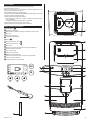
1
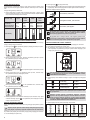
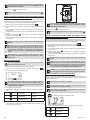
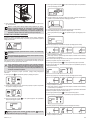
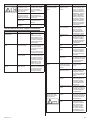
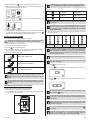
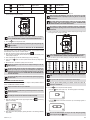
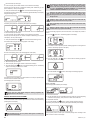
●● Press the button B or the button to select the “Device parameters” menu.
●● Press the buttons A or C repeatedly until the “Water hardness” menu appears on the
display. The following appears on the display:
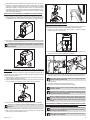
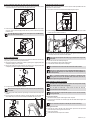
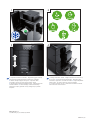
If the height adjuster is difficult to move, clean it. Proceed as escribed in
section “REMOVING AND CLEANING THE COFFEE DISPENSING UNIT”.
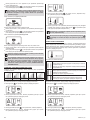
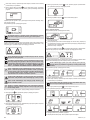
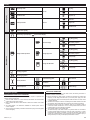
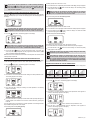
●● Select the desired cup size by pressing the button C. The following selections are
possible:
●● Press
the button B or the
button to display the “Water hardness” menu.
The following appears on the display:
●● Press the button C 1 time for hardness level 1, 2 times for hardness level 2 etc. until
you have set the determined water hardness. Store the input by pressing the
button B. The stored water hardness briefly appears on the display.
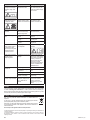
Coffee mug
approx. 190 ml
Coffee cup
approx. 120 ml
Espresso cup
approx. 40 ml
The set cup filling level remains stored even when the coffee machine is
switched off.
The coffee machine is set for standard quantities for each cup size by
default. If you wish to change any of the cup filling quantities, instructions
can be found in section “CHANGING AND STORING THE CUP FILLING
LEVEL IN BEAN MODE”.
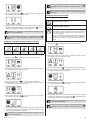
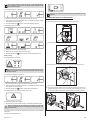
●● Select the desired ground coffee quantity by pressing the button A. The following
selections are possible:
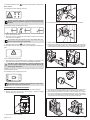
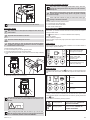
SETTING THE GRINDING FINENESS
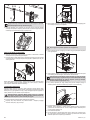
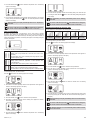
You can set the the grinding fineness with the help of the lever.
Setting the grinding fineness when the grinder is not running can lead to
damage! Only set the grinding fineness when the grinder is running.
To set the grinding fineness, proceed as follows:
●● Place a cup under the coffee dispensing spout.
●● Press the button to prepare the coffee.
●● Adjust the grinding fineness with the grinding fineness lever while the grinder is
running. The coffee is prepared and the grinding fineness is set.
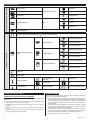
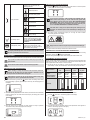
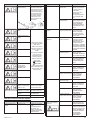
The following lever positions are possible:
fine ground for “intensive taste”
medium ground for “normal taste”
“extra light”
“light”
“normal”
“strong”
“extra strong”
An automatic grinding quantity correction measures the ground coffee
quantity and adapts this gradually to the set value for the coffee strength.
This compensates the differences between the grinder and various
different coffee varieties. It may therefore be necessary to brew 5 times
until the correction is perfect.
The last-selected ground coffee quantity remains set for each cup size.
The set ground coffee quantity remains stored even when the coffee
machine is switched off.
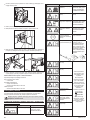
●● Press the
button to heat the coffee.
●● Press the
button once to heat a cup. The following appears on the display:
●● Press the
the display:
button a second time to heat two cups. The following appears on
coarse ground for “mild taste”
For light roasted coffee beans, set the grinding mechanism to “fine”. If the
grinding fineness is set too fine, the coffee will be dispensed a drop at
a time.
For dark roasted coffee beans, set the grinding mechanism to ”coarse”.
If the grinding fineness is set too coarse, the coffee will be dispensed too
quickly.
PREPARING COFFEE WITH WHOLE COFFEE BEANS
To prepare coffee with whole coffee beans, proceed as follows:
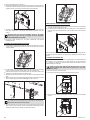
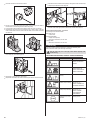
●● Place one or two cups under the coffee dispensing spout.
●● In order to reduce heat loss and splashing, adjust the dispensing spout height to suit
your cup size by moving it up or down.
You can switch between one cup or two cups during the grinding process
by pressing the
button.
Be aware that two brewing processes are performed in sequence in twocup operation. Only remove the cups when the both brewing processes
are completed.
During coffee preparation, the coffee powder is moistened with a small
amount of water first for pre-brewing. The actual brewing process takes
place after a short pause.
You can stop coffee dispensing prematurely by briefly pressing the
menu button.
In the case of strongly uneven or only one-sided cup filling during 2-cup
operation, check whether one or both coffee dispensing spouts are
blocked on the inside by foreign bodies (coffee bean or similar).
ZCM4821-001_v01
29