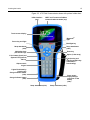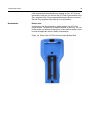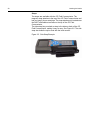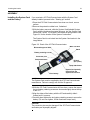
1
User’s Manual Rev K May 2015 475 Field Communicator User’s Manual 99 Washington Street Melrose, MA 02176 Phone 781-665-1400 Toll Free 1-800-517-8431 Visit us at www.TestEquipmentDepot.com 475 FIELD COMMUNICATOR 475 Field Communicator NOTICE Read this User’s Manual before working with the 475 Field Communicator. For personal and system safety, and for optimum product performance, thoroughly understand the contents before using or servicing this product. For equipment service needs, contact the nearest product representative. ©Emerson Process Management. 2015. All rights reserved. The Emerson logo is a trademark and service mark of Emerson Electric Co. AMS, DeltaV, and ValveLink are marks of one of the Emerson group of companies. Windows is a registered trademark of Microsoft Corporation in the United States and other countries. IrDA is a registered trademark of the Infrared Data Association. Bluetooth is a registered trademark of the Bluetooth SIG, Inc. FOUNDATION is a trademark of the Fieldbus Foundation of Austin, Texas, USA. HART and WirelessHART are registered trademarks of the HART Communication Foundation of Austin, Texas, USA. Hitachi is a registered trademark of Hitachi America, Ltd. All other marks are property of their respective owners. 475 FIELD COMMUNICATOR TABLE OF CONTENTS SECTION 1 Introduction Using this manual. . . . . . . . . . . . . . . . . . . . . . . . . . . . . . . . 7 SECTION 2 Learning the basics Overview . . . . . . . . . . . . . . . . . . . . . . . . . . . . . . . . . . . . . . . 9 Safety messages . . . . . . . . . . . . . . . . . . . . . . . . . . . . . . . . 9 475 Field Communicator overview . . . . . . . . . . . . . . . . . 10 Device interoperability. . . . . . . . . . . . . . . . . . . . . . . . . . . 10 Working in a hazardous area . . . . . . . . . . . . . . . . . . . . . 11 Battery and power supply/charger . . . . . . . . . . . . . . . . . . . . . . . . . . . 11 Using the touch screen . . . . . . . . . . . . . . . . . . . . . . . . . . 16 Using the keypad . . . . . . . . . . . . . . . . . . . . . . . . . . . . . . 16 Memory . . . . . . . . . . . . . . . . . . . . . . . . . . . . . . . . . . . . . . 18 Accessories. . . . . . . . . . . . . . . . . . . . . . . . . . . . . . . . . . . 19 Assembly. . . . . . . . . . . . . . . . . . . . . . . . . . . . . . . . . . . . . . 21 Installing the System Card and the battery . . . . . . . . . . . 21 Removing the battery and the System Card . . . . . . . . . . 22 Starting up and shutting down . . . . . . . . . . . . . . . . . . . . 22 Starting up. . . . . . . . . . . . . . . . . . . . . . . . . . . . . . . . . . . . 22 The Field Communicator Main Menu . . . . . . . . . . . . . . . 22 Entering standby . . . . . . . . . . . . . . . . . . . . . . . . . . . . . . . 23 Shutting down . . . . . . . . . . . . . . . . . . . . . . . . . . . . . . . . . 23 Settings . . . . . . . . . . . . . . . . . . . . . . . . . . . . . . . . . . . . . . . 24 About. . . . . . . . . . . . . . . . . . . . . . . . . . . . . . . . . . . . . . . . 24 Backlight . . . . . . . . . . . . . . . . . . . . . . . . . . . . . . . . . . . . . 24 Clock . . . . . . . . . . . . . . . . . . . . . . . . . . . . . . . . . . . . . . . . 24 Contrast . . . . . . . . . . . . . . . . . . . . . . . . . . . . . . . . . . . . . 25 Licenses . . . . . . . . . . . . . . . . . . . . . . . . . . . . . . . . . . . . . 25 Power . . . . . . . . . . . . . . . . . . . . . . . . . . . . . . . . . . . . . . . 25 Power Button . . . . . . . . . . . . . . . . . . . . . . . . . . . . . . . . . 26 Retrain Battery . . . . . . . . . . . . . . . . . . . . . . . . . . . . . . . . 26 Touch Screen . . . . . . . . . . . . . . . . . . . . . . . . . . . . . . . . . 26 Event Capture . . . . . . . . . . . . . . . . . . . . . . . . . . . . . . . . . 27 Memory . . . . . . . . . . . . . . . . . . . . . . . . . . . . . . . . . . . . . . 27 Connecting to a device . . . . . . . . . . . . . . . . . . . . . . . . . . 28 PC applications. . . . . . . . . . . . . . . . . . . . . . . . . . . . . . . . . 28 AMS Device Manager . . . . . . . . . . . . . . . . . . . . . . . . . . . 28 Field Communicator Easy Upgrade Utility . . . . . . . . . . . 28 Connecting the 475 Field Communicator or System Card29 Upgrading the 475 Field Communicator . . . . . . . . . . . . . 33 4 Table of Contents Adding functionality by enabling licenses . . . . . . . . . . . . ScratchPad . . . . . . . . . . . . . . . . . . . . . . . . . . . . . . . . . . . . Creating a new document . . . . . . . . . . . . . . . . . . . . . . . . Opening an existing document . . . . . . . . . . . . . . . . . . . . ValveLink Mobile . . . . . . . . . . . . . . . . . . . . . . . . . . . . . . . Maintenance . . . . . . . . . . . . . . . . . . . . . . . . . . . . . . . . . . . Running a self test . . . . . . . . . . . . . . . . . . . . . . . . . . . . . Calibrating. . . . . . . . . . . . . . . . . . . . . . . . . . . . . . . . . . . . 33 34 35 35 37 37 37 37 SECTION 3 HART functionality Overview . . . . . . . . . . . . . . . . . . . . . . . . . . . . . . . . . . . . . . 39 Safety messages . . . . . . . . . . . . . . . . . . . . . . . . . . . . . . . 39 Basic features and functions . . . . . . . . . . . . . . . . . . . . . 40 HART Application functionality . . . . . . . . . . . . . . . . . . . . 40 Using a fast key sequence . . . . . . . . . . . . . . . . . . . . . . . 40 Starting the HART Application . . . . . . . . . . . . . . . . . . . . 40 Working with offline configurations . . . . . . . . . . . . . . . . 41 Creating a new configuration . . . . . . . . . . . . . . . . . . . . . 41 Opening a saved configuration . . . . . . . . . . . . . . . . . . . . 42 Transferring configurations to a PC application . . . . . . . 44 Working online with HART devices . . . . . . . . . . . . . . . . 45 Connecting to a HART device. . . . . . . . . . . . . . . . . . . . . 45 Displaying the connected HART devices . . . . . . . . . . . . 48 The HART icon . . . . . . . . . . . . . . . . . . . . . . . . . . . . . . . . 49 Saving a device configuration . . . . . . . . . . . . . . . . . . . . . 49 Displaying Device Setup options . . . . . . . . . . . . . . . . . . 50 Displaying Graphics . . . . . . . . . . . . . . . . . . . . . . . . . . . . 51 Configuring the HART Application . . . . . . . . . . . . . . . . . 52 Using hot keys . . . . . . . . . . . . . . . . . . . . . . . . . . . . . . . . 52 Changing the HART polling options . . . . . . . . . . . . . . . . 53 Ignoring status messages . . . . . . . . . . . . . . . . . . . . . . . . 55 Displaying the HART short tag or long tag in a menu title 55 Storage Cleanup . . . . . . . . . . . . . . . . . . . . . . . . . . . . . . . 55 Viewing available device descriptions. . . . . . . . . . . . . . . 56 Simulating an online connection to a HART device . . . . 56 Running HART diagnostics . . . . . . . . . . . . . . . . . . . . . . . 57 DC voltage measurement (HART terminals) . . . . . . . . . 57 Disconnecting from a HART device . . . . . . . . . . . . . . . . 57 SECTION 4 Fieldbus functionality Overview . . . . . . . . . . . . . . . . . . . . . . . . . . . . . . . . . . . . . . Safety messages . . . . . . . . . . . . . . . . . . . . . . . . . . . . . . . Basic features and functions . . . . . . . . . . . . . . . . . . . . . Fieldbus Application functionality . . . . . . . . . . . . . . . . . . Link Active Scheduler (LAS) . . . . . . . . . . . . . . . . . . . . . . LAS hierarchy . . . . . . . . . . . . . . . . . . . . . . . . . . . . . . . . . 59 59 60 60 60 60 Table of Contents 5 Starting the Fieldbus Application . . . . . . . . . . . . . . . . . . Working online with fieldbus devices . . . . . . . . . . . . . . Connecting to a fieldbus device . . . . . . . . . . . . . . . . . . . Displaying the connected fieldbus devices . . . . . . . . . . . Displaying the online device . . . . . . . . . . . . . . . . . . . . . . Block modes . . . . . . . . . . . . . . . . . . . . . . . . . . . . . . . . . . Device blocks . . . . . . . . . . . . . . . . . . . . . . . . . . . . . . . . . Displaying Graphics . . . . . . . . . . . . . . . . . . . . . . . . . . . . Configuring the Fieldbus Application . . . . . . . . . . . . . . Changing the fieldbus polling addresses . . . . . . . . . . . . Changing the Slot Time . . . . . . . . . . . . . . . . . . . . . . . . . Viewing available device descriptions. . . . . . . . . . . . . . . Running fieldbus diagnostics . . . . . . . . . . . . . . . . . . . . . DC voltage measurement . . . . . . . . . . . . . . . . . . . . . . . . Noise level measurement . . . . . . . . . . . . . . . . . . . . . . . . Signal level measurement. . . . . . . . . . . . . . . . . . . . . . . . Disconnecting from a fieldbus device . . . . . . . . . . . . . . 61 61 62 65 66 66 69 75 75 75 76 76 77 77 77 77 78 Overview . . . . . . . . . . . . . . . . . . . . . . . . . . . . . . . . . . . . . . Troubleshooting suggestions . . . . . . . . . . . . . . . . . . . . . Error and status messages . . . . . . . . . . . . . . . . . . . . . . . Information for Technical Support . . . . . . . . . . . . . . . . . 79 79 84 90 Processor and memory specifications. . . . . . . . . . . . . . Microprocessor . . . . . . . . . . . . . . . . . . . . . . . . . . . . . . . . Memory . . . . . . . . . . . . . . . . . . . . . . . . . . . . . . . . . . . . . . Physical specifications . . . . . . . . . . . . . . . . . . . . . . . . . . Weight. . . . . . . . . . . . . . . . . . . . . . . . . . . . . . . . . . . . . . . Display . . . . . . . . . . . . . . . . . . . . . . . . . . . . . . . . . . . . . . Keypad . . . . . . . . . . . . . . . . . . . . . . . . . . . . . . . . . . . . . . Usage specifications . . . . . . . . . . . . . . . . . . . . . . . . . . . . Temperature limits . . . . . . . . . . . . . . . . . . . . . . . . . . . . . Storage with batteries . . . . . . . . . . . . . . . . . . . . . . . . . . . Storage without batteries . . . . . . . . . . . . . . . . . . . . . . . . Enclosure rating . . . . . . . . . . . . . . . . . . . . . . . . . . . . . . . Shock . . . . . . . . . . . . . . . . . . . . . . . . . . . . . . . . . . . . . . . General guidelines . . . . . . . . . . . . . . . . . . . . . . . . . . . . . Connection specifications. . . . . . . . . . . . . . . . . . . . . . . . HART and fieldbus communication terminals . . . . . . . . . Connection types . . . . . . . . . . . . . . . . . . . . . . . . . . . . . . Battery specifications . . . . . . . . . . . . . . . . . . . . . . . . . . . Battery type. . . . . . . . . . . . . . . . . . . . . . . . . . . . . . . . . . . Connection . . . . . . . . . . . . . . . . . . . . . . . . . . . . . . . . . . . Charge . . . . . . . . . . . . . . . . . . . . . . . . . . . . . . . . . . . . . . 91 91 91 91 91 91 91 92 92 92 92 92 92 92 92 92 92 93 93 93 93 SECTION 5 Troubleshooting APPENDIX A Reference data 6 Table of Contents Lights . . . . . . . . . . . . . . . . . . . . . . . . . . . . . . . . . . . . . . . Operating time . . . . . . . . . . . . . . . . . . . . . . . . . . . . . . . . Storage . . . . . . . . . . . . . . . . . . . . . . . . . . . . . . . . . . . . . . Power supply/charger specifications . . . . . . . . . . . . . . . Connection . . . . . . . . . . . . . . . . . . . . . . . . . . . . . . . . . . . Lights . . . . . . . . . . . . . . . . . . . . . . . . . . . . . . . . . . . . . . . Voltage . . . . . . . . . . . . . . . . . . . . . . . . . . . . . . . . . . . . . . Technical data. . . . . . . . . . . . . . . . . . . . . . . . . . . . . . . . . Order information . . . . . . . . . . . . . . . . . . . . . . . . . . . . . . . Spare parts list . . . . . . . . . . . . . . . . . . . . . . . . . . . . . . . . . 93 93 93 94 94 94 94 94 95 97 APPENDIX B Product certifications Overview . . . . . . . . . . . . . . . . . . . . . . . . . . . . . . . . . . . . . . 99 Approved Manufacturing Locations . . . . . . . . . . . . . . . . 99 FCC . . . . . . . . . . . . . . . . . . . . . . . . . . . . . . . . . . . . . . . . . . 99 IC . . . . . . . . . . . . . . . . . . . . . . . . . . . . . . . . . . . . . . . . . . . . 99 Telecommunications Regulatory Authority . . . . . . . . . 100 European Directive Information - CE Compliance . . . 100 R&TTE (1999/5/EC) . . . . . . . . . . . . . . . . . . . . . . . . . . . 100 Electro Magnetic Compatibility (2004/108/EC) . . . . . . . 100 Low Voltage (2006/95/EC) . . . . . . . . . . . . . . . . . . . . . . 100 ATEX Directive (94/9/EC) (KL option only) . . . . . . . . . . 100 Hazardous Locations Certifications (KL option only). 100 European Certifications. . . . . . . . . . . . . . . . . . . . . . . . . 100 International Certification . . . . . . . . . . . . . . . . . . . . . . . 101 North American Certifications . . . . . . . . . . . . . . . . . . . . 101 Power Supply/Charger Certification . . . . . . . . . . . . . . . 102 Declaration of Conformity/Approvals . . . . . . . . . . . . . . 102 Label Drawings . . . . . . . . . . . . . . . . . . . . . . . . . . . . . . . . 102 Approval Drawings. . . . . . . . . . . . . . . . . . . . . . . . . . . . . 106 APPENDIX C Graphics information Overview . . . . . . . . . . . . . . . . . . . . . . . . . . . . . . . . . . . . . Screen layout . . . . . . . . . . . . . . . . . . . . . . . . . . . . . . . . . Buttons . . . . . . . . . . . . . . . . . . . . . . . . . . . . . . . . . . . . . . Graphics options . . . . . . . . . . . . . . . . . . . . . . . . . . . . . . Images . . . . . . . . . . . . . . . . . . . . . . . . . . . . . . . . . . . . . Charts . . . . . . . . . . . . . . . . . . . . . . . . . . . . . . . . . . . . . . Graphs . . . . . . . . . . . . . . . . . . . . . . . . . . . . . . . . . . . . . 111 111 112 112 112 113 116 Glossary . . . . . . . . . . . . . . . . . . . . . . . . . . . . . . . . . . . G-117 Index . . . . . . . . . . . . . . . . . . . . . . . . . . . . . . . . . . . I-125 475 FIELD COMMUNICATOR SECTION 1 USING THIS MANUAL INTRODUCTION The sections in this manual provide the following information on the 475 Field Communicator. Section 2: Learning the basics contains information on assembly, components, starting, entering standby, shutting down, settings, supported PC applications, and maintaining the 475 Field Communicator. Section 3: HART functionality contains information on starting and configuring the HART® Application, working offline, communicating with HART devices, modifying device parameters, and running diagnostics. Section 4: Fieldbus functionality contains information on starting and configuring the Fieldbus Application, communicating with fieldbus devices, modifying device parameters, and running diagnostics. Section 5: Troubleshooting provides solutions to the most common 475 Field Communicator operating problems. Appendix A: Reference data provides physical, functional, and performance specifications. Appendix B: Product certifications contains hazardous location and international certifications, European directive information, and approval drawings. Appendix C: Graphics information contains an overview of the Graphics functionality and options in the 475 Field Communicator. 8 Introduction 475 FIELD COMMUNICATOR SECTION 2 LEARNING THE BASICS OVERVIEW This section provides instructions on basic features and functions of the 475 Field Communicator. It also provides information on assembly, components, starting, entering standby, shutting down, settings, applications, and maintaining the 475 Field Communicator. The functionality described in this section is based on system software version 3.9. SAFETY MESSAGES Procedures and instructions in this section may require special precautions to ensure the safety of the personnel performing the operation. Information that raises potential safety issues is indicated by a warning symbol ( ). Refer to the safety messages before performing an operation preceded by this symbol. See the “Troubleshooting” section for more warning messages. IMPORTANT NOTICE This equipment has been tested and found to comply with the limits for a Class A digital device, pursuant to part 15 of the FCC Rules. These limits are designed to provide reasonable protection against harmful interference when the equipment is operated in a commercial environment. This equipment generates, uses, and can radiate radio frequency energy and, if not installed and used in accordance with the user’s manual, may cause harmful interference to radio communications. Operation of this equipment in a residential area is likely to cause harmful interference in which case the user will be required to correct the interference at his own expense. This device complies with Part 15 of the FCC Rules. Operation is subject to the following two conditions: (1) this device may not cause harmful interference, and (2) this device must accept any interference received, including interference that may cause undesired operation. Any modifications made to this device that are not approved by Emerson Process Management may void the authority granted to the user by the FCC to operate this equipment. This Class A digital apparatus complies with Canadian ICES-003. 10 Learning the basics WARNING You can install or remove the Lithium Ion (Li-Ion) battery (Power Module) in a hazardous area environment.You cannot charge the battery in this environment because the power supply/charger (00375-0003-0005) is not IS-approved. 475 FIELD COMMUNICATOR OVERVIEW The 475 Field Communicator supports HART and FOUNDATION fieldbus devices, letting you configure, maintain, or troubleshoot devices. When using the 475 Field Communicator to communicate with devices, follow all standards and procedures applicable to the location. Failure to comply may result in equipment damage and/or personal injury. Be sure to understand and comply with the sections in this manual. The 475 Field Communicator includes a color LCD touch screen, a Li-Ion battery (Power Module), a SH3 processor, memory components, System Card, and integral communication and measurement circuitry. The Field Communicator also supports multiple languages. See the readme file included with the Field Communicator Easy Upgrade Utility or www.testequipmentdepot.com for more information. Device interoperability The 475 Field Communicator is designed to operate with a wide range of HART and FOUNDATION fieldbus devices independent of device manufacturer. Device interoperability is achieved through the Electronic Device Description Language (EDDL) technology supported by the HART Communication Foundation and Fieldbus Foundation. Basic testing is performed on all device descriptions. Each device manufacturer is asked to certify that they thoroughly tested their devices with the 475 Field Communicator. If certification is not received, a warning message displays when you attempt to communicate with an untested device. New device descriptions are available from the Field Communicator Easy Upgrade Utility or the Resource CD or DVD. Learning the basics Working in a hazardous area 11 A 475 Field Communicator that meets the Intrinsic Safety requirements (I/S-approved) can be used in Zone 0 (FM), Zone 1, or Zone 2, for Group IIC, and Class I, Division 1 and Division 2, Groups A, B, C, and D locations. An IS-approved 475 Field Communicator may be connected to loops or segments that are attached to equipment located in Zone 0, Zone 1, Zone 2, for Group IIC; Zone 20, Zone 21, Zone 22, and Class I, Division 1 and Division 2, Groups A, B, C, and D locations. IS-approved 475 Field Communicators are ordered with the KL option and have an additional label on the back of the 475 that lists the approvals. See Appendix B “Product certifications” for more information about IS approvals and installations. CAUTION You can install or remove the Li-Ion battery in a hazardous area environment. You cannot charge the battery in this environment because the power supply/charger is not IS-approved. Battery and power supply/charger The 475 Field Communicator is powered by a Li-Ion battery that has a green, 6-pin connector. The power supply/charger also has a green connector to match the appropriate connector on the battery. See Figure 2-1 for the location of the connector. Prior to using the 475 Field Communicator without the power supply/charger connected, fully charge the battery. Guidelines and precautions Understand and follow the guidelines and precautions below before using the battery or power supply/charger. • When transporting a Li-Ion battery, follow all applicable regulations. • Protect the battery and power supply/charger from moisture, and respect operating and storage temperature limits. See Appendix A “Reference data” for more information. • Do not cover the battery or power supply/charger, subject it to prolonged periods of direct sunlight, or place it upon or next to heat-sensitive materials. • Charge the battery with only the Field Communicator power supply/charger. The power supply/charger should not be used with other products. Failure to comply may permanently damage your 475 Field Communicator and will void the IS approval and the warranty. • Do not open or modify the battery or power supply/charger. There are no user-serviceable components or safety elements inside. Opening or modifying them will void the warranty and could cause personal harm. 12 Learning the basics Checking the remaining charge To view the remaining charge, press the Charge Indicator button on the lower left side of the battery. See Figure 2-1 for the location of this button. When you press and release the button, the lights above the button slowly illuminate to display the charge remaining. Each light represents 20 percent of the charge. The battery is fully charged when all of the lights are illuminated. You can also check the remaining charge from the Settings menu on the Field Communicator Main Menu. See “Power” on page 25 for more information. Figure 2-1. Li-Ion battery example Charge Indicator button Lights illuminated by pressing the Charge Indicator button Li-Ion battery Green power supply/charger connector (side) Charging the battery Prior to first portable use, fully charge the battery. The battery can be charged separately or while attached to the 475 Field Communicator. The 475 Field Communicator is fully operable while the battery is recharging, and a full charge takes 2-3 hours. An overcharge condition will not occur if the power supply/charger remains connected. CAUTION You can remove and install the Li-Ion battery in a hazardous area environment. You cannot charge the battery in this environment because the power supply/charger is not IS-approved. Learning the basics 13 To charge the battery: 1.Plug the power supply/charger into a power outlet. 2.Plug the green power supply/charger connector into the green connector on the battery. The flat side of the power supply/charger connector should face the front of the 475 or the inside of the battery, if the battery is not attached to the 475. The battery is fully charged when the light on the power supply/charger is green. Figure 2-2. Charging the battery connected to the 475 Field Communicator Power supply/charger connector Power supply/charger Power supply/charger lights 14 Learning the basics Power supply/charger lights Three lights are on the power supply/charger to indicate the conditions below. Each light displays a different color. Table 2-1. Power supply/charger lights Color Condition Green The battery is fully charged. Flashing green The battery is nearly fully charged. Yellow The battery is charging. Flashing yellow The power supply/charger is not connected to the 475 Field Communicator. Flashing yellow and The remaining charge in the battery is very low. red Red Charging cannot occur. Contact Technical Support for more information. Maintaining the battery To help maintain the performance and life of the Li-Ion battery, understand and follow the guidelines below: • Recharge the battery frequently, preferably after each use or at night. Limit the number of full discharges, if possible. • Frequent use at high temperatures can reduce performance. • Use a dry location at or near room temperature when storing the battery for an extended time. Prolonged storage at higher temperatures can reduce performance. • Ensure the remaining charge level is at or near mid-capacity when storing for an extended time. The remaining charge will slowly drain during storage. Periodically charge the battery to ensure the remaining charge does not drain to low levels. Learning the basics 15 Figure 2-3. 475 Field Communicator shown with optional rubber boot IrDA® interface (top) HART and FOUNDATION fieldbus communication terminals (top) Touch screen display Bluetooth® light Power key and light Backlight key Strap attachment (side) Strap attachment (side) Navigation keys (four arrow keys) Enter key Stylus (in the strap) Li-Ion battery (back) and System Card (internal) Tab key Function key and light (for multiple-key combination functionality) Alphanumeric keypad Lights illuminated by pressing the Charge Indicator button (side) Green power supply/charger connector on the battery (side) Charge Indicator button (side) Strap attachment (side) Strap attachment (side) 16 Using the touch screen Learning the basics The touch screen and keypad let you select menu items and enter text. Use the provided stylus or the up and down arrow keys on the keypad to select a menu item. On the Settings and Field Communicator Main Menu, tap an icon or press Enter to open the selected icon. On other menus, double-tap the selected item on the screen or press the right arrow key on the keypad to open a menu item. CAUTION Contact the touch screen with blunt items only, preferably the stylus included with the 475 Field Communicator. See Figure 2-3 on page 15 for the location of the stylus. Sharp instruments, such as screwdrivers, can damage the touch screen. Repairing the touch screen requires replacement of the entire display assembly, which is possible only at an authorized service center. Use the back arrow icon ( ) on the window to return to the previous menu. Use the close icon ( ) in the upper right corner of the window to end the application. If the touch screen seems inaccurate, you can recalibrate it. For more information, see “Touch Screen” on page 26. NOTE All instructions in this manual are written for the touch screen. Use the soft input panel (SIP) keyboard The SIP keyboard allows for alphanumeric input using the touch screen. The SIP keyboard detects when you need to enter characters and appears automatically as required. Using the keypad The following section describes the buttons on the 475 Field Communicator keypad. Bluetooth symbol ( ) The Bluetooth symbol on the keypad is illuminated by a blue light when Bluetooth is enabled from the Listen for PC window. The 475 Field Communicator must be licensed for Bluetooth to use this functionality. Power key The Power key is used to power on and off the 475 Field Communicator or to put it in standby. You can set the default option, stand by or shut down, from the Settings menu. See “Power Button” on page 26 for more information. The green light on the Power key flashes when you press and hold the Power key to turn on the 475 Field Communicator. The light is constant when the 475 is on, and it slowly blinks when the 475 is in standby. Learning the basics 17 If the Power key is pressed when there is unsent data or a device method is running, a warning message appears. Tap OK to have the 475 Field Communicator enter standby or shut down, or tap Cancel to return to the previous window. The Power key is disabled when the 475 Field Communicator is in Listen for PC mode or when the ScratchPad application is open. Arrow navigation keys Four arrow navigation keys let you move through the menus and icons in the applications. Press the up and down arrow keys to select a menu item. On the Settings and Field Communicator Main Menu, tap an icon or press the Enter key to open the selected menu. On all other menus, use the right arrow key to open a menu item or the left arrow key to return to the previous menu. The blue text near the keys indicates alternate functionality that can be enabled by pressing the Function key. Enter key The Enter key lets you open the selected (highlighted) button on a window or an icon on the Field Communicator Main Menu or Settings Menu. For example, if you push the Enter key when the Cancel button on a window is selected, you will close that window. Tab key The Tab key lets you move between selectable controls on a window. Pressing the Tab key selects the icons from left to right across all of the rows on the screen. Alphanumeric keypad The alphanumeric keypad lets you enter letters, digits, and other characters, such as punctuation marks. The 475 Field Communicator automatically determines which text options are available depending upon the input necessary for the particular field. To enter text when in alphanumeric mode, press the desired keypad button in quick repetition to scroll through the options to display the appropriate letter or number. For example, to type the letter Z, press the 9 key quickly four times. The blue text near the keys indicates alternate functionality that can be enabled by pressing the Function key. The alternate function on the alphanumeric 5 key (insert) will be activated in future releases of the 475 Field Communicator software. 18 Learning the basics Backlight key The Backlight key lets you adjust the intensity of the touch screen display. There are four different settings. The intensity impacts the charge in the battery. Expect a shorter charge life for higher intensities. See “Backlight” on page 24 for information on timers that can turn off the backlight after specified periods of inactivity. These timers can help conserve the battery power. Function (Fn) key The Function key lets you enable alternate functionality on select keys. The Function key does not apply for menus displaying icons.The blue text near the other keys on the keypad indicate the alternate functionality. When the Function key is enabled, the orange light in the left corner of the Function key appears and the FN button on the Soft Input Panel (SIP), if displayed, is highlighted. Press the Function key again to disable the functionality and turn off the light. Memory Types The 475 Field Communicator memory consists of three components: 1.Internal Flash—32MB non-volatile RAM. The Internal Flash memory stores the operating system and system software. It also stores the following: • Up to 25 HART configurations • HART Event Captures • FOUNDATION fieldbus statistics • Text files saved from ScratchPad 2.System Card—an internal 1 GB or higher Secure Digital Card with non-volatile flash memory. A copy of installable system software exists on every System Card. The System Card also contains all HART and FOUNDATION fieldbus device descriptions and can store up to 1,000 HART configurations, depending on the sizes of the files. 3.RAM—32MB used only for program execution. Available memory space To view the available memory in your 475 Field Communicator, connect to the Field Communicator Easy Upgrade Utility or tap the Memory icon from the Settings menu. The Field Communicator Main Menu displays the Settings menu item. See “Memory” on page 27 for more information. Free memory on the System Card Over time, your System Card may become full and unable to store new files. To free memory on your System Card, use the Memory Management feature in the Field Communicator Easy Upgrade Utility. This lets you filter and select which device descriptions can be transferred onto your System Card. Device descriptions from selected manufacturers or protocols are omitted during an upgrade, allowing more space for other files. Learning the basics 19 If the selected device descriptions are already on your 475, they are removed the next time you connect the 475 Field Communicator to the Easy Upgrade Utility. You are prompted before the files are removed. See the Easy Upgrade Utility Help for more information. Accessories Rubber boot A rubber boot can be purchased to further protect your 475 Field Communicator. The boot has an additional stand on the back, cut outs for the straps, and holders for the stylus. An anti-static material is used to meet the applicable Intrinsic Safety requirements. Figure 2-4. Back of the 475 Field Communicator Rubber Boot 20 Learning the basics Straps Two straps are available with the 475 Field Communicator. The magnetic strap attaches to the top of the 475 Field Communicator and lets you hang it from a metal pipe. The strap attachment is located near the HART and fieldbus terminals on the top of the 475 Field Communicator. The side strap lets you attach a strap to the sides or back of the 475 Field Communicator, making it easy to carry. See Figure 2-5. The side strap also holds the stylus used with the touch screen. Figure 2-5. Side Strap Example Learning the basics 21 ASSEMBLY Installing the System Card and the battery If you received a 475 Field Communicator with the System Card already installed, proceed to the " Starting up" section. 1.Place the 475 Field Communicator face down on a level, secure surface. 2.Remove the protective rubber boot, if attached. 3.With the battery removed, slide the System Card (labeled System Card), with the metal card contacts facing up, into the System Card socket until it clicks. The System Card socket is spring-loaded. See Figure 2-6 for the location of the System Card socket. The System Card is not locked into the System Card socket in the image below. Figure 2-6. Back of the 475 Field Communicator Bluetooth approval label Main unit label Stand Battery retaining screws Connector pins Strap attachment IS label (KL option) Strap attachment Li-Ion battery System Card partially inserted into the System Card socket CAUTION The System Card must be supplied by the 475 Field Communicator manufacturer. Failure to comply will void the IS approval. 4.With the 475 Field Communicator still face down, ensure the tops of the two battery retaining screws are loose and slightly above the top of the 475. 5.Align the sides of the battery with the 475 and carefully slide it forward until it is secure. 6.Carefully hand tighten the two battery retaining screws to secure the battery. (Do not over tighten, 0.5Nm maximum torque load.) CAUTION The connector pins may be damaged if the 475 Field Communicator and battery are improperly aligned. 22 Learning the basics Removing the battery and the System Card To remove the battery and System Card: 1.Remove the rubber boot, if attached. 2.Place the 475 Field Communicator face down on a level, secure surface. 3.Loosen the battery retaining screws until the top of each screw is slightly above the top of the 475 Field Communicator. 4.Slide the battery off the 475 Field Communicator. Do not pull up the battery because this could damage the connector pins. 5.Push the System Card into the System Card socket until it clicks to release it. The System Card socket is spring-loaded. 6.Grasp the System Card with your fingers and slide it straight out of the 475 Field Communicator. STARTING UP AND SHUTTING DOWN Prior to using the 475 Field Communicator without the power supply/charger, fully charge the battery. See “Charging the battery” on page 12 for more information. Before operating the 475 Field Communicator, ensure: • The 475 Field Communicator is not damaged. • The battery is fully seated. • All screws are sufficiently tightened. • The communication terminal recess is free of dirt and debris. Starting up Press and hold the Power key on the keypad until the green light on that key flashes (approximately two seconds). See Figure 2-3 on page 15 for the location of the Power key. During startup, the 475 Field Communicator automatically checks for any system software upgrades available on the internal System Card. You are notified if an upgrade is on the System Card and ready to be installed. The Field Communicator Main Menu appears. The Field Communicator Main Menu The Field Communicator Main Menu is the first menu that appears after you start the 475 Field Communicator. This menu lets you run the HART and the Fieldbus Applications, view the Settings menu, communicate with a PC, and launch ScratchPad or ValveLink™ Mobile. See Section 3 “HART Functionality” and Section 4 “Fieldbus Functionality” for more information on these applications. Learning the basics 23 Figure 2-7. Field Communicator Main Menu Entering standby You can put the 475 Field Communicator into standby to save power or to reduce the boot-up time if you are using the 475 Field Communicator intermittently. Standby turns off the touch screen and areas within the 475 Field Communicator. You can put the 475 Field Communicator in standby when the HART Application or the Fieldbus Application is running. If you are working online with a device when standby is entered, the application main menu is displayed when the 475 Field Communicator returns from standby. Otherwise, the 475 Field Communicator displays the last open window. To enter standby, press the Power key. From the Power Switch dialog box, tap Stand by and tap OK or press the Enter key. Tap Cancel to close the dialog box and return to the application. You can set the default option on the Power Switch dialog box. See “Power Button” on page 26 for more information.The green light on the Power key slowly flashes when the 475 Field Communicator is in standby. To leave standby, press the Power key. The 475 Field Communicator also enters standby if the standby timer has expired. See “Power” on page 25 for more information. Shutting down To shut down the 475 Field Communicator, press the Power key. From the Power Switch dialog box, tap Shut down and tap OK or press the Enter key. Tap Cancel to close the dialog box and return to the application. You can set the default option on the Power Switch dialog box. See “Power Button” on page 26 for more information. The 475 Field Communicator shuts down if the auto-off timer has expired. See “Power” on page 25 for more information. You can also shut down the 475 Field Communicator by simultaneously pressing the Backlight key and the Function key until the display turns off. The shut down is accomplished in the hardware (similar to removing the power to a PC using a switch). This is not the recommended way of shutting off the 475 Field Communicator. Use this method to shut down and reset the 475 Field Communicator if the screen appears to lock up and does not respond when you use the touch screen or keypad. 24 SETTINGS About Backlight Clock Learning the basics You can view and modify the options below for the 475 Field Communicator from the Settings option on the Field Communicator Main Menu. To return to the Field Communicator Main Menu, tap the Back button on the screen. Tap the MORE button to view additional items on the Settings menu. The About setting lets you view the software revisions in your 475 Field Communicator. If you need to call Technical Support personnel, have the system software version, Communication and Diagnostic Circuitry (CDC) version, and the operating system version available. Tapping RE-IMAGE re-installs the operating system, system software, and applications on your 475 Field Communicator. The power supply/charger must be connected when the RE-IMAGE operation is performed. During the operation, the standby and auto-off timers are disabled. This operation should only be performed under the direction of Technical Support personnel. Tapping RE-FLASH re-installs the firmware and software from the System Card. The power supply/charger must be connected when the RE-FLASH operation is performed. During the operation, the standby and auto-off timers are disabled. This operation should only be performed under the direction of Technical Support personnel. Tap OK to return to the Settings menu. The Backlight setting lets you adjust the backlight intensity of the screen. To adjust the backlight, drag the slider left to right. The Backlight setting also lets you set timers to automatically turn off the backlight after a specified period of inactivity to save battery power. To enable a timer, tap a drop-down list and select the appropriate time interval. The external power timer applies when the power supply/charger is connected to the 475 Field Communicator After you select the appropriate backlight settings, tap OK to retain this setting for this session only, SET DEFAULT to retain this setting upon startup, or CANCEL to exit without changes. The Clock setting lets you set the date, time, and time zone on the 475 Field Communicator. Configure the date by using the drop-down list. To configure the time, select the appropriate time field and use the arrows to scroll through values until you find the correct time. Select the drop-down list to select a time zone. Tap OK to save the changes and to close the window, or CANCEL to exit without changes. Learning the basics 25 The Contrast setting lets you adjust the lightest and darkest areas on the window. This option applies to only the 375 Field Communicator. Contrast NOTE Temperature can affect contrast. Licenses Power The Licenses setting lets you view the enabled and available licenses for the 475 Field Communicator. A checkmark indicates the license is enabled. Unlicensed features cannot be accessed. The following licenses and information are displayed: • HART - enables your 475 to run the HART Application to communicate with HART devices. • Graphics - enables your 475 Field Communicator to display device information as images, charts, and graphs. • Easy Upgrade - enables you to upgrade your 475 Field Communicator with the latest system software and device descriptions at your site, without having to send it to a service center. • Exp Date - displays the expiration date of the Easy Upgrade license. The date is listed as year-month-day. N/A appears if the 475 is not licensed for Easy Upgrade. • Bluetooth - enables your 475 Field Communicator to communicate with supported PC applications, such as the Easy Upgrade Utility, using Bluetooth. • FOUNDATION fieldbus - enables the 475 Field Communicator to run the Fieldbus Application to communicate with fieldbus devices. • Device Config Management - enables you to save HART device or user configurations to the System Card and to print and store them using the Easy Upgrade Utility. The License window also displays the Unit Name and System Card Serial Number (SN) of the 475 Field Communicator. See the Easy Upgrade Utility Help for more details on assigning a Unit Name. Tap OK to return to the Settings menu. The Power setting lets you specify power management options when the 475 Field Communicator is on battery power. The standby timer puts the 475 Field Communicator in standby and the auto-off timer shuts down the 475 Field Communicator after the specified values of inactivity. To specify values for the standby or auto-off timer, select the time intervals from the drop-down lists. If set to short intervals, these timers will save battery power. The Maximize Power Savings option conserves additional battery power by letting the 475 Field Communicator enter standby or shut down when communicating with a device. To enable Maximize Power Savings, tap the checkbox. If this option is disabled, the 475 Field Communicator will not enter standby or shut down when communicating with a device. 26 Learning the basics After you select the appropriate power management settings, tap OK to apply the settings for this session only, SET DEFAULT to retain the settings upon startup, or CANCEL to exit without changes. Power Button Retrain Battery The Power Button setting lets you set the default option for the Power Switch dialog. The Power Switch dialog appears when you press the Power key. This option does not let the Field Communicator automatically shut down or enter stand by when you press the Power key. You still need to tap OK. From the Power Button screen, select the Stand by or Shut down option and then tap OK to apply the settings for this session only, SET DEFAULT to retain the settings upon startup, or CANCEL to exit without changes. The Retrain Battery setting lets you fully discharge the battery so it can be charged to its full capacity. Perform this operation if you notice a significant decrease in charge life or performance. CAUTION It should not be necessary to perform this operation on a regular basis. Doing so may damage the Li-Ion battery. Ensure the power supply/charger is not connected when this operation is performed. During the operation, the backlight is set to its brightest setting to quickly discharge the battery. The backlight, standby, and auto-off timers are disabled. If you tap CANCEL, the battery stops discharging and the backlight, standby, and auto-off timers are re-enabled. The backlight setting is also restored. After the battery is fully discharged, make sure it is fully recharged before using it without the power supply/charger. You can use the 475 Field Communicator while the battery is recharging. To retrain the battery: 1.Disconnect the power supply/charger, if it is connected to the 475 Field Communicator. 2.Tap Retrain Battery from the Settings menu. 3.Wait until the 475 Field Communicator shuts down. It may take up to several hours to discharge the battery, depending on the charge remaining when the operation began. Connect the power supply/charger to the 475 Field Communicator and fully charge the battery. Touch Screen The Touch Screen setting lets you calibrate the touch screen with the display. Tap the center of the cross hairs firmly and accurately at each location on the window. The target continues to move until the touch screen is aligned. Touch screen alignment is retained upon start up. Learning the basics Event Capture 27 The Event Capture setting lets you create an Event Capture file (.rec), which is a log of communication, input, and output that occurs between the 475 Field Communicator and a device (HART only). When working with Technical Support personnel, you may be asked to create an Event Capture file to help troubleshoot issues that cannot be easily isolated or resolved. The Event Capture file can then be transferred to your PC using the Field Communicator Easy Upgrade Utility and sent to Technical Support personnel for review. Tap the option to activate the Event Capture feature. The option is black when selected. To delete an existing Event Capture, tap DELETE EVENT FILE. NOTE While Event Capture is enabled, device status and warning messages do not appear. To create and send an Event Capture file: 1.Tap Settings from the Field Communicator Main Menu. 2.Tap MORE and then tap Event Capture. 3.Tap Turn on HART event capture from the Event Capture window and tap OK. 4.Tap HART from the Field Communicator Main Menu. 5.Enter a file name for the Event Capture file and tap OK. The file is saved to a default location. 6.Perform the requested operations to capture the data. 7.Use the Field Communicator Easy Upgrade Utility to transfer the file from your 475 Field Communicator to your PC. See the Easy Upgrade Utility Help for more information. Memory The Memory setting lets you view available free space in the System Card, Internal Flash, or RAM. To select the Memory icon, tap MORE on the Settings screen. If you have less than 10 percent of memory free, the value is highlighted yellow. 28 Learning the basics CONNECTING TO A DEVICE Use the provided lead set and the HART or Fieldbus (if licensed) Applications to connect and communicate with a device. The appropriate device description is also required. If the 475 Field Communicator does not have the HART device description, the device can be displayed in forward compatibility mode. This mode uses a generic device description and does not display all device functionality. Three terminals for the lead set are on the top of the 475 Field Communicator. Each red terminal is a positive connection for its protocol, while the black terminal is a common terminal shared by both protocols. An access door ensures only one pair of terminals is exposed at any one time. Several markings indicate which pair of terminals is for which protocol. See "Section 3 HART functionality" and "Section 4 Fieldbus functionality" for wiring diagrams and more information. Appendix B displays diagrams for Intrinsically Safe installations. PC APPLICATIONS Connect your 475 Field Communicator to a supported PC application, such as AMS Suite: Intelligent Device Manager or the Field Communicator Easy Upgrade Utility, to download new system software, device descriptions, and licenses. You can also transfer HART configuration files, Event Capture files, and ScratchPad (.txt) files to a PC. AMS Device Manager The 475 Field Communicator can connect to AMS Device Manager (version 6.2 or higher), letting you create, open, edit, or compare HART device or user configuration files. You may need to connect using IrDA if Bluetooth is not supported in your version. You can also transfer configurations between AMS Device Manager and a storage location in the 475 Field Communicator. Check the AMS Device Manager Books Online for more information. Field Communicator Easy Upgrade Utility The 475 Field Communicator can connect to the Field Communicator Easy Upgrade Utility that is available on the Resource CD or DVD. See the readme file for installation and system requirements. You can access this file from www.testequipmentdepot.com or the Resource CD or DVD. Learning the basics 29 The Easy Upgrade Utility lets you do the following: • Download new system software and device descriptions to upgrade your 475 Field Communicator at your site. • Enable new functionality and applications by purchasing and downloading new application licenses using the Online Licensing feature. • Upload Event Capture and ScratchPad files to your PC. • Upload, download, and print HART device or user configurations (.hcf files). Uploading configurations to the Easy Upgrade Utility lets you back up these files. • Manage the memory in your System Card by specifying which device descriptions can be downloaded to your System Card. Limiting the number of device descriptions will free memory on your System Card. • Assign a Unit Name to a 475 Field Communicator to uniquely identify it, which is useful when connecting to a 475 Field Communicator using Bluetooth. See the Easy Upgrade Utility Help for more information on these features. Connecting the 475 Field Communicator or System Card You can use three connection types to connect a 475 Field Communicator to the Easy Upgrade Utility: IrDA, Bluetooth (if licensed), or a supported card reader. The 475 Field Communicator must be in Listen for PC mode to communicate through IrDA or Bluetooth. See the AMS Device Manager Books Online for information on supported connection types. Certain connection types are required to transfer files or information between the Field Communicator Easy Upgrade Utility and a 475 Field Communicator. See Table 2-2. 30 Learning the basics Table 2-2. Required connection types to transfer files using the Easy Upgrade Utility File to Transfer Required Connection Type Device Descriptions* IrDA, Bluetooth, or a Card Reader Event Capture Files IrDA or Bluetooth HART Device or User Configuration Files IrDA, Bluetooth, or a Card Reader Licenses IrDA or Bluetooth ScratchPad (.txt) Files IrDA or Bluetooth System Software* IrDA, Bluetooth, or a Card Reader Unit Name IrDA or Bluetooth *Some upgrades may require a card reader. Listen for PC The Listen for PC option lets you select IrDA or Bluetooth as the connection type to communicate with a PC. To enter Listen for PC mode, tap the Listen for PC icon from the Field Communicator Main Menu. IrDA is initially set as the default connection type and is automatically enabled when you open Listen for PC. You can change the connection type at any time by tapping the Change Connection Type button and then selecting an option. Tap OK to use the selected connection type for only the current session. The default connection type is used the next time you open Listen for PC. Tap Save as Default to always use the selected connection type when Listen for PC is opened. After you select the connection type, the 475 Field Communicator waits for a connection from the PC. When the 475 is connected, a message appears and the PC name is listed in the Connected PC field on the Listen for PC window. NOTE The Power key, standby timer, and auto-off timer are disabled when the 475 Field Communicator is in Listen for PC mode. Bluetooth The Bluetooth interface (if licensed) lets your 475 Field Communicator connect to the Field Communicator Easy Upgrade Utility version 3.0 or higher to transfer device descriptions, system software, configurations, Event Captures, application licenses, and ScratchPad (.txt) files. Check your AMS Device Manager documentation to see if Bluetooth is supported. Learning the basics 31 NOTE The 475 Field Communicator does not communicate with HART or fieldbus devices using Bluetooth. To use Bluetooth, you need the following: • 475 Field Communicator with a Bluetooth license. To see if your 475 is licensed for Bluetooth, tap the Settings icon from the Field Communicator Main Menu. Then tap Licenses. A checkmark next to Bluetooth indicates it is licensed. • An approved Bluetooth adapter attached to your PC that uses the Windows Bluetooth software and drivers. See the Easy Upgrade Utility Help and readme file for more information. You can access the readme file from Emerson's website, the Resource CD or DVD, or the Field Communicator Easy Upgrade Utility menu in the Windows Start menu (if the Easy Upgrade Utility has been installed.) If Bluetooth is not set as the default connection type, you need to enable it on the Listen for PC window. To enable Bluetooth communication: 1.Tap Listen for PC from the Field Communicator Main Menu. 2.Tap Change Connection Type. 3.Tap Bluetooth and then tap OK. You can tap Save as Default to always use Bluetooth as the connection type. The Bluetooth symbol on the keypad is illuminated by a blue light ( ) and a “Waiting for connection” message appears when Bluetooth is enabled. See Figure 2-3 for the location of this light. The maximum recommended distance between the 475 Field Communicator and PC is 30 feet (10 meters). See the Help in the Easy Upgrade Utility or AMS Device Manager for more information about connecting using Bluetooth. IrDA The 475 Field Communicator can communicate with the Field Communicator Easy Upgrade Utility and AMS Device Manager using infrared (IrDA) technology. IrDA is a PC interface supported for the transfer of device descriptions, software updates, configurations, Event Captures, application licenses, and ScratchPad files. See Figure 2-3 on page 15 for the location of the IrDA interface on the 475 Field Communicator. All 475 Field Communicators can use IrDA. IrDA communication can either be built into the PC, such as a laptop, or provided through an adapter such as a USB to IrDA adapter. Refer to your IrDA manual for installation and operating instructions. The maximum recommended distance between the IrDA and PC is 18 inches. If you previously set Bluetooth as the default connection type, you need to enable IrDA. 32 Learning the basics To enable IrDA communication: 1.Tap Listen for PC from the Field Communicator Main Menu. 2.Tap Change Connection Type. 3.Tap IrDA and then tap OK.You can tap Save as Default to always use IrDA as the connection type. A “Waiting for connection” message appears when IrDA is enabled. See AMS Device Manager Books Online or the Easy Upgrade Utility Help for instructions to connect to those applications using IrDA. Card reader The 475 Field Communicator System Card can also communicate with the Easy Upgrade Utility using a supported Secure Digital card reader. See the readme file for the supported card readers. You can access this file from Emerson's website, the Resource CD or DVD, or the Field Communicator Easy Upgrade Utility menu in the Windows Start menu (if the Easy Upgrade Utility has been installed.) CAUTION Using Windows Explorer and a card reader to manually transfer or copy files between the System Card and a PC can corrupt the System Card. This operation should only be performed under the direction of Technical Support personnel. The card reader provides faster upload and download speeds than an IrDA adapter; however, it cannot transfer application licenses, Event Capture files, or ScratchPad files. To access the System Card, you need to remove the battery from the 475 Field Communicator. See “Removing the battery and the System Card” on page 22 for more information. See the Easy Upgrade Utility Help for instructions to connect a System Card and card reader. Learning the basics Upgrading the 475 Field Communicator 33 The Field Communicator Easy Upgrade Utility on the Resource CD or DVD lets you download new system software and device descriptions to upgrade your 475 Field Communicator at your site. To download new system software and device descriptions, your 475 Field Communicator must be licensed for Easy Upgrade. You can also send your Field Communicator to a Service Center to be upgraded. For more information, contact your sales representative. CAUTION New system software and device descriptions must be downloaded and transferred to the 475 Field Communicator using the Easy Upgrade Utility. Manually copying files to the System Card using Windows Explorer will corrupt the System Card. Downloading new system software and device descriptions Download the latest system software and device descriptions from the Internet by using the Update PC functionality in the Easy Upgrade Utility (version 3.0 or higher). An Internet connection is required to download the new files. If your site does not have Internet access, a Resource CD or DVD can provide the latest updates. Transferring the system software and device descriptions Use the Easy Upgrade Utility to transfer all the files to a connected 475 Field Communicator. You can use IrDA, Bluetooth, or a card reader to connect to the Easy Upgrade Utility and transfer the upgrades. Large or critical upgrades may require a card reader. See the Easy Upgrade Utility Help for information on connecting and upgrading a 475 Field Communicator. The Easy Upgrade Utility also lets you transfer a specific system software or device description version. Connect a 475 Field Communicator or System Card and click the More Options button on the Upgrade window to access the System Software and DDs tabs. Adding functionality by enabling licenses The HART Application, Device Configuration Management, and Graphics are licensed in all 475 Field Communicators, but other functionality requires a license. Renew or add licenses anytime at your site by using the Online Licensing feature in the Field Communicator Easy Upgrade Utility. Only the Easy Upgrade license needs to be renewed. 34 Learning the basics Viewing current licenses To view the current licenses and the Easy Upgrade expiration date in your 475 Field Communicator, tap the Settings icon from the Field Communicator Main Menu. Then tap the Licenses icon. The Easy Upgrade Utility can also display all licensing information from the Licensing & Registration window or Upgrade window. A 475 Field Communicator must be connected to view licensing information from the Upgrade window. Purchasing and downloading new licenses You can select and enable new licenses for a 475 Field Communicator from your site. There are four basic steps to obtain new licenses: 1.Register your 475 Field Communicator by connecting it to the Easy Upgrade Utility and logging in to the Licensing & Registration window. 2.Select the licenses to purchase and note the appropriate part numbers. You can select licenses for multiple Field Communicators at one time. 3.Submit a purchase order to your sales representative.You are notified when your order has been processed and the licenses are available for download. 4.Connect the 475 Field Communicator to the Easy Upgrade Utility, and use the Licensing & Registration window to enable the purchased licenses. See the Easy Upgrade Utility Help for more information on selecting and enabling licenses. You can send your 475 Field Communicator to a service center to have a technician enable licenses for you. Contact your sales representative for more information. SCRATCHPAD ScratchPad is a text editor that you can use to create, open, edit, and save simple text (.txt) documents. ScratchPad supports very basic formatting. From the Field Communicator Main Menu, tap the ScratchPad icon to run the application. You can also launch ScratchPad from within the HART or Fieldbus Application by tapping the ScratchPad ( ) icon in the upper right corner of the window. You can transfer text files between a PC and the 475 Field Communicator using the Field Communicator Easy Upgrade Utility. NOTE The Power key, standby timer, and auto-off timer are disabled when the ScratchPad application is open. Learning the basics Creating a new document 35 From the Main Page in ScratchPad, tap NEW. An empty text window and SIP keyboard appears. See Figure 2-8. You are now ready to enter text into your new document. A new document can also be created within ScratchPad by tapping the New ( ) icon in the toolbar or by selecting File | New from the menu. Figure 2-8. ScratchPad displaying the SIP keyboard Opening an existing document 1.From the Main Page in ScratchPad, select the desired file located under File Name. 2.Tap OPEN. A text window and the SIP keyboard appears. You are now ready to edit your document. You can also open a document by selecting File | Open from the menu bar or by tapping the Open ( ) icon in the toolbar. Entering text Using the stylus, tap the desired letters from the SIP keyboard. Using the keypad, press the desired keypad button in quick repetitions to display the appropriate letter or number. Selecting text Drag the stylus over the desired text to highlight or to select all of the text in the document tap Edit | Select All. Cutting text 1.Select the text to be cut. 2.Tap Edit | Cut. You can also cut text by selecting text and tapping the Cut ( the toolbar. ) icon in Copying text 1.Select the text to be copied. 2.Tap Edit | Copy. You can also copy text by selecting text and tapping the Copy ( icon in the toolbar. ) 36 Learning the basics Pasting text 1.Copy the text to be pasted. 2.Tap a location on the screen. This is where the text will be pasted. 3.Tap Edit | Paste. You can also paste text by copying the text and tapping the Paste ( ) icon in the toolbar. Saving a document 1.In your document, tap File | Save. 2.Type the file name in the dialog box if your document is new. 3.Tap OK. You can also save a document by tapping the Save ( ) icon in the toolbar. Saving a copy To save a copy of the current document under another name: 1.In your document, tap File | Save As... 2.Type the copy file name in the dialog box. 3.Tap OK. Deleting a document There are three options for deleting a ScratchPad document: Option 1 1.From the Main Page in ScratchPad, select the file to be deleted. 2.Tap DELETE. 3.A warning appears telling you that the selected file will be permanently deleted. If you are sure you want to delete this file, tap Yes. Option 2 1.To delete from your document, tap File | Delete. 2.From the Delete File Page, tap the desired file to be deleted. 3.Tap OK. 4.A warning appears telling you that the selected file will be permanently deleted. If you are sure you want to delete this file, tap Yes. 5.Tap EXIT when you are finished deleting files. Option 3 Delete the .txt file using the Easy Upgrade Utility. See the Easy Upgrade Utility Help for more information on deleting a User Data file. Exiting 1.In your document, tap File | Exit. 2.Tap the EXIT button from the Main Page. Learning the basics VALVELINK MOBILE 37 ValveLink Mobile lets you configure, calibrate, and troubleshoot Fisher digital valve controllers (DVC) through an easy-to-use, graphical interface.To open ValveLink Mobile, tap the ValveLink Mobile icon from the Field Communicator Main Menu. The Field Communicator must have a 1 GB or larger System Card and a valid Easy Upgrade license to open ValveLink Mobile. Use the leadset to connect to the DVC and run the desired diagnostics or operations. See the ValveLink Mobile documentation at Emerson's website for more information about the functionality. Upgrades to ValveLink Mobile are included with the Field Communicator system software updates. Use the Easy Upgrade Utility to download updates from the Internet to your PC and then transfer them to your Field Communicator. A card reader may be required. NOTE The standby timer and auto-off timer are disabled when ValveLink Mobile is open. MAINTENANCE Any maintenance, repair, or replacement of components not listed below must be performed by specially trained personnel at authorized service centers. You can perform common maintenance procedures on the 475 Field Communicator, as described below: • Cleaning the exterior. Use only a dry, lint-free towel or dampen the towel with a mild soap and water solution. • Charging, removing, and replacing the battery. • Removing and replacing the System Card. • Removing and replacing the stand. • Ensuring that all exterior screws are sufficiently tightened. • Ensuring that the communication terminal recess is free of dirt and debris (does not require disassembly). Running a self test There is no need, nor is it possible, to perform a manual self test with the 475 Field Communicator. Testing features are done automatically. A warning message appears if a fault condition is found during these tests. Calibrating It is not necessary or possible to calibrate the 475 Field Communicator. The 475 Field Communicator is a communication interface that communicates digitally with HART and FOUNDATION fieldbus devices. Voltage measurements made by the 475 Field Communicator are for use in detection of power or noise on a network, and are for reference purposes only. NIST standards are not applicable to the 475 Field Communicator. 38 Learning the basics 475 FIELD COMMUNICATOR SECTION 3 HART FUNCTIONALITY OVERVIEW This section provides instruction on basic HART functionality in the 475 Field Communicator. It is based on the operation of the HART Application version 6.1. SAFETY MESSAGES Procedures and instructions in this section may require special precautions to ensure the safety of the personnel performing the operation. Information that raises potential safety issues is indicated by a warning symbol ( ). Refer to the safety messages before performing an operation preceded by this symbol. Other warning messages can be found in the “Troubleshooting” section of this manual. WARNING If you choose to ignore all field device status messages, every message, regardless of severity, is ignored until the specified number of messages is reached. See “Ignoring status messages” on page 55 for more information. WARNING Voltage measurements are for reference purposes only. Do not make critical process control decisions based on these measurements. 40 HART functionality BASIC FEATURES AND FUNCTIONS HART Application functionality The HART Application lets you communicate with and configure HART devices that are connected to the 475 Field Communicator. You can also create and edit configurations and run diagnostics. Using a fast key sequence A fast key sequence is a sequence of numerical button presses, corresponding to the menu options that lead you to a given task. See your device documentation for fast key sequence options. STARTING THE HART APPLICATION To start the HART Application: 1.Press and hold the Power key until the green light on that key blinks to turn on the 475 Field Communicator. 2.Tap from the Field Communicator Main Menu. If a live HART device is connected to the 475 Field Communicator, the HART Application Online menu appears automatically. If a device is not connected, the HART Application main menu appears after a few seconds. See Figure 3-1. To return to the Field Communicator Main Menu, press the left arrow key on the keypad or tap the back arrow on the window. Select Yes when prompted if you want to exit the HART Application. From the HART Application main menu, you can choose Offline, Online, Utility, or HART Diagnostics functions. The rest of this section guides you through the HART Application menus and functions. Figure 3-1. HART Application Main Menu HART functionality 41 WORKING WITH OFFLINE CONFIGURATIONS The Offline menu lets you create offline configurations and view and change configurations stored in the 475 Field Communicator. There are two types of HART configurations: device configurations and user configurations. A device configuration is created from a connected, online HART device. A user configuration is created offline or transferred to a 475 Field Communicator from another program. Editing a device configuration within the 475 Field Communicator changes it to a user configuration. The concept of partial or standard configurations does not apply to the 475 Field Communicator. All configurations are full configurations. Creating a new configuration Creating a new configuration lets you create a user configuration for a specific device type and revision. To create a new HART configuration while working offline: 1.From the HART Application main menu, double-tap Offline. 2.Double-tap New Configuration. The manufacturer names of the installed device descriptions are listed. 3.Double-tap the desired manufacturer to expand the list. The models available for the manufacturer are listed. 4.Double-tap the desired device model to expand the list. The device revisions available for the selected device model are listed. 5.Double-tap the desired device revision. 6.If a warning appears, thoroughly read the warning, tap CONT to accept the warning and proceed, or tap EXIT. 7.Mark (select) the configurable variables you want sent to the device; unmarked variables are not included when the configuration is transferred to a device. Double-tap Mark all | OK to have all variables marked. Double-tap Unmark all | OK to clear the marks from all variables. If a variable cannot be marked, an error message appears. To mark and edit variables individually: a.Double-tap Edit individually. b.Scroll through the list of variables and select the variable you want to mark or edit. c.To change the value for the selected variable, tap EDIT, change the value, and tap ENTER. A “*” symbol appears next to the variable name and the value is highlighted yellow to indicate the change has not been saved. To mark the selected variable, tap MARK. A “+” symbol appears next to the value. d.Repeat these steps for other variables as necessary and tap EXIT when you are finished. 8.To save the configuration, double-tap Save as. (The SAVE button brings you to the Save as menu.) 42 HART functionality a.To change the location where the configuration is saved, double-tap Location, select an option, and tap ENTER. b.To specify a name for the configuration, double-tap Name, enter the name, and tap ENTER. c.Tap SAVE. Opening a saved configuration A saved configuration lets you edit, copy, send, delete, or rename it. You can also compare it to other saved configurations. To open a saved configuration: 1.From the HART Application main menu, double-tap Offline. 2.Double-tap Saved Configuration. 3.Double-tap the storage location where you saved the configuration. The FILTR button opens a menu that provides both sort and tag filter options. These options let you customize your view of saved configurations. • The Sort option lets you group and display configurations according to your choice of configuration name, device tag, or device descriptor. • The Filter option lets you limit which configurations are displayed by picking specific characters from the configuration name, device tag, or device descriptor. When setting up a filter, you can use two special characters: the period (.) and the asterisk (*). The period replaces a single character of any value. The asterisk replaces a string of characters. For example, if you want to list all configurations that have a name of P - 001 to P - 300, enter “P - *” in the filter. If you want to list configurations with a name that begins P - 0 and ends with a 7, set the filter to “P - 0.7”. The period will replace only one character between the 0 and 7. The XPAND button lets you view the configuration name, device tag, manufacturer, device type, device revision, descriptor, and the configuration type. Tap CMPRS to return to the previous window. 4.Double-tap the desired configuration to open the Saved Configuration menu. Editing a saved configuration The Edit option lets you edit a saved configuration while working offline. To edit a saved configuration: 1.Open a saved configuration. See “Opening a saved configuration”. 2.Double-tap Edit from the Saved Configuration menu. 3.If a warning appears, thoroughly read the warning, tap CONT to accept the warning and proceed, or tap EXIT to end this operation. 4.Mark (select) the configurable variables you want sent to the device; unmarked variables are not included when the configuration is transferred to a device. Double-tap Mark all | OK to have all HART functionality 43 variables marked. Double-tap Unmark all | OK to clear the marks from all variables. To mark and edit variables individually: a.Double-tap Edit individually. b.Scroll through the list of variables and select the variable you want to mark or edit. To change the value for the selected variable, tap EDIT, change the value, and tap ENTER. A “*” symbol appears next to the variable name and the value is highlighted yellow to indicate the change has not been saved.To mark the selected variable, tap MARK. A “+” symbol appears next to the value. c.Repeat these steps for other variables as necessary. d.Tap Exit. 5.Tap SAVE. Copying a saved configuration The Copy to option lets you copy a saved configuration to a new storage location in the 475 Field Communicator. To copy a saved configuration: 1.Open a saved configuration. See “Opening a saved configuration” on page 42. 2.Double-tap Copy to from the Saved Configuration menu. 3.Double-tap Location and select the new storage location to which you want to save the configuration, and tap ENTER. 4.Double-tap Name, enter the name for the copy of this configuration, and tap ENTER. 5.Tap SAVE to copy the configuration to a new location. Sending a saved configuration to a connected device The Send option lets you send the open configuration to a connected device. From the Saved Configuration menu, double-tap Send. The 475 Field Communicator sends the configuration to a connected device that is compatible with the configuration. Deleting a saved configuration The Delete option lets you remove saved configurations one at a time. To delete a configuration from the 475 Field Communicator storage: 1.Open a saved configuration. See “Opening a saved configuration” on page 42. 2.Double-tap Delete from the Saved Configuration menu. 3.Tap Yes to confirm the deletion. Tap No to cancel. 44 HART functionality Renaming a saved configuration The Rename option lets you change the name of a saved configuration. To rename a saved configuration: 1.Open a saved configuration. See “Opening a saved configuration” on page 42. 2.Double-tap Rename from the Saved Configuration menu. 3.Double-tap the file you want to rename. 4.Enter the new file name and tap ENTER. 5.Tap SAVE. Comparing two saved configurations Any two configurations can be compared. A message appears indicating if differences exist, but the specific differences are not displayed. To compare two saved configurations: 1.Open a saved configuration. See “Opening a saved configuration” on page 42. 2.Double-tap Compare from the Saved Configuration menu. 3.Double-tap Location and select the storage location containing the other configuration that will be used in this comparison and tap ENTER. 4.Double-tap Name to select the desired file to compare. 5.Tap COMP to compare the configurations. 6.Tap OK when you are finished. Transferring configurations to a PC application You can transfer configurations (.hcf files) from the 475 Field Communicator to AMS Device Manager or the Field Communicator Easy Upgrade Utility. After you transfer the configuration, you can perform different operations depending on the application used. AMS Device Manager Use AMS Device Manager to open, edit, compare, and transfer saved configurations. A Handheld or Field Communicator Interface kit for AMS Device Manager (version 6.2 or higher) lets you use the 475 Field Communicator with AMS Device Manager. If the System Card does not appear as a storage location in AMS Device Manager, copy the configurations from the System Card into the Internal Flash in the 475 Field Communicator before connecting to AMS Device Manager. See “Copying a saved configuration” on page 43 for instructions. Then access the Internal Flash location to open, edit, and save the configurations in AMS Device Manager. See the AMS Device Manager Books Online for more information on connecting and transferring configurations. HART functionality 45 Field Communicator Easy Upgrade Utility Use the Easy Upgrade Utility to back up, transfer, and print the configurations saved in your 475 Field Communicator. See the Easy Upgrade Utility Help for more information about connecting and transferring configurations. WORKING ONLINE WITH HART DEVICES Connecting to a HART device The 475 Field Communicator can communicate with a device from the control room, on the bench, or any wiring termination point in the loop. Connect the 475 Field Communicator with the appropriate connectors in parallel with the device or load resistor. The HART connectors are not polarity sensitive. A minimum of 250 ohms resistance must be present in the HART loop for the 475 Field Communicator to function properly. For information about Intrinsically Safe connections, see Appendix B. HART communication terminals Three terminals for the lead set are on the top of the 475 Field Communicator. Each red terminal is a positive connection for its protocol. The black terminal is a common terminal shared by both protocols. An access door ensures only one pair of terminals is exposed at any one time; see Figure 3-2. Several markings indicate which pair of terminals is for which protocol. Figure 3-2. HART communication terminals and access door Access door Communication terminals HART communication terminal markings NOTE The lead set must be used to communicate with a wired or wireless device. The 475 Field Communicator cannot communicate wirelessly with devices. 46 HART functionality Wiring diagrams Figure 3-3 shows how to connect the 475 Field Communicator to a HART loop. Figure 3-3. Connecting to a HART loop HART device RL≥250Ω + - - + + + mA + - - + Power supply - - Current meter Figure 3-4 shows how to connect the 475 Field Communicator directly to the terminals of a HART device. Figure 3-4. Connecting directly to a HART device HART device + + - RL≥250Ω + mA - + + + Power supply - - Current meter Figure 3-5 shows how to connect the optional 250 ohm resistor. Attaching a resistor is necessary if less than 250 ohms resistance is present in the HART loop. HART functionality 47 Figure 3-5. Connecting with a 250 Ohm resistor HART device + – + Power supply – Optional 250-Ohm load resistor To temporarily install the optional 250 ohm load resistor: 1.Insert the load resistor into the lead set jacks. 2.Open the loop to allow connection of the resistor in series in the loop. 3.Close the loop using the lead set connectors. Figure 3-6 shows how to connect the 475 Field Communicator directly to the communication terminals on a wireless device. Figure 3-6. Connecting to a wireless device Wireless device Battery Communication terminals 48 Displaying the connected HART devices HART functionality After the device is connected, tap from the Field Communicator Main Menu. The HART Application automatically polls for connected devices using the selected polling options. See “Changing the HART polling options” on page 53 for information on modifying these options. NOTE Communication errors, such as a device appearing at multiple addresses, can occur when polling addresses greater than 15 on a loop with both HART Universal Revision 5 or earlier and HART Universal Revision 6 or higher devices. For many devices, an Online menu similar to Figure 3-7 is the first menu to appear when connected to a HART device and is the root menu for the device. This menu displays critical, up-to-date process information that is continuously updated, including device setup, primary variable (PV), analog output (AO), PV lower range value (LRV), and PV upper range value (URV). Depending on the device description, the first online screen may be a standard HART menu or a Device Dashboard menu. A Device Dashboard menu displays the same parameters, but they are organized by task. Options such as Overview, Configure, Service Tools, and Advanced may appear. See your device documentation for more information on these menus. NOTE Dynamic variables shown while online represent the digital data being sent from the device. Figure 3-7. HART Online Menu and Device Dashboard Online Menu Because the Online menu displays important information, some submenus display the HOME button to return you to the HART Online menu. HART functionality The HART icon 49 A beating HART icon appears at the top of the window when the 475 Field Communicator is communicating with a device. See the table below for the icons and their meanings. Table 3-1. HART icons Icon Meaning The 475 Field Communicator is communicating with a live, online HART device. The 475 Field Communicator is communicating with a HART loop with a device in burst mode. The 475 Field Communicator is running in shout/deaf mode, which helps the 475 communicate with a device when it is on a noisy loop. The 475 Field Communicator is running in shout/deaf mode and communicating to a HART loop with a device in burst mode. Communication is not occurring. This is common when only non-dynamic parameters are listed. Saving a device configuration When you save a configuration from a connected device, it is saved as a device configuration. You can save only 25 configurations to the Internal Flash. To save the configuration in the connected device: 1.Ensure the 475 Field Communicator is connected to a HART loop or directly to the device and turn on the 475 Field Communicator. 2.Tap from the Field Communicator Main Menu. A HART Online menu appears. 3.Tap Save. The Save button will not appear if you have already saved the configuration while connected to the device. You may need to make a change to the configuration or disconnect and then reconnect to the device to resave. a.To set the location where the configuration will be saved, double-tap Location, select an option, and tap ENTER. b.To specify a name for the configuration, double-tap Name, enter the name, and tap ENTER. 4.Tap Save. If the configuration already exists, a message appears. Tap YES to overwrite the older version with the new version, or tap NO to return to the Save as window. 50 Displaying Device Setup options HART functionality The Device Setup on the HART Online menu accesses every configurable parameter for the connected device. Some devices may not display a Device Setup menu. Check your device documentation for more information. Double-tap Device setup to view the process variables, diagnostics and service, basic setup, detailed setup, and review menus. Process Variables The Process Variables menu lists all process variables and their values. Process variables are continuously updated when this window is displayed. Diagnostics and Service The Diagnostics and Service menu offers device and loop tests as well as calibration options. The diagnostics and service operations that are available vary widely from device to device and are defined in the device description. The Test device menu lists the status as well as self and master test of the device. Test device initiates a diagnostic routine at the device and can report an electronics failure, as well as other failures that can affect performance. Loop test is used to set the output of the device at a specified analog value, and may be used to test the integrity of the loop and the operation of indicators, recorders, or similar devices in the loop. Calibration is used to perform such operations as performing a sensor trim, D/A trim, and scaled D/A trim. Basic setup The Basic setup menu provides quick access to a number of configurable parameters including tag, unit, range values, and damping. The options available in the Basic setup menu are the most fundamental tasks that can be performed with a device. These tasks are a subset of the options available under the Detailed setup menu. The Tag identifies a specific device. Changing the unit option affects the engineering units that are displayed. Changing range values modifies the analog output scaling. Changing damping affects the response time of the transmitter and is often used to smooth the output when there are rapid input variations. A modified parameter is highlighted yellow and an asterisk appears to indicate the change has not been sent to the device. Tap Send to update the device. HART functionality 51 Figure 3-8. Modified parameter example Detailed setup The Detailed setup menu provides access to every editable device parameter and all device functions. The Detailed setup menu varies widely from one HART device to another. Functions in this menu can include tasks such as characterization, configuration, and sensor and output trims. Review The Review menu lists all of the static parameters read from the connected device, including information about the device and sensor setup and limitations. It also may include information about the connected device such as tag, materials of construction, and device software revision. Displaying Graphics The HART Application offers graphical views of device data by using the enhanced Electronic Device Description Language (EDDL) technology. Device data can be presented as images, charts, and graphs. These options appear as items in the HART Online menu and its submenus. The placement of the graphics in the menus varies from device to device because it is determined by the device manufacturer. To view the graphical representations, you need a device using an enhanced device description. Only devices using an enhanced EDDL device description offer graphical representations of data. See Appendix C for more information about the Graphics functionality. 52 HART functionality CONFIGURING THE HART APPLICATION Using hot keys Setting up hot key options The Hot key menu is a user-definable menu that can store shortcuts for up to 20 of your most frequently performed tasks. For example, if you change device tags and damping often, you can add options for these functions to the Hot key menu for quick access. The Hot key automatically appears in the toolbar when you are working online. Hot keys created from generic DDs are not saved. To add a custom option to the Hot key menu: 1.Connect to a HART device. . 2.From the Field Communicator Main Menu, tap 3.From the HART Online Menu or any of the submenus, select the option you want to add to the Hot key menu. 4.Tap and hold the Hot key ( ). The Hotkey Configuration window shows the new option you are adding. 5.Tap ADD. 6.Tap ALL to add the Hot key option for all device types, or tap ONE to add the Hot key option for only the device type to which you are currently connected. 7.If the message “Mark as read only variable on hotkey menu” appears, choose one of the following: • YES: The variable for this option is read-only. You can view but not change its value. • NO: You can view and change the value for this variable. 8.Respond to the message “Display value of variable on hotkey menu?” by choosing one of the following: • YES: The value of this variable appears on the Hot key menu. • NO: The Hot Key menu shows the name of the variable but not its value. 9.Tap the EXIT button on the Hotkey Configuration window to return to the original menu. The new option is added to the Hot key menu. Using a hot key option You can access the Hot key menu from any online window. To use a Hot key option: 1.Connect the 475 Field Communicator to a HART loop or device. . 2.From the Field Communicator Main Menu, tap 3.Tap the Hot key ( ) from an online menu. 4.Double-tap the desired option from the Hot key menu. HART functionality 53 Removing a hot key option To remove individual Hot key options: 1.Tap and hold the Hot key ( ). The Hotkey Configuration window appears. 2.Tap the menu option you want to remove. NOTE Some options are predefined and cannot be removed from the Hot key menu. These options vary depending on the device type. 3.Tap DEL. 4.When you are done, tap EXIT to close the Hotkey Configuration window. Removing all hot key options To remove all Hot key options currently defined: 1.From the HART Application main menu, double-tap Utility. 2.Double-tap Configure HART Application. 3.Double-tap Storage Cleanup. 4.Double-tap Hotkey Menu. 5.Tap YES if you are sure you want to delete all the items from the Hot key menu. Tap NO to return to the Storage Cleanup menu. Changing the HART polling options Use the HART Polling Options to configure your 475 Field Communicator to automatically search for all or specific connected devices. Most HART device installations contain one device per loop and the device address is zero. Refer to your device manual for more information about changing a device polling address. To have more than one device per loop, wire the devices in parallel and place into “Multidrop” mode. This mode is enabled by changing the address from zero to any address between 1-63. After the mode is enabled, the analog output of each device is fixed and no longer represents any variable. NOTE Communication errors, such as a device appearing at multiple addresses, can occur when polling addresses greater than 15 on a loop with both HART Universal Revision 5 or earlier and HART Universal Revision 6 or higher devices. 54 HART functionality To change the polling option: 1.From the HART Application main menu, double-tap Utility. 2.Double-tap Configure HART Application. 3.Double-tap Polling Options. Select one of the following polling options: • Poll By Address - Lets you poll for devices at the specified addresses. Tap Enter and then double-tap Polling Addresses from the Configure HART Application window to select addresses to poll. (This option appears only when Poll By Address is selected.) Select one of the following options from the Polling Addresses menu: Table 3-2. Options in the Polling Addresses menu Polling Addresses Recommended Use 0 Poll non multi-dropped loops. 0-15 Poll HART Universal Revision 5 or earlier devices on multi-dropped loops. 0-63 Poll HART Universal Revision 6 or newer devices on multi-dropped loops. 63 Poll the default address for WirelessHART adapters. Custom Range Poll a unique or non-consecutive group of addresses (example: “0, 5-7, 12”). Use a hyphen to specify consecutive addresses and/or a comma to separate numbers or groups of numbers. • Poll Using Tag - Lets you enter and poll by the tag of the device. You are prompted to enter a tag when the HART Application starts. • Poll Using Long Tag - Lets you enter and poll by the long tag of the device. (Only supported in HART Universal Revision 6 or higher devices.) You are prompted to enter a tag when the HART Application starts. • Poll Using Unique ID - Lets you poll using the device’s unique ID. For HART Universal Revision 7 devices, the unique ID is the expanded device type, a hyphen, and the device ID. For HART Universal Revision 6 and earlier devices, the unique ID is the manufacturer ID, the device type, a hyphen, and the device ID. You are prompted to enter a unique ID when the HART Application starts. 4.Tap Enter. HART functionality Ignoring status messages 55 The 475 Field Communicator displays status messages from the connected HART device. The Ignore Status option lets you specify the number of device status messages that are not displayed, extending the time between displayed messages. The default is 50 messages and it is reset to this value after you close the HART Application. NOTE If you choose to ignore all device status messages, every message, regardless of severity, is ignored until the specified number of messages is reached. To change the number of ignored status messages: 1.From the HART Application main menu, double-tap Utility. 2.Double-tap Configure HART Application. 3.Double-tap Ignore Status. 4.Enter the number of status messages you want ignored before the next message appears. You can specify a number from 50 to 500. 5.Tap ENTER. All device status messages are ignored until the quantity specified is reached. Displaying the HART short The HART Tag menu lets you select the HART short or long tag to display in the menu title for HART Universal Revision 6 or higher tag or long tag in a menu devices. The short tag can have up to 8 characters, and the long tag title can have up to 32 characters. These tags can be edited at any time. If the long tag does not fit on the window, an ellipsis is shown at the end of the tag. Tap and hold the ellipsis to see the full tag name. The location of these parameters in the Online menu varies from device to device because it is determined by the device manufacturer. To select a HART tag for the menu title: 1.From the HART Application main menu, double-tap Utility. 2.Double-tap Configure HART Application. 3.Double-tap HART Tag. 4.Tap Show Long Tag to display the HART long tag, or tap Show Short Tag to display the HART short tag. 5.Tap ENTER. The 475 Field Communicator continues to use the option you selected until you change the setting. Storage Cleanup The Storage Cleanup menu lets you delete the following items: • Internal Flash - Tap YES to delete all configurations in the Internal Flash. Tap No to cancel. • System Card - Tap YES to delete all configurations in the System Card. Tap No to cancel. • Hotkey Menu - Tap YES to delete all items from the Hot key menu. Tap No to cancel. 56 Viewing available device descriptions HART functionality The Available Device Descriptions menu lets you view all the device descriptions in the 475 Field Communicator. HART device descriptions enable the 475 Field Communicator to recognize and configure specific HART devices. Use the Field Communicator Easy Upgrade Utility to download or import new device descriptions and then transfer them to your 475 Field Communicator. See the Easy Upgrade Utility Help more information. To view the currently installed HART device descriptions: 1.From the HART Application main menu, double-tap Utility. 2.Double-tap Available Device Descriptions. The manufacturer names of the installed device descriptions are listed. 3.Double-tap the desired device manufacturer to expand the list. The models available for the manufacturer are listed. 4.Double-tap the desired device model. The device revisions available for the selected model are listed. One of the icons below appears next to each device description to indicate its status. Table 3-3. Device description icons Icon Meaning The device description has been tested with the system software version in the 475 Field Communicator. The device description has not been formally tested for use with the system software version in the 475 Field Communicator. The device description can be used, but you may experience unexpected results. The device description is incompatible and cannot be used with the system software version in the 475 Field Communicator. You need to transfer a different version of this device description to the 475 Field Communicator. Simulating an online connection to a HART device The 475 Field Communicator has a simulation mode that lets you simulate an online connection to a HART device without actually connecting to a device. Simulation mode is a training tool that helps you become familiar with devices before configuring them in a critical environment. A simulated configuration cannot be saved. Not all device descriptions have been optimized to run under simulation. The HART Application will close to the Field Communicator Main Menu if the device cannot be simulated. To simulate a connection to a HART device: 1.From the HART Application main menu, double-tap Utility. 2.Double-tap Simulation. The manufacturers with device descriptions installed in the 475 Field Communicator are listed. 3.Double-tap the desired manufacturer to expand the list. The models available for the manufacturer are listed. HART functionality 57 4.Double-tap the desired model to expand the list. The device revisions available for the selected model are listed. 5.Double-tap the desired device revision. Refer to the device manual to determine the device revision. 6.If a warning appears, thoroughly read the warning, tap CONT to accept the warning and proceed, or tap EXIT to return to the Utility menu. (This warning does not appear if your device is tested.) The Online menu for the simulated device appears. You can now use the 475 Field Communicator as if it were connected to the selected device and perform any online task. RUNNING HART DIAGNOSTICS DC voltage measurement (HART terminals) The HART DC voltage measurement takes a voltage reading at the HART connector and displays it in the window. To check the device voltage: 1.From the HART Application main menu, double-tap HART Diagnostics. 2.Double-tap DC Voltage Measurement. The DC voltage measurement appears. 3.Tap OK when you are finished viewing the measurement. To refresh the window, double-tap DC Voltage Measurement from the HART Diagnostics menu. CAUTION Voltage measurements are for reference purposes only. Do not make critical process control decisions based upon these measurements. DISCONNECTING FROM A HART DEVICE Prior to disconnecting the 475 Field Communicator from a HART device, check the following items: • Determine if you want to save a configuration. • Verify methods, such as calibration or loop test, are complete. • Resolve any un-sent data to the device. 58 HART functionality 475 FIELD COMMUNICATOR SECTION 4 FIELDBUS FUNCTIONALITY OVERVIEW This section provides instruction on basic fieldbus functionality in the 475 Field Communicator. It is based on the operation of the Fieldbus Application version 6.1. SAFETY MESSAGES Procedures and instructions in this section may require special precautions to ensure the safety of the personnel performing the operation. Information that raises potential safety issues is indicated by a warning symbol ( ). Refer to the safety messages before performing an operation preceded by this symbol. Other warning messages can be found in the Troubleshooting section of this manual. WARNING If a segment is connected to a host system, the changes made with the 475 Field Communicator may not be recorded in the host system’s permanent database. Verify the changes in the database. Otherwise, this could cause unpredictable results and, depending upon your application, process disruption leading to property damage, serious injury, or death. Ensure all safety precautions and work procedures have been followed. WARNING Changing device parameters could adversely affect the control of your process. Put the control loop in Manual/Out of Service before applying changes. Verify the output before returning the control loop to Auto. Failure to do so could result in property damage, serious injury, or death. Ensure all safety precautions and work procedures have been followed. WARNING The 475 Field Communicator draws approximately 12 mA from the fieldbus segment. Be sure the power supply or barrier on the fieldbus segment has the capacity to provide this additional current. If a heavily loaded fieldbus segment is drawing near the capacity of the segment’s power supply, connecting the 475 Field Communicator may result in loss of communication. 60 Fieldbus functionality BASIC FEATURES AND FUNCTIONS Fieldbus Application functionality The Fieldbus Application lets you communicate with connected fieldbus devices, modify settings for the application, and run diagnostics. Your 475 Field Communicator must be licensed for FOUNDATION Fieldbus to run this application. See your sales representative or the Online Licensing feature in the Field Communicator Easy Upgrade Utility to purchase this license. Link Active Scheduler (LAS) All segments have only one Link Active Scheduler (LAS). The LAS operates as the bus arbiter for the segment. The 475 Field Communicator is set up to always be the last node to become the LAS on a segment. The devices that are capable of becoming the LAS are called link master devices. All other devices are referred to as basic devices. You can set a device to be a link master or basic device using the 475 Field Communicator. See “Setting the device to be a Link Master or Basic device” on page 74 for more information. When a segment first starts up, or upon failure of the existing LAS, the link master devices on the segment bid to become the LAS. The link master that wins the bid (the one with the lowest address) begins operating as the LAS immediately upon completion of the bidding process. Link masters that do not become the LAS can act as LAS backups by monitoring the segment for failure of the LAS and then bidding to become the LAS when a LAS failure is detected. Although the 475 Field Communicator is capable of becoming the LAS, it does not maintain the communication schedule and should not be thought of as a backup LAS. Only one device can communicate at a time. Permission to communicate on the bus is controlled by a centralized token passed between devices by the LAS. Only the device with the token can communicate. The LAS maintains a list of all devices that need access to the bus. This list is called the Live Device List; see “Displaying the connected fieldbus devices” on page 65. LAS hierarchy When a 475 Field Communicator is connected to a live fieldbus segment, it joins the fieldbus segment but not as the LAS. This means the 475 Field Communicator can view and edit device parameters, but the control of the segment is still handled by the node that is designated the LAS for the segment. You can also read and write if there is another LAS. Prior to connecting to a host system, review the 475 Field Communicator Host System Interoperability. Fieldbus functionality STARTING THE FIELDBUS APPLICATION 61 A general warning message may appear upon starting the Fieldbus Application when a LAS is detected on the segment. Tap YES to go to the Live Device List, NO to return to the Field Communicator Main Menu, or HELP to get more information on the warning. To start the Fieldbus Application: 1.Press and hold the Power Key until the green light on that key blinks to turn on the 475 Field Communicator. 2.Tap from the Field Communicator Main Menu. If a live fieldbus device is connected to the 475 Field Communicator, the Fieldbus Application main menu briefly appears followed by the Live Device List. Figure 4-1 shows the Fieldbus Application main menu. If insufficient voltage is detected, a warning message appears. Tap OK to go to the Fieldbus Application main menu. Figure 4-1. Fieldbus Application Main Menu A connection warning message may appear if no communication is detected. This means that a LAS is not recognized by the 475 Field Communicator. This typically occurs when connecting to a single device. To go back to the Field Communicator Main Menu, tap the back arrow button or press the left arrow key on the keypad. From the Fieldbus Application main menu, you can choose Online, Utility, or Fieldbus Diagnostic functions. The rest of this section guides you through the Fieldbus Application menus and functions. WORKING ONLINE WITH FIELDBUS DEVICES The online menus display data for the device to which you are connected, and they display critical, up-to-date process information, including the segment Live Device List, Block Lists, Device Dashboard menus, and parameter information. NOTE It is normal for processes to take longer the greater the amount of scheduled communication. This is influenced by the number of devices and the control methods in place. 62 Connecting to a fieldbus device Fieldbus functionality Connect the 475 Field Communicator by using the lead set with the appropriate connectors in parallel with the device. Due to measurement circuitry, the 475 Field Communicator fieldbus connectors on the communication terminals are polarity sensitive. An error message appears if the lead set is connected incorrectly. For information about Intrinsically Safe connections, see Appendix B. NOTE Dynamic variables shown while online represent the digital data being sent from the device. Digital communication is susceptible to electrical noise; follow proper wiring instructions. Fieldbus communication terminals Three terminals for the lead set are on the top of the 475 Field Communicator. Each red terminal is a positive connection for its protocol. The black terminal is a common terminal shared by both protocols. An access door ensures only one pair of terminals is exposed at any one time; see Figure 4-2. Several markings indicate which pair of terminals is for which protocol. Figure 4-2. Fieldbus communication terminals and access door Communication terminals Access door Fieldbus communication terminal markings Fieldbus functionality 63 Bench hook-up Figure 4-3 illustrates one method of connecting the 475 Field Communicator on a bench. For segments that are limited in size, the power conditioner and terminators can be contained in a single wiring block. Figure 4-3. Bench wiring diagram example T e r m i n a t o r Connection block + + - +- T e r m i n a t o r Fieldbus 24 VDC power power + conditioner + supply - - 64 Fieldbus functionality Field hook-up Figure 4-4 illustrates one method of connecting the 475 Field Communicator to a fieldbus segment. The 475 Field Communicator can be connected at any convenient place along the bus (segment). In the field, this is typically done at the device or at the fieldbus junction box. Figure 4-4. Field wiring diagram example Fieldbus T Fieldbus host + power + e conditioner r control system - m i n + a t 24 VDC o power r supply Fieldbus T + junction + e box r m i n a t o r CAUTION The 475 Field Communicator draws approximately 12 mA from the fieldbus segment. Ensure the power supply or barrier on the fieldbus segment has the capacity to provide this additional current. If a fieldbus segment is drawing near the capacity of the segment’s power supply, connecting the 475 Field Communicator may result in loss of communication. Fieldbus functionality Displaying the connected fieldbus devices 65 To display the connected devices on a fieldbus segment (Live Device List): 1.Connect the 475 Field Communicator to a fieldbus segment. 2.Turn on the 475 Field Communicator. . 3.On the Field Communicator Main Menu, tap 4.On the Fieldbus Application main menu, double-tap Online. The Fieldbus Live Device List appears and indicates which device or host is acting as the LAS. The text LAS appears at the top of the window only when the 475 Field Communicator is the LAS. See Figure 4-5. If a live fieldbus device is connected to a host acting as the LAS, a precautionary message appears. The Live Device List then appears with the tag name and address for the connected device. If an existing host control system or a device capable of being the LAS is not connected, the 475 Field Communicator acts as a temporary LAS on the segment and produces a warning message. After reading and following the message instructions, tap OK to display the Live Device List. From the Live Device List, a Block List or a Device Dashboard menu is displayed for a device, depending on the device description. To return to the Fieldbus Application Main Menu, press the left arrow key on the keypad or tap the back arrow on the window. Select OK when prompted if you want to go offline. Figure 4-5. Live Device List window example 66 Displaying the online device Fieldbus functionality Depending on the device description, the first screen displayed may be the Block List or a Device Dashboard menu. The Block List displays the block tag, block type, and actual mode of the device blocks in the connected device. It also lists an Advanced menu with additional menu options. Consult your device manual or the Fieldbus Foundation for more information on blocks and their functionality. A Device Dashboard menu displays the same parameters as the Block List, but they are organized by task rather than by block. Options such as Overview, Configure, Service Tools, and Advanced may appear. The Block List is still accessible from the Advanced option in a device menu. The menu items that are displayed vary because they are determined by the device description. Refer to your device manual. To view the Block List or Device Dashboard: 1.From the Fieldbus Application main menu, double-tap Online. 2.Double-tap a device. 3.The Block List or Device Dashboard menu appears. NOTE If the device is commissioned, the following operations are disabled: modifying the physical device tag, modifying the node address, scheduling an I/O Block, instantiating or deleting blocks, configuring a link master device, modifying a block tag. Figure 4-6. Block List and Device Dashboard example Block modes The resource, transducer, and all function blocks in the device have modes of operation. These modes govern the operation of the block. Every block supports both automatic (AUTO) and out of service (OOS) modes. Other types of modes that may also be supported are Cas, RCas, ROut, IMan and LO. Fieldbus functionality 67 Types of modes For the procedures described in this manual, it is helpful to understand the following modes: AUTO The functions performed by the block will execute. If the block has any outputs, these will continue to update. This is typically the normal operating mode. MAN In this mode, the output of the block can be manually overwritten for testing purposes. Out of Service (OOS) The functions performed by the block will not execute. If the block has any outputs, these will typically not update and the status of any values passed to other blocks is “BAD”. Before you make changes to the configuration of the block, change the mode of the block to OOS. When the changes are complete, change the mode back to AUTO. Mode parameters Mode parameters are used to change the block mode from one state to another. There are four types of mode parameters: Target, Actual, Permitted, and Normal. The Target mode is the mode assigned to a block and is used to change a block to a desired mode. The Actual mode is the current mode of the block. The Permitted mode lists the modes that are allowed for a block. Setting the Permitted modes prevents unauthorized changes to the operating mode of a block. To do this, configure the Block:Mode Permitted parameter to allow only the desired operating modes. It is recommended to always select OOS as one of the Permitted modes. The Normal mode is the mode the block should be set to during normal operation conditions. Locate mode parameters In the resource and transducer blocks, the mode parameters are normally found in the Process menu. In all other function blocks, they are found in the Common Config menu. The mode parameters are also included in the All parameter list; see “Device blocks” on page 69. You can view and edit the Target mode parameter by tapping the MODE button in the menus. 68 Fieldbus functionality Change modes Whenever you need to change the parameters or properties of a block, you need to change the mode. A warning message may appear if the mode of any block is included in a list of parameter changes to be sent to a device. To change the block mode: 1.Tap the MODE button in the Block Menu or at the bottom of a screen. See Figure 4-7. 2.If prompted, select a block from the list and tap OK. 3.Remove the checkmark next to the current mode by tapping the checkbox next to it. An asterisk (*) symbol appears next to Block Mode Target and the checkboxes are highlighted yellow to indicate the change to the Target mode has not been sent to the device. If the mode checkboxes are read-only, the block may have been set to allow only one mode. 4.Tap the checkbox next to a mode to select it as the new Target mode. 5.Tap OK. 6.When the message appears, tap YES to apply and send the change to the device, or tap NO to cancel. A Mode Change window showing the Target mode and Actual mode appears until the Actual mode changes. If the window does not disappear, the actual mode cannot be changed due to the current device state. Tap CLOSE to close the Mode Change window. Figure 4-7. Device Block Menu and Mode window Fieldbus functionality Device blocks 69 The Block Menu is a submenu of the Block List and it displays block information for the fieldbus device to which you are connected. The Block Menu is also available from the Advanced option in a Device Dashboard menu. Devices that do not support transducer block menus within the device description have the following selections: All, Process, Status, Other. If methods are incorporated into the transducer block, they may be displayed as either Diagnostic Methods or Calibration Methods. Tap All to display all of the parameters for the desired block. It may take several minutes to display the parameters. It is recommended that you use this only if you are unable to find your desired selection elsewhere. Displaying the Block Menu If the device description supports menus, you can display the Block Menu by performing the following steps: 1.From the Live Device List, double-tap a device to display the Block List. See page 66. For Device Dashboard menus, the Block List is available from the Advanced menu. 2.Double-tap the desired block tag. 3.From the Block Menu, double-tap the desired parameter group. NOTE The Block mode must be in the appropriate state to accept parameter changes. Typically, the mode is MAN or OOS. Displaying parameters To display the parameters for fieldbus devices: 1.Display the Live Device List; see page 65. 2.Double-tap a device. 3.Double-tap the desired block from the Block List or the appropriate item from a Device Dashboard menu. 4.Double-tap the desired parameter group. The parameters and their current values appear. Changing and sending parameter data Shaded areas in a menu indicate values that cannot be changed. You can edit only the resource, transducer, and I/O blocks. You can open and view all other blocks, however, you cannot edit them. When you modify a parameter value, an asterisk (*) appears and the value is highlighted yellow to indicate the change has not been sent to the device. 70 Fieldbus functionality CAUTION Changing device parameters could adversely affect the control of your process. Put the control loop in Manual/Out of Service before applying changes. Verify the output before returning the control loop to Auto. Failure to do so could result in property damage, serious injury, or death. Ensure all safety precautions and work procedures have been followed. To change the values for parameters: 1.Display the parameters for the device. 2.Double-tap the desired parameter. 3.Change the value for the parameter. (Tap HELP to view a description of the parameter.) 4.Tap OK. Repeat these steps for other parameters as necessary. 5.Tap SEND to commit your changes to the connected device. After you tap SEND, the modified values are no longer highlighted yellow. Displaying the status of a block Different devices have different options associated with them and the selections on these menus vary accordingly. See your device documentation for more information on supported menu items. To display device status: 1.Display the Live Device List; see page 65. 2.Double-tap a device. 3.Double-tap the desired block. 4.Double-tap Status. Status parameters appear. Running methods Different devices have different methods associated with them, and the selections on these menus vary accordingly. See your device documentation for more information on supported menu items. To run methods: 1.Display the Live Device List; see page 65. 2.Double-tap a device. 3.Double-tap the desired block (typically, methods are run in the transducer block). 4.Double-tap a menu containing methods. The menu option will vary for each device. 5.Double-tap the type of method you want to run, for example, calibration or diagnostic. Follow the prompts on the windows to run the method. Fieldbus functionality 71 Displaying device information NOTE The physical device tag and address of a device are read-only when the device is commissioned or, at a minimum, any of the following hosts/linking devices are detected on the segment: Rosemount 3420, DeltaV, Ovation, Allen-Bradley FFLD and FFLDC, Honeywell Experion PKS, Yokogawa Stardom or CENTUM, Softing FG-100/HSE, or SMAR DF62. To change the device tag or address, use the host system or remove the device from the segment and connect it directly to the 475 Field Communicator. To display the Physical Device Tag, Device Address, Device ID, and the Device Revision: 1.Display the Live Device List; see page 65. 2.Double-tap a device. 3.Double-tap Advanced. 4.Double-tap Detail. 5.Double-tap one of the following options: • Physical Device Tag designates a device’s identity in the system. • Address is the data link layer node address of the device. The host control system has the ability to assign an address to a device when it is connected to a segment. When assigning device addresses, follow the guidelines below: • Valid device addresses for fieldbus devices are 20 through 247 with the exception of the addresses between V(FUN) and V(FUN) + V(NUN)-1 parameters as defined for the 475; see “Changing the fieldbus polling addresses” on page 75. These parameters are available in the Polling menu. • Addresses between 16 and 19 are usually reserved for host systems. A device should not be assigned in this address range. • Addresses below 16 are not available. • Addresses between 248 and 251 are temporary addresses. Devices without a tag or address appear on the segment at these addresses. • Addresses in the range 252 to 255 are reserved for visitors, such as the 475 Field Communicator. • Device ID is the unique number identifier for each device. It is set by the device manufacturer and cannot be changed. • Device Revision is the manufacturer revision number. It is used by an interface device to locate the device description and cannot be changed. 72 Fieldbus functionality 6.Select Yes or No when you are asked if the device is commissioned. You cannot change the physical device tag or address if the device is commissioned. 7.Using the SIP keyboard, enter the new information. When you modify a parameter value, an asterisk (*) appears and the value is highlighted yellow to indicate the change has not been sent to the device. 8.Tap OK. 9.Tap SEND to send the changes to the device. A window appears until the changes are made. 10.Tap YES, if prompted. Displaying network settings To view the network parameters for the device or segment: 1.Display the Live Device List; see page 65. 2.Double-tap a device. 3.Double-tap Advanced. 4.Double-tap Network Management. 5.Double-tap the desired label to view the values. Tap the SAVE button to save this as a text file. Connect your 475 Field Communicator to the Field Communicator Easy Upgrade Utility to transfer this file to a PC. The file appears in the User Data tab. Changing the I/O block schedule Changing the I/O Block Schedule is typically done on the bench (not connected to a control system) when you want to execute an I/O block to verify that the outputs of the block are computed correctly. NOTE You cannot schedule I/O blocks when the device is commissioned or, at a minimum, any of the following hosts/linking devices are detected on the segment: Rosemount 3420, DeltaV, Ovation, Allen-Bradley FFLD and FFLDC, Honeywell Experion PKS, Yokogawa Stardom or CENTUM, Softing FG-100/HSE, or SMAR DF62. To schedule I/O blocks, use the host system or remove the device from the segment and connect it directly to the 475 Field Communicator. To change the schedule: 1.Display the Live Device List; see page 65. 2.Double-tap a device. 3.Double-tap Advanced. 4.Double-tap Schedule. 5.Select Yes or No when you are asked if the device is commissioned. You cannot schedule blocks if the device is commissioned. 6.Select the appropriate MacroCycle from the drop-down list. Fieldbus functionality 73 7.Tap the appropriate checkboxes next to the I/O blocks. 8.Tap OK. This schedules the blocks and sets the block mode to Auto. 9.After reading the note, tap OK to acknowledge that the I/O blocks were successfully scheduled. Instantiating blocks The Instantiate Block menu lets you add function and transducer blocks to a connected device. This menu item appears only if the fieldbus device contains instantiable block types. After a block has been instantiated, the view displays the new block. The Actual mode of the new instantiated block is set to OOS. NOTE You cannot instantiate or delete blocks when, at a minimum, any of the following hosts/linking devices are detected on the segment: Rosemount 3420, DeltaV, Ovation, Allen-Bradley FFLD and FFLDC, Honeywell Experion PKS, Yokogawa Stardom or CENTUM, Softing FG-100/HSE, or SMAR DF62. To instantiate or delete blocks, use the host system or remove the device from the segment and connect it directly to the 475 Field Communicator. To instantiate a block: 1.Display the Live Device List; see page 65. 2.Double-tap a device. 3.Double-tap Advanced. 4.Double-tap Instantiate Block. 5.Select Yes or No when you are asked if the device is commissioned. You cannot instantiate blocks if the device is commissioned. 6.Tap the type of block that you want to add to the device. 7.Tap OK to add the block to the device. Tap CANCEL to exit the window without adding a block. 8.When the warning message appears, tap YES to instantiate the block, or NO to cancel the operation. Deleting instantiated blocks The Delete Block menu lets you delete instantiated blocks from a fieldbus device; you cannot delete permanent blocks. You can delete only one instantiated block at a time, and the Actual mode in the device must be set to OOS. If the Delete Block menu item is selected and no blocks have been instantiated in the device, an error message appears. After a block has been deleted, the window is refreshed and it does not display the deleted block. To delete an instantiated block: 1.Display the Live Device List; see page 65. 2.Double-tap a device. 3.Double-tap Advanced. 74 Fieldbus functionality 4.Double-tap Delete Block. 5.Select Yes or No when you are asked if the device is commissioned. You cannot delete blocks if the device is commissioned. 6.Tap the block that you want to delete from the device. 7.Tap OK. 8.When the warning message appears, tap YES to delete the block, or NO to cancel the operation. NOTE Some devices restart after a block is instantiated or deleted, causing a loss in communication between the 475 Field Communicator and the device. After the device and 475 Field Communicator resume communication, the Live Device List appears. Setting the device to be a Link Master or Basic device If a device is capable of becoming a Link Active Scheduler (LAS), the Link Master Configuration menu option is displayed in the Advanced menu. The screen shows the current operating class in the drop down box and lets you select the new operating class. Select Link Master if you want the device to attempt to be the LAS, or select Basic if you want to prevent the device from becoming the LAS. Setting the device as a link master does not set the device as the LAS. The link master device must follow the fieldbus process to become the LAS if other link master devices are on the segment. After you set the option, the device resets and the Field Communicator temporarily loses communication with the device. NOTE You cannot change the device to be a link master or basic device when, at a minimum, any of the following hosts/linking devices are detected on the segment: Rosemount 3420, DeltaV, Ovation, Allen-Bradley FFLD and FFLDC, Honeywell Experion PKS, Yokogawa Stardom or CENTUM, Softing FG-100/HSE, or SMAR DF62. To change the device to be a Link Master or Basic device, use the host system or remove the device from the segment and connect it directly to the 475 Field Communicator. Fieldbus functionality 75 To set a device to be a link master or basic device: 1.Display the Live Device List; see page 65. 2.Double-tap a device. 3.Double-tap Advanced. 4.Double-tap Link Master Configuration. 5.Select Yes or No when you are asked if the device is commissioned. You cannot change the operating class if the device is commissioned. 6.Select the Basic or Link Master option from the drop down box. 7.Tap OK. 8.Tap OK when prompted that the device will restart. The Live Device List appears. 9.Wait until the device reappears on the screen. Displaying Graphics The Fieldbus Application offers graphical views of device data by using the enhanced Electronic Device Description Language (EDDL) technology. Device data can be presented as images, charts, and graphs. These options appear as items in the Online menu and its submenus. The placement of the Graphics options in the menus varies from device to device because it is determined by the device manufacturer. To view the graphical representations, you need a device using an enhanced device description. Only devices using an enhanced EDDL device description offer graphical representations of data. See Appendix C for more information about the Graphics functionality. CONFIGURING THE FIELDBUS APPLICATION Changing the fieldbus polling addresses Polling is a method of determining which devices are present on a network. The V(FUN) is the first unpolled node address. V(NUN) is the number of unpolled node addresses. The addresses between V(FUN) and V(FUN)+V(NUN)-1 are not polled. The default value for V(FUN) is 200 and the default value for V(NUN) is zero. Narrowing the range of devices being polled provides a quicker Live Device List refresh. The DeltaV System Polling checkbox instructs the 475 Field Communicator to use the same polling scheme as DeltaV. The V(FUN) and V(NUN) options are read-only when the checkbox is selected. To change the polling addresses: 1.From the Fieldbus Application main menu, double-tap Utility. 2.Double-tap Polling. 3.Enter values in the V(FUN) and V(NUN) fields and tap OK. 76 Fieldbus functionality Changing the Slot Time Select the default Slot Time of 8 to allow the devices to be seen on the 475 Field Communicator Live Device List. From the Fieldbus Application Utility main menu, double-tap Utility and then double-tap Link Settings to access the Slot Time menu. It may be necessary to change the Slot Time to 16 to view older devices on the 475 Field Communicator Live Device List. Viewing available device descriptions The Available Device Description List menu lets you view all the device descriptions in the 475 Field Communicator. Fieldbus device descriptions enable the 475 Field Communicator to recognize and configure fieldbus devices. Use the Field Communicator Easy Upgrade Utility to download or import new device descriptions and then transfer them to your 475 Field Communicator. See the Easy Upgrade Utility Help for more information. To view the fieldbus device descriptions installed in the 475 Field Communicator: 1.From the Fieldbus Application main menu, double-tap Utility. 2.Double-tap Available Device Description List. The manufacturer names of the installed device descriptions are listed. 3.Double-tap the desired device manufacturer to expand the list. The models available for the manufacturer are listed. 4.Double-tap the desired device model. The device revisions available for the selected model are listed. One of the following icons appears next to each device description to indicate its status. Table 4-1. Device description icons Icon Meaning A tested device description can be used with the system software version in the 475 Field Communicator. An untested device description has not been formally tested for use with the system software version in the 475 Field Communicator. The device description can be used, but you may experience unexpected results. An incompatible device description cannot be used with the system software version in the 475 Field Communicator. You need to transfer a different version of this device description to the 475 Field Communicator. Fieldbus functionality 77 RUNNING FIELDBUS DIAGNOSTICS The Fieldbus Diagnostics menu lets you run diagnostics to troubleshoot fieldbus networks and devices. You can check the DC voltage, the noise level at low frequencies, and the signal level and communication status. The selected tests are automatically repeated and the test results are updated in the Diagnostics Results window. To view the values associated with the status indicators or the possible causes of the values, run the diagnostic test, highlight the test on the Diagnostics Results window, and tap HELP. DC voltage measurement The DC voltage test displays the amount of DC voltage on a segment. The word Limit appears if the DC voltage measurement is out of the -37 V to 37 V range. If the DC voltage is out of this range, there may be a faulty terminator, wiring problem, or power supply problem. This test displays the measurement value, measurement unit, and one of the status indicators listed below. OK - The value is within the acceptable range. High - The value is greater than 32 V. Low - The value is less than 9 V. Error - There is an error in the measurement or within the 475 Field Communicator. Noise level measurement The noise level test displays the amount of noise on the segment. The word Limit appears if the noise level measurement is greater than 1.0 V. If the low frequency noise is too high, the power supply or power conditioner may be faulty. This test displays the measurement value, measurement unit, and one of the status indicators listed below. OK - The value is within the acceptable range. High - The value is greater than 75mv from peak to peak. Error - There is an error in the measurement or within the 475 Field Communicator. Signal level measurement The signal level test determines if a 475 Field Communicator can receive signals from devices on a segment. To measure the fieldbus signal level, make sure a LAS is on the segment. Up to 16 different nodes are checked. The word Limit appears if the signal level value is greater than 1.3 V. The word Low appears if the signal level value is less than 100 mV. 78 Fieldbus functionality This test displays the node address, measurement value, measurement unit, and one of the status indicators listed below. - All signal responses from the device were received by the 475 Field Communicator. ! - One or more signal responses from the device was not received by the 475 Field Communicator. This may be caused by noise on the segment. X - No signal responses from the device were received by the 475 Field Communicator. This may be caused by noise on the segment. Error - The measurement value is less than 75 mV or there is an error within the 475 Field Communicator. Figure 4-8. Fieldbus diagnostics window examples DISCONNECTING FROM A Prior to disconnecting or turning off the 475 Field Communicator, check the following items: FIELDBUS DEVICE • Verify methods are complete. • Resolve any un-sent data to the device. 475 FIELD COMMUNICATOR SECTION 5 TROUBLESHOOTING OVERVIEW This section provides basic troubleshooting techniques for the 475 Field Communicator. Below are methods for troubleshooting networks that are experiencing problems communicating between a device and the 475 Field Communicator. Troubleshooting suggestions Answer the questions below and use the tables in this section before calling Technical Support personnel. • Does the control system have HART or fieldbus communication capabilities? • Is it configured to communicate HART or fieldbus? • Is it reporting communication problems? If not, stop communications on the control system and re-test communication with the 475 Field Communicator. • Is there a barrier installed? • Is the barrier capable of passing along the signal? General troubleshooting information for the system software If the 475 Field Communicator screen does not respond or it appears to lock up, you may need to restart and reset the 475 Field Communicator by doing the following. 1.Simultaneously press the Fn and Backlight keys to shut down the Field Communicator. The green light on the Power key should turn off. 2.Power on the Field Communicator by pressing and holding the Power key. 80 Troubleshooting HART loops Verify the HART loop current and voltage on the device. Almost all devices need at least 4 mA and 12V DC to operate properly. If there are multiple devices on a multidrop loop, set the 475 Field Communicator to Poll by Address. See “Changing the HART polling options” on page 53 for more information on polling options. Inspection of the loop wiring can often reveal problems. The shield is normally grounded at one end only, which is usually the control system. Verify the loop has a minimum of 250 ohms resistance. If there is not an external resistor, then, normally, the total resistance is the resistance of the process-indicating device monitoring the loop. Check the manuals for the process-indicating device to determine its loop resistance. If the resistance of the process-indicating device is unknown, it can be determined by knowing the current flow in the loop and the voltage across the process-indicating device. The resistance can be calculated using the formula, Resistance = Voltage / Current. The 475 Field Communicator can be used to measure the voltage; see “DC voltage measurement (HART terminals)” on page 57. Sample values Loop Current Flow Minimum voltage for 250 ohms. 4 mA 1 Volt 8 mA 2 Volts 12 mA 3 Volts 16 mA 4 Volts 20 mA 5 Volts If the voltage across the process-indicating device is greater than the value listed for a given current flow, the device has at least 250 ohms of internal resistance. If the voltage is less than the value listed in the table for the given current flow, more resistance needs to be added to the loop. If an oscilloscope is available, use it to look for noise on the loop. Use a scope with differential mode capability or a battery powered/isolated scope to avoid grounding one side of the loop. Noise with a frequency of 500 Hz to 10,000 Hz is of particular interest, as this represents frequencies near the HART frequencies of 1200 and 2200 Hz. 81 Troubleshooting Table 5-1. Troubleshooting table for the HART protocol Symptom Intermittent communication Possible causes Solution Insufficient loop current Verify there is at least 4 and voltage at the mA and 12V DC at the device terminals. device terminals; see “DC voltage measurement (HART terminals)” on page 57. Noise on the field loop. Noise or signal distortion from the control system, i.e., noise from the power supply powering the devices or front end analog circuitry inside the control system may be distorting the HART signal. Poor wiring. Check wiring terminations and exposed signal wire for damage. No communication Insufficient loop Add an additional 250 with device. resistance at the HART ohm resistor in series in frequencies. the loop. Place the leads across the resistor and verify if communication has been restored. Insufficient loop current Verify that there is at and voltage at the least 4 mA and 12V DC device terminals. at the device terminals; “DC voltage measurement (HART terminals)” on page 57. Device may be set to a HART address other than zero (multidrop mode). Cannot connect to a The polling address or HART device. tag may not match the device. Change Polling mode to Poll by Address. See “Changing the HART polling options” on page 53. Check the Polling Options to ensure the proper polling type is selected. Control system is HART communication is Stop HART communicating being prevented by the communications on the HART, but the Field control system. control system and Communicator is verify if communication not communicating between the devices properly. and the 475 is restored. Troubleshooting 82 More than one Field Communicator or other Secondary Master may be attached to the control loop. Ensure there is only one Primary Master and one Secondary Master on the control loop. A HART device The incorrect polling Change the addresses appears at the addresses may be used. being polled. See multiple addresses. “Changing the HART polling options” on page 53. HART Universal Revision 5 (or earlier), 6, and 7 devices are on the same loop Put HART Universal Revision 5 or earlier devices on a separate loop from HART Universal Revision 6 or 7 devices. 83 Troubleshooting Table 5-2. Troubleshooting table for the fieldbus protocol Symptom No communication with device. Possible causes Solution The Field Communicator is connected to a segment with DeltaV and the device on the same segment is being commissioned using DeltaV. The Field Communicator is unable to communicate with this device until you go offline and then back online. Connected to a This issue is caused segment in a by the speed at bench which certain configuration and LAS-enabled the Live Device devices are List remains attempting to run the blank (even the segment. Field Communicator does not appear). Establish communication by putting the Field Communicator on the segment first and then adding one or more devices. By putting the Field Communicator on first, it will remain the LAS and control the communication. Unable to change The Field the address of a Communicator is device. unable to change the address of a device that is currently the LAS. Establish communication by putting the Field Communicator on the segment first and then adding one or more devices. By putting the Field Communicator on first, it will remain the LAS and allow the address change. The Field A host takes over as Communicator the LAS. does not remain the LAS on a segment. A backup LAS takes over as the LAS. The lower the address and Slot Time of the device, the more likely this will occur. When a host is established on a segment, it will take over as the LAS. No action is required. See “Changing the Slot Time” on page 76. Troubleshooting 84 ERROR AND STATUS MESSAGES Table 5-3. Field Communicator error messages General error messages License file check failed - error code x. Please contact service center to resolve this problem. Press OK to turn off. (Where x indicates the test that failed.) Warning: System incompatibility detected - error code x. Start Listen For PC and use the Easy Upgrade Utility to resolve this, turn off your Field Communicator and contact service center to resolve this. (Where x is an error code indicating what the incompatibility detected was or related errors.) Installation file is corrupt - error code x. Please call service center to resolve this problem. Press OK to turn off. This Field Communicator is not licensed for FOUNDATION Fieldbus. Description License file check failed during power- up. Hardware version or operating system in your Field Communicator is not compatible. The installation is corrupt. Your 475 Field Communicator is not licensed for FOUNDATION fieldbus functionality. Contact your sales representative for information about adding this functionality. The Field Communicator is not Your 475 Field Communicator is licensed for Bluetooth not licensed and does not have communication. the necessary hardware for Bluetooth communication.Contact your sales representative for information about this functionality. The Field Communicator does not The System Card is improperly detect a System Card. Please make installed in the System Card sure your System Card is properly socket or the System Card is installed in its slot. Press OK to turn missing. The System Card socket off. is spring-loaded. Ensure that when you insert the System Card into the socket, you hear a click. Also ensure the System Card has the metal card contacts facing up when you insert the card. See “Installing the System Card and the battery” on page 21. The System Card may be damaged if inserted improperly. 85 Troubleshooting Table 5-4. HART Application error messages HART error messages Hart Application Error... “registry failure”...Reinstall System Files...See User's Manual for details. Description A registry setting in the 475 is corrupted. From the Field Communicator Main Menu, do the following: 1. Tap Settings. 2. Tap About. 3. Double-tap RE-FLASH. 4. Tap Yes to proceed. Voltage detected on FF connectors. Insert the lead set connectors into Check your connectors and press the HART communication OK. terminals on the top of the 475. The access door shows which protocols terminals are exposed. CDC Error...“failure while switching The HART Application fails to put to HART”...Reinstall System the CDC in HART mode for talking Files...See User’s Manual for details. to a HART device. From the Field Communicator Main Menu, do the following: 1. Tap Settings. 2. Tap About. 3. Double-tap RE-FLASH. 4. Tap Yes to proceed. The version of the tokenizer used DD Error…"tokenizer to tokenize the device description mismatch"…DD version <manufacturer name, device name, is not what the HART Application expects and the device description dev. rev. #, and DD rev. #>; HART application is incompatible with the installed <version x.y>; HART app version HART Application version. x.y...Reinstall DD…See Upgrade the system software and Programming Interface for details. device descriptions in the Field Communicator using the Field Communicator Easy Upgrade Utility. DD Error…"linker mismatch"...DD The version of the linker used to version x.y; HART app version link the device description is not x.y...Reinstall DD…See what the HART Application Programming Interface for details. expects and the device description is incompatible with the installed HART Application version. Upgrade the system software and device descriptions using the Field Communicator Easy Upgrade Utility. The device description was DD Error…"developed-to developed and tested for a later mismatch"…DD version <manufacturer name, device name, HART Application revision. Upgrade the system software and dev. rev. #, and DD rev. #>; HART application device descriptions using the Field <version x.y> …See Programming Communicator Easy Upgrade Interface for solution. Utility. Troubleshooting 86 Warning: this DD is untested with the current Hart App ver <manufacturer name, device name, dev. rev. #, and DD rev. #>…you may experience unexpected or inappropriate results…See Programming Interface for details on DD updates…Do you want to accept these risks and proceed? DD Error…"tested-to sequence mismatch"…DD version <manufacturer name, device name, dev. rev. #, and DD rev. #>; HART application <version x.y>; HART app version x.y…See Programming Utility for solution. DD Error…"developed-to mismatch"...DD version <manufacturer name, device name, dev. rev. #, and DD rev. #>; HART application <version x.y>; HART app version x.y...See Programming Utility for details Device Description Error...'Device Description header file corrupted'...To repair, reinstall the Device Descriptions for %s %s dev rev %d DD rev %d...see Programming Utility for details...Press FWDCOM to attempt to load an earlier Device Description." Communication Error…See User's Manual for solution. The device description was not tested and verified with the installed version of the HART Application. Obtain a newer version of the device description using the Field Communicator Easy Upgrade Utility. The DD was tested with a previous version, but not with this version of the HART Application. Obtain a newer version of the device description using the Field Communicator Easy Upgrade Utility. The DD was developed using a later HART Application revision. Upgrade the system software and device descriptions using the Field Communicator Easy Upgrade Utility. There is a checksum error in the device description header file. Obtain a newer version of the device description using the Field Communicator Easy Upgrade Utility. Check the wiring to the device. 87 Troubleshooting Forward Compatibility Blocked…The Device Description for x Device Rev x dd Rev x cannot be used in forward compatibility mode…x… Press OK to load the Generic Device Description. Device Description Not Installed…The Device Description for device type x device rev x is not installed on the System Card…See Programming Interface for details on Device Description updates…Do you wish to proceed in forward compatibility mode? The HART Application attempts to use a device description to run in forward compatibility mode and cannot. A generic device description will be used. The device description for the connected device is not in the 475 Field Communicator. If you have the Easy Upgrade option, you can add device descriptions to your 475 Field Communicator from the Field Communicator Easy Upgrade Utility. Do you want to ignore this message The HART Application lets you while communicating with this ignore some response code device? warning messages, such as Update Failure, while communicating with a device. The next time you communicate with the device, this message will appear. Troubleshooting 88 Table 5-5. Fieldbus Application error messages Fieldbus error messages Connection Error - Voltage Detected on HART connectors. Please check your connectors. Press OK to retry connecting to the segment. Press CANCEL to end the Fieldbus Application. Connection error - Polarity reversed on the fieldbus segment connection. Please reverse connectors. Press OK to recheck polarity. DDP Error 1: Unable to load DD. Press OK to return to Block List. There has been a loss of communication with one or more devices on the segment. Press OK to return to the Fieldbus Live Device List. The Field Communicator has been disconnected from the segment. Press RETRY to attempt to reconnect to the segment. Press CANCEL to return to the Fieldbus Application main menu. Press EXIT to exit the Fieldbus Application. SM ERROR: FAILED RESPONDER IDENTIFY FFLIB: Incompatible DD Static Description Description Insert the lead set connectors into the fieldbus communication terminals on the top of the 475. The access door shows which protocols terminals are exposed. The lead set connectors attached to the 475 Field Communicator need to be reversed (rotated) and reconnected to the 475. The fieldbus terminals are polarity sensitive. Using the Field Communicator Easy Upgrade Utility, check to see if this device description is available to load into your 475 Field Communicator. If not, contact the device manufacturer. Check connection to fieldbus devices. Verify that the 475 Field Communicator lead set is still securely connected to the FF Segment and tap RETRY. There is a problem sustaining communications with the device. Contact 475 Field Communicator Technical Support personnel. The device description (DD) does not match the actual device. Use the Field Communicator Easy Upgrade Utility to see if a new DD is available for that device. Contact 475 Field Communicator Technical Support personnel. Device Upload aborted. Press OK to Communication with a device has return to the Fieldbus Live Device timed out. This should normally List. not happen, unless a host was selected. Contact 475 Field Communicator Technical Support personnel. 89 Troubleshooting Function Block Service Error: Parameter Check The parameter value being entered is invalid for this device. Check with the device supplier. Make sure the value entered is valid for that specific device parameter. Function Block Service Error: The parameter value being Exceeds Parameter Limits entered is outside the range of valid values for the device parameter. Check with the device supplier. Make sure the value entered is in the correct range for that device parameter. Function Block Service Error: Wrong The block is in the wrong mode to Mode For Request accept the parameter change being requested. See “Change modes” on page 68 for information on how to change block modes. SM ERROR: REMOTE ERROR An attempt to change the address INVALID STATE of the device serving as the LAS on the segment is being made. Changing the device address of the LAS is not recommended. FF Library System Management These messages typically occur Error. SM Set Address Failed.SM when there is an error changing a Error SM ERROR: Failed. device address. RESPONDER IDENTIFY or Possible solutions: Fieldbus Library error code -49 1.Make sure the 475 Field FBLIB: Address outside of range set Communicator is the LAS. Some in Field Communicator. LASs may not let you change the device address. 2. Make sure the address is not already used by another device. 3. Make sure the polling range is set to poll the device address. Troubleshooting 90 INFORMATION FOR TECHNICAL SUPPORT Before you call Technical Support personnel, have a detailed description of the issue, including the information below (if applicable). Have the User’s Manual for the device available. • 475 Field Communicator system software revision. • What is the serial number of the 475 Field Communicator having the communication issue? This is located on the label on back of the Field Communicator. The battery also has a serial number, but this does not apply to the Field Communicator unit. • Manufacturer and model of control system. • Does the control system support HART or fieldbus communications? • Device manufacturer name (or ID) and model revision of device (as displayed on the 475 Field Communicator, exact spelling if possible.) • What task is being performed when the communication problem occurs? • Can AMS Device Manager or another Field Communicator talk to the device? • Are you having communication problems with multiple devices? • Are there any error messages displayed when attempting to communicate with a device (e.g., device not found)? • Does communication work when certain devices or processes are not running? • What is the total cable length run from the termination panel to the device? • What is the loop impedance in the HART device loop? (resistance value) • If a HART multiplexer is being used, what is the manufacturer and model? • Is the device in burst mode? • Is the device address set to "0"? • Is there more than one device on the loop? • Is there another master (primary or secondary) on the loop? (i.e., control system, multiplexer, etc.) Contacting Technical Support personnel Contact your supplier for Technical Support contact information. 99 Washington Street Melrose, MA 02176 Phone 781-665-1400 Toll Free 1-800-517-8431 Visit us at www.TestEquipmentDepot.com 475 FIELD COMMUNICATOR APPENDIX A REFERENCE DATA PROCESSOR AND MEMORY SPECIFICATIONS Microprocessor 80 MHz, max 133 MHz Hitachi® SH3 Memory Internal Flash 32 MB System Card 1 GB Secure Digital card or higher RAM 32 MB PHYSICAL SPECIFICATIONS Weight Approximately 1.65 lb (750 grams) includes battery Display 3.5” diagonal, 1/4 VGA (240 by 320 pixels) color touch screen Hard-coated surface Dimensions approximately 2.81” x 2.11” (71.5 mm x 53.6 mm) Keypad The keypad consists of the following: • A Power key to turn on and off the 475 or to put it in standby • A Backlight key to adjust the intensity of the light on the screen • Four navigation (arrow) keys to select, open, and back out of menu items • An Enter key to open menu items from the Field Communicator Main Menu or Settings menu, and select any highlighted button • A Tab key to move between buttons or fields on a window • A Function key that enables alternate functionality indicated by the blue text near the keys • Alphanumeric keys for entering data 92 USAGE SPECIFICATIONS Temperature limits +14°F to +122°F (-10°C to +50°C) 0% to 95%RH (non-condensing) for +32°F to +122°F (0°C to +50°C) Storage with batteries -4°F to 131°F (-20°C to +55°C) for less than 1 month Storage without batteries -4°F to +140°F (-20°C to +60°C) Enclosure rating IP51 (front) Shock Passes the 1-meter drop test onto concrete General guidelines • • • • Only use new, original parts. Do not recharge the battery in hazardous areas. Have repairs done by only qualified personnel. Charge or power using only the Field Communicator power supply/charger. CONNECTION SPECIFICATIONS HART and fieldbus communication terminals Three 4mm banana plugs (one common terminal to both HART and FOUNDATION fieldbus.) Connection types IrDA port ± 15 degrees recommended maximum angle between the 475 interface and adapter or PC. 18 in. recommended maximum distance between the 475 interface and adapter or PC. Bluetooth interface The Bluetooth Interface is a licensed option for the 475 Field Communicator. If your 475 is not licensed for Bluetooth, it does not have a Bluetooth radio.To use Bluetooth you need an approved adapter using the Windows Bluetooth software and drivers (stack) included with Windows XP Professional Service Pack 2 or 3, Windows Vista Business Service Pack 1, or Windows 7 Professional. The adapter should be plug-and-play if no other Bluetooth software or drivers were installed on your PC. The Easy Upgrade Utility cannot communicate with an adapter using third-party drivers. The readme file for more information. 30 feet (10 meters) recommended maximum distance between the 475 and a Bluetooth adapter attached to a PC. 93 Card reader Only supported card readers can be used with the System Card. Unsupported card readers may corrupt files. See the readme file on your Resource CD or DVD or your provider for the list of supported card readers. The card reader can be used only with the Field Communicator Easy Upgrade Utility. BATTERY SPECIFICATIONS Battery type Two rechargeable Li-Ion cells, not serviceable Connection Green six-pin mini din (female) jack on the side of the battery Charge +50°F to +104°F (10°C to +40°C) Guidelines for the Li-Ion battery (Power Module) • Do not recharge the battery in hazardous areas. The power supply/charger is not IS-approved. • Charge or power using only the Field Communicator power supply/charger. • Recharge the battery frequently, preferably after each use. Limit full discharges, if possible. Lights Five lights (LEDs) on the side of the battery indicate the remaining level of battery charge. When you press and release the Charge Indicator button below these lights, the lights slowly illuminate. Each light indicates 20 percent of remaining charge, and the battery is fully charged when all of the lights are illuminated. See Figure 2-1 on page 2-12 for the location of the Charge Indicator button. Operating time 10 or more hours when the backlight is to highest setting 20 or more hours when the backlight is off 80 or more hours when using standby Storage -4°F to +131°F (-20°C to +55°C) less than one month Storage Guidelines for the Li-Ion Battery • Use a location at room temperature or cooler. Prolonged storage at higher temperatures can permanently reduce the charge capacity and performance. • Ensure the remaining charge is at or near mid-capacity. The charge will slowly drain during storage. Periodically recharge the battery during storage to ensure it does not drain to low levels. 94 POWER SUPPLY/CHARGER SPECIFICATIONS Connection Green six-pin mini din (male) plug Lights The power supply/charger has three colored lights that indicate the conditions below. Each light displays a different color. Voltage Color Condition Green The battery is fully charged. Flashing green The battery is nearly fully charged. Yellow The battery is charging. Flashing yellow The power supply/charger is not connected to the 475 Field Communicator. Flashing yellow and red The remaining charge in the battery is low. Red Charging cannot occur. Contact Technical Support for more information. 100-240 VAC, 50/60Hz, US/UK/EU connection types included Technical data Input voltage 100 - 240 VAC ±10% Input current 750 mA max. Standby current 20 mA max. Input fuse type TES 2A 250 V Timelag Output voltage 1 0 - 8.3 V Output current 1 1000 mA max. Output voltage 2 0 - 9.0 V Output current 2 1400 mA max. Output power rating 20 W Operating temperature 0°C - +40°C Storage temperature -20°C -+80°C Measurements [L x B x H] 112 mm x 51.5 mm x 29.5 mm Total Mass 240 g. Altitude Up to 2000m Pollution Degree 2 Installation Category 2 IEC Protection Class Double Insulation 95 ORDER INFORMATION Product Description Field Communicator (Note 1) Communication Protocol Code H HART F HART and FOUNDATION fieldbus (Note 2) Battery Type Code P Rechargeable Li-ion Power Module Power Supply/Charger Code 1 Power Supply/Charger Li-ion/NiMH US/UK/EU connection types included (Note 3) 9 Not Included (Note 4) Language Code E English D German J Japanese R Russian C Chinese F French P Portuguese Product Certifications Code KL ATEX, FM, CSA and IECEx Intrinsically Safe (includes FISCO as applicable) NA No Approval Easy Upgrade Code U Easy Upgrade Option (Note 5) 9 Not Included Included Options Code Graphics (Included at no charge) (Note 6) GM Device Configuration Management (Included at no charge) (Note 7) Code Bluetooth T Bluetooth Communications (Note 8) 9 No Bluetooth Communication (Note 8) Code Options Spare Battery A Spare Rechargeable Li-ion Power Module (Note 9) Enclosures S Protective Rubber Boot with Stand Typical HART Model Number: 475 H P 1 E KL U GMT Typical HART/Fieldbus Model Number: 475 F P 1 E KL U GMT Model 475 (1) Base Model 475 includes Field Communicator unit with color LCD display, System Card, Leadset with connectors, Carrying Case, Getting Started Guide, 475 Resource CD or DVD, stylus and straps. (2) This option requires that the Easy Upgrade option (code U) is specified. (3) To obtain an Australian Power Cord, order part number 00375-0003-0003. (4) This option should only be considered if the user already has a 375 or 475 Power Supply/Charger. If it is a 375 Power Supply/Charger, it must be the Li-Ion/NiMH version. 96 (5) The Easy Upgrade feature allows the user to add new System Application software and device descriptions (DDs) to the 475 for a period of 3 years. To upgrade without this feature, the System Card would have to be sent to a Service Center. (6) The Graphics Option enables a user to access enhanced graphical features when using the HART or FOUNDATION fieldbus application. (7) Device Configuration Management provides the capability to store up to 1000 configurations and print them using the Easy Upgrade Utility. (8) Bluetooth enables communication to a PC via the Bluetooth protocol. (9) A fully charged Li-Ion Power Module is capable of delivering power for 40 hours of typical field use. If requirements exceed this specification, a spare Power Module (code A) should be specified. 97 SPARE PARTS LIST Description Ruggedized 250 Ohm Load Resistor Rechargeable Li-Ion Power Module Power Supply/Charger (Li-Ion/NiMH) US/UK/EU connection types included Power Supply/Charger Standard cord set (US/UK/EU cords) Australian (AU cord) for Power Supply/Charger Lead Set with connectors Hand Strap (pack of 2) Carrying Case (with spare Hand Strap and Stylus) Magnetic Hanger Protective Rubber Boot with stand (Boot available to ship Dec. 09) Stylus (pack of 2) IrDA to USB Adapter (Note 1) System Card (SD) Reader (with USB interface) (Note 2) Bluetooth Adapter (Note 1) Stand Field Accessory Kit (Note 7) Shop Accessory Kit (Bluetooth) (Note 8) Shop Accessory Kit (Non-Bluetooth) (Note 8) Getting Started Guide Resource CD Resource DVD (Note 9) Technical Training CD Online Licensing (Note 4) FOUNDATION fieldbus license via Web Easy Upgrade (New) license via Web (Note 3) Easy Upgrade (Renew) license via Web (Notes 3 and 5) AMS Device Manager Handheld Interface Kit (Note 6) AMS Suite: Intelligent Device Manager Field Communicator Interface Kit (25 tags) AMS Suite:Intelligent Device Manager Field Communicator Interface Kit (100 tags and above) Part Number 00275-0096-0001 00475-0002-0022 00475-0003-0022 00375-0003-0002 00375-0003-0003 00375-0004-0001 00475-0005-0002 00475-0005-0003 00475-0005-0004 00475-0005-0005 00475-0006-0001 00375-0015-0002 00375-0018-0022 00475-0018-0023 00475-0044-0001 00475-0019-FK01 00475-0019-SK01 00475-0019-SK02 00475-0045-3001 00475-0049-0001 00475-0049-DVD1 00475-0050-TRN1 00375-0142-0002 00375-0142-0003 00375-0142-2003 AW7005HC00025 AW7005HC20000 (1) Can be used to support communication between the 375/475 and the Easy Upgrade Programming Utility or AMS Device Manager (with Handheld Communicator Interface Kit). Either IrDA or Bluetooth Communication is required to register the 375/475 or use the Online Licensing system. (2) The System Card (SD) Reader allows a user the ability to upgrade a System Card much faster than they can when using IrDA or Bluetooth. Due to the file size constraints, major upgrades require the use of a card reader. (3) The Easy Upgrade feature allows the user to add System Application Software and device descriptions (DDs) to the 475 for a period of 3 years. To upgrade without this feature, the System Card would have to be sent to a Service Center (fee would apply). 98 (4) These parts support license upgrades of System Cards in the field through the use of the Field Communicator Online Licensing system. The capability is available to end users and may also be performed by an agent on the user’s behalf. It is at the agent’s discretion if an additional fee should apply. Any order must be accompanied by the System Card S/N. Instant notification of when the licenses are available for download are sent to emails provided at time of order. (5) The ReNew option is available on System Cards where the Easy Upgrade license has been expired for less than 90 days. Date of expiration can be obtained by interfacing the 475 with v3.0 (or higher) of the Easy Upgrade Programming Utility. (6)Requires AMS Device Manager (version 6.2 or higher). Both AMS Device Manager and the Handheld Communicator Interface kit are available for sale through select channels only. See www.assetweb.com for further details. (7) Contains Protective Rubber Boot, Ruggedized 250 Ohm Load Resistor, Magnetic Hanger, Stylus Pack, and Technical Training CD. (8) Contains Field Accessory Kit plus System Card Reader, Bluetooth Adapter, and Resource CD and DVD. Non-Bluetooth model substitutes IrDA to USB adapter for Bluetooth adapter. (9) Same content as Resource CD, but also includes localized versions for English, German, Russian, Chinese, and Japanese. 475 FIELD COMMUNICATOR APPENDIX B PRODUCT CERTIFICATIONS OVERVIEW All 475 Field Communicators come with the main unit label (see Figure B-1). Intrinsically Safe (KL option) 475 Field Communicators also have an additional label opposite the main unit label on the back of the Field Communicator. If the 475 Field Communicator does not contain this label (NA option), then it is considered non-IS approved. The Declaration of Conformity and other approval information are available. The Federal Communications Commission (FCC), Industry Canada (IC), Telecommunications Regulatory Authority (TRA), and Radio and Telecommunications Terminal Equipment (R&TTE) approvals apply to only 475 Field Communicators licensed for Bluetooth. A labels appears on the back of the Field Communicator if it is licensed for Bluetooth. APPROVED MANUFACTURING LOCATIONS R. STAHL HMI Systems GmbH —Cologne, Germany FCC This equipment has been tested and found to comply with the limits for a Class A digital device, pursuant to part 15 of the FCC Rules. These limits are designed to provide reasonable protection against harmful interference when the equipment is operated in a commercial environment. This equipment generates, uses, and can radiate radio frequency energy and, if not installed and used in accordance with the user’s manual, may cause harmful interference to radio communications. Operation of this equipment in a residential area is likely to cause harmful interference in which case the user will be required to correct the interference at his own expense. This device complies with Part 15 of the FCC Rules. Operation is subject to the following two conditions: (1) this device may not cause harmful interference, and (2) this device must accept any interference received, including interference that may cause undesired operation. Any modifications made to this device that are not approved by Emerson Process Management may void the authority granted to the user by the FCC to operate this equipment. IC This Class A digital apparatus complies with Canadian ICES-003. Cet appareil numérique de la classe A est conforme à la norme NMB-003 du Canada. 100 TELECOMMUNICATIONS REGULATORY AUTHORITY OMAN - TRA TRA/TA-R/0089/11 D080273 EUROPEAN DIRECTIVE INFORMATION - CE COMPLIANCE R&TTE (1999/5/EC) This equipment is in conformity with the Radio and Telecommunications Terminal Equipment (R&TTE) Directive 1999/5/EC, ETSI EN 300328 V1.81:2012-06, and IEC 62209-2:2007 standards. Electro Magnetic Compatibility (2004/108/EC) Tested to the EN 61326-1:2006 and ETSI EN 301489-17:2002-08 specification. Low Voltage (2006/95/EC) Tested to the EN 61010-1:2001 specification. ATEX Directive (94/9/EC) (KL option only) See “European Certifications” for more information. HAZARDOUS LOCATIONS The Intrinsic Safety approvals listed in this section include compliance with the FISCO requirements. CERTIFICATIONS (KL OPTION ONLY) European Certifications ATEX Intrinsic Safety (KL option only) This equipment complies with the ATEX Directive (94/9/EC). Specific ATEX Directive Information is located within this section and in the 475 Field Communicator Getting Started Guide. Applicable standards EN 60079-0:2012, EN 60079-11:2012, and EN 60079-26:2007. Certification No.: BVS 09 ATEX E 022 II 2 G (1 GD) Ex ia [ia Ga] [ia Da IIIC] IIC T4 Gb (-10°C ≤ Ta ≤ +50°C) 0158 HART Intrinsically Safe Electrical Parameters Input Parameters Ui Ii Pi Li Ci = 30 Volt DC = 200 mA = 1.0 Watt =0 =0 101 Output Parameters U0 I0 = 1.9 Volt DC = 32 μA FOUNDATION fieldbus The FISCO standard applies to the FM, CSA, IECEx, and ATEX certifications. Intrinsically Safe FISCO UiIIC UiIIB U0 = 17.5 Volt DC = 17.5 Volt DC = 1.9 Volt DC Ui U0 Li = 30 Volt DC = 1.9 Volt DC =0 IiIIC IiIIB I0 = 215 mA = 380 mA = 32 µA PiIIC PiIIB = 1.9 Watt = 5.3 Watt Ii I0 Ci = 380 mA = 32 µA =0 Pi = 1.3 Watt Intrinsically Safe Non-FISCO International Certification IECEx Certification No.: IECEx BVS 10.0094 Ex ia [ia Ga] [ia Da IIIC] IIC T4 Gb (-10°C ≤ Ta ≤ +50°C) HART Intrinsically Safe electrical parameters Input Parameters Ui Ii Pi Li Ci = 30 Volt DC = 200 mA = 1.0 Watt =0 =0 U0 I0 = 1.9 Volt DC = 32 μA Output Parameters FOUNDATION fieldbus Intrinsically Safe FISCO UiIIC UiIIB U0 = 17.5 Volt DC = 17.5 Volt DC = 1.9 Volt DC Ui U0 = 30 Volt DC = 1.9 Volt DC IiIIC IiIIB I0 = 215 mA = 380 mA = 32 µA PiIIC PiIIB = 1.9 Watt = 5.3 Watt Ii I0 = 380 mA = 32 µA Pi = 1.3 Watt Intrinsically Safe Non-FISCO North American Certifications Factory Mutual (FM) Intrinsically Safe for Class I, Division 1, Groups A, B, C, and D and Class I, Zone 0, AEx ia IIC T4 (Ta = 50°C) hazardous locations when connected as indicated in the control drawing 00475-1130. See the control drawing for input and output parameters. Canadian Standards Association (CSA) Intrinsically Safe for use in Class I, Ex ia [ia Ga] [ia Da IIIC] IIC T4 Gb 102 (-10°C ≤ Ta ≤ +50°C) hazardous locations when connected as indicated in the control drawing 00475-1130. See the control drawing for input and output parameters. Please note the parameters in the control drawing are the same as the FM parameters. EURASIAN CUSTOMS UNION CONFORMITY CERTIFICATE The 475 Field Communicator and rechargeable Li-ion power module (part number 00475-0002-0022) comply with the ECU TR 012/2011, GOST 30852.0-2002, and GOST 30852.10-2002 Eurasian Customs Union technical regulation requirements. Certification intrinsically-safe circuit «i» ECU TR 012/2011 1 Ex ia IIC T4 (-10°C ≤ Tenv ≤ +50°C) HART and fieldbus Output and input intrinsically-safe parameters Circuit Input intrinsically-safe parameters U i, V Ii, мА Pi, мА HART 30 200 1 Fieldbus 30 380 1.3 Li, мHn negligible Output intriniscally-safe parameters Сi, nf negligible Uo, V Io, мкА 1.9 32 Fieldbus (FISCO) Output and input intrinsically-safe parameters Input intrinsically-safe parameters Electrical eqiupment subgroup IIB IIC Ui , V 17.5 17.5 Ii, мА 380 215 Pi, мА 5.3 1.9 Li, мHn negligible Сi, nF negligible Output intrinsically-safe parameters U o, V 1.9 Io, мкА 32 POWER SUPPLY/CHARGER CERTIFICATION Declaration of Conformity/Approvals The 475 Field Communicator power supply/charger complies to the requirements of the relevant EU directives. The conformity assessment process has been successfully completed as per the directives listed below. All approval information for this product can be accessed at www.testequipmentdepot.com. 103 European Union Directives Low Voltage Directive 2006/95/EC EN 60950: 2001 + A11 EMC Directive 2004/108/EC The following harmonized standards were applied, immunity EN61204-3:2000 RoHS (2002/95/EC) directive WEEE (2002/96/EC) directive Japanese Directives DENAN/PSE LABEL DRAWINGS Figure B-1. All 475 Field Communicators have a similar label to the one below. Label 1-1 ZN:2009 08 50 2 44.0mm Manufactured Exclusively for Fisher-Rosemount Systems, Inc. (an Emerson Process Management company) By R. STAHL HMI Systems GmbH D-50767 Cologne, Germany 2009 08 50 2 33.0 mm 475 Field Communicator Serial No. 1 2 3 4 5 6 7 8 0158 Barcode 2015 Use only with: Utilisez selement avec: 475 Power Module R = 1.5 mm 104 Figure B-2. Approval Ex Label Example (Only on 475 Field Communicators with the KL option) Label 1-2 ZN:2009 08 51 3 44.0mm -10 C £ Ta £ 50 C Barcode SN 33.0 mm O 2009 08 51 3 O Model 475...KL BVS 09 ATEX E 022 IECEx BVS 10.0094 II 2G (1GD) Ex ia [ia Ga] [ia Da IIIC] IIC T4 Gb CL I, ZONE 0, AEx ia IIC T4 CL I, DIV 1, GP A, B, C, D APPROVED T4 max amb 50°C CSA 213004 Exia Ex ia [ia Ga] [ia Da IIIC] IIC T4 Gb FISCO Field Device / Hand Held Terminal IS when installed per dwg 00475-1130 R = 1.5 mm Figure B-3. Bluetooth Approval Label Example (Only on 475 Field Communicators with the T option) Label 1-4 ZN: 2009 08 53 7 44.0mm 24.0 mm FCC ID: XAF475 IC ID: 8299A-475 No.: ESD-1004470C CMII ID: 2010DJ5079 16746/POSTEL/2010 CFT: RCPEM4710-1031 R 012WWA100827 CNC: 16-8988 CCAG10LP0110T8 Complies with IDA Standards DA100927 N96 Additional Approvals Listed Inside Unit 2009 08 53 7 R = 1.5 mm Figure B-4. Bluetooth Approval Label Example Label 1-4 BT2 ZN: 2011 15 50 2 44.0mm 24.0 mm TRA REGISTERED No: ER0041436/10 DEALER No: 0014455/08 OMAN - TRA TRA/TA-R/0089/11 D080273 ICASA TA-2011/887 APPROVED KCC-CMI-FR2-475 2011 15 50 2 R = 1.5 mm 105 Figure B-5. Battery Label Examples Label 4-1 ZN:2009 08 54 4 475 Field Communicator Power Module WARNING / AVERTISSEMENT - USE ONLY WITH: / UTILISEZ SEULEMENT AVEC: 475 FIELD COMMUNICATOR - CHARGE ONLY WITH: / CHARGEZ SEULEMENT AVEC: CHARGER 00375-0003-0005 - BATTERIES MUST BE CHARGED IN A NONHAZARDOUS LOCATION ONLY / - TOUJOURS RECHARGER LES PILES DANS UNE ZONE SANS RISQUES D'EXPLOSIONS - SUBSTITUTION OF COMPONENTS MAY IMPAIR INTRINSIC SAFETY / - TOUTE SUBSTITUTION DE COMPOSANTES PEUT RÉDUIRE LA SÉCURITÉ INTRINSÈQUE 0158 Li-Ion 14.4Wh Serial No. 1 2 3 4 5 6 7 8 20nn Barcode Made in Germany 2009 08 54 4 89.0 mm 49.0mm R = 1.5 mm 106 Label 4-2 ZN:2009 08 55 3 37.0mm BVS 09 ATEX E 022 IECEx BVS 10.0094 II 2G (1GD) Ex ia [ia Ga] [ia Da IIIC] IIC T4 Gb APPROVED CL I, ZONE 0, AEx ia IIC T4 CL I, DIV 1, GP A, B, C, D T4 max amb 50°C CSA 213004 67.0 mm Exia Ex ia [ia Ga] [ia Da IIIC] IIC T4 Gb -10 C £ Ta £ 50 C O O SAFETY INFORMATION Li-Ion Rechargeable battery for 475 Field Communicator. Do not charge, use and leave the battery at the high temperature. Do not heat the battery or throw it into fire. Do not deform, short-circuit, modify and disassemble the battery. Do not allow the battery to be wetted with or immersed in water or sea-water. Do not subject the battery to a strong impact or throw it. May cause heat, explosion and fire. 2009 08 55 3 R = 1.5 mm Figure B-6. Waste Electrical and Electronic Equipment (WEEE) label Products with the following label comply with the Waste Electrical and Electronic Equipment (WEEE) directive, 2002/96/EC, which applies to European Union (EU) member states only. The label indicates this product should be recycled and not treated as household waste. Customers in EU member states should contact their local Emerson sales representative for information on discarding any part of the 475 Field Communicator. For customers in all other world areas, if it is necessary to discard any part of the 475 Field Communicator, follow the waste-disposal regulations applicable in your location. Figure B-7. RoHS label Products with the following label are lead-free and comply with the Restriction of the Use of Certain Hazardous Substances in Electrical and Electronic Equipment (RoHS) directive, 2002/95/EC, which applies to EU member states only. The purpose of the directive is to limit the use of lead, Pb cadmium, mercury, hexavalent chromium, polybrominated RoHS biphenyl (PBB), and polybrominated diphenyl ether (PBDE) flame retardants in electronic equipment. 107 APPROVAL DRAWINGS 108 109 110 475 FIELD COMMUNICATOR APPENDIX C GRAPHICS INFORMATION OVERVIEW The Graphics functionality enables new, graphical screens by using enhanced Electronic Device Description Language (EDDL) capabilities. You can now view HART or fieldbus device information as images, charts, and graphs. To view the graphical representations, you need a device using an enhanced EDDL device description and a 475 Field Communicator. The following sections provide details on the window layout, the buttons used to modify the graphics, and the graphics options. SCREEN LAYOUT A 475 Field Communicator has three elements on a window: a command bar, a tag bar, and buttons. The command bar shows the back arrow icon, HART heartbeat or fieldbus logo, LAS indicator (fieldbus devices only), ScratchPad application icon, and terminate icon. The tag bar shows the device type and device tag. The buttons let you modify the appearance of a window by panning, zooming, or resetting the window. The HELP key appears if there is help associated with the particular selection. Use the left arrow button on the 475 Field Communicator or the back arrow icon on the window to close the view and return to the previous menu. Figure C-1. 475 Field Communicator Screen Layout Command Bar Tag Bar Buttons 112 BUTTONS Use the following buttons to modify the appearance of the graphs and charts on your window: Pan - Tap this button, select a point in the chart or graph, and drag to move it back and forth in the window. Area zoom - Tap this button, then tap and drag a point in the chart to create an enlarged box. After you release your stylus from the window, the chart enlarges to fit the area. This control is available on strip charts and graphs only. Zoom in - Tap this button to zoom in at a fixed rate from the center of the chart. Tap again to repeat the action. Zoom out - Tap this button to zoom out at a fixed rate from the center of the chart. Tap again to repeat the action. Reset - Tap this button to return the chart or graph to its original home view, removing any panning or zooming you have performed. Drop-down list - Tap this menu to select between different variables to highlight on the chart or the different waveforms in the graph. GRAPHICS OPTIONS Images An image is a full screen picture of a device. Images can include logos and various graphics, such as tanks. To view the image, select the image or drawing label in the menu. The full screen image is shown. To return to the menu view, press any key or tap the touch screen. Some images have links that let you run methods or view additional menus. If an image has a link, an arrow appears next to the image or drawing label in the menu. After you open the image, use the left arrow key to return to the menu or press any key to launch the method or additional menu associated with that image or drawing. If a link is not associated with the image, press any key to return to the menu. Figure C-2. Image Example 113 Charts Charts display a graphic view of variables as they occur over time. There are four major types of charts: • Strip/sweep/scope - Displays variable data with an x-axis of time. A strip chart continually updates the chart, scrolling from right to left. A sweep chart paints the window from left to right, and then paints the window from left to right again, overwriting the oldest data. A vertical line is used to separate the old and new data. When the data reaches the right edge of the screen, the data is then plotted from the left edge of the screen and the x-axis is updated. A scope chart paints the window from left to right. When the data reaches the right edge of the screen, the screen is cleared and the x-axis is updated. • Horizontal bar - Displays data represented as bars from left to right. • Vertical bar - Displays data represented as bars from bottom to top. • Gauge - Displays a gauge chart, similar to an analog car speedometer. NOTE If a chart is displayed for an extended time period, the 475 Field Communicator will have decreased response time due to the large number of data points in the chart. Strip/sweep/scope charts The strip/sweep/scope chart formats device data into a line chart that displays device data over time. The labels and axis displayed are determined by the device manufacturer. Use the drop-down list to select the variable you want to highlight. The selected variable is displayed as a bold, solid colored line. Other variables that share the same source or same Y-axis appear as thin colored lines on the chart. Variables that do not share the same axis as the selected variable appear as dashed, colored lines. The colors displayed are determined by the device description and may vary between devices. A vertical line may be displayed in the chart to distinguish between the old and new data. The vertical line advances as new data is displayed. For the sweep and scope charts, the pan, zoom-in, zoom-out, and reset affect only the Y-axis. The time shown on the x-axis starts at the time the chart starts. The chart update rate is determined by the device manufacturer. The default chart update rate is 1 second. 114 Figure C-3. Strip/sweep/scope chart example Horizontal bar charts A horizontal bar chart formats device data into bars from left to right and varies with time. Use the drop-down list to select the variable you want to highlight. Additional horizontal bars may be present if more than one variable is defined for the option you selected in the drop-down list. The selected variable from the drop-down list appears in color and has a black dot at the end of it. The colors displayed are determined by the device description and may vary between devices. The labels and axis displayed are determined by the device manufacturer. The chart update rate is determined by the device manufacturer. The default chart update rate is 1 second. Figure C-4. Horizontal bar chart example 115 Vertical bar charts A vertical bar chart formats device data into bars from bottom to top and varies with time. Use the drop-down list to select the variable you want to highlight. Additional vertical bars may be present if more than one variable is defined for the option you selected in the drop-down menu. The selected variable from the drop-down list appears in color and has a black dot above it. The colors displayed are determined by the device description and may vary between devices.The labels and axis displayed are determined by the device manufacturer. The chart update rate is determined by the device manufacturer. The default chart update rate is 1 second. Figure C-5. Vertical bar chart example Gauge charts A gauge chart formats device data into a view similar to an analog car speedometer and plots device data varying with time. Use the drop-down list to select the variable you want to highlight. Additional gauge needles may be present if more than one variable is defined for the option selected in the drop-down list. The selected variable from the drop-down list appears as a long, colored needle while the other variables appear as short, colored needles. The colors displayed are determined by the device description and may vary between devices.There can only be a maximum number of three variables per gauge chart. The labels and axis displayed are determined by the device manufacturer. The chart update rate is determined by the device manufacturer. The default chart update rate is 1 second. 116 Figure C-6. Gauge chart example Graphs A graph is a snapshot line drawing of device information. Use the drop-down list to select the variable you want to highlight. Additional variables may be present if more than one is defined for the option selected in the drop-down list. The selected variable from the drop-down list appears as a bold, solid colored line while the other variables with the same Y-axis appear as thin colored lines. The colors displayed are determined by the device description and may vary between devices. Variables that do not share the same Y-axis as the selected variable appear as dashed, colored lines. The labels and axis displayed are determined by the device manufacturer. You may also see symbols such as squares or triangles on some variables. These show keypoints that indicate the important values on a graph. If more than seven variables are on the graph, “+” symbols are displayed for the keypoints. Figure C-7. Graph example 475 FIELD COMMUNICATOR GLOSSARY Alphanumeric A character set that contains both letters and digits and, usually, other characters, such as punctuation marks. AMS Suite: Intelligent Device Manager Software for remotely managing Smart devices (offline or online) over existing HART, FOUNDATION fieldbus, or PROFIBUS DP networks. You can use AMS Device Manager to monitor and configure devices, maintain calibration results, run diagnostic routines, and maintain historical data. Bluetooth Bluetooth is a wireless protocol for exchanging data. On the 475 Field Communicator, Bluetooth is a licensed feature that enables wireless communication between the 475 and a PC. Burst mode A communication mode in a HART transmitter to send data at regular intervals. Card reader A device that is capable of reading the System Card. You can use an approved card reader to transfer system software and device descriptions from the Field Communicator Easy Upgrade Utility to a 475 Field Communicator. See www.testequipmentdepot.com or the readme file for a list of supported card readers. CDC Communication and Diagnostic Circuitry. You can view the CDC version by tapping Settings | About from the Field Communicator Main Menu. Commissioned device A device that has been setup to communicate with a host system.This usually includes assigning a permanent address to the device. For DeltaV systems, the device would be at an address between 20-35. Other host systems may use a different address range. Some operations on the 475 Field Communicator are disabled for commissioned devices because they could cause process disruption. See Section 4 Fieldbus functionality for more information. 118 Data Link Time Data Link Time is a network-wide time periodically distributed by the LAS to synchronize all device clocks on the bus. Device See HART device or fieldbus device. Device configuration Parameters that define the physical attributes and operating characteristics of a device. It does not include dynamic data. Device configuration management A licensed feature that lets you save up to 1000 HART device or user configurations, depending on file size, to a System Card. It also lets you print and back up (save) the configurations using the Field Communicator Easy Upgrade Utility. Device description (DD) A set of instructions written in the HART or FOUNDATION fieldbus Device Description Language that defines the parameters, commands, and methods that a host application uses to communicate with a HART or FOUNDATION fieldbus device. DDL Device Description Language. A specialized programming language used to write device descriptions for HART or FOUNDATION fieldbus-compatible devices. See also Device Description. Easy Upgrade option A licensed feature that lets you use the Field Communicator Easy Upgrade Utility to update the system software and DDs in your 475 Field Communicator. See your sales representative or the Online Licensing feature in the Easy Upgrade Utility for more information on purchasing this license. EDDL Electronic Device Description Language. Enhancements to the EDDL language enable device information to be displayed as images, charts, and graphs. Event capture file An ASCII file (.rec file) that captures your keystrokes, display windows, and protocol communication messages on a 475 Field Communicator. Event Capture files can be useful in diagnosing problems. To create Event Capture files on a 475, you must enable the Event Capture function from the Settings menu. 119 Fieldbus device A device that communicates information using the fieldbus protocol on a digital, serial, multidrop data bus. Fieldbus Foundation The organization that develops and supports FOUNDATION fieldbus, an international, interoperable standard for communication of process automation and control information. Members include suppliers and end users of process control and manufacturing automation products. Support for the standard includes education, interoperability and conformance testing, testing tools, and development software. FOUNDATION fieldbus A specific fieldbus technology developed and supported by Emerson Process Management and the other members of the independent Fieldbus Foundation. FOUNDATION fieldbus technology uses device descriptions and function blocks to enable intelligent devices to execute control functions traditionally performed by a distributed control system. Graphics A feature that enables the 475 Field Communicator to display device information as images, charts, and graphs by using enhanced Electronic Device Description Language, EDDL. To view the graphical representations, you need a device using an enhanced EDDL device description. HART device A device that communicates information using the HART protocol. HART loop A communication network in which the master and slave device are HART-smart or HART-compatible. HART protocol Highway Addressable Remote Transducer communication protocol. An industry-standard protocol for digitally enhanced 4-20 mA communication with Smart devices. HART tag An 8-character field used to identify a device. A 32-character long tag is also possible with HART Universal Revision 6 or higher devices. This field is stored in the HART device and can be modified. 120 Instantiation Some FOUNDATION fieldbus devices support instantiation of function or transducer blocks in the device. This means the device allows a command to be sent to it that will create (instantiate) additional function or transducer blocks in the device. After instantiation, these blocks operate like any other block in the device. The 475 Field Communicator supports the commands to instantiate and to delete function and transducer blocks in a fieldbus device. Internal Flash Non-volatile memory that stores the operating system, application software, internal device configurations, Event Captures, fieldbus statistics, and user generated text files. Intrinsic Safety (IS) Circuits that are designed to limit the amount of energy consumed or provided to devices to levels below those that are required to ignite specific types of hazardous materials under fault and no fault conditions. Also a method of providing safe operation of electronic process-control instrumentation in hazardous areas, such as flammable environments. IS systems keep the available electrical energy in the system low enough that ignition of the hazardous atmosphere cannot occur. Intrinsic Safety barrier A physical entity that limits the current and voltage into a hazardous area in order to satisfy Intrinsic Safety requirements. IrDA Infrared Data Association, a non-profit trade association that establishes standards for infrared communications between devices such as personal computers, printers, and handheld devices. The 475 Field Communicator can use an IrDA adapter to communicate with the Field Communicator Easy Upgrade Utility or AMS Device Manager. Lead set A cable with two 4mm banana plugs used to connect to a device. Link Active Scheduler (LAS) The bus arbiter for the segment. The LAS recognizes and adds new devices to the link, removes non-responsive devices from the link, and distributes Data Link (DL) and Link Scheduling (LS) time on the link. 121 Link Master A Link Master device controls when devices access the fieldbus and executes the link schedule, which synchronizes communications with function block execution on the fieldbus. The H1 card or any device that supports Link Master functionality can function as a Link Master device. Only one Link Master device can be active at a time on the fieldbus segment. This device is called the LAS. Link Master Configuration An option to set a device as a basic or link master device. Only devices that are capable of being a Link Active Scheduler have this option on the Field Communicator. Link Scheduling time Link Scheduling time is a link-specific time represented as an offset from Data Link Time. It is used to indicate when the LAS on each link begins and repeats its schedule. System management uses it to synchronize function block execution with the data transfers scheduled by the LAS. Lithium Ion Power Module A Lithium Ion (Li-Ion) battery used to power the 475 Field Communicator. The battery has a green, 6-pin power supply/charger connector. See Figure 2-1 on page 12 for the location of this connector. The battery must be charged by the Field Communicator power supply/charger with the matching green connector. Online licensing A feature in the Field Communicator Easy Upgrade Utility to select and download new licenses that enable additional functionality in the 475 Field Communicator. You can order and download licenses for Easy Upgrade and Fieldbus application. The 475 Field Communicator must be licensed for the Easy Upgrade option before you can download a license for the Fieldbus application. See the Easy Upgrade Utility Help for more information. Personal computer (PC) Synonymous with microcomputer, a computer that serves one user in the office or the home. Polling A method of sequentially interrogating a network to determine which devices are present. Process variable (PV) A process parameter that is being measured or controlled (for example, level, flow, temperature, mass, or density). 122 Resource CD or DVD A CD or DVD included with the purchase of a 475 Field Communicator. It contains electronic copies of product documentation, the install file for the Easy Upgrade Utility, and the latest system software and device descriptions at the time the CD or DVD was created. The Resource CD contains English versions of the documentation, system software, and Easy Upgrade Utility. The Resource DVD contains the documentation and software in English and additional languages. Segment (Fieldbus only) The section of a fieldbus that is terminated in its characteristic impedance. Segments are linked by repeaters to form a complete Fieldbus. Shout/deaf mode A communication mode in the 475 Field Communicator where the amplitude of the 475 signal is increased. The 475 Field Communicator icon (with a solid or determines when to enter this mode. The hollow heart) indicates when the 475 Field Communicator is in this mode. Standby A power option that turns off the screen display and parts of the 475 Field Communicator. Use this feature to save battery life or to reduce the boot-up time. The green light on the Power key slowly flashes to indicate the 475 Field Communicator is in standby mode. System Card An internal Secure Digital Card with non-volatile Flash memory. A copy of installable 475 Field Communicator application software exists on every System Card. The System Card also stores HART device configurations and all HART and FOUNDATION fieldbus device descriptions. System Card serial number (S/N) The serial number assigned by the manufacturer to a Secure Digital (SD) card. The System Card Serial Number uniquely identifies a 475 Field Communicator System Card. User configuration A configuration that is created offline or that is transferred to a 475 Field Communicator from another program. Editing a device configuration within the 475 Field Communicator will change it to a user configuration. 123 User data file A text (.TXT) file created by a user either on a PC or with the ScratchPad application on the 475 Field Communicator. User data files can be transferred between the Field Communicator Easy Upgrade Utility and a 475. WirelessHART adapter A HART device that meets the WirelessHART standard and enables a wired HART device to join a Wireless network and communicate with the gateway. WirelessHART device A digital HART device that meets the HART 7 WirelessHART standard and has been enhanced with wireless capability to function within a Wireless network. This device is not connected to a 4-20mA loop. 124 475 FIELD COMMUNICATOR Index Symbols .hcf files 29, 44 .rec files 27, 118 .txt files 34, 123 A About setting 24 advanced features 72 alphanumeric keypad 17, 91 AMS Device Manager communicate with 28 definition 117 System Card does not appear 44 analog output 48 approval drawing 106 asterisk 41, 42, 50, 69, 72 ATEX 100 auto-off timer disabled 24, 26, 30, 34, 37 enable 25 B back arrow 16 backlight adjust 24 intensity 26 key 18, 23 setting 26 timer 24, 26 basic setup menu 50 battery charge 12 conserve power 23, 25 labels 104 lights 12, 93 operating time 93 reduced life 18, 26 remove 22 storage guidelines 93 usage guidelines 11 bench wiring fieldbus device 63 HART device 46 block delete 73 device 69 instantiate 73 Block List 66 blue light 31 Bluetooth certification 99, 100 connect 30 definition 117 overview 30 symbol on keypad 15, 31 view license 25 brightness, see backlight 24 burst mode 49, 117 C Canadian Standards Association 101 card reader connect 32 definition 117 supported 32 CE Compliance 100 certifications 99 charts 113 Clock 24 communication and diagnostic circuitry 24, 117 communication terminals 15 configuration device 41, 118 limited number in Internal Flash 18 limited number in System Card 18, 118 management license 118 offline 41, 42 online 49 opening 42 partial 41 sending to a device 43 sort 42 transferring between a PC 44 126 user 41, 122 configure Fieldbus Application 75 HART Application 52 connecting 250-ohm resistor 47 fieldbus device 63 fieldbus segment 64 HART device 46 HART loop 45 load resistor 46 D D/A trim 50 damping 50, 52 data link time 118 date/time 24 DDL 118 DeltaV System Polling checkbox 75 detail 71 detailed setup 51 device address 71 blocks 69 configuration 118 ID 71 revision 71 setup 50 status 70 tag 50, 71 test 50 Device Configuration Management 118 Device Dashboard 48, 66 device description add new 33 definition 118 icons 56, 76 incompatible 56 installed 56, 76 storage 18 tested 56 untested 56 diagnostics and service 50 Fieldbus 77 HART 57 disconnecting HART device 57 display, see touch screen E Easy Upgrade license 118 renew 33 view expiration date 25 Easy Upgrade Utility connection types 30 install 28 overview 28 upgrade Field Communicator 33 EDDL 51, 75, 118 Electro Magnetic Compatibility 100 enclosure rating 92 Enter key 17 environmental specifications 95 error messages 84 European directive information 100 Event Capture 27, 118, 120 F Factory Mutual 101 fast key 40 FCC 99 Field Communicator Main Menu 22 Fieldbus 23 connecting 62 diagnostics 77 Foundation 119 online 61 starting the application 61 Utility menu 75 fieldbus bench wiring 63 field wiring 64 functionality 59 terminals 62 filter sort 42 tag 42 FILTR button 42 flash, see internal flash 18 Fn key, see Function key 18 Foundation fieldbus Application 59 definition 119 Function key 15, 18 function blocks 69 127 G gauge chart 116 graphics 119 buttons 112 controls 112 enhanced DDs 51, 75 fieldbus devices 75 HART devices 51 license 51 options 112 overview 111 graphs 116 H HART 23 device 119 diagnostics 57 functionality 39 icon 49 long tag 55 loop 45, 46, 80, 119 main menu 40 Offline menu 41 polling options 53 protocol 119 short tag 55 simulation 56 starting application 40 tag 119 terminals 45 Utility menu 52 wiring 46 hazardous locations certifications ATEX 100 CSA 101 FM 101 IECEx 101 HOME 48 horizontal bar chart 114 hot key removing 53, 55 setting up 52 I I/O block schedule 72 IECEx 101 ignored status messages 55 images 112 instantiate blocks 73, 120 Internal Flash 55, 91, 120 Intrinsic Safety 120 IrDA adapter 31 association 120 overview 31 K keypad, see also alphanumeric keypad KL option 95 L label battery 104 drawings 102 Intrinsic Safety 103 RoHS 105 WEEE 105 LAS, see Link Active Scheduler 60 license add new 33 available 25 view existing 25, 33 lights battery 12 Bluetooth 15 Charge Indicator button 15 Function key 15 Power key 15 power supply/charger 14 Link Active Scheduler 60, 65, 120 Link Master Configuration 60, 74 Link Master devices 60, 121 Link Scheduling time 121 Listen for PC 17, 30 load resistor 46 long tag 55 loop HART 119 terminals 45 test 50 troubleshooting 80 lower range value 48 M maintenance 37 Maximize Power Savings 25 memory specifications 91 types 18 128 menu Block 69 Fieldbus Diagnostics 77 Fieldbus Main 61, 75, 76 Fieldbus Online 61, 75 Fieldbus Utility 61, 75, 76 HART diagnostics 57 HART Offline 41, 42 HART Online 48, 51 HART Utility 53, 54, 55, 56 Hot Key 52 title 55 messages error 84 ignored status 55 safety 9, 39, 59 status 84 methods 70 microprocessor 91 modes 66 actual 68 block 69 burst 49, 117 change 68 MAN 69 out of service 69 parameters 67 shout/deaf 49, 122 target 68 types 67 N navigation keys 17 O Online Fieldbus menu 61, 65 HART menu 48 Licensing 121 operating system 24 ordering information 95 output trim 51 P parameters changing and sending data 69 displaying blocks 69 functionality 69 modes 67 personal computer 92, 121 physical device tag 71 physical specifications 91 polarity 62 polling 53, 75, 121 Power 25 Power key disabled 30, 34 functionality 16 turn on 475 22 power management timers 25 Power Module definition 121 see battery power supply/charger guidelines 11 lights 14 specifications 94 voltage 94 primary variable 48 process variables 50, 121 processor specifications 91 product precautions 10 protocol fieldbus 119 HART 119 R R&TTE 100 RAM 18, 91 range values 50 reference 91 re-flash 24 re-image 24 resistance troubleshooting 80 Retrain Battery 26 review menu 51 RoHS 105 rubber boot 19 S safety messages 9, 39, 59 saving online configuration 49 text 36 scaled D/A trim 50 schedule I/O block 72 scope chart 113 ScratchPad application 17 129 new 35 opening 35 saving text 36 screen. See touch screen 26 segment 122 sensor setup 51 sensor trim 50, 51 Settings About 24 Backlight 24 Clock 24 Contrast 25 Event Capture 27 Licenses 25 Memory 27 Power 25 Power Button 26 Retrain Battery 26 Touch Screen 26 short tag 55 shout/deaf mode 49, 122 shut-down timer. see auto-off timer shutting down 22, 23, 79 simulation 56 soft input panel (SIP) 16 specifications 91–95 standby definition 122 enter/leave 23 mode 16, 23, 25 timer 23, 24, 25, 26, 30, 34, 37 status device 70 messages 84 number of ignored 55 storage 18 cleanup 55 guidelines 92, 93 strip chart 113 stylus location 15, 19 using 16 sweep chart 113 System Card connect with card reader 32 definition 122 does not appear in AMS Device Manager 44 install 14 remove 22 serial number 25, 122 specifications 91 system software add new 33 version 9, 22 T Tab key 17 tag access 50 alphanumeric 50 device 52, 71, 111 filter 42 HART 119 polling 54 Temperature 92 terminals 15, 45, 62, 92 terminate button 16 test device 50 loop 50 time/date 24 timers auto-off 24, 25, 30, 34, 37 backlight 24, 26 standby 23, 24, 30, 34, 37 touch screen layout 111 specifications 91 using 16 trim D/A 50 scaled D/A 50 sensor 50 troubleshooting 79 U unit name assign 29 view 25 untested device description 10 upper range value 48 user configuration 41, 122 user data file 123 Utility menu Fieldbus 61, 75, 76 HART 40, 52, 53, 55, 56 130 V V(FUN) 75 V(NUN) 75 ValveLink Mobile 37 vertical bar chart 115 voltage 57, 61 troubleshooting 80 W WEEE 105 weight 91 WirelessHART adapter 54, 123 WirelessHART device 123 wiring fieldbus 63, 64 HART 46 troubleshooting 81 X XPAND button 42 99 Washington Street Melrose, MA 02176 Phone 781-665-1400 Toll Free 1-800-517-8431 Visit us at www.TestEquipmentDepot.com ©2015, Emerson Process Management. The contents of this publication are presented for informational purposes only, and while every effort has been made to ensure their accuracy, they are not to be construed as warranties or guarantees, express or implied, regarding the products or services described herein or their use or applicability. All sales are governed by our terms and conditions, which are available on request. We reserve the right to modify or improve the designs or specifications of our products at any time without notice. All rights reserved. The Emerson logo is a trademark and service mark of Emerson Electric Co. All other marks are the property of their respective owners.