1
If a number is entered outside the given range, the scale will display an “Enter Postcode” message. The scale will again
ask you to enter a correct Postcode number. Any subsequent powering-on of the scale will no longer require you to
enter a lodgment zone because the zone has already been stored internally in the non-volatile memory of the PS3000N
scale.
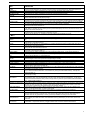
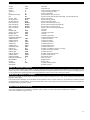
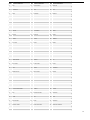
Parcel, Air Parcel, Express Post, Regular Parcel Zones
Post Code
Zone
Lodgment
Zone
N2
N1
N2
N2/Q1*
N2
N1
N2
N1
N2
V2/N2*
N2
V2†
N2
V2†
N2
V2†
N2
V2†
N1
N2
S2#
N2
N1
N2
NF
N2
2
1
2
17
2
1
2
1
2
18
2
4
2
4
2
4
2
4
1
2
10
2
1
2
16
2
Post Code
Zone
Lodgment
Zone
3921-3925
3926-3944
3945-3971
3972-3978
3979
3980-3983
3984-3999
8000-8999
V2
V1
V2
V1
V2
V1
V2
V1
4
3
4
3
4
3
4
3
Queensland
4000-4224
4225
4226-4229
4300-4449
4450-4499
4500-4549
4550-4699
4700-4805
4806-4899
9000-9299
9400-9596
9597-9599
9700-9799
9880-9919
9920-9959
9960-9999
Q1
N2/Q1*
Q1
Q2
Q3
Q1
Q2
Q3
Q4
Q1
Q1
Q2
Q1
Q2
Q3
Q4
5
17
5
6
7
5
6
7
8
5
5
6
5
6
7
8
South Australia
5000-5199
5200-5749
5800-5999
S1
S2
S1
9
10
9
Northern
Territory
0800-0999
NT1
11
W1
W2
W3
W1
12
13
14
12
T1
15
New South Wales
0200-0299
1000-2263
2264-2484
2485-2486
2487-2499
2500-2530
2531-2554
2555-2574
2575-2639
2640-2641
2642-2647
2648
2649-2714
2715
2716
2717-2719
2720-2730
2731-2739
2740-2786
2787-2879
2880
2881-2889
2890
2891-2898
2899
2900-2999
Victoria
3000-3220
3221-3334
3335-3341
3342-3424
3425-3443
3444-3688
3689-3690
3691-3749
3750-3811
3812-3909
3910-3920
V1
V2
V1
V2
V1
V2
V2/N2
V2
V1
V2
V1
3
4
3
4
3
4
3
4
3
3
4
Western
Australia
6000-6214
6215-6699
6700-6799
6800-6999
Tasmania
7000-7999
* Zone with lower charge is used.
† For charging purposes these Post Codes are considered to be part of Victoria.
# Broken Hill (2880) is considered to be part of South Australia.
CUBIC WEIGHT
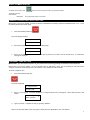
CUBIC weighing is applicable to the Domestic Parcel services (e.g. Local Rate, Within 50km, Parcel Post, Express Post
Parcel). When the weight is greater than 1000g, press the Cubic weight key (also key “0”). After which, the three
dimensions (length, width, or height in any order) will be entered one by one. Key in the number followed by the enter key.
The dimensions are limited to 105cm.
When the three dimensions have been entered, the appropriate postage is displayed. The display will show the equivalent
Cubed weight (if greater than actual weight) and corresponding postage. A “(C)“ is appended to the weight display denoting
it is CUBED. Press the CE key to exit CUBIC and go back to normal weighing mode.
OPERATING THE PS 3000N POSTAL SCALE
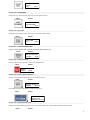
The PS3000N is easy to use and user-friendly in operation. First select which basic postal service you wish to use (e.g.
STANDARD) then decide whether you wish to utilize any of the supplementary services (e.g. REGISTERED) and simply
press the appropriate keys in turn. The display will guide you through, asking for the information it needs and display the
services selected and the total postage.
6