1
Specifications
Display
Display update rate
Microphone
Measurement Bandwidth
Dynamic range
Measurement Range
Frequency weighting
Accuracy / Resolution
Maximum Hold decay time
Response time
Built-in calibration check
AC Analog output
3-1/2 digit (2000 count) LCD
0.5 seconds
0.5” Electret condensor
31.5Hz to 8KHz
65dB
35 to 130dB (Low: 35 to 90; High: 65 to 130dB)
‘A’ and ‘C’ (selectable)
± 2.0dB @1kHz / 0.1dB
<1dB / 3min
Fast: 125 milliseconds / Slow: 1 second
1KHz internal sine wave @ 94dB
DC Analog output
10mVDC / dB; 100Ω output impedance (approx).
9V Battery
50 hours (typical); Low battery indicator alerts user
o
o
32 to 104 F (0 to 40 C)
10 to 90% RH
9.45 x 2.68 x 1” (240 x 68 x 25mm) / 6.75oz (210g)
Power
Battery life
Operating temperature
Operating humidity
Dimensions/weight
0.65VAC rms (full scale); 600Ω output impedance
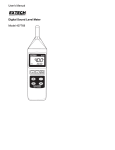
Meter Description
1.
2.
3.
4.
5.
6.
7.
8.
9.
Microphone
LCD display
POWER OFF & RANGE select switch
RESPONSE & HOLD select switch
A/C weighting and Calibration switch
Calibration adjust screw for 94dB
Reset key (resets max hold reading)
AC/DC analog output 3.5mm phone jack
Battery compartment and Tripod mount are located
on back of meter
Measurement Considerations
1.
Wind blowing across the microphone adds extraneous noise to the measurement.
Use the supplied windscreen to cover the microphone when applicable.
2.
Calibrate the instrument before each use if possible. Especially if the meter has not
been used for a long period of time.
3.
Do not store or operate the instrument in areas of high temperature or humidity.
4.
Keep meter and microphone dry.
5.
Avoid severe vibration when using the meter.
6.
Remove the battery when the meter is to be stored for long periods of time.
2
407735
Ver. 2.1
04/2006