1
English
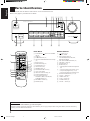
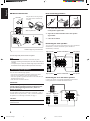
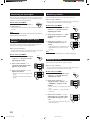
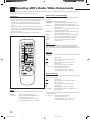
Parts Identification
Become familiar with the buttons and controls on the receiver before use.
Refer to the pages in parentheses for details.
1
2
3 4 5 67 8
9
p
MASTER VOLUME
AUDIO/VIDEO CONTROL RECEIVER
–
+
STANDBY
BASS BOOST
/I
ADJUST
SETTING
STANDBY/ON
MEMORY
DVD MULTI
DVD
VCR
FM
CD
PHONO
TAPE/MD
AM
SURROUND
ONE TOUCH OPERATION
SPEAKERS
1
PHONES
2
INPUT ATT.
SOURCE NAME
ENHANCED COMPULINK CONTROL SYSTEM
_ ON — OFF
y
t
r
1
CD
TV
VCR
AUDIO
TAPE/MD
DELAY
TEST
SURROUND
1
25
3
– CENTER +
4
5
7/P
8
VCR
DVD
6
5
2
EFFECT
5
FM/AM
8
– REAR•L +
5
9
MENU
SOUND
CONTROL
– REAR•R +
10
+10
ENT
DVD MULTI CD-DISC
PHONO
+
TV/VIDEO
TV CH
ONE TOUCH
OPERATION
MUTING
+
+
VOLUME
VCR CH
–
–
£
SLEEP
6
8
7
4
1
p
q
+
–
3
4
5
9
TV VOL.
–
4
1
7
RM-SR558XU REMOTE CONTROL
w
e
r
e
w
q
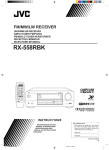
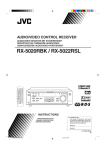
Front Panel
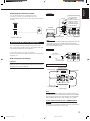
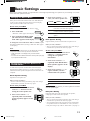
Remote Control
1 STANDBY/ON
button and STANDBY
lamp (8)
2 Display (8)
3 SURROUND button (16)
4 ONE TOUCH OPERATION button and lamp
(12)
5 Remote sensor (7)
6 BASS BOOST lamp (10)
7 SETTING button (11)*
8 ADJUST button (10)*
9 MEMORY button (13)
p MASTER VOLUME control (9)
q Cursor control buttons
w INPUT ATT. button and lamp (10)
e SOURCE NAME button (11)
r Source selecting buttons (8)
DVD MULTI, DVD, VCR, FM*,AM*,
TAPE/MD, PHONO, CD
t SPEAKERS 1/2 buttons (9)
y PHONES jack (9)
1
2
3
4
5
6
7
8
9
p
q
w
e
r
buttons (8, 23)
TV, VCR, AUDIO
Source selecting buttons (8)
CD, TAPE/MD, FM/AM, VCR, DVD,
DVD MULTI, PHONO
ONE TOUCH OPERATION button (12)
VOLUME +/– buttons (9)
MUTING button (9)
SLEEP button (12)
• Operating buttons for audio/video components
(22)
• 10 keys for selecting preset channel (14, 22)
• 10 keys for adjusting sound (12, 17, 22)
• 10 keys for operating other components (22)
SOUND CONTROL button (12, 17, 22)
TV VOL –/+ buttons (23)
CD-DISC button (22)
TV CH –/+ buttons (23)
TV/VIDEO button (23)
VCR CH +/– buttons (23)
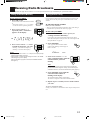
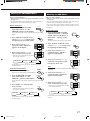
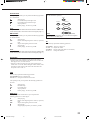
IMPORTANT:
To use the Cursor control buttons (q) on the front panel:
What these buttons actually do depends on which function you are trying to adjust. Before using these buttons, select the function by
pressing one of the buttons marked with *.
2
EN01-07.RX-558V[U]/1
2
98.12.21, 11:06 AM