1
Page: 4
2. Getting Started
This Quick Guide is to help Teachers who are using a SRS product for the first time.
All SRS products are secure web based software applications for tracking and reporting in schools, accessed over the
internet. The basic parameters of the system (such as pupil names, classes, term dates, who can access the product and
what they can do) are all set by the System Administrator or Super Administrator (usually the school ICT Coordinator).
Everyone logs on to SRS over the internet – so teachers can update their pupil tracking and reporting from anywhere at any
time.
To log in you need to enter your User Name, Password and Role. User Names and Passwords are assigned by the system
Super Administrator and your Role will be: Head Teacher, Teacher, or Support Teacher.
First type the web address provided by your school ICT Coordinator into your web browser. The web address will usually take
the form: www.yourschoolname.schoolreports.eu. You may want to bookmark this page.
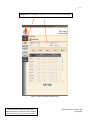
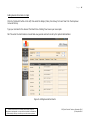
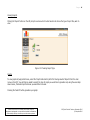
Once logged in, you will be presented with the SRS Screen, from which you select the functionality you require:
Figure 1 : Main SRS : Primary Screen (after log in)
Teachers select either ‘ATS’ for Assessment Tracking or ‘ARS’ for Reporting.
Please note that SRS is a software product under continual
development and upgrade – screen shots are included as illustrations
of functionality and may not reflect your actual screen experience.
SRS Quick Guide for Teachers, September 2010
© Compubits 2010