1
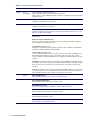
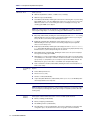
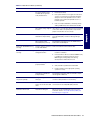
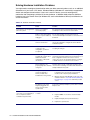
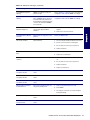
Table 5-18 POST Error Messages (Continued)
Screen Message
Probable Cause
Recommended Action
162—System Options Not Set
Configuration incorrect. RTC battery
might need to be replaced.
1
Run Computer Setup (F10 Setup).
2
Set the date and time under Control Panel or in
F10 Setup depending on the operating system.
3
If the problem persists, replace the RTC battery.
Invalid time or date in configuration
memory.
RTC (real-time clock) battery might
need to be replaced.
CMOS jumper might not be properly
installed.
1
Set the date and time under Control Panel or in
F10 Setup depending on the operating system.
2
If the problem persists, replace the RTC battery.
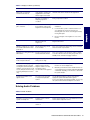
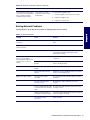
Memory configuration is incorrect.
1
Run Computer Setup (F10 Setup) or Windows
utilities.
2
Be sure memory module(s) (if any) are installed
properly.
3
If third-party memory has been added, test using
HP-only memory.
4
Verify proper memory module type.
163—Time and Date Not Set
164—Memory Size Error
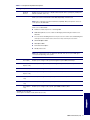
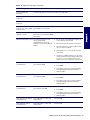
183—Invalid Processor
Jumper Setting
System board jumper improperly set.
Reset system board jumpers to match processor and
bus speeds (select models).
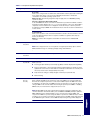
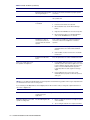
201—Memory Error
RAM failure.
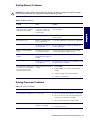
1
Run Computer Setup (F10 Setup) or Windows
utilities.
2
Be sure that memory and continuity modules are
installed correctly.
3
Verify proper memory module type.
4
Remove and replace memory module(s) one at a
time to isolate faulty module.
5
Replace the faulty memory module(s).
6
If error persists after replacing memory modules,
replace the system board.
202—Memory Type Mismatch
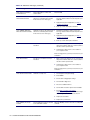
Memory modules do not match each
other.
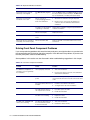
Single Bit ECC error.
207—ECC Corrected Single
Bit Errors in Memory Socket(s)
y,y
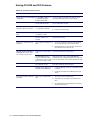
212—Failed Processor
213—Incompatible memory
Module in memory Socket(s)
X,X, X
144
Processor has failed to initialize.
A memory module in memory socket
identified in the error message is
missing critical SPD information, or is
incompatible with the chipset.
SYSTEM DIAGNOSTICS AND TROUBLESHOOTING
Replace memory modules with matched sets.
1
Verify proper memory module type.
2
Try another memory socket.
3
Replace memory module if problem persists.
1
Reseat the processor in its socket.
2
If the processor does not respond, replace it.
1
Verify proper memory module type.
2
Try another memory socket.
3
Replace memory with a module conforming to the
SPD standard.