1
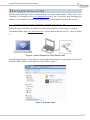
Tamarisk®640
17 μm 640x480 Long Wave Infrared Camera
Camera Control Software User Guide
Document No: 1012821
Revision: B
®
Tamarisk Camera Control Software User Guide
©Copyright 2013, DRS TECHNOLOGIES, Inc.- All rights reserved.
13532 N. Central Expressway
Dallas, TX 75243
877.377.4783
www.drsinfrared.com
All rights reserved. The contents of this document may not be reproduced in whole or in parts
without the written consent of the copyright owner.
NOTICE
ALL STATEMENTS, INFORMATION, AND RECOMMENDATIONS IN THIS MANUAL ARE BELIEVED TO BE ACCURATE BUT ARE PRESENTED WITHOUT
WARRANTY OF ANY KIND. NOTWITHSTANDING ANY OTHER WARRANTY HEREIN, ALL DOCUMENT FILES AND SOFTWARE ARE PROVIDED “AS IS”
WITH ALL FAULTS. DRS DISCLAIMS ALL WARRANTIES, EXPRESSED OR IMPLIED, INCLUDING, WITHOUT LIMITATION, THOSE OF MERCHANTABILITY,
FITNESS FOR A PARTICULAR PURPOSE AND NONINFRINGEMENT OR ARISING FROM A COURSE OF DEALING, USAGE, OR TRADE PRACTICE.
IN NO EVENT SHALL DRS BE LIABLE FOR ANY INDIRECT, SPECIAL, CONSEQUENTIAL, OR INCIDENTAL DAMAGES, INCLUDING, WITHOUT
LIMITATION, LOST PROFITS OR LOSS OR DAMAGE TO DATA ARISING OUT OF THE USE OR INABILITY TO USE THIS MANUAL, EVEN IF DRS HAS
BEEN ADVISED OF THE POSSIBILITY OF SUCH DAMAGES.
Rev History
Revision Number
Release Date
A
3/26/2012
B
11/15/2013
Description
Initial Release
Use with Firmware older than V01.00.0080
Updated Document to include latest SW/FW including ICE
Strength Slider etc. Prepared for Public Release
Camera Link® is a registered trademark of the Automated Imaging Association.
i
®
Tamarisk Camera Control Software User Guide
TABLE OF CONTENTS
Table of Contents ................................................................................................................... ii
Acronyms and Abbreviations ................................................................................................. iii
Reference Documents ........................................................................................................... 1
Safety Instructions ................................................................................................................. 2
1
Introduction ..................................................................................................................... 3
1.1
1.2
1.3
2
Hardware Setup .............................................................................................................. 5
2.1
3
Information Tab .............................................................................................................. 17
Settings .......................................................................................................................... 17
Video .............................................................................................................................. 22
Colorization .................................................................................................................... 25
AGC ............................................................................................................................... 25
Pan and Zoom ................................................................................................................ 30
Lens Calibration ............................................................................................................. 31
Pixel Map ....................................................................................................................... 40
Utilities............................................................................................................................ 42
Uninstalling the Software .............................................................................................. 47
6.1
6.2
6.3
7
Getting started ................................................................................................................ 14
Starting the Camera Control Software ............................................................................ 14
Camera Control Software Operation............................................................................. 16
5.1
5.2
5.3
5.4
5.5
5.6
5.7
5.8
5.9
6
Launching The Camera Control Software Installer ........................................................... 8
Install Camera Control Software ....................................................................................... 9
Set-up and Operation ................................................................................................... 14
4.1
4.2
5
Hardware Configuration .................................................................................................... 5
Software Installation ....................................................................................................... 8
3.1
3.2
4
Supported Cameras ......................................................................................................... 3
System Requirements ...................................................................................................... 3
Lens Calibration Requirements ........................................................................................ 4
Removing The Software Using the Install Utility ............................................................. 47
Uninstalling The Software Using the Uninstall Prompt .................................................... 47
Uninstalling The Software via Control Panel .................................................................. 48
Troubleshooting ............................................................................................................ 49
7.1
7.2
7.3
7.4
No Attached Devices Found ........................................................................................... 49
No Video or Poor Video From the Camera ..................................................................... 55
Custom lens Calibration and Custom Pixel Map Tabs are non functional ....................... 56
Custom Lens Calibrated camera has poor video ............................................................ 56
ii
®
Tamarisk Camera Control Software User Guide
ACRONYMS AND ABBREVIATIONS
Abbreviation
°C
°F
AGC
BPR
CCA
CL
COMM
CSC
CSCI
CSU
dB
DSP
ESD
E-Zoom
FOV
FPA
ft
G
g
GUI
H
HFOV
I/O
ICD
ICE
ID
IR
IRS
km
LR
LWIR
Description
Celsius
Fahrenheit
automatic gain control
bad pixel replacement
circuit card assembly
center line
communication
Computer Software Component
Computer Software Configuration Item
Computer Software Unit
decibels
digital signal processor
electrostatic discharge
electronic zoom
field of view
Focal Plane Array
feet
gravitational force
gram
graphical user interface
height
horizontal field of view
input/output
Interface Control Document
Image Contrast Enhancement
identification
infrared
Interface Requirements Specification
kilometer
lower right
long-wave infrared
Abbreviation
mm
ms
MSB
MTU
MWIR
NETD
NTSC
NUC
NVTHERM
OEM
OLA
P
POL
psi
Rev
ROI
SC
SWIR
TBD
TCR
TIM
UART
UAV
UFPA
USB
V
VDC
VGA
VOx
W
μm
Description
millimeter
milliseconds
Most Significant Bit
Maximum Transfer Unit
Mid-wave infrared
noise equivalent temperature difference
National Television System Committee
non-uniformity correction
Night Vision Thermal Analysis Tool
original equipment manufacturer
Optical Lens Adapter
probability
polarity
pound per square inch
revision
region of interest
split configuration
Short-wave infrared
To Be Determined
Temperature coefficient of resistance
Thermal Imaging Module
Universal Asynchronous Receiver Transmitter
unmanned aerial vehicle
Un-cooled Focal Plane Array
Universal Serial Bus
Vertical or Voltage
volts direct current
video graphics array
Vanadium Oxide
width or Watt
micron (micrometer)
iii
®
Tamarisk Camera Control Software User Guide
REFERENCE DOCUMENTS
The following documents form part of this specification. In the event of a conflict between
documents referenced herein and the contents of this specification, the contents of this specification
shall be considered a superseding requirement.
Document No: 1002593 Tamarisk®640 User Manual
Document No: 1012820 Tamarisk®640 Electrical Interface Control Document
Document No: 1012819 Tamarisk®640 Software Interface Control Document
Document No: 1003727 Tamarisk®640 Mechanical Interface Control Document
1
®
Tamarisk Camera Control Software User Guide
SAFETY INSTRUCTIONS
NOTIFICATIONS: CAUTION, WARNING AND NOTE
The following is a list of notifications and their accompanying symbol that may be found through this
document to alert the reader to potential risks and to minimize the potential for personal injury and or
damage to the product. When a notification is present, it is important that the user review and
understand all statements related to the notification before proceeding. If questions arise, please
contact your authorized dealer or DRS Technologies.
Notifications are preceded by a symbol and followed by highlighted text. Three types of notifications
are typically used and are defined below:
CAUTION
A caution is a procedure, practice, or condition that, if not strictly followed, may
result in personal injury or damage to the equipment that may impede product
performance.
WARNING
A warning is intended to alert the user to the presence of potentially harmful
circumstances and provide precautionary guidance for mitigating risk of personal
injury and or damage to the product.
NOTE
A note is a statement that clarifies or is used to emphasize important information.
1. Read all instructions
2. Keep these instructions for future reference.
3. Follow all instructions
4. Heed all warnings.
5. Do not submerge this apparatus in liquid of any kind.
6. Clean per recommended instructions using dry non-abrasive cloth.
7. Do not install near any sources of intense heat such as radiators, furnaces,
stoves or other apparatus that regularly produce excessive heat.
8. Refer all servicing to qualified service personnel.
2
®
Tamarisk Camera Control Software User Guide
1 INTRODUCTION
The Camera Control Software provides an easy to use, graphical interface which allows the user to
fully evaluate the camera’s functions and features. This user guide describes the installation
requirements, installation procedure, and provides details on how to use the Camera Control Software
to configure the camera, display status information, and perform image processing.
NOTE
This guide is based on version 1.6 or later of the DRS Camera Control Software.
1.1 SUPPORTED CAMERAS
This User Guide explains the operation of with the Camera Control Software version 1.6 or later.
This version supports the following cameras:
1. Tamarisk®640
2. Tamarisk®320
3. Zafiro™640
4. UC640
1.2 SYSTEM REQUIREMENTS
To install and run the Camera Control Software, ensure the host PC supports the following:
1. Operating System: Microsoft Windows7 (64-bit/32-bit), or Windows XP (64-bit/32-bit)
with SP3
2. CPU: 1GHz or faster
3. Memory: 512MB of RAM (1GB recommended) and 500 MB of available hard-disk
space
4. CD/DVD-ROM drive
5. USB 2.0 port or a serial port
6. Display: 1024×768 resolution or above
7. Adobe PDF reader – for viewing the help files
8. The following are optional
9. Analog frame grabber which supports Microsoft’s DirectShow API
10. Camera Link frame grabber which supports Microsoft’s DirectShow API
3
®
Tamarisk Camera Control Software User Guide
1.3 LENS CALIBRATION REQUIREMENTS
The following hardware is needed to calibrate the camera successfully:
1. Pass Key to enable the Lens Calibration tab
2. A Tamarisk® with lens focused at infinity running:
a. FPGA RTL ver: V01.00.0080 or newer
b. CPU SW ver: X1.P1.01.13.13 or newer -OR- X1.Px.00.xx.xx
3. A USB cable or RS232 cable and power
4. One or two thermally stable black bodies. Ideally, the calibration process uses a
controllable black body, but any thermally stable and uniform body is acceptable. The
black body must completely fill the field of view with a uniform scene. DRS recommends
the following black body manufactures and models:
a. Santa Barbara Infrared, Inc.
www.sbir.com
Model: Infinity black body and controller
b. CI Systems
www.ci-systems.com
Model: sR-800
4
®
Tamarisk Camera Control Software User Guide
2
HARDWARE SETUP
2.1 HARDWARE CONFIGURATION
In this section, three different configurations for viewing your camera’s output video will be
presented, including solutions for both analog and digital video. Although the physical interface may
vary from camera to camera, the schema outlined below will remain valid for the products listed in
section 1.1 above.
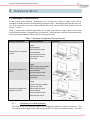
Table 1, presents three different approaches for viewing your camera’s output video as well as the
recommended hardware to support that given approach. An illustration is provided to document each
connection and demonstrate what the given set-up may look like.
Table 1. Hardware Configuration Set-up Overview
Display Configuration
Required Hardware
Analog video to an external
monitor
Laptop
Analog Display
USB to USB mini cable
Camera Module
Camera Interface Cable
Camera break out box
Coax cable
Analog video displayed on
the PC
Laptop
USB to analog frame grabber
USB to USB mini cable
Camera Module
Camera Interface Cable
Camera break out box
Coax cable
Camera Link (digital) video
displayed on the PC
2.1.1
Illustration
Laptop
Camera Link frame grabber
Camera Link cable
USB to USB mini cable
Camera Module
Camera Interface Cable
Camera break out box
Connecting to an Analog Monitor
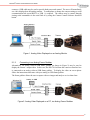
The simplest way to evaluate the camera is to configure the hardware as shown in Figure 1. The
user simply needs to apply power and connect the RS-170 cable to an analog monitor. For some
5
®
Tamarisk Camera Control Software User Guide
cameras, a USB cable may be used to provide both power and control. The user will immediately
see video displayed on the analog monitor. To manipulate or change the camera settings a serial
communication link (serial RS232 or USB ) is required. The camera may be control through
issuing serial commands via the serial link or by using the Camera Control Software described
herein.
Figure 1. Analog Video Displayed on an Analog Monitor
2.1.2
Connecting to an Analog Frame Grabber
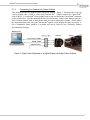
Alternatively, an analog video-to-USB frame grabber (as shown in Figure 2) may be used to
display the camera’s output video. In this case, the RS-170 feed from the camera or interface box
is connected to an analog video-to-USB frame grabber. To display the video on screen please
follow the instructions that came with your analog-to-USB frame grabber.
The frame grabber allows the user to capture video or images and analyze or view them later.
Figure 2. Analog Video Displayed on a PC, via Analog Frame Grabber
6
®
Tamarisk Camera Control Software User Guide
2.1.3
Connecting to a Camera Link Frame Grabber
This method provides the highest quality image for display. Figure 3, illustrates the set-up for
viewing digital video (14-bit or 8-bit) using CameraLink®. Simply connect the CameraLink®
cable to the PC’s CameraLink® frame grabber card on one end and to the CameraLink® connector
on the interface box. Besides capturing digital video and images, Camera Link adapters provide a
host of control features such as data capture rates and video compression formats. Please follow
the instructions that came with your CameraLink® capture card to display the image on screen. A
list of compatible frame grabbers is available and can be found in your Tamarisk® Product
Documentation Package.
Figure 3. Digital Video Displayed on a Digital Display via Digital Frame Grabber
7
®
Tamarisk Camera Control Software User Guide
3 SOFTWARE
INSTALLATION
DRS provides Tamarisk® Camera Control Software in various media formats. Please refer to the
Tamarisk® User Manual and or www.drsinfrared.com for a list of accessory items including part
numbers. The Tamarisk® Camera Control Software may be download directly from our web site.
3.1 LAUNCHING THE CAMERA CONTROL SOFTWARE INSTALLER
Follow the instructions below to install the Camera Control Software GUI on your PC or laptop.
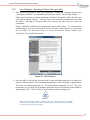
Download software from www.drsinfrared.com or insert flash media into your PC. Refer to Figure
4.
Figure 4. Internet Download or Flash Media Install
Using Windows Explorer, select the drive corresponding to the media was just inserted. Look for the
file name: DRS Camera Control Software Setup. Refer to Figure 5.
Figure 5. Software Install
8
®
Tamarisk Camera Control Software User Guide
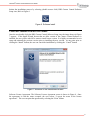
Initiate the installation process by selecting (double mouse click) DRS Camera Control Software
Setup icon; Refer to Figure 6.
Figure 6. Software Install
3.2 INSTALL CAMERA CONTROL SOFTWARE
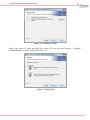
Once the user double clicks the DRS Camera Control Software Setup icon, the image shown in Figure
7 appears. If the Install Wizard detects that an older version of the Camera Control Software is
installed, the user will be asked if he wants to install a new version. It is highly recommended to exit
setup and uninstall the previous version prior to installing the new version. At any point prior to
clicking the “Install” button; the user can cancel the installation by clicking the “Cancel” button.
Figure 7. Welcome to the InstallShield Wizard
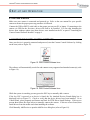
Software License Agreement: The Software License Agreement screen is shown in Figure 8. Once
the agreement is read the terms accepted, the user selects “I accept the terms in the license
agreement”. The user can print the agreement by selecting the “Print” button.
9
®
Tamarisk Camera Control Software User Guide
Figure 8. Software License Agreement
LGPL License: The LGPL License Agreement is shown in Figure 9. Once you have read the
agreement and accept the terms, select “I accept the terms in the license agreement”. The user can
print the agreement by selecting the “Print” button.
Figure 9. LGPL License Agreement
Destination Folder: The default installation directory is shown in Figure 10. The user can change the
installation directory by clicking on the “Change” button. Select next to confirm installation
destination.
10
®
Tamarisk Camera Control Software User Guide
Figure 10. Destination Folder
Setup Type: Figure 11 shows the Setup Type screen. The user can select between a “Complete”
(recommended) or “Custom” install, then select Next.
Figure 11. Setup Type
11
®
Tamarisk Camera Control Software User Guide
Ready to Install the Program: The InstallShield Wizard has enough user information to complete the
installation. At this point the user can cancel the installation. Once the “Install” button is pressed, the
Wizard will make sure the system meets the minimum installation requirements and complete the
installation. The Ready to Install the Program screen is shown in Figure 12.
Figure 12. Ready to Install the Program
Installing DRS Camera Control Software: The InstallShield Wizard status shows the changes that are
made during the installation; a progress bar also is provided. A command prompt window may
briefly appear; this is a normal part of the installation. Figure 13 shows the Installing DRS Camera
Control Software screen.
Figure 13. Installing DRS Camera Control Software
Within approximately three minutes the InstallShield Wizard Completed screen appears. The
installation is now complete. Select Finish. By default the DRS Camera Control Software will not
12
®
Tamarisk Camera Control Software User Guide
immediately start when the “Finish” button is pressed. The user can select the “Launch DRS Camera
Control Software” checkbox and upon selecting “Finish” and the DRS Camera Control Software will
start. Figure 14 shows the InstallShield Wizard Complete screen.
Figure 14. InstallShield Wizard Completed
Once the installation is complete the user will notice that an icon was added to the desktop and a DRS
Technologies folder is added to the programs list.
13
®
Tamarisk Camera Control Software User Guide
4 SET-UP
AND
OPERATION
4.1 GETTING STARTED
Make sure your camera is connected and powered up. Refer to the user manual for your specific
camera to ensure the proper power-up procedure is followed.
Connect the USB or RS232 serial cable to the proper port on your PC or laptop. If connecting to the
camera via USB for the first time, drivers will need to be installed. You can skip obtaining the
drivers from windows update since these drivers were installed on the PC as part of “Launching the
Camera Control Software Installer” on page 8.
4.2 STARTING THE CAMERA CONTROL SOFTWARE
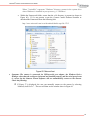
Once your device is properly connected and powered, start the Camera Control Software by clicking
on the icon (refer to Figure 15).
Figure 15. DRS Control Software Icon
The software will automatically search for and connect to any supported and attached camera(s) (refer
to Figure 16).
Figure 16. DRS Control Software Icon
While the system is searching you may press the ESC key to manually add a camera.
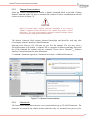
If the key ESC is pressed or no device is found, the No Attached Devices Found dialog box is
displayed (refer to Figure 17). Check to verify that the device drivers have been installed. Go to
Control Panel, select programs and features and look for FTDI Driver Install Package. If drivers are
present then follow the steps below to manually connect the camera. If drivers are not found, then
install drivers from the media used when installing the software.
Click Manually Add Device to open the Add Devices dialog box (refer to Figure 18).
14
®
Tamarisk Camera Control Software User Guide
Figure 17. DRS No Attached Devices Found
Select the camera from the pull-down menu or select “Auto Detect Device.” Additionally, the user
may select the COM port and Baud rate. The default baud rate for connecting through USB is
921600. The default baud rate for connecting through a RS232 serial interface is 57600. Figure 18
illustrates the configuration needed to connect to the camera via the RS232 interface; The COM port
used is PC dependent. Click “Add Device” to connect to the selected camera.
Figure 18. DRS Control Software Icon
15
®
Tamarisk Camera Control Software User Guide
5
CAMERA CONTROL SOFTWARE OPERATION
In this section the operation of the Camera Control Software GUI is explained by stepping through
the various tabs and providing an explanation of features and functions.
The Camera Control Software is capable of supporting multiple cameras within the same application.
A new camera tab, identified by the camera’s serial number (see Figure 19) is displayed for each
additional camera. This feature is available only when using a USB cable (and not a USB-to-serial
RS232 cable) to communicate with your camera. For example, to configure and control three
Tamarisk® cameras, connect each camera (via USB) from the camera’s break out box to the PC as
shown in Table 1. Hardware Configuration Set-up Overview. Open the Camera Control Software.
The software will display three separate camera tabs; each tab is uniquely identified by the camera’s
serial number.
Additionally, multiple instances of the Camera Control Software may be opened at a time by
launching multiple Camera Control Software applications and manually connecting your cameras as
desired.
There are several tabs available to assist you in communicating with and controlling your connected
Tamarisk®cameras. They are:
1. Information
2. Settings
3. Video
4. Colorization
5. AGC
6. Pan and Zoom
7. Lens Calibration
8. Pixel Map
9. Utilities
10. Help
Additionally, there are two functions that may be present on the Camera Control Software window,
namely, Search for New Connected Devices and Show Live Video. See section 5.9 for details.
16
®
Tamarisk Camera Control Software User Guide
5.1 INFORMATION TAB
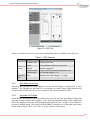
Once a supported camera is located the “Information” tab is displayed (refer to Figure 19).
Figure 19. Information Tab
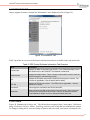
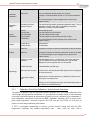
Table 2 provides an overview of the features and functions that are available on the Information tab.
Table 2. DRS Control Software Information Tab Overview
Item
Description
Part Number
Displays the DRS Technologies part number. For a detailed description of the
®
part number refer to the Tamarisk User Manual or data sheet
Serial Number
Displays the serial number. This is a unique number which is used to track the
camera through the manufacturing process
Rel
Displays the Firmware version that is loaded and running in the camera. The
Firmware is upgradable – See the utilities tab for details
RTL Rel
Displays the FPGA code revision. The FPGA code is upgradable – See the
utilities tab for details
Connected
The two types of connections are RS-232 and USB
Baud Rate
When connected via USB the baud rate is fixed at 921600. When connected
via RS-232 the default baud rate is 57600. Refer to the Software Interface
Control Manual for details on how to change the default baud rate.
5.2 SETTINGS
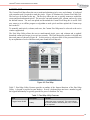
Figure 20 illustrates the Settings tab. This tab has been organized into 6 task panes, Calibration,
Image Orientation, Polarity, Shutter, Symbology and Password to help the user configure the camera.
To change a setting, hover over the setting of interest and select with your mouse or pointer device.
17
®
Tamarisk Camera Control Software User Guide
The selected command is immediately applied to the camera and the results will appear on the output
video. Note, the settings are not saved until you select the Save Settings tab at the bottom of the
window. Once Save Settings has been selected, all indicated settings will be saved to the cameras
non-volatile memory; this may take a few seconds. When the camera is powered cycled the settings
are retained.
NOTE
To save settings, select the Save Settings tab at the bottom of the window. This
may take a few seconds and will store all selected settings to non-volatile
memory.
Figure 20. Settings Tab
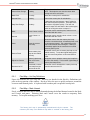
Table 3 provides an overview of the features and functions available on the Settings tab.
Table 3. Settings Overview
Task Pane
Calibration
Description
Function
1-Point Calibration
Performs calibration / non-uniformity correction (NUC) – shutter is
used
Performs NUC through the lens – shutter is not used
1-Point (No Shutter)
18
®
Tamarisk Camera Control Software User Guide
Automatic
Calibration
Calibration
Status
Image
Orientation
Shutter
Polarity
Symbology
Period (in minutes)
Sets time between calibrations
Set Period
Sets new calibration period (default is 5 minutes)
Setting the “Autocal Enabled” button to “0” turns auto calibration
off.
Click “Save Settings” to save changes to the camera’s nonvolatile memory
Provides the current
calibration status
The camera will periodically update the calibration status. This is
especially important if the user has disabled the automatic
calibration by clicking “Autocal Enabled.”
Normal
Flip Vertically
Flip Horizontally
Flip Vertically/
Horizontally
Normal display mode
Flips the image from top to bottom
Flips the image from left to right
Flips the image from top to bottom and left to right
Click “Save Settings” to save changes to the camera’s nonvolatile memory
Shutter Open
Shutter Closed
Opens shutter
Closes shutter
White Hot
Hot pixels are shown as white and cold pixels are shown as black
Black Hot
Hot pixels are shown as black and cold pixels are shown as white
Click “Save Settings” to save changes to the camera’s nonvolatile memory
Enable on-screen
indicators
Enables/disables zoom, 1-pt calibration, and polarity indicators.
The 1-pt calibration indicator also requires the 1-pt indicator
display time to be set greater than 0 to be enabled.
Enable DRS logo
Enables/disables the DRS logo.
Start-up screen duration
Sets the time in seconds that the DRS splash screen is displayed
on camera power-up.
1-pt indicator display
time
Sets the time in seconds that the 1-pt calibration indicator will be
shown prior to a shutter event.
Changes on the Symbology task pane are automatically saved to
the camera’s non-volatile memory
5.2.1
Calibration (One-Point Calibration) Non-Uniformity Correction
To optimize a thermal scene, the processor software performs NUC or 1-Point calibration of the
video images through internal calculations. To provide the best possible image, a non-uniformity
correction is performed based on information provided by factory calibration, user-commanded 1point calibrations, and bad pixel replacement (BPR) algorithms. Initiating a NUC activates a onepoint single-temperature correction sequence that will reset the level offset of each pixel to
improve overall image uniformity and contrast.
A NUC is performed automatically at start up, per the AutoCal setting and when the FPA
temperature transitions into another temperature zone – these zones are static with a
19
®
Tamarisk Camera Control Software User Guide
corresponding set of offsets determined as part of the factory calibration process. The operator
can also initiate a NUC at anytime and has the option of selecting “1-Point Calibration” or “1Point (No Shutter)” from the camera software control GUI.
“1-Point Calibration” (shutter closed)
Calibration is performed with the shutter closed preventing scene IR energy being received by the
detector. With the shutter closed, the sensor sees a uniform temperature when performing the
NUC. The shutter will momentarily close while calibration is performed.
“1-Point (No Shutter)” (Shutter open, “Through-the-lens”)
Shutterless calibration is use for optimal image performance by removing unwanted optical noise.
This calibration is a, “through-the-lens,” one-point calibration. In this case, a uniform temperature
object must be placed in front of the lens while the one-point calibration is performed.
5.2.2
Automatic Calibration (One-Point Calibration)
The camera is programmed at the factory to automatically perform a 1-point on power-up, when
the FPA temperature transitions across predefined temperature zones, and every 5 minutes (per
the default automatic calibration time setting). The user can disable the automatic calibration
timer by entering a 0 in the automatic calibration field.
5.2.3
Image Orientation
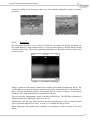
The image can be displayed in four operator-selectable orientations as shown below:
Figure 21. Normal Orientation
Figure 22. Flip Horizontally
Figure 23. Flip Vertically
Figure 24. Flip Vertically and Horizontally
5.2.4
Polarity
Polarity switches the displayed image from White Hot to Black Hot polarity (refer to Figure 25
and Figure 26). White Hot polarity is set as factory default. Reversing the image polarity can
improve the apparent detail in some scenes, especially in the presence of bright ambient lighting
20
®
Tamarisk Camera Control Software User Guide
around the display screen. In general, there is no correct polarity setting but a matter of operator
preference.
Figure 25. White Hot Polarity
5.2.5
Figure 26. Black Hot Polarity
Symbology
By selecting the Enable on-screen indicators check box, the camera will display symbology for
the current polarity, 1-point indicator time (if a value of greater than 0 is entered) and the current
electronic zoom value. These three symbology indications are displayed at the top of the screen
as shown below:
Figure 27. On Screen Symbology
Durig a 1-point event the camera’s shutter closes and the video output is temporarally frozen. The
1-point indication is used in instances when the user desires advanced notice of an imminent 1point. The user may want to pospone an event until after the 1-point is complete. For maximum
flexability, the 1-point indication time is adjustable by the user.
The user may also, independently, enable or disable the DRS logo. The DRS logo symbology is
displayed in the lower right-hand corner of the screen.
Additionally, the user may adjust the time interval for displaying the start-up screen between
power-up and the output of live video. A value of “0” disables the start up screen.
When displaying 14-bit digital video, symbology is not displayed. Refer to Figure 28 for more
details.
21
®
Tamarisk Camera Control Software User Guide
5.3 VIDEO
Figure 29 illustrates the Video tab. The Video tab comprised of two task panes, Analog Video and
Digital Video. Factory default settings are Analog Video Enabled and Digital Video Camera Link
enabled. Analog Video and Parallel Digital Video are mutually exclusive. To save changes to the
video output, the user must click on Save Settings before moving to another tab or closing the Camera
Control Software application.
5.3.1
Video Overview
Within the Camera Control Software, the video output of the camera is broken into the Settings,
Video, Colorization, AGC, and the Pan and Zoom tabs. Since all of these tabs are related to each
other a high level explanation of the camera video functions is helpful. Figure 28 is a block
diagram of the video chain.
Raw Detector
Output
Rate Adapt, NUC, BPR
Zoom
On/Off
AGC
On/Off
14-bit
Symbology
On/Off
To Video DAC
(Analog Video)
8-bit
Digital Video
Selection
To Parallel Digital Video
Colorization
On/Off
To Digital Video
Figure 28: Video Block Diagram
On the left side of the block diagram, the detector (or FPA) output feeds into the rate adaptation,
Non Uniformity Correction, and Bad Pixel Replacement block. The output of this block is a 14bit corrected image and it feeds into the Zoom block.
The zoom block can perform up to a 4X digital zoom and also allows the user to perform a digital
pan and tilt. The Zoom block feeds into the Frame buffer block.
The frame buffer block performs the white-hot, black-hot and allows the user to change the image
orientation. The 14-bit output of the Frame buffer block feeds into the Digital Video Selection
block and the AGC block.
The AGC block allows the user to select several different AGC modes. The AGC block also
converts the 14-bit video to 8-bit digital video. The output of the AGC block feeds into the
Symbology block.
The Symbology block allows the user to display camera information on-screen. The output of the
symbology block is input to the digital to analog converter (DAC) block where the 8-bit digital
22
®
Tamarisk Camera Control Software User Guide
data is converted into RS-170 analog video. The RS-170 video is not colorized. The output of
the symbology block also feeds into the digital video selection.
The Digital Video Selection allows the user to select either 14-bit (pre AGC) or 8-bit (post AGC)
digital data. This is an important note because the two video streams look very different from
each other. The output of the Digital Video Selection block feeds into the Colorization block
If the Colorization block is off, the digital video data passes through and is unchanged; 14-bit and
8-bit data is output from the colorization block. If the Colorization block is enabled, the incoming
digital video data is mapped to 24-bit RGB data. The user has the ability to select the color pallet.
Figure 29. Video Tab
Table 4 provides an overview of the features and functions that are available on the Video tab.
Table 4 – Video Overview
Item
Digital Video
Output Select
Description
Function
Enable Camera Link
Enables/disables the Camera Link Output
Enable Parallel Digital
Video
Enables/disables Digital Video Output
Parallel Digital Video
Enables/disables the parallel digital video output
(Note: Parallel digital video cannot be enabled while
analog video is enabled)
Changes are automatically saved to the camera’s
non-volatile memory
23
®
Tamarisk Camera Control Software User Guide
Analog Video
Select
NTSC
Sets analog video output to the National Television
System Committee standard
PAL-M
Sets analog video output to the Phase Alternating
Line (M)
PAL-N
PAL-B,D,G,H,I,N2
Sets analog video output to the Phase Alternating
Line (N) standard
Sets analog video output to the Phase Alternating
Line (B,D,G,H,I,N) standards
Changes are automatically saved to the camera’s
non-volatile memory
Digital Video
Output Selection
8-bit Digital Out
Sets the Camera Link and parallel digital video output
to display 8 bits
14-bit Digital Out
Sets the Camera Link and parallel digital video output
to display 14 bits
Click “Save Settings” to save changes to the camera’s
non-volatile memory
Enable 24 bit RGB Map
Colorization
Selection
Enables 8-bit to 24 bit colorization palette mappings.
Once colorization is enabled, the user can select the
colorization pallet by selecting the Colorization Tab.
Click “Save Settings” to save changes to the camera’s
non-volatile memory
5.3.1.1
Video Output Select
The camera outputs monochrome analog or digital video. When Camera Link and
colorization is enabled and a colorization palette is selected, the camera outputs 24-bit
RGB color digital video. Time to first video image is typically < 2 seconds.
5.3.1.2
Analog Video
The camera outputs RS-170/NTSC (or PAL)-compatible analog video. The output is 1
volt peak-to-peak when properly terminated.
5.3.1.3
Digital Video
The camera outputs Camera Link digital video signal. When colorization is disabled the
output video is either 8-bit or 14-bit gray scale. When colorization is enabled, the output
video is 24-bit RGB; the colorization block maps the 8-bit gray scale video to 24-bit RGB
video. The digital video output is progressive scan with a 4:3 display ratio. The format
will vary with the type of camera core you have connected and is typically either 640x480
or 320x240.
24
®
Tamarisk Camera Control Software User Guide
5.4 COLORIZATION
Figure 30, illustrates the Colorization tab. The user is presented with 8-bit to 24-bit colorization
pallet mappings. The user may select any one of eleven different pallets. The results are immediately
applied to the output video. To save the settings, the user must select Save Settings button before
moving to another tab or closing the Camera Control Software application.
Figure 30. 8-Bit Colorization Tab
5.5 AGC
Figure 31 illustrates the Automatic Gain Control (AGC) tab. This window includes two task panes,
Gain/Level Control and Gain/Level Bias.
The factory default setting is AGC enabled. When
enabling Image Contrast Enhancement (ICE) for the first time, the default setting is ICE Strength 3.
Additional user selectable settings are also available.
NOTE
The utility of AGC, (automatic or manual) is highly dependent upon the scene
content Operators are encouraged to experiment with various scenes, alternately
enabling, disabling, and varying the controls to develop a familiarity with this
feature.
25
®
Tamarisk Camera Control Software User Guide
Figure 31. AGC Tab
Table 5, provides an overview of the features and functions that are available on the AGC tab.
Table 5 – AGC Overview
Item
Gain/ Level
Control
Gain/Level
Bias
5.5.1
Description
Function
Automatic AGC
Enables AGC mode
Freeze
Turns off/freezes AGC at its current level
Manual
Operator adjustment
Image Contrast
Enhancement
Turns on ICE and enables the adjustment of the
ICE Strength (Range = 0 - 7)
Gain
Displays current Gain (Range = 0 - 4095)
Level
Displays current Level (Range = 0 - 4095)
Gain and Level Control
Adjusting the gain and level, may improve how the detected energy is displayed on a video
monitor. By adjusting the gain and level, an operator can control image output intensity and
contrast. There are four Gain/Level Control modes to select from as noted in Table 5.
5.5.2
Automatic AGC Mode
Automatically adjusts the gain and level of the entire scene, in real-time, providing an image with
optimum average contrast and brightness. AGC limits the adjustment range when enabled but
allows the operator to fine tune by adjusting the gain and level bias. Automatic AGC enabled is
the factory default setting. This setting can be disabled by selecting one of the other gain control
modes such as Manual AGC, Freeze AGC or Image Contrast Enhancement.
26
®
Tamarisk Camera Control Software User Guide
5.5.3
Manual Gain and Level
This mode is used to enhance specific objects or areas in the scene. This mode is not
recommended for overall global adjustment but to quickly discriminate targets from background.
Gain and level can be lowered for very bright objects to reduce pixel saturation, maintain image
detail and increase dark objects to improve their visibility. This is a variable setting from 0 – 4095
counts. The default is set to 2048 counts, the midpoint of the full dynamic range.
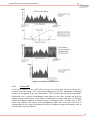
In Manual Mode, a three-piece linear transformation is used to convert a 12-bit input image to an
8-bit output image. These transfer functions are defined by three lines with y = mx + b format.
The three-piece transfer function is defined by X0 and X1 boundaries (see Figure 32). These
boundaries are determined using the following equations and controlled by adjusting the Manual
Gain and Level sliders in the Camera Control Software:
X0 = Manual Level –floor((4095 – Manual Gain) / 2).
X1 = 1 + Manual Level + floor((4095 – Manual Gain + 1) / 2).
This effectively sets the Manual Level to the center point of the central-piece of the 3-piece
transfer function. This Manual Level value can be any value from 0-4095 (212, 12-bits of values).
The Manual Gain value then determines the span or how far the central-piece of the 3-piece
transfer function spreads apart. At the same time, it also determines the “slope” of the centralpiece; hence it is also referred to as the Gain of the image.
NOTE
Care should be taken when using Manual Mode AGC so that the output video is
not saturated solid black or solid white. This often occurs when the majority of
the scene histogram falls outside the span defined by X0 and X1, see Figure 32:
Manual Gain and Level. If this occurs, adjust the Manual Gain and Level to recenter the histogram.
27
®
Tamarisk Camera Control Software User Guide
Figure 32: Manual Gain and Level
5.5.4
Freeze AGC
As the name implies, Freeze AGC locks or freezes the current gain and level settings for a
particular scene preventing AGC from making adjustments; however, logarithmic equalization
continues to be applied to the scene information. This is useful when one wants to establish a
background scene, possibly discriminating certain objects in the scene and does not want the
displayed image characteristics of the object or background to change when there is a dramatic
change in the thermal signature of objects entering or exiting the scene. In such a case, if AGC
mode were enabled, the camera would automatically adjust the scene gain and level to
accommodate the new object and potentially affect the displayed image characteristics and /or
wash-out other objects of interest.
28
®
Tamarisk Camera Control Software User Guide
5.5.5
Image Contrast Enhancement - ICE
Unlike Automatic AGC mode (which makes global image adjustments via the Gain and Level
controls), Image Contrast Enhancement independently adjusts the gain and level settings for
different “localized” areas of the image based on spacial frequency and an object’s individual
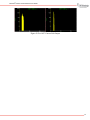
brightness and contrast; it functions in real-time. Figure 33 and Figure 34 illustrate the
differences in the thermal image with and without Image Contrast Enhancement.
Figure 33. Automatic AGC Mode w/o
Image Contrast Enhancement
Figure 34. Image w/ High Contrast
Enhancement
ICE can be tuned for lower contrast or higher contrast scenes by adjusting the ICE strength slider.
Lower contrast scenes typically include indoor or bland outdoor environments where the scene
temperature variance is minimal. Higher contrast scenes typically include outdoor environments
or thermal scenes with significant thermal variations. The degree of contrast enchancement may
be adjusted by moving the slider between 0 and 7.
29
®
Tamarisk Camera Control Software User Guide
5.6 PAN AND ZOOM
Figure 35 illustrates the Pan and Zoom tab. This feature enables the user to define a region of interest
(ROI) using a combination of the Zoom and Pan functions. Once a region has been defined, the user
may reposition the ROI using the up, down, left, and right arrow keys or selecting the ROI box and
moving it with a mouse/pointer device. The user also has the option to perform an electronic zoom
between 1x and 4x. See Figure 35.
ROI
Figure 35. Pan and Zoom Tab
Table 6 provides an overview of the features and functions that are available on the Pan and Zoom
tab.
Table 6 – Pan and Zoom Overview
Item
Pan and Zoom
Description
Function
Pan and Zoom
Area
To change the region of interest, hold down the right mouse
button and draw a new region of interest on the gray area. To
move the current region of interest, hold down the left mouse
button and drag.
Arrows
The up, down, right, and left arrows can be used to move the
region of interest
E-Zoom
The e-zoom value can be set using the plus and minus
buttons or by moving the slider to the desired value.
Presets
The 1x, 2x, 3x, and 4x buttons will move the e-zoom to the
corresponding zoom positions.
30
®
Tamarisk Camera Control Software User Guide
5.7 LENS CALIBRATION
All Tamarisk® camera cores are calibrated as stand alone units prior to leaving the factory to ensure
product specifications are met. This includes all lensed and no-lens versions commonly referred to as
thermal imaging modules or TIMs. TIMs start as fully assembled cameras and are calibrated with a
specified lens. After calibration, the lens is removed and the unit is ready for shipment.
However, as cores are often just one component of an integrated systems, the factory calibration may
not always prove to be the most optimal. Therefore the Lens Calibration Utility has been designed to
enable integrators to compensate for nonuniform conditions that may have been introduced when
embedding the Tamarisk® camera core into a system or when installing a new lens or any other
process that may have altered the isothermal nature of the camera core.
Please refer to section 3.1 (Lens Calibration Requirements) for a list of recommended equipment and
software version requirements.
5.7.1
Lens Calibration – Theory of Operation
During the calibration process, the camera stares at two uniform scenes of different temperature;
the response of each pixel is automatically captured, tabulated and saved to one of 5 user selected
memory locations known as Tables. Using this pixel data, individual gain and offset values for
each pixel are calculated resulting in a matrix or table of correction coefficients for the entire
pixel array. When applied, these correction coefficients compensate for the non-uniformities of
the system and pixel behavior characterized for the given set of conditions under which the
calibration was performed. When performed with an optical assembly between the focal plane
array and the uniform scenes, these coefficients will “calibrate out” the non-uniformity of the the
optical design.
Additionally, the Lens Calibration utility permits the upload/download of calibration tables; this is
very useful when configuring multiple cameras with the same configuration as the data may be
stored on an external PC and uploaded to each camera during its build/configuration cycle.
Other useful applications include: In the case of an optical zoom lens, the user may want to
calibrate the zoom lens at different zoom settings and store the data for future use. Or, the user
may calibrate the camera under different environmental conditions (hot, cold, mild temperatures)
and save this data to one of the 5 tables and then call on the table as needed.
5.7.2
Lens Calibration - Getting Started
In this section a step-by-step procedure for accessing the Lens Calibration Utility.
1. To install the latest version of the Camera Control Software including the Lens Calibration
utility please follow instructions outlined in section 3.2.
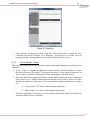
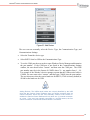
2. Clicking the Lens Calibration tab for the first time, the user is prompted to enter a pass key.
To obtain a pass key, please contract your DRS representative. Figure 36 illustrates the pass
key screen. The hash number is used to generate a unique pass key. The computer and pass
key are tied together. The pass key is a 25 character alpha numeric string which is typed or
pasted into the text box.
31
®
Tamarisk Camera Control Software User Guide
Figure 36. Pass Key
3. After entering a valid pass key, select Verify Key. Once the pass key is verified, the Lens
Calibration tab (shown in Figure 38) is displayed. If the pass key is invalid, a pop up
message provides a warning and the user is returned to the Verify Key screen.
5.7.3
Lens Calibration - Setup
This section provides a step-by-step proceduree and recommended conditions for performing lens
calibration.
4. Set-up. Figure 37 illustrates the hardware setup to perform a custom calibration. Connect
the serial data cable (USB or RS232) and power the camera. Please allow the camera to sit
for 30 minutes to stabilize its temperature before beginning the calibration process.
5. Place the camera at the appropriate distance from the black body/thermal scene such that the
entire field of view is flooded with the uniform thermal scene, but not so close as to affect
the thermal equilibrium of the camera. The recommended calibration temperature set points
are:
•
Cold set point -10°C below camera ambient temperature
•
Hot set point +10°C above camera ambient temperature
The exact temperature is not critical. For best results a black body should be used but any
thermally uniform scene is acceptable.
32
®
Tamarisk Camera Control Software User Guide
NOTE
For best results, please allow the camera to reach steady state operating
temperature before starting the custome calibration process - it is recommended
that the camera sit in a powered-on stated for at least 30 mins prior to starting.
Figure 37. Lens Calibration Setup
5.7.4
Lens Calibration: Start
6. In Figure 38, the user is prompted to start the custom lens calibration process, See START
button at the bottom of the Custom Lens Calibration task pane. One of the 5 custom tables
may be selected. In this example, Table 1 is occupied with existing data (note, this is not
the factory calibration settings. Factory calibration data is stored elsewhere and will always
be available to return the camera to its original factory calibration settings). The user may
select or the Return to Factory Calibration Settings from the pull-down menu located in the
Calibration Selection task pane.
Figure 38. Lens Calibration Tab
33
®
Tamarisk Camera Control Software User Guide
5.7.5
Lens Calibration - Selecting a Table to Store your Data
7. Next, select the location to store your calibration. During the calibration process, lens
“correction coefficients” are calculated and saved to the camera, via one of the 5 tables.
Tables that have been previously populated are labeled “Occupied;” tables that have not
been used are labeled “Empty.” The user can save the correction coefficients to any of the
five tables. Selecting an occupied table will overwrite the table with new correction
coefficients.
Factory calibration coefficients are permanently stored in the camera. To restore factory
default settings go to the Calibration Selection task pane found on the Lens Calibration
tab, see Figure 39, and select Return to Factory Calibration Settings found in the
Calibration Selection pull-down menu.
Figure 39: Table Selection
8. Once the table is selected, the first step in the 2-point lens characterization is to capture the
uniform cold target data. The recommended temperature of the cold target is approximately
10C below the ambient temperature (or 12C if the ambient temperature is 22C). The exact
temperature is not critical; the temperature delta between the cold and hot target should be
approximately 20C. Click Cold Target Ready button, as shown in Figure 40.
NOTE
Once the cold target data is captured, the user has 180 seconds to begin
capturing the hot target data. If the 180 second timer expires the lens calibration
process must be started over again.
34
®
Tamarisk Camera Control Software User Guide
Figure 40: Cold Target
The Camera Control Software application will send setup information to the camera and
command it to start collecting cold target data. Several frames are integrated together to
reduce noise and provide an average pixel response for each pixel in the FPA. The cold data
collection takes a few seconds; once complete, the user is prompted to capture the hot data.
9. The next step is to capture data from a uniform “hot” thermal scene. The recommended
temperature for the hot target is approximately +10C above ambient temperature. The exact
temperature is not critical; the temperature difference between the cold and hot target should
be approximately 20C.
When the screen changes to Continue – Hot Target is Ready, flood the camera field of view
with the “hot” scene. Once the FOV is flooded, click Continue – Hot Target is Ready
button as shown in Figure 41.
35
®
Tamarisk Camera Control Software User Guide
Figure 41: Hot Target
The application will send setup information to the camera and command it to start collecting
hot target data. Several frames are integrated together to reduce noise and provide an
average pixel response for each pixel in the focal plane array for the second point of the
two-point calibration. The hot data collection takes a few seconds. Following the hot target
data collection, the application will calculate the gain correction factors for each pixel as
shown in Figure 42.
Figure 42: Performing Calculations
36
®
Tamarisk Camera Control Software User Guide
10. Once the calculations are complete, the lens calibration settings are immediately applied to
the camera video output. The user is prompted to use or discard the settings by answering
“Yes” or “No,” see Figure 43. If the user selects yes, the lens settings are saved in nonvolatile memory; power cycling the camera is not required.
Figure 43: Save Settings
The Lens Calibration procedure is now complete and the application returns to the Lens
Calibration tab, see Figure 44. Notice, Table 2 is now occupied and in use as indicated by
the pull-down menu in the Calibration Selection task pane.
Figure 44: Lens Calibration
37
®
Tamarisk Camera Control Software User Guide
5.7.6
Lens Calibration - Table Upload/Download Procedure
Using the upload/download feature the user may easily move calibration data to and from the
camera. This feature is useful if building multiple cameras with the same configuration. Lens
calibration performed on one camera may be stored to an external PC and uploaded to multiple
cameras.
1. To download, select an occupied table followed by Download to PC.
The user is prompted to save the file to the PC, see Figure 45. In the example shown,
Table 2 was selected. The downloaded file is named Table_2. The saved file will have an
extension of .nuc. The .nuc table contains both the gain and offset data, file size will vary
depending on the Tamarisk® array format.
Figure 45: Download to PC
2. To upload table data to the camera, select any one of the 5 tables to receive the data. If
data is written to an occupied table, the uploaded data will overwrite the current data. In
this example, Table 3 is selected. Upon selecting Upload to Camera, the user is prompted
to select a file. See Figure 45.
Once the upload is complete the data is saved to the selected table, Table 3, in this case,
now indicates it is occupied. See Figure 46.
38
®
Tamarisk Camera Control Software User Guide
Figure 46: Table 3 Occupied
5.7.7
Lens Calibration - Calibration Selection
Calibration Selection (shown in Figure 47) allows the user to select one of the occupied tables for
use or to Restore Factory Calibration Settings. To enable a specific calibration table, simply
highlight one of the options in the pull-down menu found in the Calibration Selection task pane.
Upon selection, the table is immediately applied to the camera and saved to non-volatile memory
and will remain persistent through power cycles until it is changed.
Figure 47: Calibration Selection
39
®
Tamarisk Camera Control Software User Guide
5.8 PIXEL MAP
The Custom Pixel Map allows the user to mark and substitute pixels, rows, and columns. A keyboard
with a number pad is required to mark the pixels. Figure 48 illustrates the Custom Pixel Map Tab.
The hot keys are defined at the top. The hot keys allow the user to quickly maneuver around the
screen and mark and unmark pixels. The user also can mark/unmark pixel, column, and row by using
the defined buttons. The user can upload and download the Custom Pixel Map; this is useful if the
user wants to us an offline program or algorithm to mark pixels and then upload the Custom map
back to the PC.
To manually mark pixels, columns, and rows, the Custom Pixel Map must be selected as the active
windows application.
The Pixel Map Utility allows the user to mark/unmark pixels, rows, and columns and to upload/
download custom pixel maps via several user controls. The Pixel Map utility window is divided into
three task panes as shown in Figure 48. In this section, a reference table is first presented followed
by an explanation of each of the three task panes found in Pixel Map tab.
Figure 48: Pixel Map
Table 7: Pixel Map Utility Features provides an outline of the features/functions of the Pixel Map
Utility. A keypad is required to enter hotkeys. Even if a keyboard does not have a number keypad,
the keypad functionality is typically provided as part of a function “Fn” key.
Table 7: Pixel Map Utility Features
Item
Toggle Cursor On/Off
Description
Function
* hotkey
Toggles the cursor on and off. The cursor shows
the current location and which pixel, row, or column
will be replaced.
40
®
Tamarisk Camera Control Software User Guide
Cursor Color Change
/ hotkey
Toggles the color of the cursor between white and
black. This helps the user see the cursor when
looking at a hot or cold scene.
Mark Pixel
+ hotkey
Marks the current pixel for substitution
Unmark Pixel
- hotkey
Unmark the current pixel for substitution
Step Size Change
5 hotkey
Toggles the step size between 1 and 5 pixels for
each arrow key that is pressed. This helps move
the cursor to a position quickly. The user can
moves in steps of 5 and when in the correct region,
switch to moving the cursor in steps of 1.
Mark
Pixel, Column or Row
Allows the user to mark the pixel, column or row
associated with the cursor
Unmark
Pixel, Column, or
Row
Allows the user to unmark a pixel, column, or row
associated with the cursor
Clear
Clear the custom
pixel map
Allows the user to clear the custom pixel map.
Once the user selects clear, all marked pixels, rows,
or columns are cleared. The original factor pixel
map is still retained and unchanged. Clearing is
immediately applied to the camera but not saved
between power cycles
Save to Flash
Save custom pixel
map to non-volatile
memory
Allows the user to save a custom pixel map to nonvolatile memory. To use the original factory pixel
map, the user must perform a Clear and Save to
Flash.
Upload to Camera
Upload a pixel map
from a PC to the
camera
Allows the user to upload a custom pixel map from
the PC to the camera. This is useful if generating a
custom pixel map off line.
Download to PC
Download a custom
pixel map from the
camera to the PC
Allows the user to download the custom pixel map
from the camera to the PC.
5.8.1
Pixel Map – Hot Key Definitions
Figure 48 illustrates the Pixel Map tab. Hot keys are detailed in the Hot Key Definitions task
pane at the top portion of the window. Hot keys allow the user to quickly maneuver around the
screen to mark/unmark pixels. A keyboard with a number pad is required to mark pixels.
5.8.2
Pixel Map – Mark Unmark
Pixels, columns and rows may be marked/unmarked using the defined buttons located in the Mark
and Unmark task panes. Selecting Mark and Unmark saves the results to temporary flash
memory. To keep the markings press Save.
NOTE
The factory pixel map is permanently retained/used in/by the camera. The
customer pixel map is an additional map which is overlaid on the factory pixel
41
®
Tamarisk Camera Control Software User Guide
map. To return back to the default factory pixel map, press the Clear and Save
to Flash.
5.8.3
Pixel Map – Table Upload/Download
The Camera Control Software allows the user to upload or download a custom pixel map. This
feature is useful if a pixel substitution algorithm is run off line. The user can capture a digital
image via the Camera Link interface, calculate the custom pixel map, and upload the custom pixel
map to the camera. To upload or download, select the Upload to Camera or Download to PC
button and follow the windows prompts.
If downloading a custom pixel map, the user is prompted to save the file to PC. The saved file
has an extension of .cpm. The .cpm table contains only the pixel substitution data. File size will
vary depending on the detector array format but is typically between 20-100Kbytes.
320 bits
*
row
240 rows
frame
*
characters
4bits
=
19200 characters
frame
Hence each row contains exactly 80 characters and each character represents 4 pixels; for a total
of 320 pixels per row.
5.9 UTILITIES
The Utilities tab provides several functions as indicated by the task panes seen in Figure 49, namely,
Firmware Upgrade, Camera Communication. and Customer Camera Info The option to Restore
Factory Settings is also made available through the Utilities tab.
Figure 49: Utilities
42
®
Tamarisk Camera Control Software User Guide
5.9.1
Firmware
Updating/upgrading the camera’s firmware: simply click on Select File in the Firmware Upgrade
task pane. Choose the appropriate version of DRS supplied Firmware. The firmware file name
should look similar to the following:
Tamarisk [column size] CPU - X1.P1.01.13.13 FPGA - 01.00.0080.zip
Where column size is either 320 or 640 depending on your detector array
CAUTION
Only unaltered files provided by DRS are approved for upload. Use of any file to
the contrary may render the camera inoperable and void the camera warranty.
The user should not attempt to modify the file name or the contents of DRS
provided firmware, so doing may invalidate/corrupt the file. During the firmware
upgrade, the user should not power cycle the camera.
Once the firmware upgrade is complete, the user must power cycle the camera for the upload to
take effect. During the firmware upgrade, the user should not power cycle the camera. After the
firmware is uploaded and the camera has been power cycled, select “Search for New Connected
Devices” in the lower left hand corner of the Camera Control Software window and verify that the
firmware was correctly upgraded. On the Information tab, the CPU code version is displayed as
“Rel:” and the FPGA code version is displayed as “RTL Rel:”
While the upgrade is underway, a green progress bar is displayed (as shown in Figure 50). Once
completed, the user will see a pop-up message indicating that the upgrade is complete. If the
upgrade fails for any reason, an error message is displayed at the top of the Camera Control
Software screen.
Figure 50: Firmware Upgrade
43
®
Tamarisk Camera Control Software User Guide
5.9.2
Camera Communications
Under the Camera Communications section, a Manual Command Mode is provided. Clicking
Manual Command Mode will open a command line window for direct communication with the
camera (as shown in Figure 51).
CAUTION
Manual Command Mode requires advanced knowledge of the camera’s
registers; improperly writing commands to the camera may result in camera
malfunction. The user is encouraged to review the camera’s Interface Control
Document before using Manual Command Mode.
The Manual Command Mode requires advanced knowledge and should be used only after
reviewing the camera’s Interface Control Document.
Selecting Load Sequence File will open up your PCs file manager. The user may select a
file/script/sequence to be loaded. A sequence file is a sequence of manual commands where each
line of the command file contains only one command. Please refer to Tamarisk®640 Software
Interface Control Document for more information.
<Command><Parameter upper byte><Parameter lower byte><Additional Parameters>
Figure 51. Camera Communications
5.9.3
Camera Info
The Camera Info button allows the user to save (and read back) up to 252 ASCII characters. The
characters are stored in non-volatile memory and hence they are retained across power cycles.
44
®
Tamarisk Camera Control Software User Guide
The Camera Info feature allows users to add their own unique camera identification or serial
number. Figure 52 illustrates the Camera Info screen. To change the characters, simply edit the
text and select update to save the characters to non-volatile memory. In this example Custom
Camera Info Field is saved in non-volatile memory.
Figure 52: Camera Info
5.9.4
Reset to Factory Defaults
Restore Factory Settings returns all camera settings back to their factory defaults. This feature is
sometimes useful if the user would like to return the camera to a known state. To restore reset to
factory defaults, select Restore Factory Settings at the bottom of the Utilities window.
NOTE
Restoring factory settings will return all camera settings, including non-volatile
parameters and custom lens calibration settings, if applicable, to their factory
default values. Any marked pixels, rows, columns saved to the camera (i.e.
overlaid on top of the factory pixel map) will remain, i.e. will not be affected by the
Restore to Factory Settings command.
5.9.5
Help
To view the help file, select the Help tab. This will open up a pdf version of the Camera Control
Software User Manual in a separate window. See Figure 53 below:
45
®
Tamarisk Camera Control Software User Guide
Figure 53: Help Tab
5.9.6
Show Live Video
If a frame capture device which supports Microsoft’s DirectShow AP is plugged into the PC
(prior to launching the Camera Control Software Icon and starting the application), the user may
select Show Live Video located in the bottom right corner of the Camera Control Software
window to display live video.
5.9.7
Search for New Connected Devices
At any time, the user may select the Search for New Connected Devices button located in the
bottom left corner of the Camera Control Software window. This will close the current window,
search for connected devices, and display the information tab for the first device and a separate
Serial Number tab across the top of the Camera Control Software window for all devices found.
46
®
Tamarisk Camera Control Software User Guide
6 UNINSTALLING
THE
SOFTWARE
There are multiple methods for uninstalling the DSR Camera Control Software.
1. Running the Install Shield Wizard and selecting “Remove”
2. Running the uninstall utility
3. Using Microsoft’s uninstall utility through the Program and Features control panel.
In this section all three approaches are reviewed.
6.1 REMOVING THE SOFTWARE USING THE INSTALL UTILITY
The DRS Camera Control Software may be removed by launching the DRS Camera Control Software
InstallShield Wizard; Refer to Figure 54. Since the DRS Camera Control Software is already
installed, the user has the option to “Modify”, “Repair”, or “Remove”. Select the Remove button,
select Next and follow the final on-screen menu to completely remove the program. When finished, a
notification is displayed to confirm the uninstall operation has been completed.
Figure 54. InstallShield Wizard (Uninstall)
6.2 UNINSTALLING THE SOFTWARE USING THE UNINSTALL PROMPT
During the installation process, the InstallShield Wizard creates a DRS Technologies folder within
the Start Programs menu. To uninstall the DRS Camera Control Software, perform the following:
1. From the Start menu, select All Programs
2. Open the DRS Technologies folder
3. Select Uninstall DSR Camera Control Software icon
47
®
Tamarisk Camera Control Software User Guide
Once the icon is selected, the window shown Figure 55 will appear. Click “Yes” to continue the
uninstall procedure. When finished, a notification is displayed to confirm the uninstall operation has
been completed.
Figure 55. DRS Camera Control Software Uninstall
6.3 UNINSTALLING THE SOFTWARE VIA CONTROL PANEL
Microsoft Windows has a built in uninstall mechanism. To uninstall the DRS Camera Control
Software, perform the following:
1. From the Start menu, select Control Panel
2. In Large or Small icon view, click Programs and Features. If you're using Category view,
under "Programs", click Uninstall a program
3. Select the DRS Camera Control Software and click Uninstall. Alternatively, right-click
the program and select Uninstall
Once the icon is selected, the window shown in Figure 56 will appear. Click on Yes to continue the
uninstall procedure. When complete a notification window will tell you that the uninstall was
completed
Figure 56. Control Panel Uninstall
48
®
Tamarisk Camera Control Software User Guide
7 TROUBLESHOOTING
In this section troubleshooting guides are presented to aid the user in diagnosing potential problems.
7.1 NO ATTACHED DEVICES FOUND
If the DRS Camera Control Software does not detect a camera, the “No attached devices found!”
window appears - see Figure 57. Symptoms and solutions for remedying this issue are outlined
below.
Figure 57. No Attached Devices Found
•
Symptom: An audible shutter click is not heard when the camera is powered:
Verify that the camera interface cable is inserted correctly into to both the 30-pin electrical
interface on the back of the camera as well as the 30-pin connector on the break out box.
The connectors are keyed such that they can only be inserted one way
If your set-up uses USB for camera communication and power, verify that the mini-USB
to USB cable is properly connected to their respective ports on the break out box and on
the PC
If your set-up uses RS232 for camera communication then an auxiliary power supply is
required. Be sure the external DC power supply is connected to the camera’s break out
box and that the supply is turned on. Verify that the serial RS232 cable is properly
connected between the camera’s break out box and the PC
Verify that the communication cable (ie.USB) is not damaged.
49
®
Tamarisk Camera Control Software User Guide
If using a DC power supply to power the camera, verify that the power supply is on and
supplying the correct voltage and is capable of sourcing enough current.
•
Symptom: A continual audible shutter click is heard when the camera is powered. This
commonly occurs when the supply current drops below the minimum operating requirement.
Refer to the Tamarisk® Electrical ICD for specifications. Check for the following:
Voltage drop or marginal supply current:
•
Verify supply voltage and current capabilities of the power source. If batteries are
being used it may be necessary to exchange them for new ones
Excessively long USB cables may cause a voltage drop in the cable which results in a
temporary power cycle of the PC’s USB port; this behavior is typically seen as the
camera’s shutter closes.
If connecting the camera to a hub, it is recommended to limit the number of USB
devices connected to the hub. The user may also want to power the hub from an
external power supply.
If connecting the camera directly to the PC, it is recommended to limit the number of
USB devices connected to the PC. Too many USB devices may overload the PC’s
USB ports.
Symptom: A single audible shutter click is heard when the camera is powered via the USB
cable but the Camera Control Software does not detect the camera. Check the following:
Open Windows Device Manager and verify that the camera hardware is detected and
installed properly. A yellow exclamation mark indicates a problem Figure 58 shows the
camera is not installed properly.
Figure 58 Windows Device Manager
50
®
Tamarisk Camera Control Software User Guide
Verify that the yellow exclamation mark belongs to the camera and not some other device.
While looking at the Windows Device Manager, unplug the camera’s USB cable. If (after
the screen updates) the yellow exclamation mark disappears from the list, the camera
hardware is not detected or installed properly. Confirm hardware configuration, refer to
Table 1. Hardware Configuration Set-up Overview.
•
Symptom: Windows Device Manager shows the camera is not detected or installed properly.
Check the following:
Verify/update installed drivers. From the Windows Device Manager, Right-click the
device with the yellow exclamation mark. In the popup menu select Update Driver
Software. Then follow the instructions on screen. If you know where the drivers are
located you may select the “Browse my computer for driver software” option. The other
option is allow Windows to search the web for updated drivers. If allowing Windows to
search make sure the PC is connected to the web.
If you are using a USB-to-serial port adapter, follow the manufactures procedure to verify
the serial port is properly configured.
•
Symptom: After the Windows Device Manager searches for drivers, the drivers cannot be found
or would not install properly. Check the following:
Sometimes a conflict will occur during the installation process and the drivers will not
load properly. Run the Camera Control Software installer again, the software will
automatically attempt to install/re-install the drivers.
Follow the on screen menu. When the InstallShield Wizard displays the “Modify, repair,
or remove the program” menu, select Modify. The Custom Setup screen in Figure 59 will
appear. It indicates the USB drivers were not installed during the initial installation
process. Select the USB Drivers pull down and ensure this feature will be installed to the
local hard drive option is selected. Select Next to continue the installation
Figure 59 InstallShield’s Custom Setup
51
®
Tamarisk Camera Control Software User Guide
The installer will load the drivers and the hardware will be detected and installed
correctly.
•
Symptom: The installer was re-run and the drivers were installed on the local hard drive but
the camera is not detected and a yellow exclamation mark appears in the Windows Device
Manager window. Check the following:
Sometimes a conflict will occur during the installation process and the hardware is not
properly detected. If connecting via USB, try disconnecting and reconnecting the USB
cable. If connecting via a serial interface, try power cycling the camera. If this does not
work, restart your computer.
•
Symptom: The camera is powered and the Windows Device Manager shows that the hardware
is detected and installed properly but the Camera Control Software does not detect the camera.
Check the following:
Close all Camera Control Software windows. Re-launch the software by double-clicking
the DRS Camera Control Software icon. If the camera is still not discovered, proceed to
net step.
Ensure that only one instance of the Camera Control Software is running. Windows will
allow multiple instances of the Camera Control Software but the first instance is tied to the
first serial port/camera detected.
If using a serial RS232 cable:
Make sure the serial port is properly connected to the camera and make sure that the
pin out is correct; refer to the Electrical Interface Control Document for pin out
details.
If using a serial RS232 cable, ensure that other applications running on the PC are not
using the serial port. Shut down any other applications that may be using the serial
port.
If connecting via USB cable, when the Camera Control Software displays the menu shown
in Figure 57, select “Try Search Again”. Sometimes the camera itself is not fully
initialized when the Camera Control Software is first run.
•
Symptom: The camera is powered and the Windows Device Manager shows that the hardware
is detected and installed properly but the Camera Control Software does not start or
immediately closes. Check the Following:
The Camera Control Software is built upon Microsoft’s .net framework. In order for the
Camera Control Software to operate correctly, the .net framework (version 4.0) must be
installed on the PC. To check if the .net framework is installed, perform the following
steps
Open Windows Explorer and go to the following directory:
%windir%\Microsoft.NET\Framework\
52
®
Tamarisk Camera Control Software User Guide
Where "%windir%" represents "Windows" directory present in the system drive
where Windows is installed in your system e.g. C:\Windows\
Within the Framework folder, ensure that the v4.0 directory is present (as shown in
Figure 60). If it’s not present, re-run the Camera Control Software Installer or
download the Framework from the following link:
http://www.microsoft.com/en-us/download/details.aspx?id=17113
Figure 60. Microsoft.net
•
Symptom: The camera is connected via USB-to-serial port adapter, the Windows Device
Manager shows that the serial port is detected and installed properly, and the serial port pin out
is correct but the Camera Control Software will not automatically connect to the camera.
Check the following:
If Figure 57 is displayed, the user can manually connect to the camera by selecting
“Manually Add Device”. The user will then see the window show in Figure 61.
53
®
Tamarisk Camera Control Software User Guide
Figure 61 Add Device
The user can now manually select the Device Type, the Communication Type, and
Communications Settings.
Select the Tamarisk® device type.
Select RS232 Serial or USB as the Communications Type
To set the COM port the user needs to open Windows Device Manager and determine
the port number. If the COM port is not listed in the Communications Settings
window, the user should select “custom” and then enter the COM port. The COM
port number must be in the format of COMX where X = any number from 1 – 99.
For example if the Window’s device manager reports that the USB-to-serial cable is
COM18, the user must select “custom” and then type COM18 into the port number.
The user also must select the correct baud rate for RS232 (57600 is factory default) or
921600 as the baud rate for USB.
NOTE
Adding Devices: The USB-to-serial cables are uniquely identified by the USB
driver but the Camera Control Software does not always recognize these as
camera interfaces; hence the user must manually connect to the camera. In
addition the Camera Control Software will only allow one (1) manual connection
at a time. If the user has manually connected to a second camera, the first
camera connection is lost and the second camera is connected
54
®
Tamarisk Camera Control Software User Guide
7.2 NO VIDEO OR POOR VIDEO FROM THE CAMERA
The DRS Camera Control Software will display video data taken from a frame capture device which
supports Microsoft’s DirectShow AP. If no video or poor video is seen, review the following
symptoms and solutions:
•
No video data is displayed, check the following:
Verify that a video cable is connected between the camera and the video display device.
Verify that the camera and the video display device are powered and operational
Use a different video source to verify that the video cable and video display device are
functioning correctly
Verify the bits per pixel and ensure that the frame grabber or video display is configured
correctly. Having the wrong pixel mapping will give strange video effects. Typically the
frame grabber hardware will include software which allows the user to configure the frame
grabber.
If using a USB port frame grabber, make sure you use a USB 2.0 (or greater) USB port
The frame grabber device driver must be installed. This device driver is provided by the
frame grabber manufacturer. The DSR Camera Control Software uses the DirectShow
interface of the manufacturer's device driver to display video.
Make sure that the cameras' shutter is not closed or that the lens is not block from seeing
thermal energy. When the camera is first powered on, you should hear the shutter “click”
indicating both power to the camera and that a 1-pt NUC has been performed. Refer to the
Tamarisk® User Manual for more details
Make sure your video display device supports the cameras' output. For analog display
devices, make sure the device can supports the RS-170 protocol and supports the camera’s
resolution.
Make sure the camera is set to the proper video output mode. The camera supports NTSC,
several PAL modes and 8-bit and 14-bit digital video. Refer to section 5.2.
•
Symptom: The frame grabber is installed and operating correctly but the video quality is very
poor. Check the following:
Make sure the camera is not zoomed out too far. Some cameras support a very narrow
field of view and when an image is viewed close up the image will look very poor.
Verify the operating range of the camera as well as the scene temperature is within
specified limits. The image may look poor because the camera is operating out of its
designed operating or scene temperature range.
55
®
Tamarisk Camera Control Software User Guide
7.3 CUSTOM LENS CALIBRATION AND CUSTOM PIXEL MAP TABS ARE NON
FUNCTIONAL
•
The Custom Lens Calibration and Custom Pixel Map tabs are non-functional but the other tabs
are functional
The Custom Lens Calibration and Custom Pixel Map tabs are only enabled for cameras
that have FPGA firmware version 01.00.0076 or higher.
7.4 CUSTOM LENS CALIBRATED CAMERA HAS POOR VIDEO
Focus on an object far in the distance. Do not focus the camera on the uniform black
body.
Ensure that the uniform black body is truly uniform and stable before beginning the
custom lens calibration
Ensure that the custom lens calibration option is enabled by selecting the correct
calibration table.
Power cycle the camera to ensure that the calibration settings are applied
The dynamic range may be too small or too large. Adjust the temperature of the black
bodies to ensure adequate dynamic range over the scene temperature desired.
Ensure that air conditioning or air is not blowing on the camera or the black body during
the Custom Lens Calibration process. The air movement can cause thermal gradients
which will show up as gain or offset errors and cause poor image uniformity. For best
results the test environment should be thermally static.
Ensure that the custom lens and lens mount are tightly coupled to the TIM. For best
results the TIM, lens mount, and lens should be isothermal.
Do not rely on the analog video output to determine the video quality. If the image is
extremely uniform the AGC will cause the image to look like it has more noise. To
properly evaluate the image quality, the user should look at the pre AGC, Camera Link
video data. The user should plot the histogram of the output image while looking at a
uniform black body. Figure 62 shows the same camera (with a custom lens) while looking
at the same black body. The histogram on the left is with the custom lens calibration
disabled. The histogram on the right is with the custom lens calibration enabled. Notice
that the pixel distribution on the right is much tighter (which is expected and desired). But
while looking at the analog output image (while looking at the same black body), the
image with the custom lens calibration looks worse; this is because the AGC is trying to
apply gain correction over a narrow (uniform) scene.
56
®
Tamarisk Camera Control Software User Guide
Figure 62: Pre AGC Camera Link Output
57
®
Tamarisk Camera Control Software User Guide
DRS RSTA, Inc.
END USER LICENSE AGREEMENT
FOR
DRS CAMERA CONTROL SOFTWARE
THIS LICENSE AGREEMENT IS PROOF OF YOUR RIGHT TO USE THE DRS CAMERA
CONTROL SOFTWARE AND PROVIDES ADDITIONAL INFORMATION CONCERNING
DRS' LIMITED WARRANTY AND LIMITATIONS OF LIABILITY. PLEASE READ IT
CAREFULLY. BY ACCEPTING OR USING THE PRODUCTS, YOU ARE AGREEING TO
BE BOUND BY THE TERMS AND CONDITIONS OF THIS LICENSE AGREEMENT.
This License Agreement (hereinafter the "Agreement") is between you (either an individual
or an entity) and DRS RSTA, Inc. and/or its affiliates ("DRS"). DRS is willing to grant you
the following rights to use the DRS CAMERA CONTROL SOFTWARE incorporated in or
supplied with the Products (collectively, the "DRS Software") only if you agree to be bound
by all of the terms and conditions of this Agreement. By accepting or using the Products, you
agree to be bound by all the terms and conditions of this Agreement. If you do not agree to
be bound by all of the terms and conditions of this Agreement, DRS is unwilling to grant you
any rights to use the DRS Software; instead you must promptly return the Products to DRS
for a full refund or to the authorized reseller that provided you with the Products.
1. OWNERSHIP: The DRS Software is and shall remain a proprietary product of DRS or its licensors
and you hereby acknowledge and agree that the DRS Software embodies valuable trade secrets
proprietary to DRS and/or its licensors. All patents, copyrights, trademarks, trade names, trade secrets
and other proprietary rights relating to or residing in the DRS Software shall be owned or licensed
exclusively by DRS. Except for the license provided in Section 2, you shall have no right, title or interest
in or to the DRS Software. The DRS Software is licensed, not sold, to you for use only under the terms
and conditions of this Agreement. Furthermore, you agree to be bound by the terms and conditions of
this Agreement with respect to any and all upgrades or updates to the DRS Software provided to you by
DRS or the authorized reseller that provided you with the Products.
2. GRANT OF LICENSE: Subject to your full compliance with all terms and conditions set forth in
this Agreement, DRS grants you a nontransferable (except as specifically set forth in this Section) nonexclusive, restricted right to use the DRS Software as incorporated in or supplied with the Products and
solely in connection with the use of the Products. You may make a reasonable number of back-up copies
of the DRS Software. You understand that DRS may update the DRS Software at any time and in doing
so incurs no obligation to furnish such updates to you pursuant to this Agreement. You may transfer the
license to use the DRS Software only in connection with a sale or transfer of the Products and only as
included with the Products and not on a stand-alone basis, provided the buyer or transferee agrees in
writing to be bound by all the terms and conditions of this Agreement.
3. RESTRICTIONS/LIMITATIONS: Except as expressly authorized in Section 2, you may not use,
copy, modify, create derivative works of, distribute, sell, assign, pledge, sublicense, lease, loan, rent,
timeshare, or disclose the DRS Software, in whole or in part, at any time for any reason, nor permit any
other party to do any of the foregoing. You specifically agree that you will not provide access to the
DRS Software to any person or party other than for the intended use of the DRS Software as authorized
hereunder. You may not remove from the DRS Software, or alter, any of the trademarks, trade names,
logos, patent or copyright notices or markings, or add any other notices or markings to the DRS
Software. You may not install or use the DRS Software on any product other than the Products. You
58
®
Tamarisk Camera Control Software User Guide
specifically agree not to reverse engineer, decompile, disassemble, or reverse translate the DRS Software
or any part thereof. The license granted in Section 2 shall immediately terminate if you use the DRS
Software in a manner that exceeds the scope of the license granted hereunder and/or upon any breach of
the terms and conditions of this Agreement.
4. LIMITED WARRANTY: DRS does not warrant that the functions contained in the DRS Software
will meet your requirements or that the DRS Software will be uninterrupted or error-free. DRS warrants
that for a period of twenty-four (24) months from the original shipment date that the DRS Software will
perform substantially as described in the applicable Software User Guide during normal use. This
limited warranty is void if failure of the DRS Software to conform to the warranty has resulted from
improper installation, testing, misuse, neglect, accident, fire or other hazard, or any breach of this
Agreement.
5. LIMITED REMEDIES: In the event of a breach of the foregoing limited warranty, DRS will, at its
own expense, use commercially reasonable efforts to promptly and diligently correct all issues with the
DRS Software (except those classified as Class 3 issues, which means cosmetic and minor anomalies;
functionality is impaired). DRS's sole and exclusive obligation and your sole and exclusive remedy shall
be, at DRS's sole discretion, to repair or replace the nonconforming DRS Software.
6. NO OTHER WARRANTIES: OTHER THAN THE FOREGOING LIMITED WARRANTY, DRS
HEREBY EXPRESSLY DISCLAIMS ALL OTHER WARRANTIES, EXPRESS OR IMPLIED,
INCLUDING WITHOUT LIMITATION THE IMPLIED WARRANTIES OF MERCHANTABILITY
AND FITNESS FOR A PARTICULAR PURPOSE. SOME JURISDICTIONS DO NOT ALLOW THE
DISCLAIMER OF IMPLIED WARRANTIES, SO THE ABOVE DISCLAIMER MAY NOT APPLY
TO YOU, IN WHICH CASE THE DURATION OF ANY SUCH IMPLIED WARRANTIES IS
LIMITED TO SIXTY (60) DAYS FROM THE DATE THE PRODUCTS IS RECEIVED BY YOU.
7. INTELLECTUAL PROPERTY: Up to the aggregate limit specified in Section 8 below, DRS shall
indemnify, defend and hold you harmless against and pay all costs and damages awarded against you
resulting from a claim that the DRS Software infringes any U.S. patent or copyright or misappropriates a
U.S. trade secret, provided that you (a) provide DRS with written notice of such claim within thirty (30)
days of being notified of the claim; (b) allow DRS to exclusively control the defense and/or settlement
of such claim; and (c) provide any information, authority and assistance that DRS reasonably deems
necessary for the defense and/or settlement of any such claim, provided that any reasonable costs and
expenses incurred by you in providing such information and assistance will be reimbursed by DRS. You
agree not to consent to any judgment or decree or do any other act in compromise of any such claim
without first obtaining DRS's written consent. In any action based on such a claim, DRS may, in its sole
discretion and at its own expense, either: (1) procure for you the license right to continue using the DRS
Software; or (2) replace or modify the DRS Software to avoid the claim. If neither of the foregoing is
reasonably practicable, DRS may terminate the license and refund the license amount paid. DRS will
not be liable for any costs or expenses incurred by you in connection with any claims subject to the
terms of this Section without the prior written authorization by DRS. Notwithstanding the provisions of
this Section, DRS assumes no liability or obligation to indemnify for any infringement or
misappropriation claim of any kind arising from: (a) use or combination of the DRS Software with other
software or products not provided by DRS, if such infringement claims would not have arisen with
respect to the DRS Software standing alone, or (b) any modifications, enhancements or revisions to the
DRS Software unless made or approved in writing by DRS. The foregoing provisions state the entire
liability and obligations of DRS and the sole and your exclusive remedy with respect to any actual or
alleged infringement or misappropriation of any intellectual property rights regarding or involving the
DRS Software.
8. LIMITATION OF LIABILITY: THE AGGREGATE LIABILITY OF DRS OR ITS SUPPLIERS
IN CONNECTION WITH THIS AGREEMENT AND THE DRS SOFTWARE, REGARDLESS OF
THE FORM OF THE ACTION GIVING RISE TO SUCH LIABILITY (WHETHER IN CONTRACT,
TORT OR OTHERWISE), SHALL NOT EXCEED THE AMOUNT PAID BY YOU TO DRS OR
RESELLER FOR THE PRODUCTS, OR USD $100,000.00, WHICHEVER IS LESS. NEITHER DRS
NOR ITS SUPPLIERS SHALL BE LIABLE TO YOU FOR ANY INDIRECT, EXEMPLARY,
59
®
Tamarisk Camera Control Software User Guide
SPECIAL (INCLUDING PUNITIVE OR MULTIPLE), CONSEQUENTIAL OR INCIDENTAL
DAMAGES OF ANY KIND (INCLUDING WITHOUT LIMITATION LOSS OF DATA,
EQUIPMENT DOWNTIME OR LOST PROFITS), EVEN IF DRS OR ITS SUPPLIERS HAVE BEEN
ADVISED OF THE POSSIBILITY OF SUCH DAMAGES. THE LIMITED WARRANTY, LIMITED
REMEDIES AND LIMITED LIABILITY PROVISIONS CONTAINED IN THIS AGREEMENT ARE
FUNDAMENTAL PARTS OF THE BASIS OF DRS’ BARGAIN HEREUNDER, AND DRS WOULD
NOT PROVIDE THE DRS SOFTWARE TO YOU ABSENT SUCH LIMITATIONS.
u.s.
9. U.S. GOVERNMENT END USERS: This provision only applies to
Government end users.
The DRS CAMERA CONTROL SOFTWARE and any provided documentation are commercial
items as that term is defined at 48 C.F.R. Part 2.101, consisting of "commercial computer software" and
"computer software documentation" as such terms are defined in 48 C.F.R. Part 252.227-7014(a)(1) and
48 C.F.R. Part 252.227-7014(a)(5), and used in 48 C.F.R. Part 12.212 and 48 C.F.R. Part 227.7202, as
applicable. Consistent with 48 C.F.R. Part 12.212, 48 C.F.R. Part 252.227-7015, 48 C.F.R. Part
227.7202-1 through 227.7202-4, 48 C.F.R. Part 52.227-19, and other relevant sections of the Code of
Federal Regulations, as applicable, and as may be amended or updated from time-to-time, the DRS
CAMERA CONTROL SOFTWARE and any provided documentation are distributed and licensed
to U.S. Government end users (a) only as commercial items, and (b) with only those rights as are granted
to all other end users pursuant to the terms and conditions contained herein. The DRS CAMERA
CONTROL SOFTWARE is provided with Restricted Rights, as such term is defined in 48 C.F.R.
Part 252.227-7014(a)(14).
10. THIRD PARTY SOFTWARE LICENSES: The DRS Software may contain third party software,
which requires the application of third party terms and conditions (reference Table 1 below). Such third
party terms and conditions are located in .txt files or other documentation of each third party software
component. By accepting this Agreement, you also agree to accept and be bound by any such applicable
third party additional terms and conditions, if any, as referenced herein.
11. GENERAL: This Agreement shall be governed by and interpreted in accordance with the laws of
the state of New York, U.S.A., excluding its conflict of laws principles. The United Nations Convention
on Contracts for the International Sale of Goods is specifically disclaimed. If any provision of this
Agreement is held by a court of competent jurisdiction in the United States to be unenforceable for any
reason, the remaining provisions hereof shall be unaffected and remain in full force and effect as if this
Agreement had been executed with the invalid portion eliminated, provided the effectiveness of the
remaining portions of this Agreement will not defeat the overall intent of the parties. In such a situation,
the parties agree, to the extent legal and possible, to incorporate a replacement provision to accomplish
the originally intended effect. This Agreement is the final, complete and exclusive agreement between
the parties relating to the subject matter hereof, and supersedes all prior or contemporaneous
understandings and agreements relating to such subject matter, whether oral or written, and may only be
modified by a written instrument executed by an authorized representative of each party.
Table 8
Item
File Name
Web Site
1.
LibUsbDotNet USB Driver:
http://fsf.org
2.
FTDI USB Driver:
http://www.ftdichip.com
60