1
5.
Points for the BOILER User
Note. In line with our current warranty policy we would ask that you check through the following guide to identify any
problems external to the boiler prior to requesting a service engineers visit. Should the problem be found to be other
than with the appliance we reserve the right to levy a charge for the visit, or for any pre-arranged visit where access is
not gained by the engineer.
Troubleshooting
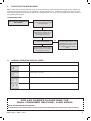
NO CENTRAL HEATING OR
HOT WATER
Check the mains power is turned
on and ensure mode knob (B) is
in the ON position
Check the Programmer
(external to the boiler) is in an
“ON” position, and the room
thermostat is turned up
Does the boiler operate and
provide central heating?
YES
Check the time settings on the
programmer are as you require
and adjust if necessary
NO
See boiler “Operation Modes”
and “Fault Codes” section. If “0”
is displayed then contact a Gas
Safe Registered Engineer or in
IE a Registered Gas Installer
(RGII)
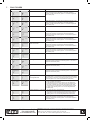
6.Normal OperAtion Display Codes
DISPLAY CODE ON BOILER
DESCRIPTION
The boiler is in standby mode awaiting either a central heating call or hot water demand.
The boiler has a call for central heating/hot water but the appliance has reached the desired
temperature set on the boiler.
The boiler is operating for central heating/hot water mode.
The boiler is operating in frost protection.
For any queries pleAse ring the
ideal consumer helpline : 01482 498660
NOTE. BOILER RESTART PROCEDURE To restart boiler, turn mode knob to “restart” position and immediately turn knob back to required setting.
Ideal Logic + Heat - User’s
5