1
The pdfTEX user manual
into, flip through, browse, glance into, leaf through,
skim, refine, enumerate, glean, synopsize, winnow
the wheat from the chaff and separate the sheep from
the goats.
Additional PDF keys
This section is based on the manual on keys written by Martin Schröder, one of the maintainers of pdfTEX.
A pdf document should contain only the structures and attributes defined in the pdf specification. However,
the specification allows applications to insert additional keys, provided they follow certain rules.
The most important rule is that developers have to register with Adobe prefixes for the keys they want to
insert. Hans Hagen has registered the prefix PTEX for pdfTEX.
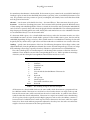
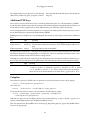
pdfTEX generates an XObject for every included pdf. The dictionary of this object contains these additional
keys:
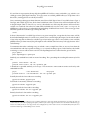
key
type
meaning
PTEX.FileName
PTEX.InfoDict
string
dictionary
The name of the included file as seen by pdfTEX.
The document information dictionary of the included pdf (an indirect object).
The page number of the included file.
PTEX.PageNumber integer
The pdf reference manual says: “Although viewer applications can store custom metadata in the document
information dictionary, it is inappropriate to store private content or structural information there; such
information should be stored in the document catalog instead.”
Although it would seem more natural to put this infomation in the document information dictionary, we
have to obey the rules laid down in the pdf reference. The following key ends up in the document catalog.
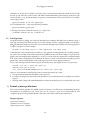
type
key
meaning
PTEX.Fullbanner string The full version of the binary that produced the file as displayed by pdftex -version, e. g. This is pdfeTeX, Version 3.141592-1.30.4-2.2 (Web2C
7.5.5) kpathsea version 3.5.5. This is necessary because the string in
the Producer key in the info dictionary is rather short, e. g. pdfeTeX-1.30.4.
Colophon
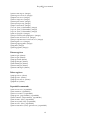
This manual is typeset in ConTEXt. One can generate an A4 version from the source code by typing:
texexec --result=pdftex-a.pdf pdftex-t
Or in letter size:
texexec
--mode=letter --result=pdftex-l.pdf pdftex-t
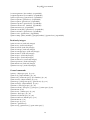
Given that the A4 version is typeset, one can generate an A5 booklet by typing:
texexec --pdfarrange --paper=a5a4 --print=up --addempty=1,2
--result=pdftex-b.pdf pdftex-a
Odd and even page sets for non-duplex printers can be generated using --pages=odd and --pages=even
options (which might require some disciplined shuffling of sheet).
This also demonstrates that pdfTEX can be used for page imposition purposes (given that pdfTEX and the
fonts are set up properly).
41