1
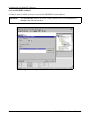
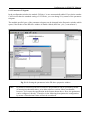
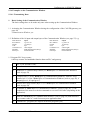
Configuration via SIMATIC Manager
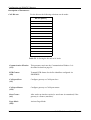
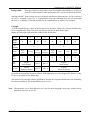
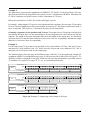
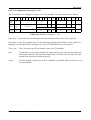
2.2 Initiate reception of data of the enabled Rx-identifier
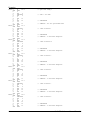
Byte of
Communication
Window
Contents
Example here
[hex]
1
high byte of CAN-identifier (identifier bit [15] 10...8)
low byte of CAN-identifier (identifier bit 7...0)
01
23
2
3
bytes 2 and 3 always ‘0’ for 11-bit identifier
00
00
4
5
6
7
8
9
10
11
12
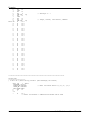
data byte 0
data byte 1
data byte 2
data byte 3
data byte 4
data byte 5
data byte 6
data byte 7
data length for transmission commands (Tx)
00
00
00
00
00
00
00
00
00
13
PLC-loop counter
14
sub-command (always set to ‘0’)
00
15
command ‘Read Rx-Identifier’
03
8-bit counter + n
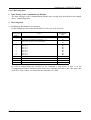
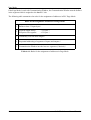
2.3 Reading the data
After an undetermined time the Rx-data is received and can be accessed by reading the
Communication Window. Since the data is received asynchronously to the PLC-cycles the
Communication Window has to be read again and again until the data was received (polling). By
comparing the values of the PLC-loop counter you can determine, whether the data received is the
correct data from the read command.
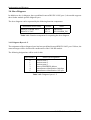
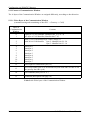
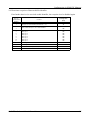
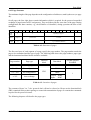
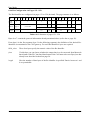
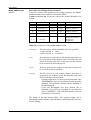
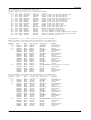
A read access returns the following bytes:
Byte of
Communication
Window
Example here
[hex]
high byte of CAN-identifier (identifier bit [15] 10...8)
low byte of CAN-identifier (identifier bit 7...0)
01
23
2
3
4
5
6
7
8
9
10
11
bytes 2 and 3 always ‘0’ for 11-bit identifier
00
00
AA
BB
CC
DD
EE
FF
00
11
12
data length
13
PLC-loop counter
14
15
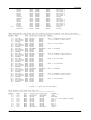
returned sub-command (without significance)
error code of the read function (without significance)
1
36
Contents
received data byte 0
received data byte 1
received data byte 2
received data byte 3
received data byte 4
received data byte 5
received data byte 6
received data byte 7
08
8-bit counter + n
00
00
CAN-DP Software Manual Rev. 1.2