1
Preface
Copyright
This publication, including all photographs, illustrations and software, is protected
under international copyright laws, with all rights reserved. Neither this manual, nor
any of the material contained herein, may be reproduced without written consent of
the author.
Version 1.0
Disclaimer
The information in this document is subject to change without notice. The
manufacturer makes no representations or warranties with respect to the contents
hereof and specifically disclaims any implied warranties of merchantability or fitness
for any particular purpose. The manufacturer reserves the right to revise this
publication and to make changes from time to time in the content hereof without
obligation of the manufacturer to notify any person of such revision or changes.
Trademark Recognition
Microsoft, MS-DOS and Windows are registered trademarks of Microsoft Corp.
MMX, Pentium, Pentium-II, Pentium-III, Celeron are registered trademarks of Intel
Corporation.
Other product names used in this manual are the properties of their respective owners
and are acknowledged.
Federal Communications Commission (FCC)
This equipment has been tested and found to comply with the limits for a Class B
digital device, pursuant to Part 15 of the FCC Rules. These limits are designed to
provide reasonable protection against harmful interference in a residential installation.
This equipment generates, uses, and can radiate radio frequency energy and, if not
installed and used in accordance with the instructions, may cause harmful interference
to radio communications. However, there is no guarantee that interference will not
occur in a particular installation. If this equipment does cause harmful interference to
radio or television reception, which can be determined by turning the equipment off
and on, the user is encouraged to try to correct the interference by one or more of the
following measures:
−
−
−
−
Reorient or relocate the receiving antenna.
Increase the separation between the equipment and the receiver.
Connect the equipment onto an outlet on a circuit different from that to which
the receiver is connected.
Consult the dealer or an experienced radio/TV technician for help.
Shielded interconnect cables and a shielded AC power cable must be employed with
this equipment to ensure compliance with the pertinent RF emission limits governing
this device. Changes or modifications not expressly approved by the system's
manufacturer could void the user's authority to operate the equipment.
Declaration of Conformity
This device complies with part 15 of the FCC rules. Operation is subject to the
following conditions:
−
−
This device may not cause harmful interference, and
This device must accept any interference received, including interference
that may cause undesired operation.
Canadian Department of Communications
This class B digital apparatus meets all requirements of the Canadian Interferencecausing Equipment Regulations.
Cet appareil numérique de la classe B respecte toutes les exigences du Réglement
sur le matériel brouilieur du Canada.
About the Manual
The manual consists of the following:
Chapter 1
Describes features of the mainboard,
and provides a shipping checklist.
Introducing the Mainboard
Go to ⇒ page 1
Chapter 2
Describes installation of mainboard
components.
Installing the Mainboard
Go to ⇒ page 6
Chapter 3
Using BIOS
Provides information on using the BIOS
Setup Utility.
Chapter 4
Describes the mainboard software.
Using the Mainboard Software
Go to ⇒ page 50
Go to ⇒ page 26
ii
Features and Packing List Translations
Liste de contrôle
Comparez ce qui est contenu dans l'emballage de la carte mère avec la liste
suivante:
Eléments standards
•
•
•
•
•
Une carte mère
Un câble plat pour lecteur de disquette
Un câble plat pour lecteur IDE
Un CD d'installation automatique pour le logiciel
Ce manuel utilisateur
Caractéristiques
Processeur
Chipset
La carte mère SV266A utilise un Socket A AMD 462 broches
présentant les caractéristiques suivantes:
•
Supporte un bus frontal (FSB) de 100/133 MHz
•
Reçoit des processeurs Athlon/Duron AMD
Les chipsets KT266A Northbridge et VT8235 Southbridge sont
basés sur une architecture de chipset de bon rapport qualitéprix et de bon rendement énergétique pour implémenter les
systèmes d’ordinateurs de bureau AGP/PCI avec une fiabilité
et des performances prouvées.
•
Supporte les processeurs Athlon AMD (Socket-462)
Socket-A
•
Transfert DDR (Double Data Rate) 100/133 MHz sur
adresse CPU Athlon et bus de données
•
Offre un contrôleur de Port Graphique Accéléré (AGP)
complet conforme V2.0 et supportant les modes 1x, 2x et
4x en 66 MHz offrant des graphiques 3D éclatants, et des
performances vidéo de haute qualité
•
Supporte une interface d'Hôte V-Link 66 MHz avec une
bande passante de pointe de 266 Mo/sec et un protocole
de transaction V-Link intelligent pour éliminer l’état
d’attente/latence de transfert d’accélérateur de données
•
Types de mémoire SDRAM DDR et SDR de hautes
performances avancés
•
Contrôleur USB 2.0 intégré avec trois hubs racine et six
ports de fonction
•
Contrôleur EIDE de mode maître Ultra DMA
33/66/100/133 de Canal double
Les caractéristiques clé supplémentaires comprennent le
support de six ports USB, une liaison AC 97 pour audio et
modem et surveillance matérielle.
iii
Graphiques
La carte mère comprend un logement AGP qui offre quatre fois la
bande passante des spécifications AGP d’origine. La technologie
AGP offre une connexion directe entre le sous-système graphique
et le processeur de sorte que les graphiques n’ont pas à entrer en
concurrence avec d’autres périphériques pour le temps
d’utilisation du processeur sur le bus PCI.
Mémoire
La carte mère peut recevoir les configurations de mémoire
suivantes :
•
SDRAM DDR (Double Data Rate) PC1600/PC2100
supportant jusqu’à 2 Go en utilisant deux modules DIMM
2.5V
•
SDRAM PC133/ PC100 supportant jusqu’à 2 Go en
utilisant deux modules DIMM 3.3V
Le codec audio est conforme aux spécifications AC 97 2.2, et
supporte la résolution 18 bits ADC (Analog Digital Converter)
et DAC (Digital Analog Converter) ainsi que le codec fullduplex stéréo 18 bits avec vitesses d’échantillonnage
indépendantes et variables. Cette carte mère supporte une
ligne de sortie jusqu’à 4 canaux.
Audio
LAN Interne
(optionnel)
E/S Intégrées
Microprogramme
BIOS
Le VT6103 est un périphérique à Couche Physique pour
Ethernet 10BASE-T et 100BASE-TX utilisant des câbles Non
blindés de catégorie 5, Blindés de Type 1.
•
Double Vitesse – 100/10 Mbps
•
Half et Full Duplex
•
Conforme à tous les Standards IEEE 802.3, 10Base-T et
100Base-Tx Applicables
•
Egaliseur Adaptatif
La carte mère possède un jeu complet de ports d’E/S et de
connecteurs:
•
Deux ports PS/2 pour souris et clavier
•
Deux ports série
•
Un port parallèle
•
Quatre ports USB
•
Un port LAN
•
Prises audio pour microphone, ligne d’entrée et ligne de
sortie
Cette carte mère utilise Award BIOS qui permet aux
utilisateurs de configurer de nombreuses caractéristiques du
système comprenant les suivantes:
•
Gestion d’alimentation
•
Alarmes de réveil
•
Paramètres de CPU
•
Synchronisation de CPU et de mémoire
Le microprogramme peut aussi être utilisé pour définir les
paramètres pour les vitesses d’horloges de différents
processeurs.
iv
Checkliste
Vergleichen Sie den Packungsinhalt des Motherboards mit der folgenden
Checkliste:
Standard Items
•
•
•
•
•
Ein Motherboard
Ein Bandkabel für Diskettenlaufwerke
Ein Bandkabel für IDE-Laufwerke
Eine Auto-Installations-Support-CD
Dieses Benutzerhandbuch
Features
Prozessor
Chipsatz
Grafik
Das SV266A Mainboard enthält einen AMD 462-Pin Sockel A
mit den folgenden Eigenschaften:
•
Unterstützt 100/133 MHz Front-Side Bus (FSB)
•
Nimmt AMD Athlon/Duron Prozessoren auf
Die Chipsätze KT266A Northbridge und VT8235 Southbridge
basieren auf einer kostengünstigen und energiesparenden
Architektur zur Implementierung von AGP/PCI-DesktopComputersystemen mit bewiesener Zuverlässigkeit und
Leistung.
•
Unterstützt Sockel-A (Sockel-462) AMD Athlon
Prozessoren
•
100/133 MHz DDR (Double Data Rate) Transfer auf
Athlon CPU-Adress- und Datenbussen
•
Bietet vollständigen Accelerated Graphics Port (AGP)
Controller, der v2.0 entspricht und 66 MHz 1x, 2x und 4x
Modi unterstützt und damit lebendige 3D-Grafik und
qualitativ hochwertige Videoleistung bietet
•
Unterstützt 66 MHz V-Link Host Interface mit einer
Spitzenbandbreite von 266 MB/s und einem intelligenten
V-Link Transaction Protocol, um Data-Wait-State/ThrottleTransfer-Latency zu beseitigen
•
Erweiterte Hochleistungs-SDR und DDR SDRAMSpeichertypen
•
Integrierter USB 2.0 Controller mit drei Root Hubs und
sechs Funktionsschnittstellen
•
Dual-Kanal Ultra DMA 33/66/100/133 Master Mode EIDE
Controller
Zusätzliche Schlüsselmerkmale umfassen die Unterstützung
für sechs USB-Anschlüsse, ein AC 97-Link für Audio und
Modem und Hardwareüberwachung.
Dieses Mainboard umfasst einen AGP-Steckplatz mit der
vierfachen Bandbreite der ursprünglichen AGP-Spezifikation.
AGP-Technologie bietet eine direkte Verbindung zwischen dem
Grafiksubsystem und dem Speicher, so dass die Grafik nicht mit
anderen Geräten auf dem PCI-Bus um Prozessorzeit wetteifern
muss.
v
Speicher
Audio
Integriertes LAN
(optional)
Integrierte I/O
BIOS
Firmware
Das Mainboard nimmt die folgenden Speicherkonfigurationen
auf:
•
DDR (Double Data Rate) PC1600/PC2100 SDRAM
unterstützt bis zu 2 GB unter Verwendung von zwei 2.5V
DIMM-Modulen
•
SDRAM PC133/ PC100 unterstützt bis zu 2 GB unter
Verwendung von zwei 3.3V DIMM-Modulen
Der Audio-Codec ist kompatibel mit der AC 97 2.2Spezifikation und unterstützt 18-Bit ADC (Analog Digital
Converter) und DAC (Digital Analog Converter)-Auflösungen
sowie 18-Bit-Stereo-Vollduplex-Codec mit unabhängigen und
variablen Samplingraten. Das Mainboard unterstützt bis zu 4Kanal Line-out.
Das VT6103 ist ein Physical-Layer-Gerät für Ethernet
10BASE-T und 100BASE-TX bei Benutzung von nicht
abgeschirmten Kategorie 5-Kabeln und abgeschirmten Typ 1Kabeln.
•
Zwei Geschwindigkeiten – 100/10 Mbps
•
Halb- und Vollduplex
•
Entspricht allen geltenden IEEE 802.3, 10Base-T und
100Base-Tx-Standards
•
Einstellbarer Equalizer
Das Mainboard verfügt über einen kompletten Satz von I/OSchnittstellen und Anschlüssen:
•
Zwei PS/2-Schnittstellen für Maus und Tastatur
•
Zwei serielle Schnittstellen
•
Eine parallele Schnittstelle
•
Vier USB-Schnittstellen
•
Eine LAN-Schnittstelle
•
Audiobuchsen für Mikrofon, Line-in und Line-out
Dieses Mainboard setzt das Award BIOS ein, mit dem der
Anwender viele Systemeigenschaften selbst konfigurieren
kann, einschließlich der folgenden:
•
Energieverwaltung
•
Wake-up Alarm
•
CPU-Parameter
•
CPU- und Speichertiming
Mit der Firmware können auch die Parameter für verschiedene
Prozessortaktgeschwindigkeiten eingestellt werden.
vi
Lista di controllo
Comparate il contenuto della confezione della scheda madre con la seguente
lista di controllo:
Articoli standard
•
•
•
•
•
Una scheda madre
Un cavo a nastro per il drive dischetti
Un cavo a nastro IDE
Un CD di supporto software auto-installante
Il manuale dell’utente
Caratteristiche
Processore
Chipset
Grafica
La scheda madre SV266A usa un socket AMD 462-pin Socket
A con le seguenti caratteristiche:
•
Supporto per il bus di sistema frontside (FSB) 100/133
MHz
•
Alloggia processori AMD Athlon/Duron.
I chipset KT266A Northbridge and VT8235 Southbridge sono
basati su un'architettura efficace nei costi, innovativa e
efficiente nei consumi per l’implementazione di sistemi
personal computer AGP/PCI con provata affidabilità e
prestazioni.
•
Supporta processori AMD Athlon Socket A (Socket 462)
•
Trasferimento 100/133 MHz DDR (Double Data Rate) su
bus indirizzo e dati CPU Athlon
•
Fornisce una porta grafica accelerata (AGP) completa
compatibile v2.0 e supporta le modalità 1x, 2x e 4x
66MHz per la fornitura di grafica 3D e alta qualità di
prestazioni video.
•
Supporta interfaccia V-Link Host 66 MHz con un picco di
banda 266 MB/s e protocollo di transazione intelligente VLink per eliminare latenza di trasferimento stato wait data/
throttle
•
Tipi di memoria SDR e DDR SDRAM ad alte prestazioni
avanzate
•
Controller USB 2.0 integrata con tre hub root e sei porte
funzione.
•
Controller EIDE modalità master doppio canale Ultra
DMA 33/66/100/133
Funzioni supplementari includono sei porte USB un
collegamento AC97 audio e modem e monitoraggio hardware.
La scheda madre include uno slot AGP che fornisce quattro volte
la larghezza di banda delle specifiche AGP originarie. La
tecnologia AGP fornisce un collegamento diretto tra il sottosistema
grafico e il processore in modo che la grafica non deve competere
con le altre periferiche presenti sul bus PCI per avere tempo
processore.
vii
Memoria
Audio
LAN integrata
(Opzionale)
Inizializza I/O
Firmware BIOS
La scheda madre alloggia le seguenti configurazioni di
memoria:
•
DDR (Double Data Rate) PC1600/PC2100 SDRAM con
supporto fino a 2 GB con due moduli DIMM 2.5V
•
SDRAM PC133/ PC100 supporta fino a 2 GB usando due
moduli DIMM 3,3V.
Il code audio è compatibile con le specifiche AC 97 2.2 e
supporta una risoluzione a 18 bit ADC (convertitore analogico
digitale) e DAC (convertitore digitale analogico) come pure
codec full duplex 18 bit con frequenze di campionamento
indipendenti e variabili. La scheda madre supporta una linea di
uscita fino a 4 canali
La scheda VT6103 è una periferica Physical Layer per
Ethernet 10BASE-T e 100BASE-TX usando cavi schermati tipo
1 e non schermati categoria 5
•
Doppia velocità – 100/10 Mbps
•
Half e Full duplex.
•
Conforme a tutti gli standard applicabili IEEE802.3,
10Base-T e 100Base-TX
•
Equalizzatore adattivo
La scheda madre è dotata da una serie completa di porte e
connettori I/O:
•
Due porte PS/2 per tastiera e mouse
•
Due porte seriali
•
Una porta parallela
•
Quattro porte USB
•
Una porta LAN
•
Jack audio per microfono, ingresso linea e uscita linea
Questa scheda madre adotto un BIOS Award che permette
agli utenti di configurare le caratteristiche principali del
sistema, inclusi:
•
Gestione energia
•
Allarmi wake up
•
Parametri CPU
•
Temporizzazione CPU e memoria
Il firmware può anche essere usato per impostare i parametri
per diverse velocità di clock.
viii
Lista de Verificación
Compare los contenidos del paquete de la placa principal con la sigte. lista:
Ítems Estándares
•
•
•
•
•
Una placa principal
Un cable cinta del lector de diskette
Un cable cinta de la unidad IDE
Un CD de soporte en software de autoinstalación
Este manual del usuario
Características
Procesador
Chipset
Memoria
La placa principal SV266A usa una AMD 462-pin Socket A que
tiene las sigtes. características:
•
Soporta bus de lado frontal (FSB) 100/133 MHz
•
Acomoda procesadores AMD Athlon/Duron
Los chipsets KT266A Northbridge y VT8235 Southbridge se
basan de la arquitectura de chipset eficiente de energía y de costo
para implementar sistemas de ordenador personal AGP/PCI con
fiabilidad y rendimiento comprobados.
•
Soporta procesadores Socket-A (Socket-462) AMD
Athlon
•
Transferencia 100/133 MHz DDR (Índice de Datos Doble/
Double Data Rate) en dirección Athlon CPU y buses de
datos
•
Provee controlador Accelerated Graphics Port (AGP) con
funciones completas que se conforman con v2.0 y
soporta modos 66 MHz 1x, 2x y 4x que entregan gráficas
3D vivas y rendimiento de vídeo de alta calidad
•
Soporta interfaz 66 MHz V-Link Host con una ancha de
banda máxima de 266 MB/s y un protocolo de
transacción V-Link inteligente para eliminar demora de
transferencia estado de espera/ahogado de datos
•
Tipos de memoria SDR y DDR SDRAM de alto
rendimiento
•
Controlador USB 2.0 Integrado con tres hubs de raíz y
puertos de seis funciones
•
Controlador EIDE de modo máster de Dual Channel Ultra
DMA 33/66/100/133
Las características claves adicionales incluyen soporte para
seis puertos USB, un vínculo AC 97 para sonido y módem y
monitoreo de hardware.
La placa principal acomoda las sigtes. configuraciones de
memoria:
•
DDR (Double Data Rate) PC1600/PC2100 SDRAM soporta
hasta 2 GB con dos módulos de 2.5V DIMM
•
SDRAM PC133/ PC100 soporta hasta 2 GB con dos
módulos de 3.3V DIMM
ix
Gráficas
La placa principal incluye una ranura AGP que provee cuatro
veces la ancha de banda de la especificación AGP original. La
tecnología AGP provee una conexión directa entre el subsistema
de gráficas y el procesador para que las gráficas no tengan que
competir por el tiempo de procesador con otros dispositivos en el
bus PCI.
Sonido
El codec de sonido se conforma con la AC 97 2.2, y soporta
18-bit ADC (Conversor Digital Analógico/Analog Digital
Converter) y resolución DAC (Conversor Analógico
Digital/Digital Analog Converter) y también codec de fullduplex de estéreo de 18-bit con índice de muestreo
independiente y variable. Esta placa principal soporta hasta
salida de de línea de 4 canales.
LAN abordo
(optativo)
El VT6103 es un dispositivo de Capa Física para Ethernet
10BASE-T y 100BASE-TX con cables de la categoría 5 Sin
protección, y de Tipo 1 con protección
•
Velocidad Dual – 100/10 Mbps
•
Duplex Medio y Completo
•
Satisface todas las normas IEEE 802.3, 10Base-T y
100Base-Tx
•
Ecualizador Adaptivo
La placa principal tiene un juego completo de puertos y
conectores I/O:
•
Dos puertos PS/2 para ratón y teclado
•
Dos puertos seriales
•
Un puerto paralelo
•
Cuatro puertos USB
•
Un puerto LAN
•
Clavijas de sonido para micrófono, entrada y salida de
línea
Esta placa principal usa Award BIOS que habilita los usuarios
a configurar muchas características de sistema que incluyen
las sigtes:
•
Administración de energía
•
Alarmas despertadoras
•
Parámetros de CPU
•
CPU y cronometraje de memoria
El firmware también se puede usar para configurar parámetros
para diferentes velocidades de reloj.
I/O Integrado
Firmware de
BIOS
x
xi
TABLE OF CONTENTS
Preface..............................................................................................................i
Features and Packing List Translations......................................................iii
CHAPTER 1
1
Introducing the Mainboard...........................................................................1
Introduction.................................................................................................1
Checklist......................................................................................................1
Standard Items.................................................................................................1
Features......................................................................................................2
Choosing a Computer Case........................................................................3
Mainboard Components..............................................................................4
CHAPTER 2
6
xii
Installing the Mainboard...............................................................................6
Safety Precautions......................................................................................6
Quick Guide................................................................................................6
Installing the Mainboard in a Case..............................................................7
Checking Jumper Settings..........................................................................7
Setting Jumpers...............................................................................................7
Checking Jumper Settings...............................................................................8
Jumper Settings...............................................................................................8
Connecting Case Components.................................................................10
Front Panel Connector...................................................................................11
Installing Hardware...................................................................................12
Installing the Processor..................................................................................13
Installing Memory Modules...........................................................................15
Installing a Hard Disk Drive/CD-ROM.........................................................17
Installing a Floppy Diskette Drive.................................................................19
Installing Add-on Cards.................................................................................20
Connecting Optional Devices........................................................................21
Connecting I/O Devices............................................................................24
External Connector Color Coding..................................................................25
CHAPTER 3
26
Using BIOS....................................................................................................26
About the Setup Utility..............................................................................26
The Standard Configuration...........................................................................26
Starting Setup................................................................................................27
Updating the BIOS........................................................................................28
Using BIOS...............................................................................................29
Standard CMOS Features..............................................................................29
Advanced BIOS Setup...................................................................................31
Advanced Chipset Setup ...............................................................................33
Integrated Peripherals ...................................................................................37
Power Management Setup ............................................................................40
PNP/PCI Configurations ...............................................................................44
PC Health Status ...........................................................................................46
Frequency Control.........................................................................................47
Load Fail-Safe Defaults Option.....................................................................48
Load Optimized Defaults Option...................................................................48
Set Password Option......................................................................................48
Save & Exit Setup Option..............................................................................49
Exit Without Saving ......................................................................................49
CHAPTER 4
50
Using the Mainboard Software....................................................................50
About the Software CD-ROM....................................................................50
Auto-installing under Windows 98/ME/2000/XP.......................................50
Running Setup...............................................................................................51
Manual Installation ...................................................................................53
Utility Software Reference........................................................................53
xiii
xiv
Chapter 1
Introducing the Mainboard
Introduction
Thank you for choosing the SV266A mainboard. The SV266A is a high
performance and high quality mainboard which is built around the latest and
fastest VIA KT266A + VT8235 chipset providing superior performance
between the CPU, DRAM, AGP bus, and V-Link bus with pipelined, burst and
concurrent operation. This mainboard supports Socket 462 that
accommodates AMD Athlon processors with a frontside bus (FSB) speeds up
to 133MHz.
The KT266A supports four banks of SDR/DDR Synchronous DRAMs up to
2GB for unbuffered modules. It also fully supports full AGP v2.0 capability for
maximum bus utilization including 1x, 2x and 4x mode transfers, SBA
(SideBand Addressing), Flush/Fence commands and pipelined grants.
The VT8235 Southbridge supports standard intelligent peripheral controllers
such as USB v2.0/1.1 and Universal HCI v2.0/1.1 compliant, real time clock
with 256 byte extended CMOS, integrated bus-mastering dual full-duplex
direct-sound AC97 link compatible sound system and full System
Management Bus (SMBus) interface.
Sufficient expansion is provided for with one AGP slot, five 32-bit PCI slot and
one CNR slot. It also comes with a built-in Enhanced PCI Bus Master PCI IDE
controller that provides high-speed connections to full range of IDE devices
such as HDD and CD-ROM. This mainboard is designed in a standard ATX
form factor using a 4-layer printed circuit board and measures 305 mm x 244
mm.
Checklist
Compare the mainboard’s package contents with the following checklist:
Standard Items
•
•
•
•
•
One mainboard
One diskette drive ribbon cable
One IDE drive ribbon cable
One auto-install software support CD
This user’s manual
Features
Processor
Chipset
The SV266A mainboard uses an AMD 462-pin Socket A that
has the following features:
•
Supports 100/133 MHz frontside bus (FSB)
•
Accommodates AMD Athlon/Duron processors
The KT266A Northbridge and VT8235 Southbridge chipsets are
based on cost-effective and energy efficient chipset architecture
for implementing AGP/PCI desktop personal computer systems
with proven reliability and performance.
•
Supports Socket-A (Socket-462) AMD Athlon processors
•
100/133 MHz DDR (Double Data Rate) transfer on Athlon
CPU address and data buses
•
Provides full featured Accelerated Graphics Port (AGP)
controller which is v2.0 compliant and supports 66 MHz
1x, 2x and 4x modes delivering vivid 3D graphics and
high quality video performance
•
Supports 66 MHz V-Link Host interface with a peak
bandwidth of 266 MB/s and an intelligent V-Link
transaction protocol to eliminate data wait-state/throttle
transfer latency
•
Advanced high-performance SDR and DDR SDRAM
memory types
•
Integrated USB 2.0 Controller with three root hubs and six
function ports
•
Dual Channel Ultra DMA 33/66/100/133 master mode
EIDE controller
Additional key features include support for six USB ports, an
AC 97 link for audio and modem and hardware monitoring.
Graphics
The mainboard includes an AGP slot that provides four times the
bandwidth of the original AGP specification. AGP technology
provides a direct connection between the graphics sub-system
and the processor so that the graphics do not have to compete for
processor time with other devices on the PCI bus.
Memory
The mainboard accommodates the following memory
configurations:
•
DDR (Double Data Rate) PC1600/PC2100 SDRAM supports
up to 2 GB using two 2.5V DIMM modules
•
SDRAM PC133/ PC100 supports up to 2 GB using two
3.3V DIMM modules
The audio codec is compliant with the AC 97 2.2 specification,
and supports 18-bit ADC (Analog Digital Converter) and DAC
(Digital Analog Converter) resolution as well as 18-bit stereo
full-duplex codec with independent and variable sampling
rates. This mainboard supports up to 4-channel line out.
Audio
2
Onboard LAN
(optional)
Integrated I/O
BIOS
Firmware
The VT6103 is a Physical Layer device for Ethernet 10BASE-T
and 100BASE-TX using category 5 Unshielded, Type 1
Shielded cables
•
Dual Speed – 100/10 Mbps
•
Half And Full Duplex
•
Meet All Applicable IEEE 802.3, 10Base-T and
100Base-Tx Standards
•
Adaptive Equalizer
The mainboard has a full set of I/O ports and connectors:
•
Two PS/2 ports for mouse and keyboard
•
Two serial port
•
One parallel port
•
Four USB ports
•
One LAN port
•
Audio jacks for microphone, line-in and line-out
This mainboard uses Award BIOS that enables users to
configure many system features including the following:
•
Power management
•
Wake-up alarms
•
CPU parameters
•
CPU and memory timing
The firmware can also be used to set parameters for different
processor clock speeds.
Choosing a Computer Case
There are many types of computer cases on the market. The mainboard
complies with the specifications for the ATX system case. Some features on
the mainboard are implemented by cabling connectors on the mainboard to
indicators and switches on the system case. Ensure that your case supports
all the features required. The mainboard can support one or two floppy
diskette drives and four enhanced IDE drives. Ensure that your case has
sufficient power and space for all the drives that you intend to install.
Most cases have a choice of I/O templates in the rear panel. Make sure that
the I/O template in the case matches the I/O ports installed on the rear edge
of the mainboard.
This mainboard has an ATX form factor of 305 x 244 mm. Choose a case that
accommodates this form factor.
3
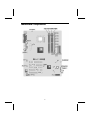
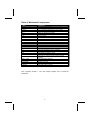
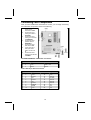
Mainboard Components
4
Table of Mainboard Components
Label
AGP1
ATX1
AUDIO1
AUXIN1
BT1
CASEFAN1
CD1
CNR1
CPUFAN1
CPU Socket
DDR1~DDR2
DIMM1 ~ DIMM2
FDD1
IDE 1
IDE 2
J1
JP1
JP4
JP5A/B/C/D, JP6A/B/C/D
PANEL1
PCI1 ~ PCI5
IR1
SPEAKER1
USB3
USBCR1
Component
Accelerated Graphics Port
Power connector
Front-oriented microphone/line-out port header
Extra line-in connector
Three volt realtime clock battery
Auxiliary case cooling fan
CD-in connector
Communications Networking Riser slot
Cooling fan for CPU
Socket A for AMD Athlon processor
Two 184 pin DDR SDRAM sockets
Two 168 pin DIMM sockets
Floppy disk drive connector
Primary IDE channel
Secondary IDE channel
Case open detecting connector (optional)
Clear CMOS jumper
CPU frequency selection jumper
DDR/SDR DRAM type selector
Connector for case front panel switches and LED
indicators
Five 32-bit add-in card slots
Infrared cable header
Speaker connector
Front panel USB headers
USB card reader connector
This concludes Chapter 1. The next chapter explains how to install the
mainboard.
5
Chapter 2
Installing the Mainboard
Safety Precautions
Follow these safety precautions when installing the mainboard:
•
•
•
•
Wear a grounding strap attached to a grounded device to avoid
damage from static electricity.
Discharge static electricity by touching the metal case of a safely
grounded object before working on the mainboard.
Leave components in the static-proof bags they came in.
Hold all circuit boards by the edges. Do not bend circuit boards.
Quick Guide
This Quick Guide suggests the steps you can take to assemble your system
with the mainboards.
The following table provides a reference for installing specific components:
Locating Mainboard Components
Go to page 4
Installing the Mainboard in a Case
Go to page 7
Setting Jumpers
Go to page 7
Installing Case Components
Go to page 10
Installing the CPU
Go to page 13
Installing Memory
Go to page 15
Installing an HDD and CD-ROM Drive
Go to page 17
Installing an FDD
Go to page 18
Installing Add-on Cards
Go to page 19
Connecting Options
Go to page 21
Connecting Peripheral (I/O) Devices
Go to page 24
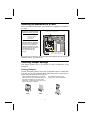
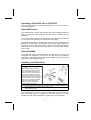
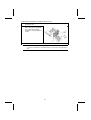
Installing the Mainboard in a Case
Refer to the following illustration and instructions for installing the mainboard
in a case:
This illustration shows an
example of a mainboard being
installed in a tower-type case:
Note:
2 . S e c u r e th e m a in b o a r d w ith
s c r e w s w h e r e a p p r o p r ia te .
Do not overtighten
the screws as this
can stress the
mainboard.
Most system cases have
mounting brackets installed in
the case, which correspond to
the holes in the mainboard.
Place the mainboard over the
mounting brackets and secure
the mainboard onto the
mounting brackets with
screws.
1 . P la c e th e m a in b o a rd
o v e r th e m o u n tin g b r a c k e ts .
Ensure that your case has an I/O template that supports the I/O ports and
expansion slots on your mainboard.
Checking Jumper Settings
This section explains how to set jumpers for correct configuration of the
mainboard.
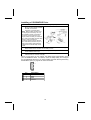
Setting Jumpers
Use the mainboard jumpers to set system configuration options. Jumpers with
more than one pin are numbered. When setting the jumpers, ensure that the
jumper caps are placed on the correct pins.
The illustrations below show a 2-pin jumper.
When the jumper cap is placed on both pins,
the jumper is SHORT. If you remove the
jumper cap, or place the jumper cap on just
one pin, the jumper is OPEN.
Short
This illustration shows a 3-pin
jumper. Pins 1 and 2 are SHORT.
1 2
3
Open
7
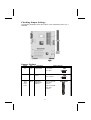
Checking Jumper Settings
The following illustration shows the location of the mainboard jumpers. Pin 1
is labeled.
Jumper Settings
Jumper
Type
JP1
3 pin
Description
Setting (default)
Clear CMOS
1-2: Normal
2-3: Clear
JP4
JP5A
JP5B
JP5C
JP5D
3 pin
80 pin
CPU frequency
select
1-2: 100MHz
DDR/SDR
DRAM Type
Selector
Short all JP5A/B/
C/D: DDR
memory
2-3: 133 MHz
Open all JP5A/B/
C/D: SDR
memory
8
JP1
1
1
JP4
JP5A/B/C/D
JP6A
JP6B
JP6C
JP6D
80 pin
DDR/SDR
DRAM Type
Selector
Short all JP6A/B/
C/D: DDR
memory
JP6A/B/C/D
Open all JP6A/B/
C/D: SDR
memory
Jumper 1 – enables you to clear the BIOS. Follow these instructions:
1.
2.
3.
4.
Turn the system off.
Short pins 2 and 3 on JP1.
Return the jumper to the normal setting.
Turn the system on. The BIOS is returned to the
default settings.
Jumper 4 – set the CPU frequency (100MHz or 133MHz) according to the
CPU.
Jumper 5A/B/C/D - this jumper enables the DDR terminator for DDR memory.
If you installed DDR memory in DDR1/DDR2, short all the jumpers.
Otherwise, if you installed SDR memory in DIMM1/DIMM2, open all the
jumpers.
Jumper 6A/B/C/D - this jumper enables the DDR terminator for DDR memory.
If you installed DDR memory in DDR1/DDR2, short all the jumpers.
Otherwise, if you installed SDR memory in DIMM1/DIMM2, open all the
jumpers.
9
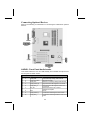
Connecting Case Components
After you have installed the mainboard into a case, you can begin connecting
the mainboard components. Refer to the following:
1.
2.
3.
4.
5.
6.
7.
Connect the case
power supply
connector to ATX1.
Connect the CPU
cooling fan cable to
CPUFAN1.
Connect the case
cooling fan connector
to CASEFAN1.
Connect the case
speaker cable to
SPEAKER1.
Connect the case
LED cable to SJ1.
If your case has a
case open alarm
cable, connect it to
J1.
Connect the case
switches and indicator
to PANEL1.
CPUFAN1/CASEFAN1: FAN Power Connectors
Pin
1
2
3
Signal Name
Function
GND
+12V
Sense
System Ground
Power +12V
Sensor
ATX1: ATX 20-pin Power Connector
Pin
Signal Name
Pin
Signal Name
1
2
3
4
5
6
7
8
9
10
+3.3V
+3.3V
Ground
+5V
Ground
+5V
Ground
PWRGD
+5VSB
+12V
11
12
13
14
15
16
17
18
19
20
+3.3V
-12V
Ground
PS ON#
Ground
Ground
Ground
-5V
+5V
+5V
10
SPEAKER1: Internal speaker
Pin
1
2
3
4
Signal Name
Signal
NC
Ground
VCC
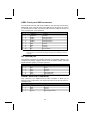
J1: Case open detecting connector (optional)
This connector allows the user to detect unauthorized intrusion to the case. It
will alert the user with a warning message when the case is turned on.
Pin
1
2
Signal Name
Function
Intruder
GND
Case open detecting signal
Ground
SJ1: Single color LED header
Pin
1
2
3
Signal Name
Function
ACPI LED
ACPI LED
SB5V
MSG LED (-) green
MSG LED (-) green
Power LED (+)
LED function:
SJ1
1
S0
S1
S3
S4/S5
Light
Blinking
Blinking
Dark
11
Front Panel Connector
The front panel connector (PANEL1) provides a standard set of switch and
LED connectors commonly found on ATX or micro-ATX cases. Refer to the
table below for information:
Pin
1
3
5
7
9
Function
Hard disk LED
(positive)
Hard disk active LED
(negative)
Reset Switch
Reset Switch
Reserved
Pin
2
4
6
8
10
Function
MSG LED [dual color
or single color (+)]
MSG LED [dual color
or single color (-)]
Power Switch
Power Switch
No pin
PANEL1
Hard Drive Activity LED
Connecting pins 1 and 3 to a front panel mounted LED provides visual
indication that data is being read from or written to the hard drive. For the LED
to function properly, an IDE drive should be connected to the onboard IDE
interface.
Power / Sleep LED
Connecting pins 2 and 4 to a single- or dual-color, front panel mounted LED
provides power on/off, sleep, and message waiting indication.
S0
Green
S1
Green blinking
S3
Yellow blinking
S4/S5
Dark
Reset Switch
Supporting the reset function requires connecting pins 5 and 7 to a
momentary-contact switch that is normally open. When the switch is closed,
the board resets and runs POST.
Power Switch
Supporting the power on/off function requires connecting pins 6 and 8 to a
momentary-contact switch that is normally open. The switch should maintain
contact for at least 50 ms to signal the power supply to switch on or off. The
time requirement is due to internal debounce circuitry. After receiving a power
on/off signal, at least two seconds elapses before the power supply
recognizes another on/off signal.
12
Installing Hardware
Installing the Processor
Caution: When installing a CPU heatsink and cooling fan make sure
that you DO NOT scratch the mainboard or any of the surface-mount
resistors with the clip of the cooling fan. If the clip of the cooling fan
scrapes across the mainboard, you may cause serious damage to the
mainboard or its components.
On most mainboards, there are small surface-mount resistors near the
processor socket, which may be damaged if the cooling fan is
carelessly installed.
Avoid using cooling fans with sharp edges on the fan casing and the
clips. Also, install the cooling fan in a well-lit work area so that you can
clearly see the mainboard and processor socket.
Before installing the Processor
This mainboard automatically determines the CPU clock frequency and
system bus frequency for the processor. You may be able to change these
settings by making changes to jumpers on the mainboard, or changing the
settings in the system Setup Utility. We strongly recommend that you do not
overclock processors or other components to run faster than their rated
speed.
Warning: Overclocking components can adversely affect the reliability
of the system and introduce errors into your system. Overclocking can
permanently damage the mainboard by generating excess heat in
components that are run beyond the rated limits.
This mainboard has a Socket 462 processor socket. When choosing a
processor, consider the performance requirements of the system.
Performance is based on the processor design, the clock speed and system
bus frequency of the processor, and the quantity of internal cache memory
and external cache memory.
13
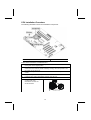
CPU Installation Procedure
The following illustration shows CPU installation components:
Note: The pin-1 corner is marked with an arrow
Follow these instructions to install the CPU:
1.
4.
Pull the CPU socket locking lever away from the socket to unhook it and raise the
locking lever to the upright position.
Match the corner on the CPU marked with an arrow with pin A-1 on the CPU
socket (the corner with the pinhole noticeably missing). Insert the processor into
the socket. Do not use force.
Swing the locking lever down and hook it under the latch on the edge of the
socket.
Apply thermal grease to the top of the CPU.
5.
Lower the CPU cooling fan/heatsink assembly onto the CPU
6.
Secure the two retention clips
on either side of the
fan/heatsink unit onto the
Socket 462 base.
2.
3.
Fan/heatsink unit
secured to socket
14
7.
Connect the CPU Cooling Fan
power cable connector to the
CPUFAN connector.
Notes
:
•
•
To achieve better airflow rates and heat dissipation, we suggest that
you use a high quality fan with 4800 rpm at least.
CPU fan and heatsink installation procedures may vary with the type of
CPU fan/heatsink supplied. The form and size of fan/heatsink may also
vary.
Installing Memory Modules
This mainboard accommodates 184-pin 2.5V Double Data Rate (DDR)
SDRAM and 168-pin 3.3V SDRAM memory modules. The memory chips must
be standard SDRAM (Synchronous Dynamic Random Access Memory).
The CPU supports 100MHz system bus. The SDRAM DIMMs and DDRs can
synchronously work with 100 MHz or operates over a 133 MHz system bus.
Do not remove any memory module from its antistatic packaging until
you are ready to install it on the mainboard. Handle the modules only by
their edges. Do not touch the components or metal parts. Always wear
a grounding strap when you handle the modules.
Installation Procedure
You must install at least one memory
module in order to use the
mainboard. Each module cab be
installed with up to 1 GB of memory;
total memory capacity is 2GB.
Note: You cannot use DDR
SDRAM and SDRAM
simultaneously.
SDRAM provides 800 MBps or 1 GBps data transfer depending on whether
the bus is 100 MHz or 133 MHz. Double Data Rate SDRAM (DDR SDRAM)
doubles the rate to 1.6 GBps or 2.1 GBps by transferring data on both the
rising and falling edges of the clock. DDR SDRAM uses additional power and
ground lines and requires 184-pin DIMM modules rather than the 168-pin
DIMMs used by SDRAM.
15
Refer to the following to install the memory modules.
1.
2.
3.
Push the latches on each side of the DIMM slot down.
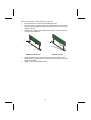
Align the memory module with the slot. The DIMM slots are keyed with
notches and the DIMMs are keyed with cutouts so that they can only be
installed correctly.
Check that the cutouts on the DIMM module edge connector match the
notches in the DIMM slot:
L a tc h
L a tc h
C u to u t
N o tc h
N o tc h e s
L a tc h
L a tc h
DDR SDRAM Module
4.
5.
C u to u ts
SDRAM Module
Install the DIMM module into the slot and press it firmly down until it
seats correctly. The slot latches are levered upwards and latch on to the
edges of the DIMM.
Install any remaining DIMM modules.
16
Installing a Hard Disk Drive/CD-ROM
This section describes how to install IDE devices such as a hard disk drive
and a CD-ROM drive.
About IDE Devices
Your mainboard has a primary and secondary IDE channel interface (IDE1 and
IDE2). An IDE ribbon cable supporting two IDE devices is bundled with the
mainboard.
If you want to install more than two IDE devices, get a second IDE cable and
you can add two more devices to the secondary IDE channel.
IDE devices have jumpers or switches that are used to set the IDE device as
MASTER or SLAVE. Refer to the IDE device user’s manual. When installing two
IDE devices on one cable, ensure that one device is set to MASTER and the
other device is set to SLAVE. The documentation of your IDE device explains
how to do this.
About UltraDMA
This mainboard supports UltraDMA 66/100/133. UDMA is a technology that
accelerates the performance of devices in the IDE channel. To maximize
performance, install IDE devices that support UDMA and use 80-pin IDE
cables that support UDMA 66/100/133.
Installing a Hard Disk Drive
1.
2.
Install the hard disk drive into the drive cage in your system case.
Plug the IDE cable into IDE1
(A):
Note: Ribbon cable connectors
are usually keyed so that they can
only be installed correctly on the
device connector. If the connector
is not keyed, make sure that you
match the pin-1 side of the cable
connector with the pin-1 side of the
device connector. Each connector
has the pin-1 side clearly marked.
The pin-1 side of each ribbon
cable is always marked with a
colored stripe on the cable.
3. Plug an IDE cable connector into the hard disk drive IDE connector (B). It
doesn't matter which connector on the cable you use.
4. Plug a power cable from the case power supply into the power connector on
the hard disk drive (C).
When you first start up your system, the BIOS should automatically detect
your hard disk drive. If it doesn’t, enter the Setup Utility and use the IDE Hard
Disk Auto Detect feature to configure the hard disk drive that you have
installed. See IDE HDD Auto-Detection on page 30 for more information.
17
Installing a CD-ROM/DVD Drive
1.
2.
Install the CD-ROM/DVD drive into the drive cage in your system case.
Plug the IDE cable into IDE1
(A). If you have already installed
an HDD, use the other
connector on the IDE cable.
Note: Ribbon cable connectors are
usually keyed so that they can only
be installed correctly on the device
connector. If the connector is not
keyed, make sure that you match the
pin-1 side of the cable connector with
the pin-1 side of the device
connector. Each connector has the
pin-1 side clearly marked. The pin-1
side of each ribbon cable is always
marked with a colored stripe on the
cable.
3. Plug an IDE cable connector into the CD-ROM/DVD drive IDE connector (B). It
doesn't matter which connector on the cable you use.
4. Plug a power cable from the case power supply into the power connector on
the CD-ROM/DVD drive (C).
5. Use the audio cable provided with the CD-ROM/DVD drive to connect to the
mainboard CD-in connector CD1 (D).
When you first start up your system, the BIOS should automatically detect
your CD-ROM/DVD drive. If it doesn’t, enter the Setup Utility and configure
the CD-ROM/DVD drive that you have installed. See IDE Primary/Secondary
Master/Slave (Auto) on page 30 for more information.
CD1
Pin
1
2
3
4
Signal Name
CD IN L
GND
GND
CD IN R
18
Installing a Floppy Diskette Drive
The mainboard has a floppy diskette drive (FDD) interface and ships with a
diskette drive ribbon cable that supports one or two floppy diskette drives. You
can install a 5.25-inch drive and a 3.5-inch drive with various capacities. The
floppy diskette drive cable has one type of connector for a 5.25-inch drive and
another type of connector for a 3.5-inch drive.
1.
2.
Install the FDD into the drive cage in your system case.
Plug the FDD cable into FDD1
(A):
Note: Ribbon cable connectors are
usually keyed so that they can only
be installed correctly on the device
connector. If the connector is not
keyed, make sure that you match the
pin-1 side of the cable connector with
the pin-1 side of the device
connector. Each connector has the
pin-1 side clearly marked. The pin-1
side of each ribbon cable is always
marked with a colored stripe on the
cable.
3. Plug the correct connector on the FDD cable for the 5.25-inch or 3.5-inch drive
into the FDD connector (B).
4. Plug a power cable from the case power supply into the power connector on
the FDD (C).
When you first start up your system, go immediately to the Setup Utility to
configure the floppy diskette drives that you have installed.
19
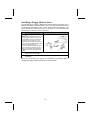
Installing Add-on Cards
The slots in this mainboard are designed to hold expansion cards and connect
them to the system bus. Expansion slots are a means of adding or enhancing
the mainboard’s features and capabilities. With these efficient facilities, you
can increase the mainboard’s capabilities by adding hardware which performs
tasks that are not part of the basic system.
PCI Slots
PCI slots are used to install expansion cards that have the 32-bit
PCI interface.
AGP Slot
The AGP slot is used to install a graphics adapter that supports the
4xAGP specification and has a 4xAGP edge connector.
Note: The above layout is for reference only. The AGP slot
may be different from your mainboard. Please refer to
actual shipment.
CNR Slot
This slot is used to insert CNR cards with Modem and Audio
functionality.
Note: Before installing an add-on card, check the documentation for the card
carefully. If the card is not Plug and Play, you may have to manually
configure the card before installation.
20
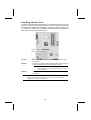
Follow these instructions to install an add-on card:
1.
2.
3.
Remove a blanking plate from the system case corresponding to the slot you
are going to use.
Install the edge connector of the
add-on card into the expansion
slot. Ensure that the edge
connector is correctly seated in
the slot.
Secure the metal bracket of the card to the system case with a screw.
Note: For some add-on cards, for example graphics adapters and network adapters,
you have to install drivers and software before you can begin using the add-on
card.
21
Connecting Optional Devices
Refer to the following for information on connecting the mainboard’s optional
devices:
AUDIO1: Front Panel Audio header
This header allows the user to install auxiliary front-oriented microphone and
line-out ports for easier access.
Pin
Signal Name
Function
1
2
3
4
5
6
AUD_MIC
AUD_GND
AUD_MIC_BIAS
AUD_VCC
AUD_FPOUT_R
AUD_RET_R
7
HP_ON
8
9
10
KEY
AUD_FPOUT_L
AUD_RET_L
Front Panel Microphone input signal
Ground used by Analog Audio Circuits
Microphone Power
Filtered +5 V used by Analog Audio Circuits
Right Channel Audio signal to Front Panel
Right Channel Audio signal to Return from
Front Panel
Reserved for future use to control
Headphone Amplifier
No Pin
Left Channel Audio signal to Front Panel
Left Channel Audio signal Return from Front
Panel
22
USB3: Front panel USB connectors
The mainboard has four USB ports installed on the rear edge I/O port array.
Additionally, some computer cases have USB ports at the front of the case. If
you have this kind of case, use auxiliary USB connectors USB3 to connect the
front-mounted ports to the mainboard.
Pin
Signal Name
Function
1
2
3
4
5
6
7
8
9
10
USBVCC3
USBVCC3
USBP4USBP5USBP4+
USBP5+
GND
GND
Key
NC
+5V dual
+5V dual
Data signal port 4 Data signal port 5 Data signal port 4 +
Data signal port 5 +
Ground
Ground
Cut away
No connection
Note: Please make sure that the USB cable has the same pin assignment as
indicated above. A different pin assignment may cause damage or system
hang-up.
IR1: Infrared port
The infrared port allows the wireless exchange of information between your
computer and similarly equipped devices such as printers, laptops, Personal
Digital Assistants (PDAs), and other computers.
Pin
Signal Name
Function
1
2
3
4
5
6
Not assigned
KEY
+5V
GND
IRTX
IRRX
Not assigned
No pin
IR Power
Ground
IrDA serial output
IrDA serial input
AUXIN1: Extra line-in connector
This connector is an additional line-in audio connector. It allows you to
attached a line-in cable when your rear line-in jack is set as line out port for 4channel function.
Pin
1
2
3
4
Signal Name
Function
AUX_L
GND
GND
AUX_R
AUX In left channel
Ground
Ground
AUX In right channel
23
USBCR1: USB Card Reader connector
This connector is for connecting internal USB card reader. You can use a card
reader to read or transfer files and digital images to your computer.
Pin
1
2
3
4
5
Signal Name
Function
USBVCC2
USB2USB2+
GND
Key
+5V dual
Data signal port 2Data signal port 2+
Ground
No pin
Note: The USBCR1 is shared with one of the USB ports of the I/O back panel.
The USB port is located beside the serial port connectors. See
“Connecting I/O Devices” for more information.
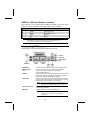
Connecting I/O Devices
The backplane of the mainboard has the following I/O ports:
PS/2 Mouse
PS/2 Keyboard
LPT1
COM1/2
Audio Ports
Use the upper PS/2 port to connect a PS/2 pointing device.
Use the lower PS/2 port to connect a PS/2 keyboard.
Use LPT1 to connect printers or other parallel
communications devices.
Use the COM ports to connect serial devices such as mice or
fax/modems. COM1 is identified by the system as COM1/3.
COM2 is identified by the system as COM2/4.
Use the three audio ports to connect audio devices. The first
jack is for stereo line-in signal. The second jack is for stereo
line-out signal. The third jack is for microphone.
Note: The line-in port can be set as another line-out
port when the 4-channel function is enabled.
LAN Port (optional)
USB Ports
Connect an RJ-45 jack to the LAN port to connect your
computer to the Network.
Use the USB ports to connect USB devices.
Note: The second USB port located beside the serial
COM 2 port is shared with the USBCR1
connector.
24
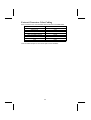
External Connector Color Coding
Many connectors now use standard colors as shown in the table below.
Connector
Color
Audio line-in
Audio line-out
Microphone
Parallel
PS/2-compatible keyboard
PS/2-compatible mouse
Serial
USB
Light blue
Lime
Pink
Burgundy
Purple
Green
Teal or Turquoise
Black
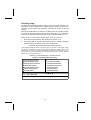
This concludes Chapter 2. The next chapter covers the BIOS.
25
Chapter 3
Using BIOS
About the Setup Utility
The computer uses the latest Award BIOS with support for Windows Plug and
Play. The CMOS chip on the mainboard contains the ROM setup instructions
for configuring the mainboard BIOS.
The BIOS (Basic Input and Output System) Setup Utility displays the system's
configuration status and provides you with options to set system parameters.
The parameters are stored in battery-backed-up CMOS RAM that saves this
information when the power is turned off. When the system is turned back on,
the system is configured with the values you stored in CMOS.
The BIOS Setup Utility enables you to configure:
•
•
•
•
Hard drives, diskette drives, and peripherals
Video display type and display options
Password protection from unauthorized use
Power management features
The settings made in the Setup Utility affect how the computer performs.
Before using the Setup Utility, ensure that you understand the Setup Utility
options.
This chapter provides explanations for Setup Utility options.
The Standard Configuration
A standard configuration has already been set in the Setup Utility. However,
we recommend that you read this chapter in case you need to make any
changes in the future.
This Setup Utility should be used:
•
•
•
•
•
when changing the system configuration
when a configuration error is detected and you are prompted to
make changes to the Setup Utility
when trying to resolve IRQ conflicts
when making changes to the Power Management configuration
when changing the password or making other changes to the
Security Setup
26
Starting Setup
The BIOS is immediately activated when you first turn on the computer. The
BIOS reads system configuration in CMOS RAM and begins the process of
checking out the system and configuring it through the power-on self test
(POST).
When these preliminaries are finished, the BIOS seeks an operating system
on one of the data storage devices (hard drive, floppy drive, etc.). The BIOS
launches the operating system and hands control of system operations to it.
During POST, you can start the Setup program in one on two ways:
1.
By pressing Del immediately after switching the system on, or
2.
By pressing Del or pressing Ctrl+Alt+Esc when the following message
appears briefly at the bottom of the screen during POST:
TO ENTER SETUP BEFORE BOOT PRESS DEL KEY
If the message disappears before you respond and you still wish to enter Setup, restart
the system to try again by turning it OFF then ON or pressing the RESET button on the
system case. You may also restart by simultaneously pressing Ctrl+Alt+Del. If you do
not press the keys at the correct time and the system does not boot, an error message
appears and you are again asked to:
PRES F1 TO CONTINUE, DEL TO ENTER SETUP
Phoenix – AwardBIOS CMOS Setup Utility
Standard CMOS Features
Frequency Control
Advanced BIOS Features
Load Fail-Safe Defaults
Advanced Chipset Features
Load Optimized Defaults
Integrated Peripherals
Set Supervisor Password
Power Management Setup
Set User Password
PnP/PCI Configurations
Save & Exit Setup
PC Health Status
Exit Without Saving
↑ ↓ → ←:
Esc : Quit
F10 : Save & Exit Setup
Time, Date, Hard Disk Type . . .
27
Select Item
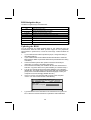
BIOS Navigation Keys
The BIOS navigation keys are listed below:
Key
Function
Esc
Exits the current menu
←↑↓→
+/–/PU/PD
Scrolls through the items on a menu
Modifies the selected field's values
F10
Saves the current configuration and exits setup
F1
Displays a screen that describes all key functions
F5
Loads previously saved values to CMOS
F6
Loads a minimum configuration for troubleshooting.
F7
Loads an optimum set of values for peak performance
Updating the BIOS
You can download and install updated BIOS for this mainboard from the
manufacturer's Web site. New BIOS provides support for new peripherals,
improvements in performance, or fixes for known bugs. Install new BIOS as
follows:
1.
2.
3.
4.
5.
6.
If your mainboard has a BIOS protection jumper, change the setting to
allow BIOS flashing.
If your mainboard has an item called Firmware Write Protect in Advanced
BIOS features, disable it. (Firmware Write Protect prevents BIOS from being
overwritten.)
Create a bootable system disk. (Refer to Windows online help for
information on creating a bootable system disk.)
Download the Flash Utility and new BIOS file from the manufacturer's
Web site. Copy these files to the system diskette you created in Step 3.
Turn off your computer and insert the system diskette in your computer's
diskette drive. (You might need to run the Setup Utility and change the boot
priority items on the Advanced BIOS Features Setup page, to force your
computer to boot from the floppy diskette drive first.)
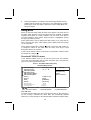
At the A:\ prompt, type the Flash Utility program name and press
<Enter>. You see a screen similar to the following:
FLASH MEMORY WRITER V7.33
(C) Award Software 1999 All Rights Reserved
For (MAINBOARD NAME)
DATE: 10/26/2000
Flash Type
File Name to Program :____________________
Error Message
7.
Type the filename of the new BIOS in the “File Name to Program” text
box. Follow the onscreen directions to update the mainboard BIOS.
28
8.
When the installation is complete, remove the floppy diskette from the
diskette drive and restart your computer. If your mainboard has a Flash
BIOS jumper, reset the jumper to protect the newly installed BIOS from
being overwritten.
Using BIOS
When you start the Setup Utility, the main menu appears. The main menu of
the Setup Utility displays a list of the options that are available. A highlight
indicates which option is currently selected. Use the cursor arrow keys to
move the highlight to other options. When an option is highlighted, execute
the option by pressing <Enter>.
Some options lead to pop-up dialog boxes that prompt you to verify that you
wish to execute that option. Other options lead to dialog boxes that prompt
you for information.
Some options (marked with a triangle
) lead to submenus that enable you
to change the values for the option. Use the cursor arrow keys to scroll
through the items in the submenu.
In this manual, default values are enclosed in parenthesis. Submenu items
are denoted by a triangle .
Standard CMOS Features
In the Standard CMOS menu you can set the system clock and calendar,
record disk drive parameters and the video subsystem type, and select the
type of errors that stop the BIOS POST.
Phoenix – AwardBIOS CMOS Setup Utility
Standard CMOS Features
Date (mm:dd:yy)
Time (hh:mm:ss)
Tue, July 11 2001
12 : 8 : 59
IDE Primary Master
IDE Primary Slave
IDE Secondary Master
IDE Secondary Slave
[1.44M, 3.5 in.]
[None]
Video
Halt On
[EGA/VGA]
[All errors]
↑ ↓ → ← : Move Enter : Select
Help F5:Previous Values
Menu Level
Change the day,
month,
year and century.
Drive A
Drive B
Base Memory
Extended Memory
Total Memory
Item Help
640K
31744K
32768K
+/-/PU/PD:Value:F10: Save ESC: Exit F1:General
F6:Fail-Safe Defaults
F7:Optimized Defaults
Date and Time
The Date and Time items show the current date and time on the computer. If
you are running a Windows OS, these items are automatically updated
whenever you make changes to the Windows Date and Time Properties utility.
29
IDE Devices (None)
Your computer has two IDE channels (Primary and Secondary) and each
channel can be installed with one or two devices (Master and Slave). Use
these items to configure each device on the IDE channel.
Press <Enter> to display the IDE submenu:
CMOS Setup Utility – Copyright © 1984 – 2001 Award Software
IDE Primary Master
IDE HDD Auto-Detection
[Press Enter]
IDE Primary Master
Access Mode
[Auto]
[Auto]
Capacity
0 MB
Cylinder
Head
Precomp
Landing Zone
Sector
0
0
0
0
0
↑ ↓ → ← : Move Enter : Select
Help F5:Previous Values
Item Help
Menu Level
To auto-detect the
HDD’s size, head . . .
on
this channel
+/-/PU/PD:Value:F10: Save ESC: Exit F1:General
F6:Fail-Safe Defaults
F7:Optimized Defaults
IDE HDD Auto-Detection
Press <Enter> while this item is highlighted to prompt the Setup Utility to
automatically detect and configure an IDE device on the IDE channel.
Note: If you are setting up a new hard disk drive that supports LBA mode, more
than one line will appear in the parameter box. Choose the line that lists
LBA for an LBA drive.
IDE Primary/Secondary Master/Slave (Auto)
Leave this item at Auto to enable the system to automatically detect and configure
IDE devices on the channel. If it fails to find a device, change the value to Manual
and then manually configure the drive by entering the characteristics of the drive
in the items described below.
Refer to your drive's documentation or look on the drive casing if you need to
obtain this information. If no device is installed, change the value to None.
Note: Before attempting to configure a hard disk drive, ensure that you have the
configuration information supplied by the manufacturer of your hard
drive. Incorrect settings can result in your system not recognizing the
installed hard disk.
Access Mode
This item defines ways that can be used to access IDE hard disks such as
LBA (Large Block Addressing). Leave this value at Auto and the system will
automatically decide the fastest way to access the hard disk drive.
Press <Esc> to return to the Standard CMOS Features screen.
30
Drive A/Drive B (1.44M, 3.5 in./None)
These items define the characteristics of any diskette drive attached to the
system. You can connect one or two diskette drives.
Video (EGA/VGA)
This item defines the video mode of the system. This mainboard has a built-in
VGA graphics system; you must leave this item at the default value.
Halt On (All, But keyboard)
This item defines the operation of the system POST (Power On Self Test)
routine. You can use this item to select which types of errors in the POST are
sufficient to halt the system.
Base Memory, Extended Memory, and Total Memory
These items are automatically detected by the system at start up time. These
are display-only fields. You cannot make changes to these fields.
Advanced BIOS Setup
This screen contains industry-standard options additional to the core PC AT
BIOS.
Phoenix – AwardBIOS CMOS Setup Utility
Advanced BIOS Setup
CPU Internal Cache
External Cache
CPU L2 Cache ECC Checking
Quick Power On Self Test
First Boot Device
Second Boot Device
Third Boot Device
Boot Other Device
Swap Floppy Drive
Boot Up Floppy Seek
Boot Up NumLock Status
Gate A20 Option
ATA 66/100 IDE Cable Msg
Typematic Rate Setting
x Typematic Rate (Chars/Sec)
x Typematic Delay (Msec)
Security Option
APIC Mode
↑ ↓ → ← : Move Enter : Select
Help F5:Previous Values
[Enabled]
[Enabled]
[Enabled]
[Enabled]
[Floppy]
[HDD-0]
[CD-ROM]
[Enabled]
[Disabled]
[Enabled]
[On]
[Fast]
[Enabled]
[Disabled]
6
250
[Setup]
[Disabled]
Item Help
Menu Level
Allows you to choose
the VIRUS warning
feature for IDE Hard
Disk boot sector
protection. If this
function is enabled
and someone
attempts
to write data into this
area, BIOS will show a
warning message on
screen and alarm
beep
+/-/PU/PD:Value:F10: Save ESC: Exit F1:General
F6:Fail-Safe Defaults
F7:Optimized Defaults
CPU Internal Cache (Enabled)
All processors that can be installed in this mainboard use internal level 1 (L1)
cache memory to improve performance. Leave this item at the default value
for better performance.
External Cache (Enabled)
Most processors that can be installed in this system use external level 2 (L2)
cache memory to improve performance. Leave this item at the default value
31
for better performance.
CPU L2 Cache ECC Checking (Enabled)
This item enables or disables ECC (Error Correction Code) error checking on
the CPU cache memory. We recommend that you leave this item at the
default value.
Quick Power On Self Test (Enabled)
Enable this item to shorten the power on testing (POST) and have your
system start up faster. You might like to enable this item after you are
confident that your system hardware is operating smoothly.
First/Second/Third Boot Device (Floppy/HDD-0/CD-ROM)
Use these three items to select the priority and order of the devices that your
system searches for an operating system at start-up time.
Boot Other Device (Enabled)
When enabled, the system searches all other possible locations for an
operating system if it fails to find one in the devices specified under the First,
Second, and Third boot devices.
Swap Floppy Drive (Disabled)
If you have two floppy diskette drives in your system, this item allows you to
swap the assigned drive letters so that drive A becomes drive B, and drive B
becomes drive A.
Boot Up Floppy Seek (Enabled)
If this item is enabled, it checks the size of the floppy disk drives at start-up
time. You don't need to enable this item unless you have a legacy diskette
drive with 360K capacity.
Boot Up NumLock Status (On)
This item defines if the keyboard Num Lock key is active when your system is
started.
Gate A20 Option (Fast)
This item defines how the system handles legacy software that was written for
an earlier generation of processors. Leave this item at the default value.
ATA 66/100 IDE Cable Msg (Enabled)
Enables or disables the ATA 66/100 IDE Cable Msg. This message will appear
during reboot when you use 40-pin cable on your 66/100 hard disks.
Typematic Rate Setting (Disabled)
If this item is enabled, you can use the following two items to set the typematic
rate and the typematic delay settings for your keyboard.
•
•
Typematic Rate (Chars/Sec): Use this item to define how many
characters per second are generated by a held-down key.
Typematic Delay (Msec): Use this item to define how many
milliseconds must elapse before a held-down key begins generating
repeat characters.
32
Security Option (Setup)
If you have installed password protection, this item defines if the password is
required at system start up, or if it is only required when a user tries to enter
the Setup Utility.
APIC Mode (Enabled)
Selecting Enabled enables the ACPI device mode reporting from the BIOS to
the operating system.
OS Select For DRAM > 64 MB (Non-OS2)
This item is only required if you have installed more than 64 MB of memory
and you are running the OS/2 operating system. Otherwise, leave this item at
the default.
Video BIOS Shadow (Enabled)
This function, when enabled allows VGA BIOS to be copied to the system
DRAM for enhanced performance.
Small Logo (EPA) Show (Disabled)
Determines whether or not the EPA logo appears during boot up.
Advanced Chipset Setup
The parameters in this screen are for system designers, service personnel,
and technically competent users only. Do not reset these values unless you
understand the consequences of your changes.
Phoenix – AwardBIOS CMOS Setup Utility
Advanced Chipset Setup
DRAM Clock/Drive Control
AGP & P2P Bridge Control
CPU & PCI Bus Control
Memory Hole
System BIOS Cacheable
Video RAM Cacheable
↑ ↓ → ← : Move Enter : Select
Help F5:Previous Values
[Press Enter]
[Press Enter]
[Press Enter]
[Disabled]
[Disabled]
[Disabled]
Item Help
Menu Level
+/-/PU/PD:Value:F10: Save ESC: Exit F1:General
F6:Fail-Safe Defaults
F7:Optimized Defaults
33
DRAM Clock/Drive Control
Scroll to this item and press <Enter> to view the following screen:
CMOS Setup Utility – Copyright (C) 1984 – 2001 Award Software
DRAM Clock/Drive Control
Current FSB Frequency
Current DRAM Frequency
DRAM Clock
[By SPD]
DRAM Timing
[By SPD]
x SDRAM Cycle Length
3
x Bank Interleave
Disabled
DRAM Command Rate
[2T Command]
↑ ↓ → ← : Move Enter : Select
Help F5:Previous Values
Item Help
Menu Level
+/-/PU/PD:Value:F10: Save ESC: Exit F1:General
F6:Fail-Safe Defaults
F7:Optimized Defaults
Current FSB Frequency
This item displays the frontside bus (FSB) frequency. This is a display-only
item. You cannot make changes to this field.
Current DRAM Frequency
This item displays the memory (DRAM) frequency. This is a display-only item.
You cannot make changes to this field.
DRAM Clock (100 MHz)
This item enables you to manually set the DRAM Clock. We recommend that
you leave this item at the default value.
DRAM Timing (Manual)
Set this to the default value to enable the system to automatically set the
SDRAM timing by SPD (Serial Presence Detect). SPD is an EEPROM chip on
the DIMM module that stores information about the memory chips it contains,
including size, speed, voltage, row and column addresses, and manufacturer.
If you disable this item, you can use the following three items to manually set
the timing parameters for the system memory
SDRAM Cycle Length (3)
When synchronous DRAM is installed, the number of clock cycles of CAS
latency depends on the DRAM timing. We recommend that you leave this item
at the default value.
Bank Interleave (4 Bank)
Enable this item to increase memory speed. When enabled, separate memory
banks are set for odd and even addresses and the next byte of memory can
be accessed while the current byte is being refreshed.
DRAM Command Rate (2T Command)
This item enables you to specify the waiting time for the CPU to issue the next
34
command after issuing the command to the DDR memory. We recommend
that you leave this item at the default value.
DRAM Burst Length (4)
This item describes which burst lengths are supported by the devices on the
mainboard. 1 level can provide faster performance but may result in instability
whereas 8 level gives the most stable but slowest performance.
DRAM Queue Depth (4 level)
This item sets the depth of the DRAM queue used for CPU’s cache.
Press <Esc> to return to the Advanced Chipset Setup screen.
AGP & P2P Bridge Control
Scroll to this item and press <Enter> to view the following screen:
CMOS Setup Utility – Copyright (C) 1984 – 2001 Award Software
AGP & P2P Bridge Control
x
AGP Aperture Size
AGP Mode
AGP Driving Control
AGP Driving Value
↑ ↓ → ← : Move
Exit
F1:General Help
F7:Optimized Defaults
[128M]
[4X]
[Auto]
DA
Item Help
Menu Level
Enter : Select +/-/PU/PD:Value:
F10: Save ESC:
F5:Previous Values
F6:Fail-Safe Defaults
AGP Aperture Size (128 MB)
This item defines the size of the aperture if you use an AGP graphics adapter.
The AGP aperture refers to a section of the PCI memory address range used
for graphics memory. We recommend that you leave this item at the default
value.
AGP Mode (4X)
This item allows you to enable or disable the caching of display data for the
processor video memory. Enabling AGP-4X Mode can greatly improve the
display speed. Disable this item if your graphics display card does not support
this feature.
AGP Driving Control (Auto)
This item is used to signal driving current on AGP cards to auto or manual.
Some AGP cards need stronger than normal driving current in order to
operate. We recommend that you set this item to the default.
•
AGP Driving Value: When AGP Driving Control is set to Manual,
use this item to set the AGP current driving value.
35
Press <Esc> to return to the Advanced Chipset Setup screen.
CPU & PCI Bus Control
Scroll to this item and press <Enter> to view the following screen:
CMOS Setup Utility – Copyright (C) 1984 – 2001 Award Software
CPU & PCI Bridge Control
PCI1 Master 0 WS Write
PCI2 Master 0 WS Write
PCI1 Post Write
PCI2 Post Write
PCI Delay Transaction
↑ ↓ → ← : Move
Exit
F1:General Help
F7:Optimized Defaults
[Enabled]
[Enabled]
[Enabled]
[Enabled]
[Disabled]
Item Help
Menu Level
Enter : Select +/-/PU/PD:Value:
F10: Save ESC:
F5:Previous Values
F6:Fail-Safe Defaults
PCI 1/2 Master 0 WS Write (Enabled)
When enabled, writes to the PCI bus are executed with zero wait states,
providing faster data transfer.
PCI 1/2 Post Write (Enabled)
When enabled, writes from the CPU to PCU bus are buffered, to compensate
for the speed differences between the CPU and PCI bus. When disabled, the
writes are not buffered and the CPU must wait until the write is complete
before starting another write cycle.
PCI Delay Transaction (Disabled)
The mainboard’s chipset has an embedded 32-bit post write buffer to support
delay transactions cycles. Select Enabled to support compliance with PCI
specification version 2.1.
Press <Esc> to return to the Advanced Chipset Setup screen.
Memory Hole (Disabled)
This item is used to reserve memory space for ISA expansion cards that
require it.
System BIOS/Video RAM Cacheable (Disabled)
These items allow the video and system to be cached in memory for faster
execution. Leave these items at the default value for better performance.
36
Integrated Peripherals
These options display items that define the operation of peripheral
components on the system's input/output ports.
Phoenix – AwardBIOS CMOS Setup Utility
Integrated Peripherals
USB 2.0 Support
OnChip IDE Device
OnChip PCI Device
Super I/O Device
Init Display First
OnChip USB Controller
USB keyboard Support
IDE HDD Block Mode
PWRON After PWR-Fail
↑ ↓ → ← : Move Enter : Select
Help F5:Previous Values
[Enabled]
[Press Enter]
[Press Enter]
[Press Enter]
[PCI Slot]
[All Enabled]
[Disabled]
[Enabled]
[Off]
Item Help
Menu Level
+/-/PU/PD:Value:F10: Save ESC: Exit F1:General
F6:Fail-Safe Defaults
F7:Optimized Defaults
USB 2.0 Support (Enabled)
Select enabled if your system support the USB 2.0 function.
OnChip IDE Device
Scroll to this item and press <Enter> to view the following screen:
CMOS Setup Utility – Copyright (C) 1984 – 2001 Award Software
OnChip IDE Device
OnChip IDE Channel0
OnChip IDE Channel1
IDE Prefetch Mode
Primary Master PIO
Primary Slave
PIO
Secondary Master
Secondary Slave PIO
Primary Master UDMA
Primary Slave
UDMA
Secondary Master
[Auto]
Secondary Slave UDMA
↑ ↓ → ← : Move Enter : Select
Help F5:Previous Values
[Enabled]
[Enabled]
[Enabled]
[Auto]
[Auto]
PIO [Auto]
[Auto]
[Auto]
[Auto]
UDMA
Item Help
Menu Level
[Auto]
+/-/PU/PD:Value:F10: Save ESC: Exit F1:General
F6:Fail-Safe Defaults
F7:Optimized Defaults
On-Chip IDE Channel 0/1 (Enabled)
Use these items to enable or disable the PCI IDE channels that are integrated
on the mainboard.
37
IDE Prefetch Mode (Enabled)
The onboard IDE drive interfaces supports IDE prefetching, for faster drive
access. If you install a primary and secondary add-in IDE interface, set this
field to Disabled if the interface does not support prefetching.
IDE Primary/Secondary Master/Slave PIO (Auto)
Each IDE channel supports a master device and a slave device. These four
items let you assign which kind of PIO (Programmed Input/Output) is used by
IDE devices. Choose Auto to let the system auto detect which PIO mode is
best, or select a PIO mode from 0-4.
IDE Primary/Secondary Master/Slave UDMA (Auto)
Each IDE channel supports a master device and a slave device. This
mainboard supports UltraDMA technology, which provides faster access to
IDE devices.
If you install a device that supports UltraDMA, change the appropriate item on
this list to Auto. You may have to install the UltraDMA driver supplied with this
mainboard in order to use an UltraDMA device.
Press <Esc> to return to the Integrated Peripherals screen.
OnChip PCI Device
Scroll to this item and press <Enter> to view the following screen:
CMOS Setup Utility – Copyright (C) 1984 – 2001 Award Software
OnChip PCI Device
OnChip AC97 Audio
VIA-3068 MC97 Modem
VIA-3043 OnChip LAN
Onboard LAN Boot ROM
↑ ↓ → ← : Move Enter : Select
Help F5:Previous Values
[Auto]
[Enabled]
[Enabled]
[Disabled]
Item Help
Menu Level
+/-/PU/PD:Value:F10: Save ESC: Exit F1:General
F6:Fail-Safe Defaults
F7:Optimized Defaults
OnChip AC97 Audio (Auto)
Enables and disables the onboard audio chip. Disable this item if you are
going to install a PCI audio add-in card.
VIA-3068 MC97 Modem (Enabled)
Enables and disables the onboard modem. Disable this item if you are going
to install an external modem.
VIA-3043 OnChip LAN (Enabled)
Enables and disables the onboard LAN.
38
Onboard LAN Boot ROM (Disabled)
Use this item to enable and disable the booting from the onboard LAN or a
network add-in card with a remote boot ROM installed.
Press <Esc> to return to the Integrated Peripherals screen.
SuperIO Device
Scroll to this item and press <Enter> to view the following screen:
CMOS Setup Utility – Copyright (C) 1984 – 2001 Award Software
SuperIO Device
Onboard FDC Controller
Onboard Serial Port 1
Onboard Serial Port 2
UART Mode Select
UR2 Duplex Mode
Onboard Parallel Port
Parallel Port Mode
ECP Mode Use DMA
Game Port Address
Midi Port Address
Midi Port IRQ
↑ ↓ → ← : Move
Exit
F1:General Help
F7:Optimized Defaults
[Enabled]
[3F8/IRQ4]
[2F8/IRQ3]
[Normal]
[Half]
[378/IRQ7]
[ECP]
[3]
[201]
[330]
[10]
Item Help
Menu Level
Enter : Select +/-/PU/PD:Value:
F10: Save ESC:
F5:Previous Values
F6:Fail-Safe Defaults
Onboard FDC Controller (Enabled)
This option enables the onboard floppy disk drive controller.
Onboard Serial Port 1 (3F8/IRQ4)
This option is used to assign the I/O address and interrupt request (IRQ) for
the onboard serial port 1 (COM1).
Onboard Serial Port 2 (2F8/IRQ3)
This option is used to assign the I/O address and interrupt request (IRQ) for
the onboard serial port 2 (COM2).
UART Mode Select (Normal)
This field is available if the Onboard Serial Port 2 field is set to any option but
Disabled. UART Mode Select enables you to select the infrared
communication protocol: Normal (default), IrDA, or ASKIR. IrDA is an infrared
communication protocol with a maximum baud rate up to 115.2K bps. ASKIR
is Sharp's infrared communication protocol with a maximum baud rate up to
57.6K bps.
UR2 Duplex Mode (Half)
This field is available when UART 2 Mode is set to either ASKIR or IrDA. This
item enables you to determine the infrared function of the onboard infrared
chip. The options are Full and Half (default).
Full-duplex means that you can transmit and send information simultaneously.
39
Half-duplex is the transmission of data in both directions, but only one
direction at a time.
Onboard Parallel Port (378/IRQ7)
This option is used to assign the I/O address and interrupt request (IRQ) for
the onboard parallel port.
Parallel Port Mode (ECP)
Enables you to set the data transfer protocol for your parallel port. There are
four options: SPP (Standard Parallel Port), EPP (Enhanced Parallel Port),
ECP (Extended Capabilities Port) and ECP+EPP.
SPP allows data output only. Extended Capabilities Port (ECP) and Enhanced
Parallel Port (EPP) are bi-directional modes, allowing both data input and output.
ECP and EPP modes are only supported with EPP- and ECP-aware peripherals.
ECP Mode Use DMA (3)
When the onboard parallel port is set to ECP mode, the parallel port can use
DMA 3 or DMA 1.
Press <Esc> to return to the Integrated Peripherals screen.
Init Display First (PCI Slot)
Use this item to specify whether your graphics adapter is installed in one of
the PCI slots or is integrated on the mainboard.
OnChip USB Controller (All Enabled)
Enable this item if you plan to use the Universal Serial Bus ports on this
mainboard.
USB Keyboard Support (Disabled)
Enable this item if you plan to use a keyboard connected through the USB
port in a legacy operating system (such as DOS) that does not support Plug
and Play.
IDE HDD Block Mode (Enabled)
Enable this field if your IDE hard drive supports block mode. Block mode
enables BIOS to automatically detect the optimal number of block read and
writes per sector that the drive can support and improves the speed of access
to IDE devices.
40
Power Management Setup
The Power Management Setup Menu option is used to change the values of
the chipset registers for system power management.
Power Management Timeouts
The power-saving modes can be controlled by timeouts. If the system is
inactive for a time, the timeouts begin counting. If the inactivity continues so
that the timeout period elapses, the system enters a power-saving mode. If
any item in the list of Reload Global Timer Events is Enabled, then any activity
on that item will reset the timeout counters to zero.
Wake Up Calls
If the system is suspended, or has been powered down by software, it can be
resumed by a wake up call that is generated by incoming traffic to a modem, a
LAN card, a PCI card, or a fixed alarm on the system realtime clock.
Phoenix – AwardBIOS CMOS Setup Utility
Power Management Setup
ACPI function
Power Management Option
HDD Power Down
Suspend Mode
Video Off Option
Video Off Method
MODEM Use IRQ
Soft-Off by PWRBTN
IRQ/Event Activity Detect
↑ ↓ → ← : Move
ESC: Exit
F6:Fail-Safe Defaults
[Enabled]
[User Define]
[Disable]
[Disable]
[Suspend --> Off]
[DPMS Support]
[3]
[Instant-Off]
[Press Enter]
Item Help
Menu Level
Enter : Select +/-/PU/PD:Value: F10: Save
F1:General Help
F5:Previous Values
F7:Optimized Defaults
ACPI Function (Enabled)
This mainboard supports ACPI (Advanced Configuration and Power
management Interface). Use this item to enable or disable the ACPI feature.
Note: ACPI is a power management specification that makes hardware status
information available to the operating system. ACPI enables a PC to turn
its peripherals on and off for improved power management. It also allows
the PC to be turned on and off by external devices, so that mouse or
keyboard activity wakes up the computer.
Power Management Option (User Define)
This item acts like a master switch for the power-saving modes and hard disk
timeouts. If this item is set to Max Saving, power-saving modes occur after a
short timeout. If this item is set to Min Saving, power-saving modes occur after
41
a longer timeout. If the item is set to User Define, you can insert your own
timeouts for the power-saving modes.
HDD Power Down (Disable)
The IDE hard drive will spin down if it is not accessed within a specified length
of time. Options are from 1 Min to 15 Min and Disable.
Suspend Mode (Disable)
The CPU clock will be stopped and the video signal will be suspended if no
Power Management events occur for a specified length of time. Full power
function will return when a Power Management event is detected. Options are
from 1 Min to 1 Hour and Disable.
Video Off Option (Suspend --> Off)
This option defines if the video is powered down when the system is put into
suspend mode.
Video Off Method (DPMS Support)
This item defines how the video is powered down to save power. This item is
set to DPMS (Display Power Management Software) by default.
MODEM Use IRQ (3)
If you want an incoming call on a modem to automatically resume the system
from a power-saving mode, use this item to specify the interrupt request line
(IRQ) that is used by the modem. You might have to connect the fax/modem
to the mainboard Wake On Modem connector for this feature to work.
Soft-Off by PWRBTN (Instant-Off)
Under ACPI (Advanced Configuration and Power management Interface) you
can create a software power down. In a software power down, the system can
be resumed by Wake Up Alarms. This item lets you install a software power
down that is controlled by the power button on your system. If the item is set
to Instant-Off, then the power button causes a software power down. If the
item is set to Delay 4 Sec. then you have to hold the power button down for
four seconds to cause a software power down.
42
IRQ/Event Activity Detect
Scroll to this item and press <Enter> to view the following screen:
Phoenix – AwardBIOS CMOS Setup Utility
IRQ/Event Activity Detect
x
x
LPT & COM
HDD & FDD
PCI Master
PowerOn by PCI Card
Wake Up On LAN/Ring
RTC Alarm Resume
Date (of Month)
Resume Time (hh:mm:ss)
IRQs Activity Monitoring
↑ ↓ → ← : Move Enter : Select
Help F5:Previous Values
VGA
[OFF]
[LPT/COM]
[ON]
[OFF]
[Enabled]
[Disabled]
[Disabled]
0
0 0 0
[Press Enter]
Item Help
Menu Level
+/-/PU/PD:Value:F10: Save ESC: Exit F1:General
F6:Fail-Safe Defaults
F7:Optimized Defaults
This item opens a submenu that enables you to set events that will resume
the system from a power saving mode.
VGA (Off)
When set to On, the system power will resume the system from a power
saving mode if there is any VGA activity.
LPT & COM (LPT/COM )
When this item is enabled, the system will restart the power-saving timeout
counters when any activity is detected on the serial ports, or the parallel port.
HDD & FDD (ON)
When this item is enabled, the system will restart the power-saving timeout
counters when any activity is detected on the hard disk drive or the floppy
diskette drive.
PCI Master (OFF)
When set to Off, any PCI device set as the Master will not power on the
system.
PowerOn by PCI Card (Enabled)
Use this item to enable PCI activity to wakeup the system from a power
saving mode.
Wake Up On LAN/Ring (Disabled)
Use this item to enable LAN or modem activity to wakeup the system from a
power saving mode.
RTC Alarm Resume (Disabled)
When set to Enabled, additional fields become available and you can set the
date (day of the month), hour, minute and second to turn on your system.
When set to 0 (zero) for the day of the month, the alarm will power on your
system every day at the specified time.
43
IRQs Activity Monitoring
Scroll to this item and press <Enter> to view the following screen:
Phoenix – AwardBIOS CMOS Setup Utility
IRQs Activity Monitoring
Primary INTR
IRQ 3
(COM2)
IRQ 4
(COM1)
IRQ 5
(LPT2)
IRQ 6
(Floppy Disk)
IRQ 7
(LPT1)
IRQ 8
(RTC Alarm)
IRQ 9
(IRQ2 Redir)
IRQ 10 (Reserved)
IRQ 11 (Reserved)
IRQ 12 (PS/2 Mouse)
IRQ 13 (Coprocessor)
IRQ 14 (Hard Disk)
IRQ 15 (Reserved)
[ON]
[Enabled]
[Enabled]
[Enabled]
[Enabled]
[Enabled]
[Disabled]
[Disabled]
[Disabled]
[Disabled]
[Enabled]
[Enabled]
[Enabled]
[Disabled]
Item Help
Menu Level
↑ ↓ → ← : Move
Enter : Select +/-/PU/PD:Value:
F10: Save
ESC: Exit F1:General Help F5:Previous Values
F6:Fail-Safe Defaults
F7:Optimized Defaults
This screen enables you to set IRQs that will resume the system from a power
saving mode.
Set any IRQ to Enabled to allow activity at the IRQ to wake up the system
from a power saving mode.
Press <Esc> to return to the Power Management Setup screen.
44
PNP/PCI Configurations
This section describes configuring the PCI bus system. PCI (Peripheral
Component Interconnect) is a system, which allows I/O devices to operate at
speeds nearing CPU’s when they communicate with own special
components.
All the options describes in this section are important and technical and it is
strongly recommended that only experienced users should make any
changes to the default settings.
Phoenix - AwardBIOS CMOS Setup Utility
PnP/PCI Configurations
PNP OS Installed
[No]
Reset Configuration Data [Disabled]
Resources Controlled by
x IRQ Resources
PCI/VGA Palette Snoop
Assign IRQ For VGA
Assign IRQ For USB
INT Pin 1 Assignment
INT Pin 2 Assignment
INT Pin 3 Assignment
↑ ↓ → ← : Move Enter : Select
Help F5:Previous Values
[Auto(ESCD)]
Press Enter
[Disabled]
[Enabled]
[Enabled]
[Auto]
[Auto]
[Auto]
Item Help
Menu Level
Default is Disabled.
Select Enabled to
reset Extended
System Configuration
Data (ESCD) when
you exit Setup if you
have installed a new
add-on and the
system
reconfiguration has
caused such a
serious conflict that
the OS cannot boot
+/-/PU/PD:Value:F10: Save ESC: Exit F1:General
F6:Fail-Safe Defaults
F7:Optimized Defaults
PNP OS Installed (No)
Setting this option to Yes allows the PnP OS (instead of BIOS) to assign the
system resources such as IRQ and I/O address to the ISA PnP device. The
default setting is No.
Reset Configuration Data (Disabled)
If you enable this item and restart the system, any Plug and Play configuration
data stored in the BIOS setup is cleared from memory. New updated data is
created.
Resources Controlled By (Auto(ESCD))
You should leave this item at the default Auto(ESCD). Under this setting, the
system dynamically allocates resources to plug and play devices as they are
required.
If you cannot get a legacy ISA (Industry Standard Architecture) expansion
card to work properly, you might be able to solve the problem by changing this
item to Manual, and then opening up the IRQ Resources and Memory
Resources sub-menus.
In the IRQ Resources sub-menu, if you change any of the IRQ assignations to
Legacy ISA, then that Interrupt Request Line is reserved for a legacy ISA
45
expansion card. Press <Esc> to close the IRQ Resources sub-menu.
In the Memory Resources sub menu, use the first item Reserved Memory
Base to set the start address of the memory you want to reserve for the ISA
expansion card. Use the second item Reserved Memory Length to set the
amount of reserved memory. Press <Esc> to close the Memory Resources
sub-menu.
PCI/VGA Palette Snoop (Disabled)
This item is designed to overcome some problems that can be caused by
some non-standard VGA cards. This board includes a built-in VGA system
that does not require palette snooping so you must leave this item disabled.
Assign IRQ for VGA/USB (Enabled)
Names the interrupt request (IRQ) line assigned to the USB/VGA (if any) on
your system. Activity of the selected IRQ always awakens the system.
PC Health Status
On mainboards that support hardware monitoring, this item lets you monitor
the parameters for critical voltages, critical temperatures, and fan speeds.
Phoenix – AwardBIOS CMOS Setup Utility
PC Health Status
Target Temperature
Shutdown Temperature
Vcore
+ 2.5V
+ 3.3V
+ 5V
+ 12V
3.3V Battery
System Temperature
CPU Temperature
CPU FAN speed
System Fan Speed
↑ ↓ → ← : Move
ESC: Exit
F6:Fail-Safe Defaults
[Disabled]
[Disabled]
Item Help
Menu Level
Enter : Select +/-/PU/PD:Value: F10: Save
F1:General Help
F5:Previous Values
F7:Optimized Defaults
Target Temperature (Disabled)
This item is for CPU Throttling switch. When the CPU reached it’s target
temperature, the CPU Throttling will be activated. Enabling this item will
protect your CPU not to overheat, but it will reduce the CPU performance.
Shutdown Temperature (Disabled)
Enables you to set the maximum temperature the system can reach before
powering down.
System Component Characteristics
These fields provide you with information about the systems current operating
status. You cannot make changes to these fields.
46
Frequency Control
This item enables you to set the clock speed and system bus for your system.
The clock speed and system bus are determined by the kind of processor you
have installed in your system.
Phoenix – AwardBIOS CMOS Setup Utility
Frequency Control
CPU Voltage Regulator
Auto Detect DIMM/PCI Clk
Spread Spectrum Modulated
CPU Host/PCI Clock
↑ ↓ → ← : Move Enter : Select
Help F5:Previous Values
[Normal]
[Enabled]
[Enabled]
[Default]
Item Help
Menu Level
+/-/PU/PD:Value:F10: Save ESC: Exit F1:General
F6:Fail-Safe Defaults
F7:Optimized Defaults
CPU Voltage Regulator (Normal)
This item is used to supply the correct voltage to the CPU.
Auto Detect DIMM/PCI Clk (Enabled)
When this item is enabled, BIOS will disable the clock signal of free DIMM and
PCI slots.
Spread Spectrum (Enabled)
If you enable spread spectrum, it can significantly reduce the EMI (ElectroMagnetic Interference) generated by the system.
CPU Host Clock (CPU/PCI) (Default)
This item is used for overclocking only.
47
Load Fail-Safe Defaults Option
This option opens a dialog box that lets you install fail-safe defaults for all
appropriate items in the Setup Utility:
Press <Y> and then <Enter> to install the defaults. Press <N> and then
<Enter> to not install the defaults. The fail-safe defaults place no great
demands on the system and are generally stable. If your system is not
functioning correctly, try installing the fail-safe defaults as a first step in getting
your system working properly again. If you only want to install fail-safe
defaults for a specific option, select and display that option, and then press
<F6>.
Load Optimized Defaults Option
This option opens a dialog box that lets you install optimized defaults for all
appropriate items in the Setup Utility. Press <Y> and then <Enter> to install
the defaults. Press <N> and then <Enter> to not install the defaults. The
optimized defaults place demands on the system that may be greater than the
performance level of the components, such as the CPU and the memory. You
can cause fatal errors or instability if you install the optimized defaults when
your hardware does not support them. If you only want to install setup defaults
for a specific option, select and display that option, and then press <F7>.
Set Password Option
This item can be used to install a password. To install a password, follow
these steps:
1.
2.
Highlight the item Set Password on the main menu and press <Enter>.
The password dialog box appears.
Enter Password:
3.
If you are installing a new password, type in the password. You cannot
use more than eight characters or numbers. The Set Password item
differentiates between upper and lower case characters. Press <Enter>
after you have typed in the password. If you are deleting a password that
is already installed press <Enter> when the password dialog box
appears. You see a message that indicates that the password has been
disabled.
PASSWORD DISABLED !!!
Press any key to continue . . .
4.
Press any key. You are prompted to confirm the password:
Confirm Password:
5.
6.
Type the password again and press <Enter>, or press <Enter> if you are
deleting a password that is already installed.
If you typed the password correctly, the password will be installed.
48
Save & Exit Setup Option
Highlight this item and press <Enter> to save the changes that you have
made in the Setup Utility and exit the Setup Utility. When the Save and Exit
dialog box appears, press <Y> to save and exit, or press <N> to return to the
main menu:
Exit Without Saving
Highlight this item and press <Enter> to discard any changes that you have
made in the Setup Utility and exit the Setup Utility. When the Exit Without
Saving dialog box appears, press <Y> to discard changes and exit, or press
<N> to return to the main menu.
Note: If you have made settings that you do not want to save, use the "Exit
Without Saving" item and press <Y> to discard any changes you have
made.
This concludes Chapter 3. Refer to the next chapter for information on the
software supplied with the mainboard.
49
Chapter 4
Using the Mainboard Software
About the Software CD-ROM
The support software CD-ROM that is included in the mainboard package
contains all the drivers and utility programs needed to properly run the
bundled products. Below you can find a brief description of each software
program, and the location for your mainboard version. More information on
some programs is available in a README file, located in the same directory
as the software.
Note: Never try to install software from a folder that is not specified for use with
your mainboard.
Before installing any software, always inspect the folder for files named
README.TXT, INSTALL.TXT, or something similar. These files may contain
important information that is not included in this manual.
Auto-installing under Windows 98/ME/2000/XP
The Auto-install CD-ROM makes it easy for you to install the drivers and
software for your mainboard.
Note: If the Auto-install CD-ROM does not work on your system, you can still
install drivers through the file manager for your OS (for example, Windows
Explorer). Refer to Utility Folder Installation Notes later in this chapter.
The support software CD-ROM disc loads automatically under Windows
98/ME/2000/XP. When you insert the CD-ROM disc in the CD-ROM drive, the
autorun feature will automatically bring up the install screen. The screen has
three buttons on it, Setup, Browse CD and Exit.
Note: If the opening screen doesn't appear, double-click the file "setup.exe" in
the root directory.
Setup Tab
Setup
Click the Setup button to run the software installation program.
Select from the menu which software you want to install.
Browse
CD
The Browse CD button is the standard Windows command that
allows you to open Windows Explorer and show the contents of
the support CD.
Before installing the software from Windows Explorer, look for a
file named README.TXT, INSTALL.TXT or something similar.
This file may contain important information to help you install the
software correctly.
Some software is installed in separate folders for different
operating systems, such as DOS, WIN NT, or WIN98/95. Always
go to the correct folder for the kind of OS you are using.
To install the software, execute a file named SETUP.EXE or
INSTALL.EXE by double-clicking the file and then following the
instructions on the screen.
Exit
The Exit button closes the Auto Setup window.
Application Tab
Lists the software utilities that are available on the CD.
Read Me Tab
Displays the path for all software and drivers available on the CD.
Running Setup
Follow these instructions to install device drivers and software for the
mainboard:
1.
Click
Setup.
The
installation
Mainboard model
51
program
begins:
Note: The following screens are examples only. The screens and driver lists will
be different according to the mainboard you are installing.
The mainboard identification is located in the upper left-hand corner.
2.
Click Next. The following screen appears:
3.
Check the box next to the items you want to install. The default options
are recommended.
4.
Click Next run the Installation Wizard. An item installation screen
appears:
52
5.
Follow the instructions on the screen to install the items.
Drivers and software are automatically installed in sequence. Follow the
onscreen instructions, confirm commands and allow the computer to restart a
few times to complete the installation.
Manual Installation
Insert the CD in the CD-ROM drive and locate the PATH.DOC file in the root
directory. This file contains the information needed to locate the drivers for
your mainboard.
Look for the chipset and mainboard model; then browse to the directory and
path to begin installing the drivers. Most drivers have a setup program
(SETUP.EXE) that automatically detects your operating system before
installation. Other drivers have the setup program located in the operating
system subfolder.
If the driver you want to install does not have a setup program, browse to the
operating system subfolder and locate the readme text file (README.TXT or
README.DOC) for information on installing the driver or software for your
operating system.
Utility Software Reference
All the utility software available from this page is Windows compliant. They are
provided only for the convenience of the customer. The following software is
furnished under license and may only be used or copied in accordance with
the terms of the license.
53
Note: These software(s) are subject to change at anytime without prior notice.
Please refer to the support CD for available software.
AWARD Flash Memory Utility
This utility lets you erase the system BIOS stored on a Flash Memory chip on
the mainboard, and lets you copy an updated version of the BIOS to the chip.
Proceed with caution when using this program. If you erase the current BIOS
and fail to write a new BIOS, or write a new BIOS that is incorrect, your
system will malfunction. Refer to Chapter 3, Using BIOS for more information.
WinFlash Utility
The Award WinFlash utility is a Windows version of the DOS Award BIOS
flash writer utility. The utility enables you to flash the system BIOS stored on a
Flash Memory chip on the mainboard while in a Windows environment. This
utility is currently available for WINXP\ME\2000\98SE. To install the WinFlash
utility, run WINFLASH.EXE from the following directory:
\UTILITY\WINFLASH 1.51
PC-CILLIN 2002
The PC-CILLIN 2002 software program provides anti-virus protection for your
system. This program is available for Windows 2000/ME/98SE/XP and
Windows NT. Be sure to check the readme.txt and install the appropriate antivirus software for your operating system.
We strongly recommend users to install this free anti-virus software to help
protect your system against viruses.
MediaRing Talk – Telephony Software
To install the MediaRing Talk voice modem software for the built-in modem, go
to the directory \UTILITY\MEDIARING TALK, then run MRTALKSETUP72.EXE to install the application software.
Super Voice – Fax/Modem Software
To install the Super Voice voice, fax, data communication application for use
with the built-in fax/modem, go the directory \UTILITY\SUPER_VOICE, then
run PICSHELL.EXE to install the application software.
PageABC
The PageABC application software enables you to create your very own
home page. To install the PageABC, go to the directory \UTILITYPageABC,
and then run SETUP.EXE to install the application software.
This concludes Chapter 4.
54
55