1
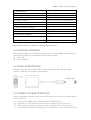
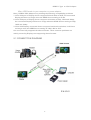
USER MANUAL Table of Contents 1.0 Introduction……………………………………………….....2 2.0 Specifications…………………………………………..……2 3.0 Package Contents…………………………………………...3 4.0 Panel Descriptions…………………………………….........3 5.0 Connection and Operation …………………….…....…….4 1 HDMI D Type to VGA Adapter HDMI D Type to VGA Adapter Dear customer Thank you for purchasing this product. For optimum performance and safety, please read these instructions carefully before connecting, operating or adjusting this product. Please keep this manual for future reference. 1.0 INTRODUCTION This kind of HDMI D Type to VGA converts digital HDMI signal into analog VGA video. when you watch movies or play games on traditional VGA monitors or projectors,this product not only can allow you to enjoy their high definition image ,but also can let you enjoy the high quality of sound. Besides, If the HDMI Sources can’t supply the enough power,you can connect your power adapter or computer to the Micro USB female for charging. 1.1 FEATURES This product has many features that enable it to perform in a superior manner. Among those features you will find: Easy to Use: Install in seconds, no need of setting. Conversion: It can convert complete HDMI into VGA video. Supports HDCP 1.2. Supports 165MHz/1.65Gbps per channel (6.75Gbps all channel) bandwidth for HDMI Input. Supports Analogue Video output up to UXGA and 1080p with 10-bit DAC. 2.0 SPECIFICATIONS Signal Inputs/Output Input Video Signal Input DDC Signal Input connection Output connection HDMI video input format VGA video output format Operating Frequency Vertical Frequency Range Input Video Amplifier Bandwidth Mechanical Shell Size(L-W-H) Weight(Net) Warranty Limited Warranty 0.5-1.0 volts p-p 5 volts p-p (TTL) HDMI D female VGA, 480p/576p/720p/1080p 480p/576p/720p/1080p 50/60Hz 1.65Gpbs/165MHz 45X43X14.5MM 27g 1 Year Parts and Labor 2 HDMI D Type to VGA Adapter Environmental Operating Temperature Operating Humidity Storage Temperature Storage Humidity Power Requirement External Power Supply Power consumption (Max) Regulatory Approvals Converter Unit Accessories Adapter AC Power Adapter 0 ℃ to +70℃ 10% to 85 % RH (no condensation) -10℃ to +80℃ 5% to 95 % RH (no condensation) NO 2W FCC,CE, US standard, UK standard and so on English Version User Manual Note: Specifications are subject to change without notice. 3.0 PACKAGE CONTENTS Before attempting to use this unit, please check the packaging and make sure the following items are contained in the shipping carton: Main unit. User's Manual 4.0 PANEL DESCRIPTIONS Please study the panel drawn below and become familiar with the signal input(s), output(s) and power requirements. 5.0 CONNECTION AND OPERATION Before installation, please make sure all the devices you wish to connect have been turned off. 1) Connect the HDMI input of this product to HDMI source. 2) Connect the VGA output of this product to display with VGA input. 3) Connect the Headset and stereo video amplifiter to the Headset jack. 4) If the HDMI sources can’t supply the enough power ,you can connect the 3 HDMI D Type to VGA Adapter Micro USB female to your computer or power adapter. Note:HDMI to VGA Adapter may existing the following compatibility problems 1. If the VGA port of Display doesn’t support Refresh Rate at 50HZ, the connected Display will have no image when the HDMI Source setting at 50 Hz. 2. If the VGA port of Display doesn’t support resolution at 720p, 1080i and 1080p, the connected Display will have no image when the HDMI Source setting at 720p, 1080i and 1080p. 3. If the VGA Display connected doesn’t support interlaced resolution, it will have no image when the HDMI Source setting at 1080i, 480i or 567i. Our converter fully supports the above formats. These common problems are mainly caused by Displays not supporting these formats. 5.1 CONNECTION DIAGRAM P/N:C013 4