1
remove an inserted item
If you want to attach more items, select
[New Attach].
To remove an item from the message you are
creating, highlight it and press K under Delete.
3 When finished, press K under Done.
attach a picture, video, or audio
recording
Note: You can only attach audio files and
pictures if they are not forward locked and if
their DRM settings do not prevent you from
sending.
You can attach one or more pictures, audio or
voice recordings from your phone into the
body of the message. You can include text in
the body of your message in addition to these
items.
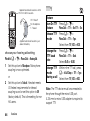
1 While you are filling in the Attach field,
press [New Attach] > and select from Browse
Pictures, Capture Picture, Browse Audio, Record Voice,
Browse Video, or Record Video.
A list of available pictures, audio files, or
voice recordings appears.
2 Select the picture, audio or voice record
you want to attach.
Forward locked items are usually copyright
protected, and you cannot share them with
anyone, such as in Private calls or by
uploading them from your phone.
take a new picture
1 While you are creating a message, scroll
to any message field and press / or
select Attach > [New Attach].
2 Select Capture Picture. This accesses the
camera.
essentials
21