1
OPERATING YOUR RADIO
POWER ON/OFF AND VOLUME
Rotate the POWER/VOLUME knob clockwise to turn the radio on and
increase the volume level. Rotate the control counter-clockwise to
reduce the volume level and to turn the radio off. During Power On,
the radio will beep 2 times with different tones, the LCD will display all
icons for 1 second and the LCD display will indicate the last channel
selected.
TRANSMITTING AND RECEIVING A CALL
To communicate, all radios in your group must be set to the same
channel.
1.For maximum clarity, hold the radio 2 to 3 inches from your mouth.
2.Press and hold the PTT button and speak in a normal voice into
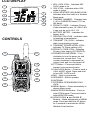
the microphone. The TX icon will appear continuously on the LCD
display while transmitting.
3.To receive a call, release the PTT button. The RX icon will appear
on the display when your radio is receiving a transmission.
ABOUT RANGE
Your LXT Series radios are designed to give you maximum range
under optimum conditions.
l Over water
l Open rural areas without obstructions
l Flat areas where you can see the other person
To ensure you get maximum range:
l Be sure to use fresh or fully charged batteries - low batteries will
cause low power conditions.
l Be sure you are on a GMRS channel - FRS channels are
restricted by the FCC to low power.
l Be sure to set your radio to use Hi power.